session-peer 0.6.1 → 0.7.0
This diff represents the content of publicly available package versions that have been released to one of the supported registries. The information contained in this diff is provided for informational purposes only and reflects changes between package versions as they appear in their respective public registries.
- package/PARITY.md +1 -1
- package/README.ja.md +40 -33
- package/README.ko.md +16 -22
- package/README.md +10 -16
- package/README.zh-CN.md +38 -30
- package/RELEASING.md +51 -0
- package/VALIDATION.md +8 -0
- package/dist/cli.d.ts +1 -17
- package/dist/cli.js +38 -211
- package/dist/execution.d.ts +60 -0
- package/dist/execution.js +215 -0
- package/dist/process.d.ts +2 -0
- package/dist/process.js +21 -3
- package/dist/protocol.d.ts +2 -2
- package/dist/protocol.js +1 -1
- package/dist/skill-metadata.js +5 -3
- package/docs/api.md +18 -15
- package/docs/design/execution-and-mcp.md +84 -0
- package/docs/design/typescript-skill-compatibility.md +15 -0
- package/docs/guide.ja.md +55 -53
- package/docs/guide.ko.md +52 -48
- package/docs/guide.md +81 -77
- package/docs/guide.zh-CN.md +54 -51
- package/docs/shorthand.md +9 -10
- package/package.json +2 -1
package/PARITY.md
CHANGED
|
@@ -90,7 +90,7 @@ the installation pin; runtime publication is not companion-skill publication.
|
|
|
90
90
|
<a id="current-scoped-feature-matrix"></a>
|
|
91
91
|
## Current scoped feature matrix
|
|
92
92
|
|
|
93
|
-
Current source/package version: **0.
|
|
93
|
+
Current source/package version: **0.7.0**.
|
|
94
94
|
|
|
95
95
|
Reviewed **2026-10-29 KST** against TS **0.5.1** source
|
|
96
96
|
[`90481b148584926ea328ed956327f3050d9be9cb`](https://github.com/abruption/session-peer-ts/tree/90481b148584926ea328ed956327f3050d9be9cb)
|
package/README.ja.md
CHANGED
|
@@ -12,28 +12,26 @@
|
|
|
12
12
|
|
|
13
13
|
[English](README.md) | [한국어](README.ko.md) | [日本語](README.ja.md) | [简体中文](README.zh-CN.md)
|
|
14
14
|
|
|
15
|
-
<!-- docs-contract: stable-release-source; package=session-peer; bin=session-peer; node=22.13+/24; python-reference=1.1.0 -->
|
|
16
|
-
|
|
17
|
-
**文書・ソースのバージョン: 0.6.1。** インストール前に、選択したリリースとレジストリのメタデータを確認してください。日付付きの準備・検証記録は [VALIDATION.md](VALIDATION.md)、リリース手順は [RELEASING.md](RELEASING.md) にあります。SSH の両端には同じ TypeScript クライアントのバージョンが必要で、0.3.6 と 0.6.1 は互いの SSH 事前確認を拒否します。
|
|
18
|
-
|
|
19
|
-
**0.4.0 handoff の範囲:** 任意の native 観測は macOS arm64 の厳密な Codex 0.160.1/0.162.1 に限定し、明示的な `operator_confirmed` 受領確認には対応する POSIX ledger を使います。Linux・Windows の native 観測と自動 ACK 収集は未対応です。 0.6.1 のソースは選択できない Linux arm64 の Codex 0.162.1 候補(固定された上流 `aarch64-unknown-linux-musl` 実行ファイル、スキーマ、注入テスト 1 回)を記録しますが、Linux 観測を有効化しません。Linux の native 観測は引き続き未対応です。
|
|
20
|
-
|
|
21
15
|
**実行中の Claude Code・Codex セッションを見つけ、ローカルまたは SSH でメッセージを送信します。**
|
|
22
16
|
Python 不要の Node.js クライアントです。パッケージ名とコマンド名は `session-peer` です。
|
|
23
17
|
|
|
24
18
|
</div>
|
|
25
19
|
|
|
26
|
-
|
|
20
|
+
<!-- docs-contract: stable-release-source; package=session-peer; bin=session-peer; node=22.13+/24; python-reference=1.1.0 -->
|
|
21
|
+
|
|
22
|
+
**ドキュメントとソースのバージョン: 0.7.0。**
|
|
27
23
|
|
|
28
|
-
|
|
24
|
+
Windows では Codex への送信と dry-run はキューに登録する前に停止します。クラウドのストレージポリシーを確認できない環境でも、通常の Codex 送信は停止します。[Codex のストレージ検証規則](docs/api.md#codex-storage-configuration)と[配信観測の範囲](docs/api.md#local-delivery-observation--72)を参照してください。
|
|
29
25
|
|
|
30
|
-
|
|
26
|
+
<a id="demo"></a>
|
|
27
|
+
|
|
28
|
+
## デモ
|
|
31
29
|
|
|
32
30
|
|
|
33
31
|
|
|
34
|
-
npm 0.2.1 でローカルの要求と明示的な `ACK DEMO-READY`
|
|
32
|
+
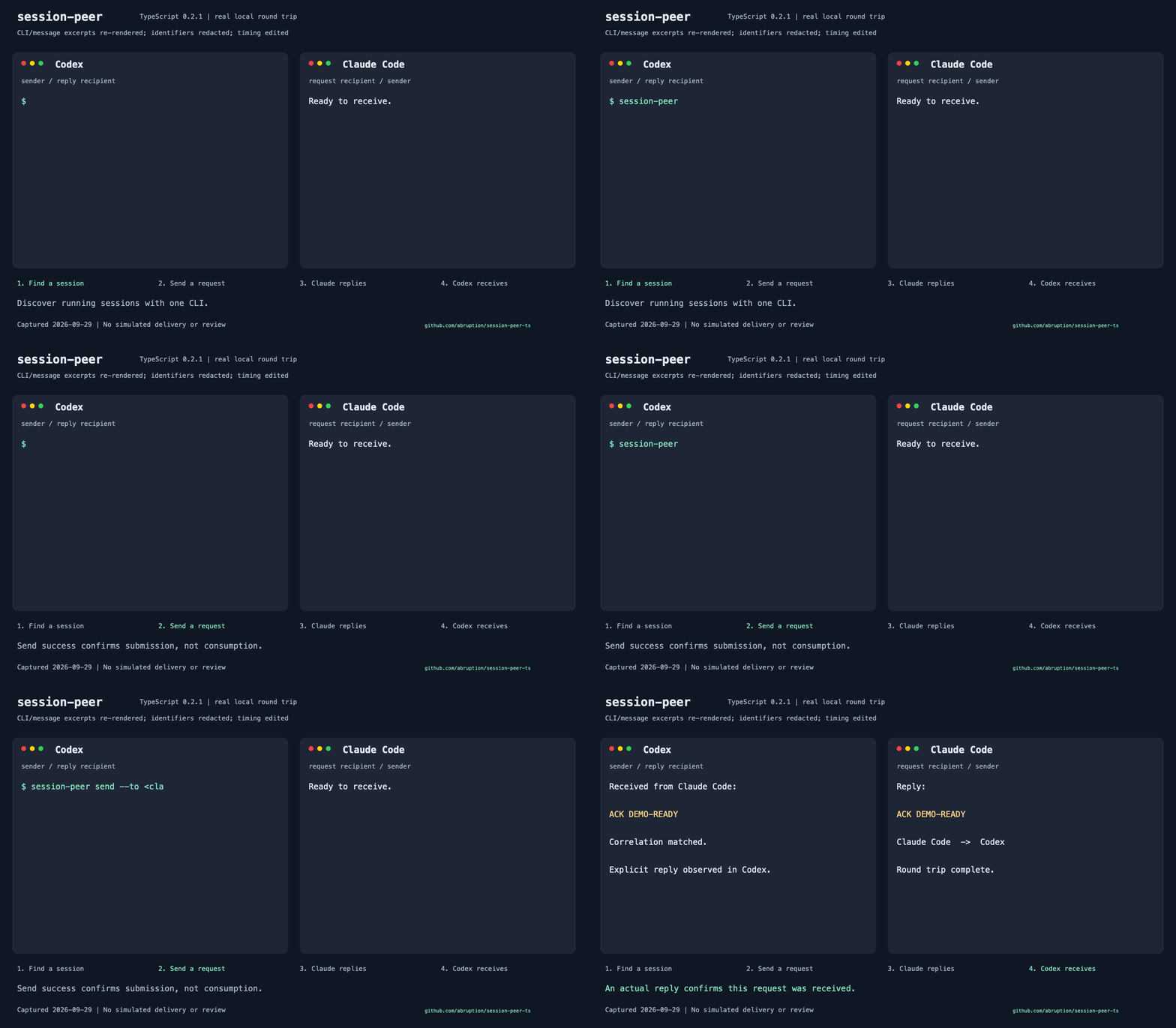
npm 0.2.1 でローカルの要求と明示的な `ACK DEMO-READY` の返信を確認しました。識別情報を隠し、表示タイミングを調整して、CLI の出力とメッセージの抜粋を再現したものです。画面録画ではありません。提出だけでは ACK を意味しません。
|
|
35
33
|
|
|
36
|
-
|
|
34
|
+
インストール後、一覧で送信先のセッションを選び、`CLAUDE_PID` をその PID に置き換えてください。
|
|
37
35
|
|
|
38
36
|
```sh
|
|
39
37
|
session-peer list --agent claude --json
|
|
@@ -41,54 +39,59 @@ session-peer send --to CLAUDE_PID --message 'API の契約を確認して返信
|
|
|
41
39
|
```
|
|
42
40
|
|
|
43
41
|
`--dry-run` は送信せずに検証します。実際に送るときは同じコマンドから
|
|
44
|
-
`--dry-run`
|
|
45
|
-
**`posted` / `queued`
|
|
42
|
+
`--dry-run` を外して一度実行してください。受領確認が必要な場合は、メッセージで返信を依頼してください。
|
|
43
|
+
**`posted` / `queued` は、受信箱への書き込みまたはキューへの登録を示します。受信側での処理や ACK は別途確認してください。** `unknown`
|
|
46
44
|
(`submitted:null`)、返信がないこと、対象の終了を理由に自動再送しないでください。
|
|
47
45
|
`consumptionConfirmed` は常に false です。返信は受信側 TUI で確認します。
|
|
48
46
|
|
|
49
|
-
|
|
47
|
+
<a id="quick-start"></a>
|
|
48
|
+
|
|
49
|
+
## クイックスタート
|
|
50
50
|
|
|
51
|
-
macOS/Linux/Windows、**Node 22.x の 22.13 以降または 24.x
|
|
52
|
-
|
|
51
|
+
macOS/Linux/Windows、**Node 22.x の 22.13 以降または 24.x**、環境に合った
|
|
52
|
+
ビルド済みのネイティブ依存パッケージ(x64/arm64)が必要です。Claude は実行中 TUI の inbox、
|
|
53
53
|
Codex は CLI と検証可能な writer が必要です(macOS/Linux は `lsof`・`ps` も必要)。
|
|
54
54
|
SSH は既存の鍵・ホスト信頼設定と両端の**同じバージョンの TypeScript クライアント**を
|
|
55
|
-
|
|
55
|
+
必要とします。OS ごとの要件と、非アクティブな Codex セッションのキューに登録する条件はガイドを参照してください。
|
|
56
56
|
|
|
57
|
-
|
|
57
|
+
<a id="install"></a>
|
|
58
|
+
|
|
59
|
+
### インストール
|
|
58
60
|
|
|
59
61
|
[Python CLI](https://github.com/abruption/session-peer)も同じコマンド名を使います。
|
|
60
62
|
インストール前に macOS/Linux では `type -a session-peer`、PowerShell では
|
|
61
63
|
`Get-Command session-peer -All` で PATH を確認してください。利用する実装を選び、
|
|
62
64
|
別の管理ツールのファイルを `--force` で上書きしないでください。
|
|
63
65
|
|
|
64
|
-
**0.
|
|
66
|
+
**0.7.0 のインストール:** npm の導入・更新例を実行する前に、レジストリで公開状況と選択したリリースを確認してください。利用できない場合は[レビュー済みソースビルド](docs/guide.ja.md#ソースからビルド)を使います。
|
|
65
67
|
|
|
66
68
|
```sh
|
|
67
|
-
npm view session-peer@0.
|
|
68
|
-
npm install --global --ignore-scripts session-peer@0.
|
|
69
|
+
npm view session-peer@0.7.0 version dist.integrity
|
|
70
|
+
npm install --global --ignore-scripts session-peer@0.7.0
|
|
69
71
|
session-peer --version
|
|
70
72
|
```
|
|
71
73
|
|
|
72
|
-
期待する出力: `session-peer 0.
|
|
74
|
+
期待する出力: `session-peer 0.7.0 (typescript)`。分離インストール・ソースビルド・
|
|
73
75
|
Windows・削除の手順は以下の詳細ガイドを参照してください。
|
|
74
76
|
|
|
75
77
|
任意の `sp` 短縮名は 0.3.0 以降に含まれ(0.2.1 以前にはありません)、自動では有効になりません。
|
|
76
78
|
[明示的な有効化・衝突・解除(英語)](docs/shorthand.md)を参照してください。
|
|
77
79
|
|
|
78
|
-
|
|
80
|
+
<a id="update"></a>
|
|
81
|
+
|
|
82
|
+
### 更新
|
|
79
83
|
|
|
80
84
|
npm で導入したクライアントは npm で更新します。タグと対象バージョンを確認してから
|
|
81
|
-
|
|
85
|
+
更新先のバージョンを指定してください。以下は、npm でインストールした旧版を 0.7.0 に更新する例です。
|
|
82
86
|
CLI は更新をインストールせず、`session-peer update --check` は確認のみ行います。
|
|
83
87
|
|
|
84
88
|
```sh
|
|
85
89
|
npm view session-peer dist-tags
|
|
86
|
-
npm install --global --ignore-scripts session-peer@0.
|
|
90
|
+
npm install --global --ignore-scripts session-peer@0.7.0
|
|
87
91
|
session-peer --version
|
|
88
92
|
```
|
|
89
93
|
|
|
90
|
-
|
|
91
|
-
ガイドの固定コミットに基づくスキル導入手順を確認してください。
|
|
94
|
+
連携スキルは、ガイドに記載されたコミットを使って別途インストール・更新してください。
|
|
92
95
|
|
|
93
96
|
<!-- Preserve links to the former detailed sections; their contents are in the guide. -->
|
|
94
97
|
<a id="機能と範囲"></a>
|
|
@@ -108,24 +111,28 @@ session-peer --version
|
|
|
108
111
|
<a id="020-の読み取り専用診断"></a>
|
|
109
112
|
<a id="エージェントスキルの明示的な導入"></a>
|
|
110
113
|
|
|
111
|
-
|
|
114
|
+
<a id="docs"></a>
|
|
112
115
|
|
|
113
|
-
|
|
116
|
+
## ドキュメント
|
|
117
|
+
|
|
118
|
+
- [ユーザーガイド](docs/guide.ja.md) — CLI オプション、セッションの検索、Codex のホームディレクトリ、SSH、返信、インストール、スキル設定。
|
|
114
119
|
- [API リファレンス(英語)](docs/api.md).
|
|
115
120
|
- [互換性・移行・機能計画](PARITY.md).
|
|
116
121
|
- [リリース証拠・プラットフォーム検証](VALIDATION.md).
|
|
117
122
|
- [開発・貢献](CONTRIBUTING.md).
|
|
118
123
|
- [リリース手順](RELEASING.md).
|
|
119
|
-
|
|
120
124
|
- [0.4.0 handoff 設計と実装の範囲](PARITY.md#handoff-v1-design-candidate--69).
|
|
121
|
-
|
|
122
125
|
- [private handoff CLI と制限](docs/api.md#unreleased-opt-in-handoff-cli--040-work).
|
|
123
126
|
|
|
124
|
-
|
|
127
|
+
<a id="license"></a>
|
|
128
|
+
|
|
129
|
+
## ライセンス
|
|
125
130
|
|
|
126
131
|
[MIT ライセンス](LICENSE)で公開しています。
|
|
127
132
|
|
|
128
|
-
|
|
133
|
+
<a id="support-and-security"></a>
|
|
134
|
+
|
|
135
|
+
## サポートとセキュリティ
|
|
129
136
|
|
|
130
137
|
利用上の質問と再現可能な不具合は[イシュー](https://github.com/abruption/session-peer-ts/issues)へ。
|
|
131
138
|
脆弱性は[非公開報告](https://github.com/abruption/session-peer-ts/security/advisories/new)または
|
package/README.ko.md
CHANGED
|
@@ -12,29 +12,25 @@
|
|
|
12
12
|
|
|
13
13
|
[English](README.md) | [한국어](README.ko.md) | [日本語](README.ja.md) | [简体中文](README.zh-CN.md)
|
|
14
14
|
|
|
15
|
-
**실행 중인 Claude Code와 Codex 세션을 찾아
|
|
15
|
+
**실행 중인 Claude Code와 Codex 세션을 찾아 메시지를 보냅니다. 로컬과 SSH를 지원합니다.**
|
|
16
16
|
Python을 설치하지 않아도 Node.js에서 실행되는 TypeScript 클라이언트입니다. 패키지명과 CLI 명령은 모두 `session-peer`입니다.
|
|
17
17
|
|
|
18
18
|
</div>
|
|
19
19
|
|
|
20
|
-
일반 Codex 전송은 로그인 home 등 클라우드 정책 적용 여부를 분류할 수 없는 경우에도 거부합니다. 경로를 선택하기 전에 [저장소 검증 범위](docs/api.md#codex-storage-configuration)를 확인하세요.
|
|
21
|
-
|
|
22
|
-
이 소스는 Codex의 추가 설정 계층을 검사합니다. Windows Codex 전송과 dry-run은 로컬 저장소 검사 방식이 검증될 때까지 큐 제출 전에 거부하며, 일반 Claude 경로는 별도입니다. 설치 전에 [검증 범위](docs/api.md#codex-storage-configuration)와 선택한 릴리스를 확인하세요.
|
|
23
|
-
|
|
24
20
|
<!-- docs-contract: stable-release-source; package=session-peer; bin=session-peer; node=22.13+/24; python-reference=1.1.0 -->
|
|
25
21
|
|
|
26
|
-
|
|
22
|
+
**문서와 소스의 기준은 0.7.0 버전입니다.**
|
|
27
23
|
|
|
28
|
-
|
|
24
|
+
Windows에서 Codex 전송과 dry-run은 큐에 넣기 전에 중단됩니다. 클라우드 저장 정책을 확인할 수 없는 환경에서도 일반 Codex 전송이 중단됩니다. [Codex 저장소 검사 규칙](docs/api.md#codex-storage-configuration)과 [전달 관측 범위](docs/api.md#local-delivery-observation--72)를 참고하세요.
|
|
29
25
|
|
|
30
26
|
<a id="demo"></a>
|
|
31
27
|
## 시연
|
|
32
28
|
|
|
33
29
|

|
|
34
30
|
|
|
35
|
-
npm 0.2.1을 사용해 실제 로컬 요청을 보내고 명시적인 `ACK DEMO-READY` 회신을 받았습니다.
|
|
31
|
+
npm 0.2.1을 사용해 실제 로컬 요청을 보내고 명시적인 `ACK DEMO-READY` 회신을 받았습니다. CLI 출력과 메시지 일부를 다시 구성했습니다. 식별 정보는 가리고 표시 시점은 조정했습니다. 화면 녹화는 아닙니다. 메시지를 제출한 것만으로는 ACK(수신 확인 응답)가 아닙니다.
|
|
36
32
|
|
|
37
|
-
|
|
33
|
+
설치 후 세션 목록을 열고, `CLAUDE_PID`를 보낼 세션의 PID(프로세스 ID)로 바꾸세요.
|
|
38
34
|
|
|
39
35
|
```sh
|
|
40
36
|
session-peer list --agent claude --json
|
|
@@ -44,7 +40,7 @@ session-peer send --to CLAUDE_PID --message 'Please review the API contract and
|
|
|
44
40
|
`--dry-run`은 메시지를 보내지 않고 요청만 검증합니다. 실제로 전달할 때는 같은
|
|
45
41
|
명령에서 `--dry-run`을 빼고 한 번 실행하세요. 수신 확인이 필요하면 메시지에
|
|
46
42
|
명시적인 회신을 요청하세요. **`posted` / `queued`는 제출 또는 큐 수락을 뜻할
|
|
47
|
-
뿐, 수신
|
|
43
|
+
뿐, 수신 측이 메시지를 읽거나 처리했는지, ACK를 보냈는지는 알 수 없습니다.** `unknown`
|
|
48
44
|
(`submitted:null`)은 제출 여부가 불확실하므로 자동 재시도하지 마세요. 회신이
|
|
49
45
|
없거나 대상 세션이 종료된 경우에도 자동 재시도하지 마세요. `consumptionConfirmed`는
|
|
50
46
|
항상 `false`이며, 실제 회신은 수신 측 TUI(터미널 사용자 인터페이스)에서 직접 확인하세요.
|
|
@@ -53,9 +49,9 @@ session-peer send --to CLAUDE_PID --message 'Please review the API contract and
|
|
|
53
49
|
## 빠른 시작
|
|
54
50
|
|
|
55
51
|
macOS, Linux, Windows와 **Node 22.x의 22.13 이상 또는 24.x**가 필요합니다.
|
|
56
|
-
운영체제와 아키텍처(x64/arm64)에 맞는
|
|
57
|
-
Claude Code에는 실행 중인 TUI의 받은 메시지함이, Codex에는 CLI
|
|
58
|
-
|
|
52
|
+
운영체제와 아키텍처(x64/arm64)에 맞는 미리 빌드된 네이티브 모듈도 필요합니다.
|
|
53
|
+
Claude Code에는 실행 중인 TUI의 받은 메시지함이, Codex에는 CLI가 필요하며, 메시지를 기록하는 writer 프로세스의 소유권을 확인할 수 있어야 합니다.
|
|
54
|
+
macOS와 Linux에서는 `lsof`와 `ps`도 필요합니다.
|
|
59
55
|
SSH를 사용하려면 기존 키와 호스트 신뢰 설정이 있어야 하며, 양쪽에서 **같은 버전의
|
|
60
56
|
TypeScript 클라이언트**를 사용해야 합니다. 운영체제별 요구사항은
|
|
61
57
|
[사용자 가이드](docs/guide.ko.md#요구사항)를, 비활성 Codex 세션에 메시지를 대기열로
|
|
@@ -68,17 +64,17 @@ TypeScript 클라이언트**를 사용해야 합니다. 운영체제별 요구
|
|
|
68
64
|
`session-peer`라는 같은 명령 이름을 사용합니다. 설치 전에 macOS/Linux에서는 `type -a session-peer`,
|
|
69
65
|
PowerShell에서는 `Get-Command session-peer -All`로 PATH(명령 검색 경로)에서 어떤
|
|
70
66
|
실행 파일을 찾는지 확인하세요. 사용할 구현을 선택하고 다른 패키지 관리자가 설치한
|
|
71
|
-
파일을 `--force`로 덮어쓰지 마세요. 설치와
|
|
67
|
+
파일을 `--force`로 덮어쓰지 마세요. 설치와 업데이트는 npm에서 직접 실행하세요.
|
|
72
68
|
|
|
73
|
-
**0.
|
|
69
|
+
**0.7.0 설치:** npm 설치·업데이트 예시를 실행하기 전에 레지스트리 제공 여부와 선택한 릴리스를 확인하세요. 해당 버전이 제공되지 않으면 [검토한 소스 빌드](docs/guide.ko.md#소스에서-빌드)를 사용하세요.
|
|
74
70
|
|
|
75
71
|
```sh
|
|
76
|
-
npm view session-peer@0.
|
|
77
|
-
npm install --global --ignore-scripts session-peer@0.
|
|
72
|
+
npm view session-peer@0.7.0 version dist.integrity
|
|
73
|
+
npm install --global --ignore-scripts session-peer@0.7.0
|
|
78
74
|
session-peer --version
|
|
79
75
|
```
|
|
80
76
|
|
|
81
|
-
예상 결과는 `session-peer 0.
|
|
77
|
+
예상 결과는 `session-peer 0.7.0 (typescript)`입니다. 별도 경로에 설치하거나,
|
|
82
78
|
소스에서 빌드하거나, Windows에서 설치·제거하는 방법은 [사용자 가이드](docs/guide.ko.md#설치)를 참고하세요.
|
|
83
79
|
|
|
84
80
|
선택 사항인 `sp` 단축 명령은 0.3.0 이상에 포함되며(0.2.1 이하에는 없음) 자동으로
|
|
@@ -89,13 +85,13 @@ session-peer --version
|
|
|
89
85
|
### 업데이트
|
|
90
86
|
|
|
91
87
|
npm으로 설치한 클라이언트는 사용자가 직접 npm으로 업데이트합니다. 사용 가능한 배포 태그
|
|
92
|
-
(dist-tag)와 대상 버전을 확인한 뒤 해당 버전을 지정해 설치하세요. 아래 예시는 이전 npm 설치본을 선택한 0.
|
|
88
|
+
(dist-tag)와 대상 버전을 확인한 뒤 해당 버전을 지정해 설치하세요. 아래 예시는 이전 npm 설치본을 선택한 0.7.0 버전으로
|
|
93
89
|
업데이트합니다. `session-peer` CLI는 업데이트를 설치하지 않습니다. `session-peer
|
|
94
90
|
update --check`는 새 버전이 있는지 확인할 뿐입니다.
|
|
95
91
|
|
|
96
92
|
```sh
|
|
97
93
|
npm view session-peer dist-tags
|
|
98
|
-
npm install --global --ignore-scripts session-peer@0.
|
|
94
|
+
npm install --global --ignore-scripts session-peer@0.7.0
|
|
99
95
|
session-peer --version
|
|
100
96
|
```
|
|
101
97
|
|
|
@@ -130,9 +126,7 @@ session-peer --version
|
|
|
130
126
|
- [릴리스 검증 기록·플랫폼 검증](VALIDATION.md).
|
|
131
127
|
- [개발·기여 안내](CONTRIBUTING.md).
|
|
132
128
|
- [릴리스 절차](RELEASING.md).
|
|
133
|
-
|
|
134
129
|
- [0.4.0 handoff 설계와 구현 범위](PARITY.md#handoff-v1-design-candidate--69).
|
|
135
|
-
|
|
136
130
|
- [private handoff CLI와 지원 한계](docs/api.md#unreleased-opt-in-handoff-cli--040-work).
|
|
137
131
|
|
|
138
132
|
<a id="license"></a>
|
package/README.md
CHANGED
|
@@ -12,20 +12,16 @@
|
|
|
12
12
|
|
|
13
13
|
[English](README.md) | [한국어](README.ko.md) | [日本語](README.ja.md) | [简体中文](README.zh-CN.md)
|
|
14
14
|
|
|
15
|
-
<!-- docs-contract: stable-release-source; package=session-peer; bin=session-peer; node=22.13+/24; python-reference=1.1.0 -->
|
|
16
|
-
|
|
17
|
-
**Documentation and source version: 0.6.1.** Review the selected release and registry metadata before installation. Dated preparation and validation records are in [VALIDATION.md](VALIDATION.md); release procedures are in [RELEASING.md](RELEASING.md). SSH endpoints require the same TypeScript client version; 0.3.6 and 0.6.1 refuse each other’s SSH preflight.
|
|
18
|
-
|
|
19
|
-
**0.4.0 handoff scope:** opt-in native observation is limited to exact Codex 0.160.1/0.162.1 on macOS arm64; explicit `operator_confirmed` receipts use supported POSIX ledgers. Linux/Windows native observation and automatic ACK collection remain unsupported. The 0.6.1 source records a non-selectable Linux arm64 Codex 0.162.1 candidate (pinned upstream `aarch64-unknown-linux-musl` executable, schema and one injection test); it does not enable Linux observation. Linux native observation remains unsupported.
|
|
20
|
-
|
|
21
15
|
**Find and message running Claude Code and Codex sessions, locally or over SSH.**
|
|
22
16
|
A Node.js client that runs without Python. Package and command: `session-peer`.
|
|
23
17
|
|
|
24
18
|
</div>
|
|
25
19
|
|
|
26
|
-
|
|
20
|
+
<!-- docs-contract: stable-release-source; package=session-peer; bin=session-peer; node=22.13+/24; python-reference=1.1.0 -->
|
|
21
|
+
|
|
22
|
+
**Documentation and source version: 0.7.0.**
|
|
27
23
|
|
|
28
|
-
|
|
24
|
+
Windows Codex send and dry-run stop before queueing. Ordinary Codex sends also stop when cloud storage policy cannot be verified. See the [Codex storage rules](docs/api.md#codex-storage-configuration) and [delivery observation limits](docs/api.md#local-delivery-observation--72).
|
|
29
25
|
|
|
30
26
|
## Demo
|
|
31
27
|
|
|
@@ -61,15 +57,15 @@ Check `type -a session-peer` on macOS/Linux or `Get-Command session-peer -All`
|
|
|
61
57
|
in PowerShell before installing. Choose the intended PATH entry; do not use
|
|
62
58
|
`--force` to overwrite another manager’s files.
|
|
63
59
|
|
|
64
|
-
**Version 0.
|
|
60
|
+
**Version 0.7.0 installation:** check registry availability and review the chosen release before running the npm install/update examples. If that version is unavailable, use the [reviewed source build](docs/guide.md#build-from-source).
|
|
65
61
|
|
|
66
62
|
```sh
|
|
67
|
-
npm view session-peer@0.
|
|
68
|
-
npm install --global --ignore-scripts session-peer@0.
|
|
63
|
+
npm view session-peer@0.7.0 version dist.integrity
|
|
64
|
+
npm install --global --ignore-scripts session-peer@0.7.0
|
|
69
65
|
session-peer --version
|
|
70
66
|
```
|
|
71
67
|
|
|
72
|
-
Expected: `session-peer 0.
|
|
68
|
+
Expected: `session-peer 0.7.0 (typescript)`. For isolated installation, source
|
|
73
69
|
builds, Windows and removal, see the detailed guide below.
|
|
74
70
|
|
|
75
71
|
Optional `sp` shorthand ships with 0.3.0 and later (not 0.2.1 or earlier) and is
|
|
@@ -79,12 +75,12 @@ never enabled automatically. See [explicit activation and collisions](docs/short
|
|
|
79
75
|
|
|
80
76
|
Use npm for an npm-managed installation. Check the available tags and review
|
|
81
77
|
the target version, then install that exact version; this example updates an
|
|
82
|
-
older npm installation to the selected 0.
|
|
78
|
+
older npm installation to the selected 0.7.0 release. The CLI does not install updates;
|
|
83
79
|
`session-peer update --check` only reports them.
|
|
84
80
|
|
|
85
81
|
```sh
|
|
86
82
|
npm view session-peer dist-tags
|
|
87
|
-
npm install --global --ignore-scripts session-peer@0.
|
|
83
|
+
npm install --global --ignore-scripts session-peer@0.7.0
|
|
88
84
|
session-peer --version
|
|
89
85
|
```
|
|
90
86
|
|
|
@@ -116,9 +112,7 @@ does not install a skill. Review its pinned-source instructions in the guide.
|
|
|
116
112
|
- [Release evidence and platform validation](VALIDATION.md).
|
|
117
113
|
- [Development and contributions](CONTRIBUTING.md).
|
|
118
114
|
- [Release process](RELEASING.md).
|
|
119
|
-
|
|
120
115
|
- [0.4.0 handoff design and implementation scope](PARITY.md#handoff-v1-design-candidate--69).
|
|
121
|
-
|
|
122
116
|
- [Private handoff CLI and limitations](docs/api.md#unreleased-opt-in-handoff-cli--040-work).
|
|
123
117
|
|
|
124
118
|
## License
|
package/README.zh-CN.md
CHANGED
|
@@ -12,28 +12,26 @@
|
|
|
12
12
|
|
|
13
13
|
[English](README.md) | [한국어](README.ko.md) | [日本語](README.ja.md) | [简体中文](README.zh-CN.md)
|
|
14
14
|
|
|
15
|
-
|
|
16
|
-
|
|
17
|
-
**文档和源码版本:0.6.1。** 安装前,请审核所选发布版本和注册表元数据。按日期记录的准备与验证结果见 [VALIDATION.md](VALIDATION.md),发布流程见 [RELEASING.md](RELEASING.md)。SSH 两端必须使用相同的 TypeScript 客户端版本;0.3.6 与 0.6.1 会拒绝彼此的 SSH 预检。
|
|
18
|
-
|
|
19
|
-
**0.4.0 handoff 范围:** 可选 native 观测仅限 macOS arm64 上精确 Codex 0.160.1/0.162.1 版本;明确的 `operator_confirmed` 收件确认使用受支持的 POSIX ledger。Linux、Windows 的 native 观测和自动 ACK 收集仍不支持。 0.6.1 源码记录了不可选用的 Linux arm64 Codex 0.162.1 候选(固定的上游 `aarch64-unknown-linux-musl` 可执行文件、schema 及一次注入测试),但不启用 Linux 观测;Linux native 观测仍不支持。
|
|
20
|
-
|
|
21
|
-
**发现正在运行的 Claude Code 和 Codex 会话,并在本机或通过 SSH 发送消息。**
|
|
15
|
+
**查找正在运行的 Claude Code 和 Codex 会话,在本机或通过 SSH 发送消息。**
|
|
22
16
|
这是不需要 Python 的 Node.js 客户端。包名与命令名均为 `session-peer`。
|
|
23
17
|
|
|
24
18
|
</div>
|
|
25
19
|
|
|
26
|
-
|
|
20
|
+
<!-- docs-contract: stable-release-source; package=session-peer; bin=session-peer; node=22.13+/24; python-reference=1.1.0 -->
|
|
21
|
+
|
|
22
|
+
**文档和源码版本:0.7.0。**
|
|
23
|
+
|
|
24
|
+
Windows 上的 Codex 发送和 dry-run 会在消息入队前停止。无法确认云端存储策略时,普通 Codex 发送也会停止。请参阅 [Codex 存储检查规则](docs/api.md#codex-storage-configuration)和[投递观测范围](docs/api.md#local-delivery-observation--72)。
|
|
27
25
|
|
|
28
|
-
|
|
26
|
+
<a id="demo"></a>
|
|
29
27
|
|
|
30
|
-
##
|
|
28
|
+
## 演示
|
|
31
29
|
|
|
32
30
|

|
|
33
31
|
|
|
34
|
-
|
|
32
|
+
演示使用 npm 0.2.1 在本机发送请求,并收到明确的 `ACK DEMO-READY` 回复。画面根据 CLI 输出和消息摘录重现,标识符已遮盖,显示时序经过调整。这不是屏幕录像。仅提交不代表 ACK。
|
|
35
33
|
|
|
36
|
-
安装后列出会话,将 `CLAUDE_PID`
|
|
34
|
+
安装后列出会话,将 `CLAUDE_PID` 替换为目标会话的 PID:
|
|
37
35
|
|
|
38
36
|
```sh
|
|
39
37
|
session-peer list --agent claude --json
|
|
@@ -41,50 +39,56 @@ session-peer send --to CLAUDE_PID --message '请检查 API 契约并回复。' -
|
|
|
41
39
|
```
|
|
42
40
|
|
|
43
41
|
`--dry-run` 仅验证,不提交。实际发送时移除同一命令中的 `--dry-run`,执行一次。
|
|
44
|
-
需要确认时,请明确要求回复。**`posted` / `queued`
|
|
42
|
+
需要确认时,请明确要求回复。**`posted` / `queued` 表示消息已写入收件箱或进入队列。接收方是否处理消息或发回 ACK,需要另行确认。**
|
|
45
43
|
遇到 `unknown` (`submitted:null`)、没有回复或目标退出时,不要自动重试。
|
|
46
44
|
`consumptionConfirmed` 始终为 false,请在接收方 TUI 中确认实际回复。
|
|
47
45
|
|
|
48
|
-
|
|
46
|
+
<a id="quick-start"></a>
|
|
47
|
+
|
|
48
|
+
## 快速开始
|
|
49
49
|
|
|
50
50
|
需要 macOS/Linux/Windows、**Node 22.x 中的 22.13 及以上或 24.x**,以及匹配的
|
|
51
51
|
原生预编译依赖(x64/arm64)。Claude 需要运行中的 TUI inbox;Codex 需要 CLI 和
|
|
52
52
|
可验证的 writer(macOS/Linux 还需要 `lsof`、`ps`)。SSH 需要已有密钥、主机信任
|
|
53
|
-
以及两端**同版本的 TypeScript
|
|
53
|
+
以及两端**同版本的 TypeScript 客户端**。各平台的要求,以及如何明确允许向非活动 Codex 会话的队列提交消息,见用户指南。
|
|
54
|
+
|
|
55
|
+
<a id="install"></a>
|
|
54
56
|
|
|
55
|
-
###
|
|
57
|
+
### 安装
|
|
56
58
|
|
|
57
59
|
[Python CLI](https://github.com/abruption/session-peer)也使用同名命令。
|
|
58
60
|
安装前,macOS/Linux 使用 `type -a session-peer`,PowerShell 使用
|
|
59
61
|
`Get-Command session-peer -All` 检查 PATH。选择所需实现,不要用 `--force`
|
|
60
62
|
覆盖其他安装管理器的文件。
|
|
61
63
|
|
|
62
|
-
**安装 0.
|
|
64
|
+
**安装 0.7.0:** 运行 npm 安装或更新示例前,请确认注册表可用性并审核所选发布版本。如该版本不可用,请使用[已审核的源码构建](docs/guide.zh-CN.md#从源码构建)。
|
|
63
65
|
|
|
64
66
|
```sh
|
|
65
|
-
npm view session-peer@0.
|
|
66
|
-
npm install --global --ignore-scripts session-peer@0.
|
|
67
|
+
npm view session-peer@0.7.0 version dist.integrity
|
|
68
|
+
npm install --global --ignore-scripts session-peer@0.7.0
|
|
67
69
|
session-peer --version
|
|
68
70
|
```
|
|
69
71
|
|
|
70
|
-
预期输出:`session-peer 0.
|
|
72
|
+
预期输出:`session-peer 0.7.0 (typescript)`。隔离安装、源码构建、Windows 和
|
|
71
73
|
卸载步骤见下方详细指南。
|
|
72
74
|
|
|
73
75
|
可选的 `sp` 简写包含在 0.3.0 及更高版本中(0.2.1 及更早版本没有),不会自动启用。
|
|
74
76
|
请参阅[显式启用、冲突与停用(英文)](docs/shorthand.md)。
|
|
75
77
|
|
|
76
|
-
|
|
78
|
+
<a id="update"></a>
|
|
79
|
+
|
|
80
|
+
### 更新
|
|
77
81
|
|
|
78
82
|
使用 npm 更新由 npm 管理的安装。先检查标签并审阅目标版本,再安装指定版本。
|
|
79
|
-
下面示例将旧 npm 安装更新至所选的 0.
|
|
83
|
+
下面示例将旧 npm 安装更新至所选的 0.7.0。CLI 不会安装更新,`session-peer update --check` 只做检查。
|
|
80
84
|
|
|
81
85
|
```sh
|
|
82
86
|
npm view session-peer dist-tags
|
|
83
|
-
npm install --global --ignore-scripts session-peer@0.
|
|
87
|
+
npm install --global --ignore-scripts session-peer@0.7.0
|
|
84
88
|
session-peer --version
|
|
85
89
|
```
|
|
86
90
|
|
|
87
|
-
|
|
91
|
+
配套技能需单独安装和更新。请按指南中的步骤使用指定的 Git 提交。
|
|
88
92
|
|
|
89
93
|
<!-- Preserve links to the former detailed sections; their contents are in the guide. -->
|
|
90
94
|
<a id="功能与边界"></a>
|
|
@@ -104,24 +108,28 @@ session-peer --version
|
|
|
104
108
|
<a id="020-只读诊断"></a>
|
|
105
109
|
<a id="显式安装代理技能"></a>
|
|
106
110
|
|
|
107
|
-
|
|
111
|
+
<a id="docs"></a>
|
|
108
112
|
|
|
109
|
-
|
|
113
|
+
## 文档
|
|
114
|
+
|
|
115
|
+
- [用户指南](docs/guide.zh-CN.md) — CLI 选项、会话查找、Codex 主目录、SSH、回复、安装和技能设置。
|
|
110
116
|
- [API 参考(英文)](docs/api.md).
|
|
111
117
|
- [兼容性、迁移和功能计划](PARITY.md).
|
|
112
118
|
- [发布证据与平台验证](VALIDATION.md).
|
|
113
119
|
- [开发与贡献](CONTRIBUTING.md).
|
|
114
120
|
- [发布流程](RELEASING.md).
|
|
115
|
-
|
|
116
121
|
- [0.4.0 handoff 设计与实现范围](PARITY.md#handoff-v1-design-candidate--69).
|
|
122
|
+
- [私有 handoff 命令及限制](docs/api.md#unreleased-opt-in-handoff-cli--040-work).
|
|
117
123
|
|
|
118
|
-
|
|
124
|
+
<a id="license"></a>
|
|
119
125
|
|
|
120
|
-
##
|
|
126
|
+
## 许可证
|
|
121
127
|
|
|
122
128
|
采用 [MIT 许可证](LICENSE)。
|
|
123
129
|
|
|
124
|
-
|
|
130
|
+
<a id="support-and-security"></a>
|
|
131
|
+
|
|
132
|
+
## 支持与安全
|
|
125
133
|
|
|
126
134
|
使用问题和可复现的缺陷请提交到[议题](https://github.com/abruption/session-peer-ts/issues)。
|
|
127
135
|
漏洞请使用[私密报告](https://github.com/abruption/session-peer-ts/security/advisories/new)或
|
package/RELEASING.md
CHANGED
|
@@ -9,6 +9,57 @@ the historical 0.3.2 settings-read exception is recorded below. The workflow
|
|
|
9
9
|
uses OIDC and no npm token. The protected GitHub environment requires a reviewer
|
|
10
10
|
and permits deployments from `main` only.
|
|
11
11
|
|
|
12
|
+
## 0.7.0 release preparation
|
|
13
|
+
|
|
14
|
+
The 0.7.0 changes cover the execution layer, the aligned README and guide entry
|
|
15
|
+
pages, remote qualification guidance, and the separately packaged policy-scoped
|
|
16
|
+
MCP integration from #193, #194 and #195. Native agent integrations and remaining
|
|
17
|
+
platform and remote qualification are tracked separately.
|
|
18
|
+
|
|
19
|
+
Build the core with the exact-main procedure below. The stable dispatch uses
|
|
20
|
+
`version=0.7.0`, `mode=stable-stage` and
|
|
21
|
+
`confirmation=session-peer@0.7.0 stable-stage`, with the approved main SHA and
|
|
22
|
+
archive SHA-256. The expected registry baselines are `latest=0.6.2` and
|
|
23
|
+
`preview=0.1.0-preview.1`. Fresh registry, approval and provenance gates apply.
|
|
24
|
+
|
|
25
|
+
The separate `session-peer-mcp@0.7.0` archive declares an exact peer dependency
|
|
26
|
+
on `session-peer@0.7.0`. Use `npm run test:mcp` after installing both sets of
|
|
27
|
+
locked dependencies to verify both unmodified archives together in an
|
|
28
|
+
isolated prefix. The core publication workflow handles only `session-peer`.
|
|
29
|
+
Any public availability of the optional package requires its own reviewed
|
|
30
|
+
publication procedure, after the matching core is public.
|
|
31
|
+
|
|
32
|
+
## 0.6.2 release supply-chain hardening
|
|
33
|
+
|
|
34
|
+
[#190](https://github.com/abruption/session-peer-ts/issues/190) adds verification
|
|
35
|
+
of the independently reviewed npm tarball SHA-256 to the manual publication
|
|
36
|
+
workflow. Build and pack the exact merged main source with locked dependencies
|
|
37
|
+
and the publication toolchain (Ubuntu 24.04, Node 24, npm 11.15.0, and
|
|
38
|
+
`npm ci --ignore-scripts`). Compare the raw tarball digest with the exact main
|
|
39
|
+
Ubuntu Node 24 CI package manifest. If the bytes differ, record the toolchain
|
|
40
|
+
versions and resolve the difference before dispatch. Approve the source SHA,
|
|
41
|
+
tarball SHA-256, version and release mode before dispatch.
|
|
42
|
+
|
|
43
|
+
For this stable release, dispatch with `source_sha`, `archive_sha256`
|
|
44
|
+
(the approved 64 lowercase hex characters), `version=0.6.2`,
|
|
45
|
+
`mode=stable-stage` and `confirmation=session-peer@0.6.2 stable-stage`.
|
|
46
|
+
Prepare checks the rebuilt tarball against the dispatch digest before retaining
|
|
47
|
+
it. The protected npm job rechecks the downloaded tarball against the same
|
|
48
|
+
digest, as well as the manifest, source and package allowlist, before staging.
|
|
49
|
+
On a mismatch, stop and compare the artifact and toolchain to the approved
|
|
50
|
+
source and digest. Local and CI packaging without publication remains available
|
|
51
|
+
without a dispatch digest.
|
|
52
|
+
|
|
53
|
+
Verify fresh npm ownership, pending stages, stage-only publisher, package MFA,
|
|
54
|
+
and the protected environment. Verify the retained Actions archive before
|
|
55
|
+
environment approval, then the staged archive and provenance before final npm
|
|
56
|
+
approval. Verify public bytes, signatures and provenance before tagging and
|
|
57
|
+
creating the GitHub Release. In the approved source checkout, put the retained
|
|
58
|
+
Actions artifact in `release-dist/` and set `GITHUB_SHA` and
|
|
59
|
+
`RELEASE_ARCHIVE_SHA256` to the approved values for
|
|
60
|
+
`node scripts/release.mjs verify`. The previous stable baseline is 0.6.1 and preview
|
|
61
|
+
is 0.1.0-preview.1. Both SSH endpoints require exactly the same TS version.
|
|
62
|
+
|
|
12
63
|
## 0.6.1 preparation — 2026-11-09 KST
|
|
13
64
|
|
|
14
65
|
Issue [#188](https://github.com/abruption/session-peer-ts/issues/188) tracks
|
package/VALIDATION.md
CHANGED
|
@@ -1,5 +1,13 @@
|
|
|
1
1
|
# Validation record — updated 2026-11-09 KST
|
|
2
2
|
|
|
3
|
+
## 0.6.2 release verification scope
|
|
4
|
+
|
|
5
|
+
The patch requires the approved raw tarball SHA-256 in both publication jobs.
|
|
6
|
+
The release helper tests cover a matching digest, invalid dispatch inputs, and
|
|
7
|
+
a tarball and manifest that agree with one another but disagree with the
|
|
8
|
+
approved digest. Ordinary nonpublishing packaging retains its existing checks.
|
|
9
|
+
The release PR and release record track actual CI, source and archive evidence.
|
|
10
|
+
|
|
3
11
|
## 0.6.1 preparation scope — 2026-11-09 KST
|
|
4
12
|
|
|
5
13
|
The release candidate for [#188](https://github.com/abruption/session-peer-ts/issues/188)
|
package/dist/cli.d.ts
CHANGED
|
@@ -1,19 +1,3 @@
|
|
|
1
1
|
#!/usr/bin/env node
|
|
2
|
-
import { type
|
|
3
|
-
import { type SshJump, type SshOptions } from './ssh.js';
|
|
4
|
-
type Options = {
|
|
5
|
-
command: 'list' | 'send' | 'doctor' | 'update';
|
|
6
|
-
values: Map<string, string>;
|
|
7
|
-
flags: Set<string>;
|
|
8
|
-
hosts: string[];
|
|
9
|
-
ssh: SshOptions;
|
|
10
|
-
jump?: SshJump;
|
|
11
|
-
address?: {
|
|
12
|
-
uri: string;
|
|
13
|
-
transport: 'local' | 'ssh';
|
|
14
|
-
implicit: boolean;
|
|
15
|
-
};
|
|
16
|
-
};
|
|
2
|
+
import { type ParsedOptions as Options } from './execution.js';
|
|
17
3
|
export declare function parse(args: string[]): Options;
|
|
18
|
-
export declare function sshPreflightFailure(result: Done, expected: string): string | undefined;
|
|
19
|
-
export {};
|