server-studio 1.0.0 → 1.1.0
This diff represents the content of publicly available package versions that have been released to one of the supported registries. The information contained in this diff is provided for informational purposes only and reflects changes between package versions as they appear in their respective public registries.
- package/README.md +153 -14
- package/bin/cli.js +31 -0
- package/dist/server-studio.plugin +0 -0
- package/package.json +5 -3
- package/scripts/postinstall.js +39 -0
- package/src/platform.js +16 -3
- package/scripts/build-plugin.js +0 -28
- package/scripts/test.js +0 -125
package/README.md
CHANGED
|
@@ -1,20 +1,48 @@
|
|
|
1
1
|
# Server Studio
|
|
2
2
|
|
|
3
|
-
|
|
4
|
-
|
|
5
|
-
|
|
3
|
+
[](https://github.com/mehdi214designer/server-studio/actions/workflows/test.yml)
|
|
4
|
+
[](https://www.npmjs.com/package/server-studio)
|
|
5
|
+
|
|
6
|
+
A small dashboard for the local dev servers you actually run.
|
|
7
|
+
|
|
8
|
+
If you work on more than three or four projects, you know the routine. You want to show someone the
|
|
9
|
+
staging build, and first you have to remember which folder it lives in, then whether it starts with
|
|
10
|
+
`npm run dev` or `yarn start` or `php -S`, then which port it landed on last time, then why that port
|
|
11
|
+
is now busy because something else grabbed it a week ago.
|
|
12
|
+
|
|
13
|
+
Server Studio gives every project a card holding its folder, its run command and its URL. Click
|
|
14
|
+
**Run** and it opens a real terminal window in the right directory with the right command. Click the
|
|
15
|
+
URL and the browser opens. The card also shows a live dot for whether that port is currently up, so
|
|
16
|
+
you can see what is running without checking.
|
|
17
|
+
|
|
18
|
+
The other half is the port rule: each project keeps one permanent port that nothing else is allowed
|
|
19
|
+
to take. A saved card is worthless if the port drifts, so the app hands out a unique one and you bake
|
|
20
|
+
it into the project config. Six months later the card still works.
|
|
6
21
|
|
|
7
22
|
Node.js is the only requirement. No npm install inside the app, no Electron, no background daemon.
|
|
8
23
|
|
|
24
|
+
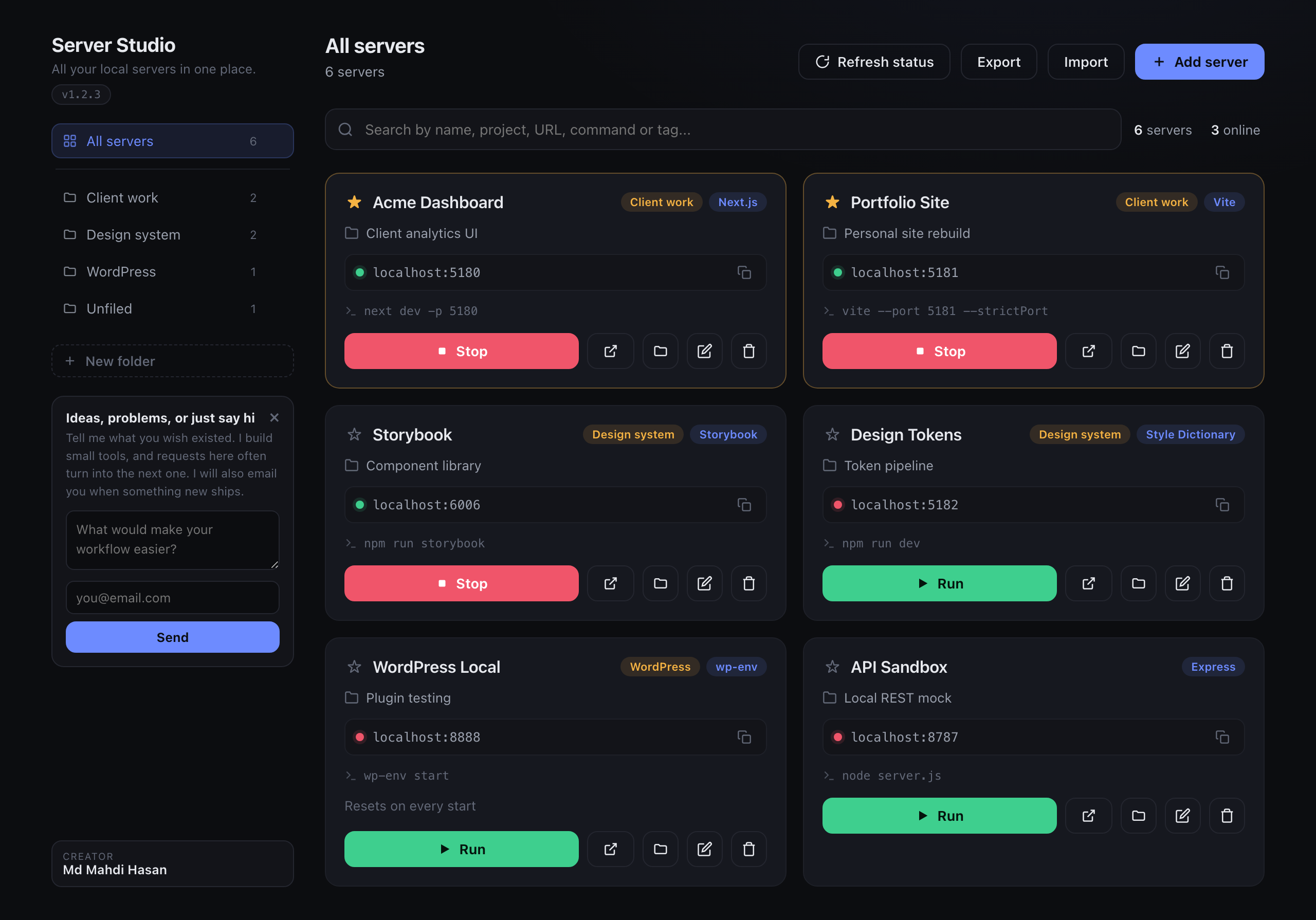
|
|
25
|
+
|
|
9
26
|
## Install
|
|
10
27
|
|
|
11
|
-
|
|
28
|
+
```bash
|
|
29
|
+
npm install -g server-studio
|
|
30
|
+
```
|
|
31
|
+
|
|
32
|
+
That is the whole thing. A global install sets up the app and the skill for you.
|
|
33
|
+
|
|
34
|
+
If you would rather not install globally, this does the same without leaving anything behind:
|
|
12
35
|
|
|
13
36
|
```bash
|
|
14
37
|
npx server-studio install
|
|
15
38
|
```
|
|
16
39
|
|
|
17
|
-
|
|
40
|
+
Installing this as a project dependency deliberately does **not** set anything up, since that would
|
|
41
|
+
write outside the package on a machine that only wanted the library.
|
|
42
|
+
|
|
43
|
+
**macOS**
|
|
44
|
+
|
|
45
|
+
`install` copies the app to `/Applications` and installs the Claude Code skill. Then open it from
|
|
18
46
|
Applications, or:
|
|
19
47
|
|
|
20
48
|
```bash
|
|
@@ -29,7 +57,7 @@ There is no app bundle to install, so run the dashboard directly:
|
|
|
29
57
|
npx server-studio start
|
|
30
58
|
```
|
|
31
59
|
|
|
32
|
-
It serves the same dashboard at `http://localhost:4587` and opens your browser.
|
|
60
|
+
It serves the same dashboard at `http://localhost:4587` and opens your browser. Run
|
|
33
61
|
`npx server-studio install --no-app` first if you also want the Claude Code skill.
|
|
34
62
|
|
|
35
63
|
To remove it again:
|
|
@@ -47,16 +75,119 @@ Your saved servers are kept. Add `--purge` if you want those deleted too.
|
|
|
47
75
|
| `--dry-run` | Print what would happen, change nothing |
|
|
48
76
|
| `--purge` | Uninstall only: also delete your saved server list |
|
|
49
77
|
|
|
78
|
+
## Using it
|
|
79
|
+
|
|
80
|
+
### Add your first server
|
|
81
|
+
|
|
82
|
+
Click **Add server**. Only the name matters, everything else can be filled in later.
|
|
83
|
+
|
|
84
|
+
| Field | What it does | Example |
|
|
85
|
+
|---|---|---|
|
|
86
|
+
| Name | Card title, and what you search by | `Acme Dashboard` |
|
|
87
|
+
| Project | A line of context for future you | `Client analytics UI` |
|
|
88
|
+
| Category | Groups cards into filter tabs along the top | `Web app` |
|
|
89
|
+
| Project folder | Where the run command executes. **Browse** opens a folder picker | `~/Sites/acme` |
|
|
90
|
+
| Run command | Exactly what you would type to start it | `npm run dev` |
|
|
91
|
+
| URL / Address | Where it serves. A bare port works and becomes `localhost:PORT` | `5181` |
|
|
92
|
+
| Tag | Small label on the card, usually the stack | `Next.js` |
|
|
93
|
+
| Notes | Anything you will forget | `Seed data resets on restart` |
|
|
94
|
+
|
|
95
|
+
### Run, stop, open
|
|
96
|
+
|
|
97
|
+
Each card has five controls:
|
|
98
|
+
|
|
99
|
+
| Control | What happens |
|
|
100
|
+
|---|---|
|
|
101
|
+
| **Run** | Opens a terminal window, `cd`s into the folder, runs the command. Real terminal, so you see the output and can Ctrl-C it |
|
|
102
|
+
| Open in browser | Opens the card's URL |
|
|
103
|
+
| Stop | Kills whatever process is holding that port. Useful when something is stuck |
|
|
104
|
+
| Edit | Change any field |
|
|
105
|
+
| Delete | Removes the card. Does not touch the project itself |
|
|
106
|
+
|
|
107
|
+
The icon inside the URL box copies the address to your clipboard.
|
|
108
|
+
|
|
109
|
+
The dot next to the URL is live status: green means that port is currently accepting connections,
|
|
110
|
+
red means nothing is there. It re-checks every 12 seconds, and **Refresh status** forces it.
|
|
111
|
+
|
|
112
|
+
Click the star to pin a card to the top. The search box matches name, project, URL, command, tag,
|
|
113
|
+
category and notes at once, so searching `wordpress` or `5181` or `vite` all find the right card.
|
|
114
|
+
|
|
115
|
+
### The one permanent port rule
|
|
116
|
+
|
|
117
|
+
This is the part that makes saved cards stay useful, and it needs one step from you.
|
|
118
|
+
|
|
119
|
+
When you add a project, give it a port nothing else uses, then **force the dev server to always use
|
|
120
|
+
that exact port**. Most tools will silently pick a different one if the port is busy, which is what
|
|
121
|
+
makes a saved entry go stale. Use the strict option so it fails loudly instead:
|
|
122
|
+
|
|
123
|
+
| Tool | How to pin the port |
|
|
124
|
+
|---|---|
|
|
125
|
+
| Vite | `server: { port: 5181, strictPort: true }` in `vite.config`, or `vite --port 5181 --strictPort` |
|
|
126
|
+
| Next.js | `next dev -p 5181` |
|
|
127
|
+
| Astro | `astro dev --port 5181` |
|
|
128
|
+
| create-react-app | `PORT=5181 react-scripts start` |
|
|
129
|
+
| Express / plain Node | `process.env.PORT || 5181` |
|
|
130
|
+
| PHP | `php -S localhost:5181` |
|
|
131
|
+
|
|
132
|
+
Then put that same port in both the run command and the URL on the card.
|
|
133
|
+
|
|
134
|
+
### Let Claude do it for you
|
|
135
|
+
|
|
136
|
+
If you installed the skill, you never have to add cards by hand. Ask Claude Code to build something
|
|
137
|
+
with a dev server and it registers the project itself, picks a port no other project is using, and
|
|
138
|
+
writes that port into the config with the strict flag set.
|
|
139
|
+
|
|
140
|
+
You can also just ask:
|
|
141
|
+
|
|
142
|
+
> save this server to Server Studio
|
|
143
|
+
|
|
144
|
+
To do it manually, or from a script:
|
|
145
|
+
|
|
146
|
+
```bash
|
|
147
|
+
node ~/.claude/skills/server-studio/register-server.js \
|
|
148
|
+
--name "Acme Dashboard" \
|
|
149
|
+
--cwd "$PWD" \
|
|
150
|
+
--command "npm run dev" \
|
|
151
|
+
--assign
|
|
152
|
+
```
|
|
153
|
+
|
|
154
|
+
`--assign` picks a free port and prints it, so you know what to write into the config. Re-running it
|
|
155
|
+
for a project that already exists updates the other fields but keeps the port locked, which is the
|
|
156
|
+
whole point.
|
|
157
|
+
|
|
158
|
+
### Using it from any editor or script
|
|
159
|
+
|
|
160
|
+
The Claude skill is a convenience wrapper, not the mechanism. Registering a server is a plain
|
|
161
|
+
command with no AI involved, so any tool that can run a shell command can use it. That includes
|
|
162
|
+
Cursor, Copilot, Windsurf, a Makefile, a shell alias, or you:
|
|
163
|
+
|
|
164
|
+
```bash
|
|
165
|
+
server-studio add --name "Portfolio Site" --cwd "$PWD" --command "npm run dev" --assign
|
|
166
|
+
```
|
|
167
|
+
|
|
168
|
+
`--assign` picks a port nothing else uses and prints `PORT <n>`, so a script can read that line and
|
|
169
|
+
write the port into the project config. Re-running for the same project updates its fields and keeps
|
|
170
|
+
its port locked, which is what makes this safe to call from a build step.
|
|
171
|
+
|
|
172
|
+
Run `server-studio add` with no arguments for the full list of fields.
|
|
173
|
+
|
|
174
|
+
### Backups
|
|
175
|
+
|
|
176
|
+
**Export** saves your whole list to `server-studio-backup.json`. **Import** loads one back.
|
|
177
|
+
|
|
178
|
+
Note that Import **replaces** your entire list rather than merging into it, so export first if you
|
|
179
|
+
have anything you care about.
|
|
180
|
+
|
|
50
181
|
## What's in the box
|
|
51
182
|
|
|
52
|
-
**The app
|
|
53
|
-
window), stop it, open its URL, reveal its folder, and see at a glance which ports are live.
|
|
183
|
+
**The app**, a dashboard served at `127.0.0.1:4587`.
|
|
54
184
|
|
|
55
|
-
**The Claude Code skill
|
|
56
|
-
server
|
|
185
|
+
**The Claude Code skill**, so Claude can register servers for you. It wraps
|
|
186
|
+
`server-studio add`, which works on its own from any tool.
|
|
57
187
|
|
|
58
|
-
**The Cowork plugin
|
|
59
|
-
|
|
188
|
+
**The Cowork plugin**, the same skill as a `/server-studio` command. The installer copies it next to
|
|
189
|
+
your data file and prints the path, then you open that file to install it. To rebuild it from source,
|
|
190
|
+
run `npm run build:plugin`.
|
|
60
191
|
|
|
61
192
|
## Platform support
|
|
62
193
|
|
|
@@ -68,8 +199,16 @@ server for you, picking a free port and baking it into the project config so the
|
|
|
68
199
|
| Stop a port | `lsof` + `kill` | `netstat` + `taskkill` | `lsof` + `kill` |
|
|
69
200
|
| Browse for a folder | native dialog | native dialog | needs `zenity`, otherwise type the path |
|
|
70
201
|
|
|
71
|
-
|
|
72
|
-
|
|
202
|
+
The suite runs on macOS, Linux and Windows in CI, on Node 18 and 22. That covers the installer, the
|
|
203
|
+
data paths, the dashboard, the security checks and the plugin build on all three.
|
|
204
|
+
|
|
205
|
+
Opening a terminal window is tested for real too, not just in theory: CI calls it, then checks the
|
|
206
|
+
command actually ran in the right folder. Linux gets a desktop from Xvfb with xterm, Windows runs it
|
|
207
|
+
directly, and macOS is verified by hand since its runners have no scriptable Terminal.
|
|
208
|
+
|
|
209
|
+
The one thing left uncovered is the native folder picker, because a modal dialog cannot be
|
|
210
|
+
automated. Its fallback is tested, so a machine with no dialog available reports cancelled rather
|
|
211
|
+
than hanging, but the dialog itself has only been opened by hand on macOS.
|
|
73
212
|
|
|
74
213
|
## Your data
|
|
75
214
|
|
package/bin/cli.js
CHANGED
|
@@ -139,6 +139,35 @@ function uninstall() {
|
|
|
139
139
|
}
|
|
140
140
|
}
|
|
141
141
|
|
|
142
|
+
// The registration script has nothing Claude-specific in it, so it is exposed as a
|
|
143
|
+
// plain command too. Any editor, agent or shell script can call this.
|
|
144
|
+
function add() {
|
|
145
|
+
const { spawnSync } = require('child_process');
|
|
146
|
+
const script = path.join(ROOT, 'skill', 'register-server.js');
|
|
147
|
+
const passthrough = args.filter(a => a !== 'add');
|
|
148
|
+
if (!passthrough.length) {
|
|
149
|
+
console.log(`Add or update a server from the command line.
|
|
150
|
+
|
|
151
|
+
server-studio add --name "Portfolio Site" --cwd "$PWD" --command "npm run dev" --assign
|
|
152
|
+
|
|
153
|
+
--name what to call it
|
|
154
|
+
--project a line of context
|
|
155
|
+
--category groups cards into filter tabs
|
|
156
|
+
--cwd the project folder
|
|
157
|
+
--command how to start it
|
|
158
|
+
--url address or bare port; omit with --assign
|
|
159
|
+
--tag small label, usually the stack
|
|
160
|
+
--note anything to remember
|
|
161
|
+
--assign pick a free port nothing else uses, and print it
|
|
162
|
+
--force allow an existing project to move to a different port
|
|
163
|
+
|
|
164
|
+
Re-running for the same project updates its fields but keeps its port locked.`);
|
|
165
|
+
return;
|
|
166
|
+
}
|
|
167
|
+
const r = spawnSync(process.execPath, [script, ...passthrough], { stdio: 'inherit' });
|
|
168
|
+
process.exit(r.status === null ? 1 : r.status);
|
|
169
|
+
}
|
|
170
|
+
|
|
142
171
|
function start() {
|
|
143
172
|
DATA_DIR = dataDir();
|
|
144
173
|
const { spawn } = require('child_process');
|
|
@@ -153,6 +182,7 @@ function help() {
|
|
|
153
182
|
|
|
154
183
|
npx server-studio install install the app + Claude Code skill
|
|
155
184
|
npx server-studio start run the dashboard (works on macOS, Windows and Linux)
|
|
185
|
+
npx server-studio add ... save a server from the command line
|
|
156
186
|
npx server-studio uninstall remove them (keeps your saved servers)
|
|
157
187
|
|
|
158
188
|
Options
|
|
@@ -166,5 +196,6 @@ Options
|
|
|
166
196
|
if (cmd === 'help') help();
|
|
167
197
|
else if (cmd === 'install') install();
|
|
168
198
|
else if (cmd === 'start') start();
|
|
199
|
+
else if (cmd === 'add') add();
|
|
169
200
|
else if (cmd === 'uninstall') uninstall();
|
|
170
201
|
else { console.error('unknown command: ' + cmd + '\n'); help(); process.exit(1); }
|
|
Binary file
|
package/package.json
CHANGED
|
@@ -1,6 +1,6 @@
|
|
|
1
1
|
{
|
|
2
2
|
"name": "server-studio",
|
|
3
|
-
"version": "1.
|
|
3
|
+
"version": "1.1.0",
|
|
4
4
|
"description": "A tiny dashboard for your local dev servers. One click to run, stop and open them, with one permanent port per project.",
|
|
5
5
|
"author": "Md Mahdi Hasan",
|
|
6
6
|
"license": "MIT",
|
|
@@ -18,15 +18,17 @@
|
|
|
18
18
|
"scripts": {
|
|
19
19
|
"build:plugin": "node scripts/build-plugin.js",
|
|
20
20
|
"prepack": "node scripts/build-plugin.js",
|
|
21
|
-
"test": "node scripts/test.js"
|
|
21
|
+
"test": "node scripts/test.js",
|
|
22
|
+
"test:terminal": "node scripts/test-terminal.js",
|
|
23
|
+
"postinstall": "node scripts/postinstall.js"
|
|
22
24
|
},
|
|
23
25
|
"files": [
|
|
24
26
|
"bin",
|
|
27
|
+
"scripts/postinstall.js",
|
|
25
28
|
"app",
|
|
26
29
|
"src",
|
|
27
30
|
"skill",
|
|
28
31
|
"plugin",
|
|
29
|
-
"scripts",
|
|
30
32
|
"dist",
|
|
31
33
|
"README.md",
|
|
32
34
|
"LICENSE"
|
|
@@ -0,0 +1,39 @@
|
|
|
1
|
+
#!/usr/bin/env node
|
|
2
|
+
// Runs the setup automatically after `npm install -g server-studio`, so one command
|
|
3
|
+
// is enough. Deliberately narrow: only a global install triggers it, because setting
|
|
4
|
+
// up writes outside the package and that should never happen to someone who merely
|
|
5
|
+
// pulled this in as a dependency.
|
|
6
|
+
//
|
|
7
|
+
// This must never fail the install. Every path exits 0.
|
|
8
|
+
'use strict';
|
|
9
|
+
|
|
10
|
+
const path = require('path');
|
|
11
|
+
const { execFileSync } = require('child_process');
|
|
12
|
+
|
|
13
|
+
function skip(why) {
|
|
14
|
+
if (process.env.SERVER_STUDIO_DEBUG) console.log('server-studio: skipped setup (' + why + ')');
|
|
15
|
+
process.exit(0);
|
|
16
|
+
}
|
|
17
|
+
|
|
18
|
+
if (process.env.CI) skip('CI');
|
|
19
|
+
// A dependency install must not touch /Applications or ~/.claude.
|
|
20
|
+
if (process.env.npm_config_global !== 'true') skip('not a global install');
|
|
21
|
+
// Do not run while developing this repo itself.
|
|
22
|
+
if (process.env.INIT_CWD && path.resolve(process.env.INIT_CWD) === path.resolve(__dirname, '..')) {
|
|
23
|
+
skip('local checkout');
|
|
24
|
+
}
|
|
25
|
+
|
|
26
|
+
try {
|
|
27
|
+
const out = execFileSync(process.execPath, [path.join(__dirname, '..', 'bin', 'cli.js'), 'install'], {
|
|
28
|
+
encoding: 'utf8',
|
|
29
|
+
});
|
|
30
|
+
console.log(out.trim());
|
|
31
|
+
} catch (e) {
|
|
32
|
+
// Setup failing is not a reason for `npm install` to fail. Say so and move on.
|
|
33
|
+
console.log(
|
|
34
|
+
'server-studio: could not finish setup automatically.\n' +
|
|
35
|
+
' Run it yourself with: server-studio install\n' +
|
|
36
|
+
' Reason: ' + (e && e.message ? e.message.split('\n')[0] : 'unknown')
|
|
37
|
+
);
|
|
38
|
+
}
|
|
39
|
+
process.exit(0);
|
package/src/platform.js
CHANGED
|
@@ -1,6 +1,7 @@
|
|
|
1
1
|
// Per-OS shims. Everything the dashboard does that is not plain Node lives here.
|
|
2
2
|
'use strict';
|
|
3
3
|
|
|
4
|
+
const fs = require('fs');
|
|
4
5
|
const os = require('os');
|
|
5
6
|
const path = require('path');
|
|
6
7
|
const { execFile, exec } = require('child_process');
|
|
@@ -46,9 +47,21 @@ function runInTerminal(cwd, command, cb) {
|
|
|
46
47
|
], cb);
|
|
47
48
|
}
|
|
48
49
|
if (WIN) {
|
|
49
|
-
//
|
|
50
|
-
|
|
51
|
-
|
|
50
|
+
// The command goes into a .bat rather than onto cmd's command line. Node escapes
|
|
51
|
+
// embedded quotes as \" which cmd.exe does not accept as an escape, so passing a
|
|
52
|
+
// quoted path through `start cmd /k "..."` mangles it. A file has no such problem.
|
|
53
|
+
let bat;
|
|
54
|
+
try {
|
|
55
|
+
bat = path.join(os.tmpdir(), 'server-studio-' + Date.now() + '-' + process.pid + '.bat');
|
|
56
|
+
fs.writeFileSync(bat, [
|
|
57
|
+
'@echo off',
|
|
58
|
+
cwd ? 'cd /d "' + cwd + '"' : '',
|
|
59
|
+
command,
|
|
60
|
+
].filter(Boolean).join('\r\n') + '\r\n');
|
|
61
|
+
} catch (e) { return cb(e); }
|
|
62
|
+
// The empty string is start's window-title argument, and /k keeps the window open
|
|
63
|
+
// so a dev server keeps running and its output stays readable.
|
|
64
|
+
return execFile('cmd', ['/c', 'start', '', 'cmd', '/k', bat], cb);
|
|
52
65
|
}
|
|
53
66
|
// Linux has no standard terminal, so try the common ones in turn.
|
|
54
67
|
const line = (cwd ? 'cd ' + shQuote(cwd) + ' && ' : '') + command + '; exec $SHELL';
|
package/scripts/build-plugin.js
DELETED
|
@@ -1,28 +0,0 @@
|
|
|
1
|
-
#!/usr/bin/env node
|
|
2
|
-
// Builds dist/server-studio.plugin from skill/ + plugin/, so the plugin copy of the
|
|
3
|
-
// skill can never drift from the source in skill/.
|
|
4
|
-
'use strict';
|
|
5
|
-
|
|
6
|
-
const fs = require('fs');
|
|
7
|
-
const os = require('os');
|
|
8
|
-
const path = require('path');
|
|
9
|
-
const { execFileSync } = require('child_process');
|
|
10
|
-
|
|
11
|
-
const ROOT = path.join(__dirname, '..');
|
|
12
|
-
const DIST = path.join(ROOT, 'dist');
|
|
13
|
-
const OUT = path.join(DIST, 'server-studio.plugin');
|
|
14
|
-
|
|
15
|
-
const stage = fs.mkdtempSync(path.join(os.tmpdir(), 'ss-plugin-'));
|
|
16
|
-
const skillDir = path.join(stage, 'skills', 'server-studio');
|
|
17
|
-
fs.mkdirSync(skillDir, { recursive: true });
|
|
18
|
-
|
|
19
|
-
fs.cpSync(path.join(ROOT, 'skill'), skillDir, { recursive: true });
|
|
20
|
-
fs.cpSync(path.join(ROOT, 'plugin'), stage, { recursive: true });
|
|
21
|
-
|
|
22
|
-
fs.mkdirSync(DIST, { recursive: true });
|
|
23
|
-
fs.rmSync(OUT, { force: true });
|
|
24
|
-
// -r zips the staged tree; the plugin format is a plain zip.
|
|
25
|
-
execFileSync('zip', ['-qr', OUT, '.', '-x', '.DS_Store'], { cwd: stage });
|
|
26
|
-
fs.rmSync(stage, { recursive: true, force: true });
|
|
27
|
-
|
|
28
|
-
console.log('built ' + path.relative(ROOT, OUT));
|
package/scripts/test.js
DELETED
|
@@ -1,125 +0,0 @@
|
|
|
1
|
-
#!/usr/bin/env node
|
|
2
|
-
// End to end check: installs into a temp folder and attacks a temp server.
|
|
3
|
-
// Never touches /Applications, ~/.claude or your real server list.
|
|
4
|
-
'use strict';
|
|
5
|
-
|
|
6
|
-
const fs = require('fs');
|
|
7
|
-
const os = require('os');
|
|
8
|
-
const path = require('path');
|
|
9
|
-
const http = require('http');
|
|
10
|
-
const { execFileSync, spawn } = require('child_process');
|
|
11
|
-
|
|
12
|
-
const ROOT = path.join(__dirname, '..');
|
|
13
|
-
const SB = fs.mkdtempSync(path.join(os.tmpdir(), 'ss-test-'));
|
|
14
|
-
const PORT = 4400 + Math.floor(process.pid % 300);
|
|
15
|
-
const env = {
|
|
16
|
-
...process.env,
|
|
17
|
-
SERVER_STUDIO_APP_DEST: path.join(SB, 'Server Studio.app'),
|
|
18
|
-
SERVER_STUDIO_SKILL_DEST: path.join(SB, 'skill'),
|
|
19
|
-
SERVER_STUDIO_DATA_DIR: path.join(SB, 'data'),
|
|
20
|
-
};
|
|
21
|
-
|
|
22
|
-
let failed = 0;
|
|
23
|
-
function check(name, pass, detail) {
|
|
24
|
-
console.log((pass ? ' pass ' : ' FAIL ') + name + (detail && !pass ? ' -> ' + detail : ''));
|
|
25
|
-
if (!pass) failed++;
|
|
26
|
-
}
|
|
27
|
-
|
|
28
|
-
function req(opts, body) {
|
|
29
|
-
return new Promise(resolve => {
|
|
30
|
-
const r = http.request({ host: '127.0.0.1', port: PORT, ...opts }, res => {
|
|
31
|
-
let b = ''; res.on('data', c => b += c); res.on('end', () => resolve({ code: res.statusCode, body: b }));
|
|
32
|
-
});
|
|
33
|
-
r.on('error', e => resolve({ code: 0, body: String(e) }));
|
|
34
|
-
if (body) r.write(body);
|
|
35
|
-
r.end();
|
|
36
|
-
});
|
|
37
|
-
}
|
|
38
|
-
|
|
39
|
-
(async () => {
|
|
40
|
-
console.log('sandbox: ' + SB + '\n');
|
|
41
|
-
|
|
42
|
-
// ---- installer ----
|
|
43
|
-
execFileSync('node', [path.join(ROOT, 'bin', 'cli.js'), 'install'], { env, stdio: 'ignore' });
|
|
44
|
-
check('app installed', fs.existsSync(path.join(env.SERVER_STUDIO_APP_DEST, 'Contents', 'Resources', 'server.js')));
|
|
45
|
-
check('shared src copied into bundle', fs.existsSync(path.join(env.SERVER_STUDIO_APP_DEST, 'Contents', 'Resources', 'platform.js')));
|
|
46
|
-
check('launcher is executable', (fs.statSync(path.join(env.SERVER_STUDIO_APP_DEST, 'Contents', 'MacOS', 'ServerStudio')).mode & 0o111) !== 0);
|
|
47
|
-
check('skill installed', fs.existsSync(path.join(env.SERVER_STUDIO_SKILL_DEST, 'SKILL.md')));
|
|
48
|
-
check('empty data file created', fs.readFileSync(path.join(env.SERVER_STUDIO_DATA_DIR, 'data.json'), 'utf8').trim() === '[]');
|
|
49
|
-
// The path printed for the Cowork plugin must survive npx clearing its cache.
|
|
50
|
-
check('plugin copied out of the package', fs.existsSync(path.join(env.SERVER_STUDIO_DATA_DIR, 'server-studio.plugin')));
|
|
51
|
-
|
|
52
|
-
// Existing data must survive a reinstall.
|
|
53
|
-
fs.writeFileSync(path.join(env.SERVER_STUDIO_DATA_DIR, 'data.json'), '[{"id":"keep","name":"keep me"}]');
|
|
54
|
-
execFileSync('node', [path.join(ROOT, 'bin', 'cli.js'), 'install'], { env, stdio: 'ignore' });
|
|
55
|
-
check('reinstall keeps existing servers',
|
|
56
|
-
JSON.parse(fs.readFileSync(path.join(env.SERVER_STUDIO_DATA_DIR, 'data.json'), 'utf8'))[0].id === 'keep');
|
|
57
|
-
|
|
58
|
-
// ---- running server ----
|
|
59
|
-
const srv = spawn('node', [path.join(env.SERVER_STUDIO_APP_DEST, 'Contents', 'Resources', 'server.js')],
|
|
60
|
-
{ env: { ...env, PORT: String(PORT) }, stdio: ['ignore', 'pipe', 'pipe'] });
|
|
61
|
-
const up = await new Promise(res => {
|
|
62
|
-
const t = setTimeout(() => res(false), 5000);
|
|
63
|
-
srv.stdout.on('data', d => { if (String(d).includes('running on')) { clearTimeout(t); res(true); } });
|
|
64
|
-
});
|
|
65
|
-
check('server started on its own port', up);
|
|
66
|
-
|
|
67
|
-
if (up) {
|
|
68
|
-
const marker = path.join(SB, 'pwned.txt');
|
|
69
|
-
const payload = JSON.stringify({ command: 'touch ' + marker });
|
|
70
|
-
|
|
71
|
-
const a1 = await req({ method: 'POST', path: '/api/run', headers: { 'Content-Type': 'text/plain' } }, payload);
|
|
72
|
-
check('text/plain CSRF rejected', a1.code === 415, 'got ' + a1.code);
|
|
73
|
-
|
|
74
|
-
const a2 = await req({ method: 'POST', path: '/api/run',
|
|
75
|
-
headers: { 'Content-Type': 'application/json', Origin: 'https://evil.example' } }, payload);
|
|
76
|
-
check('foreign Origin rejected', a2.code === 403, 'got ' + a2.code);
|
|
77
|
-
|
|
78
|
-
const a3 = await req({ method: 'OPTIONS', path: '/api/run', headers: { Origin: 'https://evil.example' } });
|
|
79
|
-
check('preflight refused', a3.code === 403 || a3.code === 405, 'got ' + a3.code);
|
|
80
|
-
|
|
81
|
-
const good = await req({ method: 'POST', path: '/api/servers',
|
|
82
|
-
headers: { 'Content-Type': 'application/json', Origin: 'http://localhost:' + PORT } }, '[]');
|
|
83
|
-
check('same-origin write accepted', good.code === 200, 'got ' + good.code);
|
|
84
|
-
|
|
85
|
-
await new Promise(r => setTimeout(r, 300));
|
|
86
|
-
check('no attack executed a command', !fs.existsSync(marker));
|
|
87
|
-
}
|
|
88
|
-
srv.kill();
|
|
89
|
-
|
|
90
|
-
// ---- uninstall ----
|
|
91
|
-
execFileSync('node', [path.join(ROOT, 'bin', 'cli.js'), 'uninstall'], { env, stdio: 'ignore' });
|
|
92
|
-
check('app removed', !fs.existsSync(env.SERVER_STUDIO_APP_DEST));
|
|
93
|
-
check('skill removed', !fs.existsSync(env.SERVER_STUDIO_SKILL_DEST));
|
|
94
|
-
check('saved servers kept without --purge', fs.existsSync(path.join(env.SERVER_STUDIO_DATA_DIR, 'data.json')));
|
|
95
|
-
|
|
96
|
-
execFileSync('node', [path.join(ROOT, 'bin', 'cli.js'), 'uninstall', '--purge'], { env, stdio: 'ignore' });
|
|
97
|
-
check('--purge deletes saved servers', !fs.existsSync(env.SERVER_STUDIO_DATA_DIR));
|
|
98
|
-
|
|
99
|
-
// ---- platform shims ----
|
|
100
|
-
// The real Windows and Linux behaviour cannot run here, so this only proves the
|
|
101
|
-
// module picks the right command and data path for each OS.
|
|
102
|
-
function loadPlatformAs(name) {
|
|
103
|
-
const real = process.platform;
|
|
104
|
-
Object.defineProperty(process, 'platform', { value: name, configurable: true });
|
|
105
|
-
delete require.cache[require.resolve(path.join(ROOT, 'src', 'platform.js'))];
|
|
106
|
-
const m = require(path.join(ROOT, 'src', 'platform.js'));
|
|
107
|
-
Object.defineProperty(process, 'platform', { value: real, configurable: true });
|
|
108
|
-
return m;
|
|
109
|
-
}
|
|
110
|
-
const saved = process.env.SERVER_STUDIO_DATA_DIR;
|
|
111
|
-
delete process.env.SERVER_STUDIO_DATA_DIR;
|
|
112
|
-
const win = loadPlatformAs('win32');
|
|
113
|
-
const lin = loadPlatformAs('linux');
|
|
114
|
-
const mac = loadPlatformAs('darwin');
|
|
115
|
-
check('windows data dir uses AppData', /AppData|Roaming|Server Studio/.test(win.dataDir()) && !win.dataDir().includes('Library'));
|
|
116
|
-
check('linux data dir uses .config', lin.dataDir().includes('.config'));
|
|
117
|
-
check('mac data dir uses Application Support', mac.dataDir().includes('Application Support'));
|
|
118
|
-
check('windows terminal is named Command Prompt', win.terminalName() === 'Command Prompt');
|
|
119
|
-
check('mac terminal is named Terminal', mac.terminalName() === 'Terminal');
|
|
120
|
-
if (saved) process.env.SERVER_STUDIO_DATA_DIR = saved;
|
|
121
|
-
|
|
122
|
-
fs.rmSync(SB, { recursive: true, force: true });
|
|
123
|
-
console.log('\n' + (failed ? failed + ' failed' : 'all passed'));
|
|
124
|
-
process.exit(failed ? 1 : 0);
|
|
125
|
-
})();
|