senangwebs-tour 1.0.2
This diff represents the content of publicly available package versions that have been released to one of the supported registries. The information contained in this diff is provided for informational purposes only and reflects changes between package versions as they appear in their respective public registries.
- package/LICENSE.md +21 -0
- package/README.md +653 -0
- package/dist/swt-editor.css +869 -0
- package/dist/swt-editor.css.map +1 -0
- package/dist/swt-editor.js +2853 -0
- package/dist/swt-editor.js.map +1 -0
- package/dist/swt-editor.min.css +1 -0
- package/dist/swt-editor.min.js +1 -0
- package/dist/swt.js +873 -0
- package/dist/swt.js.map +1 -0
- package/dist/swt.min.js +1 -0
- package/package.json +39 -0
- package/src/AssetManager.js +153 -0
- package/src/HotspotManager.js +193 -0
- package/src/SceneManager.js +162 -0
- package/src/components/hotspot-listener.js +114 -0
- package/src/editor/css/main.css +1002 -0
- package/src/editor/editor-entry.css +4 -0
- package/src/editor/editor-entry.js +30 -0
- package/src/editor/js/editor.js +629 -0
- package/src/editor/js/export-manager.js +286 -0
- package/src/editor/js/hotspot-editor.js +237 -0
- package/src/editor/js/preview-controller.js +556 -0
- package/src/editor/js/scene-manager.js +202 -0
- package/src/editor/js/storage-manager.js +193 -0
- package/src/editor/js/ui-controller.js +387 -0
- package/src/editor/js/ui-init.js +164 -0
- package/src/editor/js/utils.js +217 -0
- package/src/index.js +245 -0
package/LICENSE.md
ADDED
|
@@ -0,0 +1,21 @@
|
|
|
1
|
+
MIT License
|
|
2
|
+
|
|
3
|
+
Copyright (c) 2025 A.Hakim
|
|
4
|
+
|
|
5
|
+
Permission is hereby granted, free of charge, to any person obtaining a copy
|
|
6
|
+
of this software and associated documentation files (the "Software"), to deal
|
|
7
|
+
in the Software without restriction, including without limitation the rights
|
|
8
|
+
to use, copy, modify, merge, publish, distribute, sublicense, and/or sell
|
|
9
|
+
copies of the Software, and to permit persons to whom the Software is
|
|
10
|
+
furnished to do so, subject to the following conditions:
|
|
11
|
+
|
|
12
|
+
The above copyright notice and this permission notice shall be included in all
|
|
13
|
+
copies or substantial portions of the Software.
|
|
14
|
+
|
|
15
|
+
THE SOFTWARE IS PROVIDED "AS IS", WITHOUT WARRANTY OF ANY KIND, EXPRESS OR
|
|
16
|
+
IMPLIED, INCLUDING BUT NOT LIMITED TO THE WARRANTIES OF MERCHANTABILITY,
|
|
17
|
+
FITNESS FOR A PARTICULAR PURPOSE AND NONINFRINGEMENT. IN NO EVENT SHALL THE
|
|
18
|
+
AUTHORS OR COPYRIGHT HOLDERS BE LIABLE FOR ANY CLAIM, DAMAGES OR OTHER
|
|
19
|
+
LIABILITY, WHETHER IN AN ACTION OF CONTRACT, TORT OR OTHERWISE, ARISING FROM,
|
|
20
|
+
OUT OF OR IN CONNECTION WITH THE SOFTWARE OR THE USE OR OTHER DEALINGS IN THE
|
|
21
|
+
SOFTWARE.
|
package/README.md
ADDED
|
@@ -0,0 +1,653 @@
|
|
|
1
|
+
# SenangWebs Tour (SWT)
|
|
2
|
+
|
|
3
|
+
A powerful, data-driven 360° virtual tour system built on A-Frame WebVR. Create immersive virtual tours with a visual editor, or integrate the lightweight viewer library into your own projects.
|
|
4
|
+
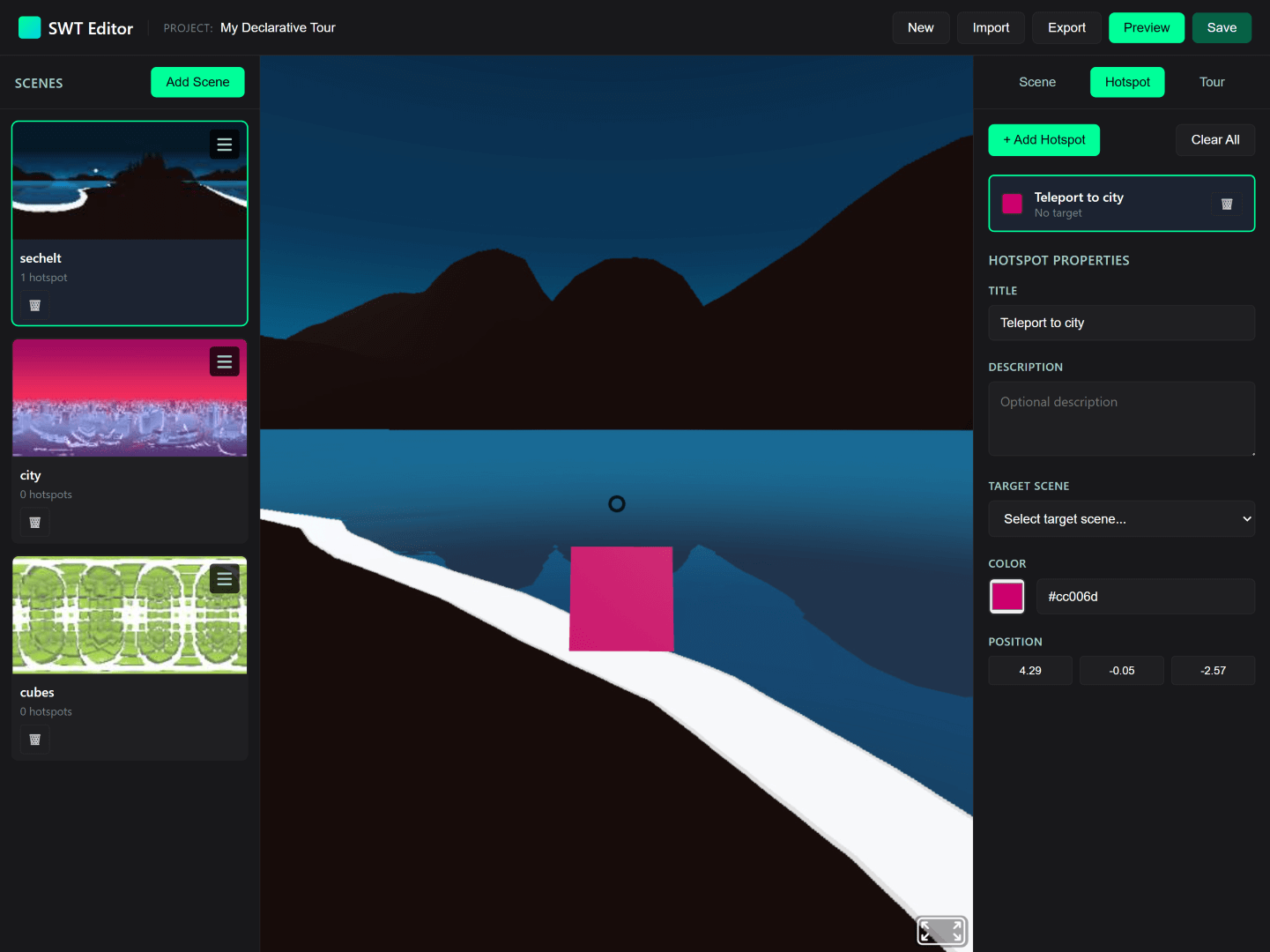
|
|
5
|
+
|
|
6
|
+
## Table of Contents
|
|
7
|
+
|
|
8
|
+
- [Features](#-features)
|
|
9
|
+
- [Quick Start](#-quick-start)
|
|
10
|
+
- [Using the Visual Editor](#using-the-visual-editor-no-coding-required)
|
|
11
|
+
- [Integrating with Code](#integrating-with-code-viewer-library)
|
|
12
|
+
- [Custom Editor Integration](#-custom-editor-integration)
|
|
13
|
+
- [Declarative Mode](#option-1-declarative-mode-html-attributes)
|
|
14
|
+
- [Programmatic Mode](#option-2-programmatic-mode-javascript-api)
|
|
15
|
+
- [Building from Source](#️-building-from-source)
|
|
16
|
+
- [API Documentation](#-api-documentation)
|
|
17
|
+
- [Editor Features](#-editor-features)
|
|
18
|
+
- [Browser Compatibility](#-browser-compatibility)
|
|
19
|
+
- [Documentation](#-documentation)
|
|
20
|
+
- [Contributing](#-contributing)
|
|
21
|
+
- [License](#-license)
|
|
22
|
+
|
|
23
|
+
## Features
|
|
24
|
+
|
|
25
|
+
### Core Capabilities
|
|
26
|
+
- **Visual Editor** - No-code tour builder with click-to-place hotspot interface
|
|
27
|
+
- **Viewer Library** - Lightweight (12KB minified) JavaScript library for embedding tours
|
|
28
|
+
- **Standalone Viewer** - Self-contained HTML viewer with drag-and-drop JSON support
|
|
29
|
+
- **Mobile & VR Ready** - Full touch, mouse, and VR headset support
|
|
30
|
+
- **Customizable Hotspots** - Custom colors, scales, and tooltip text
|
|
31
|
+
- **Multiple Export Formats** - JSON configuration or standalone HTML files
|
|
32
|
+
|
|
33
|
+
### Developer-Friendly
|
|
34
|
+
- **Two Integration Modes** - Declarative (HTML attributes) or Programmatic (JavaScript API)
|
|
35
|
+
- **Modular Architecture** - Six-controller editor pattern with clear separation of concerns
|
|
36
|
+
- **Event System** - React to scene loads, hotspot clicks, and navigation events
|
|
37
|
+
- **Data-Driven** - Pure JSON configuration, no internal state management
|
|
38
|
+
- **Built with Rollup** - Modern ES6+ modules with sourcemaps for debugging
|
|
39
|
+
|
|
40
|
+
## Quick Start
|
|
41
|
+
|
|
42
|
+
### Using the Visual Editor (No Coding Required)
|
|
43
|
+
|
|
44
|
+
1. **Start Local Server** (required for A-Frame CORS):
|
|
45
|
+
```bash
|
|
46
|
+
npm install
|
|
47
|
+
npm run serve
|
|
48
|
+
```
|
|
49
|
+
|
|
50
|
+
2. **Open Editor**: Navigate to `http://localhost:8080/examples/editor.html`
|
|
51
|
+
|
|
52
|
+
3. **Create Your Tour**:
|
|
53
|
+
- Click **"Add Scene"** and upload 360° panorama images (JPG/PNG)
|
|
54
|
+
- Click **"Add Hotspot"** then click on the preview to place navigation points
|
|
55
|
+
- Configure hotspot properties: color, scale, tooltip text, target scene
|
|
56
|
+
- See changes instantly in the live A-Frame preview
|
|
57
|
+
|
|
58
|
+
4. **Export Your Tour**:
|
|
59
|
+
- **JSON Export** → Portable config file for library integration
|
|
60
|
+
- **Viewer Export** → Self-contained HTML file (no dependencies needed)
|
|
61
|
+
|
|
62
|
+
5. **Test Standalone Viewer**: Open `http://localhost:8080/examples/viewer.html` and drag-and-drop your exported JSON
|
|
63
|
+
|
|
64
|
+
### Integrating with Code (Viewer Library)
|
|
65
|
+
|
|
66
|
+
**Minimal Example** (see `examples/example-simple.html`):
|
|
67
|
+
|
|
68
|
+
```html
|
|
69
|
+
<!DOCTYPE html>
|
|
70
|
+
<html>
|
|
71
|
+
<head>
|
|
72
|
+
<script src="https://aframe.io/releases/1.7.0/aframe.min.js"></script>
|
|
73
|
+
<script src="https://cdn.jsdelivr.net/gh/a-hakim/senangwebs-tour@latest/dist/swt.min.js"></script>
|
|
74
|
+
</head>
|
|
75
|
+
<body>
|
|
76
|
+
<a-scene id="tour-scene">
|
|
77
|
+
<a-camera><a-cursor></a-cursor></a-camera>
|
|
78
|
+
</a-scene>
|
|
79
|
+
|
|
80
|
+
<script>
|
|
81
|
+
const config = {
|
|
82
|
+
initialScene: "room1",
|
|
83
|
+
scenes: {
|
|
84
|
+
room1: {
|
|
85
|
+
name: "Living Room",
|
|
86
|
+
panorama: "path/to/panorama1.jpg",
|
|
87
|
+
hotspots: [{
|
|
88
|
+
position: { x: 5, y: 0, z: -5 },
|
|
89
|
+
action: { type: "navigateTo", target: "room2" },
|
|
90
|
+
appearance: { color: "#FF6B6B", scale: 1.5 },
|
|
91
|
+
tooltip: { text: "Go to Kitchen" }
|
|
92
|
+
}]
|
|
93
|
+
},
|
|
94
|
+
room2: {
|
|
95
|
+
name: "Kitchen",
|
|
96
|
+
panorama: "path/to/panorama2.jpg",
|
|
97
|
+
hotspots: [{
|
|
98
|
+
position: { x: -5, y: 0, z: 5 },
|
|
99
|
+
action: { type: "navigateTo", target: "room1" },
|
|
100
|
+
appearance: { color: "#4ECDC4", scale: 1.5 },
|
|
101
|
+
tooltip: { text: "Back to Living Room" }
|
|
102
|
+
}]
|
|
103
|
+
}
|
|
104
|
+
}
|
|
105
|
+
};
|
|
106
|
+
|
|
107
|
+
const scene = document.querySelector('#tour-scene');
|
|
108
|
+
scene.addEventListener('loaded', () => {
|
|
109
|
+
const tour = new SWT.Tour(scene, config);
|
|
110
|
+
tour.addEventListener('scene-loaded', (e) => {
|
|
111
|
+
console.log('Now viewing:', e.detail.sceneName);
|
|
112
|
+
});
|
|
113
|
+
tour.start();
|
|
114
|
+
});
|
|
115
|
+
</script>
|
|
116
|
+
</body>
|
|
117
|
+
</html>
|
|
118
|
+
```
|
|
119
|
+
|
|
120
|
+
## Custom Editor Integration
|
|
121
|
+
|
|
122
|
+
Build your own tour editor using the `swt-editor.js` bundle. Two initialization modes are supported:
|
|
123
|
+
|
|
124
|
+
### Option 1: Declarative Mode (HTML Attributes)
|
|
125
|
+
|
|
126
|
+
**Zero JavaScript** - perfect for quick prototypes:
|
|
127
|
+
|
|
128
|
+
```html
|
|
129
|
+
<!DOCTYPE html>
|
|
130
|
+
<html>
|
|
131
|
+
<head>
|
|
132
|
+
<script src="https://aframe.io/releases/1.7.0/aframe.min.js"></script>
|
|
133
|
+
<script src="dist/swt.js"></script>
|
|
134
|
+
<script src="dist/swt-editor.js"></script>
|
|
135
|
+
<link rel="stylesheet" href="dist/swt-editor.css">
|
|
136
|
+
</head>
|
|
137
|
+
<body>
|
|
138
|
+
<!-- Auto-initializes on page load -->
|
|
139
|
+
<div data-swt-editor
|
|
140
|
+
data-swt-auto-init="true"
|
|
141
|
+
data-swt-project-name="My Virtual Tour">
|
|
142
|
+
<div data-swt-scene-list></div>
|
|
143
|
+
<div data-swt-preview-area></div>
|
|
144
|
+
<div data-swt-properties-panel></div>
|
|
145
|
+
</div>
|
|
146
|
+
</body>
|
|
147
|
+
</html>
|
|
148
|
+
```
|
|
149
|
+
|
|
150
|
+
**Supported HTML Attributes:**
|
|
151
|
+
| Attribute | Description | Default |
|
|
152
|
+
|-----------|-------------|---------|
|
|
153
|
+
| `data-swt-editor` | Marks the editor container (required) | - |
|
|
154
|
+
| `data-swt-auto-init` | Auto-initialize on DOMContentLoaded | `false` |
|
|
155
|
+
| `data-swt-project-name` | Initial project name | `"Untitled Tour"` |
|
|
156
|
+
| `data-swt-auto-save` | Enable LocalStorage auto-save | `false` |
|
|
157
|
+
| `data-swt-auto-save-interval` | Auto-save interval (milliseconds) | `30000` |
|
|
158
|
+
| `data-swt-scene-list` | Scene list panel container | - |
|
|
159
|
+
| `data-swt-preview-area` | A-Frame preview container | - |
|
|
160
|
+
| `data-swt-properties-panel` | Hotspot properties panel | - |
|
|
161
|
+
|
|
162
|
+
**Example:** `examples/editor-declarative.html`
|
|
163
|
+
|
|
164
|
+
### Option 2: Programmatic Mode (JavaScript API)
|
|
165
|
+
|
|
166
|
+
**Full control** - for custom workflows and advanced integrations:
|
|
167
|
+
|
|
168
|
+
```html
|
|
169
|
+
<!DOCTYPE html>
|
|
170
|
+
<html>
|
|
171
|
+
<head>
|
|
172
|
+
<script src="https://aframe.io/releases/1.7.0/aframe.min.js"></script>
|
|
173
|
+
<script src="dist/swt.js"></script>
|
|
174
|
+
<script src="dist/swt-editor.js"></script>
|
|
175
|
+
<link rel="stylesheet" href="dist/swt-editor.css">
|
|
176
|
+
</head>
|
|
177
|
+
<body>
|
|
178
|
+
<div id="editor-container">
|
|
179
|
+
<div id="scenes"></div>
|
|
180
|
+
<div id="preview"></div>
|
|
181
|
+
<div id="properties"></div>
|
|
182
|
+
</div>
|
|
183
|
+
|
|
184
|
+
<script>
|
|
185
|
+
// Create editor instance with custom config
|
|
186
|
+
const editor = new TourEditor({
|
|
187
|
+
projectName: 'My Custom Tour',
|
|
188
|
+
autoSave: true,
|
|
189
|
+
autoSaveInterval: 30000
|
|
190
|
+
});
|
|
191
|
+
|
|
192
|
+
// Initialize with DOM elements
|
|
193
|
+
editor.init({
|
|
194
|
+
sceneListElement: document.getElementById('scenes'),
|
|
195
|
+
previewElement: document.getElementById('preview'),
|
|
196
|
+
propertiesElement: document.getElementById('properties')
|
|
197
|
+
});
|
|
198
|
+
|
|
199
|
+
// Access editor programmatically
|
|
200
|
+
editor.addEventListener('scene-added', (scene) => {
|
|
201
|
+
console.log('New scene:', scene.name);
|
|
202
|
+
});
|
|
203
|
+
|
|
204
|
+
// Export tour configuration
|
|
205
|
+
const config = editor.exportJSON();
|
|
206
|
+
</script>
|
|
207
|
+
</body>
|
|
208
|
+
</html>
|
|
209
|
+
```
|
|
210
|
+
|
|
211
|
+
**Available Classes** (all attached to `window` after loading `swt-editor.js`):
|
|
212
|
+
- `TourEditor` - Main coordinator, orchestrates all managers
|
|
213
|
+
- `SceneManagerEditor` - Scene CRUD operations
|
|
214
|
+
- `HotspotEditor` - Hotspot placement and editing
|
|
215
|
+
- `PreviewController` - A-Frame preview rendering
|
|
216
|
+
- `UIController` - DOM rendering and updates
|
|
217
|
+
- `ProjectStorageManager` - LocalStorage persistence
|
|
218
|
+
- `ExportManager` - JSON and HTML export
|
|
219
|
+
|
|
220
|
+
**Examples:**
|
|
221
|
+
- `examples/editor-declarative.html` - Declarative HTML-only mode
|
|
222
|
+
- `examples/editor.html` - Full-featured programmatic editor
|
|
223
|
+
|
|
224
|
+
## Building from Source
|
|
225
|
+
|
|
226
|
+
### Installation & Build
|
|
227
|
+
|
|
228
|
+
```bash
|
|
229
|
+
# Install dependencies
|
|
230
|
+
npm install
|
|
231
|
+
|
|
232
|
+
# Build all bundles (viewer + editor)
|
|
233
|
+
npm run build
|
|
234
|
+
|
|
235
|
+
# Development mode (watch for changes)
|
|
236
|
+
npm run dev
|
|
237
|
+
|
|
238
|
+
# Serve locally (required for A-Frame CORS)
|
|
239
|
+
npm run serve
|
|
240
|
+
# Access at http://localhost:8080
|
|
241
|
+
```
|
|
242
|
+
|
|
243
|
+
### Build Output
|
|
244
|
+
|
|
245
|
+
| File | Size | Format | Purpose |
|
|
246
|
+
|------|------|--------|---------|
|
|
247
|
+
| `dist/swt.js` | 26KB | UMD | Viewer library (development) |
|
|
248
|
+
| `dist/swt.min.js` | 12KB | UMD | Viewer library (production) |
|
|
249
|
+
| `dist/swt-editor.js` | 89KB | IIFE | Editor bundle (development) |
|
|
250
|
+
| `dist/swt-editor.min.js` | 38KB | IIFE | Editor bundle (production) |
|
|
251
|
+
| `dist/swt-editor.css` | 39KB | CSS | Editor styles (development) |
|
|
252
|
+
| `dist/swt-editor.min.css` | 25KB | CSS | Editor styles (production) |
|
|
253
|
+
|
|
254
|
+
All builds include **sourcemaps** for debugging.
|
|
255
|
+
|
|
256
|
+
### Project Structure
|
|
257
|
+
|
|
258
|
+
```
|
|
259
|
+
src/
|
|
260
|
+
├── index.js # Viewer library entry (UMD export)
|
|
261
|
+
├── AssetManager.js # Panorama preloading
|
|
262
|
+
├── SceneManager.js # Sky entity, transitions, fades
|
|
263
|
+
├── HotspotManager.js # Hotspot creation & updates
|
|
264
|
+
├── components/
|
|
265
|
+
│ └── hotspot-listener.js # A-Frame hotspot component
|
|
266
|
+
└── editor/
|
|
267
|
+
├── editor-entry.js # Editor bundle entry (IIFE)
|
|
268
|
+
├── editor-entry.css # CSS bundle entry (@import)
|
|
269
|
+
├── css/
|
|
270
|
+
│ └── main.css # Editor UI styles
|
|
271
|
+
└── js/
|
|
272
|
+
├── editor.js # Main coordinator (TourEditor)
|
|
273
|
+
├── scene-manager.js # Scene CRUD (SceneManagerEditor)
|
|
274
|
+
├── hotspot-editor.js # Hotspot placement (HotspotEditor)
|
|
275
|
+
├── preview-controller.js # A-Frame preview (PreviewController)
|
|
276
|
+
├── ui-controller.js # DOM rendering (UIController)
|
|
277
|
+
├── storage-manager.js # LocalStorage (ProjectStorageManager)
|
|
278
|
+
├── export-manager.js # JSON/HTML export (ExportManager)
|
|
279
|
+
├── utils.js # Helper functions
|
|
280
|
+
└── ui-init.js # DOMContentLoaded initialization
|
|
281
|
+
|
|
282
|
+
examples/
|
|
283
|
+
├── example.html # Full viewer demo
|
|
284
|
+
├── example-simple.html # Minimal viewer demo
|
|
285
|
+
├── editor.html # Full editor demo
|
|
286
|
+
├── editor-declarative.html # Declarative editor demo
|
|
287
|
+
└── viewer.html # Standalone drag-and-drop viewer
|
|
288
|
+
```
|
|
289
|
+
|
|
290
|
+
## API Documentation
|
|
291
|
+
|
|
292
|
+
### Viewer Library API
|
|
293
|
+
|
|
294
|
+
#### Constructor
|
|
295
|
+
|
|
296
|
+
```javascript
|
|
297
|
+
new SWT.Tour(aframeSceneElement, tourConfiguration)
|
|
298
|
+
```
|
|
299
|
+
|
|
300
|
+
**Parameters:**
|
|
301
|
+
- `aframeSceneElement` (HTMLElement) - A-Frame `<a-scene>` DOM element
|
|
302
|
+
- `tourConfiguration` (Object) - Tour config (see structure below)
|
|
303
|
+
|
|
304
|
+
**Returns:** `Tour` instance
|
|
305
|
+
|
|
306
|
+
---
|
|
307
|
+
|
|
308
|
+
#### Configuration Structure
|
|
309
|
+
|
|
310
|
+
```javascript
|
|
311
|
+
{
|
|
312
|
+
initialScene: "scene-id", // Required: Starting scene ID
|
|
313
|
+
scenes: { // Required: Object (not array!)
|
|
314
|
+
"scene-id": { // Key = scene ID
|
|
315
|
+
name: "Scene Name", // Required: Display name
|
|
316
|
+
panorama: "url-or-dataurl", // Required: Image URL or base64
|
|
317
|
+
hotspots: [ // Optional: Array of hotspots
|
|
318
|
+
{
|
|
319
|
+
id: "hotspot-1", // Optional: Auto-generated if omitted
|
|
320
|
+
position: { // Required: 3D coordinates
|
|
321
|
+
x: 10,
|
|
322
|
+
y: 1.5,
|
|
323
|
+
z: -3
|
|
324
|
+
},
|
|
325
|
+
action: { // Required: Hotspot action
|
|
326
|
+
type: "navigateTo", // Required: Action type
|
|
327
|
+
target: "scene-id-2" // Required: Target scene ID
|
|
328
|
+
},
|
|
329
|
+
appearance: { // Optional: Visual customization
|
|
330
|
+
color: "#00ff00", // Default: "#00ff00"
|
|
331
|
+
scale: 1.5, // Default: 1.0 (number or "x y z" string)
|
|
332
|
+
icon: "arrow" // Default: sphere (future: custom icons)
|
|
333
|
+
},
|
|
334
|
+
tooltip: { // Optional: Hover/focus text
|
|
335
|
+
text: "Click to navigate" // Tooltip content
|
|
336
|
+
}
|
|
337
|
+
}
|
|
338
|
+
]
|
|
339
|
+
}
|
|
340
|
+
}
|
|
341
|
+
}
|
|
342
|
+
```
|
|
343
|
+
|
|
344
|
+
**Important Notes:**
|
|
345
|
+
- `scenes` is an **object** (keys are scene IDs), not an array
|
|
346
|
+
- Hotspot `position` is in 3D space (typically on 10-unit sphere surface)
|
|
347
|
+
- Editor stores `imageUrl`, library expects `panorama` (export handles conversion)
|
|
348
|
+
- Images can be URLs or Data URLs (base64) for offline tours
|
|
349
|
+
|
|
350
|
+
---
|
|
351
|
+
|
|
352
|
+
#### Methods
|
|
353
|
+
|
|
354
|
+
##### `tour.start()`
|
|
355
|
+
Initialize and start the tour. Loads the initial scene and sets up event listeners.
|
|
356
|
+
|
|
357
|
+
**Returns:** `void`
|
|
358
|
+
|
|
359
|
+
**Example:**
|
|
360
|
+
```javascript
|
|
361
|
+
const tour = new SWT.Tour(sceneElement, config);
|
|
362
|
+
tour.start();
|
|
363
|
+
```
|
|
364
|
+
|
|
365
|
+
---
|
|
366
|
+
|
|
367
|
+
##### `tour.navigateTo(sceneId)`
|
|
368
|
+
Navigate to a specific scene by ID.
|
|
369
|
+
|
|
370
|
+
**Parameters:**
|
|
371
|
+
- `sceneId` (String) - Target scene ID (must exist in `scenes` object)
|
|
372
|
+
|
|
373
|
+
**Returns:** `void`
|
|
374
|
+
|
|
375
|
+
**Example:**
|
|
376
|
+
```javascript
|
|
377
|
+
tour.navigateTo('bedroom'); // Loads scene with id "bedroom"
|
|
378
|
+
```
|
|
379
|
+
|
|
380
|
+
---
|
|
381
|
+
|
|
382
|
+
##### `tour.getCurrentSceneId()`
|
|
383
|
+
Get the ID of the currently active scene.
|
|
384
|
+
|
|
385
|
+
**Returns:** `String` - Current scene ID
|
|
386
|
+
|
|
387
|
+
**Example:**
|
|
388
|
+
```javascript
|
|
389
|
+
const currentScene = tour.getCurrentSceneId();
|
|
390
|
+
console.log('Viewing:', currentScene); // "living-room"
|
|
391
|
+
```
|
|
392
|
+
|
|
393
|
+
---
|
|
394
|
+
|
|
395
|
+
##### `tour.destroy()`
|
|
396
|
+
Clean up and remove the tour. Removes all hotspots, event listeners, and resets scene.
|
|
397
|
+
|
|
398
|
+
**Returns:** `void`
|
|
399
|
+
|
|
400
|
+
**Example:**
|
|
401
|
+
```javascript
|
|
402
|
+
tour.destroy(); // Cleanup before removing from DOM
|
|
403
|
+
```
|
|
404
|
+
|
|
405
|
+
---
|
|
406
|
+
|
|
407
|
+
##### `tour.addEventListener(eventName, callback)`
|
|
408
|
+
Listen to tour events. Custom event system (not DOM events).
|
|
409
|
+
|
|
410
|
+
**Parameters:**
|
|
411
|
+
- `eventName` (String) - Event name (see Events section)
|
|
412
|
+
- `callback` (Function) - Handler function receiving event object
|
|
413
|
+
|
|
414
|
+
**Returns:** `void`
|
|
415
|
+
|
|
416
|
+
**Example:**
|
|
417
|
+
```javascript
|
|
418
|
+
tour.addEventListener('scene-loaded', (event) => {
|
|
419
|
+
console.log('Scene:', event.detail.sceneName);
|
|
420
|
+
});
|
|
421
|
+
```
|
|
422
|
+
|
|
423
|
+
---
|
|
424
|
+
|
|
425
|
+
#### Events
|
|
426
|
+
|
|
427
|
+
All events include a `detail` object with event-specific data.
|
|
428
|
+
|
|
429
|
+
##### `tour-started`
|
|
430
|
+
Fired when `tour.start()` is called.
|
|
431
|
+
|
|
432
|
+
**Detail:**
|
|
433
|
+
```javascript
|
|
434
|
+
{
|
|
435
|
+
config: Object // Full tour configuration
|
|
436
|
+
}
|
|
437
|
+
```
|
|
438
|
+
|
|
439
|
+
---
|
|
440
|
+
|
|
441
|
+
##### `scene-loading`
|
|
442
|
+
Fired before a scene begins loading.
|
|
443
|
+
|
|
444
|
+
**Detail:**
|
|
445
|
+
```javascript
|
|
446
|
+
{
|
|
447
|
+
sceneId: String // ID of scene being loaded
|
|
448
|
+
}
|
|
449
|
+
```
|
|
450
|
+
|
|
451
|
+
---
|
|
452
|
+
|
|
453
|
+
##### `scene-loaded`
|
|
454
|
+
Fired after a scene is fully loaded and rendered.
|
|
455
|
+
|
|
456
|
+
**Detail:**
|
|
457
|
+
```javascript
|
|
458
|
+
{
|
|
459
|
+
sceneId: String, // ID of loaded scene
|
|
460
|
+
sceneName: String // Display name of scene
|
|
461
|
+
}
|
|
462
|
+
```
|
|
463
|
+
|
|
464
|
+
---
|
|
465
|
+
|
|
466
|
+
##### `hotspot-activated`
|
|
467
|
+
Fired when a hotspot is clicked/activated.
|
|
468
|
+
|
|
469
|
+
**Detail:**
|
|
470
|
+
```javascript
|
|
471
|
+
{
|
|
472
|
+
hotspotId: String, // Hotspot ID
|
|
473
|
+
sceneId: String, // Current scene ID
|
|
474
|
+
action: Object // Hotspot action object { type, target }
|
|
475
|
+
}
|
|
476
|
+
```
|
|
477
|
+
|
|
478
|
+
---
|
|
479
|
+
|
|
480
|
+
#### Usage Example
|
|
481
|
+
|
|
482
|
+
```javascript
|
|
483
|
+
const scene = document.querySelector('#vr-scene');
|
|
484
|
+
const tour = new SWT.Tour(scene, {
|
|
485
|
+
initialScene: "room1",
|
|
486
|
+
scenes: {
|
|
487
|
+
room1: {
|
|
488
|
+
name: "Living Room",
|
|
489
|
+
panorama: "360-living-room.jpg",
|
|
490
|
+
hotspots: [{
|
|
491
|
+
position: { x: 5, y: 0, z: -5 },
|
|
492
|
+
action: { type: "navigateTo", target: "room2" },
|
|
493
|
+
appearance: { color: "#FF6B6B" },
|
|
494
|
+
tooltip: { text: "Kitchen" }
|
|
495
|
+
}]
|
|
496
|
+
},
|
|
497
|
+
room2: {
|
|
498
|
+
name: "Kitchen",
|
|
499
|
+
panorama: "360-kitchen.jpg",
|
|
500
|
+
hotspots: []
|
|
501
|
+
}
|
|
502
|
+
}
|
|
503
|
+
});
|
|
504
|
+
|
|
505
|
+
// Listen to events
|
|
506
|
+
tour.addEventListener('tour-started', (e) => {
|
|
507
|
+
console.log('Tour configuration:', e.detail.config);
|
|
508
|
+
});
|
|
509
|
+
|
|
510
|
+
tour.addEventListener('scene-loading', (e) => {
|
|
511
|
+
console.log('Loading scene:', e.detail.sceneId);
|
|
512
|
+
// Show loading indicator
|
|
513
|
+
});
|
|
514
|
+
|
|
515
|
+
tour.addEventListener('scene-loaded', (e) => {
|
|
516
|
+
console.log('Loaded:', e.detail.sceneName);
|
|
517
|
+
// Hide loading indicator
|
|
518
|
+
});
|
|
519
|
+
|
|
520
|
+
tour.addEventListener('hotspot-activated', (e) => {
|
|
521
|
+
console.log('Hotspot clicked:', e.detail.hotspotId);
|
|
522
|
+
console.log('Navigating to:', e.detail.action.target);
|
|
523
|
+
});
|
|
524
|
+
|
|
525
|
+
// Start the tour
|
|
526
|
+
tour.start();
|
|
527
|
+
|
|
528
|
+
// Programmatic navigation
|
|
529
|
+
setTimeout(() => {
|
|
530
|
+
tour.navigateTo('room2');
|
|
531
|
+
}, 5000);
|
|
532
|
+
|
|
533
|
+
// Cleanup
|
|
534
|
+
// tour.destroy();
|
|
535
|
+
```
|
|
536
|
+
|
|
537
|
+
## Editor Features
|
|
538
|
+
|
|
539
|
+
### Visual Tour Creation
|
|
540
|
+
- **Click-to-Place Hotspots** - Raycast-based placement on panorama sphere
|
|
541
|
+
- **Real-Time Preview** - Instant A-Frame rendering as you edit
|
|
542
|
+
- **Scene Management** - Add, remove, reorder scenes with thumbnails
|
|
543
|
+
- **Camera Control** - Auto-point camera to selected hotspot with animation
|
|
544
|
+
- **Position Validation** - Hotspots clamped to 10-unit sphere radius
|
|
545
|
+
|
|
546
|
+
### Hotspot Configuration
|
|
547
|
+
- **3D Position** - Click-to-place or manual X/Y/Z coordinate input
|
|
548
|
+
- **Navigation Target** - Link to any scene in the tour
|
|
549
|
+
- **Visual Customization** - Color picker and scale slider
|
|
550
|
+
- **Tooltips** - Custom hover text for each hotspot
|
|
551
|
+
|
|
552
|
+
### Data Management
|
|
553
|
+
- **LocalStorage Persistence** - Auto-save projects (configurable interval)
|
|
554
|
+
- **Import/Export** - Load and save tour JSON configurations
|
|
555
|
+
- **Data URLs** - Panoramas embedded as base64 (no external files needed)
|
|
556
|
+
- **Thumbnail Generation** - Auto-generated scene previews (100x50px)
|
|
557
|
+
|
|
558
|
+
### Export Options
|
|
559
|
+
1. **JSON Export** - Portable configuration file for library integration
|
|
560
|
+
- Converts editor's `imageUrl` to library's `panorama` format
|
|
561
|
+
- Compatible with `SWT.Tour` viewer library
|
|
562
|
+
- Use in custom integrations or standalone viewer
|
|
563
|
+
|
|
564
|
+
2. **Viewer Export** - Self-contained HTML file
|
|
565
|
+
- Embeds minified `swt.min.js` library
|
|
566
|
+
- Includes full tour JSON configuration
|
|
567
|
+
- No external dependencies - works offline
|
|
568
|
+
- Drag-and-drop ready for distribution
|
|
569
|
+
|
|
570
|
+
### Developer Tools
|
|
571
|
+
- **ES6 Module Architecture** - Six-controller pattern with clear separation
|
|
572
|
+
- **Sourcemaps** - Debug original ES6 source in browser DevTools
|
|
573
|
+
- **Two Init Modes** - Declarative (HTML) or Programmatic (JS API)
|
|
574
|
+
- **Event System** - React to scene-added, hotspot-clicked events
|
|
575
|
+
- **Global Access** - All classes attached to `window` for console debugging
|
|
576
|
+
|
|
577
|
+
## Browser Compatibility
|
|
578
|
+
|
|
579
|
+
| Browser | Version | Notes |
|
|
580
|
+
|---------|---------|-------|
|
|
581
|
+
| Chrome | 90+ | Recommended - best performance |
|
|
582
|
+
| Firefox | 88+ | Full support |
|
|
583
|
+
| Safari | 14+ | WebGL support required |
|
|
584
|
+
| Edge | 90+ | Chromium-based |
|
|
585
|
+
| Mobile Safari | iOS 14+ | Touch and gyroscope support |
|
|
586
|
+
| Chrome Mobile | Android 90+ | Touch and gyroscope support |
|
|
587
|
+
|
|
588
|
+
**Requirements:**
|
|
589
|
+
- WebGL 1.0 or higher
|
|
590
|
+
- ES6 module support (for editor)
|
|
591
|
+
- LocalStorage (for editor persistence)
|
|
592
|
+
|
|
593
|
+
**VR Headsets:**
|
|
594
|
+
- Oculus Quest 1/2/3
|
|
595
|
+
- Meta Quest Pro
|
|
596
|
+
- HTC Vive
|
|
597
|
+
- Valve Index
|
|
598
|
+
- Any WebXR-compatible headset
|
|
599
|
+
|
|
600
|
+
## Documentation
|
|
601
|
+
|
|
602
|
+
- **[EDITOR.md](./EDITOR.md)** - Complete guide to building custom editors
|
|
603
|
+
- **[.github/copilot-instructions.md](./.github/copilot-instructions.md)** - AI agent development instructions
|
|
604
|
+
- **[examples/](./examples/)** - Live code examples and demos
|
|
605
|
+
|
|
606
|
+
## Contributing
|
|
607
|
+
|
|
608
|
+
Contributions are welcome! Here's how you can help:
|
|
609
|
+
|
|
610
|
+
1. **Report Bugs** - Open an issue with reproduction steps
|
|
611
|
+
2. **Suggest Features** - Share your ideas in GitHub Issues
|
|
612
|
+
3. **Submit PRs** - Fork, create a feature branch, and submit a pull request
|
|
613
|
+
4. **Improve Docs** - Help make documentation clearer and more comprehensive
|
|
614
|
+
|
|
615
|
+
### Development Workflow
|
|
616
|
+
|
|
617
|
+
```bash
|
|
618
|
+
# Fork and clone the repository
|
|
619
|
+
git clone https://github.com/your-username/senangwebs-tour.git
|
|
620
|
+
cd senangwebs-tour
|
|
621
|
+
|
|
622
|
+
# Install dependencies
|
|
623
|
+
npm install
|
|
624
|
+
|
|
625
|
+
# Start development server with watch mode
|
|
626
|
+
npm run dev
|
|
627
|
+
|
|
628
|
+
# In another terminal, serve the examples
|
|
629
|
+
npm run serve
|
|
630
|
+
|
|
631
|
+
# Make changes, test in browser at http://localhost:8080
|
|
632
|
+
# Build for production
|
|
633
|
+
npm run build
|
|
634
|
+
|
|
635
|
+
# Submit a pull request
|
|
636
|
+
```
|
|
637
|
+
|
|
638
|
+
### Code Guidelines
|
|
639
|
+
- Use ES6+ syntax (modules, classes, arrow functions)
|
|
640
|
+
- Follow existing naming conventions (see copilot-instructions.md)
|
|
641
|
+
- No debug `console.log()` - only `console.error()` for critical errors
|
|
642
|
+
- All editor classes must use `export default`
|
|
643
|
+
- Debounce text inputs (300ms) using `debounce()` from utils.js
|
|
644
|
+
- Test in Chrome, Firefox, and Safari before submitting
|
|
645
|
+
|
|
646
|
+
## License
|
|
647
|
+
|
|
648
|
+
MIT License - see [LICENSE.md](./LICENSE.md) for details.
|
|
649
|
+
|
|
650
|
+
## Acknowledgments
|
|
651
|
+
|
|
652
|
+
- **[A-Frame](https://aframe.io/)** - WebVR framework powering the 3D rendering
|
|
653
|
+
- **[Rollup](https://rollupjs.org/)** - Module bundler for clean ES6+ builds
|