senangwebs-photobooth 1.0.1
This diff represents the content of publicly available package versions that have been released to one of the supported registries. The information contained in this diff is provided for informational purposes only and reflects changes between package versions as they appear in their respective public registries.
- package/.github/copilot-instructions.md +252 -0
- package/LICENSE.md +21 -0
- package/README.md +297 -0
- package/dist/styles.js +1 -0
- package/dist/swp.css +448 -0
- package/dist/swp.js +1 -0
- package/examples/customization.html +360 -0
- package/examples/index.html +54 -0
- package/package.json +32 -0
- package/spec.md +239 -0
- package/src/css/swp.css +447 -0
- package/src/js/swp.js +726 -0
- package/swp_preview.png +0 -0
- package/webpack.config.js +39 -0
|
@@ -0,0 +1,252 @@
|
|
|
1
|
+
# SenangWebs Photobooth - AI Agent Instructions
|
|
2
|
+
|
|
3
|
+
## Project Overview
|
|
4
|
+
A zero-dependency, client-side photo editing library built as a UMD module. All image processing happens in the browser using HTML5 Canvas API and CSS filters. Single-class architecture exported as both ES6 module and global `window.SWP`.
|
|
5
|
+
|
|
6
|
+
## Architecture & Design Principles
|
|
7
|
+
|
|
8
|
+
### Core Philosophy
|
|
9
|
+
- **Zero runtime dependencies** - Pure vanilla JavaScript, no frameworks
|
|
10
|
+
- **Client-side only** - No server-side processing, all Canvas API based
|
|
11
|
+
- **Single responsibility** - One `SWP` class handles all functionality (`src/js/swp.js`)
|
|
12
|
+
- **UMD export** - Works in browser (global), CommonJS, AMD, and ES6 modules
|
|
13
|
+
|
|
14
|
+
### Key Architectural Pattern
|
|
15
|
+
The library follows a **self-contained UI generator** pattern:
|
|
16
|
+
```javascript
|
|
17
|
+
// Constructor -> init() -> createUI() -> bindEvents()
|
|
18
|
+
class SWP {
|
|
19
|
+
constructor(container, options) {
|
|
20
|
+
// State setup
|
|
21
|
+
this.currentState = { brightness: 100, contrast: 100, saturation: 100, ... }
|
|
22
|
+
this.init();
|
|
23
|
+
}
|
|
24
|
+
|
|
25
|
+
createUI() {
|
|
26
|
+
// Dynamically generates complete UI: toolbar, canvas, adjustment panels
|
|
27
|
+
// All HTML is template strings, no external templates
|
|
28
|
+
}
|
|
29
|
+
|
|
30
|
+
drawImage() {
|
|
31
|
+
// Core rendering loop - ALL visual changes go through here
|
|
32
|
+
// Applies state transformations to canvas on every change
|
|
33
|
+
}
|
|
34
|
+
}
|
|
35
|
+
```
|
|
36
|
+
|
|
37
|
+
**Critical:** Every image manipulation (rotate, flip, adjust, filter) calls `drawImage()` which re-renders from `currentState`. Never manipulate canvas directly outside `drawImage()`.
|
|
38
|
+
|
|
39
|
+
## Build System & Workflows
|
|
40
|
+
|
|
41
|
+
### Development Commands
|
|
42
|
+
```bash
|
|
43
|
+
npm run dev # Webpack watch mode with auto-rebuild (no dev server)
|
|
44
|
+
npm run build # Production: dist/swp.min.js (~10KB) + swp.min.css (~4KB)
|
|
45
|
+
```
|
|
46
|
+
**Note:** There is no dev server configured. Open `examples/index.html` directly in browser or use your own local server. The `dev` script runs webpack in watch mode for auto-rebuilding.
|
|
47
|
+
|
|
48
|
+
### Build Configuration (webpack.config.js)
|
|
49
|
+
- **Dual entry points:** `swp.js` and `styles.css` (separate entries, not CSS-in-JS)
|
|
50
|
+
- **Output naming:**
|
|
51
|
+
- Dev: `swp.js` + `swp.css`
|
|
52
|
+
- Prod: Uses same filenames (no .min suffix - configured elsewhere)
|
|
53
|
+
- **UMD library config:** Exports as `SWP` global + default ES6 export
|
|
54
|
+
- **NO HtmlWebpackPlugin** - Demo pages reference dist/ files via script tags
|
|
55
|
+
- **CSS extraction:** MiniCssExtractPlugin extracts CSS to separate file
|
|
56
|
+
|
|
57
|
+
### File Structure
|
|
58
|
+
```
|
|
59
|
+
src/
|
|
60
|
+
├── js/swp.js # Single ~630-line class - ALL library logic
|
|
61
|
+
├── css/swp.css # Complete styling (~6KB)
|
|
62
|
+
dist/ # Generated build artifacts
|
|
63
|
+
├── swp.js # Built library bundle
|
|
64
|
+
└── swp.css # Built styles
|
|
65
|
+
examples/
|
|
66
|
+
└── index.html # Standalone example (uses dist/ files via script tags)
|
|
67
|
+
spec.md # Original specification - source of truth
|
|
68
|
+
```
|
|
69
|
+
|
|
70
|
+
**Important:** Demo pages (`examples/index.html`) are NOT bundled by webpack. They reference built dist/ files directly via `<script>` tags. Always run `npm run build` first before testing demos.
|
|
71
|
+
|
|
72
|
+
## Code Conventions & Patterns
|
|
73
|
+
|
|
74
|
+
### State Management Pattern
|
|
75
|
+
All edits are **non-destructive** until export:
|
|
76
|
+
```javascript
|
|
77
|
+
this.currentState = {
|
|
78
|
+
brightness: 100, // 0-200 range
|
|
79
|
+
contrast: 100, // 0-200 range
|
|
80
|
+
saturation: 100, // 0-200 range
|
|
81
|
+
rotation: 0, // 0, 90, 180, 270
|
|
82
|
+
flipH: false, // boolean
|
|
83
|
+
flipV: false, // boolean
|
|
84
|
+
filter: 'none' // 'none' | 'grayscale' | 'sepia' | 'invert' | 'blur'
|
|
85
|
+
};
|
|
86
|
+
```
|
|
87
|
+
State is applied via Canvas transforms + CSS filter strings in `drawImage()`.
|
|
88
|
+
|
|
89
|
+
### Resize Functionality
|
|
90
|
+
Canvas dimensions dynamically adjust to match loaded image:
|
|
91
|
+
```javascript
|
|
92
|
+
// In loadImage() - canvas resizes to exact image dimensions
|
|
93
|
+
this.canvas.width = img.width;
|
|
94
|
+
this.canvas.height = img.height;
|
|
95
|
+
```
|
|
96
|
+
Users can manually resize via UI panel which updates canvas dimensions and redraws.
|
|
97
|
+
|
|
98
|
+
### Crop Functionality
|
|
99
|
+
Crop method exists but **NO UI implementation** - only programmatic access:
|
|
100
|
+
```javascript
|
|
101
|
+
// crop(x, y, width, height) at lines ~519-538
|
|
102
|
+
crop(x, y, width, height) {
|
|
103
|
+
// Creates temp canvas, draws cropped region from main canvas
|
|
104
|
+
// Loads result as new currentImage
|
|
105
|
+
tempCtx.drawImage(this.canvas, x, y, width, height, 0, 0, width, height);
|
|
106
|
+
}
|
|
107
|
+
```
|
|
108
|
+
**Important:** Crops from current canvas state (including all applied transforms), not original image. Coordinates are relative to current canvas dimensions.
|
|
109
|
+
|
|
110
|
+
**Missing UI features** (mentioned in spec.md but not implemented):
|
|
111
|
+
- Interactive crop selection overlay
|
|
112
|
+
- Aspect ratio presets (1:1, 4:3, 16:9, freeform)
|
|
113
|
+
- Visual crop handles/rectangle
|
|
114
|
+
|
|
115
|
+
If adding crop UI, follow the pattern: `createCropPanelHTML()` → add toolbar button → `handleAction('toggle-crop')` → bind mouse events for selection rectangle.
|
|
116
|
+
|
|
117
|
+
### Event System
|
|
118
|
+
Simple pub-sub pattern (`on()` / `emit()`):
|
|
119
|
+
```javascript
|
|
120
|
+
swp.on('load', () => {}); // Image loaded
|
|
121
|
+
swp.on('change', () => {}); // Any edit applied
|
|
122
|
+
swp.on('save', () => {}); // Image exported
|
|
123
|
+
```
|
|
124
|
+
|
|
125
|
+
### UI Generation Pattern
|
|
126
|
+
All UI is **template strings** in `create*HTML()` methods:
|
|
127
|
+
- `createToolbarHTML()` - Toolbar with data-action attributes
|
|
128
|
+
- `createAdjustmentsPanelHTML()` - Sliders for brightness/contrast/saturation
|
|
129
|
+
- `createFiltersPanelHTML()` - Filter button grid
|
|
130
|
+
- `createResizePanelHTML()` - Canvas dimension controls
|
|
131
|
+
|
|
132
|
+
Event delegation via `data-action` attributes → `handleAction(action)` dispatcher.
|
|
133
|
+
|
|
134
|
+
### CSS Filter Application
|
|
135
|
+
Filters use **CSS filter property** applied to canvas context:
|
|
136
|
+
```javascript
|
|
137
|
+
getFilterString() {
|
|
138
|
+
let filters = [];
|
|
139
|
+
if (this.currentState.brightness !== 100) filters.push(`brightness(${this.currentState.brightness}%)`);
|
|
140
|
+
// ... combine all active filters
|
|
141
|
+
return filters.join(' ');
|
|
142
|
+
}
|
|
143
|
+
ctx.filter = this.getFilterString(); // Applied before drawImage()
|
|
144
|
+
```
|
|
145
|
+
|
|
146
|
+
## Common Development Tasks
|
|
147
|
+
|
|
148
|
+
### Adding Interactive Crop UI
|
|
149
|
+
Currently crop only works programmatically (`swp.crop(x, y, w, h)`). To add UI:
|
|
150
|
+
1. Create `createCropPanelHTML()` with aspect ratio buttons
|
|
151
|
+
2. Add crop mode toggle to toolbar: `<button data-action="toggle-crop">Crop</button>`
|
|
152
|
+
3. Add case in `handleAction()`: `case 'toggle-crop': this.enableCropMode(); break;`
|
|
153
|
+
4. Implement selection rectangle with mouse events:
|
|
154
|
+
- `mousedown`: Start selection at (x, y)
|
|
155
|
+
- `mousemove`: Draw selection rectangle overlay
|
|
156
|
+
- `mouseup`: Call `this.crop(x, y, width, height)`
|
|
157
|
+
5. Use CSS absolute positioning for overlay on `.swp-canvas-container`
|
|
158
|
+
|
|
159
|
+
### Adding a New Filter
|
|
160
|
+
1. Add to `createFiltersPanelHTML()` button grid
|
|
161
|
+
2. Add case in `getFilterString()` switch statement
|
|
162
|
+
3. CSS filter property examples: `grayscale(100%)`, `sepia(100%)`, `blur(5px)`
|
|
163
|
+
|
|
164
|
+
### Adding a New Adjustment
|
|
165
|
+
1. Add to `currentState` with default value
|
|
166
|
+
2. Add slider in `createAdjustmentsPanelHTML()`
|
|
167
|
+
3. Add event binding in `bindEvents()` for the slider
|
|
168
|
+
4. Include in `getFilterString()` filter chain
|
|
169
|
+
|
|
170
|
+
### Modifying Canvas Rendering
|
|
171
|
+
**Always work in `drawImage()` method** - this is the single rendering pipeline:
|
|
172
|
+
```javascript
|
|
173
|
+
drawImage() {
|
|
174
|
+
ctx.clearRect(0, 0, canvas.width, canvas.height);
|
|
175
|
+
ctx.save();
|
|
176
|
+
// Apply all transforms based on currentState
|
|
177
|
+
ctx.translate(canvas.width / 2, canvas.height / 2);
|
|
178
|
+
ctx.rotate(this.currentState.rotation * Math.PI / 180);
|
|
179
|
+
ctx.scale(flipH ? -1 : 1, flipV ? -1 : 1);
|
|
180
|
+
ctx.filter = this.getFilterString();
|
|
181
|
+
ctx.drawImage(this.currentImage, ...);
|
|
182
|
+
ctx.restore();
|
|
183
|
+
this.emit('change');
|
|
184
|
+
}
|
|
185
|
+
```
|
|
186
|
+
|
|
187
|
+
## Critical Implementation Details
|
|
188
|
+
|
|
189
|
+
### Image Loading & CORS
|
|
190
|
+
Images loaded with `crossOrigin = 'anonymous'` to enable canvas export:
|
|
191
|
+
```javascript
|
|
192
|
+
const img = new Image();
|
|
193
|
+
img.crossOrigin = 'anonymous'; // Required for toDataURL()
|
|
194
|
+
img.onload = () => { ... };
|
|
195
|
+
```
|
|
196
|
+
|
|
197
|
+
### Auto-initialization Pattern
|
|
198
|
+
Supports declarative HTML usage via `data-swp` attribute:
|
|
199
|
+
```javascript
|
|
200
|
+
// In module footer:
|
|
201
|
+
if (typeof document !== 'undefined') {
|
|
202
|
+
document.addEventListener('DOMContentLoaded', () => {
|
|
203
|
+
document.querySelectorAll('[data-swp]').forEach(container => {
|
|
204
|
+
new SWP(container);
|
|
205
|
+
});
|
|
206
|
+
});
|
|
207
|
+
}
|
|
208
|
+
```
|
|
209
|
+
|
|
210
|
+
### Export Format
|
|
211
|
+
```javascript
|
|
212
|
+
getImageData(format = 'jpeg', quality = 0.9) {
|
|
213
|
+
const mimeType = format === 'png' ? 'image/png' : 'image/jpeg';
|
|
214
|
+
return this.canvas.toDataURL(mimeType, quality);
|
|
215
|
+
}
|
|
216
|
+
```
|
|
217
|
+
|
|
218
|
+
## Testing & Debugging
|
|
219
|
+
|
|
220
|
+
### Manual Testing
|
|
221
|
+
Use dev server console:
|
|
222
|
+
```javascript
|
|
223
|
+
swpInstance.loadImage('https://picsum.photos/800/600');
|
|
224
|
+
swpInstance.rotate(90);
|
|
225
|
+
swpInstance.setAdjustment('brightness', 150);
|
|
226
|
+
swpInstance.applyFilter('grayscale');
|
|
227
|
+
```
|
|
228
|
+
|
|
229
|
+
### Common Pitfalls
|
|
230
|
+
- **Don't manipulate canvas outside `drawImage()`** - breaks state sync
|
|
231
|
+
- **Always call `drawImage()` after state changes** - or UI won't update
|
|
232
|
+
- **CSS import must be first line in swp.js** - webpack extracts it
|
|
233
|
+
- **Filter values are percentages (0-200)** - not 0-1 or 0-255
|
|
234
|
+
- **Rotation is in degrees** - convert to radians in drawImage()
|
|
235
|
+
|
|
236
|
+
## Integration Points
|
|
237
|
+
|
|
238
|
+
### Browser APIs Used
|
|
239
|
+
- **Canvas 2D Context:** All rendering (`getContext('2d')`)
|
|
240
|
+
- **FileReader API:** Image upload (`readAsDataURL`)
|
|
241
|
+
- **Canvas.toDataURL():** Image export
|
|
242
|
+
- **CSS filter property:** Filter effects
|
|
243
|
+
|
|
244
|
+
### No External Dependencies
|
|
245
|
+
- No npm runtime dependencies
|
|
246
|
+
- No framework requirements
|
|
247
|
+
- Works in vanilla HTML, React, Vue, etc.
|
|
248
|
+
|
|
249
|
+
## Documentation References
|
|
250
|
+
- `spec.md` - Original feature specification (source of truth)
|
|
251
|
+
- `README.md` - API documentation and usage examples
|
|
252
|
+
- `examples/index.html` - Standalone usage example (uses built dist/ files)
|
package/LICENSE.md
ADDED
|
@@ -0,0 +1,21 @@
|
|
|
1
|
+
MIT License
|
|
2
|
+
|
|
3
|
+
Copyright (c) 2025 A.Hakim
|
|
4
|
+
|
|
5
|
+
Permission is hereby granted, free of charge, to any person obtaining a copy
|
|
6
|
+
of this software and associated documentation files (the "Software"), to deal
|
|
7
|
+
in the Software without restriction, including without limitation the rights
|
|
8
|
+
to use, copy, modify, merge, publish, distribute, sublicense, and/or sell
|
|
9
|
+
copies of the Software, and to permit persons to whom the Software is
|
|
10
|
+
furnished to do so, subject to the following conditions:
|
|
11
|
+
|
|
12
|
+
The above copyright notice and this permission notice shall be included in all
|
|
13
|
+
copies or substantial portions of the Software.
|
|
14
|
+
|
|
15
|
+
THE SOFTWARE IS PROVIDED "AS IS", WITHOUT WARRANTY OF ANY KIND, EXPRESS OR
|
|
16
|
+
IMPLIED, INCLUDING BUT NOT LIMITED TO THE WARRANTIES OF MERCHANTABILITY,
|
|
17
|
+
FITNESS FOR A PARTICULAR PURPOSE AND NONINFRINGEMENT. IN NO EVENT SHALL THE
|
|
18
|
+
AUTHORS OR COPYRIGHT HOLDERS BE LIABLE FOR ANY CLAIM, DAMAGES OR OTHER
|
|
19
|
+
LIABILITY, WHETHER IN AN ACTION OF CONTRACT, TORT OR OTHERWISE, ARISING FROM,
|
|
20
|
+
OUT OF OR IN CONNECTION WITH THE SOFTWARE OR THE USE OR OTHER DEALINGS IN THE
|
|
21
|
+
SOFTWARE.
|
package/README.md
ADDED
|
@@ -0,0 +1,297 @@
|
|
|
1
|
+
# SenangWebs Photobooth (SWP)
|
|
2
|
+
|
|
3
|
+
A lightweight and easy-to-use JavaScript library for client-side photo editing. No dependencies, no server-side processing - everything happens in your browser!
|
|
4
|
+
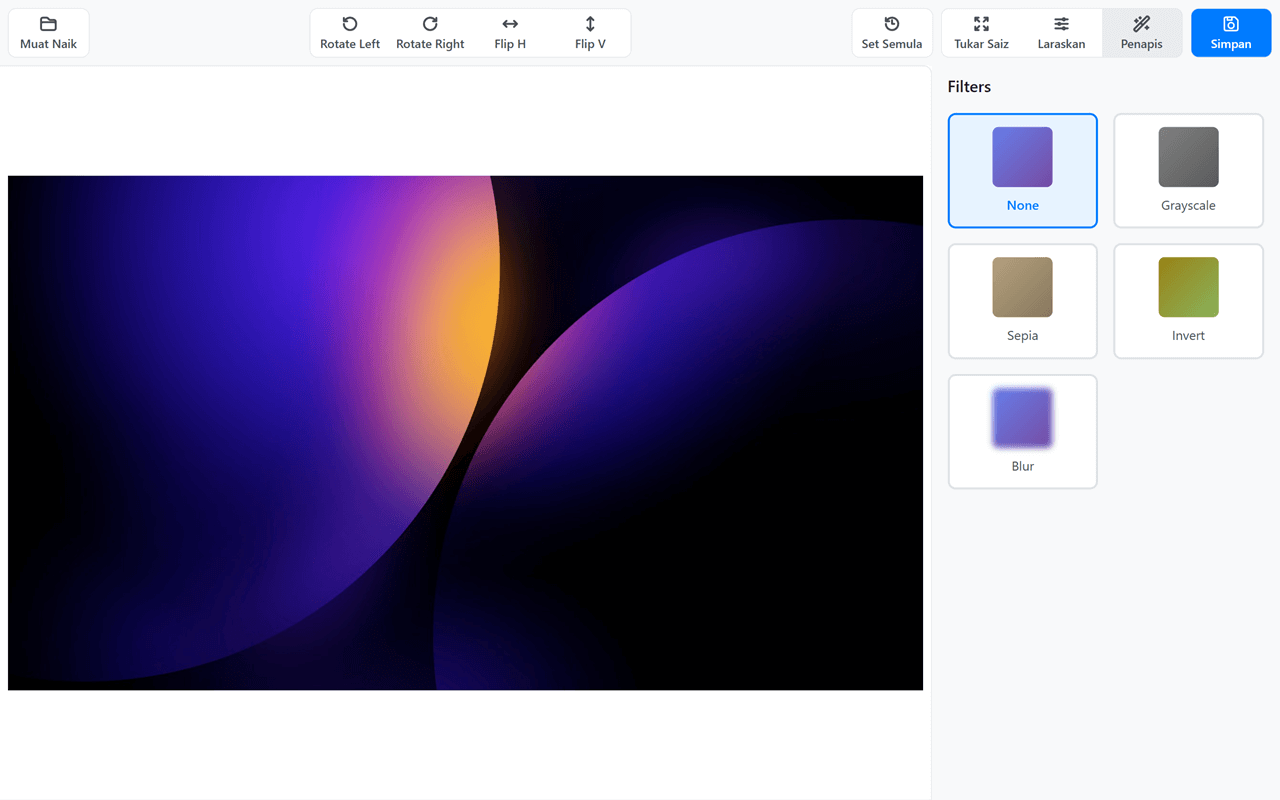
|
|
5
|
+
|
|
6
|
+
## Quick Start
|
|
7
|
+
|
|
8
|
+
### Development
|
|
9
|
+
|
|
10
|
+
1. **Install dependencies:**
|
|
11
|
+
|
|
12
|
+
```bash
|
|
13
|
+
npm install
|
|
14
|
+
```
|
|
15
|
+
2. **Start development server:**
|
|
16
|
+
|
|
17
|
+
```bash
|
|
18
|
+
npm run dev
|
|
19
|
+
```
|
|
20
|
+
|
|
21
|
+
This will start a dev server at `http://localhost:3000` with hot reloading.
|
|
22
|
+
3. **Build for production:**
|
|
23
|
+
|
|
24
|
+
```bash
|
|
25
|
+
npm run build
|
|
26
|
+
```
|
|
27
|
+
|
|
28
|
+
This creates optimized files in the `dist/` directory.
|
|
29
|
+
|
|
30
|
+
### Using the Library
|
|
31
|
+
|
|
32
|
+
#### Include the built files:
|
|
33
|
+
|
|
34
|
+
```html
|
|
35
|
+
<link rel="stylesheet" href="dist/swp.min.css">
|
|
36
|
+
<script src="dist/swp.min.js"></script>
|
|
37
|
+
```
|
|
38
|
+
|
|
39
|
+
#### Or use source files directly:
|
|
40
|
+
|
|
41
|
+
```html
|
|
42
|
+
<link rel="stylesheet" href="src/css/swp.css">
|
|
43
|
+
<script src="src/js/swp.js"></script>
|
|
44
|
+
```
|
|
45
|
+
|
|
46
|
+
## Features
|
|
47
|
+
|
|
48
|
+
- Cropping** - Select and crop image areas with predefined aspect ratios
|
|
49
|
+
- Rotating** - Rotate images in 90-degree increments
|
|
50
|
+
- Flipping** - Flip images horizontally and vertically
|
|
51
|
+
- Adjustments** - Fine-tune brightness, contrast, and saturation
|
|
52
|
+
- Filters** - Apply pre-defined filters (Grayscale, Sepia, Invert, Blur)
|
|
53
|
+
- **Export** - Save edited images in JPEG or PNG format
|
|
54
|
+
|
|
55
|
+
## Usage
|
|
56
|
+
|
|
57
|
+
### Programmatic Approach
|
|
58
|
+
|
|
59
|
+
```html
|
|
60
|
+
<div id="photobooth-container"></div>
|
|
61
|
+
|
|
62
|
+
<script>
|
|
63
|
+
const container = document.getElementById('photobooth-container');
|
|
64
|
+
const swp = new SWP(container, {
|
|
65
|
+
imageUrl: 'path/to/your/image.jpg',
|
|
66
|
+
width: 800,
|
|
67
|
+
height: 600
|
|
68
|
+
});
|
|
69
|
+
|
|
70
|
+
// Listen to events
|
|
71
|
+
swp.on('load', () => console.log('Image loaded'));
|
|
72
|
+
swp.on('change', () => console.log('Image changed'));
|
|
73
|
+
swp.on('save', () => console.log('Image saved'));
|
|
74
|
+
</script>
|
|
75
|
+
```
|
|
76
|
+
|
|
77
|
+
### Declarative Approach
|
|
78
|
+
|
|
79
|
+
Use HTML data attributes for zero-JavaScript configuration:
|
|
80
|
+
|
|
81
|
+
```html
|
|
82
|
+
<!-- Basic -->
|
|
83
|
+
<div data-swp></div>
|
|
84
|
+
|
|
85
|
+
<!-- With configuration -->
|
|
86
|
+
<div data-swp
|
|
87
|
+
data-swp-width="900"
|
|
88
|
+
data-swp-height="600"
|
|
89
|
+
data-swp-show-labels="false"></div>
|
|
90
|
+
|
|
91
|
+
<!-- With custom labels (simple format) -->
|
|
92
|
+
<div data-swp
|
|
93
|
+
data-swp-labels="upload: 'Muat Naik'; save: 'Simpan'; reset: 'Set Semula'"></div>
|
|
94
|
+
|
|
95
|
+
<!-- With custom labels (JSON format) -->
|
|
96
|
+
<div data-swp
|
|
97
|
+
data-swp-labels='{"upload":"Télécharger","save":"Enregistrer"}'></div>
|
|
98
|
+
```
|
|
99
|
+
|
|
100
|
+
**Available Data Attributes:**
|
|
101
|
+
|
|
102
|
+
- `data-swp` - Enable auto-initialization
|
|
103
|
+
- `data-swp-width` - Canvas width (number)
|
|
104
|
+
- `data-swp-height` - Canvas height (number)
|
|
105
|
+
- `data-swp-image-url` - Initial image URL
|
|
106
|
+
- `data-swp-show-icons` - Show/hide icons ("true" or "false")
|
|
107
|
+
- `data-swp-show-labels` - Show/hide labels ("true" or "false")
|
|
108
|
+
- `data-swp-labels` - Custom labels (see formats above)
|
|
109
|
+
|
|
110
|
+
The library will automatically initialize when the DOM is ready.
|
|
111
|
+
|
|
112
|
+
## API Reference
|
|
113
|
+
|
|
114
|
+
### Initialization
|
|
115
|
+
|
|
116
|
+
```javascript
|
|
117
|
+
const swp = new SWP(container, options);
|
|
118
|
+
```
|
|
119
|
+
|
|
120
|
+
**Options:**
|
|
121
|
+
|
|
122
|
+
- `imageUrl` (String) - URL of the image to load
|
|
123
|
+
- `width` (Number) - Width of the editor in pixels (default: 800)
|
|
124
|
+
- `height` (Number) - Height of the editor in pixels (default: 600)
|
|
125
|
+
- `showIcons` (Boolean) - Show icons in toolbar buttons (default: true)
|
|
126
|
+
- `showLabels` (Boolean) - Show text labels in toolbar buttons (default: true)
|
|
127
|
+
- `labels` (Object) - Custom labels for toolbar buttons
|
|
128
|
+
- `upload` (String|null) - Label for upload button (default: 'Upload')
|
|
129
|
+
- `rotateLeft` (String|null) - Label for rotate left button (default: null)
|
|
130
|
+
- `rotateRight` (String|null) - Label for rotate right button (default: null)
|
|
131
|
+
- `flipH` (String|null) - Label for flip horizontal button (default: null)
|
|
132
|
+
- `flipV` (String|null) - Label for flip vertical button (default: null)
|
|
133
|
+
- `resize` (String|null) - Label for resize button (default: 'Resize')
|
|
134
|
+
- `adjust` (String|null) - Label for adjustments button (default: 'Adjust')
|
|
135
|
+
- `filters` (String|null) - Label for filters button (default: 'Filters')
|
|
136
|
+
- `reset` (String|null) - Label for reset button (default: 'Reset')
|
|
137
|
+
- `save` (String|null) - Label for save button (default: 'Save')
|
|
138
|
+
|
|
139
|
+
**Customization Examples:**
|
|
140
|
+
|
|
141
|
+
```javascript
|
|
142
|
+
// Icons only (compact view)
|
|
143
|
+
const swp = new SWP(container, {
|
|
144
|
+
showLabels: false
|
|
145
|
+
});
|
|
146
|
+
|
|
147
|
+
// Custom labels (multilingual support)
|
|
148
|
+
const swp = new SWP(container, {
|
|
149
|
+
labels: {
|
|
150
|
+
upload: 'Télécharger',
|
|
151
|
+
save: 'Enregistrer',
|
|
152
|
+
reset: 'Réinitialiser'
|
|
153
|
+
}
|
|
154
|
+
});
|
|
155
|
+
|
|
156
|
+
// Hide specific labels (set to null)
|
|
157
|
+
const swp = new SWP(container, {
|
|
158
|
+
labels: {
|
|
159
|
+
rotateLeft: null, // No label, icon only
|
|
160
|
+
rotateRight: null
|
|
161
|
+
}
|
|
162
|
+
});
|
|
163
|
+
|
|
164
|
+
// Show labels for rotate and flip buttons
|
|
165
|
+
const swp = new SWP(container, {
|
|
166
|
+
labels: {
|
|
167
|
+
rotateLeft: 'Rotate Left',
|
|
168
|
+
rotateRight: 'Rotate Right',
|
|
169
|
+
flipH: 'Flip Horizontal',
|
|
170
|
+
flipV: 'Flip Vertical'
|
|
171
|
+
}
|
|
172
|
+
});
|
|
173
|
+
```
|
|
174
|
+
|
|
175
|
+
**Note:** By default, `rotateLeft`, `rotateRight`, `flipH`, and `flipV` have `null` labels (icon-only display) to keep the toolbar compact. You can add custom labels to these buttons as shown above.
|
|
176
|
+
|
|
177
|
+
### Methods
|
|
178
|
+
|
|
179
|
+
#### `loadImage(imageUrl)`
|
|
180
|
+
|
|
181
|
+
Load a new image into the editor.
|
|
182
|
+
|
|
183
|
+
```javascript
|
|
184
|
+
swp.loadImage('path/to/image.jpg');
|
|
185
|
+
```
|
|
186
|
+
|
|
187
|
+
#### `rotate(degrees)`
|
|
188
|
+
|
|
189
|
+
Rotate the image by specified degrees.
|
|
190
|
+
|
|
191
|
+
```javascript
|
|
192
|
+
swp.rotate(90); // Rotate 90 degrees clockwise
|
|
193
|
+
swp.rotate(-90); // Rotate 90 degrees counter-clockwise
|
|
194
|
+
```
|
|
195
|
+
|
|
196
|
+
#### `flip(direction)`
|
|
197
|
+
|
|
198
|
+
Flip the image horizontally or vertically.
|
|
199
|
+
|
|
200
|
+
```javascript
|
|
201
|
+
swp.flip('horizontal');
|
|
202
|
+
swp.flip('vertical');
|
|
203
|
+
```
|
|
204
|
+
|
|
205
|
+
#### `setAdjustment(adjustment, value)`
|
|
206
|
+
|
|
207
|
+
Apply adjustments to the image.
|
|
208
|
+
|
|
209
|
+
```javascript
|
|
210
|
+
swp.setAdjustment('brightness', 150); // Range: 0-200
|
|
211
|
+
swp.setAdjustment('contrast', 120); // Range: 0-200
|
|
212
|
+
swp.setAdjustment('saturation', 80); // Range: 0-200
|
|
213
|
+
```
|
|
214
|
+
|
|
215
|
+
#### `applyFilter(filterName)`
|
|
216
|
+
|
|
217
|
+
Apply a pre-defined filter.
|
|
218
|
+
|
|
219
|
+
```javascript
|
|
220
|
+
swp.applyFilter('grayscale');
|
|
221
|
+
swp.applyFilter('sepia');
|
|
222
|
+
swp.applyFilter('invert');
|
|
223
|
+
swp.applyFilter('blur');
|
|
224
|
+
swp.applyFilter('none'); // Remove filter
|
|
225
|
+
```
|
|
226
|
+
|
|
227
|
+
#### `crop(x, y, width, height)`
|
|
228
|
+
|
|
229
|
+
Crop the image to specified dimensions.
|
|
230
|
+
|
|
231
|
+
```javascript
|
|
232
|
+
swp.crop(100, 100, 400, 300);
|
|
233
|
+
```
|
|
234
|
+
|
|
235
|
+
#### `reset()`
|
|
236
|
+
|
|
237
|
+
Reset all edits and revert to original image.
|
|
238
|
+
|
|
239
|
+
```javascript
|
|
240
|
+
swp.reset();
|
|
241
|
+
```
|
|
242
|
+
|
|
243
|
+
#### `getImageData(format, quality)`
|
|
244
|
+
|
|
245
|
+
Export the edited image data.
|
|
246
|
+
|
|
247
|
+
```javascript
|
|
248
|
+
const dataUrl = swp.getImageData('png'); // PNG format
|
|
249
|
+
const dataUrl = swp.getImageData('jpeg', 0.9); // JPEG with 90% quality
|
|
250
|
+
```
|
|
251
|
+
|
|
252
|
+
### Events
|
|
253
|
+
|
|
254
|
+
Listen to events using the `on()` method:
|
|
255
|
+
|
|
256
|
+
```javascript
|
|
257
|
+
swp.on('load', () => {
|
|
258
|
+
console.log('Image loaded successfully');
|
|
259
|
+
});
|
|
260
|
+
|
|
261
|
+
swp.on('change', () => {
|
|
262
|
+
console.log('Image has been edited');
|
|
263
|
+
});
|
|
264
|
+
|
|
265
|
+
swp.on('save', () => {
|
|
266
|
+
console.log('Image saved');
|
|
267
|
+
});
|
|
268
|
+
```
|
|
269
|
+
|
|
270
|
+
## NPM Scripts
|
|
271
|
+
|
|
272
|
+
- `npm run dev` - Start development server with hot reload
|
|
273
|
+
- `npm run build` - Build for production
|
|
274
|
+
|
|
275
|
+
## Browser Compatibility
|
|
276
|
+
|
|
277
|
+
SWP works on all modern browsers that support HTML5 Canvas API and CSS filters:
|
|
278
|
+
|
|
279
|
+
- ✅ Chrome (latest 2 versions)
|
|
280
|
+
- ✅ Firefox (latest 2 versions)
|
|
281
|
+
- ✅ Edge (latest 2 versions)
|
|
282
|
+
- ✅ Safari (latest 2 versions)
|
|
283
|
+
|
|
284
|
+
## License
|
|
285
|
+
|
|
286
|
+
MIT License - Feel free to use in your projects!
|
|
287
|
+
|
|
288
|
+
## Contributing
|
|
289
|
+
|
|
290
|
+
Contributions are welcome! Please feel free to submit a Pull Request.
|
|
291
|
+
|
|
292
|
+
## Future Enhancements
|
|
293
|
+
|
|
294
|
+
- More filters and adjustments
|
|
295
|
+
- Text and sticker overlays
|
|
296
|
+
- Touch gesture support
|
|
297
|
+
- Framework integrations (React, Vue, Angular)
|
package/dist/styles.js
ADDED
|
@@ -0,0 +1 @@
|
|
|
1
|
+
!function(e,t){"object"==typeof exports&&"object"==typeof module?module.exports=t():"function"==typeof define&&define.amd?define([],t):"object"==typeof exports?exports.SWP=t():e.SWP=t()}(this,()=>(()=>{"use strict";var e={};return e.default})());
|