senangwebs-photobooth 1.0.1 → 1.0.2
This diff represents the content of publicly available package versions that have been released to one of the supported registries. The information contained in this diff is provided for informational purposes only and reflects changes between package versions as they appear in their respective public registries.
- package/README.md +72 -72
- package/dist/swp.css +261 -255
- package/dist/swp.js +1 -1
- package/package.json +4 -1
- package/src/css/swp.css +261 -255
- package/src/js/swp.js +713 -611
- package/swp_preview.png +0 -0
- package/spec.md +0 -239
package/README.md
CHANGED
|
@@ -1,6 +1,7 @@
|
|
|
1
1
|
# SenangWebs Photobooth (SWP)
|
|
2
2
|
|
|
3
3
|
A lightweight and easy-to-use JavaScript library for client-side photo editing. No dependencies, no server-side processing - everything happens in your browser!
|
|
4
|
+
|
|
4
5
|
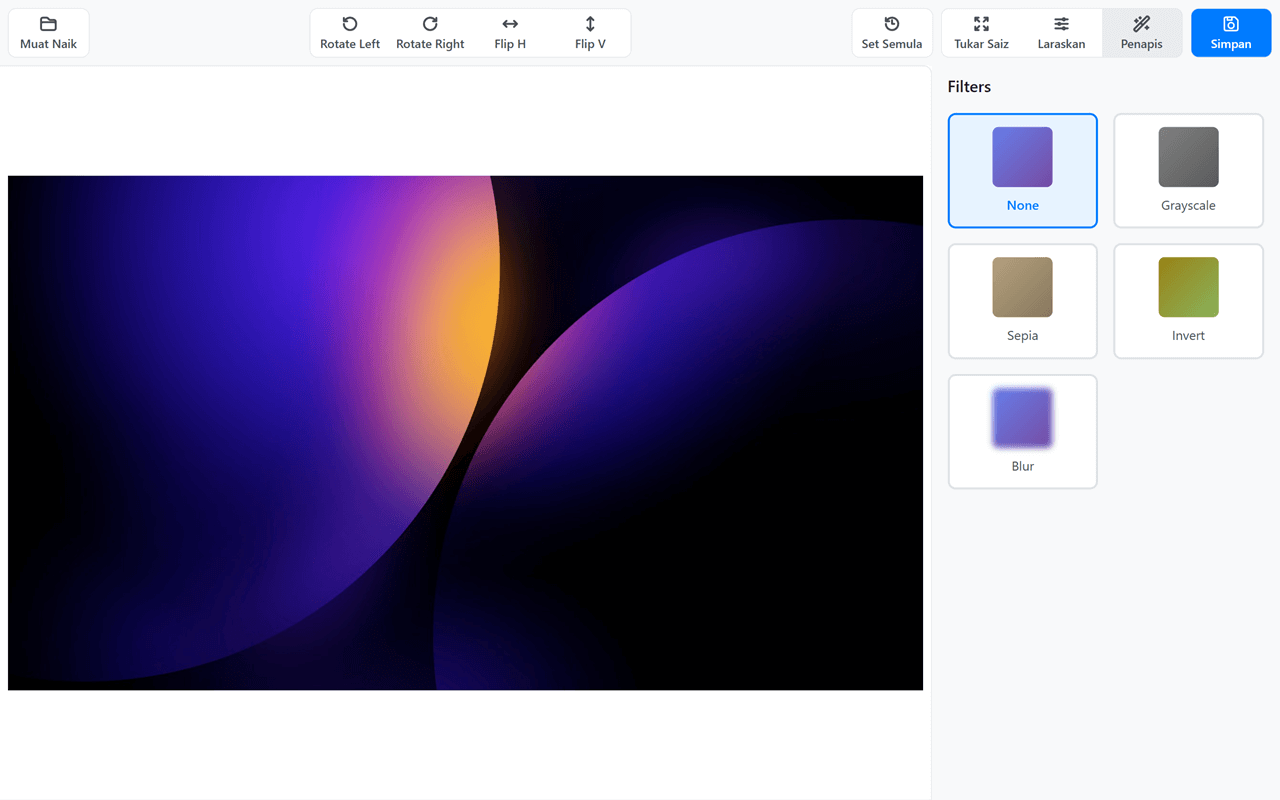
|
|
5
6
|
|
|
6
7
|
## Quick Start
|
|
@@ -12,6 +13,7 @@ A lightweight and easy-to-use JavaScript library for client-side photo editing.
|
|
|
12
13
|
```bash
|
|
13
14
|
npm install
|
|
14
15
|
```
|
|
16
|
+
|
|
15
17
|
2. **Start development server:**
|
|
16
18
|
|
|
17
19
|
```bash
|
|
@@ -19,6 +21,7 @@ A lightweight and easy-to-use JavaScript library for client-side photo editing.
|
|
|
19
21
|
```
|
|
20
22
|
|
|
21
23
|
This will start a dev server at `http://localhost:3000` with hot reloading.
|
|
24
|
+
|
|
22
25
|
3. **Build for production:**
|
|
23
26
|
|
|
24
27
|
```bash
|
|
@@ -32,24 +35,24 @@ A lightweight and easy-to-use JavaScript library for client-side photo editing.
|
|
|
32
35
|
#### Include the built files:
|
|
33
36
|
|
|
34
37
|
```html
|
|
35
|
-
<link rel="stylesheet" href="dist/swp.min.css"
|
|
38
|
+
<link rel="stylesheet" href="dist/swp.min.css" />
|
|
36
39
|
<script src="dist/swp.min.js"></script>
|
|
37
40
|
```
|
|
38
41
|
|
|
39
42
|
#### Or use source files directly:
|
|
40
43
|
|
|
41
44
|
```html
|
|
42
|
-
<link rel="stylesheet" href="src/css/swp.css"
|
|
45
|
+
<link rel="stylesheet" href="src/css/swp.css" />
|
|
43
46
|
<script src="src/js/swp.js"></script>
|
|
44
47
|
```
|
|
45
48
|
|
|
46
49
|
## Features
|
|
47
50
|
|
|
48
|
-
- Cropping
|
|
49
|
-
- Rotating
|
|
50
|
-
- Flipping
|
|
51
|
-
- Adjustments
|
|
52
|
-
- Filters
|
|
51
|
+
- Cropping\*\* - Select and crop image areas with predefined aspect ratios
|
|
52
|
+
- Rotating\*\* - Rotate images in 90-degree increments
|
|
53
|
+
- Flipping\*\* - Flip images horizontally and vertically
|
|
54
|
+
- Adjustments\*\* - Fine-tune brightness, contrast, and saturation
|
|
55
|
+
- Filters\*\* - Apply pre-defined filters (Grayscale, Sepia, Invert, Blur)
|
|
53
56
|
- **Export** - Save edited images in JPEG or PNG format
|
|
54
57
|
|
|
55
58
|
## Usage
|
|
@@ -60,17 +63,17 @@ A lightweight and easy-to-use JavaScript library for client-side photo editing.
|
|
|
60
63
|
<div id="photobooth-container"></div>
|
|
61
64
|
|
|
62
65
|
<script>
|
|
63
|
-
|
|
64
|
-
|
|
65
|
-
|
|
66
|
-
|
|
67
|
-
|
|
68
|
-
|
|
69
|
-
|
|
70
|
-
|
|
71
|
-
|
|
72
|
-
|
|
73
|
-
|
|
66
|
+
const container = document.getElementById("photobooth-container");
|
|
67
|
+
const swp = new SWP(container, {
|
|
68
|
+
imageUrl: "path/to/your/image.jpg",
|
|
69
|
+
width: 800,
|
|
70
|
+
height: 600,
|
|
71
|
+
});
|
|
72
|
+
|
|
73
|
+
// Listen to events
|
|
74
|
+
swp.on("load", () => console.log("Image loaded"));
|
|
75
|
+
swp.on("change", () => console.log("Image changed"));
|
|
76
|
+
swp.on("save", () => console.log("Image saved"));
|
|
74
77
|
</script>
|
|
75
78
|
```
|
|
76
79
|
|
|
@@ -83,18 +86,24 @@ Use HTML data attributes for zero-JavaScript configuration:
|
|
|
83
86
|
<div data-swp></div>
|
|
84
87
|
|
|
85
88
|
<!-- With configuration -->
|
|
86
|
-
<div
|
|
87
|
-
|
|
88
|
-
|
|
89
|
-
|
|
89
|
+
<div
|
|
90
|
+
data-swp
|
|
91
|
+
data-swp-width="900"
|
|
92
|
+
data-swp-height="600"
|
|
93
|
+
data-swp-show-labels="false"
|
|
94
|
+
></div>
|
|
90
95
|
|
|
91
96
|
<!-- With custom labels (simple format) -->
|
|
92
|
-
<div
|
|
93
|
-
|
|
97
|
+
<div
|
|
98
|
+
data-swp
|
|
99
|
+
data-swp-labels="upload: 'Muat Naik'; save: 'Simpan'; reset: 'Set Semula'"
|
|
100
|
+
></div>
|
|
94
101
|
|
|
95
102
|
<!-- With custom labels (JSON format) -->
|
|
96
|
-
<div
|
|
97
|
-
|
|
103
|
+
<div
|
|
104
|
+
data-swp
|
|
105
|
+
data-swp-labels='{"upload":"Télécharger","save":"Enregistrer"}'
|
|
106
|
+
></div>
|
|
98
107
|
```
|
|
99
108
|
|
|
100
109
|
**Available Data Attributes:**
|
|
@@ -141,34 +150,34 @@ const swp = new SWP(container, options);
|
|
|
141
150
|
```javascript
|
|
142
151
|
// Icons only (compact view)
|
|
143
152
|
const swp = new SWP(container, {
|
|
144
|
-
|
|
153
|
+
showLabels: false,
|
|
145
154
|
});
|
|
146
155
|
|
|
147
156
|
// Custom labels (multilingual support)
|
|
148
157
|
const swp = new SWP(container, {
|
|
149
|
-
|
|
150
|
-
|
|
151
|
-
|
|
152
|
-
|
|
153
|
-
|
|
158
|
+
labels: {
|
|
159
|
+
upload: "Télécharger",
|
|
160
|
+
save: "Enregistrer",
|
|
161
|
+
reset: "Réinitialiser",
|
|
162
|
+
},
|
|
154
163
|
});
|
|
155
164
|
|
|
156
165
|
// Hide specific labels (set to null)
|
|
157
166
|
const swp = new SWP(container, {
|
|
158
|
-
|
|
159
|
-
|
|
160
|
-
|
|
161
|
-
|
|
167
|
+
labels: {
|
|
168
|
+
rotateLeft: null, // No label, icon only
|
|
169
|
+
rotateRight: null,
|
|
170
|
+
},
|
|
162
171
|
});
|
|
163
172
|
|
|
164
173
|
// Show labels for rotate and flip buttons
|
|
165
174
|
const swp = new SWP(container, {
|
|
166
|
-
|
|
167
|
-
|
|
168
|
-
|
|
169
|
-
|
|
170
|
-
|
|
171
|
-
|
|
175
|
+
labels: {
|
|
176
|
+
rotateLeft: "Rotate Left",
|
|
177
|
+
rotateRight: "Rotate Right",
|
|
178
|
+
flipH: "Flip Horizontal",
|
|
179
|
+
flipV: "Flip Vertical",
|
|
180
|
+
},
|
|
172
181
|
});
|
|
173
182
|
```
|
|
174
183
|
|
|
@@ -181,7 +190,7 @@ const swp = new SWP(container, {
|
|
|
181
190
|
Load a new image into the editor.
|
|
182
191
|
|
|
183
192
|
```javascript
|
|
184
|
-
swp.loadImage(
|
|
193
|
+
swp.loadImage("path/to/image.jpg");
|
|
185
194
|
```
|
|
186
195
|
|
|
187
196
|
#### `rotate(degrees)`
|
|
@@ -189,7 +198,7 @@ swp.loadImage('path/to/image.jpg');
|
|
|
189
198
|
Rotate the image by specified degrees.
|
|
190
199
|
|
|
191
200
|
```javascript
|
|
192
|
-
swp.rotate(90);
|
|
201
|
+
swp.rotate(90); // Rotate 90 degrees clockwise
|
|
193
202
|
swp.rotate(-90); // Rotate 90 degrees counter-clockwise
|
|
194
203
|
```
|
|
195
204
|
|
|
@@ -198,8 +207,8 @@ swp.rotate(-90); // Rotate 90 degrees counter-clockwise
|
|
|
198
207
|
Flip the image horizontally or vertically.
|
|
199
208
|
|
|
200
209
|
```javascript
|
|
201
|
-
swp.flip(
|
|
202
|
-
swp.flip(
|
|
210
|
+
swp.flip("horizontal");
|
|
211
|
+
swp.flip("vertical");
|
|
203
212
|
```
|
|
204
213
|
|
|
205
214
|
#### `setAdjustment(adjustment, value)`
|
|
@@ -207,9 +216,9 @@ swp.flip('vertical');
|
|
|
207
216
|
Apply adjustments to the image.
|
|
208
217
|
|
|
209
218
|
```javascript
|
|
210
|
-
swp.setAdjustment(
|
|
211
|
-
swp.setAdjustment(
|
|
212
|
-
swp.setAdjustment(
|
|
219
|
+
swp.setAdjustment("brightness", 150); // Range: 0-200
|
|
220
|
+
swp.setAdjustment("contrast", 120); // Range: 0-200
|
|
221
|
+
swp.setAdjustment("saturation", 80); // Range: 0-200
|
|
213
222
|
```
|
|
214
223
|
|
|
215
224
|
#### `applyFilter(filterName)`
|
|
@@ -217,11 +226,11 @@ swp.setAdjustment('saturation', 80); // Range: 0-200
|
|
|
217
226
|
Apply a pre-defined filter.
|
|
218
227
|
|
|
219
228
|
```javascript
|
|
220
|
-
swp.applyFilter(
|
|
221
|
-
swp.applyFilter(
|
|
222
|
-
swp.applyFilter(
|
|
223
|
-
swp.applyFilter(
|
|
224
|
-
swp.applyFilter(
|
|
229
|
+
swp.applyFilter("grayscale");
|
|
230
|
+
swp.applyFilter("sepia");
|
|
231
|
+
swp.applyFilter("invert");
|
|
232
|
+
swp.applyFilter("blur");
|
|
233
|
+
swp.applyFilter("none"); // Remove filter
|
|
225
234
|
```
|
|
226
235
|
|
|
227
236
|
#### `crop(x, y, width, height)`
|
|
@@ -245,8 +254,8 @@ swp.reset();
|
|
|
245
254
|
Export the edited image data.
|
|
246
255
|
|
|
247
256
|
```javascript
|
|
248
|
-
const dataUrl = swp.getImageData(
|
|
249
|
-
const dataUrl = swp.getImageData(
|
|
257
|
+
const dataUrl = swp.getImageData("png"); // PNG format
|
|
258
|
+
const dataUrl = swp.getImageData("jpeg", 0.9); // JPEG with 90% quality
|
|
250
259
|
```
|
|
251
260
|
|
|
252
261
|
### Events
|
|
@@ -254,16 +263,16 @@ const dataUrl = swp.getImageData('jpeg', 0.9); // JPEG with 90% quality
|
|
|
254
263
|
Listen to events using the `on()` method:
|
|
255
264
|
|
|
256
265
|
```javascript
|
|
257
|
-
swp.on(
|
|
258
|
-
|
|
266
|
+
swp.on("load", () => {
|
|
267
|
+
console.log("Image loaded successfully");
|
|
259
268
|
});
|
|
260
269
|
|
|
261
|
-
swp.on(
|
|
262
|
-
|
|
270
|
+
swp.on("change", () => {
|
|
271
|
+
console.log("Image has been edited");
|
|
263
272
|
});
|
|
264
273
|
|
|
265
|
-
swp.on(
|
|
266
|
-
|
|
274
|
+
swp.on("save", () => {
|
|
275
|
+
console.log("Image saved");
|
|
267
276
|
});
|
|
268
277
|
```
|
|
269
278
|
|
|
@@ -272,18 +281,9 @@ swp.on('save', () => {
|
|
|
272
281
|
- `npm run dev` - Start development server with hot reload
|
|
273
282
|
- `npm run build` - Build for production
|
|
274
283
|
|
|
275
|
-
## Browser Compatibility
|
|
276
|
-
|
|
277
|
-
SWP works on all modern browsers that support HTML5 Canvas API and CSS filters:
|
|
278
|
-
|
|
279
|
-
- ✅ Chrome (latest 2 versions)
|
|
280
|
-
- ✅ Firefox (latest 2 versions)
|
|
281
|
-
- ✅ Edge (latest 2 versions)
|
|
282
|
-
- ✅ Safari (latest 2 versions)
|
|
283
|
-
|
|
284
284
|
## License
|
|
285
285
|
|
|
286
|
-
MIT License
|
|
286
|
+
MIT License
|
|
287
287
|
|
|
288
288
|
## Contributing
|
|
289
289
|
|