scrible 1.0.4 → 1.0.6
This diff represents the content of publicly available package versions that have been released to one of the supported registries. The information contained in this diff is provided for informational purposes only and reflects changes between package versions as they appear in their respective public registries.
- package/README.md +306 -306
- package/dist/scrible.cjs.js +11 -3
- package/dist/scrible.es.js +1183 -830
- package/dist/scrible.umd.js +11 -3
- package/package.json +82 -75
package/README.md
CHANGED
|
@@ -1,306 +1,306 @@
|
|
|
1
|
-
# Scrible ✍️
|
|
2
|
-
|
|
3
|
-
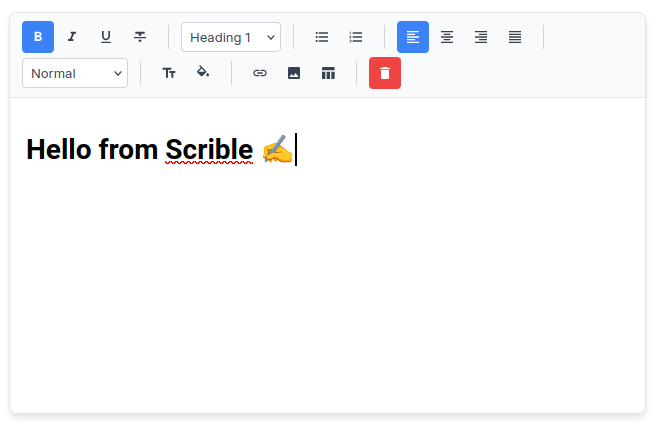
**A powerful, customizable rich text editor for React** - Built with Slate.js, outputs clean HTML, and offers Notion-like editing experience.
|
|
4
|
-
|
|
5
|
-
|
|
6
|
-
|
|
7
|
-
[](https://www.npmjs.com/package/scrible)
|
|
8
|
-
[](https://opensource.org/licenses/MIT)
|
|
9
|
-
|
|
10
|
-
## ✨ Features
|
|
11
|
-
|
|
12
|
-
- 🎨 **Fully Customizable** - Choose which features to include
|
|
13
|
-
- 📝 **Rich Text Formatting** - Bold, italic, underline, strikethrough
|
|
14
|
-
- 🎨 **Color Customization** - Text and background color pickers with 24 preset colors
|
|
15
|
-
- 📑 **Multiple Heading Levels** - H1, H2, H3 with semantic markup
|
|
16
|
-
- 📋 **Lists** - Bulleted and numbered lists
|
|
17
|
-
- 📊 **Tables** - Full table support with easy insertion
|
|
18
|
-
- 🖼️ **Images** - Upload and resize images with drag handles
|
|
19
|
-
- 🔗 **Links** - Automatic link detection and manual insertion
|
|
20
|
-
- ↔️ **Text Alignment** - Left, center, right, justify
|
|
21
|
-
- 📏 **Font Sizes** - Multiple size options
|
|
22
|
-
- 💾 **Clean HTML Output** - Semantic HTML like Quill.js
|
|
23
|
-
- ⌨️ **Keyboard Shortcuts** - Standard shortcuts (Ctrl+B, Ctrl+I, etc.)
|
|
24
|
-
- 📱 **Responsive** - Works great on desktop and mobile
|
|
25
|
-
- 🎯 **TypeScript Ready** - Full type support
|
|
26
|
-
|
|
27
|
-
## 📦 Installation
|
|
28
|
-
|
|
29
|
-
```bash
|
|
30
|
-
npm install scrible slate slate-react slate-history
|
|
31
|
-
```
|
|
32
|
-
|
|
33
|
-
or
|
|
34
|
-
|
|
35
|
-
```bash
|
|
36
|
-
yarn add scrible slate slate-react slate-history
|
|
37
|
-
```
|
|
38
|
-
|
|
39
|
-
## 🚀 Quick Start
|
|
40
|
-
|
|
41
|
-
```jsx
|
|
42
|
-
import React, { useState } from 'react';
|
|
43
|
-
import ScribleEditor from 'scrible';
|
|
44
|
-
import 'scrible/dist/scrible.css';
|
|
45
|
-
|
|
46
|
-
function App() {
|
|
47
|
-
const [content, setContent] = useState('');
|
|
48
|
-
|
|
49
|
-
const handleChange = (htmlContent, slateValue) => {
|
|
50
|
-
setContent(htmlContent);
|
|
51
|
-
};
|
|
52
|
-
|
|
53
|
-
return (
|
|
54
|
-
<ScribleEditor
|
|
55
|
-
onChange={handleChange}
|
|
56
|
-
placeholder="Start writing..."
|
|
57
|
-
/>
|
|
58
|
-
);
|
|
59
|
-
}
|
|
60
|
-
```
|
|
61
|
-
|
|
62
|
-
**Important:** Don't forget to import the CSS file!
|
|
63
|
-
|
|
64
|
-
## 🎛️ Customizable Toolbar
|
|
65
|
-
|
|
66
|
-
Choose which features to include in your editor:
|
|
67
|
-
|
|
68
|
-
```jsx
|
|
69
|
-
import ScribleEditor from 'scrible';
|
|
70
|
-
import 'scrible/dist/scrible.css';
|
|
71
|
-
|
|
72
|
-
function CustomEditor() {
|
|
73
|
-
const [content, setContent] = useState('');
|
|
74
|
-
|
|
75
|
-
// Only include the features you need
|
|
76
|
-
const features = [
|
|
77
|
-
'bold',
|
|
78
|
-
'italic',
|
|
79
|
-
'underline',
|
|
80
|
-
'headings',
|
|
81
|
-
'lists',
|
|
82
|
-
'link',
|
|
83
|
-
'image'
|
|
84
|
-
];
|
|
85
|
-
|
|
86
|
-
return (
|
|
87
|
-
<ScribleEditor
|
|
88
|
-
features={features}
|
|
89
|
-
onChange={(html) => setContent(html)}
|
|
90
|
-
placeholder="Minimal editor..."
|
|
91
|
-
/>
|
|
92
|
-
);
|
|
93
|
-
}
|
|
94
|
-
```
|
|
95
|
-
|
|
96
|
-
### Available Features
|
|
97
|
-
|
|
98
|
-
| Feature | Description |
|
|
99
|
-
|---------|-------------|
|
|
100
|
-
| `bold` | Bold text formatting |
|
|
101
|
-
| `italic` | Italic text formatting |
|
|
102
|
-
| `underline` | Underline text formatting |
|
|
103
|
-
| `strikethrough` | Strikethrough text formatting |
|
|
104
|
-
| `headings` | H1, H2, H3, blockquote |
|
|
105
|
-
| `lists` | Bulleted and numbered lists |
|
|
106
|
-
| `alignment` | Text alignment (left, center, right, justify) |
|
|
107
|
-
| `fontSize` | Font size options |
|
|
108
|
-
| `textColor` | Text color picker with presets and custom colors |
|
|
109
|
-
| `backgroundColor` | Background/highlight color picker |
|
|
110
|
-
| `link` | Insert and edit links |
|
|
111
|
-
| `image` | Upload and resize images |
|
|
112
|
-
| `table` | Insert and manage tables |
|
|
113
|
-
| `clear` | Clear all content button |
|
|
114
|
-
|
|
115
|
-
## 📖 Props
|
|
116
|
-
|
|
117
|
-
| Prop | Type | Default | Description |
|
|
118
|
-
|------|------|---------|-------------|
|
|
119
|
-
| `value` | `Node[]` | `null` | Controlled Slate.js value |
|
|
120
|
-
| `onChange` | `(html: string, value: Node[]) => void` | `undefined` | Called when content changes |
|
|
121
|
-
| `placeholder` | `string` | `"Enter some text..."` | Placeholder text |
|
|
122
|
-
| `readOnly` | `boolean` | `false` | Make editor read-only |
|
|
123
|
-
| `className` | `string` | `""` | Additional CSS class |
|
|
124
|
-
| `initialValue` | `string \| Node[]` | `null` | Initial content (HTML string or Slate value) |
|
|
125
|
-
| `features` | `string[]` | All features | Array of features to include |
|
|
126
|
-
|
|
127
|
-
## 💡 Examples
|
|
128
|
-
|
|
129
|
-
### Basic Editor
|
|
130
|
-
|
|
131
|
-
```jsx
|
|
132
|
-
<ScribleEditor
|
|
133
|
-
onChange={(html) => console.log(html)}
|
|
134
|
-
placeholder="Start typing..."
|
|
135
|
-
/>
|
|
136
|
-
```
|
|
137
|
-
|
|
138
|
-
### Minimal Editor (Only Basic Formatting)
|
|
139
|
-
|
|
140
|
-
```jsx
|
|
141
|
-
<ScribleEditor
|
|
142
|
-
features={['bold', 'italic', 'underline', 'clear']}
|
|
143
|
-
onChange={(html) => console.log(html)}
|
|
144
|
-
placeholder="Simple editor..."
|
|
145
|
-
/>
|
|
146
|
-
```
|
|
147
|
-
|
|
148
|
-
### Blog Editor (No Tables)
|
|
149
|
-
|
|
150
|
-
```jsx
|
|
151
|
-
<ScribleEditor
|
|
152
|
-
features={[
|
|
153
|
-
'bold', 'italic', 'underline', 'strikethrough',
|
|
154
|
-
'headings', 'lists', 'alignment',
|
|
155
|
-
'textColor', 'backgroundColor',
|
|
156
|
-
'link', 'image', 'clear'
|
|
157
|
-
]}
|
|
158
|
-
onChange={(html) => console.log(html)}
|
|
159
|
-
placeholder="Write your blog post..."
|
|
160
|
-
/>
|
|
161
|
-
```
|
|
162
|
-
|
|
163
|
-
### Editor with Color Highlighting
|
|
164
|
-
|
|
165
|
-
```jsx
|
|
166
|
-
<ScribleEditor
|
|
167
|
-
features={[
|
|
168
|
-
'bold', 'italic', 'underline',
|
|
169
|
-
'textColor', 'backgroundColor',
|
|
170
|
-
'clear'
|
|
171
|
-
]}
|
|
172
|
-
onChange={(html) => console.log(html)}
|
|
173
|
-
placeholder="Highlight important text..."
|
|
174
|
-
/>
|
|
175
|
-
```
|
|
176
|
-
|
|
177
|
-
### With Initial Content
|
|
178
|
-
|
|
179
|
-
```jsx
|
|
180
|
-
const initialContent = `
|
|
181
|
-
<h1>Welcome to Scrible</h1>
|
|
182
|
-
<p>This is a <strong>powerful</strong> editor!</p>
|
|
183
|
-
`;
|
|
184
|
-
|
|
185
|
-
<ScribleEditor
|
|
186
|
-
initialValue={initialContent}
|
|
187
|
-
onChange={(html) => console.log(html)}
|
|
188
|
-
/>
|
|
189
|
-
```
|
|
190
|
-
|
|
191
|
-
### Read-Only Mode
|
|
192
|
-
|
|
193
|
-
```jsx
|
|
194
|
-
<ScribleEditor
|
|
195
|
-
initialValue={articleContent}
|
|
196
|
-
readOnly={true}
|
|
197
|
-
/>
|
|
198
|
-
```
|
|
199
|
-
|
|
200
|
-
### Check if Empty
|
|
201
|
-
|
|
202
|
-
```jsx
|
|
203
|
-
function MyEditor() {
|
|
204
|
-
const [editorValue, setEditorValue] = useState([]);
|
|
205
|
-
|
|
206
|
-
const handleChange = (html, slateValue) => {
|
|
207
|
-
setEditorValue(slateValue);
|
|
208
|
-
};
|
|
209
|
-
|
|
210
|
-
const isEmpty = editorValue.length === 0;
|
|
211
|
-
|
|
212
|
-
return (
|
|
213
|
-
<div>
|
|
214
|
-
<ScribleEditor onChange={handleChange} />
|
|
215
|
-
{isEmpty && <p>Editor is empty!</p>}
|
|
216
|
-
</div>
|
|
217
|
-
);
|
|
218
|
-
}
|
|
219
|
-
```
|
|
220
|
-
|
|
221
|
-
## 🎨 Custom Styling
|
|
222
|
-
|
|
223
|
-
Scrible comes with default styles, but you can customize the appearance:
|
|
224
|
-
|
|
225
|
-
```css
|
|
226
|
-
/* Customize the editor container */
|
|
227
|
-
.scrible-editor {
|
|
228
|
-
border: 2px solid #3b82f6;
|
|
229
|
-
border-radius: 12px;
|
|
230
|
-
}
|
|
231
|
-
|
|
232
|
-
/* Customize the toolbar */
|
|
233
|
-
.toolbar {
|
|
234
|
-
background: linear-gradient(135deg, #667eea 0%, #764ba2 100%);
|
|
235
|
-
}
|
|
236
|
-
|
|
237
|
-
/* Customize the editing area */
|
|
238
|
-
.editor-content {
|
|
239
|
-
min-height: 300px;
|
|
240
|
-
font-family: 'Georgia', serif;
|
|
241
|
-
font-size: 16px;
|
|
242
|
-
}
|
|
243
|
-
```
|
|
244
|
-
|
|
245
|
-
## ⌨️ Keyboard Shortcuts
|
|
246
|
-
|
|
247
|
-
- `Ctrl+B` - Bold
|
|
248
|
-
- `Ctrl+I` - Italic
|
|
249
|
-
- `Ctrl+U` - Underline
|
|
250
|
-
- `Ctrl+Z` - Undo
|
|
251
|
-
- `Ctrl+Shift+Z` - Redo
|
|
252
|
-
|
|
253
|
-
## 🔧 HTML Output
|
|
254
|
-
|
|
255
|
-
Scrible outputs clean, semantic HTML:
|
|
256
|
-
|
|
257
|
-
```html
|
|
258
|
-
<h1>Heading</h1>
|
|
259
|
-
<p>This is a <strong>bold</strong> paragraph with <em>italic</em> text.</p>
|
|
260
|
-
<ul>
|
|
261
|
-
<li>List item 1</li>
|
|
262
|
-
<li>List item 2</li>
|
|
263
|
-
</ul>
|
|
264
|
-
<table border="1">
|
|
265
|
-
<tr>
|
|
266
|
-
<th>Header 1</th>
|
|
267
|
-
<th>Header 2</th>
|
|
268
|
-
</tr>
|
|
269
|
-
<tr>
|
|
270
|
-
<td>Cell 1</td>
|
|
271
|
-
<td>Cell 2</td>
|
|
272
|
-
</tr>
|
|
273
|
-
</table>
|
|
274
|
-
```
|
|
275
|
-
<!--
|
|
276
|
-
## 🛠️ Development
|
|
277
|
-
|
|
278
|
-
```bash
|
|
279
|
-
# Install dependencies
|
|
280
|
-
npm install
|
|
281
|
-
|
|
282
|
-
# Start development server
|
|
283
|
-
npm run dev
|
|
284
|
-
|
|
285
|
-
# Build for production
|
|
286
|
-
npm run build
|
|
287
|
-
|
|
288
|
-
# Build library for npm
|
|
289
|
-
npm run build:lib
|
|
290
|
-
```-->
|
|
291
|
-
|
|
292
|
-
## 📄 License
|
|
293
|
-
|
|
294
|
-
MIT © Ayush Singhal
|
|
295
|
-
|
|
296
|
-
<!--## 🤝 Contributing
|
|
297
|
-
|
|
298
|
-
Contributions are welcome! Please feel free to submit a Pull Request.
|
|
299
|
-
|
|
300
|
-
## 🌟 Show Your Support
|
|
301
|
-
|
|
302
|
-
Give a ⭐️ if this project helped you!
|
|
303
|
-
|
|
304
|
-
---
|
|
305
|
-
|
|
306
|
-
**Made with ❤️ by developers, for developers**-->
|
|
1
|
+
# Scrible ✍️
|
|
2
|
+
|
|
3
|
+
**A powerful, customizable rich text editor for React** - Built with Slate.js, outputs clean HTML, and offers Notion-like editing experience.
|
|
4
|
+
|
|
5
|
+

|
|
6
|
+
|
|
7
|
+
[](https://www.npmjs.com/package/scrible)
|
|
8
|
+
[](https://opensource.org/licenses/MIT)
|
|
9
|
+
|
|
10
|
+
## ✨ Features
|
|
11
|
+
|
|
12
|
+
- 🎨 **Fully Customizable** - Choose which features to include
|
|
13
|
+
- 📝 **Rich Text Formatting** - Bold, italic, underline, strikethrough
|
|
14
|
+
- 🎨 **Color Customization** - Text and background color pickers with 24 preset colors
|
|
15
|
+
- 📑 **Multiple Heading Levels** - H1, H2, H3 with semantic markup
|
|
16
|
+
- 📋 **Lists** - Bulleted and numbered lists
|
|
17
|
+
- 📊 **Tables** - Full table support with easy insertion
|
|
18
|
+
- 🖼️ **Images** - Upload and resize images with drag handles
|
|
19
|
+
- 🔗 **Links** - Automatic link detection and manual insertion
|
|
20
|
+
- ↔️ **Text Alignment** - Left, center, right, justify
|
|
21
|
+
- 📏 **Font Sizes** - Multiple size options
|
|
22
|
+
- 💾 **Clean HTML Output** - Semantic HTML like Quill.js
|
|
23
|
+
- ⌨️ **Keyboard Shortcuts** - Standard shortcuts (Ctrl+B, Ctrl+I, etc.)
|
|
24
|
+
- 📱 **Responsive** - Works great on desktop and mobile
|
|
25
|
+
- 🎯 **TypeScript Ready** - Full type support
|
|
26
|
+
|
|
27
|
+
## 📦 Installation
|
|
28
|
+
|
|
29
|
+
```bash
|
|
30
|
+
npm install scrible slate slate-react slate-history
|
|
31
|
+
```
|
|
32
|
+
|
|
33
|
+
or
|
|
34
|
+
|
|
35
|
+
```bash
|
|
36
|
+
yarn add scrible slate slate-react slate-history
|
|
37
|
+
```
|
|
38
|
+
|
|
39
|
+
## 🚀 Quick Start
|
|
40
|
+
|
|
41
|
+
```jsx
|
|
42
|
+
import React, { useState } from 'react';
|
|
43
|
+
import ScribleEditor from 'scrible';
|
|
44
|
+
import 'scrible/dist/scrible.css';
|
|
45
|
+
|
|
46
|
+
function App() {
|
|
47
|
+
const [content, setContent] = useState('');
|
|
48
|
+
|
|
49
|
+
const handleChange = (htmlContent, slateValue) => {
|
|
50
|
+
setContent(htmlContent);
|
|
51
|
+
};
|
|
52
|
+
|
|
53
|
+
return (
|
|
54
|
+
<ScribleEditor
|
|
55
|
+
onChange={handleChange}
|
|
56
|
+
placeholder="Start writing..."
|
|
57
|
+
/>
|
|
58
|
+
);
|
|
59
|
+
}
|
|
60
|
+
```
|
|
61
|
+
|
|
62
|
+
**Important:** Don't forget to import the CSS file!
|
|
63
|
+
|
|
64
|
+
## 🎛️ Customizable Toolbar
|
|
65
|
+
|
|
66
|
+
Choose which features to include in your editor:
|
|
67
|
+
|
|
68
|
+
```jsx
|
|
69
|
+
import ScribleEditor from 'scrible';
|
|
70
|
+
import 'scrible/dist/scrible.css';
|
|
71
|
+
|
|
72
|
+
function CustomEditor() {
|
|
73
|
+
const [content, setContent] = useState('');
|
|
74
|
+
|
|
75
|
+
// Only include the features you need
|
|
76
|
+
const features = [
|
|
77
|
+
'bold',
|
|
78
|
+
'italic',
|
|
79
|
+
'underline',
|
|
80
|
+
'headings',
|
|
81
|
+
'lists',
|
|
82
|
+
'link',
|
|
83
|
+
'image'
|
|
84
|
+
];
|
|
85
|
+
|
|
86
|
+
return (
|
|
87
|
+
<ScribleEditor
|
|
88
|
+
features={features}
|
|
89
|
+
onChange={(html) => setContent(html)}
|
|
90
|
+
placeholder="Minimal editor..."
|
|
91
|
+
/>
|
|
92
|
+
);
|
|
93
|
+
}
|
|
94
|
+
```
|
|
95
|
+
|
|
96
|
+
### Available Features
|
|
97
|
+
|
|
98
|
+
| Feature | Description |
|
|
99
|
+
|---------|-------------|
|
|
100
|
+
| `bold` | Bold text formatting |
|
|
101
|
+
| `italic` | Italic text formatting |
|
|
102
|
+
| `underline` | Underline text formatting |
|
|
103
|
+
| `strikethrough` | Strikethrough text formatting |
|
|
104
|
+
| `headings` | H1, H2, H3, blockquote |
|
|
105
|
+
| `lists` | Bulleted and numbered lists |
|
|
106
|
+
| `alignment` | Text alignment (left, center, right, justify) |
|
|
107
|
+
| `fontSize` | Font size options |
|
|
108
|
+
| `textColor` | Text color picker with presets and custom colors |
|
|
109
|
+
| `backgroundColor` | Background/highlight color picker |
|
|
110
|
+
| `link` | Insert and edit links |
|
|
111
|
+
| `image` | Upload and resize images |
|
|
112
|
+
| `table` | Insert and manage tables |
|
|
113
|
+
| `clear` | Clear all content button |
|
|
114
|
+
|
|
115
|
+
## 📖 Props
|
|
116
|
+
|
|
117
|
+
| Prop | Type | Default | Description |
|
|
118
|
+
|------|------|---------|-------------|
|
|
119
|
+
| `value` | `Node[]` | `null` | Controlled Slate.js value |
|
|
120
|
+
| `onChange` | `(html: string, value: Node[]) => void` | `undefined` | Called when content changes |
|
|
121
|
+
| `placeholder` | `string` | `"Enter some text..."` | Placeholder text |
|
|
122
|
+
| `readOnly` | `boolean` | `false` | Make editor read-only |
|
|
123
|
+
| `className` | `string` | `""` | Additional CSS class |
|
|
124
|
+
| `initialValue` | `string \| Node[]` | `null` | Initial content (HTML string or Slate value) |
|
|
125
|
+
| `features` | `string[]` | All features | Array of features to include |
|
|
126
|
+
|
|
127
|
+
## 💡 Examples
|
|
128
|
+
|
|
129
|
+
### Basic Editor
|
|
130
|
+
|
|
131
|
+
```jsx
|
|
132
|
+
<ScribleEditor
|
|
133
|
+
onChange={(html) => console.log(html)}
|
|
134
|
+
placeholder="Start typing..."
|
|
135
|
+
/>
|
|
136
|
+
```
|
|
137
|
+
|
|
138
|
+
### Minimal Editor (Only Basic Formatting)
|
|
139
|
+
|
|
140
|
+
```jsx
|
|
141
|
+
<ScribleEditor
|
|
142
|
+
features={['bold', 'italic', 'underline', 'clear']}
|
|
143
|
+
onChange={(html) => console.log(html)}
|
|
144
|
+
placeholder="Simple editor..."
|
|
145
|
+
/>
|
|
146
|
+
```
|
|
147
|
+
|
|
148
|
+
### Blog Editor (No Tables)
|
|
149
|
+
|
|
150
|
+
```jsx
|
|
151
|
+
<ScribleEditor
|
|
152
|
+
features={[
|
|
153
|
+
'bold', 'italic', 'underline', 'strikethrough',
|
|
154
|
+
'headings', 'lists', 'alignment',
|
|
155
|
+
'textColor', 'backgroundColor',
|
|
156
|
+
'link', 'image', 'clear'
|
|
157
|
+
]}
|
|
158
|
+
onChange={(html) => console.log(html)}
|
|
159
|
+
placeholder="Write your blog post..."
|
|
160
|
+
/>
|
|
161
|
+
```
|
|
162
|
+
|
|
163
|
+
### Editor with Color Highlighting
|
|
164
|
+
|
|
165
|
+
```jsx
|
|
166
|
+
<ScribleEditor
|
|
167
|
+
features={[
|
|
168
|
+
'bold', 'italic', 'underline',
|
|
169
|
+
'textColor', 'backgroundColor',
|
|
170
|
+
'clear'
|
|
171
|
+
]}
|
|
172
|
+
onChange={(html) => console.log(html)}
|
|
173
|
+
placeholder="Highlight important text..."
|
|
174
|
+
/>
|
|
175
|
+
```
|
|
176
|
+
|
|
177
|
+
### With Initial Content
|
|
178
|
+
|
|
179
|
+
```jsx
|
|
180
|
+
const initialContent = `
|
|
181
|
+
<h1>Welcome to Scrible</h1>
|
|
182
|
+
<p>This is a <strong>powerful</strong> editor!</p>
|
|
183
|
+
`;
|
|
184
|
+
|
|
185
|
+
<ScribleEditor
|
|
186
|
+
initialValue={initialContent}
|
|
187
|
+
onChange={(html) => console.log(html)}
|
|
188
|
+
/>
|
|
189
|
+
```
|
|
190
|
+
|
|
191
|
+
### Read-Only Mode
|
|
192
|
+
|
|
193
|
+
```jsx
|
|
194
|
+
<ScribleEditor
|
|
195
|
+
initialValue={articleContent}
|
|
196
|
+
readOnly={true}
|
|
197
|
+
/>
|
|
198
|
+
```
|
|
199
|
+
|
|
200
|
+
### Check if Empty
|
|
201
|
+
|
|
202
|
+
```jsx
|
|
203
|
+
function MyEditor() {
|
|
204
|
+
const [editorValue, setEditorValue] = useState([]);
|
|
205
|
+
|
|
206
|
+
const handleChange = (html, slateValue) => {
|
|
207
|
+
setEditorValue(slateValue);
|
|
208
|
+
};
|
|
209
|
+
|
|
210
|
+
const isEmpty = editorValue.length === 0;
|
|
211
|
+
|
|
212
|
+
return (
|
|
213
|
+
<div>
|
|
214
|
+
<ScribleEditor onChange={handleChange} />
|
|
215
|
+
{isEmpty && <p>Editor is empty!</p>}
|
|
216
|
+
</div>
|
|
217
|
+
);
|
|
218
|
+
}
|
|
219
|
+
```
|
|
220
|
+
|
|
221
|
+
## 🎨 Custom Styling
|
|
222
|
+
|
|
223
|
+
Scrible comes with default styles, but you can customize the appearance:
|
|
224
|
+
|
|
225
|
+
```css
|
|
226
|
+
/* Customize the editor container */
|
|
227
|
+
.scrible-editor {
|
|
228
|
+
border: 2px solid #3b82f6;
|
|
229
|
+
border-radius: 12px;
|
|
230
|
+
}
|
|
231
|
+
|
|
232
|
+
/* Customize the toolbar */
|
|
233
|
+
.toolbar {
|
|
234
|
+
background: linear-gradient(135deg, #667eea 0%, #764ba2 100%);
|
|
235
|
+
}
|
|
236
|
+
|
|
237
|
+
/* Customize the editing area */
|
|
238
|
+
.editor-content {
|
|
239
|
+
min-height: 300px;
|
|
240
|
+
font-family: 'Georgia', serif;
|
|
241
|
+
font-size: 16px;
|
|
242
|
+
}
|
|
243
|
+
```
|
|
244
|
+
|
|
245
|
+
## ⌨️ Keyboard Shortcuts
|
|
246
|
+
|
|
247
|
+
- `Ctrl+B` - Bold
|
|
248
|
+
- `Ctrl+I` - Italic
|
|
249
|
+
- `Ctrl+U` - Underline
|
|
250
|
+
- `Ctrl+Z` - Undo
|
|
251
|
+
- `Ctrl+Shift+Z` - Redo
|
|
252
|
+
|
|
253
|
+
## 🔧 HTML Output
|
|
254
|
+
|
|
255
|
+
Scrible outputs clean, semantic HTML:
|
|
256
|
+
|
|
257
|
+
```html
|
|
258
|
+
<h1>Heading</h1>
|
|
259
|
+
<p>This is a <strong>bold</strong> paragraph with <em>italic</em> text.</p>
|
|
260
|
+
<ul>
|
|
261
|
+
<li>List item 1</li>
|
|
262
|
+
<li>List item 2</li>
|
|
263
|
+
</ul>
|
|
264
|
+
<table border="1">
|
|
265
|
+
<tr>
|
|
266
|
+
<th>Header 1</th>
|
|
267
|
+
<th>Header 2</th>
|
|
268
|
+
</tr>
|
|
269
|
+
<tr>
|
|
270
|
+
<td>Cell 1</td>
|
|
271
|
+
<td>Cell 2</td>
|
|
272
|
+
</tr>
|
|
273
|
+
</table>
|
|
274
|
+
```
|
|
275
|
+
<!--
|
|
276
|
+
## 🛠️ Development
|
|
277
|
+
|
|
278
|
+
```bash
|
|
279
|
+
# Install dependencies
|
|
280
|
+
npm install
|
|
281
|
+
|
|
282
|
+
# Start development server
|
|
283
|
+
npm run dev
|
|
284
|
+
|
|
285
|
+
# Build for production
|
|
286
|
+
npm run build
|
|
287
|
+
|
|
288
|
+
# Build library for npm
|
|
289
|
+
npm run build:lib
|
|
290
|
+
```-->
|
|
291
|
+
|
|
292
|
+
## 📄 License
|
|
293
|
+
|
|
294
|
+
MIT © Ayush Singhal
|
|
295
|
+
|
|
296
|
+
<!--## 🤝 Contributing
|
|
297
|
+
|
|
298
|
+
Contributions are welcome! Please feel free to submit a Pull Request.
|
|
299
|
+
|
|
300
|
+
## 🌟 Show Your Support
|
|
301
|
+
|
|
302
|
+
Give a ⭐️ if this project helped you!
|
|
303
|
+
|
|
304
|
+
---
|
|
305
|
+
|
|
306
|
+
**Made with ❤️ by developers, for developers**-->
|