scimgateway 6.2.1 → 6.2.3
This diff represents the content of publicly available package versions that have been released to one of the supported registries. The information contained in this diff is provided for informational purposes only and reflects changes between package versions as they appear in their respective public registries.
- package/CHANGELOG.md +127 -0
- package/README.md +992 -3467
- package/config/plugin-entra-id.json +28 -4
- package/lib/helper-rest.ts +17 -14
- package/lib/plugin-entra-id.ts +713 -233
- package/lib/plugin-generic.ts +11 -0
- package/lib/plugin-ldap.ts +15 -2
- package/lib/plugin-loki.ts +11 -0
- package/lib/plugin-mongodb.ts +11 -0
- package/lib/plugin-mssql.ts +11 -0
- package/lib/plugin-saphana.ts +11 -0
- package/lib/plugin-soap.ts +11 -0
- package/lib/scimgateway.ts +56 -38
- package/package.json +1 -1
package/README.md
CHANGED
|
@@ -1,3733 +1,1258 @@
|
|
|
1
|
-
# SCIM Gateway
|
|
1
|
+
# SCIM Gateway
|
|
2
2
|
|
|
3
|
-
[](https://app.travis-ci.com/github/jelhub/scimgateway)
|
|
3
|
+
[](https://app.travis-ci.com/github/jelhub/scimgateway)
|
|
4
|
+
[](https://www.npmjs.com/package/scimgateway)
|
|
5
|
+
[](https://www.npmjs.com/package/scimgateway)
|
|
6
|
+
[](https://github.com/jelhub/scimgateway)
|
|
4
7
|
|
|
5
|
-
|
|
6
|
-
|
|
8
|
+
**Author:** [Jarle Elshaug](https://www.elshaug.xyz)
|
|
9
|
+
|
|
10
|
+
SCIM Gateway is a user provisioning bridge built with [Bun](https://bun.sh/) and [Node.js](https://nodejs.dev/) using TypeScript. It translates incoming SCIM 1.1/2.0 requests into endpoint-specific protocols — turning any destination into a SCIM-compatible interface without vendor lock-in.
|
|
7
11
|
|
|
8
|
-
|
|
12
|
+
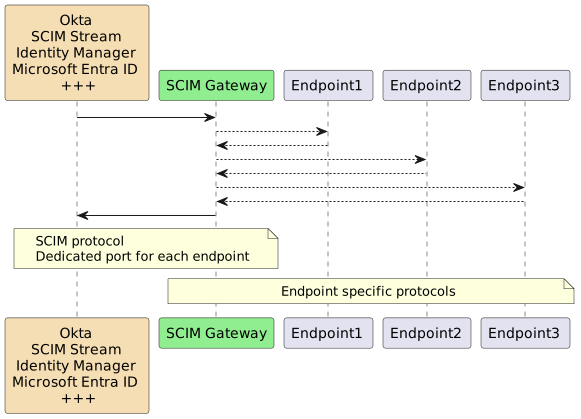
|
|
9
13
|
|
|
10
|
-
* Symantec/Broadcom Identity Manager
|
|
11
|
-
* Microsoft Entra ID
|
|
12
|
-
* One Identity Manager
|
|
13
|
-
* Okta
|
|
14
|
-
* Omada
|
|
15
|
-
* SailPoint/IdentityNow
|
|
16
14
|
---
|
|
17
15
|
|
|
18
|
-
|
|
19
|
-
|
|
20
|
-
-
|
|
21
|
-
-
|
|
22
|
-
-
|
|
23
|
-
-
|
|
24
|
-
-
|
|
25
|
-
-
|
|
26
|
-
- [
|
|
27
|
-
- [
|
|
28
|
-
- [
|
|
29
|
-
-
|
|
30
|
-
-
|
|
31
|
-
-
|
|
32
|
-
-
|
|
33
|
-
-
|
|
34
|
-
- Authentication
|
|
35
|
-
-
|
|
36
|
-
-
|
|
37
|
-
-
|
|
38
|
-
-
|
|
39
|
-
- [
|
|
40
|
-
-
|
|
41
|
-
-
|
|
42
|
-
-
|
|
43
|
-
-
|
|
44
|
-
-
|
|
45
|
-
-
|
|
46
|
-
-
|
|
16
|
+
## Table of Contents
|
|
17
|
+
|
|
18
|
+
- [SCIM Gateway](#scim-gateway)
|
|
19
|
+
- [Table of Contents](#table-of-contents)
|
|
20
|
+
- [What's New](#whats-new)
|
|
21
|
+
- [Included Plugins](#included-plugins)
|
|
22
|
+
- [Installation](#installation)
|
|
23
|
+
- [Prerequisites](#prerequisites)
|
|
24
|
+
- [Install SCIM Gateway](#install-scim-gateway)
|
|
25
|
+
- [Verify the Default Loki Plugin](#verify-the-default-loki-plugin)
|
|
26
|
+
- [Upgrading](#upgrading)
|
|
27
|
+
- [Configuration](#configuration)
|
|
28
|
+
- [Entry Point — `index.ts`](#entry-point--indexts)
|
|
29
|
+
- [Plugin File Naming](#plugin-file-naming)
|
|
30
|
+
- [Core Options](#core-options)
|
|
31
|
+
- [Authentication](#authentication)
|
|
32
|
+
- [Basic Authentication](#basic-authentication)
|
|
33
|
+
- [Bearer Token (Shared Secret)](#bearer-token-shared-secret)
|
|
34
|
+
- [JWT (Standard)](#jwt-standard)
|
|
35
|
+
- [OAuth Client Credentials](#oauth-client-credentials)
|
|
36
|
+
- [Authentication PassThrough](#authentication-passthrough)
|
|
37
|
+
- [IP Allow List](#ip-allow-list)
|
|
38
|
+
- [TLS \& Certificates](#tls--certificates)
|
|
39
|
+
- [Using PEM files](#using-pem-files)
|
|
40
|
+
- [Using PFX / PKCS#12](#using-pfx--pkcs12)
|
|
41
|
+
- [No TLS](#no-tls)
|
|
42
|
+
- [Email Notifications](#email-notifications)
|
|
43
|
+
- [Microsoft Exchange Online (OAuth)](#microsoft-exchange-online-oauth)
|
|
44
|
+
- [Google Workspace Gmail (OAuth)](#google-workspace-gmail-oauth)
|
|
45
|
+
- [SMTP Auth](#smtp-auth)
|
|
46
|
+
- [Azure Relay](#azure-relay)
|
|
47
|
+
- [Secrets from External Sources](#secrets-from-external-sources)
|
|
48
|
+
- [Remote Log Subscription](#remote-log-subscription)
|
|
49
|
+
- [Gateway Chaining](#gateway-chaining)
|
|
50
|
+
- [HelperRest](#helperrest)
|
|
51
|
+
- [Basic Auth](#basic-auth)
|
|
52
|
+
- [Entra ID — Client Secret](#entra-id--client-secret)
|
|
53
|
+
- [Entra ID — Certificate Secret](#entra-id--certificate-secret)
|
|
54
|
+
- [Entra ID — Federated Credentials (no secrets)](#entra-id--federated-credentials-no-secrets)
|
|
55
|
+
- [General OAuth (Client Credentials)](#general-oauth-client-credentials)
|
|
56
|
+
- [Single Binary Deployment](#single-binary-deployment)
|
|
57
|
+
- [Running the Gateway](#running-the-gateway)
|
|
58
|
+
- [Manual Startup](#manual-startup)
|
|
59
|
+
- [Windows Task Scheduler](#windows-task-scheduler)
|
|
60
|
+
- [Docker](#docker)
|
|
61
|
+
- [Single Image](#single-image)
|
|
62
|
+
- [Docker Compose](#docker-compose)
|
|
63
|
+
- [Identity Provider Integration](#identity-provider-integration)
|
|
64
|
+
- [Microsoft Entra ID as IdP](#microsoft-entra-id-as-idp)
|
|
65
|
+
- [Symantec/Broadcom Identity Manager as IdP](#symantecbroadcom-identity-manager-as-idp)
|
|
66
|
+
- [Entra ID Provisioning Plugin](#entra-id-provisioning-plugin)
|
|
67
|
+
- [Entra ID App Registration](#entra-id-app-registration)
|
|
68
|
+
- [Plugin Configuration](#plugin-configuration)
|
|
69
|
+
- [Using with Symantec/Broadcom (ConnectorXpress)](#using-with-symantecbroadcom-connectorxpress)
|
|
70
|
+
- [API Gateway](#api-gateway)
|
|
71
|
+
- [Building Custom Plugins](#building-custom-plugins)
|
|
72
|
+
- [Setup](#setup)
|
|
73
|
+
- [Mandatory Plugin Initialization](#mandatory-plugin-initialization)
|
|
74
|
+
- [Implementation Order](#implementation-order)
|
|
75
|
+
- [Plugin Methods](#plugin-methods)
|
|
76
|
+
- [Custom Schemas](#custom-schemas)
|
|
77
|
+
- [License](#license)
|
|
78
|
+
- [Change Log](#change-log)
|
|
47
79
|
|
|
48
80
|
---
|
|
49
81
|
|
|
50
|
-
##
|
|
82
|
+
## What's New
|
|
83
|
+
|
|
84
|
+
- **`plugin-entra-id`** now supports Entra ID roles and access packages, in addition to reading MFA capabilities and licenses.
|
|
85
|
+
- **`plugin-generic`** replaces `plugin-scim` — a flexible template using `endpointMapper` with the new `valueMap` option for allowlisting and name mapping e.g., groups
|
|
86
|
+
- **`GET /Roles` and `GET /Entitlements`** endpoint support, with user management via SCIM `roles` and `entitlements` attributes; `plugin-entra-id` uses `entitlements` for Entra ID licenses (read-only) and `roles` for Permanent and Eligible PIM roles (full management)
|
|
87
|
+
- **AI Agent ready** — `x-agent-schema` configuration in `endpointMapper` enables custom schema generation with MCP tool instructions for autonomous provisioning agents
|
|
88
|
+
- **Bun binary builds** — compile a plugin into a single executable for simplified deployment
|
|
89
|
+
- **ES module / TypeScript support in Node.js** via `tsx`
|
|
90
|
+
- **v6.0.0** — API method response bodies returned as-is; new `publicApi()` method for unauthenticated `/pub/api` routes; `bearerJwtAzure.tenantIdGUID` replaced by `bearerJwt.azureTenantId`
|
|
91
|
+
- **Federated Identity Credentials** (Entra ID) — access Microsoft-protected resources without managing secrets, via internal JWKS
|
|
92
|
+
- **External JWKS** support for JWT authentication
|
|
93
|
+
- **Azure Relay** — secure outbound-only tunnel with one minute of setup (~$10/month per listener)
|
|
94
|
+
- **ETag** and **Bulk Operations** support (SCIM RFC 7644)
|
|
95
|
+
- **Remote real-time log subscription** via browser, curl, or custom client at `https://<host>/logger`
|
|
96
|
+
- **Gateway chaining** — chain `gateway1 → gateway2 → gateway3 → endpoint` with reverse-proxy-style auth validation
|
|
97
|
+
- **OAuth for email** — Microsoft Exchange Online and Google Workspace Gmail alongside traditional SMTP Auth
|
|
98
|
+
- [SCIM Stream](https://elshaug.xyz/docs/scim-stream) — subscribe-based provisioning as an alternative to top-down IGA polling
|
|
51
99
|
|
|
52
|
-
|
|
100
|
+
---
|
|
53
101
|
|
|
54
|
-
|
|
102
|
+
## Included Plugins
|
|
55
103
|
|
|
56
|
-
|
|
104
|
+
| Plugin | Endpoint Type | Description |
|
|
105
|
+
|---|---|---|
|
|
106
|
+
| **loki** | NoSQL | Standalone SCIM endpoint using [LokiJS](https://github.com/techfort/LokiJS). Includes test users and groups. Ideal for development. |
|
|
107
|
+
| **mongodb** | NoSQL | Like Loki but backed by an external MongoDB. Demonstrates multi-tenant via `baseEntity`. |
|
|
108
|
+
| **entra-id** | REST | Users/Groups/Roles/AccessPackages/Licenses provisioning to Microsoft Entra ID via Microsoft Graph API. |
|
|
109
|
+
| **generic** | REST | Generic template using `endpointMapper` and the `valueMap` option for allowlisting and name mapping e.g., groups. Defaults to plugin-loki as the SCIM target. Can also act as a SCIM version gateway (e.g. 1.1 → 2.0). |
|
|
110
|
+
| **api** | REST | Non-SCIM plugin demonstrating API Gateway mode for custom REST specifications. |
|
|
111
|
+
| **soap** | SOAP | User provisioning to a SOAP-based endpoint with example WSDLs. |
|
|
112
|
+
| **mssql** | SQL | User provisioning to Microsoft SQL Server. |
|
|
113
|
+
| **saphana** | SQL | SAP HANA–specific user provisioning. |
|
|
114
|
+
| **ldap** | Directory | Full LDAP plugin pre-configured for Microsoft Active Directory. |
|
|
57
115
|
|
|
58
|
-
|
|
116
|
+
---
|
|
59
117
|
|
|
60
|
-
|
|
61
|
-
| :--- | :--- | :--- |
|
|
62
|
-
| **Loki** | NoSQL Database | Transforms the SCIM Gateway into a standalone SCIM endpoint utilizing the internal [LokiJS](https://github.com/techfort/LokiJS) database. Includes two test users and groups |
|
|
63
|
-
| **MongoDB** | NoSQL Database | Similar to the Loki plugin, but using an externally managed MongoDB database, showcasing multi-tenant and multi-endpoint capabilities via `baseEntity` |
|
|
64
|
-
| **Entra ID** | REST Webservices | Entra ID user provisioning via Microsoft Graph API |
|
|
65
|
-
| **Generic** | REST Webservice | Generic template plugin configured to use plugin-loki as a SCIM provisioning endpoint. Supports the endpointMapper `valueMap` option for allowlisting and mapping (e.g., groups). Can also be used as a SCIM version gateway (e.g., 1.1 => 2.0) |
|
|
66
|
-
| **API** | REST Webservices | A non-SCIM plugin demonstrating API Gateway functionality for custom REST specifications |
|
|
67
|
-
| **Soap** | SOAP Webservice | Demonstrates user provisioning to a SOAP-based endpoint with example WSDLs |
|
|
68
|
-
| **MSSQL** | Database | Demonstrates user provisioning to an MSSQL database |
|
|
69
|
-
| **SAP HANA** | Database | Demonstrates SAP HANA-specific user provisioning |
|
|
70
|
-
| **LDAP** | Directory | A fully functional LDAP plugin pre-configured for Microsoft Active Directory |
|
|
118
|
+
## Installation
|
|
71
119
|
|
|
72
|
-
|
|
73
|
-
To get started with SCIM Gateway, follow the instructions below.
|
|
120
|
+
### Prerequisites
|
|
74
121
|
|
|
75
|
-
|
|
122
|
+
Install [Bun](https://bun.sh/) first. By default Bun installs to `HOMEPATH\.bun`. To install elsewhere, set `BUN_INSTALL=<path>` as a system environment variable before running the installer. Consider adding Bun to the system path for all users.
|
|
76
123
|
|
|
77
|
-
|
|
124
|
+
### Install SCIM Gateway
|
|
78
125
|
|
|
79
|
-
|
|
126
|
+
```sh
|
|
127
|
+
mkdir c:\my-scimgateway
|
|
128
|
+
cd c:\my-scimgateway
|
|
129
|
+
bun init -y
|
|
130
|
+
bun install scimgateway
|
|
131
|
+
bun pm trust scimgateway # required to allow postinstall to copy example files
|
|
132
|
+
```
|
|
80
133
|
|
|
81
|
-
|
|
134
|
+
This copies `index.ts`, `lib/`, and `config/` (with example plugins) into your package directory.
|
|
82
135
|
|
|
83
|
-
|
|
136
|
+
### Verify the Default Loki Plugin
|
|
84
137
|
|
|
85
|
-
|
|
86
|
-
|
|
87
|
-
|
|
88
|
-
bun install scimgateway
|
|
89
|
-
bun pm trust scimgateway
|
|
90
|
-
|
|
91
|
-
index.ts, lib and config directories containing example plugins are copied to your package. The command `bun pm trust scimgateway` is required to allow the `postinstall` script to copy these files.
|
|
138
|
+
```sh
|
|
139
|
+
bun c:\my-scimgateway
|
|
140
|
+
```
|
|
92
141
|
|
|
93
|
-
|
|
142
|
+
Then open a browser and try:
|
|
94
143
|
|
|
95
|
-
|
|
96
|
-
|
|
97
|
-
|
|
144
|
+
```
|
|
145
|
+
# Health check
|
|
146
|
+
GET http://localhost:8880/ping
|
|
98
147
|
|
|
99
|
-
|
|
100
|
-
|
|
148
|
+
# List users and groups (basic auth: gwadmin / password)
|
|
149
|
+
GET http://localhost:8880/Users
|
|
150
|
+
GET http://localhost:8880/Groups
|
|
101
151
|
|
|
102
|
-
|
|
103
|
-
|
|
104
|
-
=> Logon using gwadmin/password and two users and groups should be listed
|
|
152
|
+
# Real-time remote log monitoring
|
|
153
|
+
http://localhost:8880/logger
|
|
105
154
|
|
|
106
|
-
|
|
107
|
-
|
|
155
|
+
# Fetch a specific user or group
|
|
156
|
+
GET http://localhost:8880/Users/bjensen
|
|
157
|
+
GET http://localhost:8880/Groups/Admins
|
|
108
158
|
|
|
109
|
-
|
|
110
|
-
|
|
111
|
-
|
|
112
|
-
|
|
113
|
-
|
|
114
|
-
|
|
159
|
+
# Filter examples
|
|
160
|
+
GET http://localhost:8880/Users?filter=userName eq "bjensen"
|
|
161
|
+
GET http://localhost:8880/Users?filter=emails.value co "@example.com"&attributes=userName,name.familyName,emails&sortBy=name.familyName&sortOrder=descending
|
|
162
|
+
GET http://localhost:8880/Groups?filter=displayName eq "Admins"&excludedAttributes=members
|
|
163
|
+
GET http://localhost:8880/Groups?filter=members.value eq "bjensen"&attributes=id,displayName,members.value
|
|
164
|
+
```
|
|
115
165
|
|
|
116
|
-
|
|
117
|
-
http://localhost:8880/Groups?filter=members.value eq "bjensen"&attributes=id,displayName,members.value
|
|
118
|
-
http://localhost:8880/Users?filter=userName eq "bjensen"&attributes=userName,id,name.givenName
|
|
119
|
-
http://localhost:8880/Users?filter=meta.created ge "2010-01-01T00:00:00Z"&attributes=userName,name.familyName,meta.created
|
|
120
|
-
http://localhost:8880/Users?filter=emails.value co "@example.com"&attributes=userName,name.familyName,emails&sortBy=name.familyName&sortOrder=descending
|
|
121
|
-
=> Filtering and attribute examples
|
|
166
|
+
Press `Ctrl+C` to stop.
|
|
122
167
|
|
|
123
|
-
|
|
168
|
+
> Using **Node.js**, the startup command is: `node --import=tsx ./index.ts`
|
|
124
169
|
|
|
125
|
-
|
|
126
|
-
`node --import=tsx ./index.ts`
|
|
170
|
+
### Upgrading
|
|
127
171
|
|
|
128
|
-
|
|
172
|
+
The recommended approach is to rename the old package folder, do a fresh install, then copy your customized `index.ts`, `config/`, and `lib/` from the previous install.
|
|
129
173
|
|
|
130
|
-
|
|
174
|
+
```sh
|
|
175
|
+
# Minor upgrade
|
|
176
|
+
bun install scimgateway
|
|
131
177
|
|
|
132
|
-
|
|
133
|
-
|
|
178
|
+
# Major upgrade (may break existing plugins — review change log first)
|
|
179
|
+
bun install scimgateway@latest
|
|
180
|
+
```
|
|
134
181
|
|
|
135
|
-
|
|
182
|
+
**Excluding example plugins in production:** Bun skips `postinstall` unless you run `bun pm trust scimgateway`. For npm or Node.js environments, set `scimgateway_postinstall_skip = true` in `.npmrc` or the environment variable `SCIMGATEWAY_POSTINSTALL_SKIP=true`.
|
|
136
183
|
|
|
137
|
-
|
|
138
|
-
Bun will by default exlude any `postinstall` jobs unless we have trusted the scimgateway package using the `bun pm trust scimgateway` that updates package.json `{ trustedDependencies: ["scimgateway"] }`
|
|
184
|
+
---
|
|
139
185
|
|
|
140
|
-
|
|
186
|
+
## Configuration
|
|
141
187
|
|
|
142
|
-
|
|
188
|
+
### Entry Point — `index.ts`
|
|
143
189
|
|
|
144
|
-
|
|
190
|
+
`index.ts` defines which plugins to start:
|
|
145
191
|
|
|
146
|
-
|
|
147
|
-
|
|
148
|
-
|
|
192
|
+
```ts
|
|
193
|
+
// Start one or more plugins:
|
|
194
|
+
import './lib/plugin-entra-id.ts'
|
|
195
|
+
export {}
|
|
196
|
+
```
|
|
149
197
|
|
|
198
|
+
### Plugin File Naming
|
|
150
199
|
|
|
151
|
-
Each
|
|
152
|
-
They both must have the **same naming prefix**. For the Entra ID endpoint, the corresponding files are:
|
|
153
|
-
>lib\plugin-entra-id.ts
|
|
154
|
-
>config\plugin-entra-id.json
|
|
200
|
+
Each plugin requires a TypeScript file and a JSON configuration file sharing the same name prefix:
|
|
155
201
|
|
|
156
|
-
|
|
202
|
+
```
|
|
203
|
+
lib/plugin-entra-id.ts
|
|
204
|
+
config/plugin-entra-id.json
|
|
205
|
+
```
|
|
157
206
|
|
|
158
|
-
|
|
159
|
-
"scimgateway": {
|
|
160
|
-
...
|
|
161
|
-
},
|
|
162
|
-
"endpoint": {
|
|
163
|
-
...
|
|
164
|
-
}
|
|
165
|
-
}
|
|
207
|
+
The JSON file has two top-level objects:
|
|
166
208
|
|
|
167
|
-
|
|
209
|
+
```json
|
|
210
|
+
{
|
|
211
|
+
"scimgateway": { ... },
|
|
212
|
+
"endpoint": { ... }
|
|
213
|
+
}
|
|
214
|
+
```
|
|
168
215
|
|
|
169
|
-
`
|
|
216
|
+
`scimgateway` holds gateway core settings (port, auth, logging, TLS). `endpoint` holds plugin-specific connection details (host, credentials, mappings).
|
|
170
217
|
|
|
171
|
-
|
|
218
|
+
---
|
|
172
219
|
|
|
173
|
-
|
|
220
|
+
### Core Options
|
|
221
|
+
|
|
222
|
+
| Option | Type | Default | Description |
|
|
223
|
+
|---|---|---|---|
|
|
224
|
+
| `port` | number | — | Port the gateway listens on |
|
|
225
|
+
| `localhostonly` | boolean | false | Accept requests only from `127.0.0.1` |
|
|
226
|
+
| `chainingBaseUrl` | string | — | Route requests to another gateway (`http(s)://host:port`) |
|
|
227
|
+
| `idleTimeout` | number | 120 | Seconds before an idle connection is dropped |
|
|
228
|
+
| `scim.version` | string | `"2.0"` | SCIM protocol version: `"1.1"` or `"2.0"` |
|
|
229
|
+
| `scim.skipTypeConvert` | boolean | false | Pass multivalue attributes as-is instead of type-converted objects |
|
|
230
|
+
| `scim.skipMetaLocation` | boolean | false | Omit `meta.location` from responses (useful behind a reverse proxy) |
|
|
231
|
+
| `scim.groupMemberOfUser` | boolean | false | Keep `groups` on the user object instead of managing group membership via `modifyGroup` |
|
|
232
|
+
| `scim.usePutSoftSync` | boolean | false | `PUT` replaces only the attributes in the body; existing attributes are preserved |
|
|
233
|
+
|
|
234
|
+
**Logging options (`log.*`):**
|
|
235
|
+
|
|
236
|
+
| Option | Values | Default | Description |
|
|
237
|
+
|---|---|---|---|
|
|
238
|
+
| `log.loglevel.file` | off, debug, info, warn, error | off | Log level for the plugin log file |
|
|
239
|
+
| `log.loglevel.console` | off, debug, info, warn, error | off | Log level for stdout/stderr |
|
|
240
|
+
| `log.loglevel.push` | debug, info, warn, error | info | Log level for the remote real-time subscriber |
|
|
241
|
+
| `log.logDirectory` | path | `<package>/logs` | Override the default log directory |
|
|
242
|
+
| `log.customMasking` | string[] | `[]` | Additional attribute names to mask in logs, e.g. `["SSN", "weight"]` |
|
|
243
|
+
| `log.colorize` | boolean | true | Colorized console output; set false for plain JSON |
|
|
244
|
+
| `log.maxSize` | number | 20 | Max log file size in MB |
|
|
245
|
+
| `log.maxFiles` | number | 5 | Number of rotated log files to keep |
|
|
246
|
+
|
|
247
|
+
**`scim.skipTypeConvert` example:**
|
|
248
|
+
|
|
249
|
+
With `skipTypeConvert: false` (default), emails are converted to type-keyed objects:
|
|
250
|
+
|
|
251
|
+
```json
|
|
252
|
+
"emails": {
|
|
253
|
+
"work": { "value": "jsmith@example.com", "type": "work" },
|
|
254
|
+
"home": { "value": "", "type": "home", "operation": "delete" }
|
|
255
|
+
}
|
|
256
|
+
```
|
|
174
257
|
|
|
175
|
-
|
|
258
|
+
With `skipTypeConvert: true`, the array is passed as-is:
|
|
176
259
|
|
|
177
|
-
|
|
260
|
+
```json
|
|
261
|
+
"emails": [
|
|
262
|
+
{ "value": "jsmith@example.com", "type": "work" },
|
|
263
|
+
{ "value": "john.smith.org", "type": "home", "operation": "delete" }
|
|
264
|
+
]
|
|
265
|
+
```
|
|
178
266
|
|
|
179
|
-
|
|
267
|
+
---
|
|
180
268
|
|
|
181
|
-
|
|
269
|
+
### Authentication
|
|
182
270
|
|
|
183
|
-
|
|
184
|
-
"work": {"value": "jsmith@example.com", "type": "work"},
|
|
185
|
-
"home": {"value": "", "type": "home", "operation": "delete"},
|
|
186
|
-
"undefined": {"value": "jsmith@hotmail.com"}
|
|
187
|
-
}
|
|
188
|
-
|
|
189
|
-
When `skipTypeConvert` is set to `true`, the attribute is provided "as-is" as an array, allowing duplicate types including blank types. Values to be deleted are marked with `"operation": "delete"`.
|
|
271
|
+
The `auth` object supports multiple concurrent methods. Set any admin user to `null` to disable that method. Each entry supports:
|
|
190
272
|
|
|
191
|
-
|
|
192
|
-
|
|
193
|
-
{"value": "john.smith.org", "type": "home", "operation": "delete"},
|
|
194
|
-
{"value": "jsmith@hotmail.com"}
|
|
195
|
-
]
|
|
273
|
+
- `readOnly` — if `true`, only `GET` requests are allowed
|
|
274
|
+
- `baseEntities` — restrict this credential to specific baseEntity values (empty array = all)
|
|
196
275
|
|
|
197
|
-
|
|
276
|
+
#### Basic Authentication
|
|
198
277
|
|
|
199
|
-
|
|
278
|
+
```json
|
|
279
|
+
"auth": {
|
|
280
|
+
"basic": [
|
|
281
|
+
{
|
|
282
|
+
"username": "gwadmin",
|
|
283
|
+
"password": "password",
|
|
284
|
+
"readOnly": false,
|
|
285
|
+
"baseEntities": []
|
|
286
|
+
}
|
|
287
|
+
]
|
|
288
|
+
}
|
|
289
|
+
```
|
|
200
290
|
|
|
201
|
-
|
|
291
|
+
Cleartext passwords are encrypted on first gateway start.
|
|
202
292
|
|
|
203
|
-
|
|
293
|
+
#### Bearer Token (Shared Secret)
|
|
204
294
|
|
|
205
|
-
|
|
295
|
+
```json
|
|
296
|
+
"bearerToken": [
|
|
297
|
+
{
|
|
298
|
+
"token": "my-shared-secret",
|
|
299
|
+
"readOnly": false,
|
|
300
|
+
"baseEntities": []
|
|
301
|
+
}
|
|
302
|
+
]
|
|
303
|
+
```
|
|
206
304
|
|
|
207
|
-
|
|
305
|
+
Supported by Entra ID provisioning. The token is encrypted on first start.
|
|
208
306
|
|
|
209
|
-
|
|
307
|
+
#### JWT (Standard)
|
|
210
308
|
|
|
211
|
-
|
|
309
|
+
```json
|
|
310
|
+
"bearerJwt": [
|
|
311
|
+
{
|
|
312
|
+
"secret": null,
|
|
313
|
+
"publicKey": "jwt-public-key.pem",
|
|
314
|
+
"wellKnownUri": null,
|
|
315
|
+
"azureTenantId": null,
|
|
316
|
+
"options": {
|
|
317
|
+
"issuer": "https://my-idp.example.com"
|
|
318
|
+
},
|
|
319
|
+
"readOnly": false,
|
|
320
|
+
"baseEntities": []
|
|
321
|
+
}
|
|
322
|
+
]
|
|
323
|
+
```
|
|
212
324
|
|
|
213
|
-
-
|
|
325
|
+
- `secret` — HMAC shared secret (encrypted on start)
|
|
326
|
+
- `publicKey` — filename of a PEM file in `config/certs/`
|
|
327
|
+
- `wellKnownUri` — JWKS discovery URL, e.g. `https://keycloak.example.com/realms/my-realm/.well-known/openid-configuration`
|
|
328
|
+
- `azureTenantId` — Entra ID tenant ID; enables Entra-initiated provisioning using JWT validation
|
|
214
329
|
|
|
215
|
-
|
|
330
|
+
For Entra ID apps accessing the gateway:
|
|
216
331
|
|
|
217
|
-
|
|
332
|
+
```json
|
|
333
|
+
"wellKnownUri": "https://login.microsoftonline.com/{tenant-id}/v2.0/.well-known/openid-configuration",
|
|
334
|
+
"options": { "audience": "{application-id}" }
|
|
335
|
+
```
|
|
218
336
|
|
|
219
|
-
|
|
220
|
-
- **auth.xx.readOnly** - true/false, true gives read only access - only allowing `GET` requests for corresponding admin user
|
|
221
|
-
- **auth.xx.baseEntities** - array containing one or more `baseEntity` allowed for this user e.g. ["client-a"] - empty array allowing all.
|
|
222
|
-
**Methods are disabled by setting corresponding admin user to null or remove methods not used**
|
|
337
|
+
#### OAuth Client Credentials
|
|
223
338
|
|
|
224
|
-
|
|
339
|
+
```json
|
|
340
|
+
"bearerOAuth": [
|
|
341
|
+
{
|
|
342
|
+
"clientId": "my-client-id",
|
|
343
|
+
"clientSecret": "my-client-secret",
|
|
344
|
+
"readOnly": false,
|
|
345
|
+
"baseEntities": []
|
|
346
|
+
}
|
|
347
|
+
]
|
|
348
|
+
```
|
|
225
349
|
|
|
226
|
-
|
|
350
|
+
Clients request a token from `POST /oauth/token` (e.g. `http://localhost:8880/oauth/token`).
|
|
227
351
|
|
|
228
|
-
|
|
352
|
+
#### Authentication PassThrough
|
|
229
353
|
|
|
230
|
-
|
|
354
|
+
```json
|
|
355
|
+
"passThrough": {
|
|
356
|
+
"enabled": true,
|
|
357
|
+
"readOnly": false,
|
|
358
|
+
"baseEntities": []
|
|
359
|
+
}
|
|
360
|
+
```
|
|
231
361
|
|
|
232
|
-
|
|
362
|
+
The gateway forwards the raw `Authorization` header to the plugin. The plugin must set `scimgateway.authPassThroughAllowed = true` and implement its own auth handling against the endpoint.
|
|
233
363
|
|
|
234
|
-
|
|
235
|
-
|
|
236
|
-
"certificate": {
|
|
237
|
-
"key": "key.pem",
|
|
238
|
-
"cert": "cert.pem",
|
|
239
|
-
"ca": "ca.pem" // if several: "ca": ["ca1.pem", "ca2.pem"]
|
|
240
|
-
}
|
|
241
|
-
|
|
242
|
-
Example of how to make a self signed certificate:
|
|
364
|
+
---
|
|
243
365
|
|
|
244
|
-
|
|
245
|
-
|
|
246
|
-
Note, when using Symantec/Broadcom Provisioning, the "certificate authority - CA" also must be imported on the Connector Server. For self-signed certificate, CA and the certificate (public key) is the same.
|
|
366
|
+
### IP Allow List
|
|
247
367
|
|
|
248
|
-
|
|
368
|
+
Restrict incoming traffic to specific subnets (CIDR notation). Useful for Entra ID provisioning where you want to accept traffic only from Azure IP ranges:
|
|
249
369
|
|
|
250
|
-
|
|
251
|
-
|
|
252
|
-
|
|
253
|
-
|
|
370
|
+
```json
|
|
371
|
+
"ipAllowList": [
|
|
372
|
+
"13.64.151.161/32",
|
|
373
|
+
"13.66.141.64/27",
|
|
374
|
+
"2603:1056:2000::/48"
|
|
375
|
+
]
|
|
376
|
+
```
|
|
254
377
|
|
|
255
|
-
|
|
256
|
-
|
|
257
|
-
- **ipAllowList** - Array of one or more IPv4/IPv6 subnets (CIDR) allowed for incoming traffic. E.g. using Entra ID as IdP, we would like to restrict access to IP addresses used by Azure. Azure IP-range can be downloaded from: [https://azureipranges.azurewebsites.net](https://azureipranges.azurewebsites.net), enter **AzureActiveDirectory** in the search list and select JSON download. Copy the "addressPrefixes" array content and paste into ipAllowList array. CIDR single IP-host syntax is a.b.c.d/32. Note, front-end HTTP proxy or a load balancer must include client IP-address in the **X-Forwarded-For** header. Configuration example:
|
|
258
|
-
|
|
259
|
-
"ipAllowList": [
|
|
260
|
-
"13.64.151.161/32",
|
|
261
|
-
"13.66.141.64/27",
|
|
262
|
-
...
|
|
263
|
-
"2603:1056:2000::/48",
|
|
264
|
-
"2603:1057:2::/48"
|
|
265
|
-
]
|
|
266
|
-
- **email** - Sending email from plugin or automated error notifications emailOnError. For emailOnError only the first error will be sent until sendInterval have passed. Supporting both SMTP Auth and modern REST OAuth. For OAuth, currently Microsoft Exchange Online (ExO) and Google Workspace Gmail are supported - see configuration notes
|
|
267
|
-
- **email.auth** - Authentication configuration
|
|
268
|
-
- **email.auth.type** - `oauth` or `smtp`
|
|
269
|
-
- **email.auth.options** - Authentication options - note, different options for type oauth and smtp
|
|
270
|
-
- **email.auth.options.azureTenantId (oauth/ExO)** - Entra tenant id or domain name
|
|
271
|
-
- **email.auth.options.clientId (oauth/ExO)** - Entra OAuth application Client ID
|
|
272
|
-
- **email.auth.options.clientSecret (oauth/ExO)** - Entra OAuth application Client Secret
|
|
273
|
-
- **email.auth.options.serviceAccountKeyFile (oauth/Gmail)** - Google Service Account key json-file name located in the `package-root>\config\certs` directory unless absolute path being defined
|
|
274
|
-
- **email.auth.options.host (smtp)** - Mailserver e.g. "smtp.gmail.com" - mandatory for smtp
|
|
275
|
-
- **email.auth.options.port (smtp)** - Port used by mailserver e.g. 587, 25 or 465 - mandatory for smtp
|
|
276
|
-
- **email.auth.options.username (smtp)** - Mail account for authentication normally same as sender of the email, e.g. "user@gmail.com"
|
|
277
|
-
- **email.auth.options.password (smtp)** - Mail account password
|
|
278
|
-
- **email.proxy** - Proxy configuration if using mailproxy
|
|
279
|
-
- **email.proxy.host** - Proxy host e.g. `http://proxy-host:1234`
|
|
280
|
-
- **email.proxy.username** - username if authentication is required
|
|
281
|
-
- **email.proxy.password** - password if authentication is required
|
|
282
|
-
- **email.emailOnError** - Contains configuration for sending error notifications by email. Note, only the first error will be sent until sendInterval have passed
|
|
283
|
-
- **email.emailOnError.enabled** - true or false, value set to true will enable email notifications
|
|
284
|
-
- **email.emailOnError.sendInterval** - Default 15. Mail notifications on error are deferred until sendInterval **minutes** have passed since the last notification
|
|
285
|
-
- **email.emailOnError.from** - Sender email addresses e.g: "noreply@example.com". **Mandatory for oauth**. For smtp email.auth.options.username will be used
|
|
286
|
-
- **email.emailOnError.to** - Comma separated list of recipients email addresses e.g: "someone@example.com"
|
|
287
|
-
- **email.emailOnError.cc** - Optional comma separated list of cc mail addresses
|
|
288
|
-
- **email.emailOnError.subject** - Optional mail subject, default `SCIM Gateway error message`
|
|
289
|
-
|
|
290
|
-
- **azureRelay** - Azure Relay outbound listener
|
|
291
|
-
- **azureRelay.enabled** - true or false, true will enable the Azure Relay listener
|
|
292
|
-
- **azureRelay.connectionUrl** - `https://<namespace-name>.servicebus.windows.net/<hybrid-connection-name>` - `<namespace-name>` is the name of the Relay created and `<hybrid-connection-name>` is the name of the Hybrid Connection entity created in the Relay
|
|
293
|
-
- **azureRelay.apiKey** - The `Private Key` found in the `Shared access policy` (RootManageSharedaccessKey)
|
|
294
|
-
- **azureRelay.keyRule** - Optional, the `Shared access policy` name - default using `RootManageSharedaccessKey`
|
|
295
|
-
|
|
296
|
-
- **stream** - See [SCIM Stream](https://elshaug.xyz/docs/scim-stream) for configuration details
|
|
297
|
-
|
|
298
|
-
- **endpoint** - Contains endpoint specific configuration according to customized **plugin code**.
|
|
299
|
-
|
|
300
|
-
### Configuration notes - general
|
|
301
|
-
|
|
302
|
-
- Custom Schemas, ServiceProviderConfig and ResourceType can be used if `./lib/scimdef-v2.json or scimdef-v1.json` exists. Original scimdef-v2.json/scimdef-v1.json can be copied from node_modules/scimgateway/lib to your plugin/lib and customized.
|
|
303
|
-
- Using reverse proxy and we want ipAllowList and correct meta.location response, following headers must be set by proxy: `X-Forwarded-For`, `X-Forwarded-Proto` and `X-Forwarded-Host`
|
|
304
|
-
- Setting environment variable `SEED` with some random characters will override default password seeding logic. This also allow copying configuration file with encrypted secrets from one machine to another.
|
|
305
|
-
- All configuration can be set based on environment variables. Syntax will then be `"process.env.<ENVIRONMENT>"` where `<ENVIRONMENT>` is the environment variable used. E.g. scimgateway.port could have value "process.env.PORT", then using environment variable PORT.
|
|
306
|
-
- All configuration values can be moved to a single external file having JSON dot notation content with plugin name as parent JSON object. Syntax in original configuration file used by the gateway will then be `"process.file.<path>"` where `<path>` is the file used. E.g. key endpoint.password could have value "process.file./var/run/vault/secrets.json"
|
|
307
|
-
- All configuration values can be moved to multiple external files, each file containing one single value. Syntax in original configuration file used by the gateway will then be `"process.text.<path>"` where `<path>` is the file which contains raw (`UTF-8`) character value. E.g. key endpoint.password could have value "process.text./var/run/vault/endpoint.password".
|
|
308
|
-
|
|
309
|
-
Example:
|
|
310
|
-
|
|
311
|
-
{
|
|
312
|
-
"scimgateway": {
|
|
313
|
-
...
|
|
314
|
-
"port": "process.env.PORT",
|
|
315
|
-
...
|
|
316
|
-
"loglevel": {
|
|
317
|
-
"file": "process.env.LOG_LEVEL_FILE",
|
|
318
|
-
...
|
|
319
|
-
"auth": {
|
|
320
|
-
"basic": [
|
|
321
|
-
{
|
|
322
|
-
"username": "process.file./var/run/vault/secrets.json",
|
|
323
|
-
"password": "process.file./var/run/vault/secrets.json"
|
|
324
|
-
},
|
|
325
|
-
...
|
|
326
|
-
],
|
|
327
|
-
"bearerJwt": [
|
|
328
|
-
"secret": "process.text./var/run/vault/jwt.secret",
|
|
329
|
-
"publicKey": "process.text./var/run/vault/jwt.pub",
|
|
330
|
-
...
|
|
331
|
-
],
|
|
332
|
-
...
|
|
333
|
-
},
|
|
334
|
-
"endpoint": {
|
|
335
|
-
...
|
|
336
|
-
"username": "process.file./var/run/vault/secrets.json",
|
|
337
|
-
"password": "process.file./var/run/vault/secrets.json",
|
|
338
|
-
...
|
|
339
|
-
}
|
|
340
|
-
}
|
|
341
|
-
|
|
342
|
-
|
|
343
|
-
jwt.secret file content example:
|
|
344
|
-
|
|
345
|
-
thisIsSecret
|
|
346
|
-
|
|
347
|
-
secrets.json file content example for plugin-soap:
|
|
348
|
-
|
|
349
|
-
{
|
|
350
|
-
"plugin-soap.scimgateway.auth.basic[0].username": "gwadmin",
|
|
351
|
-
"plugin-soap.scimgateway.auth.basic[0].password": "password",
|
|
352
|
-
"plugin-soap.endpoint.username": "superuser",
|
|
353
|
-
"plugin-soap.endpoint.password": "secret"
|
|
354
|
-
}
|
|
355
|
-
|
|
356
|
-
### Configuration notes - Email, using Microsoft Exchange Online (ExO)
|
|
357
|
-
|
|
358
|
-
- Entra ID application must have application permissions `Mail.Send`
|
|
359
|
-
- To prevent the sending of emails from any defined mailboxes, an ExO `ApplicationAccessPolicy` must be defined through PowerShell.
|
|
360
|
-
|
|
361
|
-
First create a mail-enabled security-group that only includes those users (mailboxes) the application is allowed to send from
|
|
362
|
-
Note, `mail enabled security group` cannot be created from portal, only from admin or admin.exchange console
|
|
363
|
-
|
|
364
|
-
##Connect to Exchange
|
|
365
|
-
Install-Module -Name ExchangeOnlineManagement
|
|
366
|
-
Connect-ExchangeOnline
|
|
367
|
-
|
|
368
|
-
##Create ApplicationAccessPolicy
|
|
369
|
-
New-ApplicationAccessPolicy -AppId <AppClientID> -PolicyScopeGroupId <MailEnabledSecurityGrpId> -AccessRight RestrictAccess -Description "Restrict app to specific mailboxes"
|
|
370
|
-
|
|
371
|
-
### Configuration notes - Email, using Google Workspace Gmail
|
|
372
|
-
|
|
373
|
-
- https://console.cloud.google.com
|
|
374
|
-
- IAM & Admin > Service Accounts > Create Service Account
|
|
375
|
-
- Name=email-sender
|
|
376
|
-
- Create and Continue
|
|
377
|
-
- Grant this service account access to project - not needed
|
|
378
|
-
- Grant users access to this service - not needed
|
|
379
|
-
- IAM & Admin > Service Accounts > "email-sender" account > Keys
|
|
380
|
-
- Add Key > Create new key > JSON
|
|
381
|
-
- download json Service Account Key file, refere to configuration `email.auth.options.serviceAccountKeyFile`
|
|
382
|
-
|
|
383
|
-
- https://admin.google.com
|
|
384
|
-
- Security > Access and data control > API controls
|
|
385
|
-
- Manage Domain Wide Delegation > Add new
|
|
386
|
-
- Client ID = id of service account created
|
|
387
|
-
- OAuth scope = `https://www.googleapis.com/auth/gmail.send`
|
|
388
|
-
|
|
389
|
-
- https://admin.google.com
|
|
390
|
-
- Billing > Subscriptions - verify Google Workspace license
|
|
391
|
-
- Directory > Users > "user"
|
|
392
|
-
- Licenses > Edit > enable Google Workspace license
|
|
393
|
-
`email.emailOnError.from` mail address must have Google Workspace license
|
|
394
|
-
|
|
395
|
-
### Configuration notes - Gateway chainging and chainingBaseUrl
|
|
396
|
-
|
|
397
|
-
By configuring the `chainingBaseUrl`, it is possible to chain multiple gateways in sequence, such as `gateway1->gateway2->gateway3->endpoint`. In this setup, gateway behave much like a reverse proxy, validating authorization at each step unless PassThrough mode is enabled. Chaining is also supported in stream subscriber mode
|
|
398
|
-
|
|
399
|
-
{
|
|
400
|
-
"scimgateway": {
|
|
401
|
-
...
|
|
402
|
-
"chainingBaseUrl": "https:\\gateway2:8880",
|
|
403
|
-
...
|
|
404
|
-
"auth": {
|
|
405
|
-
...
|
|
406
|
-
"passThrough": {
|
|
407
|
-
"enabled": false,
|
|
408
|
-
"readOnly": false,
|
|
409
|
-
"baseEntities": []
|
|
410
|
-
}
|
|
411
|
-
...
|
|
412
|
-
}
|
|
413
|
-
},
|
|
414
|
-
...
|
|
415
|
-
}
|
|
416
|
-
|
|
417
|
-
|
|
418
|
-
Using above configuration example on gateway1, incoming requests will be routed to `https:\\gateway2:8880`
|
|
419
|
-
|
|
420
|
-
The plugin and its associated authentication configuration can mirror the setup running on the final gateway. However, in chaining mode, the plugin binary is used solely for initializing and configuring the gateway. This allows for the use of a simplified `plugin-<name>.ts` binary containing only the essential mandatory components:
|
|
421
|
-
|
|
422
|
-
// start - mandatory plugin initialization
|
|
423
|
-
const ScimGateway: typeof import('scimgateway').ScimGateway = await (async () => {
|
|
424
|
-
try {
|
|
425
|
-
return (await import('scimgateway')).ScimGateway
|
|
426
|
-
} catch (err) {
|
|
427
|
-
const source = './scimgateway.ts'
|
|
428
|
-
return (await import(source)).ScimGateway
|
|
429
|
-
}
|
|
430
|
-
})()
|
|
431
|
-
const scimgateway = new ScimGateway()
|
|
432
|
-
const config = scimgateway.getConfig()
|
|
433
|
-
scimgateway.authPassThroughAllowed = false
|
|
434
|
-
// end - mandatory plugin initialization
|
|
435
|
-
|
|
436
|
-
Using `scimgateway.authPassThroughAllowed = true` and `plugin-<name>.json` configuration `scimgateway.auth.passThrough=true` enables Authentication PassTrhough
|
|
437
|
-
|
|
438
|
-
### Configuration notes - HelperRest used by plugins
|
|
439
|
-
For REST endpoints, plugins may use HelperRest to simplify authentication and communication
|
|
440
|
-
doRequest() executes REST request and return response
|
|
441
|
-
`doRequest(<baseEntity>, <method>, <path>, <body>, <ctx>, <options>)`
|
|
442
|
-
|
|
443
|
-
* baseEntity - 'undefined' if not used and must correspond with endpoint configuration that defines baseUrls and connection options.
|
|
444
|
-
* method - GET, PATCH, PUT, DELETE
|
|
445
|
-
* path - either full url or just the path that will be added to baseUrl. Using full url will override baseUrl. Using path is preferred because of auth caching logic and simplicity
|
|
446
|
-
* body - optional body to be used
|
|
447
|
-
* ctx - optional, passing authorization header if Auth PassThrough is enabled
|
|
448
|
-
* opt - optional, connection options that will extend/override any endpoint.entity.undefined.connection definitions
|
|
449
|
-
|
|
450
|
-
Configuration showing connection settings:
|
|
451
|
-
|
|
452
|
-
{
|
|
453
|
-
"scimgateway": {
|
|
454
|
-
...
|
|
455
|
-
}
|
|
456
|
-
"endpoint": {
|
|
457
|
-
"entity": {
|
|
458
|
-
"undefined": {
|
|
459
|
-
"connection": {
|
|
460
|
-
"baseUrls": [],
|
|
461
|
-
"auth": {
|
|
462
|
-
"type": "xxx",
|
|
463
|
-
"options": {
|
|
464
|
-
...
|
|
465
|
-
"jwtPayload": {},
|
|
466
|
-
"samlPayload": {},
|
|
467
|
-
"tls": {} // files located in ./config/certs
|
|
468
|
-
}
|
|
469
|
-
},
|
|
470
|
-
"options": {
|
|
471
|
-
"headers": {},
|
|
472
|
-
"tls": {} // files located in ./config/certs
|
|
473
|
-
},
|
|
474
|
-
"proxy": {}
|
|
475
|
-
}
|
|
476
|
-
}
|
|
477
|
-
}
|
|
478
|
-
}
|
|
479
|
-
}
|
|
480
|
-
|
|
481
|
-
|
|
482
|
-
* baseUrls - Endpoint URL. Several may be defined for failower. There are retry logic on connection failures
|
|
483
|
-
* auth.type - defines authentication being used: `basic`, `oauth`, `token`, `bearer`, `oauthSamlBearer` or `oauthJwtBearer`
|
|
484
|
-
* auth.options - for each valid type there are different options. azureTenantId is special for Entra ID and serviceAccountKeyFile is special for Google. Using these will simplify and reduce options to be included. Also note we do not need to include baseUrls when using azureTenantId/serviceAccountKeyFile as long as endpoint is Entra ID (Microsoft Graph) or Google.
|
|
485
|
-
|
|
486
|
-
Example using basic auth:
|
|
487
|
-
|
|
488
|
-
"connection": {
|
|
489
|
-
"baseUrls": [
|
|
490
|
-
"https://localhost:8880"
|
|
491
|
-
],
|
|
492
|
-
"auth": {
|
|
493
|
-
"type": "basic",
|
|
494
|
-
"options": {
|
|
495
|
-
"username": "gwadmin",
|
|
496
|
-
"password": "password"
|
|
497
|
-
}
|
|
498
|
-
},
|
|
499
|
-
"options": {
|
|
500
|
-
"tls": {
|
|
501
|
-
"rejectUnauthorized": false,
|
|
502
|
-
"ca": "ca.pem"
|
|
503
|
-
}
|
|
504
|
-
}
|
|
505
|
-
}
|
|
506
|
-
|
|
507
|
-
Example Entra ID (plugin-entra-id) using clientId/clientSecret:
|
|
508
|
-
|
|
509
|
-
"connection": {
|
|
510
|
-
"baseUrls": [],
|
|
511
|
-
"auth": {
|
|
512
|
-
"type": "oauth",
|
|
513
|
-
"options": {
|
|
514
|
-
"azureTenantId": "<tenantId>",
|
|
515
|
-
"clientId": "<clientId>",
|
|
516
|
-
"clientSecret": "<clientSecret>"
|
|
517
|
-
}
|
|
518
|
-
}
|
|
519
|
-
}
|
|
520
|
-
|
|
521
|
-
Example Entra ID (plugin-entra-id) using certificate secret:
|
|
522
|
-
|
|
523
|
-
"connection": {
|
|
524
|
-
"baseUrls": [],
|
|
525
|
-
"auth": {
|
|
526
|
-
"type": "oauthJwtBearer",
|
|
527
|
-
"options": {
|
|
528
|
-
"azureTenantId": "<tenantId>",
|
|
529
|
-
"clientId": "<clientId>",
|
|
530
|
-
"tls": {
|
|
531
|
-
"key": "key.pem",
|
|
532
|
-
"cert": "cert.pem"
|
|
533
|
-
}
|
|
534
|
-
}
|
|
535
|
-
}
|
|
536
|
-
}
|
|
537
|
-
|
|
538
|
-
Example Entra ID (plugin-entra-id) using federated credentials:
|
|
539
|
-
|
|
540
|
-
"connection": {
|
|
541
|
-
"baseUrls": [],
|
|
542
|
-
"auth": {
|
|
543
|
-
"type": "oauthJwtBearer",
|
|
544
|
-
"options": {
|
|
545
|
-
"azureTenantId": "<tenantId>",
|
|
546
|
-
"fedCred": {
|
|
547
|
-
"issuer": "<https://FQDN-scimgateway>",
|
|
548
|
-
"subject": "<entra id application object id - client id>",
|
|
549
|
-
"name": "<entra id federated credentials unique name>"
|
|
550
|
-
}
|
|
551
|
-
}
|
|
552
|
-
}
|
|
553
|
-
}
|
|
554
|
-
// Note, fedCred configuration must match corresponding configuration in Entra ID Application - Certificates & Secrets - Federated credentials - scenario "Other issuer"
|
|
555
|
-
// example issuer: "https://scimgateway.my-company.com" note, this scimgateway base URL must be reachable from the internet
|
|
556
|
-
// example name: "plugin-entra-id"
|
|
557
|
-
|
|
558
|
-
|
|
559
|
-
Example using general OAuth:
|
|
560
|
-
|
|
561
|
-
"connection": {
|
|
562
|
-
"baseUrls": [<"endpointUrl">],
|
|
563
|
-
"auth": {
|
|
564
|
-
"type": "oauth",
|
|
565
|
-
"options": {
|
|
566
|
-
"tokenUrl": "<tokenUrl>"
|
|
567
|
-
"clientId": "<clientId>",
|
|
568
|
-
"clientSecret": "<clientSecret>"
|
|
569
|
-
}
|
|
570
|
-
}
|
|
571
|
-
}
|
|
572
|
-
|
|
573
|
-
Please see code editor method HelperRest doRequest() IntelliSense for type and option details
|
|
574
|
-
|
|
575
|
-
### Configuration notes - Remote real-time log subscription
|
|
576
|
-
Using remote real-time log subscription we may implement custom logic like monitoring and centralized logging
|
|
577
|
-
|
|
578
|
-
- browser and url: https://host/logger
|
|
579
|
-
- curl with -u or -H "Authorization: Bearer secret"
|
|
580
|
-
```
|
|
581
|
-
curl -Ns http://localhost:8880/logger -u gwadmin:password | awk '
|
|
582
|
-
/^data: / {sub(/^data: /,""); printf "%s", $0; last=1; next}
|
|
583
|
-
/^$/ {if (last) print ""; last=0}
|
|
584
|
-
'
|
|
585
|
-
```
|
|
586
|
-
- custom client API (see example below)
|
|
587
|
-
- not supported by Azure Relay
|
|
588
|
-
|
|
589
|
-
|
|
590
|
-
We may configure read-only user/secret for log collection purpose
|
|
591
|
-
|
|
592
|
-
"auth": {
|
|
593
|
-
"basic": [
|
|
594
|
-
{
|
|
595
|
-
"username": "gwadmin",
|
|
596
|
-
"password": "password",
|
|
597
|
-
"readOnly": false,
|
|
598
|
-
"baseEntities": []
|
|
599
|
-
},
|
|
600
|
-
{
|
|
601
|
-
"username": "gwread",
|
|
602
|
-
"password": "password",
|
|
603
|
-
"readOnly": true,
|
|
604
|
-
"baseEntities": []
|
|
605
|
-
}
|
|
606
|
-
],
|
|
607
|
-
"bearerToken": [
|
|
608
|
-
{
|
|
609
|
-
"token": "secret",
|
|
610
|
-
"readOnly": true,
|
|
611
|
-
"baseEntities": []
|
|
612
|
-
}
|
|
613
|
-
],
|
|
614
|
-
...
|
|
615
|
-
}
|
|
616
|
-
|
|
617
|
-
Remote log subscription is configured by log.loglevel.push and the push logger has default loglevel set to `info`
|
|
618
|
-
Example using debug loglevel:
|
|
619
|
-
|
|
620
|
-
"log": {
|
|
621
|
-
"loglevel": {
|
|
622
|
-
"push": "debug"
|
|
623
|
-
}
|
|
624
|
-
}
|
|
625
|
-
|
|
626
|
-
Example code implementing remote real-time log subscription and custom message handling
|
|
627
|
-
|
|
628
|
-
```
|
|
629
|
-
//
|
|
630
|
-
// usage: bun <scriptname.ts>
|
|
631
|
-
// update url and the auth according to environment used
|
|
632
|
-
//
|
|
633
|
-
const username = "gwadmin"
|
|
634
|
-
const password = "password"
|
|
635
|
-
const url = "http://localhost:8880/logger"
|
|
378
|
+
> Azure IP ranges can be downloaded from [azureipranges.azurewebsites.net](https://azureipranges.azurewebsites.net) — search for `AzureActiveDirectory` and copy the `addressPrefixes` array.
|
|
636
379
|
|
|
637
|
-
|
|
638
|
-
Authorization: "Basic " + btoa(`${username}:${password}`),
|
|
639
|
-
Accept: "text/event-stream"
|
|
640
|
-
})
|
|
380
|
+
When running behind a load balancer or reverse proxy, the proxy must include the client IP in the `X-Forwarded-For` header.
|
|
641
381
|
|
|
642
|
-
|
|
643
|
-
// we could also do JSON.parse(message) and granular filtering on log "level"
|
|
644
|
-
const messageHandler = async (message: string) => {
|
|
645
|
-
console.log(message)
|
|
646
|
-
}
|
|
382
|
+
---
|
|
647
383
|
|
|
648
|
-
|
|
649
|
-
while (true) {
|
|
650
|
-
try {
|
|
651
|
-
const resp = await fetch(url, { headers });
|
|
652
|
-
if (!resp.ok || !resp.body) {
|
|
653
|
-
console.error(`❌ Response error: ${resp.status} ${resp.statusText}`)
|
|
654
|
-
await Bun.sleep(10_000)
|
|
655
|
-
continue
|
|
656
|
-
}
|
|
657
|
-
console.log('✅ Now awaiting log events...\n')
|
|
384
|
+
### TLS & Certificates
|
|
658
385
|
|
|
659
|
-
|
|
386
|
+
#### Using PEM files
|
|
660
387
|
|
|
661
|
-
|
|
662
|
-
|
|
663
|
-
|
|
664
|
-
|
|
665
|
-
|
|
666
|
-
if (i < 1) continue
|
|
667
|
-
const msg = value.slice(6, i)
|
|
668
|
-
messageHandler(msg)
|
|
669
|
-
}
|
|
670
|
-
console.error("⚠️ Connection closed");
|
|
671
|
-
await Bun.sleep(10_000)
|
|
672
|
-
} catch (err: any) {
|
|
673
|
-
console.error("❌ Connection error:", err?.message || err)
|
|
674
|
-
await Bun.sleep(10_000)
|
|
675
|
-
}
|
|
676
|
-
}
|
|
388
|
+
```json
|
|
389
|
+
"certificate": {
|
|
390
|
+
"key": "key.pem",
|
|
391
|
+
"cert": "cert.pem",
|
|
392
|
+
"ca": "ca.pem"
|
|
677
393
|
}
|
|
678
|
-
|
|
679
|
-
startup()
|
|
680
394
|
```
|
|
681
395
|
|
|
682
|
-
|
|
683
|
-
|
|
684
|
-
Using Azure technology we have different options for setting up a communication tunnel to SCIM Gateway:
|
|
396
|
+
Files must be in `config/certs/` or use absolute paths. For multiple CAs: `"ca": ["ca1.pem", "ca2.pem"]`.
|
|
685
397
|
|
|
686
|
-
|
|
687
|
-
- `Azure Application Gateway` - Layer 7 (SCIM Gateway located in Azure)
|
|
688
|
-
- `Azure Relay` (SCIM Gateway located on-premises or in Azure)
|
|
398
|
+
**Generate a self-signed certificate:**
|
|
689
399
|
|
|
690
|
-
|
|
400
|
+
```sh
|
|
401
|
+
openssl req -nodes -newkey rsa:2048 -x509 -sha256 -days 3650 \
|
|
402
|
+
-keyout key.pem -out cert.pem \
|
|
403
|
+
-subj "/O=My Company/OU=Application/CN=SCIM Gateway" \
|
|
404
|
+
-addext "subjectAltName=DNS:localhost,DNS:127.0.0.1,DNS:*.mycompany.com" \
|
|
405
|
+
-addext "extendedKeyUsage=serverAuth" \
|
|
406
|
+
-addext "keyUsage=digitalSignature"
|
|
407
|
+
```
|
|
691
408
|
|
|
692
|
-
|
|
409
|
+
#### Using PFX / PKCS#12
|
|
693
410
|
|
|
694
|
-
|
|
411
|
+
```json
|
|
412
|
+
"pfx": {
|
|
413
|
+
"bundle": "certbundle.pfx",
|
|
414
|
+
"password": "password"
|
|
415
|
+
}
|
|
416
|
+
```
|
|
695
417
|
|
|
696
|
-
|
|
697
|
-
- In Azure create a `Relay` - `<namespace-name>`
|
|
698
|
-
- In the Relay, create an entity of type `Hybrid Connection` - `<hybrid-connection-name>` **one for each SCIM Gateway plugin**
|
|
699
|
-
- The `Requires Client Authorization` option **should be unchecked (not activated)**, unless we are using custom IdP/API having logic for including SAS-token in the communication header
|
|
700
|
-
- Shared access policies - RootManageSharedaccessKey - Primary Key (copy this one)
|
|
701
|
-
Instead of RootManageSharedaccessKey policy in the `<namespace-name>`, we could create dedicated policy in the sub level `<hybrid-connection-name>` and use this policy name in plugin configuration `scimgateway.azureRelay.keyRule`
|
|
418
|
+
> If communicating over localhost only (e.g. gateway installed directly on the provisioning server), you can skip TLS and use `http://localhost:<port>` with `"localhostonly": true`.
|
|
702
419
|
|
|
703
|
-
|
|
420
|
+
#### No TLS
|
|
704
421
|
|
|
705
|
-
```
|
|
706
|
-
{
|
|
707
|
-
"
|
|
708
|
-
|
|
709
|
-
|
|
710
|
-
"enabled": true,
|
|
711
|
-
"connectionUrl": "https://<namespace-name>.servicebus.windows.net/<hybrid-connection-name>",
|
|
712
|
-
"apiKey": "<primary-key>"
|
|
713
|
-
},
|
|
714
|
-
...
|
|
715
|
-
},
|
|
716
|
-
...
|
|
422
|
+
```json
|
|
423
|
+
"certificate": {
|
|
424
|
+
"key": null,
|
|
425
|
+
"cert": null,
|
|
426
|
+
"ca": null
|
|
717
427
|
}
|
|
718
|
-
|
|
719
|
-
|
|
720
|
-
`connectionUrl` will be the SCIM base URL used by IdP/API for accessing SCIM Gateway
|
|
428
|
+
```
|
|
721
429
|
|
|
722
|
-
|
|
723
|
-
GET `https://<namespace-name>.servicebus.windows.net/<hybrid-connection-name>/Users`
|
|
724
|
-
GET `https://<namespace-name>.servicebus.windows.net/<hybrid-connection-name>/<baseEntity>/Users`
|
|
430
|
+
---
|
|
725
431
|
|
|
726
|
-
|
|
432
|
+
### Email Notifications
|
|
727
433
|
|
|
728
|
-
|
|
434
|
+
The `email` section supports alerting on errors and sending mail from plugin code via `scimgateway.sendMail()`.
|
|
729
435
|
|
|
730
|
-
|
|
436
|
+
#### Microsoft Exchange Online (OAuth)
|
|
731
437
|
|
|
732
|
-
|
|
733
|
-
|
|
734
|
-
|
|
438
|
+
```json
|
|
439
|
+
"email": {
|
|
440
|
+
"auth": {
|
|
441
|
+
"type": "oauth",
|
|
442
|
+
"options": {
|
|
443
|
+
"azureTenantId": "<tenant-id>",
|
|
444
|
+
"clientId": "<client-id>",
|
|
445
|
+
"clientSecret": "<client-secret>"
|
|
446
|
+
}
|
|
447
|
+
},
|
|
448
|
+
"emailOnError": {
|
|
449
|
+
"enabled": true,
|
|
450
|
+
"from": "noreply@example.com",
|
|
451
|
+
"to": "ops-team@example.com",
|
|
452
|
+
"cc": null,
|
|
453
|
+
"subject": "SCIM Gateway error",
|
|
454
|
+
"sendInterval": 15
|
|
455
|
+
}
|
|
456
|
+
}
|
|
457
|
+
```
|
|
735
458
|
|
|
736
|
-
|
|
737
|
-
|
|
738
|
-
|
|
739
|
-
# run the binary - note, binary must have same name (prefix) as the configuration file in the config directory
|
|
740
|
-
./plugin-loki
|
|
459
|
+
**Entra ID requirements:**
|
|
460
|
+
1. Grant the application permission `Mail.Send`
|
|
461
|
+
2. Restrict which mailboxes the app can send from via an Exchange `ApplicationAccessPolicy`:
|
|
741
462
|
|
|
463
|
+
```powershell
|
|
464
|
+
Install-Module -Name ExchangeOnlineManagement
|
|
465
|
+
Connect-ExchangeOnline
|
|
742
466
|
|
|
467
|
+
New-ApplicationAccessPolicy `
|
|
468
|
+
-AppId <AppClientID> `
|
|
469
|
+
-PolicyScopeGroupId <MailEnabledSecurityGroupId> `
|
|
470
|
+
-AccessRight RestrictAccess `
|
|
471
|
+
-Description "Restrict app to specific mailboxes"
|
|
472
|
+
```
|
|
743
473
|
|
|
744
|
-
|
|
474
|
+
#### Google Workspace Gmail (OAuth)
|
|
745
475
|
|
|
746
|
-
|
|
476
|
+
```json
|
|
477
|
+
"email": {
|
|
478
|
+
"auth": {
|
|
479
|
+
"type": "oauth",
|
|
480
|
+
"options": {
|
|
481
|
+
"serviceAccountKeyFile": "google-service-account.json"
|
|
482
|
+
}
|
|
483
|
+
},
|
|
484
|
+
"emailOnError": {
|
|
485
|
+
"enabled": true,
|
|
486
|
+
"from": "sender@example.com",
|
|
487
|
+
"to": "ops@example.com"
|
|
488
|
+
}
|
|
489
|
+
}
|
|
490
|
+
```
|
|
747
491
|
|
|
748
|
-
|
|
492
|
+
**Google setup:**
|
|
493
|
+
1. [Google Cloud Console](https://console.cloud.google.com): create a Service Account → download the JSON key
|
|
494
|
+
2. [Google Admin](https://admin.google.com): Security → API controls → Domain Wide Delegation → add Client ID with scope `https://www.googleapis.com/auth/gmail.send`
|
|
495
|
+
3. Ensure `from` address has a Google Workspace license
|
|
496
|
+
|
|
497
|
+
#### SMTP Auth
|
|
498
|
+
|
|
499
|
+
```json
|
|
500
|
+
"email": {
|
|
501
|
+
"auth": {
|
|
502
|
+
"type": "smtp",
|
|
503
|
+
"options": {
|
|
504
|
+
"host": "smtp.gmail.com",
|
|
505
|
+
"port": 587,
|
|
506
|
+
"username": "user@gmail.com",
|
|
507
|
+
"password": "app-password"
|
|
508
|
+
}
|
|
509
|
+
},
|
|
510
|
+
"emailOnError": {
|
|
511
|
+
"enabled": true,
|
|
512
|
+
"to": "ops@example.com"
|
|
513
|
+
}
|
|
514
|
+
}
|
|
515
|
+
```
|
|
749
516
|
|
|
750
|
-
|
|
517
|
+
---
|
|
751
518
|
|
|
752
|
-
|
|
519
|
+
### Azure Relay
|
|
753
520
|
|
|
754
|
-
|
|
521
|
+
Azure Relay lets the gateway listen for inbound SCIM requests over an outbound HTTPS/443 connection — no inbound firewall rules required.
|
|
755
522
|
|
|
523
|
+
**Cost:** ~$10/month per Hybrid Connection listener.
|
|
756
524
|
|
|
757
|
-
|
|
525
|
+
**Azure setup:**
|
|
526
|
+
1. Create a Relay namespace in Azure → create a Hybrid Connection entity (one per plugin)
|
|
527
|
+
2. Leave **Requires Client Authorization** unchecked unless your IdP includes a SAS token
|
|
528
|
+
3. Copy the primary key from Shared Access Policies → RootManageSharedaccessKey
|
|
758
529
|
|
|
759
|
-
|
|
530
|
+
**Plugin configuration:**
|
|
760
531
|
|
|
761
|
-
|
|
762
|
-
|
|
763
|
-
|
|
764
|
-
|
|
765
|
-
|
|
766
|
-
|
|
767
|
-
|
|
768
|
-
|
|
769
|
-
Triggers tab:
|
|
770
|
-
-------------
|
|
771
|
-
Begin the task = At startup
|
|
772
|
-
|
|
773
|
-
Actions tab:
|
|
774
|
-
------------
|
|
775
|
-
Action = Start a program
|
|
776
|
-
Program/script = <install path>\bun.exe
|
|
777
|
-
Arguments = c:\my-scimgateway
|
|
532
|
+
```json
|
|
533
|
+
"azureRelay": {
|
|
534
|
+
"enabled": true,
|
|
535
|
+
"connectionUrl": "https://<namespace>.servicebus.windows.net/<hybrid-connection>",
|
|
536
|
+
"apiKey": "<primary-key>",
|
|
537
|
+
"keyRule": "RootManageSharedaccessKey"
|
|
538
|
+
}
|
|
539
|
+
```
|
|
778
540
|
|
|
779
|
-
|
|
780
|
-
---------------
|
|
781
|
-
Stop the task if runs longer than = Disabled (greyed out)
|
|
541
|
+
The `connectionUrl` becomes the SCIM base URL. Examples:
|
|
782
542
|
|
|
783
|
-
|
|
543
|
+
```
|
|
544
|
+
GET https://<namespace>.servicebus.windows.net/<hybrid-connection>/Users
|
|
545
|
+
GET https://<namespace>.servicebus.windows.net/<hybrid-connection>/<baseEntity>/Users
|
|
546
|
+
```
|
|
784
547
|
|
|
785
|
-
|
|
786
|
-
- Right click task - **End**, verify process node.exe have been terminated and disappeared from task manager
|
|
787
|
-
- **Reboot** server and verify SCIM Gateway have been automatically started
|
|
548
|
+
Multiple gateway instances sharing the same `connectionUrl` will round-robin load-balance.
|
|
788
549
|
|
|
789
|
-
|
|
550
|
+
> Azure Relay does not support remote log subscription.
|
|
790
551
|
|
|
791
|
-
|
|
552
|
+
---
|
|
792
553
|
|
|
793
|
-
|
|
554
|
+
### Secrets from External Sources
|
|
794
555
|
|
|
795
|
-
|
|
556
|
+
All configuration values can be sourced from environment variables, external JSON files, or plain text files. This supports secret managers and Kubernetes secrets.
|
|
796
557
|
|
|
797
|
-
|
|
558
|
+
**From environment variables:**
|
|
798
559
|
|
|
799
|
-
|
|
800
|
-
|
|
801
|
-
|
|
802
|
-
|
|
803
|
-
bun install scimgateway
|
|
804
|
-
bun pm trust scimgateway
|
|
805
|
-
cp ./config/docker/* .
|
|
806
|
-
cp ./config/docker/.dockerignore .
|
|
807
|
-
```
|
|
560
|
+
```json
|
|
561
|
+
"port": "process.env.PORT",
|
|
562
|
+
"log": { "loglevel": { "file": "process.env.LOG_LEVEL_FILE" } }
|
|
563
|
+
```
|
|
808
564
|
|
|
809
|
-
|
|
810
|
-
**.dockerignore** <== Files to exclude from the build context
|
|
565
|
+
**From a shared JSON file** (dot-notation keyed by plugin name):
|
|
811
566
|
|
|
567
|
+
```json
|
|
568
|
+
"username": "process.file./var/run/vault/secrets.json"
|
|
569
|
+
```
|
|
812
570
|
|
|
813
|
-
|
|
571
|
+
Where `secrets.json` contains:
|
|
814
572
|
|
|
815
|
-
|
|
573
|
+
```json
|
|
574
|
+
{
|
|
575
|
+
"plugin-soap.scimgateway.auth.basic[0].username": "gwadmin",
|
|
576
|
+
"plugin-soap.scimgateway.auth.basic[0].password": "password",
|
|
577
|
+
"plugin-soap.endpoint.username": "superuser",
|
|
578
|
+
"plugin-soap.endpoint.password": "secret"
|
|
579
|
+
}
|
|
580
|
+
```
|
|
816
581
|
|
|
817
|
-
-
|
|
582
|
+
**From a single-value text file:**
|
|
818
583
|
|
|
819
|
-
|
|
584
|
+
```json
|
|
585
|
+
"secret": "process.text./var/run/vault/jwt.secret"
|
|
586
|
+
```
|
|
820
587
|
|
|
821
|
-
|
|
588
|
+
Where the file contains the raw value: `thisIsSecret`
|
|
822
589
|
|
|
823
|
-
|
|
590
|
+
> Set the environment variable `SEED` to a random string to override default password seeding. This also lets you copy an encrypted configuration file between machines.
|
|
824
591
|
|
|
825
|
-
|
|
592
|
+
---
|
|
826
593
|
|
|
827
|
-
|
|
594
|
+
### Remote Log Subscription
|
|
828
595
|
|
|
829
|
-
|
|
596
|
+
Stream real-time logs from the gateway to a browser, curl, or custom client.
|
|
830
597
|
|
|
831
|
-
|
|
598
|
+
**Browser:** `https://<host>/logger`
|
|
832
599
|
|
|
833
|
-
|
|
834
|
-
**docker-ce
|
|
835
|
-
docker-compose**
|
|
600
|
+
**curl:**
|
|
836
601
|
|
|
837
|
-
|
|
602
|
+
```sh
|
|
603
|
+
curl -Ns http://localhost:8880/logger -u gwadmin:password | awk '
|
|
604
|
+
/^data: / {sub(/^data: /,""); printf "%s", $0; last=1; next}
|
|
605
|
+
/^$/ {if (last) print ""; last=0}
|
|
606
|
+
'
|
|
607
|
+
```
|
|
838
608
|
|
|
839
|
-
|
|
840
|
-
mkdir /opt/my-scimgateway
|
|
841
|
-
cd /opt/my-scimgateway
|
|
842
|
-
bun init -y
|
|
843
|
-
bun install scimgateway
|
|
844
|
-
bun pm trust scimgateway
|
|
845
|
-
cp ./config/docker/* .
|
|
846
|
-
```
|
|
609
|
+
**Custom client (TypeScript/Bun):**
|
|
847
610
|
|
|
848
|
-
|
|
849
|
-
|
|
850
|
-
|
|
851
|
-
|
|
852
|
-
**docker-compose-mssql.yml** <== Example including MSSQL docker image
|
|
853
|
-
**.dockerignore** <== Files to exclude from the build context
|
|
611
|
+
```ts
|
|
612
|
+
const username = "gwadmin"
|
|
613
|
+
const password = "password"
|
|
614
|
+
const url = "http://localhost:8880/logger"
|
|
854
615
|
|
|
855
|
-
|
|
616
|
+
const headers = new Headers({
|
|
617
|
+
Authorization: "Basic " + btoa(`${username}:${password}`),
|
|
618
|
+
Accept: "text/event-stream"
|
|
619
|
+
})
|
|
856
620
|
|
|
857
|
-
|
|
621
|
+
// message handling and custom logic
|
|
622
|
+
const messageHandler = async (message: string) => {
|
|
623
|
+
console.log(message)
|
|
624
|
+
}
|
|
858
625
|
|
|
859
|
-
|
|
626
|
+
async function startup() {
|
|
627
|
+
while (true) {
|
|
628
|
+
try {
|
|
629
|
+
const resp = await fetch(url, { headers })
|
|
630
|
+
if (!resp.ok || !resp.body) {
|
|
631
|
+
console.error(`❌ Response error: ${resp.status} ${resp.statusText}`)
|
|
632
|
+
await Bun.sleep(10_000)
|
|
633
|
+
continue
|
|
634
|
+
}
|
|
635
|
+
console.log('✅ Connected — awaiting log events...\n')
|
|
636
|
+
const reader = resp.body.pipeThrough(new TextDecoderStream()).getReader()
|
|
637
|
+
while (true) {
|
|
638
|
+
const { value, done } = await reader.read()
|
|
639
|
+
if (done) break
|
|
640
|
+
if (!value.startsWith('data: ')) continue
|
|
641
|
+
const i = value.indexOf("\n\n")
|
|
642
|
+
if (i < 1) continue
|
|
643
|
+
messageHandler(value.slice(6, i))
|
|
644
|
+
}
|
|
645
|
+
console.error("⚠️ Connection closed")
|
|
646
|
+
await Bun.sleep(10_000)
|
|
647
|
+
} catch (err: any) {
|
|
648
|
+
console.error("❌ Connection error:", err?.message || err)
|
|
649
|
+
await Bun.sleep(10_000)
|
|
650
|
+
}
|
|
651
|
+
}
|
|
652
|
+
}
|
|
860
653
|
|
|
861
|
-
|
|
654
|
+
startup()
|
|
655
|
+
```
|
|
862
656
|
|
|
863
|
-
|
|
657
|
+
Set a dedicated read-only credential for log collection:
|
|
658
|
+
|
|
659
|
+
```json
|
|
660
|
+
"auth": {
|
|
661
|
+
"basic": [
|
|
662
|
+
{ "username": "gwadmin", "password": "password", "readOnly": false },
|
|
663
|
+
{ "username": "gwread", "password": "password", "readOnly": true }
|
|
664
|
+
],
|
|
665
|
+
"bearerToken": [
|
|
666
|
+
{ "token": "log-secret", "readOnly": true }
|
|
667
|
+
]
|
|
668
|
+
}
|
|
669
|
+
```
|
|
864
670
|
|
|
865
|
-
|
|
671
|
+
Set push log level (default `info`):
|
|
866
672
|
|
|
867
|
-
|
|
673
|
+
```json
|
|
674
|
+
"log": { "loglevel": { "push": "debug" } }
|
|
675
|
+
```
|
|
868
676
|
|
|
869
|
-
|
|
677
|
+
You can also scope log output to a specific `baseEntity`: `https://<host>/<baseEntity>/logger`
|
|
870
678
|
|
|
871
|
-
|
|
679
|
+
---
|
|
872
680
|
|
|
873
|
-
|
|
681
|
+
### Gateway Chaining
|
|
874
682
|
|
|
875
|
-
|
|
876
|
-
|
|
877
|
-
```
|
|
878
|
-
su scimgateway
|
|
879
|
-
cd /home/scimgateway/config
|
|
880
|
-
ls loki.db
|
|
881
|
-
```
|
|
683
|
+
Chain multiple gateways: `gateway1 → gateway2 → gateway3 → endpoint`. Each gateway validates authorization and forwards the request unless PassThrough is enabled.
|
|
882
684
|
|
|
883
|
-
|
|
884
|
-
`docker ps`
|
|
685
|
+
**gateway1 configuration:**
|
|
885
686
|
|
|
886
|
-
|
|
887
|
-
|
|
687
|
+
```json
|
|
688
|
+
{
|
|
689
|
+
"scimgateway": {
|
|
690
|
+
"chainingBaseUrl": "https://gateway2:8880",
|
|
691
|
+
"auth": {
|
|
692
|
+
"passThrough": {
|
|
693
|
+
"enabled": false
|
|
694
|
+
}
|
|
695
|
+
}
|
|
696
|
+
}
|
|
697
|
+
}
|
|
698
|
+
```
|
|
888
699
|
|
|
889
|
-
|
|
890
|
-
`docker logs scimgateway`
|
|
700
|
+
In chaining mode the plugin binary is only used for initialization. You can simplify the plugin to the mandatory section only:
|
|
891
701
|
|
|
892
|
-
|
|
893
|
-
|
|
702
|
+
```ts
|
|
703
|
+
// start - mandatory plugin initialization
|
|
704
|
+
import { ScimGateway } from 'scimgateway'
|
|
705
|
+
const scimgateway = new ScimGateway()
|
|
706
|
+
const config = scimgateway.getConfig()
|
|
707
|
+
scimgateway.authPassThroughAllowed = true // and configuration file having: scimgateway.auth.passThrough=true
|
|
708
|
+
scimgateway.pluginAndOrFilterEnabled = false
|
|
709
|
+
// end - mandatory plugin initialization
|
|
710
|
+
```
|
|
894
711
|
|
|
895
|
-
|
|
896
|
-
`docker-compose stop`
|
|
712
|
+
---
|
|
897
713
|
|
|
898
|
-
|
|
899
|
-
`docker-compose start`
|
|
714
|
+
### HelperRest
|
|
900
715
|
|
|
901
|
-
|
|
902
|
-
`docker-compose -f docker-compose.yml -f docker-compose-debug.yml up -d`
|
|
903
|
-
Start Visual Studio Code and follow [these](https://code.visualstudio.com/docs/nodejs/nodejs-debugging) debugging instructions
|
|
716
|
+
`HelperRest` provides a unified REST client for plugins with built-in support for authentication, retries, failover, and proxies.
|
|
904
717
|
|
|
905
|
-
|
|
718
|
+
```ts
|
|
719
|
+
helper.doRequest(baseEntity, method, path, body?, ctx?, options?)
|
|
720
|
+
```
|
|
906
721
|
|
|
907
|
-
|
|
908
|
-
|
|
722
|
+
- `baseEntity` — `'undefined'` if not used; must match a key in `endpoint.entity`
|
|
723
|
+
- `method` — `GET`, `POST`, `PATCH`, `PUT`, `DELETE`
|
|
724
|
+
- `path` — full URL or path appended to `baseUrl`
|
|
725
|
+
- `body` — optional request body
|
|
726
|
+
- `ctx` — optional, passes the `Authorization` header for PassThrough auth
|
|
727
|
+
- `options` — optional overrides for connection settings
|
|
728
|
+
|
|
729
|
+
**Endpoint connection structure:**
|
|
730
|
+
|
|
731
|
+
```json
|
|
732
|
+
"endpoint": {
|
|
733
|
+
"entity": {
|
|
734
|
+
"undefined": {
|
|
735
|
+
"connection": {
|
|
736
|
+
"baseUrls": ["https://api.example.com"],
|
|
737
|
+
"auth": {
|
|
738
|
+
"type": "basic|oauth|token|bearer|oauthSamlBearer|oauthJwtBearer",
|
|
739
|
+
"options": { ... }
|
|
740
|
+
},
|
|
741
|
+
"options": {
|
|
742
|
+
"headers": {},
|
|
743
|
+
"tls": {} // // files located in ./config/certs
|
|
744
|
+
},
|
|
745
|
+
"proxy": {}
|
|
746
|
+
}
|
|
747
|
+
}
|
|
748
|
+
}
|
|
749
|
+
}
|
|
750
|
+
```
|
|
909
751
|
|
|
910
|
-
|
|
752
|
+
#### Basic Auth
|
|
911
753
|
|
|
912
|
-
|
|
754
|
+
```json
|
|
755
|
+
"connection": {
|
|
756
|
+
"baseUrls": ["https://localhost:8880"],
|
|
757
|
+
"auth": {
|
|
758
|
+
"type": "basic",
|
|
759
|
+
"options": {
|
|
760
|
+
"username": "gwadmin",
|
|
761
|
+
"password": "password"
|
|
762
|
+
}
|
|
763
|
+
},
|
|
764
|
+
"options": {
|
|
765
|
+
"tls": { "rejectUnauthorized": false, "ca": "ca.pem" }
|
|
766
|
+
}
|
|
767
|
+
}
|
|
768
|
+
```
|
|
913
769
|
|
|
914
|
-
|
|
770
|
+
#### Entra ID — Client Secret
|
|
771
|
+
|
|
772
|
+
```json
|
|
773
|
+
"connection": {
|
|
774
|
+
"baseUrls": [],
|
|
775
|
+
"auth": {
|
|
776
|
+
"type": "oauth",
|
|
777
|
+
"options": {
|
|
778
|
+
"azureTenantId": "<tenant-id>",
|
|
779
|
+
"clientId": "<client-id>",
|
|
780
|
+
"clientSecret": "<client-secret>"
|
|
781
|
+
}
|
|
782
|
+
}
|
|
783
|
+
}
|
|
784
|
+
```
|
|
915
785
|
|
|
916
|
-
|
|
917
|
-
|
|
918
|
-
|
|
919
|
-
|
|
920
|
-
|
|
921
|
-
|
|
922
|
-
|
|
923
|
-
|
|
924
|
-
|
|
925
|
-
|
|
926
|
-
|
|
927
|
-
|
|
928
|
-
"
|
|
929
|
-
{
|
|
930
|
-
"azureTenantId": "xxxxxxxx-xxxx-xxxx-xxxx-xxxxxxxxxxxx"
|
|
931
|
-
}
|
|
932
|
-
]
|
|
786
|
+
#### Entra ID — Certificate Secret
|
|
787
|
+
|
|
788
|
+
```json
|
|
789
|
+
"connection": {
|
|
790
|
+
"baseUrls": [],
|
|
791
|
+
"auth": {
|
|
792
|
+
"type": "oauthJwtBearer",
|
|
793
|
+
"options": {
|
|
794
|
+
"azureTenantId": "<tenant-id>",
|
|
795
|
+
"clientId": "<client-id>",
|
|
796
|
+
"tls": {
|
|
797
|
+
"key": "key.pem",
|
|
798
|
+
"cert": "cert.pem"
|
|
933
799
|
}
|
|
934
|
-
|
|
935
|
-
|
|
936
|
-
|
|
937
|
-
|
|
938
|
-
`azureTenantId` configuration must correspond with Entra ID Tenant ID
|
|
939
|
-
|
|
940
|
-
In Azure Portal:
|
|
941
|
-
`Azure-Microsoft Entra ID-Enterprise Application-<My Application>-Provisioning-Secret Token`
|
|
942
|
-
Note, when "Secret Token" is left blank, Azure will use JWT (azureTenantId)
|
|
800
|
+
}
|
|
801
|
+
}
|
|
802
|
+
}
|
|
803
|
+
```
|
|
943
804
|
|
|
944
|
-
|
|
805
|
+
#### Entra ID — Federated Credentials (no secrets)
|
|
806
|
+
|
|
807
|
+
```json
|
|
808
|
+
"connection": {
|
|
809
|
+
"baseUrls": [],
|
|
810
|
+
"auth": {
|
|
811
|
+
"type": "oauthJwtBearer",
|
|
812
|
+
"options": {
|
|
813
|
+
"azureTenantId": "<tenant-id>",
|
|
814
|
+
"fedCred": {
|
|
815
|
+
"issuer": "<https://FQDN-scimgateway>", // https://scimgateway.my-company.com
|
|
816
|
+
"subject": "<entra-application-object-id>",
|
|
817
|
+
"name": "<entra-fed-cred-unique-name>" // plugin-entra-id
|
|
818
|
+
}
|
|
819
|
+
}
|
|
820
|
+
}
|
|
821
|
+
}
|
|
822
|
+
```
|
|
945
823
|
|
|
946
|
-
|
|
824
|
+
> The `issuer`, `subject`, and `name` must match the Federated Credentials configured in Entra ID (scenario: "Other issuer"). The gateway must be reachable from the internet at the `issuer` URL, or use Azure Relay for outbound-only communication.
|
|
947
825
|
|
|
948
|
-
|
|
826
|
+
#### General OAuth (Client Credentials)
|
|
949
827
|
|
|
950
|
-
|
|
828
|
+
```json
|
|
829
|
+
"connection": {
|
|
830
|
+
"baseUrls": ["https://api.example.com"],
|
|
831
|
+
"auth": {
|
|
832
|
+
"type": "oauth",
|
|
833
|
+
"options": {
|
|
834
|
+
"tokenUrl": "https://idp.example.com/oauth/token",
|
|
835
|
+
"clientId": "<client-id>",
|
|
836
|
+
"clientSecret": "<client-secret>"
|
|
837
|
+
}
|
|
838
|
+
}
|
|
839
|
+
}
|
|
840
|
+
```
|
|
951
841
|
|
|
952
|
-
|
|
842
|
+
Use VS Code IntelliSense on `HelperRest.doRequest()` for full type and option documentation.
|
|
953
843
|
|
|
844
|
+
---
|
|
954
845
|
|
|
955
|
-
|
|
846
|
+
### Single Binary Deployment
|
|
956
847
|
|
|
957
|
-
|
|
958
|
-
members mapped to members
|
|
848
|
+
Compile a plugin to a self-contained native binary (no Bun/Node runtime required):
|
|
959
849
|
|
|
850
|
+
```sh
|
|
851
|
+
cd my-scimgateway
|
|
960
852
|
|
|
853
|
+
bun build --compile ./lib/plugin-loki.ts \
|
|
854
|
+
--target=bun-darwin-arm64 \
|
|
855
|
+
--outfile ./build/plugin-loki
|
|
961
856
|
|
|
962
|
-
|
|
857
|
+
# See https://bun.sh/docs/bundler/executables#cross-compile-to-other-platforms for all targets
|
|
963
858
|
|
|
964
|
-
-
|
|
859
|
+
cp -r ./config ./build
|
|
965
860
|
|
|
966
|
-
|
|
861
|
+
cd build
|
|
862
|
+
./plugin-loki # binary name must match the config file prefix
|
|
863
|
+
```
|
|
967
864
|
|
|
968
|
-
|
|
865
|
+
The `config/` directory must be in the same folder as the binary.
|
|
969
866
|
|
|
970
|
-
|
|
867
|
+
---
|
|
971
868
|
|
|
972
|
-
|
|
869
|
+
## Running the Gateway
|
|
973
870
|
|
|
871
|
+
### Manual Startup
|
|
974
872
|
|
|
975
|
-
|
|
873
|
+
```sh
|
|
874
|
+
# All three are equivalent:
|
|
875
|
+
bun c:\my-scimgateway
|
|
876
|
+
bun c:\my-scimgateway\index.ts
|
|
877
|
+
bun . # from the package root
|
|
878
|
+
```
|
|
976
879
|
|
|
977
|
-
|
|
880
|
+
Press `Ctrl+C` to stop.
|
|
978
881
|
|
|
979
|
-
|
|
882
|
+
### Windows Task Scheduler
|
|
980
883
|
|
|
981
|
-
|
|
884
|
+
Open Task Scheduler (`taskschd.msc`), right-click "Task Scheduler Library" → "Create Task":
|
|
982
885
|
|
|
983
|
-
|
|
984
|
-
|
|
985
|
-
|
|
986
|
-
|
|
987
|
-
|
|
886
|
+
| Tab | Setting |
|
|
887
|
+
|---|---|
|
|
888
|
+
| General | Name: `SCIM Gateway`; User: `SYSTEM`; Run with highest privileges |
|
|
889
|
+
| Triggers | Begin the task: At startup |
|
|
890
|
+
| Actions | Start a program: `<bun-install-path>\bun.exe`; Arguments: `c:\my-scimgateway` |
|
|
891
|
+
| Settings | Stop the task if it runs longer than: **Disabled** |
|
|
988
892
|
|
|
989
|
-
|
|
893
|
+
**Verify:**
|
|
894
|
+
1. Right-click → Run → confirm process appears in Task Manager
|
|
895
|
+
2. Right-click → End → confirm process disappears
|
|
896
|
+
3. Reboot → confirm auto-start
|
|
990
897
|
|
|
991
|
-
|
|
898
|
+
---
|
|
992
899
|
|
|
993
|
-
|
|
900
|
+
## Docker
|
|
994
901
|
|
|
995
|
-
|
|
902
|
+
### Single Image
|
|
996
903
|
|
|
997
|
-
|
|
904
|
+
```sh
|
|
905
|
+
mkdir /opt/my-scimgateway
|
|
906
|
+
cd /opt/my-scimgateway
|
|
907
|
+
bun init -y
|
|
908
|
+
bun install scimgateway
|
|
909
|
+
bun pm trust scimgateway
|
|
910
|
+
cp ./config/docker/* .
|
|
911
|
+
cp ./config/docker/.dockerignore .
|
|
998
912
|
|
|
999
|
-
|
|
1000
|
-
|
|
913
|
+
# Build
|
|
914
|
+
docker build --platform linux/amd64 --force-rm=true -t my-scimgateway:1.0.0 .
|
|
1001
915
|
|
|
1002
|
-
|
|
916
|
+
# Create and run
|
|
917
|
+
docker create --init --ulimit memlock=-1:-1 --name my-scimgateway -p 8880:8880 my-scimgateway:1.0.0
|
|
918
|
+
docker start my-scimgateway
|
|
919
|
+
docker stop my-scimgateway
|
|
920
|
+
```
|
|
1003
921
|
|
|
1004
|
-
|
|
1005
|
-
Using plugin-entra-id we could do user provisioning towards Entra ID
|
|
922
|
+
Consider passing `-e SEED=<random>` at create time if using encrypted configuration files.
|
|
1006
923
|
|
|
1007
|
-
|
|
924
|
+
### Docker Compose
|
|
1008
925
|
|
|
1009
|
-
|
|
926
|
+
Pre-requisites: `docker-compose` and `docker-ce`
|
|
1010
927
|
|
|
1011
|
-
|
|
1012
|
-
-
|
|
1013
|
-
|
|
1014
|
-
|
|
1015
|
-
- Select: Accounts in this organizational directory only
|
|
1016
|
-
- Click "Register"
|
|
1017
|
-
- Overview:
|
|
1018
|
-
- Copy "Application (client) ID"
|
|
1019
|
-
- Copy "Directory (tentant) ID"
|
|
1020
|
-
- Certificates & secrets:
|
|
1021
|
-
- Click "New client secret"
|
|
1022
|
-
- Description = SCIM Gateway Inbound secret#1
|
|
1023
|
-
- Select an appropriate "Expires"
|
|
1024
|
-
- Click "Add"
|
|
1025
|
-
- Copy "Value" of the new secret that was created
|
|
1026
|
-
- API permissions: - Add a permission - Microsoft Graph - Application permissions
|
|
1027
|
-
- Optionally remove any defaults included e.g. User.Read
|
|
1028
|
-
- Click "Add a permission"
|
|
1029
|
-
- Microsoft Graph
|
|
1030
|
-
- Application permissions
|
|
1031
|
-
- Directory - Directory.ReadWriteAll
|
|
1032
|
-
- Organization - Organization.ReadWrite.All
|
|
1033
|
-
- AuditLog - AuditLog.Read.All (required if using plugin configuration `map.user.signInActivity`)
|
|
1034
|
-
- RoleEligibilitySchedule - RoleEligibilitySchedule.Read.Directory (PIM Eligible roles; required if using plugin configuration `map.user.roles`)
|
|
1035
|
-
- RoleManagement - RoleManagement.ReadWrite.Directory' (PIM Permanent roles; required if using plugin configuration `map.user.roles`)
|
|
1036
|
-
- Click "Add permissions"
|
|
1037
|
-
- API permissions: - Grant Admin consent
|
|
1038
|
-
Or we could go to Enterprise application to grant these consents:
|
|
1039
|
-
- Microsoft Entra ID - Enterprise applications - SCIM Gateway Inbound
|
|
1040
|
-
- Permissions:
|
|
1041
|
-
- Click "Grant admin consent for [tenant name]"
|
|
1042
|
-
- In the logon dialog, logon as global administrator
|
|
1043
|
-
- In permissions request dialog, click "Accept"
|
|
1044
|
-
- Click "Refresh", directory and organization permissions are now listed and OK
|
|
1045
|
-
|
|
1046
|
-
- Microsoft Entra ID - Manage - Roles and administrators
|
|
1047
|
-
- Search: User administrator
|
|
1048
|
-
- Click on role **User administrator**
|
|
1049
|
-
- Click "Add assignments"
|
|
1050
|
-
- Click "No member selected" to add members
|
|
1051
|
-
- Search: SCIM Gateway Inbound (name of the application we have created)
|
|
1052
|
-
- Select the application name that shows up and click "Add"
|
|
1053
|
-
- Click Next
|
|
1054
|
-
- Assignment type=Active and enable "Permanent assigned", add some justification text and click "Assign"
|
|
928
|
+
```sh
|
|
929
|
+
mkdir /opt/my-scimgateway && cd /opt/my-scimgateway
|
|
930
|
+
bun init -y && bun install scimgateway && bun pm trust scimgateway
|
|
931
|
+
cp ./config/docker/* .
|
|
1055
932
|
|
|
1056
|
-
|
|
933
|
+
adduser scimgateway
|
|
934
|
+
mkdir /home/scimgateway/config
|
|
1057
935
|
|
|
1058
|
-
|
|
936
|
+
# Copy your plugin config to the persistent volume
|
|
937
|
+
scp config/plugin-loki.json scimgateway@host:/home/scimgateway/config/
|
|
1059
938
|
|
|
1060
|
-
|
|
1061
|
-
|
|
939
|
+
docker-compose up --build -d
|
|
940
|
+
```
|
|
1062
941
|
|
|
1063
|
-
|
|
942
|
+
Provided compose files:
|
|
943
|
+
|
|
944
|
+
| File | Purpose |
|
|
945
|
+
|---|---|
|
|
946
|
+
| `docker-compose.yml` | Main compose file — set exposed ports and environment here |
|
|
947
|
+
| `Dockerfile` | Main image definition |
|
|
948
|
+
| `DataDockerfile` | Volume mapping |
|
|
949
|
+
| `docker-compose-debug.yml` | Attach VS Code debugger |
|
|
950
|
+
| `docker-compose-mssql.yml` | Compose example including an MSSQL container |
|
|
951
|
+
|
|
952
|
+
**Common Docker commands:**
|
|
953
|
+
|
|
954
|
+
```sh
|
|
955
|
+
docker ps # list running containers
|
|
956
|
+
docker images # list images
|
|
957
|
+
docker logs scimgateway # view logs
|
|
958
|
+
docker exec scimgateway <command> # run command in container
|
|
959
|
+
docker-compose stop / start # stop / restart
|
|
960
|
+
docker-compose -f docker-compose.yml \
|
|
961
|
+
-f docker-compose-debug.yml up -d # debug mode (VS Code)
|
|
962
|
+
|
|
963
|
+
# Upgrade — remove old container and dangling images first
|
|
964
|
+
docker rm scimgateway
|
|
965
|
+
docker rm $(docker ps -a -q)
|
|
966
|
+
docker rmi $(docker images -q -f "dangling=true")
|
|
967
|
+
```
|
|
1064
968
|
|
|
1065
|
-
|
|
969
|
+
---
|
|
1066
970
|
|
|
1067
|
-
|
|
1068
|
-
|
|
1069
|
-
scimgateway: {
|
|
1070
|
-
"scim": {
|
|
1071
|
-
"version": "1.1"
|
|
1072
|
-
},
|
|
971
|
+
## Identity Provider Integration
|
|
1073
972
|
|
|
1074
|
-
|
|
973
|
+
### Microsoft Entra ID as IdP
|
|
1075
974
|
|
|
1076
|
-
|
|
1077
|
-
"basic": [
|
|
1078
|
-
{
|
|
1079
|
-
"username": "gwadmin",
|
|
1080
|
-
"password": "password",
|
|
1081
|
-
"readOnly": false,
|
|
1082
|
-
"baseEntities": []
|
|
1083
|
-
}
|
|
1084
|
-
],
|
|
1085
|
-
|
|
1086
|
-
Update `azureTenantId`, `clientID` and `clientSecret` according to what you copied from the previous Entra ID configuration.
|
|
1087
|
-
|
|
1088
|
-
If using proxy, set proxy.host to `"http://<FQDN-ProxyHost>:<port>"` e.g `"http://proxy.mycompany.com:3128"`
|
|
1089
|
-
|
|
1090
|
-
"endpoint": {
|
|
1091
|
-
"entity": {
|
|
1092
|
-
"undefined": {
|
|
1093
|
-
"connection": {
|
|
1094
|
-
"baseUrls": [
|
|
1095
|
-
"not in use for Entra ID when azureTenantId is defined"
|
|
1096
|
-
],
|
|
1097
|
-
"auth": {
|
|
1098
|
-
"type": "oauth",
|
|
1099
|
-
"options": {
|
|
1100
|
-
"tokenUrl": "oauth token_url - not in use when azureTenantId is defined",
|
|
1101
|
-
"azureTenantId": "Entra ID Tenant ID (GUID) or Primary domain name - only used by plugin-entra-id",
|
|
1102
|
-
"clientId": "oauth client_id - Entra ID: Application ID",
|
|
1103
|
-
"clientSecret": "oauth client_secret - Entra ID: generated application secret value"
|
|
1104
|
-
}
|
|
1105
|
-
},
|
|
1106
|
-
"proxy": {
|
|
1107
|
-
"host": null,
|
|
1108
|
-
"username": null,
|
|
1109
|
-
"password": null
|
|
1110
|
-
}
|
|
1111
|
-
}
|
|
1112
|
-
}
|
|
1113
|
-
},
|
|
1114
|
-
"map": {
|
|
1115
|
-
...
|
|
1116
|
-
}
|
|
1117
|
-
}
|
|
1118
|
-
|
|
1119
|
-
Note, clientSecret and any proxy.password will become encrypted in this file on the first Azure connection.
|
|
1120
|
-
|
|
1121
|
-
For multi-tenant or multi-endpoint support, we may add several entities:
|
|
1122
|
-
|
|
1123
|
-
"endpoint": {
|
|
1124
|
-
"entity": {
|
|
1125
|
-
"undefined": {
|
|
1126
|
-
...
|
|
1127
|
-
},
|
|
1128
|
-
"client-a": {
|
|
1129
|
-
...
|
|
1130
|
-
},
|
|
1131
|
-
"client-b": {
|
|
1132
|
-
...
|
|
1133
|
-
}
|
|
1134
|
-
}
|
|
1135
|
-
}
|
|
1136
|
-
|
|
1137
|
-
For additional details, see baseEntity description.
|
|
1138
|
-
|
|
1139
|
-
Note, we should normally use certificate (https) for communicating with SCIM Gateway unless we install gateway locally on the manager (e.g. on the CA Connector Server). When installed on the manager, we could use `http://localhost:port` or `http://127.0.0.1:port` which will not be passed down to the data link layer for transmission. We could then also set {"localhostonly": true}
|
|
1140
|
-
|
|
1141
|
-
### Using Symantec/Broadcom Provisioning
|
|
1142
|
-
Create a new endpoint type "Azure - ScimGateway"
|
|
1143
|
-
|
|
1144
|
-
- Start SCIM Gateway
|
|
1145
|
-
- Using plugin-entra-id: `const plugins = ['entra-id']` in `index.ts`
|
|
1146
|
-
- username, password and port defined in `plugin-entra-id.json` must also be known
|
|
1147
|
-
- Start ConnectorXpress
|
|
1148
|
-
- Setup Data Sources
|
|
1149
|
-
- Add
|
|
1150
|
-
- Layer7 (this is SCIM)
|
|
1151
|
-
- Name = SCIM Gateway-8881
|
|
1152
|
-
- Base URL = http://localhost:8881 (SCIM Gateway installed locally on Connector Server)
|
|
1153
|
-
- Add the new "Azure - ScimGateway" endpoint type
|
|
1154
|
-
- Metadata - Import - "my-scimgateway\node_modules\scimgateway\config\resources\Azure - ScimGateway.xml"
|
|
1155
|
-
- Select the datasource we created - SCIM Gateway-8881
|
|
1156
|
-
- Enter password for the user defined in datasource (e.g. gwadmin/password)
|
|
1157
|
-
- On the right - expand Provisioning Servers - your server - and logon
|
|
1158
|
-
- Right Click "Endpoint Types", Create New Endpoint Type
|
|
1159
|
-
- You may use default name "Azure - ScimGateway" and click "OK" to create endpoint
|
|
1160
|
-
|
|
1161
|
-
Note, metafile "Azure - ScimGateway.xml" is based on CA "Azure - WSL7" with some minor adjustments like using Microsoft Graph API attributes instead of Azure AD Graph attributes.
|
|
1162
|
-
|
|
1163
|
-
**Provisioning Manager configuration**
|
|
1164
|
-
|
|
1165
|
-
`Endpoint type = Azure - ScimGateway (DYN Endpoint)`
|
|
1166
|
-
|
|
1167
|
-
Endpoint configuration example:
|
|
1168
|
-
|
|
1169
|
-
Endpoint Name = AzureAD-8881
|
|
1170
|
-
User Name = gwadmin
|
|
1171
|
-
Password = password
|
|
1172
|
-
SCIM Authentication Method = HTTP Basic Authentication
|
|
1173
|
-
SCIM Based URL = http://localhost:8881
|
|
1174
|
-
or
|
|
1175
|
-
SCIM Based URL = http://localhost:8881/<baseEntity>
|
|
1176
|
-
|
|
1177
|
-
For details, please see section "CA Identity Manager as IdP using SCIM Gateway"
|
|
1178
|
-
|
|
1179
|
-
## API Gateway
|
|
1180
|
-
|
|
1181
|
-
SCIM Gateway also works as an API Gateway when using url `/api` or `/<baseEntity>/api`
|
|
1182
|
-
|
|
1183
|
-
Following methods for the none SCIM based api-plugin are supported:
|
|
1184
|
-
|
|
1185
|
-
GET /api
|
|
1186
|
-
GET /api?queries
|
|
1187
|
-
GET /api/{id}
|
|
1188
|
-
POST /api + body
|
|
1189
|
-
PUT /api/{id} + body
|
|
1190
|
-
PATCH /api/{id} + body
|
|
1191
|
-
DELETE /api/{id}
|
|
1192
|
-
|
|
1193
|
-
These methods can also be included in standard SCIM plugins
|
|
1194
|
-
Please see example plugin: **plugin-api.ts**
|
|
1195
|
-
|
|
1196
|
-
## How to build your own plugins
|
|
1197
|
-
For coding editor you may use [Visual Studio Code](https://code.visualstudio.com/ "Visual Studio Code")
|
|
1198
|
-
|
|
1199
|
-
Preparation:
|
|
1200
|
-
|
|
1201
|
-
* Copy "best matching" example plugin e.g. `lib\plugin-mssql.ts` and `config\plugin-mssql.json` and rename both copies to your plugin name prefix e.g. plugin-mine.ts and plugin-mine.json
|
|
1202
|
-
* Edit plugin-mine.json and define a unique port number for the gateway setting
|
|
1203
|
-
* Edit index.ts and include your plugin in the startup e.g. `import './lib/plugin-mine.ts'`
|
|
1204
|
-
* Start SCIM Gateway and verify
|
|
1205
|
-
|
|
1206
|
-
We are now ready for custom coding by editing plugin-mine.ts
|
|
1207
|
-
Coding should be done step by step and each step should be verified and tested before starting the next
|
|
1208
|
-
|
|
1209
|
-
1. **Turn off group functionality** - getGroups to return empty response (gateway automatically use getGroups for some of the methods if groups not included)
|
|
1210
|
-
Please see plugin-saphana that do not use groups.
|
|
1211
|
-
2. **getUsers** (test provisioning retrieve all accounts and single account)
|
|
1212
|
-
3. **createUser** (test provisioning new account)
|
|
1213
|
-
4. **deleteUser** (test provisioning delete account)
|
|
1214
|
-
5. **modifyUser** (test provisioning modify account)
|
|
1215
|
-
6. **Turn on group functionality** - getGroups having logic for returning groups if groups are supported
|
|
1216
|
-
7. **getGroups** (test provisioning retrieve groups)
|
|
1217
|
-
8. **modifyGroup** (test provisioning modify group members)
|
|
1218
|
-
9. **createGroup** (test provisioning new group)
|
|
1219
|
-
10. **deleteGroup** (test provisioning delete account)
|
|
975
|
+
Entra ID can automatically provision users to SCIM Gateway, which then forwards to your endpoint plugin.
|
|
1220
976
|
|
|
1221
|
-
|
|
977
|
+
**Plugin configuration requirements:**
|
|
1222
978
|
|
|
1223
|
-
|
|
1224
|
-
|
|
1225
|
-
|
|
979
|
+
```json
|
|
980
|
+
"scimgateway": {
|
|
981
|
+
"scim": { "version": "2.0" },
|
|
982
|
+
"auth": {
|
|
983
|
+
"bearerToken": [
|
|
984
|
+
{ "token": "shared-secret" }
|
|
985
|
+
],
|
|
986
|
+
"bearerJwt": [
|
|
987
|
+
{ "azureTenantId": "xxxxxxxx-xxxx-xxxx-xxxx-xxxxxxxxxxxx" }
|
|
988
|
+
]
|
|
989
|
+
}
|
|
990
|
+
}
|
|
991
|
+
```
|
|
1226
992
|
|
|
993
|
+
- `token` must match the "Secret Token" in the Entra ID provisioning configuration
|
|
994
|
+
- `azureTenantId` must match the Entra tenant ID
|
|
995
|
+
- If "Secret Token" is left blank in Entra ID, JWT (`azureTenantId`) is used automatically
|
|
1227
996
|
|
|
1228
|
-
|
|
997
|
+
**Azure Portal paths:**
|
|
1229
998
|
|
|
1230
|
-
|
|
1231
|
-
|
|
1232
|
-
|
|
1233
|
-
|
|
999
|
+
```
|
|
1000
|
+
Secret Token: Microsoft Entra ID → Enterprise Apps → <App> → Provisioning → Secret Token
|
|
1001
|
+
Tenant ID: Microsoft Entra ID → Overview → Tenant ID
|
|
1002
|
+
Attribute maps: Enterprise Apps → <App> → Provisioning → Edit attribute mappings → Mappings
|
|
1003
|
+
```
|
|
1234
1004
|
|
|
1235
|
-
|
|
1005
|
+
**Required attribute mappings:**
|
|
1236
1006
|
|
|
1237
|
-
|
|
1007
|
+
| Object | Source | Target | Matching |
|
|
1008
|
+
|---|---|---|---|
|
|
1009
|
+
| User | `userPrincipalName` | `userName` | Precedence #1 |
|
|
1010
|
+
| Group | `displayName` | `displayName` | Precedence #1 |
|
|
1011
|
+
| Group | `members` | `members` | — |
|
|
1238
1012
|
|
|
1239
|
-
|
|
1240
|
-
|
|
1241
|
-
|
|
1242
|
-
|
|
1013
|
+
**Entra ID behavior notes:**
|
|
1014
|
+
- Deleting a user sends `PATCH { "active": "False" }` rather than a `DELETE` request
|
|
1015
|
+
- Entra ID periodically checks for non-existent users/groups as a keep-alive
|
|
1016
|
+
- Entra ID checks existence before creating (no full user explore like some other IdPs)
|
|
1243
1017
|
|
|
1244
|
-
|
|
1245
|
-
User Account - Attributes: Groups - Flexi DN - Multivalue - **groups**
|
|
1018
|
+
---
|
|
1246
1019
|
|
|
1247
|
-
|
|
1248
|
-
User Account - Accociations - **Direct association with = Group**
|
|
1249
|
-
User Account - Accociations - with Group
|
|
1020
|
+
### Symantec/Broadcom Identity Manager as IdP
|
|
1250
1021
|
|
|
1251
|
-
|
|
1022
|
+
Use **SCIM version `"1.1"`** for Symantec/Broadcom Provisioning.
|
|
1252
1023
|
|
|
1253
|
-
|
|
1254
|
-
Match Group = By Attribute = ID
|
|
1024
|
+
In Provisioning Manager use endpoint type `SCIM (DYN Endpoint)` or create a custom type.
|
|
1255
1025
|
|
|
1256
|
-
|
|
1257
|
-
Use DNs in Attribute = activated (toggled on)
|
|
1026
|
+
**Example endpoint configuration (plugin-loki):**
|
|
1258
1027
|
|
|
1259
|
-
|
|
1260
|
-
|
|
1261
|
-
|
|
1028
|
+
```
|
|
1029
|
+
Endpoint Name: Loki-8880
|
|
1030
|
+
User Name: gwadmin
|
|
1031
|
+
Password: password
|
|
1032
|
+
SCIM Authentication Method: HTTP Basic Authentication
|
|
1033
|
+
SCIM Based URL: http://localhost:8880
|
|
1034
|
+
or: http://localhost:8880/<baseEntity>
|
|
1035
|
+
```
|
|
1262
1036
|
|
|
1263
|
-
|
|
1264
|
-
advanced options - **Synchronized** = enabled (toggled on)
|
|
1037
|
+
The `baseEntity` parameter enables multi-tenant setups — create multiple endpoints with the same base URL but different `baseEntity` values (e.g. `/client-a`, `/client-b`). Define per-entity connection attributes in the plugin JSON configuration.
|
|
1265
1038
|
|
|
1266
|
-
|
|
1039
|
+
---
|
|
1267
1040
|
|
|
1268
|
-
|
|
1041
|
+
## Entra ID Provisioning Plugin
|
|
1269
1042
|
|
|
1270
|
-
|
|
1271
|
-
import { ScimGateway, HelperRest } from 'scimgateway'
|
|
1272
|
-
const scimgateway = new ScimGateway()
|
|
1273
|
-
const helper = new HelperRest(scimgateway)
|
|
1274
|
-
const config = scimgateway.getConfig()
|
|
1275
|
-
scimgateway.authPassThroughAllowed = false
|
|
1276
|
-
// end - mandatory plugin initialization
|
|
1043
|
+
`plugin-entra-id` provisions users and groups to Microsoft Entra ID via the Microsoft Graph API.
|
|
1277
1044
|
|
|
1278
|
-
|
|
1045
|
+
### Entra ID App Registration
|
|
1279
1046
|
|
|
1280
|
-
|
|
1047
|
+
1. **Microsoft Entra ID → App registrations → New registration**
|
|
1048
|
+
- Name: `SCIM Gateway Inbound`
|
|
1049
|
+
- Accounts: This organizational directory only
|
|
1050
|
+
2. **Overview** — copy Application (client) ID and Directory (tenant) ID
|
|
1051
|
+
3. **Certificates & secrets → New client secret** — copy the value
|
|
1052
|
+
4. **API permissions → Add → Microsoft Graph → Application permissions:**
|
|
1053
|
+
- `Directory.ReadWriteAll`
|
|
1054
|
+
- `Organization.ReadWrite.All`
|
|
1055
|
+
- Additional for signInActivity, MFA, roles, and access packages:
|
|
1056
|
+
- `AuditLog.Read.All` *(sign-in activity; only if using `map.user.signInActivity`; requires Entra ID Premium)*
|
|
1057
|
+
- `UserAuthenticationMethod.Read.All` *(MFA information; only if using `map.user.mfa`)*
|
|
1058
|
+
- `RoleEligibilitySchedule.ReadWrite.Directory` *(PIM Eligible roles; only if using `map.user.roles`)*
|
|
1059
|
+
- `RoleManagement.ReadWrite.Directory` *(PIM Permanent roles; only if using `map.user.roles`)*
|
|
1060
|
+
- `EntitlementManagement.ReadWrite.All` *(IGA Access Packages; only if using `map.user.entitlements`)*
|
|
1061
|
+
- Click **Grant admin consent**
|
|
1062
|
+
5. **Entra ID → Roles and administrators → User administrator → Add assignments** — add `SCIM Gateway Inbound`
|
|
1281
1063
|
|
|
1282
|
-
|
|
1283
|
-
* scimgateway.createUser()
|
|
1284
|
-
* scimgateway.deleteUser()
|
|
1285
|
-
* scimgateway.modifyUser()
|
|
1286
|
-
* scimgateway.getGroups()
|
|
1287
|
-
* scimgateway.createGroup()
|
|
1288
|
-
* scimgateway.deleteGroup()
|
|
1289
|
-
* scimgateway.modifyGroup()
|
|
1064
|
+
> For full access to admin users, assign the `Global Administrator` role. The `User Administrator` role has limitations on users with admin roles.
|
|
1290
1065
|
|
|
1291
|
-
|
|
1066
|
+
> Note, if PIM and Access Package `management` is not required, `ReadWrite` can be replaced with `Read`. **Remove any mapping configuration whose conditions are not met** — The minimum `Read` permissions are validated at startup.
|
|
1292
1067
|
|
|
1293
|
-
|
|
1294
|
-
* scimgateway.putApi()
|
|
1295
|
-
* scimgateway.patchApi()
|
|
1296
|
-
* scimgateway.getApi()
|
|
1297
|
-
* scimgateway.deleteApi()
|
|
1298
|
-
* scimgateway.publicApi()
|
|
1068
|
+
### Plugin Configuration
|
|
1299
1069
|
|
|
1300
|
-
|
|
1070
|
+
**`index.ts`:**
|
|
1301
1071
|
|
|
1302
|
-
|
|
1303
|
-
|
|
1304
|
-
|
|
1072
|
+
```ts
|
|
1073
|
+
import './lib/plugin-entra-id.ts'
|
|
1074
|
+
export {}
|
|
1075
|
+
```
|
|
1305
1076
|
|
|
1306
|
-
|
|
1077
|
+
**`config/plugin-entra-id.json` (key sections):**
|
|
1307
1078
|
|
|
1308
|
-
|
|
1079
|
+
```json
|
|
1080
|
+
{
|
|
1081
|
+
"scimgateway": {
|
|
1082
|
+
"scim": { "version": "2.0", "skipTypeConvert": true}, // skipTypeConvert if Access Package management (entitlements)
|
|
1083
|
+
"auth": {
|
|
1084
|
+
"basic": [
|
|
1085
|
+
{
|
|
1086
|
+
"username": "gwadmin",
|
|
1087
|
+
"password": "password",
|
|
1088
|
+
"readOnly": false
|
|
1089
|
+
}
|
|
1090
|
+
]
|
|
1091
|
+
}
|
|
1092
|
+
},
|
|
1093
|
+
"endpoint": {
|
|
1094
|
+
"entity": {
|
|
1095
|
+
"undefined": {
|
|
1096
|
+
"connection": {
|
|
1097
|
+
"baseUrls": [],
|
|
1098
|
+
"auth": {
|
|
1099
|
+
"type": "oauth",
|
|
1100
|
+
"options": {
|
|
1101
|
+
"azureTenantId": "<Tenant ID>",
|
|
1102
|
+
"clientId": "<Application ID>",
|
|
1103
|
+
"clientSecret": "<Secret value>"
|
|
1104
|
+
}
|
|
1105
|
+
},
|
|
1106
|
+
"proxy": {
|
|
1107
|
+
"host": null,
|
|
1108
|
+
"username": null,
|
|
1109
|
+
"password": null
|
|
1110
|
+
}
|
|
1111
|
+
}
|
|
1112
|
+
}
|
|
1113
|
+
}
|
|
1114
|
+
}
|
|
1115
|
+
}
|
|
1116
|
+
```
|
|
1309
1117
|
|
|
1310
|
-
|
|
1118
|
+
`clientSecret` and any proxy passwords are automatically encrypted on the first connection.
|
|
1311
1119
|
|
|
1312
|
-
-
|
|
1120
|
+
**Multi-tenant setup:**
|
|
1313
1121
|
|
|
1314
|
-
|
|
1122
|
+
```json
|
|
1123
|
+
"endpoint": {
|
|
1124
|
+
"entity": {
|
|
1125
|
+
"undefined": { ... },
|
|
1126
|
+
"client-a": { ... },
|
|
1127
|
+
"client-b": { ... }
|
|
1128
|
+
}
|
|
1129
|
+
}
|
|
1130
|
+
```
|
|
1315
1131
|
|
|
1316
|
-
|
|
1132
|
+
### Using with Symantec/Broadcom (ConnectorXpress)
|
|
1317
1133
|
|
|
1318
|
-
|
|
1134
|
+
1. Start SCIM Gateway with `plugin-entra-id`
|
|
1135
|
+
2. Open ConnectorXpress → Setup Data Sources → Add Layer7 → Base URL: `http://localhost:8881`
|
|
1136
|
+
3. Import the endpoint type metadata: `node_modules/scimgateway/config/resources/Azure - ScimGateway.xml`
|
|
1137
|
+
4. Create endpoint type `Azure - ScimGateway`
|
|
1319
1138
|
|
|
1320
|
-
|
|
1139
|
+
**Provisioning Manager endpoint example:**
|
|
1321
1140
|
|
|
1322
|
-
|
|
1323
|
-
-
|
|
1141
|
+
```
|
|
1142
|
+
Endpoint Name: AzureAD-8881
|
|
1143
|
+
User Name: gwadmin
|
|
1144
|
+
Password: password
|
|
1145
|
+
SCIM Authentication Method: HTTP Basic Authentication
|
|
1146
|
+
SCIM Based URL: http://localhost:8881
|
|
1147
|
+
```
|
|
1324
1148
|
|
|
1325
|
-
|
|
1149
|
+
---
|
|
1326
1150
|
|
|
1327
|
-
|
|
1328
|
-
"group": {
|
|
1329
|
-
...
|
|
1330
|
-
"displayName": {
|
|
1331
|
-
"mapTo": "displayName",
|
|
1332
|
-
"type": "string",
|
|
1333
|
-
"valueMap": {
|
|
1334
|
-
"outboundEndpointGrp1": "inboundScimGrp1",
|
|
1335
|
-
"Employees": "Admins"
|
|
1336
|
-
}
|
|
1337
|
-
},
|
|
1338
|
-
...
|
|
1339
|
-
}
|
|
1340
|
-
...
|
|
1341
|
-
}
|
|
1151
|
+
## API Gateway
|
|
1342
1152
|
|
|
1343
|
-
|
|
1344
|
-
The client will only see and be able to manage groups with SCIM names "inboundScimGrp1" and "Admins",
|
|
1345
|
-
if their mapped counterparts exist at the target endpoint as "outboundEndpointGrp1" and "Employees".
|
|
1153
|
+
SCIM Gateway doubles as a general API gateway via the `/api` path (no SCIM schema required):
|
|
1346
1154
|
|
|
1347
|
-
|
|
1155
|
+
```
|
|
1156
|
+
GET /api
|
|
1157
|
+
GET /api?<query>
|
|
1158
|
+
GET /api/{id}
|
|
1159
|
+
POST /api + body
|
|
1160
|
+
PUT /api/{id} + body
|
|
1161
|
+
PATCH /api/{id} + body
|
|
1162
|
+
DELETE /api/{id}
|
|
1163
|
+
```
|
|
1348
1164
|
|
|
1349
|
-
|
|
1350
|
-
- Supporting different inbound/outbound names (e.g., Entra ID group provisioning to SCIM Gateway).
|
|
1165
|
+
With `baseEntity`: `/<baseEntity>/api`
|
|
1351
1166
|
|
|
1167
|
+
A public (unauthenticated) API path is also available:
|
|
1352
1168
|
|
|
1353
|
-
|
|
1169
|
+
```
|
|
1170
|
+
GET /pub/api?model=Tesla
|
|
1171
|
+
```
|
|
1354
1172
|
|
|
1355
|
-
|
|
1173
|
+
See `lib/plugin-api.ts` for a complete example.
|
|
1356
1174
|
|
|
1357
|
-
|
|
1175
|
+
---
|
|
1358
1176
|
|
|
1177
|
+
## Building Custom Plugins
|
|
1359
1178
|
|
|
1360
|
-
|
|
1179
|
+
**Recommended editor:** [Visual Studio Code](https://code.visualstudio.com/) — provides IntelliSense for all `scimgateway` methods.
|
|
1361
1180
|
|
|
1362
|
-
|
|
1181
|
+
### Setup
|
|
1363
1182
|
|
|
1364
|
-
-
|
|
1183
|
+
1. Copy the closest matching example plugin (e.g. `lib/plugin-mssql.ts` + `config/plugin-mssql.json`) and rename both with your prefix (e.g. `plugin-mine`)
|
|
1184
|
+
2. Set a unique `port` in `config/plugin-mine.json`
|
|
1185
|
+
3. Add your plugin to `index.ts`: `import './lib/plugin-mine.ts'`
|
|
1186
|
+
4. Start the gateway and verify
|
|
1365
1187
|
|
|
1366
|
-
|
|
1188
|
+
### Mandatory Plugin Initialization
|
|
1367
1189
|
|
|
1368
|
-
|
|
1369
|
-
|
|
1370
|
-
|
|
1371
|
-
|
|
1372
|
-
|
|
1373
|
-
|
|
1190
|
+
```ts
|
|
1191
|
+
// start - mandatory plugin initialization
|
|
1192
|
+
import { ScimGateway, HelperRest } from 'scimgateway'
|
|
1193
|
+
const scimgateway = new ScimGateway()
|
|
1194
|
+
const helper = new HelperRest(scimgateway) // include if using REST
|
|
1195
|
+
const config = scimgateway.getConfig()
|
|
1196
|
+
scimgateway.authPassThroughAllowed = false
|
|
1197
|
+
scimgateway.pluginAndOrFilterEnabled = false
|
|
1198
|
+
// end - mandatory plugin initialization
|
|
1199
|
+
```
|
|
1374
1200
|
|
|
1375
|
-
###
|
|
1201
|
+
### Implementation Order
|
|
1376
1202
|
|
|
1377
|
-
|
|
1203
|
+
Build and test incrementally:
|
|
1378
1204
|
|
|
1379
|
-
|
|
1205
|
+
1. **`getGroups`** — return empty response to disable group handling initially (see `plugin-saphana` for a groups-free example)
|
|
1206
|
+
2. **`getUsers`** — retrieve all accounts and a single account by filter
|
|
1207
|
+
3. **`createUser`** — create new accounts
|
|
1208
|
+
4. **`deleteUser`** — delete accounts
|
|
1209
|
+
5. **`modifyUser`** — update accounts
|
|
1210
|
+
6. **`getGroups`** — re-enable with real logic if groups are supported
|
|
1211
|
+
7. **`createGroup`**, **`deleteGroup`**, **`modifyGroup`** — group lifecycle
|
|
1380
1212
|
|
|
1381
|
-
###
|
|
1213
|
+
### Plugin Methods
|
|
1382
1214
|
|
|
1383
|
-
|
|
1215
|
+
**SCIM methods (implement in your plugin):**
|
|
1384
1216
|
|
|
1385
|
-
|
|
1217
|
+
| Method | Description |
|
|
1218
|
+
|---|---|
|
|
1219
|
+
| `scimgateway.getUsers()` | Retrieve users (all or filtered) |
|
|
1220
|
+
| `scimgateway.createUser()` | Create a new user |
|
|
1221
|
+
| `scimgateway.deleteUser()` | Delete a user |
|
|
1222
|
+
| `scimgateway.modifyUser()` | Update user attributes |
|
|
1223
|
+
| `scimgateway.getGroups()` | Retrieve groups (all or filtered) |
|
|
1224
|
+
| `scimgateway.createGroup()` | Create a new group |
|
|
1225
|
+
| `scimgateway.deleteGroup()` | Delete a group |
|
|
1226
|
+
| `scimgateway.modifyGroup()` | Update group members/attributes |
|
|
1227
|
+
| `scimgateway.getEntitlements()` | Retrieve entitlements (e.g. Entra ID licenses) |
|
|
1228
|
+
| `scimgateway.getRoles()` | Retrieve roles (e.g. Entra ID PIM roles) |
|
|
1386
1229
|
|
|
1387
|
-
|
|
1388
|
-
- Added new configuration option `endpoint.entity.[baseEntity].skipSignInActivity = true` to exclude the `signInActivity` attribute. This attribute requires a Microsoft Entra ID Premium license and the `AuditLog.Read.All` API permission.
|
|
1230
|
+
**API Gateway methods:**
|
|
1389
1231
|
|
|
1390
|
-
|
|
1232
|
+
| Method | Path |
|
|
1233
|
+
|---|---|
|
|
1234
|
+
| `scimgateway.getApi()` | `GET /api` |
|
|
1235
|
+
| `scimgateway.postApi()` | `POST /api` |
|
|
1236
|
+
| `scimgateway.putApi()` | `PUT /api/{id}` |
|
|
1237
|
+
| `scimgateway.patchApi()` | `PATCH /api/{id}` |
|
|
1238
|
+
| `scimgateway.deleteApi()` | `DELETE /api/{id}` |
|
|
1239
|
+
| `scimgateway.publicApi()` | `GET /pub/api` (no auth) |
|
|
1391
1240
|
|
|
1392
|
-
|
|
1241
|
+
Use VS Code IntelliSense on any method for inline documentation and type information.
|
|
1393
1242
|
|
|
1394
|
-
|
|
1243
|
+
### Custom Schemas
|
|
1395
1244
|
|
|
1396
|
-
|
|
1245
|
+
If plugin use `endpointMapper`, SCIM schemas will be generated based on configured mapping.
|
|
1397
1246
|
|
|
1398
|
-
|
|
1247
|
+
To use custom SCIM schemas, copy `node_modules/scimgateway/lib/scimdef-v2.json` (or `scimdef-v1.json`) to `lib/` and edit as needed. The gateway will use your version when it detects the file.
|
|
1399
1248
|
|
|
1400
|
-
|
|
1249
|
+
---
|
|
1401
1250
|
|
|
1402
|
-
|
|
1251
|
+
## License
|
|
1403
1252
|
|
|
1404
|
-
[
|
|
1253
|
+
MIT © [Jarle Elshaug](https://www.elshaug.xyz)
|
|
1405
1254
|
|
|
1406
|
-
|
|
1407
|
-
- Dependencies bump
|
|
1408
|
-
|
|
1409
|
-
### v6.1.13
|
|
1410
|
-
|
|
1411
|
-
[Improved]
|
|
1412
|
-
|
|
1413
|
-
- plugin-entra-id: `signInActivity` attributes are filterable
|
|
1414
|
-
|
|
1415
|
-
|
|
1416
|
-
### v6.1.12
|
|
1417
|
-
|
|
1418
|
-
[Improved]
|
|
1419
|
-
|
|
1420
|
-
- filter operator `pr` (precense) now sent to plugin (previoulsy rejected)
|
|
1421
|
-
- plugin-entra-id: now handles the pr filter operator for entitlements
|
|
1422
|
-
|
|
1423
|
-
### v6.1.11
|
|
1424
|
-
|
|
1425
|
-
[Fixed]
|
|
1426
|
-
|
|
1427
|
-
- From v6.1.6, schemas are autogenerated when using `endpointMapper` (configuration `map.user` and `map.group`). Fixed incorrect schema generation logic.
|
|
1428
|
-
|
|
1429
|
-
[Improved]
|
|
1430
|
-
|
|
1431
|
-
- New endpoint `GET /Entitlements` and corresponding new plugin method `scimgateway.getEntitlements()`, which is currently used by plugin-entra-id.
|
|
1432
|
-
- plugin-entra-id: User license information through entitlements attribute.
|
|
1433
|
-
- plugin-entra-id: The `plugin-entra-id.json` configuration file includes `map.user.signInActivity`. Using the `signInActivity` attribute requires an Entra ID Premium license and the API permission `AuditLog.Read.All`.
|
|
1434
|
-
**Remove this mapping configuration if these conditions are not met**, otherwise provisioning will fail and errors such as `Authentication_RequestFromNonPremiumTenantOrB2CTenant` may occur.
|
|
1435
|
-
|
|
1436
|
-
### v6.1.10
|
|
1437
|
-
|
|
1438
|
-
[Fixed]
|
|
1439
|
-
|
|
1440
|
-
- plugin-entra-id: user group membership now includes nested (transitive) groups (`direct` and `indirect`)
|
|
1441
|
-
- Docker example files `config/docker/.dockerignore` and `docker-compose-mssql.yml` were missing
|
|
1442
|
-
|
|
1443
|
-
### v6.1.9
|
|
1444
|
-
|
|
1445
|
-
[Improved]
|
|
1446
|
-
|
|
1447
|
-
- Some improvements to createUser/createGroup regarding the response object, which should contain the newly generated ID
|
|
1448
|
-
|
|
1449
|
-
### v6.1.8
|
|
1450
|
-
|
|
1451
|
-
[Fixed]
|
|
1452
|
-
|
|
1453
|
-
- Incorrect masking of secrets in the final info log message for requests
|
|
1454
|
-
|
|
1455
|
-
### v6.1.7
|
|
1456
|
-
|
|
1457
|
-
[Fixed]
|
|
1458
|
-
|
|
1459
|
-
- Incorrect masking of secrets in the final info log message for requests
|
|
1460
|
-
- plugin-entra, fixed an issue where creating a user with a manager sometimes failed
|
|
1461
|
-
|
|
1462
|
-
### v6.1.6
|
|
1463
|
-
|
|
1464
|
-
[Fixed]
|
|
1465
|
-
|
|
1466
|
-
- plugin-loki and plugin-mongodb, using extension schema attributes in search returned empty result
|
|
1467
|
-
- Auth validation failure because of readOnly protection now returns 405 instead of 401
|
|
1468
|
-
- The post-install step now verifies and updates `package.json` to ensure the mandatory `"type": "module"` setting is applied. Using `npm init -y` instead of the recommended `bun init -y` sets `"type": "commonjs"` by default, which is incorrect.
|
|
1469
|
-
|
|
1470
|
-
[Improved]
|
|
1471
|
-
|
|
1472
|
-
- Using the endpointMapper configuration (`endpoint.map.user` / `endpoint.map.group`) will now generate a custom schema instead of using the default SCIM schema by `GET /Schemas`. In addition the configuration `endpoint.map` now supports a special `"x-agent-schema": {...}` configuration which is used by the schema generator for updating `description` and including AI MCP tools related instructions. See `plugin-entra-id.json` for examples.
|
|
1473
|
-
- Dependencies bump
|
|
1474
|
-
|
|
1475
|
-
### v6.1.5
|
|
1476
|
-
|
|
1477
|
-
[Improved]
|
|
1478
|
-
|
|
1479
|
-
- complex filtering (and/or) now handled by scimgateway using plugin's simple filtering logic
|
|
1480
|
-
- modify group response now returns http status 204 (No Content) instead of 200 OK (full group object)
|
|
1481
|
-
- url `/auth` can now be used for validating external authentication
|
|
1482
|
-
- plugin-entra-id, now supports filter `sw` (startsWith)
|
|
1483
|
-
|
|
1484
|
-
|
|
1485
|
-
### v6.1.4
|
|
1486
|
-
|
|
1487
|
-
[Fixed]
|
|
1488
|
-
|
|
1489
|
-
- plugin-entra-id, OData paging was not working, so some users/groups/members might be missing
|
|
1490
|
-
- helper-rest, OData paging
|
|
1491
|
-
- user’s group membership did not iterate through paging and may be incomplete
|
|
1492
|
-
|
|
1493
|
-
### v6.1.3
|
|
1494
|
-
|
|
1495
|
-
[Fixed]
|
|
1496
|
-
|
|
1497
|
-
- azure relay, recover on failure
|
|
1498
|
-
- plugin-ldap, some improvements for Active Directory and the use of objectGUID/mS-DS-ConsistencyGuid
|
|
1499
|
-
- plugin-mongodb, group meta.version not standarized
|
|
1500
|
-
- when modifying group members, if an error occurs, the gateway now checks whether it was caused by adding an existing member or removing a non-existing member. In such cases, it returns 200 OK instead of an error.
|
|
1501
|
-
|
|
1502
|
-
[Improved]
|
|
1503
|
-
- Dependencies bump
|
|
1504
|
-
|
|
1505
|
-
### v6.1.2
|
|
1506
|
-
|
|
1507
|
-
[Fixed]
|
|
1508
|
-
|
|
1509
|
-
- SMTP mail functionality failed because of an updated dependency
|
|
1510
|
-
- endpointMapper failed when `mapTo` included multiple comma-separated attributes and one of them was a multivalued attribute, e.g. `{ "mail": { "mapTo": "userName,emails.work.value" } }`
|
|
1511
|
-
|
|
1512
|
-
### v6.1.1
|
|
1513
|
-
|
|
1514
|
-
[Fixed]
|
|
1515
|
-
|
|
1516
|
-
- plugin-ldap, a createUser operation followed immediately by a readUser (automatically performed by SCIM Gateway) may not find the newly created user on some systems, such as Samba AD, due to timing issues
|
|
1517
|
-
|
|
1518
|
-
|
|
1519
|
-
[Improved]
|
|
1520
|
-
|
|
1521
|
-
- the final info log message now includes a JSON serialization of all elements, such as durationMs, status, requestBody, responseBody, ...
|
|
1522
|
-
|
|
1523
|
-
### v6.1.0
|
|
1524
|
-
|
|
1525
|
-
[Improved]
|
|
1526
|
-
|
|
1527
|
-
- `tsx` is now included, allowing SCIM Gateway to run as an ES module (TypeScript) in Node.js. The mandatory plugin section, which previously required complex dynamic loading, can now be simplified using static imports
|
|
1528
|
-
|
|
1529
|
-
**Old plugin-xxx.ts:**
|
|
1530
|
-
|
|
1531
|
-
// start - mandatory plugin initialization
|
|
1532
|
-
const ScimGateway: typeof import('scimgateway').ScimGateway = await (async () => {
|
|
1533
|
-
try {
|
|
1534
|
-
return (await import('scimgateway')).ScimGateway
|
|
1535
|
-
} catch (err) {
|
|
1536
|
-
const source = './scimgateway.ts'
|
|
1537
|
-
return (await import(source)).ScimGateway
|
|
1538
|
-
}
|
|
1539
|
-
})()
|
|
1540
|
-
const scimgateway = new ScimGateway()
|
|
1541
|
-
const config = scimgateway.getConfig()
|
|
1542
|
-
scimgateway.authPassThroughAllowed = false
|
|
1543
|
-
// end - mandatory plugin initialization
|
|
1544
|
-
|
|
1545
|
-
**New plugin-xxx.ts:**
|
|
1546
|
-
|
|
1547
|
-
// start - mandatory plugin initialization
|
|
1548
|
-
import { ScimGateway } from 'scimgateway'
|
|
1549
|
-
const scimgateway = new ScimGateway()
|
|
1550
|
-
const config = scimgateway.getConfig()
|
|
1551
|
-
scimgateway.authPassThroughAllowed = false
|
|
1552
|
-
// end - mandatory plugin initialization
|
|
1553
|
-
|
|
1554
|
-
|
|
1555
|
-
**Old Node.js startup:**
|
|
1556
|
-
|
|
1557
|
-
node --experimental-strip-types c:\scimgateway\index.ts // scimgateway downloaded from github
|
|
1558
|
-
|
|
1559
|
-
**New Node.js startup:**
|
|
1560
|
-
|
|
1561
|
-
node --import=tsx ./index.ts // running in local package
|
|
1562
|
-
|
|
1563
|
-
- index.ts now using static import instead of dynamic
|
|
1564
|
-
|
|
1565
|
-
**Old index.ts:**
|
|
1566
|
-
|
|
1567
|
-
const plugins = ['loki']
|
|
1568
|
-
for (const plugin of plugins) {
|
|
1569
|
-
try {
|
|
1570
|
-
await import(`./lib/plugin-${plugin}.ts`)
|
|
1571
|
-
} catch (err: any) {
|
|
1572
|
-
console.error(err)
|
|
1573
|
-
}
|
|
1574
|
-
}
|
|
1575
|
-
|
|
1576
|
-
**New index.ts:**
|
|
1577
|
-
|
|
1578
|
-
// start one or more plugins:
|
|
1579
|
-
// import './lib/plugin-scim.ts'
|
|
1580
|
-
// import './lib/plugin-entra-id.ts'
|
|
1581
|
-
// import './lib/plugin-ldap.ts'
|
|
1582
|
-
// import './lib/plugin-mongodb.ts'
|
|
1583
|
-
// import './lib/plugin-api.ts'
|
|
1584
|
-
// import './lib/plugin-mssql.ts'
|
|
1585
|
-
// import './lib/plugin-saphana.ts'
|
|
1586
|
-
// import './lib/plugin-soap.ts'
|
|
1587
|
-
|
|
1588
|
-
import './lib/plugin-loki.ts'
|
|
1589
|
-
export {}
|
|
1590
|
-
|
|
1591
|
-
- Bun binary build is now supported allowing SCIM Gateway to be compiled into a single executable binary for simplified deployment and execution. The binary must have the same name (prefix) as the configuration file in the config directory, and this directory must be located in the same folder as the binary.
|
|
1592
|
-
|
|
1593
|
-
cd my-scimgateway
|
|
1594
|
-
bun build --compile ./lib/plugin-loki.ts --target=bun-darwin-arm64 --outfile ./build/plugin-loki
|
|
1595
|
-
# for target options, see: https://bun.com/docs/bundler/executables#cross-compile-to-other-platforms
|
|
1596
|
-
|
|
1597
|
-
cp -r ./config ./build
|
|
1598
|
-
# build directory now ready for production deployment
|
|
1599
|
-
cd build
|
|
1600
|
-
# run the binary - note, binary must have same name (prefix) as the configuration file in the config directory
|
|
1601
|
-
./plugin-loki
|
|
1602
|
-
|
|
1603
|
-
- Dependencies bump
|
|
1604
|
-
|
|
1605
|
-
### v6.0.2
|
|
1606
|
-
|
|
1607
|
-
[Fixed]
|
|
1608
|
-
- Gateway now passing provided filter attributes for getUsers()/getGroups to plugin instead of using empty array for having all supported attributes returned
|
|
1609
|
-
|
|
1610
|
-
### v6.0.1
|
|
1611
|
-
|
|
1612
|
-
[Fixed]
|
|
1613
|
-
- plugin-ldap, failed when the RDN value contained the character '=' e.g., `CN=Firstname \= Lastname,CN=Users,DC=my-company,DC=com`
|
|
1614
|
-
- GET using filter failed when filter value contained the character '%' e.g., `GET /Users?filter=userName eq "my % name"`
|
|
1615
|
-
|
|
1616
|
-
### v6.0.0
|
|
1617
|
-
|
|
1618
|
-
**[MAJOR]**
|
|
1619
|
-
|
|
1620
|
-
- API method response bodies (no SCIM related) will now be returned "as-is". Previously response body had format `{ result: <content> }`. If response body is parsed by client, client must be changeed to reflect the new response body format.
|
|
1621
|
-
- New plugin API method `scimgateway.publicApi()` for handling public path `/pub/api` with no authentication required, please see `plugin-api`
|
|
1622
|
-
e.g. `GET /pub/api?model=Tesla`
|
|
1623
|
-
- Configuration `scimgateway.auth.bearerJwtAzure` is no longer supported. Instead use the new `scimgateway.auth.bearerJwt.azureTenantId` for allowing Entra ID initiated provisioning through scimgateway
|
|
1624
|
-
|
|
1625
|
-
**Old configuration:**
|
|
1626
|
-
|
|
1627
|
-
"bearerJwtAzure": [
|
|
1628
|
-
{
|
|
1629
|
-
"tenantIdGUID": {entra-tenant-id},
|
|
1630
|
-
"readOnly": false,
|
|
1631
|
-
"baseEntities": []
|
|
1632
|
-
}
|
|
1633
|
-
],
|
|
1634
|
-
|
|
1635
|
-
**New configuration:**
|
|
1636
|
-
|
|
1637
|
-
"bearerJwt": [
|
|
1638
|
-
{
|
|
1639
|
-
"secret": null,
|
|
1640
|
-
"publicKey": null,
|
|
1641
|
-
"wellKnownUri": null,
|
|
1642
|
-
"azureTenantId": {entra-tenant-id},
|
|
1643
|
-
"options": {
|
|
1644
|
-
"issuer": null
|
|
1645
|
-
},
|
|
1646
|
-
"readOnly": false,
|
|
1647
|
-
"baseEntities": []
|
|
1648
|
-
}
|
|
1649
|
-
],
|
|
1650
|
-
|
|
1651
|
-
- All existing configurations having key `tenantIdGUID` must be replaced with the new key `azureTenantId`. This also applies to endpoint configuration used by HelperRest()
|
|
1652
|
-
|
|
1653
|
-
**Old configuration:**
|
|
1654
|
-
|
|
1655
|
-
"email": {
|
|
1656
|
-
"auth": {
|
|
1657
|
-
"type": "oauth",
|
|
1658
|
-
"options": {
|
|
1659
|
-
"tenantIdGUID": null,
|
|
1660
|
-
"clientId": null,
|
|
1661
|
-
"clientSecret": null
|
|
1662
|
-
}
|
|
1663
|
-
},
|
|
1664
|
-
|
|
1665
|
-
**New configuration:**
|
|
1666
|
-
|
|
1667
|
-
"email": {
|
|
1668
|
-
"auth": {
|
|
1669
|
-
"type": "oauth",
|
|
1670
|
-
"options": {
|
|
1671
|
-
"azureTenantId": null,
|
|
1672
|
-
"clientId": null,
|
|
1673
|
-
"clientSecret": null
|
|
1674
|
-
}
|
|
1675
|
-
|
|
1676
|
-
|
|
1677
|
-
Example of HelperRest() endpoint configuration used by plugin-entra-id having tenantIdGUID replaced with azureTenantId:
|
|
1678
|
-
|
|
1679
|
-
"connection": {
|
|
1680
|
-
"baseUrls": [],
|
|
1681
|
-
"auth": {
|
|
1682
|
-
"type": "oauth",
|
|
1683
|
-
"options": {
|
|
1684
|
-
"azureTenantId": "Entra ID Tenant ID (GUID)",
|
|
1685
|
-
"clientId": "Entra ID Application ID",
|
|
1686
|
-
"clientSecret": "Entra ID Application secret value"
|
|
1687
|
-
}
|
|
1688
|
-
},
|
|
1689
|
-
|
|
1690
|
-
### v5.5.5
|
|
1691
|
-
|
|
1692
|
-
[Improved]
|
|
1693
|
-
- Dependencies bump
|
|
1694
|
-
- Docker - `.dockerignore` included at root, same as `./config/docker/.dockerignore`
|
|
1695
|
-
|
|
1696
|
-
### v5.5.4
|
|
1697
|
-
|
|
1698
|
-
[Fixed]
|
|
1699
|
-
- Docker - exclude any package postinstall script to be run `--ignore-scripts`, because of `bun pm trust` prerequirement
|
|
1700
|
-
|
|
1701
|
-
### v5.5.3
|
|
1702
|
-
|
|
1703
|
-
[Fixed]
|
|
1704
|
-
- Docker - fixed `docker build` error introduced in v5.5.0 (using bun.lock instead of binary bun.lockb)
|
|
1705
|
-
|
|
1706
|
-
[Improved]
|
|
1707
|
-
- plugin-mssql - attribute externalId included
|
|
1708
|
-
- .dockerignore - new docker configuration file, contains files to be excluded from the build context
|
|
1709
|
-
|
|
1710
|
-
### v5.5.2
|
|
1711
|
-
|
|
1712
|
-
[Improved]
|
|
1713
|
-
|
|
1714
|
-
- Entra ID Federated Identity Credentials introduced in v5.5.0, the issuer configuration should be scimgateway base URL
|
|
1715
|
-
old: `"issuer": "<https://FQDN-scimgateway>/oauth"`
|
|
1716
|
-
new: `"issuer": "<https://FQDN-scimgateway>"`
|
|
1717
|
-
|
|
1718
|
-
Change log v5.5.0 have been corrected with the new issuer having base URL only
|
|
1719
|
-
|
|
1720
|
-
|
|
1721
|
-
### v5.5.1
|
|
1722
|
-
|
|
1723
|
-
[Fixed]
|
|
1724
|
-
|
|
1725
|
-
- 401 Unauthorized response did include scim-formatted error message when using `helper-rest` and authentication `PassThrough`. 401 should not include scim-formatted error message
|
|
1726
|
-
|
|
1727
|
-
### v5.5.0
|
|
1728
|
-
|
|
1729
|
-
[Improved]
|
|
1730
|
-
|
|
1731
|
-
- Entra ID [Federated Identity Credentials](https://learn.microsoft.com/en-us/graph/api/resources/federatedidentitycredentials-overview?view=graph-rest-1.0) is now supported. Identity federation allows SCIM Gateway to access Microsoft Entra protected resources without needing to manage secrets
|
|
1732
|
-
|
|
1733
|
-
helper-rest includes options for federated credentials:
|
|
1734
|
-
|
|
1735
|
-
"auth {
|
|
1736
|
-
"type": "oauthJwtBearer",
|
|
1737
|
-
"options": {
|
|
1738
|
-
"tenantIdGUID": "<Entra ID tenantIdGUID",
|
|
1739
|
-
"fedCred": {
|
|
1740
|
-
"issuer": "<https://FQDN-scimgateway>",
|
|
1741
|
-
"subject": "<entra id application object id - client id>",
|
|
1742
|
-
"name": "<entra id federated credentials unique name>"
|
|
1743
|
-
}
|
|
1744
|
-
}
|
|
1745
|
-
}
|
|
1746
|
-
|
|
1747
|
-
Example:
|
|
1748
|
-
|
|
1749
|
-
"auth {
|
|
1750
|
-
"type": "oauthJwtBearer",
|
|
1751
|
-
"options": {
|
|
1752
|
-
"tenantIdGUID": "11111111-2222-3333-4444-555555555555",
|
|
1753
|
-
"fedCred": {
|
|
1754
|
-
"issuer": "https://scimgateway.my-company.com",
|
|
1755
|
-
"subject": "99999999-8888-7777-6666-555555555555",
|
|
1756
|
-
"name": "plugin-entra-id"
|
|
1757
|
-
}
|
|
1758
|
-
}
|
|
1759
|
-
}
|
|
1760
|
-
|
|
1761
|
-
Note: Federated credentials (scenario "Other issuer") defined for the application in Entra ID must match the corresponding `issuer`, `subject`, and `name` values defined in the SCIM Gateway endpoint configuration. An example of this can be using `plugin-entra-id` and other plugins that interact with endpoints or applications protected by Entra ID.
|
|
1762
|
-
|
|
1763
|
-
Also note: SCIM Gateway must be reachable from the internet (as defined by the `issuer` URL). This requires allowing inbound internet communication — or alternatively, Azure Relay can be used for outbound-only communication.
|
|
1764
|
-
|
|
1765
|
-
### v5.4.4
|
|
1766
|
-
|
|
1767
|
-
[Improved]
|
|
1768
|
-
|
|
1769
|
-
- External JWKS (JSON Web Key Set) is now supported by JWT Authentication. These are public and typically frequent rotated by modern identity providers
|
|
1770
|
-
|
|
1771
|
-
JKWS is enabled by setting scimgateway.auth.bearerJwt[].wellKnownUri to the identity provider's well-known URI
|
|
1772
|
-
|
|
1773
|
-
Keycloak example:
|
|
1774
|
-
|
|
1775
|
-
auth: {
|
|
1776
|
-
"bearerJwt": [
|
|
1777
|
-
{
|
|
1778
|
-
"wellKnownUri": "https://keycloak.example.com/realms/example-realm/.well-known/openid-configuration",
|
|
1779
|
-
"options": {
|
|
1780
|
-
...
|
|
1781
|
-
},
|
|
1782
|
-
...
|
|
1783
|
-
}
|
|
1784
|
-
]
|
|
1785
|
-
}
|
|
1786
|
-
|
|
1787
|
-
### v5.4.3
|
|
1788
|
-
|
|
1789
|
-
[Fixed]
|
|
1790
|
-
|
|
1791
|
-
- helper-rest, fixed an issue introduced in v5.3.8 that caused problems using OAuth
|
|
1792
|
-
|
|
1793
|
-
[Improved]
|
|
1794
|
-
|
|
1795
|
-
- Remote real-time logger
|
|
1796
|
-
|
|
1797
|
-
### v5.4.2
|
|
1798
|
-
|
|
1799
|
-
[Improved]
|
|
1800
|
-
|
|
1801
|
-
- baseEntity included as json-key in logs
|
|
1802
|
-
- Remote real-time logger now supports baseEntity. `http(s)://host/logger` gives all log entries for plugin. `http(s)://host/<baseEntity>/logger` gives only log entries for the baseEntity used.
|
|
1803
|
-
|
|
1804
|
-
Note, using `baseEntity` is optional. This is a parameter used for multi tenant or multi endpoint solutions. We could create several endpoint configurations having unique baseEntity. Also note that we can configure auth linked to baseEntity including readOnly.
|
|
1805
|
-
|
|
1806
|
-
### v5.4.1
|
|
1807
|
-
|
|
1808
|
-
[Improved]
|
|
1809
|
-
|
|
1810
|
-
- Remote real-time logger, stop/start button added when using browser
|
|
1811
|
-
|
|
1812
|
-
### v5.4.0
|
|
1813
|
-
|
|
1814
|
-
[Improved]
|
|
1815
|
-
|
|
1816
|
-
- Some underlying enhancements have been made to the remote real-time logger. When using a browser, log level colors are now shown. Note: the remote logger is not supported via Azure Relay
|
|
1817
|
-
|
|
1818
|
-
### v5.3.8
|
|
1819
|
-
|
|
1820
|
-
[Improved]
|
|
1821
|
-
|
|
1822
|
-
- [Azure Relay](https://learn.microsoft.com/en-us/azure/azure-relay/relay-what-is-it) is now supported for secure and hassle-free outbound communication — with just one minute of configuration
|
|
1823
|
-
|
|
1824
|
-
Using Azure technology we have different options for setting up a communication tunnel to SCIM Gateway:
|
|
1825
|
-
|
|
1826
|
-
`Microsoft Entra Application Proxy + Microsoft Entra Application Proxy Connector` (SCIM Gateway located on-premises or using Azure private VNet/IP)
|
|
1827
|
-
`Azure Application Gateway` - Layer 7 (SCIM Gateway located in Azure)
|
|
1828
|
-
`Azure Relay` (SCIM Gateway located on-premises or in Azure)
|
|
1829
|
-
|
|
1830
|
-
Azure pricing for using Azure Relay is approx. 10$ per month for each listener (SCIM Gateway plugin)
|
|
1831
|
-
|
|
1832
|
-
**Using out-of-the-box Azure Relay:**
|
|
1833
|
-
|
|
1834
|
-
Prerequisite: SCIM Gateway having outbound internet access (https/443)
|
|
1835
|
-
In Azure create a `Relay` - `<namespace-name>`
|
|
1836
|
-
In the Relay, create an entity of type `Hybrid Connection` - `<hybrid-connection-name>` **one for each SCIM Gateway plugin**
|
|
1837
|
-
The `Requires Client Authorization` option **should be unchecked (not activated)**, unless we are using custom IdP/API having logic for including SAS-token in the communication header
|
|
1838
|
-
Shared access policies - RootManageSharedaccessKey - Primary Key (copy this one)
|
|
1839
|
-
|
|
1840
|
-
SCIM Gateway plugin configuration:
|
|
1841
|
-
|
|
1842
|
-
{
|
|
1843
|
-
"scimgateway: {
|
|
1844
|
-
...
|
|
1845
|
-
"azureRelay": {
|
|
1846
|
-
"enabled": true,
|
|
1847
|
-
"connectionUrl": "https://<namespace-name>.servicebus.windows.net/<hybrid-connection-name>",
|
|
1848
|
-
"apiKey": "<primary-key>"
|
|
1849
|
-
},
|
|
1850
|
-
...
|
|
1851
|
-
},
|
|
1852
|
-
...
|
|
1853
|
-
}
|
|
1854
|
-
|
|
1855
|
-
`connectionUrl` will be the SCIM base URL used by IdP/API for accessing SCIM Gateway
|
|
1856
|
-
|
|
1857
|
-
Example:
|
|
1858
|
-
GET `https://<namespace-name>.servicebus.windows.net/<hybrid-connection-name>/Users`
|
|
1859
|
-
GET `https://<namespace-name>.servicebus.windows.net/<hybrid-connection-name>/<baseEntity>/Users`
|
|
1860
|
-
|
|
1861
|
-
If several SCIM Gateway´s (same plugin) connect listeners using the same Azure Relay connectionUrl, there will be load-balancing and round-robin distribution
|
|
1862
|
-
|
|
1863
|
-
### v5.3.7
|
|
1864
|
-
|
|
1865
|
-
[Improved]
|
|
1866
|
-
|
|
1867
|
-
- Normalize line endings to LF
|
|
1868
|
-
|
|
1869
|
-
### v5.3.6
|
|
1870
|
-
|
|
1871
|
-
[Fixed]
|
|
1872
|
-
|
|
1873
|
-
- Some minor ETag improvements
|
|
1874
|
-
|
|
1875
|
-
### v5.3.5
|
|
1876
|
-
|
|
1877
|
-
[Improved]
|
|
1878
|
-
|
|
1879
|
-
- ETag now supported and default included for all requests. Plugin may use custom ETag by returning meta.version.
|
|
1880
|
-
|
|
1881
|
-
### v5.3.4
|
|
1882
|
-
|
|
1883
|
-
[Fixed]
|
|
1884
|
-
|
|
1885
|
-
- PATCH operations (modifyUser/modifyGroup) that includes `null` values, will now be converted to empty string `""`
|
|
1886
|
-
|
|
1887
|
-
{
|
|
1888
|
-
"schemas": [
|
|
1889
|
-
"urn:ietf:params:scim:api:messages:2.0:PatchOp"
|
|
1890
|
-
],
|
|
1891
|
-
"Operations": [{
|
|
1892
|
-
"op": "replace",
|
|
1893
|
-
"value": {
|
|
1894
|
-
"name": {
|
|
1895
|
-
"formatted": "Smith, John",
|
|
1896
|
-
"honorificPrefix": null
|
|
1897
|
-
}
|
|
1898
|
-
}}
|
|
1899
|
-
]
|
|
1900
|
-
}
|
|
1901
|
-
|
|
1902
|
-
In the example above, following will be sent to plugin:
|
|
1903
|
-
{ "name": { "formatted": "Smith, John", "honorificPrefix": "" } }
|
|
1904
|
-
|
|
1905
|
-
### v5.3.3
|
|
1906
|
-
|
|
1907
|
-
[Fixed]
|
|
1908
|
-
|
|
1909
|
-
- helper-rest, SamlBearer token-request now includes `new_token=true` to avoid retrieving an existing token that is about to expire
|
|
1910
|
-
|
|
1911
|
-
### v5.3.2
|
|
1912
|
-
|
|
1913
|
-
[Improved]
|
|
1914
|
-
|
|
1915
|
-
- helper-rest, retry on request error 504 Gateway Timeout
|
|
1916
|
-
- performance micro-optimization on log mask logic
|
|
1917
|
-
|
|
1918
|
-
### v5.3.1
|
|
1919
|
-
|
|
1920
|
-
[Fixed]
|
|
1921
|
-
|
|
1922
|
-
- Incorrect log masking of SCIM 2.0 PATCH Operations
|
|
1923
|
-
- plugin-ldap, create user/group having DN special character `#` failed on OpenLDAP
|
|
1924
|
-
|
|
1925
|
-
### v5.3.0
|
|
1926
|
-
|
|
1927
|
-
[Improved]
|
|
1928
|
-
|
|
1929
|
-
- [Bulk Operations](https://datatracker.ietf.org/doc/html/rfc7644#section-3.7) now supported
|
|
1930
|
-
- Dependencies bump
|
|
1931
|
-
|
|
1932
|
-
### v5.2.5
|
|
1933
|
-
|
|
1934
|
-
[Fixed]
|
|
1935
|
-
|
|
1936
|
-
- endpointMapper (used by plugin-entra-id and plugin-ldap) in v5 when using mapping type=array, the first element was excluded on outbound mapping in some use cases
|
|
1937
|
-
|
|
1938
|
-
### v5.2.4
|
|
1939
|
-
|
|
1940
|
-
[Improved]
|
|
1941
|
-
|
|
1942
|
-
- New configuration `log.logDirectory` for custom defined log directory e.g. `/var/log/scimgateway` that will override default `<scimgateway path>/logs`.
|
|
1943
|
-
**Thanks to [@Gerrit Lansing](https://github.com/gerritlansing)**
|
|
1944
|
-
- Base URL like `/scim/v1` and `/scim/v2` is now supported, also with baseEntity e.g. `/scim/v2/client1/Users`
|
|
1945
|
-
|
|
1946
|
-
### v5.2.3
|
|
1947
|
-
|
|
1948
|
-
[Fixed]
|
|
1949
|
-
|
|
1950
|
-
- GET /ResourceTypes was missing in v5
|
|
1951
|
-
|
|
1952
|
-
### v5.2.2
|
|
1953
|
-
|
|
1954
|
-
[Fixed]
|
|
1955
|
-
|
|
1956
|
-
- plugin-ldap, tls configuration now supported for Bun > v1.2.4, previously environments had to be used
|
|
1957
|
-
|
|
1958
|
-
"tls": {
|
|
1959
|
-
"ca": "ca-file-name", // located in config/certs
|
|
1960
|
-
"rejectUnauthorized": true
|
|
1961
|
-
}
|
|
1962
|
-
|
|
1963
|
-
[Improved]
|
|
1964
|
-
|
|
1965
|
-
- Dependencies bump
|
|
1966
|
-
|
|
1967
|
-
### v5.2.1
|
|
1968
|
-
|
|
1969
|
-
[Fixed]
|
|
1970
|
-
|
|
1971
|
-
- Logger did not use the correct plugin rollover filename when the gateway ran multiple plugins
|
|
1972
|
-
|
|
1973
|
-
### v5.2.0
|
|
1974
|
-
|
|
1975
|
-
[Improved]
|
|
1976
|
-
|
|
1977
|
-
- Logger have been redesigned
|
|
1978
|
-
|
|
1979
|
-
Supports console, file and push (client subscriber) logging
|
|
1980
|
-
Remote real-time log subscription, see configuration notes
|
|
1981
|
-
JSON formatted log messages
|
|
1982
|
-
UTC (Coordinated Universal Time)
|
|
1983
|
-
File logging will rotate on startup
|
|
1984
|
-
File logging now includes configuration options for maxFiles and maxSize
|
|
1985
|
-
Console using default colorized and minimized output. If redirecting stdout/stderr, standard JSON will be used and no color encoding
|
|
1986
|
-
|
|
1987
|
-
|
|
1988
|
-
### v5.1.8
|
|
1989
|
-
|
|
1990
|
-
[Fixed]
|
|
1991
|
-
|
|
1992
|
-
- plugin-ldap, dn that includes double underscore `__` not correctly handled
|
|
1993
|
-
|
|
1994
|
-
|
|
1995
|
-
### v5.1.7
|
|
1996
|
-
|
|
1997
|
-
[Fixed]
|
|
1998
|
-
|
|
1999
|
-
- Using gateway certificate CA, the CA did not load correctly. It now also supports an array of multiple CAs.
|
|
2000
|
-
|
|
2001
|
-
[Improved]
|
|
2002
|
-
|
|
2003
|
-
- Dependencies bump
|
|
2004
|
-
|
|
2005
|
-
### v5.1.6
|
|
2006
|
-
|
|
2007
|
-
[Improved]
|
|
2008
|
-
|
|
2009
|
-
- HelperRest, payload/claims configuration now defined in auth.options.jwtPayload and auth.options.samlPayload. Previously all was defiend in auth.options
|
|
2010
|
-
- README configuration notes updated
|
|
2011
|
-
|
|
2012
|
-
### v5.1.5
|
|
2013
|
-
|
|
2014
|
-
[Improved]
|
|
2015
|
-
|
|
2016
|
-
- 404 NOT_FOUND is now logged as a warning instead of error
|
|
2017
|
-
|
|
2018
|
-
### v5.1.4
|
|
2019
|
-
|
|
2020
|
-
[Fixed]
|
|
2021
|
-
|
|
2022
|
-
- Postinstall failed using the new Bun v1.2.0
|
|
2023
|
-
|
|
2024
|
-
### v5.1.3
|
|
2025
|
-
|
|
2026
|
-
[Fixed]
|
|
2027
|
-
|
|
2028
|
-
- HelperRest, auth.type=`oauthJwtBearer` and auth.options=`tenantIdGUID`
|
|
2029
|
-
|
|
2030
|
-
Configuration example using Entra ID application having uploaded cert.pem as certificate secret:
|
|
2031
|
-
|
|
2032
|
-
"endpoint": {
|
|
2033
|
-
"entity": {
|
|
2034
|
-
"undefined": {
|
|
2035
|
-
"connection": {
|
|
2036
|
-
"baseUrls": [],
|
|
2037
|
-
"auth": {
|
|
2038
|
-
"type": "oauthJwtBearer",
|
|
2039
|
-
"options": {
|
|
2040
|
-
"tenantIdGUID": "Entra ID Tenant ID (GUID)",
|
|
2041
|
-
"clientId": "<application clientId>",
|
|
2042
|
-
"tls": { // files located in ./config/certs
|
|
2043
|
-
"key": "key.pem",
|
|
2044
|
-
"cert": "cert.pem"
|
|
2045
|
-
}
|
|
2046
|
-
}
|
|
2047
|
-
}
|
|
2048
|
-
}
|
|
2049
|
-
}
|
|
2050
|
-
}
|
|
2051
|
-
}
|
|
2052
|
-
|
|
2053
|
-
Please see code editor method HelperRest doRequest() IntelliSense for details
|
|
2054
|
-
|
|
2055
|
-
Note, this fix may break `plugin-entra-id` if baseUrls configuration not empty. If baseUrl not empty, it will be used. If empty, baseUrl will automatically be set according to graph api when using tenantIdGUID definition
|
|
2056
|
-
|
|
2057
|
-
### v5.1.2
|
|
2058
|
-
|
|
2059
|
-
[Improved]
|
|
2060
|
-
|
|
2061
|
-
- Simplified some initialization logic
|
|
2062
|
-
|
|
2063
|
-
### v5.1.1
|
|
2064
|
-
|
|
2065
|
-
[Fixed]
|
|
2066
|
-
|
|
2067
|
-
- SCIM Gateway failed to start on linux using Bun >= v1.1.43
|
|
2068
|
-
|
|
2069
|
-
### v5.1.0
|
|
2070
|
-
|
|
2071
|
-
[Improved]
|
|
2072
|
-
|
|
2073
|
-
- By configuring the `chainingBaseUrl`, it is now possible to chain multiple gateways in sequence, such as `gateway1->gateway2->gateway3->endpoint`. In this setup, gateway beave much like a reverse proxy, validating authorization at each step unless PassThrough mode is enabled. Chaining is also supported in stream subscriber mode
|
|
2074
|
-
|
|
2075
|
-
Please see `Configuration notes` for details
|
|
2076
|
-
|
|
2077
|
-
|
|
2078
|
-
### v5.0.15
|
|
2079
|
-
|
|
2080
|
-
[Improved]
|
|
2081
|
-
|
|
2082
|
-
- HelperRest, auth.type=oauthSamlAssertion and auth.type=oauthJwtAssertion have been updated to `oauthSamlBearer` and `oauthJwtBearer` for consistency
|
|
2083
|
-
|
|
2084
|
-
### v5.0.14
|
|
2085
|
-
|
|
2086
|
-
[Improved]
|
|
2087
|
-
|
|
2088
|
-
- email now supports Google Workspace Gmail using REST OAuth
|
|
2089
|
-
- email workaround for ExO national characters introduced in v5.0.7 not needed anymore - ExO/GraphApi seems to have been fixed
|
|
2090
|
-
- some minor cosmetics on email message layout formatting when using plain text message
|
|
2091
|
-
- HelperRest now includes authentication type `oauthJwtAssertion`
|
|
2092
|
-
|
|
2093
|
-
### v5.0.13
|
|
2094
|
-
|
|
2095
|
-
[Improved]
|
|
2096
|
-
|
|
2097
|
-
- scim-stream, using the new reorganized nats.js v3 client library
|
|
2098
|
-
- cosmetics, `use strict` not needed and removed because ES modules are always strict mode
|
|
2099
|
-
|
|
2100
|
-
### v5.0.12
|
|
2101
|
-
|
|
2102
|
-
[Fixed]
|
|
2103
|
-
|
|
2104
|
-
- HelperRest doRequest() incorrect Auth PassThrough handling
|
|
2105
|
-
|
|
2106
|
-
[Improved]
|
|
2107
|
-
|
|
2108
|
-
- Dependencies bump
|
|
2109
|
-
|
|
2110
|
-
|
|
2111
|
-
### v5.0.11
|
|
2112
|
-
|
|
2113
|
-
[Fixed]
|
|
2114
|
-
|
|
2115
|
-
- OAuth token response on error missing error_description in v5
|
|
2116
|
-
- HelperRest doRequest() now also includes retry logic on invalid token that has not expired - will renew token
|
|
2117
|
-
|
|
2118
|
-
### v5.0.10
|
|
2119
|
-
|
|
2120
|
-
[Improved]
|
|
2121
|
-
|
|
2122
|
-
- OAuth token request now accept missing or invalid Content-Type header
|
|
2123
|
-
|
|
2124
|
-
### v5.0.9
|
|
2125
|
-
|
|
2126
|
-
[Improved]
|
|
2127
|
-
|
|
2128
|
-
- HelperRest doRequest() now support configuration auth type `oauthSamlAssertion` for OAuth SAML token assertion. Please see code editor method IntelliSense for details
|
|
2129
|
-
|
|
2130
|
-
### v5.0.8
|
|
2131
|
-
|
|
2132
|
-
[Fixed]
|
|
2133
|
-
|
|
2134
|
-
- Ensure Bun compatibility with Azure Reverse Proxy for large and long running response
|
|
2135
|
-
- HelperRest was not compatible with Node.js
|
|
2136
|
-
- plugin-mssql, some error handling should not throw an error
|
|
2137
|
-
- Configuration files updated according to the v5 configuration syntax of `scimgateway.auth.bearerOAuth` - `clientId/clientSecret` now replacing deprecated `client_id/client_secret`
|
|
2138
|
-
|
|
2139
|
-
### v5.0.7
|
|
2140
|
-
|
|
2141
|
-
[Improved]
|
|
2142
|
-
|
|
2143
|
-
- plugin-mssql all methods now implemented, also includes docker and dbinit configuration, **thanks to [@Peter Havekes](https://github.com/phavekes) and [@mrvanes](https://github.com/mrvanes)**
|
|
2144
|
-
|
|
2145
|
-
[Fixed]
|
|
2146
|
-
|
|
2147
|
-
- mail sending option introduced in v5.0.6 did not fully support national special charcters when using Microsoft Exchange Online and html formatted email
|
|
2148
|
-
|
|
2149
|
-
### v5.0.6
|
|
2150
|
-
|
|
2151
|
-
[Improved]
|
|
2152
|
-
|
|
2153
|
-
- new configuration option: `scimgateway.idleTimeout` default 120, sets the the number of seconds to wait before timing out a connection due to inactivity
|
|
2154
|
-
- deprecated configuration option: `scimgateway.payloadSize` Bun using default maxRequestBodySize 128MB
|
|
2155
|
-
- new configuration option: `scimgateway.email` replacing legacy `scimgateway.emailOnError` (legacy still supported). Email now support oauth authentication
|
|
2156
|
-
|
|
2157
|
-
**old configuration:**
|
|
2158
|
-
|
|
2159
|
-
{
|
|
2160
|
-
"scimgateway": {
|
|
2161
|
-
...
|
|
2162
|
-
"emailOnError": {
|
|
2163
|
-
"smtp": {
|
|
2164
|
-
"enabled": false,
|
|
2165
|
-
"host": null,
|
|
2166
|
-
"port": 587,
|
|
2167
|
-
"proxy": null,
|
|
2168
|
-
"authenticate": true,
|
|
2169
|
-
"username": null,
|
|
2170
|
-
"password": null,
|
|
2171
|
-
"sendInterval": 15,
|
|
2172
|
-
"to": null,
|
|
2173
|
-
"cc": null
|
|
2174
|
-
}
|
|
2175
|
-
},
|
|
2176
|
-
...
|
|
2177
|
-
},
|
|
2178
|
-
...
|
|
2179
|
-
}
|
|
2180
|
-
|
|
2181
|
-
|
|
2182
|
-
**new configuration:**
|
|
2183
|
-
Using Microsoft Exchange Online and oauth authencation which also is default and recommended by Microsoft. For other mail servers and options like SMTP AUTH (basic/oauth), please see configuration description. Plugin may also send mail using method scimgateway.sendMail()
|
|
2184
|
-
|
|
2185
|
-
{
|
|
2186
|
-
"scimgateway": {
|
|
2187
|
-
...
|
|
2188
|
-
"email": {
|
|
2189
|
-
"auth": {
|
|
2190
|
-
"type": "oauth",
|
|
2191
|
-
"options": {
|
|
2192
|
-
"tenantIdGUID": null,
|
|
2193
|
-
"clientId": null,
|
|
2194
|
-
"clientSecret": null
|
|
2195
|
-
}
|
|
2196
|
-
},
|
|
2197
|
-
"emailOnError": {
|
|
2198
|
-
"enabled": false,
|
|
2199
|
-
"from": null,
|
|
2200
|
-
"to": null
|
|
2201
|
-
}
|
|
2202
|
-
},
|
|
2203
|
-
...
|
|
2204
|
-
},
|
|
2205
|
-
...
|
|
2206
|
-
}
|
|
2207
|
-
|
|
2208
|
-
Configuration notes when using oauth and tenantIdGUID - Microsoft Exchange Online (ExO):
|
|
2209
|
-
|
|
2210
|
-
- Entra ID application must have application permissions `Mail.Send`
|
|
2211
|
-
- To prevent the sending of emails from any defined mailboxes, an ExO `ApplicationAccessPolicy` must be defined through PowerShell.
|
|
2212
|
-
|
|
2213
|
-
First create a mail-enabled security-group that only includes those users (mailboxes) the application is allowed to send from
|
|
2214
|
-
Note, `mail enabled security group` cannot be created from portal, only from admin or admin.exchange console
|
|
2215
|
-
|
|
2216
|
-
##Connect to Exchange
|
|
2217
|
-
Install-Module -Name ExchangeOnlineManagement
|
|
2218
|
-
Connect-ExchangeOnline
|
|
2219
|
-
|
|
2220
|
-
##Create ApplicationAccessPolicy
|
|
2221
|
-
New-ApplicationAccessPolicy -AppId <AppClientID> -PolicyScopeGroupId <MailEnabledSecurityGrpId> -AccessRight RestrictAccess -Description "Restrict app to specific mailboxes"
|
|
2222
|
-
|
|
2223
|
-
|
|
2224
|
-
### v5.0.5
|
|
2225
|
-
|
|
2226
|
-
[Fixed]
|
|
2227
|
-
|
|
2228
|
-
- plugin-ldap, dn special character not correct for ascii code 128(dec)/80(hex)
|
|
2229
|
-
|
|
2230
|
-
### v5.0.4
|
|
2231
|
-
|
|
2232
|
-
[Improved]
|
|
2233
|
-
|
|
2234
|
-
- minor type definition cosmetics
|
|
2235
|
-
|
|
2236
|
-
### v5.0.3
|
|
2237
|
-
|
|
2238
|
-
[Fixed]
|
|
2239
|
-
|
|
2240
|
-
- unauthorized connection when using configuration bearerJwtAzure
|
|
2241
|
-
|
|
2242
|
-
[Improved]
|
|
2243
|
-
|
|
2244
|
-
- minor type definition cosmetics
|
|
2245
|
-
|
|
2246
|
-
|
|
2247
|
-
### v5.0.2
|
|
2248
|
-
|
|
2249
|
-
[Improved]
|
|
2250
|
-
|
|
2251
|
-
- minor cosmetics readme updates
|
|
2252
|
-
|
|
2253
|
-
### v5.0.1
|
|
2254
|
-
|
|
2255
|
-
[Fixed]
|
|
2256
|
-
|
|
2257
|
-
- postinstall did not update index.ts when default bun index.ts did exist
|
|
2258
|
-
|
|
2259
|
-
|
|
2260
|
-
### v5.0.0
|
|
2261
|
-
|
|
2262
|
-
**[MAJOR]**
|
|
2263
|
-
|
|
2264
|
-
Major version v5.0.0 marks a shift to native TypeScript support and prioritizes [Bun](https://bun.sh/) over Node.js.
|
|
2265
|
-
|
|
2266
|
-
Besides going from JavaScript to TypeScript, following can be mentioned:
|
|
2267
|
-
|
|
2268
|
-
* Code editor now having IntelliSense showing available methods and documentation details for scimgateway methods
|
|
2269
|
-
* index.ts having new logic for starting plugins e.g.: `const plugins = ['ldap']` for starting plugin-ldap
|
|
2270
|
-
* If using Node.js: node must be version >= 22.6.0, scimgateway must be downloaded from github (because stripping types is currently unsupported for files under node_modules) and startup argument `--experimental-strip-types` e.g.; `node --experimental-strip-types index.ts`
|
|
2271
|
-
* Plugins can use `scimgateway.HelperRest()` for REST functionality. Previously this logic was included in each plugin that used REST.
|
|
2272
|
-
|
|
2273
|
-
// start - mandatory plugin initialization
|
|
2274
|
-
...
|
|
2275
|
-
const HelperRest: typeof import('scimgateway').HelperRest = await (async () => {
|
|
2276
|
-
try {
|
|
2277
|
-
return (await import('scimgateway')).HelperRest
|
|
2278
|
-
} catch (err) {
|
|
2279
|
-
const source = './scimgateway.ts'
|
|
2280
|
-
return (await import(source)).HelperRest
|
|
2281
|
-
}
|
|
2282
|
-
})()
|
|
2283
|
-
...
|
|
2284
|
-
// end - mandatory plugin initialization
|
|
2285
|
-
|
|
2286
|
-
Note, HelperRest use fetch which is not fully supported by Node.js regarding TLS.
|
|
2287
|
-
For TLS and Node.js, environment must instead be used and set before started, e.g.,:
|
|
2288
|
-
`export NODE_EXTRA_CA_CERTS=/package-path/config/certs/ca.pem`
|
|
2289
|
-
or
|
|
2290
|
-
`export NODE_TLS_REJECT_UNAUTHORIZED=0`
|
|
2291
|
-
|
|
2292
|
-
* Configuration secrets (password, secret, token, client_secret, ... ) defined in the `endpoint` section of the configuration file, will automatically be encrypted/decrypted. If there are secrets not handled by the automated encryption/decryption, we may use `scimgateway.getSecret()`. In the old version, corresponding method was named scimgateway.getPassword().
|
|
2293
|
-
* kubernetes configuration and logic have been removed. Kubernetes can use default `/ping` url for healthchecks, and graceful shutdown is taken care of the gateway
|
|
2294
|
-
* In case using custom schemas defined in lib/scimdef-v1/v2.js, these files have now changed to scimdef-v1/v2.json
|
|
2295
|
-
* `config/docker/Dockerfile` now using Bun
|
|
2296
|
-
* plugin-entra, modify licenses/servicePlans is not included anymore, only listing. For license management we instead use groups.
|
|
2297
|
-
* plugin-ldap, for LDAPS/TLS and Bun, we must use environments e.g.:
|
|
2298
|
-
`export NODE_EXTRA_CA_CERTS=/package-path/config/certs/ca.pem`
|
|
2299
|
-
or
|
|
2300
|
-
`export NODE_TLS_REJECT_UNAUTHORIZED=0`
|
|
2301
|
-
|
|
2302
|
-
|
|
2303
|
-
**How to migrate existing plugins:**
|
|
2304
|
-
|
|
2305
|
-
* Remove old index.js, use the new index.ts and update `const plugins = ['xxx']` to include your plugin name(s)
|
|
2306
|
-
* Rename plugin-xxx.js to plugin-xxx.ts
|
|
2307
|
-
* import must be used instead of require for loading modules e.g.:
|
|
2308
|
-
const Loki = require('lokijs') => `import Loki from 'lokijs'`
|
|
2309
|
-
* Use the new mandatory settings:
|
|
2310
|
-
|
|
2311
|
-
// start - mandatory plugin initialization
|
|
2312
|
-
const ScimGateway: typeof import('scimgateway').ScimGateway = await (async () => {
|
|
2313
|
-
try {
|
|
2314
|
-
return (await import('scimgateway')).ScimGateway
|
|
2315
|
-
} catch (err) {
|
|
2316
|
-
const source = './scimgateway.ts'
|
|
2317
|
-
return (await import(source)).ScimGateway
|
|
2318
|
-
}
|
|
2319
|
-
})()
|
|
2320
|
-
const scimgateway = new ScimGateway()
|
|
2321
|
-
const config = scimgateway.getConfig()
|
|
2322
|
-
scimgateway.authPassThroughAllowed = false
|
|
2323
|
-
// end - mandatory plugin initialization
|
|
2324
|
-
|
|
2325
|
-
* Use the new `config` object (mentioned above) which contains the `scimgatway.endpoint` configuration having automated encryption/decryption of any attributes named password, secret, client_secret, token and APIKey
|
|
2326
|
-
* The old scimgateway.getPassword() is not normally not needed because of scimgateway automated `config` logic. If needed, use the new scimgateway.getSecret().
|
|
2327
|
-
* Use the new logging syntax:
|
|
2328
|
-
|
|
2329
|
-
replace: scimgateway.logger.debug(`${pluginName}[${baseEntity}] xxx`)
|
|
2330
|
-
with: scimgateway.logDebug(baseEntity, `xxx`)
|
|
2331
|
-
|
|
2332
|
-
* Use scimgateway.HelperRest() for REST functionlity, also supports Auth PassThrough
|
|
2333
|
-
* scimgateway.endpointMapper() may be used for inbound/outbound attribute mappings
|
|
2334
|
-
* In general when using TypeScript, variables should be type-defined: `let isDone: boolean = false`, `catch (err: any)`, ...
|
|
2335
|
-
|
|
2336
|
-
### v4.5.12
|
|
2337
|
-
|
|
2338
|
-
[Improved]
|
|
2339
|
-
|
|
2340
|
-
- plugin-ldap, new configuration { allowModifyDN: true } allows DN being changed based on modified mapping or namingAttribute
|
|
2341
|
-
|
|
2342
|
-
### v4.5.11
|
|
2343
|
-
|
|
2344
|
-
[Improved]
|
|
2345
|
-
|
|
2346
|
-
- deleteUser will try to revoke user from groups before deleting user
|
|
2347
|
-
- advanced or-filter (e.g., used by One Identity Manager) will be chunked and handled by scimgateway as separate calls to plugin
|
|
2348
|
-
- baseEntity now included in scimgateway log entries like plugin log entries
|
|
2349
|
-
|
|
2350
|
-
[Fixed]
|
|
2351
|
-
|
|
2352
|
-
- plugin-ldap, using OpenLDAP - configuration { "isOpenLdap": true } and adding an already existing group member returned 500 Error instead of 200 OK.
|
|
2353
|
-
- plugin-ldap, using OpenLDAP in combination with endpoint user mapping `"type":"array"` and `"typeInbound":"string"` for handling comma separated SCIM string mapping towards an endpoint array/multivalue attribute, did not return correct sort order of the comma separated string when using OpenLDAP. Mapping example:
|
|
2354
|
-
|
|
2355
|
-
"<endpointAttr>": {
|
|
2356
|
-
"mapTo": "<scimAttr>",
|
|
2357
|
-
"type": "array",
|
|
2358
|
-
"typeInbound": "string"
|
|
2359
|
-
},
|
|
2360
|
-
|
|
2361
|
-
|
|
2362
|
-
### v4.5.10
|
|
2363
|
-
|
|
2364
|
-
[Fixed]
|
|
2365
|
-
|
|
2366
|
-
- PUT changes introduced in v4.5.7 had incorrect check of configuration groupMemberOfUser (default not set)
|
|
2367
|
-
|
|
2368
|
-
### v4.5.9
|
|
2369
|
-
|
|
2370
|
-
[Improved]
|
|
2371
|
-
|
|
2372
|
-
- Dependencies bump
|
|
2373
|
-
|
|
2374
|
-
### v4.5.8
|
|
2375
|
-
|
|
2376
|
-
[Fixed]
|
|
2377
|
-
|
|
2378
|
-
- plugin-ldap failed when using national special characters and some other LDAP special characters in DN
|
|
2379
|
-
|
|
2380
|
-
Note, plugin-ldap now has following new configuration:
|
|
2381
|
-
|
|
2382
|
-
"ldap": {
|
|
2383
|
-
"isOpenLdap": false,
|
|
2384
|
-
...
|
|
2385
|
-
"namingAttribute": {
|
|
2386
|
-
"user": [
|
|
2387
|
-
{
|
|
2388
|
-
"attribute": "CN",
|
|
2389
|
-
"mapTo": "userName"
|
|
2390
|
-
}
|
|
2391
|
-
],
|
|
2392
|
-
"group": [
|
|
2393
|
-
{
|
|
2394
|
-
"attribute": "CN",
|
|
2395
|
-
"mapTo": "displayName"
|
|
2396
|
-
}
|
|
2397
|
-
]
|
|
2398
|
-
},
|
|
2399
|
-
...
|
|
2400
|
-
}
|
|
2401
|
-
|
|
2402
|
-
`isOpenLdap` true/false decides whether or not OpenLDAP Foundation protocol should be used for national characters and special characters in DN. For Active Directory, default isOpenLdap=false should be used.
|
|
2403
|
-
|
|
2404
|
-
`namingAttribute` can now be linked to scim `mapTo` attribute and is not hardcoded like it was in previous version.
|
|
2405
|
-
|
|
2406
|
-
Previous `userNamingAttr` and `groupNamingAttr` shown below, is now deprecated
|
|
2407
|
-
|
|
2408
|
-
"ldap": {
|
|
2409
|
-
...
|
|
2410
|
-
"userNamingAttr": "CN",
|
|
2411
|
-
"groupNamingAttr": "CN",
|
|
2412
|
-
...
|
|
2413
|
-
}
|
|
2414
|
-
|
|
2415
|
-
|
|
2416
|
-
### v4.5.7
|
|
2417
|
-
|
|
2418
|
-
[Fixed]
|
|
2419
|
-
|
|
2420
|
-
- PUT changes introduced in v4.4.6 did not handle PUT /Groups correctly
|
|
2421
|
-
|
|
2422
|
-
[Improved]
|
|
2423
|
-
- configuration scim.usePutGroupMemberOfUser replaced by scim.groupMemberOfUser
|
|
2424
|
-
- misc cosmetics
|
|
2425
|
-
|
|
2426
|
-
### v4.5.6
|
|
2427
|
-
|
|
2428
|
-
[Improved]
|
|
2429
|
-
|
|
2430
|
-
- plugin-ldap preserve multivalue-attribute order on modify. Do not apply to groups/members.
|
|
2431
|
-
|
|
2432
|
-
### v4.5.5
|
|
2433
|
-
|
|
2434
|
-
[Fixed]
|
|
2435
|
-
|
|
2436
|
-
- PUT /Groups/xxx failed on final group lookup and returned error
|
|
2437
|
-
- endpointMapper failed to correctly map customExtensions in certain use cases
|
|
2438
|
-
|
|
2439
|
-
### v4.5.4
|
|
2440
|
-
|
|
2441
|
-
[Fixed]
|
|
2442
|
-
|
|
2443
|
-
- Delete User missing url-decoding of id e.g. using ldap-dn as id
|
|
2444
|
-
|
|
2445
|
-
### v4.5.3
|
|
2446
|
-
|
|
2447
|
-
[Fixed]
|
|
2448
|
-
|
|
2449
|
-
- plugin-api configuration file having new credentials for dummy-json testing
|
|
2450
|
-
|
|
2451
|
-
[Improved]
|
|
2452
|
-
|
|
2453
|
-
- Dependencies bump
|
|
2454
|
-
- plugin-loki and plugin-mongodb, minor improvements for handling raw mulitivalue updates when not using default skipTypeConvert=false
|
|
2455
|
-
- endpointMapper supporting comma separated string to be converted to array, e.g.:
|
|
2456
|
-
SCIM otherMails = "myAlias1@company.com,myAlias2@company.com,myAlias3@company.com"
|
|
2457
|
-
|
|
2458
|
-
endpointMapper configuration for endpoint attribute emails of type array:
|
|
2459
|
-
|
|
2460
|
-
"map": {
|
|
2461
|
-
"user": {
|
|
2462
|
-
"emails": {
|
|
2463
|
-
"mapTo": "otherMails",
|
|
2464
|
-
"type": "array",
|
|
2465
|
-
"typeInbound": "string"
|
|
2466
|
-
},
|
|
2467
|
-
...
|
|
2468
|
-
|
|
2469
|
-
### v4.5.1
|
|
2470
|
-
|
|
2471
|
-
[Improved]
|
|
2472
|
-
|
|
2473
|
-
- scim-stream, client reconnect improvements
|
|
2474
|
-
|
|
2475
|
-
### v4.5.0
|
|
2476
|
-
|
|
2477
|
-
[Improved]
|
|
2478
|
-
|
|
2479
|
-
- scim-stream, scimgateway now supports stream publishing mode having [SCIM Stream](https://elshaug.xyz/docs/scim-stream) as a prerequisite. In this mode, standard incoming SCIM requests from your Identity Provider (IdP) or API are directed and published to the stream. Subsequently, one of the gateways subscribing to the channel utilized by the publisher will manage the SCIM request, and response back to the publisher. Using SCIM Stream we have `egress/outbound only traffic` and get loadbalancing/failover by adding more gateways subscribing to same channel.
|
|
2480
|
-
- scim-stream, subscriber will do automatic retry until connected when plugin not able to connect to endpoint (offline endpoint)
|
|
2481
|
-
- plugin-ldap, modifyGroup now supports all attributes and not only add/remove members
|
|
2482
|
-
- certificate absolute path may be used in plugin configuration file instead of default relative path
|
|
2483
|
-
- dependencies bump
|
|
2484
|
-
|
|
2485
|
-
### v4.4.6
|
|
2486
|
-
|
|
2487
|
-
[Improved]
|
|
2488
|
-
|
|
2489
|
-
- Some PUT logic redesign. More granularity on mulitvalues, instead of including all elements, now only those that differ are sent to modifyUser.
|
|
2490
|
-
|
|
2491
|
-
### v4.4.5
|
|
2492
|
-
|
|
2493
|
-
[Fixed]
|
|
2494
|
-
|
|
2495
|
-
- PATCH group members=[] should remove all members
|
|
2496
|
-
- scim-stream modify user fix
|
|
2497
|
-
|
|
2498
|
-
[Improved]
|
|
2499
|
-
|
|
2500
|
-
- plugin-entra-id, plugin-scim and plugin-api having updated `REST endpoint helpers-template` that includes `tokenAuth` (now used by plugin-api). Auth PassTrhough also supported for oauth/tokenAuth endpoint
|
|
2501
|
-
- PUT improvements
|
|
2502
|
-
|
|
2503
|
-
### v4.4.4
|
|
2504
|
-
|
|
2505
|
-
[Improved]
|
|
2506
|
-
|
|
2507
|
-
- New configuration: **scim.skipMetaLocation**
|
|
2508
|
-
true or false, default false. If set to true, `meta.location` which contains protocol and hostname from request-url, will be excluded from response e.g. `"{...,meta":{"location":"https://my-company.com/<...>"}}`. If using reverse proxy and not including headers `X-Forwarded-Proto` and `X-Forwarded-Host`, originator will be the proxy and we might not want to expose internal protocol and hostname being used by the proxy request.
|
|
2509
|
-
|
|
2510
|
-
Below is an example of nginx reverse proxy configuration supporting SCIM Gateway ipAllowList and correct meta.location response:
|
|
2511
|
-
|
|
2512
|
-
proxy_set_header X-Forwarded-For $proxy_add_x_forwarded_for;
|
|
2513
|
-
proxy_set_header X-Forwarded-Proto $scheme;
|
|
2514
|
-
proxy_set_header X-Forwarded-Host $http_host;
|
|
2515
|
-
|
|
2516
|
-
### v4.4.3
|
|
2517
|
-
|
|
2518
|
-
[Improved]
|
|
2519
|
-
|
|
2520
|
-
- Dependencies bump
|
|
2521
|
-
|
|
2522
|
-
### v4.4.2
|
|
2523
|
-
|
|
2524
|
-
[Improved]
|
|
2525
|
-
|
|
2526
|
-
- scim-stream subscriber configuration have been changed:
|
|
2527
|
-
old: `"convertRolesToGroups": false`
|
|
2528
|
-
new: `"skipConvertRolesToGroups": false`
|
|
2529
|
-
This means convert roles to groups is default behavior unless skipConvertRolesToGroups=true
|
|
2530
|
-
|
|
2531
|
-
### v4.4.1
|
|
2532
|
-
|
|
2533
|
-
[Improved]
|
|
2534
|
-
|
|
2535
|
-
- scim-stream subscriber using latest api and some additional recovery logic
|
|
2536
|
-
Prerequisite: [SCIM Stream](https://elshaug.xyz/docs/scim-stream) version > v1.0.0
|
|
2537
|
-
|
|
2538
|
-
[Fixed]
|
|
2539
|
-
|
|
2540
|
-
- plugin-loki was missing async await and could cause problems in some stress test use cases
|
|
2541
|
-
|
|
2542
|
-
### v4.4.0
|
|
2543
|
-
|
|
2544
|
-
[Improved]
|
|
2545
|
-
|
|
2546
|
-
- SCIM Gateway now offers enhanced functionality with support for message subscription and automated provisioning using [SCIM Stream](https://elshaug.xyz/docs/scim-stream)
|
|
2547
|
-
- plugin-entra-id, plugin-scim and plugin-api having updated `REST endpoint helpers-template` to address and resolve endpoint throttling
|
|
2548
|
-
|
|
2549
|
-
Note, module soap is not default included anymore. SOAP based plugins e.g., plugin-soap therefore needs `npm install soap` for including module in your package
|
|
2550
|
-
|
|
2551
|
-
### v4.3.0
|
|
2552
|
-
|
|
2553
|
-
[Improved]
|
|
2554
|
-
|
|
2555
|
-
- configuration `scimgateway.scim.port` can now be set to 0 or removed for deactivating listener
|
|
2556
|
-
- configuration `cimgateway.scim.usePutSoftSync` set to `true` now includes additional logic that do not change existing user attributes not included in PUT body content
|
|
2557
|
-
- createUser/createGroup no longer return id if id have not been returned by plugin or by getUser filtering on userName. Previously userName was returned as id when missing plugin logic.
|
|
2558
|
-
- plugin-ldap supporting simpel filtering
|
|
2559
|
-
- plugin-loki using baseEntity configuration for supporting multi loki endpoints
|
|
2560
|
-
- plugin-azure-ad renamed to plugin-entra-id
|
|
2561
|
-
- plugin-entra-id and plugin-scim now using an updated default REST helpers-template that gives more flexible endpoint authentication support like OAuth, Basic, Bearer, custom-headers, no-auth,...
|
|
2562
|
-
- Dependencies bump
|
|
2563
|
-
|
|
2564
|
-
### v4.2.17
|
|
2565
|
-
|
|
2566
|
-
[Fixed]
|
|
2567
|
-
|
|
2568
|
-
- plugin-loki incorrect unique filtering
|
|
2569
|
-
|
|
2570
|
-
[Improved]
|
|
2571
|
-
|
|
2572
|
-
- Dependencies bump
|
|
2573
|
-
|
|
2574
|
-
### v4.2.15
|
|
2575
|
-
|
|
2576
|
-
[Improved]
|
|
2577
|
-
|
|
2578
|
-
- Plugin can set error statusCode returned by scimgateway through error object key `err.name`. This can be done by adding suffix `#code` to err.name where code is HTTP status code e.g., `err.name += '#401'`. This can be useful for auth.PassThrough and other scenarios like createUser where user already exist (409) and modifyUser where user does not exist (404)
|
|
2579
|
-
|
|
2580
|
-
This change replace statusCode logic introduced in v4.2.11
|
|
2581
|
-
|
|
2582
|
-
### v4.2.14
|
|
2583
|
-
|
|
2584
|
-
[Fixed]
|
|
2585
|
-
|
|
2586
|
-
- PUT now returning 404 instead of 500 when trying to update a user/group that does not exist
|
|
2587
|
-
|
|
2588
|
-
### v4.2.13
|
|
2589
|
-
|
|
2590
|
-
[Fixed]
|
|
2591
|
-
|
|
2592
|
-
- `/ping` now excluded from info logs. If we want ping logging, use something else than lowercase e.g., `/Ping` or `/PING`
|
|
2593
|
-
|
|
2594
|
-
### v4.2.12
|
|
2595
|
-
|
|
2596
|
-
[Improved]
|
|
2597
|
-
|
|
2598
|
-
- Schemas, ServiceProviderConfig and ResourceType can be customized if `lib/scimdef-v2.js (or scimdef-v1.js)` exists. Original scimdef-v2.js/scimdef-v1.js can be copied from node_modules/scimgateway/lib to your plugin/lib and customized.
|
|
2599
|
-
|
|
2600
|
-
### v4.2.11
|
|
2601
|
-
|
|
2602
|
-
[Improved]
|
|
2603
|
-
|
|
2604
|
-
Note, obsolete - see v4.2.15 comments
|
|
2605
|
-
|
|
2606
|
-
- Plugin can set error statusCode returned by scimgateway through error message. Error message must then contain string `"statusCode":xxx` where xxx is HTTP status code e.g., 401. Plugin using REST will have statusCode automatically included in error message thrown by plugin. This could be useful for auth.PassThrough.
|
|
2607
|
-
|
|
2608
|
-
### v4.2.10
|
|
2609
|
-
|
|
2610
|
-
[Fixed]
|
|
2611
|
-
|
|
2612
|
-
- plugin-ldap broken after dependencies bump of ldapjs (from 2.x.x to 3.x.x) in version 4.2.7
|
|
2613
|
-
|
|
2614
|
-
### v4.2.9
|
|
2615
|
-
|
|
2616
|
-
[Fixed]
|
|
2617
|
-
|
|
2618
|
-
- installation require nodejs >= v.16.0.0 due to previous dependencies bump
|
|
2619
|
-
|
|
2620
|
-
### v4.2.8
|
|
2621
|
-
|
|
2622
|
-
[Fixed]
|
|
2623
|
-
|
|
2624
|
-
- PUT did not allow group name to be modified
|
|
2625
|
-
|
|
2626
|
-
### v4.2.7
|
|
2627
|
-
|
|
2628
|
-
[Improved]
|
|
2629
|
-
|
|
2630
|
-
- new plugin configuration **scim.usePutGroupMemberOfUser** can be set to true or false, default false. `PUT /Users/<user>` will replace user with body content. If body contains groups and usePutGroupMemberOfUser=true, groups will be set on user object (groups are member of user) instead of default user member of groups
|
|
2631
|
-
- plugin-forwardinc renamed to plugin-soap
|
|
2632
|
-
- Dependencies bump
|
|
2633
|
-
|
|
2634
|
-
[Fixed]
|
|
2635
|
-
|
|
2636
|
-
- plugin-azure-ad fixed some issues introduced in v4.2.4
|
|
2637
|
-
- plugin-mongodb fixed some issues introduced in v4.2.4
|
|
2638
|
-
|
|
2639
|
-
### v4.2.6
|
|
2640
|
-
|
|
2641
|
-
[Fixed]
|
|
2642
|
-
|
|
2643
|
-
- cosmetics related to 401 error handling introduced in v4.2.4
|
|
2644
|
-
|
|
2645
|
-
### v4.2.5
|
|
2646
|
-
|
|
2647
|
-
[Fixed]
|
|
2648
|
-
|
|
2649
|
-
- travis test build cosmetics
|
|
2650
|
-
|
|
2651
|
-
### v4.2.4
|
|
2652
|
-
|
|
2653
|
-
[Improved]
|
|
2654
|
-
|
|
2655
|
-
- provided plugins now supports Auth PassThrough. See helpers methods like getClientIdentifier(), getCtxAuth() and changes in doRequest() and getServiceClient(). In general, PassThrough is supported for both basic and bearer auth. Password/secret/client_secret are then not needed in configuration file. Username may still be needed in configuration file depended on how logic is implemented (ref. mongodb/mssql) and what auth beeing used (basic/bearer). Plugin scim, api and azure-ad are all REST plugins having the same helpers (but, some minor differences to azure-ad using OAuth and the getAccessToken() method)
|
|
2656
|
-
|
|
2657
|
-
### v4.2.3
|
|
2658
|
-
|
|
2659
|
-
[Fixed]
|
|
2660
|
-
|
|
2661
|
-
- plugin-loki and plugin-mongodb, for multi-value attributes like emails,phoneNumbers,... that includes primary attribute, only one is allowed having primary value set to true in the multi-value set.
|
|
2662
|
-
|
|
2663
|
-
### v4.2.2
|
|
2664
|
-
|
|
2665
|
-
[Fixed]
|
|
2666
|
-
|
|
2667
|
-
- some minor SCIM protocol complient adjustments for beeing fully SCIM API complient with [https://scimvalidator.microsoft.com](https://scimvalidator.microsoft.com)
|
|
2668
|
-
|
|
2669
|
-
### v4.2.1
|
|
2670
|
-
|
|
2671
|
-
[Fixed]
|
|
2672
|
-
|
|
2673
|
-
- plugin-azure-ad createUser failed when manager was included
|
|
2674
|
-
- plugin-ldap slow when not using group/groupBase configuration
|
|
2675
|
-
|
|
2676
|
-
|
|
2677
|
-
### v4.2.0
|
|
2678
|
-
|
|
2679
|
-
[Improved]
|
|
2680
|
-
|
|
2681
|
-
- Kubernetes health checks and shutdown handler support
|
|
2682
|
-
|
|
2683
|
-
Plugin configuration prerequisite: **kubernetes.enabled=true**
|
|
2684
|
-
|
|
2685
|
-
"kubernetes": {
|
|
2686
|
-
"enabled": true,
|
|
2687
|
-
"shutdownTimeout": 15000,
|
|
2688
|
-
"forceExitTimeout": 1000
|
|
2689
|
-
}
|
|
2690
|
-
|
|
2691
|
-
**Thanks to [@Kevin Osborn](https://github.com/osbornk)**
|
|
2692
|
-
|
|
2693
|
-
### v4.1.15
|
|
2694
|
-
|
|
2695
|
-
[Improved]
|
|
2696
|
-
|
|
2697
|
-
- Authentication PassThrough for passing the authentication directly to plugin without being processed by scimgateway. Plugin can then pass this authentication to endpoint for avoid maintaining secrets at the gateway.
|
|
2698
|
-
|
|
2699
|
-
Plugin configuration prerequisites: **auth.passThrough.enabled=true**
|
|
2700
|
-
|
|
2701
|
-
"auth": {
|
|
2702
|
-
...
|
|
2703
|
-
"passThrough": {
|
|
2704
|
-
"enabled": true,
|
|
2705
|
-
"readOnly": false,
|
|
2706
|
-
"baseEntities": []
|
|
2707
|
-
}
|
|
2708
|
-
...
|
|
2709
|
-
}
|
|
2710
|
-
|
|
2711
|
-
Plugin binary prerequisites:
|
|
2712
|
-
|
|
2713
|
-
scimgateway.authPassThroughAllowed = true
|
|
2714
|
-
// also need endpoint logic for handling/passing ctx.request.header.authorization
|
|
2715
|
-
|
|
2716
|
-
|
|
2717
|
-
For upgrading existing custom plugins, above mention prerequisites needs to be included and in addition all plugin methods must include the `ctx` parameter e.g.:
|
|
2718
|
-
|
|
2719
|
-
scimgateway.getUsers = async (baseEntity, getObj, attributes, ctx)
|
|
2720
|
-
// tip, see provided example plugins
|
|
2721
|
-
|
|
2722
|
-
**Thanks to [@Kevin Osborn](https://github.com/osbornk)**
|
|
2723
|
-
|
|
2724
|
-
### v4.1.14
|
|
2725
|
-
|
|
2726
|
-
[Fixed]
|
|
2727
|
-
|
|
2728
|
-
- Do not create logs directory or log-file when configuration `log.loglevel.file` not defined or set to `"off"`. This fix will allow SCIM Gateway to run on systems having read-only disk like Google Cloud App Engine Standard
|
|
2729
|
-
|
|
2730
|
-
### v4.1.12
|
|
2731
|
-
|
|
2732
|
-
[Improved]
|
|
2733
|
-
|
|
2734
|
-
- Dependencies bump
|
|
2735
|
-
|
|
2736
|
-
### v4.1.11
|
|
2737
|
-
|
|
2738
|
-
[Fixed]
|
|
2739
|
-
|
|
2740
|
-
- basic auth logon dialog should not show up when not configured
|
|
2741
|
-
|
|
2742
|
-
### v4.1.10
|
|
2743
|
-
|
|
2744
|
-
[Improved]
|
|
2745
|
-
|
|
2746
|
-
- new plugin configuration `payloadSize`. If not defined, default "1mb" will be used. There are cases which large groups could exceed default size and you may want to increase by setting your own size e.g. "5mb"
|
|
2747
|
-
**Thanks to [@Sam Murphy*](https://github.com/SamMurphyDev)**
|
|
2748
|
-
|
|
2749
|
-
[Fixed]
|
|
2750
|
-
|
|
2751
|
-
- using `GET /Users`, scimgateway automatically adds groups if not included by plugin. This operation calls plugin getGroups having attributes=['members.value', 'id', 'displayName']. Now, `members.value` is excluded. This attribute was in use and could cause unneeded load when having many group members.
|
|
2752
|
-
|
|
2753
|
-
### v4.1.9
|
|
2754
|
-
|
|
2755
|
-
[Fixed]
|
|
2756
|
-
|
|
2757
|
-
- plugin-azure-ad.json configuration file introduced in v.4.1.7 was missing passwordProfile attribute mappings
|
|
2758
|
-
- Symantec/Broadcom/CA ConnectorXpress configuration file `config\resources\Azure - ScimGateway.xml` now using standard text on manager attribute instead of selection dialogbox.
|
|
2759
|
-
|
|
2760
|
-
### v4.1.8
|
|
2761
|
-
|
|
2762
|
-
[Fixed]
|
|
2763
|
-
|
|
2764
|
-
- endpointMap and Symantec/Broadcom/CA ConnectorXpress configuration file `config\resources\Azure - ScimGateway.xml` introduced in v.4.1.7 had some missing logic
|
|
2765
|
-
|
|
2766
|
-
### v4.1.7
|
|
2767
|
-
|
|
2768
|
-
**Note, this version breaks compability with previous versions of plugin-azure-ad**
|
|
2769
|
-
|
|
2770
|
-
[Improved]
|
|
2771
|
-
|
|
2772
|
-
- endpointMap moved from scimgateway to plugin-azure-ad
|
|
2773
|
-
- plugin-azure-ad.json configuration file now includes attribute mapping giving flexibility to add or customize AAD-SCIM attribute mappings
|
|
2774
|
-
- Symantec/Broadcom/CA ConnectorXpress configuration file `config\resources\Azure - ScimGateway.xml` for defining the Azure endpoint, have been updated with some new attributes according to plugin-azure-ad.json attribute mappings
|
|
2775
|
-
|
|
2776
|
-
### v4.1.6
|
|
2777
|
-
|
|
2778
|
-
[Improved]
|
|
2779
|
-
|
|
2780
|
-
- Dependencies bump
|
|
2781
|
-
|
|
2782
|
-
### v4.1.5
|
|
2783
|
-
|
|
2784
|
-
[Improved]
|
|
2785
|
-
|
|
2786
|
-
SCIM Gateway related news:
|
|
2787
|
-
|
|
2788
|
-
- [SCIM Stream](https://elshaug.xyz/docs/scim-stream) is the modern way of user provisioning letting clients subscribe to messages instead of traditional IGA top-down provisioning. SCIM Stream includes **SCIM Stream Gateway**, the next generation SCIM Gateway that supports message subscription and automated provisioning
|
|
2789
|
-
|
|
2790
|
-
|
|
2791
|
-
### v4.1.4
|
|
2792
|
-
[Fixed]
|
|
2793
|
-
|
|
2794
|
-
- TypeConvert logic for multivalue attribute `addresses` did not correctly catch duplicate entries
|
|
2795
|
-
- PUT (Replace User) configuration `scim.usePutSoftsync=true` will also prevent removing any existing roles that are not included in body.roles ref. v4.1.3
|
|
2796
|
-
|
|
2797
|
-
### v4.1.3
|
|
2798
|
-
[Fixed]
|
|
2799
|
-
|
|
2800
|
-
- createUser response did not include the id that was returned by plugin
|
|
2801
|
-
|
|
2802
|
-
[Improved]
|
|
2803
|
-
|
|
2804
|
-
- PUT (Replace User) now includes group handling. Using configuration `scim.usePutSoftsync=true` will prevent removing any existing groups that are not included in body.groups
|
|
2805
|
-
|
|
2806
|
-
Example:
|
|
2807
|
-
|
|
2808
|
-
PUT /Users/bjensen
|
|
2809
|
-
{
|
|
2810
|
-
...
|
|
2811
|
-
"groups": [
|
|
2812
|
-
{"value":"Employees","display":"Employees"},
|
|
2813
|
-
{"value":"Admins","display":"Admins"}
|
|
2814
|
-
],
|
|
2815
|
-
...
|
|
2816
|
-
}
|
|
2817
|
-
|
|
2818
|
-
|
|
2819
|
-
|
|
2820
|
-
|
|
2821
|
-
### v4.1.2
|
|
2822
|
-
[Improved]
|
|
2823
|
-
|
|
2824
|
-
- endpointMapper supporting one to many mappings using a comma separated list of attributes in the `mapTo`
|
|
2825
|
-
|
|
2826
|
-
Configuration example:
|
|
2827
|
-
|
|
2828
|
-
"map": {
|
|
2829
|
-
"user": {
|
|
2830
|
-
"PersonnelNumber": {
|
|
2831
|
-
"mapTo": "id,userName",
|
|
2832
|
-
"type": "string"
|
|
2833
|
-
},
|
|
2834
|
-
...
|
|
2835
|
-
}
|
|
2836
|
-
}
|
|
2837
|
-
|
|
2838
|
-
|
|
2839
|
-
### v4.1.1
|
|
2840
|
-
[Improved]
|
|
2841
|
-
|
|
2842
|
-
- plugin-ldap support userFilter/groupFilter configuration for restricting scope
|
|
2843
|
-
|
|
2844
|
-
Configuration example:
|
|
2845
|
-
|
|
2846
|
-
{
|
|
2847
|
-
...
|
|
2848
|
-
"userFilter": "(memberOf=CN=grp1,OU=Groups,DC=test,DC=com)(!(memberOf=CN=Domain Admins,CN=Users,DC=test,DC=com))",
|
|
2849
|
-
"groupFilter": "(!(cn=grp2))",
|
|
2850
|
-
...
|
|
2851
|
-
}
|
|
2852
|
-
|
|
2853
|
-
### v4.1.0
|
|
2854
|
-
[Improved]
|
|
2855
|
-
|
|
2856
|
-
- Supporting OAuth Client Credentials authentication
|
|
2857
|
-
|
|
2858
|
-
Configuration example:
|
|
2859
|
-
|
|
2860
|
-
"bearerOAuth": [
|
|
2861
|
-
{
|
|
2862
|
-
"client_id": "my_client_id",
|
|
2863
|
-
"client_secret": "my_client_secret",
|
|
2864
|
-
"readOnly": false,
|
|
2865
|
-
"baseEntities": []
|
|
2866
|
-
}
|
|
2867
|
-
]
|
|
2868
|
-
|
|
2869
|
-
|
|
2870
|
-
In example above, client using SCIM Gateway must have OAuth configuration:
|
|
2871
|
-
|
|
2872
|
-
client_id = my_client_id
|
|
2873
|
-
client_secret = my_client_secret
|
|
2874
|
-
token request url = http(s)://<host>:<port>/oauth/token
|
|
2875
|
-
|
|
2876
|
-
|
|
2877
|
-
### v4.0.1
|
|
2878
|
-
[Improved]
|
|
2879
|
-
|
|
2880
|
-
- create user/group supporting externalId
|
|
2881
|
-
- plugin-restful renamed to plugin-scim
|
|
2882
|
-
- plugin-ldap having improved SID/GUID support for Active Directory, also supporting domain map of userPrincipalName e.g. Azure AD => Active Directory
|
|
2883
|
-
|
|
2884
|
-
"userPrincipalName": {
|
|
2885
|
-
"mapTo": "userName",
|
|
2886
|
-
"type": "string",
|
|
2887
|
-
"mapDomain": {
|
|
2888
|
-
"inbound": "test.onmicrosoft.com",
|
|
2889
|
-
"outbound": "my-company.com"
|
|
2890
|
-
}
|
|
2891
|
-
|
|
2892
|
-
- postinstall copying example plugins may be skipped by setting the property `scimgateway_postinstall_skip = true` in `.npmrc` or by setting environment `SCIMGATEWAY_POSTINSTALL_SKIP = true`
|
|
2893
|
-
- Secrets now also support key-value storage. The key defined in plugin configuration have syntax `process.text.<path>` where `<path>` is the file which contains raw (UTF-8) character value. E.g. configuration `endpoint.password` could have value `process.text./var/run/vault/endpoint.password`, and the corresponding file contains the secret. **Thanks to [@Raymond Augé](https://github.com/rotty3000)**
|
|
2894
|
-
|
|
2895
|
-
|
|
2896
|
-
### v4.0.0
|
|
2897
|
-
**[MAJOR]**
|
|
2898
|
-
|
|
2899
|
-
- New `getUsers()` replacing deprecated exploreUsers(), getUser() and getGroupUsers()
|
|
2900
|
-
- New `getGroups()` replacing deprecated exploreGroups(), getGroup() and getGroupMembers()
|
|
2901
|
-
- Fully filter and sort support
|
|
2902
|
-
- Authentication configuration may now include a baseEntities array containing one or more `baseEntity` allowed for corresponding admin user
|
|
2903
|
-
- New plugin-mongodb, **Thanks to [@Filipe Ribeiro](https://github.com/fribeiro-keeps) and [@Miguel Ferreira](https://github.com/jmaferreira) (KEEP SOLUTIONS)**
|
|
2904
|
-
|
|
2905
|
-
Note, using this major version **require existing custom plugins to be upgraded**. If you do not want to upgrade your custom plugins, the old version have to be installed using: `npm install scimgateway@3.2.11`
|
|
2906
|
-
|
|
2907
|
-
How to upgrade your custom plugins:
|
|
2908
|
-
|
|
2909
|
-
Replace: scimgateway.exploreUsers = async (baseEntity, attributes, startIndex, count) => {
|
|
2910
|
-
With: scimgateway.getUsers = async (baseEntity, getObj, attributes) => {
|
|
2911
|
-
|
|
2912
|
-
See comments in provided plugins regarding the new `getObj`. Also note that `attributes` is now an array and not a comma separated string like previous versions
|
|
2913
|
-
|
|
2914
|
-
In the very beginning, add:
|
|
2915
|
-
|
|
2916
|
-
// mandatory if-else logic - start
|
|
2917
|
-
if (getObj.operator) {
|
|
2918
|
-
if (getObj.operator === 'eq' && ['id', 'userName', 'externalId'].includes(getObj.attribute)) {
|
|
2919
|
-
// mandatory - unique filtering - single unique user to be returned - correspond to getUser() in versions < 4.x.x
|
|
2920
|
-
} else if (getObj.operator === 'eq' && getObj.attribute === 'group.value') {
|
|
2921
|
-
// optional - only used when groups are member of users, not default behavior - correspond to getGroupUsers() in versions < 4.x.x
|
|
2922
|
-
throw new Error(`${action} error: not supporting groups member of user filtering: ${getObj.rawFilter}`)
|
|
2923
|
-
} else {
|
|
2924
|
-
// optional - simpel filtering
|
|
2925
|
-
throw new Error(`${action} error: not supporting simpel filtering: ${getObj.rawFilter}`)
|
|
2926
|
-
}
|
|
2927
|
-
} else if (getObj.rawFilter) {
|
|
2928
|
-
// optional - advanced filtering having and/or/not - use getObj.rawFilter
|
|
2929
|
-
throw new Error(`${action} error: not supporting advanced filtering: ${getObj.rawFilter}`)
|
|
2930
|
-
} else {
|
|
2931
|
-
// mandatory - no filtering (!getObj.operator && !getObj.rawFilter) - all users to be returned - correspond to exploreUsers() in versions < 4.x.x
|
|
2932
|
-
}
|
|
2933
|
-
// mandatory if-else logic - end
|
|
2934
|
-
|
|
2935
|
-
|
|
2936
|
-
In the new getUsers() replacing exploreUsers() "as-is", we then need some logic in the last "else" statement listed above.
|
|
2937
|
-
We also need to add logic from existing getGroup() and getGroupMembers()
|
|
2938
|
-
**Please have a look at provieded plugins to see different ways of doing this logic.**
|
|
2939
|
-
|
|
2940
|
-
|
|
2941
|
-
Replace: scimgateway.exploreGroups = async (baseEntity, attributes, startIndex, count) => {
|
|
2942
|
-
With: scimgateway.getGroups = async (baseEntity, getObj, attributes) => {
|
|
2943
|
-
|
|
2944
|
-
In the very beginning, add:
|
|
2945
|
-
|
|
2946
|
-
// mandatory if-else logic - start
|
|
2947
|
-
if (getObj.operator) {
|
|
2948
|
-
if (getObj.operator === 'eq' && ['id', 'displayName', 'externalId'].includes(getObj.attribute)) {
|
|
2949
|
-
// mandatory - unique filtering - single unique user to be returned - correspond to getUser() in versions < 4.x.x
|
|
2950
|
-
} else if (getObj.operator === 'eq' && getObj.attribute === 'members.value') {
|
|
2951
|
-
// mandatory - return all groups the user 'id' (getObj.value) is member of - correspond to getGroupMembers() in versions < 4.x.x
|
|
2952
|
-
// Resources = [{ id: <id-group>> , displayName: <displayName-group>, members [{value: <id-user>}] }]
|
|
2953
|
-
} else {
|
|
2954
|
-
// optional - simpel filtering
|
|
2955
|
-
throw new Error(`${action} error: not supporting simpel filtering: ${getObj.rawFilter}`)
|
|
2956
|
-
}
|
|
2957
|
-
} else if (getObj.rawFilter) {
|
|
2958
|
-
// optional - advanced filtering having and/or/not - use getObj.rawFilter
|
|
2959
|
-
throw new Error(`${action} error: not supporting advanced filtering: ${getObj.rawFilter}`)
|
|
2960
|
-
} else {
|
|
2961
|
-
// mandatory - no filtering (!getObj.operator && !getObj.rawFilter) - all groups to be returned - correspond to exploreGroups() in versions < 4.x.x
|
|
2962
|
-
}
|
|
2963
|
-
// mandatory if-else logic - end
|
|
2964
|
-
|
|
2965
|
-
|
|
2966
|
-
In the new getGroups() replacing exploreGroups() "as-is", we then need some logic in the last "else" statement listed above.
|
|
2967
|
-
We also need to add logic from existing getGroup() and getGroupMembers()
|
|
2968
|
-
**Please have a look at provieded plugins to see different ways of doing this logic.**
|
|
2969
|
-
|
|
2970
|
-
|
|
2971
|
-
Delete deprecated exploreUsers(), getUser(), getGroupUsers(), exploreGroups(), getGroup() and getGroupMembers()
|
|
2972
|
-
|
|
2973
|
-
|
|
2974
|
-
### v3.2.11
|
|
2975
|
-
[Fixed]
|
|
2976
|
-
|
|
2977
|
-
- errorhandling related to running scimgateway as unikernel
|
|
2978
|
-
|
|
2979
|
-
### v3.2.10
|
|
2980
|
-
[Fixed]
|
|
2981
|
-
|
|
2982
|
-
- for SCIM 2.0 exploreUsers/exploreGroups now includes schemas/resourceType on each object in the Resources response. This may be required by som IdP's.
|
|
2983
|
-
|
|
2984
|
-
[Improved]
|
|
2985
|
-
- Dependencies bump
|
|
2986
|
-
|
|
2987
|
-
### v3.2.9
|
|
2988
|
-
[Fixed]
|
|
2989
|
-
|
|
2990
|
-
- plugin-loki pagination fix
|
|
2991
|
-
|
|
2992
|
-
### v3.2.8
|
|
2993
|
-
[Fixed]
|
|
2994
|
-
|
|
2995
|
-
- plugin-ldap `objectGUID` introduced in v.3.2.7 had some missing logic
|
|
2996
|
-
|
|
2997
|
-
### v3.2.7
|
|
2998
|
-
[Improved]
|
|
2999
|
-
|
|
3000
|
-
- plugin-ldap supports using Active Directory `objectGUID` instead of `dn` mapped to `id`
|
|
3001
|
-
configuration example:
|
|
3002
|
-
|
|
3003
|
-
"objectGUID": {
|
|
3004
|
-
"mapTo": "id",
|
|
3005
|
-
"type": "string"
|
|
3006
|
-
}
|
|
3007
|
-
|
|
3008
|
-
[Fixed]
|
|
3009
|
-
|
|
3010
|
-
- Return 500 on GET handler error instead of 404
|
|
3011
|
-
**Thanks to [@Nipun Dayanath](https://github.com/nipund)**
|
|
3012
|
-
- createUser/createRole response now includes id retrieved by getUser/getRole instead of using posted userName/displayName value
|
|
3013
|
-
|
|
3014
|
-
### v3.2.6
|
|
3015
|
-
[Fixed]
|
|
3016
|
-
|
|
3017
|
-
- bearerJwt authentication missing public key handling
|
|
3018
|
-
- plugin-azure-ad getGroup did not return all members when group had more than 100 members (Azure page size is 100). getGroup now using paging
|
|
3019
|
-
|
|
3020
|
-
### v3.2.5
|
|
3021
|
-
[Fixed]
|
|
3022
|
-
|
|
3023
|
-
- default "type converted object" logic may fail on requests that includes a mix of type and blank type. Now blank type will be converted to type "undefined", and all types must be unique within the same request. "type converted object" logic can be turned off by configuration `scim.skipTypeConvert = true`
|
|
3024
|
-
- plugin-loki supporting type = "undefined"
|
|
3025
|
-
|
|
3026
|
-
[Improved]
|
|
3027
|
-
|
|
3028
|
-
- new configuration `scim.skipTypeConvert` allowing overriding the default behaviour "type converted object" when set to true. See attribute list for details
|
|
3029
|
-
- `scimgateway.isMultivalue` used by plugin-loki have been changed, and **custom plugins using this method must be updated**
|
|
3030
|
-
|
|
3031
|
-
old syntax:
|
|
3032
|
-
scimgateway.isMultivalue('User', key)
|
|
3033
|
-
|
|
3034
|
-
new syntax:
|
|
3035
|
-
scimgateway.isMultiValueTypes(key)
|
|
3036
|
-
|
|
3037
|
-
### v3.2.4
|
|
3038
|
-
[Fixed]
|
|
3039
|
-
|
|
3040
|
-
- plugin-loki some code cleanup
|
|
3041
|
-
|
|
3042
|
-
### v3.2.3
|
|
3043
|
-
[Fixed]
|
|
3044
|
-
|
|
3045
|
-
- PUT was not according to the SCIM specification
|
|
3046
|
-
- plugin-mssql broken after dependencies bump v3.1.0
|
|
3047
|
-
- plugin-loki getUser using `find` instead of `findOne` to ensure returning unique user
|
|
3048
|
-
|
|
3049
|
-
### v3.2.2
|
|
3050
|
-
[Fixed]
|
|
3051
|
-
|
|
3052
|
-
- plugins missing logic for handling the virtual readOnly user attribute `groups` (when `"user member of groups"`) e.g. GET /Users/bjensen should return all user attributes including the virtual `groups` attribute. Now this user attribute will be automatically handled by scimgateway if not included in the plugin response.
|
|
3053
|
-
- Pre and post actions onAddGroups/onRemoveGroups introduced in v.3.2.0 has been withdrawn
|
|
3054
|
-
|
|
3055
|
-
[Improved]
|
|
3056
|
-
|
|
3057
|
-
- scimgateway will do plugin response filtering according to requested attributes/excludedAttributes
|
|
3058
|
-
|
|
3059
|
-
|
|
3060
|
-
### v3.2.1
|
|
3061
|
-
[Fixed]
|
|
3062
|
-
|
|
3063
|
-
- plugin-azure-ad updating businessPhones (Office phone) broken after v3.2.0
|
|
3064
|
-
- plugin-azure-ad listing groups for user did also include Azure roles
|
|
3065
|
-
- SCIM v2.0 none core schema attributes handling
|
|
3066
|
-
- response not always including correct schemas
|
|
3067
|
-
|
|
3068
|
-
[Improved]
|
|
3069
|
-
|
|
3070
|
-
- roles now using array instead of objects based on type. **Note, this may break your custom plugins if roles logic are in use**
|
|
3071
|
-
|
|
3072
|
-
### v3.2.0
|
|
3073
|
-
[Improved]
|
|
3074
|
-
|
|
3075
|
-
- ipAllowList for restricting access to allowlisted IP addresses or subnets e.g. Azure AD IP-range
|
|
3076
|
-
Configuration example:
|
|
3077
|
-
|
|
3078
|
-
"ipAllowList": [
|
|
3079
|
-
"13.66.60.119/32",
|
|
3080
|
-
"13.66.143.220/30",
|
|
3081
|
-
...
|
|
3082
|
-
"2603:1056:2000::/48",
|
|
3083
|
-
"2603:1057:2::/48"
|
|
3084
|
-
]
|
|
3085
|
-
|
|
3086
|
-
- Example plugins now configured for SCIM v2.0 instead of v1.1
|
|
3087
|
-
|
|
3088
|
-
New configuration:
|
|
3089
|
-
|
|
3090
|
-
"scim": {
|
|
3091
|
-
"version": "2.0"
|
|
3092
|
-
}
|
|
3093
|
-
|
|
3094
|
-
Old configuration:
|
|
3095
|
-
|
|
3096
|
-
"scim": {
|
|
3097
|
-
"version": "1.1"
|
|
3098
|
-
}
|
|
3099
|
-
|
|
3100
|
-
|
|
3101
|
-
### v3.1.0
|
|
3102
|
-
[Improved]
|
|
3103
|
-
|
|
3104
|
-
- plugin-ldap a general LDAP plugin pre-configured for Microsoft Active Directory. Using endpointMapper logic (like plugin-azure-ad) for attribute flexibility
|
|
3105
|
-
- Pre and post actions onAddGroups/onRemoveGroups can be configured and needed logic to be defined in plugin method `pre_post_Action`
|
|
3106
|
-
- Dependencies bump
|
|
3107
|
-
|
|
3108
|
-
### v3.0.8
|
|
3109
|
-
[Fixed]
|
|
3110
|
-
|
|
3111
|
-
- plugin-azure-ad delete account fails in v3.x
|
|
3112
|
-
|
|
3113
|
-
### v3.0.7
|
|
3114
|
-
[Fixed]
|
|
3115
|
-
|
|
3116
|
-
- Using proxy configuration broken in v3.x
|
|
3117
|
-
|
|
3118
|
-
### v3.0.6
|
|
3119
|
-
[Fixed]
|
|
3120
|
-
|
|
3121
|
-
- Dependencies bump
|
|
3122
|
-
|
|
3123
|
-
### v3.0.4
|
|
3124
|
-
[Improved]
|
|
3125
|
-
|
|
3126
|
-
- Pagination request having startIndex but no count, now sets count to default 200 and may be overridden by plugin.
|
|
3127
|
-
|
|
3128
|
-
### v3.0.3
|
|
3129
|
-
[Fixed]
|
|
3130
|
-
|
|
3131
|
-
- GET /Users?startIndex=1&count=100 with no attributes filter included did not work
|
|
3132
|
-
|
|
3133
|
-
### v3.0.2
|
|
3134
|
-
[Fixed]
|
|
3135
|
-
|
|
3136
|
-
- SCIM v2.0 PUT did not work.
|
|
3137
|
-
|
|
3138
|
-
### v3.0.1
|
|
3139
|
-
[Improved]
|
|
3140
|
-
|
|
3141
|
-
- getApi supports body (apiObj).
|
|
3142
|
-
|
|
3143
|
-
Old syntax:
|
|
3144
|
-
|
|
3145
|
-
scimgateway.getApi = async (baseEntity, id, apiQuery) => {
|
|
3146
|
-
|
|
3147
|
-
New syntax:
|
|
3148
|
-
|
|
3149
|
-
scimgateway.getApi = async (baseEntity, id, apiQuery, apiObj) => {
|
|
3150
|
-
|
|
3151
|
-
|
|
3152
|
-
### v3.0.0
|
|
3153
|
-
**[MAJOR]**
|
|
3154
|
-
|
|
3155
|
-
- getUser/getGroup now using parameter getObj giving more flexibility
|
|
3156
|
-
- deprecated modifyGroupMembers - now using modifyGroup
|
|
3157
|
-
- deprecated configuration `scimgateway.scim.customUniqueAttrMapping` - replaced by getObj logic
|
|
3158
|
-
- loglevel=off turns of logging
|
|
3159
|
-
- Auth methods allowing more than one user/object including option for readOnly
|
|
3160
|
-
- Includes latest versions of module dependencies
|
|
3161
|
-
|
|
3162
|
-
|
|
3163
|
-
**[UPGRADE]**
|
|
3164
|
-
|
|
3165
|
-
Note, this is a major upgrade (^2.x.x => ^3.x.x) that will brake compatibility with any existing custom plugins. To force a major upgrade, suffix `@latest` must be include in the npm install command, but it's recommended to do a fresh install and copy any custom plugins instead of upgrading an existing package
|
|
3166
|
-
|
|
3167
|
-
Old syntax:
|
|
3168
|
-
|
|
3169
|
-
scimgateway.getUser = async (baseEntity, userName, attributes) => {
|
|
3170
|
-
scimgateway.getGroup = async (baseEntity, displayName, attributes) => {
|
|
3171
|
-
scimgateway.modifyGroupMembers = async (baseEntity, id, members) => {
|
|
3172
|
-
|
|
3173
|
-
New syntax:
|
|
3174
|
-
|
|
3175
|
-
scimgateway.getUser = async (baseEntity, getObj, attributes) => {
|
|
3176
|
-
const userName = getObj.identifier // gives v2.x compatibility
|
|
3177
|
-
|
|
3178
|
-
scimgateway.getGroup = async (baseEntity, getObj, attributes) => {
|
|
3179
|
-
const displayName = getObj.identifier // gives v2.x compatibility
|
|
3180
|
-
|
|
3181
|
-
scimgateway.modifyGroup = async (baseEntity, id, attrObj) => {
|
|
3182
|
-
// attrObj.members corresponds to members in deprecated modifyGroupMembers
|
|
3183
|
-
|
|
3184
|
-
getUser comments:
|
|
3185
|
-
getObj = `{ filter: <filterAttribute>, identifier: <identifier> }`
|
|
3186
|
-
e.g: getObj = `{ filter: 'userName', identifier: 'bjensen'}`
|
|
3187
|
-
filter: userName and id must be supported
|
|
3188
|
-
|
|
3189
|
-
getGroup comments:
|
|
3190
|
-
getObj = `{ filter: <filterAttribute>, identifier: <identifier> }`
|
|
3191
|
-
e.g: getObj = `{ filter: 'displayName', identifier: 'GroupA' }`
|
|
3192
|
-
filter: displayName and id must be supported
|
|
3193
|
-
|
|
3194
|
-
**Please see provided example plugins**
|
|
3195
|
-
|
|
3196
|
-
Using the new getObj parameter gives more flexibility in the way of lookup a user e.g:
|
|
3197
|
-
`http://localhost:8880/Users?filter=emails.value eq "jsmith@example.com"&attributes=userName,name.givenName`
|
|
3198
|
-
getObj = `{ filter: 'emails.value', identifier: 'jsmith@example.com'}`
|
|
3199
|
-
attributes = `'userName,name.givenName'`
|
|
3200
|
-
|
|
3201
|
-
Configuration file, auth settings have changed and now using arrays allowing more than one user/object to be set. `"readOnly": true` can also be set for allowing read only access for a spesific user (does not apply to bearerJwtAzure).
|
|
3202
|
-
|
|
3203
|
-
New syntax is:
|
|
3204
|
-
|
|
3205
|
-
"auth": {
|
|
3206
|
-
"basic": [
|
|
3207
|
-
{
|
|
3208
|
-
"username": "gwadmin",
|
|
3209
|
-
"password": "password",
|
|
3210
|
-
"readOnly": false
|
|
3211
|
-
}
|
|
3212
|
-
],
|
|
3213
|
-
"bearerToken": [
|
|
3214
|
-
{
|
|
3215
|
-
"token": null,
|
|
3216
|
-
"readOnly": false
|
|
3217
|
-
}
|
|
3218
|
-
],
|
|
3219
|
-
"bearerJwtAzure": [
|
|
3220
|
-
{
|
|
3221
|
-
"tenantIdGUID": null
|
|
3222
|
-
}
|
|
3223
|
-
],
|
|
3224
|
-
"bearerJwt": [
|
|
3225
|
-
{
|
|
3226
|
-
"secret": null,
|
|
3227
|
-
"publicKey": null,
|
|
3228
|
-
"options": {
|
|
3229
|
-
"issuer": null
|
|
3230
|
-
},
|
|
3231
|
-
"readOnly": false
|
|
3232
|
-
}
|
|
3233
|
-
]
|
|
3234
|
-
}
|
|
3235
|
-
|
|
3236
|
-
|
|
3237
|
-
### v2.1.13
|
|
3238
|
-
[Fixed]
|
|
3239
|
-
|
|
3240
|
-
- Plugin configuration referring to an external configuration file using an array did not work.
|
|
3241
|
-
|
|
3242
|
-
### v2.1.11
|
|
3243
|
-
[Fixed]
|
|
3244
|
-
|
|
3245
|
-
- Log masking of xml (SOAP) messages.
|
|
3246
|
-
|
|
3247
|
-
|
|
3248
|
-
### v2.1.10
|
|
3249
|
-
[Improved]
|
|
3250
|
-
|
|
3251
|
-
- Log masking of custom defined attributes.
|
|
3252
|
-
customMasking may include an array of attributes to be masked
|
|
3253
|
-
e.g. `"customMasking": ["SSN", "weight"]`
|
|
3254
|
-
- Note, configurationfiles must be changed (old syntax still supported)
|
|
3255
|
-
old syntax:
|
|
3256
|
-
|
|
3257
|
-
"loglevel": {
|
|
3258
|
-
"file": "debug",
|
|
3259
|
-
"console": "error"
|
|
3260
|
-
},
|
|
3261
|
-
new syntax:
|
|
3262
|
-
|
|
3263
|
-
"log": {
|
|
3264
|
-
"loglevel": {
|
|
3265
|
-
"file": "debug",
|
|
3266
|
-
"console": "error"
|
|
3267
|
-
},
|
|
3268
|
-
"customMasking": []
|
|
3269
|
-
},
|
|
3270
|
-
By default SCIM Gateway includes masking of standard attributes like password
|
|
3271
|
-
|
|
3272
|
-
### v2.1.9
|
|
3273
|
-
[Fixed]
|
|
3274
|
-
|
|
3275
|
-
- AAD as IdP broken after content-type validation introduced in v2.1.7
|
|
3276
|
-
- AAD as IdP, none gallery app support
|
|
3277
|
-
- Incorrect SCIM 2.0 multivalue converting
|
|
3278
|
-
- plugin-saphana not correctly ported to v2.x
|
|
3279
|
-
|
|
3280
|
-
**Thanks to Luca Moretto**
|
|
3281
|
-
|
|
3282
|
-
### v2.1.8
|
|
3283
|
-
[Fixed]
|
|
3284
|
-
|
|
3285
|
-
- plugin-mssql not correctly ported to v2.x, and some config syntax for this plugin have also changed in newer releases of dependencies.
|
|
3286
|
-
|
|
3287
|
-
### v2.1.7
|
|
3288
|
-
[Fixed]
|
|
3289
|
-
|
|
3290
|
-
- Validates content-type when body is included
|
|
3291
|
-
- Case insensitive log-masking
|
|
3292
|
-
- Plugins now don't using deprecated `url.parse`
|
|
3293
|
-
- Misc cosmetics e.g. using const instead of let when not reassigned
|
|
3294
|
-
|
|
3295
|
-
### v2.1.6
|
|
3296
|
-
[Fixed]
|
|
3297
|
-
|
|
3298
|
-
- plugin-azure-ad did not return correct error code (`err.name = 'DuplicateKeyError'`) when failing on creating a duplicate user
|
|
3299
|
-
|
|
3300
|
-
[Improved]
|
|
3301
|
-
|
|
3302
|
-
- Includes latest versions of module dependencies
|
|
3303
|
-
|
|
3304
|
-
### v2.1.4
|
|
3305
|
-
[Fixed]
|
|
3306
|
-
|
|
3307
|
-
- Incorrect SCIM 2.0 error handling after v2.1.0
|
|
3308
|
-
- For duplicate key error, setting `err.name = 'DuplicateKeyError'` now gives correct status code 409 instead of defult 500 (see plugin-loki.js)
|
|
3309
|
-
|
|
3310
|
-
### v2.1.3
|
|
3311
|
-
[Fixed]
|
|
3312
|
-
|
|
3313
|
-
- Standardized the API Gateway response (not SCIM related)
|
|
3314
|
-
- Not allowing plugins to return password
|
|
3315
|
-
- Colorize option now automatically turned off when using stdout/stderr redirect (configuration file `loglevel.colorize` is not needed)
|
|
3316
|
-
|
|
3317
|
-
### v2.1.2
|
|
3318
|
-
[Fixed]
|
|
3319
|
-
|
|
3320
|
-
- SCIM 2.0 may use Operations.value as array and none array (issue #16)
|
|
3321
|
-
|
|
3322
|
-
[Improved]
|
|
3323
|
-
|
|
3324
|
-
- Option for replacing mandatory userName/displayName attribute by configuring customUniqueAttrMapping
|
|
3325
|
-
- Includes latest versions of module dependencies
|
|
3326
|
-
|
|
3327
|
-
### v2.1.1
|
|
3328
|
-
[Fixed]
|
|
3329
|
-
|
|
3330
|
-
- SCIM 2.0 may use Operations.value or Operation.value[] for PATCH syntax of the name object (issue #14)
|
|
3331
|
-
- plugin-loki failed to modify a none existing object, e.g name object not included in Create User
|
|
3332
|
-
|
|
3333
|
-
### v2.1.0
|
|
3334
|
-
[Improved]
|
|
3335
|
-
|
|
3336
|
-
- Custom schema attributes can be added by plugin configuration `scim.customSchema` having value set to filename of a JSON schema-file located in `<package-root>/config/schemas`
|
|
3337
|
-
|
|
3338
|
-
**[UPGRADE]**
|
|
3339
|
-
|
|
3340
|
-
- Configurationfiles for custom plugins should be changed
|
|
3341
|
-
old syntax:
|
|
3342
|
-
|
|
3343
|
-
"scimversion": "1.1",
|
|
3344
|
-
new syntax:
|
|
3345
|
-
|
|
3346
|
-
"scim": {
|
|
3347
|
-
"version": "1.1",
|
|
3348
|
-
"customSchema": null
|
|
3349
|
-
},
|
|
3350
|
-
Note, "1.1" is default, if using "2.0" the new syntax must be used.
|
|
3351
|
-
|
|
3352
|
-
|
|
3353
|
-
### v2.0.2
|
|
3354
|
-
[Fixed]
|
|
3355
|
-
|
|
3356
|
-
- SCIM 2.0 incorrect response for user not found
|
|
3357
|
-
- Did not mask logentries ending with newline
|
|
3358
|
-
|
|
3359
|
-
|
|
3360
|
-
### v2.0.0
|
|
3361
|
-
**[MAJOR]**
|
|
3362
|
-
|
|
3363
|
-
- Codebase moved from callback to async/await
|
|
3364
|
-
- Koa replacing Express
|
|
3365
|
-
- Some log enhancements
|
|
3366
|
-
- Deprecated cipher methods have been replaced
|
|
3367
|
-
- Plugin restful (REST) and
|
|
3368
|
-
- forwardinc (SOAP) includes failover logic based on endpoints defined in array baseUrls/baseServiceEndpoints.
|
|
3369
|
-
|
|
3370
|
-
**[UPGRADE]**
|
|
3371
|
-
|
|
3372
|
-
Note, this is a major upgrade (^1.x.x => ^2.x.x) and will brake compatibility with any existing custom plugins. To force a major upgrade, suffix `@latest` must be include in the npm install command, but it's recommended to do a fresh install and copy any custom plugins instead of upgrading an existing package
|
|
3373
|
-
|
|
3374
|
-
cd c:\my-scimgateway
|
|
3375
|
-
npm install scimgateway@latest
|
|
3376
|
-
|
|
3377
|
-
Custom plugins needs some changes (please see included example plugins)
|
|
3378
|
-
|
|
3379
|
-
- `scimgateway.on(xxx, function (..., callback)` replaced with `scimgateway.xxx = async (...)` returning a result or throwing an error
|
|
3380
|
-
- Rest and SOAP using `doRequest` method having endpoint failover logic through array `baseUrls/baseServiceEndpoints` defined in corresponding plugin configuration file.
|
|
3381
|
-
- Additional argument `attributes` included in exploreUsers and exploreGroups method
|
|
3382
|
-
- Proxy configuration includes option for user/password
|
|
3383
|
-
- Encrypted passwords in configuration files needs to be reset to clear text passwords
|
|
3384
|
-
|
|
3385
|
-
|
|
3386
|
-
### v1.0.20
|
|
3387
|
-
[Fixed]
|
|
3388
|
-
|
|
3389
|
-
- HTTP status code 200 and totalResults set to value of 0 when using SCIM 2.0 filter user/group and no resulted user/group found. SCIM 1.1 still using status code 404.
|
|
3390
|
-
|
|
3391
|
-
**[UPGRADE]**
|
|
3392
|
-
|
|
3393
|
-
- For custom plugins to be compliant with SCIM 2.0, the `getUser` and `getGroup` methods needs to be updated. If user/group not found then return `callback(null, null)` instead of callback(err)
|
|
3394
|
-
|
|
3395
|
-
|
|
3396
|
-
### v1.0.19
|
|
3397
|
-
[Fixed]
|
|
3398
|
-
|
|
3399
|
-
- Fix related to external configuration (ref. v1.0.18) when running multiple plugins
|
|
3400
|
-
|
|
3401
|
-
### v1.0.18
|
|
3402
|
-
[Improved]
|
|
3403
|
-
|
|
3404
|
-
- Includes latest versions of module dependencies
|
|
3405
|
-
- Loglevel configuration for file and console now separated
|
|
3406
|
-
- Loglevel colorize option (value false could be useful when redirecting console output)
|
|
3407
|
-
- All configuration can be set based on environment variables
|
|
3408
|
-
- All configuration can be set based on correspondig json-content in external file (supports also dot notation)
|
|
3409
|
-
|
|
3410
|
-
**[UPGRADE]**
|
|
3411
|
-
|
|
3412
|
-
- Configurationfiles for custom plugins should be changed
|
|
3413
|
-
old syntax:
|
|
3414
|
-
|
|
3415
|
-
loglevel: "debug"
|
|
3416
|
-
new syntax:
|
|
3417
|
-
|
|
3418
|
-
"loglevel": {
|
|
3419
|
-
"file": "debug",
|
|
3420
|
-
"console": "error",
|
|
3421
|
-
"colorize": true
|
|
3422
|
-
}
|
|
3423
|
-
|
|
3424
|
-
### v1.0.14
|
|
3425
|
-
[Fixed]
|
|
3426
|
-
|
|
3427
|
-
- Some multiValued attributes not correctly handled (e.g. addresses)
|
|
3428
|
-
|
|
3429
|
-
### v1.0.13
|
|
3430
|
-
[Fixed]
|
|
3431
|
-
|
|
3432
|
-
- plugin-azure-ad: New version of "Azure - ScimGateway.xml" fixing CA IM RoleDefGenerator problem (related to creating and importing screens in CA IM)
|
|
3433
|
-
|
|
3434
|
-
**[UPGRADE]**
|
|
3435
|
-
|
|
3436
|
-
- Use CA ConnectorXpress, import "Azure - ScimGateway.xml" and deploy/redeploy endpoint
|
|
3437
|
-
|
|
3438
|
-
### v1.0.12
|
|
3439
|
-
[Fixed]
|
|
3440
|
-
|
|
3441
|
-
- Incorrect logging of Express stream messages (type info) when running multiple plugins
|
|
3442
|
-
|
|
3443
|
-
### v1.0.11
|
|
3444
|
-
[Fixed]
|
|
3445
|
-
|
|
3446
|
-
- plugin-azure-ad: proxy configuration did not work
|
|
3447
|
-
|
|
3448
|
-
|
|
3449
|
-
### v1.0.10
|
|
3450
|
-
[Fixed]
|
|
3451
|
-
|
|
3452
|
-
- An issue with pagination fixed
|
|
3453
|
-
|
|
3454
|
-
### v1.0.9
|
|
3455
|
-
[Improved]
|
|
3456
|
-
|
|
3457
|
-
- Cosmetics, changed emailOnError logic - now emitted by logger
|
|
3458
|
-
|
|
3459
|
-
### v1.0.8
|
|
3460
|
-
[Improved]
|
|
3461
|
-
|
|
3462
|
-
- Support health monitoring using the "/ping" URL with a "hello" response, e.g. http://localhost:8880/ping. Useful for frontend load balancing/failover functionality
|
|
3463
|
-
- Option for error notifications by email
|
|
3464
|
-
|
|
3465
|
-
**[UPGRADE]**
|
|
3466
|
-
|
|
3467
|
-
- Configuration files for custom plugins must include the **emailOnError** object for enabling error notifications by email. Please see the syntax in provided example plugins and details described in the "Configuration" section of this document.
|
|
3468
|
-
|
|
3469
|
-
|
|
3470
|
-
### v1.0.7
|
|
3471
|
-
[Improved]
|
|
3472
|
-
|
|
3473
|
-
- Docker now using node v.9.10.0 instead of v.6.9.2
|
|
3474
|
-
- Minor log cosmetics
|
|
3475
|
-
|
|
3476
|
-
### v1.0.6
|
|
3477
|
-
[Fixed]
|
|
3478
|
-
|
|
3479
|
-
- Azure AD plugin, failed to create user when licenses (app Service plans) was included
|
|
3480
|
-
|
|
3481
|
-
### v1.0.5
|
|
3482
|
-
[Improved]
|
|
3483
|
-
|
|
3484
|
-
- Supporting GET /Users, GET /Groups, PUT method and delete groups
|
|
3485
|
-
- After more than 3 invalid auth attempts, response will be delayed to prevent brute force
|
|
3486
|
-
|
|
3487
|
-
[Fixed]
|
|
3488
|
-
|
|
3489
|
-
- Some minor compliance fixes
|
|
3490
|
-
|
|
3491
|
-
**Thanks to [@ywchuang](https://github.com/ywchuang)**
|
|
3492
|
-
|
|
3493
|
-
### v1.0.4
|
|
3494
|
-
[Improved]
|
|
3495
|
-
|
|
3496
|
-
- Plugin for Azure AD now supports paging for retrieving users and groups. Any existing metafile used by CA ConnectorXpress ("Azure - ScimGateway.xml") must be re-deployed.
|
|
3497
|
-
|
|
3498
|
-
[Fixed]
|
|
3499
|
-
|
|
3500
|
-
- Don't use deprecated existsSync in postinstallation
|
|
3501
|
-
|
|
3502
|
-
### v1.0.3
|
|
3503
|
-
[Fixed]
|
|
3504
|
-
|
|
3505
|
-
- Undefined root url not handled correctly after v1.0.0
|
|
3506
|
-
|
|
3507
|
-
### v1.0.2
|
|
3508
|
-
[Fixed]
|
|
3509
|
-
|
|
3510
|
-
- License and group defined as capability attributes in metafile used by CA ConnectorXpress regarding plugin-azure-ad
|
|
3511
|
-
|
|
3512
|
-
### v1.0.1
|
|
3513
|
-
[Fixed]
|
|
3514
|
-
|
|
3515
|
-
- Mocha test script did not terminate after upgrading from 3.x to 4.x of Mocha
|
|
3516
|
-
|
|
3517
|
-
### v1.0.0
|
|
3518
|
-
[Improved]
|
|
3519
|
-
|
|
3520
|
-
- New plugin-azure-ad.js for Azure AD user provisioning including Azure license management e.g. Office 365
|
|
3521
|
-
- Includes latest versions of module dependencies
|
|
3522
|
-
- Module hdb (for SapHana) and saml is not included by default anymore and therefore have to be manually installed if needed.
|
|
3523
|
-
|
|
3524
|
-
**[UPGRADE]**
|
|
3525
|
-
Method `getGroupMembers` must be updated for all custom plugins
|
|
3526
|
-
|
|
3527
|
-
Replace:
|
|
3528
|
-
|
|
3529
|
-
scimgateway.on('getGroupMembers', function (baseEntity, id, attributes, startIndex, count, callback) {
|
|
3530
|
-
...
|
|
3531
|
-
let ret = {
|
|
3532
|
-
'Resources' : [],
|
|
3533
|
-
'totalResults' : null
|
|
3534
|
-
}
|
|
3535
|
-
...
|
|
3536
|
-
ret.Resources.push(userGroup)
|
|
3537
|
-
...
|
|
3538
|
-
callback(null, ret)
|
|
3539
|
-
|
|
3540
|
-
|
|
3541
|
-
With:
|
|
3542
|
-
|
|
3543
|
-
scimgateway.on('getGroupMembers', function (baseEntity ,id ,attributes, callback) {
|
|
3544
|
-
...
|
|
3545
|
-
let arrRet = []
|
|
3546
|
-
...
|
|
3547
|
-
arrRet.push(userGroup)
|
|
3548
|
-
...
|
|
3549
|
-
callback(null, arrRet)
|
|
3550
|
-
|
|
3551
|
-
### v0.5.3
|
|
3552
|
-
[Improved]
|
|
3553
|
-
|
|
3554
|
-
- Includes api gateway/plugin for general none provisioning
|
|
3555
|
-
- GET /api
|
|
3556
|
-
- GET /api?queries
|
|
3557
|
-
- GET /api/{id}
|
|
3558
|
-
- POST /api + body
|
|
3559
|
-
- PUT /api/{id} + body
|
|
3560
|
-
- PATCH /api/{id} + body
|
|
3561
|
-
- DELETE /api/{id}
|
|
3562
|
-
- plugin-api.js demonstrates api functionallity (becomes what you want it to become)
|
|
3563
|
-
|
|
3564
|
-
|
|
3565
|
-
### v0.5.2
|
|
3566
|
-
[Improved]
|
|
3567
|
-
|
|
3568
|
-
- One or more of following authentication/authorization methods are accepted:
|
|
3569
|
-
- Basic Authentication
|
|
3570
|
-
- Bearer token - shared secret
|
|
3571
|
-
- Bearer token - Standard JSON Web Token (JWT)
|
|
3572
|
-
- Bearer token - Azure JSON Web Token (JWT)
|
|
3573
|
-
|
|
3574
|
-
**[UPGRADE]**
|
|
3575
|
-
|
|
3576
|
-
- Configuration files for custom plugins `config/plugin-xxx.json` needs to be updated regarding the new `scimgateway.auth` section:
|
|
3577
|
-
- Copy scimgateway.auth section from one of the example plugins
|
|
3578
|
-
- Copy existing scimgateway.username value to new auth.basic.username value
|
|
3579
|
-
- Copy existing scimgateway.password value to new auth.basic.username value
|
|
3580
|
-
- Copy existing scimgateway.oauth.accesstoken value to new auth.bearer.token value
|
|
3581
|
-
- Delete scimgateway.username
|
|
3582
|
-
- Delete scimgateway.password
|
|
3583
|
-
- Delete scimgateway.oauth
|
|
3584
|
-
|
|
3585
|
-
|
|
3586
|
-
### v0.4.6
|
|
3587
|
-
[Improved]
|
|
3588
|
-
|
|
3589
|
-
- Document updated on how to run SCIM Gateway as a Docker container
|
|
3590
|
-
- `config\docker` includes docker configuration examples
|
|
3591
|
-
**Thanks to [@cwatsonc](https://github.com/cwatsonc) and [@visualjeff](https://github.com/visualjeff)**
|
|
3592
|
-
|
|
3593
|
-
|
|
3594
|
-
### v0.4.5
|
|
3595
|
-
[Improved]
|
|
3596
|
-
|
|
3597
|
-
- Environment variable `SEED` overrides default password seeding
|
|
3598
|
-
- Setting SCIM Gateway port to `"process.env.XXX"` lets environment variable XXX define the port
|
|
3599
|
-
- Don't validate config-file port number for numeric value (Azure AD - iisnode using a name pipe for communication)
|
|
3600
|
-
|
|
3601
|
-
**[UPGRADE]**
|
|
3602
|
-
|
|
3603
|
-
- Configuration files for custom plugins `config/plugin-xxx.json` needs to be updated:
|
|
3604
|
-
- Encrypted passwords needs to be reset to clear text passwords
|
|
3605
|
-
- Start SCIM Gateway and passwords will become encrypted
|
|
3606
|
-
|
|
3607
|
-
### v0.4.4
|
|
3608
|
-
[Improved]
|
|
3609
|
-
|
|
3610
|
-
- NoSQL Document-Oriented Database plugin: `plugin-loki`
|
|
3611
|
-
This plugin now replace previous `plugin-testmode`
|
|
3612
|
-
**Thanks to [@visualjeff](https://github.com/visualjeff)**
|
|
3613
|
-
- Minor code/comment reorganizations in provided plugins
|
|
3614
|
-
- Minor adjustments to multi-value logic introduced in v0.4.0
|
|
3615
|
-
|
|
3616
|
-
**[UPGRADE]**
|
|
3617
|
-
|
|
3618
|
-
- Delete depricated `lib/plugin-testmode.js` and `config/plugin-testmode.json`
|
|
3619
|
-
- Edit index.js, replace tesmode with loki
|
|
3620
|
-
|
|
3621
|
-
### v0.4.2
|
|
3622
|
-
[Fixed]
|
|
3623
|
-
|
|
3624
|
-
- plugin-restful minor adjustments to multivalue and cleared attributes logic introduced in v0.4.0
|
|
3625
|
-
|
|
3626
|
-
### v0.4.1
|
|
3627
|
-
[Improved]
|
|
3628
|
-
|
|
3629
|
-
- Mocha test scripts for automated testing of plugin-testmode
|
|
3630
|
-
- Automated tests run on Travis-ci.org (click on build badge)
|
|
3631
|
-
- **Thanks to [@visualjeff](https://github.com/visualjeff)**
|
|
3632
|
-
|
|
3633
|
-
|
|
3634
|
-
|
|
3635
|
-
[Fixed]
|
|
3636
|
-
|
|
3637
|
-
- Minor adjustments to multi-value logic introduced in v0.4.0
|
|
3638
|
-
|
|
3639
|
-
### v0.4.0
|
|
3640
|
-
[Improved]
|
|
3641
|
-
|
|
3642
|
-
- Not using the SCIM standard for handling multivalue attributes and cleared attributes. Changed from array to object based on type. This simplifies plugin-coding for multivalue attributes like emails, phoneNumbers, entitlements, ...
|
|
3643
|
-
- Module dependencies updated to latest versions
|
|
3644
|
-
|
|
3645
|
-
**[UPGRADE]**
|
|
3646
|
-
|
|
3647
|
-
- Custom plugins using multivalue attributes needs to be updated regarding methods createUser and modifyUser. Please see example plugins for details.
|
|
3648
|
-
|
|
3649
|
-
### v0.3.8
|
|
3650
|
-
[Fixed]
|
|
3651
|
-
|
|
3652
|
-
- Minor changes related to SCIM specification
|
|
3653
|
-
|
|
3654
|
-
### v0.3.7
|
|
3655
|
-
[Improved]
|
|
3656
|
-
|
|
3657
|
-
- PFX / PKCS#12 certificate bundle is supported
|
|
3658
|
-
|
|
3659
|
-
### v0.3.6
|
|
3660
|
-
[Improved]
|
|
3661
|
-
|
|
3662
|
-
- SCIM Gateway used by Microsoft Azure Active Directory is supported
|
|
3663
|
-
- SCIM version 2.0 is supported
|
|
3664
|
-
- Create group is supported
|
|
3665
|
-
|
|
3666
|
-
**[UPGRADE]**
|
|
3667
|
-
|
|
3668
|
-
- For custom plugins to support create group, they needs to be updated regarding listener method `scimgateway.on('createGroup',...` Please see example plugins for details.
|
|
3669
|
-
|
|
3670
|
-
|
|
3671
|
-
|
|
3672
|
-
### v0.3.5
|
|
3673
|
-
[Fixed]
|
|
3674
|
-
|
|
3675
|
-
- plugin-mssql not included in postinstall
|
|
3676
|
-
|
|
3677
|
-
### v0.3.4
|
|
3678
|
-
[Improved]
|
|
3679
|
-
|
|
3680
|
-
- MSSQL example plugin: `plugin-mssql`
|
|
3681
|
-
- Changed multivalue logic in example plugins, now using `scimgateway.getArrayObject`
|
|
3682
|
-
|
|
3683
|
-
[Fixed]
|
|
3684
|
-
|
|
3685
|
-
- Minor changes related to SCIM specification
|
|
3686
|
-
|
|
3687
|
-
|
|
3688
|
-
### v0.3.3
|
|
3689
|
-
[Fixed]
|
|
3690
|
-
|
|
3691
|
-
- Logic for handling incorrect pagination request to avoid endless loop conditions (there is a pagination bug in CA Identity Manager v.14)
|
|
3692
|
-
- Pagination now supported on getGroupMembers
|
|
3693
|
-
|
|
3694
|
-
**[UPGRADE]**
|
|
3695
|
-
|
|
3696
|
-
- Custom plugins needs to be updated regarding listener method `scimgateway.on('getGroupMembers',...` New arguments have been added "startIndex" and "count". Also a new return variable "ret". Please see example plugins for details.
|
|
3697
|
-
|
|
3698
|
-
### v0.3.2
|
|
3699
|
-
[Fixed]
|
|
3700
|
-
|
|
3701
|
-
- Minor changes related to SCIM specification
|
|
3702
|
-
|
|
3703
|
-
### v0.3.1
|
|
3704
|
-
[Improved]
|
|
3705
|
-
|
|
3706
|
-
- REST Webservices example plugin: `plugin-restful`
|
|
3707
|
-
|
|
3708
|
-
### v0.3.0
|
|
3709
|
-
[Improved]
|
|
3710
|
-
|
|
3711
|
-
- Preferred installation method changed from "global" to "local"
|
|
3712
|
-
- `<Base URL>/[baseEntity]` for multi tenant or multi endpoint flexibility
|
|
3713
|
-
- plugin-forwardinc includes examples of baseEntity, custom soap header and signed saml assertion
|
|
3714
|
-
- Support groups defined on user object "group member of user"
|
|
3715
|
-
- New module dependendcies included: saml, async and callsite
|
|
3716
|
-
|
|
3717
|
-
|
|
3718
|
-
**[UPGRADE]**
|
|
3719
|
-
|
|
3720
|
-
- Use "fresh" install and restore any custom plugins. Custom plugins needs to be updated. Listener method names have changed and method must include "baseEntity" - please see example plugins.
|
|
3721
|
-
|
|
3722
|
-
### v0.2.2 - v0.2.8
|
|
3723
|
-
[Doc]
|
|
3724
|
-
|
|
3725
|
-
- Minor readme changes and version bumps
|
|
3726
|
-
|
|
3727
|
-
### v0.2.1
|
|
3728
|
-
[Fixed]
|
|
3729
|
-
|
|
3730
|
-
- plugin-forwardinc explore of empty endpoint
|
|
1255
|
+
---
|
|
3731
1256
|
|
|
3732
|
-
|
|
3733
|
-
|
|
1257
|
+
## Change Log
|
|
1258
|
+
For a detailed history of changes, please see the [Change Log](https://github.com/jelhub/scimgateway/blob/master/CHANGELOG.md).
|