scimgateway 6.1.0 → 6.1.2
This diff represents the content of publicly available package versions that have been released to one of the supported registries. The information contained in this diff is provided for informational purposes only and reflects changes between package versions as they appear in their respective public registries.
- package/README.md +106 -334
- package/config/plugin-ldap.json +2 -2
- package/lib/helper-rest.ts +244 -248
- package/lib/plugin-ldap.ts +3 -2
- package/lib/plugin-scim.ts +8 -8
- package/lib/scimgateway.ts +298 -170
- package/lib/utils-scim.ts +7 -3
- package/lib/utils.ts +69 -0
- package/package.json +1 -1
package/README.md
CHANGED
|
@@ -1,25 +1,26 @@
|
|
|
1
1
|
# SCIM Gateway
|
|
2
2
|
|
|
3
|
-
[](https://app.travis-ci.com/github/jelhub/scimgateway) [](https://www.npmjs.com/package/scimgateway)[](https://www.npmjs.com/package/scimgateway) [](https://elshaug.xyz/docs/scimgateway#disqus_thread) [](https://github.com/jelhub/scimgateway)
|
|
3
|
+
[](https://app.travis-ci.com/github/jelhub/scimgateway) [](https://www.npmjs.com/package/scimgateway)[](https://www.npmjs.com/package/scimgateway) [](https://elshaug.xyz/docs/scimgateway#disqus_thread) [](https://github.com/jelhub/scimgateway)
|
|
4
4
|
|
|
5
|
-
---
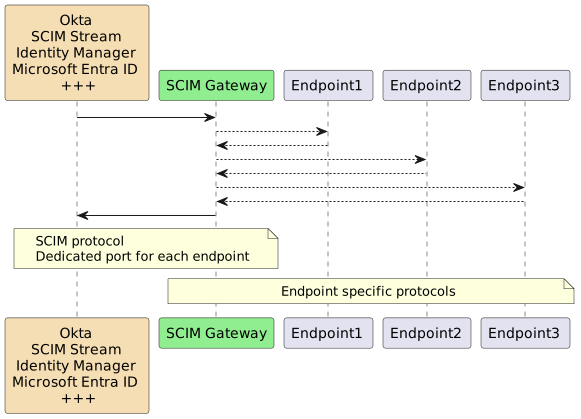
|
|
6
|
-
Author
|
|
5
|
+
---
|
|
6
|
+
**Author:** Jarle Elshaug
|
|
7
7
|
|
|
8
|
-
Validated through
|
|
8
|
+
**Validated through IdPs:**
|
|
9
9
|
|
|
10
|
-
|
|
11
|
-
|
|
12
|
-
|
|
13
|
-
|
|
14
|
-
|
|
15
|
-
|
|
10
|
+
* Symantec/Broadcom Identity Manager
|
|
11
|
+
* Microsoft Entra ID
|
|
12
|
+
* One Identity Manager
|
|
13
|
+
* Okta
|
|
14
|
+
* Omada
|
|
15
|
+
* SailPoint/IdentityNow
|
|
16
|
+
---
|
|
16
17
|
|
|
17
18
|
Latest news:
|
|
18
19
|
|
|
19
|
-
-
|
|
20
|
+
- Bun binary build is now supported, allowing SCIM Gateway to be compiled into a single executable binary for simplified deployment and execution. SCIM Gateway can now run as an ES module (TypeScript) in Node.js.
|
|
20
21
|
- Major release **v6.0.0** introduces changes to API method response bodies (not SCIM-related) and a new method `publicApi()` for handling public path `/pub/api` requests with no authentication required. In addition, the configuration option `bearerJwtAzure.tenantIdGUID` has been replaced by `bearerJwt.azureTenantId`. See the version history for details.
|
|
21
|
-
- Entra ID [Federated Identity Credentials](https://learn.microsoft.com/en-us/graph/api/resources/federatedidentitycredentials-overview?view=graph-rest-1.0)
|
|
22
|
-
- External JWKS (JSON Web Key Set) is now supported by JWT
|
|
22
|
+
- Support for Entra ID [Federated Identity Credentials](https://learn.microsoft.com/en-us/graph/api/resources/federatedidentitycredentials-overview?view=graph-rest-1.0) has been added through internal JWKS (JSON Web Key Set), allowing SCIM Gateway to access Microsoft Entra–protected resources without the need to manage secrets
|
|
23
|
+
- External JWKS (JSON Web Key Set) is now supported by JWT authentication, allowing external applications to access SCIM Gateway without the need to manage secrets
|
|
23
24
|
- [Azure Relay](https://learn.microsoft.com/en-us/azure/azure-relay/relay-what-is-it) is now supported for secure and hassle-free outbound communication — with just one minute of configuration
|
|
24
25
|
- [ETag](https://datatracker.ietf.org/doc/html/rfc7644#section-3.14) is now supported
|
|
25
26
|
- [Bulk Operations](https://datatracker.ietf.org/doc/html/rfc7644#section-3.7) is now supported
|
|
@@ -42,90 +43,50 @@ Latest news:
|
|
|
42
43
|
- Includes API Gateway for none SCIM/provisioning - becomes what you want it to become
|
|
43
44
|
- Running SCIM Gateway as a Docker container
|
|
44
45
|
|
|
46
|
+
---
|
|
47
|
+
|
|
45
48
|
## Overview
|
|
46
49
|
|
|
47
50
|
SCIM Gateway facilitates user management using the standardized REST-based SCIM 1.1 or 2.0 protocol, offering easier, more powerful, and consistent provisioning while avoiding vendor lock-in. Acting as a translator for incoming SCIM requests, the gateway seamlessly enables CRUD functionality (create, read, update, and delete) for users and groups. By implementing endpoint-specific protocols, it ensures provisioning across diverse destinations. With the gateway, your destinations become SCIM-compatible interfaces, streamlining integration and simplifying user management.
|
|
48
51
|
|
|
49
|
-
|
|
50
52
|
|
|
51
53
|
|
|
52
|
-
SCIM Gateway is
|
|
53
|
-
|
|
54
|
-
|
|
55
|
-
|
|
56
|
-
|
|
57
|
-
|
|
58
|
-
|
|
59
|
-
|
|
60
|
-
|
|
61
|
-
|
|
62
|
-
|
|
63
|
-
|
|
64
|
-
|
|
65
|
-
|
|
66
|
-
|
|
67
|
-
|
|
68
|
-
* **SCIM** (REST Webservice)
|
|
69
|
-
Demonstrates user provisioning towards REST-Based endpoint (type SCIM)
|
|
70
|
-
Using plugin Loki as SCIM endpoint through HelperRest
|
|
71
|
-
Can be used as SCIM version-gateway e.g. 1.1=>2.0 or 2.0=>1.1
|
|
72
|
-
|
|
73
|
-
* **Soap** (SOAP Webservice)
|
|
74
|
-
Demonstrates user provisioning towards SOAP-Based endpoint
|
|
75
|
-
Example WSDLs are included
|
|
76
|
-
Using endpoint "Forwardinc" as an example (comes with Symantec/Broadcom/CA IM SDK - SDKWS)
|
|
77
|
-
Shows how to implement a highly configurable multi tenant or multi endpoint solution through `baseEntity` in URL
|
|
78
|
-
|
|
79
|
-
* **MSSQL** (MSSQL Database)
|
|
80
|
-
Demonstrates user provisioning towards MSSQL database
|
|
81
|
-
|
|
82
|
-
* **SAP HANA** (SAP HANA Database)
|
|
83
|
-
Demonstrates SAP HANA specific user provisioning
|
|
84
|
-
|
|
85
|
-
* **Entra ID** (REST Webservices)
|
|
86
|
-
Entra ID user provisioning including license management (App Service plans) e.g. Office 365
|
|
87
|
-
Using Microsoft Graph API through HelperRest
|
|
88
|
-
Using customized SCIM attributes according to Microsoft Graph API
|
|
89
|
-
Includes Symantec/Broadcom ConnectorXpress metafile for creating provisioning "Azure - ScimGateway" endpoint type
|
|
90
|
-
|
|
91
|
-
* **LDAP** (Directory)
|
|
92
|
-
Fully functional LDAP plugin
|
|
93
|
-
Pre-configured for Microsoft Active Directory
|
|
94
|
-
Using endpointMapper (like plugin-entra-id) for attribute mapping flexibility
|
|
95
|
-
|
|
96
|
-
* **API** (REST Webservices)
|
|
97
|
-
Demonstrates API Gateway/plugin functionality using post/put/patch/get/delete combined with HelperRest
|
|
98
|
-
None SCIM plugin, becomes what you want it to become.
|
|
99
|
-
Methods included can also be used in standard SCIM plugins
|
|
100
|
-
Endpoint complexity could be put in this plugin, and client could instead communicate through Gateway using your own simplified REST specification.
|
|
101
|
-
One example of usage could be creation of tickets in ServiceDesk and also the other way, closing a ticket could automatically approve/reject corresponding workflow in IdP.
|
|
54
|
+
SCIM Gateway is built on the modern, asynchronous, event-driven framework [Bun](https://bun.sh/) or [Node.js](https://nodejs.dev/) using TypeScript/JavaScript. It is designed to be cloud and firewall friendly, runs on nearly all operating systems
|
|
55
|
+
|
|
56
|
+
The following fully functional plugins are included for demonstration and production use:
|
|
57
|
+
|
|
58
|
+
| Plugin | Endpoint Type | Description |
|
|
59
|
+
| :--- | :--- | :--- |
|
|
60
|
+
| **Loki** | NoSQL Database | Transforms the SCIM Gateway into a standalone SCIM endpoint utilizing the internal [LokiJS](https://github.com/techfort/LokiJS) database. Includes two test users and groups |
|
|
61
|
+
| **MongoDB** | NoSQL Database | Similar to the Loki plugin, but using an externally managed MongoDB database, showcasing multi-tenant and multi-endpoint capabilities via `baseEntity` |
|
|
62
|
+
| **Entra ID** | REST Webservices | Entra ID user provisioning via Microsoft Graph API |
|
|
63
|
+
| **SCIM** | REST Webservice | Using plugin Loki as a SCIM provisioning endpoint. May become a SCIM version-gateway (e.g., 1.1 => 2.0) |
|
|
64
|
+
| **API** | REST Webservices | A non-SCIM plugin demonstrating API Gateway functionality for custom REST specifications |
|
|
65
|
+
| **Soap** | SOAP Webservice | Demonstrates user provisioning to a SOAP-based endpoint with example WSDLs |
|
|
66
|
+
| **MSSQL** | Database | Demonstrates user provisioning to an MSSQL database |
|
|
67
|
+
| **SAP HANA** | Database | Demonstrates SAP HANA-specific user provisioning |
|
|
68
|
+
| **LDAP** | Directory | A fully functional LDAP plugin pre-configured for Microsoft Active Directory |
|
|
102
69
|
|
|
103
|
-
|
|
104
70
|
## Installation
|
|
71
|
+
To get started with SCIM Gateway, follow the instructions below.
|
|
105
72
|
|
|
106
73
|
#### Install Bun
|
|
107
74
|
|
|
108
|
-
[Bun](https://bun.sh/) is a prerequisite and must be installed
|
|
75
|
+
[Bun](https://bun.sh/) is a prerequisite and must be installed
|
|
109
76
|
|
|
110
77
|
Note, Bun installs by default in the current user’s `HOMEPATH\.bun`. To install it elsewhere, set `BUN_INSTALL=<install-path>` as a global or system environment variable before installing. The installation will add Bun to the current user’s path, but consider adding it to the global or system path for easier access across all users.
|
|
111
78
|
|
|
112
|
-
####
|
|
79
|
+
#### SCIM Gateway Installation
|
|
113
80
|
|
|
114
|
-
|
|
115
|
-
Create your own package directory e.g. c:\my-scimgateway and install SCIM Gateway within this package.
|
|
81
|
+
Create a package directory and install the SCIM Gateway:
|
|
116
82
|
|
|
117
83
|
mkdir c:\my-scimgateway
|
|
118
84
|
cd c:\my-scimgateway
|
|
119
85
|
bun init -y
|
|
120
86
|
bun install scimgateway
|
|
121
87
|
bun pm trust scimgateway
|
|
122
|
-
|
|
123
|
-
**c:\\my-scimgateway** will now be `<package-root>`
|
|
124
88
|
|
|
125
|
-
index.ts, lib and config directories containing example plugins
|
|
126
|
-
|
|
127
|
-
If internet connection is blocked, we could install on another machine and copy the `<package-root>` folder.
|
|
128
|
-
|
|
89
|
+
index.ts, lib and config directories containing example plugins are copied to your package. The command `bun pm trust scimgateway` is required to allow the `postinstall` script to copy these files.
|
|
129
90
|
|
|
130
91
|
#### Startup and verify default Loki plugin
|
|
131
92
|
|
|
@@ -134,7 +95,7 @@ If internet connection is blocked, we could install on another machine and copy
|
|
|
134
95
|
Start a browser
|
|
135
96
|
|
|
136
97
|
http://localhost:8880/ping
|
|
137
|
-
=>
|
|
98
|
+
=> Returns a health check with a "hello" response
|
|
138
99
|
|
|
139
100
|
http://localhost:8880/Users
|
|
140
101
|
http://localhost:8880/Groups
|
|
@@ -159,30 +120,17 @@ If internet connection is blocked, we could install on another machine and copy
|
|
|
159
120
|
|
|
160
121
|
"Ctrl + c" to stop the SCIM Gateway
|
|
161
122
|
|
|
162
|
-
>
|
|
163
|
-
|
|
164
|
-
> If using Node.js instead of Bun, startup will then be:
|
|
123
|
+
> For Node.js, the startup command is:
|
|
165
124
|
`node --import=tsx ./index.ts`
|
|
166
125
|
|
|
167
|
-
#### Upgrade
|
|
168
|
-
|
|
169
|
-
Not needed after a fresh install
|
|
170
|
-
|
|
171
|
-
The best and easiest way to upgrade is renaming existing scimgateway package folder, create a new one and do a fresh installation. After the installation we copy `index.ts, config and lib folder` (customized plugins) from previous installation to the new installation. You should also read the version history to see if custom plugins needs to be updated.
|
|
172
|
-
|
|
173
|
-
Alternatives are:
|
|
174
|
-
|
|
175
|
-
Upgrade to latest minor version:
|
|
176
|
-
|
|
177
|
-
cd c:\my-scimgateway
|
|
178
|
-
bun install scimgateway
|
|
126
|
+
#### Upgrade Process
|
|
179
127
|
|
|
180
|
-
|
|
128
|
+
The recommended upgrade method is to rename the existing package folder, perform a fresh installation, and then copy your custom `index.ts`, `config`, and `lib` folders from the previous installation.
|
|
181
129
|
|
|
182
|
-
|
|
183
|
-
`bun install scimgateway@latest`
|
|
130
|
+
- Minor Upgrade: `bun install scimgateway`
|
|
131
|
+
- Major Upgrade: `bun install scimgateway@latest` (Use with caution, as it may break compatibility with existing custom plugins)
|
|
184
132
|
|
|
185
|
-
##### Avoid (re-)adding the
|
|
133
|
+
##### Avoid (re-)adding the example plugins created during `postinstall`
|
|
186
134
|
|
|
187
135
|
For production we do not need example plugins to be incuded by the `postinstall` job
|
|
188
136
|
Bun will by default exlude any `postinstall` jobs unless we have trusted the scimgateway package using the `bun pm trust scimgateway` that updates package.json `{ trustedDependencies: ["scimgateway"] }`
|
|
@@ -191,201 +139,62 @@ For Node.js (and also Bun), we might set the property `scimgateway_postinstall_s
|
|
|
191
139
|
|
|
192
140
|
## Configuration
|
|
193
141
|
|
|
194
|
-
|
|
195
|
-
|
|
142
|
+
The `index.ts` file defines the plugins to be started.
|
|
143
|
+
|
|
196
144
|
// start one or more plugins:
|
|
197
|
-
|
|
198
|
-
// import './lib/plugin-entra-id.ts'
|
|
199
|
-
// import './lib/plugin-ldap.ts'
|
|
200
|
-
// import './lib/plugin-mongodb.ts'
|
|
201
|
-
// import './lib/plugin-api.ts'
|
|
202
|
-
// import './lib/plugin-mssql.ts'
|
|
203
|
-
// import './lib/plugin-saphana.ts'
|
|
204
|
-
// import './lib/plugin-soap.ts'
|
|
205
|
-
|
|
206
|
-
import './lib/plugin-loki.ts'
|
|
145
|
+
import './lib/plugin-entra-id.ts'
|
|
207
146
|
export {}
|
|
208
147
|
|
|
209
148
|
|
|
210
149
|
Each endpoint plugin needs a TypeScript file (.ts) and a configuration file (.json).
|
|
211
|
-
|
|
212
|
-
>lib\plugin-
|
|
213
|
-
>config\plugin-
|
|
150
|
+
They both must have the **same naming prefix**. For the Entra ID endpoint, the corresponding files are:
|
|
151
|
+
>lib\plugin-entra-id.ts
|
|
152
|
+
>config\plugin-entra-id.json
|
|
214
153
|
|
|
154
|
+
A plugin configuration file has two main JSON objects: `scimgateway` and `endpoint`
|
|
215
155
|
|
|
216
|
-
Edit specific plugin configuration file according to your needs.
|
|
217
|
-
Below shows an example of config\plugin-saphana.json
|
|
218
|
-
|
|
219
156
|
{
|
|
220
157
|
"scimgateway": {
|
|
221
|
-
|
|
222
|
-
"localhostonly": false,
|
|
223
|
-
"chainingBaseUrl": null,
|
|
224
|
-
"scim": {
|
|
225
|
-
"version": "2.0",
|
|
226
|
-
"skipTypeConvert" : false,
|
|
227
|
-
"skipMetaLocation" false,
|
|
228
|
-
"groupMemberOfUser": false
|
|
229
|
-
"usePutSoftSync" : false
|
|
230
|
-
},
|
|
231
|
-
"log": {
|
|
232
|
-
"loglevel": {
|
|
233
|
-
"file": "debug",
|
|
234
|
-
"console": "error"
|
|
235
|
-
},
|
|
236
|
-
"customMasking": []
|
|
237
|
-
},
|
|
238
|
-
"auth": {
|
|
239
|
-
"basic": [
|
|
240
|
-
{
|
|
241
|
-
"username": "gwadmin",
|
|
242
|
-
"password": "password",
|
|
243
|
-
"readOnly": false,
|
|
244
|
-
"baseEntities": []
|
|
245
|
-
}
|
|
246
|
-
],
|
|
247
|
-
"bearerToken": [
|
|
248
|
-
{
|
|
249
|
-
"token": null,
|
|
250
|
-
"readOnly": false,
|
|
251
|
-
"baseEntities": []
|
|
252
|
-
}
|
|
253
|
-
],
|
|
254
|
-
"bearerJwt": [
|
|
255
|
-
{
|
|
256
|
-
"secret": null,
|
|
257
|
-
"publicKey": null,
|
|
258
|
-
"wellKnownUri": null,
|
|
259
|
-
"azureTenantId": null,
|
|
260
|
-
"options": {
|
|
261
|
-
"issuer": null
|
|
262
|
-
},
|
|
263
|
-
"readOnly": false,
|
|
264
|
-
"baseEntities": []
|
|
265
|
-
}
|
|
266
|
-
],
|
|
267
|
-
"bearerOAuth": [
|
|
268
|
-
{
|
|
269
|
-
"clientId": null,
|
|
270
|
-
"clientSecret": null,
|
|
271
|
-
"readOnly": false,
|
|
272
|
-
"baseEntities": []
|
|
273
|
-
}
|
|
274
|
-
],
|
|
275
|
-
"passThrough": {
|
|
276
|
-
"enabled": false,
|
|
277
|
-
"readOnly": false,
|
|
278
|
-
"baseEntities": []
|
|
279
|
-
}
|
|
280
|
-
},
|
|
281
|
-
"certificate": {
|
|
282
|
-
"key": null,
|
|
283
|
-
"cert": null,
|
|
284
|
-
"ca": null,
|
|
285
|
-
"pfx": {
|
|
286
|
-
"bundle": null,
|
|
287
|
-
"password": null
|
|
288
|
-
}
|
|
289
|
-
},
|
|
290
|
-
"ipAllowList": [],
|
|
291
|
-
"email": {
|
|
292
|
-
"auth": {
|
|
293
|
-
"type": "oauth",
|
|
294
|
-
"options": {
|
|
295
|
-
"azureTenantId": null,
|
|
296
|
-
"clientId": null,
|
|
297
|
-
"clientSecret": null
|
|
298
|
-
}
|
|
299
|
-
},
|
|
300
|
-
"emailOnError": {
|
|
301
|
-
"enabled": false,
|
|
302
|
-
"from": null,
|
|
303
|
-
"to": null
|
|
304
|
-
}
|
|
305
|
-
},
|
|
306
|
-
"stream": {
|
|
307
|
-
"baseUrls": [],
|
|
308
|
-
"certificate": {
|
|
309
|
-
"ca": null
|
|
310
|
-
},
|
|
311
|
-
"subscriber": {
|
|
312
|
-
"enabled": false,
|
|
313
|
-
"entity": {
|
|
314
|
-
"undefined": {
|
|
315
|
-
"nats": {
|
|
316
|
-
"tenant": null,
|
|
317
|
-
"subject": null,
|
|
318
|
-
"jwt": null,
|
|
319
|
-
"secret": null
|
|
320
|
-
},
|
|
321
|
-
"deleteUserOnLastGroupRoleRemoval": false,
|
|
322
|
-
"convertRolesToGroups": false,
|
|
323
|
-
"generateUserPassword": false,
|
|
324
|
-
"modifyOnly": false,
|
|
325
|
-
"replaceDomains": []
|
|
326
|
-
}
|
|
327
|
-
}
|
|
328
|
-
},
|
|
329
|
-
"publisher": {
|
|
330
|
-
"enabled": false,
|
|
331
|
-
"entity": {
|
|
332
|
-
"undefined": {
|
|
333
|
-
"nats": {
|
|
334
|
-
"tenant": null,
|
|
335
|
-
"subject": null,
|
|
336
|
-
"jwt": null,
|
|
337
|
-
"secret": null
|
|
338
|
-
}
|
|
339
|
-
}
|
|
340
|
-
}
|
|
341
|
-
}
|
|
342
|
-
}
|
|
158
|
+
...
|
|
343
159
|
},
|
|
344
160
|
"endpoint": {
|
|
345
|
-
|
|
346
|
-
"port": 30015,
|
|
347
|
-
"username": "username",
|
|
348
|
-
"password": "password",
|
|
349
|
-
"saml_provider": "saml_provider_name"
|
|
161
|
+
...
|
|
350
162
|
}
|
|
351
163
|
}
|
|
352
164
|
|
|
165
|
+
`scimgateway`: Contains fixed attributes used by the core gateway functionality, such as port, logging, and authentication.
|
|
353
166
|
|
|
354
|
-
|
|
167
|
+
`endpoint`: Contains customized definitions required by the plugin code for communication with the destination system, including host, port, and credentials.
|
|
355
168
|
|
|
356
|
-
|
|
169
|
+
- **port**: The gateway will listen on this port number. Clients, such as a provisioning server, will use this port to communicate with the gateway.
|
|
357
170
|
|
|
358
|
-
|
|
171
|
+
- **localhostonly**: Set to `true` to accept incoming requests only from localhost (127.0.0.1). Set to `false` to accept requests from all clients.
|
|
359
172
|
|
|
360
|
-
- **
|
|
173
|
+
- **chainingBaseUrl**: The base URL for chaining another gateway, with the syntax `http(s)://host:port`. When defined, the gateway behaves like a reverse proxy, validating authorization unless PassThrough mode is enabled. See `Configuration notes` for details.
|
|
361
174
|
|
|
362
|
-
- **
|
|
175
|
+
- **idleTimeout**: The number of seconds to wait before timing out a connection due to inactivity. The default value is 120 seconds.
|
|
363
176
|
|
|
364
|
-
- **
|
|
177
|
+
- **scim.version**: Specifies the SCIM protocol version to use, either "1.1" or "2.0". The default is "2.0".
|
|
365
178
|
|
|
366
|
-
- **
|
|
367
|
-
|
|
368
|
-
- **scim.version** - "1.1" or "2.0". Default is "2.0".
|
|
369
|
-
|
|
370
|
-
- **scim.skipTypeConvert** - true or false, default false. Multivalue attributes supporting types e.g. emails, phoneNumbers, ims, photos, addresses, entitlements and x509Certificates (but not roles, groups and members) will be become "type converted objects" when sent to modifyUser and createUser. This for simplicity of checking attributes included and also for the endpointMapper method (used by plugin-ldap and plugin-entra-id), e.g.:
|
|
179
|
+
- **scim.skipTypeConvert**: When set to `true`, multivalue attributes with types (e.g., emails, phoneNumbers, ims, photos, addresses, entitlements, and x509Certificates, but not roles, groups, and members) will not be converted into "type converted objects" when sent to `modifyUser` and `createUser`. This is useful for simplifying attribute checks and for the `endpointMapper` method used by `plugin-ldap` and `plugin-entra-id`. For example:
|
|
371
180
|
|
|
372
181
|
"emails": {
|
|
373
182
|
"work": {"value": "jsmith@example.com", "type": "work"},
|
|
374
183
|
"home": {"value": "", "type": "home", "operation": "delete"},
|
|
375
184
|
"undefined": {"value": "jsmith@hotmail.com"}
|
|
376
185
|
}
|
|
377
|
-
|
|
378
|
-
skipTypeConvert set to true gives attribute "as-is": array, allow duplicate types including blank, but values to be deleted have been marked with "operation": "delete"
|
|
379
186
|
|
|
187
|
+
When `skipTypeConvert` is set to `true`, the attribute is provided "as-is" as an array, allowing duplicate types including blank types. Values to be deleted are marked with `"operation": "delete"`.
|
|
188
|
+
|
|
380
189
|
"emails": [
|
|
381
190
|
{"value": "jsmith@example.com", "type": "work"},
|
|
382
191
|
{"value": "john.smith.org", "type": "home", "operation": "delete"},
|
|
383
192
|
{"value": "jsmith@hotmail.com"}
|
|
384
193
|
]
|
|
385
194
|
|
|
386
|
-
- **scim.skipMetaLocation
|
|
195
|
+
- **scim.skipMetaLocation**: When set to `true`, the `meta.location` attribute, which contains the protocol and hostname from the request URL, will be excluded from the response (e.g., `"{...,meta":{"location":"https://my-company.com/<...>"}}`). This is useful when using a reverse proxy and not including the `X-Forwarded-Proto` and `X-Forwarded-Host` headers, as the originator will be the proxy and the internal protocol and hostname should not be exposed.
|
|
387
196
|
|
|
388
|
-
- **scim.groupMemberOfUser
|
|
197
|
+
- **scim.groupMemberOfUser**: When set to `true`, and the request body contains groups, the `groups` attribute will remain on the user object (groups are members of the user). The default behavior is for the user to be a member of the groups, which uses the `modifyGroup` method to maintain group members.
|
|
389
198
|
|
|
390
199
|
- **scim.usePutSoftSync** - true or false, default false. `PUT /Users/bjensen` will replace the user bjensen with body content. If set to `true`, only PUT body content will be replaced. Any additional existing user attributes and groups supported by plugin will remain as-is.
|
|
391
200
|
|
|
@@ -916,16 +725,16 @@ If several SCIM Gateway´s (same plugin) connect listeners using the same Azure
|
|
|
916
725
|
|
|
917
726
|
### Configuration notes - running SCIM Gateway as a single binary
|
|
918
727
|
|
|
919
|
-
|
|
728
|
+
Bun binary build allowing SCIM Gateway to be compiled into a single executable binary for simplified deployment and execution. The binary must have the same name (prefix) as the configuration file in the config directory, and this directory must be located in the same folder as the binary.
|
|
920
729
|
|
|
921
730
|
cd my-scimgateway
|
|
922
|
-
bun build --compile --target=bun-darwin-arm64 --outfile ./build/plugin-loki
|
|
923
|
-
|
|
731
|
+
bun build --compile ./lib/plugin-loki.ts --target=bun-darwin-arm64 --outfile ./build/plugin-loki
|
|
732
|
+
# for target options, see: https://bun.com/docs/bundler/executables#cross-compile-to-other-platforms
|
|
924
733
|
|
|
925
734
|
cp -r ./config ./build
|
|
926
|
-
|
|
735
|
+
# build directory now ready for production deployment
|
|
927
736
|
cd build
|
|
928
|
-
|
|
737
|
+
# run the binary - note, binary must have same name (prefix) as the configuration file in the config directory
|
|
929
738
|
./plugin-loki
|
|
930
739
|
|
|
931
740
|
|
|
@@ -1364,36 +1173,6 @@ Endpoint configuration example:
|
|
|
1364
1173
|
|
|
1365
1174
|
For details, please see section "CA Identity Manager as IdP using SCIM Gateway"
|
|
1366
1175
|
|
|
1367
|
-
## SCIM Gateway REST API
|
|
1368
|
-
|
|
1369
|
-
Create = POST http://localhost:8880/Users
|
|
1370
|
-
(body contains the user information)
|
|
1371
|
-
|
|
1372
|
-
Update = PATCH http://localhost:8880/Users/<id>
|
|
1373
|
-
(body contains the attributes to be updated)
|
|
1374
|
-
|
|
1375
|
-
Search/Read = GET http://localhost:8880/Users?userName eq
|
|
1376
|
-
"userID"&attributes=<comma separated list of scim-schema defined attributes>
|
|
1377
|
-
|
|
1378
|
-
Search/explore all users:
|
|
1379
|
-
GET http://localhost:8880/Users?attributes=userName
|
|
1380
|
-
|
|
1381
|
-
Delete = DELETE http://localhost:8880/Users/<id>
|
|
1382
|
-
|
|
1383
|
-
Discovery:
|
|
1384
|
-
|
|
1385
|
-
GET http://localhost:8880/ServiceProviderConfigs
|
|
1386
|
-
Specification compliance, authentication schemes, data models.
|
|
1387
|
-
|
|
1388
|
-
GET http://localhost:8880/Schemas
|
|
1389
|
-
Introspect resources and attribute extensions.
|
|
1390
|
-
|
|
1391
|
-
Note:
|
|
1392
|
-
|
|
1393
|
-
- userName (mandatory) = UserID
|
|
1394
|
-
- id (mandatory) = Unique id. Could be set to the same as UserID but don't have to.
|
|
1395
|
-
|
|
1396
|
-
|
|
1397
1176
|
## API Gateway
|
|
1398
1177
|
|
|
1399
1178
|
SCIM Gateway also works as an API Gateway when using url `/api` or `/<baseEntity>/api`
|
|
@@ -1408,35 +1187,33 @@ Following methods for the none SCIM based api-plugin are supported:
|
|
|
1408
1187
|
PATCH /api/{id} + body
|
|
1409
1188
|
DELETE /api/{id}
|
|
1410
1189
|
|
|
1411
|
-
These methods can also be
|
|
1190
|
+
These methods can also be included in standard SCIM plugins
|
|
1412
1191
|
Please see example plugin: **plugin-api.ts**
|
|
1413
1192
|
|
|
1414
|
-
|
|
1415
1193
|
## How to build your own plugins
|
|
1416
|
-
For
|
|
1194
|
+
For coding editor you may use [Visual Studio Code](https://code.visualstudio.com/ "Visual Studio Code")
|
|
1417
1195
|
|
|
1418
1196
|
Preparation:
|
|
1419
1197
|
|
|
1420
1198
|
* Copy "best matching" example plugin e.g. `lib\plugin-mssql.ts` and `config\plugin-mssql.json` and rename both copies to your plugin name prefix e.g. plugin-mine.ts and plugin-mine.json
|
|
1421
1199
|
* Edit plugin-mine.json and define a unique port number for the gateway setting
|
|
1422
|
-
* Edit index.ts and include your plugin in the startup e.g. `
|
|
1423
|
-
* Start SCIM Gateway and verify
|
|
1200
|
+
* Edit index.ts and include your plugin in the startup e.g. `import './lib/plugin-mine.ts'`
|
|
1201
|
+
* Start SCIM Gateway and verify
|
|
1424
1202
|
|
|
1425
|
-
|
|
1203
|
+
We are now ready for custom coding by editing plugin-mine.ts
|
|
1426
1204
|
Coding should be done step by step and each step should be verified and tested before starting the next
|
|
1427
1205
|
|
|
1428
1206
|
1. **Turn off group functionality** - getGroups to return empty response (gateway automatically use getGroups for some of the methods if groups not included)
|
|
1429
1207
|
Please see plugin-saphana that do not use groups.
|
|
1430
1208
|
2. **getUsers** (test provisioning retrieve all accounts and single account)
|
|
1431
|
-
|
|
1432
|
-
|
|
1433
|
-
|
|
1434
|
-
|
|
1209
|
+
3. **createUser** (test provisioning new account)
|
|
1210
|
+
4. **deleteUser** (test provisioning delete account)
|
|
1211
|
+
5. **modifyUser** (test provisioning modify account)
|
|
1212
|
+
6. **Turn on group functionality** - getGroups having logic for returning groups if groups are supported
|
|
1435
1213
|
7. **getGroups** (test provisioning retrieve groups)
|
|
1436
1214
|
8. **modifyGroup** (test provisioning modify group members)
|
|
1437
|
-
|
|
1438
|
-
|
|
1439
|
-
|
|
1215
|
+
9. **createGroup** (test provisioning new group)
|
|
1216
|
+
10. **deleteGroup** (test provisioning delete account)
|
|
1440
1217
|
|
|
1441
1218
|
Template used by CA Provisioning role should only include endpoint supported attributes defined in our plugin. Template should therefore have no links to global user for none supported attributes (e.g. remove %UT% from "Job Title" if our endpoint/code do not support title)
|
|
1442
1219
|
|
|
@@ -1488,33 +1265,14 @@ advanced options - **Synchronized** = enabled (toggled on)
|
|
|
1488
1265
|
Plugins should have following initialization:
|
|
1489
1266
|
|
|
1490
1267
|
// start - mandatory plugin initialization
|
|
1491
|
-
|
|
1492
|
-
try {
|
|
1493
|
-
return (await import('scimgateway')).ScimGateway
|
|
1494
|
-
} catch (err) {
|
|
1495
|
-
const source = './scimgateway.ts'
|
|
1496
|
-
return (await import(source)).ScimGateway
|
|
1497
|
-
}
|
|
1498
|
-
})()
|
|
1268
|
+
import { ScimGateway, HelperRest } from 'scimgateway'
|
|
1499
1269
|
const scimgateway = new ScimGateway()
|
|
1270
|
+
const helper = new HelperRest(scimgateway)
|
|
1500
1271
|
const config = scimgateway.getConfig()
|
|
1501
1272
|
scimgateway.authPassThroughAllowed = false
|
|
1502
1273
|
// end - mandatory plugin initialization
|
|
1503
|
-
|
|
1504
|
-
If using REST, we could also include the HelperRest:
|
|
1505
1274
|
|
|
1506
|
-
|
|
1507
|
-
...
|
|
1508
|
-
const HelperRest: typeof import('scimgateway').HelperRest = await (async () => {
|
|
1509
|
-
try {
|
|
1510
|
-
return (await import('scimgateway')).HelperRest
|
|
1511
|
-
} catch (err) {
|
|
1512
|
-
const source = './scimgateway.ts'
|
|
1513
|
-
return (await import(source)).HelperRest
|
|
1514
|
-
}
|
|
1515
|
-
})()
|
|
1516
|
-
...
|
|
1517
|
-
// end - mandatory plugin initialization
|
|
1275
|
+
HelperRest could included and used by REST plugins
|
|
1518
1276
|
|
|
1519
1277
|
Plugins should include following SCIM Gateway methods:
|
|
1520
1278
|
|
|
@@ -1545,11 +1303,28 @@ MIT © [Jarle Elshaug](https://www.elshaug.xyz)
|
|
|
1545
1303
|
|
|
1546
1304
|
## Change log
|
|
1547
1305
|
|
|
1306
|
+
### v6.1.2
|
|
1307
|
+
|
|
1308
|
+
[Fixed]
|
|
1309
|
+
- SMTP mail functionality failed because of an updated dependency
|
|
1310
|
+
- endpointMapper failed when `mapTo` included multiple comma-separated attributes and one of them was a multivalued attribute, e.g. `{ "mail": { "mapTo": "userName,emails.work.value" } }`
|
|
1311
|
+
|
|
1312
|
+
### v6.1.1
|
|
1313
|
+
|
|
1314
|
+
[Fixed]
|
|
1315
|
+
|
|
1316
|
+
- plugin-ldap, a createUser operation followed immediately by a readUser (automatically performed by SCIM Gateway) may not find the newly created user on some systems, such as Samba AD, due to timing issues
|
|
1317
|
+
|
|
1318
|
+
|
|
1319
|
+
[Improved]
|
|
1320
|
+
|
|
1321
|
+
- the final info log message now includes a JSON serialization of all elements, such as durationMs, status, requestBody, responseBody, ...
|
|
1322
|
+
|
|
1548
1323
|
### v6.1.0
|
|
1549
1324
|
|
|
1550
1325
|
[Improved]
|
|
1551
1326
|
|
|
1552
|
-
- tsx is now included, allowing SCIM Gateway to
|
|
1327
|
+
- `tsx` is now included, allowing SCIM Gateway to run as an ES module (TypeScript) in Node.js. The mandatory plugin section, which previously required complex dynamic loading, can now be simplified using static imports
|
|
1553
1328
|
|
|
1554
1329
|
**Old plugin-xxx.ts:**
|
|
1555
1330
|
|
|
@@ -1613,17 +1388,16 @@ MIT © [Jarle Elshaug](https://www.elshaug.xyz)
|
|
|
1613
1388
|
import './lib/plugin-loki.ts'
|
|
1614
1389
|
export {}
|
|
1615
1390
|
|
|
1616
|
-
|
|
1617
|
-
- Bun binary build is now supported. A single binary can be compiled that includes both the gateway and the plugin. The binary must have the same name (prefix) as the configuration file in the config directory, and this directory must be located in the same folder as the binary.
|
|
1391
|
+
- Bun binary build is now supported allowing SCIM Gateway to be compiled into a single executable binary for simplified deployment and execution. The binary must have the same name (prefix) as the configuration file in the config directory, and this directory must be located in the same folder as the binary.
|
|
1618
1392
|
|
|
1619
1393
|
cd my-scimgateway
|
|
1620
|
-
bun build --compile --target=bun-darwin-arm64 --outfile ./build/plugin-loki
|
|
1621
|
-
|
|
1394
|
+
bun build --compile ./lib/plugin-loki.ts --target=bun-darwin-arm64 --outfile ./build/plugin-loki
|
|
1395
|
+
# for target options, see: https://bun.com/docs/bundler/executables#cross-compile-to-other-platforms
|
|
1622
1396
|
|
|
1623
1397
|
cp -r ./config ./build
|
|
1624
|
-
|
|
1398
|
+
# build directory now ready for production deployment
|
|
1625
1399
|
cd build
|
|
1626
|
-
|
|
1400
|
+
# run the binary - note, binary must have same name (prefix) as the configuration file in the config directory
|
|
1627
1401
|
./plugin-loki
|
|
1628
1402
|
|
|
1629
1403
|
- Dependencies bump
|
|
@@ -3757,5 +3531,3 @@ This plugin now replace previous `plugin-testmode`
|
|
|
3757
3531
|
|
|
3758
3532
|
### v0.2.0
|
|
3759
3533
|
Initial version
|
|
3760
|
-
|
|
3761
|
-
|
package/config/plugin-ldap.json
CHANGED
|
@@ -144,13 +144,13 @@
|
|
|
144
144
|
"namingAttribute": {
|
|
145
145
|
"user": [
|
|
146
146
|
{
|
|
147
|
-
"attribute": "
|
|
147
|
+
"attribute": "CN",
|
|
148
148
|
"mapTo": "userName"
|
|
149
149
|
}
|
|
150
150
|
],
|
|
151
151
|
"group": [
|
|
152
152
|
{
|
|
153
|
-
"attribute": "
|
|
153
|
+
"attribute": "CN",
|
|
154
154
|
"mapTo": "displayName"
|
|
155
155
|
}
|
|
156
156
|
]
|