scimgateway 6.0.2 → 6.1.1
This diff represents the content of publicly available package versions that have been released to one of the supported registries. The information contained in this diff is provided for informational purposes only and reflects changes between package versions as they appear in their respective public registries.
- package/README.md +156 -241
- package/bun.lock +199 -175
- package/config/plugin-ldap.json +2 -2
- package/index.ts +13 -14
- package/lib/helper-rest.ts +1 -1
- package/lib/plugin-api.ts +3 -21
- package/lib/plugin-entra-id.ts +2 -20
- package/lib/plugin-ldap.ts +4 -13
- package/lib/plugin-loki.ts +1 -10
- package/lib/plugin-mongodb.ts +1 -10
- package/lib/plugin-mssql.ts +1 -10
- package/lib/plugin-saphana.ts +1 -10
- package/lib/plugin-scim.ts +10 -29
- package/lib/plugin-soap.ts +1 -10
- package/lib/scimgateway.ts +230 -237
- package/lib/utils-scim.ts +40 -22
- package/lib/utils.ts +69 -0
- package/package.json +12 -14
- package/test/index.ts +4 -4
package/README.md
CHANGED
|
@@ -8,17 +8,18 @@ Author: Jarle Elshaug
|
|
|
8
8
|
Validated through IdP's:
|
|
9
9
|
|
|
10
10
|
- Symantec/Broadcom Identity Manager
|
|
11
|
-
- Microsoft Entra ID
|
|
12
|
-
- One Identity Manager
|
|
13
|
-
- Okta
|
|
14
|
-
- Omada
|
|
15
|
-
- SailPoint/IdentityNow
|
|
11
|
+
- Microsoft Entra ID
|
|
12
|
+
- One Identity Manager
|
|
13
|
+
- Okta
|
|
14
|
+
- Omada
|
|
15
|
+
- SailPoint/IdentityNow
|
|
16
16
|
|
|
17
17
|
Latest news:
|
|
18
18
|
|
|
19
|
+
- Bun binary build is now supported, allowing SCIM Gateway to be compiled into a single executable binary for simplified deployment and execution. SCIM Gateway can now run as an ES module (TypeScript) in Node.js.
|
|
19
20
|
- Major release **v6.0.0** introduces changes to API method response bodies (not SCIM-related) and a new method `publicApi()` for handling public path `/pub/api` requests with no authentication required. In addition, the configuration option `bearerJwtAzure.tenantIdGUID` has been replaced by `bearerJwt.azureTenantId`. See the version history for details.
|
|
20
|
-
- Entra ID [Federated Identity Credentials](https://learn.microsoft.com/en-us/graph/api/resources/federatedidentitycredentials-overview?view=graph-rest-1.0)
|
|
21
|
-
- External JWKS (JSON Web Key Set) is now supported by JWT
|
|
21
|
+
- Support for Entra ID [Federated Identity Credentials](https://learn.microsoft.com/en-us/graph/api/resources/federatedidentitycredentials-overview?view=graph-rest-1.0) has been added through internal JWKS (JSON Web Key Set), allowing SCIM Gateway to access Microsoft Entra–protected resources without the need to manage secrets
|
|
22
|
+
- External JWKS (JSON Web Key Set) is now supported by JWT authentication, allowing external applications to access SCIM Gateway without the need to manage secrets
|
|
22
23
|
- [Azure Relay](https://learn.microsoft.com/en-us/azure/azure-relay/relay-what-is-it) is now supported for secure and hassle-free outbound communication — with just one minute of configuration
|
|
23
24
|
- [ETag](https://datatracker.ietf.org/doc/html/rfc7644#section-3.14) is now supported
|
|
24
25
|
- [Bulk Operations](https://datatracker.ietf.org/doc/html/rfc7644#section-3.7) is now supported
|
|
@@ -45,86 +46,43 @@ Latest news:
|
|
|
45
46
|
|
|
46
47
|
SCIM Gateway facilitates user management using the standardized REST-based SCIM 1.1 or 2.0 protocol, offering easier, more powerful, and consistent provisioning while avoiding vendor lock-in. Acting as a translator for incoming SCIM requests, the gateway seamlessly enables CRUD functionality (create, read, update, and delete) for users and groups. By implementing endpoint-specific protocols, it ensures provisioning across diverse destinations. With the gateway, your destinations become SCIM-compatible interfaces, streamlining integration and simplifying user management.
|
|
47
48
|
|
|
48
|
-
|
|
49
49
|
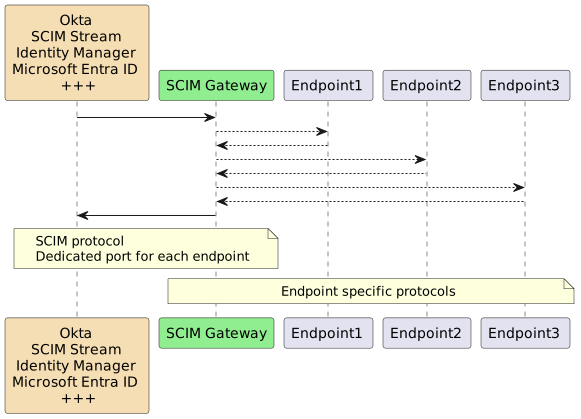
|
|
50
50
|
|
|
51
|
-
SCIM Gateway is
|
|
52
|
-
|
|
53
|
-
|
|
54
|
-
|
|
55
|
-
|
|
56
|
-
|
|
57
|
-
|
|
58
|
-
|
|
59
|
-
|
|
60
|
-
|
|
61
|
-
|
|
62
|
-
|
|
63
|
-
|
|
64
|
-
|
|
65
|
-
|
|
66
|
-
|
|
67
|
-
* **SCIM** (REST Webservice)
|
|
68
|
-
Demonstrates user provisioning towards REST-Based endpoint (type SCIM)
|
|
69
|
-
Using plugin Loki as SCIM endpoint through HelperRest
|
|
70
|
-
Can be used as SCIM version-gateway e.g. 1.1=>2.0 or 2.0=>1.1
|
|
71
|
-
|
|
72
|
-
* **Soap** (SOAP Webservice)
|
|
73
|
-
Demonstrates user provisioning towards SOAP-Based endpoint
|
|
74
|
-
Example WSDLs are included
|
|
75
|
-
Using endpoint "Forwardinc" as an example (comes with Symantec/Broadcom/CA IM SDK - SDKWS)
|
|
76
|
-
Shows how to implement a highly configurable multi tenant or multi endpoint solution through `baseEntity` in URL
|
|
77
|
-
|
|
78
|
-
* **MSSQL** (MSSQL Database)
|
|
79
|
-
Demonstrates user provisioning towards MSSQL database
|
|
80
|
-
|
|
81
|
-
* **SAP HANA** (SAP HANA Database)
|
|
82
|
-
Demonstrates SAP HANA specific user provisioning
|
|
83
|
-
|
|
84
|
-
* **Entra ID** (REST Webservices)
|
|
85
|
-
Entra ID user provisioning including license management (App Service plans) e.g. Office 365
|
|
86
|
-
Using Microsoft Graph API through HelperRest
|
|
87
|
-
Using customized SCIM attributes according to Microsoft Graph API
|
|
88
|
-
Includes Symantec/Broadcom ConnectorXpress metafile for creating provisioning "Azure - ScimGateway" endpoint type
|
|
89
|
-
|
|
90
|
-
* **LDAP** (Directory)
|
|
91
|
-
Fully functional LDAP plugin
|
|
92
|
-
Pre-configured for Microsoft Active Directory
|
|
93
|
-
Using endpointMapper (like plugin-entra-id) for attribute mapping flexibility
|
|
94
|
-
|
|
95
|
-
* **API** (REST Webservices)
|
|
96
|
-
Demonstrates API Gateway/plugin functionality using post/put/patch/get/delete combined with HelperRest
|
|
97
|
-
None SCIM plugin, becomes what you want it to become.
|
|
98
|
-
Methods included can also be used in standard SCIM plugins
|
|
99
|
-
Endpoint complexity could be put in this plugin, and client could instead communicate through Gateway using your own simplified REST specification.
|
|
100
|
-
One example of usage could be creation of tickets in ServiceDesk and also the other way, closing a ticket could automatically approve/reject corresponding workflow in IdP.
|
|
51
|
+
SCIM Gateway is built on the modern, asynchronous, event-driven framework [Bun](https://bun.sh/) or [Node.js](https://nodejs.dev/) using TypeScript/JavaScript. It is designed to be cloud and firewall friendly, runs on nearly all operating systems
|
|
52
|
+
|
|
53
|
+
The following fully functional plugins are included for demonstration and production use:
|
|
54
|
+
|
|
55
|
+
| Plugin | Endpoint Type | Description |
|
|
56
|
+
| :--- | :--- | :--- |
|
|
57
|
+
| **Loki** | NoSQL Database | Makes the SCIM Gateway a standalone SCIM endpoint using internal [LokiJS](https://github.com/techfort/LokiJS) |
|
|
58
|
+
| **MongoDB** | NoSQL Database | Like plugin Loki, but using external MongoDB. Demonstrates multi-tenant or multi-endpoint through `baseEntity`|
|
|
59
|
+
| **Entra ID** | REST Webservices | Entra ID user provisioning via Microsoft Graph API |
|
|
60
|
+
| **SCIM** | REST Webservice | Using plugin Loki as a SCIM provisioning endpoint. May become a SCIM version-gateway (e.g., 1.1 => 2.0) |
|
|
61
|
+
| **API** | REST Webservices | A non-SCIM plugin demonstrating API Gateway functionality for custom REST specifications |
|
|
62
|
+
| **Soap** | SOAP Webservice | Demonstrates user provisioning to a SOAP-based endpoint with example WSDLs |
|
|
63
|
+
| **MSSQL** | Database | Demonstrates user provisioning to an MSSQL database |
|
|
64
|
+
| **SAP HANA** | Database | Demonstrates SAP HANA-specific user provisioning |
|
|
65
|
+
| **LDAP** | Directory | A fully functional LDAP plugin pre-configured for Microsoft Active Directory |
|
|
101
66
|
|
|
102
|
-
|
|
103
67
|
## Installation
|
|
104
68
|
|
|
105
69
|
#### Install Bun
|
|
106
70
|
|
|
107
|
-
[Bun](https://bun.sh/) is a prerequisite and must be installed
|
|
71
|
+
[Bun](https://bun.sh/) is a prerequisite and must be installed
|
|
108
72
|
|
|
109
73
|
Note, Bun installs by default in the current user’s `HOMEPATH\.bun`. To install it elsewhere, set `BUN_INSTALL=<install-path>` as a global or system environment variable before installing. The installation will add Bun to the current user’s path, but consider adding it to the global or system path for easier access across all users.
|
|
110
74
|
|
|
111
|
-
####
|
|
75
|
+
#### SCIM Gateway Installation
|
|
112
76
|
|
|
113
|
-
|
|
114
|
-
Create your own package directory e.g. c:\my-scimgateway and install SCIM Gateway within this package.
|
|
77
|
+
Create a package directory and install the SCIM Gateway:
|
|
115
78
|
|
|
116
79
|
mkdir c:\my-scimgateway
|
|
117
80
|
cd c:\my-scimgateway
|
|
118
81
|
bun init -y
|
|
119
82
|
bun install scimgateway
|
|
120
83
|
bun pm trust scimgateway
|
|
121
|
-
|
|
122
|
-
**c:\\my-scimgateway** will now be `<package-root>`
|
|
123
84
|
|
|
124
|
-
index.ts, lib and config directories containing example plugins
|
|
125
|
-
|
|
126
|
-
If internet connection is blocked, we could install on another machine and copy the `<package-root>` folder.
|
|
127
|
-
|
|
85
|
+
index.ts, lib and config directories containing example plugins are copied to your package. The command `bun pm trust scimgateway` is required to allow the `postinstall` script to copy these files.
|
|
128
86
|
|
|
129
87
|
#### Startup and verify default Loki plugin
|
|
130
88
|
|
|
@@ -158,28 +116,15 @@ If internet connection is blocked, we could install on another machine and copy
|
|
|
158
116
|
|
|
159
117
|
"Ctrl + c" to stop the SCIM Gateway
|
|
160
118
|
|
|
161
|
-
>
|
|
119
|
+
> For Node.js, the startup command is:
|
|
120
|
+
`node --import=tsx ./index.ts`
|
|
162
121
|
|
|
163
|
-
|
|
164
|
-
`node --experimental-strip-types c:\scimgateway\index.ts`
|
|
122
|
+
#### Upgrade Process
|
|
165
123
|
|
|
166
|
-
|
|
124
|
+
The recommended upgrade method is to rename the existing package folder, perform a fresh installation, and then copy your custom `index.ts`, `config`, and `lib` folders from the previous installation.
|
|
167
125
|
|
|
168
|
-
|
|
169
|
-
|
|
170
|
-
The best and easiest way to upgrade is renaming existing scimgateway package folder, create a new one and do a fresh installation. After the installation we copy `index.ts, config and lib folder` (customized plugins) from previous installation to the new installation. You should also read the version history to see if custom plugins needs to be updated.
|
|
171
|
-
|
|
172
|
-
Alternatives are:
|
|
173
|
-
|
|
174
|
-
Upgrade to latest minor version:
|
|
175
|
-
|
|
176
|
-
cd c:\my-scimgateway
|
|
177
|
-
bun install scimgateway
|
|
178
|
-
|
|
179
|
-
Note, always backup/copy c:\\my-scimgateway before upgrading. Custom plugins and corresponding configuration files will not be affected.
|
|
180
|
-
|
|
181
|
-
To force a major upgrade (version x.\*.\* => y.\*.\*) that will brake compability with any existing custom plugins, we have to include the `@latest` suffix in the install command:
|
|
182
|
-
`bun install scimgateway@latest`
|
|
126
|
+
- Minor Upgrade: `bun install scimgateway`
|
|
127
|
+
- Major Upgrade: `bun install scimgateway@latest` (Use with caution, as it may break compatibility with existing custom plugins)
|
|
183
128
|
|
|
184
129
|
##### Avoid (re-)adding the files created during `postinstall`
|
|
185
130
|
|
|
@@ -190,171 +135,32 @@ For Node.js (and also Bun), we might set the property `scimgateway_postinstall_s
|
|
|
190
135
|
|
|
191
136
|
## Configuration
|
|
192
137
|
|
|
193
|
-
**index.ts** defines one or more plugins to be started
|
|
194
|
-
|
|
195
|
-
// example starting all default plugins:
|
|
196
|
-
// const plugins = ['loki', 'scim', 'entra-id', 'ldap', 'mssql', 'api', 'mongodb', 'saphana', 'soap']
|
|
138
|
+
**index.ts** defines one or more plugins to be started
|
|
197
139
|
|
|
198
|
-
|
|
199
|
-
|
|
200
|
-
|
|
201
|
-
try {
|
|
202
|
-
await import(`./lib/plugin-${plugin}.ts`)
|
|
203
|
-
} catch (err: any) {
|
|
204
|
-
console.error(err)
|
|
205
|
-
}
|
|
206
|
-
}
|
|
140
|
+
// start one or more plugins:
|
|
141
|
+
import './lib/plugin-entra-id.ts'
|
|
142
|
+
export {}
|
|
207
143
|
|
|
208
144
|
|
|
209
145
|
Each endpoint plugin needs a TypeScript file (.ts) and a configuration file (.json).
|
|
210
|
-
**They both must have the same naming prefix**. For
|
|
211
|
-
>lib\plugin-
|
|
212
|
-
>config\plugin-
|
|
146
|
+
**They both must have the same naming prefix**. For Entra ID endpoint we have:
|
|
147
|
+
>lib\plugin-entra-id.ts
|
|
148
|
+
>config\plugin-entra-id.json
|
|
213
149
|
|
|
150
|
+
A plugin configuration file has two main JSON objects: `scimgateway` and `endpoint`
|
|
214
151
|
|
|
215
|
-
Edit specific plugin configuration file according to your needs.
|
|
216
|
-
Below shows an example of config\plugin-saphana.json
|
|
217
|
-
|
|
218
152
|
{
|
|
219
153
|
"scimgateway": {
|
|
220
|
-
|
|
221
|
-
"localhostonly": false,
|
|
222
|
-
"chainingBaseUrl": null,
|
|
223
|
-
"scim": {
|
|
224
|
-
"version": "2.0",
|
|
225
|
-
"skipTypeConvert" : false,
|
|
226
|
-
"skipMetaLocation" false,
|
|
227
|
-
"groupMemberOfUser": false
|
|
228
|
-
"usePutSoftSync" : false
|
|
229
|
-
},
|
|
230
|
-
"log": {
|
|
231
|
-
"loglevel": {
|
|
232
|
-
"file": "debug",
|
|
233
|
-
"console": "error"
|
|
234
|
-
},
|
|
235
|
-
"customMasking": []
|
|
236
|
-
},
|
|
237
|
-
"auth": {
|
|
238
|
-
"basic": [
|
|
239
|
-
{
|
|
240
|
-
"username": "gwadmin",
|
|
241
|
-
"password": "password",
|
|
242
|
-
"readOnly": false,
|
|
243
|
-
"baseEntities": []
|
|
244
|
-
}
|
|
245
|
-
],
|
|
246
|
-
"bearerToken": [
|
|
247
|
-
{
|
|
248
|
-
"token": null,
|
|
249
|
-
"readOnly": false,
|
|
250
|
-
"baseEntities": []
|
|
251
|
-
}
|
|
252
|
-
],
|
|
253
|
-
"bearerJwt": [
|
|
254
|
-
{
|
|
255
|
-
"secret": null,
|
|
256
|
-
"publicKey": null,
|
|
257
|
-
"wellKnownUri": null,
|
|
258
|
-
"azureTenantId": null,
|
|
259
|
-
"options": {
|
|
260
|
-
"issuer": null
|
|
261
|
-
},
|
|
262
|
-
"readOnly": false,
|
|
263
|
-
"baseEntities": []
|
|
264
|
-
}
|
|
265
|
-
],
|
|
266
|
-
"bearerOAuth": [
|
|
267
|
-
{
|
|
268
|
-
"clientId": null,
|
|
269
|
-
"clientSecret": null,
|
|
270
|
-
"readOnly": false,
|
|
271
|
-
"baseEntities": []
|
|
272
|
-
}
|
|
273
|
-
],
|
|
274
|
-
"passThrough": {
|
|
275
|
-
"enabled": false,
|
|
276
|
-
"readOnly": false,
|
|
277
|
-
"baseEntities": []
|
|
278
|
-
}
|
|
279
|
-
},
|
|
280
|
-
"certificate": {
|
|
281
|
-
"key": null,
|
|
282
|
-
"cert": null,
|
|
283
|
-
"ca": null,
|
|
284
|
-
"pfx": {
|
|
285
|
-
"bundle": null,
|
|
286
|
-
"password": null
|
|
287
|
-
}
|
|
288
|
-
},
|
|
289
|
-
"ipAllowList": [],
|
|
290
|
-
"email": {
|
|
291
|
-
"auth": {
|
|
292
|
-
"type": "oauth",
|
|
293
|
-
"options": {
|
|
294
|
-
"azureTenantId": null,
|
|
295
|
-
"clientId": null,
|
|
296
|
-
"clientSecret": null
|
|
297
|
-
}
|
|
298
|
-
},
|
|
299
|
-
"emailOnError": {
|
|
300
|
-
"enabled": false,
|
|
301
|
-
"from": null,
|
|
302
|
-
"to": null
|
|
303
|
-
}
|
|
304
|
-
},
|
|
305
|
-
"stream": {
|
|
306
|
-
"baseUrls": [],
|
|
307
|
-
"certificate": {
|
|
308
|
-
"ca": null
|
|
309
|
-
},
|
|
310
|
-
"subscriber": {
|
|
311
|
-
"enabled": false,
|
|
312
|
-
"entity": {
|
|
313
|
-
"undefined": {
|
|
314
|
-
"nats": {
|
|
315
|
-
"tenant": null,
|
|
316
|
-
"subject": null,
|
|
317
|
-
"jwt": null,
|
|
318
|
-
"secret": null
|
|
319
|
-
},
|
|
320
|
-
"deleteUserOnLastGroupRoleRemoval": false,
|
|
321
|
-
"convertRolesToGroups": false,
|
|
322
|
-
"generateUserPassword": false,
|
|
323
|
-
"modifyOnly": false,
|
|
324
|
-
"replaceDomains": []
|
|
325
|
-
}
|
|
326
|
-
}
|
|
327
|
-
},
|
|
328
|
-
"publisher": {
|
|
329
|
-
"enabled": false,
|
|
330
|
-
"entity": {
|
|
331
|
-
"undefined": {
|
|
332
|
-
"nats": {
|
|
333
|
-
"tenant": null,
|
|
334
|
-
"subject": null,
|
|
335
|
-
"jwt": null,
|
|
336
|
-
"secret": null
|
|
337
|
-
}
|
|
338
|
-
}
|
|
339
|
-
}
|
|
340
|
-
}
|
|
341
|
-
}
|
|
154
|
+
...
|
|
342
155
|
},
|
|
343
156
|
"endpoint": {
|
|
344
|
-
|
|
345
|
-
"port": 30015,
|
|
346
|
-
"username": "username",
|
|
347
|
-
"password": "password",
|
|
348
|
-
"saml_provider": "saml_provider_name"
|
|
157
|
+
...
|
|
349
158
|
}
|
|
350
159
|
}
|
|
351
160
|
|
|
161
|
+
`scimgateway`: Contains fixed attributes used by the core gateway functionality (e.g., port, logging, and authentication).
|
|
352
162
|
|
|
353
|
-
|
|
354
|
-
|
|
355
|
-
Definitions in `scimgateway` object have fixed attributes, but values can be modified. Sections not used/configured can be removed. This object is used by the core functionality of the SCIM Gateway.
|
|
356
|
-
|
|
357
|
-
Definitions in `endpoint` object are customized according to our plugin code. Plugin typically need this information for communicating with endpoint
|
|
163
|
+
`endpoint`: Contains customized definitions required by the plugin code for communication with the destination system (e.g., host, port, credentials).
|
|
358
164
|
|
|
359
165
|
- **port** - Gateway will listen on this port number. Clients (e.g. Provisioning Server) will be using this port number for communicating with the gateway
|
|
360
166
|
|
|
@@ -913,6 +719,21 @@ GET `https://<namespace-name>.servicebus.windows.net/<hybrid-connection-name>/<b
|
|
|
913
719
|
|
|
914
720
|
If several SCIM Gateway´s (same plugin) connect listeners using the same Azure Relay connectionUrl, there will be load-balancing and round-robin distribution
|
|
915
721
|
|
|
722
|
+
### Configuration notes - running SCIM Gateway as a single binary
|
|
723
|
+
|
|
724
|
+
Bun binary build allowing SCIM Gateway to be compiled into a single executable binary for simplified deployment and execution. The binary must have the same name (prefix) as the configuration file in the config directory, and this directory must be located in the same folder as the binary.
|
|
725
|
+
|
|
726
|
+
cd my-scimgateway
|
|
727
|
+
bun build --compile ./lib/plugin-loki.ts --target=bun-darwin-arm64 --outfile ./build/plugin-loki
|
|
728
|
+
# for target options, see: https://bun.com/docs/bundler/executables#cross-compile-to-other-platforms
|
|
729
|
+
|
|
730
|
+
cp -r ./config ./build
|
|
731
|
+
# build directory now ready for production deployment
|
|
732
|
+
cd build
|
|
733
|
+
# run the binary - note, binary must have same name (prefix) as the configuration file in the config directory
|
|
734
|
+
./plugin-loki
|
|
735
|
+
|
|
736
|
+
|
|
916
737
|
|
|
917
738
|
## Manual startup
|
|
918
739
|
|
|
@@ -963,7 +784,7 @@ Verification:
|
|
|
963
784
|
|
|
964
785
|
Installing Docker Desktop may be an alternative for creating and testing docker images and containers
|
|
965
786
|
|
|
966
|
-
There are two options: run SCIM Gateway in a single image, or use Docker Compose, which allows
|
|
787
|
+
There are two options: run SCIM Gateway in a single image, or use Docker Compose, which allows configuration and data outside the image and including other images as dependencies (e.g., MSSQL)
|
|
967
788
|
|
|
968
789
|
### Docker single image
|
|
969
790
|
|
|
@@ -1021,7 +842,7 @@ docker-compose**
|
|
|
1021
842
|
**Dockerfile** <== Main dockerfile
|
|
1022
843
|
**DataDockerfile** <== Handles volume mapping
|
|
1023
844
|
**docker-compose-debug.yml** <== Debugging
|
|
1024
|
-
**docker-compose-mssql.yml** <== Example including MSSQL docker image
|
|
845
|
+
**docker-compose-mssql.yml** <== Example including MSSQL docker image
|
|
1025
846
|
**.dockerignore** <== Files to exclude from the build context
|
|
1026
847
|
|
|
1027
848
|
- Create a scimgateway user on your Linux VM.
|
|
@@ -1518,6 +1339,7 @@ In addition following general API methods are available for use:
|
|
|
1518
1339
|
* scimgateway.patchApi()
|
|
1519
1340
|
* scimgateway.getApi()
|
|
1520
1341
|
* scimgateway.deleteApi()
|
|
1342
|
+
* scimgateway.publicApi()
|
|
1521
1343
|
|
|
1522
1344
|
In code editor (e.g., Visual Studio Code), method details and documentation are shown by IntelliSense
|
|
1523
1345
|
|
|
@@ -1528,6 +1350,99 @@ MIT © [Jarle Elshaug](https://www.elshaug.xyz)
|
|
|
1528
1350
|
|
|
1529
1351
|
## Change log
|
|
1530
1352
|
|
|
1353
|
+
### v6.1.1
|
|
1354
|
+
|
|
1355
|
+
[Fixed]
|
|
1356
|
+
|
|
1357
|
+
- plugin-ldap, a createUser operation followed immediately by a readUser (automatically performed by SCIM Gateway) may not find the newly created user on some systems, such as Samba AD, due to timing issues
|
|
1358
|
+
|
|
1359
|
+
|
|
1360
|
+
[Improved]
|
|
1361
|
+
|
|
1362
|
+
- the final info log message now includes a JSON serialization of all elements, such as durationMs, status, requestBody, responseBody, ...
|
|
1363
|
+
|
|
1364
|
+
### v6.1.0
|
|
1365
|
+
|
|
1366
|
+
[Improved]
|
|
1367
|
+
|
|
1368
|
+
- `tsx` is now included, allowing SCIM Gateway to run as an ES module (TypeScript) in Node.js. The mandatory plugin section, which previously required complex dynamic loading, can now be simplified using static imports
|
|
1369
|
+
|
|
1370
|
+
**Old plugin-xxx.ts:**
|
|
1371
|
+
|
|
1372
|
+
// start - mandatory plugin initialization
|
|
1373
|
+
const ScimGateway: typeof import('scimgateway').ScimGateway = await (async () => {
|
|
1374
|
+
try {
|
|
1375
|
+
return (await import('scimgateway')).ScimGateway
|
|
1376
|
+
} catch (err) {
|
|
1377
|
+
const source = './scimgateway.ts'
|
|
1378
|
+
return (await import(source)).ScimGateway
|
|
1379
|
+
}
|
|
1380
|
+
})()
|
|
1381
|
+
const scimgateway = new ScimGateway()
|
|
1382
|
+
const config = scimgateway.getConfig()
|
|
1383
|
+
scimgateway.authPassThroughAllowed = false
|
|
1384
|
+
// end - mandatory plugin initialization
|
|
1385
|
+
|
|
1386
|
+
**New plugin-xxx.ts:**
|
|
1387
|
+
|
|
1388
|
+
// start - mandatory plugin initialization
|
|
1389
|
+
import { ScimGateway } from 'scimgateway'
|
|
1390
|
+
const scimgateway = new ScimGateway()
|
|
1391
|
+
const config = scimgateway.getConfig()
|
|
1392
|
+
scimgateway.authPassThroughAllowed = false
|
|
1393
|
+
// end - mandatory plugin initialization
|
|
1394
|
+
|
|
1395
|
+
|
|
1396
|
+
**Old Node.js startup:**
|
|
1397
|
+
|
|
1398
|
+
node --experimental-strip-types c:\scimgateway\index.ts // scimgateway downloaded from github
|
|
1399
|
+
|
|
1400
|
+
**New Node.js startup:**
|
|
1401
|
+
|
|
1402
|
+
node --import=tsx ./index.ts // running in local package
|
|
1403
|
+
|
|
1404
|
+
- index.ts now using static import instead of dynamic
|
|
1405
|
+
|
|
1406
|
+
**Old index.ts:**
|
|
1407
|
+
|
|
1408
|
+
const plugins = ['loki']
|
|
1409
|
+
for (const plugin of plugins) {
|
|
1410
|
+
try {
|
|
1411
|
+
await import(`./lib/plugin-${plugin}.ts`)
|
|
1412
|
+
} catch (err: any) {
|
|
1413
|
+
console.error(err)
|
|
1414
|
+
}
|
|
1415
|
+
}
|
|
1416
|
+
|
|
1417
|
+
**New index.ts:**
|
|
1418
|
+
|
|
1419
|
+
// start one or more plugins:
|
|
1420
|
+
// import './lib/plugin-scim.ts'
|
|
1421
|
+
// import './lib/plugin-entra-id.ts'
|
|
1422
|
+
// import './lib/plugin-ldap.ts'
|
|
1423
|
+
// import './lib/plugin-mongodb.ts'
|
|
1424
|
+
// import './lib/plugin-api.ts'
|
|
1425
|
+
// import './lib/plugin-mssql.ts'
|
|
1426
|
+
// import './lib/plugin-saphana.ts'
|
|
1427
|
+
// import './lib/plugin-soap.ts'
|
|
1428
|
+
|
|
1429
|
+
import './lib/plugin-loki.ts'
|
|
1430
|
+
export {}
|
|
1431
|
+
|
|
1432
|
+
- Bun binary build is now supported allowing SCIM Gateway to be compiled into a single executable binary for simplified deployment and execution. The binary must have the same name (prefix) as the configuration file in the config directory, and this directory must be located in the same folder as the binary.
|
|
1433
|
+
|
|
1434
|
+
cd my-scimgateway
|
|
1435
|
+
bun build --compile ./lib/plugin-loki.ts --target=bun-darwin-arm64 --outfile ./build/plugin-loki
|
|
1436
|
+
# for target options, see: https://bun.com/docs/bundler/executables#cross-compile-to-other-platforms
|
|
1437
|
+
|
|
1438
|
+
cp -r ./config ./build
|
|
1439
|
+
# build directory now ready for production deployment
|
|
1440
|
+
cd build
|
|
1441
|
+
# run the binary - note, binary must have same name (prefix) as the configuration file in the config directory
|
|
1442
|
+
./plugin-loki
|
|
1443
|
+
|
|
1444
|
+
- Dependencies bump
|
|
1445
|
+
|
|
1531
1446
|
### v6.0.2
|
|
1532
1447
|
|
|
1533
1448
|
[Fixed]
|