scimgateway 5.3.7 → 5.4.0
This diff represents the content of publicly available package versions that have been released to one of the supported registries. The information contained in this diff is provided for informational purposes only and reflects changes between package versions as they appear in their respective public registries.
- package/README.md +185 -69
- package/bun.lock +154 -133
- package/config/plugin-api.json +5 -0
- package/config/plugin-entra-id.json +5 -0
- package/config/plugin-ldap.json +5 -0
- package/config/plugin-loki.json +5 -0
- package/config/plugin-mongodb.json +5 -0
- package/config/plugin-mssql.json +5 -0
- package/config/plugin-saphana.json +5 -0
- package/config/plugin-scim.json +5 -0
- package/config/plugin-soap.json +5 -0
- package/lib/helper-rest.ts +7 -8
- package/lib/scimgateway.ts +230 -57
- package/lib/utils.ts +48 -1
- package/package.json +2 -1
package/README.md
CHANGED
|
@@ -16,12 +16,10 @@ Validated through IdP's:
|
|
|
16
16
|
|
|
17
17
|
Latest news:
|
|
18
18
|
|
|
19
|
-
- [
|
|
20
|
-
- [
|
|
21
|
-
-
|
|
22
|
-
|
|
23
|
-
`curl -N https://<host>/logger -u user:password`
|
|
24
|
-
custom client API, see configuration notes
|
|
19
|
+
- [Azure Relay](https://learn.microsoft.com/en-us/azure/azure-relay/relay-what-is-it) is now supported for secure and hassle-free outbound communication — with just one minute of configuration
|
|
20
|
+
- [ETag](https://datatracker.ietf.org/doc/html/rfc7644#section-3.14) is now supported
|
|
21
|
+
- [Bulk Operations](https://datatracker.ietf.org/doc/html/rfc7644#section-3.7) is now supported
|
|
22
|
+
- Remote real-time log subscription for centralized logging and monitoring. Using browser `https://<host>/logger`, curl or custom client API - see configuration notes
|
|
25
23
|
- By configuring the chainingBaseUrl, it is now possible to chain multiple gateways in sequence, such as `gateway1->gateway2->gateway3->endpoint`. In this setup, gateway beave much like a reverse proxy, validating authorization at each step unless PassThrough mode is enabled. Chaining is also supported in stream subscriber mode
|
|
26
24
|
- Email, onError and sendMail() supports more secure RESTful OAuth for Microsoft Exchange Online (ExO) and Google Workspace Gmail, alongside traditional SMTP Auth for all mail systems. HelperRest supports a wide range of common authentication methods, including basicAuth, bearerAuth, tokenAuth, oauth, oauthSamlBearer, oauthJwtBearer and Auth PassTrough
|
|
27
25
|
- Major version **v5.0.0** marks a shift from JavaScript to native TypeScript and prioritizes [Bun](https://bun.sh/) over Node.js. This upgrade requires some modifications to existing plugins.
|
|
@@ -42,7 +40,7 @@ custom client API, see configuration notes
|
|
|
42
40
|
|
|
43
41
|
## Overview
|
|
44
42
|
|
|
45
|
-
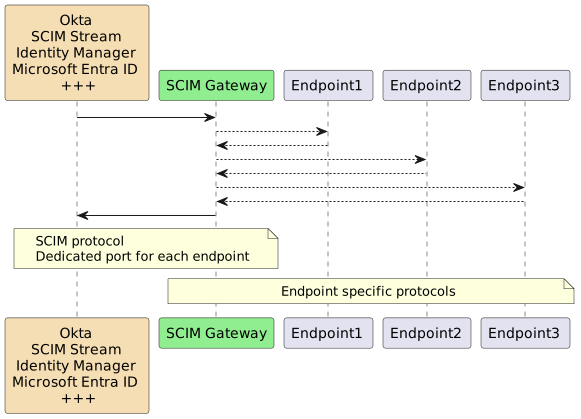
SCIM Gateway facilitates user management using the standardized REST-based SCIM 1.1 or 2.0 protocol, offering easier, more powerful, and consistent provisioning while avoiding vendor lock-in. Acting as a translator for incoming SCIM requests, the gateway seamlessly enables CRUD functionality (create, read, update, and delete) for users and groups. By implementing endpoint-specific protocols, it ensures
|
|
43
|
+
SCIM Gateway facilitates user management using the standardized REST-based SCIM 1.1 or 2.0 protocol, offering easier, more powerful, and consistent provisioning while avoiding vendor lock-in. Acting as a translator for incoming SCIM requests, the gateway seamlessly enables CRUD functionality (create, read, update, and delete) for users and groups. By implementing endpoint-specific protocols, it ensures provisioning across diverse destinations. With the gateway, your destinations effectively become SCIM endpoints, streamlining integration and simplifying user management.
|
|
46
44
|
|
|
47
45
|
|
|
48
46
|
|
|
@@ -129,7 +127,7 @@ If internet connection is blocked, we could install on another machine and copy
|
|
|
129
127
|
|
|
130
128
|
bun c:\my-scimgateway
|
|
131
129
|
|
|
132
|
-
Start a browser
|
|
130
|
+
Start a browser
|
|
133
131
|
|
|
134
132
|
http://localhost:8880/ping
|
|
135
133
|
=> Health check with a "hello" response
|
|
@@ -138,7 +136,7 @@ If internet connection is blocked, we could install on another machine and copy
|
|
|
138
136
|
http://localhost:8880/Groups
|
|
139
137
|
=> Logon using gwadmin/password and two users and groups should be listed
|
|
140
138
|
|
|
141
|
-
Start a new browser for log monitoring
|
|
139
|
+
Start a new browser for remote log monitoring
|
|
142
140
|
using url: http://localhost:8880/logger
|
|
143
141
|
|
|
144
142
|
http://localhost:8880/Users/bjensen
|
|
@@ -160,7 +158,7 @@ If internet connection is blocked, we could install on another machine and copy
|
|
|
160
158
|
>Tip, take a look at bun test scripts located in `node_modules\scimgateway\test\lib`
|
|
161
159
|
|
|
162
160
|
> If using Node.js instead of Bun, scimgateway must be downloaded from github because Node.js does not support native typescript used by modules. Startup will then be:
|
|
163
|
-
`node --experimental-strip-types c:\
|
|
161
|
+
`node --experimental-strip-types c:\scimgateway\index.ts`
|
|
164
162
|
|
|
165
163
|
#### Upgrade SCIM Gateway
|
|
166
164
|
|
|
@@ -396,7 +394,7 @@ Definitions in `endpoint` object are customized according to our plugin code. Pl
|
|
|
396
394
|
|
|
397
395
|
- **log.loglevel.console** - off, debug, info, warn or error. Default off. Output to stdout and errors to stderr
|
|
398
396
|
|
|
399
|
-
- **log.loglevel.push** - off, debug, info, warn or error. Default info. Push to stream
|
|
397
|
+
- **log.loglevel.push** - off, debug, info, warn or error. Default info. Push to stream used by remote real-time log subscription
|
|
400
398
|
|
|
401
399
|
- **log.logDirectory** - custom defined log directory e.g. `/var/log/scimgateway` that will override default `<scimgateway path>/logs`. If not exist it will be created.
|
|
402
400
|
|
|
@@ -435,7 +433,7 @@ Definitions in `endpoint` object are customized according to our plugin code. Pl
|
|
|
435
433
|
|
|
436
434
|
Example of how to make a self signed certificate:
|
|
437
435
|
|
|
438
|
-
openssl
|
|
436
|
+
openssl req -nodes -newkey rsa:2048 -x509 -sha256 -days 3650 -keyout key.pem -out cert.pem -subj "/O=My Company/OU=Application/CN=SCIM Gateway" -addext "subjectAltName=DNS:localhost,DNS:127.0.0.1,DNS:*.mycompany.com" -addext "extendedKeyUsage=serverAuth" -addext "keyUsage=digitalSignature"
|
|
439
437
|
|
|
440
438
|
Note, when using Symantec/Broadcom Provisioning, the "certificate authority - CA" also must be imported on the Connector Server. For self-signed certificate, CA and the certificate (public key) is the same.
|
|
441
439
|
|
|
@@ -475,12 +473,18 @@ Definitions in `endpoint` object are customized according to our plugin code. Pl
|
|
|
475
473
|
- **email.proxy.password** - password if authentication is required
|
|
476
474
|
- **email.emailOnError** - Contains configuration for sending error notifications by email. Note, only the first error will be sent until sendInterval have passed
|
|
477
475
|
- **email.emailOnError.enabled** - true or false, value set to true will enable email notifications
|
|
478
|
-
- **email.emailOnError.sendInterval** - Default 15. Mail notifications on error are deferred until sendInterval **minutes** have passed since the last notification
|
|
476
|
+
- **email.emailOnError.sendInterval** - Default 15. Mail notifications on error are deferred until sendInterval **minutes** have passed since the last notification
|
|
479
477
|
- **email.emailOnError.from** - Sender email addresses e.g: "noreply@example.com". **Mandatory for oauth**. For smtp email.auth.options.username will be used
|
|
480
478
|
- **email.emailOnError.to** - Comma separated list of recipients email addresses e.g: "someone@example.com"
|
|
481
479
|
- **email.emailOnError.cc** - Optional comma separated list of cc mail addresses
|
|
482
480
|
- **email.emailOnError.subject** - Optional mail subject, default `SCIM Gateway error message`
|
|
483
481
|
|
|
482
|
+
- **azureRelay** - Azure Relay outbound listener
|
|
483
|
+
- **azureRelay.enabled** - true or false, true will enable the Azure Relay listener
|
|
484
|
+
- **azureRelay.connectionUrl** - `https://<namespace-name>.servicebus.windows.net/<hybrid-connection-name>` - `<namespace-name>` is the name of the Relay created and `<hybrid-connection-name>` is the name of the Hybrid Connection entity created in the Relay
|
|
485
|
+
- **azureRelay.apiKey** - The `Private Key` found in the `Shared access policy` (RootManageSharedaccessKey)
|
|
486
|
+
- **azureRelay.keyRule** - Optional, the `Shared access policy` name - default using `RootManageSharedaccessKey`
|
|
487
|
+
|
|
484
488
|
- **stream** - See [SCIM Stream](https://elshaug.xyz/docs/scim-stream) for configuration details
|
|
485
489
|
|
|
486
490
|
- **endpoint** - Contains endpoint specific configuration according to customized **plugin code**.
|
|
@@ -743,9 +747,11 @@ Please see code editor method HelperRest doRequest() IntelliSense for type and o
|
|
|
743
747
|
Using remote real-time log subscription we may implement custom logic like monitoring and centralized logging
|
|
744
748
|
|
|
745
749
|
- using browser and url: https://host/logger
|
|
746
|
-
- curl -
|
|
747
|
-
- curl -
|
|
748
|
-
-
|
|
750
|
+
- curl -Ns https://host/logger -u gwread:password | sed 's/\xE2\x80\x8B//g'
|
|
751
|
+
- curl -Ns https://host/logger -H "Authorization: Bearer secret" | sed 's/\xE2\x80\x8B//g'
|
|
752
|
+
(-s and sed to ignore keep-alive character)
|
|
753
|
+
- custom client API (see example below)
|
|
754
|
+
- not supported by Azure Relay
|
|
749
755
|
|
|
750
756
|
We may configure read-only user/secret for log collection purpose
|
|
751
757
|
|
|
@@ -774,8 +780,8 @@ We may configure read-only user/secret for log collection purpose
|
|
|
774
780
|
...
|
|
775
781
|
}
|
|
776
782
|
|
|
777
|
-
push logger
|
|
778
|
-
|
|
783
|
+
Remote log subscription is configured by log.loglevel.push and the push logger has default loglevel set to `info`
|
|
784
|
+
Example using debug loglevel:
|
|
779
785
|
|
|
780
786
|
"log": {
|
|
781
787
|
"loglevel": {
|
|
@@ -783,57 +789,118 @@ push log level may be customized by configuration
|
|
|
783
789
|
}
|
|
784
790
|
}
|
|
785
791
|
|
|
786
|
-
Example code implementing
|
|
792
|
+
Example code implementing remote real-time log subscription and custom message handling
|
|
793
|
+
|
|
794
|
+
```
|
|
795
|
+
// startup: bun <scriptname.ts>
|
|
796
|
+
// update url (ws or wss) and the auth according to environment used
|
|
797
|
+
const url = 'ws://localhost:8880/logger'
|
|
798
|
+
const auth = 'Basic ' + btoa('gwadmin' + ':' + 'password') // const auth = 'Bearer ' + 'secret'
|
|
799
|
+
|
|
800
|
+
const tls: any = {}
|
|
801
|
+
if (url.startsWith('wss:')) {
|
|
802
|
+
tls.ca = [Bun.file('/path/to/self-signed-cert.pem')], // only needed for self-signed certs
|
|
803
|
+
tls.rejectUnauthorized = false
|
|
804
|
+
}
|
|
805
|
+
|
|
806
|
+
// messageHandler implements message handling and custom logic
|
|
807
|
+
// could also use JSON.parse(message) and granular filtering on log "level"
|
|
808
|
+
const messageHandler = async (message: string) => {
|
|
809
|
+
console.log(message)
|
|
810
|
+
}
|
|
811
|
+
|
|
812
|
+
const startWebSocket = async () => {
|
|
813
|
+
try {
|
|
814
|
+
const ws = new WebSocket(url, {
|
|
815
|
+
headers: {
|
|
816
|
+
Authorization: auth,
|
|
817
|
+
},
|
|
818
|
+
tls,
|
|
819
|
+
})
|
|
820
|
+
|
|
821
|
+
// message is received
|
|
822
|
+
ws.addEventListener("message", event => {
|
|
823
|
+
messageHandler(event.data)
|
|
824
|
+
});
|
|
825
|
+
|
|
826
|
+
// socket opened
|
|
827
|
+
ws.addEventListener("open", event => {
|
|
828
|
+
console.log('✅ Now awaiting log events...\n')
|
|
829
|
+
});
|
|
830
|
+
|
|
831
|
+
// socket closed
|
|
832
|
+
ws.addEventListener("close", event => {
|
|
833
|
+
let addInfo = ''
|
|
834
|
+
if (event.code === 1002) addInfo = ' => most likely authentication failure?'
|
|
835
|
+
console.warn(`⚠️ Connection closed (${event.code}): ${event.reason || 'no reason'}${addInfo}`)
|
|
836
|
+
retry()
|
|
837
|
+
});
|
|
838
|
+
|
|
839
|
+
// error handler
|
|
840
|
+
ws.addEventListener("error", event => {
|
|
841
|
+
// console.error('❌ WebSocket error:', event.message)
|
|
842
|
+
});
|
|
843
|
+
|
|
844
|
+
} catch (err: any) {
|
|
845
|
+
console.error('❌ Unexpected error:', err)
|
|
846
|
+
}
|
|
847
|
+
}
|
|
848
|
+
|
|
849
|
+
const retry = async () => {
|
|
850
|
+
console.log('🔁 Retry in 10 seconds...')
|
|
851
|
+
await Bun.sleep(10 * 1000)
|
|
852
|
+
startWebSocket()
|
|
853
|
+
}
|
|
854
|
+
|
|
855
|
+
startWebSocket()
|
|
856
|
+
```
|
|
857
|
+
|
|
858
|
+
### Configuration notes - Azure Relay
|
|
859
|
+
|
|
860
|
+
Using Azure technology we have different options for setting up a communication tunnel to SCIM Gateway:
|
|
861
|
+
|
|
862
|
+
- `Microsoft Entra Application Proxy + Microsoft Entra Application Proxy Connector` (SCIM Gateway located on-premises or using Azure private VNet/IP)
|
|
863
|
+
- `Azure Application Gateway` - Layer 7 (SCIM Gateway located in Azure)
|
|
864
|
+
- `Azure Relay` (SCIM Gateway located on-premises or in Azure)
|
|
865
|
+
|
|
866
|
+
SCIM Gateway have builtin [Azure Relay](https://learn.microsoft.com/en-us/azure/azure-relay/relay-what-is-it) support which gives secure and hassle-free outbound communication — with just one minute of configuration
|
|
867
|
+
|
|
868
|
+
Azure pricing for using Azure Relay is approx. 10$ per month for each listener (SCIM Gateway plugin)
|
|
869
|
+
|
|
870
|
+
**Using out-of-the-box Azure Relay:**
|
|
871
|
+
|
|
872
|
+
- Prerequisite: SCIM Gateway having outbound internet access (https/443)
|
|
873
|
+
- In Azure create a `Relay` - `<namespace-name>`
|
|
874
|
+
- In the Relay, create an entity of type `Hybrid Connection` - `<hybrid-connection-name>` **one for each SCIM Gateway plugin**
|
|
875
|
+
- The `Requires Client Authorization` option **should be unchecked (not activated)**, unless we are using custom IdP/API having logic for including SAS-token in the communication header
|
|
876
|
+
- Shared access policies - RootManageSharedaccessKey - Primary Key (copy this one)
|
|
877
|
+
Instead of RootManageSharedaccessKey policy in the `<namespace-name>`, we could create dedicated policy in the sub level `<hybrid-connection-name>` and use this policy name in plugin configuration `scimgateway.azureRelay.keyRule`
|
|
878
|
+
|
|
879
|
+
SCIM Gateway plugin configuration:
|
|
880
|
+
|
|
881
|
+
```
|
|
882
|
+
{
|
|
883
|
+
"scimgateway: {
|
|
884
|
+
...
|
|
885
|
+
"azureRelay": {
|
|
886
|
+
"enabled": true,
|
|
887
|
+
"connectionUrl": "https://<namespace-name>.servicebus.windows.net/<hybrid-connection-name>",
|
|
888
|
+
"apiKey": "<primary-key>"
|
|
889
|
+
},
|
|
890
|
+
...
|
|
891
|
+
},
|
|
892
|
+
...
|
|
893
|
+
}
|
|
894
|
+
````
|
|
895
|
+
|
|
896
|
+
`connectionUrl` will be the SCIM base URL used by IdP/API for accessing SCIM Gateway
|
|
897
|
+
|
|
898
|
+
Example:
|
|
899
|
+
GET `https://<namespace-name>.servicebus.windows.net/<hybrid-connection-name>/Users`
|
|
900
|
+
GET `https://<namespace-name>.servicebus.windows.net/<hybrid-connection-name>/<baseEntity>/Users`
|
|
901
|
+
|
|
902
|
+
If several SCIM Gateway´s (same plugin) connect listeners using the same Azure Relay connectionUrl, there will be load-balancing and round-robin distribution
|
|
787
903
|
|
|
788
|
-
let headers = new Headers()
|
|
789
|
-
headers.append('Authorization', 'Basic ' + btoa('gwadmin' + ':' + 'password'))
|
|
790
|
-
|
|
791
|
-
// message handling and custom logic
|
|
792
|
-
// we could also do JSON.parse(message) and granular filtering on log "level"
|
|
793
|
-
const messageHandler = async (message: string) => {
|
|
794
|
-
console.log(message)
|
|
795
|
-
}
|
|
796
|
-
|
|
797
|
-
let ignoreCatch = false
|
|
798
|
-
do { // retry loop when connection closed or service unavailable
|
|
799
|
-
if (ignoreCatch) ignoreCatch = false
|
|
800
|
-
|
|
801
|
-
try {
|
|
802
|
-
const resp = await fetch("http://localhost:8880/logger", {
|
|
803
|
-
method: "GET",
|
|
804
|
-
headers: headers,
|
|
805
|
-
})
|
|
806
|
-
|
|
807
|
-
const reader = resp.body.pipeThrough(new TextDecoderStream()).getReader()
|
|
808
|
-
console.log('Now awaiting log events...\n')
|
|
809
|
-
|
|
810
|
-
while (true) {
|
|
811
|
-
const { value, done } = await reader.read()
|
|
812
|
-
if (done) break
|
|
813
|
-
if (value.at(-1) !== '\n') continue
|
|
814
|
-
const message = value.slice(0, -1)
|
|
815
|
-
messageHandler(message)
|
|
816
|
-
}
|
|
817
|
-
|
|
818
|
-
// shouldn't be here... authentication failure?
|
|
819
|
-
const e = {
|
|
820
|
-
url: resp.url,
|
|
821
|
-
status: resp.status,
|
|
822
|
-
statusText: resp.statusText
|
|
823
|
-
}
|
|
824
|
-
console.error('error', e)
|
|
825
|
-
|
|
826
|
-
} catch (err: any) {
|
|
827
|
-
if (['ConnectionClosed', 'ConnectionRefused', 'ECONNRESET'].includes(err.code)) {
|
|
828
|
-
console.log('Connection closed or service unavailable')
|
|
829
|
-
ignoreCatch = true
|
|
830
|
-
await Bun.sleep(10 * 1000)
|
|
831
|
-
} else console.error(err)
|
|
832
|
-
}
|
|
833
|
-
|
|
834
|
-
} while (ignoreCatch)
|
|
835
|
-
|
|
836
|
-
console.log('\n\ndone!')
|
|
837
904
|
|
|
838
905
|
## Manual startup
|
|
839
906
|
|
|
@@ -1406,7 +1473,56 @@ MIT © [Jarle Elshaug](https://www.elshaug.xyz)
|
|
|
1406
1473
|
|
|
1407
1474
|
## Change log
|
|
1408
1475
|
|
|
1409
|
-
|
|
1476
|
+
### v5.4.0
|
|
1477
|
+
|
|
1478
|
+
[Improved]
|
|
1479
|
+
|
|
1480
|
+
- Remote real-time log subscription now prioritize using WebSocket over SSE. Using browser will show loglevel colors. If running Node.js, WebSocket is not supported and SSE will be used. Remote logger is not supported by Azure Relay.
|
|
1481
|
+
|
|
1482
|
+
### v5.3.8
|
|
1483
|
+
|
|
1484
|
+
[Improved]
|
|
1485
|
+
|
|
1486
|
+
- [Azure Relay](https://learn.microsoft.com/en-us/azure/azure-relay/relay-what-is-it) is now supported for secure and hassle-free outbound communication — with just one minute of configuration
|
|
1487
|
+
|
|
1488
|
+
Using Azure technology we have different options for setting up a communication tunnel to SCIM Gateway:
|
|
1489
|
+
|
|
1490
|
+
`Microsoft Entra Application Proxy + Microsoft Entra Application Proxy Connector` (SCIM Gateway located on-premises or using Azure private VNet/IP)
|
|
1491
|
+
`Azure Application Gateway` - Layer 7 (SCIM Gateway located in Azure)
|
|
1492
|
+
`Azure Relay` (SCIM Gateway located on-premises or in Azure)
|
|
1493
|
+
|
|
1494
|
+
Azure pricing for using Azure Relay is approx. 10$ per month for each listener (SCIM Gateway plugin)
|
|
1495
|
+
|
|
1496
|
+
**Using out-of-the-box Azure Relay:**
|
|
1497
|
+
|
|
1498
|
+
Prerequisite: SCIM Gateway having outbound internet access (https/443)
|
|
1499
|
+
In Azure create a `Relay` - `<namespace-name>`
|
|
1500
|
+
In the Relay, create an entity of type `Hybrid Connection` - `<hybrid-connection-name>` **one for each SCIM Gateway plugin**
|
|
1501
|
+
The `Requires Client Authorization` option **should be unchecked (not activated)**, unless we are using custom IdP/API having logic for including SAS-token in the communication header
|
|
1502
|
+
Shared access policies - RootManageSharedaccessKey - Primary Key (copy this one)
|
|
1503
|
+
|
|
1504
|
+
SCIM Gateway plugin configuration:
|
|
1505
|
+
|
|
1506
|
+
{
|
|
1507
|
+
"scimgateway: {
|
|
1508
|
+
...
|
|
1509
|
+
"azureRelay": {
|
|
1510
|
+
"enabled": true,
|
|
1511
|
+
"connectionUrl": "https://<namespace-name>.servicebus.windows.net/<hybrid-connection-name>",
|
|
1512
|
+
"apiKey": "<primary-key>"
|
|
1513
|
+
},
|
|
1514
|
+
...
|
|
1515
|
+
},
|
|
1516
|
+
...
|
|
1517
|
+
}
|
|
1518
|
+
|
|
1519
|
+
`connectionUrl` will be the SCIM base URL used by IdP/API for accessing SCIM Gateway
|
|
1520
|
+
|
|
1521
|
+
Example:
|
|
1522
|
+
GET `https://<namespace-name>.servicebus.windows.net/<hybrid-connection-name>/Users`
|
|
1523
|
+
GET `https://<namespace-name>.servicebus.windows.net/<hybrid-connection-name>/<baseEntity>/Users`
|
|
1524
|
+
|
|
1525
|
+
If several SCIM Gateway´s (same plugin) connect listeners using the same Azure Relay connectionUrl, there will be load-balancing and round-robin distribution
|
|
1410
1526
|
|
|
1411
1527
|
### v5.3.7
|
|
1412
1528
|
|