scimgateway 4.5.12 → 5.0.1
This diff represents the content of publicly available package versions that have been released to one of the supported registries. The information contained in this diff is provided for informational purposes only and reflects changes between package versions as they appear in their respective public registries.
- package/.travis.yml +13 -4
- package/README.md +174 -183
- package/bun.lockb +0 -0
- package/config/docker/Dockerfile +8 -10
- package/config/plugin-api.json +24 -17
- package/config/plugin-entra-id.json +20 -54
- package/config/plugin-ldap.json +0 -5
- package/config/plugin-loki.json +0 -5
- package/config/plugin-mongodb.json +0 -5
- package/config/plugin-mssql.json +0 -5
- package/config/plugin-saphana.json +0 -5
- package/config/plugin-scim.json +23 -30
- package/config/plugin-soap.json +0 -5
- package/eslint.config.js +40 -0
- package/index.ts +27 -0
- package/lib/{countries.js → countries.json} +1 -2
- package/lib/helper-rest.ts +655 -0
- package/lib/logger.ts +200 -0
- package/lib/plugin-api.ts +199 -0
- package/lib/plugin-entra-id.ts +757 -0
- package/lib/{plugin-ldap.js → plugin-ldap.ts} +162 -152
- package/lib/{plugin-loki.js → plugin-loki.ts} +127 -117
- package/lib/{plugin-mongodb.js → plugin-mongodb.ts} +107 -127
- package/lib/{plugin-mssql.js → plugin-mssql.ts} +44 -68
- package/lib/{plugin-saphana.js → plugin-saphana.ts} +50 -73
- package/lib/plugin-scim.ts +514 -0
- package/lib/{plugin-soap.js → plugin-soap.ts} +76 -104
- package/lib/{postinstall.js → postinstall.ts} +20 -14
- package/lib/scim-stream.js +1 -1
- package/lib/{scimdef-v1.js → scimdef-v1.json} +14 -22
- package/lib/{scimdef-v2.js → scimdef-v2.json} +14 -29
- package/lib/scimgateway.ts +2977 -0
- package/lib/utils-scim.ts +942 -0
- package/lib/{utils.js → utils.ts} +103 -102
- package/package.json +70 -59
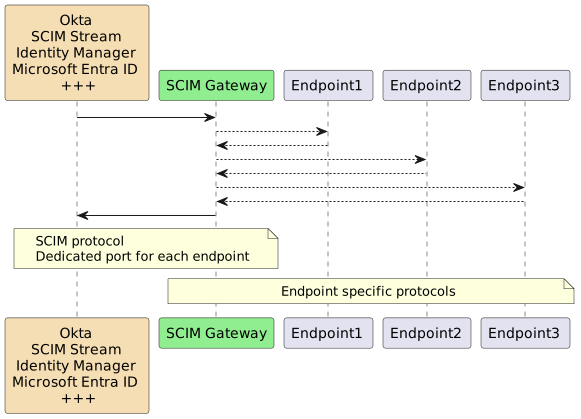
- package/test/index.ts +7 -0
- package/test/lib/plugin-api_test.ts +73 -0
- package/test/lib/plugin-loki_test.ts +571 -0
- package/test/lib/plugin-mongodb_test.ts_excluded +540 -0
- package/test/lib/plugin-scim_test.ts +420 -0
- package/tsconfig.json +34 -0
- package/.mocharc.yml +0 -1
- package/index.js +0 -20
- package/lib/logger.js +0 -150
- package/lib/plugin-api.js +0 -627
- package/lib/plugin-entra-id.js +0 -1443
- package/lib/plugin-scim.js +0 -961
- package/lib/scimgateway.js +0 -3394
- package/test/index.js +0 -15
- package/test/lib/plugin-api.js +0 -89
- package/test/lib/plugin-loki.js +0 -657
- package/test/lib/plugin-mongodb.js +0 -631
- package/test/lib/plugin-scim.js +0 -500
package/.travis.yml
CHANGED
|
@@ -1,7 +1,16 @@
|
|
|
1
|
-
|
|
1
|
+
# Specify the operating system
|
|
2
|
+
os: linux
|
|
3
|
+
dist: focal # Use Ubuntu 20.04 (focal) or another version as needed
|
|
2
4
|
|
|
3
|
-
|
|
4
|
-
|
|
5
|
+
# Install Bun
|
|
6
|
+
before_install:
|
|
7
|
+
- curl -fsSL https://bun.sh/install | bash
|
|
8
|
+
- export PATH="$HOME/.bun/bin:$PATH"
|
|
5
9
|
|
|
6
|
-
|
|
10
|
+
# Install project dependencies
|
|
11
|
+
install:
|
|
12
|
+
- bun install
|
|
7
13
|
|
|
14
|
+
# Run the Bun test runner
|
|
15
|
+
script:
|
|
16
|
+
- bun test
|
package/README.md
CHANGED
|
@@ -16,11 +16,11 @@ Validated through IdP's:
|
|
|
16
16
|
|
|
17
17
|
Latest news:
|
|
18
18
|
|
|
19
|
-
-
|
|
19
|
+
- Major version **v5.0.0** marks a shift to native TypeScript support and prioritizes [Bun](https://bun.sh/) over Node.js. This upgrade requires some modifications to existing plugins.
|
|
20
20
|
- **BREAKING**: [SCIM Stream](https://elshaug.xyz/docs/scim-stream) is the modern way of user provisioning letting clients subscribe to messages instead of traditional IGA top-down provisioning. SCIM Gateway now offers enhanced functionality with support for message subscription and automated provisioning using SCIM Stream
|
|
21
21
|
- Authentication PassThrough letting plugin pass authentication directly to endpoint for avoid maintaining secrets at the gateway. Kubernetes health checks and shutdown handler support
|
|
22
22
|
- Supports OAuth Client Credentials authentication
|
|
23
|
-
- Major version v4.0.0
|
|
23
|
+
- Major version **v4.0.0** getUsers() and getGroups() replacing some deprecated methods. No limitations on filtering/sorting. Admin user access can be linked to specific baseEntities. New MongoDB plugin
|
|
24
24
|
- ipAllowList for restricting access to allowlisted IP addresses or subnets e.g. Azure IP-range
|
|
25
25
|
- General LDAP plugin configured for Active Directory
|
|
26
26
|
- [PlugSSO](https://elshaug.xyz/docs/plugsso) using SCIM Gateway
|
|
@@ -36,11 +36,10 @@ Latest news:
|
|
|
36
36
|
|
|
37
37
|
With SCIM Gateway, user management is facilitated through the utilization of the REST-based SCIM 1.1 or 2.0 protocol. The gateway acts as a translator for incoming SCIM requests, seamlessly enabling the exposure of CRUD functionality (create, read, update, and delete user/group) towards destinations. This is achieved through the implementation of endpoint-specific protocols, ensuring precise and efficient provisioning with diverse endpoints.
|
|
38
38
|
|
|
39
|
-
Using [SCIM Stream](https://elshaug.xyz/docs/scim-stream), gateway may enable Pub/Sub allowing incoming SCIM requests to be published and processed by other gateways acting as subscribers. This extends beyond being Entra ID and HR subscriber for messages published by the SCIM Stream collector.
|
|
40
39
|
|
|
41
40
|
|
|
42
41
|
|
|
43
|
-
SCIM Gateway is based on
|
|
42
|
+
SCIM Gateway is based on popular asynchronous event driven framework [Bun](https://bun.sh/) or [Node.js](https://nodejs.dev/) using TypeScript/JavaScript. It is cloud and firewall friendly. Runs on almost all operating systems, and may load balance between hosts (horizontal) and cpu's (vertical).
|
|
44
43
|
|
|
45
44
|
**Following example plugins are included:**
|
|
46
45
|
|
|
@@ -96,11 +95,11 @@ One example of usage could be creation of tickets in ServiceDesk and also the ot
|
|
|
96
95
|
|
|
97
96
|
## Installation
|
|
98
97
|
|
|
99
|
-
#### Install
|
|
98
|
+
#### Install Bun
|
|
100
99
|
|
|
101
|
-
|
|
100
|
+
[Bun](https://bun.sh/) is a prerequisite and must be installed on the server.
|
|
102
101
|
|
|
103
|
-
|
|
102
|
+
Note, Bun installs by default in the current user’s `HOMEPATH\.bun`. To install it elsewhere, set `BUN_INSTALL=<install-path>` as a global or system environment variable before installing. The installation will add Bun to the current user’s path, but consider adding it to the global or system path for easier access across all users.
|
|
104
103
|
|
|
105
104
|
#### Install SCIM Gateway
|
|
106
105
|
|
|
@@ -109,19 +108,22 @@ Create your own package directory e.g. c:\my-scimgateway and install SCIM Gatewa
|
|
|
109
108
|
|
|
110
109
|
mkdir c:\my-scimgateway
|
|
111
110
|
cd c:\my-scimgateway
|
|
112
|
-
|
|
113
|
-
|
|
111
|
+
bun init -y
|
|
112
|
+
bun install scimgateway
|
|
113
|
+
bun pm trust scimgateway
|
|
114
114
|
|
|
115
115
|
**c:\\my-scimgateway** will now be `<package-root>`
|
|
116
116
|
|
|
117
|
-
index.
|
|
117
|
+
index.ts, lib and config directories containing example plugins have been copied to your package from the original scimgateway package located under node_modules. Bun requires `bun pm trust scimgateway` for allowing postinstall copying these files.
|
|
118
118
|
|
|
119
119
|
If internet connection is blocked, we could install on another machine and copy the `<package-root>` folder.
|
|
120
120
|
|
|
121
121
|
|
|
122
122
|
#### Startup and verify default Loki plugin
|
|
123
123
|
|
|
124
|
-
|
|
124
|
+
bun c:\my-scimgateway
|
|
125
|
+
|
|
126
|
+
If using Node.js instead of Bun: node --experimental-strip-types c:\my-scimgateway\index.ts
|
|
125
127
|
|
|
126
128
|
Start a browser (note, Edge do not pop-up logon dialog box when using http)
|
|
127
129
|
|
|
@@ -148,55 +150,54 @@ If internet connection is blocked, we could install on another machine and copy
|
|
|
148
150
|
|
|
149
151
|
"Ctrl + c" to stop the SCIM Gateway
|
|
150
152
|
|
|
151
|
-
|
|
152
|
-
|
|
153
|
-
>Tip, take a look at mocha test scripts located in `node_modules\scimgateway\test\lib`
|
|
153
|
+
>Tip, take a look at bun test scripts located in `node_modules\scimgateway\test\lib`
|
|
154
154
|
|
|
155
155
|
|
|
156
156
|
#### Upgrade SCIM Gateway
|
|
157
157
|
|
|
158
158
|
Not needed after a fresh install
|
|
159
159
|
|
|
160
|
-
|
|
161
|
-
|
|
162
|
-
cd c:\my-scimgateway
|
|
163
|
-
npm outdated
|
|
164
|
-
|
|
165
|
-
Lists current, wanted and latest version. No output on screen means we are running the latest version.
|
|
166
|
-
|
|
167
|
-
The best and easiest way to upgrade is renaming existing scimgateway package folder, create a new one and do a fresh installation. After the installation you copy `index.js, config and lib folder` (your customized plugins) from your previous installation to the new installation. You should also read the version history to see if your custom plugins needs to be updated.
|
|
160
|
+
The best and easiest way to upgrade is renaming existing scimgateway package folder, create a new one and do a fresh installation. After the installation we copy `index.ts, config and lib folder` (customized plugins) from previous installation to the new installation. You should also read the version history to see custom plugins needs to be updated.
|
|
168
161
|
|
|
169
162
|
Alternatives are:
|
|
170
163
|
|
|
171
164
|
Upgrade to latest minor version:
|
|
172
165
|
|
|
173
166
|
cd c:\my-scimgateway
|
|
174
|
-
|
|
167
|
+
bun install scimgateway
|
|
175
168
|
|
|
176
169
|
Note, always backup/copy c:\\my-scimgateway before upgrading. Custom plugins and corresponding configuration files will not be affected.
|
|
177
170
|
|
|
178
|
-
To force a major upgrade (version x.\*.\* => y.\*.\*) that will brake compability with any existing custom plugins, we have to include the `@latest` suffix in the install command: `
|
|
171
|
+
To force a major upgrade (version x.\*.\* => y.\*.\*) that will brake compability with any existing custom plugins, we have to include the `@latest` suffix in the install command: `bun install scimgateway@latest`
|
|
179
172
|
|
|
180
173
|
##### Avoid (re-)adding the files created during `postinstall`
|
|
181
174
|
|
|
182
|
-
|
|
175
|
+
For production we do not need example plugins to be incuded by the `postinstall` job
|
|
176
|
+
Bun will by default exlude any `postinstall` jobs unless we have trusted the scimgateway package using the `bun pm trust scimgateway` that updates package.json `{ trustedDependencies: ["scimgateway"] }`
|
|
177
|
+
|
|
178
|
+
For Node.js (and also Bun), we might set the property `scimgateway_postinstall_skip = true` in `.npmrc` or setting environment `SCIMGATEWAY_POSTINSTALL_SKIP = true`
|
|
183
179
|
|
|
184
180
|
## Configuration
|
|
185
181
|
|
|
186
|
-
**index.
|
|
182
|
+
**index.ts** defines one or more plugins to be started by the `const plugins` setting.
|
|
187
183
|
|
|
188
|
-
|
|
189
|
-
// const
|
|
190
|
-
|
|
191
|
-
|
|
192
|
-
|
|
193
|
-
|
|
194
|
-
|
|
195
|
-
|
|
196
|
-
|
|
197
|
-
|
|
198
|
-
|
|
199
|
-
|
|
184
|
+
// example starting all default plugins:
|
|
185
|
+
// const plugins = ['loki', 'scim', 'entra-id', 'ldap', 'mssql', 'api', 'mongodb', 'saphana', 'soap']
|
|
186
|
+
|
|
187
|
+
const plugins = ['ldap']
|
|
188
|
+
|
|
189
|
+
for (const plugin of plugins) {
|
|
190
|
+
try {
|
|
191
|
+
await import(`./lib/plugin-${plugin}.ts`)
|
|
192
|
+
} catch (err: any) {
|
|
193
|
+
console.error(`plugin-${plugin} startup error: ${err.message}`)
|
|
194
|
+
console.log()
|
|
195
|
+
}
|
|
196
|
+
}
|
|
197
|
+
|
|
198
|
+
|
|
199
|
+
Each endpoint plugin needs a TypeScript file (.ts) and a configuration file (.json). **They both must have the same naming prefix**. For SAP Hana endpoint we have:
|
|
200
|
+
>lib\plugin-saphana.ts
|
|
200
201
|
>config\plugin-saphana.json
|
|
201
202
|
|
|
202
203
|
|
|
@@ -294,11 +295,6 @@ Below shows an example of config\plugin-saphana.json
|
|
|
294
295
|
"cc": null
|
|
295
296
|
}
|
|
296
297
|
},
|
|
297
|
-
"kubernetes": {
|
|
298
|
-
"enabled": false,
|
|
299
|
-
"shutdownTimeout": 15000,
|
|
300
|
-
"forceExitTimeout": 1000
|
|
301
|
-
},
|
|
302
298
|
"stream": {
|
|
303
299
|
"baseUrls": [],
|
|
304
300
|
"certificate": {
|
|
@@ -453,18 +449,13 @@ Definitions in `endpoint` object are customized according to our plugin code. Pl
|
|
|
453
449
|
- **emailOnError.smtp.to** - Comma separated list of recipients email addresses e.g: "someone@example.com"
|
|
454
450
|
- **emailOnError.smtp.cc** - Comma separated list of cc email addresses
|
|
455
451
|
|
|
456
|
-
- **kubernetes** - Enable Kubernetes support for healthchecks and graceful shutdown.
|
|
457
|
-
- **kubernetes.enabled** - true or false, true will enable Kubernets health checks and shutdown handler
|
|
458
|
-
- **kubernetes.shutdownTimeout** - Number of milliseconds to wait before shutting down (default 15000).
|
|
459
|
-
- **kubernetes.forceExitTimeout** - Number of milliseconds before forceful exiting (default 1000).
|
|
460
|
-
|
|
461
452
|
- **stream** - See [SCIM Stream](https://elshaug.xyz/docs/scim-stream) for configuration details
|
|
462
453
|
|
|
463
454
|
- **endpoint** - Contains endpoint specific configuration according to our **plugin code**.
|
|
464
455
|
|
|
465
456
|
#### Configuration notes
|
|
466
457
|
|
|
467
|
-
- Custom Schemas, ServiceProviderConfig and ResourceType can be used if `./lib/scimdef-v2.
|
|
458
|
+
- Custom Schemas, ServiceProviderConfig and ResourceType can be used if `./lib/scimdef-v2.json or scimdef-v1.json` exists. Original scimdef-v2.json/scimdef-v1.json can be copied from node_modules/scimgateway/lib to your plugin/lib and customized.
|
|
468
459
|
- Using reverse proxy and we want ipAllowList and correct meta.location response, following headers must be set by proxy: `X-Forwarded-For`, `X-Forwarded-Proto` and `X-Forwarded-Host`
|
|
469
460
|
- Setting environment variable `SEED` with some random characters will override default password seeding logic. This also allow copying configuration file with encrypted secrets from one machine to another.
|
|
470
461
|
- All configuration can be set based on environment variables. Syntax will then be `"process.env.<ENVIRONMENT>"` where `<ENVIRONMENT>` is the environment variable used. E.g. scimgateway.port could have value "process.env.PORT", then using environment variable PORT.
|
|
@@ -526,11 +517,11 @@ Gateway can be started from a command window running in administrative mode
|
|
|
526
517
|
|
|
527
518
|
3 ways to start:
|
|
528
519
|
|
|
529
|
-
|
|
520
|
+
bun c:\my-scimgateway
|
|
530
521
|
|
|
531
|
-
|
|
522
|
+
bun c:\my-scimgateway\index.ts
|
|
532
523
|
|
|
533
|
-
<package-root>
|
|
524
|
+
<package-root>bun .
|
|
534
525
|
|
|
535
526
|
|
|
536
527
|
<kbd>Ctrl</kbd>+<kbd>c</kbd> to stop
|
|
@@ -552,7 +543,7 @@ Start Windows Task Scheduler (taskschd.msc), right click on "Task Scheduler Libr
|
|
|
552
543
|
Actions tab:
|
|
553
544
|
------------
|
|
554
545
|
Action = Start a program
|
|
555
|
-
Program/script =
|
|
546
|
+
Program/script = <install path>\bun.exe
|
|
556
547
|
Arguments = c:\my-scimgateway
|
|
557
548
|
|
|
558
549
|
Settings - tab:
|
|
@@ -745,9 +736,9 @@ IM 12.6 SP7 (and above) also supports pagination for SCIM endpoint (data transfe
|
|
|
745
736
|
|
|
746
737
|
|
|
747
738
|
## Entra ID provisioning
|
|
748
|
-
Using plugin-entra-id we could do user provisioning towards Entra ID
|
|
739
|
+
Using plugin-entra-id we could do user provisioning towards Entra ID
|
|
749
740
|
|
|
750
|
-
For testing purposes we could get an Azure free account
|
|
741
|
+
For testing purposes we could get an Azure free account
|
|
751
742
|
|
|
752
743
|
### Entra ID configuration
|
|
753
744
|
|
|
@@ -795,14 +786,14 @@ Also note, enable/disable user (accountEnabled - through Graph API) will fail if
|
|
|
795
786
|
|
|
796
787
|
### SCIM Gateway configuration
|
|
797
788
|
|
|
798
|
-
**Edit index.
|
|
799
|
-
|
|
789
|
+
**Edit index.ts**
|
|
790
|
+
Set plugin to be started to `entra-id`
|
|
800
791
|
|
|
801
|
-
const
|
|
792
|
+
const plugins = ['entra-id']
|
|
802
793
|
|
|
803
794
|
**Edit plugin-entra-id.json**
|
|
804
795
|
|
|
805
|
-
Note, for Symantec/Broadcom/CA Provisioning we
|
|
796
|
+
Note, for Symantec/Broadcom/CA Provisioning we must use SCIM version 1.1
|
|
806
797
|
|
|
807
798
|
scimgateway: {
|
|
808
799
|
"scim": {
|
|
@@ -866,7 +857,7 @@ Note, we should normally use certificate (https) for communicating with SCIM Gat
|
|
|
866
857
|
Create a new endpoint type "Azure - ScimGateway"
|
|
867
858
|
|
|
868
859
|
- Start SCIM Gateway
|
|
869
|
-
-
|
|
860
|
+
- Using plugin-entra-id: `const plugins = ['entra-id']` in `index.ts`
|
|
870
861
|
- username, password and port defined in `plugin-entra-id.json` must also be known
|
|
871
862
|
- Start ConnectorXpress
|
|
872
863
|
- Setup Data Sources
|
|
@@ -945,7 +936,7 @@ Following methods for the none SCIM based api-plugin are supported:
|
|
|
945
936
|
DELETE /api/{id}
|
|
946
937
|
|
|
947
938
|
These methods can also be used in standard SCIM plugins
|
|
948
|
-
Please see example plugin: **plugin-api.
|
|
939
|
+
Please see example plugin: **plugin-api.ts**
|
|
949
940
|
|
|
950
941
|
|
|
951
942
|
## How to build your own plugins
|
|
@@ -953,12 +944,12 @@ For JavaScript coding editor you may use [Visual Studio Code](https://code.visua
|
|
|
953
944
|
|
|
954
945
|
Preparation:
|
|
955
946
|
|
|
956
|
-
* Copy "best matching" example plugin e.g. `lib\plugin-mssql.
|
|
947
|
+
* Copy "best matching" example plugin e.g. `lib\plugin-mssql.ts` and `config\plugin-mssql.json` and rename both copies to your plugin name prefix e.g. plugin-mine.ts and plugin-mine.json (for SOAP Webservice endpoint we might use plugin-soap as a template)
|
|
957
948
|
* Edit plugin-mine.json and define a unique port number for the gateway setting
|
|
958
|
-
* Edit index.
|
|
949
|
+
* Edit index.ts and add a new line for starting your plugin e.g. `let mine = require('./lib/plugin-mine');`
|
|
959
950
|
* Start SCIM Gateway and verify. If using CA Provisioning you could setup a SCIM endpoint using the port number you defined
|
|
960
951
|
|
|
961
|
-
Now we are ready for custom coding by editing plugin-mine.
|
|
952
|
+
Now we are ready for custom coding by editing plugin-mine.ts
|
|
962
953
|
Coding should be done step by step and each step should be verified and tested before starting the next (they are all highlighted by comments in existing code).
|
|
963
954
|
|
|
964
955
|
1. **Turn off group functionality** - getGroups to return empty response
|
|
@@ -976,7 +967,7 @@ Please see plugin-saphana that do not use groups.
|
|
|
976
967
|
|
|
977
968
|
Template used by CA Provisioning role should only include endpoint supported attributes defined in our plugin. Template should therefore have no links to global user for none supported attributes (e.g. remove %UT% from "Job Title" if our endpoint/code do not support title)
|
|
978
969
|
|
|
979
|
-
CA Provisioning using default SCIM endpoint do not support SCIM Enterprise User Schema Extension (having attributes like employeeNumber, costCenter, organization, division, department and manager). If we need these or other attributes not found in CA Provisioning, we could define our own by using the free-text "type" definition in the multivalue entitlements or roles attribute. In the template entitlements definition, we could for example define type=Company and set value to %UCOMP%. Please see plugin-soap.
|
|
970
|
+
CA Provisioning using default SCIM endpoint do not support SCIM Enterprise User Schema Extension (having attributes like employeeNumber, costCenter, organization, division, department and manager). If we need these or other attributes not found in CA Provisioning, we could define our own by using the free-text "type" definition in the multivalue entitlements or roles attribute. In the template entitlements definition, we could for example define type=Company and set value to %UCOMP%. Please see plugin-soap.ts using Company as a multivalue "type" definition.
|
|
980
971
|
|
|
981
972
|
Using CA Connector Xpress we could create a new SCIM endpoint type based on the original SCIM. We could then add/remove attributes and change from default assign "user to groups" to assign "groups to user". There are also other predefined endpoints based on the original SCIM. You may take a look at "ServiceNow - WSL7" and "Zendesk - WSL7".
|
|
982
973
|
|
|
@@ -1023,145 +1014,145 @@ advanced options - **Synchronized** = enabled (toggled on)
|
|
|
1023
1014
|
|
|
1024
1015
|
Plugins should have following initialization:
|
|
1025
1016
|
|
|
1026
|
-
// mandatory plugin initialization
|
|
1027
|
-
const
|
|
1028
|
-
|
|
1029
|
-
|
|
1030
|
-
|
|
1031
|
-
|
|
1032
|
-
|
|
1033
|
-
|
|
1034
|
-
|
|
1035
|
-
|
|
1036
|
-
|
|
1037
|
-
|
|
1038
|
-
|
|
1039
|
-
|
|
1040
|
-
|
|
1041
|
-
config = scimgateway.processExtConfig(pluginName, config)
|
|
1042
|
-
scimgateway.authPassThroughAllowed = false
|
|
1043
|
-
// mandatory plugin initialization - end
|
|
1044
|
-
|
|
1045
|
-
|
|
1046
|
-
### getUsers
|
|
1047
|
-
|
|
1048
|
-
scimgateway.getUsers = async (baseEntity, getObj, attributes, ctx) => {
|
|
1049
|
-
let ret = {
|
|
1050
|
-
"Resources": [],
|
|
1051
|
-
"totalResults": null
|
|
1052
|
-
}
|
|
1053
|
-
...
|
|
1054
|
-
return ret
|
|
1055
|
-
}
|
|
1056
|
-
|
|
1057
|
-
* baseEntity = Optional for multi-tenant or multi-endpoint support (defined in base url e.g. `<baseurl>/client1` gives baseEntity=client1)
|
|
1058
|
-
* getObj = { attribute: <>, operator: <>, value: <>, rawFilter: <>, startIndex: <>, count: <> }
|
|
1059
|
-
* attribute, operator and value are set when using "simpel filtering", e.g. getObj.attribute='userName', getObj.operator='eq' and getObj.value='bjensen', but not for advanced filtering having and/or/not
|
|
1060
|
-
* rawFilter is always set when filtering is used
|
|
1061
|
-
* startIndex = Pagination - The 1-based index of the first result in the current set of search results
|
|
1062
|
-
* count = Pagination - Number of elements to be returned in the current set of search results
|
|
1063
|
-
* attributes = array of attributes to be returned - if empty, all supported attributes should be returned
|
|
1064
|
-
* ret:
|
|
1065
|
-
ret.Resources = array filled with user objects according to getObj/attributes, we could normally include all attributes having id and userName as mandatory e.g [{"id": "bjensen", "userName": "bjensen"}, {"id":"jsmith", "userName":"jsmith"}]
|
|
1066
|
-
ret.totalResults = if supporting pagination, then it should be set to the total numbers of elements (users), else set to null
|
|
1067
|
-
|
|
1068
|
-
### createUser
|
|
1069
|
-
scimgateway.createUser = async (baseEntity, userObj, ctx) => {
|
|
1070
|
-
...
|
|
1071
|
-
return { "id": uniqueID }
|
|
1072
|
-
})
|
|
1017
|
+
// start - mandatory plugin initialization
|
|
1018
|
+
const ScimGateway: typeof import('scimgateway').ScimGateway = await (async () => {
|
|
1019
|
+
try {
|
|
1020
|
+
return (await import('scimgateway')).ScimGateway
|
|
1021
|
+
} catch (err) {
|
|
1022
|
+
const source = './scimgateway.ts'
|
|
1023
|
+
return (await import(source)).ScimGateway
|
|
1024
|
+
}
|
|
1025
|
+
})()
|
|
1026
|
+
const scimgateway = new ScimGateway()
|
|
1027
|
+
const config = scimgateway.getConfig()
|
|
1028
|
+
scimgateway.authPassThroughAllowed = false
|
|
1029
|
+
// end - mandatory plugin initialization
|
|
1030
|
+
|
|
1031
|
+
If using REST, we could also include the HelperRest:
|
|
1073
1032
|
|
|
1074
|
-
|
|
1075
|
-
|
|
1076
|
-
|
|
1033
|
+
// start - mandatory plugin initialization
|
|
1034
|
+
...
|
|
1035
|
+
const HelperRest: typeof import('scimgateway').HelperRest = await (async () => {
|
|
1036
|
+
try {
|
|
1037
|
+
return (await import('scimgateway')).HelperRest
|
|
1038
|
+
} catch (err) {
|
|
1039
|
+
const source = './scimgateway.ts'
|
|
1040
|
+
return (await import(source)).HelperRest
|
|
1041
|
+
}
|
|
1042
|
+
})()
|
|
1043
|
+
...
|
|
1044
|
+
// end - mandatory plugin initialization
|
|
1077
1045
|
|
|
1078
|
-
|
|
1046
|
+
Plugins should include following SCIM methods:
|
|
1079
1047
|
|
|
1080
|
-
|
|
1081
|
-
|
|
1082
|
-
|
|
1083
|
-
|
|
1048
|
+
* scimgateway.getUsers()
|
|
1049
|
+
* scimgateway.createUser()
|
|
1050
|
+
* scimgateway.deleteUser()
|
|
1051
|
+
* scimgateway.modifyUser()
|
|
1052
|
+
* scimgateway.getGroups()
|
|
1053
|
+
* scimgateway.createGroup()
|
|
1054
|
+
* scimgateway.deleteGroup()
|
|
1055
|
+
* scimgateway.modifyGroup()
|
|
1084
1056
|
|
|
1085
|
-
|
|
1086
|
-
* return null: null if OK, else throw error
|
|
1057
|
+
In addition following general API methods are available for use:
|
|
1087
1058
|
|
|
1088
|
-
|
|
1059
|
+
* scimgateway.postApi()
|
|
1060
|
+
* scimgateway.putApi()
|
|
1061
|
+
* scimgateway.patchApi()
|
|
1062
|
+
* scimgateway.getApi()
|
|
1063
|
+
* scimgateway.deleteApi()
|
|
1089
1064
|
|
|
1090
|
-
|
|
1091
|
-
...
|
|
1092
|
-
return null
|
|
1093
|
-
}
|
|
1065
|
+
In code editor (e.g., Visual Studio Code), method details and documentation are shown by IntelliSense
|
|
1094
1066
|
|
|
1067
|
+
## License
|
|
1068
|
+
|
|
1069
|
+
MIT © [Jarle Elshaug](https://www.elshaug.xyz)
|
|
1095
1070
|
|
|
1096
|
-
* id = user id
|
|
1097
|
-
* attrObj = object containing userattributes to be modified according to scim standard
|
|
1098
|
-
Note, multi-value attributes excluding user attribute 'groups' are customized from array to object based on type
|
|
1099
|
-
* return null: null if OK, else throw error
|
|
1100
1071
|
|
|
1101
|
-
|
|
1072
|
+
## Change log
|
|
1102
1073
|
|
|
1103
|
-
|
|
1104
|
-
let ret = {
|
|
1105
|
-
"Resources": [],
|
|
1106
|
-
"totalResults": null
|
|
1107
|
-
}
|
|
1108
|
-
...
|
|
1109
|
-
return ret
|
|
1110
|
-
}
|
|
1111
|
-
|
|
1112
|
-
* baseEntity = Optional for multi-tenant or multi-endpoint support (defined in base url e.g. `<baseurl>/client1` gives baseEntity=client1)
|
|
1113
|
-
* getObj = { attribute: <>, operator: <>, value: <>, rawFilter: <>, startIndex: <>, count: <> }
|
|
1114
|
-
* attribute, operator and value are set when using "simpel filtering", e.g. getObj.attribute='displayName', getObj.operator='eq' and getObj.value='Admins', but not for advanced filtering having and/or/not
|
|
1115
|
-
* rawFilter is always set when filtering is used
|
|
1116
|
-
* startIndex = Pagination - The 1-based index of the first result in the current set of search results
|
|
1117
|
-
* count = Pagination - Number of elements to be returned in the current set of search results
|
|
1118
|
-
* attributes = array of attributes to be returned - if empty, all supported attributes should be returned
|
|
1119
|
-
* ret:
|
|
1120
|
-
ret.Resources = array filled with group objects according to getObj/attributes, we could normally include all attributes having id, displayName and members as mandatory e.g [{"id":"Admins", "displayName":"Admins", members":[{"value":"bjensen"}]}, {"id":"Employees", "displayName":"Employees"}, "members":[{"value":"jsmith","display":"John Smith"}]]
|
|
1121
|
-
ret.totalResults = if supporting pagination, then it should be set to the total numbers of elements (users), else set to null
|
|
1122
|
-
|
|
1123
|
-
|
|
1124
|
-
### createGroup
|
|
1125
|
-
scimgateway.createGroup = async (baseEntity, groupObj, ctx) => {
|
|
1126
|
-
...
|
|
1127
|
-
return { "id": uniqueID }
|
|
1128
|
-
})
|
|
1074
|
+
### v5.0.1
|
|
1129
1075
|
|
|
1130
|
-
|
|
1131
|
-
groupObj.displayName contains the group name to be created
|
|
1132
|
-
* return the created group object or minimum the id generated { "id": uniqueID }, null is also accepted else throw error
|
|
1076
|
+
[Fixed]
|
|
1133
1077
|
|
|
1134
|
-
|
|
1135
|
-
|
|
1136
|
-
|
|
1137
|
-
|
|
1138
|
-
|
|
1078
|
+
Postinstall did not update index.ts when default bun index.ts did exist
|
|
1079
|
+
|
|
1080
|
+
|
|
1081
|
+
### v5.0.0
|
|
1082
|
+
|
|
1083
|
+
**[MAJOR]**
|
|
1139
1084
|
|
|
1140
|
-
|
|
1141
|
-
* return null: null if OK, else throw error
|
|
1085
|
+
Major version v5.0.0 marks a shift to native TypeScript support and prioritizes [Bun](https://bun.sh/) over Node.js.
|
|
1142
1086
|
|
|
1143
|
-
|
|
1087
|
+
Besides going from JavaScript to TypeScript, following can be mentioned:
|
|
1088
|
+
|
|
1089
|
+
* Code editor now having IntelliSense showing available methods and documentation details for scimgateway methods
|
|
1090
|
+
* index.ts having new logic for starting plugins e.g.: `const plugins = ['ldap']` for starting plugin-ldap
|
|
1091
|
+
* If using Node.js, node must be version >= 22.6.0 and include startup argument `--experimental-strip-types` e.g.; `node --experimental-strip-types index.ts`
|
|
1092
|
+
* Plugins can use `scimgateway.HelperRest()` for REST functionality. Previously this logic was included in each plugin that used REST.
|
|
1144
1093
|
|
|
1145
|
-
|
|
1094
|
+
// start - mandatory plugin initialization
|
|
1146
1095
|
...
|
|
1147
|
-
|
|
1148
|
-
|
|
1096
|
+
const HelperRest: typeof import('scimgateway').HelperRest = await (async () => {
|
|
1097
|
+
try {
|
|
1098
|
+
return (await import('scimgateway')).HelperRest
|
|
1099
|
+
} catch (err) {
|
|
1100
|
+
const source = './scimgateway.ts'
|
|
1101
|
+
return (await import(source)).HelperRest
|
|
1102
|
+
}
|
|
1103
|
+
})()
|
|
1104
|
+
...
|
|
1105
|
+
// end - mandatory plugin initialization
|
|
1106
|
+
|
|
1107
|
+
Note, HelperRest use fetch which is not fully supported by Node.js regarding TLS.
|
|
1108
|
+
For TLS and Node.js, environment must instead be used and set before started, e.g.,:
|
|
1109
|
+
`export NODE_EXTRA_CA_CERTS=/package-path/config/certs/ca.pem`
|
|
1110
|
+
or
|
|
1111
|
+
`export NODE_TLS_REJECT_UNAUTHORIZED=0`
|
|
1112
|
+
|
|
1113
|
+
* Configuration secrets (password, secret, token, client_secret, ... ) defined in the `endpoint` section of the configuration file, will automatically be encrypted/decrypted. If there are secrets not handled by the automated encryption/decryption, we may use `scimgateway.getSecret()`. In the old version, corresponding method was named scimgateway.getPassword().
|
|
1114
|
+
* kubernetes configuration and logic have been removed. Kubernetes can use default `/ping` url for healthchecks, and graceful shutdown is taken care of the gateway
|
|
1115
|
+
* In case using custom schemas defined in lib/scimdef-v1/v2.js, these files have now changed to scimdef-v1/v2.json
|
|
1116
|
+
* `config/docker/Dockerfile` now using Bun
|
|
1117
|
+
* plugin-entra, modify licenses/servicePlans is not included anymore, only listing. For license management we instead use groups.
|
|
1118
|
+
* plugin-ldap, for LDAPS/TLS and Bun, we must use environments e.g.:
|
|
1119
|
+
`export NODE_EXTRA_CA_CERTS=/package-path/config/certs/ca.pem`
|
|
1120
|
+
or
|
|
1121
|
+
`export NODE_TLS_REJECT_UNAUTHORIZED=0`
|
|
1149
1122
|
|
|
1150
|
-
* id = group name (eg. Admins)
|
|
1151
|
-
* attrObj = object containing groupattributes to be modified according to scim standard
|
|
1152
|
-
**attrObj.members** (must be supported) = array of objects containing groupmembers modifications
|
|
1153
|
-
eg: {"value":"bjensen"},{"operation":"delete","value":"jsmith"}
|
|
1154
|
-
(adding bjensen and deliting jsmith from group)
|
|
1155
|
-
* return null: null if OK, else throw error
|
|
1156
|
-
If we do not support groups, then return null
|
|
1157
1123
|
|
|
1124
|
+
**How to migrate existing plugins:**
|
|
1158
1125
|
|
|
1159
|
-
|
|
1160
|
-
|
|
1161
|
-
|
|
1126
|
+
* Remove old index.js, use the new index.ts and update `const plugins = ['xxx']` to include your plugin name(s)
|
|
1127
|
+
* Rename plugin-xxx.js to plugin-xxx.ts
|
|
1128
|
+
* import must be used instead of require for loading modules e.g.:
|
|
1129
|
+
const Loki = require('lokijs') => `import Loki from 'lokijs'`
|
|
1130
|
+
* Use the new mandatory settings:
|
|
1162
1131
|
|
|
1132
|
+
// start - mandatory plugin initialization
|
|
1133
|
+
const ScimGateway: typeof import('scimgateway').ScimGateway = await (async () => {
|
|
1134
|
+
try {
|
|
1135
|
+
return (await import('scimgateway')).ScimGateway
|
|
1136
|
+
} catch (err) {
|
|
1137
|
+
const source = './scimgateway.ts'
|
|
1138
|
+
return (await import(source)).ScimGateway
|
|
1139
|
+
}
|
|
1140
|
+
})()
|
|
1141
|
+
const scimgateway = new ScimGateway()
|
|
1142
|
+
const config = scimgateway.getConfig()
|
|
1143
|
+
scimgateway.authPassThroughAllowed = false
|
|
1144
|
+
// end - mandatory plugin initialization
|
|
1145
|
+
|
|
1146
|
+
* Use the new `config` object (mentioned above) which contains the `scimgatway.endpoint` configuration having automated encryption/decryption of any attributes named password, secret, client_secret, token and APIKey
|
|
1147
|
+
* The old scimgateway.getPassword() is not normally not needed because of scimgateway automated `config` logic. If needed, use the new scimgateway.getSecret().
|
|
1148
|
+
* Use the new logging syntax:
|
|
1149
|
+
|
|
1150
|
+
replace: scimgateway.logger.debug(`${pluginName}[${baseEntity}] xxx`)
|
|
1151
|
+
with: scimgateway.logDebug(baseEntity, `xxx`)
|
|
1163
1152
|
|
|
1164
|
-
|
|
1153
|
+
* Use scimgateway.HelperRest() for REST functionlity, also supports Auth PassThrough
|
|
1154
|
+
* scimgateway.endpointMapper() may be used for inbound/outbound attribute mappings
|
|
1155
|
+
* In general when using TypeScript, variables should be type defined: `let isDone: boolean = false`, `catch (err: any)`, ...
|
|
1165
1156
|
|
|
1166
1157
|
### v4.5.12
|
|
1167
1158
|
|
package/bun.lockb
ADDED
|
Binary file
|
package/config/docker/Dockerfile
CHANGED
|
@@ -1,5 +1,3 @@
|
|
|
1
|
-
# Docker version 1.13.0
|
|
2
|
-
#
|
|
3
1
|
# Depending on your system you may need to prefix the commands below with sudo.
|
|
4
2
|
#
|
|
5
3
|
# To build: docker build --force-rm=true -t <projectName>:1.0.0 .
|
|
@@ -12,8 +10,8 @@
|
|
|
12
10
|
# Example: docker run -d -e NODE_ENV=development -e PORT=3000 -h localhost -p 8880:8880 --name scimgateway scimgateway:latest
|
|
13
11
|
|
|
14
12
|
|
|
15
|
-
#
|
|
16
|
-
FROM
|
|
13
|
+
# use the official Bun image, see all versions at https://hub.docker.com/r/oven/bun/tags
|
|
14
|
+
FROM oven/bun:slim AS base
|
|
17
15
|
|
|
18
16
|
# Declare who maintains this Dockerfile
|
|
19
17
|
LABEL maintainer="Charles Watson <cwatsonx@costco.com>"
|
|
@@ -22,18 +20,18 @@ LABEL maintainer="Charles Watson <cwatsonx@costco.com>"
|
|
|
22
20
|
ADD https://github.com/Yelp/dumb-init/releases/download/v1.2.0/dumb-init_1.2.0_amd64 /usr/local/bin/dumb-init
|
|
23
21
|
RUN chmod +x /usr/local/bin/dumb-init
|
|
24
22
|
|
|
25
|
-
# Define your working directory for the
|
|
23
|
+
# Define your working directory for the bun app.
|
|
26
24
|
WORKDIR /home/scimgateway
|
|
27
|
-
ENV NODE_HOME
|
|
25
|
+
ENV NODE_HOME=/home/scimgateway
|
|
28
26
|
|
|
29
27
|
# Add your project info
|
|
30
|
-
ADD ./package.json $NODE_HOME
|
|
28
|
+
ADD ./package.json ./bun.lockb $NODE_HOME
|
|
31
29
|
|
|
32
|
-
# Install
|
|
33
|
-
RUN . ~/.bashrc && cd $NODE_HOME &&
|
|
30
|
+
# Install dependencies (exclude test stuff for dependencies)
|
|
31
|
+
RUN . ~/.bashrc && cd $NODE_HOME && bun install --production --frozen-lockfile
|
|
34
32
|
|
|
35
33
|
# Copy your project's code to your working directory
|
|
36
34
|
COPY . $NODE_HOME
|
|
37
35
|
|
|
38
36
|
# Start it up
|
|
39
|
-
CMD ["dumb-init", "
|
|
37
|
+
CMD ["dumb-init", "bun", "index.ts"]
|