scimgateway 4.2.16 → 4.3.0
This diff represents the content of publicly available package versions that have been released to one of the supported registries. The information contained in this diff is provided for informational purposes only and reflects changes between package versions as they appear in their respective public registries.
- package/README.md +67 -51
- package/config/{plugin-azure-ad.json → plugin-entra-id.json} +10 -7
- package/config/plugin-loki.json +7 -3
- package/config/plugin-scim.json +9 -5
- package/index.js +1 -1
- package/lib/{plugin-azure-ad.js → plugin-entra-id.js} +243 -171
- package/lib/plugin-ldap.js +16 -7
- package/lib/plugin-loki.js +77 -38
- package/lib/plugin-scim.js +166 -12
- package/lib/postinstall.js +2 -2
- package/lib/scimgateway.js +75 -85
- package/lib/utils.js +19 -5
- package/package.json +10 -11
package/README.md
CHANGED
|
@@ -8,7 +8,7 @@ Author: Jarle Elshaug
|
|
|
8
8
|
Validated through IdP's:
|
|
9
9
|
|
|
10
10
|
- Symantec/Broadcom/CA Identity Manager
|
|
11
|
-
- Microsoft
|
|
11
|
+
- Microsoft Entra ID
|
|
12
12
|
- OneLogin
|
|
13
13
|
- Okta
|
|
14
14
|
- Omada
|
|
@@ -20,24 +20,20 @@ Latest news:
|
|
|
20
20
|
- **BREAKING**: [SCIM Stream](https://elshaug.xyz/docs/scim-stream) is the modern way of user provisioning letting clients subscribe to messages instead of traditional IGA top-down provisioning. SCIM Stream includes **SCIM Stream Gateway**, the next generation SCIM Gateway that supports message subscription and automated provisioning
|
|
21
21
|
- Supports OAuth Client Credentials authentication
|
|
22
22
|
- Major version v4.0.0. getUsers() and getGroups() replacing some deprecated methods. No limitations on filtering/sorting. Admin user access can be linked to specific baseEntities. New MongoDB plugin
|
|
23
|
-
- ipAllowList for restricting access to allowlisted IP addresses or subnets e.g. Azure
|
|
23
|
+
- ipAllowList for restricting access to allowlisted IP addresses or subnets e.g. Azure IP-range
|
|
24
24
|
- General LDAP plugin configured for Active Directory
|
|
25
25
|
- [PlugSSO](https://elshaug.xyz/docs/plugsso) using SCIM Gateway
|
|
26
26
|
- Each authentication configuration allowing more than one admin user including option for readOnly
|
|
27
27
|
- Codebase moved from callback of h... to the the promise(d) land of async/await
|
|
28
28
|
- Supports configuration by environments and external files
|
|
29
29
|
- Health monitoring through "/ping" URL, and option for error notifications by email
|
|
30
|
-
-
|
|
30
|
+
- Entra ID user provisioning including license management e.g. Office 365, installed and configured within minutes!
|
|
31
31
|
- Includes API Gateway for none SCIM/provisioning - becomes what you want it to become
|
|
32
32
|
- Running SCIM Gateway as a Docker container
|
|
33
33
|
|
|
34
34
|
## Overview
|
|
35
|
-
|
|
36
|
-
With SCIM Gateway we can manage users and groups by using REST based [SCIM](http://www.simplecloud.info/) 1.1 or 2.0 protocol. Gateway translates incoming SCIM requests and expose CRUD functionality (create, read, update and delete user/group) towards destinations using endpoint specific protocols. In other words, none SCIM-endpoints will become SCIM-endpoints. Gateway do not require SCIM to be used, it's also an API Gateway that could be used for other things than user provisioning.
|
|
37
35
|
|
|
38
|
-
SCIM Gateway is a
|
|
39
|
-
|
|
40
|
-
Using Identity Manager, we could setup one or more endpoints of type SCIM pointing to the gateway. Specific ports could then be used for each type of endpoint, and the SCIM Gateway would work like a "CA Connector Server" communicating with endpoints.
|
|
36
|
+
With SCIM Gateway, user management is facilitated through the utilization of the REST-based SCIM 1.1 or 2.0 protocol. The Gateway acts as a translator for incoming SCIM requests, seamlessly enabling the exposure of CRUD functionality (create, read, update, and delete user/group) towards destinations. This is achieved through the implementation of endpoint-specific protocols, ensuring precise and efficient provisioning with diverse endpoints.
|
|
41
37
|
|
|
42
38
|
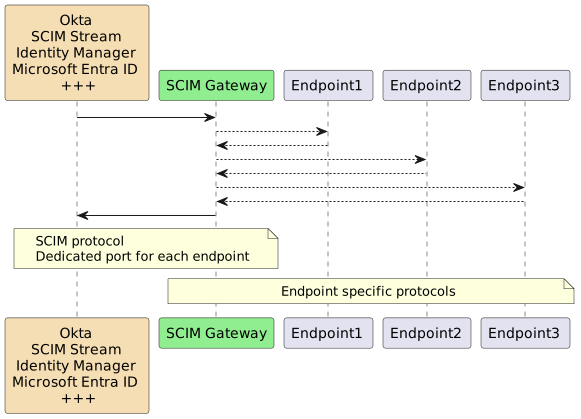
|
|
43
39
|
|
|
@@ -76,8 +72,8 @@ Demonstrates user provisioning towards MSSQL database
|
|
|
76
72
|
* **SAP HANA** (SAP HANA Database)
|
|
77
73
|
Demonstrates SAP HANA specific user provisioning
|
|
78
74
|
|
|
79
|
-
* **
|
|
80
|
-
|
|
75
|
+
* **Entra ID** (REST Webservices)
|
|
76
|
+
Entra ID user provisioning including license management (App Service plans) e.g. Office 365
|
|
81
77
|
Using Microsoft Graph API
|
|
82
78
|
Using customized SCIM attributes according to Microsoft Graph API
|
|
83
79
|
Includes Symantec/Broadcom/CA ConnectorXpress metafile for creating provisioning "Azure - ScimGateway" endpoint type
|
|
@@ -85,7 +81,7 @@ Includes Symantec/Broadcom/CA ConnectorXpress metafile for creating provisioning
|
|
|
85
81
|
* **LDAP** (Directory)
|
|
86
82
|
Fully functional LDAP plugin
|
|
87
83
|
Pre-configured for Microsoft Active Directory
|
|
88
|
-
Using endpointMapper (like plugin-
|
|
84
|
+
Using endpointMapper (like plugin-entra-id) for attribute flexibility
|
|
89
85
|
|
|
90
86
|
* **API** (REST Webservices)
|
|
91
87
|
Demonstrates API Gateway/plugin functionality using post/put/patch/get/delete
|
|
@@ -192,7 +188,7 @@ When maintaining a set of modifications it useful to disable the postinstall ope
|
|
|
192
188
|
// const soap = require('./lib/plugin-soap')
|
|
193
189
|
// const mssql = require('./lib/plugin-mssql')
|
|
194
190
|
// const saphana = require('./lib/plugin-saphana') // prereq: npm install hdb
|
|
195
|
-
// const
|
|
191
|
+
// const entra = require('./lib/plugin-entra-id')
|
|
196
192
|
// const ldap = require('./lib/plugin-ldap')
|
|
197
193
|
// const api = require('./lib/plugin-api')
|
|
198
194
|
|
|
@@ -328,7 +324,7 @@ Definitions in `endpoint` object are customized according to our plugin code. Pl
|
|
|
328
324
|
- **scim.customSchema** - filename of JSON file located in `<package-root>\config\schemas` containing custom schema attributes, see configuration notes
|
|
329
325
|
**additional information**: Schemas, ServiceProviderConfig and ResourceType can be customized if `lib/scimdef-v2.js (or scimdef-v1.js)` exists. Original scimdef-v2.js/scimdef-v1.js can be copied from node_modules/scimgateway/lib to your plugin/lib and customized.
|
|
330
326
|
|
|
331
|
-
- **scim.skipTypeConvert** - true or false, default false. Multivalue attributes supporting types e.g. emails, phoneNumbers, ims, photos, addresses, entitlements and x509Certificates (but not roles, groups and members) will be become "type converted objects" when sent to modifyUser and createUser. This for simplicity of checking attributes included and also for the endpointMapper method (used by plugin-ldap and plugin-
|
|
327
|
+
- **scim.skipTypeConvert** - true or false, default false. Multivalue attributes supporting types e.g. emails, phoneNumbers, ims, photos, addresses, entitlements and x509Certificates (but not roles, groups and members) will be become "type converted objects" when sent to modifyUser and createUser. This for simplicity of checking attributes included and also for the endpointMapper method (used by plugin-ldap and plugin-entra-id), e.g.:
|
|
332
328
|
|
|
333
329
|
"emails": {
|
|
334
330
|
"work": {"value": "jsmith@example.com", "type": "work"},
|
|
@@ -345,7 +341,7 @@ Definitions in `endpoint` object are customized according to our plugin code. Pl
|
|
|
345
341
|
]
|
|
346
342
|
|
|
347
343
|
|
|
348
|
-
- **scim.usePutSoftSync** - true or false, default false. `PUT /Users/bjensen` will replace the user bjensen with body content. If
|
|
344
|
+
- **scim.usePutSoftSync** - true or false, default false. `PUT /Users/bjensen` will replace the user bjensen with body content. If set to `true`, only PUT body content will be replaced. Any additional existing user attributes and groups supported by plugin will remain as-is.
|
|
349
345
|
|
|
350
346
|
- **scim."usePutGroupMemberOfUser** - true or false, default false. `PUT /Users/<user>` will replace the user with body content. If body contains groups and usePutGroupMemberOfUser=true, groups will be set on user object (groups are member of user) instead of default user member of groups
|
|
351
347
|
|
|
@@ -362,9 +358,9 @@ Definitions in `endpoint` object are customized according to our plugin code. Pl
|
|
|
362
358
|
|
|
363
359
|
- **auth.basic** - Array of one ore more basic authentication objects - Basic Authentication with **username**/**password**. Note, we set a clear text password that will become encrypted when gateway is started.
|
|
364
360
|
|
|
365
|
-
- **auth.bearerToken** - Array of one or more bearer token objects - Shared token/secret (supported by
|
|
361
|
+
- **auth.bearerToken** - Array of one or more bearer token objects - Shared token/secret (supported by Entra ID). Clear text value will become encrypted when gateway is started.
|
|
366
362
|
|
|
367
|
-
- **auth.bearerJwtAzure** - Array of one or more JWT used by Azure SyncFabric. **tenantIdGUID** must be set to
|
|
363
|
+
- **auth.bearerJwtAzure** - Array of one or more JWT used by Azure SyncFabric. **tenantIdGUID** must be set to Entra ID Tenant ID.
|
|
368
364
|
|
|
369
365
|
- **auth.bearerJwt** - Array of one or more standard JWT objects. Using **secret** or **publicKey** for signature verification. publicKey should be set to the filename of public key or certificate pem-file located in `<package-root>\config\certs`. Clear text secret will become encrypted when gateway is started. **options.issuer** is mandatory. Other options may also be included according to jsonwebtoken npm package definition.
|
|
370
366
|
|
|
@@ -397,7 +393,7 @@ Definitions in `endpoint` object are customized according to our plugin code. Pl
|
|
|
397
393
|
|
|
398
394
|
Note, we should normally use certificate (https) for communicating with SCIM Gateway unless we install ScimGatway locally on the manager (e.g. on the CA Connector Server). When installed on the manager, we could use `http://localhost:port` or `http://127.0.0.1:port` which will not be passed down to the data link layer for transmission. We could then also set {"localhostonly": true}
|
|
399
395
|
|
|
400
|
-
- **ipAllowList** - Array of one or more IPv4/IPv6 subnets (CIDR) allowed for incoming traffic. E.g. using
|
|
396
|
+
- **ipAllowList** - Array of one or more IPv4/IPv6 subnets (CIDR) allowed for incoming traffic. E.g. using Entra ID as IdP, we would like to restrict access to IP addresses used by Azure. Azure IP-range can be downloaded from: [https://azureipranges.azurewebsites.net](https://azureipranges.azurewebsites.net), enter **AzureActiveDirectory** in the search list and select JSON download. Copy the "addressPrefixes" array content and paste into ipAllowList array. CIDR single IP-host syntax is a.b.c.d/32. Note, front-end HTTP proxy or a load balancer must include client IP-address in the **X-Forwarded-For** header. Configuration example:
|
|
401
397
|
|
|
402
398
|
"ipAllowList": [
|
|
403
399
|
"13.64.151.161/32",
|
|
@@ -656,11 +652,11 @@ To upgrade scimgateway docker image (remove the old stuff before running docker-
|
|
|
656
652
|
docker rm scimgateway
|
|
657
653
|
docker rm $(docker ps -a -q); docker rmi $(docker images -q -f "dangling=true")
|
|
658
654
|
|
|
659
|
-
##
|
|
655
|
+
## Entra ID as IdP using SCIM Gateway
|
|
660
656
|
|
|
661
|
-
|
|
657
|
+
Entra ID could do automatic user provisioning by synchronizing users towards SCIM Gateway, and gateway plugins will update endpoints.
|
|
662
658
|
|
|
663
|
-
Plugin configuration file must include **SCIM Version "2.0"** (scimgateway.scim.version) and either **Bearer Token** (scimgateway.auth.bearerToken[x].token) or **
|
|
659
|
+
Plugin configuration file must include **SCIM Version "2.0"** (scimgateway.scim.version) and either **Bearer Token** (scimgateway.auth.bearerToken[x].token) or **Entra ID Tenant ID GUID** (scimgateway.auth.bearerJwtAzure[x].tenantIdGUID) or both:
|
|
664
660
|
|
|
665
661
|
scimgateway: {
|
|
666
662
|
"scim": {
|
|
@@ -683,42 +679,42 @@ Plugin configuration file must include **SCIM Version "2.0"** (scimgateway.scim.
|
|
|
683
679
|
...
|
|
684
680
|
}
|
|
685
681
|
|
|
686
|
-
`token` configuration must correspond with "Secret Token" defined in
|
|
687
|
-
`tenantIdGUID` configuration must correspond with
|
|
682
|
+
`token` configuration must correspond with "Secret Token" defined in Entra ID
|
|
683
|
+
`tenantIdGUID` configuration must correspond with Entra ID Tenant ID
|
|
688
684
|
|
|
689
685
|
In Azure Portal:
|
|
690
|
-
`Azure-
|
|
686
|
+
`Azure-Microsoft Entra ID-Enterprise Application-<My Application>-Provisioning-Secret Token`
|
|
691
687
|
Note, when "Secret Token" is left blank, Azure will use JWT (tenantIdGUID)
|
|
692
688
|
|
|
693
|
-
`Azure-
|
|
689
|
+
`Azure-Microsoft Entra ID-Overview-Tenant ID`
|
|
694
690
|
|
|
695
691
|
User mappings attributes between AD and SCIM also needs to be configured
|
|
696
692
|
|
|
697
|
-
`Azure-
|
|
693
|
+
`Azure-Microsoft Entra ID-Enterprise Application-<My Application>-Provisioning-Edit attribute mappings-Mappings`
|
|
698
694
|
|
|
699
|
-
|
|
695
|
+
Entra ID default SCIM attribute mapping for **USER** must have:
|
|
700
696
|
|
|
701
697
|
userPrincipalName mapped to userName (matching precedence #1)
|
|
702
698
|
|
|
703
699
|
|
|
704
|
-
|
|
700
|
+
Entra ID default SCIM attribute mapping for **GROUP** must have:
|
|
705
701
|
|
|
706
702
|
displayName mapped to displayName (matching precedence #1)
|
|
707
703
|
members mapped to members
|
|
708
704
|
|
|
709
705
|
|
|
710
706
|
|
|
711
|
-
Some notes related to
|
|
707
|
+
Some notes related to Entra ID:
|
|
712
708
|
|
|
713
|
-
-
|
|
709
|
+
- Entra ID SCIM [documentation](https://learn.microsoft.com/en-us/entra/identity/app-provisioning/use-scim-to-provision-users-and-groups)
|
|
714
710
|
|
|
715
|
-
- For using OAuth/JWT credentials,
|
|
711
|
+
- For using OAuth/JWT credentials, Entra ID configuration "Secret Token" (bearer token) should be blank. Plugin configuration must then include bearerJwtAzure.tenantIdGUID. Click "Test Connection" in Azure to verify
|
|
716
712
|
|
|
717
|
-
-
|
|
713
|
+
- Entra ID do a regular check for a "non" existing user/group. This check seems to be a "keep alive" to verify connection.
|
|
718
714
|
|
|
719
|
-
-
|
|
715
|
+
- Entra ID first checks if user/group exists, if not exist they will be created (no explore of all users like CA Identity Manager)
|
|
720
716
|
|
|
721
|
-
- Deleting a user in
|
|
717
|
+
- Deleting a user in Entra ID sends a modify user `{"active":"False"}` which means user should be disabled. This logic is default set in attribute mappings expression rule `Switch([IsSoftDeleted], , "False", "True", "True", "False")`. Standard SCIM "DELETE" method seems not to be used.
|
|
722
718
|
|
|
723
719
|
|
|
724
720
|
## CA Identity Manager as IdP using SCIM Gateway
|
|
@@ -758,18 +754,15 @@ Each baseEntity should then be defined in the plugin configuration file with cus
|
|
|
758
754
|
IM 12.6 SP7 (and above) also supports pagination for SCIM endpoint (data transferred in bulks - endpoint explore of users). Loki plugin supports pagination. Other plugin may ignore this setting.
|
|
759
755
|
|
|
760
756
|
|
|
761
|
-
##
|
|
762
|
-
Using plugin-
|
|
757
|
+
## Entra ID provisioning
|
|
758
|
+
Using plugin-entra-id we could do user provisioning towards Entra ID including license management e.g. O365
|
|
763
759
|
|
|
764
760
|
For testing purposes we could get an Azure free account and in addition the free Office 365 for testing license management through Azure.
|
|
765
761
|
|
|
766
|
-
|
|
767
|
-
|
|
768
|
-
|
|
769
|
-
### Azure AD configuration
|
|
762
|
+
### Entra ID configuration
|
|
770
763
|
|
|
771
764
|
- Logon to [Azure](https://portal.azure.com) as global administrator
|
|
772
|
-
-
|
|
765
|
+
- Microsoft Entra ID - App registrations
|
|
773
766
|
- Click "New registration"
|
|
774
767
|
- Name = SCIM Gateway Inbound
|
|
775
768
|
- Select: Accounts in this organizational directory only
|
|
@@ -792,7 +785,7 @@ There are two alternative ways of configuring Azure AD. Alternative #1 is probab
|
|
|
792
785
|
- Organization - Organization.ReadWrite.All
|
|
793
786
|
- Click "Add permissions"
|
|
794
787
|
Note, we also have to go to Enterprise application to grant these consents
|
|
795
|
-
-
|
|
788
|
+
- Microsoft Entra ID - Enterprise applications - SCIM Gateway Inbound
|
|
796
789
|
- Permissions:
|
|
797
790
|
- Click "Grant admin consent for [tenant name]"
|
|
798
791
|
- In the logon dialog, logon as global administrator
|
|
@@ -804,7 +797,7 @@ There are two alternative ways of configuring Azure AD. Alternative #1 is probab
|
|
|
804
797
|
|
|
805
798
|
Also note, enable/disable user (accountEnabled - through Graph API) will fail if user have an "Administrator" role other than above mentioned "User Administrator" e.g. "Group Administrator"/"Application Administrator". To be sure we can enable/disable all users, application needs to be member of **"Global administrator"** - 62e90394-69f5-4237-9190-012177145e10.
|
|
806
799
|
|
|
807
|
-
-
|
|
800
|
+
- Microsoft Entra ID - Roles and administration
|
|
808
801
|
- Click on role **"User administrator"**
|
|
809
802
|
- Click "Add assignments"
|
|
810
803
|
- Search: SCIM Gateway Inbound (application name)
|
|
@@ -813,11 +806,11 @@ Also note, enable/disable user (accountEnabled - through Graph API) will fail if
|
|
|
813
806
|
### SCIM Gateway configuration
|
|
814
807
|
|
|
815
808
|
**Edit index.js**
|
|
816
|
-
Uncomment startup of plugin-
|
|
809
|
+
Uncomment startup of plugin-entra-id, other plugins could be comment out if not needed
|
|
817
810
|
|
|
818
|
-
const
|
|
811
|
+
const entra = require('./lib/plugin-entra-id')
|
|
819
812
|
|
|
820
|
-
**Edit plugin-
|
|
813
|
+
**Edit plugin-entra-id.json**
|
|
821
814
|
|
|
822
815
|
Note, for Symantec/Broadcom/CA Provisioning we have to use SCIM version 1.1
|
|
823
816
|
|
|
@@ -838,7 +831,7 @@ Note, for Symantec/Broadcom/CA Provisioning we have to use SCIM version 1.1
|
|
|
838
831
|
}
|
|
839
832
|
],
|
|
840
833
|
|
|
841
|
-
Update `tenantIdGUID`, `clientID` and `clientSecret` according to what you copied from the previous
|
|
834
|
+
Update `tenantIdGUID`, `clientID` and `clientSecret` according to what you copied from the previous Entra ID configuration.
|
|
842
835
|
|
|
843
836
|
If using proxy, set proxy.host to `"http://<FQDN-ProxyHost>:<port>"` e.g `"http://proxy.mycompany.com:3128"`
|
|
844
837
|
|
|
@@ -883,8 +876,8 @@ Note, we should normally use certificate (https) for communicating with SCIM Gat
|
|
|
883
876
|
Create a new endpoint type "Azure - ScimGateway"
|
|
884
877
|
|
|
885
878
|
- Start SCIM Gateway
|
|
886
|
-
- "const
|
|
887
|
-
- username, password and port defined in `plugin-
|
|
879
|
+
- "const entra" must be uncomment in `index.js`
|
|
880
|
+
- username, password and port defined in `plugin-entra-id.json` must also be known
|
|
888
881
|
- Start ConnectorXpress
|
|
889
882
|
- Setup Data Sources
|
|
890
883
|
- Add
|
|
@@ -1082,6 +1075,16 @@ Plugins should have following initialization:
|
|
|
1082
1075
|
ret.Resources = array filled with user objects according to getObj/attributes, we could normally include all attributes having id and userName as mandatory e.g [{"id": "bjensen", "userName": "bjensen"}, {"id":"jsmith", "userName":"jsmith"}]
|
|
1083
1076
|
ret.totalResults = if supporting pagination, then it should be set to the total numbers of elements (users), else set to null
|
|
1084
1077
|
|
|
1078
|
+
### createUser
|
|
1079
|
+
scimgateway.createUser = async (baseEntity, userObj, ctx) => {
|
|
1080
|
+
...
|
|
1081
|
+
return { "id": uniqueID }
|
|
1082
|
+
})
|
|
1083
|
+
|
|
1084
|
+
* userObj = user object containing userattributes according to scim standard
|
|
1085
|
+
userObj.userName contains the unique naming at IdP
|
|
1086
|
+
* return the created user object or minimum the id generated { "id": uniqueID }, null is also accepted else throw error
|
|
1087
|
+
|
|
1085
1088
|
### deleteUser
|
|
1086
1089
|
|
|
1087
1090
|
scimgateway.deleteUser = async (baseEntity, id, ctx) => {
|
|
@@ -1131,12 +1134,12 @@ ret.totalResults = if supporting pagination, then it should be set to the total
|
|
|
1131
1134
|
### createGroup
|
|
1132
1135
|
scimgateway.createGroup = async (baseEntity, groupObj, ctx) => {
|
|
1133
1136
|
...
|
|
1134
|
-
return
|
|
1137
|
+
return { "id": uniqueID }
|
|
1135
1138
|
})
|
|
1136
1139
|
|
|
1137
1140
|
* groupObj = group object containing groupattributes according to scim standard
|
|
1138
1141
|
groupObj.displayName contains the group name to be created
|
|
1139
|
-
* return
|
|
1142
|
+
* return the created group object or minimum the id generated { "id": uniqueID }, null is also accepted else throw error
|
|
1140
1143
|
|
|
1141
1144
|
### deleteGroup
|
|
1142
1145
|
scimgateway.deleteGroup = async (baseEntity, id, ctx) => {
|
|
@@ -1170,7 +1173,20 @@ MIT © [Jarle Elshaug](https://www.elshaug.xyz)
|
|
|
1170
1173
|
|
|
1171
1174
|
## Change log
|
|
1172
1175
|
|
|
1173
|
-
### v4.
|
|
1176
|
+
### v4.3.0
|
|
1177
|
+
|
|
1178
|
+
[Added]
|
|
1179
|
+
|
|
1180
|
+
- configuration **scimgateway.scim.port** can now be set to 0 or removed for deactivating listener
|
|
1181
|
+
- configuration **scimgateway.scim.usePutSoftSync** set to `true` now includes additional logic that do not change existing user attributes not included in PUT body content
|
|
1182
|
+
- createUser/createGroup no longer return id if id have not been returned by plugin or by getUser filtering on userName. Previously userName was returned as id when missing plugin logic.
|
|
1183
|
+
- plugin-ldap supporting simpel filtering
|
|
1184
|
+
- plugin-loki using baseEntity configuration for supporting multi loki endpoints
|
|
1185
|
+
- plugin-azure-ad renamed to plugin-entra-id
|
|
1186
|
+
- plugin-entra-id and plugin-scim now using an updated default REST helpers-template that gives more flexible endpoint authentication support like OAuth, Basic, Bearer, custom-headers, no-auth,...
|
|
1187
|
+
- Dependencies bump
|
|
1188
|
+
|
|
1189
|
+
### v4.2.17
|
|
1174
1190
|
|
|
1175
1191
|
[Fixed]
|
|
1176
1192
|
|
|
@@ -4,11 +4,10 @@
|
|
|
4
4
|
"localhostonly": false,
|
|
5
5
|
"payloadSize": null,
|
|
6
6
|
"scim": {
|
|
7
|
-
"version": "
|
|
7
|
+
"version": "1.1",
|
|
8
8
|
"customSchema": null,
|
|
9
9
|
"skipTypeConvert": false,
|
|
10
|
-
"usePutSoftSync": false
|
|
11
|
-
"usePutGroupMemberOfUser": false
|
|
10
|
+
"usePutSoftSync": false
|
|
12
11
|
},
|
|
13
12
|
"log": {
|
|
14
13
|
"loglevel": {
|
|
@@ -98,9 +97,13 @@
|
|
|
98
97
|
"endpoint": {
|
|
99
98
|
"entity": {
|
|
100
99
|
"undefined": {
|
|
101
|
-
"
|
|
102
|
-
"
|
|
103
|
-
|
|
100
|
+
"baseUrls": ["not in use by plugin-entra-id (hardcoded)"],
|
|
101
|
+
"oauth": {
|
|
102
|
+
"tenantIdGUID": "DomainName or DirectoryID (GUID) - only used by plugin-entra-id",
|
|
103
|
+
"tokenUrl": "not in use by plugin-entra-id (hardcoded)",
|
|
104
|
+
"clientId": "Application ID",
|
|
105
|
+
"clientSecret": "Generated application secret value"
|
|
106
|
+
},
|
|
104
107
|
"proxy": {
|
|
105
108
|
"host": null,
|
|
106
109
|
"username": null,
|
|
@@ -271,4 +274,4 @@
|
|
|
271
274
|
}
|
|
272
275
|
}
|
|
273
276
|
}
|
|
274
|
-
}
|
|
277
|
+
}
|
package/config/plugin-loki.json
CHANGED
package/config/plugin-scim.json
CHANGED
|
@@ -102,8 +102,10 @@
|
|
|
102
102
|
"http://localhost:8880"
|
|
103
103
|
],
|
|
104
104
|
"scimVersion": "2.0",
|
|
105
|
-
"
|
|
106
|
-
|
|
105
|
+
"basicAuth": {
|
|
106
|
+
"username": "gwadmin",
|
|
107
|
+
"password": "password"
|
|
108
|
+
},
|
|
107
109
|
"proxy": {
|
|
108
110
|
"host": null,
|
|
109
111
|
"username": null,
|
|
@@ -115,8 +117,10 @@
|
|
|
115
117
|
"http://localhost:8880"
|
|
116
118
|
],
|
|
117
119
|
"scimVersion": "2.0",
|
|
118
|
-
"
|
|
119
|
-
|
|
120
|
+
"basicAuth": {
|
|
121
|
+
"username": "gwadmin",
|
|
122
|
+
"password": "password"
|
|
123
|
+
},
|
|
120
124
|
"proxy": {
|
|
121
125
|
"host": null,
|
|
122
126
|
"username": null,
|
|
@@ -125,4 +129,4 @@
|
|
|
125
129
|
}
|
|
126
130
|
}
|
|
127
131
|
}
|
|
128
|
-
}
|
|
132
|
+
}
|
package/index.js
CHANGED
|
@@ -15,6 +15,6 @@ const loki = require('./lib/plugin-loki')
|
|
|
15
15
|
// const soap = require('./lib/plugin-soap')
|
|
16
16
|
// const mssql = require('./lib/plugin-mssql')
|
|
17
17
|
// const saphana = require('./lib/plugin-saphana') // prereq: npm install hdb --save
|
|
18
|
-
// const
|
|
18
|
+
// const entra = require('./lib/plugin-entra-id')
|
|
19
19
|
// const ldap = require('./lib/plugin-ldap')
|
|
20
20
|
// const api = require('./lib/plugin-api')
|