scaffoldrite 2.0.7 → 2.1.0
This diff represents the content of publicly available package versions that have been released to one of the supported registries. The information contained in this diff is provided for informational purposes only and reflects changes between package versions as they appear in their respective public registries.
- package/dist/cli.js +4 -1
- package/dist/library/commandHandler.js +90 -39
- package/dist/library/fsToAst.js +31 -11
- package/dist/library/plot/ai.js +148 -0
- package/dist/library/plot/aiClient.js +36 -0
- package/dist/library/plot/generateStructure.js +30 -0
- package/dist/library/plot/lis.js +158 -0
- package/dist/library/validateFS.js +16 -7
- package/dist/utils/index.js +16 -8
- package/package.json +2 -2
- package/readme.md +272 -386
package/readme.md
CHANGED
|
@@ -1,14 +1,14 @@
|
|
|
1
1
|
# Scaffoldrite: Define. Enforce. Generate. 🏗️
|
|
2
2
|
|
|
3
|
-
>
|
|
3
|
+
> *Structure the right way*
|
|
4
4
|
|
|
5
5
|
**Stop guessing. Start structuring.** Your project's organization should be as reliable as your code. With Scaffoldrite, it will be.
|
|
6
6
|
|
|
7
7
|
---
|
|
8
8
|
|
|
9
|
-
|
|
11
10
|
|
|
11
|
+
---
|
|
12
12
|
|
|
13
13
|
## 🚨 v2.0.0 – Breaking Change: Config Location
|
|
14
14
|
|
|
@@ -18,97 +18,53 @@ Scaffoldrite v2 introduces a **dedicated config directory**.
|
|
|
18
18
|
|
|
19
19
|
**Before (v1.x):**
|
|
20
20
|
```
|
|
21
|
-
|
|
22
21
|
structure.sr
|
|
23
22
|
.scaffoldignore
|
|
24
|
-
|
|
25
23
|
```
|
|
26
24
|
|
|
27
25
|
**Now (v2.x):**
|
|
28
26
|
```
|
|
29
|
-
|
|
30
27
|
.scaffoldrite/
|
|
31
28
|
├─ structure.sr
|
|
32
29
|
└─ .scaffoldignore
|
|
33
|
-
|
|
34
|
-
````
|
|
30
|
+
```
|
|
35
31
|
|
|
36
32
|
Scaffoldrite no longer reads config files from the project root.
|
|
37
33
|
|
|
38
|
-
---
|
|
39
|
-
|
|
40
34
|
### 🔁 Migration
|
|
41
35
|
|
|
42
36
|
You have two options:
|
|
43
37
|
|
|
44
|
-
#### Option 1: Regenerate (
|
|
38
|
+
#### Option 1: Regenerate (Recommended)
|
|
45
39
|
```bash
|
|
46
40
|
sr init
|
|
47
|
-
|
|
48
|
-
|
|
49
|
-
#### Option 2: Migrate existing config
|
|
41
|
+
```
|
|
50
42
|
|
|
51
|
-
|
|
43
|
+
#### Option 2: Migrate Existing Config
|
|
52
44
|
|
|
53
45
|
```bash
|
|
54
46
|
sr init --migrate
|
|
55
47
|
```
|
|
56
48
|
|
|
57
49
|
This will:
|
|
50
|
+
- Move `structure.sr` → `.scaffoldrite/structure.sr`
|
|
51
|
+
- Move `.scaffoldignore` → `.scaffoldrite/.scaffoldignore`
|
|
58
52
|
|
|
59
|
-
|
|
60
|
-
* Move `.scaffoldignore` → `.scaffoldrite/.scaffoldignore`
|
|
61
|
-
|
|
62
|
-
> ⚠ If `.scaffoldrite/` already contains these files, use `--force` to overwrite:
|
|
63
|
-
|
|
53
|
+
> ⚠️ If `.scaffoldrite/` already contains these files, use `--force` to overwrite:
|
|
64
54
|
```bash
|
|
65
55
|
sr init --migrate --force
|
|
66
56
|
```
|
|
67
57
|
|
|
68
|
-
If no legacy config is found, Scaffoldrite will
|
|
69
|
-
|
|
58
|
+
If no legacy config is found, Scaffoldrite will notify you:
|
|
70
59
|
```
|
|
71
60
|
ℹ No legacy config found to migrate.
|
|
72
61
|
```
|
|
73
62
|
|
|
74
63
|
---
|
|
75
64
|
|
|
76
|
-
|
|
77
|
-
|
|
78
|
-
|
|
79
|
-
## ⚠️ Filesystem Changes
|
|
80
|
-
|
|
81
|
-
### Drift Detection
|
|
82
|
-
Manually deleted files or folders are considered **filesystem drift**.
|
|
83
|
-
Changes made outside Scaffoldrite (e.g., via `rm`, file explorers, or other scripts) are **not tracked**. Scaffoldrite does **not record history** of such changes.
|
|
84
|
-
|
|
85
|
-
### Regeneration Behavior
|
|
86
|
-
`scaffoldrite generate` **enforces the expected structure**, but does **not preserve or restore file contents** (unless using `--copy` flag).
|
|
87
|
-
When it recreates a manually deleted file:
|
|
88
|
-
|
|
89
|
-
- The file will be **empty**, or
|
|
90
|
-
- Created from a **template** if one is defined, or
|
|
91
|
-
- **Copied from source** if using `--copy` flag and file exists in source
|
|
92
|
-
|
|
93
|
-
### Copy Flag Behavior
|
|
94
|
-
`scaffoldrite generate --copy` **copies file contents** from source to output directory. This is useful for:
|
|
95
|
-
- Creating project templates with actual file content
|
|
96
|
-
- Generating complete project structures from existing codebases
|
|
97
|
-
- Preserving file contents when generating to output directories
|
|
98
|
-
|
|
99
|
-
**Note:** The `--copy` flag only works when generating to a different output directory, not when regenerating in-place.
|
|
100
|
-
|
|
101
|
-
### No Content Backup
|
|
102
|
-
Scaffoldrite tracks **structural intent only** — it does **not back up file contents**. Use **Git** or another version control system to recover lost content.
|
|
103
|
-
|
|
104
|
-
> **"Scaffoldrite deleted my file content 😡"**
|
|
105
|
-
> This usually happens when files were removed manually outside Scaffoldrite and then regenerated.
|
|
106
|
-
> Scaffoldrite does **not** delete or overwrite file contents arbitrarily — it only restores the **expected structure**.
|
|
107
|
-
> Always use Git or another VCS to protect and recover file contents.
|
|
108
|
-
|
|
109
65
|
## 🎯 The Problem Every Developer Faces
|
|
110
66
|
|
|
111
|
-
Remember
|
|
67
|
+
Remember joining a project and spending days just figuring out where things go? Or watching your team's codebase slowly become a jungle of misplaced files? We've all been there.
|
|
112
68
|
|
|
113
69
|
**Projects don't fail because of bad code alone—they fail because of bad structure.**
|
|
114
70
|
|
|
@@ -122,26 +78,26 @@ Scaffoldrite solves this by giving you:
|
|
|
122
78
|
|
|
123
79
|
## 🚀 Your First 60 Seconds with Scaffoldrite
|
|
124
80
|
|
|
125
|
-
### 1. Install
|
|
81
|
+
### 1. Install
|
|
126
82
|
```bash
|
|
127
83
|
npm install -g scaffoldrite
|
|
128
84
|
```
|
|
129
85
|
|
|
130
86
|
### 2. Choose Your Command
|
|
131
87
|
```bash
|
|
132
|
-
sr # Short and sweet (recommended daily use)
|
|
88
|
+
sr # Short and sweet (recommended for daily use)
|
|
133
89
|
scaffoldrite # Full name (great for scripts)
|
|
134
90
|
```
|
|
135
|
-
**Both
|
|
91
|
+
**Both work identically—use whichever fits your workflow.**
|
|
136
92
|
|
|
137
93
|
### 3. Create Your Blueprint
|
|
138
94
|
```bash
|
|
139
95
|
sr init
|
|
140
96
|
```
|
|
141
|
-
>
|
|
97
|
+
> Creates `.scaffoldrite/structure.sr`—your project's architectural blueprint.
|
|
142
98
|
|
|
143
|
-
### 4. Define Your
|
|
144
|
-
Edit
|
|
99
|
+
### 4. Define Your Structure
|
|
100
|
+
Edit `.scaffoldrite/structure.sr`:
|
|
145
101
|
```sr
|
|
146
102
|
folder src {
|
|
147
103
|
folder components {
|
|
@@ -160,11 +116,11 @@ constraints {
|
|
|
160
116
|
}
|
|
161
117
|
```
|
|
162
118
|
|
|
163
|
-
### 5.
|
|
119
|
+
### 5. Generate It
|
|
164
120
|
```bash
|
|
165
121
|
sr generate .
|
|
166
122
|
```
|
|
167
|
-
|
|
123
|
+
Your structure is now reality.
|
|
168
124
|
|
|
169
125
|
---
|
|
170
126
|
|
|
@@ -172,7 +128,7 @@ Boom! Your perfect structure is now reality.
|
|
|
172
128
|
|
|
173
129
|
### Simple. Literal. Powerful.
|
|
174
130
|
|
|
175
|
-
Your `structure.sr` file describes exactly what should exist. No magic, no wildcards—just clear
|
|
131
|
+
Your `structure.sr` file describes exactly what should exist. No magic, no wildcards—just clear declarations:
|
|
176
132
|
|
|
177
133
|
```sr
|
|
178
134
|
# This creates exactly what you see
|
|
@@ -190,190 +146,175 @@ folder src {
|
|
|
190
146
|
}
|
|
191
147
|
```
|
|
192
148
|
|
|
193
|
-
**Every name is literal.** `file [...slug].tsx` creates a file literally named `[...slug].tsx
|
|
149
|
+
**Every name is literal.** `file [...slug].tsx` creates a file literally named `[...slug].tsx`—perfect for Next.js, SvelteKit, or any framework with special file naming conventions.
|
|
194
150
|
|
|
195
151
|
---
|
|
196
152
|
|
|
197
|
-
## ⚡ Command
|
|
153
|
+
## ⚡ Command Reference
|
|
198
154
|
|
|
199
|
-
|
|
155
|
+
### Positional Arguments
|
|
200
156
|
|
|
201
|
-
Scaffoldrite uses positional arguments where
|
|
157
|
+
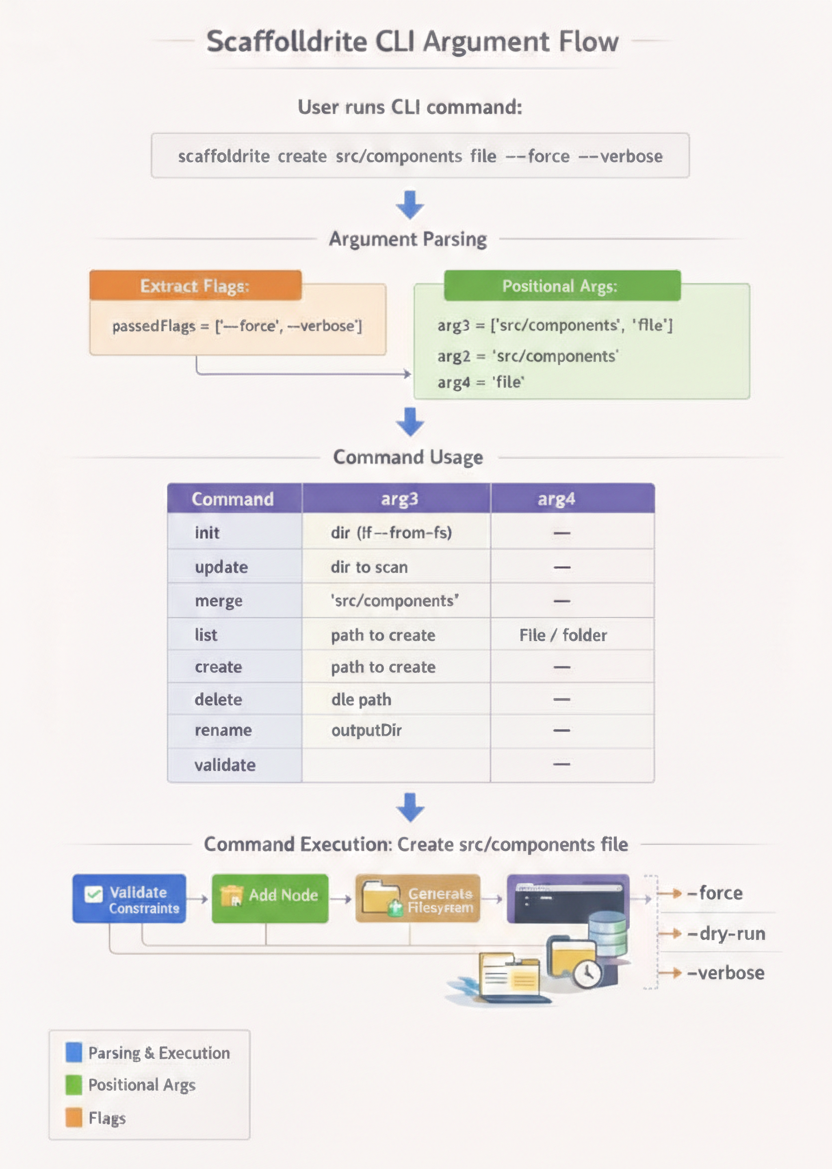
Scaffoldrite uses positional arguments where meaning depends on position. **Flags (options starting with `--` or `-`) are extracted and don't count as positional arguments.**
|
|
202
158
|
|
|
203
|
-
|
|
159
|
+
| Command | Position 1 | Position 2 | Position 3 | Position 4 |
|
|
160
|
+
|---------|------------|------------|------------|------------|
|
|
161
|
+
| `init` | (command) | — | Directory (with `--from-fs`) | — |
|
|
162
|
+
| `update` | (command) | — | Directory to scan (with `--from-fs`) | — |
|
|
163
|
+
| `merge` | (command) | — | Directory to merge (with `--from-fs`) | — |
|
|
164
|
+
| `list` | (command) | — | — | — |
|
|
165
|
+
| `create` | (command) | Path to create | `file` or `folder` | — |
|
|
166
|
+
| `delete` | (command) | Path to delete | — | — |
|
|
167
|
+
| `rename` | (command) | Old path | New name/path | — |
|
|
168
|
+
| `generate` | (command) | Output directory (**required**) | — | — |
|
|
169
|
+
| `validate` | (command) | — | — | — |
|
|
170
|
+
| `find` | (command) | Search query | — | — |
|
|
204
171
|
|
|
205
|
-
|
|
206
|
-
|---------|-------------------|-------------------|-------------------|-------------------|
|
|
207
|
-
| `init` | (command itself) | — | Directory path (when used with `--from-fs`) | — |
|
|
208
|
-
| `update` | (command itself) | — | Directory to scan (when used with `--from-fs`) | — |
|
|
209
|
-
| `merge` | (command itself) | — | Directory to merge (when used with `--from-fs`) | — |
|
|
210
|
-
| `list` | (command itself) | — | — | — |
|
|
211
|
-
| `create` | (command itself) | Path to create | `file` or `folder` | — |
|
|
212
|
-
| `delete` | (command itself) | Path to delete | — | — |
|
|
213
|
-
| `rename` | (command itself) | Old path | New name/path | — |
|
|
214
|
-
| `generate` | (command itself) | Output directory (required) | — | — |
|
|
215
|
-
| `validate` | (command itself) | — | — | — |
|
|
172
|
+
### Argument Processing
|
|
216
173
|
|
|
217
|
-
|
|
218
|
-
|
|
219
|
-
|
|
220
|
-
1. **Flags are extracted first** - All `--flag` and `-f` options are removed from the argument list
|
|
221
|
-
2. **Remaining arguments are treated as positional** - Their meaning depends on their position
|
|
222
|
-
3. **Flag values are handled separately** - Values following flags like `--from-fs ./src` are paired with their flags
|
|
174
|
+
1. **Flags are extracted first** – All `--flag` and `-f` options are removed
|
|
175
|
+
2. **Remaining arguments are positional** – Meaning depends on position
|
|
176
|
+
3. **Flag values are paired** – Values following flags like `--from-fs ./src` stay with their flag
|
|
223
177
|
|
|
224
178
|
### Usage Examples
|
|
225
179
|
|
|
226
180
|
```bash
|
|
227
181
|
# init with --from-fs
|
|
228
182
|
sr init --from-fs ./src
|
|
229
|
-
# arg3: ./src
|
|
183
|
+
# arg3: ./src
|
|
230
184
|
|
|
231
185
|
# generate with output directory (required)
|
|
232
186
|
sr generate .
|
|
233
|
-
# arg2: .
|
|
187
|
+
# arg2: .
|
|
234
188
|
|
|
235
189
|
sr generate ./output
|
|
236
190
|
# arg2: ./output
|
|
237
191
|
|
|
238
|
-
# create with flags
|
|
192
|
+
# create with flags
|
|
239
193
|
sr create src/components/ui button.ts file --force --verbose
|
|
240
194
|
# arg2: src/components/ui arg3: button.ts arg4: file
|
|
241
|
-
# --force and --verbose are extracted as flags, not counted as arguments
|
|
242
195
|
|
|
243
|
-
# rename with confirmation
|
|
196
|
+
# rename with confirmation skip
|
|
244
197
|
sr rename src/oldfile.txt newfile.txt --yes
|
|
245
198
|
# arg2: src/oldfile.txt arg3: newfile.txt
|
|
246
|
-
# --yes is extracted as a flag
|
|
247
199
|
|
|
248
|
-
#
|
|
200
|
+
# find a file or folder
|
|
201
|
+
sr find Button
|
|
202
|
+
# arg2: Button
|
|
203
|
+
|
|
204
|
+
# generate with dry-run
|
|
249
205
|
sr generate ./dist --dry-run
|
|
250
206
|
# arg2: ./dist
|
|
251
|
-
# --dry-run is extracted as a flag
|
|
252
207
|
|
|
253
208
|
# generate with copy flag
|
|
254
209
|
sr generate ./template --copy --summary
|
|
255
210
|
# arg2: ./template
|
|
256
|
-
# --copy and --summary are extracted as flags
|
|
257
|
-
|
|
258
|
-
# This would be INVALID - flags must come after positional args
|
|
259
|
-
sr create --force src/components/ui button.ts file
|
|
260
|
-
# ↑
|
|
261
|
-
# src/components/ui is now arg3, causing confusion
|
|
262
|
-
|
|
263
|
-
# This would be INVALID - generate requires output directory
|
|
264
|
-
sr generate --dry-run
|
|
265
|
-
# Error: generate requires output directory argument
|
|
266
211
|
```
|
|
267
212
|
|
|
268
213
|
### Best Practices
|
|
269
214
|
- **Place flags after positional arguments** for clarity
|
|
270
|
-
- **
|
|
271
|
-
- **Flag
|
|
272
|
-
- **Flag values** like `--from-fs ./src` stay together as a pair
|
|
215
|
+
- **Flag order doesn't matter** – `sr create path file --force --verbose` equals `sr create path file --verbose --force`
|
|
216
|
+
- **Flag values stay paired** – `--from-fs ./src` is treated as one unit
|
|
273
217
|
|
|
274
|
-
**Important:** For `generate`, the output directory
|
|
218
|
+
**Important:** For `generate`, the output directory is **required**. Use `.` for current directory or specify a path.
|
|
275
219
|
|
|
276
220
|
---
|
|
277
221
|
|
|
278
|
-
##
|
|
279
|
-
|
|
280
|
-
|
|
281
|
-
|
|
282
|
-
### Flags Reference
|
|
283
|
-
|
|
284
|
-
Each command supports specific flags:
|
|
222
|
+
## 🛠️ Command Flags Reference
|
|
285
223
|
|
|
286
|
-
|
|
287
|
-
|
|
288
|
-
Each Scaffoldrite command supports various flags for control and customization.
|
|
289
|
-
|
|
290
|
-
### `init` Command Flags
|
|
224
|
+
### `init` Command
|
|
291
225
|
| Flag | Description | Example |
|
|
292
226
|
|------|-------------|---------|
|
|
293
|
-
| `--force` | Overwrite existing
|
|
227
|
+
| `--force` | Overwrite existing config files | `sr init --force` |
|
|
294
228
|
| `--empty` | Create minimal structure with only constraints block | `sr init --empty` |
|
|
295
|
-
| `--from-fs <directory>` | Generate from existing filesystem
|
|
229
|
+
| `--from-fs <directory>` | Generate from existing filesystem | `sr init --from-fs ./src` or `sr init --from-fs .` |
|
|
230
|
+
| `--migrate` | Move legacy v1.x config to `.scaffoldrite/` | `sr init --migrate` |
|
|
296
231
|
|
|
297
|
-
### `update` Command
|
|
232
|
+
### `update` Command
|
|
298
233
|
| Flag | Description | Example |
|
|
299
234
|
|------|-------------|---------|
|
|
300
|
-
| `--from-fs <directory>` | Update from filesystem (
|
|
235
|
+
| `--from-fs <directory>` | Update from filesystem (required) | `sr update --from-fs .` |
|
|
301
236
|
| `--yes` / `-y` | Skip confirmation prompts | `sr update --from-fs . --yes` |
|
|
302
237
|
|
|
303
|
-
### `merge` Command
|
|
238
|
+
### `merge` Command
|
|
304
239
|
| Flag | Description | Example |
|
|
305
240
|
|------|-------------|---------|
|
|
306
|
-
| `--from-fs <directory>` | Merge from filesystem (
|
|
241
|
+
| `--from-fs <directory>` | Merge from filesystem (required) | `sr merge --from-fs ./features` |
|
|
307
242
|
| `--yes` / `-y` | Skip confirmation prompts | `sr merge --from-fs . --yes` |
|
|
308
243
|
|
|
309
|
-
### `generate` Command
|
|
244
|
+
### `generate` Command
|
|
310
245
|
| Flag | Description | Example |
|
|
311
246
|
|------|-------------|---------|
|
|
312
247
|
| `--yes` | Skip confirmation prompts | `sr generate . --yes` |
|
|
313
|
-
| `--dry-run` |
|
|
248
|
+
| `--dry-run` | Preview changes without applying | `sr generate . --dry-run` |
|
|
314
249
|
| `--verbose` | Show detailed output | `sr generate . --verbose` |
|
|
315
|
-
| `--ignore-tooling` | Generates without the scaffold config | `sr generate . --ignore-tooling` |
|
|
316
250
|
| `--summary` | Display operations as they happen | `sr generate . --summary` |
|
|
317
|
-
| `--
|
|
251
|
+
| `--ignore-tooling` | Generate without scaffold config | `sr generate . --ignore-tooling` |
|
|
252
|
+
| `--copy` | Copy file contents from source to output | `sr generate ./output --copy` |
|
|
318
253
|
|
|
319
|
-
### `validate` Command
|
|
254
|
+
### `validate` Command
|
|
320
255
|
| Flag | Description | Example |
|
|
321
256
|
|------|-------------|---------|
|
|
322
257
|
| `--allow-extra` | Allow extra files not in structure | `sr validate --allow-extra` |
|
|
323
258
|
| `--allow-extra <paths...>` | Allow specific extra files | `sr validate --allow-extra README.md .env` |
|
|
324
259
|
|
|
325
|
-
### `create` Command
|
|
260
|
+
### `create` Command
|
|
326
261
|
| Flag | Description | Example |
|
|
327
262
|
|------|-------------|---------|
|
|
328
263
|
| `--force` | Overwrite existing item | `sr create src/index.ts file --force` |
|
|
329
264
|
| `--if-not-exists` | Skip if path already exists | `sr create src/utils folder --if-not-exists` |
|
|
330
265
|
| `--yes` | Skip confirmation prompts | `sr create src/hooks folder --yes` |
|
|
331
|
-
| `--dry-run` |
|
|
266
|
+
| `--dry-run` | Preview changes | `sr create src/components folder --dry-run` |
|
|
332
267
|
| `--verbose` | Show detailed output | `sr create src/utils.ts file --verbose` |
|
|
333
|
-
| `--summary` | Display operations
|
|
268
|
+
| `--summary` | Display operations | `sr create src/lib folder --summary` |
|
|
334
269
|
|
|
335
|
-
### `delete` Command
|
|
270
|
+
### `delete` Command
|
|
336
271
|
| Flag | Description | Example |
|
|
337
272
|
|------|-------------|---------|
|
|
338
273
|
| `--yes` | Skip confirmation prompts | `sr delete src/old --yes` |
|
|
339
|
-
| `--dry-run` |
|
|
274
|
+
| `--dry-run` | Preview changes | `sr delete src/temp --dry-run` |
|
|
340
275
|
| `--verbose` | Show detailed output | `sr delete src/deprecated --verbose` |
|
|
341
|
-
| `--summary` | Display operations
|
|
276
|
+
| `--summary` | Display operations | `sr delete src/legacy --summary` |
|
|
342
277
|
|
|
343
|
-
### `rename` Command
|
|
278
|
+
### `rename` Command
|
|
344
279
|
| Flag | Description | Example |
|
|
345
280
|
|------|-------------|---------|
|
|
346
281
|
| `--yes` | Skip confirmation prompts | `sr rename src/index.ts main.ts --yes` |
|
|
347
|
-
| `--dry-run` |
|
|
282
|
+
| `--dry-run` | Preview changes | `sr rename src/utils helpers --dry-run` |
|
|
348
283
|
| `--verbose` | Show detailed output | `sr rename src/lib library --verbose` |
|
|
349
|
-
| `--summary` | Display operations
|
|
284
|
+
| `--summary` | Display operations | `sr rename src/components ui --summary` |
|
|
350
285
|
|
|
351
|
-
### `list` Command
|
|
286
|
+
### `list` Command
|
|
352
287
|
| Flag | Description | Example |
|
|
353
288
|
|------|-------------|---------|
|
|
354
|
-
| `--structure` / `--sr` | Show `structure.sr` contents | `sr list --structure` |
|
|
355
|
-
| `--fs` | Show filesystem structure | `sr list --fs` |
|
|
289
|
+
| `--structure` / `--sr` | Show `structure.sr` contents (respects ignore list) | `sr list --structure` |
|
|
290
|
+
| `--fs` | Show filesystem structure (respects ignore list) | `sr list --fs` |
|
|
356
291
|
| `--diff` | Compare `structure.sr` vs filesystem | `sr list --diff` |
|
|
357
|
-
| `--with` |
|
|
292
|
+
| `--with-icon` | Print with icons | `sr list --sr --with-icon` |
|
|
358
293
|
|
|
359
|
-
###
|
|
294
|
+
### `find` Command
|
|
295
|
+
| Flag | Description | Example |
|
|
296
|
+
|------|-------------|---------|
|
|
297
|
+
| `--structure` / `--sr` | Search only in structure.sr | `sr find Button --sr` |
|
|
298
|
+
| `--fs` | Search only in filesystem | `sr find Button --fs` |
|
|
299
|
+
| *(default)* | Search both structure and filesystem | `sr find Button` |
|
|
300
|
+
|
|
301
|
+
---
|
|
360
302
|
|
|
361
|
-
##
|
|
303
|
+
## 🗂️ Daily Workflows
|
|
362
304
|
|
|
363
|
-
|
|
305
|
+
### Initialize & Setup
|
|
364
306
|
|
|
365
307
|
| Command | What It Does | When To Use |
|
|
366
308
|
|---------|-------------|-------------|
|
|
367
|
-
| `sr init` | Creates
|
|
368
|
-
| `sr init --empty` | Creates
|
|
369
|
-
| `sr init --from-fs <directory>` | Generates
|
|
370
|
-
| `sr update --from-fs <directory>` | Updates
|
|
371
|
-
| `sr merge --from-fs <directory>` | Merges
|
|
372
|
-
| `sr init --force` | Overwrites
|
|
309
|
+
| `sr init` | Creates starter `structure.sr` | Starting any new project |
|
|
310
|
+
| `sr init --empty` | Creates minimal structure with only constraints | When you want complete control |
|
|
311
|
+
| `sr init --from-fs <directory>` | Generates from existing project | Adopting Scaffoldrite in existing codebase |
|
|
312
|
+
| `sr update --from-fs <directory>` | Updates existing `structure.sr` from filesystem | Syncing structure with manual changes |
|
|
313
|
+
| `sr merge --from-fs <directory>` | Merges folder structure into current `structure.sr` | Combining multiple project layouts |
|
|
314
|
+
| `sr init --force` | Overwrites existing config | Starting fresh |
|
|
373
315
|
|
|
374
|
-
**Important:** For `generate`, `update --from-fs`, `merge --from-fs`, and `init --from-fs
|
|
316
|
+
**Important:** For `generate`, `update --from-fs`, `merge --from-fs`, and `init --from-fs`, you **must provide a directory path** or `.` for current directory.
|
|
375
317
|
|
|
376
|
-
**Examples:**
|
|
377
318
|
```bash
|
|
378
319
|
# Generate to current directory
|
|
379
320
|
sr generate .
|
|
@@ -381,133 +322,107 @@ sr generate .
|
|
|
381
322
|
# Generate to specific directory
|
|
382
323
|
sr generate ./output
|
|
383
324
|
|
|
384
|
-
#
|
|
325
|
+
# Init from current directory
|
|
385
326
|
sr init --from-fs .
|
|
386
327
|
|
|
387
|
-
#
|
|
388
|
-
sr init --from-fs ./src
|
|
389
|
-
|
|
390
|
-
# Update from current directory
|
|
391
|
-
sr update --from-fs .
|
|
392
|
-
|
|
393
|
-
# Update from specific directory
|
|
328
|
+
# Update from specific directory
|
|
394
329
|
sr update --from-fs ./components
|
|
395
|
-
|
|
396
|
-
# Merge from current directory
|
|
397
|
-
sr merge --from-fs .
|
|
398
|
-
|
|
399
|
-
# Merge from specific directory
|
|
400
|
-
sr merge --from-fs ./features
|
|
401
|
-
|
|
402
|
-
# Start a new React project
|
|
403
|
-
sr init
|
|
404
|
-
sr generate . # Apply structure to current directory
|
|
405
330
|
```
|
|
406
331
|
|
|
407
|
-
|
|
332
|
+
### Validate & Check
|
|
333
|
+
|
|
408
334
|
| Command | What It Does | When To Use |
|
|
409
335
|
|---------|-------------|-------------|
|
|
410
336
|
| `sr validate` | Checks if filesystem matches structure.sr | Before commits, in CI/CD |
|
|
411
337
|
| `sr validate --allow-extra` | Allows extra files not in structure | During migration phases |
|
|
412
338
|
| `sr validate --allow-extra README.md` | Allows specific extra files | When some files are intentionally outside structure |
|
|
413
339
|
|
|
414
|
-
**Example:**
|
|
415
340
|
```bash
|
|
416
341
|
# Strict check (CI/CD ready)
|
|
417
342
|
sr validate
|
|
418
343
|
|
|
419
|
-
#
|
|
344
|
+
# Migration phase - be gentle
|
|
420
345
|
sr validate --allow-extra
|
|
421
346
|
|
|
422
|
-
#
|
|
347
|
+
# Only these can be extra
|
|
423
348
|
sr validate --allow-extra README.md .env.example
|
|
424
349
|
```
|
|
425
350
|
|
|
426
|
-
|
|
351
|
+
### Generate & Create
|
|
352
|
+
|
|
427
353
|
| Command | What It Does | When To Use |
|
|
428
354
|
|---------|-------------|-------------|
|
|
429
|
-
| `sr generate <directory>` | Creates entire structure
|
|
355
|
+
| `sr generate <directory>` | Creates entire structure (must provide directory or `.`) | Initial setup, resetting structure |
|
|
430
356
|
| `sr generate ./output` | Generates to specific directory | Creating templates for others |
|
|
431
357
|
| `sr generate . --yes` | Skips confirmation prompts | Automation scripts |
|
|
432
|
-
| `sr generate . --dry-run` |
|
|
358
|
+
| `sr generate . --dry-run` | Previews what would happen | Review before applying |
|
|
433
359
|
| `sr generate ./output --copy` | Copies structure with file contents | Creating complete project templates |
|
|
434
|
-
| `sr generate ./output --copy --summary` | Copies with summary only | Quick template generation |
|
|
435
|
-
| `sr generate ./output --copy --dry-run` | Preview what would be copied | Safe preview before copying |
|
|
436
360
|
|
|
437
|
-
**Example:**
|
|
438
361
|
```bash
|
|
439
|
-
# Create
|
|
362
|
+
# Create structure in current directory (empty files)
|
|
440
363
|
sr generate .
|
|
441
364
|
|
|
442
|
-
# Create the whole structure in specific directory
|
|
443
|
-
sr generate ./my-project
|
|
444
|
-
|
|
445
365
|
# Copy structure AND file contents to output directory
|
|
446
366
|
sr generate ./project-template --copy
|
|
447
367
|
|
|
448
368
|
# Preview what would be copied
|
|
449
369
|
sr generate ./dist --copy --dry-run
|
|
450
|
-
|
|
451
|
-
# Copy with summary only
|
|
452
|
-
sr generate ./client-project --copy --summary
|
|
453
|
-
|
|
454
|
-
# "Show me what you'll do first"
|
|
455
|
-
sr generate . --dry-run
|
|
456
|
-
|
|
457
|
-
# "Just do it, I trust you"
|
|
458
|
-
sr generate . --yes
|
|
459
370
|
```
|
|
460
371
|
|
|
461
|
-
|
|
372
|
+
### Modify & Evolve
|
|
373
|
+
|
|
462
374
|
| Command | What It Does | When To Use |
|
|
463
375
|
|---------|-------------|-------------|
|
|
464
|
-
| `sr create
|
|
465
|
-
| `sr create
|
|
466
|
-
| `sr delete
|
|
467
|
-
| `sr rename
|
|
468
|
-
| `sr update --from-fs .` |
|
|
469
|
-
| `sr merge --from-fs ./new-features` | Merges new files
|
|
470
|
-
|
|
471
|
-
**Example:**
|
|
376
|
+
| `sr create <path> folder` | Adds folder to structure | Adding new feature areas |
|
|
377
|
+
| `sr create <path> file` | Adds file to structure | Creating new modules |
|
|
378
|
+
| `sr delete <path>` | Removes from structure | Cleaning up tech debt |
|
|
379
|
+
| `sr rename <old> <new>` | Renames in structure | Refactoring |
|
|
380
|
+
| `sr update --from-fs .` | Syncs structure.sr from current files | After manual tweaks |
|
|
381
|
+
| `sr merge --from-fs ./new-features` | Merges new files into structure.sr | Collaborative feature adds |
|
|
382
|
+
|
|
472
383
|
```bash
|
|
473
|
-
#
|
|
384
|
+
# Add a utils folder
|
|
474
385
|
sr create src/utils folder
|
|
475
386
|
|
|
476
|
-
#
|
|
387
|
+
# Rename it to helpers
|
|
477
388
|
sr rename src/utils src/helpers
|
|
478
389
|
|
|
479
|
-
#
|
|
390
|
+
# Add a core utility file
|
|
480
391
|
sr create src/helpers/format.ts file
|
|
481
392
|
|
|
482
|
-
#
|
|
393
|
+
# Remove it
|
|
483
394
|
sr delete src/helpers/format.ts
|
|
484
|
-
|
|
485
|
-
# "Update from current directory"
|
|
486
|
-
sr update --from-fs .
|
|
487
|
-
|
|
488
|
-
# "Merge features from a folder"
|
|
489
|
-
sr merge --from-fs ./new-features
|
|
490
395
|
```
|
|
491
396
|
|
|
492
|
-
|
|
397
|
+
### Inspect & Understand
|
|
398
|
+
|
|
493
399
|
| Command | What It Does | When To Use |
|
|
494
400
|
|---------|-------------|-------------|
|
|
495
|
-
| `sr list` | Shows all structure.sr contents
|
|
496
|
-
| `sr list
|
|
497
|
-
| `sr list --fs` | Shows actual filesystem
|
|
498
|
-
| `sr list --diff` | Compares structure.sr vs filesystem
|
|
401
|
+
| `sr list` | Shows all structure.sr contents (ignores ignore list) | Quick reference |
|
|
402
|
+
| `sr list --structure` | Shows structure.sr respecting ignore list | Quick reference |
|
|
403
|
+
| `sr list --fs` | Shows actual filesystem (respects ignore list) | Seeing current state |
|
|
404
|
+
| `sr list --diff` | Compares structure.sr vs filesystem | Finding discrepancies |
|
|
405
|
+
| `sr find <query>` | Searches for files/folders in structure and filesystem | Locating specific items |
|
|
499
406
|
| `sr version` | Shows Scaffoldrite version | Debugging, reporting issues |
|
|
500
407
|
|
|
501
|
-
**Example:**
|
|
502
408
|
```bash
|
|
503
|
-
#
|
|
409
|
+
# What's supposed to be here?
|
|
504
410
|
sr list
|
|
505
411
|
|
|
506
|
-
#
|
|
412
|
+
# What's actually here?
|
|
507
413
|
sr list --fs
|
|
508
414
|
|
|
509
|
-
#
|
|
415
|
+
# What's different?
|
|
510
416
|
sr list --diff
|
|
417
|
+
|
|
418
|
+
# Find Button component
|
|
419
|
+
sr find Button
|
|
420
|
+
|
|
421
|
+
# Search only in structure.sr
|
|
422
|
+
sr find Button --sr
|
|
423
|
+
|
|
424
|
+
# Search only in filesystem
|
|
425
|
+
sr find Button --fs
|
|
511
426
|
```
|
|
512
427
|
|
|
513
428
|
---
|
|
@@ -517,6 +432,7 @@ sr list --diff
|
|
|
517
432
|
Constraints are where Scaffoldrite becomes powerful. They're rules that must always be true about your structure.
|
|
518
433
|
|
|
519
434
|
### Basic Constraints (Apply to specific paths)
|
|
435
|
+
|
|
520
436
|
| Constraint | What It Means | Real-World Use |
|
|
521
437
|
|------------|--------------|----------------|
|
|
522
438
|
| `require src` | `src/` must exist | Ensuring core directories exist |
|
|
@@ -527,7 +443,6 @@ Constraints are where Scaffoldrite becomes powerful. They're rules that must alw
|
|
|
527
443
|
| `maxDepth src 4` | Maximum 4 nested folders | Controlling complexity |
|
|
528
444
|
| `fileNameRegex src/ ^[a-z-]+\.tsx$` | Files must match pattern | Enforcing naming conventions |
|
|
529
445
|
|
|
530
|
-
**Example:**
|
|
531
446
|
```sr
|
|
532
447
|
constraints {
|
|
533
448
|
require src
|
|
@@ -540,19 +455,20 @@ constraints {
|
|
|
540
455
|
|
|
541
456
|
### "Each Folder" Constraints (The * and ** Magic)
|
|
542
457
|
|
|
543
|
-
|
|
458
|
+
Apply rules to multiple folders at once:
|
|
544
459
|
|
|
545
|
-
| Scope | Meaning |
|
|
546
|
-
|
|
547
|
-
| `*` | **Every direct child folder** (non-recursive) | `src/*` = `src/a/`, `src/b
|
|
460
|
+
| Scope | Meaning | Example |
|
|
461
|
+
|-------|---------|---------|
|
|
462
|
+
| `*` | **Every direct child folder** (non-recursive) | `src/*` = `src/a/`, `src/b/` (not `src/a/nested/`) |
|
|
548
463
|
| `**` | **All nested folders** (recursive) | `src/**` = `src/a/`, `src/a/nested/`, `src/b/`, etc. |
|
|
549
464
|
|
|
550
465
|
#### Available Each-Folder Constraints:
|
|
466
|
+
|
|
551
467
|
| Constraint | What It Means |
|
|
552
468
|
|------------|--------------|
|
|
553
469
|
| `eachFolderMustContain * src index.ts` | Every folder in `src/` must contain `index.ts` |
|
|
554
470
|
| `eachFolderMustContainFile ** src README.md` | Every folder (recursive) must have `README.md` |
|
|
555
|
-
| `eachFolderMustContainFolder * src tests` | Every folder must contain `tests/` subfolder
|
|
471
|
+
| `eachFolderMustContainFolder * src tests` | Every folder must contain `tests/` subfolder |
|
|
556
472
|
| `eachFolderMustHaveExt ** src .ts` | Every folder must have at least one `.ts` file |
|
|
557
473
|
|
|
558
474
|
**Example Scenarios:**
|
|
@@ -561,34 +477,28 @@ These are your superpowers. They apply rules to multiple folders at once:
|
|
|
561
477
|
```sr
|
|
562
478
|
constraints {
|
|
563
479
|
eachFolderMustContainFile * packages package.json
|
|
564
|
-
eachFolderMustContainFile * packages/package.json
|
|
565
480
|
eachFolderMustContain ** packages/src index.ts
|
|
566
481
|
}
|
|
567
482
|
```
|
|
568
|
-
"Every package must have package.json and README, and every src folder must have index.ts"
|
|
569
483
|
|
|
570
484
|
2. **Next.js API Route Standards:**
|
|
571
485
|
```sr
|
|
572
486
|
constraints {
|
|
573
487
|
eachFolderMustContainFile ** src/pages _app.tsx
|
|
574
|
-
eachFolderMustContainFile * src/api GET.ts
|
|
575
488
|
fileNameRegex src/api/* ^(GET|POST|PUT|DELETE|PATCH)\.ts$
|
|
576
489
|
}
|
|
577
490
|
```
|
|
578
|
-
"Every page needs _app.tsx, every API route needs GET.ts, and only HTTP methods allowed"
|
|
579
491
|
|
|
580
492
|
3. **React Component Organization:**
|
|
581
493
|
```sr
|
|
582
494
|
constraints {
|
|
583
495
|
eachFolderMustContain * src/features index.ts
|
|
584
|
-
eachFolderMustContainFolder * src/features components
|
|
585
|
-
eachFolderMustContainFile * src/features/components index.ts
|
|
586
496
|
maxDepth src/features 3
|
|
587
497
|
}
|
|
588
498
|
```
|
|
589
|
-
"Every feature has the same structure: index.ts, components/ folder, and components have their own index.ts"
|
|
590
499
|
|
|
591
500
|
### Complete Constraint Reference
|
|
501
|
+
|
|
592
502
|
| Constraint | Arguments | Example |
|
|
593
503
|
|------------|-----------|---------|
|
|
594
504
|
| `require` | `<path>` | `require src` |
|
|
@@ -614,7 +524,7 @@ These are your superpowers. They apply rules to multiple folders at once:
|
|
|
614
524
|
|
|
615
525
|
## 🚫 Ignoring Files: The .scaffoldignore
|
|
616
526
|
|
|
617
|
-
Sometimes you need exceptions. That's where `.scaffoldignore` comes in:
|
|
527
|
+
Sometimes you need exceptions. That's where `.scaffoldrite/.scaffoldignore` comes in:
|
|
618
528
|
|
|
619
529
|
```ignore
|
|
620
530
|
# .scaffoldignore - works like .gitignore
|
|
@@ -627,52 +537,132 @@ dist/ # Ignore build output
|
|
|
627
537
|
- `sr init --from-fs` (snapshots ignore these)
|
|
628
538
|
- `sr validate` (validation ignores these)
|
|
629
539
|
- `sr list --fs` (listing ignores these)
|
|
630
|
-
- `sr generate` (generation)
|
|
540
|
+
- `sr generate` (generation ignores these)
|
|
631
541
|
|
|
632
|
-
|
|
542
|
+
---
|
|
633
543
|
|
|
634
|
-
|
|
635
|
-
|
|
636
|
-
|
|
637
|
-
|
|
544
|
+
## 📋 Project Configuration: project.json
|
|
545
|
+
|
|
546
|
+
When you run `sr init`, Scaffoldrite creates `.scaffoldrite/project.json` to store project metadata:
|
|
547
|
+
|
|
548
|
+
```json
|
|
549
|
+
{
|
|
550
|
+
"framework": "",
|
|
551
|
+
"language": "",
|
|
552
|
+
"version": "1.0.0",
|
|
553
|
+
"author": "",
|
|
554
|
+
"conventions": {
|
|
555
|
+
"description": "",
|
|
556
|
+
"folderStructure": [],
|
|
557
|
+
"namingRules": [],
|
|
558
|
+
"folderDepthLimits": [],
|
|
559
|
+
"userNotes": []
|
|
560
|
+
},
|
|
561
|
+
"additionalInfo": {
|
|
562
|
+
"stateManagement": "",
|
|
563
|
+
"styling": "",
|
|
564
|
+
"testing": "",
|
|
565
|
+
"routing": "",
|
|
566
|
+
"apiClient": ""
|
|
567
|
+
}
|
|
568
|
+
}
|
|
569
|
+
```
|
|
570
|
+
|
|
571
|
+
This file helps document your project's architectural decisions and conventions for your team.
|
|
572
|
+
|
|
573
|
+
---
|
|
574
|
+
|
|
575
|
+
## ⚠️ Filesystem Changes & Content Handling
|
|
576
|
+
|
|
577
|
+
### Drift Detection
|
|
578
|
+
Manually deleted files or folders are considered **filesystem drift**. Changes made outside Scaffoldrite (e.g., via `rm`, file explorers, or other scripts) are **not tracked**. Scaffoldrite does **not record history** of such changes.
|
|
579
|
+
|
|
580
|
+
### Regeneration Behavior
|
|
581
|
+
`sr generate` **enforces the expected structure**, but does **not preserve or restore file contents** (unless using `--copy` flag). When it recreates a manually deleted file:
|
|
582
|
+
- The file will be **empty**, or
|
|
583
|
+
- Created from a **template** if one is defined, or
|
|
584
|
+
- **Copied from source** if using `--copy` flag and file exists in source
|
|
638
585
|
|
|
639
|
-
|
|
640
|
-
sr generate
|
|
586
|
+
### Copy Flag Behavior
|
|
587
|
+
`sr generate --copy` **copies file contents** from source to output directory. This is useful for:
|
|
588
|
+
- Creating project templates with actual file content
|
|
589
|
+
- Generating complete project structures from existing codebases
|
|
590
|
+
- Preserving file contents when generating to output directories
|
|
591
|
+
|
|
592
|
+
**Note:** The `--copy` flag only works when generating to a different output directory, not when regenerating in-place.
|
|
593
|
+
|
|
594
|
+
### No Content Backup
|
|
595
|
+
Scaffoldrite tracks **structural intent only** — it does **not back up file contents**. Use **Git** or another version control system to recover lost content.
|
|
596
|
+
|
|
597
|
+
> **"Scaffoldrite deleted my file content 😡"**
|
|
598
|
+
> This usually happens when files were removed manually outside Scaffoldrite and then regenerated. Scaffoldrite does **not** delete or overwrite file contents arbitrarily — it only restores the **expected structure**. Always use Git or another VCS to protect and recover file contents.
|
|
599
|
+
|
|
600
|
+
---
|
|
641
601
|
|
|
642
|
-
|
|
602
|
+
Here's the updated section with improved clarity around `validate`:
|
|
603
|
+
|
|
604
|
+
---
|
|
605
|
+
|
|
606
|
+
## 💾 Preserving Content & Mitigating Risks
|
|
607
|
+
|
|
608
|
+
Scaffoldrite focuses on **structure, not file content**. By default, `sr generate` creates missing files or folders **without preserving existing file content**. To make this safer:
|
|
609
|
+
|
|
610
|
+
### 1️⃣ Use `--copy` when generating to a different directory
|
|
611
|
+
```bash
|
|
612
|
+
sr generate ./output --copy
|
|
643
613
|
```
|
|
614
|
+
- Copies existing file contents from source to output
|
|
615
|
+
- Maintains templates or boilerplate if defined
|
|
616
|
+
- Great for creating project templates or starter kits
|
|
617
|
+
|
|
618
|
+
**Notes:**
|
|
619
|
+
- `--copy` **does not work in-place**; use Git or manual backup for regenerating in the same directory
|
|
620
|
+
- Cannot be combined with `--ignore-tooling`
|
|
644
621
|
|
|
645
|
-
###
|
|
622
|
+
### 2️⃣ Commit changes before regenerating
|
|
623
|
+
Always commit your work before running `sr generate`:
|
|
646
624
|
```bash
|
|
647
|
-
|
|
648
|
-
|
|
625
|
+
git add .
|
|
626
|
+
git commit -m "Save work before sr generate"
|
|
627
|
+
```
|
|
628
|
+
This ensures you can **restore deleted or modified files** if anything goes wrong.
|
|
649
629
|
|
|
650
|
-
|
|
651
|
-
|
|
630
|
+
### 3️⃣ Validate first
|
|
631
|
+
Check your structure without making changes:
|
|
632
|
+
```bash
|
|
633
|
+
sr validate
|
|
652
634
|
```
|
|
635
|
+
This reports missing, extra, or misaligned files and fails on any discrepancy.
|
|
653
636
|
|
|
654
|
-
|
|
637
|
+
To preview what would be allowed during migration or cleanup:
|
|
655
638
|
```bash
|
|
656
|
-
|
|
657
|
-
|
|
658
|
-
|
|
659
|
-
|
|
660
|
-
|
|
639
|
+
sr validate --allow-extra
|
|
640
|
+
```
|
|
641
|
+
This validates structure while **reporting** (not failing on) extra files found in the filesystem. You'll see output like:
|
|
642
|
+
```
|
|
643
|
+
ℹ Allowed extra: README.md (via --allow-extra)
|
|
644
|
+
ℹ Allowed extra: .env.local (via --allow-extra)
|
|
645
|
+
✓ All constraints and filesystem structure are valid
|
|
661
646
|
```
|
|
662
647
|
|
|
663
|
-
|
|
648
|
+
To allow specific extra files only:
|
|
664
649
|
```bash
|
|
665
|
-
|
|
666
|
-
sr generate ./new-project --copy --dry-run --verbose
|
|
667
|
-
# Output shows: COPY src/index.ts, COPY src/components/Button.tsx, etc.
|
|
650
|
+
sr validate --allow-extra README.md .env.example
|
|
668
651
|
```
|
|
669
652
|
|
|
670
|
-
###
|
|
653
|
+
### 4️⃣ Rename carefully
|
|
654
|
+
Instead of renaming in `structure.sr` first:
|
|
655
|
+
1. Rename the file in your filesystem
|
|
656
|
+
2. Sync your `structure.sr`:
|
|
671
657
|
```bash
|
|
672
|
-
|
|
673
|
-
sr generate ./output --copy --summary
|
|
674
|
-
# Output: COPY (10 files), FOLDER (5 folders), SKIP (2 existing)
|
|
658
|
+
sr update --from-fs .
|
|
675
659
|
```
|
|
660
|
+
This preserves content because the filesystem rename happens before Scaffoldrite updates the structure.
|
|
661
|
+
|
|
662
|
+
### ⚠️ Warning
|
|
663
|
+
> Renaming a file in `structure.sr` **will delete the old file in the filesystem**. Commit or back up your work first.
|
|
664
|
+
|
|
665
|
+
---
|
|
676
666
|
|
|
677
667
|
## 🎯 Real-World Workflows
|
|
678
668
|
|
|
@@ -703,7 +693,6 @@ sr init --from-fs ./golden-template
|
|
|
703
693
|
sr init --from-fs company-templates/react-starter
|
|
704
694
|
sr generate .
|
|
705
695
|
sr validate # Ensures compliance
|
|
706
|
-
# Can't violate standards even if they try
|
|
707
696
|
```
|
|
708
697
|
|
|
709
698
|
### The Open Source Maintainer: Contributor Onboarding
|
|
@@ -791,116 +780,6 @@ sr validate --allow-extra # Temporary allowance
|
|
|
791
780
|
```
|
|
792
781
|
|
|
793
782
|
---
|
|
794
|
-
## 🛠️ Structure Validation & Regeneration
|
|
795
|
-
|
|
796
|
-
Scaffoldrite focuses on **ensuring your project follows the expected folder and file layout**.
|
|
797
|
-
It does **not track history or file content** — Git or another version control system should be used for that.
|
|
798
|
-
|
|
799
|
-
### What It Solves
|
|
800
|
-
|
|
801
|
-
* **Detect drift in your project structure**
|
|
802
|
-
Scaffoldrite identifies missing or extra folders/files compared to your defined `structure.sr`.
|
|
803
|
-
|
|
804
|
-
* **Restore the intended folder hierarchy**
|
|
805
|
-
`scaffoldrite generate` recreates missing folders or files according to the structure, without touching existing file contents.
|
|
806
|
-
|
|
807
|
-
* **Prepare for scaffolding or code generation**
|
|
808
|
-
Ensures your project has a clean, consistent layout before generating new files or scaffolds.
|
|
809
|
-
|
|
810
|
-
* **Enforce consistency across teams**
|
|
811
|
-
Keep the official folder structure consistent, even if developers create extra folders or misplace files. File content remains untouched.
|
|
812
|
-
|
|
813
|
-
### Content Preservation with `--copy`
|
|
814
|
-
|
|
815
|
-
When generating to **output directories**, you can use the `--copy` flag to preserve file contents:
|
|
816
|
-
|
|
817
|
-
```bash
|
|
818
|
-
# Generate structure with empty files (default)
|
|
819
|
-
sr generate ./output
|
|
820
|
-
|
|
821
|
-
|
|
822
|
-
## 💾 Preserving Content & Mitigating Risks
|
|
823
|
-
|
|
824
|
-
Scaffoldrite focuses on **structure, not file content**. By default, `sr generate` creates missing files or folders **without preserving existing file content**. To make this safer, follow these best practices:
|
|
825
|
-
|
|
826
|
-
### 1️⃣ Use `--copy` when generating to a different directory
|
|
827
|
-
|
|
828
|
-
```bash
|
|
829
|
-
sr generate ./output --copy
|
|
830
|
-
```
|
|
831
|
-
|
|
832
|
-
* Copies existing file contents from source to output
|
|
833
|
-
* Maintains templates or boilerplate if defined
|
|
834
|
-
* Great for creating project templates or starter kits
|
|
835
|
-
|
|
836
|
-
**Notes:**
|
|
837
|
-
|
|
838
|
-
* `--copy` **does not work in-place**; use Git or manual backup for regenerating in the same directory.
|
|
839
|
-
* Cannot be combined with `--ignore-tooling`.
|
|
840
|
-
|
|
841
|
-
### 2️⃣ Commit changes before regenerating
|
|
842
|
-
|
|
843
|
-
Always commit your work before running `sr generate`:
|
|
844
|
-
|
|
845
|
-
```bash
|
|
846
|
-
git add .
|
|
847
|
-
git commit -m "Save work before sr generate"
|
|
848
|
-
```
|
|
849
|
-
|
|
850
|
-
This ensures you can **restore deleted or modified files** if anything goes wrong.
|
|
851
|
-
|
|
852
|
-
### 3️⃣ Validate first
|
|
853
|
-
|
|
854
|
-
Preview what Scaffoldrite would change without affecting your files:
|
|
855
|
-
|
|
856
|
-
```bash
|
|
857
|
-
sr validate --allow-extra
|
|
858
|
-
```
|
|
859
|
-
|
|
860
|
-
This shows missing, extra, or misaligned files, so you can make informed decisions.
|
|
861
|
-
|
|
862
|
-
### 4️⃣ Rename carefully
|
|
863
|
-
|
|
864
|
-
Instead of renaming in `structure.sr` first:
|
|
865
|
-
|
|
866
|
-
1. Rename the file in your filesystem.
|
|
867
|
-
2. Sync your `structure.sr`:
|
|
868
|
-
|
|
869
|
-
```bash
|
|
870
|
-
sr update --from-fs .
|
|
871
|
-
```
|
|
872
|
-
|
|
873
|
-
This preserves content because the filesystem rename happens before Scaffoldrite updates the structure.
|
|
874
|
-
|
|
875
|
-
### Warning
|
|
876
|
-
|
|
877
|
-
> ⚠ Renaming a file in `structure.sr` **will delete the old file in the filesystem**. Commit or back up your work first.
|
|
878
|
-
|
|
879
|
-
|
|
880
|
-
### Real-World Examples
|
|
881
|
-
|
|
882
|
-
1️⃣ **Cleaning up experimental folders**
|
|
883
|
-
**Situation:** You created temporary folders like `src/experimental/` that are no longer needed.
|
|
884
|
-
**Benefit:** `scaffoldrite generate` restores the intended structure, removing extra folders while leaving real code intact.
|
|
885
|
-
|
|
886
|
-
2️⃣ **Fixing missing folders**
|
|
887
|
-
**Situation:** A required folder like `components/` was accidentally deleted.
|
|
888
|
-
**Benefit:** Regeneration creates it automatically, ensuring the project structure is complete without affecting file contents.
|
|
889
|
-
|
|
890
|
-
3️⃣ **Preparing for scaffolding**
|
|
891
|
-
**Situation:** You want to run `scaffoldrite generate` safely without conflicts from misplaced folders.
|
|
892
|
-
**Benefit:** The tool enforces the correct structure first, reducing scaffolding errors.
|
|
893
|
-
|
|
894
|
-
4️⃣ **Keeping projects consistent across teams**
|
|
895
|
-
**Situation:** Team members create inconsistent folder layouts.
|
|
896
|
-
**Benefit:** Scaffoldrite ensures the official structure is maintained while allowing individual work to remain untouched.
|
|
897
|
-
|
|
898
|
-
### What It Does **Not** Solve
|
|
899
|
-
|
|
900
|
-
* Scaffoldrite **does not back up file contents**.
|
|
901
|
-
* Changes or deletions made outside Scaffoldrite are **not recoverable** by the tool. Use **Git or another VCS** for content versioning and recovery.
|
|
902
|
-
|
|
903
|
-
> **Tip:** Think of `scaffoldrite generate` as a **structure-only enforcement tool**. It ensures your project layout matches the defined structure without overwriting any existing file content.
|
|
904
783
|
|
|
905
784
|
## ❓ FAQ
|
|
906
785
|
|
|
@@ -917,15 +796,14 @@ sr generate ./project-b
|
|
|
917
796
|
### "Is this like a linter for file structure?"
|
|
918
797
|
Exactly! It's ESLint/Prettier for your project's organization.
|
|
919
798
|
|
|
920
|
-
### "What about heavy
|
|
921
|
-
|
|
799
|
+
### "What about heavy dev files like node_modules?"
|
|
800
|
+
Add them to `.scaffoldignore` or use `--allow-extra` during validation.
|
|
922
801
|
|
|
923
802
|
### "How do I preserve file content when generating templates?"
|
|
924
803
|
Use the `--copy` flag when generating to an output directory:
|
|
925
804
|
```bash
|
|
926
805
|
sr generate ./template --copy
|
|
927
806
|
```
|
|
928
|
-
This copies file contents from your source directory to the output directory.
|
|
929
807
|
|
|
930
808
|
### "Can I use --copy and --ignore-tooling together?"
|
|
931
809
|
No, these flags are mutually exclusive. Choose:
|
|
@@ -933,13 +811,21 @@ No, these flags are mutually exclusive. Choose:
|
|
|
933
811
|
- `--ignore-tooling` to generate without .scaffoldrite config
|
|
934
812
|
|
|
935
813
|
### "Does --copy work when generating in the same directory?"
|
|
936
|
-
No, `--copy` only works when generating to a different output directory
|
|
814
|
+
No, `--copy` only works when generating to a different output directory.
|
|
937
815
|
|
|
938
816
|
### "Why do I need to provide a directory for generate?"
|
|
939
|
-
For clarity and safety, `sr generate` requires you to explicitly specify where to generate
|
|
817
|
+
For clarity and safety, `sr generate` requires you to explicitly specify where to generate:
|
|
940
818
|
- Use `.` for current directory
|
|
941
819
|
- Use `./output` for a specific directory
|
|
942
|
-
This prevents accidental overwrites
|
|
820
|
+
This prevents accidental overwrites.
|
|
821
|
+
|
|
822
|
+
### "How do I search for specific files or folders?"
|
|
823
|
+
Use the `find` command:
|
|
824
|
+
```bash
|
|
825
|
+
sr find Button # Search for "Button" in both structure and filesystem
|
|
826
|
+
sr find Button --sr # Search only in structure.sr
|
|
827
|
+
sr find Button --fs # Search only in filesystem
|
|
828
|
+
```
|
|
943
829
|
|
|
944
830
|
---
|
|
945
831
|
|
|
@@ -965,6 +851,6 @@ MIT License - see the [LICENSE](LICENSE) file for details.
|
|
|
965
851
|
|
|
966
852
|
---
|
|
967
853
|
|
|
968
|
-
**Your project's structure is code too. Treat it with the same care
|
|
854
|
+
**Your project's structure is code too. Treat it with the same care.**
|
|
969
855
|
|
|
970
|
-
*Happy structuring! 🏗️*
|
|
856
|
+
*Happy structuring! 🏗️*
|