sanity-plugin-studio-smartling 2.0.5 → 3.0.0-beta
This diff represents the content of publicly available package versions that have been released to one of the supported registries. The information contained in this diff is provided for informational purposes only and reflects changes between package versions as they appear in their respective public registries.
- package/LICENSE +21 -0
- package/README.md +214 -60
- package/dist/index.d.ts +53 -11
- package/dist/index.esm.js +227 -0
- package/dist/index.esm.js.map +1 -0
- package/dist/index.js +286 -7
- package/dist/index.js.map +1 -0
- package/package.json +76 -47
- package/sanity.json +8 -0
- package/src/adapter/createTask.ts +60 -59
- package/src/adapter/getLocales.ts +16 -9
- package/src/adapter/getTranslation.ts +20 -12
- package/src/adapter/getTranslationTask.ts +28 -19
- package/src/adapter/helpers.ts +30 -16
- package/src/adapter/index.ts +5 -5
- package/src/index.ts +9 -3
- package/src/types.d.ts +0 -0
- package/v2-incompatible.js +11 -0
- package/dist/adapter/createTask.d.ts +0 -12
- package/dist/adapter/getLocales.d.ts +0 -2
- package/dist/adapter/getTranslation.d.ts +0 -2
- package/dist/adapter/getTranslationTask.d.ts +0 -12
- package/dist/adapter/helpers.d.ts +0 -7
- package/dist/adapter/index.d.ts +0 -2
- package/dist/sanity-plugin-studio-smartling.cjs.development.js +0 -1316
- package/dist/sanity-plugin-studio-smartling.cjs.development.js.map +0 -1
- package/dist/sanity-plugin-studio-smartling.cjs.production.min.js +0 -2
- package/dist/sanity-plugin-studio-smartling.cjs.production.min.js.map +0 -1
- package/dist/sanity-plugin-studio-smartling.esm.js +0 -1259
- package/dist/sanity-plugin-studio-smartling.esm.js.map +0 -1
- package/src/3rdparty-typings/sanity-parts.d.ts +0 -1
package/LICENSE
ADDED
|
@@ -0,0 +1,21 @@
|
|
|
1
|
+
MIT License
|
|
2
|
+
|
|
3
|
+
Copyright (c) 2023 Sanity.io
|
|
4
|
+
|
|
5
|
+
Permission is hereby granted, free of charge, to any person obtaining a copy
|
|
6
|
+
of this software and associated documentation files (the "Software"), to deal
|
|
7
|
+
in the Software without restriction, including without limitation the rights
|
|
8
|
+
to use, copy, modify, merge, publish, distribute, sublicense, and/or sell
|
|
9
|
+
copies of the Software, and to permit persons to whom the Software is
|
|
10
|
+
furnished to do so, subject to the following conditions:
|
|
11
|
+
|
|
12
|
+
The above copyright notice and this permission notice shall be included in all
|
|
13
|
+
copies or substantial portions of the Software.
|
|
14
|
+
|
|
15
|
+
THE SOFTWARE IS PROVIDED "AS IS", WITHOUT WARRANTY OF ANY KIND, EXPRESS OR
|
|
16
|
+
IMPLIED, INCLUDING BUT NOT LIMITED TO THE WARRANTIES OF MERCHANTABILITY,
|
|
17
|
+
FITNESS FOR A PARTICULAR PURPOSE AND NONINFRINGEMENT. IN NO EVENT SHALL THE
|
|
18
|
+
AUTHORS OR COPYRIGHT HOLDERS BE LIABLE FOR ANY CLAIM, DAMAGES OR OTHER
|
|
19
|
+
LIABILITY, WHETHER IN AN ACTION OF CONTRACT, TORT OR OTHERWISE, ARISING FROM,
|
|
20
|
+
OUT OF OR IN CONNECTION WITH THE SOFTWARE OR THE USE OR OTHER DEALINGS IN THE
|
|
21
|
+
SOFTWARE.
|
package/README.md
CHANGED
|
@@ -1,122 +1,276 @@
|
|
|
1
|
+
> This is a **Sanity Studio v3** plugin.
|
|
2
|
+
|
|
3
|
+
## Installation
|
|
4
|
+
|
|
5
|
+
```sh
|
|
6
|
+
npm install sanity-plugin-studio-smartling
|
|
7
|
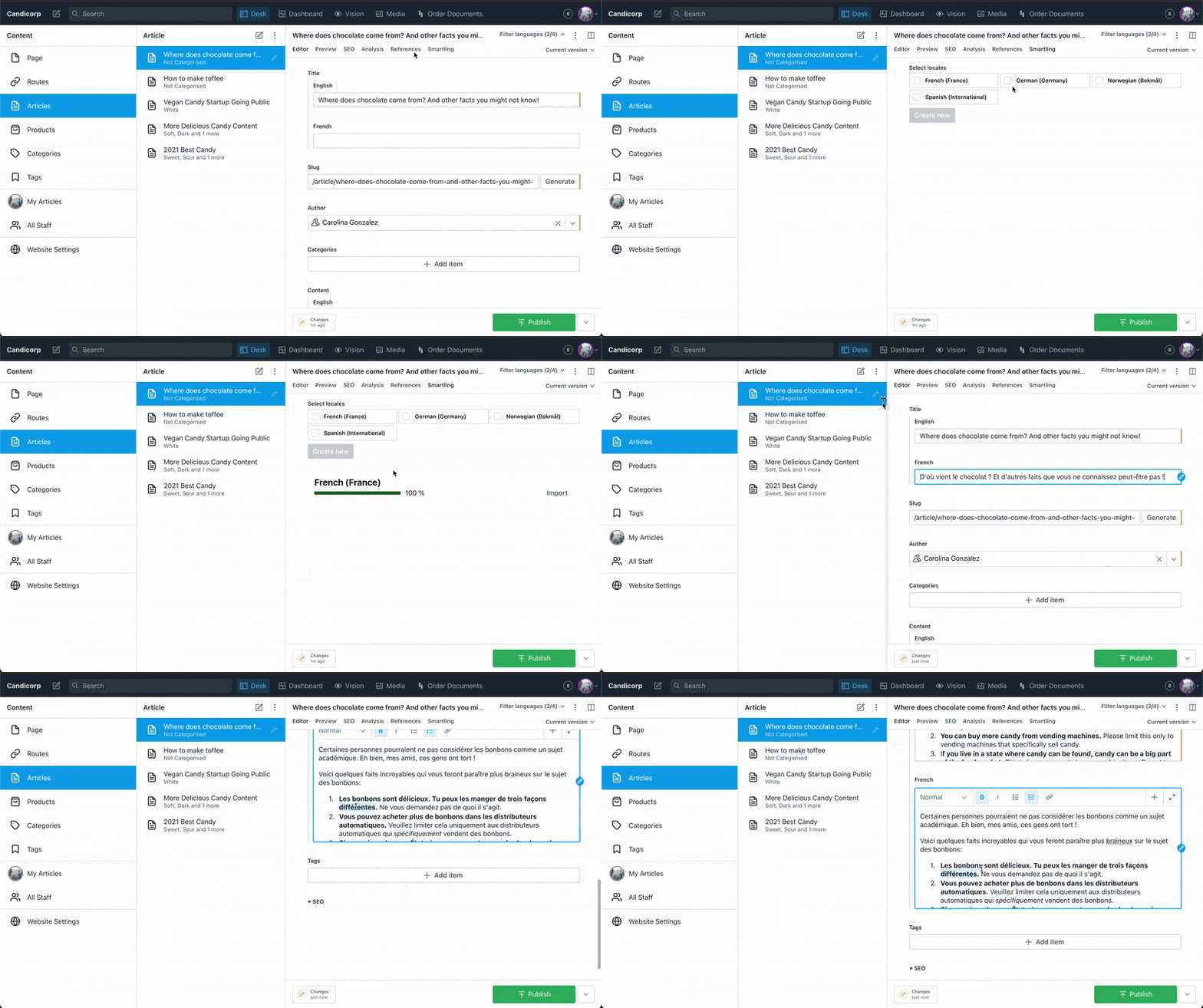
+
```
|
|
8
|
+
|
|
9
|
+
## Usage
|
|
1
10
|
|
|
2
11
|
# Studio Plugin for Sanity & Smartling
|
|
3
12
|
|
|
4
13
|
|
|
5
14
|
|
|
6
|
-
|
|
7
15
|
We're proud to be partnered with Smartling and their [official connector](https://help.smartling.com/hc/en-us/articles/1260803085050-Sanity-Connector-Overview-) makes it quick and easy to get your studio content into your Smartling project.
|
|
8
16
|
|
|
9
17
|
This is a separate plugin, and differs in that it provides editors a visual progress bar for ongoing translations and a way to import translations back into your content at either the document or field level. Feel free to try it out and see which solution works for you!
|
|
10
18
|
|
|
11
19
|
# Table of Contents
|
|
12
|
-
|
|
13
|
-
- [Assumptions](#assumptions)
|
|
20
|
+
|
|
14
21
|
- [Quickstart](#quickstart)
|
|
22
|
+
- [Assumptions](#assumptions)
|
|
15
23
|
- [Studio experience](#studio-experience)
|
|
16
24
|
- [Overriding defaults](#overriding-defaults)
|
|
25
|
+
- [License](#license)
|
|
26
|
+
- [Develop and test](#develop-and-test)
|
|
27
|
+
|
|
28
|
+
## Quickstart
|
|
29
|
+
|
|
30
|
+
1. In your studio folder, run:
|
|
31
|
+
|
|
32
|
+
```sh
|
|
33
|
+
npm install sanity-plugin-studio-smartling
|
|
34
|
+
```
|
|
35
|
+
|
|
36
|
+
2. Because of Smartling CORS restrictions, you will need to set up a proxy endpoint to funnel requests to Smartling. We've provided a tiny Next.js app you can set up [here](https://github.com/sanity-io/example-sanity-smartling-proxy). If that's not useful, the important thing to pay attention to is that this endpoint handles requests with an `X-URL` header that contains the Smartling URL configured by the plugin, and can parse a data file to an HTML string and send it back to the adapter.
|
|
37
|
+
|
|
38
|
+
3. Ensure the plugin has access to your Smartling project token. You'll want to create a document that includes your project name, organization name, and a token with appropriate access.
|
|
39
|
+
|
|
40
|
+
[Please refer to the Smartling documentation on creating a token if you don't have one already.](https://help.smartling.com/hc/en-us/articles/115004187694-API-Tokens)
|
|
41
|
+
|
|
42
|
+
In your Studio folder, create a file called `populateSmartlingSecrets.js` with the following contents:
|
|
43
|
+
|
|
44
|
+
```javascript
|
|
45
|
+
// ./populateSmartlingSecrets.js
|
|
46
|
+
// Do not commit this file to your repository
|
|
47
|
+
|
|
48
|
+
import {getCliClient} from 'sanity/cli'
|
|
49
|
+
|
|
50
|
+
const client = getCliClient({apiVersion: '2023-02-15'})
|
|
51
|
+
|
|
52
|
+
client.createOrReplace({
|
|
53
|
+
// The `.` in this _id will ensure the document is private
|
|
54
|
+
// even in a public dataset!
|
|
55
|
+
_id: 'translationService.secrets',
|
|
56
|
+
_type: 'smartlingSettings',
|
|
57
|
+
//replace these with your values
|
|
58
|
+
organization: 'YOUR_SMARTLING_ORGANIZATION_HERE',
|
|
59
|
+
project: 'YOUR_SMARTLING_PROJECT_HERE',
|
|
60
|
+
secret: '{"userIdentifier":"xxxxxx","userSecret":"xxxx"}', //in this format from Smartling when you press the button "copy token" on creation
|
|
61
|
+
proxy: 'my-proxy-endpoint.com/api/proxy' //the endpoint you set up in step 2
|
|
62
|
+
})
|
|
63
|
+
```
|
|
64
|
+
|
|
65
|
+
On the command line, run the file:
|
|
66
|
+
|
|
67
|
+
```sh
|
|
68
|
+
npx sanity exec populateSmartlingSecrets.js --with-user-token
|
|
69
|
+
```
|
|
17
70
|
|
|
18
|
-
|
|
71
|
+
Verify that the document was created using the Vision Tool in the Studio and query `*[_id == 'translationService.secrets']`. Note: If you have multiple datasets, you'll have to do this across all of them.
|
|
19
72
|
|
|
20
|
-
|
|
21
|
-
- An `Adapter` that connects to the Smartling API with methods to create a new translation job, upload and assign a file to that translation job, check the progress of an ongoing translation, and retrieve a translated file.
|
|
22
|
-
- A `Serializer` that transforms your content into HTML (we found this was the most efficient way to maintain your document structure, no matter how deeply nested, while remaining readable to translators in Smartling). The `Serializer` takes in optional arguments: `stopTypes`, which prevents certain types from being sent to your translatiors and `customSerializers`, which are rules you can use to have full control over how individual fields on your document get serialized.
|
|
23
|
-
- A `Deserializer` that deserializes translated text back to Sanity's format.
|
|
24
|
-
- A `Patcher` which determines how your content gets patched back into its destination document or field.
|
|
25
|
-
- A `TranslationsTab`, a React element that allows a non-technical user to import, export, and monitor Smartling progress.
|
|
73
|
+
If the document was found in your dataset(s), delete `populateSmartlingSecrets.js`.
|
|
26
74
|
|
|
27
|
-
|
|
75
|
+
If you have concerns about this being exposed to authenticated users of your studio, you can control access to this path with [role-based access control](https://www.sanity.io/docs/access-control).
|
|
76
|
+
|
|
77
|
+
4. Get the Smartling tab on your desired document type, using whatever pattern you like. You'll use the [desk structure](https://www.sanity.io/docs/structure-builder-introduction) for this. The options for translation will be nested under this desired document type's views. Here's an example:
|
|
78
|
+
|
|
79
|
+
```javascript
|
|
80
|
+
import {DefaultDocumentNodeResolver} from 'sanity/desk'
|
|
81
|
+
//...your other desk structure imports...
|
|
82
|
+
import {TranslationsTab, defaultDocumentLevelConfig} from 'sanity-plugin-studio-smartling'
|
|
83
|
+
|
|
84
|
+
export const getDefaultDocumentNode: DefaultDocumentNodeResolver = (S, {schemaType}) => {
|
|
85
|
+
if (schemaType === 'myTranslatableDocumentType') {
|
|
86
|
+
return S.document().views([
|
|
87
|
+
S.view.form(),
|
|
88
|
+
//...my other views -- for example, live preview, document pane, etc.,
|
|
89
|
+
S.view.component(TranslationsTab).title('Smartling').options(defaultDocumentLevelConfig)
|
|
90
|
+
])
|
|
91
|
+
}
|
|
92
|
+
return S.document()
|
|
93
|
+
}
|
|
94
|
+
```
|
|
95
|
+
|
|
96
|
+
And that should do it! Go into your studio, click around, and check the document in Smartling (it should be under its Sanity `_id` by default, but you can override this). Once it's translated, check the import by clicking the `Import` button on your Smartling tab!
|
|
28
97
|
|
|
29
98
|
## Assumptions
|
|
30
|
-
To use the default config mentioned above, we assume that you are following the conventions we outline in [our documentation on localization](https://www.sanity.io/docs/localization).
|
|
31
99
|
|
|
100
|
+
To use the default config mentioned above, we assume that you are following the conventions we outline in [our documentation on localization](https://www.sanity.io/docs/localization).
|
|
32
101
|
|
|
33
102
|
### Field-level translations
|
|
103
|
+
|
|
34
104
|
If you are using field-level translation, we assume any fields you want translated exist in the multi-locale object form we recommend.
|
|
35
105
|
For example, on a document you don't want to be translated, you may have a "title" field that's a flat string: `title: 'My title is here.'` For a field you want to include many languages for, your title may look like
|
|
36
|
-
|
|
37
|
-
|
|
38
|
-
|
|
39
|
-
|
|
40
|
-
|
|
41
|
-
|
|
42
|
-
|
|
43
|
-
|
|
44
|
-
|
|
106
|
+
`
|
|
107
|
+
{
|
|
108
|
+
title: {
|
|
109
|
+
en: 'My title is here.',
|
|
110
|
+
es: 'Mi título está aquí.',
|
|
111
|
+
etc...
|
|
112
|
+
}
|
|
113
|
+
}
|
|
114
|
+
`
|
|
115
|
+
_Important_: Smartling's locale representation includes hyphens, like `fr-FR`. These aren't valid as Sanity field names, so ensure that on your fields you change the hyphens to underscores (like `fr_FR`).
|
|
45
116
|
|
|
46
117
|
### Document level translations
|
|
47
|
-
|
|
118
|
+
|
|
119
|
+
Since we often find users want to use the [Document internationalization plugin](https://www.sanity.io/plugins/document-internationalization) if they're using document-level translations, we assume that any documents you want in different languages will follow the pattern `{id-of-base-language-document}__i18n_{locale}`
|
|
48
120
|
|
|
49
121
|
### Final note
|
|
122
|
+
|
|
50
123
|
It's okay if your data doesn't follow these patterns and you don't want to change them! You will simply have to override how the plugin gets and patches back information from your documents. Please see [Overriding defaults](#overriding-defaults).
|
|
51
124
|
|
|
52
125
|
## Quickstart
|
|
53
|
-
1. Install this plugin with `npm install sanity-plugin-studio-smartling`
|
|
54
|
-
|
|
55
|
-
2. Because of Smartling CORS restrictions, you will need to set up a proxy endpoint to funnel requests to Smartling. We've provided a tiny Next.js app you can set up [here](https://github.com/sanity-io/example-sanity-smartling-proxy). If that's not useful, the important thing to pay attention to is that this endpoint handles requests with an `X-URL` header that contains the Smartling URL configured by the plugin, and can parse a data file to an HTML string and send it back to the adapter.
|
|
56
126
|
|
|
57
|
-
|
|
58
|
-
```
|
|
59
|
-
#any other environment variables...
|
|
60
|
-
SANITY_STUDIO_SMARTLING_PROXY=http://your-proxy-url.com
|
|
61
|
-
```
|
|
127
|
+
1. Install this plugin with `npm install sanity-plugin-studio-smartling`
|
|
62
128
|
|
|
63
|
-
|
|
64
|
-
|
|
65
|
-
|
|
129
|
+
2. Ensure the plugin has access to your Smartling token secret. You'll want to create a document that includes your project name and a token secret with appropriate access. [Please refer to the Smartling documentation on creating a token if you don't have one already.](https://help.smartling.com/hc/en-us/articles/115004187694-API-Tokens-)
|
|
130
|
+
- In your studio, create a file called `populateSmartlingSecrets.js`.
|
|
131
|
+
- Place the following in the file and fill out the correct values.
|
|
66
132
|
|
|
67
133
|
```javascript
|
|
68
134
|
import sanityClient from 'part:@sanity/base/client'
|
|
69
135
|
|
|
70
|
-
const client = sanityClient.withConfig({
|
|
136
|
+
const client = sanityClient.withConfig({apiVersion: '2021-03-25'})
|
|
71
137
|
|
|
72
138
|
client.createOrReplace({
|
|
73
|
-
_id: 'translationService.secrets',
|
|
74
|
-
_type: 'smartlingSettings',
|
|
75
|
-
organization: 'YOUR_ORG_HERE',
|
|
76
|
-
project: 'YOUR_PROJECT_HERE',
|
|
77
|
-
secret: '
|
|
139
|
+
_id: 'translationService.secrets',
|
|
140
|
+
_type: 'smartlingSettings',
|
|
141
|
+
organization: 'YOUR_ORG_HERE',
|
|
142
|
+
project: 'YOUR_PROJECT_HERE',
|
|
143
|
+
secret: '{"userIdentifier":"xxxxxx","userSecret":"xxxx"}' //in this format from Smartling
|
|
78
144
|
})
|
|
79
145
|
```
|
|
80
146
|
|
|
81
|
-
|
|
82
|
-
|
|
83
|
-
|
|
84
|
-
|
|
147
|
+
- On the command line, run the file with `sanity exec populateSmartlingSecrets.js --with-user-token`.
|
|
148
|
+
Verify that everything went well by using Vision in the studio to query `*[_id == 'translationService.secrets']`. (NOTE: If you have multiple datasets, you'll have to do this across all of them, since it's a document!)
|
|
149
|
+
- If everything looks good, go ahead and delete `populateSmartlingSecrets.js` so you don't commit it.
|
|
150
|
+
Because the document's `_id` is on a path (`translationService`), it won't be exposed to the outside world, even in a public dataset. If you have concerns about this being exposed to authenticated users of your studio, you can control access to this path with [role-based access control](https://www.sanity.io/docs/access-control).
|
|
85
151
|
|
|
86
152
|
5. Now it's time to get the Smartling tab on your desired document type, using whatever pattern you like. You'll use the [desk structure](https://www.sanity.io/docs/structure-builder-introduction) for this. The options for translation will be nested under this desired document type's views. Here's an example:
|
|
87
153
|
|
|
88
154
|
```javascript
|
|
89
|
-
import
|
|
155
|
+
import {DefaultDocumentNodeResolver} from 'sanity/desk'
|
|
90
156
|
//...your other desk structure imports...
|
|
91
|
-
import {
|
|
157
|
+
import {TranslationsTab, defaultDocumentLevelConfig} from 'sanity-plugin-studio-smartling'
|
|
92
158
|
|
|
93
|
-
|
|
94
|
-
|
|
95
|
-
if (props.schemaType === 'myTranslatableDocumentType') {
|
|
159
|
+
export const getDefaultDocumentNode: DefaultDocumentNodeResolver = (S, {schemaType}) => {
|
|
160
|
+
if (schemaType === 'myTranslatableDocumentType') {
|
|
96
161
|
return S.document().views([
|
|
97
162
|
S.view.form(),
|
|
98
163
|
//...my other views -- for example, live preview, the i18n plugin, etc.,
|
|
99
|
-
S.view.component(TranslationsTab).title('Smartling').options(
|
|
100
|
-
defaultDocumentLevelConfig
|
|
101
|
-
)
|
|
164
|
+
S.view.component(TranslationsTab).title('Smartling').options(defaultDocumentLevelConfig)
|
|
102
165
|
])
|
|
103
166
|
}
|
|
104
|
-
return S.document()
|
|
105
|
-
}
|
|
167
|
+
return S.document()
|
|
168
|
+
}
|
|
106
169
|
```
|
|
107
170
|
|
|
108
|
-
And that should do it!
|
|
171
|
+
And that should do it! Go into your studio, click around, and check the document in Smartling (it should be a job under its Sanity `_id`). Once it's translated, check the import by clicking the `Import` button on your Smartling tab!
|
|
172
|
+
|
|
173
|
+
## Assumptions
|
|
174
|
+
|
|
175
|
+
To use the default config mentioned above, we assume that you are following the conventions we outline in [our documentation on localization](https://www.sanity.io/docs/localization).
|
|
176
|
+
|
|
177
|
+
### Field-level translations
|
|
178
|
+
|
|
179
|
+
If you are using field-level translation, we assume any fields you want to be translated exist in the multi-locale object form we recommend.
|
|
180
|
+
|
|
181
|
+
For example, on a document you don't want to be translated, you may have a "title" field that's a flat string: `title: 'My title is here.'` For a field you want to include many languages for your title may look like:
|
|
182
|
+
|
|
183
|
+
```javascript
|
|
184
|
+
{
|
|
185
|
+
//...other document fields,
|
|
186
|
+
title: {
|
|
187
|
+
en: 'My title is here.',
|
|
188
|
+
es: 'Mi título está aquí.',
|
|
189
|
+
etc...
|
|
190
|
+
}
|
|
191
|
+
}
|
|
192
|
+
```
|
|
193
|
+
|
|
194
|
+
### Document level translations
|
|
195
|
+
|
|
196
|
+
Since we often find users want to use the [Document internationalization plugin](https://www.sanity.io/plugins/document-internationalization) if they're using document-level translations, we assume that any documents you want in different languages will follow the pattern `{id-of-base-language-document}__i18n_{locale}`
|
|
197
|
+
|
|
198
|
+
### Final note
|
|
199
|
+
|
|
200
|
+
It's okay if your data doesn't follow these patterns and you don't want to change them! You will simply have to override how the plugin gets and patches back information from your documents. Please see [Overriding defaults](#overriding-defaults).
|
|
109
201
|
|
|
110
202
|
## Studio experience
|
|
111
|
-
|
|
203
|
+
|
|
204
|
+
By adding the `TranslationsTab` to your desk structure, your users should now have an additional view on their document. The boxes at the top of the tab can be used to send translations off to Smartling, and once those jobs are started, they should see progress bars monitoring the progress of the jobs. They can import a partial or complete job back. They can also re-send a document, which should update the existing job.
|
|
112
205
|
|
|
113
206
|
## Overriding defaults
|
|
114
207
|
|
|
115
208
|
To personalize this configuration it's useful to know what arguments go into `TranslationsTab` as options (the `defaultConfigs` are just wrappers for these):
|
|
116
|
-
* `exportForTranslation`: a function that takes your document id and returns an object with `name`: the field you want to use identify your doc in Smartling (by default this is `_id` and `content`: a serialized HTML string of all the fields in your document to be translated.
|
|
117
|
-
* `importTranslation`: a function that takes in `id` (your document id) `localeId` (the locale of the imported language) and `document` the translated HTML from Smartling. It will deserialize your document back into an object that can be patched into your Sanity data, and then executes that patch.
|
|
118
|
-
* `Adapter`: An interface with methods to send things over to Smartling. You likely don't want to override this!
|
|
119
209
|
|
|
120
|
-
|
|
210
|
+
- `exportForTranslation`: a function that takes your document id and returns an object like:
|
|
211
|
+
|
|
212
|
+
```javascript
|
|
213
|
+
{
|
|
214
|
+
`name`: /*the field you want to use identify your doc in Smartling (by default this is `_id`) */
|
|
215
|
+
`content`: /* a serialized HTML string of all the fields in your document to be translated. */
|
|
216
|
+
}
|
|
217
|
+
```
|
|
218
|
+
|
|
219
|
+
- `importTranslation`: a function that takes in `id` (your document id), `localeId` (the locale of the imported language), and `document` (the translated HTML from Smartling). It will deserialize your document back into an object that can be patched into your Sanity data, and then executes that patch.
|
|
220
|
+
- `Adapter`: An interface with methods to send things over to Smartling. You likely don't want to override this!
|
|
221
|
+
|
|
222
|
+
There are several reasons to override these functions. Generally, developers will customize to ensure documents serialize and deserialize correctly. Since the serialization functions are used across all our translation plugins currently, you can find some frequently encountered scenarios at [their repository here](https://github.com/sanity-io/sanity-naive-html-serializer), along with code examples for customized configurations.
|
|
223
|
+
|
|
224
|
+
## Migrating to Sanity Studio v3
|
|
225
|
+
|
|
226
|
+
There is one major breaking change in this plugin's migration to Sanity Studio v3: the proxy was set in an environment variable, and now it should be part of the `secrets` document.
|
|
227
|
+
|
|
228
|
+
In v2, you would set the proxy in a `.env` file, like so:
|
|
229
|
+
|
|
230
|
+
```env
|
|
231
|
+
SANITY_STUDIO_SMARTLING_PROXY=https://my-proxy-endpoint.com/api/proxy
|
|
232
|
+
```
|
|
233
|
+
|
|
234
|
+
In v3, you should set the proxy in the `secrets` document. If you have an existing secrets document, you can patch it like so:
|
|
235
|
+
|
|
236
|
+
```javascript
|
|
237
|
+
// ./patchSmartlingSecrets.js
|
|
238
|
+
// Do not commit this file to your repository
|
|
239
|
+
|
|
240
|
+
import {getCliClient} from 'sanity/cli'
|
|
241
|
+
|
|
242
|
+
const client = getCliClient({apiVersion: '2023-02-15'})
|
|
243
|
+
|
|
244
|
+
client.patch('translationService.secrets').set({proxy: 'https://my-proxy.com/api/proxy'}).commit()
|
|
245
|
+
```
|
|
246
|
+
|
|
247
|
+
and run the script with `sanity exec patchSmartlingSecrets.js --with-user-token`.
|
|
248
|
+
|
|
249
|
+
Alternatively, you can re-run the `populateSmartlingSecrets` script in [Quickstart](#quickstart) to create a new secrets document with the proxy set.
|
|
250
|
+
|
|
251
|
+
We apologize for the inconvenience. Because of the new embeddability of the studio, developers may find that their v3 Studio is built and deployed in different ways, with access to different environments. Keeping this setting in `secrets` allows developers to set it in a way that works for their deployment and reduce complexity.
|
|
252
|
+
|
|
253
|
+
Otherwise, you should not have to do anything to migrate to Sanity Studio v3. If you are using the default configs, you should be able to upgrade without any changes. If you are using custom serialization, you may need to update how `BaseDocumentSerializer` receives your schema.
|
|
254
|
+
|
|
255
|
+
These are outlined in the serializer README [here](https://github.com/sanity-io/sanity-naive-html-serializer#v2-to-v3-changes).
|
|
256
|
+
|
|
257
|
+
## License
|
|
258
|
+
|
|
259
|
+
[MIT](LICENSE) © Sanity.io
|
|
260
|
+
|
|
261
|
+
## Develop & test
|
|
262
|
+
|
|
263
|
+
This plugin is in early stages. We plan on improving some of the user-facing chrome, sorting out some quiet bugs, figuring out where things don't fail elegantly, etc. Please be a part of our development process!
|
|
264
|
+
|
|
265
|
+
This plugin uses [@sanity/plugin-kit](https://github.com/sanity-io/plugin-kit)
|
|
266
|
+
with default configuration for build & watch scripts.
|
|
267
|
+
|
|
268
|
+
See [Testing a plugin in Sanity Studio](https://github.com/sanity-io/plugin-kit#testing-a-plugin-in-sanity-studio)
|
|
269
|
+
on how to run this plugin with hotreload in the studio.
|
|
270
|
+
|
|
271
|
+
### Release new version
|
|
272
|
+
|
|
273
|
+
Run ["CI & Release" workflow](https://github.com/sanity-io/sanity-plugin-transifex/actions/workflows/main.yml).
|
|
274
|
+
Make sure to select the main branch and check "Release new version".
|
|
121
275
|
|
|
122
|
-
|
|
276
|
+
Semantic release will only release on configured branches, so it is safe to run release on any branch.
|
package/dist/index.d.ts
CHANGED
|
@@ -1,11 +1,53 @@
|
|
|
1
|
-
import {
|
|
2
|
-
import {
|
|
3
|
-
|
|
4
|
-
|
|
5
|
-
|
|
6
|
-
|
|
7
|
-
|
|
8
|
-
}
|
|
9
|
-
|
|
10
|
-
|
|
11
|
-
|
|
1
|
+
import {Adapter} from 'sanity-translations-tab'
|
|
2
|
+
import {BaseDocumentDeserializer} from 'sanity-translations-tab'
|
|
3
|
+
import {BaseDocumentMerger} from 'sanity-translations-tab'
|
|
4
|
+
import {BaseDocumentSerializer} from 'sanity-translations-tab'
|
|
5
|
+
import {customSerializers} from 'sanity-translations-tab'
|
|
6
|
+
import {defaultStopTypes} from 'sanity-translations-tab'
|
|
7
|
+
import {documentLevelPatch} from 'sanity-translations-tab'
|
|
8
|
+
import {fieldLevelPatch} from 'sanity-translations-tab'
|
|
9
|
+
import {findLatestDraft} from 'sanity-translations-tab'
|
|
10
|
+
import {SerializedDocument} from 'sanity-naive-html-serializer'
|
|
11
|
+
import {TranslationFunctionContext} from 'sanity-translations-tab'
|
|
12
|
+
import {TranslationsTab} from 'sanity-translations-tab'
|
|
13
|
+
|
|
14
|
+
export {BaseDocumentDeserializer}
|
|
15
|
+
|
|
16
|
+
export {BaseDocumentMerger}
|
|
17
|
+
|
|
18
|
+
export {BaseDocumentSerializer}
|
|
19
|
+
|
|
20
|
+
declare interface ConfigOptions {
|
|
21
|
+
adapter: Adapter
|
|
22
|
+
secretsNamespace: string | null
|
|
23
|
+
exportForTranslation: (
|
|
24
|
+
id: string,
|
|
25
|
+
context: TranslationFunctionContext
|
|
26
|
+
) => Promise<SerializedDocument>
|
|
27
|
+
importTranslation: (
|
|
28
|
+
id: string,
|
|
29
|
+
localeId: string,
|
|
30
|
+
doc: string,
|
|
31
|
+
context: TranslationFunctionContext
|
|
32
|
+
) => Promise<void>
|
|
33
|
+
}
|
|
34
|
+
|
|
35
|
+
export {customSerializers}
|
|
36
|
+
|
|
37
|
+
export declare const defaultDocumentLevelConfig: ConfigOptions
|
|
38
|
+
|
|
39
|
+
export declare const defaultFieldLevelConfig: ConfigOptions
|
|
40
|
+
|
|
41
|
+
export {defaultStopTypes}
|
|
42
|
+
|
|
43
|
+
export {documentLevelPatch}
|
|
44
|
+
|
|
45
|
+
export {fieldLevelPatch}
|
|
46
|
+
|
|
47
|
+
export {findLatestDraft}
|
|
48
|
+
|
|
49
|
+
export declare const SmartlingAdapter: Adapter
|
|
50
|
+
|
|
51
|
+
export {TranslationsTab}
|
|
52
|
+
|
|
53
|
+
export {}
|
|
@@ -0,0 +1,227 @@
|
|
|
1
|
+
import { baseDocumentLevelConfig, baseFieldLevelConfig } from 'sanity-translations-tab';
|
|
2
|
+
export { BaseDocumentDeserializer, BaseDocumentMerger, BaseDocumentSerializer, TranslationsTab, customSerializers, defaultStopTypes, documentLevelPatch, fieldLevelPatch, findLatestDraft } from 'sanity-translations-tab';
|
|
3
|
+
import { Buffer } from 'buffer';
|
|
4
|
+
const authenticate = secrets => {
|
|
5
|
+
const url = "https://api.smartling.com/auth-api/v2/authenticate";
|
|
6
|
+
const headers = {
|
|
7
|
+
"content-type": "application/json",
|
|
8
|
+
"X-URL": url
|
|
9
|
+
};
|
|
10
|
+
const {
|
|
11
|
+
secret,
|
|
12
|
+
proxy
|
|
13
|
+
} = secrets;
|
|
14
|
+
if (!secret || !proxy) {
|
|
15
|
+
throw new Error("The Smartling adapter requires a secret key and a proxy URL. Please check your secrets document in this dataset, per the plugin documentation.");
|
|
16
|
+
}
|
|
17
|
+
return fetch(proxy, {
|
|
18
|
+
headers,
|
|
19
|
+
method: "POST",
|
|
20
|
+
body: JSON.stringify(secret)
|
|
21
|
+
}).then(res => res.json()).then(res => res.response.data.accessToken);
|
|
22
|
+
};
|
|
23
|
+
const getHeaders = (url, accessToken) => ({
|
|
24
|
+
Authorization: "Bearer ".concat(accessToken),
|
|
25
|
+
"X-URL": url
|
|
26
|
+
});
|
|
27
|
+
const findExistingJob = (documentId, secrets, accessToken) => {
|
|
28
|
+
const {
|
|
29
|
+
project,
|
|
30
|
+
proxy
|
|
31
|
+
} = secrets;
|
|
32
|
+
if (!project || !proxy) {
|
|
33
|
+
throw new Error("The Smartling adapter requires a Smartling project identifier and a proxy URL. Please check your secrets document in this dataset, per the plugin documentation.");
|
|
34
|
+
}
|
|
35
|
+
const url = "https://api.smartling.com/jobs-api/v3/projects/".concat(project, "/jobs?jobName=").concat(documentId);
|
|
36
|
+
return fetch(proxy, {
|
|
37
|
+
method: "POST",
|
|
38
|
+
headers: getHeaders(url, accessToken)
|
|
39
|
+
}).then(res => res.json()).then(res => {
|
|
40
|
+
if (res.response.data.items.length) {
|
|
41
|
+
const correctJob = res.response.data.items.find(item => item.jobName && item.jobName === documentId);
|
|
42
|
+
if (correctJob) {
|
|
43
|
+
return correctJob.translationJobUid;
|
|
44
|
+
}
|
|
45
|
+
return "";
|
|
46
|
+
}
|
|
47
|
+
return "";
|
|
48
|
+
});
|
|
49
|
+
};
|
|
50
|
+
const getLocales = async secrets => {
|
|
51
|
+
if (!(secrets == null ? void 0 : secrets.project) || !(secrets == null ? void 0 : secrets.secret) || !(secrets == null ? void 0 : secrets.proxy)) {
|
|
52
|
+
throw new Error("The Smartling adapter requires a project ID, a secret key, and a proxy URL. Please check your secrets document in this dataset, per the plugin documentation.");
|
|
53
|
+
}
|
|
54
|
+
const {
|
|
55
|
+
project,
|
|
56
|
+
proxy
|
|
57
|
+
} = secrets;
|
|
58
|
+
const url = "https://api.smartling.com/projects-api/v2/projects/".concat(project);
|
|
59
|
+
const accessToken = await authenticate(secrets);
|
|
60
|
+
return fetch(proxy, {
|
|
61
|
+
method: "GET",
|
|
62
|
+
headers: getHeaders(url, accessToken)
|
|
63
|
+
}).then(res => res.json()).then(res => res.response.data.targetLocales);
|
|
64
|
+
};
|
|
65
|
+
const getTranslationTask = async (documentId, secrets) => {
|
|
66
|
+
if (!(secrets == null ? void 0 : secrets.project) || !(secrets == null ? void 0 : secrets.secret) || !(secrets == null ? void 0 : secrets.proxy)) {
|
|
67
|
+
throw new Error("The Smartling adapter requires a project ID, a secret key, and a proxy URL. Please check your secrets document in this dataset, per the plugin documentation.");
|
|
68
|
+
}
|
|
69
|
+
const {
|
|
70
|
+
project,
|
|
71
|
+
proxy
|
|
72
|
+
} = secrets;
|
|
73
|
+
const accessToken = await authenticate(secrets);
|
|
74
|
+
const taskId = await findExistingJob(documentId, secrets, accessToken);
|
|
75
|
+
if (!taskId) {
|
|
76
|
+
return {
|
|
77
|
+
documentId,
|
|
78
|
+
taskId: documentId,
|
|
79
|
+
locales: []
|
|
80
|
+
};
|
|
81
|
+
}
|
|
82
|
+
const progressUrl = "https://api.smartling.com/jobs-api/v3/projects/".concat(project, "/jobs/").concat(taskId, "/progress");
|
|
83
|
+
const smartlingTask = await fetch(proxy, {
|
|
84
|
+
method: "GET",
|
|
85
|
+
headers: getHeaders(progressUrl, accessToken)
|
|
86
|
+
}).then(res => res.json()).then(res => res.response.data);
|
|
87
|
+
let locales = [];
|
|
88
|
+
if (smartlingTask && smartlingTask.contentProgressReport) {
|
|
89
|
+
locales = smartlingTask.contentProgressReport.map(item => ({
|
|
90
|
+
localeId: item.targetLocaleId,
|
|
91
|
+
progress: item.progress ? item.progress.percentComplete : 0
|
|
92
|
+
}));
|
|
93
|
+
}
|
|
94
|
+
return {
|
|
95
|
+
documentId,
|
|
96
|
+
locales,
|
|
97
|
+
//since our download is tied to document id for smartling, keep track of it as a task
|
|
98
|
+
taskId: documentId,
|
|
99
|
+
linkToVendorTask: "https://dashboard.smartling.com/app/projects/".concat(project, "/account-jobs/").concat(project, ":").concat(taskId)
|
|
100
|
+
};
|
|
101
|
+
};
|
|
102
|
+
const createJob = (jobName, secrets, localeIds, accessToken) => {
|
|
103
|
+
const {
|
|
104
|
+
project,
|
|
105
|
+
proxy
|
|
106
|
+
} = secrets;
|
|
107
|
+
if (!project || !proxy) {
|
|
108
|
+
throw new Error("The Smartling adapter requires a Smartling project identifier and a proxy URL. Please check your secrets document in this dataset, per the plugin documentation.");
|
|
109
|
+
}
|
|
110
|
+
const url = "https://api.smartling.com/jobs-api/v3/projects/".concat(project, "/jobs");
|
|
111
|
+
return fetch(proxy, {
|
|
112
|
+
method: "POST",
|
|
113
|
+
headers: {
|
|
114
|
+
...getHeaders(url, accessToken),
|
|
115
|
+
"content-type": "application/json"
|
|
116
|
+
},
|
|
117
|
+
body: JSON.stringify({
|
|
118
|
+
jobName,
|
|
119
|
+
targetLocaleIds: localeIds
|
|
120
|
+
})
|
|
121
|
+
}).then(res => res.json()).then(res => res.response.data.translationJobUid);
|
|
122
|
+
};
|
|
123
|
+
const createJobBatch = (jobId, secrets, documentName, accessToken, localeIds, workflowUid) => {
|
|
124
|
+
const {
|
|
125
|
+
project,
|
|
126
|
+
proxy
|
|
127
|
+
} = secrets;
|
|
128
|
+
if (!project || !proxy) {
|
|
129
|
+
throw new Error("The Smartling adapter requires a Smartling project identifier and a proxy URL. Please check your secrets document in this dataset, per the plugin documentation.");
|
|
130
|
+
}
|
|
131
|
+
const url = "https://api.smartling.com/job-batches-api/v2/projects/".concat(project, "/batches");
|
|
132
|
+
const reqBody = {
|
|
133
|
+
authorize: true,
|
|
134
|
+
translationJobUid: jobId,
|
|
135
|
+
fileUris: [documentName]
|
|
136
|
+
};
|
|
137
|
+
if (workflowUid) {
|
|
138
|
+
reqBody.localeWorkflows = localeIds.map(l => ({
|
|
139
|
+
targetLocaleId: l,
|
|
140
|
+
workflowUid
|
|
141
|
+
}));
|
|
142
|
+
}
|
|
143
|
+
return fetch(proxy, {
|
|
144
|
+
method: "POST",
|
|
145
|
+
headers: {
|
|
146
|
+
...getHeaders(url, accessToken),
|
|
147
|
+
"content-type": "application/json"
|
|
148
|
+
},
|
|
149
|
+
body: JSON.stringify(reqBody)
|
|
150
|
+
}).then(res => res.json()).then(res => res.response.data.batchUid);
|
|
151
|
+
};
|
|
152
|
+
const uploadFileToBatch = (batchUid, document, secrets, localeIds, accessToken) => {
|
|
153
|
+
const {
|
|
154
|
+
project,
|
|
155
|
+
proxy
|
|
156
|
+
} = secrets;
|
|
157
|
+
if (!project || !proxy) {
|
|
158
|
+
throw new Error("The Smartling adapter requires a Smartling project identifier and a proxy URL. Please check your secrets document in this dataset, per the plugin documentation.");
|
|
159
|
+
}
|
|
160
|
+
const url = "https://api.smartling.com/job-batches-api/v2/projects/".concat(project, "/batches/").concat(batchUid, "/file");
|
|
161
|
+
const formData = new FormData();
|
|
162
|
+
formData.append("fileUri", document.name);
|
|
163
|
+
formData.append("fileType", "html");
|
|
164
|
+
const htmlBuffer = Buffer.from(document.content, "utf-8");
|
|
165
|
+
formData.append("file", new Blob([htmlBuffer]), "".concat(document.name, ".html"));
|
|
166
|
+
localeIds.forEach(localeId => formData.append("localeIdsToAuthorize[]", localeId));
|
|
167
|
+
return fetch(proxy, {
|
|
168
|
+
method: "POST",
|
|
169
|
+
headers: getHeaders(url, accessToken),
|
|
170
|
+
body: formData
|
|
171
|
+
}).then(res => res.json());
|
|
172
|
+
};
|
|
173
|
+
const createTask = async (documentId, document, localeIds, secrets, workflowUid) => {
|
|
174
|
+
if (!(secrets == null ? void 0 : secrets.project) || !(secrets == null ? void 0 : secrets.secret) || !(secrets == null ? void 0 : secrets.proxy)) {
|
|
175
|
+
throw new Error("The Smartling adapter requires a project ID, a secret key, and a proxy URL. Please check your secrets document in this dataset, per the plugin documentation.");
|
|
176
|
+
}
|
|
177
|
+
const accessToken = await authenticate(secrets);
|
|
178
|
+
let taskId = await findExistingJob(document.name, secrets, accessToken);
|
|
179
|
+
if (!taskId) {
|
|
180
|
+
taskId = await createJob(document.name, secrets, localeIds, accessToken);
|
|
181
|
+
}
|
|
182
|
+
const batchUid = await createJobBatch(taskId, secrets, document.name, accessToken, localeIds, workflowUid);
|
|
183
|
+
const uploadFileRes = await uploadFileToBatch(batchUid, document, secrets, localeIds, accessToken);
|
|
184
|
+
console.info("Upload status from Smartling: ", uploadFileRes);
|
|
185
|
+
return getTranslationTask(documentId, secrets);
|
|
186
|
+
};
|
|
187
|
+
const getTranslation = async (taskId, localeId, secrets) => {
|
|
188
|
+
if (!(secrets == null ? void 0 : secrets.project) || !(secrets == null ? void 0 : secrets.secret) || !(secrets == null ? void 0 : secrets.proxy)) {
|
|
189
|
+
throw new Error("The Smartling adapter requires a project ID, a secret key, and a proxy URL. Please check your secrets document in this dataset, per the plugin documentation.");
|
|
190
|
+
}
|
|
191
|
+
const {
|
|
192
|
+
project,
|
|
193
|
+
proxy
|
|
194
|
+
} = secrets;
|
|
195
|
+
const url = "https://api.smartling.com/files-api/v2/projects/".concat(project, "/locales/").concat(localeId, "/file?fileUri=").concat(taskId, "&retrievalType=pending");
|
|
196
|
+
const accessToken = await authenticate(secrets);
|
|
197
|
+
const translatedHTML = await fetch(proxy, {
|
|
198
|
+
method: "GET",
|
|
199
|
+
headers: getHeaders(url, accessToken)
|
|
200
|
+
}).then(res => res.json()).then(res => {
|
|
201
|
+
var _a;
|
|
202
|
+
if (res.body) {
|
|
203
|
+
return res.body;
|
|
204
|
+
} else if (res.response.errors) {
|
|
205
|
+
const errMsg = ((_a = res.response.errors[0]) == null ? void 0 : _a.message) || "Error retrieving translation from Smartling";
|
|
206
|
+
throw new Error(errMsg);
|
|
207
|
+
}
|
|
208
|
+
return "";
|
|
209
|
+
});
|
|
210
|
+
return translatedHTML;
|
|
211
|
+
};
|
|
212
|
+
const SmartlingAdapter = {
|
|
213
|
+
getLocales,
|
|
214
|
+
getTranslationTask,
|
|
215
|
+
createTask,
|
|
216
|
+
getTranslation
|
|
217
|
+
};
|
|
218
|
+
const defaultDocumentLevelConfig = {
|
|
219
|
+
...baseDocumentLevelConfig,
|
|
220
|
+
adapter: SmartlingAdapter
|
|
221
|
+
};
|
|
222
|
+
const defaultFieldLevelConfig = {
|
|
223
|
+
...baseFieldLevelConfig,
|
|
224
|
+
adapter: SmartlingAdapter
|
|
225
|
+
};
|
|
226
|
+
export { SmartlingAdapter, defaultDocumentLevelConfig, defaultFieldLevelConfig };
|
|
227
|
+
//# sourceMappingURL=index.esm.js.map
|