sage-mem 2.5.1 → 2.7.0
This diff represents the content of publicly available package versions that have been released to one of the supported registries. The information contained in this diff is provided for informational purposes only and reflects changes between package versions as they appear in their respective public registries.
- package/README.en.md +6 -6
- package/README.md +6 -6
- package/lib/client.js +862 -168
- package/lib/index.js +6 -3
- package/lib/settings.js +41 -9
- package/lib/typert.host.js +4 -4
- package/package.json +1 -1
package/README.en.md
CHANGED
|
@@ -12,7 +12,7 @@
|
|
|
12
12
|
|
|
13
13
|
**Cross-session memory for DeepSeek Harness — plain markdown files, no database, no worker.**
|
|
14
14
|
|
|
15
|
-
**Current release: `2.
|
|
15
|
+
**Current release: `2.7.0`** — the npm badge above is the dynamic source of truth. **Contract baseline: `1.0.0`** — the first stable release, whose public commitments, the capability boundaries and the list of things it explicitly cannot do are frozen in the
|
|
16
16
|
[frozen contract](https://github.com/gezi-wen/sage-mem/blob/main/docs/1.0.0-contract.md).
|
|
17
17
|
|
|
18
18
|
If it is useful to you, a Star is the most direct feedback.
|
|
@@ -81,10 +81,10 @@ Most memory schemes take the "SQLite + a long-running worker" route: once memori
|
|
|
81
81
|
|
|
82
82
|
The UI also carries four more capabilities (all of them optional): the memory management page, type and tag filtering, the timeline (an entries list by default, with an optional star-map view), and audit & archiving.
|
|
83
83
|
|
|
84
|
-
**Since
|
|
85
|
-
|
|
86
|
-
|
|
87
|
-
|
|
84
|
+
**Since 2.7.0 the interface entry is a three-way choice**: show both (default), sidebar only, or settings only — **at least one entry always stays on**.
|
|
85
|
+
The sidebar entry (1.8.0) switches the central panel to this page with one click (with a "back to conversation" control at the top); the settings entry is 「设置 → 记忆管理」.
|
|
86
|
+
The switch lives in the 「界面入口」 disclosure on the plugin's detail page (「插件 → sage-mem」), and the same options are in the panel under 「自动整理 → 设置」; changes apply immediately, no restart.
|
|
87
|
+
When the host does not support the sidebar slot, "sidebar only" is disabled and the plugin falls back to the settings entry; old settings files migrate automatically (sidebar on → both, off → settings only).
|
|
88
88
|
Since 1.8.2 the plugin also ships its own icon (a golden stack of memory cards) instead of the generic square.
|
|
89
89
|
|
|
90
90
|
The memory management page's file list also has an **Open memory folder** button: it opens the
|
|
@@ -191,7 +191,7 @@ Since 1.9.0 the memory-management surface follows the harness language (**Settin
|
|
|
191
191
|
|
|
192
192
|
|
|
193
193
|
|
|
194
|
-
*Health — one screen answers "is anything wrong with this library": the **conflict queue on top** (a finite list that needs your decision: which of two contradictory statements is void) and the **audit below** (dangling index entries, missing index entries, broken links and the rest, reported in red by category). "Points to an archived memory" is only a hint — it does not count as a problem, and there is no one-click fix
|
|
194
|
+
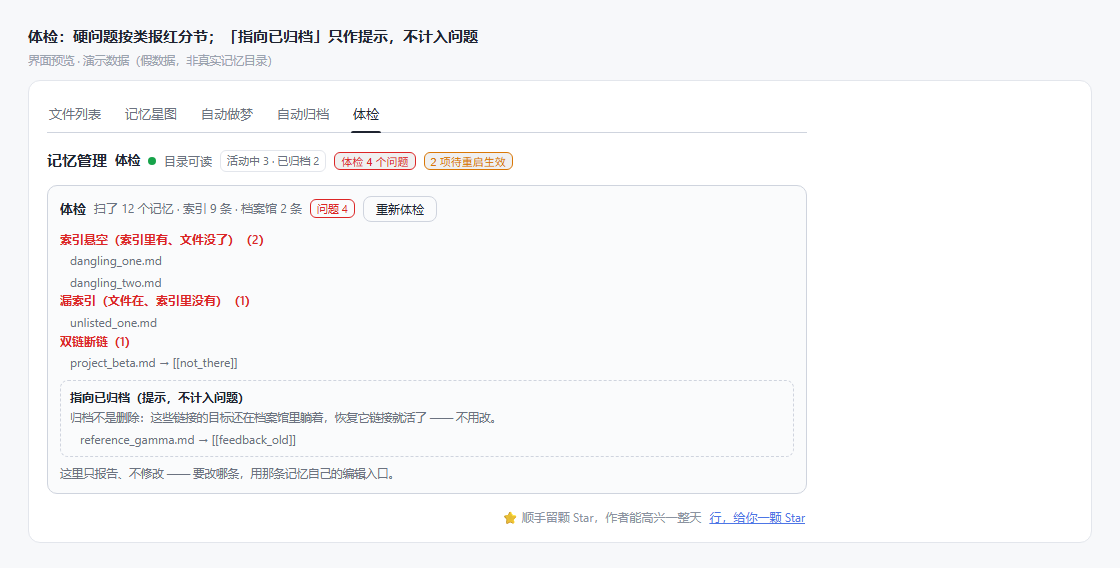
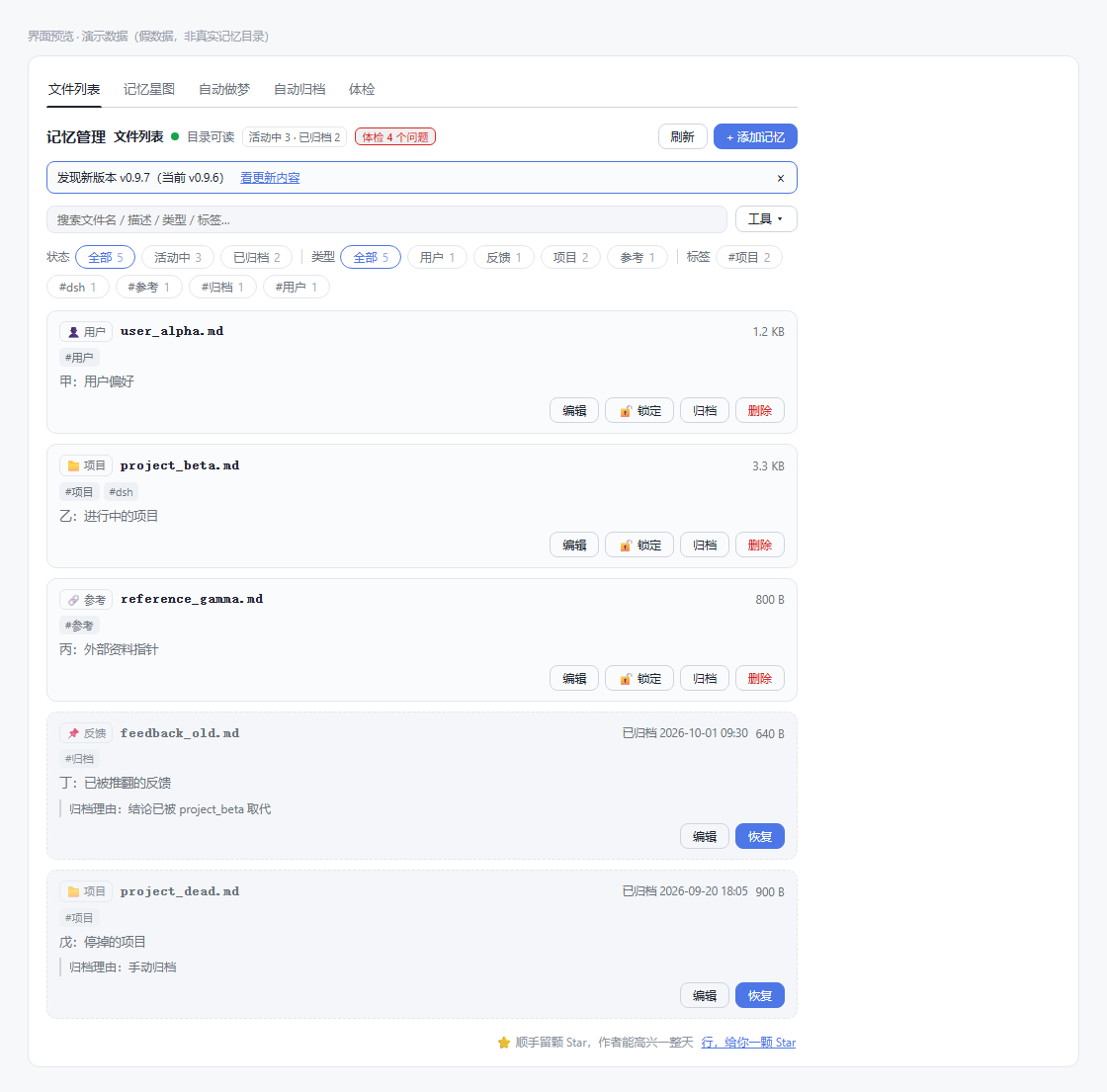
*Health — one screen answers "is anything wrong with this library": the **conflict queue on top** (a finite list that needs your decision: which of two contradictory statements is void) and the **audit below** (dangling index entries, missing index entries, broken links and the rest, reported in red by category). "Points to an archived memory" is only a hint — it does not count as a problem, and there is **no one-click fix**: which one to change is your call. The audit only reports and never modifies. When there is really something to deal with, the badge gets a **「复制修复提示词」(copy fix prompt)** button next to it (2.6.0): it turns what this screen needs into one prompt in your clipboard — **the audit problems and the pending conflicts are written as two separate sections** (fix these / only advise on those), so you can paste it to the agent and let it work. A receipt appears at the bottom afterwards — it closes itself in 10 seconds, closes as soon as you switch tabs, and you can dismiss it by hand.*
|
|
195
195
|
|
|
196
196
|
|
|
197
197
|
|
package/README.md
CHANGED
|
@@ -14,7 +14,7 @@
|
|
|
14
14
|
|
|
15
15
|
> File-based cross-session memory for DeepSeek Harness — every memory is a plain markdown file you can open, edit and delete. No database, no worker, no port.
|
|
16
16
|
|
|
17
|
-
**当前发布版本:`2.
|
|
17
|
+
**当前发布版本:`2.7.0`** —— 顶部 npm 徽章是动态权威。**契约基线:`1.0.0`** —— 第一个稳定版,公开承诺、能力边界与「明确做不到」的清单冻结在
|
|
18
18
|
[契约冻结](https://github.com/gezi-wen/sage-mem/blob/main/docs/1.0.0-contract.md)。
|
|
19
19
|
|
|
20
20
|
如果它对你有用,给个 Star 是最直接的反馈。
|
|
@@ -83,10 +83,10 @@ sage-mem 补上这一层,做法是:**把该记住的事写成一张张卡片
|
|
|
83
83
|
|
|
84
84
|
界面上还有四块能力(都可以不用):记忆管理页、类型与标签筛选、时间线(默认是条目列表,可切星空视角)、体检与归档。
|
|
85
85
|
|
|
86
|
-
|
|
87
|
-
|
|
88
|
-
|
|
89
|
-
|
|
86
|
+
**从 2.7.0 起,记忆管理的界面入口是三选一**:两个都显示(默认)/ 只显示侧栏 / 只显示设置页 —— **至少保留一个**。
|
|
87
|
+
侧栏入口(1.8.0)点一下就把中央主区切到本页(页顶有「返回会话」);设置页入口是「设置 → 记忆管理」。
|
|
88
|
+
开关在「插件 → sage-mem」的「界面入口」折叠行里,面板「自动整理 → 设置」里也有同一组选项;改完立即生效、不用重启。
|
|
89
|
+
宿主不支持侧栏时「只显示侧栏」自动置灰并回落到设置页;旧设置文件里的「侧栏开 / 关」会按 true → 两个都显示、false → 只显示设置页迁移。
|
|
90
90
|
从 1.8.2 开始,sage-mem 在插件列表里有了自己的图标(金色记忆卡片),不再是默认的通用方图标。
|
|
91
91
|
|
|
92
92
|
记忆管理页的「文件列表」头部还有一个「打开记忆文件夹」按钮:用系统文件管理器打开当前记忆目录
|
|
@@ -191,7 +191,7 @@ SAGE_MEM_DIR=/path/to/your/memory
|
|
|
191
191
|
|
|
192
192
|

|
|
193
193
|
|
|
194
|
-
*库健康 ——
|
|
194
|
+
*库健康 —— 一屏回答「这个库有没有事」:**冲突队列在上**(要你裁决的有限队列:两条说法互斥,选哪一方作废),**体检在下**(索引悬空、漏索引、双链断链等结构问题按类报红)。「指向已归档」只作提示、不计入问题;也**不提供一键修补** —— 改哪条由你决定。体检只报告、不修改。真有事要处理时,徽标后面会多一颗**「复制修复提示词」**(2.6.0):把这一屏要处理的事整理成一段提示词放进剪贴板 —— **体检问题与待裁决冲突分两段写**(前者照清单修、后者只给建议),粘给智能体就能照着办;复制成功后下方弹一条提示,10 秒自收、换页签即收、也能自己关掉。*
|
|
195
195
|
|
|
196
196
|

|
|
197
197
|
|