sage-mem 2.4.0 → 2.4.1
This diff represents the content of publicly available package versions that have been released to one of the supported registries. The information contained in this diff is provided for informational purposes only and reflects changes between package versions as they appear in their respective public registries.
- package/README.md +11 -7
- package/README.zh.md +11 -7
- package/lib/client.js +14 -11
- package/package.json +1 -1
package/README.md
CHANGED
|
@@ -12,7 +12,7 @@
|
|
|
12
12
|
|
|
13
13
|
**Cross-session memory for DeepSeek Harness — plain markdown files, no database, no worker.**
|
|
14
14
|
|
|
15
|
-
**Current release: `2.4.
|
|
15
|
+
**Current release: `2.4.1`** — the npm badge above is the dynamic source of truth. **Contract baseline: `1.0.0`** — the first stable release, whose public commitments, the capability boundaries and the list of things it explicitly cannot do are frozen in the
|
|
16
16
|
[frozen contract](https://github.com/gezi-wen/sage-mem/blob/main/docs/1.0.0-contract.md).
|
|
17
17
|
|
|
18
18
|
If it is useful to you, a Star is the most direct feedback.
|
|
@@ -79,7 +79,7 @@ Most memory schemes take the "SQLite + a long-running worker" route: once memori
|
|
|
79
79
|
| **Migration from Claude Code** | The persona (`CLAUDE.md` → `AGENTS.md`) is copied as-is; memories just need organizing into `.md` files under four types (see [the next section](#migrating-from-claude-code)) |
|
|
80
80
|
| **Ships its own usage guide** | The package carries a skill (`skills/sage-mem/`): what a memory looks like, the four types, what not to store, the frontmatter pitfalls, how retrieval actually works, how to audit and fix a broken index. Installing the plugin is enough — the agent gets the instructions, no manual setup |
|
|
81
81
|
|
|
82
|
-
The UI also carries four more capabilities (all of them optional): the memory management page, type and tag filtering, the
|
|
82
|
+
The UI also carries four more capabilities (all of them optional): the memory management page, type and tag filtering, the timeline (an entries list by default, with an optional star-map view), and audit & archiving.
|
|
83
83
|
|
|
84
84
|
**Since 1.8.0, memory management is also reachable from the sidebar**: a 「记忆管理」(memory management) icon appears in the sidebar and switches the central panel to this page (with a "back to conversation" control at the top).
|
|
85
85
|
It can be turned off in the settings page under 「记忆管理 → 自动做梦 → 设置」(on by default; applies immediately, no restart);
|
|
@@ -165,7 +165,7 @@ The state directory (configuration, ledger, rollback points, conflict queue) def
|
|
|
165
165
|
|
|
166
166
|
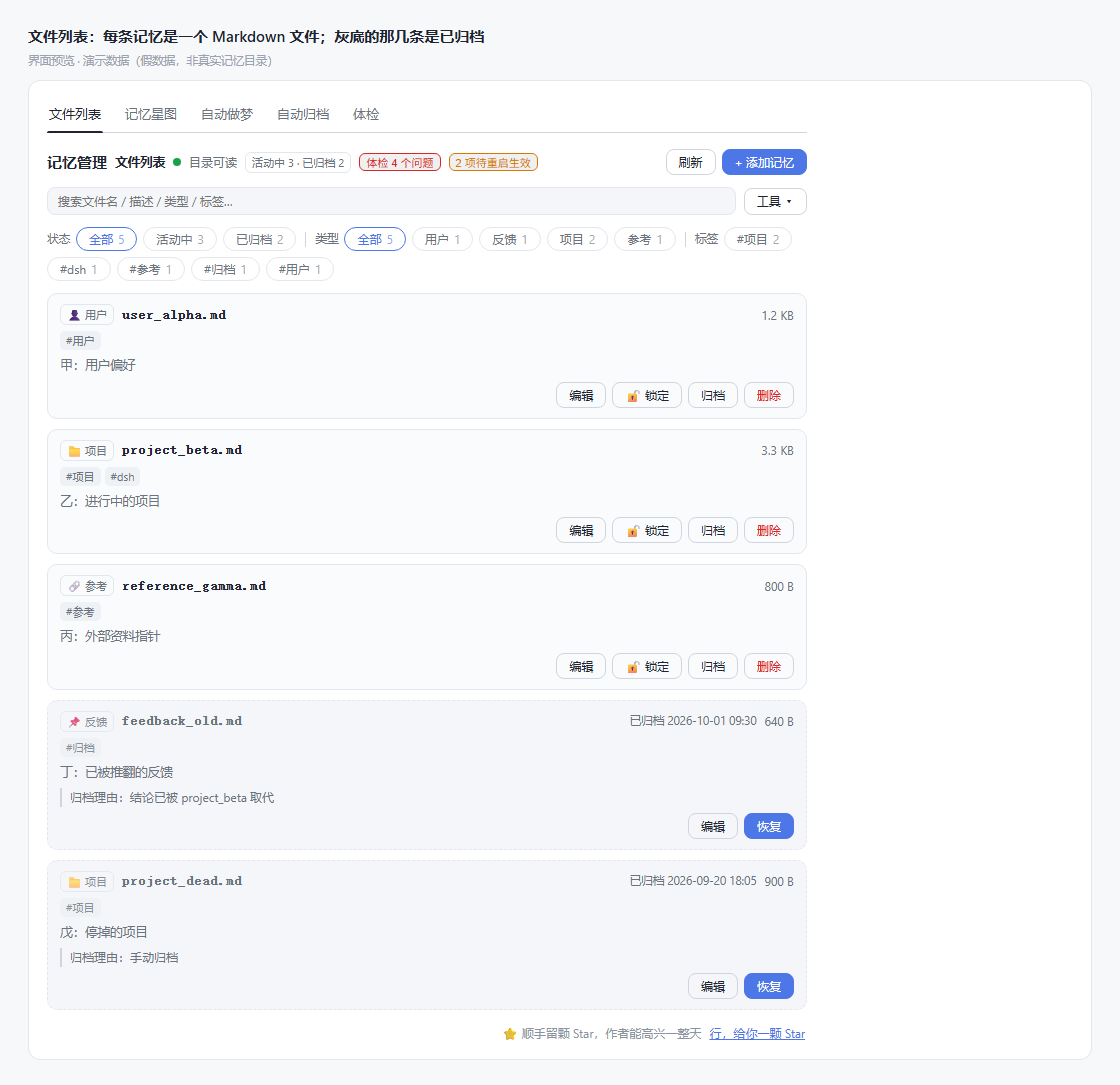
Every image below is **rendered from the UI code in this repository** (the same CSS, the same component tree; the data is demo data for illustration, not a real memory directory).
|
|
167
167
|
|
|
168
|
-
Since 1.9.0 the memory-management surface follows the harness language (**Settings → General → Language**); memory content itself stays in whatever language it was written in, 2.1.0 extends it to the **Autodream** (run / settings / records) and **Auto-archive** screens; the star
|
|
168
|
+
Since 1.9.0 the memory-management surface follows the harness language (**Settings → General → Language**); memory content itself stays in whatever language it was written in, 2.1.0 extends it to the **Autodream** (run / settings / records) and **Auto-archive** screens; the timeline / star-map screen is the only panel still Chinese until the next i18n batch.
|
|
169
169
|
|
|
170
170
|
|
|
171
171
|
|
|
@@ -191,9 +191,13 @@ Since 1.9.0 the memory-management surface follows the harness language (**Settin
|
|
|
191
191
|
|
|
192
192
|
*Archive candidates — each states "why archiving is suggested" (idle days vs the threshold for that type); files are touched only after you confirm one by one or select all. Archiving moves a file into `archive/`, it **does not delete**; to actually delete an archived entry, click 「彻底删除」(delete permanently) in the archive view and confirm once more.*
|
|
193
193
|
|
|
194
|
-
|
|
195
195
|
|
|
196
|
-
*
|
|
196
|
+
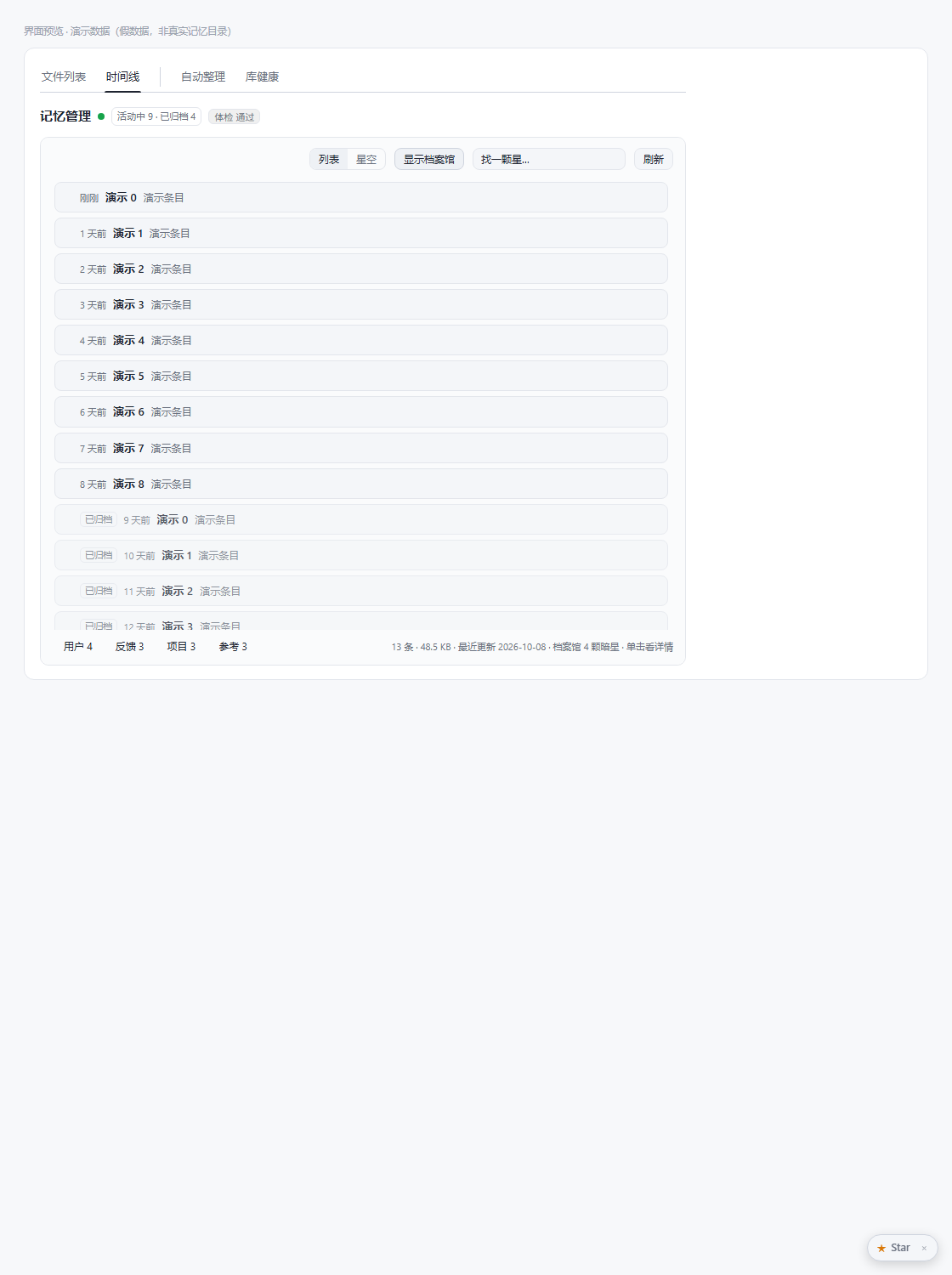
*Timeline — **this is what the tab opens on**: a list of entries sorted newest-first, most recently changed at the top. Want the picture? Switch to 「星空」(star map) in the top-right corner.*
|
|
197
|
+
|
|
198
|
+
|
|
199
|
+
|
|
200
|
+
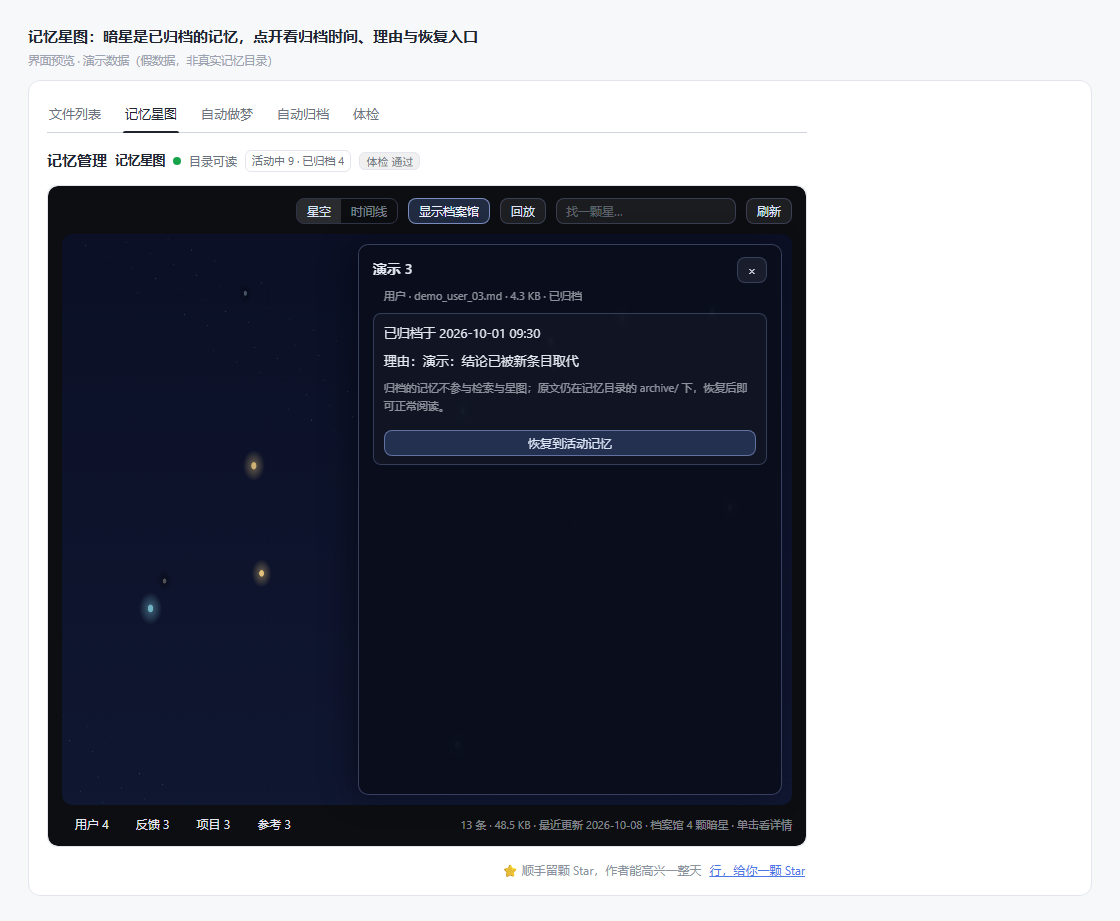
*After switching to the star-map view — colour maps to type, size to volume, brightness to freshness; dark stars are archived memories, and opening one shows the archive time and reason.*
|
|
197
201
|
|
|
198
202
|

|
|
199
203
|
|
|
@@ -203,9 +207,9 @@ Since 1.9.0 the memory-management surface follows the harness language (**Settin
|
|
|
203
207
|
|
|
204
208
|
*Auto-archive — it is not the same thing as autodream: archiving is a **deterministic rule** (computed from idle days in the access ledger, no model call), which is why it gets a page of its own. Thresholds take effect on save, no restart needed.*
|
|
205
209
|
|
|
206
|
-
|
|
207
211
|
|
|
208
|
-
*
|
|
212
|
+
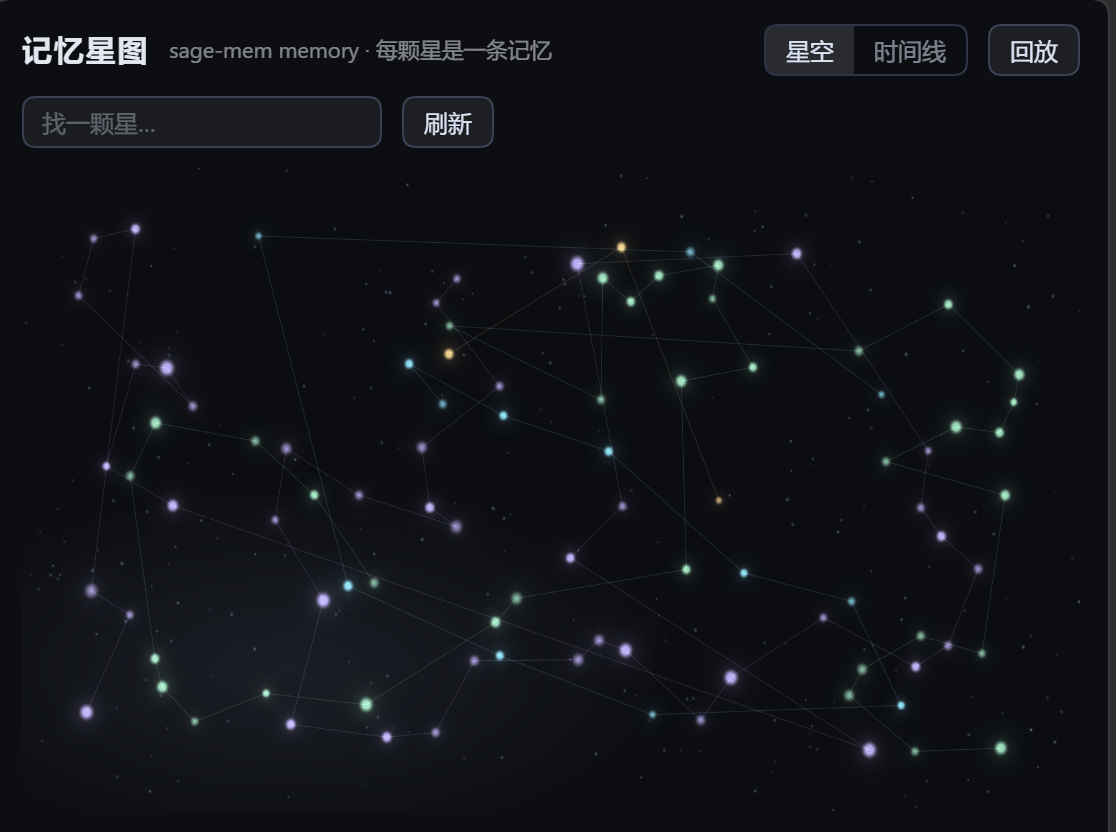
*The star-map view in full — the canvas draws only relations and distribution; the file name of a single memory appears only when you hover over or open that star. Rendering is redrawn on demand; no drawing is initiated while the view is static.*
|
|
209
213
|
|
|
210
214
|
## Memory File Format
|
|
211
215
|
|
package/README.zh.md
CHANGED
|
@@ -14,7 +14,7 @@
|
|
|
14
14
|
|
|
15
15
|
> File-based cross-session memory for DeepSeek Harness — every memory is a plain markdown file you can open, edit and delete. No database, no worker, no port.
|
|
16
16
|
|
|
17
|
-
**当前发布版本:`2.4.
|
|
17
|
+
**当前发布版本:`2.4.1`** —— 顶部 npm 徽章是动态权威。**契约基线:`1.0.0`** —— 第一个稳定版,公开承诺、能力边界与「明确做不到」的清单冻结在
|
|
18
18
|
[契约冻结](https://github.com/gezi-wen/sage-mem/blob/main/docs/1.0.0-contract.md)。
|
|
19
19
|
|
|
20
20
|
如果它对你有用,给个 Star 是最直接的反馈。
|
|
@@ -81,7 +81,7 @@ sage-mem 补上这一层,做法是:**把该记住的事写成一张张卡片
|
|
|
81
81
|
| **从 Claude Code 迁移** | 人格(`CLAUDE.md` → `AGENTS.md`)照搬;记忆按四类整理成 `.md` 即可(见[下一节](#从-claude-code-迁移)) |
|
|
82
82
|
| **自带使用指南** | 包内携带一份技能(`skills/sage-mem/`):记忆长什么样、四类怎么分、什么不该存、frontmatter 的坑、检索怎么工作、索引坏了怎么修。装上插件就够了 —— Agent 拿到说明书,不需要手工配置 |
|
|
83
83
|
|
|
84
|
-
|
|
84
|
+
界面上还有四块能力(都可以不用):记忆管理页、类型与标签筛选、时间线(默认是条目列表,可切星空视角)、体检与归档。
|
|
85
85
|
|
|
86
86
|
**1.8.0 起,记忆管理还能从侧栏直接进**:侧栏多一个「记忆管理」图标,点它把中央主区切到本页(页顶有「返回会话」)。
|
|
87
87
|
设置页「记忆管理 → 自动做梦 → 设置」里可以关掉这个入口(默认开,立即生效、不用重启);
|
|
@@ -165,7 +165,7 @@ SAGE_MEM_DIR=/path/to/your/memory
|
|
|
165
165
|
|
|
166
166
|
下面每张图都是**从仓库里的界面代码渲染出来的**(同一份 CSS、同一棵组件树;数据是演示用的假数据,不是真实记忆目录)。
|
|
167
167
|
|
|
168
|
-
1.9.0 起,记忆管理这一块跟随宿主语言(**设置 → 通用 → 语言**);记忆内容本身保持它被写下时的语言,2.1.0 起扩展到**自动做梦**(运行 / 设置 /
|
|
168
|
+
1.9.0 起,记忆管理这一块跟随宿主语言(**设置 → 通用 → 语言**);记忆内容本身保持它被写下时的语言,2.1.0 起扩展到**自动做梦**(运行 / 设置 / 记录)与**自动归档**两屏;只剩时间线/星图那一屏仍是中文,等下一批 i18n。
|
|
169
169
|
|
|
170
170
|

|
|
171
171
|
|
|
@@ -191,9 +191,13 @@ SAGE_MEM_DIR=/path/to/your/memory
|
|
|
191
191
|
|
|
192
192
|
*归档候选 —— 每条写清「为什么建议归档」(闲置天数 vs 该类型阈值),逐条或全选后确认才动文件。归档是把文件移进 `archive/`,**不删除**;真要删掉一条归档件,得在档案馆里单独点「彻底删除」并再确认一次。*
|
|
193
193
|
|
|
194
|
-

|
|
195
195
|
|
|
196
|
-
|
|
196
|
+
*时间线 —— **打开这个标签先看见的就是这一屏**:按更新时间倒序的条目列表,最近改过的在最上面。想看图,右上角「星空」自己切。*
|
|
197
|
+
|
|
198
|
+

|
|
199
|
+
|
|
200
|
+
*切到「星空」之后 —— 颜色对应类型、大小对应体积、亮度对应新鲜度,暗星是已归档的记忆,点开可看归档时间与理由。*
|
|
197
201
|
|
|
198
202
|

|
|
199
203
|
|
|
@@ -203,9 +207,9 @@ SAGE_MEM_DIR=/path/to/your/memory
|
|
|
203
207
|
|
|
204
208
|
*自动归档 —— 它和自动做梦不是一件事:归档是**确定性规则**(按访问台账的闲置天数算,不调模型),所以单独一页。阈值保存即生效,不用重启。*
|
|
205
209
|
|
|
206
|
-

|
|
207
211
|
|
|
208
|
-
|
|
212
|
+
*「星空」视角全貌 —— 画布上只画关系与分布;悬停或点开某颗星时才显示那一条的文件名。渲染是按需重绘,画面静止时不发起任何绘制。*
|
|
209
213
|
|
|
210
214
|
## 记忆文件格式
|
|
211
215
|
|
package/lib/client.js
CHANGED
|
@@ -1128,10 +1128,12 @@ const StarmapRuntime = (function (require, _react) {
|
|
|
1128
1128
|
const busyS = react.useState(false);
|
|
1129
1129
|
const busy = busyS[0];
|
|
1130
1130
|
const setBusy = busyS[1];
|
|
1131
|
-
// 2.
|
|
1132
|
-
//
|
|
1133
|
-
//
|
|
1134
|
-
|
|
1131
|
+
// 2.4.1:默认视角是**时间线**。产品要求「点开这个标签先看见按时间排的条目」——
|
|
1132
|
+
// 星空是这个功能的可选视角,不是入口。原先默认星空,理由是它更适合当招牌视觉;
|
|
1133
|
+
// 但一个叫「时间线」的标签第一屏却是一张星图,等于让人先猜这里是什么。
|
|
1134
|
+
// 代价:8 条「画布真的画出来了 / 点得中暗星」的渲染断言失去前提,
|
|
1135
|
+
// 所以 client-render-test 里补了一条切视角的入口(先点「星空」再断言)。
|
|
1136
|
+
const viewS = react.useState("timeline");
|
|
1135
1137
|
const viewMode = viewS[0];
|
|
1136
1138
|
const setViewMode = viewS[1];
|
|
1137
1139
|
const emptySkyS = react.useState(false);
|
|
@@ -1623,15 +1625,16 @@ const StarmapRuntime = (function (require, _react) {
|
|
|
1623
1625
|
}
|
|
1624
1626
|
|
|
1625
1627
|
return h("div", { className: "smap-card" },
|
|
1626
|
-
//
|
|
1628
|
+
// 卡片里不再重复标题那一行 —— 标签本身叫「时间线」,标题已经在面板顶部
|
|
1627
1629
|
// 那条共用头部带里(「我在哪」),这里只留控件,少一行噪音。
|
|
1628
1630
|
h("div", { className: "smap-head" },
|
|
1629
1631
|
h("span", { className: "smap-spacer" }),
|
|
1630
|
-
// 2.
|
|
1631
|
-
//
|
|
1632
|
+
// 2.4.1:内部视角按钮叫「列表 | 星空」—— 标签已经叫「时间线」,
|
|
1633
|
+
// 里面再放一个「时间线」按钮就成了「时间线 ▸ 时间线 | 星空」,读起来像 bug。
|
|
1634
|
+
// 「列表」也更准:它就是按更新时间倒序的条目列表。
|
|
1632
1635
|
h("span", { className: "smap-viewtoggle" },
|
|
1633
|
-
h("button", { className: "smap-vt-btn" + (viewMode === "timeline" ? " on" : ""), onClick: () => setViewMode("timeline"), title: "
|
|
1634
|
-
h("button", { className: "smap-vt-btn" + (viewMode === "sky" ? " on" : ""), onClick: () => setViewMode("sky"), title: "
|
|
1636
|
+
h("button", { className: "smap-vt-btn" + (viewMode === "timeline" ? " on" : ""), onClick: () => setViewMode("timeline"), title: "列表视角:最近更新在前" }, "列表"),
|
|
1637
|
+
h("button", { className: "smap-vt-btn" + (viewMode === "sky" ? " on" : ""), onClick: () => setViewMode("sky"), title: "星空视角:星座分布" }, "星空")),
|
|
1635
1638
|
// 档案馆开关:默认开。关掉只是本地不再画暗星,不重新取数。
|
|
1636
1639
|
// 只留文字,不挂数字(计数归脚注的「档案馆 N 颗暗星」);开/关靠 on 态
|
|
1637
1640
|
// 与 aria-pressed 的样式差,别让人猜现在是开还是关。
|
|
@@ -3834,7 +3837,7 @@ h("span", { key: "sep", className: "smem-actions-sep", "aria-hidden": "true" }),
|
|
|
3834
3837
|
"sidebar.label": "记忆管理",
|
|
3835
3838
|
|
|
3836
3839
|
"tab.files": "文件列表",
|
|
3837
|
-
"tab.star": "
|
|
3840
|
+
"tab.star": "时间线",
|
|
3838
3841
|
"tab.autodream": "自动做梦",
|
|
3839
3842
|
"tab.archive": "自动归档",
|
|
3840
3843
|
"tab.audit": "体检",
|
|
@@ -4317,7 +4320,7 @@ h("span", { key: "sep", className: "smem-actions-sep", "aria-hidden": "true" }),
|
|
|
4317
4320
|
"sidebar.label": "Memory management",
|
|
4318
4321
|
|
|
4319
4322
|
"tab.files": "Files",
|
|
4320
|
-
"tab.star": "
|
|
4323
|
+
"tab.star": "Timeline",
|
|
4321
4324
|
"tab.autodream": "Autodream",
|
|
4322
4325
|
"tab.archive": "Auto-archive",
|
|
4323
4326
|
"tab.audit": "Audit",
|
package/package.json
CHANGED