sage-mem 1.8.0 → 1.9.0
This diff represents the content of publicly available package versions that have been released to one of the supported registries. The information contained in this diff is provided for informational purposes only and reflects changes between package versions as they appear in their respective public registries.
- package/README.md +5 -1
- package/README.zh.md +5 -1
- package/icon.png +0 -0
- package/lib/client.js +738 -175
- package/package.json +4 -2
package/README.md
CHANGED
|
@@ -12,7 +12,7 @@
|
|
|
12
12
|
|
|
13
13
|
**Cross-session memory for DeepSeek Harness — plain markdown files, no database, no worker.**
|
|
14
14
|
|
|
15
|
-
**Current release: `1.
|
|
15
|
+
**Current release: `1.9.0`** — the npm badge above is the dynamic source of truth. **Contract baseline: `1.0.0`** — the first stable release, whose public commitments, the capability boundaries and the list of things it explicitly cannot do are frozen in the
|
|
16
16
|
[frozen contract](https://github.com/gezi-wen/sage-mem/blob/main/docs/1.0.0-contract.md).
|
|
17
17
|
|
|
18
18
|
If it is useful to you, a Star is the most direct feedback.
|
|
@@ -82,7 +82,9 @@ The UI also carries four more capabilities (all of them optional): the memory ma
|
|
|
82
82
|
|
|
83
83
|
**Since 1.8.0, memory management is also reachable from the sidebar**: a 「记忆管理」(memory management) icon appears in the sidebar and switches the central panel to this page (with a "back to conversation" control at the top).
|
|
84
84
|
It can be turned off in the settings page under 「记忆管理 → 自动做梦 → 设置」(on by default; applies immediately, no restart);
|
|
85
|
+
**since 1.8.2 the same toggle also lives on the plugin's detail page** (「插件 → sage-mem」card) and applies immediately too;
|
|
85
86
|
**turning it off only removes the sidebar icon — the 「设置 → 记忆管理」 entry always stays**.
|
|
87
|
+
Since 1.8.2 the plugin also ships its own icon (a golden stack of memory cards) instead of the generic square.
|
|
86
88
|
|
|
87
89
|
The memory management page's file list also has an **Open memory folder** button: it opens the
|
|
88
90
|
memory directory in the system file manager (Explorer / Finder / the Linux file manager) through a
|
|
@@ -162,6 +164,8 @@ The state directory (configuration, ledger, rollback points, conflict queue) def
|
|
|
162
164
|
|
|
163
165
|
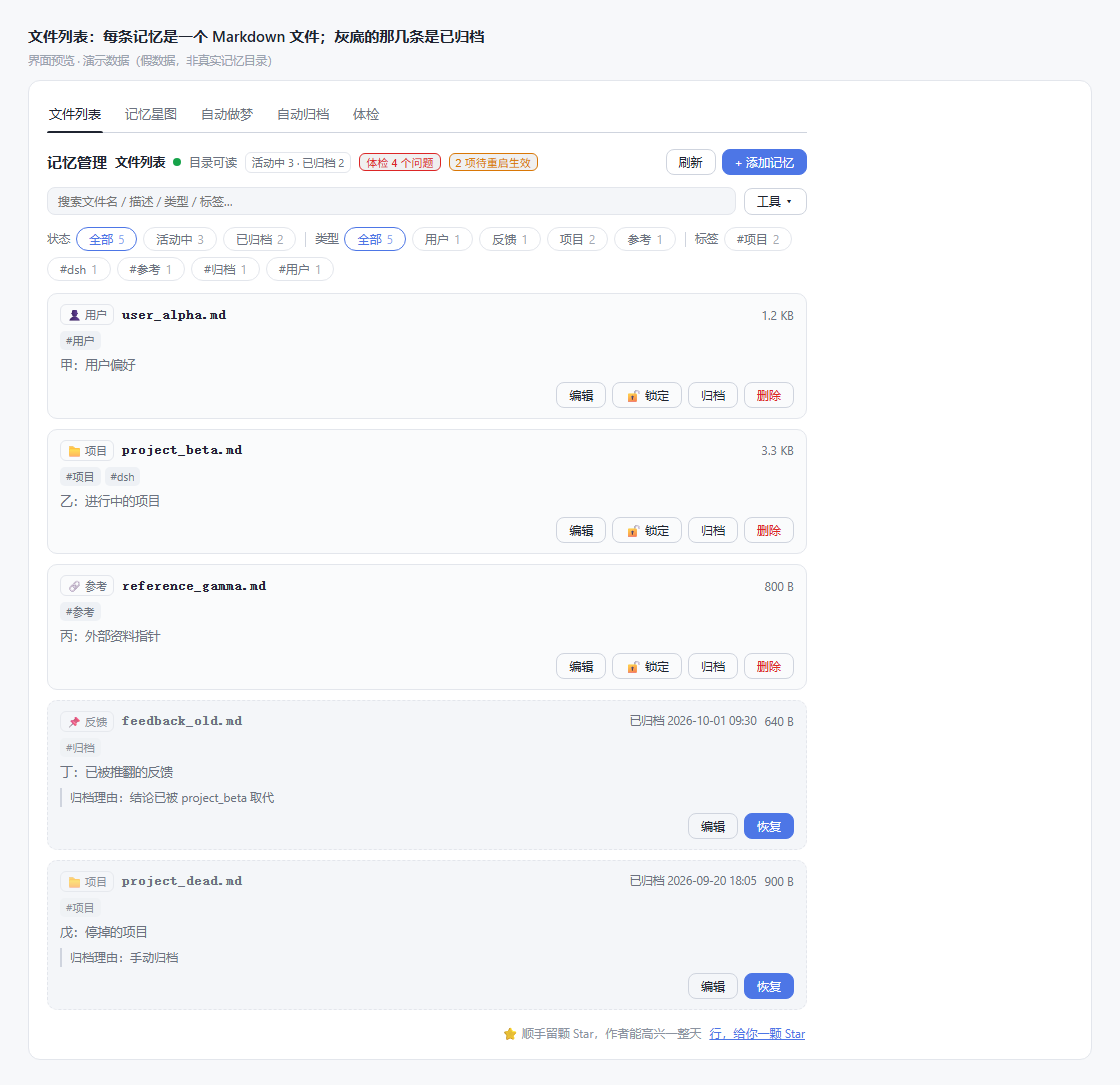
Every image below is **rendered from the UI code in this repository** (the same CSS, the same component tree; the data is demo data for illustration, not a real memory directory).
|
|
164
166
|
|
|
167
|
+
Since 1.9.0 the memory-management surface follows the harness language (**Settings → General → Language**); memory content itself stays in whatever language it was written in, and the remaining panels (autodream, archive, starmap, audit) are still Chinese until the next i18n batch.
|
|
168
|
+
|
|
165
169
|
|
|
166
170
|
|
|
167
171
|
*File list — the header always shows 「体检 N 个问题」(audit: N issues) and 「待重启生效」(restart to apply), so you know whether you should deal with it without opening anything; greyed rows are archived and can be restored at any time, or deleted for good with 「彻底删除」(irreversible, asks once more).*
|
package/README.zh.md
CHANGED
|
@@ -14,7 +14,7 @@
|
|
|
14
14
|
|
|
15
15
|
> File-based cross-session memory for DeepSeek Harness — every memory is a plain markdown file you can open, edit and delete. No database, no worker, no port.
|
|
16
16
|
|
|
17
|
-
**当前发布版本:`1.
|
|
17
|
+
**当前发布版本:`1.9.0`** —— 顶部 npm 徽章是动态权威。**契约基线:`1.0.0`** —— 第一个稳定版,公开承诺、能力边界与「明确做不到」的清单冻结在
|
|
18
18
|
[契约冻结](https://github.com/gezi-wen/sage-mem/blob/main/docs/1.0.0-contract.md)。
|
|
19
19
|
|
|
20
20
|
如果它对你有用,给个 Star 是最直接的反馈。
|
|
@@ -84,7 +84,9 @@ sage-mem 补上这一层,做法是:**把该记住的事写成一张张卡片
|
|
|
84
84
|
|
|
85
85
|
**1.8.0 起,记忆管理还能从侧栏直接进**:侧栏多一个「记忆管理」图标,点它把中央主区切到本页(页顶有「返回会话」)。
|
|
86
86
|
设置页「记忆管理 → 自动做梦 → 设置」里可以关掉这个入口(默认开,立即生效、不用重启);
|
|
87
|
+
**1.8.2 起,插件详情页也有同一个开关**(「插件 → sage-mem」那张卡),改完立即生效;
|
|
87
88
|
**关掉只影响侧栏图标,「设置 → 记忆管理」这个入口永远保留**。
|
|
89
|
+
从 1.8.2 开始,sage-mem 在插件列表里有了自己的图标(金色记忆卡片),不再是默认的通用方图标。
|
|
88
90
|
|
|
89
91
|
记忆管理页的「文件列表」头部还有一个「打开记忆文件夹」按钮:用系统文件管理器打开当前记忆目录
|
|
90
92
|
(Windows Explorer / macOS Finder / Linux 文件管理器)。host 侧起一个 detached 进程就返回,不等窗口。
|
|
@@ -162,6 +164,8 @@ SAGE_MEM_DIR=/path/to/your/memory
|
|
|
162
164
|
|
|
163
165
|
下面每张图都是**从仓库里的界面代码渲染出来的**(同一份 CSS、同一棵组件树;数据是演示用的假数据,不是真实记忆目录)。
|
|
164
166
|
|
|
167
|
+
1.9.0 起,记忆管理这一块跟随宿主语言(**设置 → 通用 → 语言**);记忆内容本身保持它被写下时的语言,其余面板(自动做梦、自动归档、记忆星图、体检)仍是中文,等下一批 i18n。
|
|
168
|
+
|
|
165
169
|

|
|
166
170
|
|
|
167
171
|
*文件列表 —— 头部常显「体检 N 个问题」与「待重启生效」,不用点开就知道该不该处理;灰底条目是已归档,随时可以恢复,也可以点「彻底删除」真的删掉(不可恢复,要再确认一次)。*
|
package/icon.png
ADDED
|
Binary file
|