rpi-io 1.2.4 → 2.0.0
This diff represents the content of publicly available package versions that have been released to one of the supported registries. The information contained in this diff is provided for informational purposes only and reflects changes between package versions as they appear in their respective public registries.
- package/README.md +428 -252
- package/addon/gpio.c +875 -0
- package/binding.gyp +33 -0
- package/esm/_util.mjs +122 -0
- package/esm/main.mjs +307 -0
- package/history.md +5 -4
- package/package.json +54 -7
- package/script/check-env.sh +192 -0
- package/script/detect-gpiod-version.sh +21 -0
- package/test/benchmark-pwm.js +44 -0
- package/test/benchmark-read.js +37 -0
- package/test/benchmark-write.js +38 -0
- package/test/close-all.js +27 -0
- package/test/duplicate-error.js +29 -0
- package/test/line-configuration.js +16 -0
- package/test/pwm-led.js +36 -0
- package/test/pwm-motor.js +40 -0
- package/test/read.js +30 -0
- package/test/write.js +29 -0
- package/esm/dev.mjs +0 -59
- package/esm/rio.mjs +0 -675
- package/esm/utl.mjs +0 -100
- package/scr/test.js +0 -171
package/README.md
CHANGED
|
@@ -1,30 +1,109 @@
|
|
|
1
1
|
# rpi-io
|
|
2
|
-
    
|
|
3
3
|
|
|
4
4
|
|
|
5
5
|
**rpi-io** is a lite [ESM](https://nodejs.org/api/esm.html#modules-ecmascript-modules) module for **Node.js** to control **Raspberry Pi** GPIO: access (in, out), input event detection and [PWM](https://en.wikipedia.org/wiki/Pulse-width_modulation) peripheral control.
|
|
6
6
|
|
|
7
|
-
**rpi-io**
|
|
7
|
+
**rpi-io** is designed for recent versions of Raspberry and related OS and middlewares. It has been tested in the following environments:
|
|
8
8
|
|
|
9
9
|
- Raspberry Pi models: *RPi 5,* *RPi 4B* and *RPi Zero 2.*
|
|
10
10
|
- Raspberry Pi OS (64-bit): Debian *Bookworm* and *Trixie*.
|
|
11
11
|
- Middlewares (installed by default with OS distribution):
|
|
12
|
-
|
|
13
|
-
|
|
12
|
+
- Input/Output - [libgpiod](https://libgpiod.readthedocs.io/en/stable/) v1.6.3 (*Bookworm*) and v2.2.1 (*Trixie*)
|
|
13
|
+
- PWM - [sysfs](https://en.wikipedia.org/wiki/Sysfs) interface.
|
|
14
14
|
|
|
15
|
-
## Installation
|
|
16
15
|
|
|
17
|
-
|
|
16
|
+
|
|
17
|
+
## What's new with version 2
|
|
18
|
+
|
|
19
|
+
| | version 1 | version 2 |
|
|
20
|
+
| ------------ | ------------ | ------------------------ |
|
|
21
|
+
| Architecture | Full Node.js | Hybrid Node.js + C addon |
|
|
22
|
+
| Performance | Low | High |
|
|
23
|
+
|
|
24
|
+
⚠️ Given the new architecture, the v2 API is not compatible with the v1 one.
|
|
25
|
+
|
|
26
|
+
|
|
27
|
+
|
|
28
|
+
## Prerequisites
|
|
29
|
+
|
|
30
|
+
### libgpiod
|
|
31
|
+
|
|
32
|
+
By default *libgpiod* is available with the latest Raspberry Pi OS distributions. If you want to install **rpi-io** with older - not tested - distributions, be sure it is installed.
|
|
33
|
+
|
|
34
|
+
```bash
|
|
35
|
+
sudo apt-get update
|
|
36
|
+
sudo apt-get install -y libgpiod-dev gpiod
|
|
37
|
+
```
|
|
38
|
+
|
|
39
|
+
Then check the installed version
|
|
40
|
+
|
|
41
|
+
```bash
|
|
42
|
+
gpioinfo --version
|
|
43
|
+
```
|
|
44
|
+
|
|
45
|
+
### Compilation tools
|
|
46
|
+
|
|
47
|
+
```bash
|
|
48
|
+
sudo apt-get install -y build-essential python3
|
|
49
|
+
```
|
|
50
|
+
|
|
51
|
+
### Node.js
|
|
52
|
+
|
|
53
|
+
Please make sure that you a recent version of Node.js (v23+) and NPM (v10+).
|
|
54
|
+
|
|
55
|
+
|
|
56
|
+
|
|
57
|
+
## Installation
|
|
58
|
+
|
|
59
|
+
**1. User rights**
|
|
60
|
+
|
|
61
|
+
To run scripts without `sudo`, add your user to the `gpio` group.
|
|
62
|
+
|
|
63
|
+
```bash
|
|
64
|
+
sudo usermod -a -G gpio $USER
|
|
65
|
+
```
|
|
66
|
+
|
|
67
|
+
Then log out and log back in.
|
|
68
|
+
|
|
69
|
+
**2. Install the module from your project main directory**
|
|
70
|
+
|
|
71
|
+
````bash
|
|
72
|
+
cd /your-project
|
|
18
73
|
npm install rpi-io
|
|
19
74
|
````
|
|
20
75
|
|
|
21
|
-
|
|
76
|
+
**3. Compile C addon from *rpi-io* directory**
|
|
22
77
|
|
|
23
|
-
|
|
78
|
+
```bash
|
|
79
|
+
cd /your-project/node_modules/rpi-io/
|
|
80
|
+
npm install
|
|
81
|
+
```
|
|
82
|
+
|
|
83
|
+
If you meet errors during this step, stay in the same directory and check your environment.
|
|
84
|
+
|
|
85
|
+
```bash
|
|
86
|
+
npm run check
|
|
87
|
+
```
|
|
88
|
+
|
|
89
|
+
If you need to recompile the module when errors are fixed, stay in the same directory and the run the following scripts.
|
|
90
|
+
|
|
91
|
+
```bash
|
|
92
|
+
npm run clean
|
|
93
|
+
npm run install
|
|
94
|
+
```
|
|
95
|
+
|
|
96
|
+
|
|
97
|
+
|
|
98
|
+
## Configuration for PWM-based peripherals
|
|
24
99
|
|
|
25
100
|
If you want to use [hardware-based PWM](https://pinout.xyz/pinout/pwm) peripherals, some configuration is required:
|
|
26
101
|
|
|
27
|
-
-
|
|
102
|
+
- Edit the file `/boot/firmware/config.txt` and add the required [dtoverlay](https://www.raspberrypi.com/documentation/computers/configuration.html#part3.1) configuration for PWM as showed in the examples below.
|
|
103
|
+
|
|
104
|
+
```bash
|
|
105
|
+
sudo nano /boot/firmware/config.txt
|
|
106
|
+
```
|
|
28
107
|
|
|
29
108
|
```shell
|
|
30
109
|
# Examples of PWM configuration to add to/boot/firmware/config.txt
|
|
@@ -48,408 +127,505 @@ pinctrl get 12
|
|
|
48
127
|
# 12: a0 pd | lo // GPIO12 = PWM0_CHAN0
|
|
49
128
|
pinctrl get 13
|
|
50
129
|
# 13: a0 pd | lo // GPIO13 = PWM0_CHAN1
|
|
51
|
-
pinctrl get 18
|
|
52
|
-
# 18: no pd | -- // GPIO18 = none
|
|
53
|
-
pinctrl get 19
|
|
54
|
-
# 19: no pd | -- // GPIO19 = none
|
|
55
130
|
```
|
|
56
131
|
|
|
132
|
+
|
|
133
|
+
|
|
57
134
|
## Usage
|
|
58
135
|
|
|
59
|
-
PLEASE NOTE: In all this document,
|
|
136
|
+
PLEASE NOTE: In all this document, GPIO line numbers are the BCM ones as defined in https://pinout.xyz/.
|
|
60
137
|
|
|
61
138
|
### *OUT* operations
|
|
62
139
|
|
|
63
|
-
#### LED control
|
|
140
|
+
#### Example of LED control
|
|
141
|
+
##### Diagram
|
|
142
|
+
```
|
|
143
|
+
GPIO Pin (Output)
|
|
144
|
+
│
|
|
145
|
+
┌┴┐
|
|
146
|
+
│ │ Current-limiting resistor (220Ω or 330Ω)
|
|
147
|
+
└┬┘
|
|
148
|
+
│
|
|
149
|
+
▼ ← LED (anode +)
|
|
150
|
+
───
|
|
151
|
+
| ← LED (cathode -)
|
|
152
|
+
|
|
|
153
|
+
───── GND (0V)
|
|
154
|
+
─
|
|
155
|
+
```
|
|
64
156
|
|
|
65
|
-
|
|
157
|
+
##### Code example
|
|
66
158
|
|
|
67
159
|
```javascript
|
|
68
160
|
// Import rpi-io module
|
|
69
|
-
import {
|
|
70
|
-
// Define instance for OUT operation on some GPIO
|
|
71
|
-
const led = new Rio(17, "out");
|
|
72
|
-
// Turn the led on
|
|
73
|
-
led.set(1);
|
|
74
|
-
// Turn the led off
|
|
75
|
-
led.set(0);
|
|
76
|
-
```
|
|
161
|
+
import {RIO} from "rpi-io"
|
|
77
162
|
|
|
78
|
-
|
|
163
|
+
// Define instance for OUT operation on some GPIO e.g. 17 with initial value
|
|
164
|
+
const led = new RIO(17, "output", {value: 0})
|
|
79
165
|
|
|
80
|
-
|
|
81
|
-
|
|
82
|
-
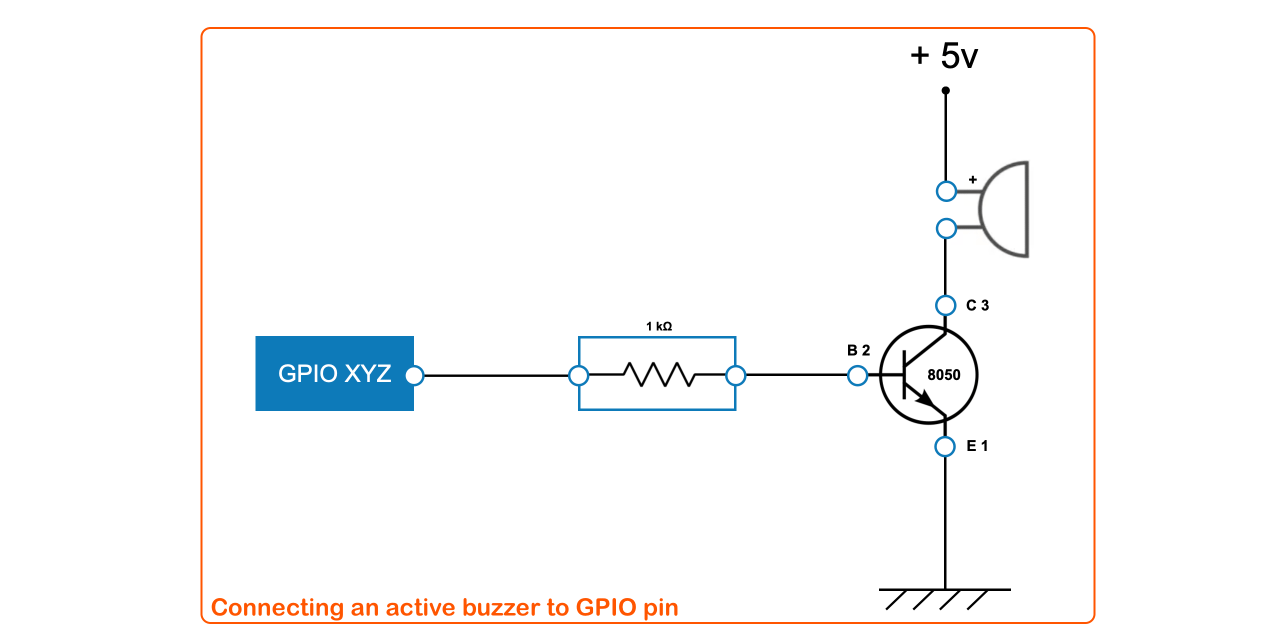
|
|
166
|
+
// Turn the led on
|
|
167
|
+
led.write(1)
|
|
83
168
|
|
|
84
|
-
|
|
85
|
-
|
|
86
|
-
|
|
87
|
-
|
|
88
|
-
|
|
89
|
-
// Turn the buzzer on for 3 seconds
|
|
90
|
-
buzzer.set(1, 3000);
|
|
169
|
+
// Turn the led off after 5s and close the instance before leaving
|
|
170
|
+
setTimeout(()=>{
|
|
171
|
+
led.write(0)
|
|
172
|
+
led.close()
|
|
173
|
+
}, 5000)
|
|
91
174
|
```
|
|
92
175
|
|
|
176
|
+
|
|
177
|
+
|
|
93
178
|
### *IN* operations
|
|
94
179
|
|
|
95
180
|
#### Getting button status and listening to input events
|
|
96
181
|
|
|
97
|
-
|
|
182
|
+
##### Diagram of *pull-down* electronic circuit
|
|
183
|
+
|
|
184
|
+
```
|
|
185
|
+
VCC (3.3V)
|
|
186
|
+
│
|
|
187
|
+
○ ← Switch/Button (open = not pressed)
|
|
188
|
+
│
|
|
189
|
+
├──────────── GPIO Pin
|
|
190
|
+
│
|
|
191
|
+
┌┴┐
|
|
192
|
+
│ │ Pull-down resistor (10kΩ typical)
|
|
193
|
+
└┬┘
|
|
194
|
+
│
|
|
195
|
+
───── GND (0V)
|
|
196
|
+
─
|
|
197
|
+
```
|
|
198
|
+
|
|
199
|
+
##### Code example
|
|
98
200
|
|
|
99
201
|
```javascript
|
|
100
202
|
// Import rpi-io module
|
|
101
|
-
import {Rio} from "rpi-io"
|
|
203
|
+
import {Rio, ctrlC} from "rpi-io"
|
|
102
204
|
|
|
103
|
-
// Define instance for IN operation on some GPIO
|
|
104
|
-
const
|
|
205
|
+
// Define instance for IN operation on some GPIO e.g. 18
|
|
206
|
+
const btn = new RIO(18, "input", {bias: "pull-down"})
|
|
105
207
|
|
|
106
|
-
//
|
|
107
|
-
|
|
208
|
+
// Close instance on script interrupt
|
|
209
|
+
ctrlC(() => {
|
|
210
|
+
btn.close()
|
|
211
|
+
})
|
|
108
212
|
|
|
109
|
-
//
|
|
110
|
-
|
|
111
|
-
button.monitor("both", (event) => {
|
|
112
|
-
// event.edge = "rising" or "falling"
|
|
113
|
-
// event.time = timestamp
|
|
114
|
-
console.log("event:", event.edge, event.time)
|
|
115
|
-
});
|
|
116
|
-
```
|
|
213
|
+
// Instant read
|
|
214
|
+
console.log("button value:", btn.read())
|
|
117
215
|
|
|
118
|
-
|
|
216
|
+
// Event monitoring for both edges ("rising"/"falling") with rebounce threshold (30)
|
|
217
|
+
const callback = edge => {console.log("edge:", edge)}
|
|
218
|
+
btn.monitoringStart(callback, "both", 30)
|
|
119
219
|
|
|
120
|
-
|
|
220
|
+
// Stop monitoring after 10s
|
|
221
|
+
setTimeout(()=>{
|
|
222
|
+
btn.monitoringStop()
|
|
223
|
+
}, 10000)
|
|
224
|
+
```
|
|
121
225
|
|
|
122
|
-
|
|
226
|
+
##### *Pull-up* variant
|
|
123
227
|
|
|
228
|
+
```
|
|
229
|
+
VCC (3.3V)
|
|
230
|
+
│
|
|
231
|
+
┌┴┐
|
|
232
|
+
│ │ Pull-up resistor (10kΩ typical)
|
|
233
|
+
└┬┘
|
|
234
|
+
│
|
|
235
|
+
├──────────── GPIO Pin
|
|
236
|
+
│
|
|
237
|
+
○ ← Switch/Button (open = not pressed)
|
|
238
|
+
│
|
|
239
|
+
───── GND (0V)
|
|
240
|
+
─
|
|
241
|
+
```
|
|
124
242
|
|
|
125
243
|
```javascript
|
|
126
|
-
|
|
127
|
-
import {Rio} from "rpi-io";
|
|
128
|
-
|
|
129
|
-
// Define instance for PWM operation on some PWM GPIO
|
|
130
|
-
const servoMotor = new Rio(13, "pwm");
|
|
131
|
-
|
|
132
|
-
// PWM servo motor parameters depends motor specifications.
|
|
133
|
-
// - period = 20,000,000 nano-seconds = 20 milli-seconds ~ frequency = 50 Hz
|
|
134
|
-
// - duty cycle on start = 500,000 nano-seconds = 0.5 milli-seconds
|
|
135
|
-
// - dutyMin = 0.5 ms ~ 0°
|
|
136
|
-
// - dutyMax = 2.5 ms ~ 180°
|
|
137
|
-
servoMotor.pwmInit(20000000, 500000, {
|
|
138
|
-
dutyMin: 500000,
|
|
139
|
-
dutyMax: 2500000
|
|
140
|
-
});
|
|
141
|
-
console.log("servo position = 0°");
|
|
142
|
-
|
|
143
|
-
// Wait 2s then change duty cyle to 1.5 ms
|
|
144
|
-
setTimeout(() => {
|
|
145
|
-
servo.pwmDuty(1500000);
|
|
146
|
-
console.log("servo position = 90°");
|
|
147
|
-
}, 2000);
|
|
244
|
+
const btn = new RIO(18, "input", {bias: "pull-up"})
|
|
148
245
|
```
|
|
149
246
|
|
|
150
|
-
## API
|
|
151
|
-
|
|
152
|
-
The **rpi-io** API is based on the class `Rio` with instance methods and static functions.
|
|
153
247
|
|
|
154
|
-
### Constructor and generic methods
|
|
155
248
|
|
|
156
|
-
|
|
249
|
+
### PWM operations in hardware mode
|
|
157
250
|
|
|
158
|
-
|
|
159
|
-
```javascript
|
|
160
|
-
import {Rio} from "rpi-io";
|
|
161
|
-
const myOutput = new Rio(17, 'out');
|
|
162
|
-
```
|
|
163
|
-
##### Parameters
|
|
164
|
-
- **gpio** *{Number}* Must be one of the GPIO number as defined in [pinout.xyz](https://pinout.xyz).
|
|
165
|
-
- **type** *{String}* Must be one of the following values: 'in', 'out', 'pwm'.
|
|
166
|
-
|
|
167
|
-
##### Detected errors
|
|
168
|
-
- Operating system version is not supported
|
|
169
|
-
- *libgpiod* version is not supported
|
|
170
|
-
- **gpio** is not defined as GPIO in [pinout.xyz](https://pinout.xyz).
|
|
171
|
-
- **gpio** is already used by another instance.
|
|
172
|
-
- **type** value is not recognized.
|
|
173
|
-
- **type**='pwm' and **gpio** is not properly configured.
|
|
251
|
+
#### Servo motor
|
|
174
252
|
|
|
253
|
+
REMINDER: PWM peripherals used in hardware mode need some specific [configuration](#Configuration).
|
|
175
254
|
|
|
255
|
+
##### Diagram for servo-motor *SG90*
|
|
256
|
+
```
|
|
257
|
+
┌─────────────────────┐
|
|
258
|
+
│ │
|
|
259
|
+
External Power (5V) │ Servo Motor │
|
|
260
|
+
│ │ │
|
|
261
|
+
│ VCC (red) │ ┌───────────────┐ │
|
|
262
|
+
├────────────────────────┤ │ │
|
|
263
|
+
│ │ │ Motor │ │
|
|
264
|
+
│ GND (brown/black)│ └───────┬───────┘ │
|
|
265
|
+
├────────────────────────────────┤ │
|
|
266
|
+
│ │ ┌─────┴─────┐ │
|
|
267
|
+
│ │ │ Gear │ │
|
|
268
|
+
│ │ │ Box │ │
|
|
269
|
+
│ │ └─────┬─────┘ │
|
|
270
|
+
│ │ ─────┴───── │
|
|
271
|
+
│ │ ( Servo Arm ) │
|
|
272
|
+
│ Signal (orange) │ │
|
|
273
|
+
GPIO Pin ───────────────────────────── │
|
|
274
|
+
(PWM) │ │
|
|
275
|
+
│ └─────────────────────┘
|
|
276
|
+
│
|
|
277
|
+
───── Common GND ← Important: Pi GND must connect here
|
|
278
|
+
─
|
|
279
|
+
```
|
|
176
280
|
|
|
177
|
-
|
|
178
|
-
To remove an instance from the list.
|
|
281
|
+
##### Code example
|
|
179
282
|
|
|
180
|
-
##### Example
|
|
181
283
|
```javascript
|
|
182
|
-
|
|
284
|
+
import {RIO, sleep, ctrlC, } from "rpi-io"
|
|
285
|
+
|
|
286
|
+
(async () => {
|
|
287
|
+
|
|
288
|
+
// Init pwm line (13) and set duty range in µs
|
|
289
|
+
const servo = new RIO(13, "pwm", {
|
|
290
|
+
period: 20000, // 20,000,000 ns ~ 50 Hz
|
|
291
|
+
dutyMin: 500, // 500,000 ns ~ 0.5 ms
|
|
292
|
+
dutyMax: 2500 // 2,500,000 ns ~ 2.5 ms
|
|
293
|
+
})
|
|
294
|
+
ctrlC(() => {
|
|
295
|
+
servo.close()
|
|
296
|
+
})
|
|
297
|
+
|
|
298
|
+
await sleep(2000)
|
|
299
|
+
servo.pwmDuty(50)
|
|
300
|
+
console.log("servo duty = 50%") // ~ 0.5 + (0.5 * (2.5 ms - 0.5 ms)) = 1.5 ms
|
|
301
|
+
await sleep(2000)
|
|
302
|
+
servo.pwmDuty(100)
|
|
303
|
+
console.log("servo duty = 100%") // ~ 0.5 + (1.0 * (2.5 ms - 0.5 ms)) = 2.5 ms
|
|
304
|
+
await sleep(2000)
|
|
305
|
+
servo.pwmDuty(0)
|
|
306
|
+
logconsole.logservo duty = 0%") // ~ 0.5 + (0.0 * (2.5 ms - 0.5 ms)) = 0.5 ms
|
|
307
|
+
await sleep(2000)
|
|
308
|
+
servo.close()
|
|
309
|
+
console.log("servo closed")
|
|
310
|
+
})()
|
|
183
311
|
```
|
|
184
312
|
|
|
185
|
-
|
|
186
|
-
#### set(value, duration)
|
|
313
|
+
##### Fade-in LED
|
|
187
314
|
|
|
188
|
-
|
|
315
|
+
PWM can also be used for progressive LED light with the same electronic circuit as write operations. See example below.
|
|
189
316
|
|
|
190
|
-
##### Example
|
|
191
317
|
```javascript
|
|
192
|
-
import {
|
|
193
|
-
|
|
194
|
-
|
|
318
|
+
import {RIO, sleep, ctrlC, } from "rpi-io"
|
|
319
|
+
(async () => {
|
|
320
|
+
// Init pwm line 12 and duty range in µs
|
|
321
|
+
const led = new RIO(12, "pwm", {
|
|
322
|
+
period: 1000, // 1,000,000 ns ~ 1 KHz
|
|
323
|
+
dutyMin: 0,
|
|
324
|
+
dutyMax: 1000
|
|
325
|
+
})
|
|
326
|
+
|
|
327
|
+
ctrlC(() => {
|
|
328
|
+
led.close()
|
|
329
|
+
})
|
|
330
|
+
|
|
331
|
+
for (let i = 1; i < 101; i++) {
|
|
332
|
+
led.pwmDuty(i)
|
|
333
|
+
await sleep(30, false)
|
|
334
|
+
}
|
|
335
|
+
await sleep(2000, false)
|
|
336
|
+
led.pwmDuty(0)
|
|
337
|
+
led.close()
|
|
338
|
+
log("led closed")
|
|
339
|
+
})()
|
|
195
340
|
```
|
|
196
|
-
##### Parameters
|
|
197
|
-
- **value** *{Number}* 0 or 1
|
|
198
|
-
- **duration** *{Number}* Time in ms. When defined, at the end of the defined time the output is inverted.
|
|
199
341
|
|
|
200
|
-
|
|
201
|
-
- Instance type is not 'out'.
|
|
202
|
-
- Instance is disabled or undefined.
|
|
342
|
+
### More examples
|
|
203
343
|
|
|
344
|
+
To get familiar with the module, you might have a glance on examples and play with them with the GPIO lines of your own electronic circuit.
|
|
204
345
|
|
|
346
|
+
```bash
|
|
347
|
+
# Simple write
|
|
348
|
+
node /your-project/node_modules/rpi-io/test/write.js
|
|
205
349
|
|
|
206
|
-
|
|
350
|
+
# Read and monitor
|
|
351
|
+
node /your-project/node_modules/rpi-io/test/read.js
|
|
207
352
|
|
|
208
|
-
|
|
353
|
+
# LED fade-in on PWM line
|
|
354
|
+
node /your-project/node_modules/rpi-io/test/pwm-led.js
|
|
209
355
|
|
|
210
|
-
|
|
356
|
+
# Servo-motor SG90 controlled by PWM
|
|
357
|
+
node /your-project/node_modules/rpi-io/test/pwm-motor.js
|
|
211
358
|
|
|
212
|
-
|
|
359
|
+
# Test duplicated instance error
|
|
360
|
+
node /your-project/node_modules/rpi-io/test/duplicate-error.js
|
|
213
361
|
|
|
214
|
-
|
|
215
|
-
|
|
216
|
-
const myInput = new Rio(18, 'in');
|
|
217
|
-
let currentValue = myInput.get();
|
|
218
|
-
```
|
|
362
|
+
# Test close of all instances
|
|
363
|
+
node /your-project/node_modules/rpi-io/test/close-all.js
|
|
219
364
|
|
|
220
|
-
|
|
221
|
-
|
|
222
|
-
|
|
223
|
-
|
|
224
|
-
##### Detected errors
|
|
365
|
+
# Test GPIO line configuration
|
|
366
|
+
node /your-project/node_modules/rpi-io/test/line-configuration.js
|
|
367
|
+
```
|
|
225
368
|
|
|
226
|
-
- Instance type is not 'in'.
|
|
227
|
-
- Instance is disabled or undefined.
|
|
228
369
|
|
|
229
370
|
|
|
371
|
+
## API
|
|
230
372
|
|
|
231
|
-
|
|
373
|
+
The **rpi-io** API is based on the class `RIO` with instance methods.
|
|
232
374
|
|
|
233
|
-
|
|
375
|
+
### RIO class and generic methods
|
|
234
376
|
|
|
377
|
+
#### constructor RIO(line, mode, opt)
|
|
378
|
+
To create instance according to parameters.
|
|
235
379
|
##### Example
|
|
236
|
-
|
|
237
380
|
```javascript
|
|
238
|
-
import {
|
|
239
|
-
const
|
|
240
|
-
myButton.monitor("both", event => {
|
|
241
|
-
console.log("event:", event.edge, event.time)
|
|
242
|
-
});
|
|
381
|
+
import {RIO} from "rpi-io"
|
|
382
|
+
const myOutput = new RIO(17, "output")
|
|
243
383
|
```
|
|
384
|
+
##### Parameter(s)
|
|
385
|
+
- **line** *{Number}* Must be one of the GPIO number as defined in [pinout.xyz](https://pinout.xyz).
|
|
386
|
+
- **mode** *{String}* Must be one of the following values: "output", "input", "pwm".
|
|
387
|
+
- **opt** *{Object}* Various options depending on selected mode. See details and default values below.
|
|
244
388
|
|
|
245
|
-
|
|
389
|
+
```javascript
|
|
390
|
+
{
|
|
391
|
+
// output - Initial value
|
|
392
|
+
value: 0,
|
|
393
|
+
// input - Circuit bias: "disable", "pull-up", "pull-down"
|
|
394
|
+
bias: "disable",
|
|
395
|
+
// pwm - Delay time (ms) required on instance creation
|
|
396
|
+
// depending on device performance. If this value is
|
|
397
|
+
// too small, the PWM instance creation fails.
|
|
398
|
+
// Can be reduced for latest RPi 5
|
|
399
|
+
// Must be increased for old RPi Zero.
|
|
400
|
+
exportTime: 100,
|
|
401
|
+
// pwm - period defined in μs. Default value is equivalent
|
|
402
|
+
// to a 50 Hz frequency.
|
|
403
|
+
period: 20000,
|
|
404
|
+
// pwm - dutyMin and dutyMax defines the duty cycle use range in µs
|
|
405
|
+
// especially for servo-motors (See their specs!).
|
|
406
|
+
dutyMin: 0
|
|
407
|
+
dutyMax: 20000
|
|
408
|
+
}
|
|
409
|
+
```
|
|
246
410
|
|
|
247
|
-
|
|
248
|
-
- **callback** *{Function}* Callback function with one Object parameter for input events on instance e.g. `event = {edge: 'rising,' time: 'Thu Oct 30 2025 18:12:35 GMT+0100'}`
|
|
249
|
-
- **options** *{Object}* Default value is `{bias: 'disable', bounce: 0}`
|
|
250
|
-
- `bias` To configure according your input connection. Supported value ares 'disable', 'pull-down' and 'pull-up'.
|
|
251
|
-
- `bounce` Delay in ms to filter callback on rebounce. Value between 0 and 1000. 0 means no filter.
|
|
411
|
+
##### Return
|
|
252
412
|
|
|
253
|
-
|
|
413
|
+
*{Object}* RIO instance
|
|
254
414
|
|
|
255
|
-
- Instance type is not 'in'.
|
|
256
|
-
- Instance is disabled or undefined.
|
|
257
415
|
|
|
258
416
|
|
|
417
|
+
#### close()
|
|
418
|
+
To close instance i.e.
|
|
259
419
|
|
|
260
|
-
|
|
261
|
-
|
|
420
|
+
- to prevent future use of the line with the current instance
|
|
421
|
+
- to stop related monitoring process if any
|
|
422
|
+
- to free PWM resources if any
|
|
262
423
|
|
|
263
|
-
To
|
|
424
|
+
To reuse a line when closed, a new instance must be created.
|
|
264
425
|
|
|
265
426
|
##### Example
|
|
266
427
|
|
|
267
428
|
```javascript
|
|
268
|
-
import {
|
|
269
|
-
const
|
|
270
|
-
|
|
271
|
-
dutyMin: 500000,
|
|
272
|
-
dutyMax: 2500000
|
|
273
|
-
});
|
|
274
|
-
console.log("servo position = 0°");
|
|
429
|
+
import {RIO} from "rpi-io"
|
|
430
|
+
const myOutput = new RIO(17, "output")
|
|
431
|
+
myOutput.close()
|
|
275
432
|
```
|
|
276
433
|
|
|
277
|
-
##### Parameters
|
|
278
434
|
|
|
279
|
-
All time parameters are defined in nanoseconds (ns).
|
|
280
435
|
|
|
281
|
-
|
|
282
|
-
|
|
283
|
-
|
|
284
|
-
|
|
285
|
-
|
|
436
|
+
#### write(value)
|
|
437
|
+
|
|
438
|
+
To write some value to "output" instance.
|
|
439
|
+
|
|
440
|
+
##### Example
|
|
441
|
+
|
|
442
|
+
```javascript
|
|
443
|
+
import {RIO} from "rpi-io"
|
|
444
|
+
const myOutput = new Rio(17, "output")
|
|
445
|
+
myOuput.write(1)
|
|
446
|
+
```
|
|
286
447
|
|
|
287
|
-
#####
|
|
448
|
+
##### Parameter(s)
|
|
288
449
|
|
|
289
|
-
-
|
|
290
|
-
- Instance is disabled or undefined.
|
|
291
|
-
- **period** is out-of-range [100, 1,000,000,000]
|
|
292
|
-
- **duty** < **options.dutyMin**
|
|
293
|
-
- **duty** > **options.dutyMax**
|
|
450
|
+
- **value** *{Number}* 0 or 1
|
|
294
451
|
|
|
295
452
|
|
|
296
453
|
|
|
297
|
-
####
|
|
454
|
+
#### read()
|
|
298
455
|
|
|
299
|
-
To
|
|
456
|
+
To read value from "input" instance.
|
|
300
457
|
|
|
301
458
|
##### Example
|
|
302
459
|
|
|
303
460
|
```javascript
|
|
304
|
-
|
|
461
|
+
import {RIO} from "rpi-io"
|
|
462
|
+
const myInput = new Rio(18, "input")
|
|
463
|
+
const result = myInput.read()
|
|
305
464
|
```
|
|
306
465
|
|
|
307
|
-
#####
|
|
466
|
+
##### Return
|
|
308
467
|
|
|
309
|
-
|
|
310
|
-
- Instance is disabled or undefined.
|
|
468
|
+
*{Number}* 0 or 1
|
|
311
469
|
|
|
312
470
|
|
|
313
471
|
|
|
314
|
-
####
|
|
472
|
+
#### monitoringStart(callback, edge, bounce)
|
|
315
473
|
|
|
316
|
-
To
|
|
474
|
+
To start event monitoring of "input" instance.
|
|
317
475
|
|
|
318
476
|
##### Example
|
|
319
477
|
|
|
320
478
|
```javascript
|
|
321
|
-
|
|
479
|
+
import {RIO} from "rpi-io"
|
|
480
|
+
const myButton = new Rio(18, "input")
|
|
481
|
+
const callback = edge => {
|
|
482
|
+
console.log("edge:", edge)
|
|
483
|
+
}
|
|
484
|
+
myButton.monitoringStart(callback, "both", 30)
|
|
322
485
|
```
|
|
323
486
|
|
|
324
|
-
#####
|
|
325
|
-
|
|
326
|
-
- **time** *{Number}* Duty cycle (ns)
|
|
487
|
+
##### Parameter(s)
|
|
327
488
|
|
|
328
|
-
|
|
489
|
+
- **callback** *{Function}* Function triggered by input events where parameter is *edge* that can be either "rising" (input change from 0 to 1) or "falling" (input change from 1 to 0).
|
|
490
|
+
- **edge** *{String}* Filter of monitored events: "rising", "falling", "both" (default value).
|
|
491
|
+
- **bounce** *{Number}* Set thresold in ms to filter consecutive events of same type. Default value is 0.
|
|
329
492
|
|
|
330
|
-
- Instance type is not 'pwm'.
|
|
331
|
-
- PWM instance is not properly initialized.
|
|
332
|
-
- **time** is out of range [dutyMin, dutyMax]
|
|
333
493
|
|
|
334
494
|
|
|
495
|
+
#### monitoringStop()
|
|
335
496
|
|
|
336
|
-
|
|
337
|
-
#### Rio.disableAll()
|
|
338
|
-
|
|
339
|
-
To to disable all instances
|
|
497
|
+
To stop event monitoring of "input" instance.
|
|
340
498
|
|
|
341
499
|
##### Example
|
|
342
500
|
|
|
343
501
|
```javascript
|
|
344
|
-
|
|
502
|
+
import {RIO} from "rpi-io"
|
|
503
|
+
const myButton = new Rio(18, "input")
|
|
504
|
+
const callback =
|
|
505
|
+
myButton.monitoringStart(edge => {console.log("edge:", edge)})
|
|
506
|
+
// Stop monitoring after 10s
|
|
507
|
+
setTimeout(() => {
|
|
508
|
+
myButton.monitoringStop()
|
|
509
|
+
}, 10000)
|
|
345
510
|
```
|
|
346
511
|
|
|
347
|
-
#### Rio.stopMonitoring()
|
|
348
512
|
|
|
349
|
-
|
|
513
|
+
|
|
514
|
+
#### pwmDuty(percent)
|
|
515
|
+
|
|
516
|
+
To change the *duty cycle* of a "pwm" instance. The parameter is defined as a percentage to compute a *duty cycle* based on the *dutyMin* and *dutyMax* values of instance definition.
|
|
350
517
|
|
|
351
518
|
##### Example
|
|
352
519
|
|
|
353
520
|
```javascript
|
|
354
|
-
|
|
521
|
+
import {RIO} from "rpi-io"
|
|
522
|
+
// Servo-motor instance
|
|
523
|
+
const servo = new RIO(13, "pwm", {
|
|
524
|
+
exportTime: 100,
|
|
525
|
+
period: 20000,
|
|
526
|
+
dutyMin: 500,
|
|
527
|
+
dutyMax: 2500)
|
|
528
|
+
|
|
529
|
+
// duty cycle = 50% between dutyMin and dutyMax
|
|
530
|
+
servo.pwmDuty(50)
|
|
355
531
|
```
|
|
356
532
|
|
|
357
|
-
|
|
533
|
+
##### Parameter(s)
|
|
358
534
|
|
|
359
|
-
|
|
535
|
+
- **percent** *{Number}* 0 ≤ percent ≤ 100
|
|
360
536
|
|
|
361
|
-
##### Example
|
|
362
537
|
|
|
538
|
+
|
|
539
|
+
### Utilities
|
|
540
|
+
|
|
541
|
+
#### RIO.closeAll()
|
|
542
|
+
Function to close all instances
|
|
543
|
+
##### Example
|
|
363
544
|
```javascript
|
|
364
|
-
import {
|
|
365
|
-
|
|
366
|
-
|
|
545
|
+
import {RIO} from "rpi-io"
|
|
546
|
+
const led = new RIO(line1, "output", {value: 0})
|
|
547
|
+
const btn = new RIO(line2, "input")
|
|
548
|
+
RIO.closeAll()
|
|
549
|
+
// led and btn are closed
|
|
367
550
|
```
|
|
368
551
|
|
|
369
|
-
#### Rio.info()
|
|
370
552
|
|
|
371
|
-
Javascript equivalent of command `gpioinfo`.
|
|
372
553
|
|
|
373
|
-
|
|
554
|
+
#### log(args)
|
|
374
555
|
|
|
375
|
-
|
|
376
|
-
import {Rio} from "rpi-io";
|
|
377
|
-
console.log(Rio.info())
|
|
378
|
-
```
|
|
556
|
+
Function similar to `console.log` but with timestamped prompt. Must be enabled or not by function `traceCfg` defined thereafter.
|
|
379
557
|
|
|
380
|
-
####
|
|
558
|
+
#### warn(args)
|
|
381
559
|
|
|
382
|
-
|
|
560
|
+
Function similar to `log` but colored and prefixed by sign ⚠️.
|
|
383
561
|
|
|
384
|
-
|
|
562
|
+
#### traceCfg(level)
|
|
563
|
+
|
|
564
|
+
Function to enable functions `log` and `warn`.
|
|
565
|
+
|
|
566
|
+
##### Example for log, warn and traceCfg
|
|
385
567
|
|
|
386
568
|
```javascript
|
|
387
|
-
import {
|
|
388
|
-
|
|
569
|
+
import {traceCfg, log, warn} from "rpi-io"
|
|
570
|
+
// traceCfg(0) => warn and log are disabled
|
|
571
|
+
// traceCfg(1) => warn is enabled and log is disabled
|
|
572
|
+
// traceCfg(2) => warn and log are enabled
|
|
573
|
+
traceCfg(2)
|
|
574
|
+
warn("This is important info")
|
|
575
|
+
log("This is useful info")
|
|
389
576
|
```
|
|
390
577
|
|
|
391
|
-
#### Rio.version()
|
|
392
578
|
|
|
393
|
-
To retrieve libgpiod version.
|
|
394
579
|
|
|
395
|
-
|
|
580
|
+
#### sleep(time)
|
|
396
581
|
|
|
397
|
-
|
|
398
|
-
import {Rio} from "rpi-io";
|
|
399
|
-
console.log(Rio.version())
|
|
400
|
-
// 'v1.6.3',
|
|
401
|
-
```
|
|
582
|
+
Similar to `setTimeout` but in async mode.
|
|
402
583
|
|
|
403
|
-
####
|
|
584
|
+
#### ctrlC(function)
|
|
404
585
|
|
|
405
|
-
To
|
|
586
|
+
To run a callback function on ctrl+c event.
|
|
406
587
|
|
|
407
|
-
##### Example
|
|
588
|
+
##### Example for sleep and ctrlC
|
|
408
589
|
|
|
409
590
|
```javascript
|
|
410
|
-
import {
|
|
411
|
-
|
|
412
|
-
|
|
591
|
+
import {sleep, ctrlC} from "rpi-io"
|
|
592
|
+
(async () => {
|
|
593
|
+
ctrlC(() => {
|
|
594
|
+
console.log("displayed on script interrupt")
|
|
595
|
+
})
|
|
596
|
+
await sleep(1000)
|
|
597
|
+
console.log("displayed after 10s")
|
|
598
|
+
})()
|
|
413
599
|
```
|
|
414
600
|
|
|
415
|
-
#### Rio.isSystemSupported()
|
|
416
601
|
|
|
417
|
-
To check if device is supported by **rpi-io** (device, model, os, middleware). It returns *true/false* and displays details in console.
|
|
418
602
|
|
|
419
|
-
#### Rio.logCfg(level)
|
|
420
|
-
To set the level of console used in the module:
|
|
421
603
|
|
|
422
|
-
|
|
423
|
-
- 1: console only for errors and warnings (default).
|
|
424
|
-
- 2: more logged data
|
|
604
|
+
## Benchmark
|
|
425
605
|
|
|
426
|
-
|
|
606
|
+
The following tables summarizes main operation times on various devices. Results are in micro-seconds (µs).
|
|
427
607
|
|
|
428
|
-
|
|
429
|
-
import {Rio} from "rpi-io";
|
|
430
|
-
Rio.logCfg(0)
|
|
431
|
-
Rio.isSystemSupported() // Nothing displayed in console
|
|
432
|
-
Rio.logCfg(2)
|
|
433
|
-
Rio.isSystemSupported() // See console below
|
|
434
|
-
// 08:15:16.506 🔎 👍 Hardware is Raspberry Pi
|
|
435
|
-
// 08:15:16.539 🔎 👍 Raspberry Pi 5 Model B Rev 1.0 is supported
|
|
436
|
-
// 08:15:16.543 🔎 👍 Bookworm OS is supported
|
|
437
|
-
// 08:15:16.545 🔎 👍 libgpiod version v1.6.x is supported
|
|
438
|
-
// 08:15:16.545 🔎 👍 Systems requirements for rpi-io are met
|
|
439
|
-
```
|
|
608
|
+
**PLEASE NOTE**: As PWM operations rely on files, performance of microSD cards installed on RPi may have a significant impact on results for `pwmDuty()`.
|
|
440
609
|
|
|
610
|
+
**OS Bookworm with libgpiod v1.6.3**
|
|
441
611
|
|
|
442
|
-
|
|
612
|
+
| | RPi 5B | RPi 4B | RPi Zero2 |
|
|
613
|
+
| --------------- | ------- | ------- | --------- |
|
|
614
|
+
| write | 0.72 µs | 1.30 µs | 2,37 µs |
|
|
615
|
+
| read | 1.32 µs | 1,09 µs | 1,90 µs |
|
|
616
|
+
| pwmDuty (1 KHz) | 15.6 µs | 25,6 µs | 48,4 µs |
|
|
617
|
+
|
|
618
|
+
**OS Trixie with libgpiod v2.2.1**
|
|
443
619
|
|
|
444
|
-
|
|
620
|
+
| | RPi 5B | RPi 4B | RPi Zero2 |
|
|
621
|
+
| --------------- | ------------ | ------- | ------------ |
|
|
622
|
+
| write | *not tested* | 1.20 µs | *not tested* |
|
|
623
|
+
| read | *not tested* | 1.37 µs | *not tested* |
|
|
624
|
+
| pwmDuty (1 KHz) | *not tested* | 24,9 µs | *not tested* |
|
|
445
625
|
|
|
446
|
-
💡 If you can, stick to *Bookworm*: **rpi-io** has stability and performance issues with Trixie and libgpiod v2.2.1. I did not test libgpiod v1.6.3 on Trixie.
|
|
447
626
|
|
|
448
|
-
| | RPi 5B | RPi 4B | RPi Zero2 |
|
|
449
|
-
|----------|---------|----------|------------|
|
|
450
|
-
| Bookworm | 1.37 ms | 4.56 ms | 9.07 ms |
|
|
451
|
-
| Trixie | 3.82 ms | 11.29 ms | not tested |
|
|
452
627
|
|
|
628
|
+
## Licence
|
|
453
629
|
|
|
454
|
-
|
|
630
|
+
MIT
|
|
455
631
|
|