risei 1.1.0 → 1.1.1
This diff represents the content of publicly available package versions that have been released to one of the supported registries. The information contained in this diff is provided for informational purposes only and reflects changes between package versions as they appear in their respective public registries.
- package/README.md +193 -338
- package/index.js +8 -8
- package/package.json +5 -5
- package/{public/javascript → system}/ChosenTestFinder.js +2 -2
- package/{public/javascript → system}/SpoofClassMethodsFixture.js +38 -22
- package/system/SpoofObjectMethodsFixture.js +58 -0
- package/{public/javascript → system}/SpoofTuple.js +14 -0
- package/system/TestFrame.js +187 -0
- package/{public/javascript → system}/TestFrameChooser.js +6 -47
- package/{public/javascript → system}/TestFrames.js +232 -180
- package/system/TestResult.js +187 -0
- package/system/TestStages.js +278 -0
- package/{public/javascript → system}/TestTuple.js +126 -18
- package/{public/javascript → system}/TotalComparer.js +12 -0
- package/system/TotalCopier.js +79 -0
- package/system/TotalDisplayer.js +143 -0
- package/system/TypeAnalyzer.js +103 -0
- package/system/TypeIdentifier.js +70 -0
- package/system/Types.js +17 -0
- package/tests/other-tests/ASpoofingFixture.tests.js +242 -0
- package/tests/other-tests/SpoofClassesFixture.tests.js +130 -0
- package/tests/other-tests/SpoofObjectsFixture.tests.js +95 -0
- package/tests/other-tests/SpoofTuple.tests.js +93 -0
- package/tests/other-tests/TotalComparer.tests.js +920 -0
- package/tests/other-tests/package.json +7 -0
- package/tests/risei-tests/ASpoofingFixtureTests.rt.js +51 -0
- package/tests/risei-tests/MomentTests.rt.js +103 -0
- package/tests/risei-tests/SpoofTupleTests.rt.js +274 -0
- package/tests/risei-tests/TestFrameChooserTests.rt.js +74 -0
- package/tests/risei-tests/TestFrameTests.rt.js +84 -0
- package/tests/risei-tests/TestStagesTests.rt.js +99 -0
- package/tests/risei-tests/TestTupleTests.rt.js +140 -0
- package/tests/risei-tests/TotalComparerTests.rt.js +184 -0
- package/tests/risei-tests/TotalCopierTests.rt.js +74 -0
- package/tests/risei-tests/TotalDisplayerTests.rt.js +186 -0
- package/tests/risei-tests/TypeAnalyzerTests.rt.js +29 -0
- package/tests/risei-tests/TypeIdentifierTests.rt.js +44 -0
- package/tests/self-tests/SelfTests.outward-rt.js +583 -0
- package/tests/target-objects/CompositionModel.js +38 -0
- package/tests/target-objects/ConditionalThrowModel.js +11 -0
- package/tests/target-objects/CountModel.js +46 -0
- package/tests/target-objects/DomModel.js +37 -0
- package/tests/target-objects/MixedContents.js +33 -0
- package/tests/target-objects/MutationModel.js +27 -0
- package/tests/target-objects/ObjectCompositionModel.js +34 -0
- package/tests/target-objects/PolySpoofableInner.js +30 -0
- package/tests/target-objects/PolySpoofableOuter.js +52 -0
- package/tests/target-objects/PropertiesModel.js +47 -0
- package/tests/target-objects/Returner.js +9 -0
- package/tests/target-objects/SearchModel.js +25 -0
- package/tests/target-objects/SortModel.js +91 -0
- package/tests/target-objects/SpoofCaller.js +24 -0
- package/tests/target-objects/Spoofable.js +36 -0
- package/tests/target-objects/SpoofableArgsCaller.js +33 -0
- package/tests/target-objects/StateModel.js +34 -0
- package/tests/target-objects/StaticModel.js +17 -0
- package/tests/target-objects/TestableModel.js +47 -0
- package/tests/topic-tests/TopicTests.outward-rt.js +354 -0
- package/public/javascript/SpoofObjectMethodsFixture.js +0 -52
- package/public/javascript/TestResult.js +0 -338
- /package/{public/javascript → system}/AComparer.js +0 -0
- /package/{public/javascript → system}/ASpoofingFixture.js +0 -0
- /package/{public/javascript → system}/ATestCaller.js +0 -0
- /package/{public/javascript → system}/ATestFinder.js +0 -0
- /package/{public/javascript → system}/ATestFixture.js +0 -0
- /package/{public/javascript → system}/ATestReporter.js +0 -0
- /package/{public/javascript → system}/ATestSource.js +0 -0
- /package/{public/javascript → system}/ClassTestGroup.js +0 -0
- /package/{public/javascript → system}/LocalCaller.js +0 -0
- /package/{public/javascript → system}/MethodTestGroup.js +0 -0
- /package/{public/javascript → system}/Moment.js +0 -0
- /package/{public/javascript → system}/Risei.js +0 -0
- /package/{public/javascript → system}/TerminalReporter.js +0 -0
- /package/{public/javascript → system}/TestFinder.js +0 -0
- /package/{public/javascript → system}/TestGroup.js +0 -0
- /package/{public/javascript → system}/TestRunner.js +0 -0
- /package/{public/javascript → system}/TestSummary.js +0 -0
package/README.md
CHANGED
|
@@ -8,72 +8,55 @@
|
|
|
8
8
|
* Refactor or replace existing designs without worrying about the cost in past or future test time.
|
|
9
9
|
* Create tests with immediate confidence, because you can't introduce mistakes in test code you write.
|
|
10
10
|
|
|
11
|
-
Risei
|
|
11
|
+
> Risei is under active development. To see the latest changes, check out [What's new in Risei](#whats-new-in-risei).
|
|
12
|
+
>
|
|
13
|
+
> For a list of any known bugs and workarounds, see [Known bugs and workarounds](#known-bugs-and-workarounds). To see which JavaScript features Risei doesn't address yet, check out [Limitations in Risei](#limitations-in-risei).
|
|
12
14
|
|
|
15
|
+
Risei may be referred to as **Rs** here for brevity. A dotted `.name` here means a property, just like a `name()` with parens is a method or function.
|
|
13
16
|
|
|
14
17
|
|
|
15
|
-
## Basics of the Risei approach
|
|
16
18
|
|
|
17
|
-
Risei replaces coded tests with simple declarative syntax that's far easier to draft than any other unit-testing approach.
|
|
18
19
|
|
|
19
|
-
|
|
20
|
+
## The Risei approach
|
|
21
|
+
|
|
22
|
+
Risei replaces coded tests with simple declarative syntax that's far easier to draft than any other unit-testing approach.
|
|
20
23
|
|
|
21
|
-
|
|
24
|
+
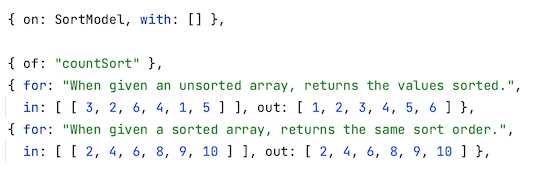
Here are two example tests. `SortModel.countSort()` is being tested using the inputs from `.in` and the expected output from `.out`:
|
|
22
25
|
|
|
23
26
|
|
|
24
27
|
|
|
25
|
-
</div>
|
|
26
28
|
|
|
27
29
|
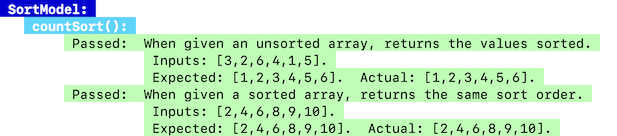
Here is the terminal output of these two example tests. Tests are grouped by class and method. Inputs, expected, and actual values are displayed for all tests, to make intended usage obvious at a glance:
|
|
28
30
|
|
|
29
|
-
<div style="padding-left: 1.5rem;">
|
|
30
|
-
|
|
31
31
|
|
|
32
32
|
|
|
33
|
-
</div>
|
|
34
33
|
|
|
35
34
|
An individual test may appear on one line or multiple lines, depending on how wide the terminal window is. Any failing tests appear in light red.
|
|
36
35
|
|
|
37
36
|
Test runs also feature a title bar, as well as a summary bar at the bottom:
|
|
38
37
|
|
|
39
|
-
<div style="padding-left: 1.5rem;">
|
|
40
|
-
|
|
41
38
|

|
|
42
39
|
|
|
43
|
-
</div>
|
|
44
40
|
|
|
45
41
|
|
|
46
42
|
|
|
47
|
-
##
|
|
43
|
+
## Using Risei
|
|
48
44
|
|
|
49
|
-
|
|
45
|
+
### Installation
|
|
50
46
|
|
|
51
|
-
|
|
47
|
+
Install Risei for development time only:
|
|
52
48
|
|
|
53
49
|
```bash
|
|
54
50
|
npm install --save-dev risei
|
|
55
51
|
```
|
|
56
52
|
|
|
57
|
-
|
|
58
|
-
|
|
59
|
-
<details>
|
|
60
|
-
<summary>
|
|
61
|
-
More information
|
|
62
|
-
</summary>
|
|
63
|
-
<br>
|
|
64
|
-
|
|
65
|
-
- Risei is an `npm` package that uses ESM syntax. It only works well with modern versions of Node that automatically support ESM.
|
|
66
|
-
- Although ESM is usable with older Node versions using external workarounds, a modern version is highly recommended, and Rs is not guaranteed to work with older versions.
|
|
67
|
-
- You can install Rs as a regular dependency if you want, using `npm install risei`, but ordinarily this doesn't make sense, and exposing tests in production is generally considered a bad practice.
|
|
68
|
-
- Risei doesn't directly add any security risks to your code, but exposing tests that use it might (as it can with other test frameworks).
|
|
69
|
-
|
|
70
|
-
</details>
|
|
71
|
-
|
|
72
|
-
|
|
53
|
+
Make sure your `package.json` specifies that ESM is in use:
|
|
73
54
|
|
|
74
|
-
|
|
55
|
+
```json
|
|
56
|
+
"type": "module"
|
|
57
|
+
```
|
|
75
58
|
|
|
76
|
-
|
|
59
|
+
And add Risei's metadata to `package.json`:
|
|
77
60
|
|
|
78
61
|
```json
|
|
79
62
|
"risei": {
|
|
@@ -81,359 +64,225 @@ npm install --save-dev risei
|
|
|
81
64
|
}
|
|
82
65
|
```
|
|
83
66
|
|
|
84
|
-
</div>
|
|
85
|
-
|
|
86
|
-
<details>
|
|
87
|
-
<summary>
|
|
88
|
-
More options
|
|
89
|
-
</summary>
|
|
90
|
-
<br>
|
|
91
|
-
|
|
92
|
-
- The extension `.rt.js` is standard, but you can actually use any extension you want.
|
|
93
|
-
- Whatever extension you use, it should be unique, to avoid scanning many extra files for tests at each test run.
|
|
94
|
-
|
|
95
|
-
</details>
|
|
96
|
-
|
|
97
|
-
|
|
98
|
-
|
|
99
|
-
## How to use Risei
|
|
100
|
-
|
|
101
|
-
1. Create test files with a `.rt.js` extension.
|
|
102
|
-
|
|
103
|
-
<details>
|
|
104
|
-
<summary>
|
|
105
|
-
More options
|
|
106
|
-
</summary>
|
|
107
|
-
<br>
|
|
108
|
-
|
|
109
|
-
- If you chose another extension for your unit-test files (covered earlier), use that instead here.
|
|
110
|
-
|
|
111
|
-
</details>
|
|
112
67
|
|
|
113
68
|
|
|
69
|
+
### Siting tests
|
|
114
70
|
|
|
115
|
-
|
|
116
|
-
|
|
117
|
-
<div style="padding-left: 1.5rem;">
|
|
71
|
+
Add tests in files ending in `.rt.js` like this:
|
|
118
72
|
|
|
119
73
|
```javascript
|
|
120
74
|
import { ATestSource } from "risei/ATestSource";
|
|
121
|
-
import {
|
|
75
|
+
import { ClassToBeTested } from "somewhere";
|
|
122
76
|
|
|
123
|
-
export
|
|
124
|
-
tests = [ ];
|
|
77
|
+
export class SomeTests extends ATestSource {
|
|
78
|
+
tests = [ ... ]; // This array is where test definitions are written.
|
|
125
79
|
}
|
|
126
80
|
```
|
|
127
81
|
|
|
128
|
-
</div>
|
|
129
|
-
|
|
130
|
-
<details>
|
|
131
|
-
<summary>
|
|
132
|
-
More information
|
|
133
|
-
</summary>
|
|
134
|
-
<br>
|
|
135
|
-
|
|
136
|
-
- Tests must be placed in subclasses of `ATestSource`.
|
|
137
|
-
- Risei looks for this class relationship internally, so duck-typing does not work.
|
|
138
|
-
- You have to `import` the class/es being tested in the file/s containing their tests.
|
|
139
|
-
- Don't use ✗`this.tests` by accident — it just causes an exception when tests are run.
|
|
140
|
-
|
|
141
|
-
</details>
|
|
142
82
|
|
|
143
83
|
|
|
84
|
+
### Writing tests
|
|
144
85
|
|
|
145
|
-
|
|
146
|
-
|
|
147
|
-
<div style="padding-left: 1.5rem;">
|
|
86
|
+
Write tests with Risei's easy syntax:
|
|
148
87
|
|
|
149
88
|
```javascript
|
|
150
|
-
|
|
151
|
-
|
|
152
|
-
|
|
153
|
-
|
|
154
|
-
|
|
155
|
-
|
|
89
|
+
tests = [ ...
|
|
90
|
+
{ on: ContainerModelClass, with: [ "a", "b", "c" ], // Target class and constructor args.
|
|
91
|
+
of: "doesContain", // Target method.
|
|
92
|
+
for: "When the input arg is present, returns true.", // Description of test.
|
|
93
|
+
in: [ "c" ], // Inputs.
|
|
94
|
+
out: true }, // Expected output.
|
|
95
|
+
...];
|
|
156
96
|
```
|
|
157
97
|
|
|
158
|
-
</div>
|
|
159
|
-
|
|
160
|
-
<details>
|
|
161
|
-
<summary>
|
|
162
|
-
Basic test properties and options for each
|
|
163
|
-
</summary>
|
|
164
|
-
<br>
|
|
165
|
-
|
|
166
|
-
<div style="padding-left: 1.5rem;">
|
|
167
|
-
|
|
168
|
-
| Name | Contents |
|
|
169
|
-
|--------|--------------------------------------------------------------------------|
|
|
170
|
-
| `on` | The class under test, as a symbol (already imported into the test file) |
|
|
171
|
-
| `with` | An array of any arguments to pass to the constructor of the tested class |
|
|
172
|
-
| `of` | The name of the method under test, as a string, no `()` needed |
|
|
173
|
-
| `for` | A description of what the test proves, for test output |
|
|
174
|
-
| `in` | An array of the input arguments to pass to the tested method |
|
|
175
|
-
| `out` | The expected return value, not in an array |
|
|
176
|
-
|
|
177
|
-
- Properties can be listed in any order within a test definition.
|
|
178
|
-
- There are additional properties for extended functionality (covered later).
|
|
179
|
-
- When there are no parameters for a class' constructor, use an empty array `[ ]` for `.with`.
|
|
180
|
-
- When there are no inputs to a method, use an empty array `[ ]` for `.in`.
|
|
181
|
-
- When the output of a method is an array, freely use an array for `.out`.
|
|
182
|
-
- When there is no output to a method, put the expected value in `.out`, and use special syntax to get the actual value to compare it with (covered later).
|
|
183
|
-
- The property names were chosen to be easy to remember and type, but longer alternatives are available (covered later).
|
|
184
|
-
|
|
185
|
-
</div>
|
|
186
|
-
|
|
187
|
-
</details>
|
|
188
|
-
|
|
189
98
|
|
|
190
99
|
|
|
191
|
-
|
|
100
|
+
#### Write more tests with less syntax:
|
|
192
101
|
|
|
193
|
-
|
|
102
|
+
You can save a lot of time by putting repeated test properties into an object once, just before the related tests:
|
|
194
103
|
|
|
195
104
|
```javascript
|
|
196
|
-
|
|
197
|
-
|
|
198
|
-
|
|
199
|
-
|
|
200
|
-
|
|
201
|
-
|
|
202
|
-
|
|
203
|
-
|
|
204
|
-
|
|
105
|
+
/* All of the following tests are of ContainerModelClass. */
|
|
106
|
+
{ on: ContainerModelClass, with: [ "a", "b", "c", "a", "b" ] },
|
|
107
|
+
|
|
108
|
+
/* Two tests for ContainerModelClass .doesContain(). */
|
|
109
|
+
{ of: "doesContain" },
|
|
110
|
+
{ for: "When the input arg is present, returns true.",
|
|
111
|
+
in: [ "c" ], out: true },
|
|
112
|
+
{ for: "When the input arg is not present, returns false.",
|
|
113
|
+
in: [ "d" ], out: false },
|
|
205
114
|
|
|
206
|
-
|
|
207
|
-
|
|
115
|
+
/* First test for ContainerModelClass .countOf(). */
|
|
116
|
+
{ of: "countOf", for: "Returns the number present.", in: [ "b" ], out: 2 }
|
|
208
117
|
```
|
|
209
118
|
|
|
210
|
-
|
|
211
|
-
|
|
212
|
-
<details>
|
|
213
|
-
<summary>
|
|
214
|
-
More information
|
|
215
|
-
</summary>
|
|
216
|
-
<br>
|
|
217
|
-
|
|
218
|
-
- This simplification tactic, called _collapsing forward_, saves a lot of typing and makes reading tests much easier.
|
|
219
|
-
- Individual tests remain isolated because class instances, spoofed methods (covered later) and so on are all created anew for each test.
|
|
220
|
-
- Test contents are partially or fully reset when it makes the most sense:
|
|
221
|
-
- Changing the class under test in `.on` wipes out all prior test properties, so the new class has a fresh start.
|
|
222
|
-
- Changing the method under test with a new `.of` wipes out only test properties related to methods, to preserve class values you usually want.
|
|
223
|
-
- You can also change individual test properties such as `.with` whenever you want just by stating a new value — but by design, they are collapsed forward to following tests.
|
|
224
|
-
|
|
225
|
-
</details>
|
|
119
|
+
This _collapsing forward_ works for just about every test property, but is reset when you change the class in `.on`, when you give the property a new value, or you erase it with an empty array `[ ]`.
|
|
226
120
|
|
|
227
121
|
|
|
228
122
|
|
|
229
|
-
|
|
123
|
+
#### Spoof away code dependencies:
|
|
230
124
|
|
|
231
|
-
|
|
125
|
+
When your code has dependencies on other code, just _spoof_ the results of that code to get what your test needs from it, using a `.plus` property on your tests that offers many options:
|
|
232
126
|
|
|
233
127
|
```javascript
|
|
234
128
|
{ on: CombinerClass, with: [ ],
|
|
235
129
|
of: "combineResults",
|
|
236
130
|
plus: [
|
|
237
|
-
{ on:
|
|
238
|
-
{ on:
|
|
239
|
-
{
|
|
240
|
-
|
|
131
|
+
{ on: ClassA, of: "someMethod", as: 10 }, // Spoof this ClassA method to return 10.
|
|
132
|
+
{ on: ClassB, of: "someMethod" }, // Spoof this ClassB method not to return (or do) anything.
|
|
133
|
+
{ of: "firstMethod", as: [ 7, 8, 9, 10 ] }, // Spoof a method on the tested class (CombinerClass).
|
|
134
|
+
{ of: "secondMethod" }, // Spoof a method on CombinerClass not to do anything.
|
|
135
|
+
{ on: ClassC, // Spoof this ClassC method to be this nonce code.
|
|
136
|
+
of: "someMethod",
|
|
137
|
+
as: (arg) => { return { color: arg }; } },
|
|
138
|
+
{ on: ClassD, as: [ // Spoof two methods on ClassD at the same time.
|
|
139
|
+
{ of: "firstMethod", as: 11 },
|
|
140
|
+
{ of: "secondMethod", as: 12 }
|
|
141
|
+
] },
|
|
142
|
+
],
|
|
241
143
|
for: "When called, returns an array of values from sources.",
|
|
242
|
-
in: [ ], out: [ 7, 8, 9, 10, 12, { color: "green" } ] }
|
|
144
|
+
in: [ "green" ], out: [ 7, 8, 9, 10, 10, 11, 12, { color: "green" } ] }
|
|
243
145
|
```
|
|
244
146
|
|
|
245
|
-
|
|
246
|
-
- Defining new spoofing wipes out all old definitions.
|
|
247
|
-
|
|
248
|
-
</div>
|
|
147
|
+
These are basically all varieties of spoofing. Spoofing collapses forward across tests, but not across the elements within `.plus`.
|
|
249
148
|
|
|
250
|
-
<details>
|
|
251
|
-
<summary>
|
|
252
|
-
Spoofing syntax and options
|
|
253
|
-
</summary>
|
|
254
|
-
<br>
|
|
255
149
|
|
|
256
|
-
- Each object in `.plus` consists of the following:
|
|
257
150
|
|
|
258
|
-
|
|
151
|
+
### Running tests
|
|
259
152
|
|
|
260
|
-
|
|
261
|
-
|------|-----------------------|---------------------------------------------------------------------------------------------------------------------------|
|
|
262
|
-
| `on` | Optional | Symbol for a type (class); if omitted, the targeted model class is assumed |
|
|
263
|
-
| `of` | Necessary | Name of method to spoof, as a string, `()` not needed |
|
|
264
|
-
| `as` | Optional | Value to return, or nonce implementation; if omitted, an empty method with no return value is used |
|
|
153
|
+
Run your tests by invoking Risei's `index.js` file:
|
|
265
154
|
|
|
266
|
-
|
|
267
|
-
|
|
268
|
-
|
|
269
|
-
- When necessary, you can provide a function to use in place of the real code, in `.as`.
|
|
155
|
+
```bash
|
|
156
|
+
node ./node_modules/risei/index.js
|
|
157
|
+
```
|
|
270
158
|
|
|
159
|
+
Or write a `package.json` script that does the same:
|
|
271
160
|
|
|
272
|
-
|
|
161
|
+
```json
|
|
162
|
+
"scripts": {
|
|
163
|
+
...
|
|
164
|
+
"test": "node ./node_modules/risei/index.js",
|
|
165
|
+
...
|
|
166
|
+
}
|
|
167
|
+
```
|
|
273
168
|
|
|
274
|
-
|
|
169
|
+
And then run that script:
|
|
275
170
|
|
|
276
|
-
```
|
|
277
|
-
|
|
278
|
-
of: "combineResults",
|
|
279
|
-
plus: [
|
|
280
|
-
{ on: ArraySource, of: "getAllValues", as: [ 7, 8, 9, 10 ] },
|
|
281
|
-
{ on: ScalarSource, of: "getValue" },
|
|
282
|
-
{ on: ObjectSource, of: "getObject", as: () => { return { color: "blue" }; } }
|
|
283
|
-
]
|
|
284
|
-
for: "When called, returns sources' values, skipping any undefineds.",
|
|
285
|
-
in: [ ], out: [ 7, 8, 9, 10, { color: "blue" } ] }
|
|
171
|
+
```bash
|
|
172
|
+
npm test
|
|
286
173
|
```
|
|
287
174
|
|
|
288
|
-
|
|
175
|
+
Risei can be used alongside other test frameworks. You might run them all from the same test script, or perhaps write unique scripts for each.
|
|
289
176
|
|
|
290
|
-
- You can spoof methods nested inside of other objects using `.` syntax in the `.of` property:
|
|
291
177
|
|
|
292
|
-
<div style="padding-left: 1.5rem;">
|
|
293
178
|
|
|
294
|
-
|
|
295
|
-
plus: [
|
|
296
|
-
{ on: SimpleObject, of: "getText", as: "Text" },
|
|
297
|
-
{ on: DeepObject, of: "root.branch.leaf.getOptimum", as: 100 }
|
|
298
|
-
]
|
|
299
|
-
```
|
|
179
|
+
### Learning more about Risei
|
|
300
180
|
|
|
301
|
-
|
|
181
|
+
Be sure to read through the rest of this doc to learn more about Risei's many capabilities, and about where Risei is headed.
|
|
302
182
|
|
|
303
|
-
-
|
|
304
|
-
-
|
|
305
|
-
-
|
|
306
|
-
- Properties of spoof objects also have long names (covered later).
|
|
183
|
+
- For instance, learn about using `.and` to test static code or throws.
|
|
184
|
+
- Or learn about using `.from` to test property results or other state.
|
|
185
|
+
- Don't miss out: Once you've tried the basics, read the rest...!
|
|
307
186
|
|
|
308
|
-
<details>
|
|
309
|
-
<summary>
|
|
310
|
-
Further spoofing options
|
|
311
|
-
</summary>
|
|
312
|
-
<br>
|
|
313
187
|
|
|
314
|
-
- You can spoof many methods on a class at the same time with an array of partial spoof objects for the `.as` property:
|
|
315
188
|
|
|
316
|
-
<div style="padding-left: 1.5rem;">
|
|
317
189
|
|
|
318
|
-
|
|
319
|
-
plus: [
|
|
320
|
-
{ on: SimpleObject, of: "getText", as: "Text" },
|
|
321
|
-
{ on: ComplexObject,
|
|
322
|
-
as: [ { of: "getIntegers", as: [ 6, 7, 8 ] },
|
|
323
|
-
{ of: "getDoubles", as: [ 6.0, 7.0, 8.0 ] } ]
|
|
324
|
-
}
|
|
325
|
-
]
|
|
326
|
-
```
|
|
190
|
+
## Risei in depth
|
|
327
191
|
|
|
328
|
-
|
|
192
|
+
### Installation
|
|
329
193
|
|
|
330
|
-
- You can use
|
|
331
|
-
- Nested partial spoof definitions in `.as: [ ... ]` never contain `.on`, and must contain at least `.of`.
|
|
332
|
-
- As in other spoof definitions, `.as` can be omitted in these nested partial spoof objects, with the same effect.
|
|
194
|
+
- You can use any file extension you want in Risei's metadata in `package.json`, and Risei will scan those files for tests.
|
|
333
195
|
|
|
334
|
-
|
|
196
|
+
- You can install Risei outside of development time the usual way, but as with any test system, this is definitely not recommended.
|
|
335
197
|
|
|
336
|
-
|
|
198
|
+
- Risei uses ESM syntax, and may not work in older environments where that's not available or is patched in.
|
|
337
199
|
|
|
338
200
|
|
|
339
201
|
|
|
340
|
-
|
|
202
|
+
### Siting tests
|
|
341
203
|
|
|
342
|
-
|
|
204
|
+
- Match your Risei test file's extensions to whatever you choose in the metadata in `package.json`.
|
|
343
205
|
|
|
344
|
-
|
|
206
|
+
- Test classes must inherit from `ATestSource` in `"risei/ATestSource"`: this type name is looked for specifically, so duck-typing doesn't work.
|
|
345
207
|
|
|
346
|
-
```bash
|
|
347
|
-
node ./node_modules/risei/index.js
|
|
348
|
-
```
|
|
349
208
|
|
|
350
|
-
</div>
|
|
351
209
|
|
|
352
|
-
|
|
353
|
-
<summary>
|
|
354
|
-
More information
|
|
355
|
-
</summary>
|
|
356
|
-
<br>
|
|
210
|
+
### Writing tests
|
|
357
211
|
|
|
358
|
-
-
|
|
212
|
+
- The order and placement of test properties doesn't matter, although the order seen in the examples is probably most readable.
|
|
359
213
|
|
|
360
|
-
</details>
|
|
361
214
|
|
|
215
|
+
#### Basic test properties and options for each:
|
|
362
216
|
|
|
217
|
+
| Name | Contents |
|
|
218
|
+
|--------|-----------------------------------------------------------------------------------------------------------|
|
|
219
|
+
| `on` | The class under test, as a symbol / name (already imported into the test file) |
|
|
220
|
+
| `with` | An array of any arguments to pass to the constructor of the tested class, or an empty array `[ ]` if none |
|
|
221
|
+
| `of` | The name of the method under test, as a string, no `()` needed |
|
|
222
|
+
| `for` | A description of what the test proves, for test output |
|
|
223
|
+
| `in` | An array of the input arguments to pass to the tested method, or an empty array `[ ]` if none |
|
|
224
|
+
| `out` | The expected return value, not in an array |
|
|
363
225
|
|
|
364
|
-
|
|
226
|
+
- There are additional properties for extended functionality, covered later.
|
|
227
|
+
- The property names were chosen to be easy to remember and type, but longer alternatives are available, covered later.
|
|
365
228
|
|
|
366
|
-
<div style="padding-left: 1.5rem;">
|
|
367
229
|
|
|
368
|
-
|
|
369
|
-
"scripts": {
|
|
370
|
-
"test": "node ./node_modules/risei/index.js"
|
|
371
|
-
}
|
|
372
|
-
```
|
|
373
|
-
</div>
|
|
230
|
+
</details>
|
|
374
231
|
|
|
375
|
-
<details>
|
|
376
|
-
<summary>
|
|
377
|
-
More options
|
|
378
|
-
</summary>
|
|
379
|
-
<br>
|
|
380
232
|
|
|
381
|
-
-
|
|
233
|
+
### Test-property reuse _AKA_ Collapsing forward
|
|
382
234
|
|
|
383
|
-
|
|
235
|
+
- To save time and effort, any property you write is collapsed forward to subsequent tests unless you replace it or erase it with an empty array `[ ]`.
|
|
236
|
+
- Property values are gathered across partial test objects until they add up to a runnable test, which is then run.
|
|
237
|
+
- Changes to properties are combined with previous ones to produce intended new tests.
|
|
238
|
+
- For a rare and avoidable side-effect of this system, see [Known bugs and workarounds](#known-bugs-and-workarounds).
|
|
384
239
|
|
|
385
|
-
|
|
386
|
-
|
|
387
|
-
|
|
388
|
-
}
|
|
389
|
-
```
|
|
240
|
+
- Test contents, reused or not, are automatically reset when it makes the most sense:
|
|
241
|
+
- Changing the tested class in `.on` wipes out all prior test properties, so the new class has a fresh start.
|
|
242
|
+
- Changing the tested method in `.of` wipes out only test properties related to methods, to preserve class values you usually want.
|
|
390
243
|
|
|
391
|
-
</div>
|
|
392
244
|
|
|
393
|
-
-
|
|
245
|
+
- Individual tests remain isolated because class instances, spoofed methods (covered later) and so on are all created anew for each test.
|
|
246
|
+
- However, input (`.in`) and instantiation (`.with`) arguments that are mutated by tested code are not yet isolated.
|
|
247
|
+
- They will be fully isolated in a future release.
|
|
248
|
+
- In the meantime, calling a function to supply them to `.in` or `.with` does isolate them completely.
|
|
394
249
|
|
|
395
|
-
<div style="padding-left: 1.5rem;">
|
|
396
250
|
|
|
397
|
-
|
|
398
|
-
"risei": "node ./node_modules/risei/index.js"
|
|
399
|
-
"test": "mocha **/* && risei"
|
|
400
|
-
```
|
|
251
|
+
### Choosing test-only dependency inputs _AKA_ Spoofing
|
|
401
252
|
|
|
402
|
-
|
|
253
|
+
- Spoofing is Risei's way of providing test-only inputs from dependencies the tested code uses, written in simple declarative syntax.
|
|
254
|
+
- It's therefore the equivalent of test doubles, mocks, fakes, and so on.
|
|
403
255
|
|
|
404
|
-
- Of course, if you are used to Linux / Unix scripting, you may also find other techniques to make running tests easier.
|
|
405
256
|
|
|
406
|
-
|
|
257
|
+
- As the earlier examples and this table show, you can spoof in many ways, both on the dependencies, and on the class being tested.
|
|
258
|
+
- All classes whose members are being spoofed have to be imported.
|
|
407
259
|
|
|
408
260
|
|
|
261
|
+
#### Spoof-definition properties:
|
|
409
262
|
|
|
410
|
-
|
|
263
|
+
| Name | Necessary or Optional | Contents |
|
|
264
|
+
|------|-----------------------|----------------------------------------------------------------------------|
|
|
265
|
+
| `on` | Optional | Symbol for a type (class); if omitted, the targeted model class is assumed |
|
|
266
|
+
| `of` | Necessary | Name of the method to spoof, as a string, trailing `()` not needed |
|
|
267
|
+
| `as` | Optional | Value to return or nonce implementation; if omitted, an empty method with no return value is used<br> — or —<br>A list of partial spoof definitions for the same class |
|
|
411
268
|
|
|
412
|
-
<div style="padding-left: 1.5rem;">
|
|
413
269
|
|
|
414
|
-
|
|
415
|
-
npm test
|
|
416
|
-
```
|
|
270
|
+
- You can spoof multiple methods of a class individually, or list them together with partial definitions as seen in the example, with the same effect either way.
|
|
417
271
|
|
|
418
|
-
</div>
|
|
419
272
|
|
|
420
|
-
|
|
421
|
-
<summary>
|
|
422
|
-
More options
|
|
423
|
-
</summary>
|
|
424
|
-
<br>
|
|
273
|
+
#### Partial spoof-definition properties:
|
|
425
274
|
|
|
426
|
-
|
|
275
|
+
| Name | Necessary or Optional | Contents |
|
|
276
|
+
|------|-----------------------|---------------------------------------------------------------------------------------------------|
|
|
277
|
+
| `of` | Necessary | Name of the method to spoof, as a string, trailing `()` not needed |
|
|
278
|
+
| `as` | Optional | Value to return or nonce implementation; if omitted, an empty method with no return value is used |
|
|
427
279
|
|
|
428
|
-
<div style="padding-left: 1.5rem;">
|
|
429
280
|
|
|
430
|
-
|
|
431
|
-
npm run risei
|
|
432
|
-
```
|
|
281
|
+
- Defining new spoofing wipes out all old definitions.
|
|
433
282
|
|
|
434
|
-
</div>
|
|
435
283
|
|
|
436
|
-
|
|
284
|
+
- Spoofing is done at the start of each test and undone at the end of each test, keeping all tests isolated.
|
|
285
|
+
|
|
437
286
|
|
|
438
287
|
|
|
439
288
|
|
|
@@ -441,17 +290,11 @@ npm run risei
|
|
|
441
290
|
|
|
442
291
|
### Testing special test conditions with `.and`
|
|
443
292
|
|
|
444
|
-
You can use the special test property `.and`, always a string, to indicate special conditions that apply to your test
|
|
293
|
+
You can use the special test property `.and`, always a string, to indicate special conditions that apply to your test.
|
|
294
|
+
- At present, the values available are `"static"` and `"throw"` / `"throws"` (either one works).
|
|
295
|
+
- You can list `static` and `throw` / `throws` together if needed, separated by a space.
|
|
445
296
|
|
|
446
|
-
|
|
447
|
-
<summary>
|
|
448
|
-
More information
|
|
449
|
-
</summary>
|
|
450
|
-
<br>
|
|
451
|
-
|
|
452
|
-
- The `.and` property is an expansion point for supporting more special conditions in the future. Values will always be listable together (as long as any particular grouping makes sense).
|
|
453
|
-
|
|
454
|
-
</details>
|
|
297
|
+
The `.and` property is an expansion point for supporting more special conditions in the future. Values will always be listable together (as long as any particular grouping makes sense).
|
|
455
298
|
|
|
456
299
|
|
|
457
300
|
|
|
@@ -459,8 +302,6 @@ You can use the special test property `.and`, always a string, to indicate speci
|
|
|
459
302
|
|
|
460
303
|
To test a static method, use an `.and` of `"static"`:
|
|
461
304
|
|
|
462
|
-
<div style="padding-left: 1.5rem">
|
|
463
|
-
|
|
464
305
|
```javascript
|
|
465
306
|
{ on: StaticTextProfileModel, with: [] },
|
|
466
307
|
|
|
@@ -472,16 +313,12 @@ To test a static method, use an `.and` of `"static"`:
|
|
|
472
313
|
}
|
|
473
314
|
```
|
|
474
315
|
|
|
475
|
-
</div>
|
|
476
|
-
|
|
477
316
|
|
|
478
317
|
|
|
479
318
|
#### Testing throws
|
|
480
319
|
|
|
481
320
|
To test a throw, use an `.and` of `"throw"` or `"throws"`:
|
|
482
321
|
|
|
483
|
-
<div style="padding-left: 1.5rem">
|
|
484
|
-
|
|
485
322
|
```javascript
|
|
486
323
|
{ on: InstanceTextProfileModel, with: [] },
|
|
487
324
|
|
|
@@ -493,22 +330,17 @@ To test a throw, use an `.and` of `"throw"` or `"throws"`:
|
|
|
493
330
|
}
|
|
494
331
|
```
|
|
495
332
|
|
|
496
|
-
</div>
|
|
497
|
-
|
|
498
333
|
|
|
499
334
|
|
|
500
335
|
### Testing object properties and other non-`return` results
|
|
501
336
|
|
|
502
337
|
To test a value that isn't the exercised code's return value, you use `.out` normally, and you add a `.from` property to your test, which can be one of two things:
|
|
503
338
|
|
|
504
|
-
<div style="padding-left: 1.5rem">
|
|
505
|
-
|
|
506
339
|
| Contents of `.from` | Usage |
|
|
507
340
|
|--------------------------------|-------------------------------------------------------------------------|
|
|
508
341
|
| Property name as string | Retrieves the actual from the named property on the test's target class |
|
|
509
342
|
| Specialized function | Retrieves the actual from either its `target` or `test` parameter |
|
|
510
343
|
|
|
511
|
-
</div>
|
|
512
344
|
|
|
513
345
|
- Getting properties, mutated args, and other non-return values is known as _retrieving_.
|
|
514
346
|
- Retrieving definitions collapse forward across tests unless replaced with new definitions, or erased by setting `.from` to an empty array `[ ]`.
|
|
@@ -522,8 +354,6 @@ To test a value that isn't the exercised code's return value, you use `.out` nor
|
|
|
522
354
|
|
|
523
355
|
- Use of `.from` with a property name looks like this:
|
|
524
356
|
|
|
525
|
-
<div style="padding-left: 1.5rem">
|
|
526
|
-
|
|
527
357
|
```javascript
|
|
528
358
|
{ on: StatefulModel, with: [] },
|
|
529
359
|
|
|
@@ -532,20 +362,15 @@ To test a value that isn't the exercised code's return value, you use `.out` nor
|
|
|
532
362
|
in: [ 10, 8, 9, 6 ], out: 4320, from: "result" },
|
|
533
363
|
```
|
|
534
364
|
|
|
535
|
-
</div>
|
|
536
|
-
|
|
537
365
|
- Only instance properties can be retrieved by name. For static properties, use `.and` (covered earlier), plus a function as `.from` (covered next).
|
|
538
366
|
|
|
539
367
|
When the contents of `.from` are a function, these are the two parameters:
|
|
540
368
|
|
|
541
|
-
<div style="padding-left: 1.5rem">
|
|
542
|
-
|
|
543
369
|
| Name | Contents |
|
|
544
370
|
|----------|---------------------------------------------------------------------------------------------------|
|
|
545
371
|
| `target` | The instance of the class being tested |
|
|
546
|
-
| `test` | The test definition itself, whose properties may have been mutated by the tested method
|
|
372
|
+
| `test` | The test definition itself, whose properties may have been mutated by the tested method |
|
|
547
373
|
|
|
548
|
-
</div>
|
|
549
374
|
|
|
550
375
|
- The `test` parameter to a `.from` function contains all of the properties of your test definition, including those that collapsed forward.
|
|
551
376
|
- These properties are available by both short or long names (covered later).
|
|
@@ -557,8 +382,6 @@ When the contents of `.from` are a function, these are the two parameters:
|
|
|
557
382
|
|
|
558
383
|
- Another usage of a `.from` function is to look at an input to see if it was changed as expected:
|
|
559
384
|
|
|
560
|
-
<div style="padding-left: 1.5rem">
|
|
561
|
-
|
|
562
385
|
```javascript
|
|
563
386
|
{ on: SecurityModel, with: [] },
|
|
564
387
|
|
|
@@ -570,8 +393,6 @@ When the contents of `.from` are a function, these are the two parameters:
|
|
|
570
393
|
},
|
|
571
394
|
```
|
|
572
395
|
|
|
573
|
-
</div>
|
|
574
|
-
|
|
575
396
|
</details>
|
|
576
397
|
|
|
577
398
|
|
|
@@ -588,8 +409,6 @@ All test properties have long names that you can use instead of the short ones i
|
|
|
588
409
|
Test properties' short and long names
|
|
589
410
|
</summary>
|
|
590
411
|
|
|
591
|
-
<div style="padding-left: 1.5rem;">
|
|
592
|
-
|
|
593
412
|
| Short Name | Long Name |
|
|
594
413
|
|------------|-----------|
|
|
595
414
|
| `on` | `type` |
|
|
@@ -602,8 +421,6 @@ All test properties have long names that you can use instead of the short ones i
|
|
|
602
421
|
| `from` | `source` |
|
|
603
422
|
| `and` | `factors` |
|
|
604
423
|
|
|
605
|
-
</div>
|
|
606
|
-
|
|
607
424
|
</details>
|
|
608
425
|
|
|
609
426
|
<br>
|
|
@@ -613,16 +430,12 @@ All test properties have long names that you can use instead of the short ones i
|
|
|
613
430
|
Spoof properties' short and long names
|
|
614
431
|
</summary>
|
|
615
432
|
|
|
616
|
-
<div style="padding-left: 1.5rem;">
|
|
617
|
-
|
|
618
433
|
| Short Name | Long Name |
|
|
619
434
|
|------------|-----------|
|
|
620
435
|
| `on` | `target` |
|
|
621
436
|
| `of` | `method` |
|
|
622
437
|
| `as` | `output` |
|
|
623
438
|
|
|
624
|
-
</div>
|
|
625
|
-
|
|
626
439
|
</details>
|
|
627
440
|
|
|
628
441
|
|
|
@@ -640,10 +453,15 @@ Constructors can be tested with no special test properties or keywords.
|
|
|
640
453
|
|
|
641
454
|
The following are not supported at present:
|
|
642
455
|
- Use of `async` syntax
|
|
456
|
+
- Code written in ESM `export` modules, but not within classes
|
|
643
457
|
- Standalone functions and other functionality not built into classes, AKA _loose code_
|
|
644
458
|
- CJS syntax using `require()`
|
|
645
459
|
- Spoofing mixes of properties and methods, such as `something.method.property.method`
|
|
646
|
-
- Debugging model code during tests
|
|
460
|
+
- Debugging model code during tests
|
|
461
|
+
- Comparing rare JS object types like `Proxy` or `ArrayBuffer` in test assertions
|
|
462
|
+
|
|
463
|
+
Some of these are on the tentative future-development list. In the meantime, Risei can be used to save development time for most of your JavaScript code, while these can be tested using another framework invoked alongside Risei.
|
|
464
|
+
|
|
647
465
|
|
|
648
466
|
|
|
649
467
|
|
|
@@ -651,14 +469,50 @@ The following are not supported at present:
|
|
|
651
469
|
|
|
652
470
|
Most problems with using Risei are minor mistakes in syntax, or omissions in test definitions:
|
|
653
471
|
|
|
654
|
-
| Error text
|
|
655
|
-
|
|
656
|
-
|
|
|
657
|
-
| `"Test loading failed for... SyntaxError: Unexpected token '
|
|
658
|
-
|
|
|
659
|
-
| Unexpected
|
|
472
|
+
| Error condition or text | Probable cause / fix |
|
|
473
|
+
|-----------------------------------|----------------------------------------------------------------|
|
|
474
|
+
| Sudden drop in the number of tests run | An error occurred in a test file; error output at the top of the test run explains why |
|
|
475
|
+
| `"Test loading failed for... SyntaxError: Unexpected token ':'"` | Missing comma in your tests in the named file |
|
|
476
|
+
| `"Test loading failed for... SyntaxError: Unexpected token '.'"` | Using `this.tests = []` instead of `tests = []` in the file named |
|
|
477
|
+
| Other `... Unexpected token ...` errors | Some other syntax error in the file named, most likely a missing or extra delimiter |
|
|
478
|
+
| Unexpected actual values, or unexpected passes / fails in test runs | Spoofs, retrievals, or special conditions from previous tests not replaced or reset with `[ ]`<br>— or —<br>Tested method mutates `.in` or `.with` args: preventable by using a function to supply those args<br>— or —<br>Pre-listed test properties produce extra tests: preventable by restating class in `.on`
|
|
479
|
+
|
|
|
480
|
+
|
|
481
|
+
|
|
482
|
+
|
|
483
|
+
|
|
484
|
+
## Known bugs and workarounds
|
|
485
|
+
|
|
486
|
+
One known bug exists:
|
|
487
|
+
- When the args stated in `.with` or `.in` are mutated by the method under test (or by anything done within a test), the mutated values are carried forward to other tests.
|
|
488
|
+
- A workaround exists for now: just provide those args using a fixture function when they may be mutated. The function is called each time, isolating them completely.
|
|
489
|
+
|
|
490
|
+
|
|
491
|
+
- This problem with test isolation is being fixed in an upcoming release.
|
|
492
|
+
|
|
493
|
+
|
|
494
|
+
One known unexpected result (not quite a bug) exists:
|
|
495
|
+
- Because test properties collapse forward to form whole tests, pre-stating new properties for upcoming tests without changing `.on` is treated as a new test like prior ones, with just those properties changed.
|
|
496
|
+
- Pre-stating properties might be done as a way to make them stand out when reading through the tests.
|
|
497
|
+
|
|
498
|
+
- This means you see an extra unexpected test that most likely fails, due to the mix of old and new properties.
|
|
499
|
+
|
|
500
|
+
- A workaround exists: if you pre-state new properties, also restate the class under test in `.on`, which erases all prior test properties.
|
|
501
|
+
- Restating `.on` doesn't cause the class name to be displayed again in output.
|
|
502
|
+
|
|
503
|
+
|
|
504
|
+
- This output is rarely an issue, and may be what is wanted in some cases, but options for preventing it are being considered.
|
|
505
|
+
|
|
506
|
+
|
|
507
|
+
|
|
508
|
+
## What's new in Risei
|
|
509
|
+
|
|
510
|
+
Release **1.1.1** of Risei (January, 2024) fixes two problems:
|
|
511
|
+
- Classes were sometimes displayed in output as their entire definition, instead of just the class name.
|
|
512
|
+
- All `Date` instances were considered equal, regardless of their actual value.
|
|
513
|
+
|
|
514
|
+
Development of Risei is ongoing, including internal improvements, problem fixes, and additional options for testing.
|
|
660
515
|
|
|
661
|
-
When something is wrong in one test file, other test files still usually load and run, so a good sign that there's a problem is a sudden decrease in the number of run tests reported.
|
|
662
516
|
|
|
663
517
|
|
|
664
518
|
|
|
@@ -668,11 +522,12 @@ Risei is written by myself, Ed Fallin. I'm a longtime software developer
|
|
|
668
522
|
|
|
669
523
|
If you find Risei useful, consider spreading the word to other devs, making a donation, suggesting enhancements, or proposing sponsorships.
|
|
670
524
|
|
|
671
|
-
You can get in touch about Risei at **
|
|
525
|
+
You can get in touch about Risei at **riseimaker@gmail.com**.
|
|
526
|
+
|
|
672
527
|
|
|
673
528
|
|
|
674
529
|
|
|
675
|
-
##
|
|
530
|
+
## Risei license
|
|
676
531
|
|
|
677
532
|
Risei is published for use under the terms of the MIT license:
|
|
678
533
|
|