report-studio 1.0.0 → 1.2.0
This diff represents the content of publicly available package versions that have been released to one of the supported registries. The information contained in this diff is provided for informational purposes only and reflects changes between package versions as they appear in their respective public registries.
- package/LICENSE +21 -21
- package/README.md +171 -22
- package/dist/designer-qy59eEux.js +3416 -0
- package/dist/designer.js +2 -3209
- package/dist/index.js +2 -2
- package/dist/react-designer.js +41 -0
- package/dist/react.js +60 -0
- package/dist/{viewer-D-c0lKzQ.js → viewer-xa17tyMJ.js} +682 -537
- package/package.json +105 -66
- package/src/cli/serve.js +135 -135
- package/src/designer/designer.js +2054 -1900
- package/src/designer/dialog.js +708 -708
- package/src/designer/fields.js +51 -2
- package/src/designer/icons.js +5 -0
- package/src/designer/index.html +28 -28
- package/src/designer/main.js +39 -39
- package/src/designer/menu.js +2 -2
- package/src/designer/panel.js +21 -1
- package/src/designer/sample-data.js +180 -9
- package/src/designer/structure.js +87 -6
- package/src/designer/styles.css +1654 -1616
- package/src/designer/tokens.js +9 -0
- package/src/engine/csv.js +350 -315
- package/src/engine/group.js +128 -65
- package/src/engine/index.js +35 -34
- package/src/engine/measure.js +13 -12
- package/src/engine/paginate.js +8 -4
- package/src/engine/resolve.js +37 -0
- package/src/engine/tables.js +87 -0
- package/src/engine/validate.js +97 -22
- package/src/index.html +79 -79
- package/src/index.js +51 -50
- package/src/preview/chrome.css +505 -505
- package/src/preview/chrome.js +147 -147
- package/src/preview/index.html +28 -28
- package/src/preview/viewer.js +763 -745
- package/src/react/designer.js +87 -0
- package/src/react/index.js +117 -0
- package/src/render/items.js +94 -1
- package/src/render/report.css +30 -0
- package/src/server/routes.js +331 -331
- package/src/shared/brand.css +29 -29
- package/src/shared/dropdown.css +136 -136
- package/src/shared/modal.css +125 -125
- package/src/shared/store.js +145 -145
- package/src/shared/theme.css +72 -72
- package/src/shared/window.js +138 -138
- package/types/designer.d.ts +85 -0
- package/types/index.d.ts +204 -0
- package/types/layout.d.ts +179 -0
- package/types/react-designer.d.ts +29 -0
- package/types/react.d.ts +30 -0
- package/types/vite.d.ts +18 -0
package/LICENSE
CHANGED
|
@@ -1,21 +1,21 @@
|
|
|
1
|
-
MIT License
|
|
2
|
-
|
|
3
|
-
Copyright (c) 2026 Mohammed Shafick A
|
|
4
|
-
|
|
5
|
-
Permission is hereby granted, free of charge, to any person obtaining a copy
|
|
6
|
-
of this software and associated documentation files (the "Software"), to deal
|
|
7
|
-
in the Software without restriction, including without limitation the rights
|
|
8
|
-
to use, copy, modify, merge, publish, distribute, sublicense, and/or sell
|
|
9
|
-
copies of the Software, and to permit persons to whom the Software is
|
|
10
|
-
furnished to do so, subject to the following conditions:
|
|
11
|
-
|
|
12
|
-
The above copyright notice and this permission notice shall be included in all
|
|
13
|
-
copies or substantial portions of the Software.
|
|
14
|
-
|
|
15
|
-
THE SOFTWARE IS PROVIDED "AS IS", WITHOUT WARRANTY OF ANY KIND, EXPRESS OR
|
|
16
|
-
IMPLIED, INCLUDING BUT NOT LIMITED TO THE WARRANTIES OF MERCHANTABILITY,
|
|
17
|
-
FITNESS FOR A PARTICULAR PURPOSE AND NONINFRINGEMENT. IN NO EVENT SHALL THE
|
|
18
|
-
AUTHORS OR COPYRIGHT HOLDERS BE LIABLE FOR ANY CLAIM, DAMAGES OR OTHER
|
|
19
|
-
LIABILITY, WHETHER IN AN ACTION OF CONTRACT, TORT OR OTHERWISE, ARISING FROM,
|
|
20
|
-
OUT OF OR IN CONNECTION WITH THE SOFTWARE OR THE USE OR OTHER DEALINGS IN THE
|
|
21
|
-
SOFTWARE.
|
|
1
|
+
MIT License
|
|
2
|
+
|
|
3
|
+
Copyright (c) 2026 Mohammed Shafick A
|
|
4
|
+
|
|
5
|
+
Permission is hereby granted, free of charge, to any person obtaining a copy
|
|
6
|
+
of this software and associated documentation files (the "Software"), to deal
|
|
7
|
+
in the Software without restriction, including without limitation the rights
|
|
8
|
+
to use, copy, modify, merge, publish, distribute, sublicense, and/or sell
|
|
9
|
+
copies of the Software, and to permit persons to whom the Software is
|
|
10
|
+
furnished to do so, subject to the following conditions:
|
|
11
|
+
|
|
12
|
+
The above copyright notice and this permission notice shall be included in all
|
|
13
|
+
copies or substantial portions of the Software.
|
|
14
|
+
|
|
15
|
+
THE SOFTWARE IS PROVIDED "AS IS", WITHOUT WARRANTY OF ANY KIND, EXPRESS OR
|
|
16
|
+
IMPLIED, INCLUDING BUT NOT LIMITED TO THE WARRANTIES OF MERCHANTABILITY,
|
|
17
|
+
FITNESS FOR A PARTICULAR PURPOSE AND NONINFRINGEMENT. IN NO EVENT SHALL THE
|
|
18
|
+
AUTHORS OR COPYRIGHT HOLDERS BE LIABLE FOR ANY CLAIM, DAMAGES OR OTHER
|
|
19
|
+
LIABILITY, WHETHER IN AN ACTION OF CONTRACT, TORT OR OTHERWISE, ARISING FROM,
|
|
20
|
+
OUT OF OR IN CONNECTION WITH THE SOFTWARE OR THE USE OR OTHER DEALINGS IN THE
|
|
21
|
+
SOFTWARE.
|
package/README.md
CHANGED
|
@@ -1,14 +1,22 @@
|
|
|
1
1
|
# Report Studio
|
|
2
2
|
|
|
3
|
-
Design paginated reports
|
|
3
|
+
**Design paginated reports visually. Zero runtime dependencies. Works in plain
|
|
4
|
+
JS or React.**
|
|
4
5
|
|
|
5
|
-
|
|
6
|
-
tables, text — and it is saved as a plain JSON file. At runtime your app feeds
|
|
7
|
-
that layout its own data and gets back a page-by-page report viewer, with
|
|
8
|
-
navigation, zoom, search, print and CSV export.
|
|
6
|
+
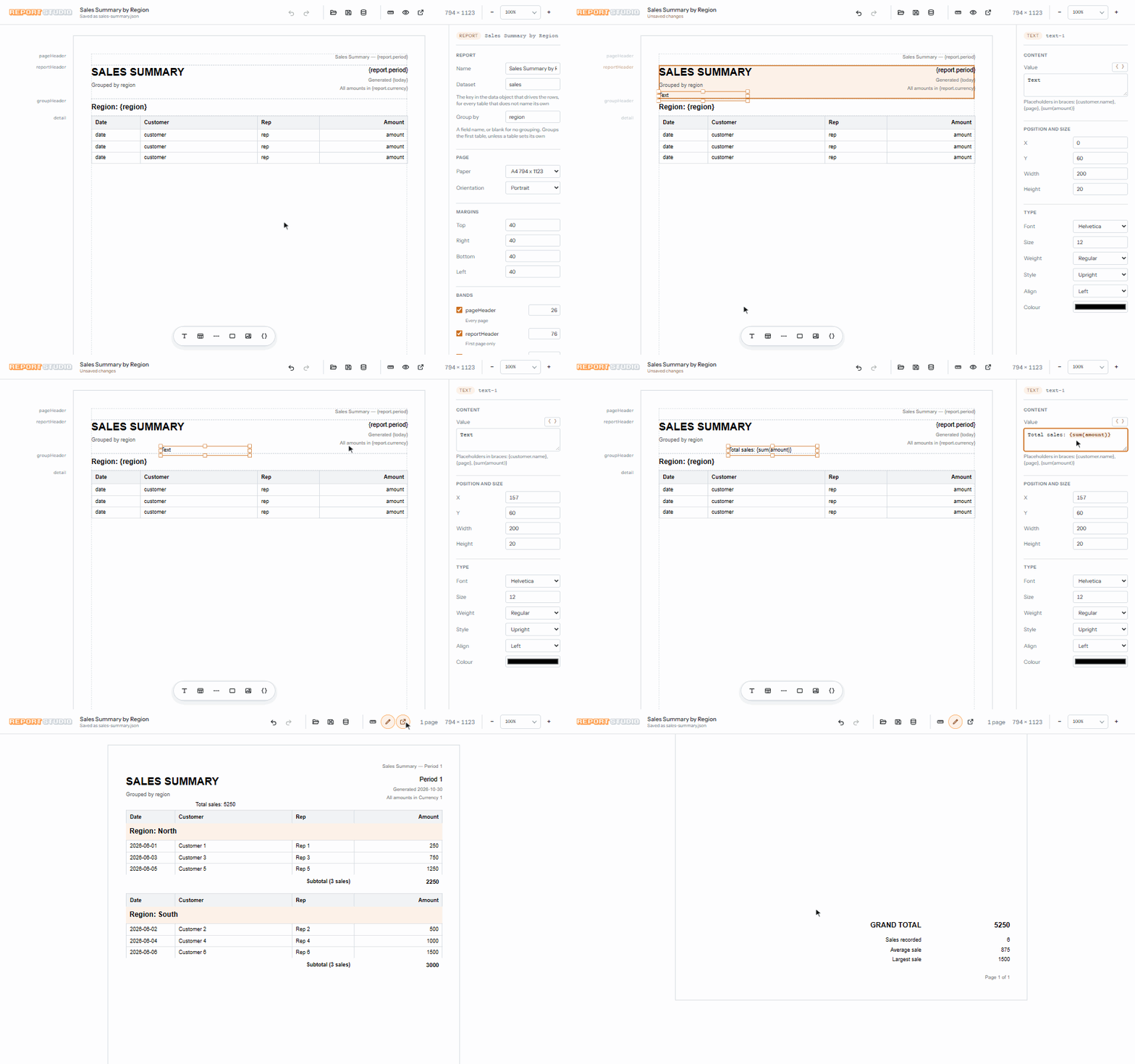
|
|
9
7
|
|
|
10
|
-
|
|
11
|
-
|
|
8
|
+
You draw the report once in a visual designer — headers, footers, groups,
|
|
9
|
+
tables, text, images — and it is saved as a plain JSON file. At runtime your
|
|
10
|
+
app feeds that layout its own data and gets back a page-by-page report viewer,
|
|
11
|
+
with navigation, zoom, search, print and CSV export.
|
|
12
|
+
|
|
13
|
+
* **Zero runtime dependencies.** The renderer is plain DOM. No server to run,
|
|
14
|
+
no framework required.
|
|
15
|
+
* **Layouts are plain JSON.** Commit them, diff them, load them with `fetch`.
|
|
16
|
+
* **React components included**, for both the viewer and the designer.
|
|
17
|
+
* **Vite plugin.** One line in `vite.config.js` and your existing dev server
|
|
18
|
+
hosts the designer's save routes.
|
|
19
|
+
* **TypeScript types included.**
|
|
12
20
|
|
|
13
21
|
## Installation
|
|
14
22
|
|
|
@@ -54,13 +62,33 @@ report asks for: a key for every text placeholder, a row array for every table,
|
|
|
54
62
|
and the fields your totals are taken over. Read it as the answer to "what does
|
|
55
63
|
my app have to supply?" — it is the shape, filled in with placeholder values.
|
|
56
64
|
|
|
57
|
-
It is
|
|
58
|
-
|
|
59
|
-
|
|
65
|
+
It is created the first time a report is saved. Later saves only *add* to it,
|
|
66
|
+
for anything the layout has asked for since: a new table's rows, a new
|
|
67
|
+
placeholder's key, a new image field. Values already in the file, including
|
|
68
|
+
real figures you have typed in, are never changed. Your app never reads this
|
|
69
|
+
file; it passes its own data to `buildPages`.
|
|
60
70
|
|
|
61
71
|
The designer is a design-time tool. It reads and writes files inside `--dir`
|
|
62
72
|
and nowhere else — keep it on localhost and do not run it in production.
|
|
63
73
|
|
|
74
|
+
### Already using Vite?
|
|
75
|
+
|
|
76
|
+
Skip the separate command. The plugin mounts the same read-and-write routes in
|
|
77
|
+
the dev server you already run:
|
|
78
|
+
|
|
79
|
+
```js
|
|
80
|
+
import { defineConfig } from 'vite';
|
|
81
|
+
import { reportStudio } from 'report-studio/vite';
|
|
82
|
+
|
|
83
|
+
export default defineConfig({
|
|
84
|
+
plugins: [reportStudio({ dir: 'reports' })]
|
|
85
|
+
});
|
|
86
|
+
```
|
|
87
|
+
|
|
88
|
+
Dev only, deliberately: it writes files, and mounting that in front of a
|
|
89
|
+
production build would be a hole rather than a feature. The CLI stays the
|
|
90
|
+
default because it works in any project, Vite or not.
|
|
91
|
+
|
|
64
92
|
## Preview setup
|
|
65
93
|
|
|
66
94
|
Two files: an HTML page with one empty element, and a module that fills it.
|
|
@@ -142,6 +170,70 @@ To open the report in a window of its own instead of inside your page, use
|
|
|
142
170
|
`openViewerWindow({ paginated, title })` — same viewer, called from a click or
|
|
143
171
|
a keypress so the browser does not block the window.
|
|
144
172
|
|
|
173
|
+
### Several tables
|
|
174
|
+
|
|
175
|
+
A report can hold any number of tables. Each one reads the dataset named in
|
|
176
|
+
its *Dataset* property, or the report's dataset if it names none, so each gets
|
|
177
|
+
its own array in your data:
|
|
178
|
+
|
|
179
|
+
```js
|
|
180
|
+
buildPages(layout, {
|
|
181
|
+
orders: [ { item: 'Widget', qty: 2, amount: 50 } ],
|
|
182
|
+
refunds: [ { item: 'Gadget', qty: 1, amount: 20 } ]
|
|
183
|
+
});
|
|
184
|
+
```
|
|
185
|
+
|
|
186
|
+
Tables in the same band are stacked, one under another. Each splits across
|
|
187
|
+
pages on its own, and a table below another moves down by however far the one
|
|
188
|
+
above really ran. Two tables side by side are refused, because they would print
|
|
189
|
+
one after the other rather than together.
|
|
190
|
+
|
|
191
|
+
Totals can name the dataset they add up:
|
|
192
|
+
|
|
193
|
+
| Placeholder | Means |
|
|
194
|
+
| --- | --- |
|
|
195
|
+
| `{sum(orders.amount)}` | `amount` summed over every row of `orders` |
|
|
196
|
+
| `{count(refunds)}` | the number of rows in `refunds` |
|
|
197
|
+
| `{sum(amount)}` | `amount` over the first table's rows, as before |
|
|
198
|
+
|
|
199
|
+
The named dataset does not need a table of its own. Any array in the data can
|
|
200
|
+
be totalled this way.
|
|
201
|
+
|
|
202
|
+
One table per report can be grouped. Set *Group by* on that table. A layout
|
|
203
|
+
with a report-wide *Group by* still groups its first table. The group header
|
|
204
|
+
and footer bands are shared, which is why only one table can use them.
|
|
205
|
+
|
|
206
|
+
For CSV, the viewer's export writes every table in the order they print. From
|
|
207
|
+
code, `toCSV(pages, { table: 'refunds' })` writes one table, and
|
|
208
|
+
`reportTables(pages)` lists the tables a report has.
|
|
209
|
+
|
|
210
|
+
### Images
|
|
211
|
+
|
|
212
|
+
An image item can get its picture in two ways:
|
|
213
|
+
|
|
214
|
+
* **Stored in the layout.** In the designer, click *Upload* in the image's
|
|
215
|
+
properties. The picture is saved inside the layout JSON as a `data:` URI, so
|
|
216
|
+
keep it small: files over 200 KB show a warning and files over 1 MB are
|
|
217
|
+
refused. PNG, JPEG, GIF and WebP are accepted.
|
|
218
|
+
* **Read from your data.** Set *From data* to a path such as `company.logo`,
|
|
219
|
+
and supply that path's URL in the data you pass to `buildPages`:
|
|
220
|
+
|
|
221
|
+
```js
|
|
222
|
+
buildPages(layout, {
|
|
223
|
+
company: { logo: 'https://cdn.example.com/acme.png' },
|
|
224
|
+
sales: [ /* ... */ ]
|
|
225
|
+
});
|
|
226
|
+
```
|
|
227
|
+
|
|
228
|
+
If an image has both, the data wins, so a stored picture works as a default
|
|
229
|
+
that your data can replace per customer. *Fit* controls how the picture sits in
|
|
230
|
+
its box: `contain` (fit inside), `cover` (fill and crop) or `fill` (stretch).
|
|
231
|
+
|
|
232
|
+
Image URLs may be `http:`, `https:`, `blob:`, relative paths, or `data:` URIs
|
|
233
|
+
for PNG, JPEG, GIF, WebP, AVIF and BMP. Anything else, including `javascript:`
|
|
234
|
+
and SVG `data:` URIs, is not drawn. Remote images must be reachable from the
|
|
235
|
+
viewer's page. The viewer waits for images to finish loading before it prints.
|
|
236
|
+
|
|
145
237
|
### With a bundler
|
|
146
238
|
|
|
147
239
|
Vite, webpack and the rest resolve bare names themselves, so there is no import
|
|
@@ -160,6 +252,65 @@ import 'report-studio/viewer.css';
|
|
|
160
252
|
| `report-studio/designer.css` | the designer's styles, likewise |
|
|
161
253
|
| `report-studio/report.css` | the report alone, for drawing pages with no chrome |
|
|
162
254
|
|
|
255
|
+
## React
|
|
256
|
+
|
|
257
|
+
React components are included. React itself is not bundled: install it
|
|
258
|
+
yourself (version 18 or newer). Apps that don't use React never load it.
|
|
259
|
+
|
|
260
|
+
```jsx
|
|
261
|
+
import { ReportViewer } from 'report-studio/react';
|
|
262
|
+
import 'report-studio/viewer.css';
|
|
263
|
+
|
|
264
|
+
function SalesReport({ layout, sales }) {
|
|
265
|
+
return (
|
|
266
|
+
<ReportViewer
|
|
267
|
+
layout={layout}
|
|
268
|
+
data={{ report: { period: 'June 2026' }, sales }}
|
|
269
|
+
title={layout.name}
|
|
270
|
+
style={{ height: '100vh' }}
|
|
271
|
+
/>
|
|
272
|
+
);
|
|
273
|
+
}
|
|
274
|
+
```
|
|
275
|
+
|
|
276
|
+
* Pass `layout` and `data`, or `paginated` if you've already called
|
|
277
|
+
`buildPages`.
|
|
278
|
+
* Give the component a height. The viewer fills it and scrolls inside it.
|
|
279
|
+
* When `data` changes, the report is rebuilt and the reader stays on the same
|
|
280
|
+
page and zoom level. Passing the same objects again rebuilds nothing, so keep
|
|
281
|
+
`data` stable (state or `useMemo`) rather than building a new object on every
|
|
282
|
+
render.
|
|
283
|
+
* A layout or data the engine can't use throws a `ReportError` while
|
|
284
|
+
rendering. Wrap the component in an error boundary to show it.
|
|
285
|
+
* A `ref` gives you the viewer's controls: `next()`, `prev()`, `show(index)`,
|
|
286
|
+
`find(text)`, `print()`, `downloadCSV()`, `setZoom(n)`, `fitWidth()`, and
|
|
287
|
+
`page`, `pageCount` and `zoom`.
|
|
288
|
+
|
|
289
|
+
The designer is a separate import, like the plain-JS one:
|
|
290
|
+
|
|
291
|
+
```jsx
|
|
292
|
+
import { ReportDesigner } from 'report-studio/react/designer';
|
|
293
|
+
import 'report-studio/designer.css';
|
|
294
|
+
|
|
295
|
+
// a new report: no layout, the designer starts blank
|
|
296
|
+
<ReportDesigner store={store} style={{ height: '100vh' }} />
|
|
297
|
+
|
|
298
|
+
// reopening a saved report: pass it, with its id so Save writes back to it
|
|
299
|
+
<ReportDesigner id="sales-summary" layout={savedLayout} store={store}
|
|
300
|
+
style={{ height: '100vh' }} />
|
|
301
|
+
```
|
|
302
|
+
|
|
303
|
+
`layout` and `id` are optional. Leave both out for a new report, and Save asks
|
|
304
|
+
for a name the first time.
|
|
305
|
+
|
|
306
|
+
`layout` is only where the designer *starts*, like an input's `defaultValue`.
|
|
307
|
+
From then on the designer owns it, so edits, selection and undo history
|
|
308
|
+
survive your component re-rendering. `onChange` is called after every edit,
|
|
309
|
+
undo and redo. It receives the designer's own object, so clone it before
|
|
310
|
+
storing it. To open a different report, change `id` (or the component's
|
|
311
|
+
`key`). `store` works as described under *Designing inside your own app*.
|
|
312
|
+
`createDesigner` also takes the same `onChange` option.
|
|
313
|
+
|
|
163
314
|
## Designing inside your own app
|
|
164
315
|
|
|
165
316
|
The command above is the usual way in, and it is a whole application. If you
|
|
@@ -215,23 +366,21 @@ file yet: that is an ordinary state, not a failure.
|
|
|
215
366
|
`destroy()`. `openDesignerWindow(options)` opens the same designer in a window
|
|
216
367
|
of its own, for the same reason `openViewerWindow` does.
|
|
217
368
|
|
|
218
|
-
##
|
|
369
|
+
## TypeScript
|
|
219
370
|
|
|
220
|
-
|
|
221
|
-
|
|
222
|
-
|
|
371
|
+
Type declarations ship with the package, for every entry point. Nothing to
|
|
372
|
+
install. The layout file has types of its own, so a layout loaded from JSON can
|
|
373
|
+
be checked:
|
|
223
374
|
|
|
224
|
-
```
|
|
225
|
-
import {
|
|
226
|
-
import { reportStudio } from 'report-studio/vite';
|
|
375
|
+
```ts
|
|
376
|
+
import { buildPages, createViewer, type Layout } from 'report-studio';
|
|
227
377
|
|
|
228
|
-
|
|
229
|
-
|
|
230
|
-
});
|
|
378
|
+
const layout: Layout = await fetch('./reports/sales-summary.json')
|
|
379
|
+
.then(r => r.json());
|
|
231
380
|
```
|
|
232
381
|
|
|
233
|
-
|
|
234
|
-
|
|
382
|
+
`Layout`, `ReportItem`, `PaginatedReport`, `ViewerHandle`, `ReportStore`,
|
|
383
|
+
`DesignerHandle` and the component props are all exported as types.
|
|
235
384
|
|
|
236
385
|
## Licence
|
|
237
386
|
|