repo-blueprint 0.1.1 → 0.1.2
This diff represents the content of publicly available package versions that have been released to one of the supported registries. The information contained in this diff is provided for informational purposes only and reflects changes between package versions as they appear in their respective public registries.
- package/.claude-plugin/plugin.json +1 -1
- package/README.md +63 -77
- package/package.json +1 -1
- package/skills/repo-blueprint/SKILL.md +2 -2
package/README.md
CHANGED
|
@@ -1,107 +1,93 @@
|
|
|
1
|
-
# repo-blueprint
|
|
1
|
+
# repo-blueprint [](https://www.npmjs.com/package/repo-blueprint)
|
|
2
2
|
|
|
3
|
-
|
|
4
|
-
[](https://github.com/MohGanji/repo-blueprint/blob/main/LICENSE)
|
|
5
|
-
[](https://github.com/MohGanji/repo-blueprint/blob/main/package.json)
|
|
3
|
+
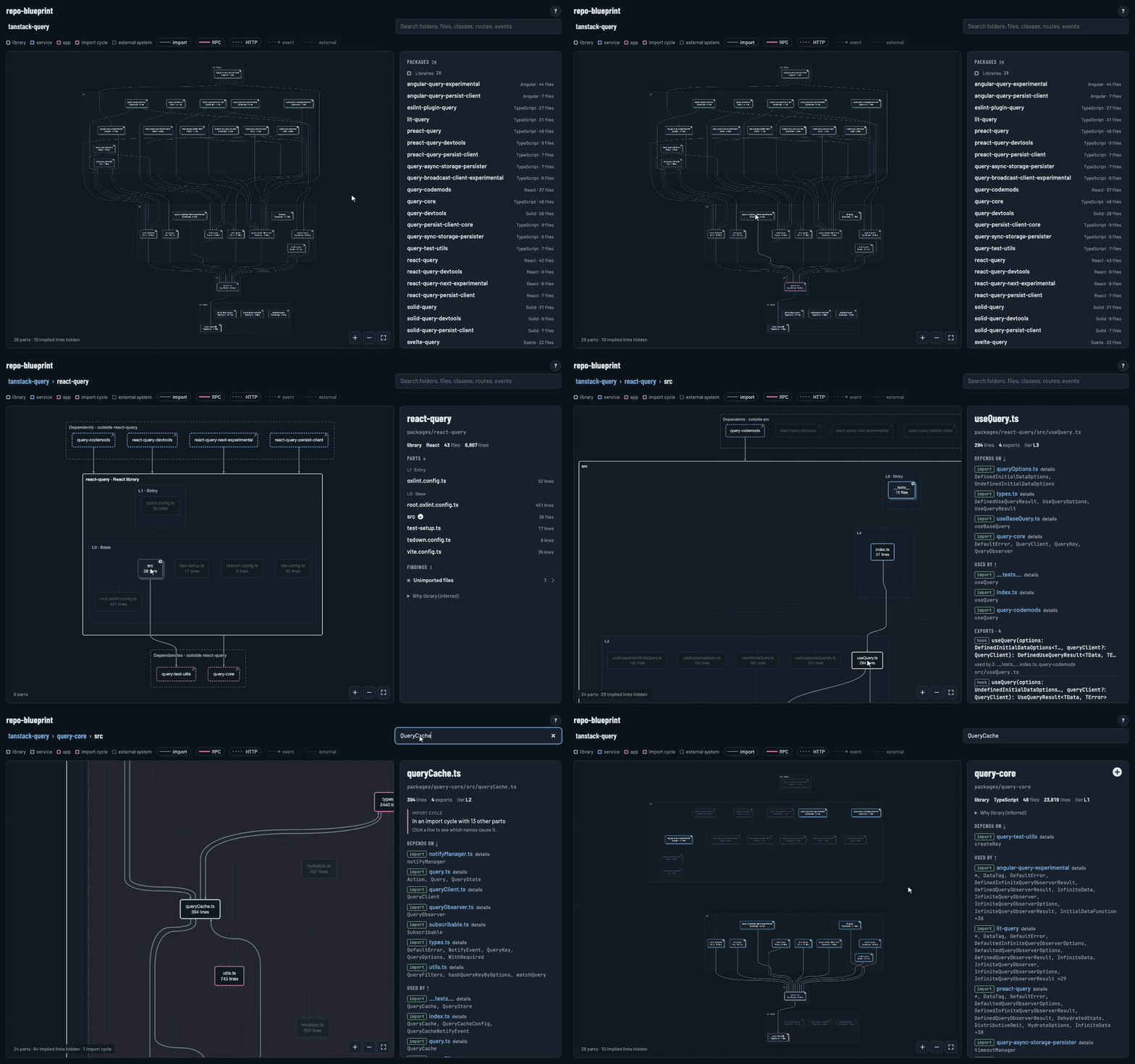
A clearer way to see how a repository is built. repo-blueprint maps a codebase into layers, with each part placed above its dependencies. Detail is handled by zoom: the top level shows packages, and zooming in reveals folders, then files.
|
|
6
4
|
|
|
7
|
-
|
|
5
|
+
|
|
8
6
|
|
|
9
|
-
|
|
7
|
+
- Works with TypeScript, JavaScript and Python, monorepos included
|
|
8
|
+
- Draws imports, RPC and HTTP calls, events, and external systems such as databases and queues
|
|
9
|
+
- Flags import cycles, unused packages and orphan files
|
|
10
|
+
- Produces one self-contained HTML file
|
|
11
|
+
- Uses static analysis only, so the output is deterministic
|
|
10
12
|
|
|
11
|
-
|
|
13
|
+
## Usage
|
|
12
14
|
|
|
13
|
-
|
|
14
|
-
|
|
15
|
+
Requires Node.js 18.17+. Python projects also need Python 3.10+ or [uv](https://docs.astral.sh/uv/).
|
|
16
|
+
|
|
17
|
+
```sh
|
|
18
|
+
npx repo-blueprint build [repo]
|
|
15
19
|
```
|
|
16
20
|
|
|
17
|
-
|
|
18
|
-
|
|
19
|
-
|
|
20
|
-
-
|
|
21
|
-
- **Findings for free.** Import cycles, misplaced packages, unused libraries and orphan files are flagged from fixed rules.
|
|
22
|
-
- **Search anything.** Jump straight to any folder, file, class, route or event.
|
|
23
|
-
- **Deterministic.** Pure static analysis through the TypeScript compiler and Python's own parser. No AI guessing: the same commit and the same version always produce the same page.
|
|
24
|
-
- **One file.** The output is a single standalone HTML page you can open, share or commit.
|
|
25
|
-
- **Live mode.** `watch` keeps the map open in your browser and redraws it as you code.
|
|
26
|
-
|
|
27
|
-
<table>
|
|
28
|
-
<tr>
|
|
29
|
-
<td width="33%"><img src="https://raw.githubusercontent.com/MohGanji/repo-blueprint/v0.1.1/media/overview.png" alt="Whole-repo overview with query-core highlighted"></td>
|
|
30
|
-
<td width="33%"><img src="https://raw.githubusercontent.com/MohGanji/repo-blueprint/v0.1.1/media/file-detail.png" alt="A file's imports, users and exports"></td>
|
|
31
|
-
<td width="33%"><img src="https://raw.githubusercontent.com/MohGanji/repo-blueprint/v0.1.1/media/import-cycle.png" alt="An import cycle flagged in query-core"></td>
|
|
32
|
-
</tr>
|
|
33
|
-
<tr>
|
|
34
|
-
<td align="center"><sub>The whole repo in dependency tiers. Hover a package to light up what uses it.</sub></td>
|
|
35
|
-
<td align="center"><sub>Any file: what it imports, what uses it, what it exports.</sub></td>
|
|
36
|
-
<td align="center"><sub>Findings, like this 14-file import cycle, marked on the map.</sub></td>
|
|
37
|
-
</tr>
|
|
38
|
-
</table>
|
|
39
|
-
|
|
40
|
-
## Quick start
|
|
41
|
-
|
|
42
|
-
Requires Node.js 18.17 or newer. Python repos also need Python 3.10+ or [uv](https://docs.astral.sh/uv/).
|
|
43
|
-
|
|
44
|
-
```bash
|
|
45
|
-
npx repo-blueprint build [repo] [--out file] [--open]
|
|
46
|
-
npx repo-blueprint watch [repo] [--port 4321] [--open]
|
|
21
|
+
Writes `~/.repo-blueprint/<repo>.blueprint.html` and prints a short summary.
|
|
22
|
+
|
|
23
|
+
```sh
|
|
24
|
+
npx repo-blueprint watch [repo]
|
|
47
25
|
```
|
|
48
26
|
|
|
49
|
-
|
|
50
|
-
|
|
51
|
-
|
|
27
|
+
Serves the map on localhost and rebuilds it when files change.
|
|
28
|
+
|
|
29
|
+
| Option | Description |
|
|
30
|
+
| --- | --- |
|
|
31
|
+
| `--out`, `-o` | Output file (`build` only) |
|
|
32
|
+
| `--port`, `-p` | Port for `watch`, default 4321 |
|
|
33
|
+
| `--open` | Open the result in a browser |
|
|
34
|
+
|
|
35
|
+
`repo` defaults to the current directory.
|
|
36
|
+
|
|
37
|
+
## Supported projects
|
|
38
|
+
|
|
39
|
+
- **TypeScript and JavaScript:** any folder with a `package.json` and a `tsconfig.json`, at any depth. Imports are resolved through the project's tsconfig paths.
|
|
40
|
+
- **Python:** any folder with a `pyproject.toml`.
|
|
52
41
|
|
|
53
|
-
|
|
42
|
+
Each package is shown as an app, a service or a library. A declared type is used when there is one (Backstage `catalog-info.yaml`, Nx `project.json`). Otherwise the role is inferred: an entry file that mounts a UI makes an app, one that starts a server or worker makes a service, and anything else is a library.
|
|
54
43
|
|
|
55
|
-
|
|
44
|
+
## Agent skill
|
|
56
45
|
|
|
57
|
-
|
|
46
|
+
The package includes a skill for Claude Code and other agents:
|
|
47
|
+
|
|
48
|
+
```sh
|
|
58
49
|
npx skills add MohGanji/repo-blueprint
|
|
59
50
|
```
|
|
60
51
|
|
|
61
|
-
|
|
62
|
-
|
|
63
|
-
## What it understands
|
|
52
|
+
You can also copy [`SKILL.md`](https://github.com/MohGanji/repo-blueprint/blob/main/skills/repo-blueprint/SKILL.md) into your agent's skills folder. Then ask for "a blueprint of this repo", or a live one to keep open while you work. The skill runs this package through `npx`, pinned to an exact version.
|
|
64
53
|
|
|
65
|
-
|
|
66
|
-
- **Python:** any folder with a `pyproject.toml`.
|
|
67
|
-
- **Roles:** each package is shown as an app, service or library. A declared type wins (Backstage `catalog-info.yaml`, Nx `project.json`). Otherwise the role comes from the code: an entry file that mounts a UI is an app, one that starts a server or worker is a service, and anything else is a library.
|
|
54
|
+
## Configuration
|
|
68
55
|
|
|
69
|
-
|
|
56
|
+
Put a `.blueprint.json` in the root of the repo being mapped to extend the [defaults](https://github.com/MohGanji/repo-blueprint/blob/main/src/blueprint.config.json). For example, to detect an extra external system:
|
|
70
57
|
|
|
71
|
-
|
|
58
|
+
```json
|
|
59
|
+
{
|
|
60
|
+
"externalSystems": { "Stripe": ["stripe"] }
|
|
61
|
+
}
|
|
62
|
+
```
|
|
72
63
|
|
|
73
|
-
|
|
74
|
-
|
|
75
|
-
|
|
76
|
-
|
|
64
|
+
| Key | Description |
|
|
65
|
+
| --- | --- |
|
|
66
|
+
| `externalSystems` | System names and the packages that indicate them |
|
|
67
|
+
| `messaging` | Method and property names for RPC calls, publishes and subscriptions |
|
|
68
|
+
| `folderRoles` | Folder names that imply a role, used by the role-mismatch finding |
|
|
69
|
+
| `sdkDirs` | Folders whose subfolders are generated API clients, named after the services they call |
|
|
77
70
|
|
|
78
71
|
## How it works
|
|
79
72
|
|
|
73
|
+
The TypeScript compiler API and Python's `ast` module extract facts from the source. Those become a model of packages, folders, edges and findings, which is rendered as one diagram per folder.
|
|
74
|
+
|
|
80
75
|
```
|
|
81
|
-
repo-blueprint
|
|
82
|
-
|
|
83
|
-
|
|
84
|
-
├──
|
|
85
|
-
|
|
86
|
-
|
|
87
|
-
|
|
88
|
-
|
|
89
|
-
|
|
90
|
-
│ ├── template.html the page
|
|
91
|
-
│ └── blueprint.config.json default settings
|
|
92
|
-
├── skills
|
|
93
|
-
│ └── repo-blueprint
|
|
94
|
-
│ └── SKILL.md the agent skill
|
|
95
|
-
└── .claude-plugin
|
|
96
|
-
└── plugin.json Claude Code plugin manifest
|
|
76
|
+
bin/repo-blueprint.mjs CLI
|
|
77
|
+
src/
|
|
78
|
+
├── extract-ts.mjs TypeScript extractor
|
|
79
|
+
├── extract-py.py Python extractor
|
|
80
|
+
├── model.mjs packages, edges, roles, findings
|
|
81
|
+
├── views.mjs one diagram per folder
|
|
82
|
+
├── build.mjs writes the HTML
|
|
83
|
+
└── template.html the page
|
|
84
|
+
skills/repo-blueprint/ agent skill
|
|
97
85
|
```
|
|
98
86
|
|
|
99
|
-
The extractors read the source into facts, the model turns facts into packages, edges and findings, and the build renders one diagram per folder into a single HTML page.
|
|
100
|
-
|
|
101
87
|
## Contributing
|
|
102
88
|
|
|
103
|
-
|
|
89
|
+
Bug reports and pull requests are welcome. See [CONTRIBUTING.md](https://github.com/MohGanji/repo-blueprint/blob/main/CONTRIBUTING.md).
|
|
104
90
|
|
|
105
91
|
## License
|
|
106
92
|
|
|
107
|
-
|
|
93
|
+
MIT
|
package/package.json
CHANGED
|
@@ -14,13 +14,13 @@ The skill runs the `repo-blueprint` npm package, pinned to the version it was wr
|
|
|
14
14
|
One-time build, writes the HTML and prints its path plus a summary:
|
|
15
15
|
|
|
16
16
|
```bash
|
|
17
|
-
npx -y repo-blueprint@0.1.
|
|
17
|
+
npx -y repo-blueprint@0.1.2 build <repo> --open
|
|
18
18
|
```
|
|
19
19
|
|
|
20
20
|
Live mode, serves the page and rebuilds it when source files change (run it in the background; it keeps running until stopped):
|
|
21
21
|
|
|
22
22
|
```bash
|
|
23
|
-
npx -y repo-blueprint@0.1.
|
|
23
|
+
npx -y repo-blueprint@0.1.2 watch <repo> --open
|
|
24
24
|
```
|
|
25
25
|
|
|
26
26
|
Keep the pinned version as written, even if a newer one exists: the same commit and the same version always produce the same page, so users can compare blueprints over time.
|