react-web-pdf-editor 0.1.0 → 0.1.2
This diff represents the content of publicly available package versions that have been released to one of the supported registries. The information contained in this diff is provided for informational purposes only and reflects changes between package versions as they appear in their respective public registries.
- package/README.md +7 -3
- package/docs/editor.png +0 -0
- package/package.json +3 -2
package/README.md
CHANGED
|
@@ -11,6 +11,8 @@ The editor includes:
|
|
|
11
11
|
- Undo and redo
|
|
12
12
|
- Export that flattens your edits into a downloadable PDF
|
|
13
13
|
|
|
14
|
+
|
|
15
|
+
|
|
14
16
|
Annotations stay in memory until you export. Changing the `file` prop starts a fresh document and clears them.
|
|
15
17
|
|
|
16
18
|
## Install
|
|
@@ -75,7 +77,9 @@ Remote URLs are fetched in the browser, with a download progress state when the
|
|
|
75
77
|
|
|
76
78
|
## Using the editor
|
|
77
79
|
|
|
78
|
-
The built-in chrome has
|
|
80
|
+
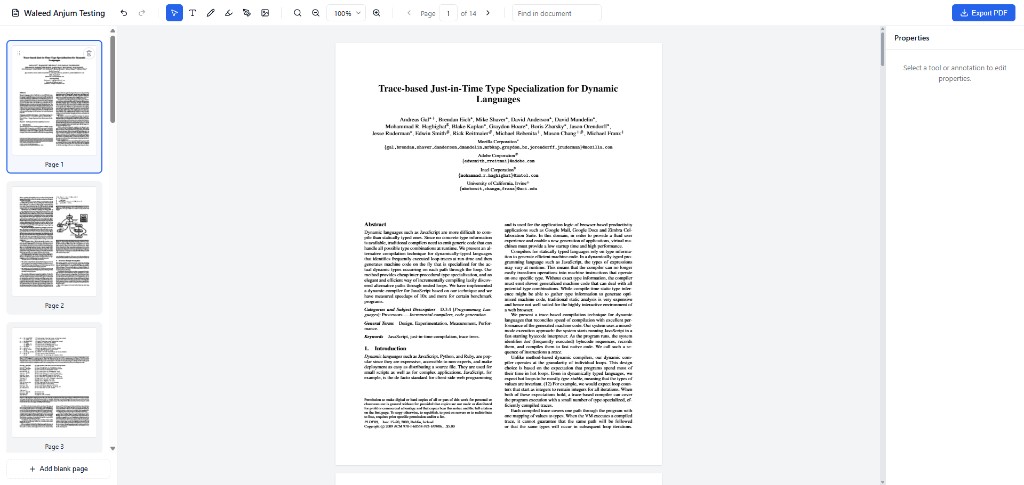
The built-in chrome has a toolbar, a page-thumbnail sidebar, the document, and a properties panel. The toolbar holds the document name, tools, search, zoom, the page count, and **Export PDF**. The sidebar lists every page and ends with **Add blank page**. The properties panel stays open on the right; until something is selected it reads “Select a tool or annotation to edit properties.”
|
|
81
|
+
|
|
82
|
+
On widths under 900px the same editor switches to a compact layout: a slim top bar, a bottom tool dock, pages in a left drawer, and properties in a sheet.
|
|
79
83
|
|
|
80
84
|
### Tools
|
|
81
85
|
|
|
@@ -107,7 +111,7 @@ Press Delete or Backspace to remove the selected object. Press Escape to leave t
|
|
|
107
111
|
The sidebar shows a thumbnail for every page, including your annotations.
|
|
108
112
|
|
|
109
113
|
- Click a thumbnail to jump to that page.
|
|
110
|
-
- Use
|
|
114
|
+
- Use **Add blank page** to insert a blank page after the current page.
|
|
111
115
|
- Delete a page from its thumbnail. The last remaining page cannot be deleted.
|
|
112
116
|
- Drag a thumbnail to reorder. With a thumbnail focused, Alt+Arrow also moves it.
|
|
113
117
|
|
|
@@ -123,7 +127,7 @@ The document name in the toolbar is editable. Click it, type a new name, and pre
|
|
|
123
127
|
|
|
124
128
|
### Export
|
|
125
129
|
|
|
126
|
-
|
|
130
|
+
**Export PDF** in the toolbar builds a PDF and saves it. The file includes the current page order and every annotation flattened onto the pages. If nothing has been annotated, export returns the current PDF bytes, including any page changes.
|
|
127
131
|
|
|
128
132
|
The download name is the document name, with `.pdf` added when it is missing. Set `exportFileName` when the download name should differ from the name shown in the toolbar.
|
|
129
133
|
|
package/docs/editor.png
ADDED
|
Binary file
|
package/package.json
CHANGED
|
@@ -1,6 +1,6 @@
|
|
|
1
1
|
{
|
|
2
2
|
"name": "react-web-pdf-editor",
|
|
3
|
-
"version": "0.1.
|
|
3
|
+
"version": "0.1.2",
|
|
4
4
|
"description": "View and edit PDFs in the browser with React: text, ink, highlights, images, signatures, page edits, and export.",
|
|
5
5
|
"license": "MIT",
|
|
6
6
|
"type": "module",
|
|
@@ -16,7 +16,8 @@
|
|
|
16
16
|
"./styles.css": "./dist/styles.css"
|
|
17
17
|
},
|
|
18
18
|
"files": [
|
|
19
|
-
"dist"
|
|
19
|
+
"dist",
|
|
20
|
+
"docs/editor.png"
|
|
20
21
|
],
|
|
21
22
|
"sideEffects": [
|
|
22
23
|
"**/*.css"
|