react-sync-ui 1.0.3 → 2.0.0
This diff represents the content of publicly available package versions that have been released to one of the supported registries. The information contained in this diff is provided for informational purposes only and reflects changes between package versions as they appear in their respective public registries.
- package/CHANGELOG.md +111 -0
- package/README.md +336 -193
- package/dist/index.d.ts +4 -14
- package/dist/index.d.ts.map +1 -0
- package/dist/index.js +195 -7
- package/dist/index.js.map +1 -0
- package/dist/syncUI.d.ts +19 -19
- package/dist/syncUI.d.ts.map +1 -0
- package/package.json +87 -39
- package/src/index.ts +11 -2
- package/src/syncUI.tsx +402 -136
- package/dist/react-sync-ui.cjs.development.js +0 -127
- package/dist/react-sync-ui.cjs.development.js.map +0 -1
- package/dist/react-sync-ui.cjs.production.min.js +0 -2
- package/dist/react-sync-ui.cjs.production.min.js.map +0 -1
- package/dist/react-sync-ui.esm.js +0 -118
- package/dist/react-sync-ui.esm.js.map +0 -1
package/README.md
CHANGED
|
@@ -1,258 +1,401 @@
|
|
|
1
1
|
# react-sync-ui
|
|
2
2
|
|
|
3
|
-
|
|
3
|
+
[](https://www.npmjs.com/package/react-sync-ui)
|
|
4
|
+
[](./LICENSE)
|
|
4
5
|
|
|
5
|
-
|
|
6
|
+
`react-sync-ui` turns a React component into a function you can `await`: calling it renders the component,
|
|
7
|
+
and the promise it returns settles when the component calls `resolve` or `reject`.
|
|
8
|
+
|
|
9
|
+
A dialog then becomes part of ordinary control flow — `if`, `while`, `try/catch` — inside one async
|
|
10
|
+
function, instead of an "is the modal open" flag threaded through props, state and effects.
|
|
6
11
|
|
|
7
12
|
```tsx
|
|
8
|
-
|
|
9
|
-
|
|
10
|
-
|
|
11
|
-
|
|
12
|
-
|
|
13
|
-
|
|
14
|
-
|
|
15
|
-
|
|
16
|
-
|
|
17
|
-
|
|
18
|
-
|
|
19
|
-
await syncAlert("Try to give it a second try");
|
|
20
|
-
} else {
|
|
21
|
-
await syncAlert("Thanks, we like you too");
|
|
22
|
-
}
|
|
23
|
-
}
|
|
24
|
-
}}
|
|
25
|
-
>
|
|
26
|
-
Run
|
|
27
|
-
</button>
|
|
13
|
+
const askForFeedback = async () => {
|
|
14
|
+
const likesIt = await syncConfirm("Do you like this library?");
|
|
15
|
+
|
|
16
|
+
if (likesIt) {
|
|
17
|
+
await syncAlert("Thanks, we like you too");
|
|
18
|
+
} else if (await syncConfirm("Are you sure?")) {
|
|
19
|
+
await syncAlert("Give it a second try");
|
|
20
|
+
} else {
|
|
21
|
+
await syncAlert("Thanks, we like you too");
|
|
22
|
+
}
|
|
23
|
+
};
|
|
28
24
|
```
|
|
29
25
|
|
|
30
|
-
|
|
26
|
+
> `syncAlert`, `syncConfirm` and `syncPrompt` are not shipped by the library — they are **your own**
|
|
27
|
+
> components, promisified with `makeSyncUI`. Their source is in [Recipes](#recipes).
|
|
31
28
|
|
|
32
|
-
|
|
33
|
-
|
|
34
|
-
|
|
35
|
-
|
|
36
|
-
|
|
37
|
-
|
|
38
|
-
await syncAlert("Invalid password, keep trying");
|
|
39
|
-
}
|
|
40
|
-
|
|
41
|
-
await syncAlert(`Congratulation ${name}, you are logged in`);
|
|
42
|
-
}}
|
|
43
|
-
>
|
|
44
|
-
Login
|
|
45
|
-
</button>
|
|
29
|
+
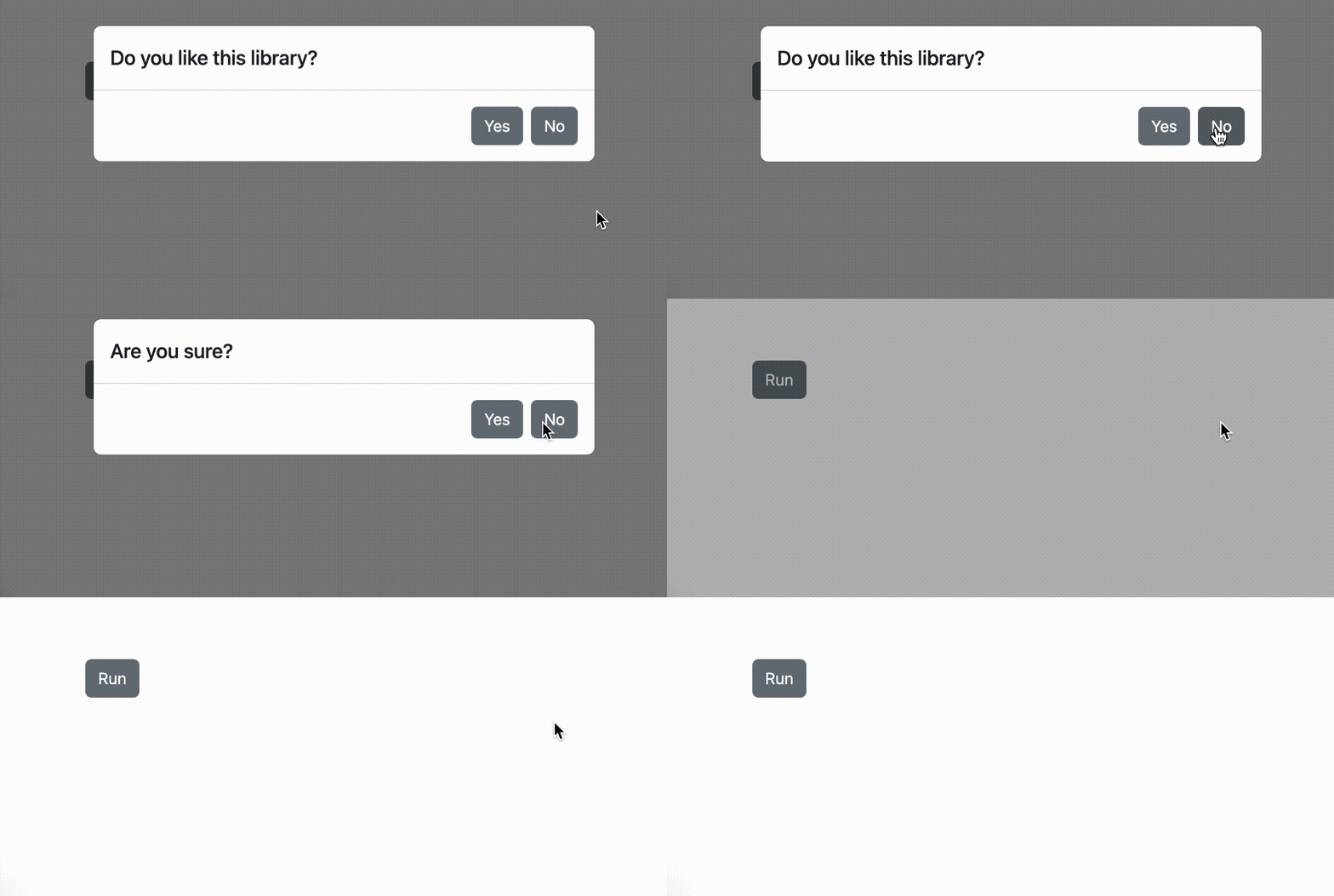
|
|
30
|
+
|
|
31
|
+
## Install
|
|
32
|
+
|
|
33
|
+
```bash
|
|
34
|
+
npm i react-sync-ui
|
|
46
35
|
```
|
|
47
36
|
|
|
48
|
-
|
|
37
|
+
React `^18 || ^19` is a peer dependency. See [Compatibility](#compatibility) for the packaging.
|
|
38
|
+
|
|
39
|
+
## Quick start
|
|
49
40
|
|
|
50
|
-
|
|
51
|
-
into the promisified awaitable functions.
|
|
41
|
+
### 1. Mount SyncUI once
|
|
52
42
|
|
|
53
43
|
```tsx
|
|
54
|
-
|
|
55
|
-
|
|
56
|
-
<Modal isOpen toggle={() => props.resolve()}>
|
|
57
|
-
<ModalHeader>{props.data}</ModalHeader>
|
|
58
|
-
<ModalFooter>
|
|
59
|
-
<Button onClick={() => props.resolve()}>OK</Button>
|
|
60
|
-
</ModalFooter>
|
|
61
|
-
</Modal>
|
|
62
|
-
));
|
|
63
|
-
```
|
|
44
|
+
import { createRoot } from "react-dom/client";
|
|
45
|
+
import { SyncUI } from "react-sync-ui";
|
|
64
46
|
|
|
65
|
-
|
|
47
|
+
const App = () => (
|
|
48
|
+
<>
|
|
49
|
+
<SyncUI />
|
|
50
|
+
<YourAppStuff />
|
|
51
|
+
</>
|
|
52
|
+
);
|
|
66
53
|
|
|
67
|
-
|
|
68
|
-
|
|
69
|
-
your business logic code is distributed over many async React handlers and it's really hard to understand the sequence of business logic.
|
|
54
|
+
createRoot(document.getElementById("root")!).render(<App />);
|
|
55
|
+
```
|
|
70
56
|
|
|
71
|
-
|
|
72
|
-
|
|
73
|
-
With this event-driven programming style, your code complexity is 1000 times more complex, and your newcomer programmes who see the code have the business workflow is.
|
|
57
|
+
Your promisified components render there, so the placement matters — see
|
|
58
|
+
[Where to mount SyncUI](#where-to-mount-syncui).
|
|
74
59
|
|
|
75
|
-
|
|
76
|
-
smaller functions that can be simply composed together inside of your Javascript function and you'll get very complex business logic in just a few lines of code.
|
|
60
|
+
### 2. Promisify a component
|
|
77
61
|
|
|
78
|
-
|
|
62
|
+
`makeSyncUI` takes a component and returns a **function**. The component receives exactly three props:
|
|
63
|
+
`data` (whatever the caller passed in), `resolve` and `reject`.
|
|
79
64
|
|
|
80
|
-
|
|
65
|
+
```tsx
|
|
66
|
+
import { makeSyncUI } from "react-sync-ui";
|
|
81
67
|
|
|
82
|
-
|
|
68
|
+
export const syncAlert = makeSyncUI<string, void>(props => (
|
|
69
|
+
<dialog open>
|
|
70
|
+
<p>{props.data}</p>
|
|
71
|
+
<button onClick={() => props.resolve()}>OK</button>
|
|
72
|
+
</dialog>
|
|
73
|
+
));
|
|
74
|
+
```
|
|
83
75
|
|
|
84
|
-
|
|
76
|
+
### 3. Await it
|
|
85
77
|
|
|
86
|
-
```
|
|
87
|
-
|
|
78
|
+
```ts
|
|
79
|
+
await syncAlert("Your changes are saved");
|
|
88
80
|
```
|
|
89
81
|
|
|
90
|
-
|
|
82
|
+
Any handler, saga or plain async function can await it — no context, hook or provider at the call site.
|
|
91
83
|
|
|
92
|
-
|
|
84
|
+
## Why react-sync-ui exists
|
|
93
85
|
|
|
94
|
-
|
|
95
|
-
|
|
96
|
-
|
|
97
|
-
|
|
98
|
-
<>
|
|
99
|
-
<SyncUI />
|
|
100
|
-
<YourAppStuffs />
|
|
101
|
-
<>
|
|
102
|
-
)
|
|
86
|
+
When a use case composes async work with user decisions — fetch, ask, branch, ask again — the business
|
|
87
|
+
logic ends up scattered over handlers, `useState` flags and `useEffect` dependencies. The workflow turns
|
|
88
|
+
into event-driven code: to follow the sequence you first have to reconstruct it from the components
|
|
89
|
+
reacting to each other, and a newcomer has no chance.
|
|
103
90
|
|
|
104
|
-
|
|
105
|
-
|
|
91
|
+
Promisifying a component puts the sequence back into a single function. The UI stays declarative and
|
|
92
|
+
small, while the workflow reads top to bottom.
|
|
106
93
|
|
|
94
|
+
```tsx
|
|
95
|
+
const login = async () => {
|
|
96
|
+
const name = await syncPrompt("Fill your name");
|
|
97
|
+
while ((await syncPrompt("Fill your password!")) !== "1234") {
|
|
98
|
+
await syncAlert("Invalid password, keep trying");
|
|
99
|
+
}
|
|
100
|
+
await syncAlert(`Congratulation ${name}, you are logged in`);
|
|
101
|
+
};
|
|
107
102
|
```
|
|
108
103
|
|
|
109
|
-
|
|
104
|
+

|
|
105
|
+
|
|
106
|
+
PS: the inspiration is `window.alert`, `window.confirm` and `window.prompt`. ❤
|
|
110
107
|
|
|
111
|
-
|
|
108
|
+
## Recipes
|
|
112
109
|
|
|
113
|
-
|
|
114
|
-
|
|
110
|
+
Three dialogs on the native `<dialog>` element, no UI framework. Each opens itself with `showModal()` on
|
|
111
|
+
mount and has a close button next to whatever Escape (`onCancel`) does. All three run in
|
|
112
|
+
[example/](https://github.com/Svehla/react-sync-ui/tree/main/example) — `npm install && npm run dev` there
|
|
113
|
+
starts the playground against the library source.
|
|
115
114
|
|
|
116
|
-
|
|
115
|
+
### Alert
|
|
117
116
|
|
|
118
117
|
```tsx
|
|
119
|
-
import {
|
|
118
|
+
import { useEffect, useRef } from "react";
|
|
120
119
|
import { makeSyncUI } from "react-sync-ui";
|
|
121
120
|
|
|
122
|
-
export const syncAlert = makeSyncUI<string, void>(
|
|
123
|
-
|
|
124
|
-
|
|
125
|
-
<ModalFooter>
|
|
126
|
-
<Button onClick={() => props.resolve()}>OK</Button>
|
|
127
|
-
</ModalFooter>
|
|
128
|
-
</Modal>
|
|
129
|
-
);
|
|
130
|
-
|
|
131
|
-
|
|
132
|
-
// usage:
|
|
133
|
-
|
|
134
|
-
<button
|
|
135
|
-
onClick={async () => {
|
|
136
|
-
await syncAlert("Wait for it...");
|
|
137
|
-
await syncAlert("Wait for it...");
|
|
138
|
-
await syncAlert("You're hacked");
|
|
139
|
-
}}
|
|
140
|
-
>
|
|
141
|
-
click to me
|
|
142
|
-
</button>;
|
|
121
|
+
export const syncAlert = makeSyncUI<string, void>(props => {
|
|
122
|
+
const ref = useRef<HTMLDialogElement>(null);
|
|
123
|
+
useEffect(() => void ref.current?.showModal(), []);
|
|
143
124
|
|
|
125
|
+
// an alert has nothing to decide: the close button and Escape both mean OK
|
|
126
|
+
return (
|
|
127
|
+
<dialog ref={ref} onCancel={() => props.resolve()}>
|
|
128
|
+
<h2>{props.data}</h2>
|
|
129
|
+
<button aria-label="Close" onClick={() => props.resolve()}>
|
|
130
|
+
×
|
|
131
|
+
</button>
|
|
132
|
+
<button onClick={() => props.resolve()}>OK</button>
|
|
133
|
+
</dialog>
|
|
134
|
+
);
|
|
135
|
+
});
|
|
144
136
|
```
|
|
145
137
|
|
|
146
|
-
|
|
138
|
+
### Confirm
|
|
147
139
|
|
|
148
140
|
```tsx
|
|
149
|
-
import {
|
|
141
|
+
import { useEffect, useRef } from "react";
|
|
150
142
|
import { makeSyncUI } from "react-sync-ui";
|
|
151
143
|
|
|
152
|
-
|
|
153
|
-
|
|
144
|
+
type ConfirmData = { title: string; description?: string };
|
|
145
|
+
|
|
146
|
+
export const syncRichConfirm = makeSyncUI<ConfirmData, boolean>(props => {
|
|
147
|
+
const ref = useRef<HTMLDialogElement>(null);
|
|
148
|
+
useEffect(() => void ref.current?.showModal(), []);
|
|
149
|
+
|
|
150
|
+
// closing a confirm without answering is a "no"
|
|
151
|
+
const no = () => props.resolve(false);
|
|
154
152
|
|
|
155
153
|
return (
|
|
156
|
-
<
|
|
157
|
-
|
|
158
|
-
|
|
159
|
-
|
|
160
|
-
|
|
161
|
-
|
|
162
|
-
|
|
163
|
-
|
|
164
|
-
|
|
165
|
-
|
|
166
|
-
|
|
167
|
-
<ModalBody>
|
|
168
|
-
<label>
|
|
169
|
-
{props.data}
|
|
170
|
-
<input
|
|
171
|
-
value={input}
|
|
172
|
-
onChange={(e) => setInput(e.target.value)}
|
|
173
|
-
type="text"
|
|
174
|
-
/>
|
|
175
|
-
</label>
|
|
176
|
-
</ModalBody>
|
|
177
|
-
|
|
178
|
-
<ModalFooter>
|
|
179
|
-
<Button type="submit">Accept</Button>
|
|
180
|
-
</ModalFooter>
|
|
181
|
-
</form>
|
|
182
|
-
</Modal>
|
|
154
|
+
<dialog ref={ref} onCancel={no}>
|
|
155
|
+
<h2>{props.data.title}</h2>
|
|
156
|
+
<button aria-label="Close" onClick={no}>
|
|
157
|
+
×
|
|
158
|
+
</button>
|
|
159
|
+
<p>{props.data.description}</p>
|
|
160
|
+
<button autoFocus onClick={() => props.resolve(true)}>
|
|
161
|
+
Yes
|
|
162
|
+
</button>
|
|
163
|
+
<button onClick={no}>No</button>
|
|
164
|
+
</dialog>
|
|
183
165
|
);
|
|
184
166
|
});
|
|
185
167
|
|
|
186
|
-
//
|
|
187
|
-
|
|
188
|
-
<button
|
|
189
|
-
onClick={async () => {
|
|
190
|
-
const usersFeelings = await syncPrompt("how are you");
|
|
191
|
-
}}
|
|
192
|
-
>
|
|
193
|
-
click to me
|
|
194
|
-
</button>;
|
|
168
|
+
// a thin positional wrapper for the common call site
|
|
169
|
+
export const syncConfirm = (title: string) => syncRichConfirm({ title });
|
|
195
170
|
```
|
|
196
171
|
|
|
197
|
-
|
|
172
|
+
### Prompt
|
|
173
|
+
|
|
174
|
+
A prompt has no neutral answer, so closing it rejects — and every caller has to handle that.
|
|
198
175
|
|
|
199
176
|
```tsx
|
|
200
|
-
import {
|
|
177
|
+
import { useEffect, useRef, useState } from "react";
|
|
201
178
|
import { makeSyncUI } from "react-sync-ui";
|
|
202
179
|
|
|
203
|
-
export const
|
|
204
|
-
|
|
205
|
-
|
|
206
|
-
|
|
207
|
-
okBtn?: string;
|
|
208
|
-
notOkBtn?: string;
|
|
209
|
-
},
|
|
210
|
-
boolean
|
|
211
|
-
>((props) => (
|
|
212
|
-
<Modal isOpen={true} toggle={() => props.resolve(false)}>
|
|
213
|
-
<ModalHeader>{props.data.title}</ModalHeader>
|
|
214
|
-
|
|
215
|
-
<ModalBody>{props.data.description}</ModalBody>
|
|
216
|
-
|
|
217
|
-
<ModalFooter>
|
|
218
|
-
<Button autoFocus onClick={() => props.resolve(true)}>
|
|
219
|
-
{props.data.okBtn ?? "Yes"}
|
|
220
|
-
</Button>
|
|
221
|
-
<Button onClick={() => props.resolve(false)}>
|
|
222
|
-
{props.data.notOkBtn ?? "No"}
|
|
223
|
-
</Button>
|
|
224
|
-
</ModalFooter>
|
|
225
|
-
</Modal>
|
|
226
|
-
));
|
|
180
|
+
export const syncPrompt = makeSyncUI<string, string>(props => {
|
|
181
|
+
const ref = useRef<HTMLDialogElement>(null);
|
|
182
|
+
const [input, setInput] = useState("");
|
|
183
|
+
useEffect(() => void ref.current?.showModal(), []);
|
|
227
184
|
|
|
228
|
-
|
|
229
|
-
|
|
230
|
-
<button
|
|
231
|
-
onClick={async () => {
|
|
232
|
-
const isOk = await syncConfirm({
|
|
233
|
-
title: "How are you",
|
|
234
|
-
okBtn: "Good",
|
|
235
|
-
notOkBtn: "Not good",
|
|
236
|
-
});
|
|
237
|
-
}}
|
|
238
|
-
>
|
|
239
|
-
click to me
|
|
240
|
-
</button>;
|
|
241
|
-
```
|
|
185
|
+
const cancel = () => props.reject(new Error("User closed the prompt"));
|
|
242
186
|
|
|
243
|
-
|
|
187
|
+
return (
|
|
188
|
+
<dialog ref={ref} onCancel={cancel}>
|
|
189
|
+
<button aria-label="Close" onClick={cancel}>
|
|
190
|
+
×
|
|
191
|
+
</button>
|
|
192
|
+
<label>
|
|
193
|
+
{props.data}
|
|
194
|
+
<input
|
|
195
|
+
autoFocus
|
|
196
|
+
value={input}
|
|
197
|
+
onChange={e => setInput(e.target.value)}
|
|
198
|
+
/>
|
|
199
|
+
</label>
|
|
200
|
+
<button onClick={() => props.resolve(input)}>Accept</button>
|
|
201
|
+
</dialog>
|
|
202
|
+
);
|
|
203
|
+
});
|
|
244
204
|
|
|
245
|
-
|
|
205
|
+
// at the call site
|
|
206
|
+
try {
|
|
207
|
+
console.log(await syncPrompt("How are you?"));
|
|
208
|
+
} catch {
|
|
209
|
+
console.log("user cancelled the prompt");
|
|
210
|
+
}
|
|
211
|
+
```
|
|
246
212
|
|
|
247
|
-
|
|
213
|
+
## How the queue works
|
|
214
|
+
|
|
215
|
+
- Every factory owns **one FIFO queue** and `<SyncUI />` renders its head, so one dialog is on screen at a
|
|
216
|
+
time. All components of the same factory share that queue, so a `syncAlert` and a `syncConfirm` never
|
|
217
|
+
overlap: `await Promise.all([syncAlert("1"), syncAlert("2")])` shows two dialogs one after another.
|
|
218
|
+
- Every call gets a **fresh React key**, so your component's local state starts clean each time.
|
|
219
|
+
- Calling a sync function **before `<SyncUI />` is mounted is fine**: the item waits and is rendered as
|
|
220
|
+
soon as a host mounts. In development a console error is logged if items are still pending after 3
|
|
221
|
+
seconds and no `<SyncUI />` has ever mounted.
|
|
222
|
+
- Unmounting `<SyncUI />` does **not** drop the queue: pending promises stay pending and are rendered
|
|
223
|
+
again by the next host that mounts.
|
|
224
|
+
- Need two dialogs side by side? Use [multiple queues](#multiple-queues).
|
|
225
|
+
|
|
226
|
+
## Errors and cancellation
|
|
227
|
+
|
|
228
|
+
`props.reject(reason)` rejects the awaited promise, which is how you model "the user closed the dialog" —
|
|
229
|
+
see the [Prompt recipe](#prompt) for both halves of it.
|
|
230
|
+
|
|
231
|
+
- Nothing catches for you: an uncaught rejection is a real unhandled promise rejection, a call you never
|
|
232
|
+
awaited included. Wrap the `await` in `try/catch` whenever a component can reject.
|
|
233
|
+
- `props.reject()` with **no argument** rejects with `new Error("react-sync-ui: rejected without a reason")`,
|
|
234
|
+
so `catch (error) { error.message }` never throws on top of the cancellation. Pass your own reason when
|
|
235
|
+
the caller has to tell one apart from another.
|
|
236
|
+
- `resolve` and `reject` are **bound to their own call** and settle it at most once: a second call, or one
|
|
237
|
+
from a dialog that already closed (a late HTTP response, a double click), is a no-op and can never settle
|
|
238
|
+
the next caller's promise.
|
|
239
|
+
- Settling pops the head and the next dialog opens immediately — `resolve(promise)` opens it while your
|
|
240
|
+
caller still awaits the inner promise, so resolve with a value, not a thenable.
|
|
241
|
+
- A component that **throws during render** is rejected with the thrown error by an internal error boundary
|
|
242
|
+
and the queue keeps draining. Your own error boundary is not triggered, so catch the call to see what
|
|
243
|
+
happened.
|
|
244
|
+
- Unmounting the component that owns a [`usePromiseQueue`](#usepromisequeue) rejects everything queued in it.
|
|
245
|
+
|
|
246
|
+
## Where to mount SyncUI
|
|
247
|
+
|
|
248
|
+
Your promisified components are rendered **inside** `<SyncUI />`, not where you called them, so `<SyncUI />`
|
|
249
|
+
has to live inside every context provider they rely on: theme (`ThemeProvider`, MUI, Chakra), router
|
|
250
|
+
(`react-router` — a dialog calling `useNavigate` throws otherwise), i18n and stores (`Provider`,
|
|
251
|
+
`QueryClientProvider`, `ApolloProvider`). Rule of thumb: **as deep as the deepest provider it needs**.
|
|
252
|
+
Modals usually render into a portal, so extra depth costs you nothing in CSS stacking.
|
|
253
|
+
|
|
254
|
+
Mount it **once per factory**. If more than one `<SyncUI />` of the same factory is mounted, only the
|
|
255
|
+
first-mounted one renders and a warning is logged in development.
|
|
256
|
+
|
|
257
|
+
## TypeScript
|
|
258
|
+
|
|
259
|
+
`makeSyncUI<InputData, ResolveValue = void>(Component)` carries two type parameters through to the
|
|
260
|
+
promise:
|
|
261
|
+
|
|
262
|
+
- `InputData` is the argument of the returned function and the type of `props.data`.
|
|
263
|
+
- `ResolveValue` is what `props.resolve` accepts and what the promise resolves with. It defaults to `void`,
|
|
264
|
+
so `makeSyncUI<string>(Comp)` is `(data: string) => Promise<void>` and `props.resolve()` takes no argument.
|
|
265
|
+
- For more than one input use an object payload plus a thin positional wrapper, as `syncRichConfirm` /
|
|
266
|
+
`syncConfirm` above do.
|
|
267
|
+
- `SyncUIProps` and `SyncUIComponent` are exported, so you can declare the component separately — inline
|
|
268
|
+
arrows, function declarations, `React.FC<SyncUIProps<string, boolean>>`, `memo()`, `forwardRef()` and
|
|
269
|
+
classes are all accepted. `SyncUIFunction` names what `makeSyncUI` returns, for wrappers, context values
|
|
270
|
+
and props types.
|
|
271
|
+
|
|
272
|
+
## Advanced
|
|
273
|
+
|
|
274
|
+
### Multiple queues
|
|
275
|
+
|
|
276
|
+
The `makeSyncUI` and `SyncUI` you import from `react-sync-ui` come from one default queue:
|
|
277
|
+
|
|
278
|
+
```ts
|
|
279
|
+
export const { makeSyncUI, SyncUI } = syncUIFactory();
|
|
280
|
+
```
|
|
281
|
+
|
|
282
|
+
Every call to `syncUIFactory()` creates a **completely independent queue** with its own `makeSyncUI` and
|
|
283
|
+
its own `SyncUI`. Two queues show two dialogs at the same time, while calls inside a single queue still
|
|
284
|
+
line up one after another. A factory's components are only rendered by **that** factory's `<SyncUI />`, so
|
|
285
|
+
mount one `<SyncUI />` per factory.
|
|
248
286
|
|
|
249
287
|
```tsx
|
|
250
288
|
import { syncUIFactory } from "react-sync-ui";
|
|
251
289
|
|
|
252
|
-
export const
|
|
253
|
-
export const
|
|
254
|
-
|
|
290
|
+
export const queueA = syncUIFactory();
|
|
291
|
+
export const queueB = syncUIFactory();
|
|
292
|
+
|
|
293
|
+
export const alertA = queueA.makeSyncUI<string, void>(p => (
|
|
294
|
+
<MyDialog text={p.data} onClose={p.resolve} />
|
|
295
|
+
));
|
|
296
|
+
export const alertB = queueB.makeSyncUI<string, void>(p => (
|
|
297
|
+
<MyDialog text={p.data} onClose={p.resolve} />
|
|
298
|
+
));
|
|
255
299
|
|
|
256
|
-
|
|
300
|
+
// with <queueA.SyncUI /> and <queueB.SyncUI /> both mounted:
|
|
301
|
+
await Promise.all([alertA("a-1"), alertB("b-1")]); // two dialogs at once
|
|
302
|
+
```
|
|
257
303
|
|
|
258
|
-
|
|
304
|
+
A full version is in
|
|
305
|
+
[example/MultiQueuesApp.tsx](https://github.com/Svehla/react-sync-ui/blob/main/example/MultiQueuesApp.tsx).
|
|
306
|
+
|
|
307
|
+
### usePromiseQueue
|
|
308
|
+
|
|
309
|
+
The low-level hook behind the library, exported for the rare case where you want to own the rendering.
|
|
310
|
+
`usePromiseQueue<InputData, ResolveValue>()` returns `{ head?: { data, resolve, reject }, push }`:
|
|
311
|
+
`push(data)` appends an item and returns a promise, `head` is the first queued item (`undefined` when
|
|
312
|
+
empty), and `head.resolve` / `head.reject` settle exactly that item.
|
|
313
|
+
|
|
314
|
+
Each calling component gets its **own** queue — not the default factory's — so nothing pushed through
|
|
315
|
+
`makeSyncUI` shows up here. Because the component owns that queue, **unmounting it rejects every item
|
|
316
|
+
still pending** with `new Error("react-sync-ui: usePromiseQueue unmounted with pending items")`; otherwise
|
|
317
|
+
those promises could never settle. StrictMode's simulated unmount/remount drains nothing, only a real
|
|
318
|
+
unmount does. The `makeSyncUI` queue lives in the factory instead, so it survives `<SyncUI />` unmounting.
|
|
319
|
+
|
|
320
|
+
## API reference
|
|
321
|
+
|
|
322
|
+
| Export | Signature |
|
|
323
|
+
| ----------------- | ------------------------------------------------------------------------------------------------------------------------------------------ |
|
|
324
|
+
| `makeSyncUI` | `<InputData, ResolveValue = void>(Component) => (data: InputData) => Promise<ResolveValue>` — promisifies a component on the default queue |
|
|
325
|
+
| `SyncUI` | `() => ReactElement \| null` — renders the head of the default queue; mount once, inside your providers |
|
|
326
|
+
| `syncUIFactory` | `() => { makeSyncUI, SyncUI }` — an independent queue with its own `makeSyncUI` and `SyncUI` |
|
|
327
|
+
| `usePromiseQueue` | `<InputData, ResolveValue = void>() => { head?: { data, resolve, reject }; push(data): Promise<ResolveValue> }` — a component-scoped queue |
|
|
328
|
+
| `SyncUIProps` | the props your component gets: `data: InputData`, `resolve: (value: ResolveValue) => void`, `reject: (reason?: unknown) => void` |
|
|
329
|
+
| `SyncUIComponent` | `ComponentType<SyncUIProps<InputData, ResolveValue>>` — the component shape `makeSyncUI` accepts |
|
|
330
|
+
| `SyncUIFunction` | `(input: InputData) => Promise<ResolveValue>` — the awaitable function `makeSyncUI` returns |
|
|
331
|
+
| `SyncUIFactory` | return type of `syncUIFactory()`: `{ makeSyncUI, SyncUI }` |
|
|
332
|
+
| `PromiseQueueAPI` | return type of `usePromiseQueue()`; its `head` is a `SyncUIProps<InputData, ResolveValue>` |
|
|
333
|
+
|
|
334
|
+
## Compatibility
|
|
335
|
+
|
|
336
|
+
- **React `^18 || ^19`**, declared as a peer dependency. The queue lives outside React, so nothing is
|
|
337
|
+
queued or settled twice under `<StrictMode>`, and hot-replacing a module that calls `makeSyncUI` (a lazy
|
|
338
|
+
route chunk included) or one that renders `<SyncUI />` keeps the queue and the open dialog.
|
|
339
|
+
- **ESM-only** package with an `exports` map and bundled types — Vite, Next.js, Remix and any other modern
|
|
340
|
+
bundler work out of the box, and TypeScript resolves the types under `moduleResolution: "bundler"`,
|
|
341
|
+
`"node16"` and `"nodenext"`. `import "react-sync-ui"` works anywhere; `require("react-sync-ui")` needs
|
|
342
|
+
Node `>=20.19` / `>=22.12`, where `require(esm)` landed — on older Node use a dynamic `import()`.
|
|
343
|
+
- **SSR**: `<SyncUI />` renders nothing on the server and hydrates cleanly; pushes before and after
|
|
344
|
+
hydration are both fine, and a push during server rendering only queues the item (no dev warning, no
|
|
345
|
+
timer). Such a promise can only settle in the browser, so drive dialogs from client code: under the
|
|
346
|
+
Next.js app router put `"use client"` at the top of the module that mounts `<SyncUI />`, and define your
|
|
347
|
+
sync components at **module scope**.
|
|
348
|
+
- **React 19.2 `<Activity>`**: `<SyncUI />` may sit inside a hidden subtree — going `hidden` → `visible`
|
|
349
|
+
restores the open dialog and the queue keeps draining. A hidden host renders nothing, so the dialog's own
|
|
350
|
+
local state starts over when it comes back; the queue and its promises are untouched.
|
|
351
|
+
|
|
352
|
+
## FAQ
|
|
353
|
+
|
|
354
|
+
**Can I load it without a bundler?** Not directly, for the same reason as React itself: the library reads
|
|
355
|
+
`process.env.NODE_ENV` at module load to decide whether to log its dev warnings. Any bundler (Vite,
|
|
356
|
+
webpack, esbuild, Rollup with a `define`) replaces that read, keeping the warnings in development and
|
|
357
|
+
dropping them from production builds. Loading `dist/index.js` straight into a browser with no `process`
|
|
358
|
+
global throws `process is not defined`; define `globalThis.process = { env: {} }` first if you need that.
|
|
359
|
+
|
|
360
|
+
**Why does my dialog open twice in development?** Because your own code pushes from a mount effect, and
|
|
361
|
+
`<StrictMode>` runs mount effects twice. That is React, not the queue — push from event handlers.
|
|
362
|
+
|
|
363
|
+
**How do I test a sync UI?** Await the query rather than the render: click the trigger, then
|
|
364
|
+
`await screen.findByRole("button", { name: "Yes" })` and click it. `findByRole` waits for the dialog to
|
|
365
|
+
reach the DOM, which removes the need for manual `act` gymnastics around the re-render.
|
|
366
|
+
|
|
367
|
+
## Migration from 1.x
|
|
368
|
+
|
|
369
|
+
`2.0.0` rewrites the internals. The API surface is unchanged, but the semantics are stricter:
|
|
370
|
+
|
|
371
|
+
1. **The React peer dependency is now `^18 || ^19`** (was `>=16`): the queue is exposed to React through
|
|
372
|
+
`useSyncExternalStore`.
|
|
373
|
+
2. **The package is ESM-only** with an `exports` map, and the CJS build is gone. If you were deep-importing
|
|
374
|
+
a file from `dist/`, import from `react-sync-ui` instead.
|
|
375
|
+
3. **Calling a sync function before `<SyncUI />` is mounted no longer throws**
|
|
376
|
+
`"You have to initialize <SyncUI />"` — the call is queued until a host mounts. Code that relied on that
|
|
377
|
+
throw, or on `<SyncUI />` mounting before the rest of your app, needs updating.
|
|
378
|
+
4. **`resolve` / `reject` are bound to their own item and idempotent.** In 1.x they settled whatever was at
|
|
379
|
+
the head of the queue at call time, so a late or duplicate call could settle the _next_ caller's promise.
|
|
380
|
+
Now a second call, or one from an already-closed dialog, is a no-op. Applies to `usePromiseQueue().head`
|
|
381
|
+
too.
|
|
382
|
+
5. **`reject()` with no reason now rejects with an `Error`**, not `undefined`:
|
|
383
|
+
`new Error("react-sync-ui: rejected without a reason")`. If you branched on
|
|
384
|
+
`catch (error) { if (error === undefined) ... }`, pass your own reason to `props.reject(reason)` or check
|
|
385
|
+
that message.
|
|
386
|
+
6. **`usePromiseQueue` rejects its pending items when the owning component unmounts**, with
|
|
387
|
+
`new Error("react-sync-ui: usePromiseQueue unmounted with pending items")` — previously every
|
|
388
|
+
`await push(...)` stayed suspended forever. The `makeSyncUI` queue is unaffected.
|
|
389
|
+
7. **`usePromiseQueue` is exported from the package entry** (it used to be reachable only from
|
|
390
|
+
`react-sync-ui/src/syncUI`).
|
|
391
|
+
8. **`reject` is typed `(reason?: unknown) => void`** (was `any`), so a `catch` block has to narrow the
|
|
392
|
+
reason before using it.
|
|
393
|
+
9. **`require("react-sync-ui")` needs Node `>=20.19` / `>=22.12`** (unflagged `require(esm)`); on older Node
|
|
394
|
+
use `import` or a dynamic `import()`.
|
|
395
|
+
|
|
396
|
+
See [CHANGELOG.md](https://github.com/Svehla/react-sync-ui/blob/main/CHANGELOG.md) for the full list,
|
|
397
|
+
including the fixes and the new type exports.
|
|
398
|
+
|
|
399
|
+
## License
|
|
400
|
+
|
|
401
|
+
[MIT](./LICENSE)
|
package/dist/index.d.ts
CHANGED
|
@@ -1,14 +1,4 @@
|
|
|
1
|
-
|
|
2
|
-
export
|
|
3
|
-
|
|
4
|
-
|
|
5
|
-
resolve: (value: ResolveValue) => void;
|
|
6
|
-
reject: (reason?: any) => void;
|
|
7
|
-
}>) => (input: InputData) => Promise<ResolveValue>;
|
|
8
|
-
SyncUI: () => JSX.Element;
|
|
9
|
-
};
|
|
10
|
-
export declare const makeSyncUI: <InputData, ResolveValue = void>(SyncUIUserComp: import("react").FC<{
|
|
11
|
-
data: InputData;
|
|
12
|
-
resolve: (value: ResolveValue) => void;
|
|
13
|
-
reject: (reason?: any) => void;
|
|
14
|
-
}>) => (input: InputData) => Promise<ResolveValue>, SyncUI: () => JSX.Element;
|
|
1
|
+
export { syncUIFactory, usePromiseQueue } from './syncUI.js';
|
|
2
|
+
export type { PromiseQueueAPI, SyncUIComponent, SyncUIFactory, SyncUIFunction, SyncUIProps } from './syncUI.js';
|
|
3
|
+
export declare const makeSyncUI: <InputData, ResolveValue = void>(Component: import('./syncUI.js').SyncUIComponent<InputData, ResolveValue>) => import('./syncUI.js').SyncUIFunction<InputData, ResolveValue>, SyncUI: () => import('react').ReactElement | null;
|
|
4
|
+
//# sourceMappingURL=index.d.ts.map
|
|
@@ -0,0 +1 @@
|
|
|
1
|
+
{"version":3,"file":"index.d.ts","sourceRoot":"","sources":["../src/index.ts"],"names":[],"mappings":"AAEA,OAAO,EAAE,aAAa,EAAE,eAAe,EAAE,MAAM,aAAa,CAAC;AAC7D,YAAY,EACV,eAAe,EACf,eAAe,EACf,aAAa,EACb,cAAc,EACd,WAAW,EACZ,MAAM,aAAa,CAAC;AAErB,eAAO,MAAQ,UAAU,gLAAE,MAAM,2CAAoB,CAAC"}
|