react-reinspect 0.1.9 → 0.2.0
This diff represents the content of publicly available package versions that have been released to one of the supported registries. The information contained in this diff is provided for informational purposes only and reflects changes between package versions as they appear in their respective public registries.
- package/README.md +34 -338
- package/dist/lib/index.cjs +1 -1
- package/dist/lib/index.js +2 -2
- package/dist/lib/internal/auto-wrap.cjs +1 -1
- package/dist/lib/internal/auto-wrap.js +1 -1
- package/dist/lib/propsInspector.d.ts +1 -0
- package/dist/lib/propsInspector.d.ts.map +1 -1
- package/dist/lib/react/wrap.d.ts.map +1 -1
- package/dist/lib/style.css +1 -1
- package/dist/lib/{wrap-DkOzTshV.js → wrap-DQM25n-h.js} +430 -415
- package/dist/lib/wrap-TqMeJ7Q-.cjs +2 -0
- package/package.json +1 -1
- package/dist/lib/wrap-Cc3mMcCA.cjs +0 -2
package/README.md
CHANGED
|
@@ -1,43 +1,17 @@
|
|
|
1
1
|
# react-reinspect
|
|
2
|
-
|
|
3
|
-
|
|
4
|
-
`react-reinspect` helps you inspect components directly in your running UI:
|
|
5
|
-
- See component boundaries and names.
|
|
6
|
-
- Right-click any wrapped component to edit style props live.
|
|
7
|
-
- Inspect and override props at runtime.
|
|
8
|
-
- Track rerenders by attempts, commits, or both.
|
|
2
|
+
Inspect and tweak React components live, directly in your running app.
|
|
9
3
|
|
|
10
4
|
[](https://www.npmjs.com/package/react-reinspect)
|
|
11
5
|
[](https://www.npmjs.com/package/react-reinspect)
|
|
12
6
|
[](./LICENSE)
|
|
13
7
|
|
|
14
|
-
|
|
15
|
-
|
|
16
|
-
|
|
17
|
-
|
|
18
|
-
|
|
19
|
-
- Inspect where a component lives visually.
|
|
20
|
-
- Tune common style props instantly.
|
|
21
|
-
- Test prop overrides without editing source first.
|
|
22
|
-
- Spot rerender hotspots while interacting with the real UI.
|
|
8
|
+
`react-reinspect` is built for fast in-context debugging:
|
|
9
|
+
- See component boundaries in the UI.
|
|
10
|
+
- Right-click components and edit style props live.
|
|
11
|
+
- Inspect and override props without changing source.
|
|
12
|
+
- Track rerenders while you interact with the real screen.
|
|
23
13
|
|
|
24
|
-
|
|
25
|
-
|
|
26
|
-
- Runtime overlay + floating settings panel.
|
|
27
|
-
- Right-click inspector menu per component.
|
|
28
|
-
- CSS prop editing:
|
|
29
|
-
- `backgroundColor`, `color`, `fontSize`, `padding`, `margin`, `borderRadius`, `borderWidth`, `borderColor`, `opacity`, `width`, `height`, `gap`
|
|
30
|
-
- Props inspector:
|
|
31
|
-
- `Detected` view for readable values
|
|
32
|
-
- `Raw` JSON editor for direct overrides
|
|
33
|
-
- Function preview + copy source
|
|
34
|
-
- JSON preview + copy for object/array props
|
|
35
|
-
- Render counting:
|
|
36
|
-
- Global toggle or per-component toggle
|
|
37
|
-
- Capture mode: `attempts` | `commits` | `both`
|
|
38
|
-
- Flexible wrapping:
|
|
39
|
-
- `withReinspect(...)`
|
|
40
|
-
- auto-discovery wrapping via `reinspectAutoDiscoverPlugin(...)` / `withReinspectAutoDiscover(...)`
|
|
14
|
+
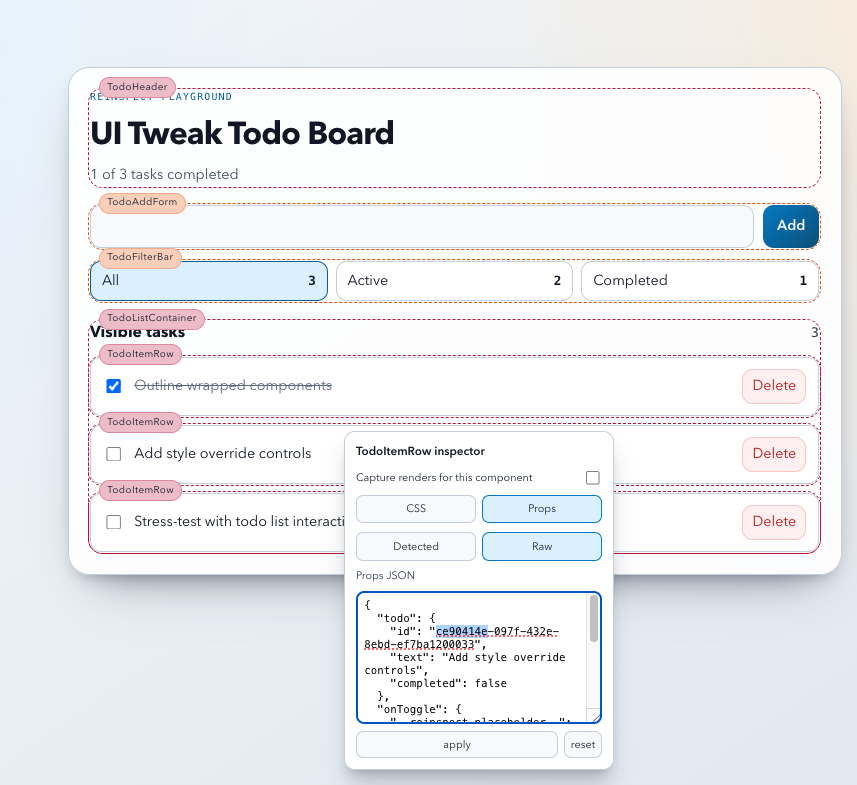
|
|
41
15
|
|
|
42
16
|
## Install
|
|
43
17
|
|
|
@@ -45,247 +19,25 @@ React DevTools is excellent for component trees and profiling.
|
|
|
45
19
|
pnpm add react-reinspect
|
|
46
20
|
```
|
|
47
21
|
|
|
48
|
-
Peer
|
|
22
|
+
Peer deps:
|
|
49
23
|
- `react >= 18`
|
|
50
24
|
- `react-dom >= 18`
|
|
51
25
|
|
|
52
|
-
|
|
53
|
-
If your app enforces strict CSP and blocks inline styles, import this once in your app root:
|
|
26
|
+
## Quick Start (Vite)
|
|
54
27
|
|
|
55
28
|
```tsx
|
|
56
|
-
import 'react-reinspect/style.css'
|
|
57
|
-
```
|
|
58
|
-
|
|
59
|
-
Auto-discovery is compile-time and requires the Vite plugin:
|
|
60
|
-
|
|
61
|
-
```ts
|
|
62
|
-
// vite.config.ts
|
|
63
|
-
import { defineConfig } from 'vite'
|
|
64
|
-
import react from '@vitejs/plugin-react'
|
|
65
|
-
import { reinspectAutoDiscoverPlugin } from 'react-reinspect/vite-plugin'
|
|
66
|
-
|
|
67
|
-
export default defineConfig({
|
|
68
|
-
plugins: [reinspectAutoDiscoverPlugin({ include: 'first-party' }), react()],
|
|
69
|
-
})
|
|
70
|
-
```
|
|
71
|
-
|
|
72
|
-
Without this plugin, only manually wrapped components (`withReinspect`) are inspectable.
|
|
73
|
-
|
|
74
|
-
Next.js (webpack mode) can use:
|
|
75
|
-
|
|
76
|
-
```ts
|
|
77
|
-
// next.config.ts
|
|
78
|
-
import { withReinspectAutoDiscover } from 'react-reinspect/next-plugin'
|
|
79
|
-
|
|
80
|
-
const nextConfig = {}
|
|
81
|
-
|
|
82
|
-
export default withReinspectAutoDiscover(nextConfig)
|
|
83
|
-
```
|
|
84
|
-
|
|
85
|
-
If your Next dev server runs with Turbopack, switch to webpack mode for this transform plugin.
|
|
86
|
-
|
|
87
|
-
|
|
88
|
-
## Example
|
|
89
|
-
|
|
90
|
-

|
|
91
|
-
|
|
92
|
-
## Screenshots
|
|
93
|
-
|
|
94
|
-
### Runtime inspector in-app
|
|
95
|
-
|
|
96
|
-

|
|
97
|
-
|
|
98
|
-
|
|
99
|
-
## Agentic Quick Start
|
|
100
|
-
|
|
101
|
-
Use this prompt on your favorite AI coding agent.
|
|
102
|
-
|
|
103
|
-
```text
|
|
104
|
-
You are a senior React code agent, your task is to integrate react-reinspect to this project. react-reinspect is a frontend utility that helps developers see the outline of react components and edit their props at runtime within their browser. it is not intended for production use at all.
|
|
105
|
-
|
|
106
|
-
Do all of the following in one pass:
|
|
107
|
-
1) Install `react-reinspect` using this repo's package manager.
|
|
108
|
-
2) Turn it on in dev mode ONLY by wiring `ReinspectProvider` at app root (on CLIENT SIDE only, not server-rendered!).
|
|
109
|
-
- Vite: use `enabled: import.meta.env.DEV`
|
|
110
|
-
- Next.js: use `enabled: process.env.NODE_ENV !== 'production'`
|
|
111
|
-
- Next App Router: mount a client `Providers` component from `app/layout.tsx`
|
|
112
|
-
- Next Pages Router: mount `ReinspectProvider` in `pages/_app.tsx`
|
|
113
|
-
3) If this app uses Vite, add `reinspectAutoDiscoverPlugin` from `react-reinspect/vite-plugin` in `vite.config.*`.
|
|
114
|
-
4) If this app uses Next.js (webpack mode), wrap the Next config with `withReinspectAutoDiscover` from `react-reinspect/next-plugin`.
|
|
115
|
-
5) If Next.js is running with Turbopack, either switch dev to webpack for auto-discovery transforms (`next dev --webpack`) or fall back to manual wrapping (`withReinspect`).
|
|
116
|
-
6) Keep production safe (e.g.: `enabled: import.meta.env.DEV` or however we manage dev/prod in this repo.).
|
|
117
|
-
7) Run validation (build/tests if available) and fix any issues.
|
|
118
|
-
8) Output a concise summary with changed files and how to use it.
|
|
119
|
-
|
|
120
|
-
Use this example as the baseline:
|
|
121
|
-
|
|
122
29
|
import { ReinspectProvider, type ReinspectConfig } from 'react-reinspect'
|
|
123
30
|
import 'react-reinspect/style.css'
|
|
124
31
|
|
|
125
32
|
const reinspectConfig: ReinspectConfig = {
|
|
126
|
-
enabled: import.meta.env.DEV,
|
|
127
|
-
// startActive: true,
|
|
128
|
-
// showFloatingToggle: true,
|
|
129
|
-
// inspectMode: 'wrapped',
|
|
33
|
+
enabled: import.meta.env.DEV, // keep it dev-only
|
|
130
34
|
}
|
|
131
35
|
|
|
132
36
|
export function AppProviders({ children }: { children: React.ReactNode }) {
|
|
133
37
|
return <ReinspectProvider config={reinspectConfig}>{children}</ReinspectProvider>
|
|
134
38
|
}
|
|
135
|
-
|
|
136
|
-
// Next.js App Router (app/providers.tsx)
|
|
137
|
-
'use client'
|
|
138
|
-
import { ReinspectProvider, type ReinspectConfig } from 'react-reinspect'
|
|
139
|
-
import 'react-reinspect/style.css'
|
|
140
|
-
|
|
141
|
-
const nextReinspectConfig: ReinspectConfig = {
|
|
142
|
-
enabled: process.env.NODE_ENV !== 'production',
|
|
143
|
-
}
|
|
144
|
-
|
|
145
|
-
export function Providers({ children }: { children: React.ReactNode }) {
|
|
146
|
-
return (
|
|
147
|
-
<ReinspectProvider config={nextReinspectConfig}>
|
|
148
|
-
{children}
|
|
149
|
-
</ReinspectProvider>
|
|
150
|
-
)
|
|
151
|
-
}
|
|
152
|
-
|
|
153
|
-
// Next.js App Router mount (app/layout.tsx)
|
|
154
|
-
import { Providers } from './providers'
|
|
155
|
-
|
|
156
|
-
export default function RootLayout({
|
|
157
|
-
children,
|
|
158
|
-
}: {
|
|
159
|
-
children: React.ReactNode
|
|
160
|
-
}) {
|
|
161
|
-
return (
|
|
162
|
-
<html lang="en">
|
|
163
|
-
<body>
|
|
164
|
-
<Providers>{children}</Providers>
|
|
165
|
-
</body>
|
|
166
|
-
</html>
|
|
167
|
-
)
|
|
168
|
-
}
|
|
169
|
-
|
|
170
|
-
For auto-discovery setup, apply one of these depending on framework:
|
|
171
|
-
|
|
172
|
-
// Vite
|
|
173
|
-
import { defineConfig } from 'vite'
|
|
174
|
-
import react from '@vitejs/plugin-react'
|
|
175
|
-
import { reinspectAutoDiscoverPlugin } from 'react-reinspect/vite-plugin'
|
|
176
|
-
|
|
177
|
-
export default defineConfig({
|
|
178
|
-
plugins: [reinspectAutoDiscoverPlugin(), react()],
|
|
179
|
-
})
|
|
180
|
-
|
|
181
|
-
// Next.js (webpack mode)
|
|
182
|
-
import { withReinspectAutoDiscover } from 'react-reinspect/next-plugin'
|
|
183
|
-
|
|
184
|
-
const nextConfig = {}
|
|
185
|
-
export default withReinspectAutoDiscover(nextConfig, {
|
|
186
|
-
includeThirdParty: false,
|
|
187
|
-
})
|
|
188
|
-
|
|
189
|
-
// Next.js dev script for auto-discovery:
|
|
190
|
-
// package.json -> "dev": "next dev --webpack"
|
|
191
|
-
|
|
192
|
-
Output format I want from you:
|
|
193
|
-
- What changed (bullet list)
|
|
194
|
-
- Why this is safe in production
|
|
195
|
-
- How to run it locally
|
|
196
|
-
- 1 copy-paste PR title + PR description
|
|
197
39
|
```
|
|
198
40
|
|
|
199
|
-
## Manual Quick Start
|
|
200
|
-
### 1) Wrap your app with `ReinspectProvider`
|
|
201
|
-
|
|
202
|
-
Vite:
|
|
203
|
-
|
|
204
|
-
```tsx
|
|
205
|
-
import {
|
|
206
|
-
ReinspectProvider,
|
|
207
|
-
type ReinspectConfig,
|
|
208
|
-
} from 'react-reinspect'
|
|
209
|
-
|
|
210
|
-
const reinspectConfig: ReinspectConfig = {
|
|
211
|
-
enabled: import.meta.env.DEV, // inspect in dev env, turn off in prod
|
|
212
|
-
// startActive: true, // start with inspector active when page loads
|
|
213
|
-
// showFloatingToggle: true, // show floating react-reinspect settings button
|
|
214
|
-
// inspectMode: 'wrapped', // wrapped: only wrapped components, first-party: wrapped + components with inspectable metadata, all: all components
|
|
215
|
-
// propsSerializationMode: 'distilled', // distilled hides React element internals in JSON previews/raw editor
|
|
216
|
-
// editableProps: ['padding', 'margin'], // change the CSS props you can edit
|
|
217
|
-
}
|
|
218
|
-
|
|
219
|
-
export function AppProviders({ children }: { children: React.ReactNode }) {
|
|
220
|
-
return <ReinspectProvider config={reinspectConfig}>{children}</ReinspectProvider>
|
|
221
|
-
}
|
|
222
|
-
```
|
|
223
|
-
|
|
224
|
-
Next.js App Router:
|
|
225
|
-
|
|
226
|
-
```tsx
|
|
227
|
-
// app/providers.tsx
|
|
228
|
-
'use client'
|
|
229
|
-
|
|
230
|
-
import { ReinspectProvider, type ReinspectConfig } from 'react-reinspect'
|
|
231
|
-
import 'react-reinspect/style.css'
|
|
232
|
-
|
|
233
|
-
const reinspectConfig: ReinspectConfig = {
|
|
234
|
-
enabled: process.env.NODE_ENV !== 'production',
|
|
235
|
-
// startActive: true,
|
|
236
|
-
// showFloatingToggle: true,
|
|
237
|
-
// inspectMode: 'first-party',
|
|
238
|
-
}
|
|
239
|
-
|
|
240
|
-
export function Providers({ children }: { children: React.ReactNode }) {
|
|
241
|
-
return <ReinspectProvider config={reinspectConfig}>{children}</ReinspectProvider>
|
|
242
|
-
}
|
|
243
|
-
```
|
|
244
|
-
|
|
245
|
-
```tsx
|
|
246
|
-
// app/layout.tsx
|
|
247
|
-
import { Providers } from './providers'
|
|
248
|
-
|
|
249
|
-
export default function RootLayout({
|
|
250
|
-
children,
|
|
251
|
-
}: {
|
|
252
|
-
children: React.ReactNode
|
|
253
|
-
}) {
|
|
254
|
-
return (
|
|
255
|
-
<html lang="en">
|
|
256
|
-
<body>
|
|
257
|
-
<Providers>{children}</Providers>
|
|
258
|
-
</body>
|
|
259
|
-
</html>
|
|
260
|
-
)
|
|
261
|
-
}
|
|
262
|
-
```
|
|
263
|
-
|
|
264
|
-
Next.js Pages Router:
|
|
265
|
-
|
|
266
|
-
```tsx
|
|
267
|
-
// pages/_app.tsx
|
|
268
|
-
import type { AppProps } from 'next/app'
|
|
269
|
-
import { ReinspectProvider, type ReinspectConfig } from 'react-reinspect'
|
|
270
|
-
import 'react-reinspect/style.css'
|
|
271
|
-
|
|
272
|
-
const reinspectConfig: ReinspectConfig = {
|
|
273
|
-
enabled: process.env.NODE_ENV !== 'production',
|
|
274
|
-
}
|
|
275
|
-
|
|
276
|
-
export default function App({ Component, pageProps }: AppProps) {
|
|
277
|
-
return (
|
|
278
|
-
<ReinspectProvider config={reinspectConfig}>
|
|
279
|
-
<Component {...pageProps} />
|
|
280
|
-
</ReinspectProvider>
|
|
281
|
-
)
|
|
282
|
-
}
|
|
283
|
-
```
|
|
284
|
-
|
|
285
|
-
### 2) Enable auto-discovery transforms (pick your framework)
|
|
286
|
-
|
|
287
|
-
Vite:
|
|
288
|
-
|
|
289
41
|
```ts
|
|
290
42
|
// vite.config.ts
|
|
291
43
|
import { defineConfig } from 'vite'
|
|
@@ -297,7 +49,7 @@ export default defineConfig({
|
|
|
297
49
|
})
|
|
298
50
|
```
|
|
299
51
|
|
|
300
|
-
Next.js (webpack mode)
|
|
52
|
+
## Next.js (webpack mode)
|
|
301
53
|
|
|
302
54
|
```ts
|
|
303
55
|
// next.config.ts
|
|
@@ -307,85 +59,36 @@ const nextConfig = {}
|
|
|
307
59
|
export default withReinspectAutoDiscover(nextConfig)
|
|
308
60
|
```
|
|
309
61
|
|
|
310
|
-
If your
|
|
311
|
-
If you keep Turbopack enabled, skip the Next transform plugin and use manual wrapping (`withReinspect`) instead.
|
|
62
|
+
If your dev server uses Turbopack, use manual wrapping via `withReinspect` or switch dev to webpack (`next dev --webpack`) for auto-discovery transforms.
|
|
312
63
|
|
|
313
|
-
|
|
64
|
+
## Use It
|
|
314
65
|
|
|
315
|
-
|
|
316
|
-
|
|
317
|
-
|
|
318
|
-
|
|
319
|
-
}
|
|
320
|
-
}
|
|
321
|
-
```
|
|
322
|
-
|
|
323
|
-
### 3) Use it in the browser
|
|
324
|
-
|
|
325
|
-
- Click `Reinspect settings` button.
|
|
326
|
-
- Right-click a wrapped component.
|
|
327
|
-
- Switch between `CSS` and `Props` tabs.
|
|
328
|
-
- Toggle rerender tracking when needed.
|
|
66
|
+
1. Open your app in dev mode.
|
|
67
|
+
2. Click the `Reinspect settings` button.
|
|
68
|
+
3. Right-click a component.
|
|
69
|
+
4. Edit CSS/Props and enable rerender counters as needed.
|
|
329
70
|
|
|
330
71
|
## API
|
|
331
72
|
|
|
332
|
-
|
|
333
|
-
|
|
334
|
-
|
|
335
|
-
|
|
336
|
-
```
|
|
337
|
-
<ReinspectProvider config={...}>{children}</ReinspectProvider>
|
|
338
|
-
```
|
|
339
|
-
|
|
340
|
-
### `ReinspectConfig`
|
|
73
|
+
- `ReinspectProvider`
|
|
74
|
+
Wrap your app root:
|
|
75
|
+
```tsx
|
|
76
|
+
<ReinspectProvider config={...}>{children}</ReinspectProvider>
|
|
77
|
+
```
|
|
341
78
|
|
|
342
|
-
|
|
343
|
-
|
|
344
|
-
| `enabled` | `boolean` | `false` | Master on/off. |
|
|
345
|
-
| `startActive` | `boolean` | `true` | Initial inspector active state. |
|
|
346
|
-
| `showFloatingToggle` | `boolean` | `enabled` | Show built-in settings button. |
|
|
347
|
-
| `inspectMode` | `'wrapped' \| 'first-party' \| 'all'` | `'wrapped'` | Auto-wrap visibility behavior. |
|
|
348
|
-
| `inspectWhitelist` | `InspectFilter` | `{ patterns: [], regex: false, wholeWord: false, matchCase: false }` | Optional include filter by component name. |
|
|
349
|
-
| `inspectBlacklist` | `InspectFilter` | `{ patterns: [], regex: false, wholeWord: false, matchCase: false }` | Optional exclude filter by component name. |
|
|
350
|
-
| `editableProps` | `EditableStyleProp[]` | built-in defaults | CSS props editable in inspector. |
|
|
351
|
-
| `propsSerializationMode` | `'distilled' \| 'complete'` | `'distilled'` | JSON view mode for props/value serialization in inspector menus. |
|
|
352
|
-
| `zIndexBase` | `number` | `2147483000` | Overlay stacking baseline. |
|
|
353
|
-
| `renderCounters` | `'off' \| 'attempts' \| 'commits' \| 'both'` | `'off'` | Global render-counter mode. |
|
|
354
|
-
| `countRendersForComponents` | `string[]` | `[]` | Component-specific counting when global mode is `off`. |
|
|
79
|
+
- `withReinspect(Component, options?)`
|
|
80
|
+
Manual wrapper if you don’t use transform plugins.
|
|
355
81
|
|
|
356
|
-
|
|
82
|
+
- `ReinspectConfig` (common options)
|
|
83
|
+
- `enabled` (`boolean`, default `false`)
|
|
84
|
+
- `inspectMode` (`'wrapped' | 'first-party' | 'all'`, default `'wrapped'`)
|
|
85
|
+
- `editableProps` (`EditableStyleProp[]`)
|
|
86
|
+
- `renderCounters` (`'off' | 'attempts' | 'commits' | 'both'`)
|
|
357
87
|
|
|
358
|
-
|
|
359
|
-
type InspectFilter = {
|
|
360
|
-
patterns: string[]
|
|
361
|
-
regex: boolean
|
|
362
|
-
wholeWord: boolean
|
|
363
|
-
matchCase: boolean
|
|
364
|
-
}
|
|
365
|
-
```
|
|
366
|
-
|
|
367
|
-
### `withReinspect(Component, options?)`
|
|
368
|
-
|
|
369
|
-
Wrap a component manually.
|
|
370
|
-
|
|
371
|
-
`options`:
|
|
372
|
-
- `name?: string`
|
|
373
|
-
|
|
374
|
-
`wrapInspectableMap` remains available as an internal utility (`react-reinspect/dist` deep-import), but is no longer part of the stable public runtime API.
|
|
375
|
-
|
|
376
|
-
`autoWrapInspectable` is now internal-only and used by the transform plugins via `react-reinspect/internal/auto-wrap`.
|
|
377
|
-
|
|
378
|
-
## Production Guidance
|
|
88
|
+
## Production Safety
|
|
379
89
|
|
|
380
|
-
-
|
|
381
|
-
-
|
|
382
|
-
|
|
383
|
-
```tsx
|
|
384
|
-
import { withReinspect } from 'react-reinspect'
|
|
385
|
-
|
|
386
|
-
const maybeWrap = <P extends object>(Component: React.ComponentType<P>) =>
|
|
387
|
-
import.meta.env.DEV ? withReinspect(Component) : Component
|
|
388
|
-
```
|
|
90
|
+
- Production-safe by default (`enabled: false`).
|
|
91
|
+
- Recommended: explicitly gate with `import.meta.env.DEV` (Vite) or `process.env.NODE_ENV !== 'production'` (Next.js).
|
|
389
92
|
|
|
390
93
|
## Development
|
|
391
94
|
|
|
@@ -395,13 +98,6 @@ pnpm test
|
|
|
395
98
|
pnpm build:lib
|
|
396
99
|
```
|
|
397
100
|
|
|
398
|
-
##
|
|
101
|
+
## License
|
|
399
102
|
|
|
400
|
-
|
|
401
|
-
|
|
402
|
-
```bash
|
|
403
|
-
pnpm build:lib
|
|
404
|
-
pnpm pack:check
|
|
405
|
-
npm login
|
|
406
|
-
pnpm publish:npm
|
|
407
|
-
```
|
|
103
|
+
MIT
|