react-native-ssl-manager 1.0.0 → 1.0.2
This diff represents the content of publicly available package versions that have been released to one of the supported registries. The information contained in this diff is provided for informational purposes only and reflects changes between package versions as they appear in their respective public registries.
- package/README.md +319 -58
- package/android/build.gradle +23 -1
- package/android/src/main/java/com/usesslpinning/SslPinningFactory.kt +94 -0
- package/android/src/main/java/com/usesslpinning/UseSslPinningModuleImpl.kt +34 -0
- package/android/src/newarch/com/usesslpinning/UseSslPinningModule.kt +26 -0
- package/android/src/newarch/com/usesslpinning/UseSslPinningPackage.kt +36 -0
- package/android/src/oldarch/com/usesslpinning/UseSslPinningModule.kt +32 -0
- package/android/src/{main/java → oldarch}/com/usesslpinning/UseSslPinningPackage.kt +0 -1
- package/android/ssl-pinning-setup.gradle +148 -0
- package/app.plugin.js +293 -0
- package/expo-module.config.json +10 -0
- package/ios/SharedLogic.swift +247 -0
- package/ios/UseSslPinning.h +5 -0
- package/ios/{UseSslPinning.mm → UseSslPinningModule.mm} +9 -6
- package/ios/UseSslPinningModule.swift +65 -0
- package/lib/NativeUseSslPinning.d.ts +8 -0
- package/lib/NativeUseSslPinning.d.ts.map +1 -0
- package/lib/NativeUseSslPinning.js +4 -0
- package/lib/UseSslPinning.types.d.ts +17 -0
- package/lib/UseSslPinning.types.d.ts.map +1 -0
- package/lib/UseSslPinning.types.js +2 -0
- package/lib/index.d.ts +15 -0
- package/lib/index.d.ts.map +1 -0
- package/lib/index.js +58 -0
- package/package.json +83 -39
- package/react-native-ssl-manager.podspec +87 -38
- package/react-native.config.js +34 -0
- package/scripts/build.sh +52 -0
- package/src/NativeUseSslPinning.ts +9 -0
- package/src/UseSslPinning.types.ts +17 -0
- package/src/index.tsx +53 -33
- package/android/src/main/java/com/usesslpinning/UseSslPinningFactory.kt +0 -50
- package/android/src/main/java/com/usesslpinning/UseSslPinningModule.kt +0 -45
- package/ios/UseSslPinning-Bridging-Header.h +0 -2
- package/ios/UseSslPinning.swift +0 -169
package/README.md
CHANGED
|
@@ -1,53 +1,117 @@
|
|
|
1
|
-
# react-native-ssl-manager
|
|
1
|
+
# 🔒 react-native-ssl-manager
|
|
2
2
|
|
|
3
|
-
|
|
3
|
+
**Production-ready SSL certificate pinning for React Native and Expo apps.** This library provides seamless SSL certificate pinning integration for enhanced network security, protecting applications against man-in-the-middle (MITM) attacks. With dynamic configuration options and the ability to toggle SSL pinning, it's perfect for both development and production environments.
|
|
4
4
|
|
|
5
|
-
##
|
|
5
|
+
## 🎥 Live Demo
|
|
6
6
|
|
|
7
|
-
|
|
8
|
-
|
|
9
|
-
- ⚡ Optimized for development and testing workflows
|
|
10
|
-
- 📱 Cross-platform support (iOS & Android)
|
|
11
|
-
- 🛠️ Simple configuration using JSON
|
|
12
|
-
- 🚀 Performance-optimized implementation
|
|
7
|
+
### iOS Demo
|
|
8
|
+
[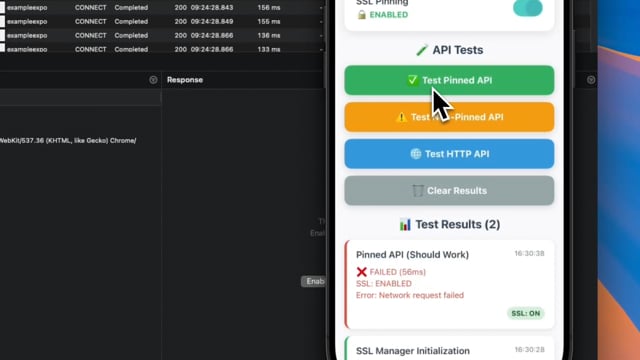](https://vimeo.com/1109299210)
|
|
13
9
|
|
|
14
|
-
|
|
10
|
+
### Android Demo
|
|
11
|
+
[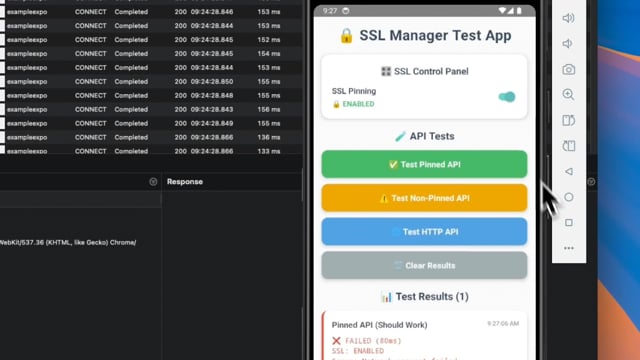](https://vimeo.com/1109299632)
|
|
15
12
|
|
|
16
|
-
|
|
13
|
+
> **📱 Interactive Features Shown:**
|
|
14
|
+
> - Toggle SSL pinning on/off
|
|
15
|
+
> - Real-time API testing with visual feedback
|
|
16
|
+
> - Certificate validation results
|
|
17
|
+
> - Performance metrics display
|
|
18
|
+
|
|
19
|
+
**🎬 Watch Full Demo Videos:**
|
|
20
|
+
- **[iOS Demo](https://vimeo.com/1109299210)** - Complete iOS SSL pinning demonstration
|
|
21
|
+
- **[Android Demo](https://vimeo.com/1109299632)** - Complete Android SSL pinning demonstration
|
|
22
|
+
|
|
23
|
+
## ✨ Features
|
|
24
|
+
|
|
25
|
+
- 🔒 **Easy SSL certificate pinning** - Simple setup with JSON configuration
|
|
26
|
+
- 🔄 **Dynamic SSL control** - Enable/disable SSL pinning at runtime
|
|
27
|
+
- 🏗️ **New Architecture Ready** - Full support for React Native's New Architecture (Fabric/TurboModules)
|
|
28
|
+
- 🏛️ **Legacy Compatible** - Works with both New and Legacy Architecture
|
|
29
|
+
- 📱 **Cross-platform** - Native support for iOS & Android
|
|
30
|
+
- 🚀 **Expo Compatible** - Built-in Expo plugin with auto-configuration
|
|
31
|
+
- ⚡ **Zero Configuration** - Auto-setup with smart fallbacks
|
|
32
|
+
- 🧪 **Developer Friendly** - Perfect for development and testing workflows
|
|
33
|
+
- 🎯 **Production Ready** - Optimized performance, no debug logs
|
|
34
|
+
|
|
35
|
+
## 📦 Installation
|
|
36
|
+
|
|
37
|
+
### For React Native CLI Projects
|
|
38
|
+
|
|
39
|
+
```bash
|
|
40
|
+
# Using npm
|
|
17
41
|
npm install react-native-ssl-manager
|
|
42
|
+
|
|
43
|
+
# Using yarn
|
|
44
|
+
yarn add react-native-ssl-manager
|
|
45
|
+
|
|
46
|
+
# Using bun
|
|
47
|
+
bun add react-native-ssl-manager
|
|
18
48
|
```
|
|
19
49
|
|
|
20
|
-
|
|
50
|
+
For iOS, run pod install:
|
|
51
|
+
```bash
|
|
52
|
+
cd ios && pod install
|
|
53
|
+
```
|
|
21
54
|
|
|
22
|
-
###
|
|
55
|
+
### For Expo Projects
|
|
23
56
|
|
|
24
|
-
```
|
|
25
|
-
|
|
26
|
-
|
|
27
|
-
|
|
28
|
-
|
|
29
|
-
|
|
30
|
-
|
|
31
|
-
|
|
32
|
-
|
|
33
|
-
|
|
34
|
-
|
|
35
|
-
|
|
36
|
-
|
|
57
|
+
```bash
|
|
58
|
+
# Using expo CLI
|
|
59
|
+
npx expo install react-native-ssl-manager
|
|
60
|
+
|
|
61
|
+
# Using bun with expo
|
|
62
|
+
bunx expo install react-native-ssl-manager
|
|
63
|
+
```
|
|
64
|
+
|
|
65
|
+
Add the plugin to your `app.json` or `app.config.js`:
|
|
66
|
+
```json
|
|
67
|
+
{
|
|
68
|
+
"expo": {
|
|
69
|
+
"plugins": [
|
|
70
|
+
[
|
|
71
|
+
"react-native-ssl-manager",
|
|
72
|
+
{
|
|
73
|
+
"sslConfigPath": "./ssl_config.json"
|
|
74
|
+
}
|
|
75
|
+
]
|
|
76
|
+
]
|
|
77
|
+
}
|
|
78
|
+
}
|
|
79
|
+
```
|
|
80
|
+
|
|
81
|
+
## 🚀 Architecture Support
|
|
82
|
+
|
|
83
|
+
This library supports **both** React Native architectures:
|
|
84
|
+
|
|
85
|
+
- ✅ **New Architecture** (Fabric/TurboModules) - React Native 0.68+
|
|
86
|
+
- ✅ **Legacy Architecture** - All React Native versions
|
|
87
|
+
|
|
88
|
+
The library automatically detects and uses the appropriate architecture at runtime.
|
|
89
|
+
|
|
90
|
+
## 🚀 Quick Start
|
|
91
|
+
|
|
92
|
+
### Step 1: Create SSL Configuration
|
|
93
|
+
|
|
94
|
+
Create a `ssl_config.json` file in your project root:
|
|
95
|
+
|
|
96
|
+
```json
|
|
97
|
+
{
|
|
37
98
|
"sha256Keys": {
|
|
38
|
-
"api.dev.example.com": [
|
|
39
|
-
"sha256/XXXXXXXXXXXXXXXXXXXXXXXXXXXXXXXXXXXXXXXXXXXX=",
|
|
40
|
-
"sha256/YYYYYYYYYYYYYYYYYYYYYYYYYYYYYYYYYYYYYYYY="
|
|
41
|
-
],
|
|
42
99
|
"api.example.com": [
|
|
43
|
-
"sha256/
|
|
44
|
-
"sha256/
|
|
100
|
+
"sha256/AAAAAAAAAAAAAAAAAAAAAAAAAAAAAAAAAAAAAAAAAAA=",
|
|
101
|
+
"sha256/BBBBBBBBBBBBBBBBBBBBBBBBBBBBBBBBBBBBBBBBBBB="
|
|
102
|
+
],
|
|
103
|
+
"api.dev.example.com": [
|
|
104
|
+
"sha256/CCCCCCCCCCCCCCCCCCCCCCCCCCCCCCCCCCCCCCCCCCC=",
|
|
105
|
+
"sha256/DDDDDDDDDDDDDDDDDDDDDDDDDDDDDDDDDDDDDDDDDDD="
|
|
45
106
|
]
|
|
46
107
|
}
|
|
47
|
-
}
|
|
108
|
+
}
|
|
109
|
+
```
|
|
110
|
+
|
|
111
|
+
### Step 2: Basic Usage
|
|
48
112
|
|
|
49
|
-
|
|
50
|
-
|
|
113
|
+
```typescript
|
|
114
|
+
import { setUseSSLPinning, getUseSSLPinning } from 'react-native-ssl-manager';
|
|
51
115
|
|
|
52
116
|
// Enable SSL pinning
|
|
53
117
|
await setUseSSLPinning(true);
|
|
@@ -55,6 +119,27 @@ await setUseSSLPinning(true);
|
|
|
55
119
|
// Check if SSL pinning is enabled
|
|
56
120
|
const isEnabled = await getUseSSLPinning();
|
|
57
121
|
console.log('SSL Pinning enabled:', isEnabled);
|
|
122
|
+
|
|
123
|
+
// Disable SSL pinning (for development/testing)
|
|
124
|
+
await setUseSSLPinning(false);
|
|
125
|
+
```
|
|
126
|
+
|
|
127
|
+
### Step 3: Test Your Implementation
|
|
128
|
+
|
|
129
|
+
```typescript
|
|
130
|
+
// Test with SSL pinning enabled
|
|
131
|
+
await setUseSSLPinning(true);
|
|
132
|
+
try {
|
|
133
|
+
const response = await fetch('https://api.example.com/data');
|
|
134
|
+
console.log('✅ SSL Pinning working - request succeeded');
|
|
135
|
+
} catch (error) {
|
|
136
|
+
console.log('⚠️ Check your SSL configuration');
|
|
137
|
+
}
|
|
138
|
+
|
|
139
|
+
// Test without SSL pinning
|
|
140
|
+
await setUseSSLPinning(false);
|
|
141
|
+
const response = await fetch('https://api.example.com/data');
|
|
142
|
+
console.log('🔓 Request without SSL pinning');
|
|
58
143
|
```
|
|
59
144
|
|
|
60
145
|
### Configuration File (ssl_config.json)
|
|
@@ -80,30 +165,64 @@ Create a configuration file with your domain certificates. Example structure:
|
|
|
80
165
|
}
|
|
81
166
|
```
|
|
82
167
|
|
|
83
|
-
|
|
84
|
-
|
|
85
|
-
#### `initializeSslPinning(configJsonString: string): Promise<any>`
|
|
86
|
-
Initializes the SSL pinning configuration with the provided JSON string configuration.
|
|
168
|
+
## 📚 API Reference
|
|
87
169
|
|
|
88
|
-
|
|
89
|
-
await initializeSslPinning(JSON.stringify(sslConfig));
|
|
90
|
-
```
|
|
170
|
+
### `setUseSSLPinning(usePinning: boolean): Promise<void>`
|
|
91
171
|
|
|
92
|
-
#### `setUseSSLPinning(usePinning: boolean): void`
|
|
93
172
|
Enables or disables SSL pinning dynamically.
|
|
94
173
|
|
|
95
174
|
```typescript
|
|
96
|
-
|
|
97
|
-
await setUseSSLPinning(
|
|
175
|
+
// Enable SSL pinning
|
|
176
|
+
await setUseSSLPinning(true);
|
|
177
|
+
|
|
178
|
+
// Disable SSL pinning
|
|
179
|
+
await setUseSSLPinning(false);
|
|
98
180
|
```
|
|
99
181
|
|
|
100
|
-
|
|
182
|
+
**Parameters:**
|
|
183
|
+
- `usePinning` (boolean): Whether to enable SSL pinning
|
|
184
|
+
|
|
185
|
+
**Returns:** Promise<void>
|
|
186
|
+
|
|
187
|
+
### `getUseSSLPinning(): Promise<boolean>`
|
|
188
|
+
|
|
101
189
|
Retrieves the current state of SSL pinning.
|
|
102
190
|
|
|
103
191
|
```typescript
|
|
104
192
|
const isEnabled = await getUseSSLPinning();
|
|
193
|
+
console.log('SSL Pinning enabled:', isEnabled);
|
|
105
194
|
```
|
|
106
195
|
|
|
196
|
+
**Returns:** Promise<boolean> - Current SSL pinning status
|
|
197
|
+
|
|
198
|
+
## 🔧 Configuration
|
|
199
|
+
|
|
200
|
+
### SSL Configuration File Structure
|
|
201
|
+
|
|
202
|
+
**⚠️ Important:** The configuration file **must** be named exactly `ssl_config.json` and placed in your project root directory.
|
|
203
|
+
|
|
204
|
+
Your `ssl_config.json` should follow this structure:
|
|
205
|
+
|
|
206
|
+
```json
|
|
207
|
+
{
|
|
208
|
+
"sha256Keys": {
|
|
209
|
+
"your-api-domain.com": [
|
|
210
|
+
"sha256/primary-certificate-hash=",
|
|
211
|
+
"sha256/backup-certificate-hash="
|
|
212
|
+
],
|
|
213
|
+
"another-domain.com": [
|
|
214
|
+
"sha256/another-certificate-hash="
|
|
215
|
+
]
|
|
216
|
+
}
|
|
217
|
+
}
|
|
218
|
+
```
|
|
219
|
+
|
|
220
|
+
**📁 File Location Requirements:**
|
|
221
|
+
- ✅ **React Native CLI**: Place `ssl_config.json` in project root
|
|
222
|
+
- ✅ **Expo**: Place `ssl_config.json` in project root (same level as `app.json`)
|
|
223
|
+
- ❌ **Don't rename** the file - it must be exactly `ssl_config.json`
|
|
224
|
+
- ❌ **Don't place** in subdirectories - must be in project root
|
|
225
|
+
|
|
107
226
|
## Important Notes ⚠️
|
|
108
227
|
|
|
109
228
|
### Restarting After SSL Pinning Changes
|
|
@@ -186,17 +305,97 @@ const handleSSLToggle = async (enabled: boolean) => {
|
|
|
186
305
|
- Regularly update certificates before expiration
|
|
187
306
|
- Maintain multiple backup certificates
|
|
188
307
|
|
|
189
|
-
## Roadmap
|
|
308
|
+
## ✅ Completed Roadmap
|
|
309
|
+
|
|
310
|
+
### Recently Completed Features
|
|
190
311
|
|
|
191
|
-
|
|
312
|
+
- ✅ **Expo Plugin Integration** - **COMPLETED!**
|
|
313
|
+
- ✅ Native SSL pinning support for Expo projects
|
|
314
|
+
- ✅ Seamless configuration through expo-config-plugin
|
|
315
|
+
- ✅ Auto-linking capabilities for Expo development builds
|
|
316
|
+
- ✅ Support for Expo's development client
|
|
317
|
+
|
|
318
|
+
- ✅ **New Architecture Support** - **COMPLETED!**
|
|
319
|
+
- ✅ Full TurboModule implementation
|
|
320
|
+
- ✅ Fabric renderer compatibility
|
|
321
|
+
- ✅ Automatic architecture detection
|
|
322
|
+
- ✅ Backward compatibility with Legacy Architecture
|
|
323
|
+
|
|
324
|
+
- ✅ **Production Optimizations** - **COMPLETED!**
|
|
325
|
+
- ✅ Removed debug logs for production builds
|
|
326
|
+
- ✅ Performance optimizations
|
|
327
|
+
- ✅ Clean codebase ready for release
|
|
328
|
+
|
|
329
|
+
## 🚀 Future Roadmap
|
|
192
330
|
|
|
193
331
|
### Upcoming Features
|
|
194
332
|
|
|
195
|
-
-
|
|
196
|
-
-
|
|
197
|
-
-
|
|
198
|
-
-
|
|
199
|
-
|
|
333
|
+
- 🔄 **Advanced Certificate Management**
|
|
334
|
+
- Certificate rotation support
|
|
335
|
+
- Automatic certificate validation
|
|
336
|
+
- Certificate expiry notifications
|
|
337
|
+
|
|
338
|
+
- 📊 **Enhanced Developer Experience**
|
|
339
|
+
- SSL pinning analytics and monitoring
|
|
340
|
+
- Better error reporting and debugging tools
|
|
341
|
+
- Integration with popular development tools
|
|
342
|
+
|
|
343
|
+
- 🔧 **Extended Platform Support**
|
|
344
|
+
- Web support for React Native Web
|
|
345
|
+
- Additional certificate formats support
|
|
346
|
+
|
|
347
|
+
## 🧪 Testing Your SSL Implementation
|
|
348
|
+
|
|
349
|
+
### Using the Example App
|
|
350
|
+
|
|
351
|
+
This library comes with a comprehensive test app that demonstrates SSL pinning functionality:
|
|
352
|
+
|
|
353
|
+
```bash
|
|
354
|
+
# Clone the repository
|
|
355
|
+
git clone https://github.com/huytdps13400/react-native-ssl-manager.git
|
|
356
|
+
|
|
357
|
+
# Test with React Native CLI
|
|
358
|
+
cd react-native-ssl-manager/example
|
|
359
|
+
npm install
|
|
360
|
+
npm run ios # or npm run android
|
|
361
|
+
|
|
362
|
+
# Test with Expo
|
|
363
|
+
cd ../example-expo
|
|
364
|
+
npm install
|
|
365
|
+
npx expo run:ios # or npx expo run:android
|
|
366
|
+
```
|
|
367
|
+
|
|
368
|
+
The example app provides:
|
|
369
|
+
- 🎛️ **SSL Control Panel** - Toggle SSL pinning on/off
|
|
370
|
+
- 🧪 **Multiple Test Scenarios** - Test different API endpoints
|
|
371
|
+
- 📊 **Real-time Results** - See detailed test results with timing
|
|
372
|
+
- 🔍 **Visual Feedback** - Color-coded success/failure indicators
|
|
373
|
+
|
|
374
|
+
### Manual Testing Steps
|
|
375
|
+
|
|
376
|
+
1. **🔓 Test without SSL Pinning:**
|
|
377
|
+
```typescript
|
|
378
|
+
await setUseSSLPinning(false);
|
|
379
|
+
// All API calls should work normally
|
|
380
|
+
```
|
|
381
|
+
|
|
382
|
+
2. **🔒 Test with SSL Pinning (Correct Certificate):**
|
|
383
|
+
```typescript
|
|
384
|
+
await setUseSSLPinning(true);
|
|
385
|
+
// Calls to pinned domains should work
|
|
386
|
+
const response = await fetch('https://your-pinned-domain.com/api');
|
|
387
|
+
```
|
|
388
|
+
|
|
389
|
+
3. **⚠️ Test with SSL Pinning (Wrong Certificate):**
|
|
390
|
+
```typescript
|
|
391
|
+
await setUseSSLPinning(true);
|
|
392
|
+
// Calls to non-pinned domains should fail
|
|
393
|
+
try {
|
|
394
|
+
await fetch('https://unpinned-domain.com/api');
|
|
395
|
+
} catch (error) {
|
|
396
|
+
console.log('✅ SSL Pinning working - blocked untrusted certificate');
|
|
397
|
+
}
|
|
398
|
+
```
|
|
200
399
|
|
|
201
400
|
## Testing with Proxyman 🔍
|
|
202
401
|
|
|
@@ -251,14 +450,76 @@ This integration with Proxyman makes it easy to:
|
|
|
251
450
|
- Validate security configurations
|
|
252
451
|
- Speed up development and testing workflows
|
|
253
452
|
|
|
254
|
-
##
|
|
453
|
+
## 📋 Requirements & Compatibility
|
|
454
|
+
|
|
455
|
+
### React Native Versions
|
|
456
|
+
- ✅ **React Native 0.60+** (AutoLinking support)
|
|
457
|
+
- ✅ **React Native 0.68+** (New Architecture support)
|
|
458
|
+
- ✅ **Expo SDK 47+** (Expo plugin support)
|
|
459
|
+
|
|
460
|
+
### Platform Support
|
|
461
|
+
- ✅ **iOS 13.0+**
|
|
462
|
+
- ✅ **Android API 21+** (Android 5.0)
|
|
463
|
+
|
|
464
|
+
### Architecture Support
|
|
465
|
+
- ✅ **New Architecture** (Fabric/TurboModules)
|
|
466
|
+
- ✅ **Legacy Architecture** (Bridge-based)
|
|
467
|
+
|
|
468
|
+
### Development Tools
|
|
469
|
+
- ✅ **React Native CLI**
|
|
470
|
+
- ✅ **Expo CLI**
|
|
471
|
+
- ✅ **Expo Development Build**
|
|
472
|
+
- ✅ **Flipper** (debugging support)
|
|
473
|
+
- ✅ **Bun** (package manager support)
|
|
474
|
+
|
|
475
|
+
## 🤝 Contributing
|
|
476
|
+
|
|
477
|
+
We welcome contributions! See the [contributing guide](CONTRIBUTING.md) to learn how to contribute to the repository and the development workflow.
|
|
478
|
+
|
|
479
|
+
### Development Setup
|
|
480
|
+
|
|
481
|
+
```bash
|
|
482
|
+
# Clone the repository
|
|
483
|
+
git clone https://github.com/huytdps13400/react-native-ssl-manager.git
|
|
484
|
+
cd react-native-ssl-manager
|
|
485
|
+
|
|
486
|
+
# Install dependencies (choose your package manager)
|
|
487
|
+
npm install
|
|
488
|
+
# or
|
|
489
|
+
yarn install
|
|
490
|
+
# or
|
|
491
|
+
bun install
|
|
492
|
+
|
|
493
|
+
# Build the library
|
|
494
|
+
npm run build
|
|
495
|
+
# or
|
|
496
|
+
bun run build
|
|
497
|
+
|
|
498
|
+
# Run tests
|
|
499
|
+
npm test
|
|
500
|
+
# or
|
|
501
|
+
bun test
|
|
502
|
+
|
|
503
|
+
# Test with example apps
|
|
504
|
+
npm run example:ios
|
|
505
|
+
npm run example:android
|
|
506
|
+
npm run example-expo:ios
|
|
507
|
+
npm run example-expo:android
|
|
508
|
+
|
|
509
|
+
# Test Bun compatibility
|
|
510
|
+
bun run bun:test-compatibility
|
|
511
|
+
```
|
|
512
|
+
|
|
513
|
+
## 📄 License
|
|
255
514
|
|
|
256
|
-
|
|
515
|
+
MIT License - see the [LICENSE](LICENSE) file for details.
|
|
257
516
|
|
|
258
|
-
##
|
|
517
|
+
## 🙏 Acknowledgments
|
|
259
518
|
|
|
260
|
-
|
|
519
|
+
- Built with [create-react-native-library](https://github.com/callstack/react-native-builder-bob)
|
|
520
|
+
- SSL pinning implementation inspired by industry best practices
|
|
521
|
+
- Special thanks to the React Native community
|
|
261
522
|
|
|
262
523
|
---
|
|
263
524
|
|
|
264
|
-
Made with
|
|
525
|
+
**Made with ❤️ for the React Native community**
|
package/android/build.gradle
CHANGED
|
@@ -23,6 +23,12 @@ apply plugin: "kotlin-android"
|
|
|
23
23
|
|
|
24
24
|
if (isNewArchitectureEnabled()) {
|
|
25
25
|
apply plugin: "com.facebook.react"
|
|
26
|
+
|
|
27
|
+
react {
|
|
28
|
+
jsRootDir = file("../src/")
|
|
29
|
+
libraryName = "UseSslPinning"
|
|
30
|
+
codegenJavaPackageName = "com.usesslpinning"
|
|
31
|
+
}
|
|
26
32
|
}
|
|
27
33
|
|
|
28
34
|
def getExtOrDefault(name) {
|
|
@@ -46,6 +52,9 @@ android {
|
|
|
46
52
|
if (supportsNamespace()) {
|
|
47
53
|
namespace "com.usesslpinning"
|
|
48
54
|
|
|
55
|
+
buildFeatures {
|
|
56
|
+
buildConfig true
|
|
57
|
+
}
|
|
49
58
|
sourceSets {
|
|
50
59
|
main {
|
|
51
60
|
manifest.srcFile "src/main/AndroidManifestNew.xml"
|
|
@@ -56,9 +65,22 @@ android {
|
|
|
56
65
|
compileSdkVersion getExtOrIntegerDefault("compileSdkVersion")
|
|
57
66
|
|
|
58
67
|
defaultConfig {
|
|
68
|
+
buildConfigField("boolean", "IS_NEW_ARCHITECTURE_ENABLED", isNewArchitectureEnabled().toString())
|
|
59
69
|
minSdkVersion getExtOrIntegerDefault("minSdkVersion")
|
|
60
70
|
targetSdkVersion getExtOrIntegerDefault("targetSdkVersion")
|
|
61
|
-
|
|
71
|
+
}
|
|
72
|
+
|
|
73
|
+
sourceSets {
|
|
74
|
+
main {
|
|
75
|
+
java {
|
|
76
|
+
if (isNewArchitectureEnabled()) {
|
|
77
|
+
srcDirs += ["src/newarch"]
|
|
78
|
+
} else {
|
|
79
|
+
srcDirs += ["src/oldarch"]
|
|
80
|
+
}
|
|
81
|
+
exclude '**/expo/**'
|
|
82
|
+
}
|
|
83
|
+
}
|
|
62
84
|
}
|
|
63
85
|
|
|
64
86
|
buildTypes {
|
|
@@ -0,0 +1,94 @@
|
|
|
1
|
+
package com.usesslpinning
|
|
2
|
+
|
|
3
|
+
import android.content.Context
|
|
4
|
+
|
|
5
|
+
import com.facebook.react.modules.network.OkHttpClientFactory
|
|
6
|
+
import com.facebook.react.modules.network.ReactCookieJarContainer
|
|
7
|
+
import okhttp3.CertificatePinner
|
|
8
|
+
import okhttp3.OkHttpClient
|
|
9
|
+
import org.json.JSONObject
|
|
10
|
+
import java.io.IOException
|
|
11
|
+
|
|
12
|
+
class SslPinningFactory(private val context: Context) : OkHttpClientFactory {
|
|
13
|
+
|
|
14
|
+
private val instanceId = System.currentTimeMillis()
|
|
15
|
+
|
|
16
|
+
override fun createNewNetworkModuleClient(): OkHttpClient {
|
|
17
|
+
|
|
18
|
+
|
|
19
|
+
val sharedPreferences = context.getSharedPreferences("AppSettings", Context.MODE_PRIVATE)
|
|
20
|
+
val useSSLPinning = sharedPreferences.getBoolean("useSSLPinning", true)
|
|
21
|
+
|
|
22
|
+
|
|
23
|
+
|
|
24
|
+
val clientBuilder = OkHttpClient.Builder()
|
|
25
|
+
.cookieJar(ReactCookieJarContainer())
|
|
26
|
+
.cache(null)
|
|
27
|
+
|
|
28
|
+
if (useSSLPinning) {
|
|
29
|
+
|
|
30
|
+
try {
|
|
31
|
+
val configJsonString = getConfigJsonString()
|
|
32
|
+
if (configJsonString != null) {
|
|
33
|
+
val certificatePinnerBuilder = CertificatePinner.Builder()
|
|
34
|
+
addCertificatesToPinner(certificatePinnerBuilder, JSONObject(configJsonString))
|
|
35
|
+
val certificatePinner = certificatePinnerBuilder.build()
|
|
36
|
+
clientBuilder.certificatePinner(certificatePinner)
|
|
37
|
+
|
|
38
|
+
} else {
|
|
39
|
+
|
|
40
|
+
}
|
|
41
|
+
} catch (e: Exception) {
|
|
42
|
+
// SSL pinning setup failed - continue with regular client
|
|
43
|
+
}
|
|
44
|
+
} else {
|
|
45
|
+
|
|
46
|
+
}
|
|
47
|
+
|
|
48
|
+
|
|
49
|
+
val client = clientBuilder.build()
|
|
50
|
+
|
|
51
|
+
|
|
52
|
+
return client
|
|
53
|
+
}
|
|
54
|
+
|
|
55
|
+
private fun getConfigJsonString(): String? {
|
|
56
|
+
val sharedPreferences = context.getSharedPreferences("AppSettings", Context.MODE_PRIVATE)
|
|
57
|
+
val runtimeConfig = sharedPreferences.getString("sslConfig", null)
|
|
58
|
+
if (!runtimeConfig.isNullOrEmpty()) {
|
|
59
|
+
|
|
60
|
+
return runtimeConfig
|
|
61
|
+
}
|
|
62
|
+
|
|
63
|
+
return try {
|
|
64
|
+
val inputStream = context.assets.open("ssl_config.json")
|
|
65
|
+
val size = inputStream.available()
|
|
66
|
+
val buffer = ByteArray(size)
|
|
67
|
+
inputStream.read(buffer)
|
|
68
|
+
inputStream.close()
|
|
69
|
+
|
|
70
|
+
String(buffer, Charsets.UTF_8)
|
|
71
|
+
} catch (e: IOException) {
|
|
72
|
+
|
|
73
|
+
null
|
|
74
|
+
}
|
|
75
|
+
}
|
|
76
|
+
|
|
77
|
+
private fun addCertificatesToPinner(certificatePinnerBuilder: CertificatePinner.Builder, configJson: JSONObject) {
|
|
78
|
+
val sha256Keys = configJson.getJSONObject("sha256Keys")
|
|
79
|
+
val hostnames = sha256Keys.keys()
|
|
80
|
+
while (hostnames.hasNext()) {
|
|
81
|
+
val hostname = hostnames.next()
|
|
82
|
+
val keysArray = sha256Keys.getJSONArray(hostname)
|
|
83
|
+
for (i in 0 until keysArray.length()) {
|
|
84
|
+
val sha256Key = keysArray.getString(i)
|
|
85
|
+
certificatePinnerBuilder.add(hostname, sha256Key)
|
|
86
|
+
|
|
87
|
+
}
|
|
88
|
+
}
|
|
89
|
+
}
|
|
90
|
+
|
|
91
|
+
companion object {
|
|
92
|
+
private const val TAG = "SslPinningFactory"
|
|
93
|
+
}
|
|
94
|
+
}
|
|
@@ -0,0 +1,34 @@
|
|
|
1
|
+
package com.usesslpinning
|
|
2
|
+
|
|
3
|
+
import android.content.Context
|
|
4
|
+
import com.facebook.react.bridge.Promise
|
|
5
|
+
import com.facebook.react.bridge.ReactApplicationContext
|
|
6
|
+
import com.facebook.react.modules.network.OkHttpClientProvider
|
|
7
|
+
|
|
8
|
+
object UseSslPinningModuleImpl {
|
|
9
|
+
const val NAME = "UseSslPinning"
|
|
10
|
+
|
|
11
|
+
fun initialize(reactContext: ReactApplicationContext) {
|
|
12
|
+
try {
|
|
13
|
+
OkHttpClientProvider.setOkHttpClientFactory(SslPinningFactory(reactContext))
|
|
14
|
+
} catch (e: Exception) {
|
|
15
|
+
// SSL Factory setup failed - continue without custom factory
|
|
16
|
+
}
|
|
17
|
+
}
|
|
18
|
+
|
|
19
|
+
fun setUseSSLPinning(reactContext: ReactApplicationContext, usePinning: Boolean, promise: Promise) {
|
|
20
|
+
val sharedPreferences = reactContext.getSharedPreferences("AppSettings", Context.MODE_PRIVATE)
|
|
21
|
+
sharedPreferences.edit().putBoolean("useSSLPinning", usePinning).apply()
|
|
22
|
+
|
|
23
|
+
// Force new factory creation to bypass RN client cache
|
|
24
|
+
OkHttpClientProvider.setOkHttpClientFactory(SslPinningFactory(reactContext))
|
|
25
|
+
|
|
26
|
+
promise.resolve(null)
|
|
27
|
+
}
|
|
28
|
+
|
|
29
|
+
fun getUseSSLPinning(reactContext: ReactApplicationContext, promise: Promise) {
|
|
30
|
+
val sharedPreferences = reactContext.getSharedPreferences("AppSettings", Context.MODE_PRIVATE)
|
|
31
|
+
val usePinning = sharedPreferences.getBoolean("useSSLPinning", true)
|
|
32
|
+
promise.resolve(usePinning)
|
|
33
|
+
}
|
|
34
|
+
}
|
|
@@ -0,0 +1,26 @@
|
|
|
1
|
+
package com.usesslpinning
|
|
2
|
+
|
|
3
|
+
import com.facebook.react.bridge.Promise
|
|
4
|
+
import com.facebook.react.bridge.ReactApplicationContext
|
|
5
|
+
import com.facebook.react.module.annotations.ReactModule
|
|
6
|
+
|
|
7
|
+
@ReactModule(name = UseSslPinningModuleImpl.NAME)
|
|
8
|
+
class UseSslPinningModule(reactContext: ReactApplicationContext) :
|
|
9
|
+
NativeUseSslPinningSpec(reactContext) {
|
|
10
|
+
|
|
11
|
+
init {
|
|
12
|
+
UseSslPinningModuleImpl.initialize(reactContext)
|
|
13
|
+
}
|
|
14
|
+
|
|
15
|
+
override fun getName(): String {
|
|
16
|
+
return UseSslPinningModuleImpl.NAME
|
|
17
|
+
}
|
|
18
|
+
|
|
19
|
+
override fun setUseSSLPinning(usePinning: Boolean, promise: Promise) {
|
|
20
|
+
UseSslPinningModuleImpl.setUseSSLPinning(reactApplicationContext, usePinning, promise)
|
|
21
|
+
}
|
|
22
|
+
|
|
23
|
+
override fun getUseSSLPinning(promise: Promise) {
|
|
24
|
+
UseSslPinningModuleImpl.getUseSSLPinning(reactApplicationContext, promise)
|
|
25
|
+
}
|
|
26
|
+
}
|
|
@@ -0,0 +1,36 @@
|
|
|
1
|
+
package com.usesslpinning
|
|
2
|
+
|
|
3
|
+
import com.facebook.react.BaseReactPackage
|
|
4
|
+
import com.facebook.react.bridge.NativeModule
|
|
5
|
+
import com.facebook.react.bridge.ReactApplicationContext
|
|
6
|
+
import com.facebook.react.module.model.ReactModuleInfo
|
|
7
|
+
import com.facebook.react.module.model.ReactModuleInfoProvider
|
|
8
|
+
|
|
9
|
+
class UseSslPinningPackage : BaseReactPackage() {
|
|
10
|
+
override fun getModule(name: String, reactContext: ReactApplicationContext): NativeModule? {
|
|
11
|
+
return when (name) {
|
|
12
|
+
UseSslPinningModuleImpl.NAME -> UseSslPinningModule(reactContext)
|
|
13
|
+
else -> null
|
|
14
|
+
}
|
|
15
|
+
}
|
|
16
|
+
|
|
17
|
+
override fun getReactModuleInfoProvider(): ReactModuleInfoProvider {
|
|
18
|
+
return ReactModuleInfoProvider {
|
|
19
|
+
val isTurboModule = BuildConfig.IS_NEW_ARCHITECTURE_ENABLED
|
|
20
|
+
|
|
21
|
+
val moduleInfo = ReactModuleInfo(
|
|
22
|
+
UseSslPinningModuleImpl.NAME,
|
|
23
|
+
UseSslPinningModuleImpl.NAME,
|
|
24
|
+
false,
|
|
25
|
+
true,
|
|
26
|
+
true,
|
|
27
|
+
false,
|
|
28
|
+
isTurboModule
|
|
29
|
+
)
|
|
30
|
+
|
|
31
|
+
mapOf(
|
|
32
|
+
UseSslPinningModuleImpl.NAME to moduleInfo
|
|
33
|
+
)
|
|
34
|
+
}
|
|
35
|
+
}
|
|
36
|
+
}
|