react-native-idosdk 1.0.4 → 1.0.6
This diff represents the content of publicly available package versions that have been released to one of the supported registries. The information contained in this diff is provided for informational purposes only and reflects changes between package versions as they appear in their respective public registries.
- package/CHANGELOG.md +18 -0
- package/README.md +56 -68
- package/android/build.gradle +11 -14
- package/android/src/main/AndroidManifest.xml +11 -3
- package/android/src/main/java/com/getui/{reactnativegetui → reactnativeido}/GetuiIdoModule.java +7 -3
- package/android/src/main/java/com/getui/{reactnativegetui → reactnativeido}/GetuiIdoPackage.java +1 -1
- package/android/src/main/java/com/getui/{reactnativegetui → reactnativeido}/GetuiLogger.java +1 -1
- package/docs/superpowers/plans/2026-07-13-android-getui-maven-dependencies.md +323 -0
- package/docs/superpowers/specs/2026-07-13-android-getui-maven-dependencies-design.md +96 -0
- package/document/android.md +48 -112
- package/document/iOS.md +31 -283
- package/package.json +4 -1
- package/react-native-harmony-ido/README.md +266 -0
- package/react-native-harmony-ido/gt-ido-ohos-plugin-1.0.1.tgz +0 -0
- package/react-native-harmony-ido/harmony/BuildProfile.ets +17 -0
- package/react-native-harmony-ido/harmony/IdoOhosSdk.har +0 -0
- package/react-native-harmony-ido/harmony/Index.ets +1 -0
- package/react-native-harmony-ido/harmony/build-profile.json5 +36 -0
- package/react-native-harmony-ido/harmony/consumer-rules.txt +0 -0
- package/react-native-harmony-ido/harmony/hvigorfile.ts +6 -0
- package/react-native-harmony-ido/harmony/libs/getui_ido_1.0.1.har +0 -0
- package/react-native-harmony-ido/harmony/obfuscation-rules.txt +23 -0
- package/react-native-harmony-ido/harmony/oh-package-lock.json5 +38 -0
- package/react-native-harmony-ido/harmony/oh-package.json5 +12 -0
- package/react-native-harmony-ido/harmony/src/main/cpp/CMakeLists.txt +7 -0
- package/react-native-harmony-ido/harmony/src/main/cpp/IdoModule.cpp +38 -0
- package/react-native-harmony-ido/harmony/src/main/cpp/IdoModule.h +21 -0
- package/react-native-harmony-ido/harmony/src/main/cpp/IdoPackage.h +76 -0
- package/react-native-harmony-ido/harmony/src/main/ets/IdoModule.ets +150 -0
- package/react-native-harmony-ido/harmony/src/main/ets/IdoPackage.ets +24 -0
- package/react-native-harmony-ido/harmony/src/main/module.json5 +9 -0
- package/react-native-harmony-ido/harmony/src/main/resources/base/element/float.json +8 -0
- package/react-native-harmony-ido/harmony/src/main/resources/base/element/string.json +8 -0
- package/react-native-harmony-ido/harmony/ts.ets +2 -0
- package/react-native-harmony-ido/index.ts +4 -0
- package/react-native-harmony-ido/package.json +35 -0
- package/react-native-harmony-ido/src/specs/v1/NativeIdo.ts +44 -0
- package/android/libs/gs-1.4.12.0.jar +0 -0
- package/android/libs/gtc-3.2.18.0.jar +0 -0
|
@@ -0,0 +1,96 @@
|
|
|
1
|
+
# Android 个推 Maven 依赖迁移设计
|
|
2
|
+
|
|
3
|
+
## 目标
|
|
4
|
+
|
|
5
|
+
将 Android React Native 插件内置的个推 JAR 文件替换为官方 Maven
|
|
6
|
+
制品,同时保留插件通过运行时参数配置 App ID 和安装渠道的初始化方式。
|
|
7
|
+
|
|
8
|
+
## 当前状态
|
|
9
|
+
|
|
10
|
+
- `android/libs/gs-1.4.12.0.jar` 提供用户运营 SDK API。
|
|
11
|
+
- `android/libs/gtc-3.2.18.0.jar` 提供个推核心 API 和 Android 组件。
|
|
12
|
+
- `android/build.gradle` 通过 `fileTree` 引入 `android/libs` 目录下的所有
|
|
13
|
+
JAR 文件。
|
|
14
|
+
- `startSdk(appid, channel)` 会在预初始化和初始化 `GsManager` 前设置
|
|
15
|
+
App ID,但目前没有使用传入的渠道参数。
|
|
16
|
+
- 插件 Manifest 显式声明了 GTC 服务和 Provider。
|
|
17
|
+
|
|
18
|
+
## 选定方案
|
|
19
|
+
|
|
20
|
+
使用精确的 Maven 版本,并移除内置 JAR 文件:
|
|
21
|
+
|
|
22
|
+
```gradle
|
|
23
|
+
implementation 'com.getui:gsido:1.4.14.0'
|
|
24
|
+
implementation 'com.getui:gtc:3.3.3.0'
|
|
25
|
+
```
|
|
26
|
+
|
|
27
|
+
继续使用个推 Releases 仓库获取这两个制品。由于宿主 App 的运行时配置不会
|
|
28
|
+
继承 RN Library 项目的仓库声明,插件需要将该仓库添加到根项目的所有项目:
|
|
29
|
+
|
|
30
|
+
```gradle
|
|
31
|
+
rootProject.allprojects {
|
|
32
|
+
repositories {
|
|
33
|
+
maven {
|
|
34
|
+
url "https://mvn.getui.com/nexus/content/repositories/releases/"
|
|
35
|
+
}
|
|
36
|
+
}
|
|
37
|
+
}
|
|
38
|
+
```
|
|
39
|
+
|
|
40
|
+
`android/libs` 当前只包含这两个 Android SDK JAR,因此移除范围较宽的
|
|
41
|
+
`fileTree` 依赖。这样可以避免完成 Maven 迁移后,旧版本 SDK JAR 被意外重新
|
|
42
|
+
加入类路径。
|
|
43
|
+
|
|
44
|
+
## 运行时配置
|
|
45
|
+
|
|
46
|
+
React Native API 保持不变。`startSdk(appid, channel)` 将按以下顺序执行:
|
|
47
|
+
|
|
48
|
+
1. 当 App ID 非空时,通过 `GsConfig.setAppId(appid)` 设置 App ID。
|
|
49
|
+
2. 当安装渠道非空时,通过 `GsConfig.setInstallChannel(channel)` 设置渠道。
|
|
50
|
+
3. 按现有顺序调用 `GsManager.preInit(context)` 和
|
|
51
|
+
`GsManager.init(context)`。
|
|
52
|
+
|
|
53
|
+
插件 Manifest 会通过 `tools:node="remove"` 移除 `gsido` AAR 声明的
|
|
54
|
+
`GETUI_APPID` 和 `GT_INSTALL_CHANNEL` 元数据。采用运行时配置的应用不需要
|
|
55
|
+
为了完成 Manifest 合并而额外声明这两个占位符;宿主应用已经显式声明的同名
|
|
56
|
+
元数据仍会保留。
|
|
57
|
+
|
|
58
|
+
## Manifest 行为
|
|
59
|
+
|
|
60
|
+
`gsido:1.4.14.0` 和 `gtc:3.3.3.0` 的 AAR Manifest 将参与 Android
|
|
61
|
+
标准 Manifest 合并。本次集成明确保留 SDK 默认声明的全部权限、Service、
|
|
62
|
+
Provider,以及 `android:usesCleartextTraffic="true"` 配置。仅移除用于静态
|
|
63
|
+
配置的 App ID 和安装渠道元数据,因为 RN Bridge 会在初始化前动态设置这两个值。
|
|
64
|
+
|
|
65
|
+
插件当前声明的 GTC Service 和 Provider 与 GTC AAR 中的组件名称及属性一致,
|
|
66
|
+
可以继续保留,Manifest 合并器会将它们合并。除非实际合并时发生冲突,否则本次
|
|
67
|
+
依赖迁移不额外删除这些声明。
|
|
68
|
+
|
|
69
|
+
## 兼容性
|
|
70
|
+
|
|
71
|
+
`gsido:1.4.14.0` 继续提供 RN Bridge 当前使用的公开类和方法,包括
|
|
72
|
+
`GsManager`、`GsConfig` 和 `IGtcIdCallback`。Java 包导入和 JavaScript
|
|
73
|
+
API 签名均不需要调整。
|
|
74
|
+
|
|
75
|
+
发布的 `gsido` 模块没有将 `gtc` 声明为传递依赖,因此必须同时显式声明这两个
|
|
76
|
+
Maven 依赖。
|
|
77
|
+
|
|
78
|
+
## 验证方式
|
|
79
|
+
|
|
80
|
+
验证范围包括:
|
|
81
|
+
|
|
82
|
+
- 检查 Gradle 文件是否声明两个精确的 Maven 坐标,并且不再引用本地 JAR。
|
|
83
|
+
- 验证能够从个推 Releases 仓库解析依赖。
|
|
84
|
+
- 验证宿主 App 能够解析个推 Maven 仓库,并正常完成 Android Manifest 合并。
|
|
85
|
+
- 验证 AAR 的两个静态配置元数据被移除,同时宿主 App 已声明的 App ID 保留。
|
|
86
|
+
- 使用新 AAR API 编译 React Native Android Library。
|
|
87
|
+
- 构建 Android 示例应用的 Debug 版本。
|
|
88
|
+
- 检查最终运行时依赖图,确认相关 SDK 类仅由 `gsido:1.4.14.0` 和
|
|
89
|
+
`gtc:3.3.3.0` 提供。
|
|
90
|
+
|
|
91
|
+
## 不在本次范围内
|
|
92
|
+
|
|
93
|
+
- 修改 JavaScript API 签名。
|
|
94
|
+
- 移除个推 SDK 声明的权限。
|
|
95
|
+
- 修改 iOS 或 HarmonyOS 依赖。
|
|
96
|
+
- 重构无关的 Bridge 代码或现有包名调整。
|
package/document/android.md
CHANGED
|
@@ -1,112 +1,48 @@
|
|
|
1
|
-
# Android
|
|
2
|
-
|
|
3
|
-
|
|
4
|
-
|
|
5
|
-
|
|
6
|
-
|
|
7
|
-
|
|
8
|
-
|
|
9
|
-
|
|
10
|
-
|
|
11
|
-
|
|
12
|
-
|
|
13
|
-
|
|
14
|
-
|
|
15
|
-
|
|
16
|
-
|
|
17
|
-
|
|
18
|
-
|
|
19
|
-
|
|
20
|
-
|
|
21
|
-
|
|
22
|
-
|
|
23
|
-
|
|
24
|
-
|
|
25
|
-
|
|
26
|
-
|
|
27
|
-
|
|
28
|
-
|
|
29
|
-
|
|
30
|
-
|
|
31
|
-
|
|
32
|
-
|
|
33
|
-
|
|
34
|
-
|
|
35
|
-
|
|
36
|
-
|
|
37
|
-
|
|
38
|
-
|
|
39
|
-
|
|
40
|
-
|
|
41
|
-
|
|
42
|
-
|
|
43
|
-
|
|
44
|
-
|
|
45
|
-
|
|
46
|
-
|
|
47
|
-
|
|
48
|
-
|
|
49
|
-
Alert.alert('初始化获取到cid',JSON.stringify(notification))
|
|
50
|
-
break;
|
|
51
|
-
case "cmd":
|
|
52
|
-
Alert.alert('cmd 消息通知',JSON.stringify(notification))
|
|
53
|
-
break;
|
|
54
|
-
case "payload":
|
|
55
|
-
Alert.alert('payload 消息通知',JSON.stringify(notification))
|
|
56
|
-
break;
|
|
57
|
-
//新增回调通知到达,点击回调
|
|
58
|
-
case 'notificationArrived':
|
|
59
|
-
Alert.alert('notificationArrived 通知到达',JSON.stringify(notification))
|
|
60
|
-
break
|
|
61
|
-
case 'notificationClicked':
|
|
62
|
-
Alert.alert('notificationArrived 通知点击',JSON.stringify(notification))
|
|
63
|
-
break
|
|
64
|
-
default:
|
|
65
|
-
}
|
|
66
|
-
}
|
|
67
|
-
);
|
|
68
|
-
|
|
69
|
-
|
|
70
|
-
````
|
|
71
|
-
|
|
72
|
-
````
|
|
73
|
-
componentWillUnMount() {
|
|
74
|
-
//记得在此处移除监听
|
|
75
|
-
receiveRemoteNotificationSub.remove()
|
|
76
|
-
}
|
|
77
|
-
|
|
78
|
-
````
|
|
79
|
-
|
|
80
|
-
其他接口:
|
|
81
|
-
|
|
82
|
-
````
|
|
83
|
-
import Getui from 'react-native-getui'
|
|
84
|
-
|
|
85
|
-
Getui.initPush()
|
|
86
|
-
|
|
87
|
-
Getui.clientId((param)=> {
|
|
88
|
-
this.setState({'clientId': param})
|
|
89
|
-
})
|
|
90
|
-
|
|
91
|
-
Getui.version((param)=> {
|
|
92
|
-
this.setState({'version': param})
|
|
93
|
-
})
|
|
94
|
-
|
|
95
|
-
Getui.status((param)=> {
|
|
96
|
-
let status = ''
|
|
97
|
-
switch (param){
|
|
98
|
-
case '0':
|
|
99
|
-
status = '正在启动'
|
|
100
|
-
break;
|
|
101
|
-
case '1':
|
|
102
|
-
status = '启动'
|
|
103
|
-
break;
|
|
104
|
-
case '2':
|
|
105
|
-
status = '停止'
|
|
106
|
-
break;
|
|
107
|
-
}
|
|
108
|
-
this.setState({'status': status})
|
|
109
|
-
})
|
|
110
|
-
//Getui...
|
|
111
|
-
|
|
112
|
-
````
|
|
1
|
+
# Android 集成
|
|
2
|
+
|
|
3
|
+
`react-native-idosdk` 接入的是 IDOSDK 运营统计能力,不是 `react-native-getui` 推送插件。
|
|
4
|
+
|
|
5
|
+
## 前置条件
|
|
6
|
+
|
|
7
|
+
- Android `minSdkVersion` 不低于 `23`。
|
|
8
|
+
- React Native 0.60 及以上项目使用 Autolinking;不需要在 `settings.gradle` 中手动引入 `react-native-getui`。
|
|
9
|
+
- 插件会从个推 Maven 仓库解析 `gsido` 和 `gtc` 依赖。网络受限时,请确认工程可访问 `https://mvn.getui.com/nexus/content/repositories/releases/`。
|
|
10
|
+
|
|
11
|
+
## 配置 AppID
|
|
12
|
+
|
|
13
|
+
在 `android/app/src/main/AndroidManifest.xml` 的 `<application>` 节点中添加:
|
|
14
|
+
|
|
15
|
+
```xml
|
|
16
|
+
<meta-data android:name="GETUI_APPID" android:value="你的 AppID" />
|
|
17
|
+
<meta-data android:name="GT_INSTALL_CHANNEL" android:value="" />
|
|
18
|
+
```
|
|
19
|
+
|
|
20
|
+
`GETUI_APPID` 是必填项,`GT_INSTALL_CHANNEL` 可按发布渠道填写。不要添加 `PUSH_APPID`、`PUSH_APPKEY`、`PUSH_APPSECRET`,IDOSDK 不使用这些推送参数。
|
|
21
|
+
|
|
22
|
+
## 混淆
|
|
23
|
+
|
|
24
|
+
若应用启用了 R8/ProGuard,在应用的混淆规则文件中加入:
|
|
25
|
+
|
|
26
|
+
```proguard
|
|
27
|
+
-keep class com.getui.gs.** { *; }
|
|
28
|
+
-keep class com.getui.gtc.** { *; }
|
|
29
|
+
```
|
|
30
|
+
|
|
31
|
+
## 初始化与使用
|
|
32
|
+
|
|
33
|
+
在 JavaScript 中配置并初始化:
|
|
34
|
+
|
|
35
|
+
```ts
|
|
36
|
+
import GetuiIdo from 'react-native-idosdk';
|
|
37
|
+
|
|
38
|
+
GetuiIdo.setDebugEnable(__DEV__);
|
|
39
|
+
GetuiIdo.startSdk('你的 AppID', 'rn');
|
|
40
|
+
|
|
41
|
+
GetuiIdo.gtcid((gtcid) => {
|
|
42
|
+
console.log('gtcid:', gtcid);
|
|
43
|
+
});
|
|
44
|
+
|
|
45
|
+
GetuiIdo.trackCountEvent('page_view', { page: 'home' }, '');
|
|
46
|
+
```
|
|
47
|
+
|
|
48
|
+
`gtcid` 的生成是异步过程。首次读取为空时,在初始化完成后再次读取即可。
|
package/document/iOS.md
CHANGED
|
@@ -1,299 +1,47 @@
|
|
|
1
|
-
# iOS
|
|
1
|
+
# iOS 集成
|
|
2
2
|
|
|
3
|
-
|
|
4
|
-
Xcode 工程中需要注册个推 SDK 、注册 deviceToken 、监听消息回调,才能正常使用推送服务,只需要通过以下几步即可集成:
|
|
3
|
+
`react-native-idosdk` 使用 IDOSDK 的 iOS 原生依赖,不需要接入个推推送 SDK、注册 DeviceToken 或配置 VoIP。
|
|
5
4
|
|
|
6
|
-
|
|
5
|
+
## 安装
|
|
7
6
|
|
|
8
|
-
|
|
9
|
-
// 导入头文件
|
|
10
|
-
#import <RCTGetuiModule/RCTGetuiModule.h>
|
|
11
|
-
#if __IPHONE_OS_VERSION_MAX_ALLOWED >= __IPHONE_10_0
|
|
12
|
-
#import <UserNotifications/UserNotifications.h>
|
|
13
|
-
#endif
|
|
14
|
-
// 以下三个参数需要到个推官网注册应用获得
|
|
15
|
-
#define kGtAppId @"iMahVVxurw6BNr7XSn9EF2"
|
|
16
|
-
#define kGtAppKey @"yIPfqwq6OMAPp6dkqgLpG5"
|
|
17
|
-
#define kGtAppSecret @"G0aBqAD6t79JfzTB6Z5lo5"
|
|
7
|
+
React Native 0.60 及以上项目会通过 Autolinking 加载插件。安装 npm 包后执行:
|
|
18
8
|
|
|
19
|
-
|
|
20
|
-
|
|
9
|
+
```sh
|
|
10
|
+
npx pod-install
|
|
11
|
+
```
|
|
21
12
|
|
|
22
|
-
|
|
13
|
+
未使用 Autolinking 的旧项目,可在 `ios/Podfile` 对应 target 中添加:
|
|
23
14
|
|
|
24
|
-
|
|
25
|
-
|
|
26
|
-
|
|
15
|
+
```ruby
|
|
16
|
+
pod 'IdoSdkRN', :path => '../node_modules/react-native-idosdk'
|
|
17
|
+
```
|
|
27
18
|
|
|
28
|
-
|
|
29
|
-
- (BOOL)application:(UIApplication *)application didFinishLaunchingWithOptions:(NSDictionary *)launchOptions
|
|
30
|
-
{
|
|
31
|
-
// 接入个推
|
|
32
|
-
[GeTuiSdk startSdkWithAppId:kGtAppId appKey:kGtAppKey appSecret:kGtAppSecret delegate:self];
|
|
33
|
-
// 注册远程通知
|
|
34
|
-
[self registerRemoteNotification];
|
|
35
|
-
}
|
|
19
|
+
随后执行:
|
|
36
20
|
|
|
37
|
-
|
|
38
|
-
|
|
39
|
-
|
|
40
|
-
|
|
41
|
-
*/
|
|
21
|
+
```sh
|
|
22
|
+
cd ios
|
|
23
|
+
pod install
|
|
24
|
+
```
|
|
42
25
|
|
|
43
|
-
|
|
44
|
-
警告:该方法需要开发者自定义,以下代码根据APP支持的iOS系统不同,代码可以对应修改。
|
|
45
|
-
以下为演示代码,注意根据实际需要修改,注意测试支持的iOS系统都能获取到DeviceToken
|
|
46
|
-
*/
|
|
47
|
-
if ([[UIDevice currentDevice].systemVersion floatValue] >= 10.0) {
|
|
48
|
-
#if __IPHONE_OS_VERSION_MAX_ALLOWED >= __IPHONE_10_0 // Xcode 8编译会调用
|
|
49
|
-
UNUserNotificationCenter *center = [UNUserNotificationCenter currentNotificationCenter];
|
|
50
|
-
center.delegate = self;
|
|
51
|
-
[center requestAuthorizationWithOptions:(UNAuthorizationOptionBadge | UNAuthorizationOptionSound | UNAuthorizationOptionAlert | UNAuthorizationOptionCarPlay) completionHandler:^(BOOL granted, NSError *_Nullable error) {
|
|
52
|
-
if (!error) {
|
|
53
|
-
NSLog(@"request authorization succeeded!");
|
|
54
|
-
}
|
|
55
|
-
}];
|
|
26
|
+
插件的 iOS 最低部署版本为 `12.0`。CocoaPods 会处理原生头文件和 IDOSDK 依赖,无需手动添加 Header Search Paths。
|
|
56
27
|
|
|
57
|
-
|
|
58
|
-
#else // Xcode 7编译会调用
|
|
59
|
-
UIUserNotificationType types = (UIUserNotificationTypeAlert | UIUserNotificationTypeSound | UIUserNotificationTypeBadge);
|
|
60
|
-
UIUserNotificationSettings *settings = [UIUserNotificationSettings settingsForTypes:types categories:nil];
|
|
61
|
-
[[UIApplication sharedApplication] registerUserNotificationSettings:settings];
|
|
62
|
-
[[UIApplication sharedApplication] registerForRemoteNotifications];
|
|
63
|
-
#endif
|
|
64
|
-
} else if ([[[UIDevice currentDevice] systemVersion] floatValue] >= 8.0) {
|
|
65
|
-
UIUserNotificationType types = (UIUserNotificationTypeAlert | UIUserNotificationTypeSound | UIUserNotificationTypeBadge);
|
|
66
|
-
UIUserNotificationSettings *settings = [UIUserNotificationSettings settingsForTypes:types categories:nil];
|
|
67
|
-
[[UIApplication sharedApplication] registerUserNotificationSettings:settings];
|
|
68
|
-
[[UIApplication sharedApplication] registerForRemoteNotifications];
|
|
69
|
-
} else {
|
|
70
|
-
UIRemoteNotificationType apn_type = (UIRemoteNotificationType)(UIRemoteNotificationTypeAlert |
|
|
71
|
-
UIRemoteNotificationTypeSound |
|
|
72
|
-
UIRemoteNotificationTypeBadge);
|
|
73
|
-
[[UIApplication sharedApplication] registerForRemoteNotificationTypes:apn_type];
|
|
74
|
-
}
|
|
75
|
-
}
|
|
28
|
+
## 初始化与使用
|
|
76
29
|
|
|
77
|
-
|
|
30
|
+
在 JavaScript 中初始化,不需要修改 `AppDelegate`:
|
|
78
31
|
|
|
79
|
-
|
|
32
|
+
```ts
|
|
33
|
+
import GetuiIdo from 'react-native-idosdk';
|
|
80
34
|
|
|
81
|
-
|
|
82
|
-
|
|
83
|
-
|
|
84
|
-
// [ GTSDK ]:(新版)向个推服务器注册deviceToken
|
|
85
|
-
[GeTuiSdk registerDeviceTokenData:deviceToken];
|
|
86
|
-
|
|
87
|
-
// [ 测试代码 ] 日志打印DeviceToken
|
|
88
|
-
NSLog(@"[ TestDemo ] [ DeviceToken(NSData) ]: %@\n\n", deviceToken);
|
|
89
|
-
}
|
|
90
|
-
````
|
|
35
|
+
GetuiIdo.setDebugEnable(__DEV__);
|
|
36
|
+
GetuiIdo.setApplicationGroupIdentifier('group.com.example.app'); // 可选:App Group 场景
|
|
37
|
+
GetuiIdo.startSdk('你的 AppID', 'rn');
|
|
91
38
|
|
|
92
|
-
|
|
39
|
+
GetuiIdo.version((version) => {
|
|
40
|
+
console.log('IDOSDK version:', version);
|
|
41
|
+
});
|
|
93
42
|
|
|
94
|
-
|
|
95
|
-
|
|
43
|
+
GetuiIdo.setUserId('user-123');
|
|
44
|
+
GetuiIdo.trackCountEvent('page_view', { page: 'home' }, '');
|
|
45
|
+
```
|
|
96
46
|
|
|
97
|
-
|
|
98
|
-
- (void)application:(UIApplication *)application didReceiveRemoteNotification:(NSDictionary *)userInfo fetchCompletionHandler:(void (^)(UIBackgroundFetchResult result))completionHandler {
|
|
99
|
-
|
|
100
|
-
// [ GTSdk ]:将收到的APNs信息传给个推统计
|
|
101
|
-
[GeTuiSdk handleRemoteNotification:userInfo];
|
|
102
|
-
|
|
103
|
-
// 控制台打印接收APNs信息
|
|
104
|
-
NSLog(@"\n>>>[Receive RemoteNotification]:%@\n\n", userInfo);
|
|
105
|
-
|
|
106
|
-
[[NSNotificationCenter defaultCenter]postNotificationName:GT_DID_RECEIVE_REMOTE_NOTIFICATION object:@{@"type":@"apns",@"userInfo":userInfo}];
|
|
107
|
-
|
|
108
|
-
completionHandler(UIBackgroundFetchResultNewData);
|
|
109
|
-
}
|
|
110
|
-
|
|
111
|
-
#pragma mark - iOS 10中收到推送消息
|
|
112
|
-
|
|
113
|
-
#if __IPHONE_OS_VERSION_MAX_ALLOWED >= __IPHONE_10_0
|
|
114
|
-
// iOS 10: App在前台获取到通知
|
|
115
|
-
- (void)userNotificationCenter:(UNUserNotificationCenter *)center willPresentNotification:(UNNotification *)notification withCompletionHandler:(void (^)(UNNotificationPresentationOptions))completionHandler {
|
|
116
|
-
|
|
117
|
-
NSLog(@"willPresentNotification:%@", notification.request.content.userInfo);
|
|
118
|
-
[[NSNotificationCenter defaultCenter]postNotificationName:GT_DID_RECEIVE_REMOTE_NOTIFICATION object:@{@"type":@"apns",@"userInfo":notification.request.content.userInfo}];
|
|
119
|
-
|
|
120
|
-
// 根据APP需要,判断是否要提示用户Badge、Sound、Alert
|
|
121
|
-
completionHandler(UNNotificationPresentationOptionBadge | UNNotificationPresentationOptionSound | UNNotificationPresentationOptionAlert);
|
|
122
|
-
}
|
|
123
|
-
|
|
124
|
-
// iOS 10: 点击通知进入App时触发
|
|
125
|
-
- (void)userNotificationCenter:(UNUserNotificationCenter *)center didReceiveNotificationResponse:(UNNotificationResponse *)response withCompletionHandler:(void (^)())completionHandler {
|
|
126
|
-
|
|
127
|
-
NSLog(@"didReceiveNotification:%@", response.notification.request.content.userInfo);
|
|
128
|
-
|
|
129
|
-
// [ GTSdk ]:将收到的APNs信息传给个推统计
|
|
130
|
-
[GeTuiSdk handleRemoteNotification:response.notification.request.content.userInfo];
|
|
131
|
-
[[NSNotificationCenter defaultCenter]postNotificationName:GT_DID_CLICK_NOTIFICATION object:response.notification.request.content.userInfo];
|
|
132
|
-
|
|
133
|
-
completionHandler();
|
|
134
|
-
}
|
|
135
|
-
#endif
|
|
136
|
-
|
|
137
|
-
````
|
|
138
|
-
|
|
139
|
-
5、在 AppDelegate.m 实现 GetuiDelegate 的代理方法并接受推送消息:
|
|
140
|
-
|
|
141
|
-
````
|
|
142
|
-
#pragma mark - GeTuiSdkDelegate
|
|
143
|
-
|
|
144
|
-
/** SDK启动成功返回cid */
|
|
145
|
-
- (void)GeTuiSdkDidRegisterClient:(NSString *)clientId {
|
|
146
|
-
// [4-EXT-1]: 个推SDK已注册,返回clientId
|
|
147
|
-
[[NSNotificationCenter defaultCenter]postNotificationName:GT_DID_REGISTE_CLIENTID object:clientId];
|
|
148
|
-
NSLog(@"\n>>[GTSdk RegisterClient]:%@\n\n", clientId);
|
|
149
|
-
}
|
|
150
|
-
|
|
151
|
-
/** SDK遇到错误回调 */
|
|
152
|
-
- (void)GeTuiSdkDidOccurError:(NSError *)error {
|
|
153
|
-
// [EXT]:个推错误报告,集成步骤发生的任何错误都在这里通知,如果集成后,无法正常收到消息,查看这里的通知。
|
|
154
|
-
NSLog(@"\n>>[GTSdk error]:%@\n\n", [error localizedDescription]);
|
|
155
|
-
}
|
|
156
|
-
|
|
157
|
-
|
|
158
|
-
/** SDK收到透传消息回调 */
|
|
159
|
-
- (void)GeTuiSdkDidReceivePayloadData:(NSData *)payloadData andTaskId:(NSString *)taskId andMsgId:(NSString *)msgId andOffLine:(BOOL)offLine fromGtAppId:(NSString *)appId {
|
|
160
|
-
// [ GTSdk ]:汇报个推自定义事件(反馈透传消息)
|
|
161
|
-
[GeTuiSdk sendFeedbackMessage:90001 andTaskId:taskId andMsgId:msgId];
|
|
162
|
-
|
|
163
|
-
// 数据转换
|
|
164
|
-
NSString *payloadMsg = nil;
|
|
165
|
-
if (payloadData) {
|
|
166
|
-
payloadMsg = [[NSString alloc] initWithBytes:payloadData.bytes length:payloadData.length encoding:NSUTF8StringEncoding];
|
|
167
|
-
}
|
|
168
|
-
|
|
169
|
-
// 控制台打印日志
|
|
170
|
-
NSString *msg = [NSString stringWithFormat:@"taskId=%@,messageId:%@,payloadMsg:%@%@", taskId, msgId, payloadMsg, offLine ? @"<离线消息>" : @""];
|
|
171
|
-
NSLog(@"\n>>[GTSdk ReceivePayload]:%@\n\n", msg);
|
|
172
|
-
NSDictionary *userInfo = @{@"taskId":taskId,@"msgId":msgId,@"payloadMsg":payloadMsg,@"offLine":offLine?@"YES":@"NO"};
|
|
173
|
-
[[NSNotificationCenter defaultCenter]postNotificationName:GT_DID_RECEIVE_REMOTE_NOTIFICATION object:@{@"type":@"payload",@"userInfo":userInfo}];
|
|
174
|
-
}
|
|
175
|
-
|
|
176
|
-
/** SDK收到sendMessage消息回调 */
|
|
177
|
-
- (void)GeTuiSdkDidSendMessage:(NSString *)messageId result:(int)result {
|
|
178
|
-
// 发送上行消息结果反馈
|
|
179
|
-
NSString *msg = [NSString stringWithFormat:@"sendmessage=%@,result=%d", messageId, result];
|
|
180
|
-
NSLog(@"\n>>[GTSdk DidSendMessage]:%@\n\n", msg);
|
|
181
|
-
}
|
|
182
|
-
|
|
183
|
-
/** SDK运行状态通知 */
|
|
184
|
-
- (void)GeTuiSDkDidNotifySdkState:(SdkStatus)aStatus {
|
|
185
|
-
// 通知SDK运行状态
|
|
186
|
-
NSLog(@"\n>>[GTSdk SdkState]:%u\n\n", aStatus);
|
|
187
|
-
}
|
|
188
|
-
|
|
189
|
-
/** SDK设置推送模式回调 */
|
|
190
|
-
- (void)GeTuiSdkDidSetPushMode:(BOOL)isModeOff error:(NSError *)error {
|
|
191
|
-
if (error) {
|
|
192
|
-
NSLog(@"\n>>[GTSdk SetModeOff Error]:%@\n\n", [error localizedDescription]);
|
|
193
|
-
return;
|
|
194
|
-
}
|
|
195
|
-
|
|
196
|
-
NSLog(@"\n>>[GTSdk SetModeOff]:%@\n\n", isModeOff ? @"开启" : @"关闭");
|
|
197
|
-
}
|
|
198
|
-
|
|
199
|
-
````
|
|
200
|
-
|
|
201
|
-
#JS 使用及接口
|
|
202
|
-
|
|
203
|
-
主要的消息通知回调使用如下,其他的接口均可在 [index.js](https://github.com/GetuiLaboratory/react-native-getui/blob/master/index.js) 查看。
|
|
204
|
-
|
|
205
|
-
````
|
|
206
|
-
//订阅消息通知
|
|
207
|
-
var { NativeAppEventEmitter } = require('react-native');
|
|
208
|
-
var resigsteClientIdSub = NativeAppEventEmitter.addListener(
|
|
209
|
-
'registeClientId',
|
|
210
|
-
(clientId) => {
|
|
211
|
-
Alert.alert(clientId);
|
|
212
|
-
}
|
|
213
|
-
)
|
|
214
|
-
var receiveRemoteNotificationSub = NativeAppEventEmitter.addListener(
|
|
215
|
-
'receiveRemoteNotification',
|
|
216
|
-
(notification) => {
|
|
217
|
-
//消息类型分为 APNs 和 payload 透传消息,具体的消息体格式会有差异
|
|
218
|
-
switch (notification.type) {
|
|
219
|
-
case "apns":
|
|
220
|
-
Alert.alert('APNs 消息通知',JSON.stringify(notification))
|
|
221
|
-
break;
|
|
222
|
-
case "payload":
|
|
223
|
-
Alert.alert('payload 消息通知',JSON.stringify(notification))
|
|
224
|
-
break;
|
|
225
|
-
default:
|
|
226
|
-
}
|
|
227
|
-
}
|
|
228
|
-
);
|
|
229
|
-
|
|
230
|
-
var clickRemoteNotificationSub = NativeAppEventEmitter.addListener(
|
|
231
|
-
'clickRemoteNotification',
|
|
232
|
-
(notification) => {
|
|
233
|
-
Alert.alert('点击通知',JSON.stringify(notification))
|
|
234
|
-
}
|
|
235
|
-
);
|
|
236
|
-
|
|
237
|
-
<!-- VoIP 推送通知回调 -->
|
|
238
|
-
|
|
239
|
-
var voipPushPayloadSub =
|
|
240
|
-
NativeAppEventEmitter.addListener(
|
|
241
|
-
'voipPushPayload',
|
|
242
|
-
(notification) => {
|
|
243
|
-
Alert.alert('VoIP 通知: ',JSON.stringify(notification))
|
|
244
|
-
}
|
|
245
|
-
);
|
|
246
|
-
````
|
|
247
|
-
**注意**
|
|
248
|
-
|
|
249
|
-
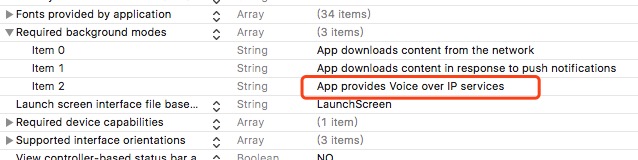
为保证正确收到 VoIP 推送回调,需要先调用注册 VoIP 接口 `Getui.voipRegistration()`,并且需要打开推送统治权限,并且开启 VoIP 后台运行权限。
|
|
250
|
-
|
|
251
|
-
|
|
252
|
-
|
|
253
|
-
````
|
|
254
|
-
componentWillUnMount() {
|
|
255
|
-
//记得在此处移除监听
|
|
256
|
-
receiveRemoteNotificationSub.remove()
|
|
257
|
-
clickRemoteNotificationSub.remove()
|
|
258
|
-
resigsteClientIdSub.remove()
|
|
259
|
-
voipPushPayloadSub.remove()
|
|
260
|
-
}
|
|
261
|
-
````
|
|
262
|
-
|
|
263
|
-
其他接口:
|
|
264
|
-
|
|
265
|
-
````
|
|
266
|
-
import Getui from 'react-native-getui'
|
|
267
|
-
|
|
268
|
-
// 注册 VoIP 通知,只有注册后才能收到 VoIP 通知。
|
|
269
|
-
Getui.voipRegistration();
|
|
270
|
-
|
|
271
|
-
Getui.clientId((param)=> {
|
|
272
|
-
this.setState({'clientId': param})
|
|
273
|
-
})
|
|
274
|
-
|
|
275
|
-
Getui.version((param)=> {
|
|
276
|
-
this.setState({'version': param})
|
|
277
|
-
})
|
|
278
|
-
|
|
279
|
-
Getui.status((param)=> {
|
|
280
|
-
let status = ''
|
|
281
|
-
switch (param){
|
|
282
|
-
case '0':
|
|
283
|
-
status = '正在启动'
|
|
284
|
-
break;
|
|
285
|
-
case '1':
|
|
286
|
-
status = '启动'
|
|
287
|
-
break;
|
|
288
|
-
case '2':
|
|
289
|
-
status = '停止'
|
|
290
|
-
break;
|
|
291
|
-
}
|
|
292
|
-
this.setState({'status': status})
|
|
293
|
-
})
|
|
294
|
-
//Getui...
|
|
295
|
-
|
|
296
|
-
````
|
|
297
|
-
**注意:**
|
|
298
|
-
|
|
299
|
-
Apple 在 iOS 10 中新增了Notification Service Extension机制,可在消息送达时进行业务处理。为精确统计消息送达率,在集成个推SDK时,可以添加 Notification Service Extension,并在 Extensions 中添加 GTExtensionSDK 的统计接口,实现消息展示回执统计功能。具体可参考[个推集成文档](https://docs.getui.com/getui/mobile/ios/xcode/)。
|
|
47
|
+
除 `setApplicationGroupIdentifier` 外,其余通用接口与 [README](../README.md) 中的 JavaScript API 一致。时间类配置的单位均为毫秒。
|
package/package.json
CHANGED
|
@@ -1,6 +1,6 @@
|
|
|
1
1
|
{
|
|
2
2
|
"name": "react-native-idosdk",
|
|
3
|
-
"version": "1.0.
|
|
3
|
+
"version": "1.0.6",
|
|
4
4
|
"description": "Getui ido sdk plugin for react-native",
|
|
5
5
|
"main": "index.js",
|
|
6
6
|
"scripts": {
|
|
@@ -51,5 +51,8 @@
|
|
|
51
51
|
}
|
|
52
52
|
},
|
|
53
53
|
"dependencies": {
|
|
54
|
+
},
|
|
55
|
+
"devDependencies": {
|
|
56
|
+
"@react-native-community/cli": "^20.0.2"
|
|
54
57
|
}
|
|
55
58
|
}
|