react-native-google-places-autocomplete 2.5.7 → 2.6.1
This diff represents the content of publicly available package versions that have been released to one of the supported registries. The information contained in this diff is provided for informational purposes only and reflects changes between package versions as they appear in their respective public registries.
- package/GooglePlacesAutocomplete.js +774 -648
- package/README.md +0 -18
- package/example/App.js +221 -0
- package/example/README.md +64 -0
- package/example/app.json +24 -0
- package/example/babel.config.js +6 -0
- package/example/package.json +23 -0
- package/package.json +3 -3
package/README.md
CHANGED
|
@@ -6,24 +6,6 @@
|
|
|
6
6
|
|
|
7
7
|
**Customizable Google Places autocomplete component for iOS and Android React-Native apps**
|
|
8
8
|
|
|
9
|
-
## Sponsor
|
|
10
|
-
|
|
11
|
-
<p align="center">
|
|
12
|
-
<br/>
|
|
13
|
-
<a href="https://bit.ly/3rneTTI" target="_blank">
|
|
14
|
-
<img src="https://raw.githubusercontent.com/FaridSafi/react-native-google-places-autocomplete/master/Assets/expensify-logo.png">
|
|
15
|
-
</a>
|
|
16
|
-
<br>
|
|
17
|
-
<p align="center">
|
|
18
|
-
The financial management super app for expenses, corporate cards, and more.
|
|
19
|
-
</p>
|
|
20
|
-
<a href="https://bit.ly/3rneTTI" target="_blank">
|
|
21
|
-
<p align="center">
|
|
22
|
-
Click to learn more
|
|
23
|
-
</p>
|
|
24
|
-
</a>
|
|
25
|
-
</p>
|
|
26
|
-
|
|
27
9
|
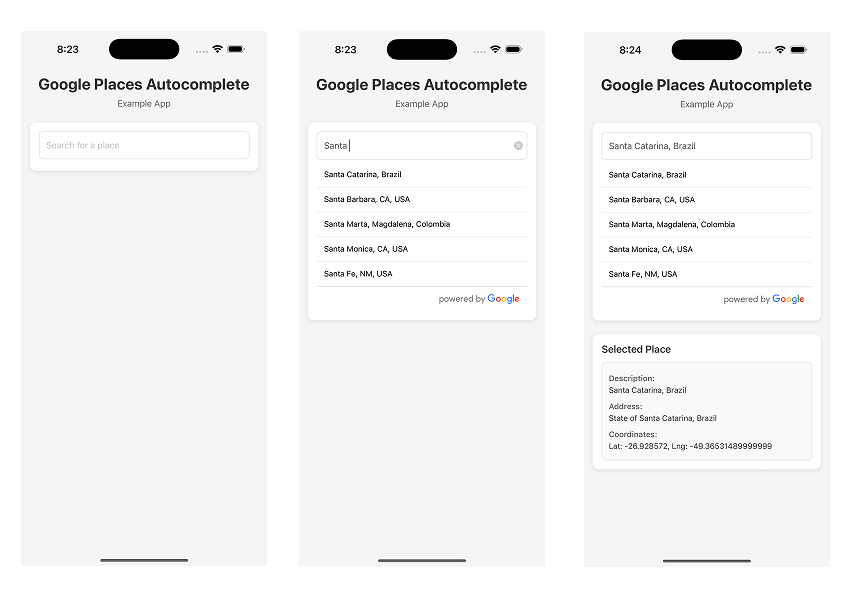
## Preview
|
|
28
10
|
|
|
29
11
|
|
package/example/App.js
ADDED
|
@@ -0,0 +1,221 @@
|
|
|
1
|
+
import React, { useState } from 'react';
|
|
2
|
+
import {
|
|
3
|
+
StyleSheet,
|
|
4
|
+
View,
|
|
5
|
+
Text,
|
|
6
|
+
KeyboardAvoidingView,
|
|
7
|
+
Platform,
|
|
8
|
+
ScrollView,
|
|
9
|
+
Alert,
|
|
10
|
+
} from 'react-native';
|
|
11
|
+
import { StatusBar } from 'expo-status-bar';
|
|
12
|
+
import { GooglePlacesAutocomplete } from 'react-native-google-places-autocomplete';
|
|
13
|
+
import { SafeAreaProvider, SafeAreaView } from 'react-native-safe-area-context';
|
|
14
|
+
|
|
15
|
+
// Replace with your Google Places API Key
|
|
16
|
+
const GOOGLE_PLACES_API_KEY = 'YOUR_API_KEY_HERE';
|
|
17
|
+
|
|
18
|
+
export default function App() {
|
|
19
|
+
const [selectedPlace, setSelectedPlace] = useState(null);
|
|
20
|
+
|
|
21
|
+
return (
|
|
22
|
+
<SafeAreaProvider>
|
|
23
|
+
<SafeAreaView
|
|
24
|
+
style={styles.container}
|
|
25
|
+
edges={['top', 'bottom', 'left', 'right']}
|
|
26
|
+
>
|
|
27
|
+
<StatusBar style='auto' />
|
|
28
|
+
<KeyboardAvoidingView
|
|
29
|
+
style={styles.keyboardAvoidingView}
|
|
30
|
+
behavior={Platform.OS === 'ios' ? 'padding' : 'height'}
|
|
31
|
+
keyboardVerticalOffset={Platform.OS === 'ios' ? 0 : 20}
|
|
32
|
+
>
|
|
33
|
+
<ScrollView
|
|
34
|
+
style={styles.scrollView}
|
|
35
|
+
keyboardShouldPersistTaps='handled'
|
|
36
|
+
contentContainerStyle={styles.contentContainer}
|
|
37
|
+
nestedScrollEnabled={true}
|
|
38
|
+
>
|
|
39
|
+
<View style={styles.header}>
|
|
40
|
+
<Text style={styles.title}>Google Places Autocomplete</Text>
|
|
41
|
+
<Text style={styles.subtitle}>Example App</Text>
|
|
42
|
+
</View>
|
|
43
|
+
|
|
44
|
+
<View style={styles.section}>
|
|
45
|
+
<GooglePlacesAutocomplete
|
|
46
|
+
placeholder='Search for a place'
|
|
47
|
+
onPress={(data, details = null) => {
|
|
48
|
+
console.log('Selected place:', data);
|
|
49
|
+
console.log('Place details:', details);
|
|
50
|
+
setSelectedPlace({ data, details });
|
|
51
|
+
Alert.alert('Place Selected', data.description);
|
|
52
|
+
}}
|
|
53
|
+
query={{
|
|
54
|
+
key: GOOGLE_PLACES_API_KEY,
|
|
55
|
+
language: 'en',
|
|
56
|
+
}}
|
|
57
|
+
fetchDetails={true}
|
|
58
|
+
styles={{
|
|
59
|
+
textInputContainer: {
|
|
60
|
+
backgroundColor: 'transparent',
|
|
61
|
+
borderTopWidth: 0,
|
|
62
|
+
borderBottomWidth: 0,
|
|
63
|
+
},
|
|
64
|
+
textInput: {
|
|
65
|
+
marginLeft: 0,
|
|
66
|
+
marginRight: 0,
|
|
67
|
+
height: 50,
|
|
68
|
+
color: '#5d5d5d',
|
|
69
|
+
fontSize: 16,
|
|
70
|
+
borderWidth: 1,
|
|
71
|
+
borderColor: '#ddd',
|
|
72
|
+
borderRadius: 8,
|
|
73
|
+
paddingHorizontal: 12,
|
|
74
|
+
},
|
|
75
|
+
predefinedPlacesDescription: {
|
|
76
|
+
color: '#1faadb',
|
|
77
|
+
},
|
|
78
|
+
}}
|
|
79
|
+
debounce={200}
|
|
80
|
+
/>
|
|
81
|
+
</View>
|
|
82
|
+
|
|
83
|
+
{selectedPlace && (
|
|
84
|
+
<View style={styles.resultSection}>
|
|
85
|
+
<Text style={styles.sectionTitle}>Selected Place</Text>
|
|
86
|
+
<View style={styles.resultBox}>
|
|
87
|
+
<Text style={styles.resultLabel}>Description:</Text>
|
|
88
|
+
<Text style={styles.resultText}>
|
|
89
|
+
{selectedPlace.data.description}
|
|
90
|
+
</Text>
|
|
91
|
+
{selectedPlace.details && (
|
|
92
|
+
<>
|
|
93
|
+
<Text style={styles.resultLabel}>Address:</Text>
|
|
94
|
+
<Text style={styles.resultText}>
|
|
95
|
+
{selectedPlace.details.formatted_address}
|
|
96
|
+
</Text>
|
|
97
|
+
{selectedPlace.details.geometry && (
|
|
98
|
+
<>
|
|
99
|
+
<Text style={styles.resultLabel}>Coordinates:</Text>
|
|
100
|
+
<Text style={styles.resultText}>
|
|
101
|
+
Lat: {selectedPlace.details.geometry.location.lat},
|
|
102
|
+
Lng: {selectedPlace.details.geometry.location.lng}
|
|
103
|
+
</Text>
|
|
104
|
+
</>
|
|
105
|
+
)}
|
|
106
|
+
</>
|
|
107
|
+
)}
|
|
108
|
+
</View>
|
|
109
|
+
</View>
|
|
110
|
+
)}
|
|
111
|
+
|
|
112
|
+
{GOOGLE_PLACES_API_KEY === 'YOUR_API_KEY_HERE' && (
|
|
113
|
+
<View style={styles.footer}>
|
|
114
|
+
<Text style={styles.footerText}>
|
|
115
|
+
Make sure to replace YOUR_API_KEY_HERE with your actual Google
|
|
116
|
+
Places API key in App.js
|
|
117
|
+
</Text>
|
|
118
|
+
</View>
|
|
119
|
+
)}
|
|
120
|
+
</ScrollView>
|
|
121
|
+
</KeyboardAvoidingView>
|
|
122
|
+
</SafeAreaView>
|
|
123
|
+
</SafeAreaProvider>
|
|
124
|
+
);
|
|
125
|
+
}
|
|
126
|
+
|
|
127
|
+
const styles = StyleSheet.create({
|
|
128
|
+
container: {
|
|
129
|
+
flex: 1,
|
|
130
|
+
backgroundColor: '#f5f5f5',
|
|
131
|
+
},
|
|
132
|
+
keyboardAvoidingView: {
|
|
133
|
+
flex: 1,
|
|
134
|
+
},
|
|
135
|
+
scrollView: {
|
|
136
|
+
flex: 1,
|
|
137
|
+
},
|
|
138
|
+
contentContainer: {
|
|
139
|
+
padding: 16,
|
|
140
|
+
},
|
|
141
|
+
header: {
|
|
142
|
+
marginBottom: 24,
|
|
143
|
+
alignItems: 'center',
|
|
144
|
+
},
|
|
145
|
+
title: {
|
|
146
|
+
fontSize: 28,
|
|
147
|
+
fontWeight: 'bold',
|
|
148
|
+
color: '#333',
|
|
149
|
+
marginBottom: 8,
|
|
150
|
+
},
|
|
151
|
+
subtitle: {
|
|
152
|
+
fontSize: 16,
|
|
153
|
+
color: '#666',
|
|
154
|
+
},
|
|
155
|
+
section: {
|
|
156
|
+
backgroundColor: '#fff',
|
|
157
|
+
padding: 16,
|
|
158
|
+
borderRadius: 12,
|
|
159
|
+
shadowColor: '#000',
|
|
160
|
+
shadowOffset: {
|
|
161
|
+
width: 0,
|
|
162
|
+
height: 2,
|
|
163
|
+
},
|
|
164
|
+
shadowOpacity: 0.1,
|
|
165
|
+
shadowRadius: 3.84,
|
|
166
|
+
elevation: 5,
|
|
167
|
+
},
|
|
168
|
+
sectionTitle: {
|
|
169
|
+
fontSize: 18,
|
|
170
|
+
fontWeight: '600',
|
|
171
|
+
color: '#333',
|
|
172
|
+
marginBottom: 12,
|
|
173
|
+
},
|
|
174
|
+
resultSection: {
|
|
175
|
+
marginTop: 24,
|
|
176
|
+
backgroundColor: '#fff',
|
|
177
|
+
padding: 16,
|
|
178
|
+
borderRadius: 12,
|
|
179
|
+
shadowColor: '#000',
|
|
180
|
+
shadowOffset: {
|
|
181
|
+
width: 0,
|
|
182
|
+
height: 2,
|
|
183
|
+
},
|
|
184
|
+
shadowOpacity: 0.1,
|
|
185
|
+
shadowRadius: 3.84,
|
|
186
|
+
elevation: 5,
|
|
187
|
+
},
|
|
188
|
+
resultBox: {
|
|
189
|
+
backgroundColor: '#f9f9f9',
|
|
190
|
+
padding: 12,
|
|
191
|
+
borderRadius: 8,
|
|
192
|
+
borderWidth: 1,
|
|
193
|
+
borderColor: '#e0e0e0',
|
|
194
|
+
},
|
|
195
|
+
resultLabel: {
|
|
196
|
+
fontSize: 14,
|
|
197
|
+
fontWeight: '600',
|
|
198
|
+
color: '#666',
|
|
199
|
+
marginTop: 8,
|
|
200
|
+
marginBottom: 4,
|
|
201
|
+
},
|
|
202
|
+
resultText: {
|
|
203
|
+
fontSize: 14,
|
|
204
|
+
color: '#333',
|
|
205
|
+
marginBottom: 4,
|
|
206
|
+
},
|
|
207
|
+
footer: {
|
|
208
|
+
marginTop: 16,
|
|
209
|
+
marginBottom: 32,
|
|
210
|
+
padding: 12,
|
|
211
|
+
backgroundColor: '#fff3cd',
|
|
212
|
+
borderRadius: 8,
|
|
213
|
+
borderWidth: 1,
|
|
214
|
+
borderColor: '#ffc107',
|
|
215
|
+
},
|
|
216
|
+
footerText: {
|
|
217
|
+
fontSize: 12,
|
|
218
|
+
color: '#856404',
|
|
219
|
+
textAlign: 'center',
|
|
220
|
+
},
|
|
221
|
+
});
|
|
@@ -0,0 +1,64 @@
|
|
|
1
|
+
# Google Places Autocomplete Example
|
|
2
|
+
|
|
3
|
+
This is an example Expo project to test the `react-native-google-places-autocomplete` library locally.
|
|
4
|
+
|
|
5
|
+
## Setup
|
|
6
|
+
|
|
7
|
+
1. **Install dependencies:**
|
|
8
|
+
|
|
9
|
+
```bash
|
|
10
|
+
cd example
|
|
11
|
+
npm install
|
|
12
|
+
# or
|
|
13
|
+
yarn install
|
|
14
|
+
```
|
|
15
|
+
|
|
16
|
+
2. **Get your Google Places API Key:**
|
|
17
|
+
|
|
18
|
+
- Go to [Google Cloud Console](https://console.cloud.google.com/)
|
|
19
|
+
- Create a new project or select an existing one
|
|
20
|
+
- Enable the "Places API" (Web Service)
|
|
21
|
+
- Create credentials (API Key)
|
|
22
|
+
- Optionally, enable "Geocoding API" if you want to use current location features
|
|
23
|
+
|
|
24
|
+
3. **Add your API Key:**
|
|
25
|
+
|
|
26
|
+
- Open `App.js`
|
|
27
|
+
- Replace `YOUR_API_KEY_HERE` with your actual Google Places API key
|
|
28
|
+
|
|
29
|
+
4. **Run the app:**
|
|
30
|
+
|
|
31
|
+
```bash
|
|
32
|
+
npm start
|
|
33
|
+
# or
|
|
34
|
+
yarn start
|
|
35
|
+
```
|
|
36
|
+
|
|
37
|
+
Then press:
|
|
38
|
+
|
|
39
|
+
- `i` for iOS simulator
|
|
40
|
+
- `a` for Android emulator
|
|
41
|
+
- `w` for web browser
|
|
42
|
+
|
|
43
|
+
## Features Demonstrated
|
|
44
|
+
|
|
45
|
+
This example app demonstrates:
|
|
46
|
+
|
|
47
|
+
- **Basic Search**: Simple autocomplete search functionality
|
|
48
|
+
- **Current Location**: Using the current location feature
|
|
49
|
+
- **Predefined Places**: Adding predefined places like Home and Work
|
|
50
|
+
- **Place Details**: Fetching detailed information about selected places
|
|
51
|
+
|
|
52
|
+
## Testing Local Changes
|
|
53
|
+
|
|
54
|
+
Since this example uses `file:..` to link to the parent library, any changes you make to the library files in the parent directory will be reflected in this example app. You may need to:
|
|
55
|
+
|
|
56
|
+
1. Restart the Expo development server after making changes to the library
|
|
57
|
+
2. Clear the cache if changes aren't reflected: `npm start -- --clear` or `yarn start --clear`
|
|
58
|
+
|
|
59
|
+
## Notes
|
|
60
|
+
|
|
61
|
+
- Make sure you have the Expo CLI installed globally: `npm install -g expo-cli` (optional, as npx can be used)
|
|
62
|
+
- For iOS, you'll need Xcode installed
|
|
63
|
+
- For Android, you'll need Android Studio and an emulator set up
|
|
64
|
+
- The library requires a valid Google Places API key to function
|
package/example/app.json
ADDED
|
@@ -0,0 +1,24 @@
|
|
|
1
|
+
{
|
|
2
|
+
"expo": {
|
|
3
|
+
"name": "Google Places Autocomplete Example",
|
|
4
|
+
"slug": "google-places-autocomplete-example",
|
|
5
|
+
"version": "1.0.0",
|
|
6
|
+
"orientation": "portrait",
|
|
7
|
+
"userInterfaceStyle": "light",
|
|
8
|
+
"splash": {
|
|
9
|
+
"resizeMode": "contain",
|
|
10
|
+
"backgroundColor": "#ffffff"
|
|
11
|
+
},
|
|
12
|
+
"assetBundlePatterns": ["**/*"],
|
|
13
|
+
"ios": {
|
|
14
|
+
"supportsTablet": true,
|
|
15
|
+
"bundleIdentifier": "com.example.googleplacesautocomplete"
|
|
16
|
+
},
|
|
17
|
+
"android": {
|
|
18
|
+
"adaptiveIcon": {
|
|
19
|
+
"backgroundColor": "#ffffff"
|
|
20
|
+
},
|
|
21
|
+
"package": "com.example.googleplacesautocomplete"
|
|
22
|
+
}
|
|
23
|
+
}
|
|
24
|
+
}
|
|
@@ -0,0 +1,23 @@
|
|
|
1
|
+
{
|
|
2
|
+
"name": "google-places-autocomplete-example",
|
|
3
|
+
"version": "1.0.0",
|
|
4
|
+
"main": "node_modules/expo/AppEntry.js",
|
|
5
|
+
"scripts": {
|
|
6
|
+
"start": "expo start",
|
|
7
|
+
"android": "expo start --android",
|
|
8
|
+
"ios": "expo start --ios",
|
|
9
|
+
"web": "expo start --web"
|
|
10
|
+
},
|
|
11
|
+
"dependencies": {
|
|
12
|
+
"expo": "^54.0.25",
|
|
13
|
+
"expo-status-bar": "~3.0.8",
|
|
14
|
+
"react": "19.1.0",
|
|
15
|
+
"react-native": "0.81.5",
|
|
16
|
+
"react-native-google-places-autocomplete": "file:..",
|
|
17
|
+
"react-native-safe-area-context": "~5.6.0"
|
|
18
|
+
},
|
|
19
|
+
"devDependencies": {
|
|
20
|
+
"@babel/core": "^7.20.0"
|
|
21
|
+
},
|
|
22
|
+
"private": true
|
|
23
|
+
}
|
package/package.json
CHANGED
|
@@ -1,6 +1,6 @@
|
|
|
1
1
|
{
|
|
2
2
|
"name": "react-native-google-places-autocomplete",
|
|
3
|
-
"version": "2.
|
|
3
|
+
"version": "2.6.1",
|
|
4
4
|
"description": "Customizable Google Places autocomplete component for iOS and Android React-Native apps",
|
|
5
5
|
"main": "GooglePlacesAutocomplete.js",
|
|
6
6
|
"types": "GooglePlacesAutocomplete.d.ts",
|
|
@@ -30,13 +30,13 @@
|
|
|
30
30
|
"homepage": "https://github.com/FaridSafi/react-native-google-places-autocomplete#readme",
|
|
31
31
|
"dependencies": {
|
|
32
32
|
"lodash.debounce": "^4.0.8",
|
|
33
|
-
"prop-types": "^15.7.2",
|
|
34
33
|
"qs": "~6.9.1",
|
|
35
|
-
"uuid": "^
|
|
34
|
+
"react-native-uuid": "^2.0.3"
|
|
36
35
|
},
|
|
37
36
|
"devDependencies": {
|
|
38
37
|
"@react-native-community/eslint-config": "2.0.0",
|
|
39
38
|
"eslint": "7.10.0",
|
|
39
|
+
"eslint-plugin-prettier": "^3.1.2",
|
|
40
40
|
"husky": "4.3.0",
|
|
41
41
|
"lint-staged": "10.4.0",
|
|
42
42
|
"prettier": "2.1.2",
|