react-native-anchored-menu 0.0.17 → 0.0.18
This diff represents the content of publicly available package versions that have been released to one of the supported registries. The information contained in this diff is provided for informational purposes only and reflects changes between package versions as they appear in their respective public registries.
- package/README.md +31 -7
- package/package.json +2 -3
- package/src/components/MenuAnchor.tsx +3 -3
- package/src/core/provider.tsx +72 -43
- package/src/hooks/useAnchoredMenu.ts +1 -1
- package/src/hooks/useAnchoredMenuActions.ts +9 -3
- package/src/hooks/useAnchoredMenuState.ts +9 -5
- package/src/index.ts +0 -2
- package/src/types.ts +4 -10
- package/assets/demo1.gif +0 -0
- package/assets/demo2.gif +0 -0
- package/src/components/AnchoredMenuLayer.tsx +0 -26
package/README.md
CHANGED
|
@@ -127,13 +127,36 @@ open({
|
|
|
127
127
|
|
|
128
128
|
---
|
|
129
129
|
|
|
130
|
+
## 📱 Example App
|
|
131
|
+
|
|
132
|
+
Want to see the library in action? Check out the comprehensive example app that demonstrates all features:
|
|
133
|
+
|
|
134
|
+
```bash
|
|
135
|
+
cd example
|
|
136
|
+
npm install
|
|
137
|
+
npm start # Opens Expo Developer Tools
|
|
138
|
+
# Then press 'i' for iOS or 'a' for Android
|
|
139
|
+
```
|
|
140
|
+
|
|
141
|
+
The example includes:
|
|
142
|
+
|
|
143
|
+
- **Basic Usage** - Simple menus and fundamentals
|
|
144
|
+
- **FlatList Integration** - Context menus in scrolling lists
|
|
145
|
+
- **Modal Usage** - Menus inside React Native modals
|
|
146
|
+
- **Placement Options** - All positioning and alignment combinations
|
|
147
|
+
- **Custom Styling** - Themes, animations, and advanced patterns
|
|
148
|
+
|
|
149
|
+
Each example includes live code samples and explanations to help you understand the implementation.
|
|
150
|
+
|
|
151
|
+
---
|
|
152
|
+
|
|
130
153
|
## 🪟 Using inside React Native `<Modal>`
|
|
131
154
|
|
|
132
155
|
React Native `<Modal>` is rendered in a separate native layer. To ensure the menu appears **above** the modal content, mount a provider/layer **inside** the modal tree.
|
|
133
156
|
|
|
134
157
|
**Sheets & overlays**:
|
|
135
158
|
|
|
136
|
-
- **Native-layer overlays** (RN `<Modal>`, `react-native-navigation` modals/overlays, etc.): mount `
|
|
159
|
+
- **Native-layer overlays** (RN `<Modal>`, `react-native-navigation` modals/overlays, etc.): mount `AnchoredMenuProvider` inside that overlay’s content tree.
|
|
137
160
|
- **JS-only sheets** (rendered as normal React views in the same tree): you can keep a single provider at the app root.
|
|
138
161
|
|
|
139
162
|
Recommended:
|
|
@@ -142,7 +165,7 @@ Recommended:
|
|
|
142
165
|
import React, { useState } from "react";
|
|
143
166
|
import { Modal, Pressable, Text, View } from "react-native";
|
|
144
167
|
import {
|
|
145
|
-
|
|
168
|
+
AnchoredMenuProvider,
|
|
146
169
|
MenuAnchor,
|
|
147
170
|
useAnchoredMenuActions,
|
|
148
171
|
} from "react-native-anchored-menu";
|
|
@@ -158,8 +181,9 @@ export function ExampleModalMenu() {
|
|
|
158
181
|
</Pressable>
|
|
159
182
|
|
|
160
183
|
<Modal transparent visible={visible} onRequestClose={() => setVisible(false)}>
|
|
161
|
-
<
|
|
162
|
-
<
|
|
184
|
+
<View style={{ flex: 1, position: "relative" }}>
|
|
185
|
+
<AnchoredMenuProvider>
|
|
186
|
+
<View style={{ flex: 1, justifyContent: "center", alignItems: "center" }}>
|
|
163
187
|
<MenuAnchor id="modal-menu">
|
|
164
188
|
<Pressable
|
|
165
189
|
onPress={() =>
|
|
@@ -183,8 +207,9 @@ export function ExampleModalMenu() {
|
|
|
183
207
|
<Pressable onPress={() => setVisible(false)}>
|
|
184
208
|
<Text>Close modal</Text>
|
|
185
209
|
</Pressable>
|
|
186
|
-
|
|
187
|
-
|
|
210
|
+
</View>
|
|
211
|
+
</AnchoredMenuProvider>
|
|
212
|
+
</View>
|
|
188
213
|
</Modal>
|
|
189
214
|
</>
|
|
190
215
|
);
|
|
@@ -198,7 +223,6 @@ export function ExampleModalMenu() {
|
|
|
198
223
|
The following exports are considered **stable public API**:
|
|
199
224
|
|
|
200
225
|
- `AnchoredMenuProvider` (with props: `defaultHost`, `autoHost`, `autoCloseOnBackground`, `host`)
|
|
201
|
-
- `AnchoredMenuLayer`
|
|
202
226
|
- `MenuAnchor`
|
|
203
227
|
- `useAnchoredMenuActions`
|
|
204
228
|
- `useAnchoredMenuState`
|
package/package.json
CHANGED
|
@@ -1,6 +1,6 @@
|
|
|
1
1
|
{
|
|
2
2
|
"name": "react-native-anchored-menu",
|
|
3
|
-
"version": "0.0.
|
|
3
|
+
"version": "0.0.18",
|
|
4
4
|
"description": "Headless anchored context menu / popover for React Native (iOS/Android) with stable measurement (default view host).",
|
|
5
5
|
"repository": {
|
|
6
6
|
"type": "git",
|
|
@@ -15,7 +15,6 @@
|
|
|
15
15
|
"types": "src/index.ts",
|
|
16
16
|
"files": [
|
|
17
17
|
"src",
|
|
18
|
-
"assets",
|
|
19
18
|
"docs",
|
|
20
19
|
"README.md",
|
|
21
20
|
"LICENSE"
|
|
@@ -41,5 +40,5 @@
|
|
|
41
40
|
"react": "*",
|
|
42
41
|
"react-native": "*"
|
|
43
42
|
},
|
|
44
|
-
"readme": "# react-native-anchored-menu\n\nA **headless, anchor-based menu / popover system for React Native** designed to work reliably across:\n\n- iOS & Android\n- FlatList / SectionList\n- Complex layouts\n- New Architecture (Fabric)\n- Modal & non-modal contexts\n\nThis library focuses on **correct measurement and positioning**, not UI. \nYou fully control how the menu looks and behaves.\n\n---\n\n## 🎬 Demo\n\n| View host (normal screens) | View host inside native `<Modal>` |\n| --- | --- |\n| 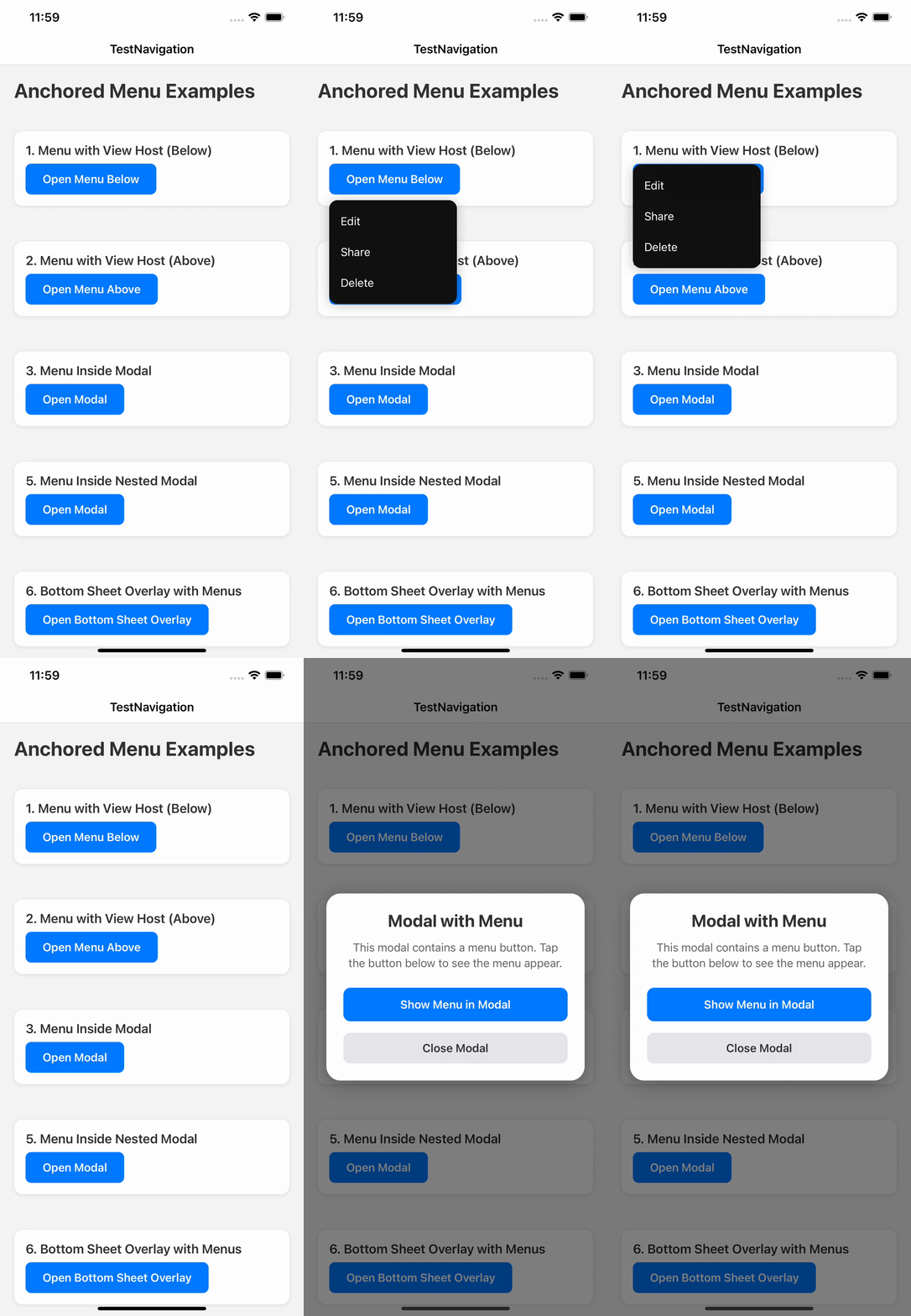 | 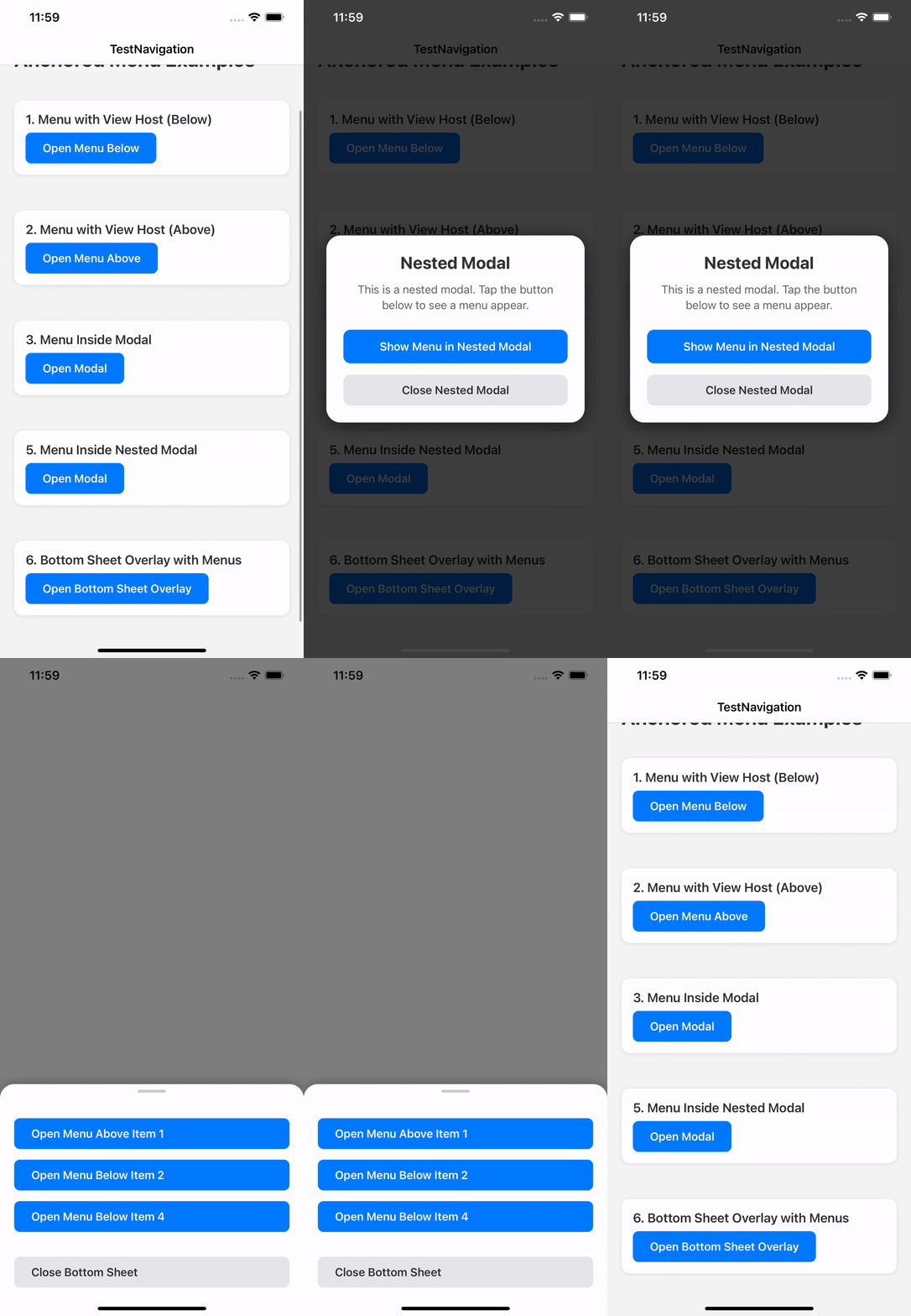 |\n\n---\n\n## ✨ Why this library exists\n\nMost React Native menu / popover libraries break in at least one of these cases:\n\n- Wrong position on Android\n- Unreliable measurement inside FlatList\n- Broken behavior with Fabric\n- Rendering behind or inside unexpected layers\n- Forced UI and styling\n\n**react-native-anchored-menu** solves these by:\n\n- Using **stable anchor measurement**\n- Separating **state (Provider)** from **rendering (Hosts)**\n- Supporting multiple rendering strategies (View / Modal)\n- Staying **100% headless**\n\n---\n\n## ✅ Features\n\n- 📍 Anchor menus to any component\n- 📐 Accurate positioning (`auto`, `top`, `bottom`)\n- 🧠 FlatList-safe measurement\n- 🪟 Works inside and outside native `<Modal>`\n- 🧩 Fully headless render API\n- 🧹 Tap outside to dismiss\n- 🔄 Auto-close on scroll (optional)\n- 🌍 RTL-aware positioning\n- 🧱 Multiple host strategies\n\n---\n\n## 📦 Installation\n\n```bash\nnpm install react-native-anchored-menu\n# or\nyarn add react-native-anchored-menu\n```\n\nNo native linking required.\n\n---\n\n## 🚀 Basic Usage\n\n### 1️⃣ Wrap your app\n\n```tsx\nimport { AnchoredMenuProvider } from \"react-native-anchored-menu\";\n\nexport default function Root() {\n return (\n <AnchoredMenuProvider>\n <App />\n </AnchoredMenuProvider>\n );\n}\n```\n\n> ⚠️ You **do NOT need** to manually mount any host by default. \n> Hosts are automatically mounted internally.\n\n---\n\n### 2️⃣ Add an anchor\n\n```tsx\nimport { MenuAnchor } from \"react-native-anchored-menu\";\n\n<MenuAnchor id=\"profile-menu\">\n <Pressable>\n <Text>Open menu</Text>\n </Pressable>\n</MenuAnchor>\n```\n\n---\n\n### 3️⃣ Open the menu\n\n```tsx\nimport { useAnchoredMenuActions } from \"react-native-anchored-menu\";\n\nconst { open, close } = useAnchoredMenuActions();\n\nopen({\n id: \"profile-menu\",\n render: ({ close }) => (\n <View style={{ backgroundColor: \"#111\", padding: 12, borderRadius: 8 }}>\n <Pressable onPress={close}>\n <Text style={{ color: \"#fff\" }}>Logout</Text>\n </Pressable>\n </View>\n ),\n});\n```\n\n---\n\n## 🪟 Using inside React Native `<Modal>`\n\nReact Native `<Modal>` is rendered in a separate native layer. To ensure the menu appears **above** the modal content, mount a provider/layer **inside** the modal tree.\n\n**Sheets & overlays**:\n\n- **Native-layer overlays** (RN `<Modal>`, `react-native-navigation` modals/overlays, etc.): mount `
|
|
43
|
+
"readme": "# react-native-anchored-menu\n\nA **headless, anchor-based menu / popover system for React Native** designed to work reliably across:\n\n- iOS & Android\n- FlatList / SectionList\n- Complex layouts\n- New Architecture (Fabric)\n- Modal & non-modal contexts\n\nThis library focuses on **correct measurement and positioning**, not UI. \nYou fully control how the menu looks and behaves.\n\n---\n\n## 🎬 Demo\n\n| View host (normal screens) | View host inside native `<Modal>` |\n| --- | --- |\n|  |  |\n\n---\n\n## ✨ Why this library exists\n\nMost React Native menu / popover libraries break in at least one of these cases:\n\n- Wrong position on Android\n- Unreliable measurement inside FlatList\n- Broken behavior with Fabric\n- Rendering behind or inside unexpected layers\n- Forced UI and styling\n\n**react-native-anchored-menu** solves these by:\n\n- Using **stable anchor measurement**\n- Separating **state (Provider)** from **rendering (Hosts)**\n- Supporting multiple rendering strategies (View / Modal)\n- Staying **100% headless**\n\n---\n\n## ✅ Features\n\n- 📍 Anchor menus to any component\n- 📐 Accurate positioning (`auto`, `top`, `bottom`)\n- 🧠 FlatList-safe measurement\n- 🪟 Works inside and outside native `<Modal>`\n- 🧩 Fully headless render API\n- 🧹 Tap outside to dismiss\n- 🔄 Auto-close on scroll (optional)\n- 🌍 RTL-aware positioning\n- 🧱 Multiple host strategies\n\n---\n\n## 📦 Installation\n\n```bash\nnpm install react-native-anchored-menu\n# or\nyarn add react-native-anchored-menu\n```\n\nNo native linking required.\n\n---\n\n## 🚀 Basic Usage\n\n### 1️⃣ Wrap your app\n\n```tsx\nimport { AnchoredMenuProvider } from \"react-native-anchored-menu\";\n\nexport default function Root() {\n return (\n <AnchoredMenuProvider>\n <App />\n </AnchoredMenuProvider>\n );\n}\n```\n\n> ⚠️ You **do NOT need** to manually mount any host by default. \n> Hosts are automatically mounted internally.\n\n---\n\n### 2️⃣ Add an anchor\n\n```tsx\nimport { MenuAnchor } from \"react-native-anchored-menu\";\n\n<MenuAnchor id=\"profile-menu\">\n <Pressable>\n <Text>Open menu</Text>\n </Pressable>\n</MenuAnchor>\n```\n\n---\n\n### 3️⃣ Open the menu\n\n```tsx\nimport { useAnchoredMenuActions } from \"react-native-anchored-menu\";\n\nconst { open, close } = useAnchoredMenuActions();\n\nopen({\n id: \"profile-menu\",\n render: ({ close }) => (\n <View style={{ backgroundColor: \"#111\", padding: 12, borderRadius: 8 }}>\n <Pressable onPress={close}>\n <Text style={{ color: \"#fff\" }}>Logout</Text>\n </Pressable>\n </View>\n ),\n});\n```\n\n---\n\n## 🪟 Using inside React Native `<Modal>`\n\nReact Native `<Modal>` is rendered in a separate native layer. To ensure the menu appears **above** the modal content, mount a provider/layer **inside** the modal tree.\n\n**Sheets & overlays**:\n\n- **Native-layer overlays** (RN `<Modal>`, `react-native-navigation` modals/overlays, etc.): mount `AnchoredMenuProvider` inside that overlay’s content tree.\n- **JS-only sheets** (rendered as normal React views in the same tree): you can keep a single provider at the app root.\n\nRecommended:\n\n```tsx\nimport React, { useState } from \"react\";\nimport { Modal, Pressable, Text, View } from \"react-native\";\nimport {\n AnchoredMenuProvider,\n MenuAnchor,\n useAnchoredMenuActions,\n} from \"react-native-anchored-menu\";\n\nexport function ExampleModalMenu() {\n const [visible, setVisible] = useState(false);\n const { open } = useAnchoredMenuActions();\n\n return (\n <>\n <Pressable onPress={() => setVisible(true)}>\n <Text>Open modal</Text>\n </Pressable>\n\n <Modal transparent visible={visible} onRequestClose={() => setVisible(false)}>\n <AnchoredMenuProvider>\n <View style={{ flex: 1, justifyContent: \"center\", alignItems: \"center\" }}>\n <MenuAnchor id=\"modal-menu\">\n <Pressable\n onPress={() =>\n open({\n id: \"modal-menu\",\n host: \"view\",\n render: ({ close }) => (\n <View style={{ backgroundColor: \"#111\", padding: 12, borderRadius: 8 }}>\n <Pressable onPress={close}>\n <Text style={{ color: \"#fff\" }}>Action</Text>\n </Pressable>\n </View>\n ),\n })\n }\n >\n <Text>Open menu</Text>\n </Pressable>\n </MenuAnchor>\n\n <Pressable onPress={() => setVisible(false)}>\n <Text>Close modal</Text>\n </Pressable>\n </View>\n </AnchoredMenuProvider>\n </Modal>\n </>\n );\n}\n```\n\n## 🧠 API\n\n### `useAnchoredMenuActions()`\n\n```ts\nconst { open, close } = useAnchoredMenuActions();\n```\n\n### `useAnchoredMenuState(selector?)`\n\n```ts\nconst isOpen = useAnchoredMenuState((s) => s.isOpen);\n```\n\n**Recommended (performance)**: prefer split hooks in large trees to reduce re-renders:\n\n```ts\nconst isOpen = useAnchoredMenuState((s) => s.isOpen);\nconst { open } = useAnchoredMenuActions();\n```\n\n> `useAnchoredMenu()` is still available for backwards compatibility, but the split hooks are recommended\n> to reduce re-renders in large trees.\n\n---\n\n### `open(options)`\n\n```ts\nopen({\n id: string;\n\n placement?: \"auto\" | \"top\" | \"bottom\";\n align?: \"start\" | \"center\" | \"end\";\n offset?: number;\n margin?: number;\n rtlAware?: boolean;\n\n render?: ({ close, anchor }) => ReactNode;\n content?: ReactNode;\n\n host?: \"view\" | \"modal\";\n\n animationType?: \"fade\" | \"none\";\n statusBarTranslucent?: boolean;\n\n /**\n * Measurement strategy.\n * - \"stable\" (default): waits for interactions and retries for correctness (best for FlatList/Android)\n * - \"fast\": one-frame measure (lowest latency, less reliable on complex layouts)\n */\n measurement?: \"stable\" | \"fast\";\n\n /**\n * Only used when `measurement=\"stable\"` (default: 8).\n */\n measurementTries?: number;\n});\n```\n\n---\n\n## 🧭 Placement Behavior\n\n- `auto` → below if space allows, otherwise above\n- `top` → prefer above, fallback below\n- `bottom` → prefer below, fallback above\n\n---\n\n## 🧱 Host System\n\n- Default host: **view**\n- Hosts are auto-mounted\n- `modal` host is disabled on Fabric and falls back to `view`\n\n---\n\n## 📄 License\n\nMIT © Mahmoud Elfeky\n"
|
|
45
44
|
}
|
|
@@ -29,12 +29,12 @@ function extractMarginsFromChild(children: React.ReactNode): AnchorMargins {
|
|
|
29
29
|
}
|
|
30
30
|
}
|
|
31
31
|
|
|
32
|
-
export function MenuAnchor({ id, children }: MenuAnchorProps) {
|
|
32
|
+
export function MenuAnchor({ id, children, style }: MenuAnchorProps) {
|
|
33
33
|
const actions = useContext(AnchoredMenuActionsContext);
|
|
34
34
|
if (!actions) {
|
|
35
35
|
throw new Error(
|
|
36
36
|
"[react-native-anchored-menu] MenuAnchor must be used within an AnchoredMenuProvider. " +
|
|
37
|
-
"Make sure to wrap your component tree with <AnchoredMenuProvider
|
|
37
|
+
"Make sure to wrap your component tree with <AnchoredMenuProvider>."
|
|
38
38
|
);
|
|
39
39
|
}
|
|
40
40
|
|
|
@@ -54,7 +54,7 @@ export function MenuAnchor({ id, children }: MenuAnchorProps) {
|
|
|
54
54
|
|
|
55
55
|
// collapsable={false} is important for Android measurement reliability
|
|
56
56
|
return (
|
|
57
|
-
<View ref={ref} collapsable={false}>
|
|
57
|
+
<View ref={ref} collapsable={false} style={style}>
|
|
58
58
|
{children}
|
|
59
59
|
</View>
|
|
60
60
|
);
|
package/src/core/provider.tsx
CHANGED
|
@@ -21,6 +21,31 @@ import type {
|
|
|
21
21
|
OpenMenuOptions,
|
|
22
22
|
} from "../types";
|
|
23
23
|
|
|
24
|
+
/**
|
|
25
|
+
* Creates a new MenuStore instance with its own state and listeners.
|
|
26
|
+
* Each provider instance needs its own store to maintain independent state.
|
|
27
|
+
*/
|
|
28
|
+
function createMenuStore(defaultHost: HostType): MenuStore {
|
|
29
|
+
const listeners = new Set<() => void>();
|
|
30
|
+
let snapshot: MenuState = {
|
|
31
|
+
request: null,
|
|
32
|
+
activeHost: defaultHost,
|
|
33
|
+
isOpen: false,
|
|
34
|
+
};
|
|
35
|
+
|
|
36
|
+
return {
|
|
37
|
+
getSnapshot: () => snapshot,
|
|
38
|
+
subscribe: (listener: () => void) => {
|
|
39
|
+
listeners.add(listener);
|
|
40
|
+
return () => listeners.delete(listener);
|
|
41
|
+
},
|
|
42
|
+
_setSnapshot: (next: MenuState) => {
|
|
43
|
+
snapshot = next;
|
|
44
|
+
listeners.forEach((l) => l());
|
|
45
|
+
},
|
|
46
|
+
};
|
|
47
|
+
}
|
|
48
|
+
|
|
24
49
|
/**
|
|
25
50
|
* Provider config
|
|
26
51
|
* - defaultHost: which host to use when `open()` doesn't specify one (default: "view")
|
|
@@ -38,30 +63,24 @@ export function AnchoredMenuProvider({
|
|
|
38
63
|
const anchorsRef = useRef(new Map<string, any>()); // id -> ref
|
|
39
64
|
const pendingOpenRafRef = useRef<number | null>(null);
|
|
40
65
|
const defaultHostRef = useRef(defaultHost);
|
|
41
|
-
defaultHostRef.current = defaultHost;
|
|
66
|
+
defaultHostRef.current = defaultHost; //this is to update the defaultHostRef.current when the defaultHost prop changes
|
|
42
67
|
|
|
43
|
-
//
|
|
68
|
+
// External store pattern: state lives outside React to prevent re-renders.
|
|
69
|
+
// When menu opens/closes, only components subscribed via useSyncExternalStore re-render,
|
|
70
|
+
// not the entire provider subtree. Each provider instance maintains its own independent store.
|
|
44
71
|
const storeRef = useRef<MenuStore | null>(null);
|
|
45
72
|
if (!storeRef.current) {
|
|
46
|
-
|
|
47
|
-
let snapshot: MenuState = {
|
|
48
|
-
request: null,
|
|
49
|
-
activeHost: defaultHost,
|
|
50
|
-
isOpen: false,
|
|
51
|
-
};
|
|
52
|
-
storeRef.current = {
|
|
53
|
-
getSnapshot: () => snapshot,
|
|
54
|
-
subscribe: (listener: () => void) => {
|
|
55
|
-
listeners.add(listener);
|
|
56
|
-
return () => listeners.delete(listener);
|
|
57
|
-
},
|
|
58
|
-
_setSnapshot: (next: MenuState) => {
|
|
59
|
-
snapshot = next;
|
|
60
|
-
listeners.forEach((l) => l());
|
|
61
|
-
},
|
|
62
|
-
};
|
|
73
|
+
storeRef.current = createMenuStore(defaultHost);
|
|
63
74
|
}
|
|
64
75
|
|
|
76
|
+
// Helper to cancel any pending open operation (used in both open and close)
|
|
77
|
+
const cancelPendingOpen = useCallback(() => {
|
|
78
|
+
if (pendingOpenRafRef.current) {
|
|
79
|
+
cancelAnimationFrame(pendingOpenRafRef.current);
|
|
80
|
+
pendingOpenRafRef.current = null;
|
|
81
|
+
}
|
|
82
|
+
}, []);
|
|
83
|
+
|
|
65
84
|
const setRequest = useCallback((payload: MenuRequest | null) => {
|
|
66
85
|
const defaultH = defaultHostRef.current ?? "view";
|
|
67
86
|
let nextActiveHost: HostType = (payload?.host ?? defaultH) as HostType;
|
|
@@ -72,8 +91,8 @@ export function AnchoredMenuProvider({
|
|
|
72
91
|
// eslint-disable-next-line no-console
|
|
73
92
|
console.warn(
|
|
74
93
|
`[react-native-anchored-menu] Unknown host="${String(
|
|
75
|
-
nextActiveHost
|
|
76
|
-
)}". Falling back to host="view"
|
|
94
|
+
nextActiveHost,
|
|
95
|
+
)}". Falling back to host="view".`,
|
|
77
96
|
);
|
|
78
97
|
}
|
|
79
98
|
nextActiveHost = "view";
|
|
@@ -89,7 +108,7 @@ export function AnchoredMenuProvider({
|
|
|
89
108
|
if (__DEV__) {
|
|
90
109
|
// eslint-disable-next-line no-console
|
|
91
110
|
console.warn(
|
|
92
|
-
'[react-native-anchored-menu] host="modal" is disabled when Fabric is enabled; falling back to host="view".'
|
|
111
|
+
'[react-native-anchored-menu] host="modal" is disabled when Fabric is enabled; falling back to host="view".',
|
|
93
112
|
);
|
|
94
113
|
}
|
|
95
114
|
}
|
|
@@ -126,13 +145,16 @@ export function AnchoredMenuProvider({
|
|
|
126
145
|
useEffect(() => {
|
|
127
146
|
if (!autoCloseOnBackground) return;
|
|
128
147
|
|
|
129
|
-
const subscription = AppState.addEventListener(
|
|
130
|
-
|
|
131
|
-
|
|
132
|
-
|
|
148
|
+
const subscription = AppState.addEventListener(
|
|
149
|
+
"change",
|
|
150
|
+
(nextAppState: string) => {
|
|
151
|
+
if (nextAppState === "background" || nextAppState === "inactive") {
|
|
152
|
+
if (storeRef.current?.getSnapshot().isOpen) {
|
|
153
|
+
setRequest(null);
|
|
154
|
+
}
|
|
133
155
|
}
|
|
134
|
-
}
|
|
135
|
-
|
|
156
|
+
},
|
|
157
|
+
);
|
|
136
158
|
|
|
137
159
|
return () => {
|
|
138
160
|
subscription.remove();
|
|
@@ -140,17 +162,20 @@ export function AnchoredMenuProvider({
|
|
|
140
162
|
}, [setRequest, autoCloseOnBackground]);
|
|
141
163
|
|
|
142
164
|
const open = useCallback((payload: OpenMenuOptions) => {
|
|
143
|
-
// Defer by default to avoid
|
|
144
|
-
// when
|
|
145
|
-
if (
|
|
146
|
-
|
|
147
|
-
pendingOpenRafRef.current = null;
|
|
148
|
-
}
|
|
165
|
+
// Defer opening by default to avoid the tap that opens the menu being interpreted
|
|
166
|
+
// as an outside press when the host mounts a Pressable backdrop during the same gesture.
|
|
167
|
+
// Cancel any pending open operation if a new open() call happens before it executes.
|
|
168
|
+
cancelPendingOpen();
|
|
149
169
|
|
|
150
170
|
const commit = () => {
|
|
171
|
+
// Handle close case: if payload is null/undefined, close the menu by clearing the request.
|
|
172
|
+
// This allows open(null) to be used as an alternative to close().
|
|
151
173
|
if (!payload) return setRequest(null);
|
|
152
174
|
|
|
153
|
-
// If the anchor isn't registered in this provider,
|
|
175
|
+
// Cross-provider routing: If the anchor isn't registered in this provider, search for it
|
|
176
|
+
// in nested providers (e.g., a provider inside a Modal). This allows menus to work across
|
|
177
|
+
// provider boundaries, which is essential when anchors exist in separate React trees
|
|
178
|
+
// (like React Native Modals that render in a different native layer).
|
|
154
179
|
const anchorId = payload.id;
|
|
155
180
|
const hasLocalAnchor = anchorsRef.current?.has?.(anchorId);
|
|
156
181
|
|
|
@@ -160,7 +185,7 @@ export function AnchoredMenuProvider({
|
|
|
160
185
|
// eslint-disable-next-line no-console
|
|
161
186
|
console.warn(
|
|
162
187
|
`[react-native-anchored-menu] Multiple MenuAnchors registered with id="${anchorId}". ` +
|
|
163
|
-
"Using the most recently mounted provider. Consider unique ids per screen/modal."
|
|
188
|
+
"Using the most recently mounted provider. Consider unique ids per screen/modal.",
|
|
164
189
|
);
|
|
165
190
|
}
|
|
166
191
|
const target = findProviderForAnchorId(anchorId);
|
|
@@ -172,18 +197,24 @@ export function AnchoredMenuProvider({
|
|
|
172
197
|
// eslint-disable-next-line no-console
|
|
173
198
|
console.warn(
|
|
174
199
|
`[react-native-anchored-menu] Anchor with id="${anchorId}" not found in any provider. ` +
|
|
175
|
-
"Make sure the MenuAnchor is mounted and the id matches."
|
|
200
|
+
"Make sure the MenuAnchor is mounted and the id matches.",
|
|
176
201
|
);
|
|
177
202
|
}
|
|
178
203
|
return; // Don't open menu if anchor doesn't exist
|
|
179
204
|
}
|
|
180
205
|
|
|
206
|
+
// Anchor is registered in this provider (hasLocalAnchor === true).
|
|
207
|
+
// Set the request to open the menu in this provider's context.
|
|
181
208
|
setRequest(payload as MenuRequest);
|
|
182
209
|
};
|
|
183
210
|
|
|
211
|
+
// Handle immediate case: if payload.immediate is true, commit the request immediately.
|
|
212
|
+
// Otherwise, defer the opening by using requestAnimationFrame to avoid conflicts with
|
|
213
|
+
// the tap that opens the menu.
|
|
184
214
|
if (payload?.immediate) commit();
|
|
185
215
|
else {
|
|
186
216
|
pendingOpenRafRef.current = requestAnimationFrame(() => {
|
|
217
|
+
// Clear the pending reference after the frame executes to avoid stale references.
|
|
187
218
|
pendingOpenRafRef.current = null;
|
|
188
219
|
commit();
|
|
189
220
|
});
|
|
@@ -191,12 +222,10 @@ export function AnchoredMenuProvider({
|
|
|
191
222
|
}, []);
|
|
192
223
|
|
|
193
224
|
const close = useCallback(() => {
|
|
194
|
-
|
|
195
|
-
|
|
196
|
-
pendingOpenRafRef.current = null;
|
|
197
|
-
}
|
|
225
|
+
// Cancel any pending open operation to prevent opening the menu again.
|
|
226
|
+
cancelPendingOpen();
|
|
198
227
|
setRequest(null);
|
|
199
|
-
}, []);
|
|
228
|
+
}, [cancelPendingOpen]);
|
|
200
229
|
|
|
201
230
|
const actionsValue = useMemo(
|
|
202
231
|
() => ({
|
|
@@ -208,7 +237,7 @@ export function AnchoredMenuProvider({
|
|
|
208
237
|
// provider config
|
|
209
238
|
defaultHost,
|
|
210
239
|
}),
|
|
211
|
-
[registerAnchor, unregisterAnchor, open, close, defaultHost]
|
|
240
|
+
[registerAnchor, unregisterAnchor, open, close, defaultHost],
|
|
212
241
|
);
|
|
213
242
|
|
|
214
243
|
const stateStore = storeRef.current;
|
|
@@ -11,7 +11,7 @@ export function useAnchoredMenu() {
|
|
|
11
11
|
if (!actions || !state) {
|
|
12
12
|
throw new Error(
|
|
13
13
|
"[react-native-anchored-menu] useAnchoredMenu must be used within an AnchoredMenuProvider. " +
|
|
14
|
-
"Make sure to wrap your component tree with <AnchoredMenuProvider
|
|
14
|
+
"Make sure to wrap your component tree with <AnchoredMenuProvider>."
|
|
15
15
|
);
|
|
16
16
|
}
|
|
17
17
|
|
|
@@ -3,8 +3,14 @@ import { AnchoredMenuActionsContext } from "../core/context";
|
|
|
3
3
|
import type { OpenMenuOptions } from "../types";
|
|
4
4
|
|
|
5
5
|
/**
|
|
6
|
-
*
|
|
7
|
-
*
|
|
6
|
+
* Actions-only hook that provides open/close functions without subscribing to menu state.
|
|
7
|
+
*
|
|
8
|
+
* Use this hook when you only need to trigger menu actions and don't need to know if the menu
|
|
9
|
+
* is currently open. Components using this hook will NOT re-render when menu state changes,
|
|
10
|
+
* making it ideal for performance-sensitive components like buttons or list items.
|
|
11
|
+
*
|
|
12
|
+
* If you need to track menu state (e.g., show loading indicator when menu is open), use
|
|
13
|
+
* `useAnchoredMenu()` or combine `useAnchoredMenuActions()` with `useAnchoredMenuState()`.
|
|
8
14
|
*/
|
|
9
15
|
export function useAnchoredMenuActions(): {
|
|
10
16
|
open: (options: OpenMenuOptions) => void;
|
|
@@ -14,7 +20,7 @@ export function useAnchoredMenuActions(): {
|
|
|
14
20
|
if (!actions) {
|
|
15
21
|
throw new Error(
|
|
16
22
|
"[react-native-anchored-menu] useAnchoredMenuActions must be used within an AnchoredMenuProvider. " +
|
|
17
|
-
"Make sure to wrap your component tree with <AnchoredMenuProvider
|
|
23
|
+
"Make sure to wrap your component tree with <AnchoredMenuProvider>."
|
|
18
24
|
);
|
|
19
25
|
}
|
|
20
26
|
|
|
@@ -15,7 +15,10 @@ try {
|
|
|
15
15
|
}
|
|
16
16
|
} catch {
|
|
17
17
|
// Fallback for older React versions - use useState + useEffect
|
|
18
|
-
useSyncExternalStore = (
|
|
18
|
+
useSyncExternalStore = (
|
|
19
|
+
subscribe: (onStoreChange: () => void) => () => void,
|
|
20
|
+
getSnapshot: () => any,
|
|
21
|
+
) => {
|
|
19
22
|
const [state, setState] = useState(() => getSnapshot());
|
|
20
23
|
useEffect(() => {
|
|
21
24
|
const unsubscribe = subscribe(() => {
|
|
@@ -34,13 +37,15 @@ try {
|
|
|
34
37
|
* const isOpen = useAnchoredMenuState(s => s.isOpen)
|
|
35
38
|
*/
|
|
36
39
|
export function useAnchoredMenuState<T = MenuState>(
|
|
37
|
-
selector: (state: MenuState) => T = ((s: MenuState) => s) as (
|
|
40
|
+
selector: (state: MenuState) => T = ((s: MenuState) => s) as (
|
|
41
|
+
state: MenuState,
|
|
42
|
+
) => T,
|
|
38
43
|
): T {
|
|
39
44
|
const store = useContext(AnchoredMenuStateContext);
|
|
40
45
|
if (!store) {
|
|
41
46
|
throw new Error(
|
|
42
47
|
"[react-native-anchored-menu] useAnchoredMenuState must be used within an AnchoredMenuProvider. " +
|
|
43
|
-
"Make sure to wrap your component tree with <AnchoredMenuProvider
|
|
48
|
+
"Make sure to wrap your component tree with <AnchoredMenuProvider>.",
|
|
44
49
|
);
|
|
45
50
|
}
|
|
46
51
|
|
|
@@ -48,7 +53,6 @@ export function useAnchoredMenuState<T = MenuState>(
|
|
|
48
53
|
return useSyncExternalStore(
|
|
49
54
|
store.subscribe,
|
|
50
55
|
getSelectedSnapshot,
|
|
51
|
-
getSelectedSnapshot
|
|
56
|
+
getSelectedSnapshot,
|
|
52
57
|
);
|
|
53
58
|
}
|
|
54
|
-
|
package/src/index.ts
CHANGED
|
@@ -1,7 +1,6 @@
|
|
|
1
1
|
// Public, stable API
|
|
2
2
|
export { AnchoredMenuProvider } from "./core/provider";
|
|
3
3
|
export { MenuAnchor } from "./components/MenuAnchor";
|
|
4
|
-
export { AnchoredMenuLayer } from "./components/AnchoredMenuLayer";
|
|
5
4
|
export { useAnchoredMenu } from "./hooks/useAnchoredMenu";
|
|
6
5
|
export { useAnchoredMenuActions } from "./hooks/useAnchoredMenuActions";
|
|
7
6
|
export { useAnchoredMenuState } from "./hooks/useAnchoredMenuState";
|
|
@@ -28,7 +27,6 @@ export type {
|
|
|
28
27
|
MenuState,
|
|
29
28
|
AnchoredMenuProviderProps,
|
|
30
29
|
MenuAnchorProps,
|
|
31
|
-
AnchoredMenuLayerProps,
|
|
32
30
|
MenuPosition,
|
|
33
31
|
} from "./types";
|
|
34
32
|
export type { ComputeMenuPositionOptions } from "./utils/position";
|
package/src/types.ts
CHANGED
|
@@ -95,10 +95,9 @@ export interface OpenMenuOptions {
|
|
|
95
95
|
|
|
96
96
|
/**
|
|
97
97
|
* Menu request (internal state)
|
|
98
|
+
* Extends OpenMenuOptions - represents a validated menu request after processing.
|
|
98
99
|
*/
|
|
99
|
-
export interface MenuRequest extends OpenMenuOptions {
|
|
100
|
-
id: string;
|
|
101
|
-
}
|
|
100
|
+
export interface MenuRequest extends OpenMenuOptions {}
|
|
102
101
|
|
|
103
102
|
/**
|
|
104
103
|
* Menu state snapshot
|
|
@@ -163,16 +162,11 @@ export interface AnchoredMenuProviderProps {
|
|
|
163
162
|
export interface MenuAnchorProps {
|
|
164
163
|
id: string;
|
|
165
164
|
children: ReactNode;
|
|
166
|
-
|
|
167
|
-
|
|
168
|
-
/**
|
|
169
|
-
* AnchoredMenuLayer props
|
|
170
|
-
*/
|
|
171
|
-
export interface AnchoredMenuLayerProps extends Omit<AnchoredMenuProviderProps, "children"> {
|
|
172
|
-
children: ReactNode;
|
|
165
|
+
/** Optional style for the anchor wrapper View */
|
|
173
166
|
style?: ViewStyle;
|
|
174
167
|
}
|
|
175
168
|
|
|
169
|
+
|
|
176
170
|
/**
|
|
177
171
|
* Position calculation result
|
|
178
172
|
*/
|
package/assets/demo1.gif
DELETED
|
Binary file
|
package/assets/demo2.gif
DELETED
|
Binary file
|
|
@@ -1,26 +0,0 @@
|
|
|
1
|
-
import React from "react";
|
|
2
|
-
import { View } from "react-native";
|
|
3
|
-
import { AnchoredMenuProvider } from "../core/provider";
|
|
4
|
-
import type { AnchoredMenuLayerProps } from "../types";
|
|
5
|
-
|
|
6
|
-
/**
|
|
7
|
-
* AnchoredMenuLayer
|
|
8
|
-
*
|
|
9
|
-
* A convenience wrapper that ensures the "view" host has a stable layout box to fill.
|
|
10
|
-
* Use it at app root and inside RN <Modal> (wrap the full-screen modal container).
|
|
11
|
-
*/
|
|
12
|
-
export function AnchoredMenuLayer({
|
|
13
|
-
children,
|
|
14
|
-
style,
|
|
15
|
-
defaultHost = "view",
|
|
16
|
-
...providerProps
|
|
17
|
-
}: AnchoredMenuLayerProps) {
|
|
18
|
-
return (
|
|
19
|
-
<View style={[{ flex: 1, position: "relative" }, style]}>
|
|
20
|
-
<AnchoredMenuProvider defaultHost={defaultHost} {...providerProps}>
|
|
21
|
-
{children}
|
|
22
|
-
</AnchoredMenuProvider>
|
|
23
|
-
</View>
|
|
24
|
-
);
|
|
25
|
-
}
|
|
26
|
-
|