react-gridix 0.2.4 → 0.2.6
This diff represents the content of publicly available package versions that have been released to one of the supported registries. The information contained in this diff is provided for informational purposes only and reflects changes between package versions as they appear in their respective public registries.
- package/README.md +278 -16
- package/dist/client-40__X0_a.cjs +1 -0
- package/dist/client-DUlru6F3.js +51 -0
- package/dist/index.d.ts +331 -9
- package/dist/react-gridix.cjs +21 -2
- package/dist/react-gridix.js +1871 -1106
- package/dist/style.css +1 -1
- package/package.json +2 -1
package/README.md
CHANGED
|
@@ -11,7 +11,8 @@ A React `DataGrid` with row selection, server-side mode, typed per-column filter
|
|
|
11
11
|
5. [Checkbox](#5-checkbox)
|
|
12
12
|
6. [DataGrid](#6-datagrid)
|
|
13
13
|
7. [Demos](#7-demos)
|
|
14
|
-
8. [Troubleshooting](#
|
|
14
|
+
8. [Troubleshooting](#9-troubleshooting)
|
|
15
|
+
|
|
15
16
|
---
|
|
16
17
|
|
|
17
18
|
## 1. Overview
|
|
@@ -42,12 +43,13 @@ A React `DataGrid` with row selection, server-side mode, typed per-column filter
|
|
|
42
43
|
|
|
43
44
|
Everything is written in TypeScript, ships its own type definitions, and uses plain CSS (no CSS-in-JS runtime). The grid is 100% of its container's width by default. There is deliberately **no column reordering**.
|
|
44
45
|
|
|
45
|
-
|
|
46
|
-
![react-gridix
|
|
47
|
-
|
|
48
|
-
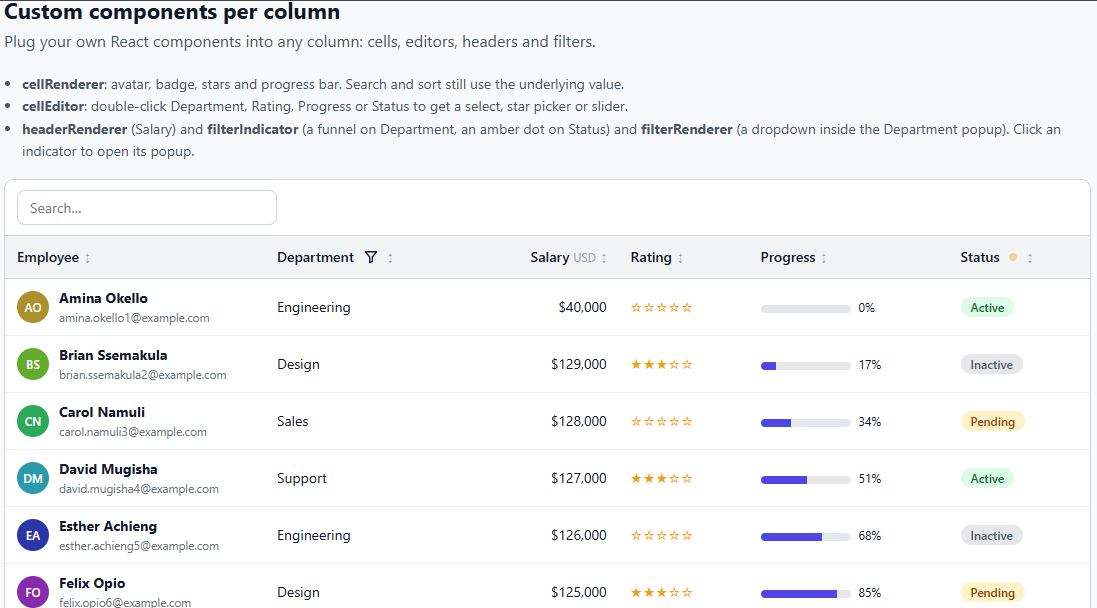
|
|
48
|
+
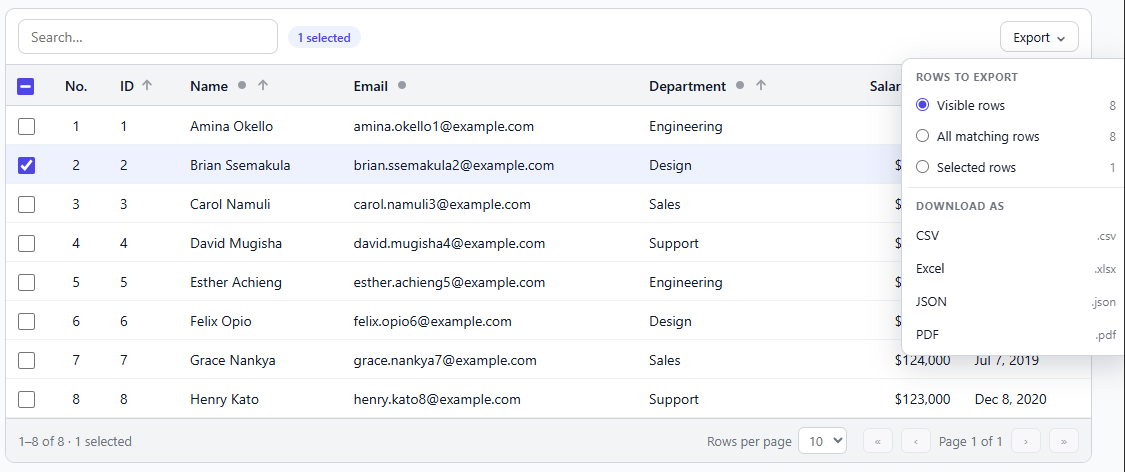
|
|
49
|
+
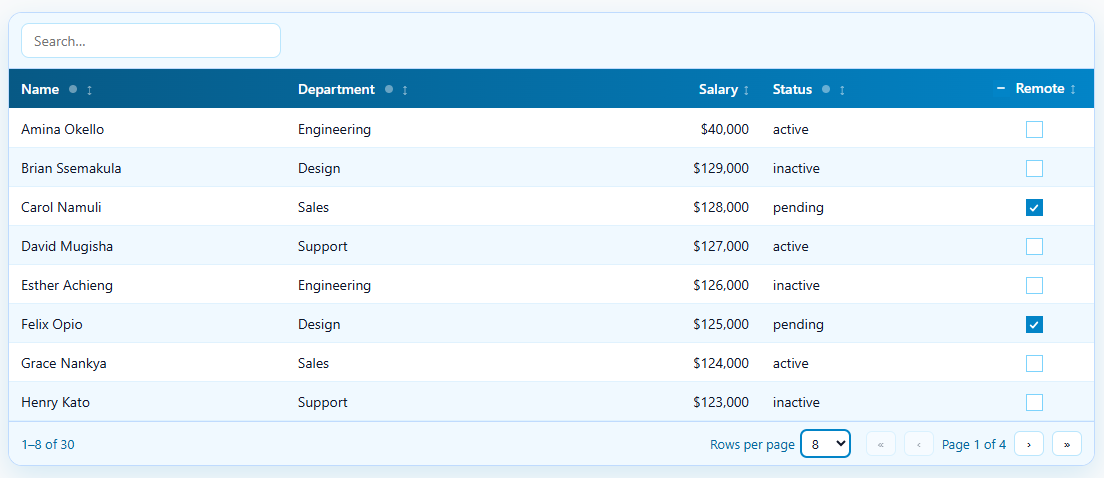
|
|
50
|
+
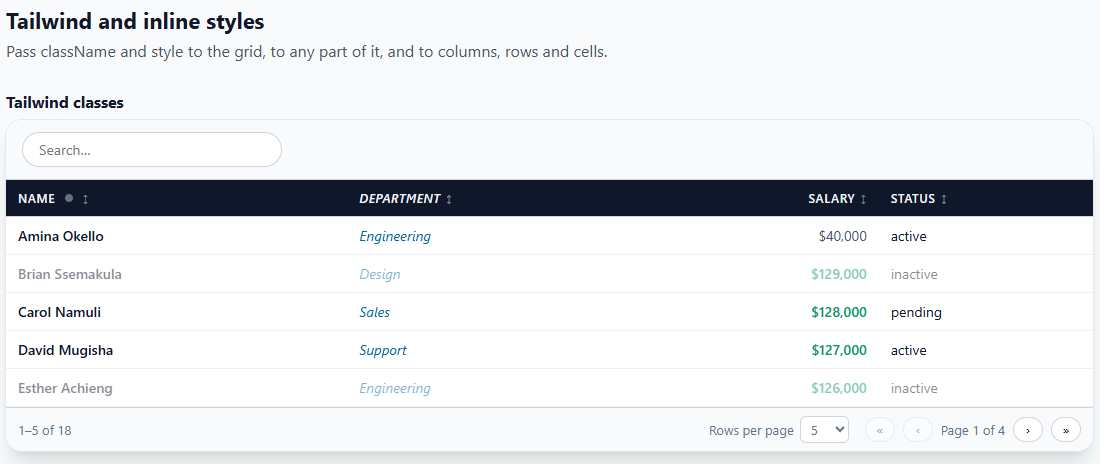
|
|
49
51
|
|
|
50
|
-
|
|
52
|
+
---
|
|
51
53
|
|
|
52
54
|
## 2. Installation
|
|
53
55
|
|
|
@@ -65,15 +67,68 @@ import "react-gridix/style.css";
|
|
|
65
67
|
|
|
66
68
|
The library does not inject CSS by itself. If the grid looks unstyled, this import is missing.
|
|
67
69
|
|
|
68
|
-
**Optional: PDF export.** CSV, Excel (`.xlsx`) and JSON export need nothing extra. PDF export uses three small libraries
|
|
70
|
+
**Optional: PDF export.** CSV, Excel (`.xlsx`) and JSON export need nothing extra. PDF export uses three small libraries. The grid does **not** import them (so your app builds and runs without them); you install them and hand them over, ideally through a function that imports them only when someone exports a PDF:
|
|
69
71
|
|
|
70
72
|
```bash
|
|
71
73
|
npm install jspdf jspdf-autotable # the PDF itself and its table
|
|
72
74
|
npm install html2canvas # only if the PDF header / footer is a React element (it is drawn to a picture)
|
|
73
75
|
```
|
|
74
76
|
|
|
75
|
-
|
|
77
|
+
```tsx
|
|
78
|
+
<DataGrid
|
|
79
|
+
exportable={{
|
|
80
|
+
formats: ["csv", "pdf"],
|
|
81
|
+
pdf: {
|
|
82
|
+
libraries: async () => ({
|
|
83
|
+
jsPDF: (await import("jspdf")).jsPDF,
|
|
84
|
+
autoTable: (await import("jspdf-autotable")).default,
|
|
85
|
+
html2canvas: (await import("html2canvas")).default, // only for a header / footer element
|
|
86
|
+
}),
|
|
87
|
+
},
|
|
88
|
+
}}
|
|
89
|
+
/>
|
|
90
|
+
```
|
|
91
|
+
Read more about stying pdf here [stying pdf here](https://github.com/simonbengtsson/jsPDF-AutoTable). Use the style property in `autoTableOptions` for styling cells
|
|
92
|
+
|
|
93
|
+
Adding `Header` and `Footer` component
|
|
94
|
+
```tsx
|
|
95
|
+
import logo from "./logo.png";
|
|
96
|
+
|
|
97
|
+
<DataGrid
|
|
98
|
+
columns={columns}
|
|
99
|
+
rows={rows}
|
|
100
|
+
getRowId={(r) => r.id}
|
|
101
|
+
exportable={{
|
|
102
|
+
formats: ["pdf"],
|
|
103
|
+
pdf: {
|
|
104
|
+
libraries: async () => ({
|
|
105
|
+
jsPDF: (await import("jspdf")).jsPDF,
|
|
106
|
+
autoTable: (await import("jspdf-autotable")).default,
|
|
107
|
+
html2canvas: (await import("html2canvas")).default, // required for an element
|
|
108
|
+
}),
|
|
109
|
+
|
|
110
|
+
header: (
|
|
111
|
+
<div style={{ display: "flex", alignItems: "center", gap: 12, borderBottom: "3px solid #4f46e5", paddingBottom: 6 }}>
|
|
112
|
+
<img src={logo} alt="" width={40} height={40} style={{ borderRadius: 8 }} />
|
|
113
|
+
<div>
|
|
114
|
+
<div style={{ fontSize: 20, fontWeight: 700, color: "#312e81" }}>Acme Corporation</div>
|
|
115
|
+
<div style={{ fontSize: 12, color: "#6b7280" }}>People & Culture report</div>
|
|
116
|
+
</div>
|
|
117
|
+
</div>
|
|
118
|
+
),
|
|
119
|
+
|
|
120
|
+
footer: (
|
|
121
|
+
<div style={{ textAlign: "center", fontSize: 11, color: "#6b7280" }}>
|
|
122
|
+
Confidential. Do not share.
|
|
123
|
+
</div>
|
|
124
|
+
),
|
|
125
|
+
},
|
|
126
|
+
}}
|
|
127
|
+
/>
|
|
128
|
+
``
|
|
76
129
|
|
|
130
|
+
Without `libraries`, or if an import fails, a PDF export reports an error that says what to install (see `onExportError`) and everything else keeps working.
|
|
131
|
+
```
|
|
77
132
|
---
|
|
78
133
|
|
|
79
134
|
## 3. Quick start
|
|
@@ -479,6 +534,36 @@ const columns: ColumnDef<Employee>[] = [
|
|
|
479
534
|
{ field: "hired", headerName: "Hired", type: "date", sortable: true, filterable: true },
|
|
480
535
|
];
|
|
481
536
|
```
|
|
537
|
+
```tsx
|
|
538
|
+
const columns: ColumnDef<User>[] = [
|
|
539
|
+
// all eight comparisons
|
|
540
|
+
{ field: "name", headerName: "Name", filterable: true, filterOperators: true },
|
|
541
|
+
|
|
542
|
+
// only some of them, with a different one selected first
|
|
543
|
+
{
|
|
544
|
+
field: "email",
|
|
545
|
+
headerName: "Email",
|
|
546
|
+
filterable: true,
|
|
547
|
+
filterOperators: ["contains", "startsWith", "endsWith", "equals"],
|
|
548
|
+
filterOperator: "startsWith",
|
|
549
|
+
},
|
|
550
|
+
|
|
551
|
+
// no filterOperators: a plain box that always means "contains"
|
|
552
|
+
{ field: "city", headerName: "City", filterable: true },
|
|
553
|
+
];
|
|
554
|
+
```
|
|
555
|
+
##### summary
|
|
556
|
+
| Value | Label shown |
|
|
557
|
+
| --- | --- |
|
|
558
|
+
| `"contains"` | Contains |
|
|
559
|
+
| `"notContains"` | Does not contain |
|
|
560
|
+
| `"equals"` | Equals |
|
|
561
|
+
| `"notEquals"` | Not equal |
|
|
562
|
+
| `"startsWith"` | Starts with |
|
|
563
|
+
| `"notStartsWith"` | Does not start with |
|
|
564
|
+
| `"endsWith"` | Ends with |
|
|
565
|
+
| `"notEndsWith"` | Does not end with |
|
|
566
|
+
|
|
482
567
|
|
|
483
568
|
| Option | Type | Description |
|
|
484
569
|
| --- | --- | --- |
|
|
@@ -524,6 +609,7 @@ const columns: ColumnDef<Employee>[] = [
|
|
|
524
609
|
| `checkbox` | `ColumnCheckboxOptions` | Look of the checkbox in a `type: "boolean"` column: `variant`, `indicator`, `className`, `style`, `classNames`, `styles` |
|
|
525
610
|
| `headerCheckbox` | `boolean` | On a `type: "boolean"` column, draws a select-all checkbox in the header. See [Select-all header checkbox](#select-all-header-checkbox) |
|
|
526
611
|
|
|
612
|
+
|
|
527
613
|
#### Row numbers (sequence column)
|
|
528
614
|
|
|
529
615
|
`type: "sequence"` adds a column of row numbers. It needs no data in your rows: give it a `field` that starts with `#` (so it can never clash with a real field) and a header.
|
|
@@ -1943,7 +2029,7 @@ The menu has two parts. **Rows to export** lets the user pick *Visible rows* (wh
|
|
|
1943
2029
|
| `"csv"` | Text of the displayed values, opens in any spreadsheet | nothing |
|
|
1944
2030
|
| `"xlsx"` | A real Excel workbook: bold coloured header row that stays in place while you scroll, auto-filter, sized columns, real numbers, real dates and real booleans | nothing (written by the library itself) |
|
|
1945
2031
|
| `"json"` | An array of objects, one per row, with real numbers and booleans and ISO dates (`"2026-11-05"`) | nothing |
|
|
1946
|
-
| `"pdf"` | A paged table with an optional title, header, footer and "Page 1 of 3" | `jspdf` and `jspdf-autotable` (and `html2canvas` for a header / footer element) |
|
|
2032
|
+
| `"pdf"` | A paged table with an optional title, header, footer and "Page 1 of 3" | `jspdf` and `jspdf-autotable` (and `html2canvas` for a header / footer element), given in `pdf.libraries` |
|
|
1947
2033
|
|
|
1948
2034
|
The same exports are available from code, for your own buttons:
|
|
1949
2035
|
|
|
@@ -1971,6 +2057,89 @@ const csv: string = api.current!.getCsv();
|
|
|
1971
2057
|
/>
|
|
1972
2058
|
```
|
|
1973
2059
|
|
|
2060
|
+
To export pdf, install supporting pdf libraries
|
|
2061
|
+
```bash
|
|
2062
|
+
npm install jspdf jspdf-autotable # the PDF itself and its table
|
|
2063
|
+
npm install html2canvas # only if the PDF header / footer is a React element (it is drawn to a picture)
|
|
2064
|
+
```
|
|
2065
|
+
|
|
2066
|
+
```tsx
|
|
2067
|
+
<DataGrid
|
|
2068
|
+
exportable={{
|
|
2069
|
+
formats: ["csv", "pdf"],
|
|
2070
|
+
pdf: {
|
|
2071
|
+
libraries: async () => ({
|
|
2072
|
+
jsPDF: (await import("jspdf")).jsPDF,
|
|
2073
|
+
autoTable: (await import("jspdf-autotable")).default,
|
|
2074
|
+
html2canvas: (await import("html2canvas")).default, // only for a header / footer element
|
|
2075
|
+
}),
|
|
2076
|
+
},
|
|
2077
|
+
}}
|
|
2078
|
+
/>
|
|
2079
|
+
```
|
|
2080
|
+
|
|
2081
|
+
```tsx
|
|
2082
|
+
<DataGrid
|
|
2083
|
+
rowSelection
|
|
2084
|
+
pagination
|
|
2085
|
+
columns={columns}
|
|
2086
|
+
rows={rows}
|
|
2087
|
+
getRowId={(r) => r.id}
|
|
2088
|
+
exportable={{
|
|
2089
|
+
filename: "employees",
|
|
2090
|
+
formats: ["csv", "xlsx", "json", "pdf"],
|
|
2091
|
+
pdf: {
|
|
2092
|
+
// required for PDF (npm install jspdf jspdf-autotable html2canvas)
|
|
2093
|
+
libraries: async () => ({
|
|
2094
|
+
jsPDF: (await import("jspdf")).jsPDF,
|
|
2095
|
+
autoTable: (await import("jspdf-autotable")).default,
|
|
2096
|
+
html2canvas: (await import("html2canvas")).default,
|
|
2097
|
+
}),
|
|
2098
|
+
|
|
2099
|
+
title: <TitleComponent />,
|
|
2100
|
+
margin: { top: 60, right: 30, bottom: 50, left: 30 },
|
|
2101
|
+
tableTheme: "grid", // "striped" | "grid" | "plain"
|
|
2102
|
+
|
|
2103
|
+
style: {
|
|
2104
|
+
headColor: "#f59e0b", // header row background
|
|
2105
|
+
headTextColor: "#111827",
|
|
2106
|
+
stripeColors: ["#ffffff", "#f1f5f9"], // rows alternate between these
|
|
2107
|
+
bodyTextColor: "#1f2937",
|
|
2108
|
+
borderColor: "#cbd5e1",
|
|
2109
|
+
borderWidth: 0.4,
|
|
2110
|
+
cellPadding: { top: 6, bottom: 6, left: 8, right: 8 },
|
|
2111
|
+
fontSize: 10,
|
|
2112
|
+
pageBackground: "#ffffff", // try "#0f172a" for a dark page
|
|
2113
|
+
columns: { // per column, by its field
|
|
2114
|
+
salary: { fontStyle: "bold", align: "right" },
|
|
2115
|
+
name: { width: 120 },
|
|
2116
|
+
},
|
|
2117
|
+
},
|
|
2118
|
+
},
|
|
2119
|
+
}}
|
|
2120
|
+
/>
|
|
2121
|
+
```
|
|
2122
|
+
Setting Border bottom
|
|
2123
|
+
```tsx
|
|
2124
|
+
pdf: {
|
|
2125
|
+
libraries:async () => ({
|
|
2126
|
+
jsPDF: (await import("jspdf")).jsPDF,
|
|
2127
|
+
autoTable: (await import("jspdf-autotable")).default,
|
|
2128
|
+
html2canvas: (await import("html2canvas")).default,
|
|
2129
|
+
}),
|
|
2130
|
+
//
|
|
2131
|
+
tableTheme: "plain", // plain draws no lines, so only your bottom border shows
|
|
2132
|
+
autoTableOptions: {
|
|
2133
|
+
styles: {
|
|
2134
|
+
lineWidth: { bottom: 0.5 }, // points; only the bottom side
|
|
2135
|
+
lineColor: [203, 213, 225], // [r, g, b]
|
|
2136
|
+
},
|
|
2137
|
+
},
|
|
2138
|
+
}
|
|
2139
|
+
```
|
|
2140
|
+
Read more about stying pdf here [stying pdf here](https://github.com/simonbengtsson/jsPDF-AutoTable). Use the style property in `autoTableOptions` for styling cells
|
|
2141
|
+
|
|
2142
|
+
|
|
1974
2143
|
**Which rows.** `scope` accepts `"filtered"` (default), `"visible"` or `"page"` (the same: the rows on screen) and `"selected"`. A page export continues the row numbers of a `sequence` column (page 2 starts at 11) unless the column has `sequenceRestartEachPage`.
|
|
1975
2144
|
|
|
1976
2145
|
**What each format writes.** CSV and PDF write the displayed text (`valueFormatter` applied, `Yes` / `No` for booleans, dates as `YYYY-MM-DD`). Excel and JSON write real values: a number column stays a number (`52000`, not `"$52,000"`), a boolean column stays `true` / `false`, a date column is a real Excel date, a column with a `valueFormatter` that changes text (for example codes shown as names) writes the shown text. A column's `exportValue(value, row)` overrides all of this in every format.
|
|
@@ -1985,7 +2154,7 @@ const csv: string = api.current!.getCsv();
|
|
|
1985
2154
|
exportable={{
|
|
1986
2155
|
formats: ["pdf"],
|
|
1987
2156
|
pdf: {
|
|
1988
|
-
title:
|
|
2157
|
+
title: <TitleComponent />,
|
|
1989
2158
|
header: "Acme Corporation, People report ({date})",
|
|
1990
2159
|
footer: "Confidential, page {page} of {pages}",
|
|
1991
2160
|
},
|
|
@@ -2027,15 +2196,19 @@ Other `pdf` options:
|
|
|
2027
2196
|
|
|
2028
2197
|
| Option | Default | Meaning |
|
|
2029
2198
|
| --- | --- | --- |
|
|
2199
|
+
| `libraries` | | **Required.** `{ jsPDF, autoTable, html2canvas? }` or a function returning them (see Installation) |
|
|
2030
2200
|
| `title` | | A heading above the table on the first page |
|
|
2031
2201
|
| `header`, `footer` | | A string or element, on every page |
|
|
2032
2202
|
| `headerAlign`, `footerAlign` | `"left"`, `"center"` | Where a **string** goes: `"left"`, `"center"`, `"right"` |
|
|
2033
2203
|
| `orientation` | `"auto"` | `"portrait"`, `"landscape"`, or `"auto"` (landscape when there are more than 6 columns) |
|
|
2034
2204
|
| `pageSize` | `"a4"` | `"a3"`, `"a4"`, `"a5"`, `"letter"`, `"legal"` |
|
|
2035
|
-
| `margin` | `36` | Points around the page (72 points = 1 inch) |
|
|
2205
|
+
| `margin` | `36` | Points around the page (72 points = 1 inch): a number, or `{ top, right, bottom, left }` |
|
|
2036
2206
|
| `fontSize` | `9` | Table text size in points |
|
|
2037
2207
|
| `tableTheme` | `"striped"` | `"striped"`, `"grid"` or `"plain"` |
|
|
2038
|
-
| `headColor`, `headTextColor` | `"#4f46e5"`, `"#ffffff"` | Colours of the table's header row
|
|
2208
|
+
| `headColor`, `headTextColor` | `"#4f46e5"`, `"#ffffff"` | Colours of the table's header row (any CSS colour) |
|
|
2209
|
+
| `matchGridStyle` | `false` | Copy the grid's on-screen look into the PDF. See [PDF styling](#pdf-styling) |
|
|
2210
|
+
| `style` | | Colours, stripes, borders, padding, page background, per-column looks. See [PDF styling](#pdf-styling) |
|
|
2211
|
+
| `autoTableOptions` | | Raw options for jspdf-autotable, merged last, for anything not covered |
|
|
2039
2212
|
| `pageNumbers` | `true` | "Page 1 of 3" in the bottom right |
|
|
2040
2213
|
| `maxImageHeight` | `90` | Tallest header / footer picture, in points |
|
|
2041
2214
|
| `fontName`, `beforeRender` | | Use another font (see below) |
|
|
@@ -2052,6 +2225,72 @@ pdf: {
|
|
|
2052
2225
|
}
|
|
2053
2226
|
```
|
|
2054
2227
|
|
|
2228
|
+
#### PDF styling
|
|
2229
|
+
|
|
2230
|
+
By default the PDF has its own look (indigo header, light stripes). Two ways to change it, and they combine.
|
|
2231
|
+
|
|
2232
|
+
**1. Copy the grid's look, only when you ask.** `matchGridStyle: true` reads the grid as it is on screen when the export runs: the header's background and text colour, the text colour and size of the rows, the two stripe colours (with `striped`), the row borders, and the grid's own background (which matters for dark themes). It reads real elements, so it follows `theme`, Tailwind classes and your CSS. Without the option nothing is read.
|
|
2233
|
+
|
|
2234
|
+
```tsx
|
|
2235
|
+
<DataGrid theme="midnight" striped exportable={{ formats: ["pdf"], pdf: { libraries, matchGridStyle: true } }} />
|
|
2236
|
+
```
|
|
2237
|
+
|
|
2238
|
+
Fonts are not copied: jsPDF cannot use a web font without its file (see `fontName`).
|
|
2239
|
+
|
|
2240
|
+
**2. Set it yourself with `style`.** Every field is optional, and colours are any CSS colour (`"#4f46e5"`, `"rgb(79,70,229)"`, `"tomato"`).
|
|
2241
|
+
|
|
2242
|
+
```tsx
|
|
2243
|
+
pdf: {
|
|
2244
|
+
libraries,
|
|
2245
|
+
margin: { top: 60, right: 30, bottom: 50, left: 30 },
|
|
2246
|
+
tableTheme: "grid", // "striped" | "grid" | "plain"
|
|
2247
|
+
style: {
|
|
2248
|
+
pageBackground: "#0f172a", // colour behind everything, on every page
|
|
2249
|
+
headColor: "#f59e0b",
|
|
2250
|
+
headTextColor: "#111827",
|
|
2251
|
+
stripeColors: ["#1e293b", "#334155"], // rows alternate between these two
|
|
2252
|
+
bodyTextColor: "#e2e8f0",
|
|
2253
|
+
borderColor: "#475569",
|
|
2254
|
+
borderWidth: 0.4, // points
|
|
2255
|
+
cellPadding: { top: 6, bottom: 6, left: 8, right: 8 },
|
|
2256
|
+
fontSize: 10,
|
|
2257
|
+
columns: { // per column, by its `field`
|
|
2258
|
+
salary: { fontStyle: "bold", textColor: "#fbbf24", align: "right" },
|
|
2259
|
+
name: { width: 120 },
|
|
2260
|
+
},
|
|
2261
|
+
},
|
|
2262
|
+
}
|
|
2263
|
+
```
|
|
2264
|
+
|
|
2265
|
+
| `style` field | Meaning |
|
|
2266
|
+
| --- | --- |
|
|
2267
|
+
| `headColor`, `headTextColor`, `headFontSize`, `headFontStyle` | The table's header row (`headFontStyle`: `"normal"`, `"bold"` (default), `"italic"`, `"bolditalic"`) |
|
|
2268
|
+
| `bodyColor` | Background of every body row (when there are no `stripeColors`) |
|
|
2269
|
+
| `stripeColors` | `[colorA, colorB]`: rows alternate, starting with A |
|
|
2270
|
+
| `bodyTextColor` | Text colour of body rows |
|
|
2271
|
+
| `borderColor`, `borderWidth` | Lines between cells (points) |
|
|
2272
|
+
| `cellPadding` | Space inside cells: a number or `{ top, right, bottom, left }`. Default 4 |
|
|
2273
|
+
| `minRowHeight` | Smallest row height in points |
|
|
2274
|
+
| `fontSize`, `fontName` | Table text size (default 9) and a font you registered |
|
|
2275
|
+
| `pageBackground` | Paper colour. Header, footer, title and table text turn light by themselves when it is dark |
|
|
2276
|
+
| `textColor`, `titleColor`, `titleSize` | Header / footer / page-number text, and the `title` |
|
|
2277
|
+
| `margin` | Same as the `margin` option |
|
|
2278
|
+
| `columns` | `{ [field]: { width, align, textColor, backgroundColor, fontStyle, fontSize } }`. `width` is points, `"auto"` or `"wrap"` |
|
|
2279
|
+
|
|
2280
|
+
**Which wins.** Weakest to strongest: built-in defaults, the grid's look (`matchGridStyle`), the flat options (`headColor`, `fontSize`, `margin`, ...), then `style`. So you can copy the grid and still force one colour:
|
|
2281
|
+
|
|
2282
|
+
```tsx
|
|
2283
|
+
pdf: { matchGridStyle: true, style: { headColor: "#0f766e" } } // the grid's look, but a teal header
|
|
2284
|
+
```
|
|
2285
|
+
|
|
2286
|
+
**Anything else.** `autoTableOptions` is handed to jspdf-autotable last, and its `styles`, `headStyles`, `bodyStyles`, `alternateRowStyles` and `margin` are merged key by key into ours:
|
|
2287
|
+
|
|
2288
|
+
```tsx
|
|
2289
|
+
pdf: { autoTableOptions: { rowPageBreak: "avoid", didParseCell: (data) => { if (data.column.index === 5 && Number(data.cell.raw.replace(/\D/g, "")) > 100000) data.cell.styles.textColor = [220, 38, 38]; } } }
|
|
2290
|
+
```
|
|
2291
|
+
|
|
2292
|
+
Header and footer *elements* are drawn on the page's colour, so they blend into a `pageBackground`.
|
|
2293
|
+
|
|
2055
2294
|
#### Export options
|
|
2056
2295
|
|
|
2057
2296
|
| `ExportOptions` | Default | Meaning |
|
|
@@ -2470,6 +2709,7 @@ Behaviours to be aware of:
|
|
|
2470
2709
|
- In `serverSide` mode the grid cannot export or select rows it has never loaded.
|
|
2471
2710
|
- The date calendar starts weeks on Sunday and has no week numbers or time of day.
|
|
2472
2711
|
- Excel export writes one worksheet. It does not carry the grid's colours or fonts, only a styled header row.
|
|
2712
|
+
- The PDF is styled by its own `pdf` options. It only copies the grid's look when `matchGridStyle` is on, and then only colours, stripes, borders and text size, not fonts or exact spacing.
|
|
2473
2713
|
- PDF text uses jsPDF's built-in Western European fonts unless you register another one (`pdf.fontName`). A PDF header / footer element is a picture: its text cannot be selected.
|
|
2474
2714
|
- Rows that leave play their exit animation as a copy in place; the table closes the gap when the animation ends instead of sliding the rows below up.
|
|
2475
2715
|
|
|
@@ -2509,8 +2749,7 @@ The Styling demo loads Tailwind from its CDN, so it needs an internet connection
|
|
|
2509
2749
|
|
|
2510
2750
|
---
|
|
2511
2751
|
|
|
2512
|
-
|
|
2513
|
-
## 8. Troubleshooting
|
|
2752
|
+
## 9. Troubleshooting
|
|
2514
2753
|
|
|
2515
2754
|
| Problem | Cause and fix |
|
|
2516
2755
|
| --- | --- |
|
|
@@ -2524,7 +2763,7 @@ The Styling demo loads Tailwind from its CDN, so it needs an internet connection
|
|
|
2524
2763
|
| The date calendar never opens | The cell must be editable (`editable` on the grid or the column), then double-click it or press Enter / F2 |
|
|
2525
2764
|
| A sequence column shows nothing or a type error | Give it `type: "sequence"` and a `field` that starts with `#`, for example `{ field: "#", type: "sequence" }` |
|
|
2526
2765
|
| My custom row animation does nothing | `animateRows` is `false`, `virtualize` is on, or your class does not set `animation`. Check that the keyframes exist and that the class name is spelled the same in CSS |
|
|
2527
|
-
| PDF export fails with `needs the
|
|
2766
|
+
| PDF export fails with `needs the jspdf and jspdf-autotable libraries` | Install `jspdf jspdf-autotable` (and `html2canvas` for a header / footer element) and pass them in `exportable.pdf.libraries`. Handle the error with `onExportError` |
|
|
2528
2767
|
| The PDF header / footer element has no image | The image must be loadable by the browser without being blocked: a bundled asset, a data URL, or a server that sends CORS headers |
|
|
2529
2768
|
| The comparison drop-down does not show in the filter popup | Add `filterOperators: true` (or a list) to that column. It applies to text columns only, and not with a custom `filterRenderer` |
|
|
2530
2769
|
| The wrong row animates out when I delete one | Give the grid `getRowId={(row) => row.id}`. Without it rows are identified by position |
|
|
@@ -2557,4 +2796,27 @@ The Styling demo loads Tailwind from its CDN, so it needs an internet connection
|
|
|
2557
2796
|
| A checkbox in a boolean column is greyed out and won't toggle | The cell isn't editable. Set `editable` on the grid, or `editable: true` on that column |
|
|
2558
2797
|
| Type error: `field` not assignable | `field` must be a key of your row type. Check the spelling, and that `ColumnDef<T>` uses the same `T` as `rows` |
|
|
2559
2798
|
|
|
2560
|
-
---
|
|
2799
|
+
---
|
|
2800
|
+
### Changed defaults
|
|
2801
|
+
|
|
2802
|
+
Three defaults changed so that every feature is opt-in.
|
|
2803
|
+
|
|
2804
|
+
| Before | Now | What to do |
|
|
2805
|
+
| --- | --- | --- |
|
|
2806
|
+
| Grid prop `sortable` (default `true`), column `sortable` override | **Column** `sortable` only, default `false`. The grid-level prop is gone | Add `sortable: true` to each column that should sort. Remove `sortable` / `sortable={false}` from the grid |
|
|
2807
|
+
| `defaultSort` / `onSortChange` used one `SortModel` or `null` | `defaultSort` takes one `SortModel` **or an array**. `onSortChange` receives an **array** (empty when unsorted) | Change `(sort) => sort?.field` to `(sort) => sort[0]?.field` |
|
|
2808
|
+
| `searchable` default `true` | Default `false` | Add `searchable` to grids that should show the search box |
|
|
2809
|
+
| `pagination` default `true` | Default `false`. With it off there is no footer and no row count | Add `pagination` to grids that should page |
|
|
2810
|
+
| Filters were text only | Filter kinds: text, exact, number, date, select | Nothing to change. Number columns now get a Min / Max popup, boolean columns a checkbox list |
|
|
2811
|
+
| `FilterRendererProps` | Unchanged (`value: string`) | |
|
|
2812
|
+
|
|
2813
|
+
A quick way to get the old behaviour everywhere:
|
|
2814
|
+
|
|
2815
|
+
```tsx
|
|
2816
|
+
// before: <DataGrid columns={columns} rows={rows} />
|
|
2817
|
+
const withSorting = (cols: ColumnDef<Row>[]) => cols.map((c) => ({ sortable: true, ...c }));
|
|
2818
|
+
|
|
2819
|
+
<DataGrid columns={withSorting(columns)} rows={rows} searchable pagination />
|
|
2820
|
+
```
|
|
2821
|
+
|
|
2822
|
+
Everything else in this document is new and optional.
|
|
@@ -0,0 +1 @@
|
|
|
1
|
+
"use strict";const y=require("react-dom");function f(t,e){for(var o=0;o<e.length;o++){const n=e[o];if(typeof n!="string"&&!Array.isArray(n)){for(const a in n)if(a!=="default"&&!(a in t)){const u=Object.getOwnPropertyDescriptor(n,a);u&&Object.defineProperty(t,a,u.get?u:{enumerable:!0,get:()=>n[a]})}}}return Object.freeze(Object.defineProperty(t,Symbol.toStringTag,{value:"Module"}))}var r={},l,s,i=y;if(process.env.NODE_ENV==="production")s=r.createRoot=i.createRoot,l=r.hydrateRoot=i.hydrateRoot;else{var c=i.__SECRET_INTERNALS_DO_NOT_USE_OR_YOU_WILL_BE_FIRED;s=r.createRoot=function(t,e){c.usingClientEntryPoint=!0;try{return i.createRoot(t,e)}finally{c.usingClientEntryPoint=!1}},l=r.hydrateRoot=function(t,e,o){c.usingClientEntryPoint=!0;try{return i.hydrateRoot(t,e,o)}finally{c.usingClientEntryPoint=!1}}}const _=f({__proto__:null,get createRoot(){return s},default:r,get hydrateRoot(){return l}},[r]);exports.client=_;
|
|
@@ -0,0 +1,51 @@
|
|
|
1
|
+
import f from "react-dom";
|
|
2
|
+
function s(t, e) {
|
|
3
|
+
for (var o = 0; o < e.length; o++) {
|
|
4
|
+
const n = e[o];
|
|
5
|
+
if (typeof n != "string" && !Array.isArray(n)) {
|
|
6
|
+
for (const a in n)
|
|
7
|
+
if (a !== "default" && !(a in t)) {
|
|
8
|
+
const u = Object.getOwnPropertyDescriptor(n, a);
|
|
9
|
+
u && Object.defineProperty(t, a, u.get ? u : {
|
|
10
|
+
enumerable: !0,
|
|
11
|
+
get: () => n[a]
|
|
12
|
+
});
|
|
13
|
+
}
|
|
14
|
+
}
|
|
15
|
+
}
|
|
16
|
+
return Object.freeze(Object.defineProperty(t, Symbol.toStringTag, { value: "Module" }));
|
|
17
|
+
}
|
|
18
|
+
var r = {}, l, y, i = f;
|
|
19
|
+
if (process.env.NODE_ENV === "production")
|
|
20
|
+
y = r.createRoot = i.createRoot, l = r.hydrateRoot = i.hydrateRoot;
|
|
21
|
+
else {
|
|
22
|
+
var c = i.__SECRET_INTERNALS_DO_NOT_USE_OR_YOU_WILL_BE_FIRED;
|
|
23
|
+
y = r.createRoot = function(t, e) {
|
|
24
|
+
c.usingClientEntryPoint = !0;
|
|
25
|
+
try {
|
|
26
|
+
return i.createRoot(t, e);
|
|
27
|
+
} finally {
|
|
28
|
+
c.usingClientEntryPoint = !1;
|
|
29
|
+
}
|
|
30
|
+
}, l = r.hydrateRoot = function(t, e, o) {
|
|
31
|
+
c.usingClientEntryPoint = !0;
|
|
32
|
+
try {
|
|
33
|
+
return i.hydrateRoot(t, e, o);
|
|
34
|
+
} finally {
|
|
35
|
+
c.usingClientEntryPoint = !1;
|
|
36
|
+
}
|
|
37
|
+
};
|
|
38
|
+
}
|
|
39
|
+
const R = /* @__PURE__ */ s({
|
|
40
|
+
__proto__: null,
|
|
41
|
+
get createRoot() {
|
|
42
|
+
return y;
|
|
43
|
+
},
|
|
44
|
+
default: r,
|
|
45
|
+
get hydrateRoot() {
|
|
46
|
+
return l;
|
|
47
|
+
}
|
|
48
|
+
}, [r]);
|
|
49
|
+
export {
|
|
50
|
+
R as c
|
|
51
|
+
};
|