react-big-screen 0.0.28 → 0.0.29
This diff represents the content of publicly available package versions that have been released to one of the supported registries. The information contained in this diff is provided for informational purposes only and reflects changes between package versions as they appear in their respective public registries.
- package/README.en-US.md +166 -0
- package/README.md +109 -309
- package/es/{attributes-ICDLlHKL.mjs → attributes-B5HWQZZK.mjs} +1 -1
- package/es/{attributes-D_7z174b.mjs → attributes-B7-hDzkQ.mjs} +1 -1
- package/es/{attributes-CKQVoQvV.mjs → attributes-BPcQtKOr.mjs} +1 -1
- package/es/{attributes-Bqwv78vP.mjs → attributes-BpX4Fdw9.mjs} +1 -1
- package/es/{attributes-S7TYD0S5.mjs → attributes-BylM83oA.mjs} +2 -2
- package/es/{attributes-CxmgjIr4.mjs → attributes-C6vh9nyy.mjs} +1 -1
- package/es/{attributes-DX29Qkf4.mjs → attributes-D-gloXi5.mjs} +1 -1
- package/es/{attributes-Db9sk_dJ.mjs → attributes-DUnMdQAM.mjs} +1 -1
- package/es/{attributes-COWyZqgA.mjs → attributes-DmnMCZfI.mjs} +1 -1
- package/es/{attributes-BhOVe6Nw.mjs → attributes-DqZ_OZyi.mjs} +1 -1
- package/es/{attributes-C9kdt2P4.mjs → attributes-IOCRHiLe.mjs} +1 -1
- package/es/{attributes-CNvZw41R.mjs → attributes-L0fyKnQO.mjs} +1 -1
- package/es/{index-B_otqPpE.mjs → index-7dLD8uUE.mjs} +2 -2
- package/es/{index-BwBB6Ooc.mjs → index-B3Ay6Aj1.mjs} +1 -1
- package/es/{index-Do46s3Bo.mjs → index-BFA4TvoH.mjs} +2 -2
- package/es/{index-DTx3K3TW.mjs → index-BXq0hs6M.mjs} +3 -3
- package/es/{index-BseO3j88.mjs → index-BlWFsMPW.mjs} +389 -376
- package/es/{index-DOx-TcxR.mjs → index-C2T3keq0.mjs} +2 -2
- package/es/{index-CF9Gq4DE.mjs → index-C40e9pm9.mjs} +1744 -1545
- package/es/{index-CQpPr_GO.mjs → index-COabQvbE.mjs} +2 -2
- package/es/{index-DiaCgMtP.mjs → index-CPLagA1y.mjs} +2 -2
- package/es/{index-DjwCZvsj.mjs → index-CRaab8fv.mjs} +2 -2
- package/es/{index-CUl51FbE.mjs → index-CdJ04MGH.mjs} +2 -2
- package/es/{index-DIXk7ULh.mjs → index-CiVNQoxr.mjs} +3 -3
- package/es/{index-CR2sC3mu.mjs → index-CiYtbqfk.mjs} +2 -2
- package/es/{index-DJCJ9mDa.mjs → index-Csn1J3aw.mjs} +2 -2
- package/es/{index-Mr6nPhGt.mjs → index-D6jgslIW.mjs} +2 -2
- package/es/{index-KR0QAPWF.mjs → index-DFiF1j8B.mjs} +2 -2
- package/es/{index-DQnoNvaR.mjs → index-DI0SW2E2.mjs} +3 -3
- package/es/{index-Cl1TBDdm.mjs → index-DIlwx359.mjs} +2 -2
- package/es/{index-BQMHx4Ur.mjs → index-D_ufK7UJ.mjs} +1 -1
- package/es/{index-QkxDL_fl.mjs → index-Dmgsn6Wm.mjs} +2 -2
- package/es/{index-Bt7Z5pcG.mjs → index-F_ek5l7j.mjs} +2 -2
- package/es/{index-BP0M5ksu.mjs → index-UsnN384D.mjs} +2 -2
- package/es/{index-CiRuNGX5.mjs → index-YRf4xbh7.mjs} +2 -2
- package/es/{index-4IXWh7p-.mjs → index-bwKeYi6r.mjs} +2 -2
- package/es/{index-Dd2HXuLY.mjs → index-s9MOJecX.mjs} +2 -2
- package/es/{index-CZaKlOGF.mjs → index-wkPXgVxT.mjs} +3 -3
- package/es/index.mjs +1 -1
- package/es/{selectPage-BejdiGuA.mjs → selectPage-BBYB3GCL.mjs} +1 -1
- package/es/style.css +1 -1
- package/es/{useCurrentPageId-CrzsBBI2.mjs → useCurrentPageId-BmlA3pBw.mjs} +1 -1
- package/package.json +10 -2
- package/types/src/engine/componentNode/index.d.ts +5 -4
- package/types/src/engine/types.d.ts +1 -0
- package/types/src/pages/components/Editor/hooks/index.d.ts +1 -0
- package/types/src/pages/components/Editor/hooks/useRegisterDrag/index.d.ts +2 -1
- package/types/src/pages/components/Editor/hooks/useRegisterDrag/listenDragMove.d.ts +13 -2
- package/types/src/pages/components/Editor/hooks/useRegisterPositionLine/index.d.ts +6 -0
- package/types/src/pages/components/Header/components/SettingsDrawer/index.d.ts +8 -0
- package/types/src/utils/graph.d.ts +10 -0
package/README.en-US.md
ADDED
|
@@ -0,0 +1,166 @@
|
|
|
1
|
+
<h1 align="center">react-big-screen</h1>
|
|
2
|
+
|
|
3
|
+
<p align="center">A drag-and-drop visual editor for building React data big-screens — usable standalone or embedded in your app as an ESM SDK.</p>
|
|
4
|
+
|
|
5
|
+
<p align="center">
|
|
6
|
+
<a href="./README.md">简体中文</a> | <a href="./README.en-US.md">English</a>
|
|
7
|
+
</p>
|
|
8
|
+
|
|
9
|
+
<p align="center">
|
|
10
|
+
<a href="https://www.npmjs.com/package/react-big-screen"><img src="https://img.shields.io/npm/v/react-big-screen?style=flat-square" alt="npm version"></a>
|
|
11
|
+
<a href="https://github.com/tangjiahui-cn/react-big-screen"><img src="https://img.shields.io/github/stars/tangjiahui-cn/react-big-screen?style=flat-square" alt="GitHub stars"></a>
|
|
12
|
+
<a href="https://tangjiahui-cn.github.io/react-big-screen"><img src="https://img.shields.io/badge/demo-online-0891B2?style=flat-square" alt="Online demo"></a>
|
|
13
|
+
<img src="https://img.shields.io/badge/React-18-3776AB?style=flat-square" alt="React 18">
|
|
14
|
+
</p>
|
|
15
|
+
|
|
16
|
+
react-big-screen is a visual big-screen editor built on React 18. By dragging and configuring components, you can quickly assemble a data big-screen. It can be used in two ways:
|
|
17
|
+
|
|
18
|
+
- **Standalone editor**: build a page visually on the canvas, then preview or share the running result directly.
|
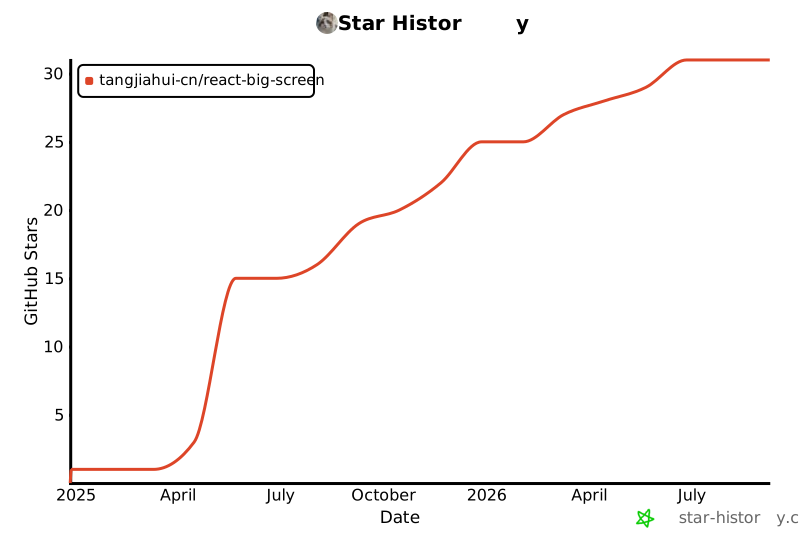
|
19
|
+
- **Embeddable SDK**: the entire screen is driven by a single piece of JSON and exposed through `RbsEngine`, letting you embed the editor or the runtime page into your own React project.
|
|
20
|
+
|
|
21
|
+
## Screenshots
|
|
22
|
+
|
|
23
|
+
Edit mode:
|
|
24
|
+
|
|
25
|
+
<img src="./imgs/edit.png" height="200" alt="react-big-screen editing canvas">
|
|
26
|
+
|
|
27
|
+
Preview mode:
|
|
28
|
+
|
|
29
|
+
<img src="./imgs/preview.png" height="200" alt="react-big-screen preview page">
|
|
30
|
+
|
|
31
|
+
## Core Features
|
|
32
|
+
|
|
33
|
+
- ✅ Drag & drop system
|
|
34
|
+
- ✅ Group / ungroup
|
|
35
|
+
- ✅ Box selection
|
|
36
|
+
- ✅ Right-click context menu
|
|
37
|
+
- ✅ Keyboard shortcuts
|
|
38
|
+
- ✅ Multi-component interaction
|
|
39
|
+
- ✅ Multi-page management
|
|
40
|
+
- ✅ Custom components
|
|
41
|
+
- ✅ Custom property panels
|
|
42
|
+
- ✅ Adaptive preview page
|
|
43
|
+
- ✅ Container components
|
|
44
|
+
- ✅ Alignment guides
|
|
45
|
+
- ✅ Load remote components
|
|
46
|
+
- ✅ i18n internationalization
|
|
47
|
+
- ✅ Undoable history records
|
|
48
|
+
- ✅ Import / export files
|
|
49
|
+
- ✅ SDK support
|
|
50
|
+
|
|
51
|
+
More capabilities are available in the source code.
|
|
52
|
+
|
|
53
|
+
## Core Design
|
|
54
|
+
|
|
55
|
+
| Design | Description |
|
|
56
|
+
|--------------------|--------------------------------------------------------------------------------------------------------------------------------------------------------------|
|
|
57
|
+
| DSL-driven | The entire screen is described by a unified JSON DSL capturing page structure, component config, data binding, and inter-component event relations. The editor and the preview runtime share the same page document model. |
|
|
58
|
+
| Component system | Extend the editor's capabilities through a component registration mechanism, with support for custom components, custom property panels, container components, and remote components. |
|
|
59
|
+
| Event system | Inter-component coordination is implemented via a `trigger → expose` event chain, so a component never depends on other component instances directly. |
|
|
60
|
+
| Data system | Each component can independently bind to static data or a remote API data source, with support for polling refresh. |
|
|
61
|
+
| Editor capabilities | Drag, resize, box selection, grouping, alignment, shortcuts, and history records all work uniformly around component nodes. |
|
|
62
|
+
| Multi-page model | One big-screen can contain multiple sub-pages. Only the current page is rendered; the others keep their document data without being rendered. |
|
|
63
|
+
| Remote components | Supports loading UMD / AMD / zip component packages and caches remote component resources in IndexedDB. |
|
|
64
|
+
| SDK embedding | Exposes capabilities such as `mount`, `importJSON`, and `exportJSON` through `RbsEngine`, so the full editor or preview runtime can be embedded in other React applications. |
|
|
65
|
+
|
|
66
|
+
## Architecture
|
|
67
|
+
|
|
68
|
+
```text
|
|
69
|
+
┌───────────────────────────────────────────────┐
|
|
70
|
+
│ Host React application │
|
|
71
|
+
│ import { RbsEngine } from "react-big-screen"│
|
|
72
|
+
└───────────────────────┬───────────────────────┘
|
|
73
|
+
│
|
|
74
|
+
mount · importJSON · exportJSON
|
|
75
|
+
│
|
|
76
|
+
▼
|
|
77
|
+
┌───────────────────────────────────────────────┐
|
|
78
|
+
│ RbsEngine — SDK layer │
|
|
79
|
+
│ edit mode (RenderEditor) / preview mode │
|
|
80
|
+
│ (RenderPreview) │
|
|
81
|
+
│ │
|
|
82
|
+
│ ┌──────────── Engine core ──────────────┐ │
|
|
83
|
+
│ │ Component templates · ComponentNode │ │
|
|
84
|
+
│ │ data · runtime instances · Config │ │
|
|
85
|
+
│ └───────────────────────────────────────┘ │
|
|
86
|
+
│ ┌────────── Editor packages ────────────┐ │
|
|
87
|
+
│ │ dragMove · resize · alignGuide │ │
|
|
88
|
+
│ │ contextMenu · historyRecord · keys │ │
|
|
89
|
+
│ └───────────────────────────────────────┘ │
|
|
90
|
+
└───────────────────────┬───────────────────────┘
|
|
91
|
+
│ JSON in/out · events
|
|
92
|
+
▼
|
|
93
|
+
┌───────────────────────────────────────────────┐
|
|
94
|
+
│ State layer │
|
|
95
|
+
│ Zustand stores · BaseEvent pub/sub │
|
|
96
|
+
│ IndexedDB (remote component cache) │
|
|
97
|
+
└───────────────────────────────────────────────┘
|
|
98
|
+
```
|
|
99
|
+
|
|
100
|
+
## Usage Example
|
|
101
|
+
|
|
102
|
+
```tsx
|
|
103
|
+
import { useEffect, useRef } from "react";
|
|
104
|
+
import { EXAMPLE, RbsEngine } from "react-big-screen";
|
|
105
|
+
import "antd/dist/antd.min.css";
|
|
106
|
+
import "react-big-screen/es/style.css";
|
|
107
|
+
|
|
108
|
+
export default function Screen() {
|
|
109
|
+
const hostRef = useRef<HTMLDivElement>(null);
|
|
110
|
+
|
|
111
|
+
useEffect(() => {
|
|
112
|
+
const engine = new RbsEngine(); // edit mode by default
|
|
113
|
+
engine.mount(hostRef.current!).then(() => {
|
|
114
|
+
engine.importJSON(EXAMPLE.classic); // render an example big-screen
|
|
115
|
+
});
|
|
116
|
+
|
|
117
|
+
return () => {
|
|
118
|
+
engine.destroy(); // unmount and clean up
|
|
119
|
+
};
|
|
120
|
+
}, []);
|
|
121
|
+
|
|
122
|
+
return <div ref={hostRef} style={{ width: "100vw", height: "100vh" }} />;
|
|
123
|
+
}
|
|
124
|
+
```
|
|
125
|
+
|
|
126
|
+
The snippet above mounts the full editor and loads an example big-screen. For a read-only runtime view, call `engine.enablePreview()` before `mount()` / `importJSON()`.
|
|
127
|
+
|
|
128
|
+
## Quick Install
|
|
129
|
+
|
|
130
|
+
```shell
|
|
131
|
+
pnpm add react-big-screen
|
|
132
|
+
```
|
|
133
|
+
|
|
134
|
+
Environment requirements: Node 20+, React 18. Import the required styles once in your app:
|
|
135
|
+
|
|
136
|
+
```tsx
|
|
137
|
+
import "antd/dist/antd.min.css";
|
|
138
|
+
import "react-big-screen/es/style.css";
|
|
139
|
+
```
|
|
140
|
+
|
|
141
|
+
## Quick Start
|
|
142
|
+
|
|
143
|
+
The fastest way to try it is the online editor — no installation needed:
|
|
144
|
+
|
|
145
|
+
- Online demo: [https://tangjiahui-cn.github.io/react-big-screen](https://tangjiahui-cn.github.io/react-big-screen)
|
|
146
|
+
- Feature demo (multi-component interaction): [Open example](https://tangjiahui-cn.github.io/react-big-screen/#/create?example=multiple-components-interactive)
|
|
147
|
+
|
|
148
|
+
Run the full editor locally:
|
|
149
|
+
|
|
150
|
+
```shell
|
|
151
|
+
git clone https://github.com/tangjiahui-cn/react-big-screen.git
|
|
152
|
+
cd react-big-screen
|
|
153
|
+
pnpm install
|
|
154
|
+
pnpm dev
|
|
155
|
+
```
|
|
156
|
+
|
|
157
|
+
The dev server runs at http://localhost:11000 by default.
|
|
158
|
+
|
|
159
|
+
## Community & Support
|
|
160
|
+
|
|
161
|
+
- Author's big-screen principles column series: [前端大屏原理系列(掘金)](https://juejin.cn/column/7492086179995811855)
|
|
162
|
+
- Report issues or request features: [GitHub Issues](https://github.com/tangjiahui-cn/react-big-screen/issues)
|
|
163
|
+
|
|
164
|
+
## Star History
|
|
165
|
+
|
|
166
|
+
[](https://star-history.com/#tangjiahui-cn/react-big-screen&Date)
|
package/README.md
CHANGED
|
@@ -1,22 +1,36 @@
|
|
|
1
|
-
|
|
1
|
+
<h1 align="center">react-big-screen</h1>
|
|
2
2
|
|
|
3
|
-
|
|
3
|
+
<p align="center">一个用于搭建 React 数据大屏的拖拽式可视化编辑器 —— 既可独立使用,也可作为 ESM SDK 嵌入你的应用。</p>
|
|
4
4
|
|
|
5
|
-
|
|
5
|
+
<p align="center">
|
|
6
|
+
<a href="./README.md">简体中文</a> | <a href="./README.en-US.md">English</a>
|
|
7
|
+
</p>
|
|
6
8
|
|
|
7
|
-
|
|
9
|
+
<p align="center">
|
|
10
|
+
<a href="https://www.npmjs.com/package/react-big-screen"><img src="https://img.shields.io/npm/v/react-big-screen?style=flat-square" alt="npm version"></a>
|
|
11
|
+
<a href="https://github.com/tangjiahui-cn/react-big-screen"><img src="https://img.shields.io/github/stars/tangjiahui-cn/react-big-screen?style=flat-square" alt="GitHub stars"></a>
|
|
12
|
+
<a href="https://tangjiahui-cn.github.io/react-big-screen"><img src="https://img.shields.io/badge/demo-online-0891B2?style=flat-square" alt="在线 demo"></a>
|
|
13
|
+
<img src="https://img.shields.io/badge/React-18-3776AB?style=flat-square" alt="React 18">
|
|
14
|
+
</p>
|
|
8
15
|
|
|
9
|
-
|
|
16
|
+
react-big-screen 是一个基于 React 18 的可视化大屏编辑器,通过拖拽、配置组件即可快速搭好一张数据大屏。它有两种使用方式:
|
|
10
17
|
|
|
11
|
-
|
|
18
|
+
- **独立编辑器**:在画布上可视化搭好页面后,直接预览或分享运行结果。
|
|
19
|
+
- **可嵌入 SDK**:整张大屏由一份 JSON 驱动,通过 `RbsEngine` 对外暴露,可将编辑器或运行时页面嵌入到你自己的 React 项目中。
|
|
12
20
|
|
|
13
|
-
|
|
21
|
+
## 界面截图
|
|
14
22
|
|
|
15
|
-
|
|
23
|
+
编辑模式:
|
|
24
|
+
|
|
25
|
+
<img src="./imgs/edit.png" style="max-width: 100%;max-height: 500px;" alt="react-big-screen 编辑画布">
|
|
26
|
+
|
|
27
|
+
预览模式:
|
|
16
28
|
|
|
17
|
-
|
|
29
|
+
<img src="./imgs/preview.png" style="max-width: 100%;max-height: 500px;" alt="react-big-screen 预览页">
|
|
18
30
|
|
|
19
|
-
|
|
31
|
+
## 核心功能
|
|
32
|
+
|
|
33
|
+
- ✅ 拖拽系统
|
|
20
34
|
- ✅ 成组、取消成组
|
|
21
35
|
- ✅ 鼠标范围框选
|
|
22
36
|
- ✅ 右键菜单
|
|
@@ -27,340 +41,126 @@ react-big-screen 是一个使用React开发的`前端可拖拽大屏`开源项
|
|
|
27
41
|
- ✅ 自定义属性面板
|
|
28
42
|
- ✅ 自适应预览页
|
|
29
43
|
- ✅ 容器组件
|
|
44
|
+
- ✅ 辅助线
|
|
30
45
|
- ✅ 加载远程组件
|
|
31
46
|
- ✅ i18n国际化
|
|
32
47
|
- ✅ 可撤销历史记录
|
|
33
48
|
- ✅ 导入、导出文件
|
|
34
|
-
|
|
35
|
-
|
|
36
|
-
|
|
37
|
-
|
|
38
|
-
##
|
|
39
|
-
|
|
40
|
-
|
|
41
|
-
|
|
42
|
-
|
|
43
|
-
|
|
49
|
+
- ✅ 支持 SDK 引用
|
|
50
|
+
|
|
51
|
+
更多能力详见源码。
|
|
52
|
+
|
|
53
|
+
## 核心设计
|
|
54
|
+
|
|
55
|
+
| 设计 | 说明 |
|
|
56
|
+
|--------|-------------------------------------------------------------------------------------|
|
|
57
|
+
| DSL 驱动 | 整张大屏由统一的 JSON DSL 描述页面结构、组件配置、数据绑定与组件间事件关系,编辑器与预览运行时共享同一份页面文档模型 |
|
|
58
|
+
| 组件系统 | 通过组件注册机制扩展编辑器能力,支持自定义组件、自定义属性面板、容器组件及远程组件。 |
|
|
59
|
+
| 事件系统 | 通过 `trigger → expose` 事件链实现组件间联动,组件无需直接依赖其它组件实例。 |
|
|
60
|
+
| 数据系统 | 每个组件可独立绑定静态数据或远程 API 数据源,并支持轮询刷新。 |
|
|
61
|
+
| 编辑器能力 | 拖拽、缩放、框选、成组、对齐、快捷键和历史记录等能力围绕组件节点统一工作。 |
|
|
62
|
+
| 多页面模型 | 一个大屏可包含多个子页面,仅渲染当前页面,其余页面保留文档数据而不参与渲染。 |
|
|
63
|
+
| 远程组件 | 支持加载 UMD / AMD / zip 组件包,并使用 IndexedDB 缓存远程组件资源。 |
|
|
64
|
+
| SDK 嵌入 | 通过 `RbsEngine` 暴露 `mount`、`importJSON`、`exportJSON` 等能力,可将完整编辑器或预览运行时嵌入其它 React 应用。 |
|
|
65
|
+
|
|
66
|
+
## 架构
|
|
67
|
+
|
|
68
|
+
```text
|
|
69
|
+
┌───────────────────────────────────────────────┐
|
|
70
|
+
│ Host React application │
|
|
71
|
+
│ import { RbsEngine } from "react-big-screen"│
|
|
72
|
+
└───────────────────────┬───────────────────────┘
|
|
73
|
+
│
|
|
74
|
+
mount · importJSON · exportJSON
|
|
75
|
+
│
|
|
76
|
+
▼
|
|
77
|
+
┌───────────────────────────────────────────────┐
|
|
78
|
+
│ RbsEngine — SDK layer │
|
|
79
|
+
│ edit mode (RenderEditor) / preview mode │
|
|
80
|
+
│ (RenderPreview) │
|
|
81
|
+
│ │
|
|
82
|
+
│ ┌──────────── Engine core ──────────────┐ │
|
|
83
|
+
│ │ Component templates · ComponentNode │ │
|
|
84
|
+
│ │ data · runtime instances · Config │ │
|
|
85
|
+
│ └───────────────────────────────────────┘ │
|
|
86
|
+
│ ┌────────── Editor packages ────────────┐ │
|
|
87
|
+
│ │ dragMove · resize · alignGuide │ │
|
|
88
|
+
│ │ contextMenu · historyRecord · keys │ │
|
|
89
|
+
│ └───────────────────────────────────────┘ │
|
|
90
|
+
└───────────────────────┬───────────────────────┘
|
|
91
|
+
│ JSON in/out · events
|
|
92
|
+
▼
|
|
93
|
+
┌───────────────────────────────────────────────┐
|
|
94
|
+
│ State layer │
|
|
95
|
+
│ Zustand stores · BaseEvent pub/sub │
|
|
96
|
+
│ IndexedDB (remote component cache) │
|
|
97
|
+
└───────────────────────────────────────────────┘
|
|
44
98
|
```
|
|
45
99
|
|
|
100
|
+
## 使用示例
|
|
101
|
+
|
|
46
102
|
```tsx
|
|
47
|
-
|
|
103
|
+
import { useEffect, useRef } from "react";
|
|
48
104
|
import { EXAMPLE, RbsEngine } from "react-big-screen";
|
|
49
|
-
import * as React from "react";
|
|
50
105
|
import "antd/dist/antd.min.css";
|
|
51
106
|
import "react-big-screen/es/style.css";
|
|
52
107
|
|
|
53
|
-
export default ()
|
|
54
|
-
const
|
|
108
|
+
export default function Screen() {
|
|
109
|
+
const hostRef = useRef<HTMLDivElement>(null);
|
|
55
110
|
|
|
56
|
-
|
|
57
|
-
const engine = new RbsEngine();
|
|
58
|
-
|
|
59
|
-
|
|
60
|
-
engine.mount(domRef.current!).then(() => {
|
|
61
|
-
// 挂载成功后,导入JSON文件
|
|
62
|
-
engine.importJSON(EXAMPLE.classic);
|
|
111
|
+
useEffect(() => {
|
|
112
|
+
const engine = new RbsEngine(); // 默认编辑模式
|
|
113
|
+
engine.mount(hostRef.current!).then(() => {
|
|
114
|
+
engine.importJSON(EXAMPLE.classic); // 渲染示例大屏
|
|
63
115
|
});
|
|
64
|
-
|
|
65
|
-
// 销毁
|
|
116
|
+
|
|
66
117
|
return () => {
|
|
67
|
-
engine.destroy()
|
|
118
|
+
engine.destroy(); // 卸载并清理
|
|
68
119
|
};
|
|
69
120
|
}, []);
|
|
70
121
|
|
|
71
|
-
return
|
|
72
|
-
<div
|
|
73
|
-
ref={domRef}
|
|
74
|
-
style={{
|
|
75
|
-
width: "100vw",
|
|
76
|
-
height: "100vh",
|
|
77
|
-
position: "fixed",
|
|
78
|
-
overflow: "hidden",
|
|
79
|
-
}}
|
|
80
|
-
/>
|
|
81
|
-
);
|
|
82
|
-
};
|
|
83
|
-
```
|
|
84
|
-
|
|
85
|
-
## 本地调试
|
|
86
|
-
本地启动一个项目,用以调试或者开发功能。
|
|
87
|
-
```shell
|
|
88
|
-
# 拉取代码
|
|
89
|
-
git clone https://github.com/tangjiahui-cn/react-big-screen.git
|
|
90
|
-
|
|
91
|
-
# 进入目录
|
|
92
|
-
cd react-big-screen
|
|
93
|
-
|
|
94
|
-
# 安装依赖
|
|
95
|
-
# node@20.15.1、pnpm@9.13.2 (或:node@16.20.1、pnpm@7.30.x)
|
|
96
|
-
pnpm i
|
|
97
|
-
|
|
98
|
-
# 本地运行
|
|
99
|
-
pnpm dev
|
|
100
|
-
```
|
|
101
|
-
|
|
102
|
-
> 在线预览:[https://tangjiahui-cn.github.io/react-big-screen](https://tangjiahui-cn.github.io/react-big-screen)
|
|
103
|
-
|
|
104
|
-
## 创建一个自定义组件
|
|
105
|
-
|
|
106
|
-
开发自定义组件,只需要3步:
|
|
107
|
-
- 创建渲染组件 `Component`。
|
|
108
|
-
- 创建属性配置组件 `Attributes`。
|
|
109
|
-
- 注册自定义组件对象。
|
|
110
|
-
|
|
111
|
-
### 1. 创建 `Component`
|
|
112
|
-
使用内置的`createComponent`创建自定义组件,可以享受编辑器类型提示。
|
|
113
|
-
```tsx
|
|
114
|
-
import engine, { createComponent } from '@/engine';
|
|
115
|
-
|
|
116
|
-
// 配置属性值类型
|
|
117
|
-
interface Options {
|
|
118
|
-
value: string; // 显示内容
|
|
122
|
+
return <div ref={hostRef} style={{ width: "100vw", height: "100vh" }} />;
|
|
119
123
|
}
|
|
120
|
-
|
|
121
|
-
const Component = createComponent<Options>(props => {
|
|
122
|
-
const { options, width, height } = props;
|
|
123
|
-
return (
|
|
124
|
-
<div style={{ width, height }}>
|
|
125
|
-
{options?.value}
|
|
126
|
-
</div>
|
|
127
|
-
)
|
|
128
|
-
})
|
|
129
124
|
```
|
|
130
125
|
|
|
131
|
-
|
|
132
|
-
创建属性配置组件,可以使用`createAttributes`或`createAttributesByConfig`。(推荐使用`createAttributesByConfig`,享受更高效的表单配置式开发)
|
|
126
|
+
以上会挂载完整编辑器并载入示例大屏。如需只读的运行画面,请在 `mount()` / `importJSON()` 之前调用 `engine.enablePreview()`。
|
|
133
127
|
|
|
134
|
-
|
|
135
|
-
// 使用 createAttributes
|
|
136
|
-
import engine, { createAttributes } from '@/engine';
|
|
137
|
-
|
|
138
|
-
// 属性配置组件
|
|
139
|
-
const Attributes = createAttributes<Options>(props => {
|
|
140
|
-
const { options, onChange } = props;
|
|
141
|
-
return (
|
|
142
|
-
<div>
|
|
143
|
-
<span>显示内容:</span>
|
|
144
|
-
<input
|
|
145
|
-
value={options?.value}
|
|
146
|
-
onChange={e => onChange({ value: e.target.value })}
|
|
147
|
-
maxLength={100}
|
|
148
|
-
/>
|
|
149
|
-
</div>
|
|
150
|
-
)
|
|
151
|
-
})
|
|
128
|
+
## 快速安装
|
|
152
129
|
|
|
130
|
+
```shell
|
|
131
|
+
pnpm add react-big-screen
|
|
153
132
|
```
|
|
154
|
-
```tsx
|
|
155
|
-
// 使用 createAttributesByConfig
|
|
156
|
-
import engine, { createAttributesByConfig } from '@/engine';
|
|
157
|
-
|
|
158
|
-
export default createAttributesByConfig<Options>(
|
|
159
|
-
[
|
|
160
|
-
{
|
|
161
|
-
key: "value",
|
|
162
|
-
label: "显示内容",
|
|
163
|
-
component: "input",
|
|
164
|
-
options: {
|
|
165
|
-
maxLength: 100
|
|
166
|
-
},
|
|
167
|
-
},
|
|
168
|
-
]
|
|
169
|
-
);
|
|
170
133
|
|
|
171
|
-
|
|
134
|
+
运行环境:Node 20+、React 18。在应用中一次性引入所需样式:
|
|
172
135
|
|
|
173
|
-
### 3. 注册组件
|
|
174
136
|
```tsx
|
|
175
|
-
|
|
176
|
-
|
|
177
|
-
cId: 'demo-text', // 组件id(必填、唯一)
|
|
178
|
-
cName: 'demo-文字', // 组件名称
|
|
179
|
-
x: 0, // 初始 x
|
|
180
|
-
y: 0, // 初始 y
|
|
181
|
-
width: 200, // 初始宽度
|
|
182
|
-
height: 32, // 初始高度
|
|
183
|
-
component: Component, // 模板组件
|
|
184
|
-
attributesComponent: Attributes, // 属性配置组件
|
|
185
|
-
})
|
|
137
|
+
import "antd/dist/antd.min.css";
|
|
138
|
+
import "react-big-screen/es/style.css";
|
|
186
139
|
```
|
|
187
140
|
|
|
188
|
-
##
|
|
189
|
-
容器组件:一个移动时会同时改变所有关联组件位置的组件。
|
|
190
|
-
|
|
191
|
-
### 1. 注册容器组件
|
|
192
|
-
创建一个容器组件,`创建Component`、`创建Attributes`和普通组件一样,仅需要修改注册对象。
|
|
193
|
-
|
|
194
|
-
只要注册对象`panels`属性有值,就被认为是一个容器组件。运行时若有组件挂载到该容器,则会设置挂载组件的 `panelId` 为 该容器组件的`currentPanelId`。(注意:panelId为引擎自动绑定请不要修改!)
|
|
195
|
-
|
|
196
|
-
- panels:当前容器组件所包含的全部面板(panel是容器的一个面板)。
|
|
197
|
-
- currentPanelId:当前容器组件展示的面板 panel 的 id。
|
|
198
|
-
- panelId: 所属父容器 panels 中某个面板的id。
|
|
199
|
-
|
|
200
|
-
挂载 / 卸载面板 api:
|
|
201
|
-
- engine.componentNode.hidePanel:隐藏一个面板全部子组件
|
|
202
|
-
- engine.componentNode.showPanel:显示一个面板全部子组件
|
|
203
|
-
|
|
204
|
-
```tsx
|
|
205
|
-
// 单面板容器组件
|
|
206
|
-
engine.component.register({
|
|
207
|
-
// ...
|
|
208
|
-
// 只要包含 panels 属性就被认为是一个容器组件
|
|
209
|
-
// (value值由引擎自动生成,此处置空)
|
|
210
|
-
panels: [{ label: "特殊卡片", value: "" }],
|
|
211
|
-
})
|
|
212
|
-
```
|
|
213
|
-
```tsx
|
|
214
|
-
// 多面板容器组件
|
|
215
|
-
engine.component.register({
|
|
216
|
-
// ...
|
|
217
|
-
// 只要包含 panels 属性就被认为是一个容器组件
|
|
218
|
-
// (value值由引擎自动生成,此处置空)
|
|
219
|
-
panels: [
|
|
220
|
-
{ label: "面板一", value: "" },
|
|
221
|
-
{ label: "面板二", value: "" },
|
|
222
|
-
{ label: "面板三", value: "" },
|
|
223
|
-
],
|
|
224
|
-
})
|
|
225
|
-
```
|
|
226
|
-
### 2. 运行时切换面板
|
|
141
|
+
## 快速开始
|
|
227
142
|
|
|
228
|
-
|
|
229
|
-
/**
|
|
230
|
-
* 点击按钮切换面板
|
|
231
|
-
*/
|
|
232
|
-
import engine, { createComponent } from '@/engine';
|
|
233
|
-
import { useEffect, useRef } from "react";
|
|
143
|
+
最快体验方式是在线编辑,无需安装:
|
|
234
144
|
|
|
235
|
-
|
|
236
|
-
|
|
237
|
-
const lastPanelId = useRef()
|
|
145
|
+
- 在线体验:[https://tangjiahui-cn.github.io/react-big-screen](https://tangjiahui-cn.github.io/react-big-screen)
|
|
146
|
+
- 功能 demo(多组件联动):[打开示例](https://tangjiahui-cn.github.io/react-big-screen/#/create?example=multiple-components-interactive)
|
|
238
147
|
|
|
239
|
-
|
|
240
|
-
function handleChange(panelId) {
|
|
241
|
-
if (!panelId || lastPanelId.current === panelId) return;
|
|
242
|
-
// 先隐藏上一个panel的所有组件
|
|
243
|
-
engine.componentNode.hidePanel(lastPanelId.current);
|
|
244
|
-
// 再显示当前panel的组件
|
|
245
|
-
engine.componentNode.showPanel(lastPanelId.current = panelId);
|
|
246
|
-
}
|
|
148
|
+
本地运行完整编辑器:
|
|
247
149
|
|
|
248
|
-
|
|
249
|
-
|
|
250
|
-
|
|
251
|
-
|
|
252
|
-
|
|
253
|
-
return (
|
|
254
|
-
<div style={{ width, height }}>
|
|
255
|
-
{componentNode?.panels?.map?.(panel => {
|
|
256
|
-
return (
|
|
257
|
-
<button
|
|
258
|
-
key={panel?.value}
|
|
259
|
-
onClick={() => handleChange(panel?.value)}
|
|
260
|
-
>
|
|
261
|
-
{panel?.label}
|
|
262
|
-
</button>
|
|
263
|
-
)
|
|
264
|
-
})}
|
|
265
|
-
</div>
|
|
266
|
-
)
|
|
267
|
-
})
|
|
150
|
+
```shell
|
|
151
|
+
git clone https://github.com/tangjiahui-cn/react-big-screen.git
|
|
152
|
+
cd react-big-screen
|
|
153
|
+
pnpm install
|
|
154
|
+
pnpm dev
|
|
268
155
|
```
|
|
269
|
-
## 性能优化
|
|
270
|
-
### (1) 组件独立更新
|
|
271
|
-
每个组件更新时,只会更新当前渲染节点,而不会更新所有组件。
|
|
272
|
-
|
|
273
|
-
### (2) 拖拽优化
|
|
274
|
-
单个或多个组件拖拽过程中,实时修改对应dom的位置,拖拽结束才会保存生效变更范围内的组件。
|
|
275
|
-
|
|
276
|
-
### (3) 隐藏组件不渲染
|
|
277
|
-
有些不显示的组件,例如处于容器中、或者show设置false等,不会在页面上渲染。等到外界控制其显示时,局部更新其节点重新渲染,而不会影响所有组件。
|
|
278
|
-
|
|
279
|
-
### (4) 远程组件包优化
|
|
280
|
-
组件包下载后,源码存储在浏览器端`IndexedDB`中,不会占用内存。下载时,才会从浏览器存储中取出。
|
|
281
|
-
|
|
282
|
-
### (5) vite 构建优化
|
|
283
|
-
手动分包,将`monaco-editor`等固定不变的大型包单独划分chunk便于更好的利用缓存。<br>
|
|
284
|
-
一些随着按需加载体积不断增大的包单独划分(例如:`antd`、`ahooks`等),避免每次改动都更新其他未修改包。<br>
|
|
285
|
-
|
|
286
|
-
### (6) 按需加载
|
|
287
|
-
同时`nginx`设置`gzip`,体积可再次减小`75%`。<br>
|
|
288
|
-
|
|
289
|
-
常见库替换:
|
|
290
|
-
- `dayjs`:代替moment。
|
|
291
|
-
- `lodash-es`:代替lodash。
|
|
292
|
-
|
|
293
|
-
大型库按需加载:
|
|
294
|
-
- `echarts`:减小 46%。1050kb => 570kb。
|
|
295
|
-
- `monoco-editor`:减小 36%。3600kb => 2308kb。
|
|
296
|
-
|
|
297
|
-
### (7) 使用“事件委托”实现拖拽
|
|
298
|
-
在编辑器容器处监听`mouse`事件,通过`dom.dataset.id`获取实例的一切信息,并借此实现组件移动、放置layout、范围框选中等。无需创建实例数量的事件监听器,节省内存提高性能。
|
|
299
|
-
|
|
300
|
-
### (8) 合并事件
|
|
301
|
-
一个事件同时运行多个功能。例如 `startMove` 支持 `hookQueue`,一次点击流程(`mousedown` -> `mouseup`),即可依次运行每个功能注册的回调函数,无需拖拽实例、选中实例功能各自创建一个`mousedown`的事件监听。
|
|
302
|
-
|
|
303
|
-
### (9) 异步组件
|
|
304
|
-
`component` 和 `attributesComponent` 支持传入`React.lazy(() => import("./...")` 形式,以支持异步组件,减小首屏加载包体积。
|
|
305
|
-
|
|
306
|
-
### ...
|
|
307
|
-
|
|
308
|
-
## dom 事件
|
|
309
|
-
点击事件只涉及到: `click`、`mousedown`、`mousemove`、`mouseup`。
|
|
310
|
-
|
|
311
|
-
## 多组件联动
|
|
312
|
-
|
|
313
|
-
自己单独实现了一套事件机制。`component`中声明了暴露事件列表`exposes`、触发事件列表`triggers`。
|
|
314
|
-
|
|
315
|
-
- `exposes` 是暴露给外界,用来调用内部事件的端口。
|
|
316
|
-
- `triggers` 是声明内部可以触发的事件,用来在 \[属性面板-交互\] 中读取该列表进行配置与其他组件联动。
|
|
317
|
-
|
|
318
|
-
关于组件内部使用?
|
|
319
|
-
|
|
320
|
-
在 `props` 中获取 `useExpose`、`handleTrigger`。通过 `useExpose` 去定义运行时暴露的事件行为,`handleTrigger` 去触发内部事件的执行。
|
|
321
|
-
|
|
322
|
-
|
|
323
|
-
## 多页面管理
|
|
324
|
-
|
|
325
|
-
多页面,主要适用于一个大屏多个子页面的场景。
|
|
326
|
-
|
|
327
|
-
> 展示一个页面时,其他页面会卸载,不渲染而只保留数据,因此不会造成性能损失。
|
|
328
|
-
|
|
329
|
-
若要控制多页面切换,需要开发`导航组件`:
|
|
330
|
-
- `usePages`:实时获取所有页面
|
|
331
|
-
- `useCurrentPageId`: 获取当前页id
|
|
332
|
-
- `selectPage`: 选中对应页面(即切换页面)
|
|
333
|
-
|
|
334
|
-
常见场景:
|
|
335
|
-
- 单大屏多子页面:顶部的导航栏tabs,点击打开目标子页面。
|
|
336
|
-
- 类SPA站点:头部面包屑导航,点击跳转对应页面。
|
|
337
|
-
- 单页面文档站点:导航下拉框,快速打开对应文档页。
|
|
338
|
-
|
|
339
|
-
> **为什么会出现子页面,容器组件难道不行吗?** <br><br>
|
|
340
|
-
> 答:子页面会完整的加载、卸载、刷新一个页面的全部组件,而容器包含的所有组件一直存在(只会随页面卸载而删除)。
|
|
341
|
-
|
|
342
|
-
## 设计复杂页面
|
|
343
|
-
|
|
344
|
-
若要实现复杂页面,则需将页面元素抽象成 一个个的实例,多个实例通过`暴露事件`、`触发事件`相互沟通。
|
|
345
|
-
|
|
346
|
-
在 `react-big-screen` 中,事件机制是一个十分重要的功能,甚至可以触发自身的 `暴露事件`!
|
|
347
|
-
|
|
348
|
-
> 例如:设计一个中后台查询表格页。我们只需要准备`按钮`、`表格`,点击 `按钮` 触发表格暴露的 `查询` 事件即可。如果想要修改查询参数,则只需要设置解析函数。
|
|
349
|
-
|
|
350
|
-
另外,有时候会用到多页面管理,在一个页面中支持切换多个子页面。 可以单独开发 `导航组件`,用于管理页面的切换、或当做路由面包屑等。
|
|
351
|
-
|
|
352
|
-
## 远程组件
|
|
353
156
|
|
|
354
|
-
|
|
157
|
+
开发服务器默认运行在 http://localhost:11000。
|
|
355
158
|
|
|
356
|
-
|
|
159
|
+
## 社区与支持
|
|
357
160
|
|
|
358
|
-
|
|
359
|
-
-
|
|
360
|
-
- 远程URL
|
|
161
|
+
- 作者大屏原理系列专栏:[前端大屏原理系列(掘金)](https://juejin.cn/column/7492086179995811855)
|
|
162
|
+
- 反馈问题或提需求:[GitHub Issues](https://github.com/tangjiahui-cn/react-big-screen/issues)
|
|
361
163
|
|
|
362
|
-
|
|
164
|
+
## Star History
|
|
363
165
|
|
|
364
|
-
|
|
365
|
-
- 支持 AMD 模块包。
|
|
366
|
-
- 支持 .zip 压缩包。
|
|
166
|
+
[](https://star-history.com/#tangjiahui-cn/react-big-screen&Date)
|