react-achievements 3.6.5 → 3.7.0
This diff represents the content of publicly available package versions that have been released to one of the supported registries. The information contained in this diff is provided for informational purposes only and reflects changes between package versions as they appear in their respective public registries.
- package/LICENSE +89 -0
- package/README.md +251 -2433
- package/dist/index.d.ts +53 -1
- package/dist/index.js +46 -1
- package/dist/index.js.map +1 -1
- package/dist/types/core/components/BadgesButtonWithModal.d.ts +53 -0
- package/dist/types/index.d.ts +1 -0
- package/package.json +6 -2
package/README.md
CHANGED
|
@@ -1,2595 +1,413 @@
|
|
|
1
1
|
# React Achievements
|
|
2
2
|
|
|
3
|
-
|
|
3
|
+
**Add gamification to your React app in 5 minutes** - Unlock achievements, celebrate milestones, delight users.
|
|
4
4
|
|
|
5
5
|
[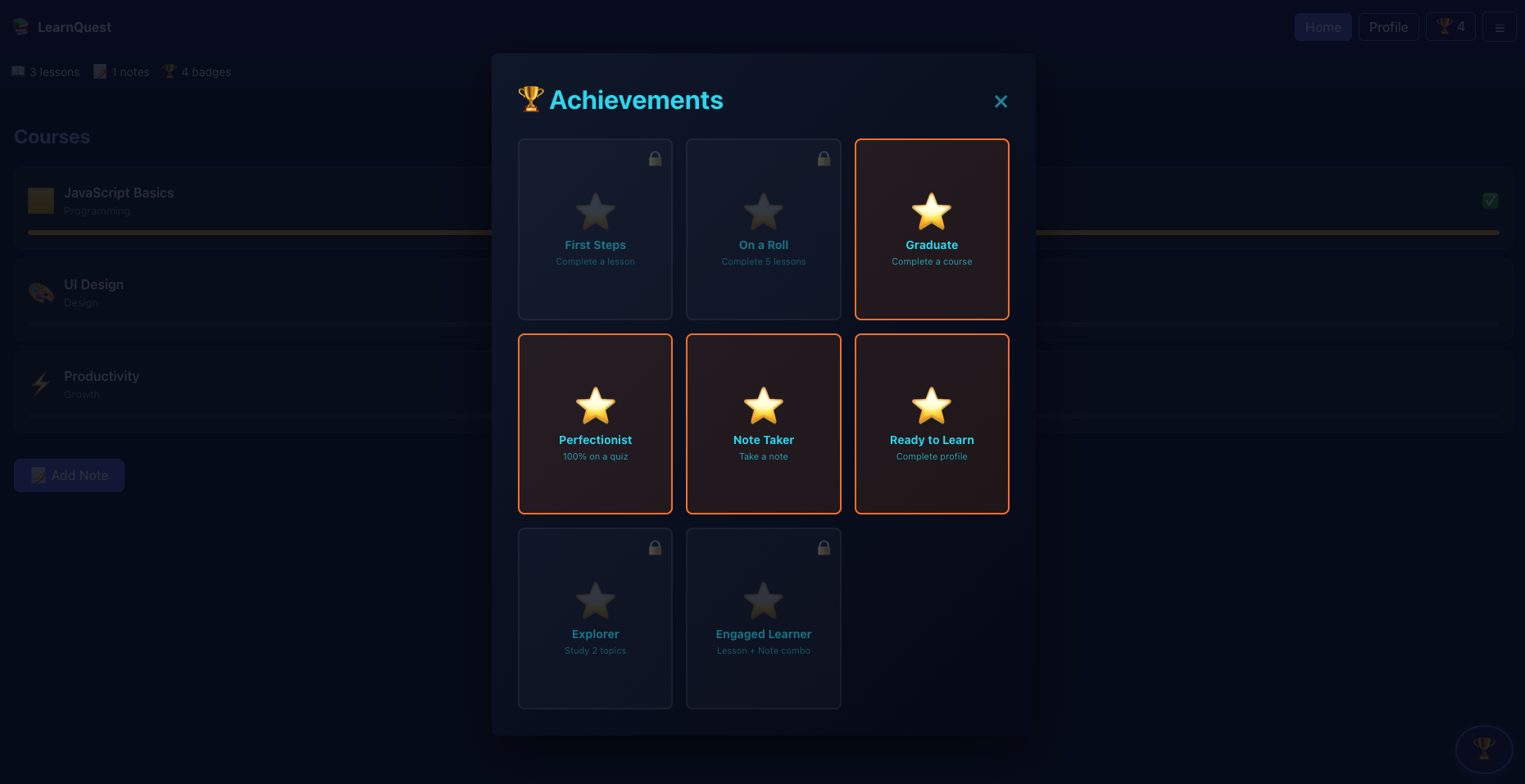](https://github.com/user-attachments/assets/a33fdae5-439b-4fc9-a388-ccb2f432a3a8)
|
|
6
6
|
|
|
7
|
-
|
|
7
|
+
[📚 Documentation](https://dave-b-b.github.io/react-achievements/) | [🎮 Interactive Demo](https://dave-b-b.github.io/react-achievements/?path=/story/introduction--page) | [📦 npm Package](https://www.npmjs.com/package/react-achievements)
|
|
8
8
|
|
|
9
|
-
|
|
9
|
+
[](https://www.npmjs.com/package/react-achievements) [-blue.svg)](./LICENSE) [](https://www.typescriptlang.org/)
|
|
10
10
|
|
|
11
|
-
|
|
12
|
-
```bash
|
|
13
|
-
npm install react-achievements react-confetti react-modal react-toastify react-use
|
|
14
|
-
```
|
|
11
|
+
## Why React Achievements?
|
|
15
12
|
|
|
16
|
-
|
|
17
|
-
|
|
18
|
-
|
|
19
|
-
|
|
13
|
+
- **🎯 Simple API** - 90% less configuration than traditional achievement systems
|
|
14
|
+
- **🎨 Built-in UI** - Beautiful notifications & modals with zero external dependencies
|
|
15
|
+
- **⚡ 5-Minute Setup** - From installation to first achievement unlock
|
|
16
|
+
- **💾 5 Storage Options** - LocalStorage, Memory, IndexedDB, REST API, Offline Queue
|
|
17
|
+
- **🎭 3 Themes** - Modern, Minimal, Gamified - or create your own
|
|
18
|
+
- **📦 Type-Safe** - Full TypeScript support with comprehensive types
|
|
20
19
|
|
|
21
|
-
|
|
22
|
-
```tsx
|
|
23
|
-
<AchievementProvider
|
|
24
|
-
achievements={config}
|
|
25
|
-
useBuiltInUI={true} // Required to use built-in UI
|
|
26
|
-
>
|
|
27
|
-
<YourApp />
|
|
28
|
-
</AchievementProvider>
|
|
29
|
-
```
|
|
20
|
+
---
|
|
30
21
|
|
|
31
|
-
|
|
22
|
+
## Get Started in 5 Minutes
|
|
32
23
|
|
|
33
|
-
|
|
24
|
+
### 1. Install
|
|
34
25
|
|
|
35
|
-
|
|
26
|
+
```bash
|
|
27
|
+
npm install react-achievements
|
|
28
|
+
```
|
|
36
29
|
|
|
37
|
-
|
|
30
|
+
### 2. Configure Achievements (Simple API)
|
|
38
31
|
|
|
39
32
|
```tsx
|
|
40
|
-
import
|
|
41
|
-
|
|
42
|
-
|
|
43
|
-
|
|
44
|
-
BadgesButton,
|
|
45
|
-
BadgesModal
|
|
33
|
+
import {
|
|
34
|
+
AchievementProvider,
|
|
35
|
+
useSimpleAchievements,
|
|
36
|
+
BadgesButtonWithModal
|
|
46
37
|
} from 'react-achievements';
|
|
47
38
|
|
|
48
|
-
// Define achievements
|
|
49
|
-
|
|
50
|
-
|
|
51
|
-
|
|
52
|
-
|
|
53
|
-
AchievementBuilder.createScoreAchievement(100)
|
|
54
|
-
.withAward({ title: 'Century!', description: 'Score 100 points', icon: '🏆' }),
|
|
55
|
-
AchievementBuilder.createScoreAchievement(500)
|
|
56
|
-
.withAward({ title: 'High Scorer!', description: 'Score 500 points', icon: '⭐' }),
|
|
57
|
-
|
|
58
|
-
// Level achievement
|
|
59
|
-
AchievementBuilder.createLevelAchievement(5)
|
|
60
|
-
.withAward({ title: 'Leveling Up', description: 'Reach level 5', icon: '📈' }),
|
|
61
|
-
|
|
62
|
-
// Boolean achievement
|
|
63
|
-
AchievementBuilder.createBooleanAchievement('completedTutorial')
|
|
64
|
-
.withAward({ title: 'Tutorial Master', description: 'Complete the tutorial', icon: '📚' }),
|
|
65
|
-
|
|
66
|
-
// For custom numeric metrics, use Simple API syntax (easiest)
|
|
67
|
-
{
|
|
68
|
-
buttonClicks: {
|
|
69
|
-
10: { title: 'Clicker', description: 'Click 10 times', icon: '👆' },
|
|
70
|
-
100: { title: 'Super Clicker', description: 'Click 100 times', icon: '🖱️' }
|
|
71
|
-
}
|
|
39
|
+
// Define achievements - notice how simple this is!
|
|
40
|
+
const achievements = {
|
|
41
|
+
score: {
|
|
42
|
+
100: { title: 'Century!', description: 'Score 100 points', icon: '🏆' },
|
|
43
|
+
500: { title: 'High Scorer!', description: 'Score 500 points', icon: '⭐' },
|
|
72
44
|
},
|
|
45
|
+
completedTutorial: {
|
|
46
|
+
true: { title: 'Tutorial Master', description: 'Complete the tutorial', icon: '📚' }
|
|
47
|
+
}
|
|
48
|
+
};
|
|
73
49
|
|
|
74
|
-
|
|
75
|
-
|
|
76
|
-
.withId('speed_demon')
|
|
77
|
-
.withMetric('buttonClicks')
|
|
78
|
-
.withCondition((clicks) => typeof clicks === 'number' && clicks >= 50)
|
|
79
|
-
.withAward({ title: 'Speed Demon', description: 'Click 50 times quickly', icon: '⚡' })
|
|
80
|
-
.build()
|
|
81
|
-
]);
|
|
82
|
-
|
|
83
|
-
// Demo component with all essential features
|
|
84
|
-
const DemoComponent = () => {
|
|
85
|
-
const [isModalOpen, setIsModalOpen] = useState(false);
|
|
86
|
-
const { track, increment, unlocked, unlockedCount, reset } = useSimpleAchievements();
|
|
50
|
+
function Game() {
|
|
51
|
+
const { track, unlocked } = useSimpleAchievements();
|
|
87
52
|
|
|
88
53
|
return (
|
|
89
54
|
<div>
|
|
90
|
-
|
|
91
|
-
|
|
92
|
-
{
|
|
93
|
-
|
|
94
|
-
|
|
95
|
-
|
|
96
|
-
<button onClick={() => track('score', 500)}>
|
|
97
|
-
Score 500 points
|
|
98
|
-
</button>
|
|
99
|
-
<button onClick={() => track('level', 5)}>
|
|
100
|
-
Reach level 5
|
|
101
|
-
</button>
|
|
102
|
-
<button onClick={() => track('completedTutorial', true)}>
|
|
103
|
-
Complete tutorial
|
|
104
|
-
</button>
|
|
105
|
-
|
|
106
|
-
{/* Increment tracking - perfect for button clicks */}
|
|
107
|
-
<button onClick={() => increment('buttonClicks')}>
|
|
108
|
-
Click Me! (increments by 1)
|
|
109
|
-
</button>
|
|
110
|
-
<button onClick={() => increment('score', 10)}>
|
|
111
|
-
Bonus Points! (+10)
|
|
112
|
-
</button>
|
|
113
|
-
|
|
114
|
-
{/* Reset button */}
|
|
115
|
-
<button onClick={reset}>
|
|
116
|
-
Reset Achievements
|
|
117
|
-
</button>
|
|
118
|
-
|
|
119
|
-
{/* Shows unlocked achievements count */}
|
|
120
|
-
<p>Unlocked: {unlockedCount}</p>
|
|
121
|
-
|
|
122
|
-
{/* Floating badges button */}
|
|
123
|
-
<BadgesButton
|
|
124
|
-
position="bottom-right"
|
|
125
|
-
onClick={() => setIsModalOpen(true)}
|
|
126
|
-
unlockedAchievements={[]} // Simplified for demo
|
|
127
|
-
/>
|
|
128
|
-
|
|
129
|
-
{/* Achievement history modal */}
|
|
130
|
-
<BadgesModal
|
|
131
|
-
isOpen={isModalOpen}
|
|
132
|
-
onClose={() => setIsModalOpen(false)}
|
|
133
|
-
achievements={[]} // Simplified for demo
|
|
134
|
-
/>
|
|
55
|
+
{/* Track achievements with one line */}
|
|
56
|
+
<button onClick={() => track('score', 100)}>Score Points</button>
|
|
57
|
+
<button onClick={() => track('completedTutorial', true)}>Complete Tutorial</button>
|
|
58
|
+
|
|
59
|
+
{/* Built-in UI - no state management needed! */}
|
|
60
|
+
<BadgesButtonWithModal unlockedAchievements={unlocked} />
|
|
135
61
|
</div>
|
|
136
62
|
);
|
|
137
|
-
}
|
|
63
|
+
}
|
|
138
64
|
|
|
139
|
-
|
|
140
|
-
const App = () => {
|
|
65
|
+
function App() {
|
|
141
66
|
return (
|
|
142
|
-
<AchievementProvider
|
|
143
|
-
|
|
144
|
-
storage="local"
|
|
145
|
-
>
|
|
146
|
-
<DemoComponent />
|
|
67
|
+
<AchievementProvider achievements={achievements} useBuiltInUI={true}>
|
|
68
|
+
<Game />
|
|
147
69
|
</AchievementProvider>
|
|
148
70
|
);
|
|
149
|
-
}
|
|
150
|
-
|
|
151
|
-
export default App;
|
|
71
|
+
}
|
|
152
72
|
```
|
|
153
73
|
|
|
154
|
-
|
|
155
|
-
1. A toast notification appears automatically
|
|
156
|
-
2. Confetti animation plays
|
|
157
|
-
3. The achievement is stored and visible in the badges modal
|
|
158
|
-
4. The badges button updates to show the new count
|
|
159
|
-
|
|
160
|
-
## Built-in UI System (NEW in v3.6.0)
|
|
74
|
+
### 3. See It Work
|
|
161
75
|
|
|
162
|
-
|
|
76
|
+
When users click "Score Points":
|
|
77
|
+
1. ✨ Beautiful notification appears: "🏆 Century! - Score 100 points"
|
|
78
|
+
2. 🎉 Confetti animation plays
|
|
79
|
+
3. 💾 Achievement saved to localStorage
|
|
80
|
+
4. 🏅 Badge button updates with count
|
|
163
81
|
|
|
164
|
-
|
|
82
|
+
**That's it!** You now have a fully functional achievement system.
|
|
165
83
|
|
|
166
|
-
|
|
167
|
-
- **Theme System**: 3 built-in themes (modern, minimal, gamified)
|
|
168
|
-
- **Component Injection**: Replace any UI component with your own implementation
|
|
169
|
-
- **Backwards Compatible**: Existing apps work without changes
|
|
170
|
-
- **SSR Safe**: Proper window checks for server-side rendering
|
|
171
|
-
- **Lightweight**: Built-in UI with zero external dependencies
|
|
84
|
+
➡️ **[Full Quick Start Guide](https://dave-b-b.github.io/react-achievements/docs/getting-started/quick-start)** - Step-by-step with all details
|
|
172
85
|
|
|
173
|
-
|
|
86
|
+
---
|
|
174
87
|
|
|
175
|
-
|
|
176
|
-
```tsx
|
|
177
|
-
<AchievementProvider
|
|
178
|
-
achievements={config}
|
|
179
|
-
useBuiltInUI={true} // Force built-in UI, ignore external dependencies
|
|
180
|
-
>
|
|
181
|
-
<YourApp />
|
|
182
|
-
</AchievementProvider>
|
|
183
|
-
```
|
|
88
|
+
## Key Features
|
|
184
89
|
|
|
185
|
-
###
|
|
90
|
+
### 🎯 Simple API - 90% Less Configuration
|
|
186
91
|
|
|
187
|
-
|
|
92
|
+
Traditional achievement systems require verbose configuration. Not anymore:
|
|
188
93
|
|
|
189
|
-
#### Modern Theme (Default)
|
|
190
94
|
```tsx
|
|
191
|
-
|
|
192
|
-
|
|
193
|
-
|
|
194
|
-
|
|
195
|
-
|
|
196
|
-
|
|
197
|
-
|
|
198
|
-
|
|
199
|
-
|
|
200
|
-
|
|
95
|
+
// ❌ Before (Complex API) - 15+ lines per achievement
|
|
96
|
+
const achievements = {
|
|
97
|
+
score: [{
|
|
98
|
+
isConditionMet: (value) => value >= 100,
|
|
99
|
+
achievementDetails: {
|
|
100
|
+
achievementId: 'score_100',
|
|
101
|
+
achievementTitle: 'Century!',
|
|
102
|
+
achievementDescription: 'Score 100 points',
|
|
103
|
+
achievementIconKey: 'trophy'
|
|
104
|
+
}
|
|
105
|
+
}]
|
|
106
|
+
};
|
|
201
107
|
|
|
202
|
-
|
|
203
|
-
|
|
204
|
-
|
|
205
|
-
|
|
206
|
-
|
|
207
|
-
|
|
208
|
-
>
|
|
108
|
+
// ✅ After (Simple API) - 1 line per achievement!
|
|
109
|
+
const achievements = {
|
|
110
|
+
score: {
|
|
111
|
+
100: { title: 'Century!', description: 'Score 100 points', icon: '🏆' }
|
|
112
|
+
}
|
|
113
|
+
};
|
|
209
114
|
```
|
|
210
|
-
- Light, clean design
|
|
211
|
-
- Subtle shadows and simple borders
|
|
212
|
-
- Reduced motion for accessibility
|
|
213
|
-
- Perfect for professional and corporate apps
|
|
214
115
|
|
|
215
|
-
|
|
216
|
-
```tsx
|
|
217
|
-
<AchievementProvider
|
|
218
|
-
achievements={config}
|
|
219
|
-
useBuiltInUI={true}
|
|
220
|
-
ui={{ theme: 'gamified' }}
|
|
221
|
-
>
|
|
222
|
-
```
|
|
223
|
-
- Perfect for games and engaging experiences
|
|
224
|
-
- Badges instead of rectangular displays
|
|
116
|
+
➡️ **[Simple API Guide](https://dave-b-b.github.io/react-achievements/docs/guides/simple-api)**
|
|
225
117
|
|
|
226
|
-
###
|
|
118
|
+
### 🎨 Built-in UI Components
|
|
227
119
|
|
|
228
|
-
|
|
120
|
+
Zero external dependencies, three beautiful themes:
|
|
229
121
|
|
|
230
122
|
```tsx
|
|
231
123
|
<AchievementProvider
|
|
232
|
-
achievements={
|
|
124
|
+
achievements={achievements}
|
|
233
125
|
useBuiltInUI={true}
|
|
234
126
|
ui={{
|
|
235
|
-
theme: 'modern',
|
|
236
|
-
notificationPosition: 'top-
|
|
237
|
-
// Options: 'top-left', 'top-center', 'top-right',
|
|
238
|
-
// 'bottom-left', 'bottom-center', 'bottom-right'
|
|
239
|
-
}}
|
|
240
|
-
>
|
|
241
|
-
```
|
|
242
|
-
|
|
243
|
-
### Custom Component Injection
|
|
244
|
-
|
|
245
|
-
For advanced users who need full customization beyond the 3 built-in themes, you can replace any UI component with your own implementation:
|
|
246
|
-
|
|
247
|
-
```tsx
|
|
248
|
-
import { AchievementProvider, NotificationProps } from 'react-achievements';
|
|
249
|
-
|
|
250
|
-
// Create your custom notification component
|
|
251
|
-
const MyCustomNotification: React.FC<NotificationProps> = ({
|
|
252
|
-
achievement,
|
|
253
|
-
onClose,
|
|
254
|
-
duration,
|
|
255
|
-
}) => {
|
|
256
|
-
useEffect(() => {
|
|
257
|
-
const timer = setTimeout(onClose, duration);
|
|
258
|
-
return () => clearTimeout(timer);
|
|
259
|
-
}, [duration, onClose]);
|
|
260
|
-
|
|
261
|
-
return (
|
|
262
|
-
<div className="my-custom-notification">
|
|
263
|
-
<h3>{achievement.title}</h3>
|
|
264
|
-
<p>{achievement.description}</p>
|
|
265
|
-
<span>{achievement.icon}</span>
|
|
266
|
-
</div>
|
|
267
|
-
);
|
|
268
|
-
};
|
|
269
|
-
|
|
270
|
-
// Inject your component
|
|
271
|
-
<AchievementProvider
|
|
272
|
-
achievements={config}
|
|
273
|
-
ui={{
|
|
274
|
-
NotificationComponent: MyCustomNotification,
|
|
275
|
-
// ModalComponent: MyCustomModal, // Optional
|
|
276
|
-
// ConfettiComponent: MyCustomConfetti, // Optional
|
|
127
|
+
theme: 'modern', // 'modern' | 'minimal' | 'gamified'
|
|
128
|
+
notificationPosition: 'top-right'
|
|
277
129
|
}}
|
|
278
130
|
>
|
|
279
131
|
<YourApp />
|
|
280
132
|
</AchievementProvider>
|
|
281
133
|
```
|
|
282
134
|
|
|
283
|
-
|
|
135
|
+
**Includes:**
|
|
136
|
+
- 🔔 Notifications with smooth animations
|
|
137
|
+
- 🎊 Confetti celebrations
|
|
138
|
+
- 🏆 Achievement modal with locked/unlocked states
|
|
139
|
+
- 🎨 Customizable themes or inject your own components
|
|
284
140
|
|
|
285
|
-
**
|
|
141
|
+
➡️ **[UI & Theming Guide](https://dave-b-b.github.io/react-achievements/docs/guides/theming)**
|
|
286
142
|
|
|
287
|
-
|
|
288
|
-
Traditional floating button:
|
|
289
|
-
```tsx
|
|
290
|
-
import { BadgesButton } from 'react-achievements';
|
|
143
|
+
### 💾 Flexible Storage - Choose What Fits
|
|
291
144
|
|
|
292
|
-
|
|
293
|
-
|
|
294
|
-
|
|
295
|
-
|
|
296
|
-
|
|
297
|
-
|
|
298
|
-
|
|
145
|
+
| Storage | Capacity | Use Case |
|
|
146
|
+
|---------|----------|----------|
|
|
147
|
+
| **LocalStorage** | 5-10MB | Simple browser apps (default) |
|
|
148
|
+
| **IndexedDB** | 50MB+ | Large datasets, PWAs |
|
|
149
|
+
| **REST API** | Unlimited | Multi-device sync, cloud backup |
|
|
150
|
+
| **Offline Queue** | Unlimited | Offline-first apps |
|
|
151
|
+
| **Memory** | Unlimited | Testing, prototypes |
|
|
299
152
|
|
|
300
|
-
#### Inline Mode (NEW)
|
|
301
|
-
Embed the badge button in drawers, navbars, sidebars:
|
|
302
153
|
```tsx
|
|
303
|
-
|
|
304
|
-
|
|
305
|
-
|
|
306
|
-
return (
|
|
307
|
-
<Drawer>
|
|
308
|
-
<nav>
|
|
309
|
-
<NavItem>Home</NavItem>
|
|
310
|
-
<NavItem>Settings</NavItem>
|
|
311
|
-
|
|
312
|
-
{/* Badge button inside drawer - no fixed positioning */}
|
|
313
|
-
<BadgesButton
|
|
314
|
-
placement="inline"
|
|
315
|
-
onClick={() => setModalOpen(true)}
|
|
316
|
-
unlockedAchievements={achievements}
|
|
317
|
-
theme="modern" // Matches your app theme
|
|
318
|
-
/>
|
|
319
|
-
</nav>
|
|
320
|
-
</Drawer>
|
|
321
|
-
);
|
|
322
|
-
}
|
|
323
|
-
```
|
|
324
|
-
|
|
325
|
-
**Inline mode benefits:**
|
|
326
|
-
- Works in drawers, sidebars, navigation bars
|
|
327
|
-
- Flows with your layout (no fixed positioning)
|
|
328
|
-
- Themeable to match surrounding UI
|
|
329
|
-
- Fully customizable with `styles` prop
|
|
154
|
+
// Change storage with one prop
|
|
155
|
+
import { StorageType } from 'react-achievements';
|
|
330
156
|
|
|
331
|
-
### UI Configuration Options
|
|
332
|
-
|
|
333
|
-
Complete UI configuration reference:
|
|
334
|
-
|
|
335
|
-
```tsx
|
|
336
157
|
<AchievementProvider
|
|
337
|
-
achievements={
|
|
338
|
-
|
|
339
|
-
ui={{
|
|
340
|
-
// Theme configuration
|
|
341
|
-
theme: 'modern', // 'modern' | 'minimal' | 'gamified' | custom theme name
|
|
342
|
-
|
|
343
|
-
// Component overrides
|
|
344
|
-
NotificationComponent: MyCustomNotification, // Optional
|
|
345
|
-
ModalComponent: MyCustomModal, // Optional
|
|
346
|
-
ConfettiComponent: MyCustomConfetti, // Optional
|
|
347
|
-
|
|
348
|
-
// Notification settings
|
|
349
|
-
notificationPosition: 'top-center', // Position on screen
|
|
350
|
-
enableNotifications: true, // Default: true
|
|
351
|
-
|
|
352
|
-
// Confetti settings
|
|
353
|
-
enableConfetti: true, // Default: true
|
|
354
|
-
|
|
355
|
-
// Direct theme object (bypasses registry)
|
|
356
|
-
customTheme: {
|
|
357
|
-
name: 'inline-theme',
|
|
358
|
-
notification: { /* ... */ },
|
|
359
|
-
modal: { /* ... */ },
|
|
360
|
-
confetti: { /* ... */ },
|
|
361
|
-
},
|
|
362
|
-
}}
|
|
158
|
+
achievements={achievements}
|
|
159
|
+
storage={StorageType.IndexedDB}
|
|
363
160
|
>
|
|
364
161
|
<YourApp />
|
|
365
162
|
</AchievementProvider>
|
|
366
163
|
```
|
|
367
164
|
|
|
368
|
-
|
|
369
|
-
|
|
370
|
-
#### Existing Users (v3.5.0 and earlier)
|
|
371
|
-
|
|
372
|
-
**Option 1: No changes (keep using external dependencies)**
|
|
373
|
-
- Your code works exactly as before
|
|
374
|
-
- You'll see a deprecation warning in console (once per session)
|
|
375
|
-
- Plan to migrate before v4.0.0
|
|
376
|
-
|
|
377
|
-
**Option 2: Migrate to built-in UI**
|
|
378
|
-
1. Add `useBuiltInUI={true}` to your AchievementProvider
|
|
379
|
-
2. Test your app (UI will change to modern theme)
|
|
380
|
-
3. Optionally customize with `ui={{ theme: 'minimal' }}` if you prefer lighter styling
|
|
381
|
-
4. Remove external dependencies:
|
|
382
|
-
```bash
|
|
383
|
-
npm uninstall react-toastify react-modal react-confetti react-use
|
|
384
|
-
```
|
|
385
|
-
|
|
386
|
-
#### New Projects
|
|
387
|
-
|
|
388
|
-
For new projects using built-in UI, install react-achievements and explicitly opt-in:
|
|
389
|
-
|
|
390
|
-
```bash
|
|
391
|
-
npm install react-achievements
|
|
392
|
-
```
|
|
393
|
-
|
|
394
|
-
```tsx
|
|
395
|
-
<AchievementProvider
|
|
396
|
-
achievements={config}
|
|
397
|
-
useBuiltInUI={true} // Explicitly enable built-in UI
|
|
398
|
-
ui={{ theme: 'modern' }} // Optional theme customization
|
|
399
|
-
>
|
|
400
|
-
{/* Beautiful built-in UI */}
|
|
401
|
-
</AchievementProvider>
|
|
402
|
-
```
|
|
403
|
-
|
|
404
|
-
Without `useBuiltInUI={true}`, you'll need to install the external UI dependencies (default behavior for v3.6.0).
|
|
405
|
-
|
|
406
|
-
### Built-in UI Component API Reference
|
|
165
|
+
➡️ **[Storage Options Guide](https://dave-b-b.github.io/react-achievements/docs/guides/storage-options)**
|
|
407
166
|
|
|
408
|
-
|
|
167
|
+
### 📦 TypeScript Support
|
|
409
168
|
|
|
410
|
-
|
|
169
|
+
Full type safety out of the box:
|
|
411
170
|
|
|
412
|
-
Displays achievement unlock notifications.
|
|
413
|
-
|
|
414
|
-
**Props:**
|
|
415
|
-
- `achievement` (object, required): Achievement object with `id`, `title`, `description`, and `icon`
|
|
416
|
-
- `onClose` (function, optional): Callback to dismiss the notification
|
|
417
|
-
- `duration` (number, optional): Auto-dismiss duration in ms (default: 5000)
|
|
418
|
-
- `position` (string, optional): Notification position - 'top-left', 'top-center', 'top-right', 'bottom-left', 'bottom-center', or 'bottom-right' (default: 'top-center')
|
|
419
|
-
- `theme` (string | ThemeConfig, optional): Theme name or custom theme config
|
|
420
|
-
|
|
421
|
-
**Usage:**
|
|
422
171
|
```tsx
|
|
423
|
-
import {
|
|
424
|
-
|
|
425
|
-
<BuiltInNotification
|
|
426
|
-
achievement={{
|
|
427
|
-
id: 'score_100',
|
|
428
|
-
title: 'Century!',
|
|
429
|
-
description: 'Score 100 points',
|
|
430
|
-
icon: '🏆'
|
|
431
|
-
}}
|
|
432
|
-
onClose={() => console.log('Dismissed')}
|
|
433
|
-
duration={5000}
|
|
434
|
-
position="top-center"
|
|
435
|
-
theme="modern"
|
|
436
|
-
/>
|
|
437
|
-
```
|
|
438
|
-
|
|
439
|
-
#### BuiltInModal
|
|
440
|
-
|
|
441
|
-
Modal dialog for displaying achievement history.
|
|
442
|
-
|
|
443
|
-
**Props:**
|
|
444
|
-
- `isOpen` (boolean, required): Modal open state
|
|
445
|
-
- `onClose` (function, required): Callback to close modal
|
|
446
|
-
- `achievements` (array, required): Array of achievement objects with `isUnlocked` status
|
|
447
|
-
- `icons` (object, optional): Custom icon mapping
|
|
448
|
-
- `theme` (string | ThemeConfig, optional): Theme name or custom theme config
|
|
172
|
+
import type { AchievementMetrics, AchievementWithStatus } from 'react-achievements';
|
|
449
173
|
|
|
450
|
-
|
|
451
|
-
```tsx
|
|
452
|
-
import { BuiltInModal } from 'react-achievements';
|
|
453
|
-
|
|
454
|
-
<BuiltInModal
|
|
455
|
-
isOpen={isOpen}
|
|
456
|
-
onClose={() => setIsOpen(false)}
|
|
457
|
-
achievements={achievementsWithStatus}
|
|
458
|
-
icons={customIcons}
|
|
459
|
-
theme="minimal"
|
|
460
|
-
/>
|
|
174
|
+
const metrics: AchievementMetrics = { score: 100, level: 5 };
|
|
461
175
|
```
|
|
462
176
|
|
|
463
|
-
**
|
|
464
|
-
|
|
465
|
-
#### BuiltInConfetti
|
|
466
|
-
|
|
467
|
-
Confetti animation component.
|
|
177
|
+
➡️ **[Complete API Reference](https://dave-b-b.github.io/react-achievements/docs/api)**
|
|
468
178
|
|
|
469
|
-
|
|
470
|
-
- `show` (boolean, required): Whether confetti is active
|
|
471
|
-
- `duration` (number, optional): Animation duration in ms (default: 5000)
|
|
472
|
-
- `particleCount` (number, optional): Number of confetti particles (default: 50)
|
|
473
|
-
- `colors` (string[], optional): Array of color hex codes (default: ['#FFD700', '#FF6B6B', '#4ECDC4', '#45B7D1', '#96CEB4', '#FFEAA7'])
|
|
179
|
+
---
|
|
474
180
|
|
|
475
|
-
|
|
476
|
-
```tsx
|
|
477
|
-
import { BuiltInConfetti } from 'react-achievements';
|
|
478
|
-
|
|
479
|
-
<BuiltInConfetti
|
|
480
|
-
show={showConfetti}
|
|
481
|
-
duration={5000}
|
|
482
|
-
particleCount={150}
|
|
483
|
-
colors={['#ff0000', '#00ff00', '#0000ff']}
|
|
484
|
-
/>
|
|
485
|
-
```
|
|
181
|
+
## Common Use Cases
|
|
486
182
|
|
|
487
|
-
|
|
488
|
-
|
|
489
|
-
You can replace any built-in component with your own implementation:
|
|
183
|
+
### Tracking User Progress
|
|
490
184
|
|
|
491
185
|
```tsx
|
|
492
|
-
|
|
493
|
-
|
|
494
|
-
const MyCustomNotification: React.FC<NotificationProps> = ({
|
|
495
|
-
achievement,
|
|
496
|
-
onClose,
|
|
497
|
-
duration
|
|
498
|
-
}) => {
|
|
499
|
-
useEffect(() => {
|
|
500
|
-
const timer = setTimeout(onClose, duration);
|
|
501
|
-
return () => clearTimeout(timer);
|
|
502
|
-
}, [duration, onClose]);
|
|
186
|
+
const { track, increment } = useSimpleAchievements();
|
|
503
187
|
|
|
504
|
-
|
|
505
|
-
|
|
506
|
-
|
|
507
|
-
|
|
508
|
-
<span>{achievement.icon}</span>
|
|
509
|
-
</div>
|
|
510
|
-
);
|
|
511
|
-
};
|
|
188
|
+
// Track specific values
|
|
189
|
+
track('score', 500);
|
|
190
|
+
track('level', 10);
|
|
191
|
+
track('completedTutorial', true);
|
|
512
192
|
|
|
513
|
-
|
|
514
|
-
|
|
515
|
-
|
|
516
|
-
NotificationComponent: MyCustomNotification,
|
|
517
|
-
// ModalComponent: MyCustomModal,
|
|
518
|
-
// ConfettiComponent: MyCustomConfetti
|
|
519
|
-
}}
|
|
520
|
-
>
|
|
521
|
-
<App />
|
|
522
|
-
</AchievementProvider>
|
|
193
|
+
// Increment counters
|
|
194
|
+
increment('buttonClicks'); // +1
|
|
195
|
+
increment('points', 50); // +50
|
|
523
196
|
```
|
|
524
197
|
|
|
525
|
-
###
|
|
526
|
-
|
|
527
|
-
- **v3.6.0 (current)**: Built-in UI available, external deps optional with deprecation warning
|
|
528
|
-
- **v3.7.0-v3.9.0**: Continued support for both systems, refinements based on feedback
|
|
529
|
-
- **v4.0.0**: External dependencies fully optional, built-in UI becomes default
|
|
530
|
-
|
|
531
|
-
## Simple API (Recommended)
|
|
532
|
-
|
|
533
|
-
Perfect for 90% of use cases - threshold-based achievements with minimal configuration:
|
|
198
|
+
### Complex Achievements (Multiple Conditions)
|
|
534
199
|
|
|
535
200
|
```tsx
|
|
536
|
-
import { AchievementProvider, useSimpleAchievements } from 'react-achievements';
|
|
537
|
-
|
|
538
201
|
const achievements = {
|
|
539
|
-
|
|
540
|
-
score: {
|
|
541
|
-
100: { title: 'Century!', description: 'Score 100 points', icon: '🏆' },
|
|
542
|
-
500: { title: 'High Scorer!', icon: '⭐' }
|
|
543
|
-
},
|
|
544
|
-
|
|
545
|
-
// Boolean achievements
|
|
546
|
-
completedTutorial: {
|
|
547
|
-
true: { title: 'Tutorial Master', description: 'Complete the tutorial', icon: '📚' }
|
|
548
|
-
},
|
|
549
|
-
|
|
550
|
-
// String-based achievements
|
|
551
|
-
characterClass: {
|
|
552
|
-
wizard: { title: 'Arcane Scholar', description: 'Choose the wizard class', icon: '🧙♂️' },
|
|
553
|
-
warrior: { title: 'Battle Hardened', description: 'Choose the warrior class', icon: '⚔️' }
|
|
554
|
-
},
|
|
555
|
-
|
|
556
|
-
// Custom condition functions for complex logic
|
|
557
|
-
combo: {
|
|
202
|
+
perfectGame: {
|
|
558
203
|
custom: {
|
|
559
|
-
title: 'Perfect
|
|
560
|
-
description: 'Score 1000+ with 100% accuracy',
|
|
204
|
+
title: 'Perfect Game',
|
|
205
|
+
description: 'Score 1000+ with 100% accuracy',
|
|
561
206
|
icon: '💎',
|
|
562
207
|
condition: (metrics) => metrics.score >= 1000 && metrics.accuracy === 100
|
|
563
208
|
}
|
|
564
209
|
}
|
|
565
210
|
};
|
|
566
|
-
|
|
567
|
-
const { track, increment, unlocked, unlockedCount, reset } = useSimpleAchievements();
|
|
568
|
-
|
|
569
|
-
// Track achievements easily
|
|
570
|
-
track('score', 100); // Unlocks "Century!" achievement
|
|
571
|
-
track('completedTutorial', true); // Unlocks "Tutorial Master"
|
|
572
|
-
track('characterClass', 'wizard'); // Unlocks "Arcane Scholar"
|
|
573
|
-
|
|
574
|
-
// Increment values - perfect for button clicks, actions, etc.
|
|
575
|
-
increment('buttonClicks'); // Adds 1 each time (great for button clicks)
|
|
576
|
-
increment('score', 50); // Adds 50 each time (custom amount)
|
|
577
|
-
increment('lives', -1); // Subtract 1 (negative increment)
|
|
578
|
-
|
|
579
|
-
// Track multiple metrics for custom conditions
|
|
580
|
-
track('score', 1000);
|
|
581
|
-
track('accuracy', 100); // Unlocks "Perfect Combo" if both conditions met
|
|
582
|
-
```
|
|
583
|
-
|
|
584
|
-
### Simple API Comparison Logic
|
|
585
|
-
|
|
586
|
-
When using the Simple API, achievement conditions use different comparison operators depending on the value type:
|
|
587
|
-
|
|
588
|
-
| Value Type | Comparison | Example | When Achievement Unlocks |
|
|
589
|
-
|------------|------------|---------|-------------------------|
|
|
590
|
-
| **Numeric** | `>=` (greater than or equal) | `score: { 100: {...} }` | When `track('score', 100)` or higher |
|
|
591
|
-
| **Boolean** | `===` (strict equality) | `completedTutorial: { true: {...} }` | When `track('completedTutorial', true)` |
|
|
592
|
-
| **String** | `===` (strict equality) | `characterClass: { wizard: {...} }` | When `track('characterClass', 'wizard')` |
|
|
593
|
-
|
|
594
|
-
**Important Notes:**
|
|
595
|
-
- **Numeric achievements** use `>=` comparison, so they unlock when you reach **or exceed** the threshold
|
|
596
|
-
- **Boolean and string achievements** use exact equality matching
|
|
597
|
-
- Custom condition functions have full control over comparison logic
|
|
598
|
-
|
|
599
|
-
**Examples:**
|
|
600
|
-
```tsx
|
|
601
|
-
// Numeric: Achievement unlocks at 100 or higher
|
|
602
|
-
track('score', 150); // ✅ Unlocks "Century!" (threshold: 100)
|
|
603
|
-
track('score', 99); // ❌ Does not unlock
|
|
604
|
-
|
|
605
|
-
// Boolean: Must match exactly
|
|
606
|
-
track('completedTutorial', true); // ✅ Unlocks achievement
|
|
607
|
-
track('completedTutorial', false); // ❌ Does not unlock
|
|
608
|
-
|
|
609
|
-
// String: Must match exactly
|
|
610
|
-
track('characterClass', 'wizard'); // ✅ Unlocks "Arcane Scholar"
|
|
611
|
-
track('characterClass', 'Wizard'); // ❌ Does not unlock (case sensitive)
|
|
612
211
|
```
|
|
613
212
|
|
|
614
|
-
|
|
615
|
-
|
|
616
|
-
The AchievementBuilder provides three levels of complexity to match your needs - from zero-config defaults to full custom logic:
|
|
617
|
-
|
|
618
|
-
### Tier 1: Smart Defaults (90% of use cases)
|
|
619
|
-
|
|
620
|
-
Zero configuration needed - just specify what you want to track:
|
|
621
|
-
|
|
622
|
-
```tsx
|
|
623
|
-
import { AchievementBuilder } from 'react-achievements';
|
|
624
|
-
|
|
625
|
-
// Individual achievements with smart defaults
|
|
626
|
-
AchievementBuilder.createScoreAchievement(100); // "Score 100!" + 🏆
|
|
627
|
-
AchievementBuilder.createLevelAchievement(5); // "Level 5!" + 📈
|
|
628
|
-
AchievementBuilder.createBooleanAchievement('completedTutorial'); // "Completed Tutorial!" + ✅
|
|
629
|
-
|
|
630
|
-
// Bulk creation with smart defaults
|
|
631
|
-
AchievementBuilder.createScoreAchievements([100, 500, 1000]);
|
|
632
|
-
AchievementBuilder.createLevelAchievements([5, 10, 25]);
|
|
633
|
-
|
|
634
|
-
// Mixed: some defaults, some custom awards
|
|
635
|
-
const achievements = AchievementBuilder.createScoreAchievements([
|
|
636
|
-
100, // Uses default "Score 100!" + 🏆
|
|
637
|
-
[500, { title: 'High Scorer!', icon: '⭐' }], // Custom award
|
|
638
|
-
1000 // Uses default "Score 1000!" + 🏆
|
|
639
|
-
]);
|
|
640
|
-
```
|
|
641
|
-
|
|
642
|
-
### Tier 2: Chainable Customization
|
|
643
|
-
|
|
644
|
-
Start with defaults, then customize awards as needed:
|
|
213
|
+
### Export/Import for Backups
|
|
645
214
|
|
|
646
215
|
```tsx
|
|
647
|
-
|
|
648
|
-
const achievements = AchievementBuilder.combine([
|
|
649
|
-
AchievementBuilder.createScoreAchievement(100)
|
|
650
|
-
.withAward({ title: 'Century!', description: 'Amazing score!', icon: '🏆' }),
|
|
651
|
-
|
|
652
|
-
AchievementBuilder.createLevelAchievement(5)
|
|
653
|
-
.withAward({ title: 'Getting Started', icon: '🌱' }),
|
|
654
|
-
|
|
655
|
-
AchievementBuilder.createBooleanAchievement('completedTutorial')
|
|
656
|
-
.withAward({ title: 'Tutorial Master', description: 'You did it!', icon: '📚' }),
|
|
657
|
-
|
|
658
|
-
AchievementBuilder.createValueAchievement('characterClass', 'wizard')
|
|
659
|
-
.withAward({ title: 'Arcane Scholar', icon: '🧙♂️' })
|
|
660
|
-
]);
|
|
661
|
-
```
|
|
662
|
-
|
|
663
|
-
### Tier 3: Full Control for Complex Logic
|
|
216
|
+
const { exportData, importData } = useAchievements();
|
|
664
217
|
|
|
665
|
-
|
|
218
|
+
// Backup to file
|
|
219
|
+
const backup = exportData();
|
|
220
|
+
localStorage.setItem('backup', backup);
|
|
666
221
|
|
|
667
|
-
|
|
668
|
-
|
|
669
|
-
const complexAchievement = AchievementBuilder.create()
|
|
670
|
-
.withId('weekly_login')
|
|
671
|
-
.withMetric('lastLoginDate')
|
|
672
|
-
.withCondition((value, state) => {
|
|
673
|
-
// Handle all possible value types
|
|
674
|
-
if (value === null || value === undefined) return false;
|
|
675
|
-
if (value instanceof Date) {
|
|
676
|
-
return value.getTime() > Date.now() - (7 * 24 * 60 * 60 * 1000);
|
|
677
|
-
}
|
|
678
|
-
return false;
|
|
679
|
-
})
|
|
680
|
-
.withAward({
|
|
681
|
-
title: 'Weekly Warrior',
|
|
682
|
-
description: 'Logged in within the last week',
|
|
683
|
-
icon: '📅'
|
|
684
|
-
})
|
|
685
|
-
.build();
|
|
686
|
-
|
|
687
|
-
// Multiple complex achievements
|
|
688
|
-
const advancedAchievements = AchievementBuilder.combine([
|
|
689
|
-
complexAchievement,
|
|
690
|
-
AchievementBuilder.create()
|
|
691
|
-
.withId('perfect_combo')
|
|
692
|
-
.withMetric('gameState')
|
|
693
|
-
.withCondition((value, state) => {
|
|
694
|
-
return state.score >= 1000 && state.accuracy === 100;
|
|
695
|
-
})
|
|
696
|
-
.withAward({ title: 'Perfect!', icon: '💎' })
|
|
697
|
-
.build()
|
|
698
|
-
]);
|
|
222
|
+
// Restore from backup
|
|
223
|
+
const result = importData(backup, { strategy: 'merge' });
|
|
699
224
|
```
|
|
700
225
|
|
|
701
|
-
###
|
|
702
|
-
- **Progressive complexity**: Start simple, add complexity only when needed
|
|
703
|
-
- **Zero configuration**: Works out of the box with smart defaults
|
|
704
|
-
- **Chainable customization**: Fine-tune awards without changing logic
|
|
705
|
-
- **Type-safe**: Full TypeScript support for complex conditions
|
|
706
|
-
- **Handles edge cases**: Date, null, undefined values in Tier 3
|
|
707
|
-
- **Combinable**: Mix and match different tiers in one configuration
|
|
708
|
-
|
|
709
|
-
## State Management Options
|
|
710
|
-
|
|
711
|
-
This package includes example implementations for different state management solutions in the `stories/examples` directory:
|
|
712
|
-
|
|
713
|
-
- **Redux**: For large applications with complex state management needs
|
|
714
|
-
- **Zustand**: For applications needing a lightweight, modern state solution
|
|
715
|
-
- **Context API**: For applications preferring React's built-in solutions
|
|
716
|
-
|
|
717
|
-
See the [examples directory](./stories/examples) for detailed implementations and instructions for each state management solution.
|
|
226
|
+
### Show Locked & Unlocked Achievements
|
|
718
227
|
|
|
719
|
-
## Features
|
|
720
|
-
|
|
721
|
-
- Framework-agnostic achievement system
|
|
722
|
-
- Customizable storage implementations
|
|
723
|
-
- Built-in local storage support
|
|
724
|
-
- Customizable UI components
|
|
725
|
-
- Toast notifications
|
|
726
|
-
- Confetti animations
|
|
727
|
-
- TypeScript support
|
|
728
|
-
- **NEW in v3.6.0**: Built-in UI components with zero external dependencies
|
|
729
|
-
- **NEW in v3.6.0**: Extensible theme system with 3 built-in themes (modern, minimal, gamified)
|
|
730
|
-
- **NEW in v3.6.0**: Component injection for full UI customization
|
|
731
|
-
- **NEW in v3.6.0**: BadgesButton inline mode for drawers and sidebars
|
|
732
|
-
- **NEW in v3.4.0**: Async storage support (IndexedDB, REST API, Offline Queue)
|
|
733
|
-
- **NEW in v3.4.0**: 50MB+ storage capacity with IndexedDB
|
|
734
|
-
- **NEW in v3.4.0**: Server-side sync with REST API storage
|
|
735
|
-
- **NEW in v3.4.0**: Offline-first capabilities with automatic queue sync
|
|
736
|
-
- **NEW in v3.3.0**: Comprehensive error handling system
|
|
737
|
-
- **NEW in v3.3.0**: Data export/import for achievement portability
|
|
738
|
-
- **NEW in v3.3.0**: Type-safe error classes with recovery guidance
|
|
739
|
-
|
|
740
|
-
## Achievement Notifications & History
|
|
741
|
-
|
|
742
|
-
The package provides two ways to display achievements to users:
|
|
743
|
-
|
|
744
|
-
### Automatic Notifications
|
|
745
|
-
When an achievement is unlocked, the system automatically:
|
|
746
|
-
- Shows a toast notification in the top-right corner with the achievement details
|
|
747
|
-
- Plays a confetti animation to celebrate the achievement
|
|
748
|
-
|
|
749
|
-
These notifications appear immediately when achievements are unlocked and require no additional setup.
|
|
750
|
-
|
|
751
|
-
### Achievement History
|
|
752
|
-
To allow users to view their achievement history, the package provides two essential components:
|
|
753
|
-
|
|
754
|
-
1. `BadgesButton`: A floating button that shows the number of unlocked achievements
|
|
755
228
|
```tsx
|
|
756
|
-
|
|
757
|
-
position="bottom-right" // or "top-right", "top-left", "bottom-left"
|
|
758
|
-
onClick={() => setIsModalOpen(true)}
|
|
759
|
-
unlockedAchievements={achievements.unlocked}
|
|
760
|
-
/>
|
|
761
|
-
```
|
|
762
|
-
|
|
763
|
-
2. `BadgesModal`: A modal dialog that displays all unlocked achievements with their details
|
|
229
|
+
const { getAllAchievements } = useSimpleAchievements();
|
|
764
230
|
|
|
765
|
-
**Basic Usage** (shows only unlocked achievements):
|
|
766
|
-
```tsx
|
|
767
231
|
<BadgesModal
|
|
768
|
-
isOpen={
|
|
769
|
-
onClose={() =>
|
|
770
|
-
|
|
771
|
-
|
|
232
|
+
isOpen={modalOpen}
|
|
233
|
+
onClose={() => setModalOpen(false)}
|
|
234
|
+
showAllAchievements={true}
|
|
235
|
+
allAchievements={getAllAchievements()}
|
|
236
|
+
showUnlockConditions={true} // Show hints for locked achievements
|
|
772
237
|
/>
|
|
773
238
|
```
|
|
774
239
|
|
|
775
|
-
**
|
|
240
|
+
➡️ **[More Patterns & Recipes](https://dave-b-b.github.io/react-achievements/docs/recipes/common-patterns)**
|
|
776
241
|
|
|
777
|
-
|
|
242
|
+
---
|
|
778
243
|
|
|
779
|
-
|
|
780
|
-
|
|
781
|
-
- ✅ **Correct**: `allAchievements={getAllAchievements()}`
|
|
782
|
-
- ❌ **Incorrect**: `allAchievements={achievements.all}`
|
|
244
|
+
## Installation
|
|
783
245
|
|
|
784
|
-
|
|
246
|
+
```bash
|
|
247
|
+
npm install react-achievements
|
|
248
|
+
```
|
|
785
249
|
|
|
786
|
-
|
|
787
|
-
|
|
250
|
+
**Requirements:**
|
|
251
|
+
- React 16.8+ (hooks support)
|
|
252
|
+
- Node.js 16+
|
|
253
|
+
- TypeScript 4.5+ (optional but recommended)
|
|
788
254
|
|
|
789
|
-
|
|
790
|
-
const { getAllAchievements } = useAchievements();
|
|
791
|
-
const [isModalOpen, setIsModalOpen] = useState(false);
|
|
255
|
+
**Note about Legacy Dependencies:**
|
|
792
256
|
|
|
793
|
-
|
|
794
|
-
const allAchievements = getAllAchievements();
|
|
257
|
+
As of v3.6.0, React Achievements includes a built-in UI system with **zero external dependencies** when using `useBuiltInUI={true}`. The legacy external UI dependencies (`react-toastify`, `react-modal`, `react-confetti`, `react-use`) are now optional and will be fully deprecated in v4.0.0.
|
|
795
258
|
|
|
796
|
-
|
|
797
|
-
|
|
798
|
-
|
|
799
|
-
onClose={() => setIsModalOpen(false)}
|
|
800
|
-
showAllAchievements={true} // Enable showing locked achievements
|
|
801
|
-
showUnlockConditions={true} // Show hints on how to unlock
|
|
802
|
-
allAchievements={allAchievements} // Pass all achievements with status
|
|
803
|
-
/>
|
|
804
|
-
);
|
|
805
|
-
}
|
|
259
|
+
```bash
|
|
260
|
+
# Only if using legacy external UI (deprecated in v4.0.0)
|
|
261
|
+
npm install react-toastify react-modal react-confetti react-use
|
|
806
262
|
```
|
|
807
263
|
|
|
808
|
-
**
|
|
809
|
-
- `showAllAchievements` (boolean): When `true`, displays both locked and unlocked achievements. Default: `false`
|
|
810
|
-
- `showUnlockConditions` (boolean): When `true`, shows unlock requirement hints for locked achievements. Default: `false`
|
|
811
|
-
- `allAchievements` (AchievementWithStatus[]): Array of all achievements with their `isUnlocked` status
|
|
264
|
+
➡️ **[Installation Guide](https://dave-b-b.github.io/react-achievements/docs/getting-started/installation)** - Full setup with troubleshooting
|
|
812
265
|
|
|
813
|
-
|
|
814
|
-
- Locked achievements appear grayed out with reduced opacity
|
|
815
|
-
- Lock icon (🔒) displayed on locked achievements
|
|
816
|
-
- Optional unlock condition hints guide users on how to progress
|
|
817
|
-
- Fully customizable via the style system
|
|
266
|
+
---
|
|
818
267
|
|
|
819
|
-
|
|
820
|
-
- Show users a roadmap of available achievements
|
|
821
|
-
- Motivate progression by revealing future rewards
|
|
822
|
-
- Provide clear guidance on unlock requirements
|
|
823
|
-
- Create achievement-based progression systems
|
|
268
|
+
## Documentation
|
|
824
269
|
|
|
825
|
-
|
|
270
|
+
### Getting Started
|
|
271
|
+
- 📦 **[Installation](https://dave-b-b.github.io/react-achievements/docs/getting-started/installation)** - Setup and troubleshooting
|
|
272
|
+
- 🚀 **[Quick Start](https://dave-b-b.github.io/react-achievements/docs/getting-started/quick-start)** - Build your first achievement system
|
|
273
|
+
- 📖 **[Simple API Guide](https://dave-b-b.github.io/react-achievements/docs/guides/simple-api)** - Recommended configuration approach
|
|
826
274
|
|
|
275
|
+
### Guides
|
|
276
|
+
- 🎨 **[Theming & Built-in UI](https://dave-b-b.github.io/react-achievements/docs/guides/theming)** - Customize UI appearance
|
|
277
|
+
- 🏗️ **[Builder API](https://dave-b-b.github.io/react-achievements/docs/guides/builder-api)** - Three-tier builder system for complex achievements
|
|
278
|
+
- 💾 **[Storage Options](https://dave-b-b.github.io/react-achievements/docs/guides/storage-options)** - Choose the right storage backend
|
|
279
|
+
- 🔧 **[Error Handling](https://dave-b-b.github.io/react-achievements/docs/guides/error-handling)** - Handle errors gracefully
|
|
280
|
+
- 📤 **[Data Portability](https://dave-b-b.github.io/react-achievements/docs/guides/data-portability)** - Export/import achievements, cloud storage integration
|
|
281
|
+
- 🎨 **[Styling](https://dave-b-b.github.io/react-achievements/docs/guides/styling)** - Custom styling patterns
|
|
827
282
|
|
|
828
|
-
|
|
283
|
+
### Recipes & Examples
|
|
284
|
+
- 🍳 **[Common Patterns](https://dave-b-b.github.io/react-achievements/docs/recipes/common-patterns)** - Ready-to-use code examples
|
|
285
|
+
- 📱 **[State Management](https://dave-b-b.github.io/react-achievements/docs/recipes/state-management)** - Redux, Zustand, Context examples
|
|
829
286
|
|
|
830
|
-
|
|
287
|
+
### API Reference
|
|
288
|
+
- 📚 **[Complete API Docs](https://dave-b-b.github.io/react-achievements/docs/api)** - Full TypeScript API reference
|
|
289
|
+
- 🪝 **[Hooks](https://dave-b-b.github.io/react-achievements/docs/api/functions/useSimpleAchievements)** - useSimpleAchievements, useAchievements
|
|
290
|
+
- 🧱 **[Components](https://dave-b-b.github.io/react-achievements/docs/api/variables/BadgesButton)** - BadgesButton, BadgesModal, etc.
|
|
831
291
|
|
|
832
|
-
|
|
833
|
-
|
|
292
|
+
### Advanced
|
|
293
|
+
- 🔌 **[Custom Storage](https://dave-b-b.github.io/react-achievements/docs/advanced/custom-storage)** - Implement your own storage backend
|
|
294
|
+
- 🏗️ **[Complex API](https://dave-b-b.github.io/react-achievements/docs/advanced/complex-api)** - For power users needing full control
|
|
834
295
|
|
|
835
|
-
|
|
836
|
-
const achievements = {
|
|
837
|
-
pageViews: {
|
|
838
|
-
5: {
|
|
839
|
-
title: 'Getting Started',
|
|
840
|
-
description: 'Viewed 5 pages',
|
|
841
|
-
icon: '👣'
|
|
842
|
-
}
|
|
843
|
-
}
|
|
844
|
-
};
|
|
296
|
+
---
|
|
845
297
|
|
|
846
|
-
|
|
847
|
-
const App = () => {
|
|
848
|
-
return (
|
|
849
|
-
<AchievementProvider
|
|
850
|
-
achievements={achievements}
|
|
851
|
-
storage="local"
|
|
852
|
-
>
|
|
853
|
-
<Game />
|
|
854
|
-
</AchievementProvider>
|
|
855
|
-
);
|
|
856
|
-
};
|
|
857
|
-
```
|
|
298
|
+
## Version & Updates
|
|
858
299
|
|
|
859
|
-
|
|
300
|
+
**Current Version:** 3.7.0
|
|
860
301
|
|
|
861
|
-
|
|
302
|
+
### Recent Highlights
|
|
862
303
|
|
|
863
|
-
|
|
864
|
-
|
|
865
|
-
|
|
866
|
-
|
|
867
|
-
|
|
868
|
-
1000: { title: 'Elite Player!', icon: '💎' }
|
|
869
|
-
},
|
|
870
|
-
level: {
|
|
871
|
-
5: { title: 'Getting Started', icon: '🌱' },
|
|
872
|
-
10: { title: 'Rising Star', icon: '🚀' },
|
|
873
|
-
25: { title: 'Expert', icon: '👑' }
|
|
874
|
-
}
|
|
875
|
-
};
|
|
876
|
-
```
|
|
304
|
+
**v3.6.0** - Built-in UI System
|
|
305
|
+
- Zero external dependencies with built-in notifications, modals, confetti
|
|
306
|
+
- 3 professional themes (modern, minimal, gamified)
|
|
307
|
+
- Component injection for custom UI
|
|
308
|
+
- Legacy external UI dependencies now optional
|
|
877
309
|
|
|
878
|
-
|
|
310
|
+
**v3.5.0** - Show All Achievements
|
|
311
|
+
- Display locked and unlocked achievements
|
|
312
|
+
- Unlock condition hints for user guidance
|
|
313
|
+
- Enhanced BadgesModal component
|
|
879
314
|
|
|
880
|
-
|
|
315
|
+
**v3.4.0** - Async Storage
|
|
316
|
+
- IndexedDB support (50MB+ capacity)
|
|
317
|
+
- REST API storage for cloud sync
|
|
318
|
+
- Offline Queue for offline-first apps
|
|
319
|
+
- Optimistic updates and eager loading
|
|
881
320
|
|
|
882
|
-
|
|
321
|
+
**v3.3.0** - Error Handling & Data Portability
|
|
322
|
+
- Type-safe error classes with recovery guidance
|
|
323
|
+
- Export/import for backups and cross-device transfer
|
|
324
|
+
- AWS S3 and Azure Blob Storage integration
|
|
883
325
|
|
|
884
|
-
|
|
326
|
+
➡️ **[Full Changelog](https://github.com/dave-b-b/react-achievements/releases)**
|
|
885
327
|
|
|
886
|
-
|
|
328
|
+
---
|
|
887
329
|
|
|
888
|
-
|
|
330
|
+
## Examples & Feature Explanation
|
|
889
331
|
|
|
890
|
-
|
|
891
|
-
|
|
892
|
-
|
|
893
|
-
| **LocalStorage** | ~5-10MB | Permanent | No | N/A | Simple apps, browser-only, small datasets |
|
|
894
|
-
| **IndexedDB** | ~50MB+ | Permanent | No | N/A | Large datasets, offline apps, PWAs |
|
|
895
|
-
| **RestAPI** | Unlimited | Server-side | Yes | No | Multi-device sync, cloud backup, user accounts |
|
|
896
|
-
| **OfflineQueue** | Unlimited | Hybrid | Yes | Yes | PWAs, unreliable connections, offline-first apps |
|
|
332
|
+
### Feature Explanation
|
|
333
|
+
- 🎮 **[Interactive Storybook](https://dave-b-b.github.io/react-achievements/)** - Explore all components and features
|
|
334
|
+
- 🌐 **[Documentation Site](https://dave-b-b.github.io/react-achievements/docs/)** - Comprehensive guides and API docs
|
|
897
335
|
|
|
898
|
-
|
|
899
|
-
|
|
900
|
-
- **Large data storage (>10MB)?** → Use **IndexedDB**
|
|
901
|
-
- **Simple browser-only app?** → Use **LocalStorage** (default)
|
|
902
|
-
- **Testing or prototypes only?** → Use **MemoryStorage**
|
|
903
|
-
- **Offline-first with sync?** → Use **OfflineQueue** (wraps RestAPI)
|
|
336
|
+
### Example Implementations
|
|
337
|
+
Explore complete working implementations in the `stories/examples/` directory:
|
|
904
338
|
|
|
905
|
-
|
|
339
|
+
- **[Redux Example](./stories/examples/redux/)** - Integration with Redux Toolkit
|
|
340
|
+
- **[Zustand Example](./stories/examples/zustand/)** - Integration with Zustand
|
|
341
|
+
- **[Context Example](./stories/examples/context/)** - Pure React Context implementation
|
|
906
342
|
|
|
907
|
-
|
|
343
|
+
Each example includes complete working code you can copy and adapt for your project.
|
|
908
344
|
|
|
909
|
-
|
|
910
|
-
import { AchievementProvider, StorageType } from 'react-achievements';
|
|
345
|
+
---
|
|
911
346
|
|
|
912
|
-
|
|
913
|
-
return (
|
|
914
|
-
<AchievementProvider
|
|
915
|
-
achievements={gameAchievements}
|
|
916
|
-
storage={StorageType.IndexedDB} // Use IndexedDB for large data
|
|
917
|
-
>
|
|
918
|
-
<Game />
|
|
919
|
-
</AchievementProvider>
|
|
920
|
-
);
|
|
921
|
-
};
|
|
922
|
-
```
|
|
347
|
+
## Contributing
|
|
923
348
|
|
|
924
|
-
|
|
925
|
-
- ✅
|
|
926
|
-
- ✅
|
|
927
|
-
- ✅
|
|
928
|
-
- ✅
|
|
349
|
+
We welcome contributions! React Achievements is built with:
|
|
350
|
+
- ✅ 154+ comprehensive tests with full coverage
|
|
351
|
+
- ✅ Pre-commit hooks (TypeScript + Jest)
|
|
352
|
+
- ✅ TypeScript-first development
|
|
353
|
+
- ✅ Storybook for component development
|
|
929
354
|
|
|
930
|
-
###
|
|
355
|
+
### Quick Contribution Steps
|
|
931
356
|
|
|
932
|
-
|
|
357
|
+
1. Fork the repository
|
|
358
|
+
2. Install dependencies: `npm install`
|
|
359
|
+
3. Install git hooks: `npm run install-hooks`
|
|
360
|
+
4. Make your changes
|
|
361
|
+
5. Ensure tests pass: `npm test`
|
|
362
|
+
6. Open a Pull Request
|
|
933
363
|
|
|
934
|
-
|
|
935
|
-
import { AchievementProvider, StorageType } from 'react-achievements';
|
|
364
|
+
➡️ **[Contributing Guide](./CONTRIBUTING.md)** - Detailed contribution guidelines
|
|
936
365
|
|
|
937
|
-
|
|
938
|
-
return (
|
|
939
|
-
<AchievementProvider
|
|
940
|
-
achievements={gameAchievements}
|
|
941
|
-
storage={StorageType.RestAPI}
|
|
942
|
-
restApiConfig={{
|
|
943
|
-
baseUrl: 'https://api.example.com',
|
|
944
|
-
userId: getCurrentUserId(),
|
|
945
|
-
headers: {
|
|
946
|
-
'Authorization': `Bearer ${getAuthToken()}`
|
|
947
|
-
},
|
|
948
|
-
timeout: 10000 // Optional, default 10s
|
|
949
|
-
}}
|
|
950
|
-
>
|
|
951
|
-
<Game />
|
|
952
|
-
</AchievementProvider>
|
|
953
|
-
);
|
|
954
|
-
};
|
|
955
|
-
```
|
|
366
|
+
### Development Commands
|
|
956
367
|
|
|
957
|
-
|
|
958
|
-
|
|
959
|
-
|
|
960
|
-
|
|
961
|
-
|
|
962
|
-
PUT /users/:userId/achievements/unlocked
|
|
963
|
-
DELETE /users/:userId/achievements
|
|
368
|
+
```bash
|
|
369
|
+
npm run build # Build the library
|
|
370
|
+
npm test # Run TypeScript checks + tests
|
|
371
|
+
npm run storybook # Start Storybook on port 6006
|
|
372
|
+
npm run type-check # TypeScript type checking
|
|
964
373
|
```
|
|
965
374
|
|
|
966
|
-
|
|
967
|
-
- ✅ Cross-device synchronization
|
|
968
|
-
- ✅ Server-side backup
|
|
969
|
-
- ✅ User authentication support
|
|
970
|
-
- ✅ Centralized data management
|
|
375
|
+
---
|
|
971
376
|
|
|
972
|
-
|
|
377
|
+
## License
|
|
973
378
|
|
|
974
|
-
|
|
379
|
+
React Achievements is **dual-licensed**:
|
|
975
380
|
|
|
976
|
-
|
|
977
|
-
import {
|
|
978
|
-
AchievementProvider,
|
|
979
|
-
OfflineQueueStorage,
|
|
980
|
-
RestApiStorage
|
|
981
|
-
} from 'react-achievements';
|
|
381
|
+
### Free for Non-Commercial Use (MIT License)
|
|
982
382
|
|
|
983
|
-
|
|
984
|
-
|
|
985
|
-
|
|
986
|
-
|
|
987
|
-
|
|
988
|
-
});
|
|
383
|
+
✅ Personal projects
|
|
384
|
+
✅ Educational institutions
|
|
385
|
+
✅ Non-profit organizations (501(c)(3) or equivalent)
|
|
386
|
+
✅ Open source projects (OSI-approved license)
|
|
387
|
+
✅ Evaluation, development, and testing
|
|
989
388
|
|
|
990
|
-
|
|
389
|
+
### Commercial License Required
|
|
991
390
|
|
|
992
|
-
|
|
993
|
-
|
|
994
|
-
|
|
995
|
-
|
|
996
|
-
storage={offlineStorage}
|
|
997
|
-
>
|
|
998
|
-
<Game />
|
|
999
|
-
</AchievementProvider>
|
|
1000
|
-
);
|
|
1001
|
-
};
|
|
1002
|
-
```
|
|
391
|
+
💼 Businesses using the library in revenue-generating products or services
|
|
392
|
+
💼 SaaS applications, commercial websites, paid mobile apps
|
|
393
|
+
💼 Enterprise software and internal business applications
|
|
394
|
+
💼 Freelancers or contractors building paid projects for clients
|
|
1003
395
|
|
|
1004
|
-
**
|
|
1005
|
-
- ✅ Works offline - queues operations locally
|
|
1006
|
-
- ✅ Automatic sync when connection restored
|
|
1007
|
-
- ✅ Persistent queue survives page refreshes
|
|
1008
|
-
- ✅ Graceful degradation for poor connectivity
|
|
396
|
+
**[Get Your Commercial License via GitHub Sponsors →](https://github.com/sponsors/dave-b-b)**
|
|
1009
397
|
|
|
1010
|
-
|
|
398
|
+
#### Pricing Tiers:
|
|
399
|
+
- **Indie Developer** ($20/month) - Small businesses, freelancers, startups under $100K revenue
|
|
400
|
+
- **Professional** ($50/month) - Growing companies under $1M revenue, priority support
|
|
401
|
+
- **Enterprise** ($100/month) - Large companies, unlimited revenue
|
|
1011
402
|
|
|
1012
|
-
|
|
403
|
+
➡️ **[License Details](./LICENSE)** | **[Commercial License Terms](./COMMERCIAL-LICENSE.md)**
|
|
1013
404
|
|
|
1014
|
-
|
|
1015
|
-
import {
|
|
1016
|
-
AsyncAchievementStorage,
|
|
1017
|
-
AchievementMetrics,
|
|
1018
|
-
AsyncStorageAdapter,
|
|
1019
|
-
AchievementProvider
|
|
1020
|
-
} from 'react-achievements';
|
|
405
|
+
For custom licensing or questions: **reactachievements@gmail.com**
|
|
1021
406
|
|
|
1022
|
-
|
|
1023
|
-
async getMetrics(): Promise<AchievementMetrics> {
|
|
1024
|
-
// Your async implementation (e.g., fetch from database)
|
|
1025
|
-
const response = await fetch('/my-api/metrics');
|
|
1026
|
-
return response.json();
|
|
1027
|
-
}
|
|
407
|
+
---
|
|
1028
408
|
|
|
1029
|
-
|
|
1030
|
-
await fetch('/my-api/metrics', {
|
|
1031
|
-
method: 'PUT',
|
|
1032
|
-
body: JSON.stringify(metrics)
|
|
1033
|
-
});
|
|
1034
|
-
}
|
|
1035
|
-
|
|
1036
|
-
async getUnlockedAchievements(): Promise<string[]> {
|
|
1037
|
-
const response = await fetch('/my-api/unlocked');
|
|
1038
|
-
return response.json();
|
|
1039
|
-
}
|
|
1040
|
-
|
|
1041
|
-
async setUnlockedAchievements(achievements: string[]): Promise<void> {
|
|
1042
|
-
await fetch('/my-api/unlocked', {
|
|
1043
|
-
method: 'PUT',
|
|
1044
|
-
body: JSON.stringify(achievements)
|
|
1045
|
-
});
|
|
1046
|
-
}
|
|
1047
|
-
|
|
1048
|
-
async clear(): Promise<void> {
|
|
1049
|
-
await fetch('/my-api/clear', { method: 'DELETE' });
|
|
1050
|
-
}
|
|
1051
|
-
}
|
|
1052
|
-
|
|
1053
|
-
// Wrap with adapter for optimistic updates
|
|
1054
|
-
const customStorage = new MyCustomAsyncStorage();
|
|
1055
|
-
const adapter = new AsyncStorageAdapter(customStorage, {
|
|
1056
|
-
onError: (error) => console.error('Storage error:', error)
|
|
1057
|
-
});
|
|
1058
|
-
|
|
1059
|
-
const App = () => {
|
|
1060
|
-
return (
|
|
1061
|
-
<AchievementProvider
|
|
1062
|
-
achievements={gameAchievements}
|
|
1063
|
-
storage={adapter}
|
|
1064
|
-
>
|
|
1065
|
-
<Game />
|
|
1066
|
-
</AchievementProvider>
|
|
1067
|
-
);
|
|
1068
|
-
};
|
|
1069
|
-
```
|
|
1070
|
-
|
|
1071
|
-
**How AsyncStorageAdapter Works:**
|
|
1072
|
-
- **Optimistic Updates**: Returns cached data immediately (no waiting)
|
|
1073
|
-
- **Eager Loading**: Preloads data during initialization
|
|
1074
|
-
- **Background Writes**: All writes happen async without blocking UI
|
|
1075
|
-
- **Error Handling**: Optional error callback for failed operations
|
|
1076
|
-
|
|
1077
|
-
## Custom Storage
|
|
1078
|
-
|
|
1079
|
-
You can implement your own synchronous storage solution by implementing the `AchievementStorage` interface:
|
|
1080
|
-
|
|
1081
|
-
```tsx
|
|
1082
|
-
import { AchievementStorage, AchievementMetrics, AchievementProvider } from 'react-achievements';
|
|
1083
|
-
|
|
1084
|
-
class CustomStorage implements AchievementStorage {
|
|
1085
|
-
getMetrics(): AchievementMetrics {
|
|
1086
|
-
// Your implementation
|
|
1087
|
-
return {};
|
|
1088
|
-
}
|
|
1089
|
-
|
|
1090
|
-
setMetrics(metrics: AchievementMetrics): void {
|
|
1091
|
-
// Your implementation
|
|
1092
|
-
}
|
|
1093
|
-
|
|
1094
|
-
getUnlockedAchievements(): string[] {
|
|
1095
|
-
// Your implementation
|
|
1096
|
-
return [];
|
|
1097
|
-
}
|
|
1098
|
-
|
|
1099
|
-
setUnlockedAchievements(achievements: string[]): void {
|
|
1100
|
-
// Your implementation
|
|
1101
|
-
}
|
|
1102
|
-
|
|
1103
|
-
clear(): void {
|
|
1104
|
-
// Your implementation
|
|
1105
|
-
}
|
|
1106
|
-
}
|
|
1107
|
-
|
|
1108
|
-
// Use your custom storage
|
|
1109
|
-
const gameAchievements = {
|
|
1110
|
-
score: {
|
|
1111
|
-
100: { title: 'Century!', icon: '🏆' }
|
|
1112
|
-
}
|
|
1113
|
-
};
|
|
1114
|
-
|
|
1115
|
-
const App = () => {
|
|
1116
|
-
return (
|
|
1117
|
-
<AchievementProvider
|
|
1118
|
-
achievements={gameAchievements}
|
|
1119
|
-
storage={new CustomStorage()} // Use your custom storage implementation
|
|
1120
|
-
>
|
|
1121
|
-
</AchievementProvider>
|
|
1122
|
-
);
|
|
1123
|
-
};
|
|
1124
|
-
|
|
1125
|
-
export default App;
|
|
1126
|
-
```
|
|
1127
|
-
|
|
1128
|
-
## Error Handling
|
|
1129
|
-
|
|
1130
|
-
React Achievements v3.3.0 introduces a comprehensive error handling system with specialized error types, recovery guidance, and graceful degradation.
|
|
1131
|
-
|
|
1132
|
-
### Error Types
|
|
1133
|
-
|
|
1134
|
-
The library provides 6 specialized error classes for different failure scenarios:
|
|
1135
|
-
|
|
1136
|
-
```tsx
|
|
1137
|
-
import {
|
|
1138
|
-
StorageQuotaError,
|
|
1139
|
-
ImportValidationError,
|
|
1140
|
-
StorageError,
|
|
1141
|
-
ConfigurationError,
|
|
1142
|
-
SyncError,
|
|
1143
|
-
isAchievementError,
|
|
1144
|
-
isRecoverableError
|
|
1145
|
-
} from 'react-achievements';
|
|
1146
|
-
```
|
|
1147
|
-
|
|
1148
|
-
| Error Type | When It Occurs | Recoverable | Use Case |
|
|
1149
|
-
|-----------|----------------|-------------|----------|
|
|
1150
|
-
| `StorageQuotaError` | Browser storage quota exceeded | Yes | Prompt user to clear storage or export data |
|
|
1151
|
-
| `ImportValidationError` | Invalid data during import | Yes | Show validation errors to user |
|
|
1152
|
-
| `StorageError` | Storage read/write failures | Maybe | Retry operation or fallback to memory storage |
|
|
1153
|
-
| `ConfigurationError` | Invalid achievement config | No | Fix configuration during development |
|
|
1154
|
-
| `SyncError` | Multi-device sync failures | Yes | Retry sync or use local data |
|
|
1155
|
-
|
|
1156
|
-
### Using the onError Callback
|
|
1157
|
-
|
|
1158
|
-
Handle errors gracefully by providing an `onError` callback to the `AchievementProvider`:
|
|
1159
|
-
|
|
1160
|
-
```tsx
|
|
1161
|
-
import { AchievementProvider, AchievementError, StorageQuotaError } from 'react-achievements';
|
|
1162
|
-
|
|
1163
|
-
const App = () => {
|
|
1164
|
-
const handleAchievementError = (error: AchievementError) => {
|
|
1165
|
-
// Check error type
|
|
1166
|
-
if (error instanceof StorageQuotaError) {
|
|
1167
|
-
console.error(`Storage quota exceeded! Need ${error.bytesNeeded} bytes`);
|
|
1168
|
-
console.log('Remedy:', error.remedy);
|
|
1169
|
-
|
|
1170
|
-
// Offer user the option to export and clear data
|
|
1171
|
-
if (confirm('Storage full. Export your achievements?')) {
|
|
1172
|
-
// Export data before clearing (see Data Export/Import section)
|
|
1173
|
-
exportAndClearData();
|
|
1174
|
-
}
|
|
1175
|
-
}
|
|
1176
|
-
|
|
1177
|
-
// Use type guards
|
|
1178
|
-
if (isRecoverableError(error)) {
|
|
1179
|
-
// Show user-friendly error message with remedy
|
|
1180
|
-
showNotification({
|
|
1181
|
-
type: 'error',
|
|
1182
|
-
message: error.message,
|
|
1183
|
-
remedy: error.remedy
|
|
1184
|
-
});
|
|
1185
|
-
} else {
|
|
1186
|
-
// Log non-recoverable errors
|
|
1187
|
-
console.error('Non-recoverable error:', error);
|
|
1188
|
-
}
|
|
1189
|
-
};
|
|
1190
|
-
|
|
1191
|
-
return (
|
|
1192
|
-
<AchievementProvider
|
|
1193
|
-
achievements={gameAchievements}
|
|
1194
|
-
storage="local"
|
|
1195
|
-
onError={handleAchievementError}
|
|
1196
|
-
>
|
|
1197
|
-
<Game />
|
|
1198
|
-
</AchievementProvider>
|
|
1199
|
-
);
|
|
1200
|
-
};
|
|
1201
|
-
```
|
|
1202
|
-
|
|
1203
|
-
### Error Properties
|
|
1204
|
-
|
|
1205
|
-
All achievement errors include helpful properties:
|
|
1206
|
-
|
|
1207
|
-
```tsx
|
|
1208
|
-
try {
|
|
1209
|
-
// Some operation that might fail
|
|
1210
|
-
storage.setMetrics(metrics);
|
|
1211
|
-
} catch (error) {
|
|
1212
|
-
if (isAchievementError(error)) {
|
|
1213
|
-
console.log(error.code); // Machine-readable: "STORAGE_QUOTA_EXCEEDED"
|
|
1214
|
-
console.log(error.message); // Human-readable: "Browser storage quota exceeded"
|
|
1215
|
-
console.log(error.recoverable); // true/false - can this be recovered?
|
|
1216
|
-
console.log(error.remedy); // Guidance: "Clear browser storage or..."
|
|
1217
|
-
|
|
1218
|
-
// Error-specific properties
|
|
1219
|
-
if (error instanceof StorageQuotaError) {
|
|
1220
|
-
console.log(error.bytesNeeded); // How much space is needed
|
|
1221
|
-
}
|
|
1222
|
-
}
|
|
1223
|
-
}
|
|
1224
|
-
```
|
|
1225
|
-
|
|
1226
|
-
### Graceful Degradation
|
|
1227
|
-
|
|
1228
|
-
If no `onError` callback is provided, errors are automatically logged to the console with full details:
|
|
1229
|
-
|
|
1230
|
-
```tsx
|
|
1231
|
-
// Without onError callback
|
|
1232
|
-
<AchievementProvider achievements={gameAchievements} storage="local">
|
|
1233
|
-
<Game />
|
|
1234
|
-
</AchievementProvider>
|
|
1235
|
-
|
|
1236
|
-
// Errors are automatically logged:
|
|
1237
|
-
// "Achievement storage error: Browser storage quota exceeded.
|
|
1238
|
-
// Remedy: Clear browser storage, reduce the number of achievements..."
|
|
1239
|
-
```
|
|
1240
|
-
|
|
1241
|
-
### Type Guards
|
|
1242
|
-
|
|
1243
|
-
Use type guards for type-safe error handling:
|
|
1244
|
-
|
|
1245
|
-
```tsx
|
|
1246
|
-
import { isAchievementError, isRecoverableError } from 'react-achievements';
|
|
1247
|
-
|
|
1248
|
-
try {
|
|
1249
|
-
await syncAchievements();
|
|
1250
|
-
} catch (error) {
|
|
1251
|
-
if (isAchievementError(error)) {
|
|
1252
|
-
// TypeScript knows this is an AchievementError
|
|
1253
|
-
console.log(error.code, error.remedy);
|
|
1254
|
-
|
|
1255
|
-
if (isRecoverableError(error)) {
|
|
1256
|
-
// Attempt recovery
|
|
1257
|
-
retryOperation();
|
|
1258
|
-
}
|
|
1259
|
-
} else {
|
|
1260
|
-
// Handle non-achievement errors
|
|
1261
|
-
console.error('Unexpected error:', error);
|
|
1262
|
-
}
|
|
1263
|
-
}
|
|
1264
|
-
```
|
|
1265
|
-
|
|
1266
|
-
## Data Export/Import
|
|
1267
|
-
|
|
1268
|
-
Transfer achievements between devices, create backups, or migrate data with the export/import system. Export to local files or cloud storage providers like AWS S3 and Azure Blob Storage.
|
|
1269
|
-
|
|
1270
|
-
### Exporting Achievement Data
|
|
1271
|
-
|
|
1272
|
-
Export all achievement data including metrics, unlocked achievements, and configuration:
|
|
1273
|
-
|
|
1274
|
-
```tsx
|
|
1275
|
-
import { useAchievements, exportAchievementData } from 'react-achievements';
|
|
1276
|
-
|
|
1277
|
-
const MyComponent = () => {
|
|
1278
|
-
const { getState } = useAchievements();
|
|
1279
|
-
|
|
1280
|
-
const exportData = () => {
|
|
1281
|
-
const state = getState();
|
|
1282
|
-
return exportAchievementData(
|
|
1283
|
-
state.metrics,
|
|
1284
|
-
state.unlockedAchievements,
|
|
1285
|
-
achievements // Your achievement configuration
|
|
1286
|
-
);
|
|
1287
|
-
};
|
|
1288
|
-
|
|
1289
|
-
return (
|
|
1290
|
-
<>
|
|
1291
|
-
<button onClick={handleExportToFile}>Export to File</button>
|
|
1292
|
-
<button onClick={handleExportToAWS}>Export to AWS S3</button>
|
|
1293
|
-
<button onClick={handleExportToAzure}>Export to Azure</button>
|
|
1294
|
-
</>
|
|
1295
|
-
);
|
|
1296
|
-
};
|
|
1297
|
-
```
|
|
1298
|
-
|
|
1299
|
-
### Export to Local File
|
|
1300
|
-
|
|
1301
|
-
Download achievement data as a JSON file:
|
|
1302
|
-
|
|
1303
|
-
```tsx
|
|
1304
|
-
const handleExportToFile = () => {
|
|
1305
|
-
const exportedData = exportData();
|
|
1306
|
-
|
|
1307
|
-
const blob = new Blob([JSON.stringify(exportedData)], { type: 'application/json' });
|
|
1308
|
-
const url = URL.createObjectURL(blob);
|
|
1309
|
-
const link = document.createElement('a');
|
|
1310
|
-
link.href = url;
|
|
1311
|
-
link.download = `achievements-${Date.now()}.json`;
|
|
1312
|
-
link.click();
|
|
1313
|
-
URL.revokeObjectURL(url);
|
|
1314
|
-
};
|
|
1315
|
-
```
|
|
1316
|
-
|
|
1317
|
-
### Export to AWS S3
|
|
1318
|
-
|
|
1319
|
-
Upload achievement data to Amazon S3 for cloud backup and cross-device sync:
|
|
1320
|
-
|
|
1321
|
-
```tsx
|
|
1322
|
-
import { S3Client, PutObjectCommand, GetObjectCommand } from '@aws-sdk/client-s3';
|
|
1323
|
-
|
|
1324
|
-
const handleExportToAWS = async () => {
|
|
1325
|
-
const exportedData = exportData();
|
|
1326
|
-
|
|
1327
|
-
const s3Client = new S3Client({
|
|
1328
|
-
region: 'us-east-1',
|
|
1329
|
-
credentials: {
|
|
1330
|
-
accessKeyId: process.env.AWS_ACCESS_KEY_ID,
|
|
1331
|
-
secretAccessKey: process.env.AWS_SECRET_ACCESS_KEY,
|
|
1332
|
-
},
|
|
1333
|
-
});
|
|
1334
|
-
|
|
1335
|
-
const userId = getCurrentUserId(); // Your user identification logic
|
|
1336
|
-
const key = `achievements/${userId}/data.json`;
|
|
1337
|
-
|
|
1338
|
-
try {
|
|
1339
|
-
await s3Client.send(new PutObjectCommand({
|
|
1340
|
-
Bucket: 'my-app-achievements',
|
|
1341
|
-
Key: key,
|
|
1342
|
-
Body: JSON.stringify(exportedData),
|
|
1343
|
-
ContentType: 'application/json',
|
|
1344
|
-
Metadata: {
|
|
1345
|
-
version: exportedData.version,
|
|
1346
|
-
timestamp: exportedData.timestamp,
|
|
1347
|
-
},
|
|
1348
|
-
}));
|
|
1349
|
-
|
|
1350
|
-
console.log('Achievements backed up to S3 successfully!');
|
|
1351
|
-
} catch (error) {
|
|
1352
|
-
console.error('Failed to upload to S3:', error);
|
|
1353
|
-
}
|
|
1354
|
-
};
|
|
1355
|
-
```
|
|
1356
|
-
|
|
1357
|
-
### Import from AWS S3
|
|
1358
|
-
|
|
1359
|
-
```tsx
|
|
1360
|
-
const MyComponent = () => {
|
|
1361
|
-
const { update } = useAchievements(); // Get update from hook
|
|
1362
|
-
|
|
1363
|
-
const handleImportFromAWS = async () => {
|
|
1364
|
-
const s3Client = new S3Client({ /* config */ });
|
|
1365
|
-
const userId = getCurrentUserId();
|
|
1366
|
-
|
|
1367
|
-
try {
|
|
1368
|
-
const response = await s3Client.send(new GetObjectCommand({
|
|
1369
|
-
Bucket: 'my-app-achievements',
|
|
1370
|
-
Key: `achievements/${userId}/data.json`,
|
|
1371
|
-
}));
|
|
1372
|
-
|
|
1373
|
-
const data = JSON.parse(await response.Body.transformToString());
|
|
1374
|
-
|
|
1375
|
-
const result = importAchievementData(data, {
|
|
1376
|
-
strategy: 'merge',
|
|
1377
|
-
achievements: gameAchievements
|
|
1378
|
-
});
|
|
1379
|
-
|
|
1380
|
-
if (result.success) {
|
|
1381
|
-
update(result.mergedMetrics);
|
|
1382
|
-
console.log('Achievements restored from S3!');
|
|
1383
|
-
}
|
|
1384
|
-
} catch (error) {
|
|
1385
|
-
console.error('Failed to import from S3:', error);
|
|
1386
|
-
}
|
|
1387
|
-
};
|
|
1388
|
-
|
|
1389
|
-
return <button onClick={handleImportFromAWS}>Restore from AWS</button>;
|
|
1390
|
-
};
|
|
1391
|
-
```
|
|
1392
|
-
|
|
1393
|
-
### Export to Microsoft Azure Blob Storage
|
|
1394
|
-
|
|
1395
|
-
Upload achievement data to Azure for enterprise cloud backup:
|
|
1396
|
-
|
|
1397
|
-
```tsx
|
|
1398
|
-
import { BlobServiceClient } from '@azure/storage-blob';
|
|
1399
|
-
|
|
1400
|
-
const handleExportToAzure = async () => {
|
|
1401
|
-
const exportedData = exportData();
|
|
1402
|
-
|
|
1403
|
-
const blobServiceClient = BlobServiceClient.fromConnectionString(
|
|
1404
|
-
process.env.AZURE_STORAGE_CONNECTION_STRING
|
|
1405
|
-
);
|
|
1406
|
-
|
|
1407
|
-
const containerClient = blobServiceClient.getContainerClient('achievements');
|
|
1408
|
-
const userId = getCurrentUserId();
|
|
1409
|
-
const blobName = `${userId}/achievements-${Date.now()}.json`;
|
|
1410
|
-
const blockBlobClient = containerClient.getBlockBlobClient(blobName);
|
|
1411
|
-
|
|
1412
|
-
try {
|
|
1413
|
-
await blockBlobClient.upload(
|
|
1414
|
-
JSON.stringify(exportedData),
|
|
1415
|
-
JSON.stringify(exportedData).length,
|
|
1416
|
-
{
|
|
1417
|
-
blobHTTPHeaders: {
|
|
1418
|
-
blobContentType: 'application/json',
|
|
1419
|
-
},
|
|
1420
|
-
metadata: {
|
|
1421
|
-
version: exportedData.version,
|
|
1422
|
-
timestamp: exportedData.timestamp,
|
|
1423
|
-
configHash: exportedData.configHash,
|
|
1424
|
-
},
|
|
1425
|
-
}
|
|
1426
|
-
);
|
|
1427
|
-
|
|
1428
|
-
console.log('Achievements backed up to Azure successfully!');
|
|
1429
|
-
} catch (error) {
|
|
1430
|
-
console.error('Failed to upload to Azure:', error);
|
|
1431
|
-
}
|
|
1432
|
-
};
|
|
1433
|
-
```
|
|
1434
|
-
|
|
1435
|
-
|
|
1436
|
-
|
|
1437
|
-
### Import from Azure Blob Storage
|
|
1438
|
-
|
|
1439
|
-
```tsx
|
|
1440
|
-
const MyComponent = () => {
|
|
1441
|
-
const { update } = useAchievements(); // Get update from hook
|
|
1442
|
-
|
|
1443
|
-
const handleImportFromAzure = async () => {
|
|
1444
|
-
const blobServiceClient = BlobServiceClient.fromConnectionString(
|
|
1445
|
-
process.env.AZURE_STORAGE_CONNECTION_STRING
|
|
1446
|
-
);
|
|
1447
|
-
|
|
1448
|
-
const containerClient = blobServiceClient.getContainerClient('achievements');
|
|
1449
|
-
const userId = getCurrentUserId();
|
|
1450
|
-
|
|
1451
|
-
try {
|
|
1452
|
-
// List blobs to find the latest backup
|
|
1453
|
-
const blobs = containerClient.listBlobsFlat({ prefix: `${userId}/` });
|
|
1454
|
-
let latestBlob = null;
|
|
1455
|
-
|
|
1456
|
-
for await (const blob of blobs) {
|
|
1457
|
-
if (!latestBlob || blob.properties.createdOn > latestBlob.properties.createdOn) {
|
|
1458
|
-
latestBlob = blob;
|
|
1459
|
-
}
|
|
1460
|
-
}
|
|
1461
|
-
|
|
1462
|
-
if (latestBlob) {
|
|
1463
|
-
const blockBlobClient = containerClient.getBlockBlobClient(latestBlob.name);
|
|
1464
|
-
const downloadResponse = await blockBlobClient.download(0);
|
|
1465
|
-
const data = JSON.parse(await streamToString(downloadResponse.readableStreamBody));
|
|
1466
|
-
|
|
1467
|
-
const result = importAchievementData(data, {
|
|
1468
|
-
strategy: 'merge',
|
|
1469
|
-
achievements: gameAchievements
|
|
1470
|
-
});
|
|
1471
|
-
|
|
1472
|
-
if (result.success) {
|
|
1473
|
-
update(result.mergedMetrics);
|
|
1474
|
-
console.log('Achievements restored from Azure!');
|
|
1475
|
-
}
|
|
1476
|
-
}
|
|
1477
|
-
} catch (error) {
|
|
1478
|
-
console.error('Failed to import from Azure:', error);
|
|
1479
|
-
}
|
|
1480
|
-
};
|
|
1481
|
-
|
|
1482
|
-
return <button onClick={handleImportFromAzure}>Restore from Azure</button>;
|
|
1483
|
-
};
|
|
1484
|
-
|
|
1485
|
-
// Helper function to convert stream to string
|
|
1486
|
-
async function streamToString(readableStream) {
|
|
1487
|
-
return new Promise((resolve, reject) => {
|
|
1488
|
-
const chunks = [];
|
|
1489
|
-
readableStream.on('data', (data) => chunks.push(data.toString()));
|
|
1490
|
-
readableStream.on('end', () => resolve(chunks.join('')));
|
|
1491
|
-
readableStream.on('error', reject);
|
|
1492
|
-
});
|
|
1493
|
-
}
|
|
1494
|
-
```
|
|
1495
|
-
|
|
1496
|
-
### Cloud Storage Best Practices
|
|
1497
|
-
|
|
1498
|
-
When using cloud storage for achievements:
|
|
1499
|
-
|
|
1500
|
-
**Security**:
|
|
1501
|
-
```tsx
|
|
1502
|
-
// Never expose credentials in client-side code
|
|
1503
|
-
// Use environment variables or secure credential management
|
|
1504
|
-
const credentials = {
|
|
1505
|
-
accessKeyId: process.env.AWS_ACCESS_KEY_ID, // Server-side only
|
|
1506
|
-
secretAccessKey: process.env.AWS_SECRET_ACCESS_KEY, // Server-side only
|
|
1507
|
-
};
|
|
1508
|
-
|
|
1509
|
-
// For client-side apps, use temporary credentials via STS or Cognito
|
|
1510
|
-
import { CognitoIdentityClient } from '@aws-sdk/client-cognito-identity';
|
|
1511
|
-
import { fromCognitoIdentityPool } from '@aws-sdk/credential-provider-cognito-identity';
|
|
1512
|
-
|
|
1513
|
-
const s3Client = new S3Client({
|
|
1514
|
-
region: 'us-east-1',
|
|
1515
|
-
credentials: fromCognitoIdentityPool({
|
|
1516
|
-
client: new CognitoIdentityClient({ region: 'us-east-1' }),
|
|
1517
|
-
identityPoolId: 'us-east-1:xxxxx-xxxx-xxxx',
|
|
1518
|
-
}),
|
|
1519
|
-
});
|
|
1520
|
-
```
|
|
1521
|
-
|
|
1522
|
-
**File Naming**:
|
|
1523
|
-
```tsx
|
|
1524
|
-
// Use consistent naming for easy retrieval
|
|
1525
|
-
const generateKey = (userId: string) => {
|
|
1526
|
-
const timestamp = new Date().toISOString();
|
|
1527
|
-
return `achievements/${userId}/${timestamp}.json`;
|
|
1528
|
-
};
|
|
1529
|
-
|
|
1530
|
-
// Or use latest.json for current data + timestamped backups
|
|
1531
|
-
const keys = {
|
|
1532
|
-
current: `achievements/${userId}/latest.json`,
|
|
1533
|
-
backup: `achievements/${userId}/backups/${Date.now()}.json`
|
|
1534
|
-
};
|
|
1535
|
-
```
|
|
1536
|
-
|
|
1537
|
-
**Error Handling**:
|
|
1538
|
-
```tsx
|
|
1539
|
-
const uploadWithRetry = async (data: ExportedData, maxRetries = 3) => {
|
|
1540
|
-
for (let i = 0; i < maxRetries; i++) {
|
|
1541
|
-
try {
|
|
1542
|
-
await uploadToCloud(data);
|
|
1543
|
-
return { success: true };
|
|
1544
|
-
} catch (error) {
|
|
1545
|
-
if (i === maxRetries - 1) throw error;
|
|
1546
|
-
await new Promise(resolve => setTimeout(resolve, 1000 * Math.pow(2, i)));
|
|
1547
|
-
}
|
|
1548
|
-
}
|
|
1549
|
-
};
|
|
1550
|
-
```
|
|
1551
|
-
|
|
1552
|
-
### Importing Achievement Data
|
|
1553
|
-
|
|
1554
|
-
Import previously exported data with validation and merge strategies:
|
|
1555
|
-
|
|
1556
|
-
```tsx
|
|
1557
|
-
import { useAchievements, importAchievementData } from 'react-achievements';
|
|
1558
|
-
|
|
1559
|
-
const MyComponent = () => {
|
|
1560
|
-
const { update } = useAchievements();
|
|
1561
|
-
|
|
1562
|
-
const handleImport = async (file: File) => {
|
|
1563
|
-
try {
|
|
1564
|
-
const text = await file.text();
|
|
1565
|
-
const importedData = JSON.parse(text);
|
|
1566
|
-
|
|
1567
|
-
const result = importAchievementData(importedData, {
|
|
1568
|
-
strategy: 'merge', // 'replace', 'merge', or 'preserve'
|
|
1569
|
-
achievements: gameAchievements
|
|
1570
|
-
});
|
|
1571
|
-
|
|
1572
|
-
if (result.success) {
|
|
1573
|
-
// Apply merged data
|
|
1574
|
-
update(result.mergedMetrics);
|
|
1575
|
-
console.log(`Imported ${result.importedCount} achievements`);
|
|
1576
|
-
} else {
|
|
1577
|
-
// Handle validation errors
|
|
1578
|
-
console.error('Import failed:', result.errors);
|
|
1579
|
-
}
|
|
1580
|
-
} catch (error) {
|
|
1581
|
-
if (error instanceof ImportValidationError) {
|
|
1582
|
-
console.error('Invalid import file:', error.remedy);
|
|
1583
|
-
}
|
|
1584
|
-
}
|
|
1585
|
-
};
|
|
1586
|
-
|
|
1587
|
-
return (
|
|
1588
|
-
<input
|
|
1589
|
-
type="file"
|
|
1590
|
-
accept=".json"
|
|
1591
|
-
onChange={(e) => e.target.files?.[0] && handleImport(e.target.files[0])}
|
|
1592
|
-
/>
|
|
1593
|
-
);
|
|
1594
|
-
};
|
|
1595
|
-
```
|
|
1596
|
-
|
|
1597
|
-
### Merge Strategies
|
|
1598
|
-
|
|
1599
|
-
Control how imported data is merged with existing data:
|
|
1600
|
-
|
|
1601
|
-
```tsx
|
|
1602
|
-
// Replace: Completely replace all existing data
|
|
1603
|
-
const result = importAchievementData(data, {
|
|
1604
|
-
strategy: 'replace',
|
|
1605
|
-
achievements
|
|
1606
|
-
});
|
|
1607
|
-
```
|
|
1608
|
-
|
|
1609
|
-
```tsx
|
|
1610
|
-
// Merge: Combine imported and existing data
|
|
1611
|
-
// - Takes maximum values for metrics
|
|
1612
|
-
// - Combines unlocked achievements
|
|
1613
|
-
const result = importAchievementData(data, {
|
|
1614
|
-
strategy: 'merge',
|
|
1615
|
-
achievements
|
|
1616
|
-
});
|
|
1617
|
-
```
|
|
1618
|
-
|
|
1619
|
-
```tsx
|
|
1620
|
-
|
|
1621
|
-
// Preserve: Only import new achievements, keep existing data
|
|
1622
|
-
const result = importAchievementData(data, {
|
|
1623
|
-
strategy: 'preserve',
|
|
1624
|
-
achievements
|
|
1625
|
-
});
|
|
1626
|
-
```
|
|
1627
|
-
|
|
1628
|
-
### Export Data Structure
|
|
1629
|
-
|
|
1630
|
-
The exported data includes:
|
|
1631
|
-
|
|
1632
|
-
```
|
|
1633
|
-
{
|
|
1634
|
-
version: "1.0", // Export format version
|
|
1635
|
-
timestamp: "2024-12-10T...", // When data was exported
|
|
1636
|
-
configHash: "abc123...", // Hash of achievement config
|
|
1637
|
-
metrics: { // All tracked metrics
|
|
1638
|
-
score: 1000,
|
|
1639
|
-
level: 5
|
|
1640
|
-
},
|
|
1641
|
-
unlockedAchievements: [ // All unlocked achievement IDs
|
|
1642
|
-
"score_100",
|
|
1643
|
-
"level_5"
|
|
1644
|
-
]
|
|
1645
|
-
}
|
|
1646
|
-
```
|
|
1647
|
-
|
|
1648
|
-
### Configuration Validation
|
|
1649
|
-
|
|
1650
|
-
Import validation ensures data compatibility:
|
|
1651
|
-
|
|
1652
|
-
```tsx
|
|
1653
|
-
try {
|
|
1654
|
-
const result = importAchievementData(importedData, {
|
|
1655
|
-
strategy: 'replace',
|
|
1656
|
-
achievements
|
|
1657
|
-
});
|
|
1658
|
-
|
|
1659
|
-
if (!result.success) {
|
|
1660
|
-
// Check for configuration mismatch
|
|
1661
|
-
if (result.configMismatch) {
|
|
1662
|
-
console.warn('Achievement configuration has changed since export');
|
|
1663
|
-
console.log('You can still import with strategy: merge or preserve');
|
|
1664
|
-
}
|
|
1665
|
-
|
|
1666
|
-
// Check for validation errors
|
|
1667
|
-
console.error('Validation errors:', result.errors);
|
|
1668
|
-
}
|
|
1669
|
-
} catch (error) {
|
|
1670
|
-
if (error instanceof ImportValidationError) {
|
|
1671
|
-
console.error('Import failed:', error.message, error.remedy);
|
|
1672
|
-
}
|
|
1673
|
-
}
|
|
1674
|
-
```
|
|
1675
|
-
|
|
1676
|
-
### Use Cases
|
|
1677
|
-
|
|
1678
|
-
**Backup Before Clearing Storage**:
|
|
1679
|
-
```tsx
|
|
1680
|
-
const MyComponent = () => {
|
|
1681
|
-
const { getState, reset } = useAchievements();
|
|
1682
|
-
|
|
1683
|
-
// Storage quota exceeded - export before clearing
|
|
1684
|
-
const handleStorageQuotaError = (error: StorageQuotaError) => {
|
|
1685
|
-
const state = getState();
|
|
1686
|
-
const backup = exportAchievementData(state.metrics, state.unlockedAchievements, achievements);
|
|
1687
|
-
|
|
1688
|
-
// Save backup
|
|
1689
|
-
localStorage.setItem('achievement-backup', JSON.stringify(backup));
|
|
1690
|
-
|
|
1691
|
-
// Clear storage
|
|
1692
|
-
reset();
|
|
1693
|
-
|
|
1694
|
-
alert('Data backed up and storage cleared!');
|
|
1695
|
-
};
|
|
1696
|
-
|
|
1697
|
-
return <button onClick={() => handleStorageQuotaError(new StorageQuotaError(1000))}>Test Backup</button>;
|
|
1698
|
-
};
|
|
1699
|
-
```
|
|
1700
|
-
|
|
1701
|
-
**Cross-Device Transfer**:
|
|
1702
|
-
```tsx
|
|
1703
|
-
const MyComponent = () => {
|
|
1704
|
-
const { getState, update } = useAchievements();
|
|
1705
|
-
|
|
1706
|
-
// Device 1: Export data
|
|
1707
|
-
const exportData = () => {
|
|
1708
|
-
const state = getState();
|
|
1709
|
-
const data = exportAchievementData(state.metrics, state.unlockedAchievements, achievements);
|
|
1710
|
-
// Upload to cloud or save to file
|
|
1711
|
-
return data;
|
|
1712
|
-
};
|
|
1713
|
-
|
|
1714
|
-
// Device 2: Import data
|
|
1715
|
-
const importData = async (cloudData) => {
|
|
1716
|
-
const result = importAchievementData(cloudData, {
|
|
1717
|
-
strategy: 'merge', // Combine with any local progress
|
|
1718
|
-
achievements
|
|
1719
|
-
});
|
|
1720
|
-
|
|
1721
|
-
if (result.success) {
|
|
1722
|
-
update(result.mergedMetrics);
|
|
1723
|
-
}
|
|
1724
|
-
};
|
|
1725
|
-
|
|
1726
|
-
return (
|
|
1727
|
-
<>
|
|
1728
|
-
<button onClick={() => exportData()}>Export for Transfer</button>
|
|
1729
|
-
<button onClick={() => importData(/* cloudData */)}>Import from Other Device</button>
|
|
1730
|
-
</>
|
|
1731
|
-
);
|
|
1732
|
-
};
|
|
1733
|
-
```
|
|
1734
|
-
|
|
1735
|
-
## Styling
|
|
1736
|
-
|
|
1737
|
-
The achievement components use default styling that works well out of the box. For custom styling, you can override the CSS classes or customize individual component props:
|
|
1738
|
-
|
|
1739
|
-
```tsx
|
|
1740
|
-
// Individual component styling
|
|
1741
|
-
<BadgesButton
|
|
1742
|
-
position="bottom-right"
|
|
1743
|
-
style={{ backgroundColor: '#ff0000' }}
|
|
1744
|
-
unlockedAchievements={achievements.unlocked}
|
|
1745
|
-
/>
|
|
1746
|
-
|
|
1747
|
-
<BadgesModal
|
|
1748
|
-
isOpen={isModalOpen}
|
|
1749
|
-
onClose={() => setIsModalOpen(false)}
|
|
1750
|
-
achievements={achievements.unlocked}
|
|
1751
|
-
style={{ backgroundColor: '#f0f0f0' }}
|
|
1752
|
-
/>
|
|
1753
|
-
```
|
|
1754
|
-
|
|
1755
|
-
### Default Styles Reference
|
|
1756
|
-
|
|
1757
|
-
The `defaultStyles` export provides access to the default styling configuration for all components. Use this to extend or override specific style properties while keeping other defaults.
|
|
1758
|
-
|
|
1759
|
-
```tsx
|
|
1760
|
-
import { defaultStyles } from 'react-achievements';
|
|
1761
|
-
|
|
1762
|
-
// Access default styles
|
|
1763
|
-
console.log(defaultStyles.badgesButton);
|
|
1764
|
-
console.log(defaultStyles.badgesModal);
|
|
1765
|
-
|
|
1766
|
-
// Extend default styles
|
|
1767
|
-
<BadgesButton
|
|
1768
|
-
style={{
|
|
1769
|
-
...defaultStyles.badgesButton,
|
|
1770
|
-
backgroundColor: '#custom-color',
|
|
1771
|
-
borderRadius: '12px'
|
|
1772
|
-
}}
|
|
1773
|
-
unlockedAchievements={achievements}
|
|
1774
|
-
/>
|
|
1775
|
-
|
|
1776
|
-
// Override specific properties
|
|
1777
|
-
<BadgesModal
|
|
1778
|
-
style={{
|
|
1779
|
-
...defaultStyles.badgesModal,
|
|
1780
|
-
maxWidth: '800px',
|
|
1781
|
-
padding: '2rem'
|
|
1782
|
-
}}
|
|
1783
|
-
isOpen={isOpen}
|
|
1784
|
-
onClose={onClose}
|
|
1785
|
-
achievements={achievements}
|
|
1786
|
-
/>
|
|
1787
|
-
```
|
|
1788
|
-
|
|
1789
|
-
**Available style objects:**
|
|
1790
|
-
- `defaultStyles.badgesButton` - Default button styles
|
|
1791
|
-
- `defaultStyles.badgesModal` - Default modal styles
|
|
1792
|
-
- `defaultStyles.notification` - Default notification styles (built-in UI)
|
|
1793
|
-
- `defaultStyles.confetti` - Default confetti configuration
|
|
1794
|
-
|
|
1795
|
-
## Utility Functions & Hooks
|
|
1796
|
-
|
|
1797
|
-
### useWindowSize Hook
|
|
1798
|
-
|
|
1799
|
-
Returns current window dimensions for responsive UI components.
|
|
1800
|
-
|
|
1801
|
-
```tsx
|
|
1802
|
-
import { useWindowSize } from 'react-achievements';
|
|
1803
|
-
|
|
1804
|
-
const MyComponent = () => {
|
|
1805
|
-
const { width, height } = useWindowSize();
|
|
1806
|
-
|
|
1807
|
-
return (
|
|
1808
|
-
<div>
|
|
1809
|
-
Window size: {width} x {height}
|
|
1810
|
-
</div>
|
|
1811
|
-
);
|
|
1812
|
-
};
|
|
1813
|
-
```
|
|
1814
|
-
|
|
1815
|
-
**Returns:** `{ width: number; height: number }`
|
|
1816
|
-
|
|
1817
|
-
**Use cases:**
|
|
1818
|
-
- Responsive achievement UI layouts
|
|
1819
|
-
- Adaptive modal positioning
|
|
1820
|
-
- Mobile vs desktop rendering
|
|
1821
|
-
|
|
1822
|
-
### normalizeAchievements Function
|
|
1823
|
-
|
|
1824
|
-
Converts Simple API configuration to Complex API format internally. This function is used automatically by the `AchievementProvider`, so you typically don't need to call it directly.
|
|
1825
|
-
|
|
1826
|
-
```tsx
|
|
1827
|
-
import { normalizeAchievements } from 'react-achievements';
|
|
1828
|
-
|
|
1829
|
-
const simpleConfig = {
|
|
1830
|
-
score: {
|
|
1831
|
-
100: { title: 'Century!', icon: '🏆' }
|
|
1832
|
-
}
|
|
1833
|
-
};
|
|
1834
|
-
|
|
1835
|
-
const normalized = normalizeAchievements(simpleConfig);
|
|
1836
|
-
// Returns complex format used internally
|
|
1837
|
-
```
|
|
1838
|
-
|
|
1839
|
-
**Note:** Usually not needed - the provider handles this automatically.
|
|
1840
|
-
|
|
1841
|
-
### isSimpleConfig Type Guard
|
|
1842
|
-
|
|
1843
|
-
Check if a configuration object uses the Simple API format.
|
|
1844
|
-
|
|
1845
|
-
```tsx
|
|
1846
|
-
import { isSimpleConfig } from 'react-achievements';
|
|
1847
|
-
|
|
1848
|
-
if (isSimpleConfig(myConfig)) {
|
|
1849
|
-
console.log('Using Simple API format');
|
|
1850
|
-
} else {
|
|
1851
|
-
console.log('Using Complex API format');
|
|
1852
|
-
}
|
|
1853
|
-
```
|
|
1854
|
-
|
|
1855
|
-
**Returns:** `boolean`
|
|
1856
|
-
|
|
1857
|
-
## TypeScript Type Reference
|
|
1858
|
-
|
|
1859
|
-
### Core Types
|
|
1860
|
-
|
|
1861
|
-
#### AchievementWithStatus
|
|
1862
|
-
|
|
1863
|
-
Achievement object with unlock status (returned by `getAllAchievements()`).
|
|
1864
|
-
|
|
1865
|
-
```tsx
|
|
1866
|
-
interface AchievementWithStatus {
|
|
1867
|
-
achievementId: string;
|
|
1868
|
-
achievementTitle: string;
|
|
1869
|
-
achievementDescription?: string;
|
|
1870
|
-
achievementIconKey?: string;
|
|
1871
|
-
isUnlocked: boolean;
|
|
1872
|
-
}
|
|
1873
|
-
```
|
|
1874
|
-
|
|
1875
|
-
#### AchievementMetrics
|
|
1876
|
-
|
|
1877
|
-
Metrics tracked for achievements.
|
|
1878
|
-
|
|
1879
|
-
```tsx
|
|
1880
|
-
type AchievementMetrics = Record<string, AchievementMetricValue>;
|
|
1881
|
-
type AchievementMetricValue = number | string | boolean | Date | null | undefined;
|
|
1882
|
-
```
|
|
1883
|
-
|
|
1884
|
-
**Example:**
|
|
1885
|
-
```tsx
|
|
1886
|
-
const metrics: AchievementMetrics = {
|
|
1887
|
-
score: 100,
|
|
1888
|
-
level: 5,
|
|
1889
|
-
completedTutorial: true,
|
|
1890
|
-
lastLoginDate: new Date()
|
|
1891
|
-
};
|
|
1892
|
-
```
|
|
1893
|
-
|
|
1894
|
-
#### UIConfig
|
|
1895
|
-
|
|
1896
|
-
UI configuration for built-in components.
|
|
1897
|
-
|
|
1898
|
-
```tsx
|
|
1899
|
-
interface UIConfig {
|
|
1900
|
-
theme?: 'modern' | 'minimal' | 'gamified' | string;
|
|
1901
|
-
customTheme?: ThemeConfig;
|
|
1902
|
-
NotificationComponent?: React.ComponentType<NotificationProps>;
|
|
1903
|
-
ModalComponent?: React.ComponentType<ModalProps>;
|
|
1904
|
-
ConfettiComponent?: React.ComponentType<ConfettiProps>;
|
|
1905
|
-
notificationPosition?: NotificationPosition;
|
|
1906
|
-
enableNotifications?: boolean;
|
|
1907
|
-
enableConfetti?: boolean;
|
|
1908
|
-
}
|
|
1909
|
-
```
|
|
1910
|
-
|
|
1911
|
-
#### StorageType Enum
|
|
1912
|
-
|
|
1913
|
-
```tsx
|
|
1914
|
-
enum StorageType {
|
|
1915
|
-
Local = 'local',
|
|
1916
|
-
Memory = 'memory',
|
|
1917
|
-
IndexedDB = 'indexeddb',
|
|
1918
|
-
RestAPI = 'restapi'
|
|
1919
|
-
}
|
|
1920
|
-
```
|
|
1921
|
-
|
|
1922
|
-
**Usage:**
|
|
1923
|
-
```tsx
|
|
1924
|
-
<AchievementProvider storage={StorageType.IndexedDB}>
|
|
1925
|
-
```
|
|
1926
|
-
|
|
1927
|
-
### Storage Interfaces
|
|
1928
|
-
|
|
1929
|
-
#### AchievementStorage (Synchronous)
|
|
1930
|
-
|
|
1931
|
-
```tsx
|
|
1932
|
-
interface AchievementStorage {
|
|
1933
|
-
getMetrics(): AchievementMetrics;
|
|
1934
|
-
setMetrics(metrics: AchievementMetrics): void;
|
|
1935
|
-
getUnlockedAchievements(): string[];
|
|
1936
|
-
setUnlockedAchievements(achievements: string[]): void;
|
|
1937
|
-
clear(): void;
|
|
1938
|
-
}
|
|
1939
|
-
```
|
|
409
|
+
**Built with ❤️ by [Dave B](https://github.com/dave-b-b)**
|
|
1940
410
|
|
|
1941
|
-
|
|
1942
|
-
|
|
1943
|
-
```tsx
|
|
1944
|
-
interface AsyncAchievementStorage {
|
|
1945
|
-
getMetrics(): Promise<AchievementMetrics>;
|
|
1946
|
-
setMetrics(metrics: AchievementMetrics): Promise<void>;
|
|
1947
|
-
getUnlockedAchievements(): Promise<string[]>;
|
|
1948
|
-
setUnlockedAchievements(achievements: string[]): Promise<void>;
|
|
1949
|
-
clear(): Promise<void>;
|
|
1950
|
-
}
|
|
1951
|
-
```
|
|
1952
|
-
|
|
1953
|
-
#### RestApiStorageConfig
|
|
1954
|
-
|
|
1955
|
-
```tsx
|
|
1956
|
-
interface RestApiStorageConfig {
|
|
1957
|
-
baseUrl: string;
|
|
1958
|
-
userId: string;
|
|
1959
|
-
headers?: Record<string, string>;
|
|
1960
|
-
timeout?: number; // milliseconds, default: 10000
|
|
1961
|
-
}
|
|
1962
|
-
```
|
|
1963
|
-
|
|
1964
|
-
**Example:**
|
|
1965
|
-
```tsx
|
|
1966
|
-
const config: RestApiStorageConfig = {
|
|
1967
|
-
baseUrl: 'https://api.example.com',
|
|
1968
|
-
userId: 'user123',
|
|
1969
|
-
headers: {
|
|
1970
|
-
'Authorization': 'Bearer token'
|
|
1971
|
-
},
|
|
1972
|
-
timeout: 15000
|
|
1973
|
-
};
|
|
1974
|
-
```
|
|
1975
|
-
|
|
1976
|
-
### Import/Export Types
|
|
1977
|
-
|
|
1978
|
-
#### ImportOptions
|
|
1979
|
-
|
|
1980
|
-
```tsx
|
|
1981
|
-
interface ImportOptions {
|
|
1982
|
-
strategy?: 'replace' | 'merge' | 'preserve';
|
|
1983
|
-
validate?: boolean;
|
|
1984
|
-
expectedConfigHash?: string;
|
|
1985
|
-
}
|
|
1986
|
-
```
|
|
1987
|
-
|
|
1988
|
-
**Strategies:**
|
|
1989
|
-
- `replace`: Completely replace all existing data
|
|
1990
|
-
- `merge`: Combine imported and existing data (takes maximum values)
|
|
1991
|
-
- `preserve`: Only import new achievements, keep existing data
|
|
1992
|
-
|
|
1993
|
-
#### ImportResult
|
|
1994
|
-
|
|
1995
|
-
```tsx
|
|
1996
|
-
interface ImportResult {
|
|
1997
|
-
success: boolean;
|
|
1998
|
-
errors?: string[];
|
|
1999
|
-
warnings?: string[];
|
|
2000
|
-
imported?: {
|
|
2001
|
-
metrics: number;
|
|
2002
|
-
achievements: number;
|
|
2003
|
-
};
|
|
2004
|
-
mergedMetrics?: AchievementMetrics;
|
|
2005
|
-
mergedUnlocked?: string[];
|
|
2006
|
-
configMismatch?: boolean;
|
|
2007
|
-
}
|
|
2008
|
-
```
|
|
2009
|
-
|
|
2010
|
-
## Common Patterns & Recipes
|
|
2011
|
-
|
|
2012
|
-
Quick reference for common use cases and patterns.
|
|
2013
|
-
|
|
2014
|
-
### Pattern 1: Display Only Unlocked Achievements
|
|
2015
|
-
|
|
2016
|
-
Show users only the achievements they've unlocked:
|
|
2017
|
-
|
|
2018
|
-
```tsx
|
|
2019
|
-
import { useAchievements, BadgesModal } from 'react-achievements';
|
|
2020
|
-
|
|
2021
|
-
function MyComponent() {
|
|
2022
|
-
const { achievements } = useAchievements();
|
|
2023
|
-
const [isOpen, setIsOpen] = useState(false);
|
|
2024
|
-
|
|
2025
|
-
return (
|
|
2026
|
-
<BadgesModal
|
|
2027
|
-
isOpen={isOpen}
|
|
2028
|
-
onClose={() => setIsOpen(false)}
|
|
2029
|
-
achievements={achievements.unlocked} // Only unlocked IDs
|
|
2030
|
-
/>
|
|
2031
|
-
);
|
|
2032
|
-
}
|
|
2033
|
-
```
|
|
2034
|
-
|
|
2035
|
-
### Pattern 2: Display All Achievements (Locked + Unlocked)
|
|
2036
|
-
|
|
2037
|
-
Show both locked and unlocked achievements to motivate users:
|
|
2038
|
-
|
|
2039
|
-
```tsx
|
|
2040
|
-
import { useAchievements, BadgesModal } from 'react-achievements';
|
|
2041
|
-
|
|
2042
|
-
function MyComponent() {
|
|
2043
|
-
const { getAllAchievements } = useAchievements();
|
|
2044
|
-
const [isOpen, setIsOpen] = useState(false);
|
|
2045
|
-
|
|
2046
|
-
return (
|
|
2047
|
-
<BadgesModal
|
|
2048
|
-
isOpen={isOpen}
|
|
2049
|
-
onClose={() => setIsOpen(false)}
|
|
2050
|
-
showAllAchievements={true}
|
|
2051
|
-
allAchievements={getAllAchievements()} // ⭐ Required!
|
|
2052
|
-
showUnlockConditions={true} // Show hints
|
|
2053
|
-
/>
|
|
2054
|
-
);
|
|
2055
|
-
}
|
|
2056
|
-
```
|
|
2057
|
-
|
|
2058
|
-
### Pattern 3: Export Achievement Data
|
|
2059
|
-
|
|
2060
|
-
Allow users to download their achievement progress:
|
|
2061
|
-
|
|
2062
|
-
```tsx
|
|
2063
|
-
import { useAchievements } from 'react-achievements';
|
|
2064
|
-
|
|
2065
|
-
function MyComponent() {
|
|
2066
|
-
const { exportData } = useAchievements();
|
|
2067
|
-
|
|
2068
|
-
const handleExport = () => {
|
|
2069
|
-
const jsonString = exportData();
|
|
2070
|
-
|
|
2071
|
-
// Create downloadable file
|
|
2072
|
-
const blob = new Blob([jsonString], { type: 'application/json' });
|
|
2073
|
-
const url = URL.createObjectURL(blob);
|
|
2074
|
-
const link = document.createElement('a');
|
|
2075
|
-
link.href = url;
|
|
2076
|
-
link.download = `achievements-${Date.now()}.json`;
|
|
2077
|
-
link.click();
|
|
2078
|
-
URL.revokeObjectURL(url);
|
|
2079
|
-
};
|
|
2080
|
-
|
|
2081
|
-
return <button onClick={handleExport}>Export Progress</button>;
|
|
2082
|
-
}
|
|
2083
|
-
```
|
|
2084
|
-
|
|
2085
|
-
### Pattern 4: Import Achievement Data
|
|
2086
|
-
|
|
2087
|
-
Restore achievements from a backup:
|
|
2088
|
-
|
|
2089
|
-
```tsx
|
|
2090
|
-
import { useAchievements } from 'react-achievements';
|
|
2091
|
-
|
|
2092
|
-
function MyComponent() {
|
|
2093
|
-
const { importData, update } = useAchievements();
|
|
2094
|
-
|
|
2095
|
-
const handleImport = async (file: File) => {
|
|
2096
|
-
const text = await file.text();
|
|
2097
|
-
const result = importData(text, {
|
|
2098
|
-
strategy: 'merge', // Combine with existing data
|
|
2099
|
-
validate: true
|
|
2100
|
-
});
|
|
2101
|
-
|
|
2102
|
-
if (result.success && result.mergedMetrics) {
|
|
2103
|
-
update(result.mergedMetrics);
|
|
2104
|
-
alert(`Imported ${result.imported?.achievements} achievements!`);
|
|
2105
|
-
} else {
|
|
2106
|
-
alert('Import failed: ' + result.errors?.join(', '));
|
|
2107
|
-
}
|
|
2108
|
-
};
|
|
2109
|
-
|
|
2110
|
-
return (
|
|
2111
|
-
<input
|
|
2112
|
-
type="file"
|
|
2113
|
-
accept=".json"
|
|
2114
|
-
onChange={(e) => e.target.files?.[0] && handleImport(e.target.files[0])}
|
|
2115
|
-
/>
|
|
2116
|
-
);
|
|
2117
|
-
}
|
|
2118
|
-
```
|
|
2119
|
-
|
|
2120
|
-
### Pattern 5: Get Current Metrics
|
|
2121
|
-
|
|
2122
|
-
Check achievement progress programmatically:
|
|
2123
|
-
|
|
2124
|
-
```tsx
|
|
2125
|
-
import { useAchievements } from 'react-achievements';
|
|
2126
|
-
|
|
2127
|
-
function MyComponent() {
|
|
2128
|
-
const { getState } = useAchievements();
|
|
2129
|
-
|
|
2130
|
-
const handleCheckProgress = () => {
|
|
2131
|
-
const state = getState();
|
|
2132
|
-
console.log('Current metrics:', state.metrics);
|
|
2133
|
-
console.log('Unlocked achievements:', state.unlocked);
|
|
2134
|
-
console.log('Total unlocked:', state.unlocked.length);
|
|
2135
|
-
};
|
|
2136
|
-
|
|
2137
|
-
return <button onClick={handleCheckProgress}>Check Progress</button>;
|
|
2138
|
-
}
|
|
2139
|
-
```
|
|
2140
|
-
|
|
2141
|
-
### Pattern 6: Track Complex Events
|
|
2142
|
-
|
|
2143
|
-
Handle achievements based on multiple conditions:
|
|
2144
|
-
|
|
2145
|
-
```tsx
|
|
2146
|
-
import { useSimpleAchievements } from 'react-achievements';
|
|
2147
|
-
|
|
2148
|
-
function GameComponent() {
|
|
2149
|
-
const { track, trackMultiple } = useSimpleAchievements();
|
|
2150
|
-
|
|
2151
|
-
const handleLevelComplete = (score: number, time: number, accuracy: number) => {
|
|
2152
|
-
// Track multiple related metrics at once
|
|
2153
|
-
trackMultiple({
|
|
2154
|
-
score: score,
|
|
2155
|
-
completionTime: time,
|
|
2156
|
-
accuracy: accuracy,
|
|
2157
|
-
levelsCompleted: true
|
|
2158
|
-
});
|
|
2159
|
-
|
|
2160
|
-
// Achievements with custom conditions will evaluate all metrics
|
|
2161
|
-
// Example: "Perfect Level" achievement for score > 1000 AND accuracy === 100
|
|
2162
|
-
};
|
|
2163
|
-
|
|
2164
|
-
return <button onClick={() => handleLevelComplete(1200, 45, 100)}>Complete Level</button>;
|
|
2165
|
-
}
|
|
2166
|
-
```
|
|
2167
|
-
|
|
2168
|
-
### Pattern 7: Reset Progress
|
|
2169
|
-
|
|
2170
|
-
Clear all achievement data:
|
|
2171
|
-
|
|
2172
|
-
```tsx
|
|
2173
|
-
import { useAchievements } from 'react-achievements';
|
|
2174
|
-
|
|
2175
|
-
function SettingsComponent() {
|
|
2176
|
-
const { reset } = useAchievements();
|
|
2177
|
-
|
|
2178
|
-
const handleReset = () => {
|
|
2179
|
-
if (confirm('Are you sure? This will delete all achievement progress.')) {
|
|
2180
|
-
reset();
|
|
2181
|
-
alert('All achievements have been reset!');
|
|
2182
|
-
}
|
|
2183
|
-
};
|
|
2184
|
-
|
|
2185
|
-
return <button onClick={handleReset}>Reset All Achievements</button>;
|
|
2186
|
-
}
|
|
2187
|
-
```
|
|
2188
|
-
|
|
2189
|
-
## API Reference
|
|
2190
|
-
|
|
2191
|
-
### AchievementProvider Props
|
|
2192
|
-
|
|
2193
|
-
| Prop | Type | Description |
|
|
2194
|
-
|------|------|-------------|
|
|
2195
|
-
| achievements | AchievementConfig | Achievement configuration object |
|
|
2196
|
-
| storage | 'local' \| 'memory' \| AchievementStorage | Storage implementation |
|
|
2197
|
-
| theme | ThemeConfig | Custom theme configuration |
|
|
2198
|
-
| onUnlock | (achievement: Achievement) => void | Callback when achievement is unlocked |
|
|
2199
|
-
| onError | (error: AchievementError) => void | **NEW in v3.3.0**: Callback when errors occur |
|
|
2200
|
-
|
|
2201
|
-
### useAchievements Hook
|
|
2202
|
-
|
|
2203
|
-
The `useAchievements` hook provides access to all achievement functionality. It must be used within an `AchievementProvider`.
|
|
2204
|
-
|
|
2205
|
-
```tsx
|
|
2206
|
-
const {
|
|
2207
|
-
update,
|
|
2208
|
-
achievements,
|
|
2209
|
-
reset,
|
|
2210
|
-
getState,
|
|
2211
|
-
exportData,
|
|
2212
|
-
importData,
|
|
2213
|
-
getAllAchievements
|
|
2214
|
-
} = useAchievements();
|
|
2215
|
-
```
|
|
2216
|
-
|
|
2217
|
-
#### Methods
|
|
2218
|
-
|
|
2219
|
-
| Method | Signature | Description |
|
|
2220
|
-
|--------|-----------|-------------|
|
|
2221
|
-
| `update` | `(metrics: Record<string, any>) => void` | Update one or more achievement metrics. Triggers achievement evaluation. |
|
|
2222
|
-
| `achievements` | `{ unlocked: string[]; all: Record<string, any> }` | Object containing arrays of unlocked achievement IDs and the full configuration. |
|
|
2223
|
-
| `reset` | `() => void` | Clear all achievement data including metrics and unlock history. |
|
|
2224
|
-
| `getState` | `() => { metrics: AchievementMetrics; unlocked: string[] }` | Get current state with metrics (in array format) and unlocked IDs. |
|
|
2225
|
-
| `exportData` | `() => string` | Export all achievement data as JSON string for backup/transfer. |
|
|
2226
|
-
| `importData` | `(jsonString: string, options?: ImportOptions) => ImportResult` | Import previously exported data with merge strategies. |
|
|
2227
|
-
| `getAllAchievements` | `() => AchievementWithStatus[]` | **Get all achievements with unlock status. Required for `BadgesModal` when showing locked achievements.** |
|
|
2228
|
-
|
|
2229
|
-
#### Method Details
|
|
2230
|
-
|
|
2231
|
-
**`update(metrics: Record<string, any>): void`**
|
|
2232
|
-
|
|
2233
|
-
Update achievement metrics and trigger evaluation of achievement conditions.
|
|
2234
|
-
|
|
2235
|
-
```tsx
|
|
2236
|
-
// Single metric
|
|
2237
|
-
update({ score: 100 });
|
|
2238
|
-
|
|
2239
|
-
// Multiple metrics
|
|
2240
|
-
update({ score: 500, level: 10 });
|
|
2241
|
-
```
|
|
2242
|
-
|
|
2243
|
-
**`achievements: { unlocked: string[]; all: Record<string, any> }`**
|
|
2244
|
-
|
|
2245
|
-
Object containing current achievement state.
|
|
2246
|
-
|
|
2247
|
-
```tsx
|
|
2248
|
-
// Get unlocked achievement IDs
|
|
2249
|
-
console.log(achievements.unlocked); // ['score_100', 'level_5']
|
|
2250
|
-
|
|
2251
|
-
// Get count of unlocked achievements
|
|
2252
|
-
const count = achievements.unlocked.length;
|
|
2253
|
-
```
|
|
2254
|
-
|
|
2255
|
-
**`reset(): void`**
|
|
2256
|
-
|
|
2257
|
-
Clear all achievement data including metrics, unlocked achievements, and notification history.
|
|
2258
|
-
|
|
2259
|
-
```tsx
|
|
2260
|
-
// Reset all achievements
|
|
2261
|
-
reset();
|
|
2262
|
-
```
|
|
2263
|
-
|
|
2264
|
-
**`getState(): { metrics: AchievementMetrics; unlocked: string[] }`**
|
|
2265
|
-
|
|
2266
|
-
Get the current achievement state including metrics and unlocked achievement IDs.
|
|
2267
|
-
|
|
2268
|
-
```tsx
|
|
2269
|
-
const state = getState();
|
|
2270
|
-
console.log('Current metrics:', state.metrics);
|
|
2271
|
-
console.log('Unlocked achievements:', state.unlocked);
|
|
2272
|
-
```
|
|
2273
|
-
|
|
2274
|
-
**Note:** Metrics are returned in array format (e.g., `{ score: [100] }`) even if you passed scalar values.
|
|
2275
|
-
|
|
2276
|
-
**`exportData(): string`**
|
|
2277
|
-
|
|
2278
|
-
Export all achievement data as a JSON string for backup or transfer.
|
|
2279
|
-
|
|
2280
|
-
```tsx
|
|
2281
|
-
const jsonString = exportData();
|
|
2282
|
-
|
|
2283
|
-
// Save to file
|
|
2284
|
-
const blob = new Blob([jsonString], { type: 'application/json' });
|
|
2285
|
-
const url = URL.createObjectURL(blob);
|
|
2286
|
-
const link = document.createElement('a');
|
|
2287
|
-
link.href = url;
|
|
2288
|
-
link.download = `achievements-${Date.now()}.json`;
|
|
2289
|
-
link.click();
|
|
2290
|
-
```
|
|
2291
|
-
|
|
2292
|
-
**`importData(jsonString: string, options?: ImportOptions): ImportResult`**
|
|
2293
|
-
|
|
2294
|
-
Import previously exported achievement data.
|
|
2295
|
-
|
|
2296
|
-
```tsx
|
|
2297
|
-
const result = importData(jsonString, {
|
|
2298
|
-
strategy: 'merge', // 'replace', 'merge', or 'preserve'
|
|
2299
|
-
validate: true
|
|
2300
|
-
});
|
|
2301
|
-
|
|
2302
|
-
if (result.success) {
|
|
2303
|
-
console.log(`Imported ${result.imported.achievements} achievements`);
|
|
2304
|
-
}
|
|
2305
|
-
```
|
|
2306
|
-
|
|
2307
|
-
**`getAllAchievements(): AchievementWithStatus[]`**
|
|
2308
|
-
|
|
2309
|
-
Returns all achievements (locked and unlocked) with their status. **This is required when using `BadgesModal` with `showAllAchievements={true}`**.
|
|
2310
|
-
|
|
2311
|
-
```tsx
|
|
2312
|
-
const allAchievements = getAllAchievements();
|
|
2313
|
-
// Returns: [
|
|
2314
|
-
// { achievementId: 'score_100', achievementTitle: 'Century!', isUnlocked: true, ... },
|
|
2315
|
-
// { achievementId: 'score_500', achievementTitle: 'High Scorer!', isUnlocked: false, ... }
|
|
2316
|
-
// ]
|
|
2317
|
-
|
|
2318
|
-
// Use with BadgesModal to show all achievements
|
|
2319
|
-
<BadgesModal
|
|
2320
|
-
showAllAchievements={true}
|
|
2321
|
-
allAchievements={allAchievements}
|
|
2322
|
-
// ... other props
|
|
2323
|
-
/>
|
|
2324
|
-
```
|
|
2325
|
-
|
|
2326
|
-
**Note:** Use `achievements.unlocked` for simple cases where you only need IDs. Use `getAllAchievements()` when you need full achievement objects with unlock status.
|
|
2327
|
-
|
|
2328
|
-
### useSimpleAchievements Hook
|
|
2329
|
-
|
|
2330
|
-
Simplified wrapper around `useAchievements` with cleaner API for common use cases.
|
|
2331
|
-
|
|
2332
|
-
```tsx
|
|
2333
|
-
const {
|
|
2334
|
-
track,
|
|
2335
|
-
increment,
|
|
2336
|
-
trackMultiple,
|
|
2337
|
-
unlocked,
|
|
2338
|
-
all,
|
|
2339
|
-
unlockedCount,
|
|
2340
|
-
reset,
|
|
2341
|
-
getState,
|
|
2342
|
-
exportData,
|
|
2343
|
-
importData,
|
|
2344
|
-
getAllAchievements
|
|
2345
|
-
} = useSimpleAchievements();
|
|
2346
|
-
```
|
|
2347
|
-
|
|
2348
|
-
#### Methods
|
|
2349
|
-
|
|
2350
|
-
| Method | Signature | Description |
|
|
2351
|
-
|--------|-----------|-------------|
|
|
2352
|
-
| `track` | `(metric: string, value: any) => void` | Update a single metric value. |
|
|
2353
|
-
| `increment` | `(metric: string, amount?: number) => void` | Increment a metric by amount (default: 1). |
|
|
2354
|
-
| `trackMultiple` | `(metrics: Record<string, any>) => void` | Update multiple metrics at once. |
|
|
2355
|
-
| `unlocked` | `string[]` | Array of unlocked achievement IDs. |
|
|
2356
|
-
| `all` | `Record<string, any>` | All achievements configuration. |
|
|
2357
|
-
| `unlockedCount` | `number` | Number of unlocked achievements. |
|
|
2358
|
-
| `reset` | `() => void` | Clear all achievement data. |
|
|
2359
|
-
| `getState` | `() => { metrics; unlocked }` | Get current state. |
|
|
2360
|
-
| `exportData` | `() => string` | Export data as JSON. |
|
|
2361
|
-
| `importData` | `(json, options) => ImportResult` | Import data. |
|
|
2362
|
-
| `getAllAchievements` | `() => AchievementWithStatus[]` | Get all achievements with status. |
|
|
2363
|
-
|
|
2364
|
-
**Example:**
|
|
2365
|
-
|
|
2366
|
-
```tsx
|
|
2367
|
-
const { track, increment, unlocked, unlockedCount } = useSimpleAchievements();
|
|
2368
|
-
|
|
2369
|
-
// Track single metrics
|
|
2370
|
-
track('score', 100);
|
|
2371
|
-
track('completedTutorial', true);
|
|
2372
|
-
|
|
2373
|
-
// Increment values (great for clicks, actions, etc.)
|
|
2374
|
-
increment('buttonClicks'); // Adds 1
|
|
2375
|
-
increment('score', 50); // Adds 50
|
|
2376
|
-
|
|
2377
|
-
// Check progress
|
|
2378
|
-
console.log(`Unlocked ${unlockedCount} achievements`);
|
|
2379
|
-
console.log('Achievement IDs:', unlocked);
|
|
2380
|
-
```
|
|
2381
|
-
|
|
2382
|
-
### Component Props Reference
|
|
2383
|
-
|
|
2384
|
-
#### BadgesButton Props
|
|
2385
|
-
|
|
2386
|
-
| Prop | Type | Required | Description |
|
|
2387
|
-
|------|------|----------|-------------|
|
|
2388
|
-
| `onClick` | `() => void` | Yes | Handler for button click |
|
|
2389
|
-
| `unlockedAchievements` | `AchievementDetails[]` | Yes | Array of unlocked achievements |
|
|
2390
|
-
| `position` | `'top-left' \| 'top-right' \| 'bottom-left' \| 'bottom-right'` | No | Fixed position (default: 'bottom-right') |
|
|
2391
|
-
| `placement` | `'fixed' \| 'inline'` | No | Positioning mode (default: 'fixed') |
|
|
2392
|
-
| `theme` | `string \| ThemeConfig` | No | Theme name or custom theme |
|
|
2393
|
-
| `style` | `React.CSSProperties` | No | Custom styles |
|
|
2394
|
-
| `icons` | `Record<string, string>` | No | Custom icon mapping |
|
|
2395
|
-
|
|
2396
|
-
**Example:**
|
|
2397
|
-
```tsx
|
|
2398
|
-
<BadgesButton
|
|
2399
|
-
onClick={() => setModalOpen(true)}
|
|
2400
|
-
unlockedAchievements={achievements.unlocked}
|
|
2401
|
-
position="bottom-right"
|
|
2402
|
-
placement="fixed"
|
|
2403
|
-
theme="modern"
|
|
2404
|
-
/>
|
|
2405
|
-
```
|
|
2406
|
-
|
|
2407
|
-
#### BadgesModal Props
|
|
2408
|
-
|
|
2409
|
-
| Prop | Type | Required | Description |
|
|
2410
|
-
|------|------|----------|-------------|
|
|
2411
|
-
| `isOpen` | `boolean` | Yes | Modal open state |
|
|
2412
|
-
| `onClose` | `() => void` | Yes | Close handler |
|
|
2413
|
-
| `achievements` | `AchievementDetails[]` | Yes* | Unlocked achievements (*not used if `showAllAchievements`) |
|
|
2414
|
-
| `showAllAchievements` | `boolean` | No | Show locked + unlocked (default: false) |
|
|
2415
|
-
| `showUnlockConditions` | `boolean` | No | Show unlock hints (default: false) |
|
|
2416
|
-
| `allAchievements` | `AchievementWithStatus[]` | No* | All achievements with status (*required if `showAllAchievements`) |
|
|
2417
|
-
| `icons` | `Record<string, string>` | No | Custom icon mapping |
|
|
2418
|
-
| `style` | `React.CSSProperties` | No | Custom styles |
|
|
2419
|
-
|
|
2420
|
-
**Example (unlocked only):**
|
|
2421
|
-
```tsx
|
|
2422
|
-
<BadgesModal
|
|
2423
|
-
isOpen={isOpen}
|
|
2424
|
-
onClose={() => setIsOpen(false)}
|
|
2425
|
-
achievements={achievements.unlocked}
|
|
2426
|
-
/>
|
|
2427
|
-
```
|
|
2428
|
-
|
|
2429
|
-
**Example (all achievements):**
|
|
2430
|
-
```tsx
|
|
2431
|
-
const { getAllAchievements } = useAchievements();
|
|
2432
|
-
|
|
2433
|
-
<BadgesModal
|
|
2434
|
-
isOpen={isOpen}
|
|
2435
|
-
onClose={() => setIsOpen(false)}
|
|
2436
|
-
showAllAchievements={true}
|
|
2437
|
-
allAchievements={getAllAchievements()} // Required!
|
|
2438
|
-
/>
|
|
2439
|
-
```
|
|
2440
|
-
|
|
2441
|
-
## Advanced: Complex API
|
|
2442
|
-
|
|
2443
|
-
For complex scenarios requiring full control over achievement logic, you can use the traditional Complex API with POJO (Plain Old JavaScript Object) configurations:
|
|
2444
|
-
|
|
2445
|
-
```tsx
|
|
2446
|
-
import { AchievementProvider, useAchievements } from 'react-achievements';
|
|
2447
|
-
|
|
2448
|
-
// Define your achievements using the traditional complex format
|
|
2449
|
-
const achievements = {
|
|
2450
|
-
score: [{
|
|
2451
|
-
isConditionMet: (value: AchievementMetricArrayValue, state: AchievementState) => {
|
|
2452
|
-
const numValue = Array.isArray(value) ? value[0] : value;
|
|
2453
|
-
return typeof numValue === 'number' && numValue >= 100;
|
|
2454
|
-
},
|
|
2455
|
-
achievementDetails: {
|
|
2456
|
-
achievementId: 'score_100',
|
|
2457
|
-
achievementTitle: 'Century!',
|
|
2458
|
-
achievementDescription: 'Score 100 points',
|
|
2459
|
-
achievementIconKey: 'trophy'
|
|
2460
|
-
}
|
|
2461
|
-
}],
|
|
2462
|
-
|
|
2463
|
-
completedTutorial: [{
|
|
2464
|
-
isConditionMet: (value: AchievementMetricArrayValue, state: AchievementState) => {
|
|
2465
|
-
const boolValue = Array.isArray(value) ? value[0] : value;
|
|
2466
|
-
return typeof boolValue === 'boolean' && boolValue === true;
|
|
2467
|
-
},
|
|
2468
|
-
achievementDetails: {
|
|
2469
|
-
achievementId: 'tutorial_complete',
|
|
2470
|
-
achievementTitle: 'Tutorial Master',
|
|
2471
|
-
achievementDescription: 'Complete the tutorial',
|
|
2472
|
-
achievementIconKey: 'book'
|
|
2473
|
-
}
|
|
2474
|
-
}]
|
|
2475
|
-
};
|
|
2476
|
-
|
|
2477
|
-
// Create your app component
|
|
2478
|
-
const App = () => {
|
|
2479
|
-
return (
|
|
2480
|
-
<AchievementProvider
|
|
2481
|
-
achievements={achievements}
|
|
2482
|
-
storage="local" // or "memory" or custom storage
|
|
2483
|
-
>
|
|
2484
|
-
<Game />
|
|
2485
|
-
</AchievementProvider>
|
|
2486
|
-
);
|
|
2487
|
-
};
|
|
2488
|
-
|
|
2489
|
-
// Use achievements in your components
|
|
2490
|
-
const Game = () => {
|
|
2491
|
-
const { update, achievements } = useAchievements();
|
|
2492
|
-
|
|
2493
|
-
const handleScoreUpdate = (newScore: number) => {
|
|
2494
|
-
update({ score: newScore });
|
|
2495
|
-
};
|
|
2496
|
-
|
|
2497
|
-
return (
|
|
2498
|
-
<div>
|
|
2499
|
-
<h1>Game</h1>
|
|
2500
|
-
<p>Unlocked Achievements: {achievements.unlocked.length}</p>
|
|
2501
|
-
<button onClick={() => handleScoreUpdate(100)}>
|
|
2502
|
-
Score 100 points
|
|
2503
|
-
</button>
|
|
2504
|
-
</div>
|
|
2505
|
-
);
|
|
2506
|
-
};
|
|
2507
|
-
```
|
|
2508
|
-
|
|
2509
|
-
This API provides maximum flexibility for complex achievement logic but requires more verbose configuration. Most users should use the Simple API or Builder API instead.
|
|
2510
|
-
|
|
2511
|
-
## Contributing
|
|
2512
|
-
|
|
2513
|
-
We welcome contributions to React Achievements! This project includes quality controls to ensure code reliability.
|
|
2514
|
-
|
|
2515
|
-
### Git Hooks
|
|
2516
|
-
|
|
2517
|
-
The project uses pre-commit hooks to maintain code quality. After cloning the repository, install the hooks:
|
|
2518
|
-
|
|
2519
|
-
```bash
|
|
2520
|
-
npm run install-hooks
|
|
2521
|
-
```
|
|
2522
|
-
|
|
2523
|
-
This will install a pre-commit hook that automatically:
|
|
2524
|
-
- Runs TypeScript type checking
|
|
2525
|
-
- Runs the full test suite (154 tests)
|
|
2526
|
-
- Blocks commits if checks fail
|
|
2527
|
-
|
|
2528
|
-
### What the Hook Does
|
|
2529
|
-
|
|
2530
|
-
When you run `git commit`, the hook will:
|
|
2531
|
-
1. Run type checking (~2-5 seconds)
|
|
2532
|
-
2. Run all tests (~2-3 seconds)
|
|
2533
|
-
3. Block the commit if either fails
|
|
2534
|
-
4. Allow the commit if all checks pass
|
|
2535
|
-
|
|
2536
|
-
### Bypassing the Hook
|
|
2537
|
-
|
|
2538
|
-
Not recommended, but if needed:
|
|
2539
|
-
|
|
2540
|
-
```bash
|
|
2541
|
-
git commit --no-verify
|
|
2542
|
-
```
|
|
2543
|
-
|
|
2544
|
-
Only use this when:
|
|
2545
|
-
- Committing work-in-progress intentionally
|
|
2546
|
-
- Reverting a commit that broke tests
|
|
2547
|
-
- You have a valid reason to skip checks
|
|
2548
|
-
|
|
2549
|
-
Never bypass for:
|
|
2550
|
-
- Failing tests (fix them first!)
|
|
2551
|
-
- TypeScript errors (fix them first!)
|
|
2552
|
-
|
|
2553
|
-
### Running Tests Manually
|
|
2554
|
-
|
|
2555
|
-
Before committing, you can run tests manually:
|
|
2556
|
-
|
|
2557
|
-
```bash
|
|
2558
|
-
# Run type checking
|
|
2559
|
-
npm run type-check
|
|
2560
|
-
|
|
2561
|
-
# Run tests
|
|
2562
|
-
npm run test:unit
|
|
2563
|
-
|
|
2564
|
-
# Run both (same as git hook)
|
|
2565
|
-
npm test
|
|
2566
|
-
```
|
|
2567
|
-
|
|
2568
|
-
### Test Coverage
|
|
2569
|
-
|
|
2570
|
-
The library has comprehensive test coverage:
|
|
2571
|
-
- 154 total tests
|
|
2572
|
-
- Unit tests for all core functionality
|
|
2573
|
-
- Integration tests for React components
|
|
2574
|
-
- Error handling tests (43 tests)
|
|
2575
|
-
- Data export/import tests
|
|
2576
|
-
|
|
2577
|
-
### Troubleshooting
|
|
2578
|
-
|
|
2579
|
-
If the hook isn't running:
|
|
2580
|
-
|
|
2581
|
-
1. Check if it's installed:
|
|
2582
|
-
```bash
|
|
2583
|
-
ls -la .git/hooks/pre-commit
|
|
2584
|
-
```
|
|
2585
|
-
|
|
2586
|
-
2. Reinstall if needed:
|
|
2587
|
-
```bash
|
|
2588
|
-
npm run install-hooks
|
|
2589
|
-
```
|
|
2590
|
-
|
|
2591
|
-
For more details, see [`docs/git-hooks.md`](./docs/git-hooks.md).
|
|
2592
|
-
|
|
2593
|
-
## License
|
|
411
|
+
**Questions?** [Open an issue](https://github.com/dave-b-b/react-achievements/issues) | [Join discussions](https://github.com/dave-b-b/react-achievements/discussions) | [⭐ Star on GitHub](https://github.com/dave-b-b/react-achievements)
|
|
2594
412
|
|
|
2595
|
-
|
|
413
|
+
**Commercial Users**: Support development via [GitHub Sponsors](https://github.com/sponsors/dave-b-b)
|