rasterport 0.1.5 → 0.1.6
This diff represents the content of publicly available package versions that have been released to one of the supported registries. The information contained in this diff is provided for informational purposes only and reflects changes between package versions as they appear in their respective public registries.
- package/README.md +169 -3
- package/assets/vercel-home-landscape.jpg +0 -0
- package/package.json +2 -1
package/README.md
CHANGED
|
@@ -6,12 +6,45 @@ Capture web screenshots + DOM in one command. Built for AI agents, CI, and autom
|
|
|
6
6
|
npx rasterport https://example.com
|
|
7
7
|
```
|
|
8
8
|
|
|
9
|
+
`rasterport` is a small Node CLI and library for grabbing a rendered page screenshot
|
|
10
|
+
and the current DOM in one pass. It is useful when you want browser output without
|
|
11
|
+
setting up a larger automation harness around Playwright.
|
|
12
|
+
|
|
9
13
|
## Example capture
|
|
10
14
|
|
|
11
15
|
Landscape preview generated with `rasterport` from `https://vercel.com/home`:
|
|
12
16
|
|
|
13
17
|
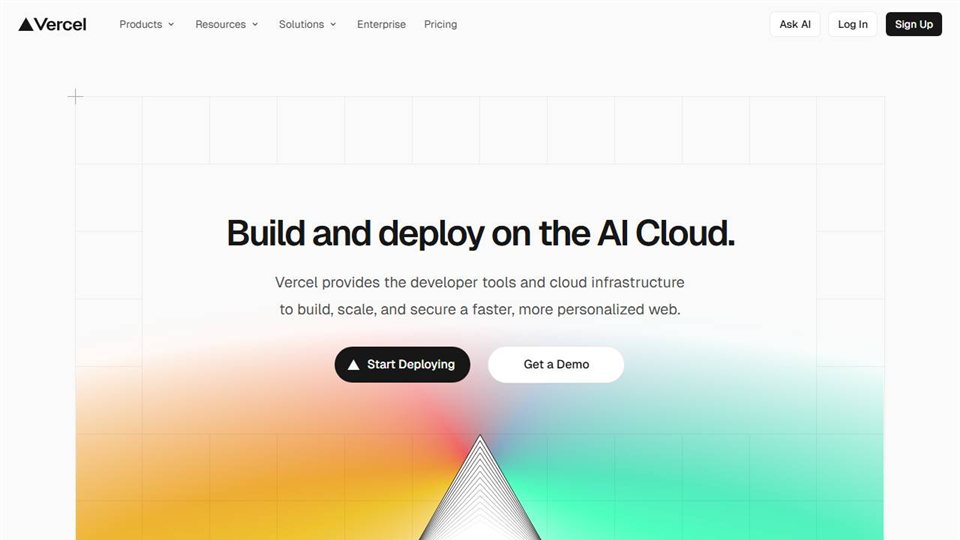
|
|
14
18
|
|
|
19
|
+
## Install
|
|
20
|
+
|
|
21
|
+
Run it directly with `npx`:
|
|
22
|
+
|
|
23
|
+
```bash
|
|
24
|
+
npx rasterport https://example.com
|
|
25
|
+
```
|
|
26
|
+
|
|
27
|
+
Or install it in a project:
|
|
28
|
+
|
|
29
|
+
```bash
|
|
30
|
+
npm install rasterport
|
|
31
|
+
```
|
|
32
|
+
|
|
33
|
+
## CLI usage
|
|
34
|
+
|
|
35
|
+
The CLI renders the page, waits for network idle, then returns JSON with:
|
|
36
|
+
|
|
37
|
+
- `screenshot`: base64 by default, or an array of bytes with `--format buffer`
|
|
38
|
+
- `dom`: the page HTML unless `--screenshot-only` is used
|
|
39
|
+
- `url`: the final page URL after navigation
|
|
40
|
+
- `viewport`: the width and height used for the capture
|
|
41
|
+
|
|
42
|
+
Basic usage:
|
|
43
|
+
|
|
44
|
+
```bash
|
|
45
|
+
rasterport <url> [options]
|
|
46
|
+
```
|
|
47
|
+
|
|
15
48
|
## Options
|
|
16
49
|
|
|
17
50
|
```bash
|
|
@@ -31,6 +64,38 @@ rasterport <url> [options]
|
|
|
31
64
|
--help Show help
|
|
32
65
|
```
|
|
33
66
|
|
|
67
|
+
### CLI examples
|
|
68
|
+
|
|
69
|
+
Capture screenshot and DOM to stdout:
|
|
70
|
+
|
|
71
|
+
```bash
|
|
72
|
+
npx rasterport https://example.com
|
|
73
|
+
```
|
|
74
|
+
|
|
75
|
+
Write the JSON result to a file:
|
|
76
|
+
|
|
77
|
+
```bash
|
|
78
|
+
npx rasterport https://example.com --out capture.json
|
|
79
|
+
```
|
|
80
|
+
|
|
81
|
+
Capture only the screenshot for a wider viewport:
|
|
82
|
+
|
|
83
|
+
```bash
|
|
84
|
+
npx rasterport https://example.com --width 1440 --height 900 --screenshot-only
|
|
85
|
+
```
|
|
86
|
+
|
|
87
|
+
Capture the full scrollable page:
|
|
88
|
+
|
|
89
|
+
```bash
|
|
90
|
+
npx rasterport https://example.com --full-page --screenshot-only --out fullpage.json
|
|
91
|
+
```
|
|
92
|
+
|
|
93
|
+
Return only the DOM:
|
|
94
|
+
|
|
95
|
+
```bash
|
|
96
|
+
npx rasterport https://example.com --dom-only
|
|
97
|
+
```
|
|
98
|
+
|
|
34
99
|
JPEG is the default because it keeps screenshot payloads much smaller while
|
|
35
100
|
remaining readable for agent workflows. Use PNG when you need lossless output:
|
|
36
101
|
|
|
@@ -52,6 +117,9 @@ The default output is JSON:
|
|
|
52
117
|
}
|
|
53
118
|
```
|
|
54
119
|
|
|
120
|
+
When `--format buffer` is used, `screenshot` is returned as a JSON array of byte
|
|
121
|
+
values instead of base64.
|
|
122
|
+
|
|
55
123
|
## Why rasterport?
|
|
56
124
|
|
|
57
125
|
- Single CLI command for screenshot + DOM capture
|
|
@@ -69,14 +137,16 @@ The default output is JSON:
|
|
|
69
137
|
| API | simple | complex |
|
|
70
138
|
| Agent workflows | native | manual |
|
|
71
139
|
|
|
72
|
-
##
|
|
140
|
+
## Library usage
|
|
141
|
+
|
|
142
|
+
`capture()` uses the same behavior as the CLI and returns the same shape of data.
|
|
73
143
|
|
|
74
|
-
|
|
144
|
+
Basic example:
|
|
75
145
|
|
|
76
146
|
```js
|
|
77
147
|
import { capture } from "rasterport";
|
|
78
148
|
|
|
79
|
-
await capture({
|
|
149
|
+
const result = await capture({
|
|
80
150
|
url: task.url,
|
|
81
151
|
fullPage: false,
|
|
82
152
|
width: 1280,
|
|
@@ -88,3 +158,99 @@ await capture({
|
|
|
88
158
|
domOnly: false,
|
|
89
159
|
});
|
|
90
160
|
```
|
|
161
|
+
|
|
162
|
+
Example result:
|
|
163
|
+
|
|
164
|
+
```js
|
|
165
|
+
{
|
|
166
|
+
screenshot: "<base64>",
|
|
167
|
+
url: "https://example.com",
|
|
168
|
+
viewport: {
|
|
169
|
+
width: 1280,
|
|
170
|
+
height: 800,
|
|
171
|
+
},
|
|
172
|
+
}
|
|
173
|
+
```
|
|
174
|
+
|
|
175
|
+
Capture both screenshot and DOM:
|
|
176
|
+
|
|
177
|
+
```js
|
|
178
|
+
import { capture } from "rasterport";
|
|
179
|
+
|
|
180
|
+
const result = await capture({
|
|
181
|
+
url: "https://example.com",
|
|
182
|
+
fullPage: false,
|
|
183
|
+
width: 1280,
|
|
184
|
+
height: 800,
|
|
185
|
+
format: "base64",
|
|
186
|
+
imageFormat: "jpeg",
|
|
187
|
+
quality: 70,
|
|
188
|
+
screenshotOnly: false,
|
|
189
|
+
domOnly: false,
|
|
190
|
+
});
|
|
191
|
+
|
|
192
|
+
console.log(result.dom);
|
|
193
|
+
console.log(result.screenshot);
|
|
194
|
+
```
|
|
195
|
+
|
|
196
|
+
Capture only the DOM:
|
|
197
|
+
|
|
198
|
+
```js
|
|
199
|
+
import { capture } from "rasterport";
|
|
200
|
+
|
|
201
|
+
const result = await capture({
|
|
202
|
+
url: "https://example.com",
|
|
203
|
+
fullPage: false,
|
|
204
|
+
width: 1280,
|
|
205
|
+
height: 800,
|
|
206
|
+
format: "base64",
|
|
207
|
+
imageFormat: "jpeg",
|
|
208
|
+
quality: 70,
|
|
209
|
+
screenshotOnly: false,
|
|
210
|
+
domOnly: true,
|
|
211
|
+
});
|
|
212
|
+
```
|
|
213
|
+
|
|
214
|
+
Capture a full-page PNG and get raw bytes:
|
|
215
|
+
|
|
216
|
+
```js
|
|
217
|
+
import { capture } from "rasterport";
|
|
218
|
+
|
|
219
|
+
const result = await capture({
|
|
220
|
+
url: "https://example.com",
|
|
221
|
+
fullPage: true,
|
|
222
|
+
width: 1280,
|
|
223
|
+
height: 800,
|
|
224
|
+
format: "buffer",
|
|
225
|
+
imageFormat: "png",
|
|
226
|
+
screenshotOnly: true,
|
|
227
|
+
domOnly: false,
|
|
228
|
+
});
|
|
229
|
+
```
|
|
230
|
+
|
|
231
|
+
### `capture()` options
|
|
232
|
+
|
|
233
|
+
```ts
|
|
234
|
+
capture(options: {
|
|
235
|
+
url: string;
|
|
236
|
+
fullPage: boolean;
|
|
237
|
+
width: number;
|
|
238
|
+
height: number;
|
|
239
|
+
format: "base64" | "buffer";
|
|
240
|
+
imageFormat: "png" | "jpeg";
|
|
241
|
+
quality?: number;
|
|
242
|
+
screenshotOnly: boolean;
|
|
243
|
+
domOnly: boolean;
|
|
244
|
+
}): Promise<{
|
|
245
|
+
screenshot?: string | number[];
|
|
246
|
+
dom?: string;
|
|
247
|
+
url: string;
|
|
248
|
+
viewport: {
|
|
249
|
+
width: number;
|
|
250
|
+
height: number;
|
|
251
|
+
};
|
|
252
|
+
}>
|
|
253
|
+
```
|
|
254
|
+
|
|
255
|
+
`quality` only applies when `imageFormat` is `jpeg`. `screenshotOnly` and
|
|
256
|
+
`domOnly` are mutually exclusive.
|
|
Binary file
|
package/package.json
CHANGED
|
@@ -1,6 +1,6 @@
|
|
|
1
1
|
{
|
|
2
2
|
"name": "rasterport",
|
|
3
|
-
"version": "0.1.
|
|
3
|
+
"version": "0.1.6",
|
|
4
4
|
"description": "Minimal CLI to capture webpage screenshots and DOM for LLM workflows.",
|
|
5
5
|
"type": "module",
|
|
6
6
|
"main": "./dist/index.js",
|
|
@@ -17,6 +17,7 @@
|
|
|
17
17
|
},
|
|
18
18
|
"files": [
|
|
19
19
|
"dist",
|
|
20
|
+
"assets",
|
|
20
21
|
"README.md",
|
|
21
22
|
"llms.txt",
|
|
22
23
|
"LICENSE"
|