q5 2.4.5 → 2.5.0
This diff represents the content of publicly available package versions that have been released to one of the supported registries. The information contained in this diff is provided for informational purposes only and reflects changes between package versions as they appear in their respective public registries.
- package/README.md +5 -2
- package/package.json +1 -1
- package/q5.d.ts +27 -4
- package/q5.js +939 -275
- package/q5.min.js +1 -1
- package/src/q5-2d-canvas.js +10 -19
- package/src/q5-2d-text.js +162 -127
- package/src/q5-canvas.js +11 -7
- package/src/q5-core.js +2 -2
- package/src/q5-util.js +17 -1
- package/src/q5-webgpu-canvas.js +81 -64
- package/src/q5-webgpu-drawing.js +21 -13
- package/src/q5-webgpu-image.js +33 -16
- package/src/q5-webgpu-text.js +601 -25
- package/src/readme.md +76 -9
package/src/readme.md
CHANGED
|
@@ -54,6 +54,11 @@ WebGPU rendering modules are in development:
|
|
|
54
54
|
- [webgpu-drawing](#webgpu-drawing)
|
|
55
55
|
- [webgpu-image](#webgpu-image)
|
|
56
56
|
- [webgpu-text](#webgpu-text)
|
|
57
|
+
- [Default Font](#default-font)
|
|
58
|
+
- [Loading Custom Fonts](#loading-custom-fonts)
|
|
59
|
+
- [Displaying Emojis](#displaying-emojis)
|
|
60
|
+
- [Lightweight Use](#lightweight-use)
|
|
61
|
+
- [Implemented functions](#implemented-functions)
|
|
57
62
|
- [math](#math)
|
|
58
63
|
- [noisier](#noisier)
|
|
59
64
|
|
|
@@ -105,7 +110,7 @@ Image based features in this module require the q5-2d-image module.
|
|
|
105
110
|
|
|
106
111
|
`textImage(img, x, y)` displays text images, complying with the user's text position settings instead of their image position settings. The idea is that text will appear in the same place as it would if it were drawn with the `text` function.
|
|
107
112
|
|
|
108
|
-
`textCache(bool, maxSize)` enables or disables text caching.
|
|
113
|
+
`textCache(bool, maxSize)` enables or disables text caching.
|
|
109
114
|
|
|
110
115
|
## webgpu-canvas
|
|
111
116
|
|
|
@@ -179,21 +184,83 @@ Implemented functions:
|
|
|
179
184
|
|
|
180
185
|
## webgpu-text
|
|
181
186
|
|
|
182
|
-
|
|
187
|
+
The q5 WebGPU text renderer uses the multi-channel signed distance fields (MSDF) technique for high performance and high quality real-time text rendering. Text can be rapidly recolored, rotated, and scaled without any loss in quality or performance.
|
|
183
188
|
|
|
184
|
-
|
|
189
|
+
MSDF, introduced by Chlumsky Viktor in his master's thesis ["Shape Decomposition for Multi-channel Distance Fields" (2015)](https://dspace.cvut.cz/bitstream/handle/10467/62770/F8-DP-2015-Chlumsky-Viktor-thesis.pdf), improves upon the signed distance field (SDF) technique, popularized by Chris Green and [Valve Software](https://www.valvesoftware.com/en/) in ["Improved Alpha-Tested Magnification for Vector Textures and Special Effects" (2007)](https://steamcdn-a.akamaihd.net/apps/valve/2007/SIGGRAPH2007_AlphaTestedMagnification.pdf).
|
|
185
190
|
|
|
186
|
-
|
|
191
|
+
| SDF | MSDF |
|
|
192
|
+
| -------------------------------------------------------------------------------------------------------------------- | --------------------------------------------------------------------------------------------------------------------- |
|
|
193
|
+
| 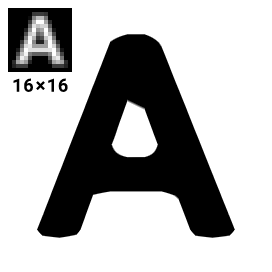 | 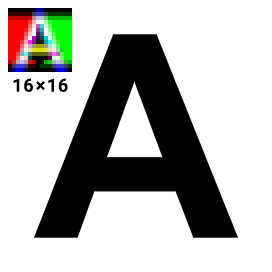 |
|
|
187
194
|
|
|
188
|
-
|
|
195
|
+
### Default Font
|
|
189
196
|
|
|
190
|
-
|
|
197
|
+
For convenience, if no font is loaded before `text` is run, then q5's default MSDF font is loaded: https://q5js.org/fonts/YaHei-msdf.json
|
|
191
198
|
|
|
192
|
-
|
|
199
|
+

|
|
193
200
|
|
|
194
|
-
|
|
201
|
+
This 512x512 msdf texture (207kb) was made with the [Microsoft YaHei](https://learn.microsoft.com/en-us/typography/font-list/microsoft-yahei) font and stores every character visible on a standard English keyboard, letters with diacritics (accents) used in European languages, and mathematical symbols.
|
|
195
202
|
|
|
196
|
-
|
|
203
|
+
```
|
|
204
|
+
!"#$%&'()\*+,-./0123456789:;<=>?@ABCDEFGHIJKLMNOPQRSTUVWXYZ[\]^\_`abcdefghijklmnopqrstuvwxyz{|}~¡¢£¥©®°²³´·¹º¿ÀÁÂÃÄÅÆÇÈÉÊËÌÍÎÏÐÑÒÓÔÕÖ×ØÙÚÛÜÝÞßàáâãäåæçèéêëìíîïðñòóôõö÷øùúûüýþÿ‘’“”π
|
|
205
|
+
```
|
|
206
|
+
|
|
207
|
+
> Do you think any other characters ought to be included in the default set? Let us know! https://github.com/q5js/q5.js/issues
|
|
208
|
+
|
|
209
|
+
### Loading Custom Fonts
|
|
210
|
+
|
|
211
|
+
You can choose a custom set of characters and convert fonts to MSDF format by using the [msdf-bmfont-xml](https://msdf-bmfont.donmccurdy.com/) website, created by Don McCurdy.
|
|
212
|
+
|
|
213
|
+
Here's how to load an MSDF font:
|
|
214
|
+
|
|
215
|
+
```js
|
|
216
|
+
function preload() {
|
|
217
|
+
loadFont('arial-msdf.json');
|
|
218
|
+
}
|
|
219
|
+
|
|
220
|
+
function setup() {
|
|
221
|
+
createCanvas(200, 200);
|
|
222
|
+
}
|
|
223
|
+
|
|
224
|
+
function draw() {
|
|
225
|
+
fill(0.71, 0.92, 1);
|
|
226
|
+
text('Hello, World!', mouseX, mouseY);
|
|
227
|
+
}
|
|
228
|
+
|
|
229
|
+
Q5.webgpu();
|
|
230
|
+
```
|
|
231
|
+
|
|
232
|
+
### Displaying Emojis
|
|
233
|
+
|
|
234
|
+
Full color emoji characters can't be rendered using the MSDF technique, so use `createTextImage` and display them with `textImage`:
|
|
235
|
+
|
|
236
|
+
```js
|
|
237
|
+
let puppy;
|
|
238
|
+
|
|
239
|
+
function setup() {
|
|
240
|
+
createCanvas(200, 200);
|
|
241
|
+
textSize(100);
|
|
242
|
+
puppy = createTextImage('🐶');
|
|
243
|
+
}
|
|
244
|
+
|
|
245
|
+
function draw() {
|
|
246
|
+
textAlign(CENTER, CENTER);
|
|
247
|
+
textImage(puppy, 0, 0);
|
|
248
|
+
}
|
|
249
|
+
|
|
250
|
+
Q5.webgpu();
|
|
251
|
+
```
|
|
252
|
+
|
|
253
|
+
### Lightweight Use
|
|
254
|
+
|
|
255
|
+
For super lightweight use load <https://q5js.org/fonts/YaHei-256-msdf.json>, which has a limited character set of english letters and some common punctuation symbols that completely fill in a 256x256 texture (73kb).
|
|
256
|
+
|
|
257
|
+
```
|
|
258
|
+
!@'",-.0123456789:ABCDEFGHIJKLMNOPQRSTUVWXYZabcdefghijklmnopqrstuvwxyz
|
|
259
|
+
```
|
|
260
|
+
|
|
261
|
+
### Implemented functions
|
|
262
|
+
|
|
263
|
+
`loadFont`, `text`, `textSize`, `textAlign`, `textWidth`, `createTextImage`, `textImage`
|
|
197
264
|
|
|
198
265
|
## math
|
|
199
266
|
|