puml-for-markdown 1.1.0 → 1.2.0
This diff represents the content of publicly available package versions that have been released to one of the supported registries. The information contained in this diff is provided for informational purposes only and reflects changes between package versions as they appear in their respective public registries.
- package/README.md +74 -24
- package/bin/index.js +6 -1
- package/index.js +20 -17
- package/package.json +4 -2
package/README.md
CHANGED
|
@@ -1,25 +1,44 @@
|
|
|
1
1
|
# puml-for-markdown
|
|
2
2
|
|
|
3
|
-
##
|
|
4
|
-
|
|
5
|
-
|
|
6
|
-
|
|
7
|
-
|
|
8
|
-
* Should support PlantUML `!include`
|
|
9
|
-
* Should support PlantUML [sprites](https://crashedmind.github.io/PlantUMLHitchhikersGuide/PlantUMLSpriteLibraries/plantuml_sprites.html) (small graphic images)
|
|
10
|
-
* Any time you make changes to diagrams you should be able to run the CLI tool to update the markdown links
|
|
3
|
+
## Simple CLI Usage
|
|
4
|
+
Just run `puml-for-markdown` in any directory where you have markdown files and it will render links to PlantUML files
|
|
5
|
+
in markdown comments. [PlantUML](https://plantuml.com) files allow you to create diagrams that are defined using a
|
|
6
|
+
simple and intuitive language. By default the entire directory is recursively searched, automatically ignoring anything
|
|
7
|
+
in the gitignore file.
|
|
11
8
|
|
|
12
9
|
## Examples
|
|
13
10
|
The following examples are of a project I worked on, **yellow components will link you to another diagram**. Obviously the
|
|
14
11
|
diagram content has been obfuscated.
|
|
15
12
|
|
|
16
|
-
###
|
|
13
|
+
### Embed a Diagram
|
|
14
|
+
You can easily add an embedded diagram to your markdown. Simply add a link to the puml file in a markdown comment like so:
|
|
15
|
+
|
|
16
|
+
```
|
|
17
|
+
<!---->
|
|
18
|
+
```
|
|
17
19
|
|
|
18
|
-
|
|
20
|
+
Here's the result. **Try clicking on the yellow blocks.**
|
|
19
21
|
|
|
20
|
-
|
|
22
|
+
[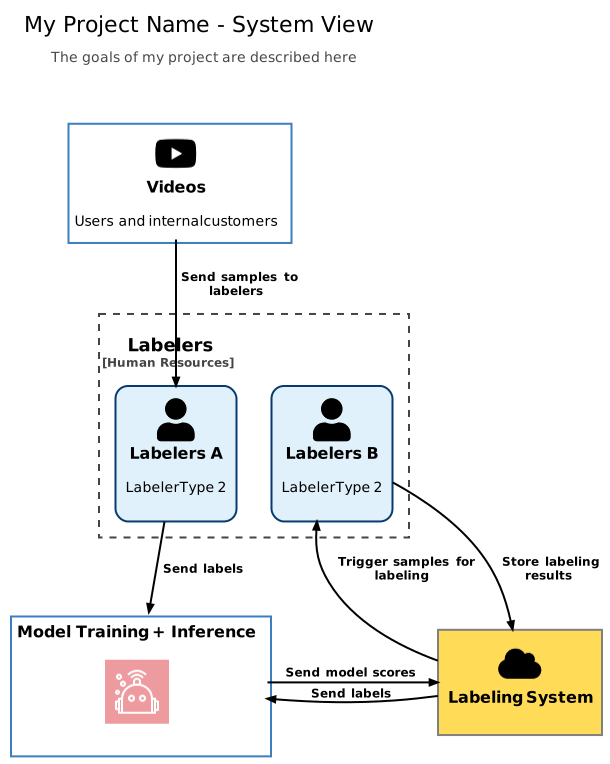](https://tinyurl.com/y847en68)<!---->
|
|
21
23
|
|
|
22
|
-
|
|
24
|
+
### Link Only
|
|
25
|
+
To render a link to a puml diagram, do the same thing but exclude the `!`
|
|
26
|
+
```
|
|
27
|
+
<!--[Click to Open Interactive Diagram](./puml/level_1_system_view.puml)-->
|
|
28
|
+
```
|
|
29
|
+
|
|
30
|
+
which renders into
|
|
31
|
+
|
|
32
|
+
[Click to Open Interactive Diagram](https://tinyurl.com/y847en68)<!--[Click to Open Interactive Diagram](./puml/level_1_system_view.puml)-->
|
|
33
|
+
|
|
34
|
+
## Goal
|
|
35
|
+
The goal is to make PlantUML diagrams easily accessible from markdown, specifically GitHub flavored.
|
|
36
|
+
* Should work with both private and public repositories
|
|
37
|
+
* Should not have to use tokens to get it to work with private repositories
|
|
38
|
+
* Should support hyperlinking to other diagrams
|
|
39
|
+
* Should support PlantUML `!include`
|
|
40
|
+
* Should support PlantUML [sprites](https://crashedmind.github.io/PlantUMLHitchhikersGuide/PlantUMLSpriteLibraries/plantuml_sprites.html) (small graphic images)
|
|
41
|
+
* Any time you make changes to diagrams you should be able to run the CLI tool to update the markdown links
|
|
23
42
|
|
|
24
43
|
## Background
|
|
25
44
|
[PlantUML](https://plantuml.com) allows you to create diagrams that are defined using a simple and intuitive language.
|
|
@@ -27,19 +46,27 @@ PlantUML diagrams are great for designing new projects but they don't work very
|
|
|
27
46
|
are some [workarounds](https://stackoverflow.com/questions/32203610/how-to-integrate-uml-diagrams-into-gitlab-or-github),
|
|
28
47
|
but I found these to be unstable and they have a lot of caveats.
|
|
29
48
|
|
|
30
|
-
|
|
31
|
-
|
|
49
|
+
**Update**: Github released support for embeddable Mermaid diagrams, but PlantUML is still unsupported,
|
|
50
|
+
[see here](https://github.blog/2022-02-14-include-diagrams-markdown-files-mermaid/) for more info.
|
|
51
|
+
|
|
32
52
|
|
|
33
53
|
### Basic Usage
|
|
34
54
|
Whenever you run the CLI it will add a tinyurl link to the rendered SVG next to the markdown comments referencing a
|
|
35
|
-
puml diagram. E.g.
|
|
55
|
+
puml diagram. E.g.
|
|
56
|
+
```
|
|
57
|
+
<!--[Example With Only Link](./puml/level_1_system_view.puml)-->
|
|
58
|
+
```
|
|
59
|
+
will be replaced with
|
|
36
60
|
```
|
|
37
61
|
[Example With Only Link](https://tinyurl.com/yfpclfpp)<!--[Example With Only Link](./puml/level_1_system_view.puml)-->
|
|
38
62
|
```
|
|
39
63
|
|
|
40
64
|
When `!` is included in front of the markdown link, it will render the diagram image in the markdown. If the image is
|
|
41
|
-
clicked it will open up the diagram. E.g.
|
|
42
|
-
|
|
65
|
+
clicked it will open up the diagram. E.g.
|
|
66
|
+
```
|
|
67
|
+
<!---->
|
|
68
|
+
```
|
|
69
|
+
will be replaced with
|
|
43
70
|
```
|
|
44
71
|
[](https://tinyurl.com/yfpclfpp)<!---->
|
|
45
72
|
```
|
|
@@ -47,22 +74,29 @@ replaced with
|
|
|
47
74
|
If you want to update the link text or switch it between image and link, just update the comment and rerun the CLI. You
|
|
48
75
|
don't need to delete the rendered image or link.
|
|
49
76
|
|
|
50
|
-
|
|
77
|
+
### Installation
|
|
78
|
+
`npm i -g puml-for-markdown`
|
|
79
|
+
|
|
80
|
+
### Advanced Usage
|
|
81
|
+
Here are some other features supported
|
|
82
|
+
- You can specify the CLI to output the diagram images as png and/or svg see `--output-images` and `--image-formats`
|
|
83
|
+
- You can specify the PUML server used to render the diagrams see `--puml-server-url`
|
|
51
84
|
|
|
52
|
-
### CLI
|
|
85
|
+
### All CLI Options
|
|
53
86
|
```
|
|
54
87
|
Usage: puml-for-markdown [options]
|
|
55
88
|
|
|
56
89
|
An application to add interactive PUML diagrams to your github markdown files. If running with default arguments, run in project root directory.
|
|
57
90
|
|
|
58
91
|
Options:
|
|
92
|
+
-s, --puml-server-url <url> This is the base URL used to render diagrams. Defaults to the public plantuml server. (default: "https://www.plantuml.com/plantuml")
|
|
59
93
|
-x, --root-directory <path> The path to your project (default: CWD)
|
|
60
94
|
-r, --hot-reload Rerun markdown generator every `interval` seconds, determined by interval option
|
|
61
95
|
-v, --interval-seconds <number> If --hot-reload is set, how often should it reload (default: 2)
|
|
62
96
|
-p, --puml-directory <path> Path to directory containing puml files which are referenced in markdown files (default: rootDirectory)
|
|
63
97
|
-m, --markdown-directory <path> Path to directory containing markdown files referencing puml files (default: rootDirectory)
|
|
64
|
-
-g, --
|
|
65
|
-
-i, --gitignore-path <path>
|
|
98
|
+
-g, --ignore-gitignore Don't use .gitignore to skip PUML and MD
|
|
99
|
+
-i, --gitignore-path <path> Use this as path to .gitignore file. (default: rootDirectory/.gitignore)
|
|
66
100
|
-d, --output-images If set, will output images of diagrams to the dist directory
|
|
67
101
|
-b, --dist-directory <path> If --output-images is set, path to output diagram images (default: rootDirectory/dist_puml)
|
|
68
102
|
-f, --image-formats <format> If --output-images is set, sets the output image format (choices: "png", "svg", "both", default: "png")
|
|
@@ -75,9 +109,10 @@ Options:
|
|
|
75
109
|
- Currently doesn't support cyclic graph references, i.e. a diagram can't reference any diagrams which reference back
|
|
76
110
|
to it
|
|
77
111
|
- See the [pre-commit hook](./.husky/pre-commit) to see how to add a git hook
|
|
78
|
-
- If you are saving diagram images and have puml files which only define constants
|
|
79
|
-
(i.e. [example](./puml/constants.puml))
|
|
80
|
-
|
|
112
|
+
- If you are saving diagram images and have puml files which only define constants or settings
|
|
113
|
+
(i.e. [example](./puml/constants.puml)) you'll see a warning in the console saying it failed to save the image to file
|
|
114
|
+
because these aren't renderable on their own (since there is nothing to render)
|
|
115
|
+
- Anything inside `inline code` or `code blocks` will be excluded from rendering
|
|
81
116
|
|
|
82
117
|
### How It Works
|
|
83
118
|
#### Using PlantUML Web Service to Render PUML Diagrams
|
|
@@ -112,8 +147,23 @@ though.
|
|
|
112
147
|
|
|
113
148
|
### More Examples
|
|
114
149
|
[](https://tinyurl.com/ya6qvr7r)<!---->
|
|
150
|
+
|
|
151
|
+
|
|
152
|
+
|
|
115
153
|
[](https://tinyurl.com/yblre3m4)<!---->
|
|
154
|
+
|
|
155
|
+
|
|
156
|
+
|
|
116
157
|
[](https://tinyurl.com/y8egw3wt)<!---->
|
|
158
|
+
|
|
159
|
+
|
|
160
|
+
|
|
117
161
|
[](https://tinyurl.com/y9j7twkz)<!---->
|
|
162
|
+
|
|
163
|
+
|
|
164
|
+
|
|
118
165
|
[](https://tinyurl.com/ybp8ju9x)<!---->
|
|
166
|
+
|
|
167
|
+
|
|
168
|
+
|
|
119
169
|
[](https://tinyurl.com/ya3cqxkv)<!---->
|
package/bin/index.js
CHANGED
|
@@ -13,6 +13,11 @@ const run = require(path.resolve(__dirname, '../index.js'))
|
|
|
13
13
|
|
|
14
14
|
new Command()
|
|
15
15
|
.description('An application to add interactive PUML diagrams to your github markdown files. If running with default arguments, run in project root directory.')
|
|
16
|
+
.option(
|
|
17
|
+
'-s, --puml-server-url <url>',
|
|
18
|
+
'This is the base URL used to render diagrams. Defaults to the public plantuml server.',
|
|
19
|
+
'https://www.plantuml.com/plantuml',
|
|
20
|
+
)
|
|
16
21
|
.addOption(new Option(
|
|
17
22
|
'-x, --root-directory <path>',
|
|
18
23
|
'The path to your project'
|
|
@@ -39,7 +44,7 @@ new Command()
|
|
|
39
44
|
)
|
|
40
45
|
.option(
|
|
41
46
|
'-g, --ignore-gitignore',
|
|
42
|
-
"Don't
|
|
47
|
+
"Don't use .gitignore to skip PUML and MD",
|
|
43
48
|
)
|
|
44
49
|
.addOption(new Option(
|
|
45
50
|
'-i, --gitignore-path <path>',
|
package/index.js
CHANGED
|
@@ -17,17 +17,14 @@ const tiny = require('tinyurl');
|
|
|
17
17
|
const parseGitIgnore = require('gitignore-globs');
|
|
18
18
|
|
|
19
19
|
|
|
20
|
-
// CONSTANTS
|
|
21
|
-
|
|
22
|
-
const PUML_SERVER = 'https://www.plantuml.com/plantuml'
|
|
23
|
-
|
|
24
20
|
// HELPERS
|
|
25
21
|
|
|
26
22
|
const getBuffer = bent('buffer')
|
|
27
23
|
const mkdirIfDoesntExist = (p) => !fs.existsSync(p) && fs.mkdirSync(p, {recursive: true})
|
|
28
|
-
const getPumlUrl = (imgFormat, encodedData, shorten) => shorten ?
|
|
29
|
-
tiny.shorten(getFullPumlUrl(imgFormat, encodedData)) :
|
|
30
|
-
|
|
24
|
+
const getPumlUrl = ({imgFormat, encodedData, shorten, pumlServerUrl}) => shorten ?
|
|
25
|
+
tiny.shorten(getFullPumlUrl({imgFormat, encodedData, pumlServerUrl})) :
|
|
26
|
+
getFullPumlUrl({imgFormat, encodedData, pumlServerUrl})
|
|
27
|
+
const getFullPumlUrl = ({imgFormat, encodedData, pumlServerUrl}) => `${pumlServerUrl}/${imgFormat}/${encodedData}}`
|
|
31
28
|
const mapUniqMatches = (s, re, mapper, match = re.exec(s), results = []) => {
|
|
32
29
|
if (match) return mapUniqMatches(s, re, mapper, re.exec(s), results.concat([match]))
|
|
33
30
|
return _.uniqBy(results, String).map(mapper)
|
|
@@ -58,11 +55,12 @@ const replaceMdIgnoringCode = (mdString, replaceFn) => {
|
|
|
58
55
|
// DATA STRUCTURES
|
|
59
56
|
|
|
60
57
|
class PumlLinks extends Map {
|
|
61
|
-
constructor(pumlPaths, shouldShortenLinks) {
|
|
58
|
+
constructor({ pumlPaths, shouldShortenLinks, pumlServerUrl }) {
|
|
62
59
|
super();
|
|
63
60
|
this.shouldShortenLinks = shouldShortenLinks
|
|
64
|
-
|
|
65
|
-
//
|
|
61
|
+
this.pumlServerUrl = pumlServerUrl
|
|
62
|
+
// We need to know which paths should be visited
|
|
63
|
+
// Any path that's not marked 0 we know isn't a puml path because it doesn't correspond to a puml file
|
|
66
64
|
pumlPaths.forEach(p => this.set(p, 0))
|
|
67
65
|
}
|
|
68
66
|
|
|
@@ -74,7 +72,9 @@ class PumlLinks extends Map {
|
|
|
74
72
|
if (typeof v === 'number') return super.set(pumlPath, v)
|
|
75
73
|
|
|
76
74
|
const encodedData = plantUmlEncoder.encode(v)
|
|
77
|
-
const url = await getPumlUrl(
|
|
75
|
+
const url = await getPumlUrl({
|
|
76
|
+
imgFormat: 'svg', encodedData, shorten: this.shouldShortenLinks, pumlServerUrl: this.pumlServerUrl
|
|
77
|
+
})
|
|
78
78
|
return super.set(pumlPath, {encodedData, url, data: v});
|
|
79
79
|
}
|
|
80
80
|
|
|
@@ -90,13 +90,13 @@ const downloadImg = async (outputPath, imgUrl) => {
|
|
|
90
90
|
fs.writeFileSync(outputPath, imgBuffer)
|
|
91
91
|
}
|
|
92
92
|
|
|
93
|
-
const saveDiagram = async ({rootDirectory, distDirectory, pumlPath, imgFormat, encodedData}) => {
|
|
93
|
+
const saveDiagram = async ({rootDirectory, distDirectory, pumlPath, imgFormat, encodedData, pumlServerUrl}) => {
|
|
94
94
|
const outputPath = path.join(
|
|
95
95
|
distDirectory, pumlPath.replace(rootDirectory, '').replace(/\.puml$/, `.${imgFormat}`)
|
|
96
96
|
)
|
|
97
97
|
|
|
98
98
|
mkdirIfDoesntExist(path.dirname(outputPath))
|
|
99
|
-
const imgUrl = getFullPumlUrl(imgFormat, encodedData)
|
|
99
|
+
const imgUrl = getFullPumlUrl({ imgFormat, encodedData, pumlServerUrl })
|
|
100
100
|
try {
|
|
101
101
|
await downloadImg(outputPath, imgUrl)
|
|
102
102
|
} catch (e) {
|
|
@@ -105,12 +105,12 @@ const saveDiagram = async ({rootDirectory, distDirectory, pumlPath, imgFormat, e
|
|
|
105
105
|
}
|
|
106
106
|
}
|
|
107
107
|
|
|
108
|
-
const saveDiagrams = async ({
|
|
108
|
+
const saveDiagrams = async ({rootDirectory, distDirectory, imageFormats, pumlLinks, pumlServerUrl}) => {
|
|
109
109
|
fs.rmSync(distDirectory, {recursive: true, force: true});
|
|
110
110
|
for (let [pumlPath, {encodedData}] of pumlLinks) {
|
|
111
111
|
for (let imgFormat of imageFormats) {
|
|
112
112
|
await saveDiagram({
|
|
113
|
-
distDirectory, rootDirectory, pumlPath, imgFormat, encodedData
|
|
113
|
+
distDirectory, rootDirectory, pumlPath, imgFormat, encodedData, pumlServerUrl
|
|
114
114
|
})
|
|
115
115
|
}
|
|
116
116
|
}
|
|
@@ -190,6 +190,7 @@ const processMdFile = async (mdPath, pumlLinks) => {
|
|
|
190
190
|
|
|
191
191
|
const runOnce = async (
|
|
192
192
|
{
|
|
193
|
+
pumlServerUrl,
|
|
193
194
|
rootDirectory,
|
|
194
195
|
markdownDirectory,
|
|
195
196
|
pumlDirectory,
|
|
@@ -207,14 +208,16 @@ const runOnce = async (
|
|
|
207
208
|
const ignore = respectGitignore ? parseGitIgnore(gitignorePath) : []
|
|
208
209
|
const mdPaths = glob.sync(`${markdownDirectory}/**/*.md`, {ignore, nodir: true})
|
|
209
210
|
const pumlPaths = glob.sync(`${pumlDirectory}/**/*.puml`, {ignore, nodir: true})
|
|
210
|
-
const pumlLinks = new PumlLinks(
|
|
211
|
+
const pumlLinks = new PumlLinks({
|
|
212
|
+
pumlPaths, shouldShortenLinks, pumlServerUrl
|
|
213
|
+
})
|
|
211
214
|
|
|
212
215
|
for (let p of pumlPaths) await processPumlFile(p, pumlLinks)
|
|
213
216
|
for (let p of mdPaths) await processMdFile(p, pumlLinks)
|
|
214
217
|
|
|
215
218
|
if (outputImages) {
|
|
216
219
|
await saveDiagrams({
|
|
217
|
-
rootDirectory, distDirectory, imageFormats, pumlLinks
|
|
220
|
+
rootDirectory, distDirectory, imageFormats, pumlLinks, pumlServerUrl
|
|
218
221
|
})
|
|
219
222
|
}
|
|
220
223
|
}
|
package/package.json
CHANGED
|
@@ -1,6 +1,6 @@
|
|
|
1
1
|
{
|
|
2
2
|
"name": "puml-for-markdown",
|
|
3
|
-
"version": "1.
|
|
3
|
+
"version": "1.2.0",
|
|
4
4
|
"description": "An application to add interactive PUML diagrams to your github markdown files. If running with default arguments, run in project root directory.",
|
|
5
5
|
"main": "index.js",
|
|
6
6
|
"scripts": {
|
|
@@ -35,7 +35,9 @@
|
|
|
35
35
|
"generator",
|
|
36
36
|
"cli",
|
|
37
37
|
"diagrams",
|
|
38
|
-
"documentation"
|
|
38
|
+
"documentation",
|
|
39
|
+
"architecture",
|
|
40
|
+
"architecture-diagrams"
|
|
39
41
|
],
|
|
40
42
|
"repository": {
|
|
41
43
|
"type": "git",
|