prosemirror-link-preview 2.0.7 → 2.0.11
This diff represents the content of publicly available package versions that have been released to one of the supported registries. The information contained in this diff is provided for informational purposes only and reflects changes between package versions as they appear in their respective public registries.
- package/README.md +95 -106
- package/dist/index.d.ts +2 -1
- package/dist/index.es.js +1 -1
- package/dist/index.js +1 -1
- package/dist/previewNodeView.d.ts +2 -1
- package/dist/previewPlugin.d.ts +3 -8
- package/dist/styles/styles.css +1 -0
- package/dist/types.d.ts +9 -0
- package/dist/utils.d.ts +2 -1
- package/package.json +1 -1
package/README.md
CHANGED
|
@@ -1,7 +1,14 @@
|
|
|
1
1
|
# prosemirror-link-preview
|
|
2
2
|
|
|
3
|
+

|
|
4
|
+
|
|
5
|
+
|
|
6
|
+
[**Made by Emergence-Engineering**](https://emergence-engineering.com/)
|
|
7
|
+
|
|
3
8
|
## Features
|
|
4
9
|
|
|
10
|
+
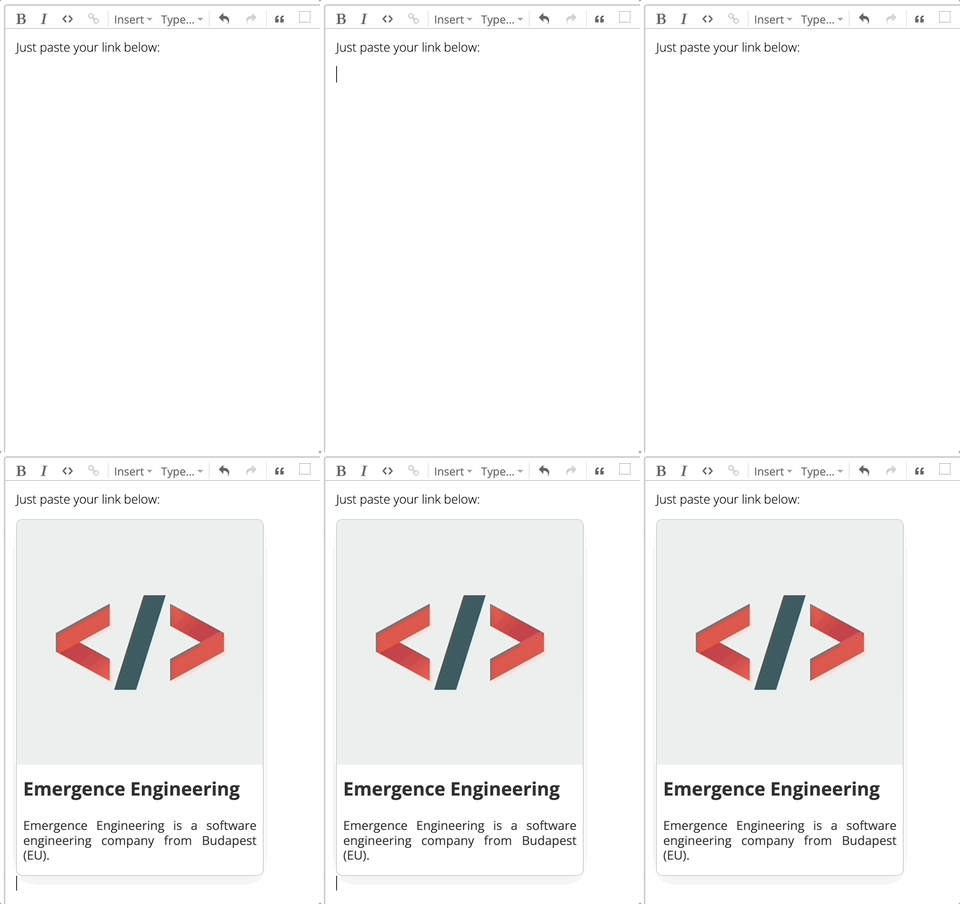
|
|
11
|
+
|
|
5
12
|
The ProseMirror-Link-Preview plugin offers several key features that enhance the user experience while editing:
|
|
6
13
|
|
|
7
14
|
1. **Dynamic Link Previews**: Whenever a valid URL is pasted into a ProseMirror document, the plugin automatically calls **your callback** function, which is one of the plugin's parameter, which fetches the necessary metadata, and the plugin renders a preview, providing a quick glimpse into the content behind the link.
|
|
@@ -12,8 +19,7 @@ The ProseMirror-Link-Preview plugin offers several key features that enhance the
|
|
|
12
19
|
|
|
13
20
|
## How to use?
|
|
14
21
|
|
|
15
|
-
1. **Installation**: Install the plugin from your preferred package manager. For example, using npm, run the following command:
|
|
16
|
-
`npm i -S prosemirror-link-preview`
|
|
22
|
+
1. **Installation**: Install the plugin from your preferred package manager. For example, using npm, run the following command: `npm i -S prosemirror-link-preview`
|
|
17
23
|
2. **Import**: Import the plugin into your project. You also need to import some utility functions from the plugin to help with the configuration process.
|
|
18
24
|
```typescript
|
|
19
25
|
import {
|
|
@@ -25,64 +31,33 @@ The ProseMirror-Link-Preview plugin offers several key features that enhance the
|
|
|
25
31
|
applyYjs, // for yjs users
|
|
26
32
|
createDecorationsYjs, // for yjs users
|
|
27
33
|
findPlaceholderYjs, // for yjs users
|
|
34
|
+
IDefaultoptions,
|
|
28
35
|
} from "prosemirror-link-preview";
|
|
29
36
|
```
|
|
30
37
|
3. Import the CSS file for your setup. You can use your custom css to style the preview, here is an example(which is the actual css used by default)
|
|
31
38
|
|
|
32
|
-
```typescript
|
|
33
|
-
import "prosemirror-link-preview/dist/styles/styles.css";
|
|
34
|
-
```
|
|
35
|
-
|
|
36
|
-
|
|
37
|
-
|
|
38
|
-
|
|
39
|
-
|
|
40
|
-
|
|
41
|
-
|
|
42
|
-
|
|
43
|
-
|
|
44
|
-
|
|
45
|
-
|
|
46
|
-
|
|
47
|
-
|
|
48
|
-
|
|
49
|
-
|
|
50
|
-
|
|
51
|
-
|
|
52
|
-
|
|
53
|
-
|
|
54
|
-
overflow: hidden;
|
|
55
|
-
}
|
|
56
|
-
|
|
57
|
-
.preview-title {
|
|
58
|
-
font-size: 1.5rem;
|
|
59
|
-
font-weight: 700;
|
|
60
|
-
color: #333;
|
|
61
|
-
padding: 0.5rem;
|
|
62
|
-
}
|
|
63
|
-
|
|
64
|
-
.preview-description {
|
|
65
|
-
font-size: 1rem;
|
|
66
|
-
font-weight: 500;
|
|
67
|
-
color: #333;
|
|
68
|
-
padding: 0.5rem 0.5rem 1rem 0.5rem;
|
|
69
|
-
}
|
|
70
|
-
|
|
71
|
-
.placeholder {
|
|
72
|
-
width: 1rem;
|
|
73
|
-
height: 1rem;
|
|
74
|
-
background: darkgray;
|
|
75
|
-
}
|
|
76
|
-
```
|
|
77
|
-
|
|
78
|
-
4. Update the image node in the ProseMirror schema to have all the necessary properties with `addPreviewNode`
|
|
79
|
-
|
|
80
|
-
```typescript
|
|
81
|
-
const mySchema = new Schema({
|
|
82
|
-
nodes: addPreviewNode(schema.spec.nodes),
|
|
83
|
-
marks: schema.spec.marks,
|
|
84
|
-
});
|
|
85
|
-
```
|
|
39
|
+
```typescript
|
|
40
|
+
import "prosemirror-link-preview/dist/styles/styles.css";
|
|
41
|
+
```
|
|
42
|
+
|
|
43
|
+
- basic card structure
|
|
44
|
+
|
|
45
|
+
```html
|
|
46
|
+
<div className="preview-root">
|
|
47
|
+
<div className="preview-image" />
|
|
48
|
+
<div className="preview-title" />
|
|
49
|
+
<div className="preview-description" />
|
|
50
|
+
</div>
|
|
51
|
+
```
|
|
52
|
+
|
|
53
|
+
4. Update nodes in the ProseMirror schema to have all the necessary properties with `addPreviewNode`
|
|
54
|
+
|
|
55
|
+
```typescript
|
|
56
|
+
const mySchema = new Schema({
|
|
57
|
+
nodes: addPreviewNode(schema.spec.nodes),
|
|
58
|
+
marks: schema.spec.marks,
|
|
59
|
+
});
|
|
60
|
+
```
|
|
86
61
|
|
|
87
62
|
5. Initialize the editor with the plugin
|
|
88
63
|
|
|
@@ -95,7 +70,6 @@ const mySchema = new Schema({
|
|
|
95
70
|
ySyncPlugin(yXmlFragment),
|
|
96
71
|
yUndoPlugin(),
|
|
97
72
|
previewPlugin(
|
|
98
|
-
mySchema,
|
|
99
73
|
async (link: string) => {
|
|
100
74
|
const data = await fetch("/api/link-preview", {
|
|
101
75
|
method: "POST",
|
|
@@ -111,6 +85,7 @@ const mySchema = new Schema({
|
|
|
111
85
|
applyYjs,
|
|
112
86
|
createDecorationsYjs,
|
|
113
87
|
findPlaceholderYjs
|
|
88
|
+
{openLinkOnClick: true} as IDefaultoptions
|
|
114
89
|
),
|
|
115
90
|
],
|
|
116
91
|
}),
|
|
@@ -119,52 +94,66 @@ const mySchema = new Schema({
|
|
|
119
94
|
|
|
120
95
|
6. `previewPlugin` requires 5 parameters:
|
|
121
96
|
|
|
122
|
-
- `
|
|
123
|
-
|
|
124
|
-
|
|
125
|
-
|
|
126
|
-
|
|
127
|
-
import
|
|
128
|
-
import
|
|
129
|
-
|
|
130
|
-
//
|
|
131
|
-
|
|
132
|
-
|
|
133
|
-
|
|
134
|
-
|
|
135
|
-
//
|
|
136
|
-
|
|
137
|
-
|
|
138
|
-
|
|
139
|
-
|
|
140
|
-
|
|
141
|
-
) {
|
|
142
|
-
|
|
143
|
-
|
|
144
|
-
|
|
145
|
-
|
|
146
|
-
|
|
147
|
-
|
|
148
|
-
|
|
149
|
-
|
|
150
|
-
|
|
151
|
-
|
|
152
|
-
|
|
153
|
-
|
|
154
|
-
|
|
155
|
-
|
|
156
|
-
|
|
157
|
-
|
|
158
|
-
|
|
159
|
-
|
|
160
|
-
|
|
161
|
-
|
|
162
|
-
|
|
163
|
-
|
|
164
|
-
|
|
165
|
-
|
|
166
|
-
|
|
167
|
-
|
|
168
|
-
- `
|
|
169
|
-
- `
|
|
170
|
-
- `
|
|
97
|
+
- `fetchLinkPreview`: `(link: string) => Promise<{url: string, title: string, description: string, images: string[]}>` a function that takes a link and returns a `Promise` that resolves to the link preview data, you can easily do this using next.js API routes
|
|
98
|
+
or just using `link-preview-js` library on your custom backend
|
|
99
|
+
|
|
100
|
+
```typescript
|
|
101
|
+
import type { NextApiRequest, NextApiResponse } from "next";
|
|
102
|
+
import Cors from "cors";
|
|
103
|
+
import { getLinkPreview } from "link-preview-js";
|
|
104
|
+
// Initializing the cors middleware
|
|
105
|
+
// You can read more about the available options here: https://github.com/expressjs/cors#configuration-options
|
|
106
|
+
const cors = Cors({
|
|
107
|
+
methods: ["POST", "GET", "HEAD"],
|
|
108
|
+
});
|
|
109
|
+
// Helper method to wait for a middleware to execute before continuing
|
|
110
|
+
// And to throw an error when an error happens in a middleware
|
|
111
|
+
function runMiddleware(
|
|
112
|
+
req: NextApiRequest,
|
|
113
|
+
res: NextApiResponse,
|
|
114
|
+
fn: Function
|
|
115
|
+
) {
|
|
116
|
+
return new Promise((resolve, reject) => {
|
|
117
|
+
fn(req, res, (result: any) => {
|
|
118
|
+
if (result instanceof Error) {
|
|
119
|
+
return reject(result);
|
|
120
|
+
}
|
|
121
|
+
return resolve(result);
|
|
122
|
+
});
|
|
123
|
+
});
|
|
124
|
+
}
|
|
125
|
+
export default async function handler(
|
|
126
|
+
req: NextApiRequest,
|
|
127
|
+
res: NextApiResponse
|
|
128
|
+
) {
|
|
129
|
+
// Run the middleware
|
|
130
|
+
await runMiddleware(req, res, cors);
|
|
131
|
+
|
|
132
|
+
const { link } = JSON.parse(req.body);
|
|
133
|
+
console.log({ link });
|
|
134
|
+
|
|
135
|
+
const data = await getLinkPreview(link);
|
|
136
|
+
|
|
137
|
+
// Rest of the API logic
|
|
138
|
+
res.json({ data });
|
|
139
|
+
}
|
|
140
|
+
```
|
|
141
|
+
|
|
142
|
+
- `apply`: import from `prosemirror-link-preview`
|
|
143
|
+
- `createDecorations`: import from `prosemirror-link-preview`
|
|
144
|
+
- `findPlaceholder`: import from `prosemirror-link-preview`
|
|
145
|
+
- `defaultOptions`:
|
|
146
|
+
```typescript
|
|
147
|
+
export interface IDefaultOptions {
|
|
148
|
+
openLinkOnClick: boolean; // if true, onClick opens the original link in a new browser tab
|
|
149
|
+
}
|
|
150
|
+
```
|
|
151
|
+
|
|
152
|
+
## Fetching preview data
|
|
153
|
+
|
|
154
|
+
**this does not happen automatically**, you need to handle it yourself by providing the `fetchLinkPreview` callback function
|
|
155
|
+
|
|
156
|
+
- this usually requires a backend using a 3rd party library like `link-preview-js`
|
|
157
|
+
- you can use `linkpreview.net` API endpoint to fetch your preview data from the frontend
|
|
158
|
+
- in case you are using nextjs, you can easily use our example above
|
|
159
|
+
- or any other tool you see fit
|
package/dist/index.d.ts
CHANGED
|
@@ -1,4 +1,5 @@
|
|
|
1
1
|
export { previewPlugin } from "./previewPlugin";
|
|
2
2
|
export { previewNodeView } from "./previewNodeView";
|
|
3
3
|
export { addPreviewNode } from "./addPreviewNode";
|
|
4
|
-
export { createDecorations, createDecorationsYjs, applyYjs, apply, findPlaceholder, findPlaceholderYjs, } from "./utils";
|
|
4
|
+
export { createDecorations, createDecorationsYjs, applyYjs, apply, findPlaceholder, findPlaceholderYjs, defaultOptions, } from "./utils";
|
|
5
|
+
export { IDefaultOptions } from "./types";
|
package/dist/index.es.js
CHANGED
|
@@ -1 +1 @@
|
|
|
1
|
-
import{PluginKey as t,Plugin as e}from"prosemirror-state";import{Fragment as r,Slice as i}from"prosemirror-model";import{DecorationSet as n,Decoration as o}from"prosemirror-view";import{ySyncPluginKey as s,relativePositionToAbsolutePosition as
|
|
1
|
+
import{PluginKey as t,Plugin as e}from"prosemirror-state";import{Fragment as r,Slice as i}from"prosemirror-model";import{DecorationSet as n,Decoration as o}from"prosemirror-view";import{ySyncPluginKey as s,relativePositionToAbsolutePosition as l,absolutePositionToRelativePosition as d}from"y-prosemirror";const a=(t,e,r,i)=>{const n=document.createElement("div");n.className="preview-root";const o=document.createElement("img");o.classList.add("preview-img"),o.src=t.attrs.src,o.alt=t.attrs.alt;const s=document.createElement("div");s.classList.add("preview-title"),s.textContent=t.attrs.title;const l=document.createElement("div");l.classList.add("preview-description"),l.textContent=t.attrs.description,n.appendChild(o),n.appendChild(s),n.appendChild(l),n.addEventListener("click",(()=>{i.openLinkOnClick&&window.open(t.attrs.url,"_blank")})),n.style.cursor=i.openLinkOnClick?"pointer":"default",o.style.cursor=i.openLinkOnClick?"pointer":"default";const d=n;return{dom:d,update:t=>{const e=d.querySelector("img"),r=d.querySelector(".preview-title"),i=d.querySelector(".preview-description");return!!(e&&r&&i)&&(e.src=t.attrs.src,e.alt=t.attrs.alt,i.textContent=t.attrs.description,r.textContent=t.attrs.title,!0)},selectNode:()=>{const{state:t,dispatch:i}=e;i(t.tr.setMeta("selectedNode",r()))},deselectNode:()=>{const{state:t,dispatch:r}=e;r(t.tr.setMeta("selectedNode",null))},destroy:()=>{d.remove()}}},c=new t("previewPlugin"),p={openLinkOnClick:!0},u=t=>{const e=c.getState(t);if(!e)return n.empty;const r=s.getState(t),i=e.map((t=>{const e=l(r.doc,r.type,t.pos,r.binding.mapping),i=document.createElement("placeholder");return"number"==typeof e?o.widget(e,i,{id:t.id}):void 0}));return n.create(t.doc,i.filter((t=>t)))||n.empty},m=t=>{const e=c.getState(t);if(!e)return n.empty;const r=e.map((t=>{const e=document.createElement("placeholder");return"number"==typeof t.pos?o.widget(t.pos,e,{id:t.id}):void 0}));return n.create(t.doc,r.filter((t=>t)))||n.empty},v=(t,e,r,i)=>{const n=t.getMeta(c);if(n&&"add"===n.type){const t=s.getState(i),r=d(n.pos,t.type,t.binding.mapping);return[...e,{id:n.id,pos:r}]}return n&&"remove"===n.type?e.filter((t=>t.id!==n.id)):e},g=(t,e)=>{const r=t.getMeta(c),i=e.map((e=>{const r=t.mapping.map(e.pos);return Object.assign(Object.assign({},e),{pos:r})}));return r&&"add"===r.type?[...i,{id:r.id,pos:r.pos}]:r&&"remove"===r.type?i.filter((t=>t.id!==r.id)):i},y=(t,e)=>{const r=c.getState(t);if(!r)return null;const i=s.getState(t),n=r.find((t=>t.id===e));if(!(null==n?void 0:n.pos))return null;return l(i.doc,i.type,n.pos,i.binding.mapping)},f=(t,e)=>{const r=c.getState(t);if(!r)return null;const i=r.find((t=>t.id===e));return(null==i?void 0:i.pos)||null},w=(t,n,o,s,l=p)=>new e({key:c,state:{init:()=>[],apply:n},props:{decorations:t=>o(t),transformPasted:(e,n)=>{var o;const l={},{tr:d}=n.state,a=null===(o=e.content.firstChild)||void 0===o?void 0:o.textContent;let p=null;try{p=new URL(a||"").origin,d.selection.empty||d.deleteSelection(),d.setMeta(c,{id:l,pos:d.selection.from,type:"add"}),n.dispatch(d)}catch(t){return e}if(a&&p){t(a).then((t=>{const{title:e,description:r,images:i}=t;if(!(null==i?void 0:i[0])){const t=n.state.schema.text(a);return void n.dispatch(n.state.tr.replaceSelectionWith(t))}const o={title:e,description:r,src:i[0],alt:e,url:a},d=n.state.schema.nodes.preview.create(o),p=s(n.state,l);p&&n.dispatch(n.state.tr.replaceWith(p,p,d).setMeta(c,{type:"remove",id:l}))}),(()=>{n.dispatch(d.setMeta(c,{type:"remove",id:l}))}));const e=r.empty;return new i(e,0,0)}return e},nodeViews:{preview:(t,e,r)=>a(t,e,r,l)}}}),h=t=>t.addToEnd("preview",{inline:!0,group:"inline",atom:!1,attrs:{src:{default:null},alt:{default:null},title:{default:null},description:{default:null},url:{default:null}},parseDOM:[{tag:"div.preview-root",getAttrs(t){var e,r,i,n;return t instanceof HTMLElement?{src:null===(e=t.querySelector(".preview-img"))||void 0===e?void 0:e.getAttribute("src"),alt:null===(r=t.querySelector(".preview-img"))||void 0===r?void 0:r.getAttribute("alt"),title:null===(i=t.querySelector(".preview-title"))||void 0===i?void 0:i.textContent,description:null===(n=t.querySelector(".preview-description"))||void 0===n?void 0:n.textContent}:{}}}],toDOM:t=>["div",{class:"preview-root"},["img",{class:"preview-img",src:t.attrs.src,alt:t.attrs.alt}],["div",{class:"preview-title"},t.attrs.title],["div",{class:"preview-description"},t.attrs.description]]});export{h as addPreviewNode,g as apply,v as applyYjs,m as createDecorations,u as createDecorationsYjs,p as defaultOptions,f as findPlaceholder,y as findPlaceholderYjs,a as previewNodeView,w as previewPlugin};
|
package/dist/index.js
CHANGED
|
@@ -1 +1 @@
|
|
|
1
|
-
"use strict";var e=require("prosemirror-state"),t=require("prosemirror-model"),r=require("prosemirror-view"),i=require("y-prosemirror");const o=(e,t,r)=>{const
|
|
1
|
+
"use strict";var e=require("prosemirror-state"),t=require("prosemirror-model"),r=require("prosemirror-view"),i=require("y-prosemirror");const o=(e,t,r,i)=>{const o=document.createElement("div");o.className="preview-root";const n=document.createElement("img");n.classList.add("preview-img"),n.src=e.attrs.src,n.alt=e.attrs.alt;const s=document.createElement("div");s.classList.add("preview-title"),s.textContent=e.attrs.title;const l=document.createElement("div");l.classList.add("preview-description"),l.textContent=e.attrs.description,o.appendChild(n),o.appendChild(s),o.appendChild(l),o.addEventListener("click",(()=>{i.openLinkOnClick&&window.open(e.attrs.url,"_blank")})),o.style.cursor=i.openLinkOnClick?"pointer":"default",n.style.cursor=i.openLinkOnClick?"pointer":"default";const a=o;return{dom:a,update:e=>{const t=a.querySelector("img"),r=a.querySelector(".preview-title"),i=a.querySelector(".preview-description");return!!(t&&r&&i)&&(t.src=e.attrs.src,t.alt=e.attrs.alt,i.textContent=e.attrs.description,r.textContent=e.attrs.title,!0)},selectNode:()=>{const{state:e,dispatch:i}=t;i(e.tr.setMeta("selectedNode",r()))},deselectNode:()=>{const{state:e,dispatch:r}=t;r(e.tr.setMeta("selectedNode",null))},destroy:()=>{a.remove()}}},n=new e.PluginKey("previewPlugin"),s={openLinkOnClick:!0};exports.addPreviewNode=e=>e.addToEnd("preview",{inline:!0,group:"inline",atom:!1,attrs:{src:{default:null},alt:{default:null},title:{default:null},description:{default:null},url:{default:null}},parseDOM:[{tag:"div.preview-root",getAttrs(e){var t,r,i,o;return e instanceof HTMLElement?{src:null===(t=e.querySelector(".preview-img"))||void 0===t?void 0:t.getAttribute("src"),alt:null===(r=e.querySelector(".preview-img"))||void 0===r?void 0:r.getAttribute("alt"),title:null===(i=e.querySelector(".preview-title"))||void 0===i?void 0:i.textContent,description:null===(o=e.querySelector(".preview-description"))||void 0===o?void 0:o.textContent}:{}}}],toDOM:e=>["div",{class:"preview-root"},["img",{class:"preview-img",src:e.attrs.src,alt:e.attrs.alt}],["div",{class:"preview-title"},e.attrs.title],["div",{class:"preview-description"},e.attrs.description]]}),exports.apply=(e,t)=>{const r=e.getMeta(n),i=t.map((t=>{const r=e.mapping.map(t.pos);return Object.assign(Object.assign({},t),{pos:r})}));return r&&"add"===r.type?[...i,{id:r.id,pos:r.pos}]:r&&"remove"===r.type?i.filter((e=>e.id!==r.id)):i},exports.applyYjs=(e,t,r,o)=>{const s=e.getMeta(n);if(s&&"add"===s.type){const e=i.ySyncPluginKey.getState(o),r=i.absolutePositionToRelativePosition(s.pos,e.type,e.binding.mapping);return[...t,{id:s.id,pos:r}]}return s&&"remove"===s.type?t.filter((e=>e.id!==s.id)):t},exports.createDecorations=e=>{const t=n.getState(e);if(!t)return r.DecorationSet.empty;const i=t.map((e=>{const t=document.createElement("placeholder");return"number"==typeof e.pos?r.Decoration.widget(e.pos,t,{id:e.id}):void 0}));return r.DecorationSet.create(e.doc,i.filter((e=>e)))||r.DecorationSet.empty},exports.createDecorationsYjs=e=>{const t=n.getState(e);if(!t)return r.DecorationSet.empty;const o=i.ySyncPluginKey.getState(e),s=t.map((e=>{const t=i.relativePositionToAbsolutePosition(o.doc,o.type,e.pos,o.binding.mapping),n=document.createElement("placeholder");return"number"==typeof t?r.Decoration.widget(t,n,{id:e.id}):void 0}));return r.DecorationSet.create(e.doc,s.filter((e=>e)))||r.DecorationSet.empty},exports.defaultOptions=s,exports.findPlaceholder=(e,t)=>{const r=n.getState(e);if(!r)return null;const i=r.find((e=>e.id===t));return(null==i?void 0:i.pos)||null},exports.findPlaceholderYjs=(e,t)=>{const r=n.getState(e);if(!r)return null;const o=i.ySyncPluginKey.getState(e),s=r.find((e=>e.id===t));if(!(null==s?void 0:s.pos))return null;return i.relativePositionToAbsolutePosition(o.doc,o.type,s.pos,o.binding.mapping)},exports.previewNodeView=o,exports.previewPlugin=(r,i,l,a,c=s)=>new e.Plugin({key:n,state:{init:()=>[],apply:i},props:{decorations:e=>l(e),transformPasted:(e,i)=>{var o;const s={},{tr:l}=i.state,c=null===(o=e.content.firstChild)||void 0===o?void 0:o.textContent;let d=null;try{d=new URL(c||"").origin,l.selection.empty||l.deleteSelection(),l.setMeta(n,{id:s,pos:l.selection.from,type:"add"}),i.dispatch(l)}catch(t){return e}if(c&&d){r(c).then((e=>{const{title:t,description:r,images:o}=e;if(!(null==o?void 0:o[0])){const e=i.state.schema.text(c);return void i.dispatch(i.state.tr.replaceSelectionWith(e))}const l={title:t,description:r,src:o[0],alt:t,url:c},d=i.state.schema.nodes.preview.create(l),p=a(i.state,s);p&&i.dispatch(i.state.tr.replaceWith(p,p,d).setMeta(n,{type:"remove",id:s}))}),(()=>{i.dispatch(l.setMeta(n,{type:"remove",id:s}))}));const e=t.Fragment.empty;return new t.Slice(e,0,0)}return e},nodeViews:{preview:(e,t,r)=>o(e,t,r,c)}}});
|
|
@@ -1,6 +1,7 @@
|
|
|
1
1
|
import { EditorView } from "prosemirror-view";
|
|
2
2
|
import { Node } from "prosemirror-model";
|
|
3
|
-
|
|
3
|
+
import { IDefaultOptions } from "./types";
|
|
4
|
+
export declare const previewNodeView: (node: Node, view: EditorView, getPos: () => number | undefined, options: IDefaultOptions) => {
|
|
4
5
|
dom: HTMLDivElement;
|
|
5
6
|
update: (node: Node) => boolean;
|
|
6
7
|
selectNode: () => void;
|
package/dist/previewPlugin.d.ts
CHANGED
|
@@ -1,9 +1,4 @@
|
|
|
1
|
-
import { EditorState, Plugin,
|
|
2
|
-
import { Schema } from "prosemirror-model";
|
|
1
|
+
import { EditorState, Plugin, Transaction } from "prosemirror-state";
|
|
3
2
|
import { DecorationSet } from "prosemirror-view";
|
|
4
|
-
|
|
5
|
-
|
|
6
|
-
id: object;
|
|
7
|
-
}[];
|
|
8
|
-
export declare const previewPluginKey: PluginKey<PreviewPluginState>;
|
|
9
|
-
export declare const previewPlugin: (schema: Schema, callback: (url: string) => Promise<any>, apply: (tr: Transaction, value: PreviewPluginState, oldState: EditorState, newState: EditorState) => PreviewPluginState, createDecorations: (state: EditorState) => DecorationSet, findPlaceholder: (state: EditorState, id: object) => number | null) => Plugin<PreviewPluginState>;
|
|
3
|
+
import { PreviewPluginState } from "./types";
|
|
4
|
+
export declare const previewPlugin: (callback: (url: string) => Promise<any>, apply: (tr: Transaction, value: PreviewPluginState, oldState: EditorState, newState: EditorState) => PreviewPluginState, createDecorations: (state: EditorState) => DecorationSet, findPlaceholder: (state: EditorState, id: object) => number | null, options?: import("./types").IDefaultOptions) => Plugin<PreviewPluginState>;
|
package/dist/styles/styles.css
CHANGED
package/dist/types.d.ts
ADDED
package/dist/utils.d.ts
CHANGED
|
@@ -1,6 +1,7 @@
|
|
|
1
1
|
import { EditorState, Transaction } from "prosemirror-state";
|
|
2
2
|
import { DecorationSet } from "prosemirror-view";
|
|
3
|
-
import { PreviewPluginState } from "./
|
|
3
|
+
import { PreviewPluginState, IDefaultOptions } from "./types";
|
|
4
|
+
export declare const defaultOptions: IDefaultOptions;
|
|
4
5
|
export declare const createDecorationsYjs: (state: EditorState) => DecorationSet;
|
|
5
6
|
export declare const createDecorations: (state: EditorState) => DecorationSet;
|
|
6
7
|
export declare const applyYjs: (tr: Transaction, value: PreviewPluginState, oldState: EditorState, newState: EditorState) => {
|