projectionlab-mcp 1.0.1 → 1.1.0
This diff represents the content of publicly available package versions that have been released to one of the supported registries. The information contained in this diff is provided for informational purposes only and reflects changes between package versions as they appear in their respective public registries.
- package/MANUAL-SETUP.md +64 -0
- package/README.md +33 -271
- package/REFERENCE.md +212 -0
- package/SETUP-FOR-AGENTS.md +37 -0
- package/dist/bootstrap.js +16 -1
- package/dist/bootstrap.js.map +1 -1
- package/dist/clonePlan.d.ts +9 -0
- package/dist/clonePlan.js +15 -14
- package/dist/clonePlan.js.map +1 -1
- package/dist/currentFinances.d.ts +12 -1
- package/dist/currentFinances.js +60 -0
- package/dist/currentFinances.js.map +1 -1
- package/dist/dataModel.d.ts +58 -0
- package/dist/dataModel.js +1429 -0
- package/dist/dataModel.js.map +1 -0
- package/dist/deletePlan.d.ts +17 -0
- package/dist/deletePlan.js +72 -0
- package/dist/deletePlan.js.map +1 -0
- package/dist/diff.d.ts +288 -0
- package/dist/diff.js +744 -0
- package/dist/diff.js.map +1 -0
- package/dist/errors.js +4 -1
- package/dist/errors.js.map +1 -1
- package/dist/extensionBridge.d.ts +2 -1
- package/dist/extensionBridge.js +30 -3
- package/dist/extensionBridge.js.map +1 -1
- package/dist/index.js +18 -0
- package/dist/index.js.map +1 -1
- package/dist/instructions.d.ts +1 -1
- package/dist/instructions.js +2 -1
- package/dist/instructions.js.map +1 -1
- package/dist/pathPatch.d.ts +5 -2
- package/dist/pathPatch.js +11 -2
- package/dist/pathPatch.js.map +1 -1
- package/dist/planSettings.d.ts +1 -1
- package/dist/planSettings.js +3 -3
- package/dist/planSettings.js.map +1 -1
- package/dist/plans.d.ts +28 -0
- package/dist/plans.js +67 -0
- package/dist/plans.js.map +1 -1
- package/dist/prompts/index.js +7 -4
- package/dist/prompts/index.js.map +1 -1
- package/dist/realEstate.d.ts +22 -0
- package/dist/realEstate.js +118 -0
- package/dist/realEstate.js.map +1 -0
- package/dist/redact.d.ts +2 -0
- package/dist/redact.js +2 -1
- package/dist/redact.js.map +1 -1
- package/dist/resources/dataModel.d.ts +3 -0
- package/dist/resources/dataModel.js +66 -0
- package/dist/resources/dataModel.js.map +1 -0
- package/dist/resources/knowledge.js +189 -47
- package/dist/resources/knowledge.js.map +1 -1
- package/dist/snapshot.d.ts +21 -0
- package/dist/snapshot.js +98 -1
- package/dist/snapshot.js.map +1 -1
- package/dist/summary.js +19 -6
- package/dist/summary.js.map +1 -1
- package/dist/tools/clonePlan.js +14 -5
- package/dist/tools/clonePlan.js.map +1 -1
- package/dist/tools/connection.js +8 -1
- package/dist/tools/connection.js.map +1 -1
- package/dist/tools/deletePlan.d.ts +4 -0
- package/dist/tools/deletePlan.js +103 -0
- package/dist/tools/deletePlan.js.map +1 -0
- package/dist/tools/diff.d.ts +4 -0
- package/dist/tools/diff.js +417 -0
- package/dist/tools/diff.js.map +1 -0
- package/dist/tools/getCurrentFinances.js +27 -4
- package/dist/tools/getCurrentFinances.js.map +1 -1
- package/dist/tools/getPlanSection.js +2 -1
- package/dist/tools/getPlanSection.js.map +1 -1
- package/dist/tools/getPlanSettings.js +7 -3
- package/dist/tools/getPlanSettings.js.map +1 -1
- package/dist/tools/schema.js +28 -4
- package/dist/tools/schema.js.map +1 -1
- package/dist/tools/snapshots.d.ts +1 -1
- package/dist/tools/snapshots.js +36 -5
- package/dist/tools/snapshots.js.map +1 -1
- package/dist/tools/summary.js +3 -2
- package/dist/tools/summary.js.map +1 -1
- package/dist/tools/updateAccount.js +9 -7
- package/dist/tools/updateAccount.js.map +1 -1
- package/dist/tools/updatePlanEvent.js +15 -3
- package/dist/tools/updatePlanEvent.js.map +1 -1
- package/dist/tools/updatePlanSection.js +8 -28
- package/dist/tools/updatePlanSection.js.map +1 -1
- package/dist/tools/updatePlanSettings.js +8 -4
- package/dist/tools/updatePlanSettings.js.map +1 -1
- package/dist/types/projectionlab.d.ts +3 -1
- package/package.json +6 -3
- package/skills/projectionlab/SKILL.md +283 -23
package/MANUAL-SETUP.md
ADDED
|
@@ -0,0 +1,64 @@
|
|
|
1
|
+
# Manual setup
|
|
2
|
+
|
|
3
|
+
The [README](README.md) has the easy way: paste one prompt into your AI
|
|
4
|
+
assistant and it does these steps with you. Follow this page to set things up
|
|
5
|
+
yourself instead.
|
|
6
|
+
|
|
7
|
+
You need **Node.js 20 or newer** ([nodejs.org](https://nodejs.org)) and
|
|
8
|
+
Chrome, Edge, Brave, or Firefox 140 or newer.
|
|
9
|
+
|
|
10
|
+
**1. Turn on plugins and copy your API key.** In
|
|
11
|
+
[ProjectionLab](https://app.projectionlab.com), open **Account Settings →
|
|
12
|
+
Plugins**, turn plugins on, and copy your **Plugin API Key**.
|
|
13
|
+
|
|
14
|
+
**2. Save the key.** Create the file `~/.projectionlab-mcp/.env` containing
|
|
15
|
+
the line below, and make it readable only by you (`chmod 600` on macOS and
|
|
16
|
+
Linux). Every assistant on your computer reads the key from this file.
|
|
17
|
+
|
|
18
|
+
```
|
|
19
|
+
PL_API_KEY=your-plugin-api-key
|
|
20
|
+
```
|
|
21
|
+
|
|
22
|
+
**3. Add the server to your assistant.** Register this MCP server with your
|
|
23
|
+
assistant, for example in Claude Desktop's `claude_desktop_config.json`:
|
|
24
|
+
|
|
25
|
+
```json
|
|
26
|
+
{
|
|
27
|
+
"mcpServers": {
|
|
28
|
+
"projectionlab": {
|
|
29
|
+
"command": "npx",
|
|
30
|
+
"args": ["-y", "projectionlab-mcp"]
|
|
31
|
+
}
|
|
32
|
+
}
|
|
33
|
+
}
|
|
34
|
+
```
|
|
35
|
+
|
|
36
|
+
For Claude Code and other assistants, see
|
|
37
|
+
[Adding the server to your MCP host](REFERENCE.md#adding-the-server-to-your-mcp-host).
|
|
38
|
+
|
|
39
|
+
**4. Restart your assistant.** It starts the server, which creates the browser
|
|
40
|
+
connection token on first start at `~/.projectionlab-mcp/ws-token`.
|
|
41
|
+
|
|
42
|
+
**5. Install the browser extension.** Download the zip for your browser from
|
|
43
|
+
the [latest release](https://github.com/Backroads4Me/projectionlab-mcp/releases/latest)
|
|
44
|
+
and unzip it.
|
|
45
|
+
|
|
46
|
+
- **Chrome, Edge, or Brave:** open `chrome://extensions`, turn on "Developer
|
|
47
|
+
mode" (top right), click "Load unpacked", and choose the unzipped Chromium
|
|
48
|
+
folder.
|
|
49
|
+
- **Firefox:** open `about:debugging` → "This Firefox" → "Load Temporary
|
|
50
|
+
Add-on", and choose `manifest.json` in the unzipped Firefox folder. Firefox
|
|
51
|
+
removes temporary add-ons when it restarts, so load it again after a
|
|
52
|
+
restart.
|
|
53
|
+
|
|
54
|
+
Open the extension's options page and enter port `8788` and the token from
|
|
55
|
+
`~/.projectionlab-mcp/ws-token`.
|
|
56
|
+
|
|
57
|
+
**6. Check the connection.** Open ProjectionLab in that browser and log in.
|
|
58
|
+
Then ask your assistant to run `projectionlab_check_connection`. When every
|
|
59
|
+
check passes, ask it about your plan.
|
|
60
|
+
|
|
61
|
+
The server starts in read-only mode. To let the assistant make changes, add
|
|
62
|
+
`PL_READ_ONLY=false` to `~/.projectionlab-mcp/.env` and restart your
|
|
63
|
+
assistant. Every setting is listed in the
|
|
64
|
+
[technical reference](REFERENCE.md#environment-variables).
|
package/README.md
CHANGED
|
@@ -1,296 +1,58 @@
|
|
|
1
|
-
|
|
2
|
-
|
|
3
|
-
**Talk to an AI assistant about your retirement plan, and let it read and update your numbers in [ProjectionLab](https://projectionlab.com) for you.**
|
|
4
|
-
|
|
5
|
-
ProjectionLab is a retirement and financial-planning app. This project connects it to an AI assistant (like Claude, or any assistant that supports the "MCP" standard; more on that below) so you can ask questions in plain English and get real answers based on *your* actual plan:
|
|
6
|
-
|
|
7
|
-
- *"Am I on track to retire at 60?"*
|
|
8
|
-
- *"What happens to my plan if the market returns 2% less than I assumed?"*
|
|
9
|
-
- *"Bump my planned travel spending to $12,000 a year and show me the effect."*
|
|
10
|
-
|
|
11
|
-
The assistant can look at your plan, walk through the tradeoffs with you, and, only when you say so, make changes for you. Every change is previewed before it happens and can be undone.
|
|
12
|
-
|
|
13
|
-
---
|
|
14
|
-
|
|
15
|
-
## Is this for me?
|
|
16
|
-
|
|
17
|
-
You'll get value from this if:
|
|
1
|
+
<p align="center"><img src="https://raw.githubusercontent.com/Backroads4Me/projectionlab-mcp/main/assets/logo.png" alt="ProjectionLab MCP logo" width="80"></p>
|
|
18
2
|
|
|
19
|
-
|
|
20
|
-
- You use an **AI assistant that supports MCP** (see below).
|
|
21
|
-
|
|
22
|
-
You do **not** need to be a programmer. The recommended path is to let your assistant do the technical setup for you. You'll mostly be answering a few questions and clicking a couple of buttons in your browser.
|
|
23
|
-
|
|
24
|
-
> **A note on trust and safety:** This tool can *change* your financial plan, so it's built to be careful. It starts in **read-only mode** (it can look but not touch). Nothing is changed without showing you a preview first, and every change is backed up so it can be reversed. Your ProjectionLab API key stays on your own computer and is never sent anywhere.
|
|
3
|
+
# ProjectionLab MCP Server
|
|
25
4
|
|
|
26
|
-
|
|
5
|
+
**Talk to an AI assistant about your retirement plan, and let it read and optionally update your numbers in [ProjectionLab](https://projectionlab.com) for you.**
|
|
27
6
|
|
|
28
|
-
|
|
7
|
+
ProjectionLab is a retirement and financial-planning app. This project connects it to an AI assistant that supports MCP servers, such as Claude Desktop or Claude Code, so you can ask questions in plain English about *your* actual plan. The assistant reads and edits your plan; ProjectionLab itself runs the projections, so you see the results (charts, Chance of Success) in the app.
|
|
29
8
|
|
|
30
|
-
*
|
|
9
|
+
- *"Walk me through what my plan assumes: returns, inflation, spending, and when Social Security starts."*
|
|
10
|
+
- *"Copy my plan as 'Returns -2%' and lower the stock and bond returns by 2 points in the copy, so I can compare the two in ProjectionLab."*
|
|
11
|
+
- *"Raise my travel spending to $12,000 a year."* (then check the effect in ProjectionLab)
|
|
31
12
|
|
|
32
|
-
|
|
13
|
+
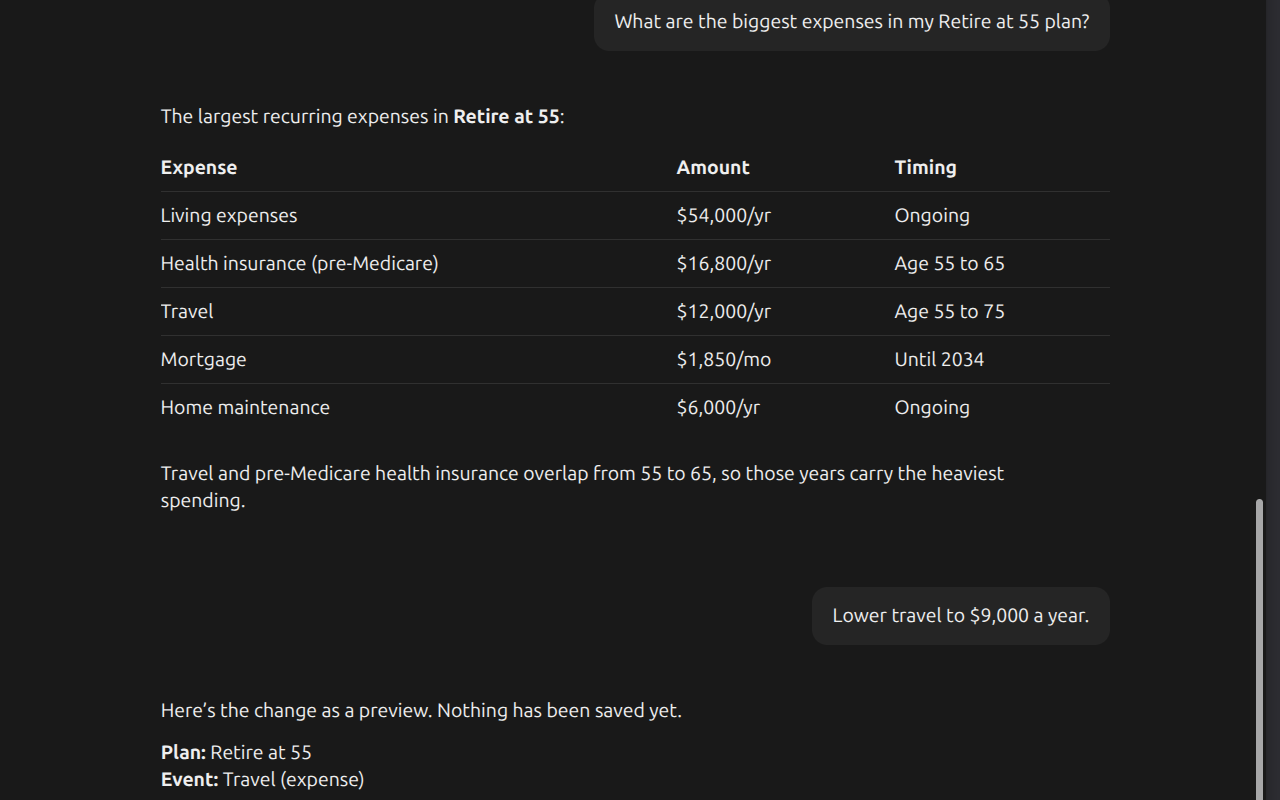
|
|
33
14
|
|
|
34
|
-
|
|
15
|
+
*Asking about a plan, then previewing a change before it is saved.*
|
|
35
16
|
|
|
36
|
-
|
|
37
|
-
2. An **AI assistant that supports MCP** (see above).
|
|
38
|
-
3. A **web browser** you already use: Chrome, Edge, Brave, or Firefox (version 140 or newer).
|
|
39
|
-
4. **Node.js** installed on your computer (version 20 or newer). If you don't have it, your assistant can help you install it, or download it from [nodejs.org](https://nodejs.org).
|
|
17
|
+
The assistant can look at your plan and walk through tradeoffs with you, and it changes things only when you say so. It starts read-only, previews each change before saving it, and backs up every change so it can be undone. Your API key stays on your computer.
|
|
40
18
|
|
|
41
19
|
---
|
|
42
20
|
|
|
43
|
-
##
|
|
21
|
+
## Get started
|
|
44
22
|
|
|
45
|
-
|
|
23
|
+
Paste this into your AI assistant:
|
|
46
24
|
|
|
47
25
|
> Please set up the ProjectionLab MCP server (the `projectionlab-mcp` npm
|
|
48
|
-
> package) for me. Follow the
|
|
49
|
-
> `https://github.com/Backroads4Me/projectionlab-mcp`.
|
|
50
|
-
> walk me through anything you need from me (like my
|
|
51
|
-
> and loading the browser extension) one step at
|
|
52
|
-
> mode until I say otherwise.
|
|
26
|
+
> package) for me. Follow the setup instructions at
|
|
27
|
+
> `https://github.com/Backroads4Me/projectionlab-mcp/blob/main/SETUP-FOR-AGENTS.md`.
|
|
28
|
+
> I'm not technical, so walk me through anything you need from me (like my
|
|
29
|
+
> ProjectionLab Plugin API key and loading the browser extension) one step at
|
|
30
|
+
> a time. Keep it in read-only mode until I say otherwise.
|
|
53
31
|
|
|
54
|
-
Your assistant
|
|
32
|
+
Your assistant installs the server, asks for your ProjectionLab Plugin API key, and walks you through a couple of short steps in your browser: loading a small helper extension and entering a connection code in its settings. When it's done, start asking questions about your plan.
|
|
55
33
|
|
|
56
34
|
If anything gets stuck, tell your assistant what you see on screen; it can troubleshoot from there.
|
|
57
35
|
|
|
58
|
-
|
|
59
|
-
|
|
60
|
-
## For your AI assistant
|
|
61
|
-
|
|
62
|
-
*(This section is written for the AI agent doing the install. If you're a person reading this, you can skip it. Your assistant follows these steps.)*
|
|
63
|
-
|
|
64
|
-
You are setting this up for a **non-technical user**. Explain each thing you need from them in plain language, one step at a time, and never ask them to do something you can do yourself.
|
|
65
|
-
|
|
66
|
-
**1. Get the user's Plugin API key.** Ask them to open ProjectionLab → Account Settings → Plugins, enable plugins, and copy their **Plugin API Key**. Do **not** invent one, and never print, log, or commit it.
|
|
67
|
-
|
|
68
|
-
**2. Store the key.** Write it to `~/.projectionlab-mcp/.env` as the line `PL_API_KEY=...` and make the file readable only by the user (`chmod 600`). Every MCP host on the machine reads this file, so the key lives in one place. Do not repeat the key back to the user. Writes stay disabled by default; do not set `PL_READ_ONLY=false` until the user has seen the tool working and explicitly asks.
|
|
69
|
-
|
|
70
|
-
**3. Register the server with the user's MCP host.** The server runs with `npx`, which needs Node.js 20 or newer:
|
|
71
|
-
```json
|
|
72
|
-
{
|
|
73
|
-
"mcpServers": {
|
|
74
|
-
"projectionlab": {
|
|
75
|
-
"command": "npx",
|
|
76
|
-
"args": ["-y", "projectionlab-mcp"]
|
|
77
|
-
}
|
|
78
|
-
}
|
|
79
|
-
}
|
|
80
|
-
```
|
|
81
|
-
The config location varies by host; see [Adding the server to your MCP host](#adding-the-server-to-your-mcp-host) for common ones. Have the user restart the host so it starts the server. On first start the server creates the browser connection token at `~/.projectionlab-mcp/ws-token`.
|
|
82
|
-
|
|
83
|
-
**4. Connect the browser.** The server reaches ProjectionLab through the user's own browser. Pick the path that fits:
|
|
84
|
-
|
|
85
|
-
- **Recommended: the browser extension** (persists across restarts). Download the zip for the user's browser from the [latest release](https://github.com/Backroads4Me/projectionlab-mcp/releases/latest) and unzip it. Then walk the user through loading it (this is a click-by-click browser task; describe exactly what they'll see):
|
|
86
|
-
- **Chrome / Edge / Brave:** open `chrome://extensions`, turn on "Developer mode" (top-right), click "Load unpacked", and choose the unzipped Chromium folder.
|
|
87
|
-
- **Firefox (140+):** open `about:debugging` → "This Firefox" → "Load Temporary Add-on", and choose `manifest.json` in the unzipped Firefox folder. Firefox removes temporary add-ons when it restarts.
|
|
88
|
-
Then have them open the extension's **options page** and enter the WebSocket **port** (default `8788`) and the **shared token** from `~/.projectionlab-mcp/ws-token`.
|
|
89
|
-
|
|
90
|
-
- **Quick alternative: no install.** Call the `projectionlab_get_bootstrap` tool, then have the user paste the returned snippet into their ProjectionLab tab's developer console (F12 → Console). It works the same way but must be re-pasted if they reload the page. Good for a first test drive.
|
|
91
|
-
|
|
92
|
-
**5. Verify.** Have the user open [ProjectionLab](https://app.projectionlab.com), log in, and confirm plugins are enabled. Then call `projectionlab_check_connection`; it should report all checks passing. Do this before any other tool call.
|
|
93
|
-
|
|
94
|
-
**6. Enabling changes (writes).** Leave everything in dry-run/read-only until the user explicitly asks to make changes. When they do: set `PL_READ_ONLY=false` in `~/.projectionlab-mcp/.env` or the host's `env` block, restart the host, and remember that every write still previews first (`confirm: true` required) and auto-snapshots so it can be rolled back. Reassure the user of this before the first change.
|
|
36
|
+
Prefer to set it up yourself? See **[Manual setup](https://github.com/Backroads4Me/projectionlab-mcp/blob/main/MANUAL-SETUP.md)**.
|
|
95
37
|
|
|
96
38
|
---
|
|
97
39
|
|
|
98
|
-
##
|
|
99
|
-
|
|
100
|
-
The rest of this document is for developers or advanced users. Everyday use needs none of it.
|
|
101
|
-
|
|
102
|
-
### How it works
|
|
103
|
-
|
|
104
|
-
ProjectionLab has no REST API, so the server reaches its browser-side `window.projectionlabPluginAPI` over a localhost WebSocket that a browser-side executor connects out to: the **extension** for normal use, or a pasted **bootstrap snippet** for a zero-install test. See **[HOW-IT-WORKS.md](HOW-IT-WORKS.md)** for the full architecture: the bridge design, wire protocol, extension internals, and safety model.
|
|
105
|
-
|
|
106
|
-
### Adding the server to your MCP host
|
|
107
|
-
|
|
108
|
-
The server is a standard stdio MCP server started with `npx -y projectionlab-mcp`. Put the key in `~/.projectionlab-mcp/.env` (see [Configuration](#configuration)) so no host config holds a secret.
|
|
109
|
-
|
|
110
|
-
**Claude Code:**
|
|
111
|
-
```bash
|
|
112
|
-
claude mcp add --scope user projectionlab -- npx -y projectionlab-mcp
|
|
113
|
-
```
|
|
114
|
-
|
|
115
|
-
**Claude Desktop** (`claude_desktop_config.json`) and other hosts that use the `mcpServers` JSON format:
|
|
116
|
-
```json
|
|
117
|
-
{
|
|
118
|
-
"mcpServers": {
|
|
119
|
-
"projectionlab": {
|
|
120
|
-
"command": "npx",
|
|
121
|
-
"args": ["-y", "projectionlab-mcp"]
|
|
122
|
-
}
|
|
123
|
-
}
|
|
124
|
-
}
|
|
125
|
-
```
|
|
126
|
-
|
|
127
|
-
**Hermes Agent** (`config.yaml` of the profile):
|
|
128
|
-
```yaml
|
|
129
|
-
mcp_servers:
|
|
130
|
-
projectionlab:
|
|
131
|
-
command: npx
|
|
132
|
-
args: ["-y", "projectionlab-mcp"]
|
|
133
|
-
enabled: true
|
|
134
|
-
```
|
|
40
|
+
## Safety
|
|
135
41
|
|
|
136
|
-
|
|
42
|
+
- **Read-only by default.** The assistant can read your plan but not change it until you set `PL_READ_ONLY=false`.
|
|
43
|
+
- **Preview before saving.** Every change is a preview until the assistant explicitly confirms it, and the assistant is instructed to show you the preview and ask first.
|
|
44
|
+
- **Undo.** Every confirmed change is backed up first, so it can be rolled back.
|
|
45
|
+
- **No overwriting your edits.** If a plan was saved in ProjectionLab after the assistant read it, the change is refused rather than overwriting your edit.
|
|
46
|
+
- **Stays on your computer.** Your API key and the connection token are stored only on your computer, and the browser connects only to the server running there.
|
|
137
47
|
|
|
138
|
-
|
|
48
|
+
Details are in the [safety model](https://github.com/Backroads4Me/projectionlab-mcp/blob/main/REFERENCE.md#safety-model) and [Privacy](https://github.com/Backroads4Me/projectionlab-mcp/blob/main/PRIVACY.md).
|
|
139
49
|
|
|
140
|
-
|
|
141
|
-
|
|
142
|
-
- **Server instructions**, sent in the MCP initialize result. Hosts that surface them give the model the core rules: check the connection first, the read-only/dry-run/confirm workflow, privacy.
|
|
143
|
-
- **The `projectionlab://guide` resource**, the full agent guide: setup walkthrough for each failed connection check, which tool answers which question, the change workflow, and privacy rules. `projectionlab_check_connection` points agents to it.
|
|
144
|
-
- **The `projectionlab` skill** at [`skills/projectionlab/SKILL.md`](skills/projectionlab/SKILL.md), the same guide in the Agent Skills format, for hosts that load skills (copy the folder into the host's skills directory).
|
|
145
|
-
|
|
146
|
-
### Manual setup from source
|
|
147
|
-
|
|
148
|
-
```bash
|
|
149
|
-
npm install
|
|
150
|
-
npm run build
|
|
151
|
-
cd extension && npm install && npm run build # build the extension
|
|
152
|
-
```
|
|
153
|
-
|
|
154
|
-
Register `node /absolute/path/to/projectionlab-mcp/dist/index.js` with your MCP host, load the built extension (`extension/dist/chromium` or `extension/dist/firefox`), configure its port + token on the options page, then run `projectionlab_check_connection`.
|
|
155
|
-
|
|
156
|
-
### Configuration
|
|
157
|
-
|
|
158
|
-
Each setting is read from the first of these that sets it:
|
|
159
|
-
|
|
160
|
-
1. The `env` block of the server entry in the MCP host's config.
|
|
161
|
-
2. `~/.projectionlab-mcp/.env`, shared by every MCP host on the machine.
|
|
162
|
-
3. `.env` at the package root, for a development checkout (copy `.env.example`).
|
|
163
|
-
|
|
164
|
-
The server starts without `PL_API_KEY` so it can tell the agent what is missing; tools that need the key return `API_KEY_MISSING` until it is set.
|
|
165
|
-
|
|
166
|
-
### Environment variables
|
|
167
|
-
|
|
168
|
-
| Variable | Required | Default | Description |
|
|
169
|
-
|---|---|---|---|
|
|
170
|
-
| `PL_API_KEY` | Yes | - | ProjectionLab Plugin API key; tools that reach the plan fail until it is set |
|
|
171
|
-
| `PL_WS_PORT` | No | `8788` | Localhost WebSocket port |
|
|
172
|
-
| `PL_WS_TOKEN` | No | auto-generated | Shared auth token; if unset, generated and saved to `~/.projectionlab-mcp/ws-token` |
|
|
173
|
-
| `PL_APP_URL` | No | `https://app.projectionlab.com` | ProjectionLab app URL |
|
|
174
|
-
| `PL_API_READY_TIMEOUT_MS` | No | `30000` | Timeout waiting for Plugin API to attach |
|
|
175
|
-
| `PL_EXPORT_CACHE_MS` | No | `90000` | How long a full export may be served from cache (writes always invalidate) |
|
|
176
|
-
| `PL_PRETTY_JSON` | No | `false` | Pretty-print JSON output (uses ~25–40% more tokens) |
|
|
177
|
-
| `PL_READ_ONLY` | No | `true` | Write/mutation tools are disabled unless this is exactly `false` |
|
|
178
|
-
| `PL_SNAPSHOT_DIR` | No | `~/.projectionlab-mcp/snapshots` | Directory for pre-mutation snapshots |
|
|
179
|
-
| `LOG_LEVEL` | No | `info` | Log verbosity (`debug`, `info`, `warn`, `error`) |
|
|
180
|
-
|
|
181
|
-
### Available tools
|
|
182
|
-
|
|
183
|
-
| Tool | Description | Mutates |
|
|
184
|
-
|---|---|---|
|
|
185
|
-
| `projectionlab_check_connection` | Verify browser + API connectivity | No |
|
|
186
|
-
| `projectionlab_get_bootstrap` | Return a console snippet to connect a ProjectionLab tab | No |
|
|
187
|
-
| `projectionlab_describe_plugin_api` | Describe the available Plugin API surface | No |
|
|
188
|
-
| `projectionlab_describe_schema` | Describe the data schema (plan names, account IDs) | No |
|
|
189
|
-
| `projectionlab_export_data` | Export full plan state as JSON | No |
|
|
190
|
-
| `projectionlab_get_summary` | Inventory Current Finances balances and current net worth (not projected outcomes) | No |
|
|
191
|
-
| `projectionlab_get_plan` | Retrieve a single plan | No |
|
|
192
|
-
| `projectionlab_get_plan_section` | Retrieve a plan section; supports event/path filters and typed field-path listing | No |
|
|
193
|
-
| `projectionlab_get_plan_settings` | List discrete plan settings as path-addressable values | No |
|
|
194
|
-
| `projectionlab_get_current_finances` | Get Current Finances or list typed paths for one account | No |
|
|
195
|
-
| `projectionlab_update_account` | Patch one Current Finances account by top-level fields or nested dot paths | Yes |
|
|
196
|
-
| `projectionlab_update_plan_event` | Patch one event by top-level fields or nested dot paths | Yes |
|
|
197
|
-
| `projectionlab_update_plan_settings` | Patch existing assumptions, Monte Carlo, or withdrawal settings by path | Yes |
|
|
198
|
-
| `projectionlab_update_plan_section` | Replace a whole section of a plan (dry-run by default) | Yes |
|
|
199
|
-
| `projectionlab_clone_plan` | Copy a plan to a new, named plan for what-if scenarios | Yes |
|
|
200
|
-
| `projectionlab_list_snapshots` | List saved pre-mutation snapshots | No |
|
|
201
|
-
| `projectionlab_restore_current_finances` | Restore Current Finances from snapshot | Yes |
|
|
202
|
-
| `projectionlab_restore_plans` | Restore Plans from snapshot | Yes |
|
|
203
|
-
| `projectionlab_restore_progress` | Restore Progress from snapshot | Yes |
|
|
204
|
-
| `projectionlab_restore_settings` | Restore Settings from snapshot | Yes |
|
|
205
|
-
| `projectionlab_rollback` | Roll back to a previous snapshot | Yes |
|
|
206
|
-
|
|
207
|
-
### Resources
|
|
208
|
-
|
|
209
|
-
| URI | Description |
|
|
210
|
-
|---|---|
|
|
211
|
-
| `projectionlab://plan-data` | Full export of all plans/finances/progress/settings (refreshed per access) |
|
|
212
|
-
| `projectionlab://summary` | High-level snapshot: net worth, account breakdown, plan count |
|
|
213
|
-
| `projectionlab://knowledge` | Curated ProjectionLab data-model + FIRE/tax reference (static) |
|
|
214
|
-
| `projectionlab://guide` | Agent guide: setup walkthrough, tool selection, change workflow, privacy rules (static) |
|
|
215
|
-
|
|
216
|
-
### Prompts
|
|
217
|
-
|
|
218
|
-
| Prompt | Purpose |
|
|
219
|
-
|---|---|
|
|
220
|
-
| `analyze-plan` | Structured analysis: cash flow, tax, risk, withdrawal, estate |
|
|
221
|
-
| `compare-plans` | Side-by-side comparison of two plans |
|
|
222
|
-
| `optimize-tax` | Roth conversion / bracket / IRMAA / gain-harvesting review |
|
|
223
|
-
| `review-assumptions` | Stress-test returns, inflation, healthcare, longevity |
|
|
224
|
-
|
|
225
|
-
### Safety model
|
|
226
|
-
|
|
227
|
-
Write operations (`update_*`, `restore_*`, `clone_plan`) default to **dry-run mode**. Pass `confirm: true` to execute. Before any confirmed mutation, the server automatically snapshots the affected data section to disk so you can roll back with `projectionlab_rollback`. Writes are disabled entirely unless `PL_READ_ONLY=false`.
|
|
228
|
-
|
|
229
|
-
Every write that replaces the plans array re-reads the plans just before writing and refuses with `PLAN_CONFLICT` if any plan was added, removed, or saved in ProjectionLab since the tool read them, so an edit made in the ProjectionLab UI is never silently overwritten. `projectionlab_update_plan_section` also returns a `planVersion` in its dry run; pass it back as `expectedPlanVersion` when confirming to refuse the write if the plan was saved after the preview.
|
|
230
|
-
|
|
231
|
-
For a small assumptions or strategy change, first call
|
|
232
|
-
`projectionlab_get_plan_settings` with the plan name. It returns the current
|
|
233
|
-
`variables`, `montecarlo`, and `withdrawalStrategy` values as dot paths with
|
|
234
|
-
their JSON types. Preview a path-level patch with
|
|
235
|
-
`projectionlab_update_plan_settings`, for example:
|
|
236
|
-
|
|
237
|
-
```json
|
|
238
|
-
{
|
|
239
|
-
"planIdentifier": "Retire at 55",
|
|
240
|
-
"section": "variables",
|
|
241
|
-
"changes": {
|
|
242
|
-
"showFutureDollars": true
|
|
243
|
-
}
|
|
244
|
-
}
|
|
245
|
-
```
|
|
246
|
-
|
|
247
|
-
The update tool preserves sibling settings, rejects unknown paths and JSON type
|
|
248
|
-
changes, and still requires `"confirm": true` before it sends a mutation.
|
|
249
|
-
Advanced inflation, stock-growth, dividend-yield, bond-growth, and bond-yield
|
|
250
|
-
schedules expose both the complete ordered array and indexed control-point
|
|
251
|
-
fields, so one existing year or rate can be adjusted without replacing the
|
|
252
|
-
rest of the schedule.
|
|
253
|
-
|
|
254
|
-
Event forms use the same path workflow. Fetch one event with
|
|
255
|
-
`projectionlab_get_plan_section` using its `eventIdentifier` and
|
|
256
|
-
`"listPaths": true`, then pass selected paths to
|
|
257
|
-
`projectionlab_update_plan_event` as `pathChanges`. The older `patch` input
|
|
258
|
-
remains available for shallow top-level changes.
|
|
259
|
-
|
|
260
|
-
Current Finances accounts also support targeted discovery and nested patches.
|
|
261
|
-
Call `projectionlab_get_current_finances` with an exact `accountId` and
|
|
262
|
-
`"listPaths": true`, then pass selected paths to
|
|
263
|
-
`projectionlab_update_account` as `pathChanges`. The legacy `data` input
|
|
264
|
-
remains available for top-level fields. Dry runs validate the account and
|
|
265
|
-
return before/after values as a safety diff; confirmed no-ops do not create a
|
|
266
|
-
snapshot or send a mutation.
|
|
267
|
-
|
|
268
|
-
### Evaluating plan impact
|
|
269
|
-
|
|
270
|
-
Projected ending net worth and Chance of Success are the primary outcome
|
|
271
|
-
metrics for comparing a plan before and after a change. Current Finances
|
|
272
|
-
balances are inputs. Mutation before/after values verify that the requested
|
|
273
|
-
input changed, but they do not measure the plan's financial impact.
|
|
274
|
-
|
|
275
|
-
ProjectionLab's Plugin API currently exposes plan definitions and simulation
|
|
276
|
-
settings, but not a supported method to recalculate and retrieve projected
|
|
277
|
-
ending net worth or a completed Chance of Success result. After a confirmed
|
|
278
|
-
mutation, re-read the targeted input through MCP for verification, then
|
|
279
|
-
recalculate the plan and run Chance of Success in the ProjectionLab UI before
|
|
280
|
-
drawing a conclusion.
|
|
281
|
-
|
|
282
|
-
### Secret handling
|
|
283
|
-
|
|
284
|
-
The Plugin API key stays on your computer: it is never logged, and the browser side never stores it. The WebSocket accepts only local connections that present a shared token. See [Security in HOW-IT-WORKS.md](HOW-IT-WORKS.md#4-security) for the details.
|
|
285
|
-
|
|
286
|
-
### After code changes
|
|
287
|
-
|
|
288
|
-
This server runs over stdio; the host process keeps compiled `dist/` in memory.
|
|
50
|
+
---
|
|
289
51
|
|
|
290
|
-
|
|
291
|
-
npm run build
|
|
292
|
-
# Then restart your MCP host
|
|
293
|
-
projectionlab_check_connection # verify before other operations
|
|
294
|
-
```
|
|
52
|
+
## More documentation
|
|
295
53
|
|
|
296
|
-
|
|
54
|
+
- **[Manual setup](https://github.com/Backroads4Me/projectionlab-mcp/blob/main/MANUAL-SETUP.md)**: set everything up yourself, step by step.
|
|
55
|
+
- **[Technical reference](https://github.com/Backroads4Me/projectionlab-mcp/blob/main/REFERENCE.md)**: host configuration, environment variables, tools, resources, prompts, the safety model, and building from source.
|
|
56
|
+
- **[How it works](https://github.com/Backroads4Me/projectionlab-mcp/blob/main/HOW-IT-WORKS.md)**: the architecture, wire protocol, extension internals, and security.
|
|
57
|
+
- **[Privacy](https://github.com/Backroads4Me/projectionlab-mcp/blob/main/PRIVACY.md)**: what the extension and server access and store.
|
|
58
|
+
- **[Setup for AI assistants](https://github.com/Backroads4Me/projectionlab-mcp/blob/main/SETUP-FOR-AGENTS.md)**: the install steps your assistant follows.
|
package/REFERENCE.md
ADDED
|
@@ -0,0 +1,212 @@
|
|
|
1
|
+
# Technical reference
|
|
2
|
+
|
|
3
|
+
For developers and advanced users. Everyday use needs none of it; the
|
|
4
|
+
[README](README.md) covers setup.
|
|
5
|
+
|
|
6
|
+
## How it works
|
|
7
|
+
|
|
8
|
+
ProjectionLab has no REST API, so the server reaches its browser-side `window.projectionlabPluginAPI` over a localhost WebSocket that a browser-side executor connects out to: the **extension** for normal use, or a pasted **bootstrap snippet** for a zero-install test. See **[HOW-IT-WORKS.md](HOW-IT-WORKS.md)** for the full architecture: the bridge design, wire protocol, extension internals, and safety model.
|
|
9
|
+
|
|
10
|
+
## Adding the server to your MCP host
|
|
11
|
+
|
|
12
|
+
The server is a standard stdio MCP server started with `npx -y projectionlab-mcp`. Put the key in `~/.projectionlab-mcp/.env` (see [Configuration](#configuration)) so no host config holds a secret.
|
|
13
|
+
|
|
14
|
+
**Claude Code:**
|
|
15
|
+
```bash
|
|
16
|
+
claude mcp add --scope user projectionlab -- npx -y projectionlab-mcp
|
|
17
|
+
```
|
|
18
|
+
|
|
19
|
+
**Claude Desktop** (`claude_desktop_config.json`) and other hosts that use the `mcpServers` JSON format:
|
|
20
|
+
```json
|
|
21
|
+
{
|
|
22
|
+
"mcpServers": {
|
|
23
|
+
"projectionlab": {
|
|
24
|
+
"command": "npx",
|
|
25
|
+
"args": ["-y", "projectionlab-mcp"]
|
|
26
|
+
}
|
|
27
|
+
}
|
|
28
|
+
}
|
|
29
|
+
```
|
|
30
|
+
|
|
31
|
+
**Hermes Agent** (`config.yaml` of the profile):
|
|
32
|
+
```yaml
|
|
33
|
+
mcp_servers:
|
|
34
|
+
projectionlab:
|
|
35
|
+
command: npx
|
|
36
|
+
args: ["-y", "projectionlab-mcp"]
|
|
37
|
+
enabled: true
|
|
38
|
+
```
|
|
39
|
+
|
|
40
|
+
Only one server instance can hold the WebSocket port. When a second host starts the server while another instance holds it, the second retries every few seconds and takes over when the first exits; `projectionlab_check_connection` explains the state in the meantime. To run both at once, give one of them its own `PL_WS_PORT` in its `env` block.
|
|
41
|
+
|
|
42
|
+
## Agent instructions
|
|
43
|
+
|
|
44
|
+
The server carries its own instructions for the agents that use it, so no per-host prompt setup is needed:
|
|
45
|
+
|
|
46
|
+
- **Server instructions**, sent in the MCP initialize result. Hosts that surface them give the model the core rules: check the connection first, the read-only/dry-run/confirm workflow, privacy.
|
|
47
|
+
- **The `projectionlab://guide` resource**, the full agent guide: setup walkthrough for each failed connection check, which tool answers which question, the change workflow, and privacy rules. `projectionlab_check_connection` points agents to it.
|
|
48
|
+
- **The `projectionlab` skill** at [`skills/projectionlab/SKILL.md`](skills/projectionlab/SKILL.md), the same guide in the Agent Skills format, for hosts that load skills (copy the folder into the host's skills directory).
|
|
49
|
+
|
|
50
|
+
## Building from source
|
|
51
|
+
|
|
52
|
+
```bash
|
|
53
|
+
git clone https://github.com/Backroads4Me/projectionlab-mcp.git
|
|
54
|
+
cd projectionlab-mcp
|
|
55
|
+
npm install
|
|
56
|
+
npm run build
|
|
57
|
+
cd extension && npm install && npm run build && cd ..
|
|
58
|
+
```
|
|
59
|
+
|
|
60
|
+
Save the Plugin API key as `PL_API_KEY=...` in `~/.projectionlab-mcp/.env`
|
|
61
|
+
(see [Manual setup](MANUAL-SETUP.md) for where to find it). Register
|
|
62
|
+
`node /absolute/path/to/projectionlab-mcp/dist/index.js` with your MCP host
|
|
63
|
+
instead of `npx -y projectionlab-mcp`, and restart the host; on first start the
|
|
64
|
+
server creates the token at `~/.projectionlab-mcp/ws-token`. Load the built
|
|
65
|
+
extension from `extension/dist/chromium` or `extension/dist/firefox`, enter
|
|
66
|
+
port `8788` and that token on its options page, then run
|
|
67
|
+
`projectionlab_check_connection`.
|
|
68
|
+
|
|
69
|
+
## Configuration
|
|
70
|
+
|
|
71
|
+
Each setting is read from the first of these that sets it:
|
|
72
|
+
|
|
73
|
+
1. The `env` block of the server entry in the MCP host's config.
|
|
74
|
+
2. `~/.projectionlab-mcp/.env`, shared by every MCP host on the machine.
|
|
75
|
+
3. `.env` at the package root, for a development checkout (copy `.env.example`).
|
|
76
|
+
|
|
77
|
+
The server starts without `PL_API_KEY` so it can tell the agent what is missing; tools that need the key return `API_KEY_MISSING` until it is set.
|
|
78
|
+
|
|
79
|
+
## Environment variables
|
|
80
|
+
|
|
81
|
+
| Variable | Required | Default | Description |
|
|
82
|
+
|---|---|---|---|
|
|
83
|
+
| `PL_API_KEY` | Yes | - | ProjectionLab Plugin API key; tools that reach the plan fail until it is set |
|
|
84
|
+
| `PL_WS_PORT` | No | `8788` | Localhost WebSocket port |
|
|
85
|
+
| `PL_WS_TOKEN` | No | auto-generated | Shared auth token; if unset, generated and saved to `~/.projectionlab-mcp/ws-token` |
|
|
86
|
+
| `PL_APP_URL` | No | `https://app.projectionlab.com` | ProjectionLab app URL |
|
|
87
|
+
| `PL_API_READY_TIMEOUT_MS` | No | `30000` | Timeout waiting for Plugin API to attach |
|
|
88
|
+
| `PL_EXPORT_CACHE_MS` | No | `90000` | How long a full export may be served from cache (writes always invalidate) |
|
|
89
|
+
| `PL_PRETTY_JSON` | No | `false` | Pretty-print JSON output (uses ~25–40% more tokens) |
|
|
90
|
+
| `PL_READ_ONLY` | No | `true` | Write/mutation tools are disabled unless this is exactly `false` |
|
|
91
|
+
| `PL_SNAPSHOT_DIR` | No | `~/.projectionlab-mcp/snapshots` | Directory for pre-mutation snapshots |
|
|
92
|
+
| `LOG_LEVEL` | No | `info` | Log verbosity (`debug`, `info`, `warn`, `error`) |
|
|
93
|
+
|
|
94
|
+
## Available tools
|
|
95
|
+
|
|
96
|
+
| Tool | Description | Mutates |
|
|
97
|
+
|---|---|---|
|
|
98
|
+
| `projectionlab_check_connection` | Verify browser + API connectivity | No |
|
|
99
|
+
| `projectionlab_get_bootstrap` | Return a console snippet to connect a ProjectionLab tab | No |
|
|
100
|
+
| `projectionlab_describe_plugin_api` | Describe the available Plugin API surface | No |
|
|
101
|
+
| `projectionlab_describe_schema` | Describe the data schema (plan names, account IDs) | No |
|
|
102
|
+
| `projectionlab_export_data` | Export full plan state as JSON | No |
|
|
103
|
+
| `projectionlab_get_summary` | Inventory Current Finances balances and current net worth (not projected outcomes) | No |
|
|
104
|
+
| `projectionlab_get_plan` | Retrieve a single plan | No |
|
|
105
|
+
| `projectionlab_get_plan_section` | Retrieve a plan section; supports event/path filters and typed field-path listing | No |
|
|
106
|
+
| `projectionlab_get_plan_settings` | List discrete plan settings as path-addressable values | No |
|
|
107
|
+
| `projectionlab_get_current_finances` | Get Current Finances or list typed paths for one account | No |
|
|
108
|
+
| `projectionlab_update_account` | Patch one Current Finances account by top-level fields or nested dot paths | Yes |
|
|
109
|
+
| `projectionlab_update_plan_event` | Patch one event by top-level fields or nested dot paths | Yes |
|
|
110
|
+
| `projectionlab_update_plan_settings` | Patch existing assumptions, Monte Carlo, or withdrawal settings by path | Yes |
|
|
111
|
+
| `projectionlab_update_plan_section` | Replace a whole section of a plan (dry-run by default) | Yes |
|
|
112
|
+
| `projectionlab_clone_plan` | Copy a plan to a new, named plan for what-if scenarios | Yes |
|
|
113
|
+
| `projectionlab_delete_plan` | Delete a plan by exact ID; refuses the last plan (dry-run by default) | Yes |
|
|
114
|
+
| `projectionlab_list_snapshots` | List saved pre-mutation snapshots | No |
|
|
115
|
+
| `projectionlab_diff` | Field-level changes between a snapshot and another snapshot or the live data, or between two plans (`planA` and `planB`) | No |
|
|
116
|
+
| `projectionlab_restore_current_finances` | Restore Current Finances from snapshot | Yes |
|
|
117
|
+
| `projectionlab_restore_plans` | Restore Plans from snapshot | Yes |
|
|
118
|
+
| `projectionlab_restore_progress` | Restore Progress from snapshot | Yes |
|
|
119
|
+
| `projectionlab_restore_settings` | Restore Settings from snapshot | Yes |
|
|
120
|
+
| `projectionlab_rollback` | Roll back to a previous snapshot | Yes |
|
|
121
|
+
|
|
122
|
+
## Resources
|
|
123
|
+
|
|
124
|
+
| URI | Description |
|
|
125
|
+
|---|---|
|
|
126
|
+
| `projectionlab://plan-data` | Full export of all plans/finances/progress/settings (refreshed per access) |
|
|
127
|
+
| `projectionlab://summary` | High-level snapshot: net worth, account breakdown, plan count |
|
|
128
|
+
| `projectionlab://knowledge` | Curated ProjectionLab data-model + FIRE/tax reference (static) |
|
|
129
|
+
| `projectionlab://data-model` | Field meanings, units, and allowed values for `listPaths` writes, version-stamped to ProjectionLab 4.6.0 (static) |
|
|
130
|
+
| `projectionlab://guide` | Agent guide: setup walkthrough, tool selection, change workflow, privacy rules (static) |
|
|
131
|
+
|
|
132
|
+
## Prompts
|
|
133
|
+
|
|
134
|
+
| Prompt | Purpose |
|
|
135
|
+
|---|---|
|
|
136
|
+
| `analyze-plan` | Structured analysis: cash flow, tax, risk, withdrawal, estate |
|
|
137
|
+
| `compare-plans` | Side-by-side comparison of two plans |
|
|
138
|
+
| `optimize-tax` | Roth conversion / bracket / IRMAA / gain-harvesting review |
|
|
139
|
+
| `review-assumptions` | Stress-test returns, inflation, healthcare, longevity |
|
|
140
|
+
|
|
141
|
+
## Safety model
|
|
142
|
+
|
|
143
|
+
Write operations (`update_*`, `restore_*`, `clone_plan`, `delete_plan`) default to **dry-run mode**. Pass `confirm: true` to execute. Before any confirmed mutation, the server automatically snapshots the affected data section to disk so you can roll back with `projectionlab_rollback`. Writes are disabled entirely unless `PL_READ_ONLY=false`.
|
|
144
|
+
|
|
145
|
+
Every write that replaces the plans array re-reads the plans just before writing and refuses with `PLAN_CONFLICT` if any plan was added, removed, or saved in ProjectionLab since the tool read them, so an edit made in the ProjectionLab UI is never silently overwritten. `projectionlab_update_plan_section` also returns a `planVersion` in its dry run; pass it back as `expectedPlanVersion` when confirming to refuse the write if the plan was saved after the preview.
|
|
146
|
+
|
|
147
|
+
For a small assumptions or strategy change, first call
|
|
148
|
+
`projectionlab_get_plan_settings` with the plan name. It returns the current
|
|
149
|
+
`variables`, `montecarlo`, and `withdrawalStrategy` values as dot paths with
|
|
150
|
+
their JSON types. Preview a path-level patch with
|
|
151
|
+
`projectionlab_update_plan_settings`, for example:
|
|
152
|
+
|
|
153
|
+
```json
|
|
154
|
+
{
|
|
155
|
+
"planIdentifier": "Retire at 55",
|
|
156
|
+
"section": "variables",
|
|
157
|
+
"changes": {
|
|
158
|
+
"showFutureDollars": true
|
|
159
|
+
}
|
|
160
|
+
}
|
|
161
|
+
```
|
|
162
|
+
|
|
163
|
+
The update tool preserves sibling settings, rejects unknown paths and JSON type
|
|
164
|
+
changes, and still requires `"confirm": true` before it sends a mutation.
|
|
165
|
+
Advanced inflation, stock-growth, dividend-yield, bond-growth, and bond-yield
|
|
166
|
+
schedules expose both the complete ordered array and indexed control-point
|
|
167
|
+
fields, so one existing year or rate can be adjusted without replacing the
|
|
168
|
+
rest of the schedule.
|
|
169
|
+
|
|
170
|
+
Event forms use the same path workflow. Fetch one event with
|
|
171
|
+
`projectionlab_get_plan_section` using its `eventIdentifier` and
|
|
172
|
+
`"listPaths": true`, then pass selected paths to
|
|
173
|
+
`projectionlab_update_plan_event` as `pathChanges`. The older `patch` input
|
|
174
|
+
remains available for shallow top-level changes.
|
|
175
|
+
|
|
176
|
+
Current Finances accounts also support targeted discovery and nested patches.
|
|
177
|
+
Call `projectionlab_get_current_finances` with an exact `accountId` and
|
|
178
|
+
`"listPaths": true`, then pass selected paths to
|
|
179
|
+
`projectionlab_update_account` as `pathChanges`. The legacy `data` input
|
|
180
|
+
remains available for top-level fields. Dry runs validate the account and
|
|
181
|
+
return before/after values as a safety diff; confirmed no-ops do not create a
|
|
182
|
+
snapshot or send a mutation.
|
|
183
|
+
|
|
184
|
+
## Evaluating plan impact
|
|
185
|
+
|
|
186
|
+
Projected ending net worth and Chance of Success are the primary outcome
|
|
187
|
+
metrics for comparing a plan before and after a change. Current Finances
|
|
188
|
+
balances are inputs. Mutation before/after values verify that the requested
|
|
189
|
+
input changed, but they do not measure the plan's financial impact.
|
|
190
|
+
|
|
191
|
+
ProjectionLab's Plugin API currently exposes plan definitions and simulation
|
|
192
|
+
settings, but not a supported method to recalculate and retrieve projected
|
|
193
|
+
ending net worth or a completed Chance of Success result. After a confirmed
|
|
194
|
+
mutation, re-read the targeted input through MCP for verification, then
|
|
195
|
+
recalculate the plan and run Chance of Success in the ProjectionLab UI before
|
|
196
|
+
drawing a conclusion.
|
|
197
|
+
|
|
198
|
+
## Secret handling
|
|
199
|
+
|
|
200
|
+
The Plugin API key stays on your computer: it is never logged, and the browser side never stores it. The WebSocket accepts only local connections that present a shared token. See [Security in HOW-IT-WORKS.md](HOW-IT-WORKS.md#4-security) for the details.
|
|
201
|
+
|
|
202
|
+
## After code changes
|
|
203
|
+
|
|
204
|
+
This server runs over stdio; the host process keeps compiled `dist/` in memory.
|
|
205
|
+
|
|
206
|
+
```bash
|
|
207
|
+
npm run build
|
|
208
|
+
# Then restart your MCP host
|
|
209
|
+
projectionlab_check_connection # verify before other operations
|
|
210
|
+
```
|
|
211
|
+
|
|
212
|
+
With the extension the browser side reconnects on its own, so you only restart the MCP host. If you change extension source, rebuild it (`cd extension && npm run build`) and reload it in the browser.
|