project-compass 3.6.3 → 3.6.5
This diff represents the content of publicly available package versions that have been released to one of the supported registries. The information contained in this diff is provided for informational purposes only and reflects changes between package versions as they appear in their respective public registries.
- package/README.md +35 -0
- package/package.json +1 -1
package/README.md
CHANGED
|
@@ -28,6 +28,7 @@ npm install -g project-compass
|
|
|
28
28
|
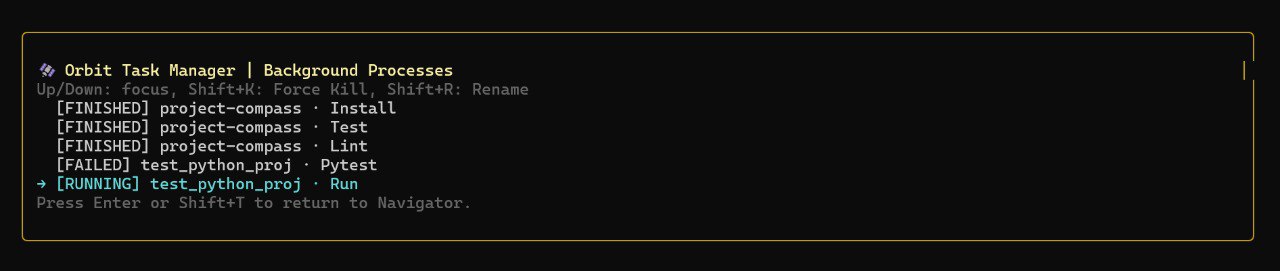
- **Background Orchestration**: Keep tasks running while you navigate the rest of your workspace.
|
|
29
29
|
- **Process Management**: Monitor status (Running, Finished, Failed, Killed) and forcefully terminate processes with `Shift+K`.
|
|
30
30
|
- **Task Identity**: Rename tasks on the fly with `Shift+R` to keep your workspace organized.
|
|
31
|
+
- **Cross-Platform Safety**: Automatically handles process signaling for both Unix (SIGKILL) and Windows (taskkill) to ensure clean exits.
|
|
31
32
|
|
|
32
33
|
|
|
33
34
|
|
|
@@ -72,6 +73,40 @@ npm install -g project-compass
|
|
|
72
73
|
|
|
73
74
|

|
|
74
75
|
|
|
76
|
+
## ⚙️ Configuration & Customization
|
|
77
|
+
|
|
78
|
+
Project Compass is designed to be personalized. All settings and custom commands are stored in a local JSON file.
|
|
79
|
+
|
|
80
|
+
- **Linux/macOS**: `~/.project-compass/config.json`
|
|
81
|
+
- **Windows**: `C:\Users\<YourUser>\.project-compass\config.json`
|
|
82
|
+
|
|
83
|
+
### 🛠️ Adding Custom Commands
|
|
84
|
+
You can add your own project-specific commands directly within the app by pressing **Shift+C** in the Detail View. Use the format `Label|Command` (e.g., `Deploy|npm run deploy`).
|
|
85
|
+
|
|
86
|
+
### 📁 Manual Config Structure
|
|
87
|
+
If you prefer manual editing, the `config.json` follows this structure:
|
|
88
|
+
|
|
89
|
+
```json
|
|
90
|
+
{
|
|
91
|
+
"showArtBoard": true,
|
|
92
|
+
"showHelpCards": false,
|
|
93
|
+
"showStructureGuide": false,
|
|
94
|
+
"customCommands": {
|
|
95
|
+
"/path/to/your/project": [
|
|
96
|
+
{
|
|
97
|
+
"label": "Build Production",
|
|
98
|
+
"command": ["npm", "run", "build", "--prod"]
|
|
99
|
+
}
|
|
100
|
+
]
|
|
101
|
+
}
|
|
102
|
+
}
|
|
103
|
+
```
|
|
104
|
+
|
|
105
|
+
- `showArtBoard/HelpCards/Structure`: Persistence for your UI visibility preferences.
|
|
106
|
+
- `customCommands`: A map of absolute project paths to arrays of command objects.
|
|
107
|
+
|
|
108
|
+
---
|
|
109
|
+
|
|
75
110
|
## 🚀 Vision
|
|
76
111
|
Project Compass is designed to be the "Last Terminal Tool" you ever need to open. It bridges the gap between raw CLI commands and full IDEs, giving you a professional, reactive cockpit for all your development work.
|
|
77
112
|
|