procdeck 0.5.0 → 1.0.0
This diff represents the content of publicly available package versions that have been released to one of the supported registries. The information contained in this diff is provided for informational purposes only and reflects changes between package versions as they appear in their respective public registries.
package/readme.md
CHANGED
|
@@ -1,156 +1,148 @@
|
|
|
1
1
|
# procdeck
|
|
2
2
|
|
|
3
|
-
|
|
4
|
-
|
|
5
|
-
the two problems terminal multiplexers can't touch: **port conflicts** and **remembering
|
|
6
|
-
which port is which**.
|
|
3
|
+
[](https://www.npmjs.com/package/procdeck)
|
|
4
|
+
[](https://github.com/kondaurovDev/procdeck/actions/workflows/build.yml)
|
|
7
5
|
|
|
6
|
+
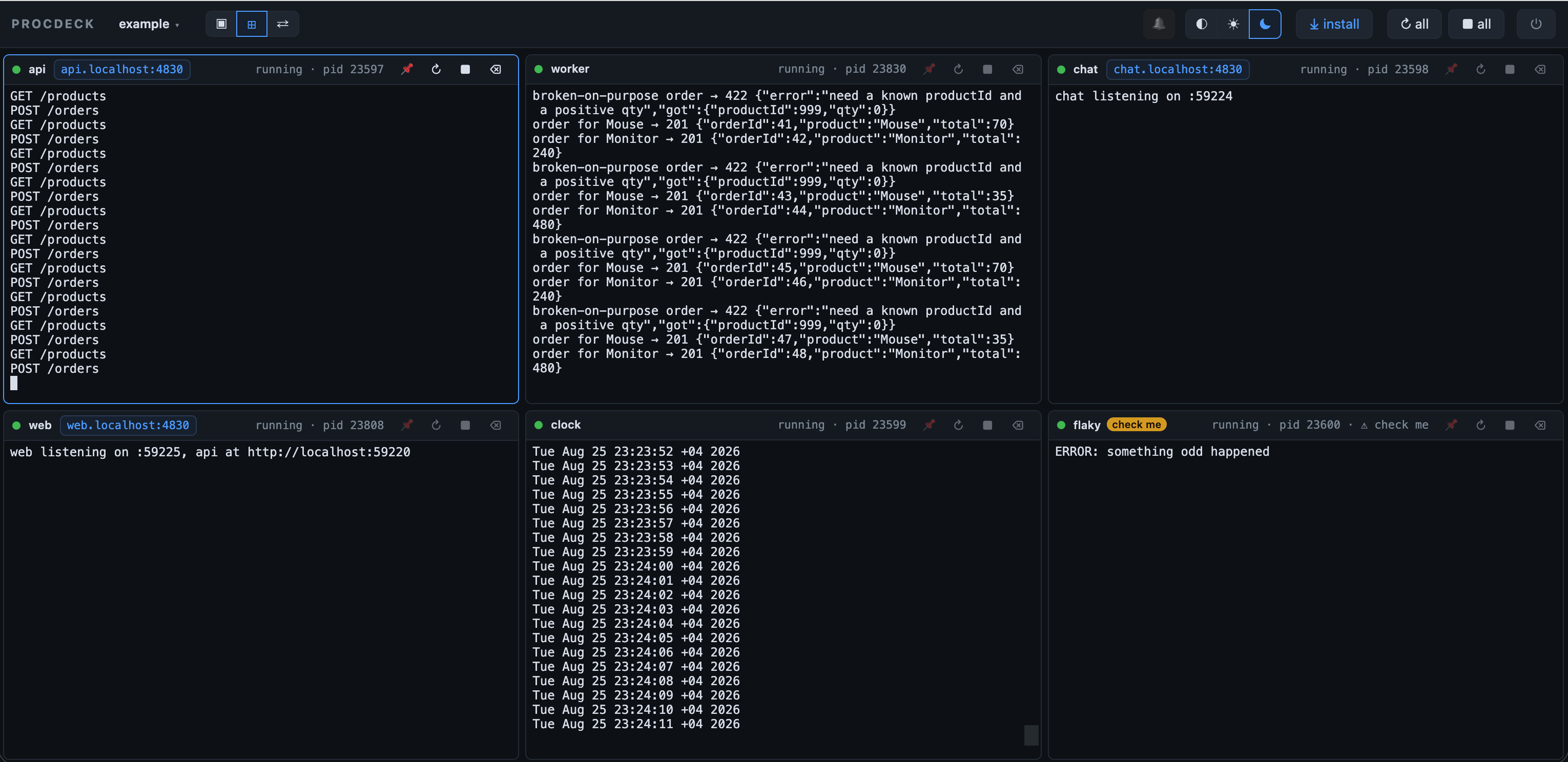
Run your whole dev stack with one command — and actually see what it's doing.
|
|
7
|
+
|
|
8
|
+
|
|
9
|
+
|
|
10
|
+
procdeck is four tools in one ~2 MB package — the process runner, the port
|
|
11
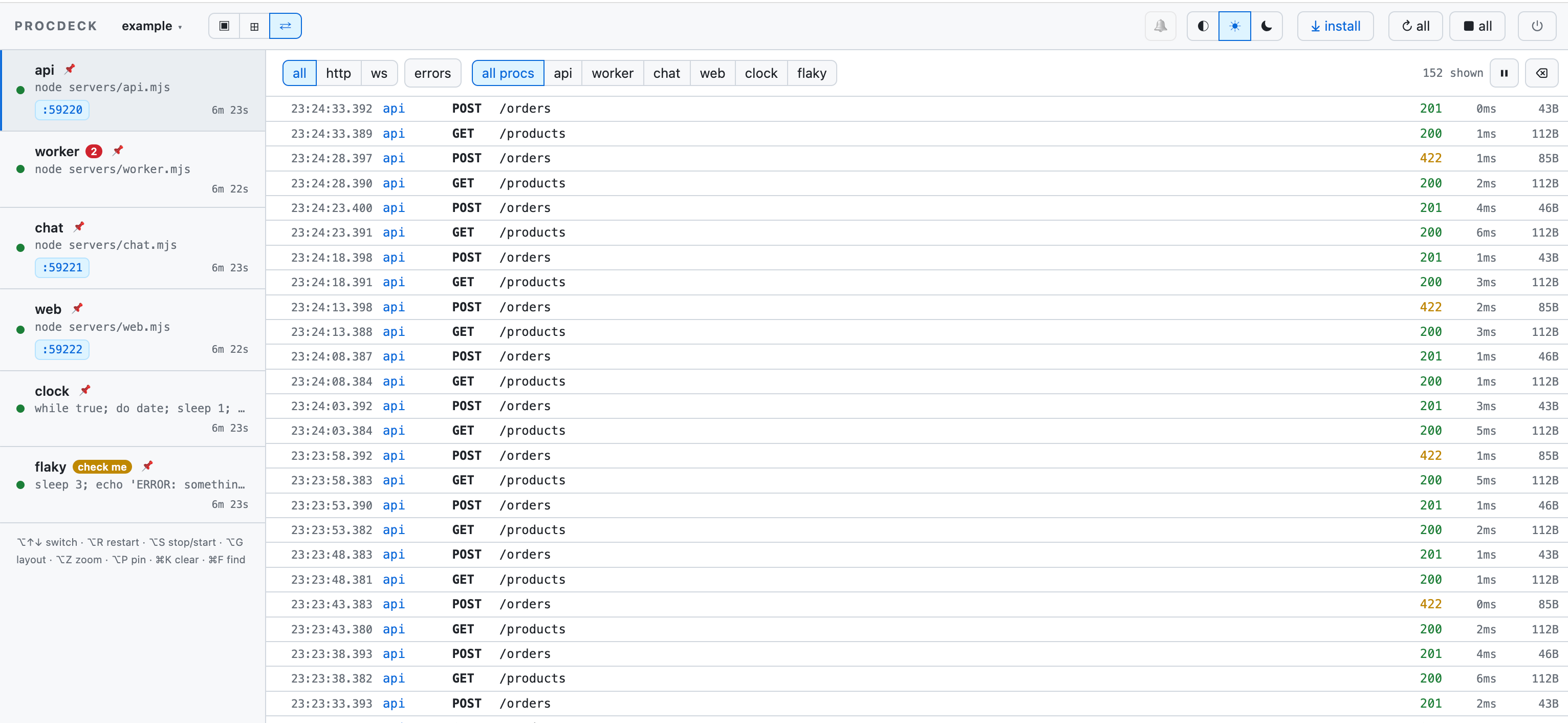
|
+
allocator, the log viewer and the network tab of your dev environment:
|
|
12
|
+
|
|
13
|
+
- **Runs everything.** Every proc is a real terminal in a browser tab — and
|
|
14
|
+
your own terminal is free again.
|
|
15
|
+
- **Hands out ports.** `${port}` is a free port, wired to whoever needs it —
|
|
16
|
+
no hardcoded numbers, no collisions — and `api.localhost:4820` always
|
|
17
|
+
reaches the right one.
|
|
18
|
+
- **Sees the traffic.** The HTTP and WebSocket requests _between_ your
|
|
19
|
+
services — the half a browser's DevTools never shows.
|
|
20
|
+
- **Answers from the CLI.** `procdeck logs --since-mark fix`, `http --digest`,
|
|
21
|
+
`status --json` — for you, or for a coding agent over MCP.
|
|
22
|
+
|
|
23
|
+
## Quick start
|
|
24
|
+
|
|
25
|
+
```sh
|
|
26
|
+
npx procdeck init # writes procdeck.config.json from your workspace's dev scripts
|
|
27
|
+
npx procdeck # starts the deck in the background and opens the UI
|
|
8
28
|
```
|
|
9
|
-
|
|
10
|
-
|
|
11
|
-
|
|
12
|
-
|
|
13
|
-
|
|
14
|
-
|
|
15
|
-
|
|
29
|
+
|
|
30
|
+
The UI opens at <http://localhost:4820> and your terminal is free again.
|
|
31
|
+
`procdeck down` stops everything. Requires **Node ≥ 22**, macOS or Linux.
|
|
32
|
+
|
|
33
|
+
Prefer it in the project (and you do, if you want the config in TypeScript):
|
|
34
|
+
|
|
35
|
+
```sh
|
|
36
|
+
pnpm add -D procdeck # npm i -D procdeck · bun add -d procdeck
|
|
16
37
|
```
|
|
17
38
|
|
|
18
|
-
|
|
19
|
-
|
|
20
|
-
-
|
|
21
|
-
|
|
22
|
-
|
|
23
|
-
|
|
24
|
-
|
|
25
|
-
|
|
26
|
-
|
|
27
|
-
|
|
28
|
-
|
|
29
|
-
|
|
30
|
-
|
|
31
|
-
|
|
32
|
-
|
|
33
|
-
|
|
34
|
-
|
|
35
|
-
|
|
36
|
-
|
|
37
|
-
|
|
38
|
-
|
|
39
|
-
|
|
40
|
-
|
|
41
|
-
|
|
42
|
-
|
|
43
|
-
|
|
44
|
-
|
|
45
|
-
|
|
46
|
-
|
|
47
|
-
|
|
48
|
-
|
|
49
|
-
|
|
50
|
-
|
|
51
|
-
|
|
52
|
-
|
|
53
|
-
|
|
54
|
-
|
|
55
|
-
|
|
56
|
-
|
|
57
|
-
|
|
58
|
-
|
|
59
|
-
|
|
60
|
-
— no terminal tab kept hostage. `down`, `restart`, `status`, `logs` and `open` work
|
|
61
|
-
from anywhere inside the project; `procdeck ls` lists every deck on the machine;
|
|
62
|
-
⏻ in the UI shuts one down. Prefer a terminal? `up --fg`.
|
|
63
|
-
- **Installable as an app.** The UI ships a web-app manifest named after the deck
|
|
64
|
-
(`name` in the config, else the directory), so "⤓ install" in the bar — or File →
|
|
65
|
-
Add to Dock in Safari — gives each project its own window and Dock icon. Works over
|
|
66
|
-
plain `http://localhost`, no HTTPS needed. Several projects? The deck name in the
|
|
67
|
-
bar lists the other running decks, one click away.
|
|
68
|
-
|
|
69
|
-
## Install
|
|
70
|
-
|
|
71
|
-
Nothing to install, if you don't want to:
|
|
39
|
+
> **Install footprint.** ~2 MB, one dependency. The server ships as a bundle,
|
|
40
|
+
> so nothing but the PTY bindings is installed — and those are
|
|
41
|
+
> [`@lydell/node-pty`](https://github.com/lydell/node-pty): the same sources as
|
|
42
|
+
> [node-pty](https://github.com/microsoft/node-pty), as per-platform packages.
|
|
43
|
+
> Nothing compiles and no install script runs, so there is no
|
|
44
|
+
> `pnpm approve-builds` detour and no compiler needed on Linux.
|
|
45
|
+
|
|
46
|
+
## What you get
|
|
47
|
+
|
|
48
|
+
- **Terminal panes in the browser.** Every process runs in a real PTY and
|
|
49
|
+
renders in xterm.js — colours, spinners, cursor redraws and interactive
|
|
50
|
+
hotkeys all work. Single pane with a sidebar, or every pane tiled (⌥G); pin
|
|
51
|
+
the ones you watch and the rest collapse into a tray.
|
|
52
|
+
- **Ports that never collide.** Write `${port}` in a command, env value or url
|
|
53
|
+
and procdeck assigns a free port before spawning. `${port:api}` is another
|
|
54
|
+
proc's port, so dependents get wired — `API_URL=http://localhost:${port:api}`
|
|
55
|
+
— with no hardcoded numbers anywhere.
|
|
56
|
+
- **A memorable address for each service.** `api.localhost:4820`,
|
|
57
|
+
`web.localhost:4820` — whatever port the process actually got. Browsers
|
|
58
|
+
resolve `*.localhost` themselves, so there is zero system setup, and
|
|
59
|
+
WebSocket upgrades (vite HMR) pass through.
|
|
60
|
+
- **Dependencies that mean something.** `needs: ["api"]` parks a proc until the
|
|
61
|
+
API is actually listening — detected from the OS, with no cooperation from
|
|
62
|
+
the process. `preflight` gates a proc behind a check that must pass first
|
|
63
|
+
(`wrangler whoami`), so interactive logins stay out of supervised panes.
|
|
64
|
+
- **It tells you when something breaks.** Crashes, blocked procs and alert
|
|
65
|
+
patterns raise a badge, count into the tab title and can fire a system
|
|
66
|
+
notification while the tab is hidden.
|
|
67
|
+
- **Clean restarts.** `pnpm` → `wrangler` → `workerd`: procdeck signals the
|
|
68
|
+
whole process group, escalating SIGTERM → SIGKILL, so nothing is left holding
|
|
69
|
+
a port.
|
|
70
|
+
- **Out of your terminal's way.** `procdeck up` runs detached; `down`,
|
|
71
|
+
`status`, `logs`, `restart` and `open` work from any subdirectory of the
|
|
72
|
+
project. `procdeck ls` lists every deck on the machine.
|
|
73
|
+
- **Installable as an app.** The UI ships a web-app manifest named after the
|
|
74
|
+
deck, so "⤓ install" gives each project its own window and Dock icon.
|
|
75
|
+
|
|
76
|
+
## Traffic, not just logs
|
|
77
|
+
|
|
78
|
+
Procs that use `${port}` get an HTTP observer on their assigned port, so
|
|
79
|
+
procdeck sees the requests _between_ your services — the half a browser's
|
|
80
|
+
DevTools never shows:
|
|
72
81
|
|
|
73
82
|
```sh
|
|
74
|
-
|
|
75
|
-
|
|
76
|
-
npx procdeck decks/backend.json # or point it at any config file
|
|
83
|
+
procdeck http --digest # 4xx/5xx grouped by route, with counts
|
|
84
|
+
procdeck http api --body # bodies (text only, auth headers redacted)
|
|
77
85
|
```
|
|
78
86
|
|
|
79
|
-
|
|
80
|
-
|
|
87
|
+
WebSocket messages land in the same view, and ⇄ in the UI is the network tab
|
|
88
|
+
for your processes:
|
|
81
89
|
|
|
82
|
-
|
|
90
|
+
|
|
91
|
+
|
|
92
|
+
See [docs/traffic.md](https://github.com/kondaurovDev/procdeck/blob/main/docs/traffic.md).
|
|
93
|
+
|
|
94
|
+
## For coding agents
|
|
95
|
+
|
|
96
|
+
An agent edits code, but the consequences land in processes it cannot see.
|
|
97
|
+
procdeck already owns those processes, so it can answer:
|
|
83
98
|
|
|
84
99
|
```sh
|
|
85
|
-
|
|
100
|
+
procdeck mark before-fix # a marker at "now"
|
|
101
|
+
procdeck restart api && procdeck wait-for api
|
|
102
|
+
procdeck logs --since-mark before-fix # only what the change caused
|
|
103
|
+
procdeck http --since-mark before-fix # only the requests it caused
|
|
86
104
|
```
|
|
87
105
|
|
|
106
|
+
Everything takes `--json` and is bounded by default. The same verbs are served
|
|
107
|
+
over MCP — `claude mcp add procdeck -- procdeck mcp`, once, globally: the
|
|
108
|
+
instance registry finds the right deck per project. `procdeck agents` writes
|
|
109
|
+
the discovery section into CLAUDE.md / AGENTS.md.
|
|
110
|
+
|
|
111
|
+
See [docs/agents.md](https://github.com/kondaurovDev/procdeck/blob/main/docs/agents.md).
|
|
112
|
+
|
|
88
113
|
## Commands
|
|
89
114
|
|
|
90
115
|
```sh
|
|
91
|
-
procdeck init # write procdeck.config.json
|
|
116
|
+
procdeck init # write procdeck.config.json from what the project already says
|
|
92
117
|
procdeck up [config] # start (detached) and open the UI — idempotent
|
|
93
118
|
procdeck down # stop: every process tree is terminated
|
|
94
|
-
procdeck restart
|
|
95
|
-
procdeck status #
|
|
119
|
+
procdeck restart [proc] # one proc, or the whole deck; --all for every deck on this machine
|
|
120
|
+
procdeck status # address, uptime, every proc's state (--json for agents)
|
|
96
121
|
procdeck ls # every running deck on this machine
|
|
97
122
|
procdeck open # open the UI — no port to remember
|
|
98
|
-
procdeck logs [
|
|
123
|
+
procdeck logs [proc] # pane output as plain lines; --grep, --since, --since-mark
|
|
124
|
+
procdeck http [proc] # captured HTTP and WebSocket traffic
|
|
125
|
+
procdeck errors [proc] # stack traces, deduplicated
|
|
99
126
|
procdeck up --fg # foreground instead: Ctrl-C stops the deck
|
|
100
127
|
```
|
|
101
128
|
|
|
102
129
|
`procdeck` alone is `procdeck up`. Without a config path, the nearest
|
|
103
|
-
`procdeck.config.{json,ts,js,mjs}`
|
|
104
|
-
command works from any subdirectory of the project. Running decks register in
|
|
105
|
-
`~/.procdeck/instances/` (one JSON per deck — that is how `down`, `ls` and the UI's
|
|
106
|
-
deck switcher find them; stale entries are pruned by pid), and a detached deck's own
|
|
107
|
-
output goes to `~/.procdeck/logs/`. `--no-open` skips the browser. Updating procdeck
|
|
108
|
-
needs a `procdeck restart` — the running deck keeps the old code until then.
|
|
130
|
+
`procdeck.config.{json,ts,js,mjs}` above the current directory is used.
|
|
109
131
|
|
|
110
|
-
|
|
111
|
-
|
|
112
|
-
|
|
132
|
+
Running decks register in `~/.procdeck/instances/` (one JSON per deck, pruned
|
|
133
|
+
by pid) and a detached deck's own output goes to `~/.procdeck/logs/`. Updating
|
|
134
|
+
procdeck needs a `procdeck restart` — the running deck keeps the old code until
|
|
135
|
+
then, and `status` says so out loud when the versions differ.
|
|
113
136
|
|
|
114
|
-
|
|
115
|
-
|
|
116
|
-
|
|
117
|
-
|
|
118
|
-
```sh
|
|
119
|
-
pnpm install
|
|
120
|
-
pnpm dev # builds the UI, starts the example stack in the foreground
|
|
121
|
-
```
|
|
122
|
-
|
|
123
|
-
> **Install footprint.** ~2 MB, one dependency. The server is shipped as a bundle, so
|
|
124
|
-
> nothing but the PTY bindings is installed — and those are
|
|
125
|
-
> [`@lydell/node-pty`](https://github.com/lydell/node-pty): the same sources as
|
|
126
|
-
> [node-pty](https://github.com/microsoft/node-pty), distributed as per-platform packages.
|
|
127
|
-
> Nothing compiles and no install script runs, so there is no `pnpm approve-builds` /
|
|
128
|
-
> `trustedDependencies` detour, and no compiler is needed on Linux.
|
|
129
|
-
|
|
130
|
-
Open <http://localhost:4820> for the panes, then <http://web.localhost:4820> and
|
|
131
|
-
<http://api.localhost:4820> — the example's two servers found each other (and their own
|
|
132
|
-
ports) entirely through `${port}` templates. See [`example/`](example/).
|
|
137
|
+
The server binds **127.0.0.1 only**: the UI types into real terminals, so it is
|
|
138
|
+
not something to put on the LAN by accident. `"host": "0.0.0.0"` opens it up
|
|
139
|
+
for a devcontainer or a VM. No telemetry, no service worker.
|
|
133
140
|
|
|
134
141
|
## Config
|
|
135
142
|
|
|
136
|
-
`procdeck init` writes a first one from what is already there, trying in order: a
|
|
137
|
-
**Procfile** (already a list of processes); **workspaces** (`pnpm-workspace.yaml`,
|
|
138
|
-
`workspaces` in `package.json`) — one proc per package with a `dev` (or `start:dev`,
|
|
139
|
-
`serve`, `watch`, `start`) script, run through the package manager your lockfile
|
|
140
|
-
points at (`pnpm --filter web dev`, `yarn workspace web dev`, …); **plain
|
|
141
|
-
subdirectories** — `backend/`, `frontend/`, each with its own `package.json` (its own
|
|
142
|
-
lockfile decides the manager) or a recognisable non-JS project (Django, Go, Rust, Rails,
|
|
143
|
-
Phoenix, docker compose), run with `cwd` set; and finally the **root itself**. Ports and
|
|
144
|
-
dependencies are yours to add; the tips it prints say how.
|
|
145
|
-
|
|
146
|
-
Two formats, one schema. **JSON** needs nothing from your toolchain — no TypeScript, and
|
|
147
|
-
procdeck itself doesn't have to be a dependency. Point `$schema` at the published schema
|
|
148
|
-
and the editor completes and validates every field:
|
|
149
|
-
|
|
150
143
|
```jsonc
|
|
151
144
|
{
|
|
152
145
|
"$schema": "https://unpkg.com/procdeck/schema.json",
|
|
153
|
-
"port": 4820,
|
|
154
146
|
"procs": [
|
|
155
147
|
{ "id": "api", "shell": "pnpm --filter api dev", "env": { "PORT": "${port}" } },
|
|
156
148
|
{
|
|
@@ -163,125 +155,59 @@ and the editor completes and validates every field:
|
|
|
163
155
|
}
|
|
164
156
|
```
|
|
165
157
|
|
|
166
|
-
|
|
167
|
-
|
|
168
|
-
|
|
169
|
-
**TypeScript** buys comments and computed configs, at the price of Node ≥ 22.18 (native
|
|
170
|
-
type stripping) and procdeck in your dependencies:
|
|
158
|
+
JSON needs nothing from your toolchain — no TypeScript, and procdeck does not
|
|
159
|
+
have to be a dependency. TypeScript configs buy comments and computed values:
|
|
171
160
|
|
|
172
161
|
```ts
|
|
173
162
|
import { defineConfig } from "procdeck"
|
|
174
163
|
|
|
175
164
|
export default defineConfig({
|
|
176
|
-
|
|
177
|
-
procs: [
|
|
178
|
-
{
|
|
179
|
-
id: "api", // pane name and the proxy subdomain
|
|
180
|
-
shell: "pnpm --filter api dev", // or cmd: ["node", "server.js"]
|
|
181
|
-
env: { PORT: "${port}" }, // ask procdeck for a free port
|
|
182
|
-
preflight: { // gate: must pass before spawning
|
|
183
|
-
shell: "wrangler whoami",
|
|
184
|
-
expect: "You are logged in",
|
|
185
|
-
hint: "run `wrangler login`, then Start",
|
|
186
|
-
},
|
|
187
|
-
alerts: [{ pattern: "ERROR", label: "check me" }],
|
|
188
|
-
},
|
|
189
|
-
{
|
|
190
|
-
id: "web",
|
|
191
|
-
shell: "pnpm --filter web dev",
|
|
192
|
-
env: { PORT: "${port}", API_URL: "http://localhost:${port:api}" },
|
|
193
|
-
needs: ["api"], // wait until api is listening
|
|
194
|
-
},
|
|
195
|
-
{
|
|
196
|
-
id: "worker",
|
|
197
|
-
shell: "node worker.js",
|
|
198
|
-
readyWhen: "started", // never listens; running = ready
|
|
199
|
-
},
|
|
200
|
-
],
|
|
165
|
+
procs: [{ id: "api", shell: "pnpm dev", env: { PORT: "${port}" } }]
|
|
201
166
|
})
|
|
202
167
|
```
|
|
203
168
|
|
|
204
|
-
Full field reference:
|
|
205
|
-
(
|
|
206
|
-
|
|
207
|
-
|
|
208
|
-
|
|
209
|
-
|
|
210
|
-
|
|
211
|
-
- Give tools that auto-increment on a busy port (vite) a `strictPort` flag, so a
|
|
212
|
-
violated port assignment fails loudly instead of drifting.
|
|
213
|
-
- A good pattern for app dev scripts: `vite dev --port ${PORT:-3000} --strictPort` —
|
|
214
|
-
fixed default when run by hand, assigned port under procdeck.
|
|
215
|
-
- The proxy is for humans and browsers. Scripts and server-to-server calls should use
|
|
216
|
-
the injected env (`${port:api}`) — system resolvers don't all know `*.localhost`.
|
|
217
|
-
|
|
218
|
-
## How it fits together
|
|
219
|
-
|
|
220
|
-
| Path | What |
|
|
221
|
-
| ----------------------- | ----------------------------------------------------------------------------------------------------- |
|
|
222
|
-
| `packages/procdeck/src` | The server: plain-Node PTY layer, Effect supervisor, HTTP/SSE server with the reverse proxy. |
|
|
223
|
-
| `packages/procdeck/ui` | [Foldkit](https://foldkit.dev) (Elm-on-Effect) app; built by vite, served statically by the server. |
|
|
224
|
-
| `example/` | Self-contained demo stack (Node one-liners) exercising every feature. |
|
|
225
|
-
|
|
226
|
-
| File | What |
|
|
227
|
-
| --------------- | ---------------------------------------------------------------------------------------------------- |
|
|
228
|
-
| `proc.ts` | Plain Node: PTY spawn, process-group kill, SIGTERM → SIGKILL escalation. |
|
|
229
|
-
| `config.ts` | Effect `Schema` for the config, `${port}` templating, loader. |
|
|
230
|
-
| `supervisor.ts` | Effect layer: scoped lifecycle, port assignment, `PubSub` fan-out, per-proc state. |
|
|
231
|
-
| `ports.ts` | Free-port allocation and `pgrep`+`lsof` listening-port discovery. |
|
|
232
|
-
| `server.ts` | `effect/unstable/http` router behind a small Node↔web-handler bridge; SSE downstream, POST upstream; `Host`-routed reverse proxy with WebSocket pass-through. |
|
|
233
|
-
| `registry.ts` | `~/.procdeck/instances/<id>.json` per running deck: how `down`/`ls`/the deck switcher find decks. |
|
|
234
|
-
| `lifecycle.ts` | Detaching (`up` re-spawns itself as `up --fg` and waits for the registry entry), `down`, port probe. |
|
|
235
|
-
| `init.ts` | `procdeck init`: workspace scan → a first config (one proc per package with a dev script). |
|
|
236
|
-
| `cli.ts` | `effect/unstable/cli` commands; `up --fg` is the server, everything else talks to the registry/API. |
|
|
237
|
-
|
|
238
|
-
Design notes worth keeping:
|
|
239
|
-
|
|
240
|
-
- **Effect end to end.** The server is Effect; the UI is a Foldkit app — one Model (a
|
|
241
|
-
Schema), pure `update`, side effects as Commands. Terminals are imperative islands via
|
|
242
|
-
`Mount.defineStream`; PTY log chunks bypass the Model (`ReceivedLog` → `WriteTerminal`
|
|
243
|
-
Command into a module-level terminal registry — the view never renders them); the SSE
|
|
244
|
-
subscription is gated on a Model condition ("every pane mounted"), so the replayed
|
|
245
|
-
backlog ordering is declarative, not sequenced by hand.
|
|
246
|
-
- **The server has no bundler.** It runs as `.ts` via Node type stripping (Node ≥ 22.18).
|
|
247
|
-
- **SSE, not WebSocket.** Logs only flow towards the browser; commands are ordinary
|
|
248
|
-
POSTs. No upgrade handshake, no extra dependency, and `EventSource` reconnects by
|
|
249
|
-
itself.
|
|
250
|
-
- **Per-proc backlog, one stream per subscriber.** Each proc keeps its last 256 KB of
|
|
251
|
-
output; a subscriber (an SSE connection) gets every proc's backlog and status, a
|
|
252
|
-
`synced` marker, then live events from a `PubSub` it subscribed to *before* the
|
|
253
|
-
snapshot — no gap, and a per-proc chunk counter cuts the duplicate at the seam. A
|
|
254
|
-
tab opened on a deck that has run for days still shows every pane's history, and
|
|
255
|
-
the UI knows exactly which chunks are news (unread tallies, notifications).
|
|
256
|
-
- **The supervisor is `Effect.acquireRelease`.** Shutdown is not a code path anyone has
|
|
257
|
-
to remember to call: closing the scope terminates every process tree. The SSE response
|
|
258
|
-
stream lives in the request scope, so a dropped tab cleans up its subscription too.
|
|
259
|
-
Ctrl-C, `procdeck down` and the UI's ⏻ are all the same SIGTERM into the same scope.
|
|
260
|
-
- **Detached is just `up --fg` in the background.** No daemon, no IPC: `up` spawns
|
|
261
|
-
itself detached with its output in a log file, and waits for the child's registry
|
|
262
|
-
entry to appear — written only after `listen` succeeds — so "up" means reachable.
|
|
263
|
-
The registry is plain files pruned by pid; every deck serves its own UI, and the
|
|
264
|
-
deck switcher is a list of links.
|
|
265
|
-
|
|
266
|
-
## Tests
|
|
169
|
+
Both formats validate against the same schema. Full field reference:
|
|
170
|
+
[docs/config.md](https://github.com/kondaurovDev/procdeck/blob/main/docs/config.md).
|
|
171
|
+
|
|
172
|
+
## Try the example
|
|
173
|
+
|
|
174
|
+
In a clone of this repo:
|
|
267
175
|
|
|
268
176
|
```sh
|
|
269
|
-
pnpm
|
|
177
|
+
pnpm install
|
|
178
|
+
pnpm dev # builds the UI, starts the example stack in the foreground
|
|
270
179
|
```
|
|
271
180
|
|
|
272
|
-
|
|
273
|
-
|
|
274
|
-
|
|
275
|
-
|
|
276
|
-
|
|
181
|
+
Then open <http://localhost:4820> for the panes, and
|
|
182
|
+
<http://web.localhost:4820> / <http://api.localhost:4820> — the example's
|
|
183
|
+
servers found each other, and their own ports, entirely through `${port}`
|
|
184
|
+
templates. See [`example/`](https://github.com/kondaurovDev/procdeck/tree/main/example).
|
|
185
|
+
|
|
186
|
+
## Docs
|
|
277
187
|
|
|
278
|
-
|
|
279
|
-
|
|
280
|
-
|
|
281
|
-
|
|
188
|
+
| Doc | What |
|
|
189
|
+
| ------------------------------------------------------------------------------------------ | ------------------------------------------------------ |
|
|
190
|
+
| [config.md](https://github.com/kondaurovDev/procdeck/blob/main/docs/config.md) | Every config field, port templating, readiness, gates. |
|
|
191
|
+
| [agents.md](https://github.com/kondaurovDev/procdeck/blob/main/docs/agents.md) | The verify loop, the CLI verbs, the MCP tools. |
|
|
192
|
+
| [traffic.md](https://github.com/kondaurovDev/procdeck/blob/main/docs/traffic.md) | What the HTTP observer captures, and what it cannot. |
|
|
193
|
+
| [architecture.md](https://github.com/kondaurovDev/procdeck/blob/main/docs/architecture.md) | How the code is put together. |
|
|
194
|
+
| [design/](https://github.com/kondaurovDev/procdeck/tree/main/docs/design/) | Engineering notes behind the bigger features. |
|
|
282
195
|
|
|
283
196
|
## Status
|
|
284
197
|
|
|
285
|
-
macOS
|
|
286
|
-
|
|
287
|
-
|
|
198
|
+
**macOS and Linux.** Port discovery asks the OS through `pgrep` + `lsof`, and
|
|
199
|
+
a whole-tree restart signals the process group (`kill(-pid)`) — both POSIX.
|
|
200
|
+
Windows works through WSL, not natively.
|
|
201
|
+
|
|
202
|
+
**Missing on purpose.** A dependency dying does _not_ cascade to its
|
|
203
|
+
dependents: procdeck tells you and leaves the decision to you. And nothing is
|
|
204
|
+
injected into the apps you develop — no overlay, no script tag, no agent in
|
|
205
|
+
your page.
|
|
206
|
+
|
|
207
|
+
Patches welcome — see
|
|
208
|
+
[contributing.md](https://github.com/kondaurovDev/procdeck/blob/main/contributing.md).
|
|
209
|
+
The UI types into real terminals, so it is worth knowing what that implies and
|
|
210
|
+
what the traffic observer keeps:
|
|
211
|
+
[security.md](https://github.com/kondaurovDev/procdeck/blob/main/security.md).
|
|
212
|
+
|
|
213
|
+
MIT.
|
|
@@ -0,0 +1,32 @@
|
|
|
1
|
+
/**
|
|
2
|
+
* Copyright (c) 2014 The xterm.js authors. All rights reserved.
|
|
3
|
+
* Copyright (c) 2012-2013, Christopher Jeffrey (MIT License)
|
|
4
|
+
* https://github.com/chjj/term.js
|
|
5
|
+
* @license MIT
|
|
6
|
+
*
|
|
7
|
+
* Permission is hereby granted, free of charge, to any person obtaining a copy
|
|
8
|
+
* of this software and associated documentation files (the "Software"), to deal
|
|
9
|
+
* in the Software without restriction, including without limitation the rights
|
|
10
|
+
* to use, copy, modify, merge, publish, distribute, sublicense, and/or sell
|
|
11
|
+
* copies of the Software, and to permit persons to whom the Software is
|
|
12
|
+
* furnished to do so, subject to the following conditions:
|
|
13
|
+
*
|
|
14
|
+
* The above copyright notice and this permission notice shall be included in
|
|
15
|
+
* all copies or substantial portions of the Software.
|
|
16
|
+
*
|
|
17
|
+
* THE SOFTWARE IS PROVIDED "AS IS", WITHOUT WARRANTY OF ANY KIND, EXPRESS OR
|
|
18
|
+
* IMPLIED, INCLUDING BUT NOT LIMITED TO THE WARRANTIES OF MERCHANTABILITY,
|
|
19
|
+
* FITNESS FOR A PARTICULAR PURPOSE AND NONINFRINGEMENT. IN NO EVENT SHALL THE
|
|
20
|
+
* AUTHORS OR COPYRIGHT HOLDERS BE LIABLE FOR ANY CLAIM, DAMAGES OR OTHER
|
|
21
|
+
* LIABILITY, WHETHER IN AN ACTION OF CONTRACT, TORT OR OTHERWISE, ARISING FROM,
|
|
22
|
+
* OUT OF OR IN CONNECTION WITH THE SOFTWARE OR THE USE OR OTHER DEALINGS IN
|
|
23
|
+
* THE SOFTWARE.
|
|
24
|
+
*
|
|
25
|
+
* Originally forked from (with the author's permission):
|
|
26
|
+
* Fabrice Bellard's javascript vt100 for jslinux:
|
|
27
|
+
* http://bellard.org/jslinux/
|
|
28
|
+
* Copyright (c) 2011 Fabrice Bellard
|
|
29
|
+
* The original design remains. The terminal itself
|
|
30
|
+
* has been extended to include xterm CSI codes, among
|
|
31
|
+
* other features.
|
|
32
|
+
*/.xterm{cursor:text;position:relative;user-select:none;-ms-user-select:none;-webkit-user-select:none}.xterm.focus,.xterm:focus{outline:none}.xterm .xterm-helpers{position:absolute;top:0;z-index:5}.xterm .xterm-helper-textarea{padding:0;border:0;margin:0;position:absolute;opacity:0;left:-9999em;top:0;width:0;height:0;z-index:-5;white-space:nowrap;overflow:hidden;resize:none}.xterm .composition-view{background:#000;color:#fff;display:none;position:absolute;white-space:nowrap;z-index:1}.xterm .composition-view.active{display:block}.xterm .xterm-viewport{background-color:#000;overflow-y:scroll;cursor:default;position:absolute;right:0;left:0;top:0;bottom:0}.xterm .xterm-screen{position:relative}.xterm .xterm-screen canvas{position:absolute;left:0;top:0}.xterm-char-measure-element{display:inline-block;visibility:hidden;position:absolute;top:0;left:-9999em;line-height:normal}.xterm.enable-mouse-events{cursor:default}.xterm.xterm-cursor-pointer,.xterm .xterm-cursor-pointer{cursor:pointer}.xterm.column-select.focus{cursor:crosshair}.xterm .xterm-accessibility:not(.debug),.xterm .xterm-message{position:absolute;left:0;top:0;bottom:0;right:0;z-index:10;color:transparent;pointer-events:none}.xterm .xterm-accessibility-tree:not(.debug) *::selection{color:transparent}.xterm .xterm-accessibility-tree{font-family:monospace;-webkit-user-select:text;user-select:text;white-space:pre}.xterm .xterm-accessibility-tree>div{transform-origin:left;width:fit-content}.xterm .live-region{position:absolute;left:-9999px;width:1px;height:1px;overflow:hidden}.xterm-dim{opacity:1!important}.xterm-underline-1{text-decoration:underline}.xterm-underline-2{text-decoration:double underline}.xterm-underline-3{text-decoration:wavy underline}.xterm-underline-4{text-decoration:dotted underline}.xterm-underline-5{text-decoration:dashed underline}.xterm-overline{text-decoration:overline}.xterm-overline.xterm-underline-1{text-decoration:overline underline}.xterm-overline.xterm-underline-2{text-decoration:overline double underline}.xterm-overline.xterm-underline-3{text-decoration:overline wavy underline}.xterm-overline.xterm-underline-4{text-decoration:overline dotted underline}.xterm-overline.xterm-underline-5{text-decoration:overline dashed underline}.xterm-strikethrough{text-decoration:line-through}.xterm-screen .xterm-decoration-container .xterm-decoration{z-index:6;position:absolute}.xterm-screen .xterm-decoration-container .xterm-decoration.xterm-decoration-top-layer{z-index:7}.xterm-decoration-overview-ruler{z-index:8;position:absolute;top:0;right:0;pointer-events:none}.xterm-decoration-top{z-index:2;position:relative}.xterm .xterm-scrollable-element>.scrollbar{cursor:default}.xterm .xterm-scrollable-element>.scrollbar>.scra{cursor:pointer;font-size:11px!important}.xterm .xterm-scrollable-element>.visible{opacity:1;background:#0000;transition:opacity .1s linear;z-index:11}.xterm .xterm-scrollable-element>.invisible{opacity:0;pointer-events:none}.xterm .xterm-scrollable-element>.invisible.fade{transition:opacity .8s linear}.xterm .xterm-scrollable-element>.shadow{position:absolute;display:none}.xterm .xterm-scrollable-element>.shadow.top{display:block;top:0;left:3px;height:3px;width:100%;box-shadow:var(--vscode-scrollbar-shadow, #000) 0 6px 6px -6px inset}.xterm .xterm-scrollable-element>.shadow.left{display:block;top:3px;left:0;height:100%;width:3px;box-shadow:var(--vscode-scrollbar-shadow, #000) 6px 0 6px -6px inset}.xterm .xterm-scrollable-element>.shadow.top-left-corner{display:block;top:0;left:0;height:3px;width:3px}.xterm .xterm-scrollable-element>.shadow.top.left{box-shadow:var(--vscode-scrollbar-shadow, #000) 6px 0 6px -6px inset}:root{--bg: #0e1116;--panel: #151a21;--hover: #1b212a;--control: #1f2630;--border: #232a34;--text: #d8dee9;--muted: #7b8794;--accent: #4c9aff;--accent-bg: #16202e;--accent-border: #2a3a52;--ok: #3fb950;--warn: #d29922;--on-warn: #1a1005;--bad: #f85149;--overlay: rgba(31, 38, 48, .85);color-scheme:dark}@media(prefers-color-scheme:light){:root:not([data-theme=dark]){--bg: #ffffff;--panel: #f6f8fa;--hover: #eaeef2;--control: #f6f8fa;--border: #d0d7de;--text: #1f2328;--muted: #656d76;--accent: #0969da;--accent-bg: #ddf4ff;--accent-border: #b6e3ff;--ok: #1a7f37;--warn: #bf8700;--on-warn: #ffffff;--bad: #cf222e;--overlay: rgba(246, 248, 250, .9);color-scheme:light}}:root[data-theme=light]{--bg: #ffffff;--panel: #f6f8fa;--hover: #eaeef2;--control: #f6f8fa;--border: #d0d7de;--text: #1f2328;--muted: #656d76;--accent: #0969da;--accent-bg: #ddf4ff;--accent-border: #b6e3ff;--ok: #1a7f37;--warn: #bf8700;--on-warn: #ffffff;--bad: #cf222e;--overlay: rgba(246, 248, 250, .9);color-scheme:light}*{box-sizing:border-box}body{margin:0;background:var(--bg);color:var(--text);font:13px/1.45 ui-sans-serif,system-ui,sans-serif}.layout{height:100vh;display:grid;grid-template-columns:260px 1fr;grid-template-rows:auto minmax(0,1fr)}.layout.grid{grid-template-columns:1fr}.layout.grid aside{display:none}.layout aside{grid-area:2 / 1}.layout main{grid-area:2 / 2}.layout.grid main{grid-area:2 / 1}.banner{grid-area:2 / 1 / 3 / -1;align-self:start;z-index:2;padding:4px 14px;font-size:12px;color:var(--on-warn);background:var(--warn);animation:banner-pulse 1.6s ease-in-out infinite}.layout.down aside,.layout.down main{opacity:.55;transition:opacity .4s}.banner.down{color:var(--text);background:var(--control);border-bottom:1px solid var(--border);animation:none}@keyframes banner-pulse{50%{opacity:.75}}header{grid-column:1 / -1;display:flex;gap:8px;align-items:center;padding:8px 14px;border-bottom:1px solid var(--border);background:var(--panel)}header h1{margin:0 8px 0 0;font-size:12px;letter-spacing:.14em;text-transform:uppercase;color:var(--muted)}header .meta{margin-left:0}header .meta.error{color:var(--bad)}.deck{position:relative;margin-right:6px}button.deck-name{color:var(--text);font-size:12px;font-weight:600;background:none;border-color:transparent;padding:3px 6px}button.deck-name .caret{margin-left:5px;font-size:10px;color:var(--muted)}.deck.open button.deck-name{background:var(--control);border-color:var(--border)}.switcher{position:absolute;top:calc(100% + 4px);left:0;z-index:5;min-width:220px;max-width:360px;padding:4px;display:flex;flex-direction:column;gap:2px;background:var(--panel);border:1px solid var(--border);border-radius:6px;box-shadow:0 8px 24px #00000059;font-size:12px}.switcher>.meta{padding:6px 8px;white-space:normal;line-height:1.4}.switcher>.version{margin-top:2px;border-top:1px solid var(--border);font-size:11px}.switcher a{display:flex;gap:8px;align-items:baseline;padding:6px 8px;border-radius:4px;color:var(--text);text-decoration:none}.switcher a:hover{background:var(--hover)}.switcher a .name{font-weight:600}.switcher a .meta{margin-left:auto}.deck-actions{margin-left:auto;display:inline-flex;gap:6px}.deck-actions .bell{padding:4px 8px;filter:grayscale(1);opacity:.5}.deck-actions .bell.on{filter:none;opacity:1;border-color:var(--accent)}.deck-actions .bell.denied{filter:none;opacity:.8;border-color:var(--warn)}.deck-actions .install{color:var(--accent);margin-right:8px}.deck-actions .shutdown{margin-left:6px;color:var(--muted)}.deck-actions .shutdown:hover:not(:disabled){color:var(--bad);border-color:var(--bad)}aside{background:var(--panel);border-right:1px solid var(--border);overflow-y:auto}.proc{padding:10px 16px;border-bottom:1px solid var(--border);cursor:pointer;display:grid;grid-template-columns:8px 1fr;gap:10px;align-items:baseline}.proc:hover{background:var(--hover)}.proc.active{background:var(--hover);box-shadow:inset 2px 0 0 var(--accent)}.dot{width:8px;height:8px;border-radius:50%;background:var(--muted);align-self:center}.dot.running{background:var(--ok)}.dot.starting{background:var(--warn)}.dot.waiting{background:var(--accent)}.dot.exited{background:var(--bad)}.dot.blocked{background:transparent;border:2px solid var(--bad)}.badge{margin-left:6px;padding:1px 5px;border-radius:8px;font-size:10px;font-weight:600;color:var(--on-warn);background:var(--warn);vertical-align:1px}.badge.err{color:#fff;background:var(--bad);cursor:help}.proc .name{font-weight:600}.proc-body{min-width:0}.sub{display:flex;align-items:center;gap:5px;margin-top:4px}.up{margin-left:auto;color:var(--muted);font-size:10px;font-family:ui-monospace,SFMono-Regular,monospace;font-variant-numeric:tabular-nums}.up.exit{color:var(--bad);opacity:.85}.proc .cmd{color:var(--muted);font-size:11px;font-family:ui-monospace,SFMono-Regular,monospace;overflow:hidden;text-overflow:ellipsis;white-space:nowrap}main{display:grid;grid-template-rows:minmax(0,1fr) auto;min-width:0;min-height:0}.meta{color:var(--muted);font-family:ui-monospace,SFMono-Regular,monospace;font-size:11px;margin-left:auto}button{font:inherit;color:var(--text);background:var(--control);border:1px solid var(--border);border-radius:6px;padding:4px 12px;cursor:pointer}button:hover:not(:disabled){border-color:var(--accent)}button:disabled{opacity:.35;cursor:default}a{color:var(--accent)}.links{display:flex;align-items:center;gap:6px;min-width:0;overflow:hidden}a.port{font-family:ui-monospace,SFMono-Regular,monospace;font-size:11px;text-decoration:none;color:var(--accent);background:var(--accent-bg);border:1px solid var(--accent-border);border-radius:5px;padding:1px 6px;white-space:nowrap}a.port:hover{border-color:var(--accent)}.links-more{color:var(--muted);font-size:11px;white-space:nowrap;cursor:help}input.search{font-family:ui-monospace,SFMono-Regular,monospace;font-size:12px;color:var(--text);background:var(--bg);border:1px solid var(--border);border-radius:6px;padding:4px 9px;width:200px}input.search:focus{outline:none;border-color:var(--accent)}.hints{padding:10px 16px;color:var(--muted);font-size:10px;line-height:1.7}.to-bottom{position:absolute;right:18px;bottom:14px;z-index:5;font-size:11px;padding:3px 12px;border-radius:12px;background:var(--overlay)}.to-bottom[hidden]{display:none}.segmented{display:inline-flex;margin-left:4px}.segmented button{padding:4px 9px;border-radius:0;font-size:13px;line-height:1.2}.segmented button:first-child{border-radius:6px 0 0 6px}.segmented button+button{margin-left:-1px}.segmented button:last-child{border-radius:0 6px 6px 0}.segmented.theme{margin-right:8px}.segmented button.on{color:var(--accent);border-color:var(--accent);background:var(--accent-bg);position:relative;z-index:1}.terminals{position:relative;min-height:0;background:var(--bg)}.tile{display:flex;flex-direction:column;min-height:0;min-width:0}.tile[hidden]{display:none}.term{position:relative;flex:1;min-height:0}.terminals.single .tile{position:absolute;top:0;right:0;bottom:0;left:0}.terminals.single .term{margin:8px 4px 4px 10px}.terminals.grid{display:grid;grid-template-columns:repeat(3,minmax(0,1fr));grid-auto-rows:minmax(180px,1fr);gap:6px;padding:6px;overflow-y:auto}.terminals.grid.cols-1{grid-template-columns:minmax(0,1fr)}.terminals.grid.cols-2{grid-template-columns:repeat(2,minmax(0,1fr))}.terminals.grid.cols-4{grid-template-columns:repeat(4,minmax(0,1fr))}@media(max-width:1100px){.terminals.grid.cols-3,.terminals.grid.cols-4{grid-template-columns:repeat(2,minmax(0,1fr))}}@media(max-width:700px){.terminals.grid{grid-template-columns:minmax(0,1fr)}}.tray{display:flex;flex-wrap:wrap;align-items:center;gap:4px 10px;padding:4px 10px;border-top:1px solid var(--border);background:var(--panel);font-size:11px}.tray-item{display:inline-flex;align-items:center}.tray .peek{display:inline-flex;align-items:center;gap:6px;padding:2px 6px;background:transparent;border-color:transparent}.tray .peek:hover{background:var(--hover);border-color:var(--border)}.tray .peek.active{border-color:var(--accent)}.tray .peek .name{font-weight:600}.tray .pin{opacity:0}.tray-item:hover .pin{opacity:.6}button.pin{padding:0 4px;font-size:11px;line-height:1.4;background:transparent;border-color:transparent;filter:grayscale(1);opacity:.3}button.pin:hover{opacity:.8;border-color:var(--accent)}button.pin.on{opacity:1;filter:none}.proc .name button.pin{margin-left:4px;vertical-align:1px;opacity:0}.proc:hover .name button.pin,.proc .name button.pin.on{opacity:.3}.proc .name button.pin.on{opacity:1}.terminals.grid .tile{border:1px solid var(--border);border-radius:6px;overflow:hidden}.terminals.grid .tile.active{border-color:var(--accent)}.terminals.grid .term{margin:4px 2px 2px 6px}.tile-head{display:flex;align-items:center;gap:8px;padding:4px 8px;font-size:11px;background:var(--panel);border-bottom:1px solid var(--border);-webkit-user-select:none;user-select:none;min-width:0}.terminals.grid .tile-head{cursor:pointer}.tile-head .name{font-weight:600;white-space:nowrap}.tile-head .links{flex-shrink:0;overflow:visible}.tile-head .meta{overflow:hidden;text-overflow:ellipsis;white-space:nowrap;flex-shrink:1;min-width:3ch}.pane-actions{display:inline-flex;gap:2px;flex-shrink:0;opacity:.4;transition:opacity .12s}.tile:hover .pane-actions,.tile.active .pane-actions{opacity:1}.pane-actions button{padding:1px 7px;font-size:12px;line-height:1.3;background:transparent;border-color:transparent}.pane-actions button:hover:not(:disabled){background:var(--control);border-color:var(--accent)}.traffic{display:grid;grid-template-rows:auto minmax(0,1fr);min-height:0;height:100%}.traffic-bar{display:flex;align-items:center;flex-wrap:wrap;gap:6px;padding:8px 12px;border-bottom:1px solid var(--border)}.traffic-bar>button{padding:4px 9px;font-size:13px}.traffic-bar button.on{color:var(--accent);border-color:var(--accent);background:var(--accent-bg)}.traffic-spacer{flex:1}.traffic-list{overflow:auto;font:12px/1.6 ui-monospace,SFMono-Regular,Menlo,monospace}.traffic-empty{padding:24px;color:var(--muted);font:13px/1.6 ui-sans-serif,system-ui,sans-serif;max-width:60ch}.traffic-row{display:grid;grid-template-columns:92px 8ch 5ch minmax(0,1fr) auto 6ch 7ch;gap:10px;align-items:baseline;padding:2px 12px;border-bottom:1px solid var(--border);cursor:pointer;white-space:nowrap}.traffic-row:hover{background:var(--hover)}.traffic-row.open{background:var(--accent-bg)}.traffic-row .proc-tag{color:var(--accent);overflow:hidden;text-overflow:ellipsis}.traffic-row .method{font-weight:600}.traffic-row .method.ws{color:var(--accent)}.traffic-row .path{overflow:hidden;text-overflow:ellipsis}.traffic-row .status.ok{color:var(--ok)}.traffic-row .status.warn{color:var(--warn)}.traffic-row .status.bad{color:var(--bad)}.traffic-row .status.ws{color:var(--muted)}.traffic-row .meta:last-child,.traffic-row .meta:nth-last-child(2){text-align:right}.traffic-detail{padding:6px 12px 12px 114px;border-bottom:1px solid var(--border);background:var(--panel)}.traffic-detail .detail-label{color:var(--muted);font:11px/2 ui-sans-serif,system-ui,sans-serif;text-transform:uppercase;letter-spacing:.04em}.traffic-detail pre{margin:0 0 8px;padding:8px 10px;background:var(--bg);border:1px solid var(--border);border-radius:6px;font:12px/1.5 ui-monospace,SFMono-Regular,Menlo,monospace;white-space:pre-wrap;word-break:break-word;max-height:40vh;overflow:auto}
|