pptx-viewer-mcp 2.5.1 → 2.5.3
This diff represents the content of publicly available package versions that have been released to one of the supported registries. The information contained in this diff is provided for informational purposes only and reflects changes between package versions as they appear in their respective public registries.
- package/CHANGELOG.md +20 -0
- package/README.md +28 -21
- package/dist/codec/index.js +8 -1
- package/dist/codec/index.mjs +8 -1
- package/package.json +3 -3
package/CHANGELOG.md
CHANGED
|
@@ -7,6 +7,26 @@ A release listed with no entries carried no Conventional Commit in this package'
|
|
|
7
7
|
scope: scripts/release-plan.mjs re-releases a package whenever any of its files
|
|
8
8
|
change, not only on conventional ones.
|
|
9
9
|
|
|
10
|
+
## [2.5.2](https://github.com/ChristopherVR/pptx-viewer/releases/tag/pptx-viewer-mcp@2.5.2) - 2026-09-14
|
|
11
|
+
|
|
12
|
+
### Documentation
|
|
13
|
+
|
|
14
|
+
- **repo:** Sync guides and references with implementation (by @ChristopherVR) ([70440f6](https://github.com/ChristopherVR/pptx-viewer/commit/70440f6f10297ba7847662361c6d6f23d35ad9e2))
|
|
15
|
+
|
|
16
|
+
### Dependencies
|
|
17
|
+
|
|
18
|
+
- **deps:** Rebase lint-staged update (by @ChristopherVR) ([c2a649e](https://github.com/ChristopherVR/pptx-viewer/commit/c2a649ee2df1e29a963aec29cb109d9c70ead6ff))
|
|
19
|
+
|
|
20
|
+
### Chores
|
|
21
|
+
|
|
22
|
+
- **deps-dev:** Bump vitest from 4.1.11 to 5.0.0 (by @dependabot[bot]) ([5f8fe4f](https://github.com/ChristopherVR/pptx-viewer/commit/5f8fe4f851d33a02545556fd63238a55cf5f868a))
|
|
23
|
+
|
|
24
|
+
## [2.5.1](https://github.com/ChristopherVR/pptx-viewer/releases/tag/pptx-viewer-mcp@2.5.1) - 2026-09-10
|
|
25
|
+
|
|
26
|
+
### Bug Fixes
|
|
27
|
+
|
|
28
|
+
- Preserve rich table cells during row and column edits (by @Sudhansh6) ([e83c2eb](https://github.com/ChristopherVR/pptx-viewer/commit/e83c2ebe92b78a7d32ed1d90ebe6765573a2c148))
|
|
29
|
+
|
|
10
30
|
## [2.5.0](https://github.com/ChristopherVR/pptx-viewer/releases/tag/pptx-viewer-mcp@2.5.0) - 2026-09-09
|
|
11
31
|
|
|
12
32
|
### Features
|
package/README.md
CHANGED
|
@@ -1,9 +1,9 @@
|
|
|
1
1
|
# pptx-viewer-mcp
|
|
2
2
|
|
|
3
3
|
[](https://www.npmjs.com/package/pptx-viewer-mcp)
|
|
4
|
-
[](LICENSE)
|
|
4
|
+
[](../../LICENSE)
|
|
5
5
|
|
|
6
|
-
Edit PowerPoint files from an AI agent. It ships a ready-to-run [MCP](https://modelcontextprotocol.io) server
|
|
6
|
+
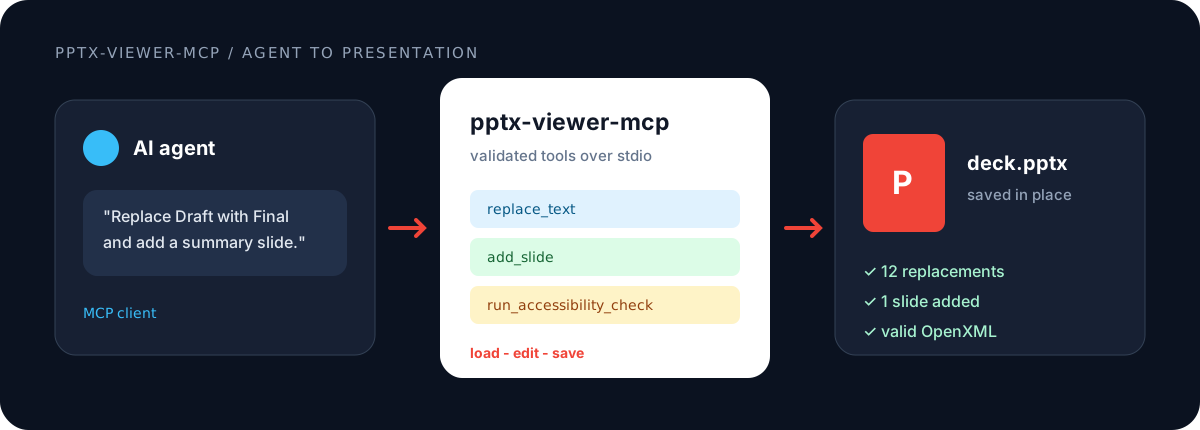
Edit PowerPoint files from an AI agent. It ships a ready-to-run [MCP](https://modelcontextprotocol.io) server with 73 PowerPoint editing tools, including adding slides, replacing text, editing charts, and updating embedded objects. The same operations are available as plain functions you can call yourself, alongside their Zod input schemas and a codec for real-time collaboration (Y.Doc). The [`pptx-viewer-core`](https://www.npmjs.com/package/pptx-viewer-core) engine is a dependency, so one install provides the complete editing stack.
|
|
7
7
|
|
|
8
8
|
|
|
9
9
|
|
|
@@ -31,7 +31,7 @@ No clone, no build, no separate core install. Point your MCP client at the publi
|
|
|
31
31
|
|
|
32
32
|
That is the entire setup. `npx` downloads `pptx-viewer-mcp` and its bundled `pptx-viewer-core` engine on first run, so there is nothing else to install. Add the config above, restart your client, and the tools are available.
|
|
33
33
|
|
|
34
|
-
This works in Claude Desktop, Claude Code, Cursor, and any MCP-compatible client. All
|
|
34
|
+
This works in Claude Desktop, Claude Code, Cursor, and any MCP-compatible client. All 73 tools are exposed over stdio in snake_case (for example `add_slide`, `batch_update_elements`). Every tool takes a `filePath` argument and the server handles loading and saving internally. File access is scoped to a root directory (`PPTX_TOOLS_ROOT`, defaulting to the process working directory) and restricted to `.pptx` and `.ppt` files.
|
|
35
35
|
|
|
36
36
|
> If you prefer a global install (`npm i -g pptx-viewer-mcp`), the same server is available as the `pptx-tools` binary. Point `command` at `pptx-tools` with no args.
|
|
37
37
|
|
|
@@ -73,30 +73,37 @@ See [Use as a library](#use-as-a-library) below for the higher-level `executeToo
|
|
|
73
73
|
|
|
74
74
|
| Entry point | Contents |
|
|
75
75
|
| ------------------------- | ----------------------------------------------------------------------------------------------------- |
|
|
76
|
-
| `pptx-viewer-mcp` |
|
|
76
|
+
| `pptx-viewer-mcp` | Tool functions, the `PptxHandler` engine, provider types, and the execution pipeline |
|
|
77
77
|
| `pptx-viewer-mcp/schemas` | Zod schemas for every tool input |
|
|
78
78
|
| `pptx-viewer-mcp/codec` | `PptxCodec`, the Y.Doc to PPTX bytes codec |
|
|
79
79
|
| `pptx-viewer-mcp/mcp` | The runnable stdio server entry (what `npx pptx-viewer-mcp` executes); importing it starts the server |
|
|
80
80
|
|
|
81
81
|
## Tools
|
|
82
82
|
|
|
83
|
-
| Group
|
|
84
|
-
|
|
|
85
|
-
| Slide (8)
|
|
86
|
-
| Element (
|
|
87
|
-
| Table (2)
|
|
88
|
-
| Table style (4)
|
|
89
|
-
| Style (2)
|
|
90
|
-
| Content (3)
|
|
91
|
-
| Chart (14)
|
|
92
|
-
| Theme (4)
|
|
93
|
-
| SmartArt (1)
|
|
94
|
-
|
|
|
95
|
-
|
|
|
96
|
-
|
|
|
97
|
-
|
|
|
98
|
-
|
|
|
99
|
-
|
|
|
83
|
+
| Group | Tools |
|
|
84
|
+
| -------------------- | -------------------------------------------------------------------------------------------------------------------------------------------------------------------------------------------------------------------------------------------------------------------------------------------------- |
|
|
85
|
+
| Slide (8) | `getSlide` `addSlide` `deleteSlides` `reorderSlides` `duplicateSlide` `updateSlideProperties` `setSlideTransition` `setCanvasSize` |
|
|
86
|
+
| Element (10) | `addElement` `updateElement` `renameElement` `deleteElements` `arrangeElements` `cloneElement` `setElementAnimation` `groupElements` `ungroupElements` `batchUpdateElements` |
|
|
87
|
+
| Table (2) | `updateTableCells` `manageTableStructure` |
|
|
88
|
+
| Table style (4) | `setTableStyleSection` `createTableStyle` `deleteTableStyle` `assignTableStyle` |
|
|
89
|
+
| Style (2) | `updateElementStyle` `runAccessibilityCheck` |
|
|
90
|
+
| Content (3) | `findText` `replaceText` `manageComments` |
|
|
91
|
+
| Chart (14) | `createChart` `updateChart` `addChartSeries` `removeChartSeries` `updateChartSeriesData` `listChartUserShapes` `addChartUserShape` `updateChartUserShape` `removeChartUserShape` `formatChartDataPoint` `formatChartDataLabel` `formatChartSeries` `setChartHelperLine` `setChartColorMapOverride` |
|
|
92
|
+
| Theme (4) | `getThemeInfo` `applyThemePreset` `updateThemeColors` `updateThemeFonts` |
|
|
93
|
+
| SmartArt (1) | `manageSmartArt` |
|
|
94
|
+
| Conversion (1) | `convertToMarkdown` |
|
|
95
|
+
| Template (2) | `findPlaceholders` `applyTemplate` |
|
|
96
|
+
| Metadata (2) | `getMetadata` `updateMetadata` |
|
|
97
|
+
| Sections (1) | `manageSections` |
|
|
98
|
+
| Export (2) | `exportToSvg` `exportSlideSvg` |
|
|
99
|
+
| JSON (2) | `exportToJson` `importFromJson` |
|
|
100
|
+
| Hyperlinks (1) | `manageHyperlinks` |
|
|
101
|
+
| Geometry (1) | `replaceGeometry` |
|
|
102
|
+
| Locking (1) | `setElementLock` |
|
|
103
|
+
| Validation (2) | `validatePresentation` `repairPresentation` |
|
|
104
|
+
| Presentation (2) | `getPresentationProperties` `updatePresentationProperties` |
|
|
105
|
+
| Layout (2) | `getLayouts` `applyLayout` |
|
|
106
|
+
| Embedded objects (6) | `getOleContent` `setOleSheetCell` `setOleDocumentParagraph` `setOleDeckSlideTitle` `replaceOleFile` `setOleObjectName` |
|
|
100
107
|
|
|
101
108
|
## Use as a library
|
|
102
109
|
|
package/dist/codec/index.js
CHANGED
|
@@ -166,7 +166,14 @@ function decodeTextBodyFromYText(ytext) {
|
|
|
166
166
|
} catch {
|
|
167
167
|
}
|
|
168
168
|
}
|
|
169
|
-
|
|
169
|
+
const isBreakMarker = /^\n+$/u.test(op.insert) && (a.pb === "1" || a.lb === "1");
|
|
170
|
+
if (isBreakMarker) {
|
|
171
|
+
for (let index = 0; index < op.insert.length; index++) {
|
|
172
|
+
segments.push(structuredClone(seg));
|
|
173
|
+
}
|
|
174
|
+
continue;
|
|
175
|
+
}
|
|
176
|
+
if (op.insert !== EMPTY_PLACEHOLDER) {
|
|
170
177
|
seg.text = op.insert;
|
|
171
178
|
}
|
|
172
179
|
segments.push(seg);
|
package/dist/codec/index.mjs
CHANGED
|
@@ -164,7 +164,14 @@ function decodeTextBodyFromYText(ytext) {
|
|
|
164
164
|
} catch {
|
|
165
165
|
}
|
|
166
166
|
}
|
|
167
|
-
|
|
167
|
+
const isBreakMarker = /^\n+$/u.test(op.insert) && (a.pb === "1" || a.lb === "1");
|
|
168
|
+
if (isBreakMarker) {
|
|
169
|
+
for (let index = 0; index < op.insert.length; index++) {
|
|
170
|
+
segments.push(structuredClone(seg));
|
|
171
|
+
}
|
|
172
|
+
continue;
|
|
173
|
+
}
|
|
174
|
+
if (op.insert !== EMPTY_PLACEHOLDER) {
|
|
168
175
|
seg.text = op.insert;
|
|
169
176
|
}
|
|
170
177
|
segments.push(seg);
|
package/package.json
CHANGED
|
@@ -1,6 +1,6 @@
|
|
|
1
1
|
{
|
|
2
2
|
"name": "pptx-viewer-mcp",
|
|
3
|
-
"version": "2.5.
|
|
3
|
+
"version": "2.5.3",
|
|
4
4
|
"description": "PowerPoint PPTX tools and MCP server: manipulate, convert, and collaborate on .pptx files from AI agents.",
|
|
5
5
|
"keywords": [
|
|
6
6
|
"ai",
|
|
@@ -72,7 +72,7 @@
|
|
|
72
72
|
"@modelcontextprotocol/sdk": "^1.30.0",
|
|
73
73
|
"fast-xml-parser": "^5.11.1",
|
|
74
74
|
"jszip": "^3.10.2",
|
|
75
|
-
"pptx-viewer-core": "^3.
|
|
75
|
+
"pptx-viewer-core": "^3.15.5",
|
|
76
76
|
"zod": ">=4.4.3 <4.5.3"
|
|
77
77
|
},
|
|
78
78
|
"devDependencies": {
|
|
@@ -80,7 +80,7 @@
|
|
|
80
80
|
"tsdown": "^0.23.0",
|
|
81
81
|
"tsup": "^8.5.1",
|
|
82
82
|
"typescript": "^7.0.2",
|
|
83
|
-
"vitest": "^
|
|
83
|
+
"vitest": "^5.0.0",
|
|
84
84
|
"yjs": "^13.6.32"
|
|
85
85
|
},
|
|
86
86
|
"peerDependencies": {
|