pptx-glimpse 0.2.2 → 0.3.1
This diff represents the content of publicly available package versions that have been released to one of the supported registries. The information contained in this diff is provided for informational purposes only and reflects changes between package versions as they appear in their respective public registries.
- package/README.md +110 -26
- package/dist/index.cjs +7514 -7258
- package/dist/index.d.cts +113 -20
- package/dist/index.d.ts +113 -20
- package/dist/index.js +7505 -7251
- package/package.json +6 -3
package/README.md
CHANGED
|
@@ -1,10 +1,23 @@
|
|
|
1
1
|
# pptx-glimpse
|
|
2
2
|
|
|
3
3
|
[](https://www.npmjs.com/package/pptx-glimpse)
|
|
4
|
+
[](https://github.com/hirokisakabe/pptx-glimpse/actions/workflows/ci.yml)
|
|
5
|
+
[](https://opensource.org/licenses/MIT)
|
|
6
|
+
[](https://nodejs.org/)
|
|
4
7
|
|
|
5
|
-
|
|
8
|
+
No LibreOffice required — just `npm install`.
|
|
6
9
|
|
|
7
|
-
|
|
10
|
+
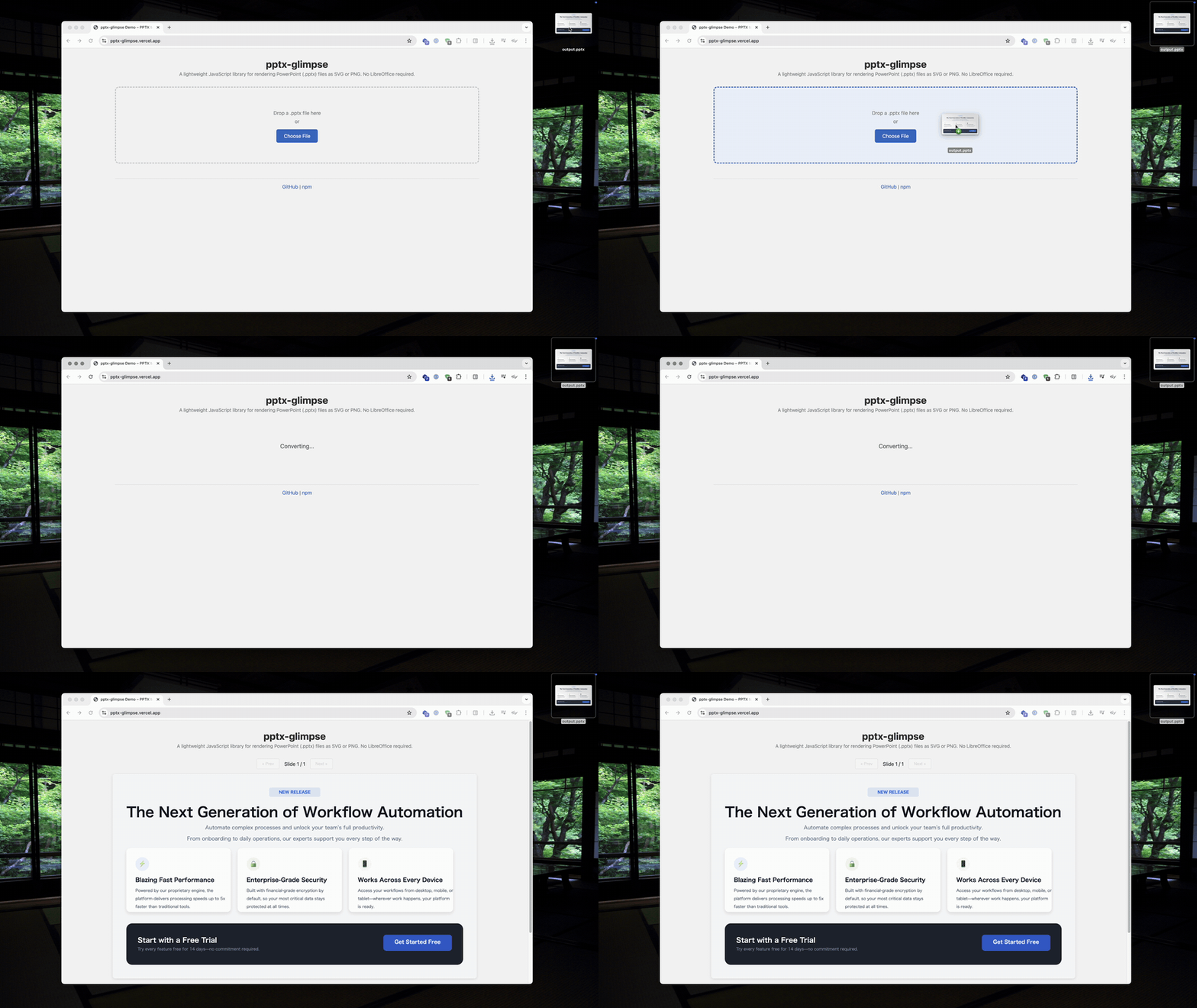
A lightweight JavaScript library that renders PowerPoint (.pptx) slides as SVG or PNG in Node.js.
|
|
11
|
+
|
|
12
|
+
**[Try the Demo](https://glimpse.pptx.app/)** | [npm](https://www.npmjs.com/package/pptx-glimpse)
|
|
13
|
+
|
|
14
|
+
|
|
15
|
+
|
|
16
|
+
_Upload a .pptx file → get SVG/PNG output instantly_
|
|
17
|
+
|
|
18
|
+
| PowerPoint | pptx-glimpse |
|
|
19
|
+
| :------------------------------------------------------------------------------------------------------------: | :----------------------------------------------------------------------------------------------------------------: |
|
|
20
|
+
| 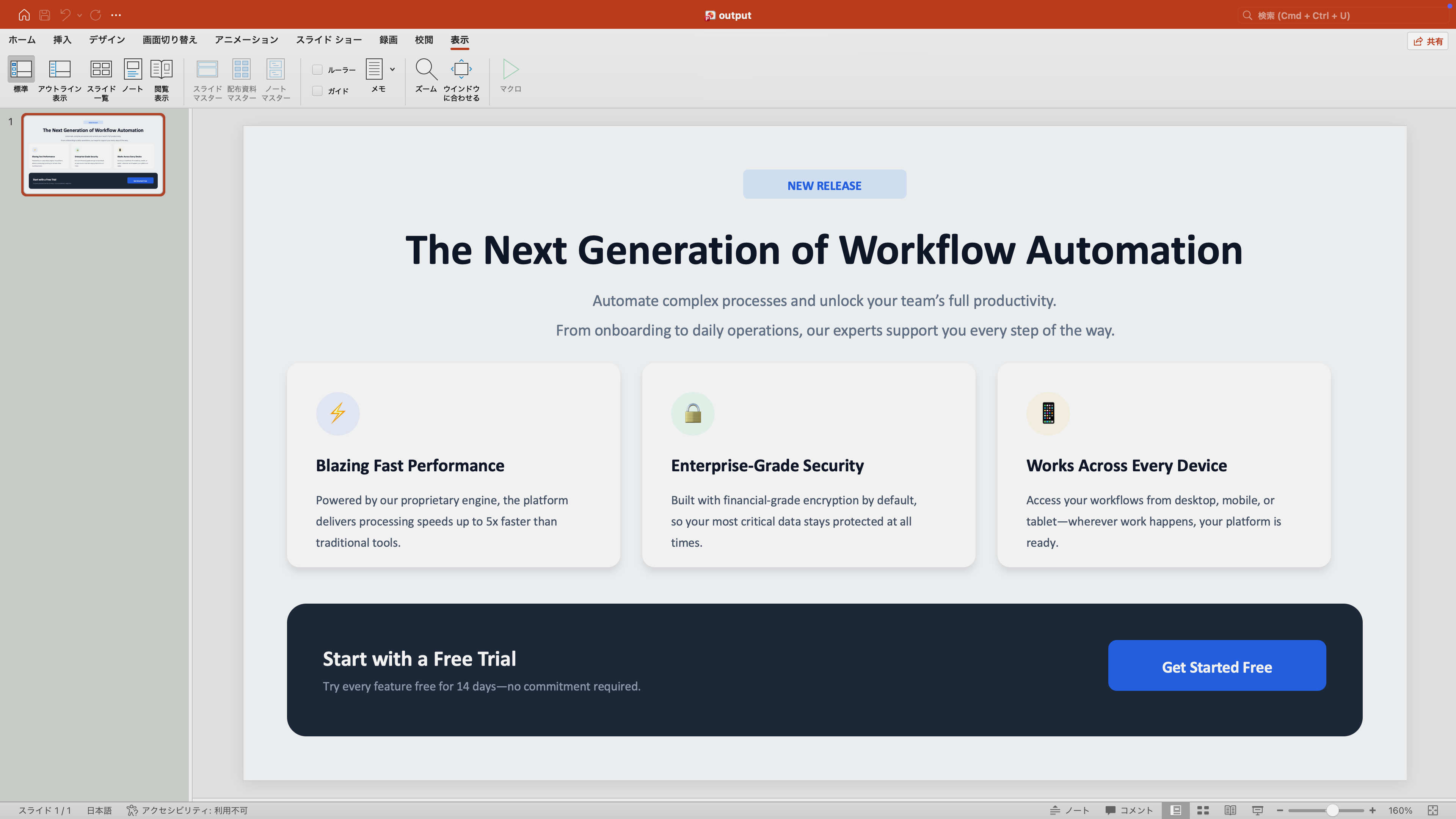 |  |
|
|
8
21
|
|
|
9
22
|
## Motivation
|
|
10
23
|
|
|
@@ -19,6 +32,15 @@ pptx-glimpse is designed for two primary use cases:
|
|
|
19
32
|
The library focuses on accurately reproducing text, shapes, and spatial layout
|
|
20
33
|
rather than pixel-perfect rendering of every PowerPoint feature.
|
|
21
34
|
|
|
35
|
+
## Why not LibreOffice?
|
|
36
|
+
|
|
37
|
+
| | LibreOffice | pptx-glimpse |
|
|
38
|
+
| ------------ | -------------------------- | ------------------------------ |
|
|
39
|
+
| Install size | ~500 MB+ | `npm install` (~30 MB) |
|
|
40
|
+
| Docker image | Large base image required | Works in any Node.js image |
|
|
41
|
+
| Startup time | Process spawning overhead | In-process, no spawning |
|
|
42
|
+
| Concurrency | One process per conversion | Async, runs in your event loop |
|
|
43
|
+
|
|
22
44
|
## Requirements
|
|
23
45
|
|
|
24
46
|
- **Node.js >= 20**
|
|
@@ -56,7 +78,8 @@ Both `convertPptxToSvg` and `convertPptxToPng` accept an optional `ConvertOption
|
|
|
56
78
|
const results = await convertPptxToPng(pptx, {
|
|
57
79
|
slides: [1, 3], // Convert only slides 1 and 3
|
|
58
80
|
width: 1920, // Output width in pixels (default: 960)
|
|
59
|
-
|
|
81
|
+
height: 1080, // Output height in pixels (width takes priority if both set)
|
|
82
|
+
logLevel: "warn", // Warning log level: "off" | "warn" | "debug"
|
|
60
83
|
fontDirs: ["/custom/fonts"], // Additional font directories to search
|
|
61
84
|
fontMapping: {
|
|
62
85
|
"Custom Corp Font": "Noto Sans", // Custom font name mapping
|
|
@@ -64,6 +87,59 @@ const results = await convertPptxToPng(pptx, {
|
|
|
64
87
|
});
|
|
65
88
|
```
|
|
66
89
|
|
|
90
|
+
### Advanced Usage
|
|
91
|
+
|
|
92
|
+
<details>
|
|
93
|
+
<summary>Font Utilities</summary>
|
|
94
|
+
|
|
95
|
+
#### Collecting used fonts
|
|
96
|
+
|
|
97
|
+
`collectUsedFonts` parses a PPTX file and returns all font names used across slides — without performing a full render. Useful for pre-checking which fonts need to be installed.
|
|
98
|
+
|
|
99
|
+
```typescript
|
|
100
|
+
import { collectUsedFonts } from "pptx-glimpse";
|
|
101
|
+
|
|
102
|
+
const fonts = collectUsedFonts(pptx);
|
|
103
|
+
// {
|
|
104
|
+
// theme: { majorFont: "Calibri Light", minorFont: "Calibri", majorFontEa: "...", ... },
|
|
105
|
+
// fonts: ["Arial", "Calibri", "Meiryo"]
|
|
106
|
+
// }
|
|
107
|
+
```
|
|
108
|
+
|
|
109
|
+
#### Font mapping helpers
|
|
110
|
+
|
|
111
|
+
```typescript
|
|
112
|
+
import { DEFAULT_FONT_MAPPING, createFontMapping, getMappedFont } from "pptx-glimpse";
|
|
113
|
+
|
|
114
|
+
// Create a custom mapping (merges with defaults, user values take priority)
|
|
115
|
+
const mapping = createFontMapping({ Calibri: "Ubuntu" });
|
|
116
|
+
|
|
117
|
+
// Look up mapped font (case-insensitive)
|
|
118
|
+
getMappedFont("Meiryo", mapping); // "Noto Sans JP"
|
|
119
|
+
getMappedFont("calibri", mapping); // "Ubuntu"
|
|
120
|
+
```
|
|
121
|
+
|
|
122
|
+
</details>
|
|
123
|
+
|
|
124
|
+
<details>
|
|
125
|
+
<summary>Custom Font Loading</summary>
|
|
126
|
+
|
|
127
|
+
In environments where system fonts are not available, you can build a text measurer from font buffers using `createOpentypeSetupFromBuffers`. This is a low-level utility for advanced use cases.
|
|
128
|
+
|
|
129
|
+
```typescript
|
|
130
|
+
import { readFileSync } from "fs";
|
|
131
|
+
import { createOpentypeSetupFromBuffers } from "pptx-glimpse";
|
|
132
|
+
|
|
133
|
+
const setup = await createOpentypeSetupFromBuffers([
|
|
134
|
+
{ name: "Carlito", data: readFileSync("fonts/Carlito-Regular.ttf") },
|
|
135
|
+
{ name: "Noto Sans JP", data: readFileSync("fonts/NotoSansJP-Regular.ttf") },
|
|
136
|
+
]);
|
|
137
|
+
// setup.measurer — text width measurement
|
|
138
|
+
// setup.fontResolver — text-to-SVG-path conversion
|
|
139
|
+
```
|
|
140
|
+
|
|
141
|
+
</details>
|
|
142
|
+
|
|
67
143
|
## Fonts
|
|
68
144
|
|
|
69
145
|
### Automatic Font Loading
|
|
@@ -109,7 +185,7 @@ const results = await convertPptxToSvg(pptx, {
|
|
|
109
185
|
|
|
110
186
|
## Feature Support
|
|
111
187
|
|
|
112
|
-
|
|
188
|
+
136 preset shapes, charts, tables, SmartArt, gradients, shadows, and more — covering the most common static PowerPoint content.
|
|
113
189
|
|
|
114
190
|
### Supported Features
|
|
115
191
|
|
|
@@ -187,10 +263,10 @@ Supports conversion of static visual content in PowerPoint. Dynamic elements suc
|
|
|
187
263
|
|
|
188
264
|
#### Charts
|
|
189
265
|
|
|
190
|
-
| Feature | Details
|
|
191
|
-
| ---------------- |
|
|
192
|
-
| Supported charts | Bar chart (vertical/horizontal), line chart, pie chart, scatter plot, area chart, doughnut, bubble, radar
|
|
193
|
-
| Chart elements | Title, legend (position), series (name/values/categories/color), category axis, value axis
|
|
266
|
+
| Feature | Details |
|
|
267
|
+
| ---------------- | --------------------------------------------------------------------------------------------------------- |
|
|
268
|
+
| Supported charts | Bar chart (vertical/horizontal), line chart, pie chart, scatter plot, area chart, doughnut, bubble, radar |
|
|
269
|
+
| Chart elements | Title, legend (position), series (name/values/categories/color), category axis, value axis |
|
|
194
270
|
|
|
195
271
|
#### SmartArt
|
|
196
272
|
|
|
@@ -208,24 +284,30 @@ Supports conversion of static visual content in PowerPoint. Dynamic elements suc
|
|
|
208
284
|
| Theme | Theme color scheme, theme fonts (majorFont/minorFont), theme font refs |
|
|
209
285
|
| showMasterSp | Control visibility of master shapes per slide / layout |
|
|
210
286
|
|
|
211
|
-
|
|
212
|
-
|
|
213
|
-
|
|
214
|
-
|
|
|
215
|
-
|
|
|
216
|
-
|
|
|
217
|
-
|
|
|
218
|
-
|
|
|
219
|
-
|
|
|
220
|
-
|
|
|
221
|
-
|
|
|
222
|
-
|
|
|
223
|
-
|
|
|
224
|
-
|
|
|
225
|
-
|
|
|
226
|
-
|
|
|
227
|
-
|
|
228
|
-
|
|
287
|
+
<details>
|
|
288
|
+
<summary>Unsupported Features</summary>
|
|
289
|
+
|
|
290
|
+
| Category | Unsupported features |
|
|
291
|
+
| -------------- | -------------------------------------------------------------------------- |
|
|
292
|
+
| Fill | Path gradient (rect/shape type) |
|
|
293
|
+
| Effects | Reflection, 3D rotation / extrusion, artistic effects |
|
|
294
|
+
| Charts | Stock, combo, histogram, box plot, waterfall, treemap, sunburst |
|
|
295
|
+
| Chart details | Data labels, axis titles / tick marks / grid lines, error bars, trendlines |
|
|
296
|
+
| Text | Individual text effects (shadow/glow), text columns |
|
|
297
|
+
| Tables | Table style template application, diagonal borders |
|
|
298
|
+
| Shapes | Shape operations (Union/Subtract/Intersect/Fragment) |
|
|
299
|
+
| Multimedia | Embedded video / audio |
|
|
300
|
+
| Animations | Object animations, slide transitions |
|
|
301
|
+
| Slide elements | Slide notes, comments, headers / footers, slide numbers / dates |
|
|
302
|
+
| Image formats | EMF/WMF (parsed but not rendered) |
|
|
303
|
+
| Other | Macros / VBA, sections, zoom slides |
|
|
304
|
+
|
|
305
|
+
</details>
|
|
306
|
+
|
|
307
|
+
## Development
|
|
308
|
+
|
|
309
|
+
<details>
|
|
310
|
+
<summary>Test rendering</summary>
|
|
229
311
|
|
|
230
312
|
You can specify a PPTX file to preview SVG and PNG conversion results.
|
|
231
313
|
|
|
@@ -241,6 +323,8 @@ npm run render -- presentation.pptx
|
|
|
241
323
|
npm run render -- presentation.pptx ./my-output
|
|
242
324
|
```
|
|
243
325
|
|
|
326
|
+
</details>
|
|
327
|
+
|
|
244
328
|
## License
|
|
245
329
|
|
|
246
330
|
MIT
|