pptb-entity-fields-analyzer 1.0.0 → 1.0.1
This diff represents the content of publicly available package versions that have been released to one of the supported registries. The information contained in this diff is provided for informational purposes only and reflects changes between package versions as they appear in their respective public registries.
- package/LICENSE +22 -0
- package/README.md +179 -71
- package/npm-shrinkwrap.json +2 -2
- package/package.json +1 -1
package/LICENSE
ADDED
|
@@ -0,0 +1,22 @@
|
|
|
1
|
+
MIT License
|
|
2
|
+
|
|
3
|
+
Copyright (c) 2026 Hamza AMRAOUI
|
|
4
|
+
|
|
5
|
+
Permission is hereby granted, free of charge, to any person obtaining a copy
|
|
6
|
+
of this software and associated documentation files (the "Software"), to deal
|
|
7
|
+
in the Software without restriction, including without limitation the rights
|
|
8
|
+
to use, copy, modify, merge, publish, distribute, sublicense, and/or sell
|
|
9
|
+
copies of the Software, and to permit persons to whom the Software is
|
|
10
|
+
furnished to do so, subject to the following conditions:
|
|
11
|
+
|
|
12
|
+
The above copyright notice and this permission notice shall be included in all
|
|
13
|
+
copies or substantial portions of the Software.
|
|
14
|
+
|
|
15
|
+
THE SOFTWARE IS PROVIDED "AS IS", WITHOUT WARRANTY OF ANY KIND, EXPRESS OR
|
|
16
|
+
IMPLIED, INCLUDING BUT NOT LIMITED TO THE WARRANTIES OF MERCHANTABILITY,
|
|
17
|
+
FITNESS FOR A PARTICULAR PURPOSE AND NONINFRINGEMENT. IN NO EVENT SHALL THE
|
|
18
|
+
AUTHORS OR COPYRIGHT HOLDERS BE LIABLE FOR ANY CLAIM, DAMAGES OR OTHER
|
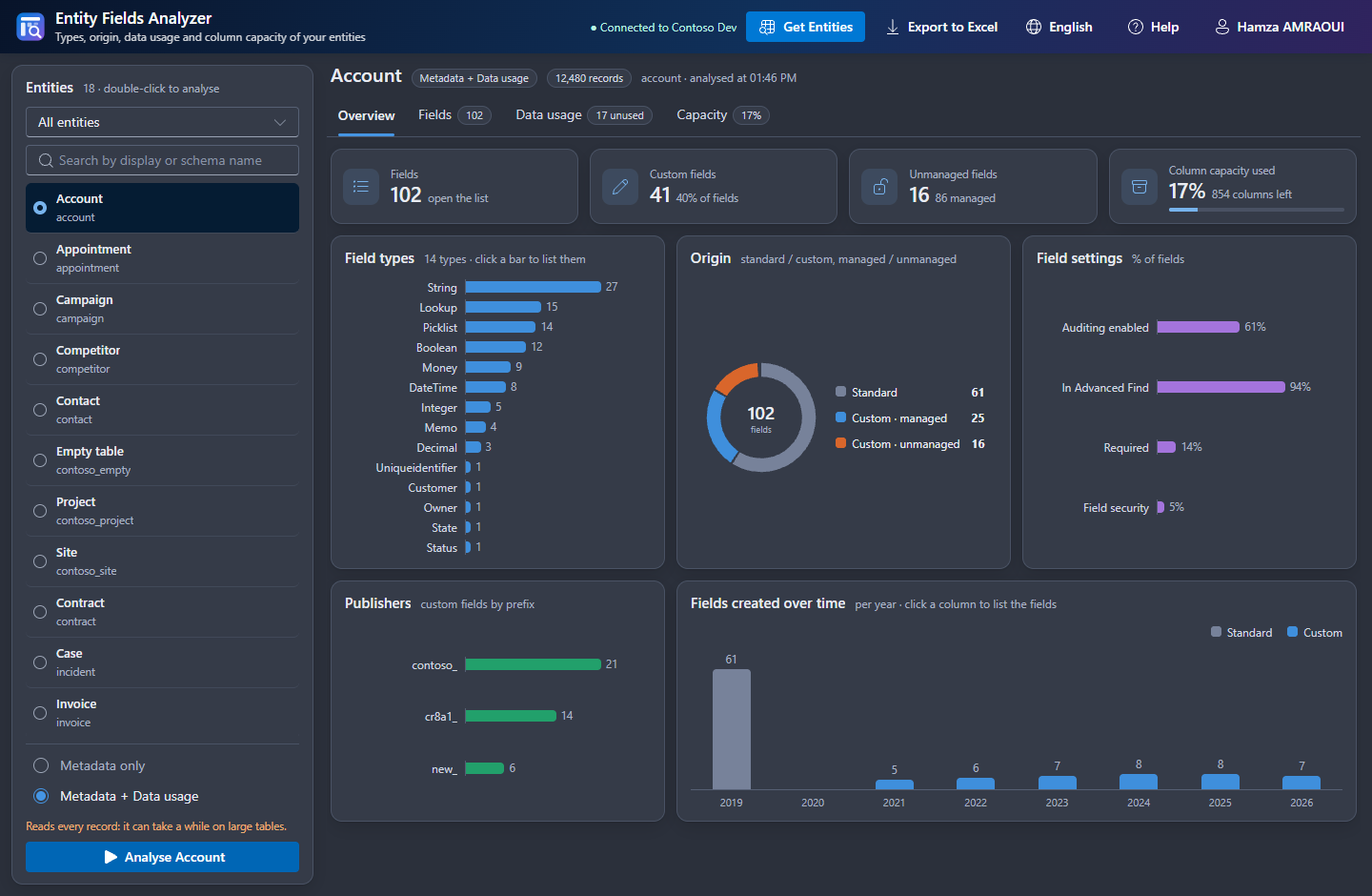
|
19
|
+
LIABILITY, WHETHER IN AN ACTION OF CONTRACT, TORT OR OTHERWISE, ARISING FROM,
|
|
20
|
+
OUT OF OR IN CONNECTION WITH THE SOFTWARE OR THE USE OR OTHER DEALINGS IN THE
|
|
21
|
+
SOFTWARE.
|
|
22
|
+
|
package/README.md
CHANGED
|
@@ -1,72 +1,149 @@
|
|
|
1
1
|

|
|
2
2
|
|
|
3
|
-
# Entity Fields Analyzer
|
|
3
|
+
# Entity Fields Analyzer
|
|
4
4
|
|
|
5
|
-
|
|
5
|
+
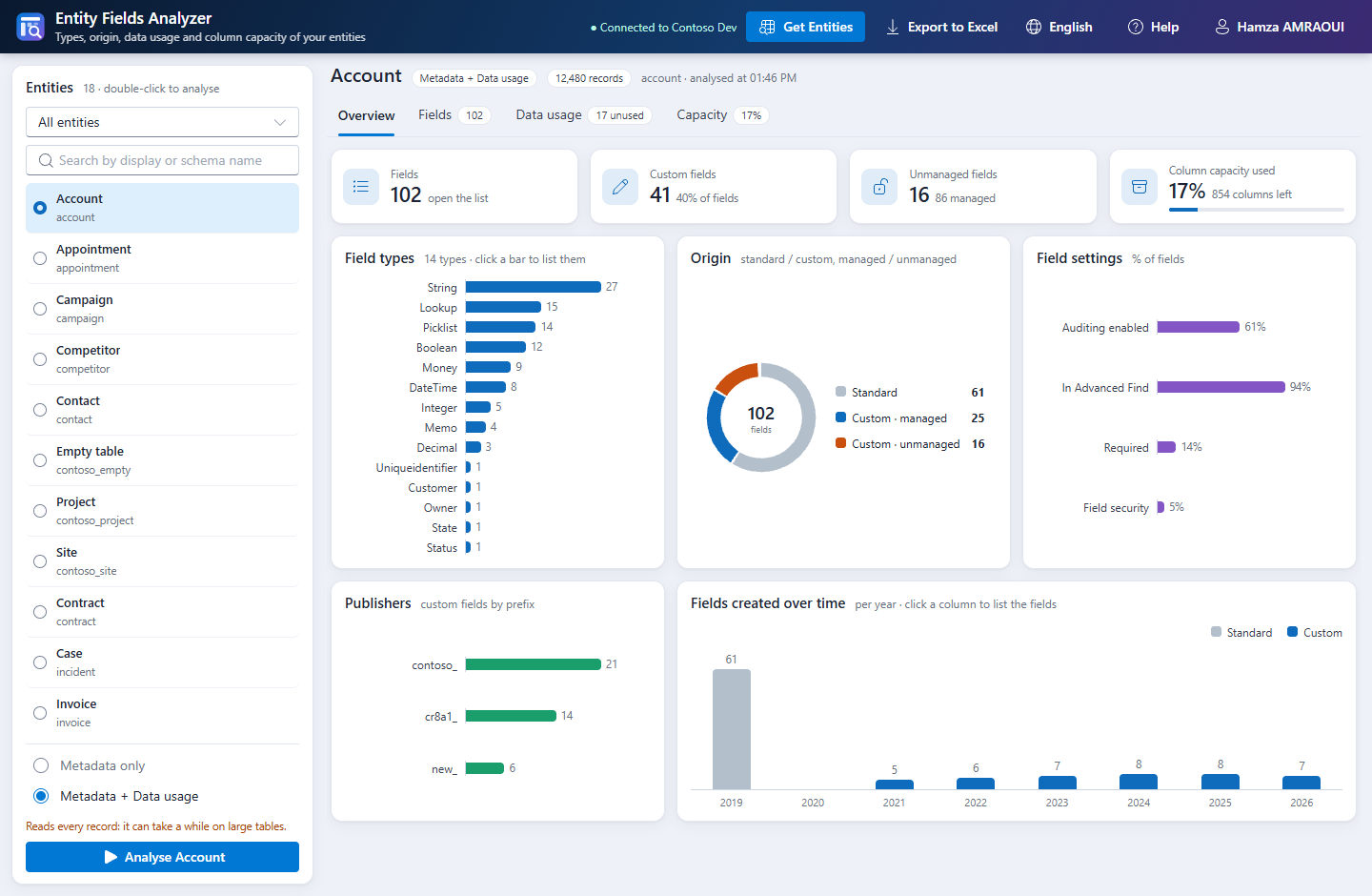
**A Power Platform ToolBox tool that shows what is really inside a Dataverse table.**
|
|
6
6
|
|
|
7
|
-
|
|
8
|
-
- Which fields are really filled, and which are never used?
|
|
9
|
-
- How much room is left before the limit of 1,024 columns?
|
|
10
|
-
- What should be cleaned up first?
|
|
7
|
+
*Reads the fields. Measures what is filled. Estimates the room left. Recommends what to clean up. Never writes to Dataverse.*
|
|
11
8
|
|
|
12
|
-
|
|
9
|
+
[](https://www.npmjs.com/package/pptb-entity-fields-analyzer)
|
|
10
|
+
[](https://www.powerplatformtoolbox.com/)
|
|
11
|
+
[](https://www.xrmtoolbox.com/plugins/EntityFieldsAnalyser/)
|
|
12
|
+
[](https://github.com/AmraouiH/EntityFieldsAnalyzer-PPTB/blob/main/LICENSE)
|
|
13
|
+
[](https://learn.microsoft.com/power-apps/developer/data-platform/)
|
|
14
|
+
[](#what-this-tool-changes)
|
|
15
|
+
|
|
16
|
+
> **From XrmToolBox to Power Platform ToolBox.** This tool comes from [**Entity Fields Analyser**](https://www.xrmtoolbox.com/plugins/EntityFieldsAnalyser/), the XrmToolBox plugin by Hamza AMRAOUI with more than 50,000 downloads. It is ported by the same author.
|
|
17
|
+
|
|
18
|
+
|
|
19
|
+
|
|
20
|
+
---
|
|
21
|
+
|
|
22
|
+
## What it does
|
|
23
|
+
|
|
24
|
+
You pick a table. It gives you a clear picture of its fields, and an Excel report of what it found.
|
|
25
|
+
|
|
26
|
+
| | |
|
|
13
27
|
|---|---|
|
|
14
|
-
| **
|
|
15
|
-
| **
|
|
16
|
-
| **
|
|
17
|
-
| **
|
|
18
|
-
|
|
|
28
|
+
| 🔍 **Explains the table** | Field types, standard or custom, managed or unmanaged, publisher prefixes, settings, fields created over time. |
|
|
29
|
+
| 📋 **Lists every field** | Metadata, quick filters, type filter, search and sort. 32 more columns with *All metadata columns*. |
|
|
30
|
+
| 🧪 **Measures real usage** | Fill rate of each field across the records you can read: never used, rarely used (under 5%), least used custom fields. |
|
|
31
|
+
| 📐 **Plans capacity** | Estimate of the physical columns used out of 1,024, and a calculator for the fields you want to add. |
|
|
32
|
+
| 💡 **Recommends** | Findings sorted by severity in the Excel report: clean-up, data quality, documentation, ALM, security. |
|
|
33
|
+
| 📊 **Reports in Excel** | One workbook with a dashboard, native charts and up to 9 sheets. |
|
|
34
|
+
| 🌍 **Feels at home** | English and French, light and dark theme. |
|
|
19
35
|
|
|
20
|
-
|
|
36
|
+
---
|
|
21
37
|
|
|
22
|
-
##
|
|
38
|
+
## How it differs from other ToolBox tools
|
|
23
39
|
|
|
24
|
-
|
|
40
|
+
Some listed tools also read field metadata or values. Entity Fields Analyzer is about the **health of one table**: how full every field is, how many of the 1,024 columns are used, and what to clean up.
|
|
25
41
|
|
|
26
|
-
|
|
42
|
+
| Tool | What it is for | What Entity Fields Analyzer adds |
|
|
43
|
+
|---|---|---|
|
|
44
|
+
| **Entity Field Catalog** | Exports the field metadata of several tables of a solution to Excel or CSV | Fill rates, capacity estimate and calculator, interactive charts, clean-up recommendations |
|
|
45
|
+
| **Metadata Browser** | Browses metadata and compares it across environments | Fill rates from the records, capacity planning, a report that analyses the table |
|
|
46
|
+
| **Data Validation** | Runs the tests you configure on columns, including whether they contain data | Fill rate of every field with no setup, combined with origin, capacity and recommendations |
|
|
47
|
+
| **Field Reference Finder** | Finds the components that reference a field | It is the step before: which fields are worth checking. Use Field Reference Finder before deleting one |
|
|
27
48
|
|
|
28
|
-
|
|
49
|
+
For documentation of many tables, comparison between environments or dependency search, use those tools.
|
|
50
|
+
|
|
51
|
+
---
|
|
52
|
+
|
|
53
|
+
## How an analysis runs
|
|
54
|
+
|
|
55
|
+
```
|
|
56
|
+
Get Entities ──► Pick a table ──► Choose a mode ──► Analyse
|
|
57
|
+
│
|
|
58
|
+
Excel report ◄── Export ◄── Drill down ◄── Charts and figures
|
|
59
|
+
```
|
|
60
|
+
|
|
61
|
+
| Step | What happens | Your role |
|
|
62
|
+
|---|---|---|
|
|
63
|
+
| **1. Load** | Lists the tables of the connected environment | **Click Get Entities** |
|
|
64
|
+
| **2. Choose** | Filters and searches by display or schema name | **Pick a table and a mode** |
|
|
65
|
+
| **3. Analyse** | Reads the metadata, and the records if you asked for data usage | **Click Analyse** |
|
|
66
|
+
| **4. Explore** | Every chart and tile opens the matching fields, already filtered | Click what interests you |
|
|
67
|
+
| **5. Report** | Builds the Excel workbook on your computer | **Click Export to Excel** |
|
|
68
|
+
|
|
69
|
+
> **Nothing is read until you click, and nothing is ever written to Dataverse.** Stop or Esc interrupts an analysis.
|
|
29
70
|
|
|
30
|
-
|
|
71
|
+
---
|
|
72
|
+
|
|
73
|
+
## Quick start
|
|
74
|
+
|
|
75
|
+
**1. Open the tool**
|
|
76
|
+
|
|
77
|
+
In [Power Platform ToolBox](https://www.powerplatformtoolbox.com/), open **Entity Fields Analyzer** and pick a Dataverse connection. To run it from the source code, see [Run from source](#run-from-source).
|
|
78
|
+
|
|
79
|
+
**2. Load your tables**
|
|
80
|
+
|
|
81
|
+
Click **Get Entities**, then select a table.
|
|
82
|
+
|
|
83
|
+
**3. Pick a mode and analyse**
|
|
84
|
+
|
|
85
|
+
| Mode | What it reads | When to use it |
|
|
86
|
+
|---|---|---|
|
|
87
|
+
| **Metadata only** | The definition of the fields | A fast look at the structure and the capacity |
|
|
88
|
+
| **Metadata + Data usage** | The definition, plus every record you can read | Before a clean-up. Slower on large tables |
|
|
89
|
+
|
|
90
|
+
**4. Export**
|
|
91
|
+
|
|
92
|
+
Click **Export to Excel** to save and share the report.
|
|
93
|
+
|
|
94
|
+
---
|
|
95
|
+
|
|
96
|
+
## A closer look
|
|
97
|
+
|
|
98
|
+
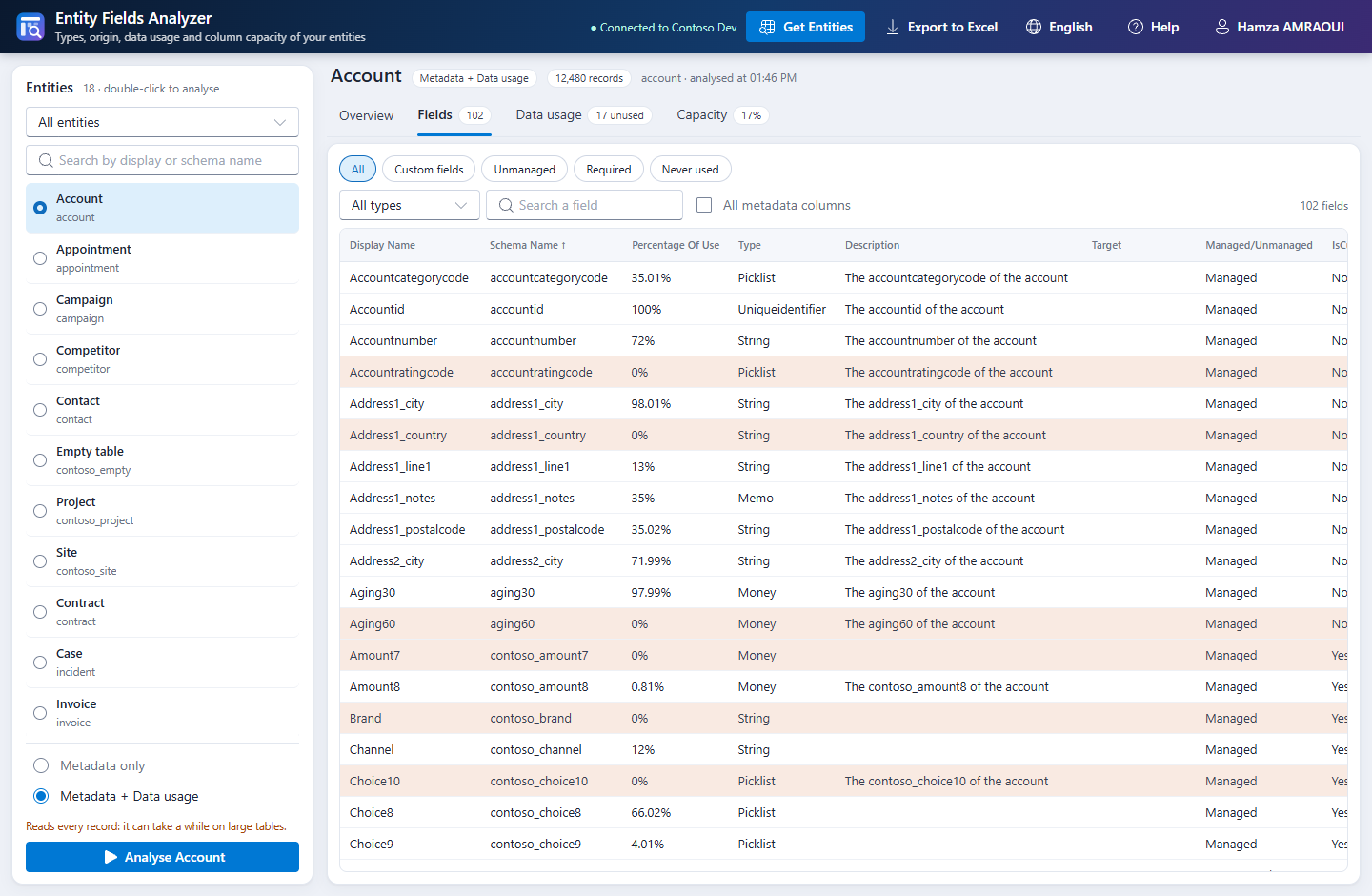
### Fields
|
|
99
|
+
|
|
100
|
+
Every field with its metadata. The fields that are empty in every record are highlighted.
|
|
31
101
|
|
|
32
102
|
|
|
33
103
|
|
|
34
|
-
|
|
104
|
+
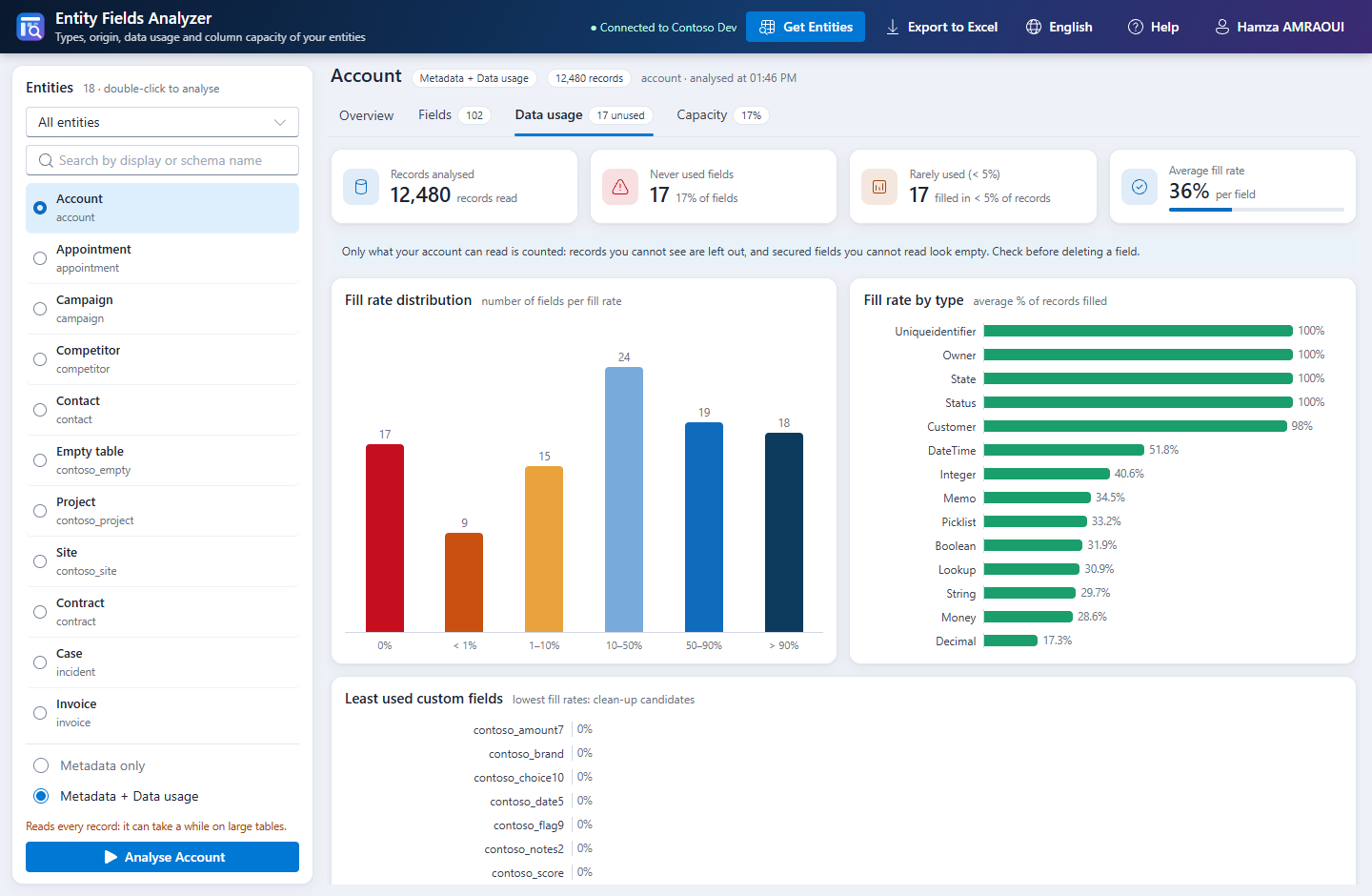
### Data usage
|
|
35
105
|
|
|
36
|
-
|
|
106
|
+
How full each field is, and where to start the clean-up.
|
|
37
107
|
|
|
38
|
-
|
|
108
|
+
|
|
39
109
|
|
|
40
|
-
|
|
110
|
+
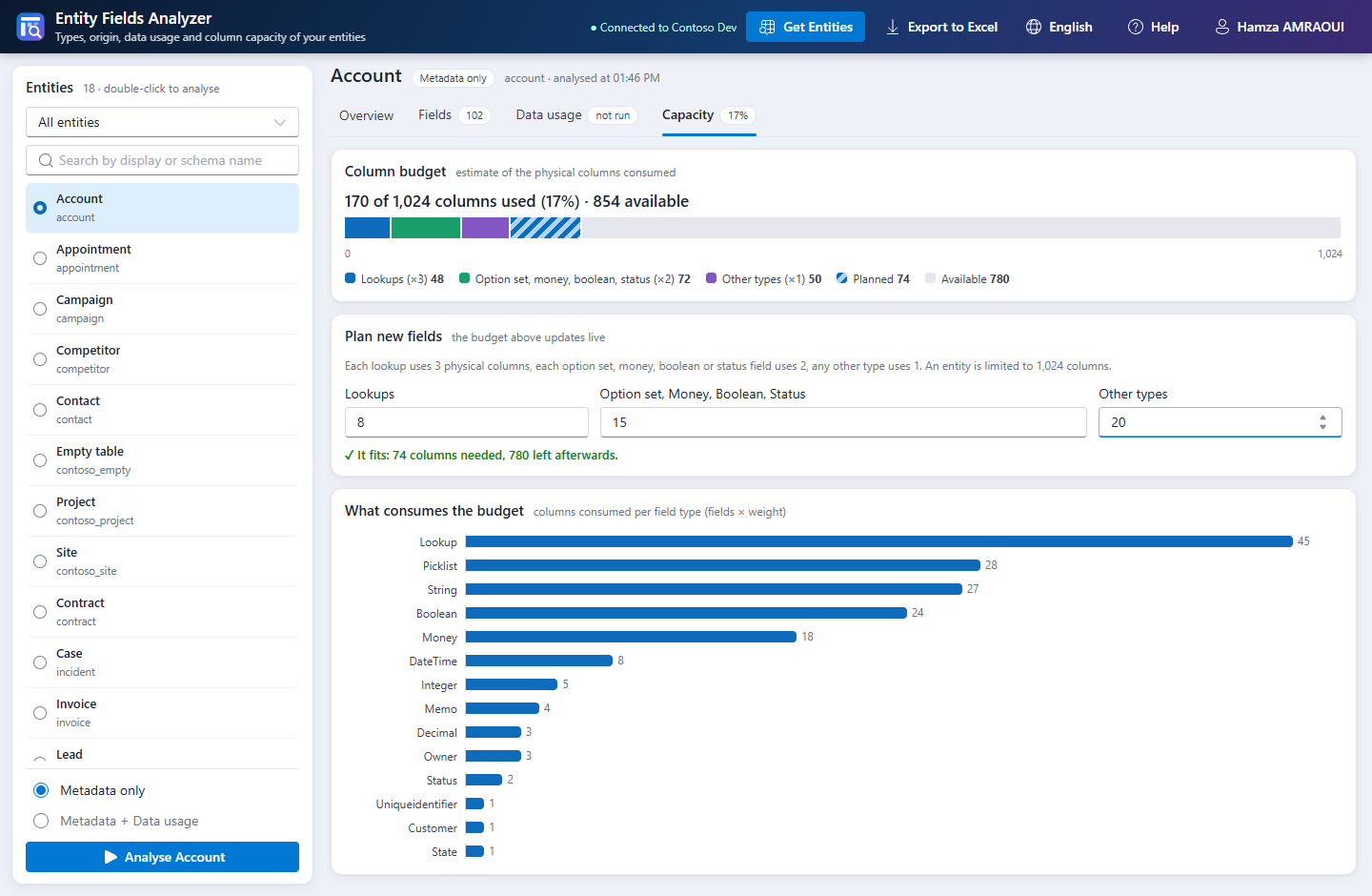
### Capacity
|
|
41
111
|
|
|
42
|
-
|
|
112
|
+
What consumes the columns, and whether the fields you plan to add will fit.
|
|
43
113
|
|
|
44
|
-
|
|
45
115
|
|
|
46
|
-
|
|
116
|
+
### Dark theme
|
|
47
117
|
|
|
48
|
-
|
|
49
|
-
2. Filter or search the list, then click an entity (a double-click analyses it right away).
|
|
50
|
-
3. Choose **Metadata only**, or **Metadata + Data usage** to also measure how full each field is.
|
|
51
|
-
4. Click **Analyse**. **Stop** or **Esc** interrupts an analysis; no partial result is kept.
|
|
52
|
-
5. Click **Export to Excel** to save the report.
|
|
118
|
+
The tool follows the theme of the ToolBox.
|
|
53
119
|
|
|
54
|
-
|
|
120
|
+
|
|
55
121
|
|
|
56
|
-
|
|
122
|
+
*Screenshots use demo data.*
|
|
57
123
|
|
|
58
|
-
|
|
124
|
+
---
|
|
59
125
|
|
|
60
|
-
##
|
|
126
|
+
## What is in the Excel report
|
|
61
127
|
|
|
62
|
-
|
|
63
|
-
|
|
128
|
+
| Sheet | Content |
|
|
129
|
+
|---|---|
|
|
130
|
+
| **Metadata** | Every analysed field with its properties, in a sheet named after the table |
|
|
131
|
+
| **Dashboard** | Key figures and native Excel charts |
|
|
132
|
+
| **Summary** | The figures of the analysis and the number of findings |
|
|
133
|
+
| **Recommendations** | Each finding with its severity and what to do |
|
|
134
|
+
| **Data usage** | Fill rate per field, only in *Metadata + Data usage* mode |
|
|
135
|
+
| **By Type** | Breakdown per field type |
|
|
136
|
+
| **By Publisher** | Breakdown per publisher prefix |
|
|
137
|
+
| **Lookups** | Lookup fields and the tables they target |
|
|
138
|
+
| **Timeline** | Fields created over time |
|
|
139
|
+
|
|
140
|
+
---
|
|
64
141
|
|
|
65
142
|
## How the figures are computed
|
|
66
143
|
|
|
67
|
-
- **Analysed fields**: readable attributes, without virtual, party list, composite and companion attributes (`AttributeOf`).
|
|
68
|
-
- **Fill rate**: share of the records read where the field has a value. `0`, `No` and an empty text
|
|
69
|
-
- **Column capacity
|
|
144
|
+
- **Analysed fields**: readable attributes, without virtual, party list, composite and companion attributes (`AttributeOf`).
|
|
145
|
+
- **Fill rate**: share of the records read where the field has a value. `0`, `No` and an empty text count as values.
|
|
146
|
+
- **Column capacity**: an estimate with the weights below, against 1,024 columns.
|
|
70
147
|
|
|
71
148
|
| Field type | Columns |
|
|
72
149
|
|---|---|
|
|
@@ -76,59 +153,90 @@ On your computer, it writes the Excel report when you export it, and three prefe
|
|
|
76
153
|
|
|
77
154
|
Background: [Field limits in Dynamics 365: how many fields is too many fields?](https://hamzaamraoui.medium.com/field-limits-in-dynamics-365-how-many-fields-is-too-many-fields-ab39c699336e)
|
|
78
155
|
|
|
79
|
-
|
|
156
|
+
---
|
|
80
157
|
|
|
81
|
-
|
|
82
|
-
- **Large tables**: data usage reads every record, so it can take a long time and it counts toward the service protection limits of Dataverse. The ToolBox rejects responses over 16 MB, so pages are sized to the records and the scan restarts with smaller pages when one is still too large.
|
|
83
|
-
- **Unpublished changes** are included when Dataverse accepts `RetrieveEntity`. Otherwise the tool reads the published metadata and says so.
|
|
158
|
+
## What this tool changes
|
|
84
159
|
|
|
85
|
-
|
|
160
|
+
**Nothing in Dataverse.** The tool never creates, updates, deletes or publishes anything.
|
|
86
161
|
|
|
87
|
-
|
|
162
|
+
On your computer, it writes the Excel report when you export it, and three preferences in the ToolBox settings: language, entity filter and metadata columns.
|
|
88
163
|
|
|
89
|
-
|
|
90
|
-
|
|
91
|
-
|
|
92
|
-
|
|
93
|
-
|
|
94
|
-
|
|
164
|
+
---
|
|
165
|
+
|
|
166
|
+
## Safety
|
|
167
|
+
|
|
168
|
+
- Only read requests, sent to the connected environment through the ToolBox.
|
|
169
|
+
- No external host, no telemetry.
|
|
170
|
+
- Records are read in memory, page by page. Only a counter per field is kept: no record value is stored or exported.
|
|
171
|
+
- A stopped analysis keeps no partial result.
|
|
172
|
+
- A secured field that reads as empty is never proposed for deletion.
|
|
173
|
+
|
|
174
|
+
Always check forms, views, processes, plugins and integrations before deleting a field. You remain responsible for what you delete.
|
|
95
175
|
|
|
96
|
-
|
|
176
|
+
---
|
|
177
|
+
|
|
178
|
+
## Limitations
|
|
179
|
+
|
|
180
|
+
- **Not analysed**: multi-select choices, files and images, which are virtual attributes.
|
|
181
|
+
- **Permissions**: records you cannot read are not counted, and secured fields you cannot read look empty. Check with a privileged account before a clean-up.
|
|
182
|
+
- **Large tables**: data usage reads every record, so it takes time and counts toward the Dataverse service protection limits. Pages shrink automatically to stay under the 16 MB response limit of the ToolBox.
|
|
183
|
+
- **Unpublished changes**: included when Dataverse accepts `RetrieveEntity`. Otherwise the tool reads the published metadata and tells you.
|
|
184
|
+
|
|
185
|
+
---
|
|
186
|
+
|
|
187
|
+
## Run from source
|
|
188
|
+
|
|
189
|
+
| Requirement | Why |
|
|
190
|
+
|---|---|
|
|
191
|
+
| Power Platform ToolBox | runs the tool |
|
|
192
|
+
| Node.js 20.19+ | build and tests |
|
|
193
|
+
| Edge or Chrome | end-to-end tests |
|
|
97
194
|
|
|
98
195
|
```bash
|
|
99
|
-
|
|
100
|
-
|
|
196
|
+
git clone https://github.com/AmraouiH/EntityFieldsAnalyzer-PPTB.git
|
|
197
|
+
cd EntityFieldsAnalyzer-PPTB
|
|
198
|
+
npm install
|
|
199
|
+
npm run build
|
|
101
200
|
```
|
|
102
201
|
|
|
103
|
-
|
|
202
|
+
Then, in Power Platform ToolBox:
|
|
104
203
|
|
|
105
|
-
|
|
204
|
+
1. Open **Settings**, turn on **Show Debug Menu** and select **Save**.
|
|
205
|
+
2. In **Debug**, under **Load Local Tool**, select **Browse** and pick the folder that contains `package.json`.
|
|
206
|
+
3. Select **Load Tool**.
|
|
106
207
|
|
|
107
|
-
|
|
108
|
-
|
|
109
|
-
|
|
110
|
-
|
|
111
|
-
|
|
112
|
-
|
|
208
|
+
| Command | Purpose |
|
|
209
|
+
|---|---|
|
|
210
|
+
| `npm run build` | Type-check and build into `dist/` |
|
|
211
|
+
| `npm run dev-watch` | Development build, rebuilt on save |
|
|
212
|
+
| `npm run validate` | Marketplace validation of the package |
|
|
213
|
+
| `npm run test:logic` | Tests of the calculations, paging and Excel report |
|
|
214
|
+
| `npm run test:e2e` | Browser tests against a simulated Dataverse and ToolBox |
|
|
113
215
|
|
|
114
|
-
|
|
115
|
-
2. Run `npm run build`, `npm run validate`, then `npm run finalize-package`.
|
|
116
|
-
3. Run `npm publish --access public`.
|
|
117
|
-
4. Submit the package at https://www.powerplatformtoolbox.com/submit-tool.
|
|
216
|
+
---
|
|
118
217
|
|
|
119
218
|
## AI Assistance
|
|
120
219
|
|
|
121
|
-
A substantial part of the code, the tests and this documentation was written with an AI coding assistant (Claude Code, by Anthropic).
|
|
122
|
-
|
|
220
|
+
A substantial part of the code, the tests and this documentation was written with an AI coding assistant (Claude Code, by Anthropic). See the [AI-Assisted Development policy](https://docs.powerplatformtoolbox.com/policies/ai-assisted-development).
|
|
221
|
+
|
|
222
|
+
---
|
|
123
223
|
|
|
124
224
|
## Credits
|
|
125
225
|
|
|
126
|
-
|
|
226
|
+
Entity Fields Analyzer is a port of [**Entity Fields Analyser** for XrmToolBox](https://www.xrmtoolbox.com/plugins/EntityFieldsAnalyser/) by [Hamza AMRAOUI](https://www.linkedin.com/in/hamza-amraoui/) ([source code](https://github.com/AmraouiH/Entity-Field-Analyser)).
|
|
227
|
+
|
|
228
|
+
The original repository has no license file. Its author publishes this port under the MIT license.
|
|
229
|
+
|
|
230
|
+
---
|
|
127
231
|
|
|
128
232
|
## Support
|
|
129
233
|
|
|
130
|
-
If the tool helps you, you can support its development on [PayPal](https://www.paypal.com/paypalme/EntityFieldsAnalyser). Bugs and ideas
|
|
234
|
+
If the tool helps you, you can support its development on [PayPal](https://www.paypal.com/paypalme/EntityFieldsAnalyser). Bugs and ideas are welcome in [GitHub issues](https://github.com/AmraouiH/EntityFieldsAnalyzer-PPTB/issues).
|
|
235
|
+
|
|
236
|
+
---
|
|
131
237
|
|
|
132
238
|
## License
|
|
133
239
|
|
|
134
|
-
MIT
|
|
240
|
+
[MIT](https://github.com/AmraouiH/EntityFieldsAnalyzer-PPTB/blob/main/LICENSE) © 2026 Hamza AMRAOUI
|
|
241
|
+
|
|
242
|
+
**[XrmToolBox version](https://www.xrmtoolbox.com/plugins/EntityFieldsAnalyser/)** · **[Source](https://github.com/AmraouiH/EntityFieldsAnalyzer-PPTB)** · **[Issues](https://github.com/AmraouiH/EntityFieldsAnalyzer-PPTB/issues)** · **[LinkedIn](https://www.linkedin.com/in/hamza-amraoui/)**
|
package/npm-shrinkwrap.json
CHANGED
|
@@ -1,12 +1,12 @@
|
|
|
1
1
|
{
|
|
2
2
|
"name": "pptb-entity-fields-analyzer",
|
|
3
|
-
"version": "1.0.
|
|
3
|
+
"version": "1.0.1",
|
|
4
4
|
"lockfileVersion": 3,
|
|
5
5
|
"requires": true,
|
|
6
6
|
"packages": {
|
|
7
7
|
"": {
|
|
8
8
|
"name": "pptb-entity-fields-analyzer",
|
|
9
|
-
"version": "1.0.
|
|
9
|
+
"version": "1.0.1",
|
|
10
10
|
"license": "MIT",
|
|
11
11
|
"dependencies": {
|
|
12
12
|
"@fluentui/react-components": "^9.72.7",
|
package/package.json
CHANGED
|
@@ -1,6 +1,6 @@
|
|
|
1
1
|
{
|
|
2
2
|
"name": "pptb-entity-fields-analyzer",
|
|
3
|
-
"version": "1.0.
|
|
3
|
+
"version": "1.0.1",
|
|
4
4
|
"displayName": "Entity Fields Analyzer",
|
|
5
5
|
"description": "Understand the fields of any Dataverse table: types, origin, data usage and column capacity left. Drill down from every chart and export a full Excel report with dashboard and recommendations.",
|
|
6
6
|
"main": "index.html",
|