playwright-slack-report-burak 1.2.0
This diff represents the content of publicly available package versions that have been released to one of the supported registries. The information contained in this diff is provided for informational purposes only and reflects changes between package versions as they appear in their respective public registries.
- package/LICENSE +21 -0
- package/README.md +614 -0
- package/dist/src/LayoutGenerator.d.ts +5 -0
- package/dist/src/LayoutGenerator.js +68 -0
- package/dist/src/ResultsParser.d.ts +62 -0
- package/dist/src/ResultsParser.js +187 -0
- package/dist/src/SlackClient.d.ts +37 -0
- package/dist/src/SlackClient.js +101 -0
- package/dist/src/SlackReporter.d.ts +30 -0
- package/dist/src/SlackReporter.js +189 -0
- package/dist/src/SlackWebhookClient.d.ts +15 -0
- package/dist/src/SlackWebhookClient.js +42 -0
- package/dist/src/custom_block/my_block.d.ts +4 -0
- package/dist/src/custom_block/my_block.js +87 -0
- package/dist/src/custom_block/simple.d.ts +3 -0
- package/dist/src/custom_block/simple.js +16 -0
- package/dist/src/custom_block/simple_with_meta.d.ts +3 -0
- package/dist/src/custom_block/simple_with_meta.js +30 -0
- package/dist/src/index.d.ts +54 -0
- package/dist/src/index.js +2 -0
- package/package.json +48 -0
package/LICENSE
ADDED
|
@@ -0,0 +1,21 @@
|
|
|
1
|
+
MIT License
|
|
2
|
+
|
|
3
|
+
Copyright (c) 2022 ryanrosello-og
|
|
4
|
+
|
|
5
|
+
Permission is hereby granted, free of charge, to any person obtaining a copy
|
|
6
|
+
of this software and associated documentation files (the "Software"), to deal
|
|
7
|
+
in the Software without restriction, including without limitation the rights
|
|
8
|
+
to use, copy, modify, merge, publish, distribute, sublicense, and/or sell
|
|
9
|
+
copies of the Software, and to permit persons to whom the Software is
|
|
10
|
+
furnished to do so, subject to the following conditions:
|
|
11
|
+
|
|
12
|
+
The above copyright notice and this permission notice shall be included in all
|
|
13
|
+
copies or substantial portions of the Software.
|
|
14
|
+
|
|
15
|
+
THE SOFTWARE IS PROVIDED "AS IS", WITHOUT WARRANTY OF ANY KIND, EXPRESS OR
|
|
16
|
+
IMPLIED, INCLUDING BUT NOT LIMITED TO THE WARRANTIES OF MERCHANTABILITY,
|
|
17
|
+
FITNESS FOR A PARTICULAR PURPOSE AND NONINFRINGEMENT. IN NO EVENT SHALL THE
|
|
18
|
+
AUTHORS OR COPYRIGHT HOLDERS BE LIABLE FOR ANY CLAIM, DAMAGES OR OTHER
|
|
19
|
+
LIABILITY, WHETHER IN AN ACTION OF CONTRACT, TORT OR OTHERWISE, ARISING FROM,
|
|
20
|
+
OUT OF OR IN CONNECTION WITH THE SOFTWARE OR THE USE OR OTHER DEALINGS IN THE
|
|
21
|
+
SOFTWARE.
|
package/README.md
ADDED
|
@@ -0,0 +1,614 @@
|
|
|
1
|
+
# playwright-slack-report  [](https://github.com/ryanrosello-og/playwright-slack-report/blob/master/LICENSE) [](https://coveralls.io/github/ryanrosello-og/playwright-slack-report?branch=main)
|
|
2
|
+
|
|
3
|
+
[](https://gitpod.io/#https://github.com/ryanrosello-og/playwright-slack-report)
|
|
4
|
+
|
|
5
|
+

|
|
6
|
+
|
|
7
|
+
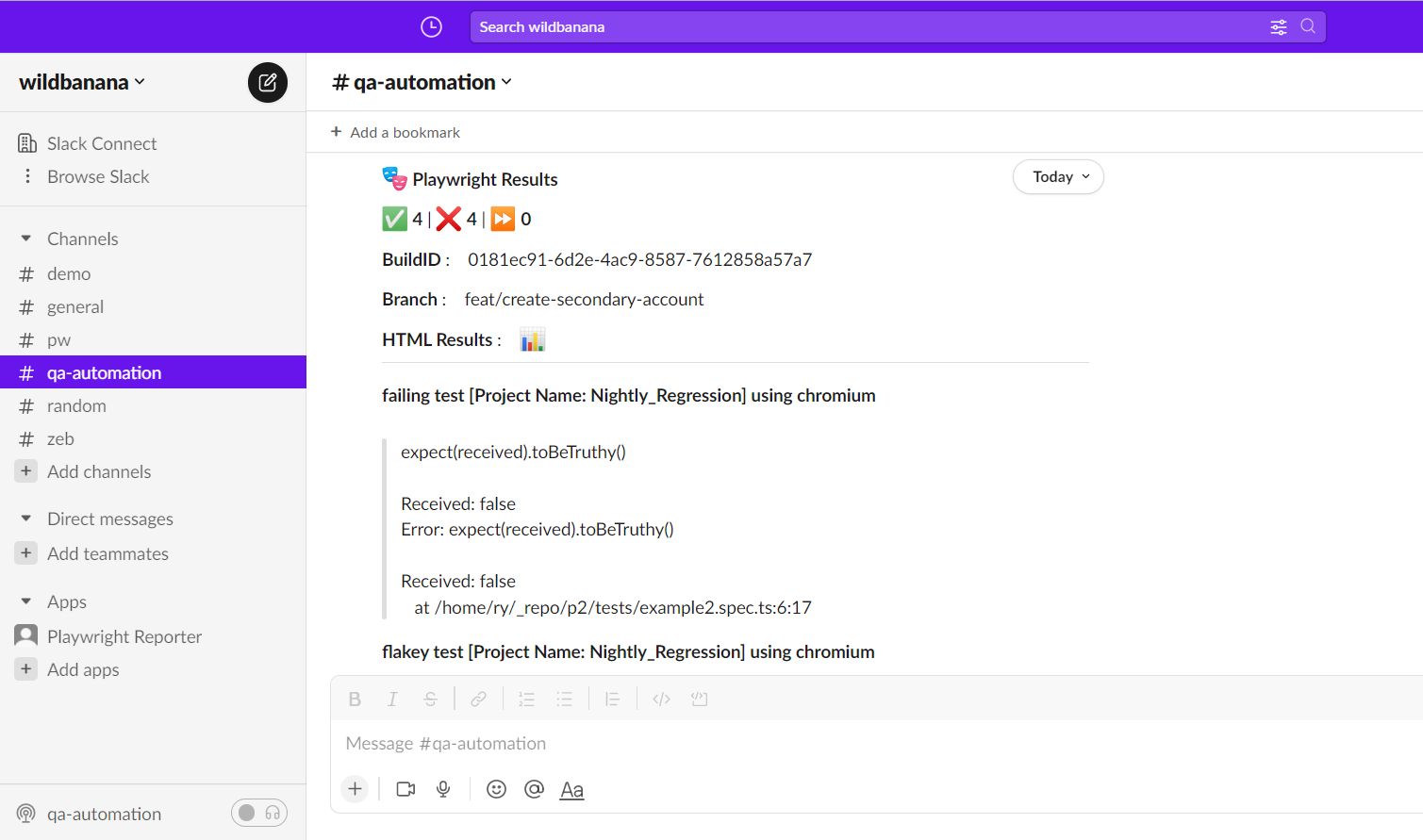
Publish your Playwright test results to your favorite Slack channel(s).
|
|
8
|
+
|
|
9
|
+
|
|
10
|
+
|
|
11
|
+
## 🚀 Features
|
|
12
|
+
|
|
13
|
+
- 💌 Send results your Playwright test results to one or more Slack channels
|
|
14
|
+
- 📊 Conditionally send results to Slack channels based on test results
|
|
15
|
+
- 📄 Include additional meta information into your test summary e.g. Branch, BuildId etc
|
|
16
|
+
- 🧑🎨 Define your own custom Slack message layout!
|
|
17
|
+
|
|
18
|
+
|
|
19
|
+
# 📦 Installation
|
|
20
|
+
|
|
21
|
+
Run following commands:
|
|
22
|
+
|
|
23
|
+
**yarn**
|
|
24
|
+
|
|
25
|
+
`yarn add playwright-slack-report -D`
|
|
26
|
+
|
|
27
|
+
**npm**
|
|
28
|
+
|
|
29
|
+
`npm install playwright-slack-report -D`
|
|
30
|
+
|
|
31
|
+
Modify your `playwright.config.ts` file to include the following:
|
|
32
|
+
|
|
33
|
+
```typescript
|
|
34
|
+
reporter: [
|
|
35
|
+
[
|
|
36
|
+
"./node_modules/playwright-slack-report/dist/src/SlackReporter.js",
|
|
37
|
+
{
|
|
38
|
+
channels: ["pw-tests", "ci"], // provide one or more Slack channels
|
|
39
|
+
sendResults: "always", // "always" , "on-failure", "off"
|
|
40
|
+
},
|
|
41
|
+
],
|
|
42
|
+
["dot"], // other reporters
|
|
43
|
+
],
|
|
44
|
+
```
|
|
45
|
+
# Option A - send your results via a Slack webhook
|
|
46
|
+
|
|
47
|
+
Enable incoming webhooks in your Slack workspace by following the steps as per Slack's documentation:
|
|
48
|
+
|
|
49
|
+
https://api.slack.com/messaging/webhooks
|
|
50
|
+
|
|
51
|
+
|
|
52
|
+
|
|
53
|
+
Once you have enabled incoming webhooks, you will need to copy the webhook URL and specify it in the config:
|
|
54
|
+
|
|
55
|
+
```typescript
|
|
56
|
+
reporter: [
|
|
57
|
+
[
|
|
58
|
+
"./node_modules/playwright-slack-report/dist/src/SlackReporter.js",
|
|
59
|
+
{
|
|
60
|
+
slackWebHookUrl: "https://hooks.slack.com/services/T00000000/B00000000/XXXXXXXXXXXXXXXXXXXXXXXX",
|
|
61
|
+
sendResults: "always", // "always" , "on-failure", "off"
|
|
62
|
+
},
|
|
63
|
+
],
|
|
64
|
+
["dot"], // other reporters
|
|
65
|
+
],
|
|
66
|
+
```
|
|
67
|
+
### Note I:
|
|
68
|
+
You will most likely need to have Slack administrator rights to perform the steps above.
|
|
69
|
+
|
|
70
|
+
### Note II:
|
|
71
|
+
Sending failure details in a thread is not supported when using webhooks. You will need to use Option B below.
|
|
72
|
+
|
|
73
|
+
# Option B
|
|
74
|
+
Run your tests by providing your `SLACK_BOT_USER_OAUTH_TOKEN` as an environment variable or specifying `slackOAuthToken` option in the config:
|
|
75
|
+
|
|
76
|
+
`SLACK_BOT_USER_OAUTH_TOKEN=[your Slack bot user OAUTH token] npx playwright test`
|
|
77
|
+
|
|
78
|
+
> **NOTE:** The Slack channel that you specify will need to be *public*, this app will not be able to publish messages to private channels.
|
|
79
|
+
|
|
80
|
+
---
|
|
81
|
+
|
|
82
|
+
<details>
|
|
83
|
+
<summary><b>🔎 How do I find my Slack bot oauth token?</b></summary>
|
|
84
|
+
|
|
85
|
+
You will need to have Slack administrator rights to perform the steps below.
|
|
86
|
+
|
|
87
|
+
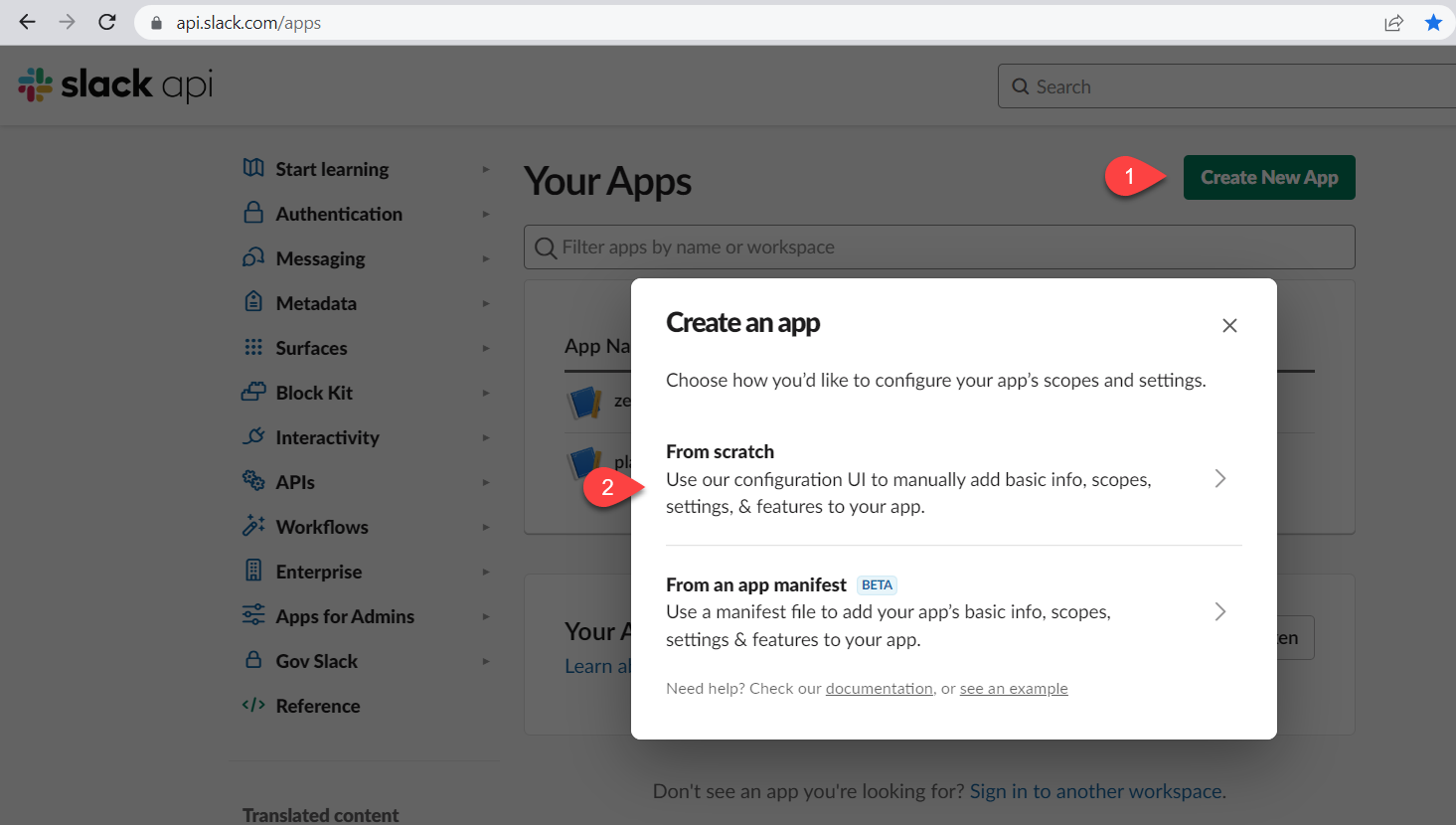
1. Navigate to https://api.slack.com/apps
|
|
88
|
+
2. Click the Create New App button and select "From scratch"
|
|
89
|
+
|
|
90
|
+
|
|
91
|
+
|
|
92
|
+
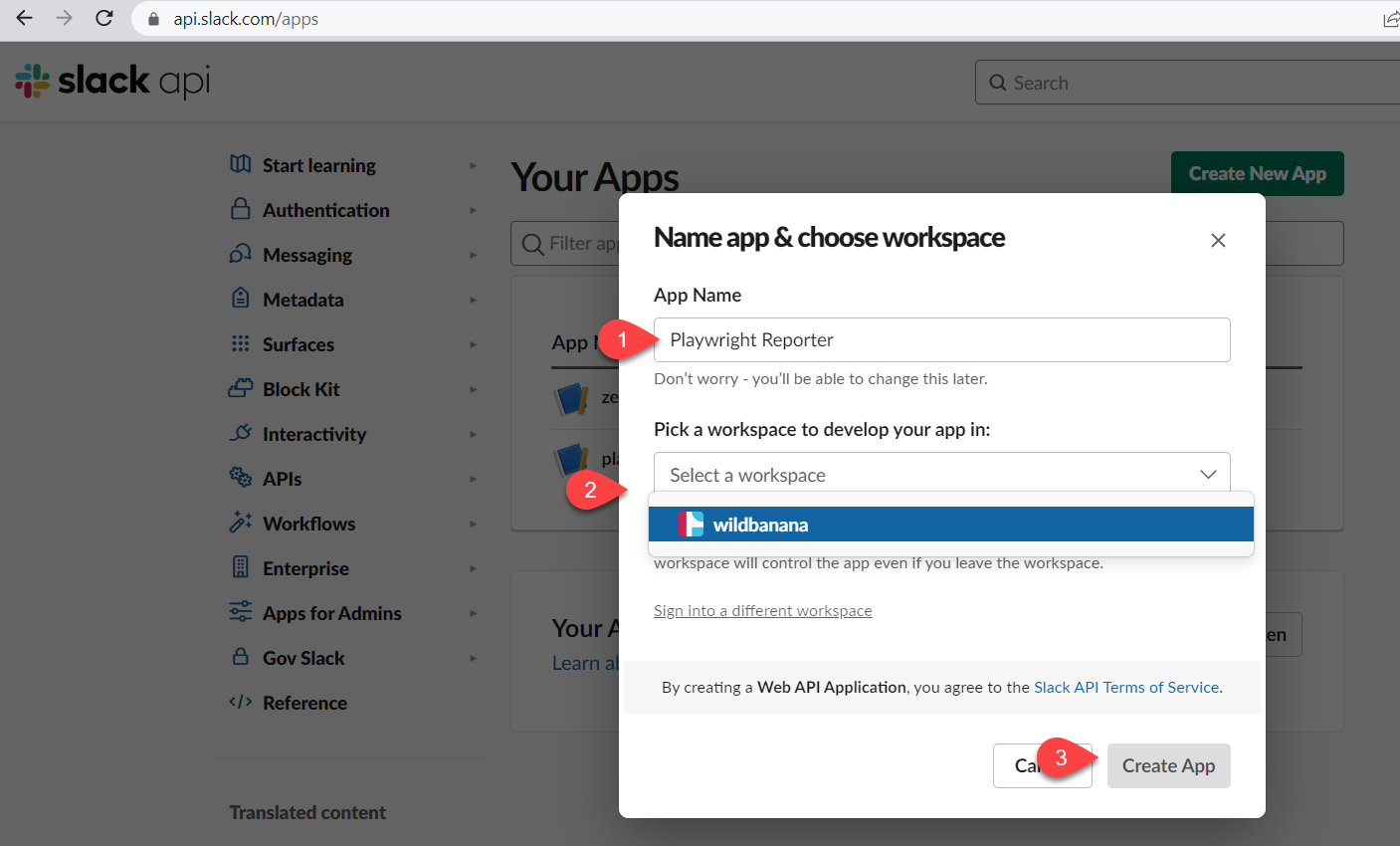
3. Input a name for your app and select the target workspace, then click on the **Create App** button
|
|
93
|
+
|
|
94
|
+
|
|
95
|
+
|
|
96
|
+
4. Under the Features menu, select **OAuth & Permissions** and scroll down to **Scopes** section
|
|
97
|
+
|
|
98
|
+

|
|
99
|
+
|
|
100
|
+
5. Click the **Add an OAuth Scope** button and select the following scopes:
|
|
101
|
+
|
|
102
|
+

|
|
103
|
+
|
|
104
|
+
* chat:write
|
|
105
|
+
* chat:write.public
|
|
106
|
+
* chat:write.customize
|
|
107
|
+
|
|
108
|
+
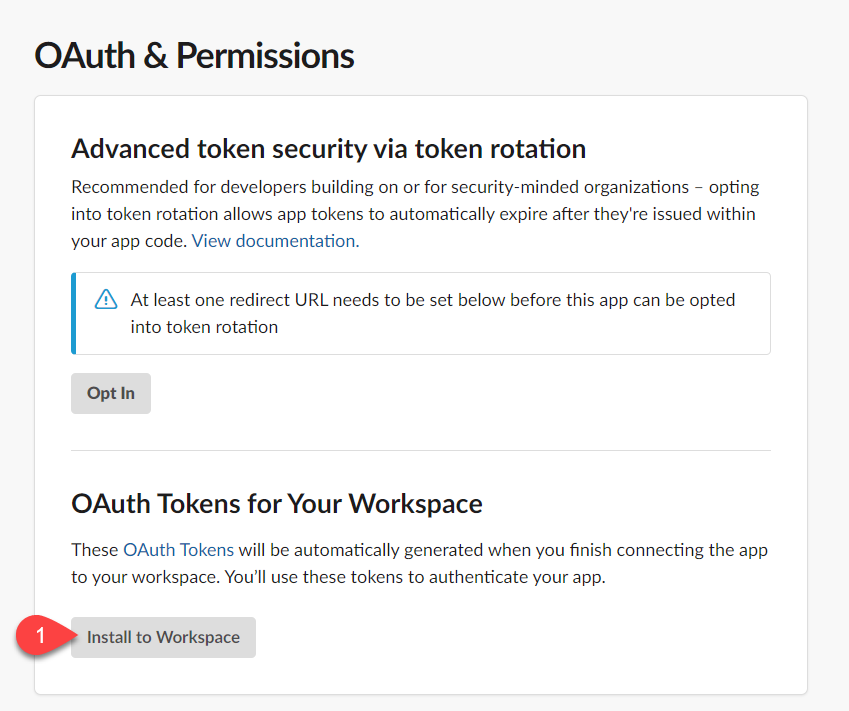
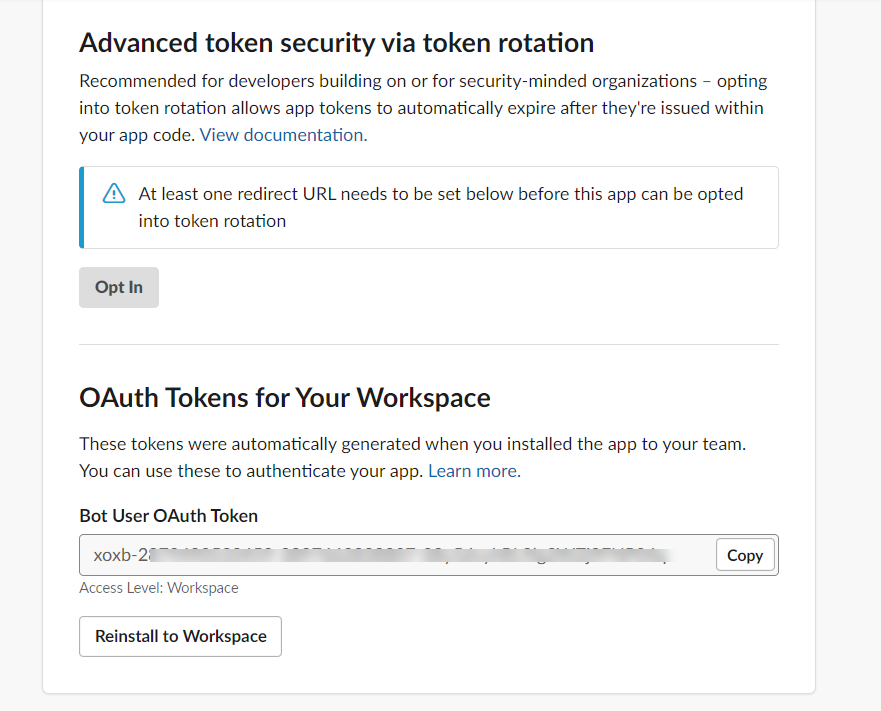
6. Scroll up to the OAuth Tokens for Your Workspace and click the **Install to Workspace** button
|
|
109
|
+
|
|
110
|
+
|
|
111
|
+
|
|
112
|
+
> You will be prompted with the message below, click the Allow button
|
|
113
|
+
|
|
114
|
+

|
|
115
|
+
|
|
116
|
+
The final step will be to copy the generated Bot User OAuth Token aka `SLACK_BOT_USER_OAUTH_TOKEN`.
|
|
117
|
+
|
|
118
|
+
>**Treat this token as a secret.**
|
|
119
|
+
|
|
120
|
+
|
|
121
|
+
|
|
122
|
+
</details>
|
|
123
|
+
|
|
124
|
+
---
|
|
125
|
+
|
|
126
|
+
# ⚙️ Configuration
|
|
127
|
+
|
|
128
|
+
An example advanced configuration is shown below:
|
|
129
|
+
|
|
130
|
+
|
|
131
|
+
```typescript
|
|
132
|
+
import { generateCustomLayout } from "./my_custom_layout";
|
|
133
|
+
import { LogLevel } from '@slack/web-api';
|
|
134
|
+
...
|
|
135
|
+
|
|
136
|
+
reporter: [
|
|
137
|
+
[
|
|
138
|
+
"./node_modules/playwright-slack-report/dist/src/SlackReporter.js",
|
|
139
|
+
{
|
|
140
|
+
channels: ["pw-tests", "ci"], // provide one or more Slack channels
|
|
141
|
+
sendResults: "always", // "always" , "on-failure", "off"
|
|
142
|
+
layout: generateCustomLayout,
|
|
143
|
+
maxNumberOfFailuresToShow: 4,
|
|
144
|
+
meta: [
|
|
145
|
+
{
|
|
146
|
+
key: 'BUILD_NUMBER',
|
|
147
|
+
value: '323332-2341',
|
|
148
|
+
},
|
|
149
|
+
{
|
|
150
|
+
key: 'WHATEVER_ENV_VARIABLE',
|
|
151
|
+
value: process.env.SOME_ENV_VARIABLE, // depending on your CI environment, this can be the branch name, build id, etc
|
|
152
|
+
},
|
|
153
|
+
{
|
|
154
|
+
key: 'HTML Results',
|
|
155
|
+
value: '<https://your-build-artifacts.my.company.dev/pw/23887/playwright-report/index.html|📊>',
|
|
156
|
+
},
|
|
157
|
+
],
|
|
158
|
+
slackOAuthToken: 'YOUR_SLACK_OAUTH_TOKEN',
|
|
159
|
+
slackLogLevel: LogLevel.DEBUG,
|
|
160
|
+
disableUnfurl: true,
|
|
161
|
+
showInThread: true,
|
|
162
|
+
},
|
|
163
|
+
|
|
164
|
+
],
|
|
165
|
+
],
|
|
166
|
+
```
|
|
167
|
+
|
|
168
|
+
### **channels**
|
|
169
|
+
An array of Slack channels to post to, at least one channel is required
|
|
170
|
+
### **sendResults**
|
|
171
|
+
Can either be *"always"*, *"on-failure"* or *"off"*, this configuration is required:
|
|
172
|
+
* **always** - will send the results to Slack at completion of the test run
|
|
173
|
+
* **on-failure** - will send the results to Slack only if a test failures are encountered
|
|
174
|
+
* **off** - turns off the reporter, it will not send the results to Slack
|
|
175
|
+
### **layout**
|
|
176
|
+
A function that returns a layout object, this configuration is optional. See section below for more details.
|
|
177
|
+
* meta - an array of meta data to be sent to Slack, this configuration is optional.
|
|
178
|
+
### **layoutAsync**
|
|
179
|
+
Same as **layout** above, but asynchronous in that it returns a promise.
|
|
180
|
+
### **maxNumberOfFailuresToShow**
|
|
181
|
+
Limits the number of failures shown in the Slack message, defaults to 10.
|
|
182
|
+
### **separateFlaky**
|
|
183
|
+
Don't consider flaky tests as passed, instead output them separately. Flaky tests are tests that passed but not on the first try. This defaults to `false` but it is highly recommended that you switch this on.
|
|
184
|
+
### **slackOAuthToken**
|
|
185
|
+
Instead of providing an environment variable `SLACK_BOT_USER_OAUTH_TOKEN` you can specify the token in the config in the `slackOAuthToken` field.
|
|
186
|
+
### **slackLogLevel** (default LogLevel.DEBUG)
|
|
187
|
+
This option allows you to control slack client severity levels for log entries. It accepts a value from @slack/web-api `LogLevel` enum:
|
|
188
|
+
- ERROR
|
|
189
|
+
- WARN
|
|
190
|
+
- INFO
|
|
191
|
+
- DEBUG
|
|
192
|
+
|
|
193
|
+
Example: `slackLogLevel: "ERROR",` will only log errors to the console.
|
|
194
|
+
### **disableUnfurl** (default: true)
|
|
195
|
+
Enable or disable unfurling of links in Slack messages.
|
|
196
|
+
### **showInThread** (default: false)
|
|
197
|
+
Instructs the reporter to show the failure details in a thread instead of the main channel.
|
|
198
|
+
|
|
199
|
+

|
|
200
|
+
|
|
201
|
+
### **proxy** (optional)
|
|
202
|
+
String representation of your proxy server.
|
|
203
|
+
*Example*:
|
|
204
|
+
|
|
205
|
+
`proxy: "http://proxy.mycompany.com:8080",`
|
|
206
|
+
|
|
207
|
+
### **meta** (default: empty array)
|
|
208
|
+
The meta data to be sent to Slack. This is useful for providing additional context to your test run.
|
|
209
|
+
|
|
210
|
+
**Examples:**
|
|
211
|
+
```typescript
|
|
212
|
+
...
|
|
213
|
+
meta: [
|
|
214
|
+
{
|
|
215
|
+
key: 'Suite',
|
|
216
|
+
value: 'Nightly full regression',
|
|
217
|
+
},
|
|
218
|
+
{
|
|
219
|
+
key: 'GITHUB_REPOSITORY',
|
|
220
|
+
value: 'octocat/telsa-ui',
|
|
221
|
+
},
|
|
222
|
+
{
|
|
223
|
+
key: 'GITHUB_REF',
|
|
224
|
+
value: process.env.GITHUB_REF,
|
|
225
|
+
},
|
|
226
|
+
],
|
|
227
|
+
...
|
|
228
|
+
```
|
|
229
|
+
|
|
230
|
+
# 🎨 Define your own Slack message custom layout
|
|
231
|
+
|
|
232
|
+
You can define your own Slack message layout to suit your needs.
|
|
233
|
+
|
|
234
|
+
Firstly, install the necessary type definitions:
|
|
235
|
+
|
|
236
|
+
`yarn add @slack/types -D`
|
|
237
|
+
|
|
238
|
+
|
|
239
|
+
Next, define your layout function. The signature of this function should adhere to example below:
|
|
240
|
+
|
|
241
|
+
```typescript
|
|
242
|
+
import { Block, KnownBlock } from "@slack/types";
|
|
243
|
+
import { SummaryResults } from "playwright-slack-report/dist/src";
|
|
244
|
+
|
|
245
|
+
const generateCustomLayout = (summaryResults: SummaryResults):Array<KnownBlock | Block> => {
|
|
246
|
+
// your implementation goes here
|
|
247
|
+
}
|
|
248
|
+
|
|
249
|
+
export default generateCustomLayout;
|
|
250
|
+
```
|
|
251
|
+
|
|
252
|
+
In your, `playwright.config.ts` file, add your function into the config.
|
|
253
|
+
|
|
254
|
+
```typescript
|
|
255
|
+
import { generateCustomLayout } from "./my_custom_layout";
|
|
256
|
+
|
|
257
|
+
...
|
|
258
|
+
|
|
259
|
+
reporter: [
|
|
260
|
+
[
|
|
261
|
+
"./node_modules/playwright-slack-report/dist/src/SlackReporter.js",
|
|
262
|
+
{
|
|
263
|
+
channels: ["pw-tests", "ci"], // provide one or more Slack channels
|
|
264
|
+
sendResults: "always", // "always" , "on-failure", "off"
|
|
265
|
+
layout: generateCustomLayout,
|
|
266
|
+
...
|
|
267
|
+
},
|
|
268
|
+
],
|
|
269
|
+
],
|
|
270
|
+
```
|
|
271
|
+
|
|
272
|
+
>Pro Tip: You can use the [block-kit provided by Slack when creating your layout.](https://app.slack.com/block-kit-builder/)
|
|
273
|
+
|
|
274
|
+
### Examples:
|
|
275
|
+
|
|
276
|
+
**Example 1: - very simple summary**
|
|
277
|
+
|
|
278
|
+
```typescript
|
|
279
|
+
import { Block, KnownBlock } from '@slack/types';
|
|
280
|
+
import { SummaryResults } from '..';
|
|
281
|
+
|
|
282
|
+
export default function generateCustomLayoutSimpleExample(
|
|
283
|
+
summaryResults: SummaryResults,
|
|
284
|
+
): Array<Block | KnownBlock> {
|
|
285
|
+
return [
|
|
286
|
+
{
|
|
287
|
+
type: 'section',
|
|
288
|
+
text: {
|
|
289
|
+
type: 'mrkdwn',
|
|
290
|
+
text:
|
|
291
|
+
summaryResults.failed === 0
|
|
292
|
+
? ':tada: All tests passed!'
|
|
293
|
+
: `😭${summaryResults.failed} failure(s) out of ${summaryResults.tests.length} tests`,
|
|
294
|
+
},
|
|
295
|
+
},
|
|
296
|
+
];
|
|
297
|
+
}
|
|
298
|
+
```
|
|
299
|
+
|
|
300
|
+
Generates the following message in Slack:
|
|
301
|
+
|
|
302
|
+

|
|
303
|
+
|
|
304
|
+
|
|
305
|
+
**Example 2: - very simple summary (with Meta information)**
|
|
306
|
+
|
|
307
|
+
Add the meta block in your config:
|
|
308
|
+
|
|
309
|
+
```typescript
|
|
310
|
+
reporter: [
|
|
311
|
+
[
|
|
312
|
+
"./node_modules/playwright-slack-report/dist/src/SlackReporter.js",
|
|
313
|
+
{
|
|
314
|
+
channels: ["demo"],
|
|
315
|
+
sendResults: "always", // "always" , "on-failure", "off",
|
|
316
|
+
layout: generateCustomLayout,
|
|
317
|
+
meta: [
|
|
318
|
+
{
|
|
319
|
+
key: 'EXAMPLE_META_node_env',
|
|
320
|
+
value: process.env.HOME ,
|
|
321
|
+
},
|
|
322
|
+
],
|
|
323
|
+
},
|
|
324
|
+
],
|
|
325
|
+
],
|
|
326
|
+
```
|
|
327
|
+
|
|
328
|
+
Create the function to generate the layout:
|
|
329
|
+
|
|
330
|
+
```typescript
|
|
331
|
+
import { Block, KnownBlock } from '@slack/types';
|
|
332
|
+
import { SummaryResults } from '..';
|
|
333
|
+
|
|
334
|
+
export default function generateCustomLayoutSimpleMeta(
|
|
335
|
+
summaryResults: SummaryResults,
|
|
336
|
+
): Array<Block | KnownBlock> {
|
|
337
|
+
const meta: { type: string; text: { type: string; text: string; }; }[] = [];
|
|
338
|
+
if (summaryResults.meta) {
|
|
339
|
+
for (let i = 0; i < summaryResults.meta.length; i += 1) {
|
|
340
|
+
const { key, value } = summaryResults.meta[i];
|
|
341
|
+
meta.push({
|
|
342
|
+
type: 'section',
|
|
343
|
+
text: {
|
|
344
|
+
type: 'mrkdwn',
|
|
345
|
+
text: `\n*${key}* :\t${value}`,
|
|
346
|
+
},
|
|
347
|
+
});
|
|
348
|
+
}
|
|
349
|
+
}
|
|
350
|
+
return [
|
|
351
|
+
{
|
|
352
|
+
type: 'section',
|
|
353
|
+
text: {
|
|
354
|
+
type: 'mrkdwn',
|
|
355
|
+
text:
|
|
356
|
+
summaryResults.failed === 0
|
|
357
|
+
? ':tada: All tests passed!'
|
|
358
|
+
: `😭${summaryResults.failed} failure(s) out of ${summaryResults.tests.length} tests`,
|
|
359
|
+
},
|
|
360
|
+
},
|
|
361
|
+
...meta,
|
|
362
|
+
];
|
|
363
|
+
}
|
|
364
|
+
|
|
365
|
+
```
|
|
366
|
+
|
|
367
|
+
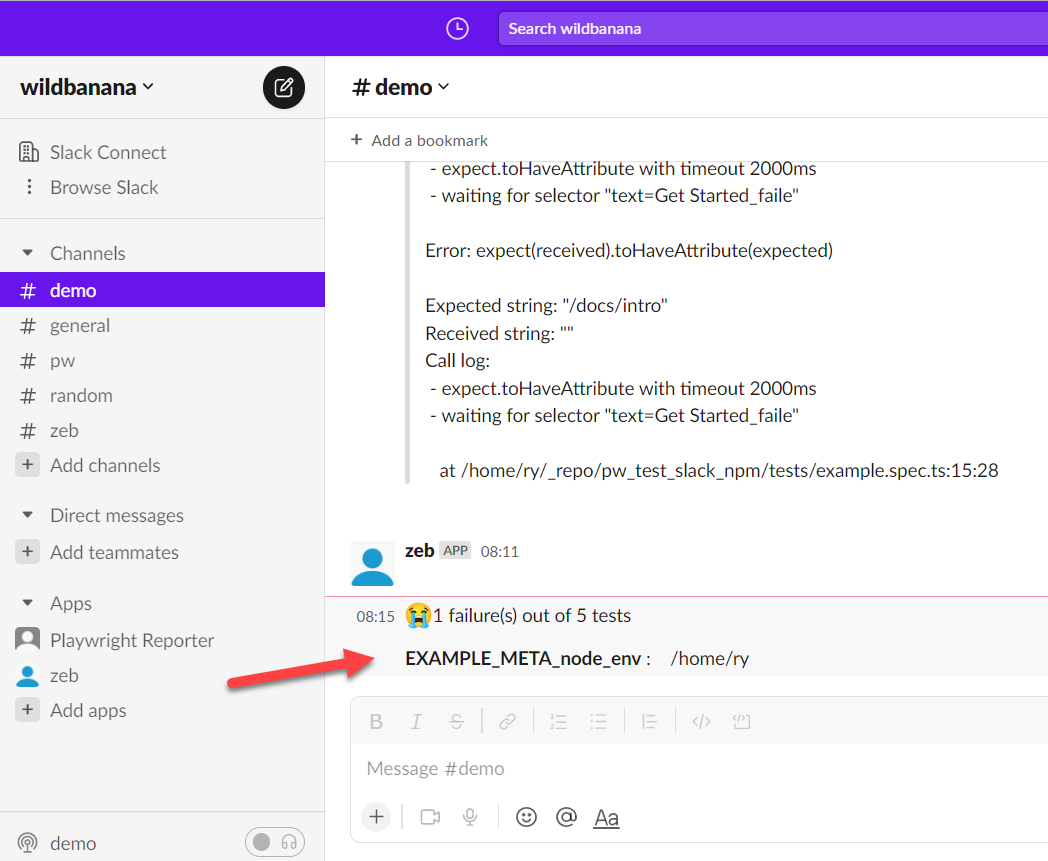
Generates the following message in Slack:
|
|
368
|
+
|
|
369
|
+
|
|
370
|
+
|
|
371
|
+
|
|
372
|
+
**Example 3: - With screenshots and/or recorded videos (using AWS S3)**
|
|
373
|
+
|
|
374
|
+
In your, `playwright.config.ts` file, add these params (Make sure you use **layoutAsync** rather than **layout**):
|
|
375
|
+
|
|
376
|
+
```typescript
|
|
377
|
+
import { generateCustomLayoutAsync } from "./my_custom_layout";
|
|
378
|
+
...
|
|
379
|
+
reporter: [
|
|
380
|
+
[
|
|
381
|
+
"./node_modules/playwright-slack-report/dist/src/SlackReporter.js",
|
|
382
|
+
{
|
|
383
|
+
...
|
|
384
|
+
layoutAsync: generateCustomLayoutAsync,
|
|
385
|
+
...
|
|
386
|
+
},
|
|
387
|
+
],
|
|
388
|
+
],
|
|
389
|
+
use: {
|
|
390
|
+
...
|
|
391
|
+
screenshot: "only-on-failure",
|
|
392
|
+
video: "retain-on-failure",
|
|
393
|
+
...
|
|
394
|
+
},
|
|
395
|
+
```
|
|
396
|
+
|
|
397
|
+
Create the function to generate the layout asynchronously in `my_custom_layout.ts`:
|
|
398
|
+
|
|
399
|
+
```typescript
|
|
400
|
+
import fs from "fs";
|
|
401
|
+
import path from "path";
|
|
402
|
+
import { Block, KnownBlock } from "@slack/types";
|
|
403
|
+
import { SummaryResults } from "playwright-slack-report/dist/src";
|
|
404
|
+
import { PutObjectCommand, S3Client } from "@aws-sdk/client-s3";
|
|
405
|
+
|
|
406
|
+
const s3Client = new S3Client({
|
|
407
|
+
credentials: {
|
|
408
|
+
accessKeyId: process.env.S3_ACCESS_KEY || "",
|
|
409
|
+
secretAccessKey: process.env.S3_SECRET || "",
|
|
410
|
+
},
|
|
411
|
+
region: process.env.S3_REGION,
|
|
412
|
+
});
|
|
413
|
+
|
|
414
|
+
async function uploadFile(filePath, fileName) {
|
|
415
|
+
try {
|
|
416
|
+
const ext = path.extname(filePath);
|
|
417
|
+
const name = `${fileName}${ext}`;
|
|
418
|
+
|
|
419
|
+
await s3Client.send(
|
|
420
|
+
new PutObjectCommand({
|
|
421
|
+
Bucket: process.env.S3_BUCKET,
|
|
422
|
+
Key: name,
|
|
423
|
+
Body: fs.createReadStream(filePath),
|
|
424
|
+
})
|
|
425
|
+
);
|
|
426
|
+
|
|
427
|
+
return `https://${process.env.S3_BUCKET}.s3.${process.env.S3_REGION}.amazonaws.com/${name}`;
|
|
428
|
+
} catch (err) {
|
|
429
|
+
console.log("🔥🔥 Error", err);
|
|
430
|
+
}
|
|
431
|
+
}
|
|
432
|
+
|
|
433
|
+
|
|
434
|
+
export async function generateCustomLayoutAsync (summaryResults: SummaryResults): Promise<Array<KnownBlock | Block>> {
|
|
435
|
+
const { tests } = summaryResults;
|
|
436
|
+
// create your custom slack blocks
|
|
437
|
+
|
|
438
|
+
const header = {
|
|
439
|
+
type: "header",
|
|
440
|
+
text: {
|
|
441
|
+
type: "plain_text",
|
|
442
|
+
text: "🎭 *Playwright E2E Test Results*",
|
|
443
|
+
emoji: true,
|
|
444
|
+
},
|
|
445
|
+
};
|
|
446
|
+
|
|
447
|
+
const summary = {
|
|
448
|
+
type: "section",
|
|
449
|
+
text: {
|
|
450
|
+
type: "mrkdwn",
|
|
451
|
+
text: `✅ *${summaryResults.passed}* | ❌ *${summaryResults.failed}* | ⏩ *${summaryResults.skipped}*`,
|
|
452
|
+
},
|
|
453
|
+
};
|
|
454
|
+
|
|
455
|
+
const fails: Array<KnownBlock | Block> = [];
|
|
456
|
+
|
|
457
|
+
for (const t of tests) {
|
|
458
|
+
if (t.status === "failed" || t.status === "timedOut") {
|
|
459
|
+
|
|
460
|
+
fails.push({
|
|
461
|
+
type: "section",
|
|
462
|
+
text: {
|
|
463
|
+
type: "mrkdwn",
|
|
464
|
+
text: `👎 *[${t.browser}] | ${t.suiteName.replace(/\W/gi, "-")}*`,
|
|
465
|
+
},
|
|
466
|
+
});
|
|
467
|
+
|
|
468
|
+
const assets: Array<string> = [];
|
|
469
|
+
|
|
470
|
+
if (t.attachments) {
|
|
471
|
+
for (const a of t.attachments) {
|
|
472
|
+
// Upload failed tests screenshots and videos to the service of your choice
|
|
473
|
+
// In my case I upload the to S3 bucket
|
|
474
|
+
const permalink = await uploadFile(
|
|
475
|
+
a.path,
|
|
476
|
+
`${t.suiteName}--${t.name}`.replace(/\W/gi, "-").toLowerCase()
|
|
477
|
+
);
|
|
478
|
+
|
|
479
|
+
if (permalink) {
|
|
480
|
+
let icon = "";
|
|
481
|
+
if (a.name === "screenshot") {
|
|
482
|
+
icon = "📸";
|
|
483
|
+
} else if (a.name === "video") {
|
|
484
|
+
icon = "🎥";
|
|
485
|
+
}
|
|
486
|
+
|
|
487
|
+
assets.push(`${icon} See the <${permalink}|${a.name}>`);
|
|
488
|
+
}
|
|
489
|
+
}
|
|
490
|
+
}
|
|
491
|
+
|
|
492
|
+
if (assets.length > 0) {
|
|
493
|
+
fails.push({
|
|
494
|
+
type: "context",
|
|
495
|
+
elements: [{ type: "mrkdwn", text: assets.join("\n") }],
|
|
496
|
+
});
|
|
497
|
+
}
|
|
498
|
+
}
|
|
499
|
+
}
|
|
500
|
+
|
|
501
|
+
return [header, summary, { type: "divider" }, ...fails]
|
|
502
|
+
}
|
|
503
|
+
|
|
504
|
+
```
|
|
505
|
+
|
|
506
|
+
**Example 4: - Upload the attachments to directly to Slack**
|
|
507
|
+
|
|
508
|
+
To enable this functionality, make sure the slackbot user has the following additional scopes:
|
|
509
|
+
- `files:write`
|
|
510
|
+
- `files:read`
|
|
511
|
+
|
|
512
|
+
You will need to re-install the app and re-invite the bot into the channel.
|
|
513
|
+
|
|
514
|
+
The value of the channel_id should be the channel id of the channel you want to upload the file to. This channel id can be found in the url when you are in the channel. e.g.
|
|
515
|
+
|
|
516
|
+
**https://app.slack.com/client/T02RVEEFPDH/C05H7TKVDUK**
|
|
517
|
+
|
|
518
|
+
^ the bit starting with 'C...' is your channel id. In this case, the channel id is `C05H7TKVDUK`
|
|
519
|
+
|
|
520
|
+
```typescript
|
|
521
|
+
...
|
|
522
|
+
const web_api_1 = require('@slack/web-api');
|
|
523
|
+
const slackClient = new web_api_1.WebClient(process.env.SLACK_BOT_USER_OAUTH_TOKEN);
|
|
524
|
+
|
|
525
|
+
async function uploadFile(filePath) {
|
|
526
|
+
try {
|
|
527
|
+
const result = await slackClient.files.uploadV2({
|
|
528
|
+
channel_id: 'C05H7TKVDUK', << this is the channel id not channel name! ☠️
|
|
529
|
+
file: fs.createReadStream(filePath),
|
|
530
|
+
filename: filePath.split('/').at(-1),
|
|
531
|
+
});
|
|
532
|
+
|
|
533
|
+
return result.file;
|
|
534
|
+
} catch (error) {
|
|
535
|
+
console.log('🔥🔥 error', error);
|
|
536
|
+
}
|
|
537
|
+
}
|
|
538
|
+
|
|
539
|
+
export async function generateCustomLayoutAsync (summaryResults: SummaryResults): Promise<Array<KnownBlock | Block>> {
|
|
540
|
+
const { tests } = summaryResults;
|
|
541
|
+
....
|
|
542
|
+
// See the snippet above ^^^
|
|
543
|
+
|
|
544
|
+
|
|
545
|
+
if (t.attachments) {
|
|
546
|
+
for (const a of t.attachments) {
|
|
547
|
+
const file = await uploadFile(a.path);
|
|
548
|
+
|
|
549
|
+
if (file) {
|
|
550
|
+
if (a.name === 'screenshot' && file.permalink) {
|
|
551
|
+
fails.push({
|
|
552
|
+
alt_text: '',
|
|
553
|
+
image_url: file.permalink,
|
|
554
|
+
title: { type: 'plain_text', text: file.name || '' },
|
|
555
|
+
type: 'image',
|
|
556
|
+
});
|
|
557
|
+
}
|
|
558
|
+
|
|
559
|
+
if (a.name === 'video' && file.permalink) {
|
|
560
|
+
fails.push({
|
|
561
|
+
alt_text: '',
|
|
562
|
+
// NOTE:
|
|
563
|
+
// Slack requires thumbnail_url length to be more that 0
|
|
564
|
+
// Either set screenshot url as the thumbnail or add a placeholder image url
|
|
565
|
+
thumbnail_url: '',
|
|
566
|
+
title: { type: 'plain_text', text: file.name || '' },
|
|
567
|
+
type: 'video',
|
|
568
|
+
video_url: file.permalink,
|
|
569
|
+
});
|
|
570
|
+
}
|
|
571
|
+
}
|
|
572
|
+
}
|
|
573
|
+
}
|
|
574
|
+
....
|
|
575
|
+
|
|
576
|
+
return [header, summary, { type: "divider" }, ...fails]
|
|
577
|
+
}
|
|
578
|
+
|
|
579
|
+
```
|
|
580
|
+
|
|
581
|
+
# 🔑 License
|
|
582
|
+
|
|
583
|
+
[MIT](https://github.com/ryanrosello-og/playwright-slack-report/blob/main/LICENSE)
|
|
584
|
+
|
|
585
|
+
# ✨ Contributing
|
|
586
|
+
|
|
587
|
+
Clone the project and run `npm install`
|
|
588
|
+
|
|
589
|
+
Make your changes
|
|
590
|
+
Run the tests using `npm run pw`
|
|
591
|
+
|
|
592
|
+
**To execute and test the entire package:**
|
|
593
|
+
|
|
594
|
+
Run `npm pack`
|
|
595
|
+
|
|
596
|
+
Create a new playwright project using `yarn create playwright`
|
|
597
|
+
Modify the `package.json` and a local dependency to the generated `tgz` file
|
|
598
|
+
|
|
599
|
+
e.g.
|
|
600
|
+
|
|
601
|
+
```
|
|
602
|
+
"dependencies": {
|
|
603
|
+
"playwright-slack-report": "/home/ry/_repo/playwright-slack-report/playwright-slack-report-1.0.3.tgz"
|
|
604
|
+
}
|
|
605
|
+
```
|
|
606
|
+
|
|
607
|
+
* Execute `npm install`
|
|
608
|
+
* Set your `SLACK_BOT_USER_OAUTH_TOKEN` environment variable
|
|
609
|
+
* Modify the `playwright.config.ts` as above
|
|
610
|
+
* Run the tests using `npx playwright text`
|
|
611
|
+
|
|
612
|
+
# 🐛 Something not working for you?
|
|
613
|
+
|
|
614
|
+
Feel free to [raise a github issue](https://github.com/ryanrosello-og/playwright-slack-report/issues) for any bugs or feature requests.
|
|
@@ -0,0 +1,5 @@
|
|
|
1
|
+
import { KnownBlock, Block } from '@slack/types';
|
|
2
|
+
import { SummaryResults } from '.';
|
|
3
|
+
declare const generateBlocks: (summaryResults: SummaryResults, maxNumberOfFailures: number) => Promise<Array<KnownBlock | Block>>;
|
|
4
|
+
declare const generateFailures: (summaryResults: SummaryResults, maxNumberOfFailures: number) => Promise<Array<KnownBlock | Block>>;
|
|
5
|
+
export { generateBlocks, generateFailures };
|
|
@@ -0,0 +1,68 @@
|
|
|
1
|
+
"use strict";
|
|
2
|
+
Object.defineProperty(exports, "__esModule", { value: true });
|
|
3
|
+
exports.generateFailures = exports.generateSkippers = exports.generateBlocks = void 0;
|
|
4
|
+
const generateBlocks = async (summaryResults, maxNumberOfFailures) => {
|
|
5
|
+
const meta = [];
|
|
6
|
+
const header = {
|
|
7
|
+
type: 'section',
|
|
8
|
+
text: {
|
|
9
|
+
type: 'mrkdwn',
|
|
10
|
+
text: '🎭 *Playwright Results*',
|
|
11
|
+
},
|
|
12
|
+
};
|
|
13
|
+
const summary = {
|
|
14
|
+
type: 'section',
|
|
15
|
+
text: {
|
|
16
|
+
type: 'mrkdwn',
|
|
17
|
+
text: `✅ *${summaryResults.passed}* | ❌ *${summaryResults.failed}* |${summaryResults.flaky !== undefined
|
|
18
|
+
? ` 🟡 *${summaryResults.flaky}* | `
|
|
19
|
+
: ' '}⏩ *${summaryResults.skipped}*`,
|
|
20
|
+
},
|
|
21
|
+
};
|
|
22
|
+
const fails = await generateFailures(summaryResults, maxNumberOfFailures);
|
|
23
|
+
if (summaryResults.meta) {
|
|
24
|
+
for (let i = 0; i < summaryResults.meta.length; i += 1) {
|
|
25
|
+
const { key, value } = summaryResults.meta[i];
|
|
26
|
+
meta.push({
|
|
27
|
+
type: 'section',
|
|
28
|
+
text: {
|
|
29
|
+
type: 'mrkdwn',
|
|
30
|
+
text: `\n*${key}* :\t${value}`,
|
|
31
|
+
},
|
|
32
|
+
});
|
|
33
|
+
}
|
|
34
|
+
}
|
|
35
|
+
return [header, summary, ...meta, ...fails];
|
|
36
|
+
};
|
|
37
|
+
exports.generateBlocks = generateBlocks;
|
|
38
|
+
const generateFailures = async (summaryResults, maxNumberOfFailures) => {
|
|
39
|
+
const maxNumberOfFailureLength = 650;
|
|
40
|
+
const fails = [];
|
|
41
|
+
const numberOfFailuresToShow = Math.min(summaryResults.failures.length, maxNumberOfFailures);
|
|
42
|
+
for (let i = 0; i < numberOfFailuresToShow; i += 1) {
|
|
43
|
+
const { failureReason, test } = summaryResults.failures[i];
|
|
44
|
+
const formattedFailure = failureReason
|
|
45
|
+
.substring(0, maxNumberOfFailureLength)
|
|
46
|
+
.split('\n')[0];
|
|
47
|
+
fails.push({
|
|
48
|
+
type: 'section',
|
|
49
|
+
text: {
|
|
50
|
+
type: 'mrkdwn',
|
|
51
|
+
text: `*${test.split(' [')[0]}*\n${formattedFailure}`,
|
|
52
|
+
},
|
|
53
|
+
});
|
|
54
|
+
}
|
|
55
|
+
if (summaryResults.failures.length > maxNumberOfFailures) {
|
|
56
|
+
fails.push({
|
|
57
|
+
type: 'section',
|
|
58
|
+
text: {
|
|
59
|
+
type: 'mrkdwn',
|
|
60
|
+
text: `*⚠️ There are too many failures to display - ${fails.length} out of ${summaryResults.failures.length} failures shown*`,
|
|
61
|
+
},
|
|
62
|
+
});
|
|
63
|
+
}
|
|
64
|
+
return [
|
|
65
|
+
...fails,
|
|
66
|
+
];
|
|
67
|
+
};
|
|
68
|
+
exports.generateFailures = generateFailures;
|