plan-review 1.1.2 → 1.1.3
This diff represents the content of publicly available package versions that have been released to one of the supported registries. The information contained in this diff is provided for informational purposes only and reflects changes between package versions as they appear in their respective public registries.
- package/README.md +153 -0
- package/package.json +2 -2
package/README.md
ADDED
|
@@ -0,0 +1,153 @@
|
|
|
1
|
+
# plan-review
|
|
2
|
+
|
|
3
|
+
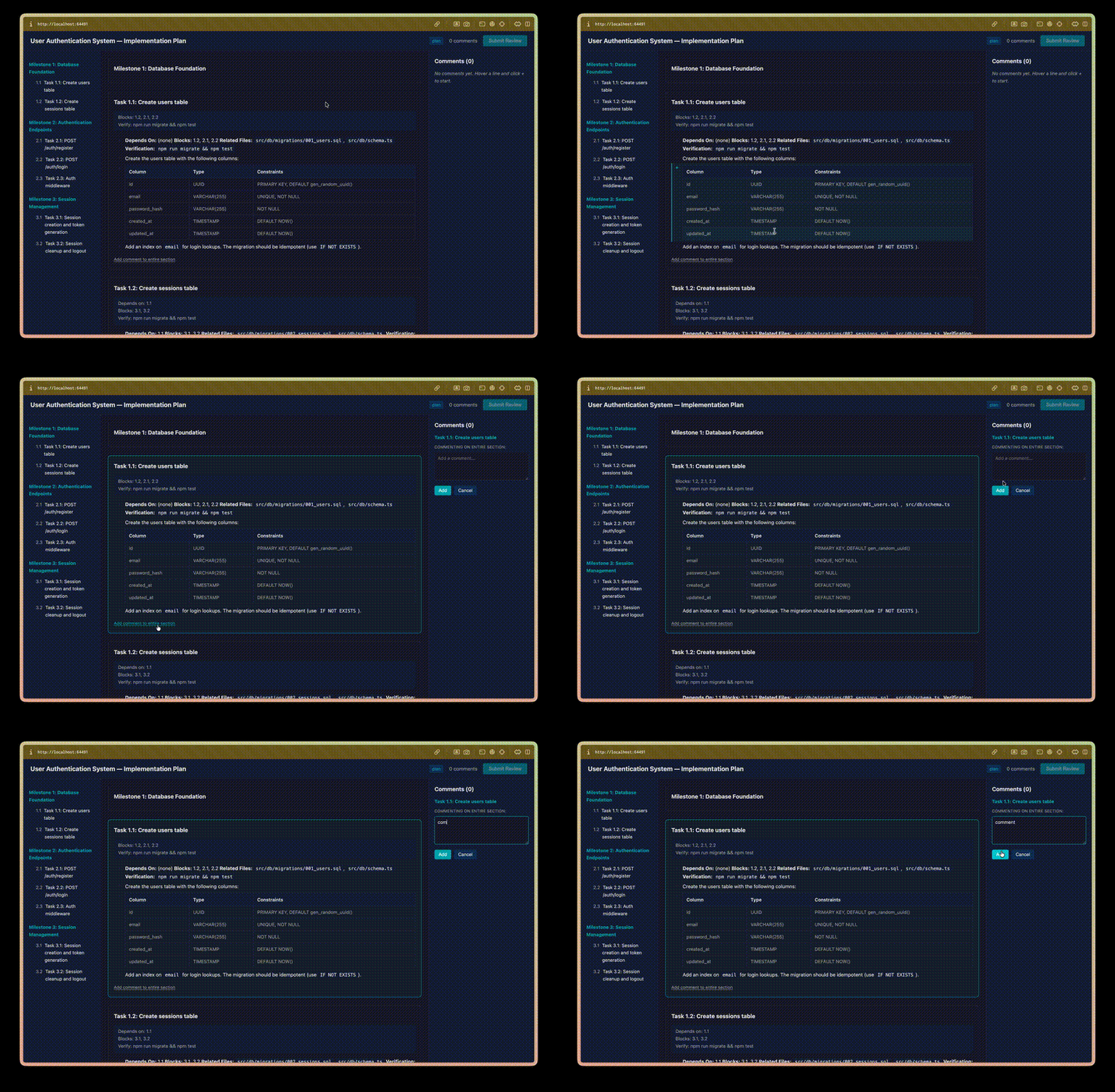
Interactive CLI for reviewing AI-generated markdown plans. Parses a plan into sections, opens a three-panel browser review UI, collects line-anchored comments, and pipes structured feedback back — to the AI that wrote the plan, your clipboard, or a file.
|
|
4
|
+
|
|
5
|
+
|
|
6
|
+
|
|
7
|
+
## Install
|
|
8
|
+
|
|
9
|
+
```bash
|
|
10
|
+
npm install -g plan-review
|
|
11
|
+
```
|
|
12
|
+
|
|
13
|
+
### Claude Code skill (optional)
|
|
14
|
+
|
|
15
|
+
If you use Claude Code, install the companion skill so you can say *"review this plan"*:
|
|
16
|
+
|
|
17
|
+
```bash
|
|
18
|
+
plan-review install-skill
|
|
19
|
+
```
|
|
20
|
+
|
|
21
|
+
## Quick start
|
|
22
|
+
|
|
23
|
+
```bash
|
|
24
|
+
# Review a plan — opens the browser UI (default)
|
|
25
|
+
plan-review path/to/plan.md
|
|
26
|
+
|
|
27
|
+
# Try the included fixture
|
|
28
|
+
plan-review examples/renderer-fixture.md
|
|
29
|
+
|
|
30
|
+
# Pipe feedback directly back to Claude
|
|
31
|
+
plan-review path/to/plan.md -o claude
|
|
32
|
+
```
|
|
33
|
+
|
|
34
|
+
That's it. The browser mode is the default and the recommended way to review plans — line-anchored comments, auto-save, full markdown rendering including mermaid, math, footnotes, and admonitions.
|
|
35
|
+
|
|
36
|
+
## Browser mode (default)
|
|
37
|
+
|
|
38
|
+
Three panels:
|
|
39
|
+
|
|
40
|
+
```
|
|
41
|
+
+------------------+----------------------------+------------------+
|
|
42
|
+
| | | |
|
|
43
|
+
| Table of | Rendered markdown | Comment |
|
|
44
|
+
| Contents | with plan metadata | Sidebar |
|
|
45
|
+
| | | |
|
|
46
|
+
| - Milestone 1 | ## Task 1.1 | [Add comment] |
|
|
47
|
+
| * Task 1.1 ✓ | | |
|
|
48
|
+
| * Task 1.2 | **Depends on:** 1.0 | > "Line 3-5" |
|
|
49
|
+
| - Milestone 2 | **Blocks:** 1.2 | Fix the error |
|
|
50
|
+
| * Task 2.1 | | handling here |
|
|
51
|
+
| | Content with line | |
|
|
52
|
+
| | gutters for anchoring | [Submit Review]|
|
|
53
|
+
| | comments to ranges | |
|
|
54
|
+
+------------------+----------------------------+------------------+
|
|
55
|
+
```
|
|
56
|
+
|
|
57
|
+
**Line-anchored comments.** Click a gutter marker to start a selection, shift-click another line to extend the range. Comments anchor to the exact lines and travel back in the output.
|
|
58
|
+
|
|
59
|
+
**Section-level comments.** "Add comment to entire section" under any section header when line-level granularity isn't needed.
|
|
60
|
+
|
|
61
|
+
**Auto-save.** Your progress writes to `~/.plan-review/sessions/` as you work. Close the tab, come back later, pick up where you left off. Closing the tab mid-review exits the CLI cleanly with the session preserved.
|
|
62
|
+
|
|
63
|
+
**Full markdown rendering.** Paragraphs, nested lists, task lists, tables, code fences, blockquotes, GFM admonitions (`> [!NOTE]`), footnotes, inline HTML (`<kbd>`, `<sub>`, `<sup>`, `<details>`), emoji shortcodes, horizontal rules, images, reference-style links — plus mermaid diagrams and KaTeX math, both lazy-loaded from CDN only when the plan contains them.
|
|
64
|
+
|
|
65
|
+
## Terminal mode (`--cli`)
|
|
66
|
+
|
|
67
|
+
For SSH sessions, CI, or headless environments where launching a browser isn't an option:
|
|
68
|
+
|
|
69
|
+
```bash
|
|
70
|
+
plan-review path/to/plan.md --cli
|
|
71
|
+
```
|
|
72
|
+
|
|
73
|
+
Interactive terminal UI with a table of contents, section navigation, and inline commenting.
|
|
74
|
+
|
|
75
|
+
| Command | Action |
|
|
76
|
+
|---------|--------|
|
|
77
|
+
| `all` | Linear review through all sections |
|
|
78
|
+
| `1.1` | Jump to a specific section |
|
|
79
|
+
| `done` / `q` | Finish review |
|
|
80
|
+
| `toc` | Return to table of contents |
|
|
81
|
+
| `back` | Go to previous section |
|
|
82
|
+
| *(enter)* | Skip section |
|
|
83
|
+
| *(any text)* | Add comment on current section |
|
|
84
|
+
|
|
85
|
+
Terminal mode is a fallback — you get text rendering and section-level comments, but no line anchors, no mermaid, no math, no live markdown preview.
|
|
86
|
+
|
|
87
|
+
## Options
|
|
88
|
+
|
|
89
|
+
```
|
|
90
|
+
-o, --output <target> Output target: stdout, clipboard, file, claude
|
|
91
|
+
--output-file <path> Custom output file path (with --output file)
|
|
92
|
+
--split-by <strategy> Force split strategy: heading, separator
|
|
93
|
+
--fresh Skip session resume, start clean review
|
|
94
|
+
--cli Use the terminal review UI instead (SSH/CI/headless)
|
|
95
|
+
-V, --version Show version
|
|
96
|
+
-h, --help Show help
|
|
97
|
+
```
|
|
98
|
+
|
|
99
|
+
## The AI feedback loop
|
|
100
|
+
|
|
101
|
+
The point is closing the loop between AI-generated plans and human review:
|
|
102
|
+
|
|
103
|
+
```
|
|
104
|
+
AI writes plan → You review with plan-review → Feedback pipes to Claude → AI revises
|
|
105
|
+
```
|
|
106
|
+
|
|
107
|
+
```bash
|
|
108
|
+
# Review in browser, send structured feedback straight to Claude
|
|
109
|
+
plan-review plan.md -o claude
|
|
110
|
+
```
|
|
111
|
+
|
|
112
|
+
Line-anchored, section-scoped comments become input the AI can act on — not a wall of prose in a chat message.
|
|
113
|
+
|
|
114
|
+
## How it works
|
|
115
|
+
|
|
116
|
+
1. **Parses** your markdown — auto-detects plan-style documents (milestones, tasks, dependencies) or falls back to generic heading-based splitting.
|
|
117
|
+
2. **Renders** in the browser by default, or in the terminal via `--cli`.
|
|
118
|
+
3. **Collects** your comments as you review each section.
|
|
119
|
+
4. **Outputs** structured markdown with your comments alongside the original content.
|
|
120
|
+
|
|
121
|
+
### Plan mode
|
|
122
|
+
|
|
123
|
+
Documents with `## Milestone` / `### Task` hierarchy and fields like `**Depends On:**`, `**Blocks:**`, `**Verification:**` are detected as plans. Sections show dependency metadata and task IDs in the sidebar.
|
|
124
|
+
|
|
125
|
+
### Generic mode
|
|
126
|
+
|
|
127
|
+
Any markdown with headings gets split into reviewable sections. Non-plan docs still work — you just don't get the plan-specific chrome.
|
|
128
|
+
|
|
129
|
+
## Output targets
|
|
130
|
+
|
|
131
|
+
- **stdout** — print to terminal (default when not prompted otherwise)
|
|
132
|
+
- **clipboard** — copy to clipboard (pbcopy/xclip)
|
|
133
|
+
- **file** — write to `<input>.review.md` or a custom path via `--output-file`
|
|
134
|
+
- **claude** — pipe directly to the Claude Code CLI
|
|
135
|
+
|
|
136
|
+
## Saved sessions
|
|
137
|
+
|
|
138
|
+
Review progress auto-saves as you work. Re-running `plan-review` on the same file prompts to resume. Stored in `~/.plan-review/sessions/`.
|
|
139
|
+
|
|
140
|
+
```
|
|
141
|
+
plan-review plan.md --fresh Skip session resume, start clean
|
|
142
|
+
plan-review sessions List all saved sessions
|
|
143
|
+
```
|
|
144
|
+
|
|
145
|
+
Manual cleanup: delete files in `~/.plan-review/sessions/`.
|
|
146
|
+
|
|
147
|
+
## VS Code extension
|
|
148
|
+
|
|
149
|
+
Review plans inside VS Code without leaving the editor. See [packages/vscode-extension/README.md](packages/vscode-extension/README.md) for install and usage.
|
|
150
|
+
|
|
151
|
+
## License
|
|
152
|
+
|
|
153
|
+
MIT
|
package/package.json
CHANGED
|
@@ -1,6 +1,6 @@
|
|
|
1
1
|
{
|
|
2
2
|
"name": "plan-review",
|
|
3
|
-
"version": "1.1.
|
|
3
|
+
"version": "1.1.3",
|
|
4
4
|
"description": "Interactive CLI for reviewing AI-generated markdown plans",
|
|
5
5
|
"type": "module",
|
|
6
6
|
"main": "dist/index.js",
|
|
@@ -31,7 +31,7 @@
|
|
|
31
31
|
"url": "https://github.com/alvaroaac/plan-review.git",
|
|
32
32
|
"directory": "packages/cli"
|
|
33
33
|
},
|
|
34
|
-
"homepage": "https://github.com/alvaroaac/plan-review#readme",
|
|
34
|
+
"homepage": "https://github.com/alvaroaac/plan-review/tree/main/packages/cli#readme",
|
|
35
35
|
"bugs": {
|
|
36
36
|
"url": "https://github.com/alvaroaac/plan-review/issues"
|
|
37
37
|
},
|