pivotkit-react 0.0.0-stage → 0.2.0
This diff represents the content of publicly available package versions that have been released to one of the supported registries. The information contained in this diff is provided for informational purposes only and reflects changes between package versions as they appear in their respective public registries.
- package/CHANGELOG.md +442 -0
- package/LICENSE +21 -0
- package/README.md +77 -2
- package/dist/chunks/chunk-53ZMK4BH.js +177 -0
- package/dist/chunks/chunk-F6MVUAQD.js +741 -0
- package/dist/chunks/chunk-LQCWFJBS.js +310 -0
- package/dist/chunks/chunk-OYY4BKIL.js +93 -0
- package/dist/chunks/chunk-QBD4FOBB.js +254 -0
- package/dist/chunks/chunk-X7H7BAVT.js +1752 -0
- package/dist/chunks/unused-texts-YTNJCFFC.js +10 -0
- package/dist/chunks/unused-texts-de-SGOHV4N7.js +6 -0
- package/dist/echarts.js +347 -0
- package/dist/index.js +3482 -0
- package/dist/labels.js +21 -0
- package/dist/menu-texts-de.js +6 -0
- package/dist/menus.js +1681 -0
- package/dist/styles.css +2529 -0
- package/package.json +70 -4
- package/types/PivotReport.d.ts +20 -0
- package/types/all-labels.d.ts +5 -0
- package/types/chart-decorate.d.ts +16 -0
- package/types/chart-layout.d.ts +111 -0
- package/types/chart-options.d.ts +23 -0
- package/types/chart-summary.d.ts +12 -0
- package/types/chart-tooltip.d.ts +38 -0
- package/types/chart-types.d.ts +61 -0
- package/types/chart.d.ts +39 -0
- package/types/chip-menus.d.ts +32 -0
- package/types/clear-input.d.ts +20 -0
- package/types/dnd-moves.d.ts +45 -0
- package/types/dnd.d.ts +101 -0
- package/types/dom.d.ts +52 -0
- package/types/drill-export.d.ts +42 -0
- package/types/drill-panel.d.ts +22 -0
- package/types/drill-table.d.ts +71 -0
- package/types/drill.d.ts +26 -0
- package/types/echarts.d.ts +4 -0
- package/types/export-run.d.ts +59 -0
- package/types/field-info.d.ts +34 -0
- package/types/fields.d.ts +32 -0
- package/types/files.d.ts +27 -0
- package/types/filter.d.ts +21 -0
- package/types/help.d.ts +21 -0
- package/types/icons.d.ts +80 -0
- package/types/index.d.ts +536 -0
- package/types/info.d.ts +34 -0
- package/types/iso.d.ts +2 -0
- package/types/labels.d.ts +663 -0
- package/types/lazy-menus.d.ts +28 -0
- package/types/menu-labels-de.d.ts +2 -0
- package/types/menu-labels.d.ts +317 -0
- package/types/menu-ops.d.ts +145 -0
- package/types/menu-texts.d.ts +2 -0
- package/types/menus.d.ts +7 -0
- package/types/names.d.ts +80 -0
- package/types/numbers.d.ts +13 -0
- package/types/overflow.d.ts +62 -0
- package/types/place.d.ts +43 -0
- package/types/popover.d.ts +93 -0
- package/types/rove.d.ts +20 -0
- package/types/section.d.ts +25 -0
- package/types/sections.d.ts +2 -0
- package/types/share-actions.d.ts +99 -0
- package/types/share.d.ts +114 -0
- package/types/skeleton.d.ts +9 -0
- package/types/storage.d.ts +24 -0
- package/types/table.d.ts +29 -0
- package/types/templates.d.ts +46 -0
- package/types/theme.d.ts +24 -0
- package/types/tip-list.d.ts +20 -0
- package/types/tips.d.ts +300 -0
- package/types/toasts.d.ts +26 -0
- package/types/toolbar-panels.d.ts +93 -0
- package/types/toolbar.d.ts +5 -0
- package/types/unused-load.d.ts +23 -0
- package/types/unused-texts-de.d.ts +2 -0
- package/types/unused-texts.d.ts +130 -0
- package/types/unused.d.ts +22 -0
- package/types/use-big-result.d.ts +29 -0
- package/types/use-export.d.ts +7 -0
- package/types/use-theme.d.ts +11 -0
- package/types/use-view-history.d.ts +37 -0
- package/types/version.d.ts +2 -0
- package/types/view-history.d.ts +106 -0
- package/types/view-ops.d.ts +293 -0
- package/types/view-save.d.ts +76 -0
- package/types/view-store.d.ts +59 -0
- package/types/virtual.d.ts +44 -0
- package/types/zones.d.ts +42 -0
package/CHANGELOG.md
ADDED
|
@@ -0,0 +1,442 @@
|
|
|
1
|
+
# Changelog
|
|
2
|
+
|
|
3
|
+
All notable changes to `pivotkit-react` are documented in this file. The format is based on
|
|
4
|
+
[Keep a Changelog](https://keepachangelog.com/en/1.1.0/), and this package adheres to
|
|
5
|
+
[Semantic Versioning](https://semver.org/spec/v2.0.0.html).
|
|
6
|
+
|
|
7
|
+
## [Unreleased]
|
|
8
|
+
|
|
9
|
+
## [0.2.0] - 2026-11-08
|
|
10
|
+
|
|
11
|
+
### Added
|
|
12
|
+
|
|
13
|
+
- A view's unused parts as a warning in plain words
|
|
14
|
+
([#56](https://github.com/eizedev/pivotkit/issues/56)). What a saved view (the host's templates
|
|
15
|
+
and the browser store's), a link or a loaded file asks for and the data or this version cannot
|
|
16
|
+
give is a notice above the result, open the first time it shows for a view (another view loaded
|
|
17
|
+
opens it again, also with the same parts) and folded with its title: "2 parts of this view could
|
|
18
|
+
not be used", one line per part with what it is about in bold (the value's name, the field, the
|
|
19
|
+
part of the report; two entries of one name say which one, "Sum of Units (no. 2 in Values)"),
|
|
20
|
+
what is wrong and what is used instead ("Quakes: the colour scale needs two or three colours - the
|
|
21
|
+
default colours are used"), and below it, small, the path and pivotkit-core's message for
|
|
22
|
+
developers. An open warning shows its first three lines (two on a narrow report) and "Show N more"
|
|
23
|
+
for the rest. A screen reader hears it once (the title through a live region, or the status note
|
|
24
|
+
"View loaded; some parts did not fit this data" alone); it never takes the focus; its x dismisses
|
|
25
|
+
it and moves the focus to what follows it. The words for every issue code (pivotkit-core's
|
|
26
|
+
`VIEW_ISSUE_CODES`) load on demand when a view has such parts (`unused-texts.js`, German in a file
|
|
27
|
+
of its own); until then, or when they fail, each line shows the core's English message, and a
|
|
28
|
+
German report falls back to English. A code a newer pivotkit-core adds gets a general text.
|
|
29
|
+
The plain words need the pivotkit-core release with issue codes (the next release); with an
|
|
30
|
+
earlier pivotkit-core each line shows the core's English message.
|
|
31
|
+
Labels: `unusedParts` (the title, a count), `unusedPath` ("For developers:"), `unusedMore` (a
|
|
32
|
+
count) and `unusedFewer` are new; the texts of the lines are `labels.unused` (`codes`, `dropped`,
|
|
33
|
+
`sections`, `settings`, `view`, `quote`, `position`, `other`, `item`), which a host overrides as
|
|
34
|
+
any label and which `pivotkit-react/labels` has in `LABELS`. Hosts that override labels: `issues`
|
|
35
|
+
is gone (the title is `unusedParts` now, with the count in it), and so are `viewMissingFields`,
|
|
36
|
+
`viewOtherIssue` and `viewOtherIssues` (each part has its own line now).
|
|
37
|
+
- Sorting with a click on a table header
|
|
38
|
+
([#55](https://github.com/eizedev/pivotkit/issues/55)). A value's name sorts the innermost row
|
|
39
|
+
field by that value: largest first, smallest first, then the field's own order again; a row
|
|
40
|
+
field's name toggles A to Z and Z to A. It writes the same sort entry as the chip menu, as one step
|
|
41
|
+
Undo takes back. Only the name is the button (the cell's edges stay free), reached with Tab and
|
|
42
|
+
pressed with Enter or Space; with column fields only the grand total column's value names sort.
|
|
43
|
+
The header whose sort was chosen carries `aria-sort` (one at a time; `other` for a custom order;
|
|
44
|
+
the default A to Z none); an
|
|
45
|
+
arrow marks the chosen order and, on hover and focus, the next one, and a faint arrow every name
|
|
46
|
+
that sorts on a touch screen, where the name is a 44 px target; a screen reader hears the new
|
|
47
|
+
order. The table's tip ("Click a value, ...") and `shortcuts.open` say that a header sorts. New
|
|
48
|
+
labels: `headerSort`, `headerSortDesc` and `headerSortAsc` (the tooltip of a row field's and a
|
|
49
|
+
value's name) and `headerSorted` (what is read out).
|
|
50
|
+
- Save, Save as and New for views
|
|
51
|
+
([#60](https://github.com/eizedev/pivotkit/issues/60)). The toolbar shows the name of the view
|
|
52
|
+
loaded (a saved view, a view file, a link) next to Views, with a dot while it has unsaved changes
|
|
53
|
+
(`labels.unsavedChanges`); the name is a button that opens Views. The Views menu starts with
|
|
54
|
+
"This view": **Save “…”** writes the loaded view under its name in one click (a view of the
|
|
55
|
+
browser store in its place, a user's view of the host through `onSaveTemplate`, a shared view
|
|
56
|
+
through `onPublishTemplate` with `canPublish`, after "Replace the shared view “…” for everyone?").
|
|
57
|
+
It is off with the reason for a shared view the user may not change, for a view from a file or a
|
|
58
|
+
link and while the report is empty. **Save as…** is the name field (its button "Save as"): a
|
|
59
|
+
name that exists among the user's views asks "“…” exists. Replace it?" first. **New, empty report** (in
|
|
60
|
+
the menu) empties the report to the start screen in one step. The name belongs to the history's steps: New and Reset take it away
|
|
61
|
+
(the report no longer shows that view), Undo and Redo move it with the view. A view of the browser
|
|
62
|
+
store is known by its name and the data it names, so two views of one name (one saved without
|
|
63
|
+
named data) stay apart; another source with the same columns keeps the view but not its name. A
|
|
64
|
+
reload with `persistView` keeps the view, not its name. A save that answers after New, another
|
|
65
|
+
view loaded or a change names nothing it did not save. New labels: `newEmpty`,
|
|
66
|
+
`unsavedChanges`, `steps.new`, and in the menus `thisView`, `saveNamed`, `saveAs`,
|
|
67
|
+
`saveSharedLocked`, `saveNotInViews`, `replaceConfirm`, `replaceSharedConfirm`, `replaceAction`,
|
|
68
|
+
`newAlready`, `settingInfo.newReport`.
|
|
69
|
+
- Publish as shared view hands over the view in the same form as Save: normalized against the data,
|
|
70
|
+
with the host's custom orders (`fieldDefaults.order`) the report shows.
|
|
71
|
+
- Host notes: Save and Save as call `onSaveTemplate(name, view, { scope: "user" })` and
|
|
72
|
+
`onPublishTemplate(name, view)` with a name that exists: the host replaces the view of that name
|
|
73
|
+
(an upsert by name), it does not add a second one.
|
|
74
|
+
|
|
75
|
+
### Changed
|
|
76
|
+
|
|
77
|
+
- The field chip menu shows each setting first, one line per setting
|
|
78
|
+
([#57](https://github.com/eizedev/pivotkit/issues/57)): "Top 10 by Sum of Revenue · Change ·
|
|
79
|
+
Remove", "Ranges of 0.5 from 4.5 · Change · Remove", "Sum of Units > 1,000 · Change · Remove",
|
|
80
|
+
"Filter: 15 of 45 · Remove" (each Remove takes only its own setting); with nothing set, one item
|
|
81
|
+
("Show top items…", "Group into ranges…", "Value condition…") opens its form in place, with Apply
|
|
82
|
+
and Cancel (Cancel puts the focus back on the line; the form scrolls into view). Filters offer
|
|
83
|
+
"Choose values…" and "Value condition…" as equals. Order: Sort, Filters, Top items, Group, Move.
|
|
84
|
+
The field's description (with its link), and in a value's menu the note that values are not
|
|
85
|
+
filtered there, are behind an "i" next to the field's name in the menu's first row, instead of a
|
|
86
|
+
paragraph.
|
|
87
|
+
- Menu sections: a folded title says what the section holds, muted at its end ("Number format ·
|
|
88
|
+
Automatic"), with a dot (read as ", changed") when it is not the default; titles read as controls
|
|
89
|
+
(the text's colour, a larger chevron, 44 px high on a touch screen). Share (Views) and Display
|
|
90
|
+
(chart type) start folded; Options → Rows, the value's Name and its Filters note fold no more.
|
|
91
|
+
Options → Help has "Reset menu sections" (the focus then on the Help title, a status says it);
|
|
92
|
+
"Show dismissed tips again" keeps the folding, as before. The drill-down's Export menu has Download
|
|
93
|
+
before Copy, as the toolbar's. My views, empty in the browser store, is one line.
|
|
94
|
+
- Labels for hosts that override them: `topN` reads "Top items", `bins` "Number ranges", `valueFilter`
|
|
95
|
+
"Value condition…"; new are `change`, `topStart`, `binsStart`, `binsState`, `chooseValues`,
|
|
96
|
+
`noViewsStore`, `resetSections`, `resetSectionsDone`, `sectionChanged` and
|
|
97
|
+
`settingInfo.valuesFilter`. `valuesFilterHint` is gone (its text is `settingInfo.valuesFilter`): a
|
|
98
|
+
host's text for it is no longer used. The `dismissedTips` entries `open:`/`closed:` of `name`,
|
|
99
|
+
`valueFilters` and `folding` are dropped.
|
|
100
|
+
|
|
101
|
+
- What runs only after a click in a menu loads with the menus, not with the report
|
|
102
|
+
([#73](https://github.com/eizedev/pivotkit/issues/73)): the view changes only the menus make and
|
|
103
|
+
the filter's summary (`menu-ops.js`), sharing's Copy link, Copy view as JSON, Download view and
|
|
104
|
+
Load view (`share-actions.js`), the drill-down's table (`drill-table.js`, built when the panel
|
|
105
|
+
opens), and the texts only these show (the totals and their reasons, Expand and Collapse all's
|
|
106
|
+
notes, the filter's text conditions, sharing's notes, `toastExported`, `chartDisplay`) move to
|
|
107
|
+
`menu-labels.js`. The chart's label layout (`chart-layout.js`) loads with ECharts. A host's
|
|
108
|
+
`labels` for them still win, `LABELS` of `pivotkit-react/labels` is unchanged, and the files of
|
|
109
|
+
`dist/` stay the same; a value clicked before the menus are there opens its rows once they are.
|
|
110
|
+
|
|
111
|
+
- The menus' German texts are a file of their own, `dist/menu-texts-de.js`, loaded with the menus
|
|
112
|
+
only for a German report, or when the locale changes to German
|
|
113
|
+
([#73](https://github.com/eizedev/pivotkit/issues/73)). A menu waits for them ("Loading…"), so it
|
|
114
|
+
never shows English first, and keeps its texts (and its state and focus) while the language
|
|
115
|
+
changes with it open; when the file cannot load, the menus open in English and the next menu tries
|
|
116
|
+
again. A host's `labels` still win; `labels` with `lang: "de"` load the file too. The loading line
|
|
117
|
+
is announced to screen readers. The menus' sections and the "i" of the
|
|
118
|
+
settings (`section.jsx`) load with the menus, not with the report; their context is `help.js`.
|
|
119
|
+
The element's menus are 2.7 KiB gzip smaller for every page that is not German. `LABELS` of
|
|
120
|
+
`pivotkit-react/labels` is unchanged. A host that copies `dist/` by hand copies the new file too
|
|
121
|
+
(it is in `dist/`).
|
|
122
|
+
|
|
123
|
+
- The README, the package's page on npm, is a short landing page: what pivotkit-react is, one screenshot,
|
|
124
|
+
install, one example and a table of links into the
|
|
125
|
+
[documentation site](https://pivotkit.eize.dev/), which holds the details.
|
|
126
|
+
- Views stays in the toolbar from a window about 1280 px wide: it is the last button to move into
|
|
127
|
+
"More" (`OVERFLOW_ORDER`: Reset, Layout, Options, the chart type, Views), so it shows wherever one
|
|
128
|
+
button besides Undo, Redo and Export fits, with the loaded view's name before it. Options and the
|
|
129
|
+
chart type move into "More" before Views: at about 1280 px the chart type is in "More", from
|
|
130
|
+
about 1440 px both show. The name is cut with "…" but never below 4em.
|
|
131
|
+
- Every save closes the Views menu, as Save “…” does: also the first Save of a view without a name
|
|
132
|
+
and Save as (it stayed open with Copy link). The focus goes back to Views (or More), the note says
|
|
133
|
+
"View “…” saved".
|
|
134
|
+
- The question before a view is replaced ("“…” exists. Replace it?", "Replace the shared view “…”
|
|
135
|
+
for everyone?") has the focus on Cancel, so Enter replaces nothing.
|
|
136
|
+
- The view loaded has a check mark (and `aria-current="true"`) in Shared views or My views; while
|
|
137
|
+
Views is in "More", More shows the dot for unsaved changes too.
|
|
138
|
+
- The texts of the keyboard shortcuts (`labels.shortcuts`) load with the menus, where Options, Help
|
|
139
|
+
shows them (`menu-labels.js`): a host's texts for them apply as before. This made room in the first
|
|
140
|
+
load for sorting by a header.
|
|
141
|
+
- The forms of a row or column field's menu (number ranges, Top N, value condition) remove what
|
|
142
|
+
they set with **Remove** (was "Clear"; label key `removeSetting`, was `clear`), and Apply with an
|
|
143
|
+
empty number removes it too instead of asking for a number. One undo step, as before.
|
|
144
|
+
- The foot of a chip menu reads **Remove field** ("Feld entfernen"), so it is not mistaken for a
|
|
145
|
+
form's Remove.
|
|
146
|
+
|
|
147
|
+
### Fixed
|
|
148
|
+
|
|
149
|
+
- Copy table, Copy data as JSON, Excel, CSV and PNG are off for an empty report (no field placed),
|
|
150
|
+
with the reason "Add a field first." (`labels.exportNeedsField`); they produced empty output
|
|
151
|
+
before, and no `onExport` call happens for them now
|
|
152
|
+
([#61](https://github.com/eizedev/pivotkit/issues/61)).
|
|
153
|
+
- A click or Enter on a field of the field list that is in Values already no longer adds it again
|
|
154
|
+
("Count of Ticket 2", "3", ... on a repeated Enter): it stays, and the status line says "Ticket is
|
|
155
|
+
already in Values", as for a field in Rows. A second value of the same field is "Add to Values
|
|
156
|
+
again" in the field's menu (label `addAgain`).
|
|
157
|
+
- A donut on a narrow chart: a legend on the right of a chart narrower than 480 px is drawn at the
|
|
158
|
+
bottom, so the ring keeps its width, and numbers inside a ring too thin for them are written
|
|
159
|
+
outside on a line instead of spilling over its edges.
|
|
160
|
+
- A colour scale in the theme's colours (Highlight, "Colour scale") no longer shows "Some parts of the
|
|
161
|
+
view were not used" (pivotkit-core's normalize).
|
|
162
|
+
|
|
163
|
+
## [0.1.0] - 2026-11-07
|
|
164
|
+
|
|
165
|
+
First release.
|
|
166
|
+
|
|
167
|
+
### Added
|
|
168
|
+
|
|
169
|
+
- The Export menus (the toolbar's and the drill-down's) fold their sections Download and Copy
|
|
170
|
+
(`exportDownload`, `exportCopy`), remembered as the other sections. Copy table and the drill-down's
|
|
171
|
+
Copy say in their "i" and their note that the copy is tab-separated and pastes into Excel or Google
|
|
172
|
+
Sheets as columns. The status notes show above the drill-down panel, so its copies and exports are
|
|
173
|
+
seen. The popovers' layer is no longer inside a clipping box: the report's layout clips its content
|
|
174
|
+
instead of the report, so Safari no longer cuts a popover (the filter from the field list) at the
|
|
175
|
+
report's edge.
|
|
176
|
+
- The field list collapses to a rail of about 40 px (`--pk-rail-w`): « next to "Fields"
|
|
177
|
+
(`collapseFields`, `aria-expanded`), the rail with "Fields" upright (`expandFields`) and a search
|
|
178
|
+
button that opens the list with the focus in its search field; a chip dropped on the rail leaves
|
|
179
|
+
the report (the rail reads "Drop here to remove" while one is dragged); another `fieldList` value
|
|
180
|
+
is ignored with a console warning; the choice is kept with the tips (`-fields`); `fieldList` (`"open"`, `"collapsed"`)
|
|
181
|
+
starts it so. Not on a narrow report (the drawer); Enlarge hides it. The check and merge of
|
|
182
|
+
`chartOptions` and the report's marks on the chart's option load with ECharts
|
|
183
|
+
(`dist/echarts.js`), so the first load stays small; the `chartOptions` warning comes when the chart
|
|
184
|
+
is drawn.
|
|
185
|
+
- Templates in two groups of the Views menu, "Shared views" and "My views" (labels `sharedViews`,
|
|
186
|
+
`myViews`; "Gemeinsame Ansichten", "Meine Ansichten"), each shown only with entries ("My views"
|
|
187
|
+
also while people can save; `noViews` when there is nothing at all). `templates` entries take
|
|
188
|
+
`scope` (`"shared"` or `"user"`; without it a `deletable` entry is the user's own) and `file`, a
|
|
189
|
+
view file instead of `view` (its name the default). A shared entry that cannot be deleted has an
|
|
190
|
+
"i": "Only admins can change shared views." (`labels.settingInfo.sharedView`), where someone can
|
|
191
|
+
change shared views (a deletable shared entry, or Publish). Every name is plain text, at most 120
|
|
192
|
+
characters; a deletable entry without `scope` is listed under My views with a console warning once.
|
|
193
|
+
A published view is sent normalized against the data. `onSaveTemplate`
|
|
194
|
+
gets `{ scope: "user" }` and `onDeleteTemplate` `{ scope }`. `canPublish` with `onPublishTemplate`
|
|
195
|
+
offers "Publish as shared view" on the user's views, asked in place (`publishView`,
|
|
196
|
+
`publishConfirm`, `publishAction`, `toastPublished`, `toastPublishFailed`,
|
|
197
|
+
`toastPublishRejected`). After a delete, a publish or Cancel the focus goes back to the entry in
|
|
198
|
+
that place. `templateStore="browser"` keeps the user's views in localStorage
|
|
199
|
+
(`pivotkit:views:<storageKey>`) as view files per data (`source`), at most 100 views and 500,000
|
|
200
|
+
characters for a save (a delete is never refused; a text over the cap is not read), a delete
|
|
201
|
+
changed in another tab meanwhile refused (`storeChanged`), read after hydration, with a note that they stay in this browser (`storeNote`) and
|
|
202
|
+
the reasons a save is refused (`storeFull`, `storeTooLarge`, `storeRefused`); the host's
|
|
203
|
+
`onSaveTemplate` wins. The texts of save and delete (`toastSaved`, `toastDeleted`,
|
|
204
|
+
`toastSaveFailed`, `toastDeleteFailed`, `toastSaveRejected`, `toastDeleteRejected`) load with the
|
|
205
|
+
menus, as does the browser store with pivotkit-core/templates, so the first load stays small.
|
|
206
|
+
- The drill-down panel: Enlarge fills the report with it (Reduce or Escape brings it back, a second
|
|
207
|
+
Escape closes it; the focus stays on the button; not on a narrow report, not part of the view),
|
|
208
|
+
columns as wide as their content with a long text wrapping, and an Export menu: Copy (the rows as
|
|
209
|
+
shown, tab-separated with a header row, for a spreadsheet), Copy as JSON (field names and raw
|
|
210
|
+
values), Download CSV and Download Excel (pivotkit-core's rows exporters, the panel's formats, named
|
|
211
|
+
after the cell: "Central – Jul 2026"). With more rows behind the value than `drillDownLimit`, every
|
|
212
|
+
export holds the rows shown, and the menu and the note say so ("Copied 1,000 of 4,212 rows").
|
|
213
|
+
- Export, Copy table (the table as shown, tab-separated, headers and totals) and Copy data as JSON
|
|
214
|
+
(pivotkit-core's `toJson`: header texts, labels and raw values; not the view, which Views, Copy view
|
|
215
|
+
as JSON copies); a page that does not allow copying gets a note. `onExport` gets every copy too:
|
|
216
|
+
kinds `copy-table`, `copy-json`, `drill-copy`, `drill-json`, `drill-csv`, `drill-xlsx`, with `text`
|
|
217
|
+
for a copy and `rows: { shown, count }` for a drill-down export; returning false keeps it from the
|
|
218
|
+
clipboard or the download. The Export menu and its texts load with the menus; the export module
|
|
219
|
+
starts loading when the Export menu or the drill-down opens, so a copy happens in the click.
|
|
220
|
+
- The filter and the chip menus (a scrolling middle, a foot that stays in view) may cover their anchor
|
|
221
|
+
when they fit neither below nor above it: placed against the window's edge, as tall as the window
|
|
222
|
+
allows (`fill` of the popover); every other popover stays next to its anchor and scrolls. The
|
|
223
|
+
filter is a column with a scrolling middle (values and condition, the list of values giving way
|
|
224
|
+
first), its head and Apply and Cancel always in view.
|
|
225
|
+
- Enlarge of the result and of the drill-down: the name says what a click does (Enlarge, Reduce), so
|
|
226
|
+
the button is no toggle (no `aria-pressed`); the highlight shows the state.
|
|
227
|
+
- Sort by value and Top N by any value that gives numbers: the sort section lists "Largest … first"
|
|
228
|
+
and "Smallest … first" for each such value, Top N has a "by" select; the first value is the
|
|
229
|
+
default. A value condition on a row or column field ("Value filter…" in the Filters section of its
|
|
230
|
+
menu: a value, an operator of `CATALOG.valueOps` and a number, two for between), pivotkit-core's
|
|
231
|
+
`value` filter, shown on the chip and in the menu as "Sum of Revenue > 1,000"; Clear removes it,
|
|
232
|
+
Remove filter too; editing changes only the condition (or top N) being edited, and a measure no
|
|
233
|
+
longer among the values stays a choice. Numbers in the menus (value condition, Top N, number
|
|
234
|
+
ranges) are text fields read in the report's locale ("1.000,5" in German, a plain "1000.5"
|
|
235
|
+
everywhere), with a note under a field that holds no number. Labels `numberInvalid`,
|
|
236
|
+
`countInvalid`, `sizeInvalid`, `topBy`, `valueFilter`, `valueFilterBy`, `valueFilterOp`,
|
|
237
|
+
`valueFilterNumber`, `valueFilterTo`, `valueOps` and `valueConditions`.
|
|
238
|
+
- Chart display settings in the chart type menu ("Display"): value labels, legend, title, smooth
|
|
239
|
+
lines, axis labels (all straight when they fit, slanted, else every n-th with a note; long names cut
|
|
240
|
+
with "…", whole in the tooltip), long titles cut with "…", and group labels under the axis for two
|
|
241
|
+
or more row fields (automatic: only where the chart has room; on, off); kept in
|
|
242
|
+
the view, so saved views, links and the PNG export show them. A tip suggests bars for lines over
|
|
243
|
+
categories without an order (`chartTrend`, "Switch to Bars").
|
|
244
|
+
- Chart type Donut (a ring; the pie is a whole circle), and "Labels: Outside / Inside" for a pie or a
|
|
245
|
+
donut (`chart.labelPosition`): inside writes only the number on the slice (the share when
|
|
246
|
+
Automatic) in a colour that reads on it, the legend names the slices. Labels `chartTypes.donut`,
|
|
247
|
+
`labelPosition`, `labelPositionNames`.
|
|
248
|
+
- `chartOptions`: plain JSON merged over the ECharts option (lists entry by entry, an object into
|
|
249
|
+
every entry of a list); it wins over the view's settings; functions, values that are not JSON and
|
|
250
|
+
the ECharts options that are markup or addresses (a string `formatter` at any depth, `rich`, `link`,
|
|
251
|
+
`sublink`, `image`, the tooltip's element) are left out with a warning.
|
|
252
|
+
- The Views menu (labels `views`, `share`; "Ansichten" in German) with the templates and Share: Copy link (with `shareLink`:
|
|
253
|
+
`true` or a base URL; the view in the fragment, `#pivot=` or `#pivot-<storageKey>=`, only that
|
|
254
|
+
entry changed so a hash route stays; `true` links to the page without its query; read after the
|
|
255
|
+
first render as the start, and on a fragment change as one undoable step), Copy view as JSON,
|
|
256
|
+
Download view (.pivotkit.json) (`onExport` kind `"json"`), Load view… from a pasted view file, JSON,
|
|
257
|
+
a link or a file, and a line on what a shared view gives away (`sharePrivacy`).
|
|
258
|
+
- The prop `schemaUrl`: the `$schema` of the view files the report writes (a self-hosted copy of the
|
|
259
|
+
schema, or `null` / `""` for none); loading never depends on it.
|
|
260
|
+
- Views are shared as pivotkit-core's view file: the envelope with the view's name, its source and
|
|
261
|
+
the fields it uses, `generator` with this package's version from its `package.json`; a link carries
|
|
262
|
+
its link profile. A bare view and a link with one still load; a newer format or view version is
|
|
263
|
+
refused with "Update pivotkit to open it."
|
|
264
|
+
- Props `source` (`{ id, name }`), `sources` and `onSourceSwitch`: a view made for another source, or
|
|
265
|
+
with fields this data lacks or has with another type, asks before it is loaded (Load anyway,
|
|
266
|
+
Cancel, "Switch to “…” and load"); labels `loadCheckTitle`, `loadCheckSource`,
|
|
267
|
+
`loadCheckOtherSource`, `loadCheckMissing`, `loadCheckChanged`, `loadAnyway`, `switchAndLoad`.
|
|
268
|
+
- A loaded view is one undoable step with a note that has Undo and goes by itself ("View loaded",
|
|
269
|
+
`toastViewLoadedPartly` when parts were left out: a warning, not an error); what was left out stays
|
|
270
|
+
in the collapsible "Some parts of the view were not used" area above the result until it is
|
|
271
|
+
dismissed (`dismissIssues`) or another view is loaded; so does a saved view trimmed to the limits
|
|
272
|
+
(`viewTrimmed`).
|
|
273
|
+
- `persistView="session"`: the view kept per tab in `sessionStorage`; Reset stores the start view.
|
|
274
|
+
- `loading` and a skeleton (toolbar, zones, table rows, `role="status"` announced once, reduced motion
|
|
275
|
+
respected) while the host loads data, while more than 10,000 rows are encoded the first time and
|
|
276
|
+
while a link is read.
|
|
277
|
+
- Filters say what they keep: "Filter: 15 of 45" or the condition in the chip menu, in the accent
|
|
278
|
+
colour, with "Remove filter" right below; "Remove filter" at the top of the filter popover; the ×
|
|
279
|
+
of the text condition removes it at once.
|
|
280
|
+
- One clear "×" for every text field in a menu (field search, value name, "Starting at", saved
|
|
281
|
+
view's name, filter search and condition, Load view): it empties the field and keeps the focus there,
|
|
282
|
+
Escape does the same first; a value's name goes back to its default at once, as one undo step.
|
|
283
|
+
- "Filter…" in the field list for a field not placed: its filter opens at once, Apply puts it into
|
|
284
|
+
Filters with the selection.
|
|
285
|
+
- The Values menu says where filtering happens; an "i" next to each zone's title explains it with an
|
|
286
|
+
example; the field list's grip says "Drag into a zone" and opens the field's menu on a click.
|
|
287
|
+
- Options, Help: two switches, "Show tips" and "Show explanations" (every "i": of the settings, the
|
|
288
|
+
zones and the field descriptions), remembered with the tips (`"-explanations"` in
|
|
289
|
+
`dismissedTips`); `fieldInfo`, `zoneInfo` and `settingInfo` ("on", "off") decide one kind each for
|
|
290
|
+
the host, whatever the switch says.
|
|
291
|
+
- One way to explain a setting: the "i" (hover, focus, tap) next to the totals, Show as, Along, the
|
|
292
|
+
export formats (the export menu is a dialog), and a pie's Labels and the Group labels; menu rows stay
|
|
293
|
+
one line (`aboutSetting`, `settingInfo`).
|
|
294
|
+
- An entry that would change nothing is disabled and says why, only while disabled: the grand total
|
|
295
|
+
row needs a field in Rows, the grand total column one in Columns, subtotals two or more fields on
|
|
296
|
+
their axis (`needsRowField`, `needsColField`, `needsRowFields`, `needsColFields`), the chart image
|
|
297
|
+
"Switch to Chart first." (`exportPngNeedsChart`).
|
|
298
|
+
- Long menus: the wheel and the swipe stay in the menu (the table and the page behind never scroll),
|
|
299
|
+
a menu is never higher than the window; sections fold with their title, the frequent ones open, the
|
|
300
|
+
user's choice kept with the tips (`"open:<id>"`, `"closed:<id>"` in `dismissedTips`); "More
|
|
301
|
+
formats" for the rarer number formats.
|
|
302
|
+
- Enlarge and Full screen at the top right of the result: Enlarge lets the result fill the report
|
|
303
|
+
(Escape or the button, which then reads "Reduce", restores; label `reduce`), Full screen uses the Fullscreen API on the report's root (also in a
|
|
304
|
+
shadow root) and is offered only where the browser has it; neither is part of the view.
|
|
305
|
+
- Expand all and Collapse all are offered only when they change something, say why not, and report
|
|
306
|
+
what they did ("5 groups collapsed").
|
|
307
|
+
- Notices and tips above the result, from one table (`tips.js`). Notices, always shown and not
|
|
308
|
+
dismissible: a filter that leaves nothing (with "Remove filter"), top N, the chart's category cap.
|
|
309
|
+
Tips: what 100 % is for a percentage, dates on Columns and many
|
|
310
|
+
series in a chart (with "Swap rows and columns"), a text field in Values, an ungrouped date with
|
|
311
|
+
many columns (with "Group by"), many columns (swap), Rows without Values, Undo after the first drag,
|
|
312
|
+
saving after five changes (opens Views; after a save it waits for five more), the empty report and
|
|
313
|
+
how to open a value; a chosen chart type over dates ("Show as lines over time", `chartOverTime`),
|
|
314
|
+
a pie or donut of more than 7 slices ("Switch to Bars", `pieSlices`) and one whose columns it adds
|
|
315
|
+
up (`pieColumns`). One tip at a time, the most important first, the next one waiting until it is
|
|
316
|
+
followed or dismissed; in the flow above the result, each with an x; Options has
|
|
317
|
+
"Show tips", "Show dismissed tips again" and the keyboard shortcuts. Props `tips` ("on", "off" or ids),
|
|
318
|
+
`storageKey` (localStorage per report, read after the first render so server rendering and
|
|
319
|
+
hydration match), `dismissedTips` and `onTipDismiss`. The texts are `labels.tips`; the earlier keys
|
|
320
|
+
`topNote`, `bottomNote`, `noValuesHint`, `cellHint`, `emptyHint`, `chartManySeries`,
|
|
321
|
+
`chartDatesOnColumns` and `chartCapped` still apply as aliases of their tip.
|
|
322
|
+
- `fieldDefaults[field].label`, `.description`, `.href` and `.type`: a display name everywhere a field
|
|
323
|
+
name shows (chips, headers, value names, drill-down, chart, CSV and XLSX; views keep the names), an
|
|
324
|
+
"i" with the description on hover, focus and tap ("Learn more" for an https link), the description
|
|
325
|
+
at the top of the chip menu and on table and drill-down headers, field search by label and
|
|
326
|
+
description, and the column type for encode. A label two fields share, or another field's name,
|
|
327
|
+
gets the field's name in parentheses. A field without them looks as before.
|
|
328
|
+
|
|
329
|
+
- `<PivotReport>`: field list with search, type icons, quick add and a menu per field; Rows, Columns,
|
|
330
|
+
Values and Filters zones with chips that are dragged, reordered and removed and say what is set on
|
|
331
|
+
them ("3 of 4", "Top 5", the sort); chip menus for sort, date grouping, number ranges, top N,
|
|
332
|
+
filter, aggregator (common ones first), "show as", number format, highlighting, name and move.
|
|
333
|
+
- Controlled (`view` + `onViewChange`) and uncontrolled (`defaultView`) use; the undo history stays in
|
|
334
|
+
the report however often the host renders, new data with the same columns keeps it; `dataKey`
|
|
335
|
+
encodes a new array only when its key changes. Undo notes say what was undone.
|
|
336
|
+
- A date is grouped by the span of its values when it is placed (day, month, quarter or year);
|
|
337
|
+
`fieldDefaults` gives a field's aggregator and format in Values.
|
|
338
|
+
- Drag and drop with @dnd-kit (mouse, touch and keyboard with positions announced), a drag preview
|
|
339
|
+
above everything, auto-scroll, drop on the field list to remove, header cells dragged into a zone.
|
|
340
|
+
- Table with sticky header and row labels (their offsets follow the report's width and fractional row
|
|
341
|
+
heights), expand and collapse, totals on and off, colour scales and
|
|
342
|
+
data bars, keyboard navigation, drill-down panel and `onCellClick`; virtual scrolling from 300 rows.
|
|
343
|
+
- The chart type "Automatic" (the default, `chart.type: "auto"`): lines when a date or a grouping of
|
|
344
|
+
one along the time line is on Rows (a weekday or hour of day is bars); with dates on Columns only, lines too, with rows and columns swapped for the chart
|
|
345
|
+
alone (the table keeps its layout); bars otherwise. The toolbar's button shows the type ("Automatic",
|
|
346
|
+
"Bars"; its name "Chart type: …"), the menu's "Automatic" what it draws now (`chartAutoNow`). A
|
|
347
|
+
type the user picks stays.
|
|
348
|
+
- Chart with Apache ECharts (a peer dependency, loaded on first use): bars, stacked and horizontal
|
|
349
|
+
bars, lines, area, pie, donut, heatmap (its colour scale in the value's number format), themed from the `--pk-*` tokens, with a text alternative, at most 50
|
|
350
|
+
categories, tips for many series and dates on Columns, and "Swap rows and columns"; a stacked area
|
|
351
|
+
or line chart is named "Area" or "Lines" in the toolbar and the picker.
|
|
352
|
+
- Filter popover with values and row counts, search, select all or none and a condition on the labels
|
|
353
|
+
by the field's type: "Text condition" for text, "Condition on the label" for a number (label
|
|
354
|
+
`conditionNumber`), none for a date or a grouping of one and a yes/no field.
|
|
355
|
+
- Undo, redo and reset; saved views (the `templates` prop: load, save, delete of entries marked
|
|
356
|
+
`deletable` after an in-page confirmation; the host's callbacks may return a promise); export to XLSX, CSV and PNG, with
|
|
357
|
+
`onExport` seeing every file before its download and able to skip it (then without the "Exported"
|
|
358
|
+
note).
|
|
359
|
+
- Popovers and menus open at their button also inside an ancestor with a transform, a filter or
|
|
360
|
+
`contain`, which becomes the containing block of fixed elements.
|
|
361
|
+
- The toolbar moves buttons into "More" by a fixed priority (Reset, Layout, Views, Options, chart
|
|
362
|
+
type) and the report's width, not by the length of its texts: the same buttons show at the same
|
|
363
|
+
width in English and German; Redo stays next to Undo. On a narrow report More and every other menu
|
|
364
|
+
are a sheet at the bottom of the window, as high as 82 % of it, scrolling inside.
|
|
365
|
+
- The field list is one stop of the Tab order: arrow keys move between the fields (up, down, Home,
|
|
366
|
+
End) and a field's grip, name, "i" and menu (left, right), Shift+F10 or the context menu key opens
|
|
367
|
+
its menu, Enter on a name adds it; a "Skip to the toolbar" link before it (label `skipToToolbar`);
|
|
368
|
+
both in Options → Help → Keyboard shortcuts. A long field name takes two lines, with the whole name
|
|
369
|
+
as its title.
|
|
370
|
+
- A date grouping is named in words: "Created by month", "Erstellt nach Monat" (labels
|
|
371
|
+
`derivedName`, `unitInName`).
|
|
372
|
+
- Status notes sit at the bottom edge of the report's part on screen, also when the report reaches
|
|
373
|
+
past the window. The Views menu stays open after "Save", with the new entry and Copy link in it.
|
|
374
|
+
- Row labels on a narrow report wrap between words and keep at least 5.5em, so a common word is not
|
|
375
|
+
cut in two; a longer one breaks at a hyphen of its own (labels are data, not the UI's
|
|
376
|
+
language), a word longer than the column only as a last resort.
|
|
377
|
+
- On a touch screen (a coarse pointer) the ×, the "i", a field's menu and grip and a tip's x are at
|
|
378
|
+
least 44 px (token `--pk-target-touch`).
|
|
379
|
+
- The texts only the menus show load with them (`menu-labels.js`); a host's `labels` for them still
|
|
380
|
+
apply. `LABELS` (every text, English and German) is the subpath export `pivotkit-react/labels`.
|
|
381
|
+
- The medium layout narrows the field list without setting `--pk-panel-w` on the root, so a host's
|
|
382
|
+
value of the token stays in force.
|
|
383
|
+
- Notes in the status line under the table (none for adding a field), kept while hovered or focused.
|
|
384
|
+
- Themes light and dark (`theme="auto"` follows the nearest `data-theme`, also across a shadow root,
|
|
385
|
+
and `prefers-color-scheme`), CSS custom properties `--pk-*` with zero-specificity defaults,
|
|
386
|
+
`prefers-reduced-motion`. Works inside a shadow root with the stylesheet linked there.
|
|
387
|
+
- Layouts for wide, medium and narrow reports; toolbar buttons keep their text and move into "More"
|
|
388
|
+
when there is no room; field list as a modal drawer below 640 px.
|
|
389
|
+
- Labels in English and German with plain words; `labels` overrides single texts and ignores entries
|
|
390
|
+
of the wrong type; the report's `lang` follows the labels.
|
|
391
|
+
- Labels `toastSaveRejected` and `toastDeleteRejected` ("The server could not save the view."),
|
|
392
|
+
shown when the host's save or delete callback throws or rejects without a message; a message the host
|
|
393
|
+
gives (an `Error`, a text) is shown instead.
|
|
394
|
+
- Compact layout: below 600 px of height, 820 px in the narrow layout (border box, measured before
|
|
395
|
+
the first paint), the zones start folded into one line that says what is in them, and at most one
|
|
396
|
+
tip shows; the line and the Layout toggle of the toolbar (a stable text with `aria-pressed`; its
|
|
397
|
+
place in the toolbar or in "More" depends on the width only) open and fold them, and a drag opens
|
|
398
|
+
them while it lasts. A fold waits while a menu or popover is open, and a focus in the zones moves to
|
|
399
|
+
the folded line. Labels `layout`, `showLayout` and `layoutEmpty`.
|
|
400
|
+
- The result keeps a least height (240 px, 280 px narrow): a report without `height` that needs more
|
|
401
|
+
grows past its 640 px (an inline `min-height`), so the page scrolls; with a `height` it stays inside
|
|
402
|
+
and its table scrolls. The prop `grow` ("on", "off") decides it either way.
|
|
403
|
+
- The menus' panels load on demand (`dist/menus.js`, `dist/chunks/`); a failed load says so in the
|
|
404
|
+
menu with Try again, and the next try imports again.
|
|
405
|
+
- A link in the page's address made for other data asks before it opens (Load anyway, Cancel, Switch),
|
|
406
|
+
as a pasted view file does; the load check takes the focus when it appears.
|
|
407
|
+
- The `label` prop names the report's region landmark (default `labels.report`); several reports on
|
|
408
|
+
one page need one name each.
|
|
409
|
+
- A limit of pivotkit-core in place of the result says which one and what to change: too many
|
|
410
|
+
rows in the data (`tooManyRows`), too many cell updates (`tooMuchWork`), groups (`tooManyGroups`) or
|
|
411
|
+
cells with subtotals (`tooManyCells`) in the layout, besides the dense grid's `tooLarge`.
|
|
412
|
+
- A field beyond pivotkit-core's limit of its zone (8 per axis, 16 values) is refused with a note
|
|
413
|
+
(`zoneFull`); a saved view with more loads the fields that fit and says so above the result
|
|
414
|
+
(`viewTrimmed`).
|
|
415
|
+
- Number ranges: size and "Starting at" (Excel's origin; empty is 0); a new size keeps the start, and
|
|
416
|
+
a start so far from the field's numbers that every row would be blank is refused with a note.
|
|
417
|
+
- `fieldDefaults[field].order`: the field's custom order of items. A field placed on Rows or Columns
|
|
418
|
+
is sorted in it, and so is one in a view or template without a sort entry for it; its menu offers
|
|
419
|
+
"Custom order" and "Custom order, reversed" (also for a view's own custom sort).
|
|
420
|
+
- Another aggregator in a value's menu keeps the field's format (`fieldDefaults` or the user's own)
|
|
421
|
+
while the result is in the field's unit, not for a count; "show values as" starts again.
|
|
422
|
+
- Long row labels wrap: the label columns share at most 40 % of the report's main area and a value's
|
|
423
|
+
name wraps beyond 30 %, so a phone shows values next to nested row labels. From 300 rows on, where
|
|
424
|
+
rows have one height, a label is cut with an ellipsis; the status line shows the whole label of a
|
|
425
|
+
tapped label or of the focused value until the focus leaves the table or the table is scrolled.
|
|
426
|
+
- A blank value cell with no rows behind it is not clickable and Enter does nothing; `onCellClick` is
|
|
427
|
+
not called for it. Every empty cell stays an arrow-key stop and a screen reader hears "No rows" or
|
|
428
|
+
"No value" (`labels.emptyCell`, `labels.emptyValue`); a copied selection keeps the cell empty.
|
|
429
|
+
- A narrow chip shortens the field's name with an ellipsis and keeps a few characters of it, never a
|
|
430
|
+
badge ("Top 10", "15 of 45"); on a phone a zone's name stands above its chips.
|
|
431
|
+
- Heatmaps slant their column names where they would overlap, write every row name where a line
|
|
432
|
+
fits each row (else every n-th), and show the numbers only where the formatted numbers fit the
|
|
433
|
+
cells.
|
|
434
|
+
- The export menu says what each file keeps: the XLSX every decimal, the CSV percentages and
|
|
435
|
+
calculations as the table shows them.
|
|
436
|
+
- Tested against the five real public data sets of the playground and the documentation site:
|
|
437
|
+
weather (Open-Meteo), countries (World Bank), earthquakes (USGS), Nobel laureates and the release
|
|
438
|
+
cycles of software products (endoflife.date).
|
|
439
|
+
|
|
440
|
+
[Unreleased]: https://github.com/eizedev/pivotkit/compare/pivotkit-react@0.2.0...HEAD
|
|
441
|
+
[0.2.0]: https://github.com/eizedev/pivotkit/compare/pivotkit-react@0.1.0...pivotkit-react@0.2.0
|
|
442
|
+
[0.1.0]: https://github.com/eizedev/pivotkit/releases/tag/pivotkit-react@0.1.0
|
package/LICENSE
ADDED
|
@@ -0,0 +1,21 @@
|
|
|
1
|
+
MIT License
|
|
2
|
+
|
|
3
|
+
Copyright (c) 2026 eizedev
|
|
4
|
+
|
|
5
|
+
Permission is hereby granted, free of charge, to any person obtaining a copy
|
|
6
|
+
of this software and associated documentation files (the "Software"), to deal
|
|
7
|
+
in the Software without restriction, including without limitation the rights
|
|
8
|
+
to use, copy, modify, merge, publish, distribute, sublicense, and/or sell
|
|
9
|
+
copies of the Software, and to permit persons to whom the Software is
|
|
10
|
+
furnished to do so, subject to the following conditions:
|
|
11
|
+
|
|
12
|
+
The above copyright notice and this permission notice shall be included in all
|
|
13
|
+
copies or substantial portions of the Software.
|
|
14
|
+
|
|
15
|
+
THE SOFTWARE IS PROVIDED "AS IS", WITHOUT WARRANTY OF ANY KIND, EXPRESS OR
|
|
16
|
+
IMPLIED, INCLUDING BUT NOT LIMITED TO THE WARRANTIES OF MERCHANTABILITY,
|
|
17
|
+
FITNESS FOR A PARTICULAR PURPOSE AND NONINFRINGEMENT. IN NO EVENT SHALL THE
|
|
18
|
+
AUTHORS OR COPYRIGHT HOLDERS BE LIABLE FOR ANY CLAIM, DAMAGES OR OTHER
|
|
19
|
+
LIABILITY, WHETHER IN AN ACTION OF CONTRACT, TORT OR OTHERWISE, ARISING FROM,
|
|
20
|
+
OUT OF OR IN CONNECTION WITH THE SOFTWARE OR THE USE OR OTHER DEALINGS IN THE
|
|
21
|
+
SOFTWARE.
|
package/README.md
CHANGED
|
@@ -1,3 +1,78 @@
|
|
|
1
|
-
#
|
|
1
|
+
# pivotkit-react
|
|
2
2
|
|
|
3
|
-
|
|
3
|
+
The pivot report builder of [pivotkit](https://pivotkit.eize.dev/) as a React 18/19 component,
|
|
4
|
+
`<PivotReport>`: a searchable field list, four drop zones (Rows, Columns, Values, Filters) with drag
|
|
5
|
+
and drop and a menu on every field, table and chart (Apache ECharts), filters with value counts,
|
|
6
|
+
drill-down to the rows behind a value, undo and redo, saved and shared views as JSON files, and
|
|
7
|
+
Excel, CSV and PNG export. Excel's PivotTable is the reference; the engine is
|
|
8
|
+
[pivotkit-core](https://www.npmjs.com/package/pivotkit-core).
|
|
9
|
+
|
|
10
|
+
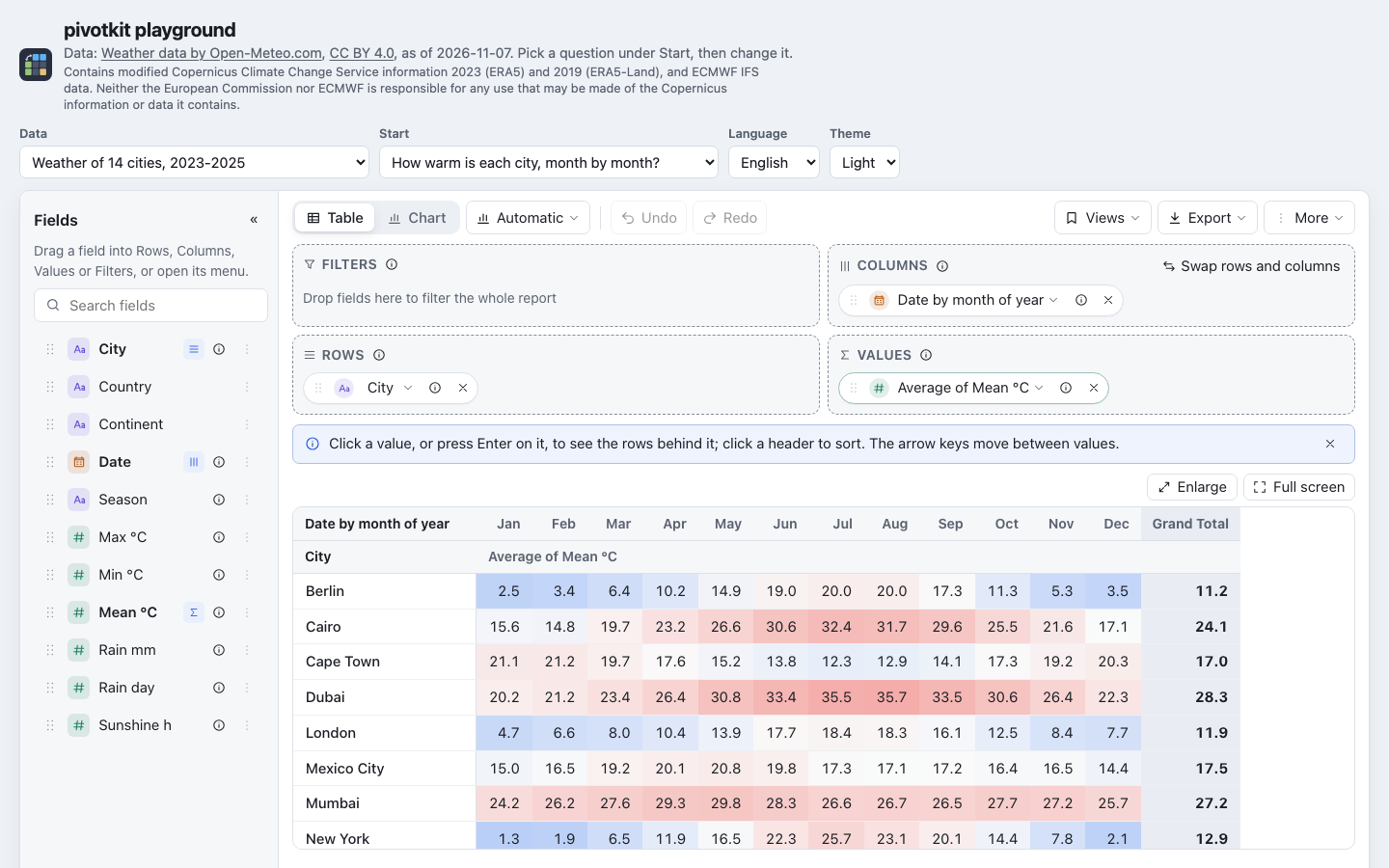
|
|
11
|
+
|
|
12
|
+
<sub>Weather data by [Open-Meteo.com](https://open-meteo.com/) ([CC BY 4.0](https://creativecommons.org/licenses/by/4.0/));
|
|
13
|
+
contains modified Copernicus Climate Change Service information
|
|
14
|
+
([attribution](https://pivotkit.eize.dev/learn/#query-it-live)).</sub>
|
|
15
|
+
|
|
16
|
+
## Install
|
|
17
|
+
|
|
18
|
+
```bash
|
|
19
|
+
npm install pivotkit-react react react-dom echarts
|
|
20
|
+
```
|
|
21
|
+
|
|
22
|
+
| Peer | Range | Why a peer |
|
|
23
|
+
| --- | --- | --- |
|
|
24
|
+
| `react`, `react-dom` | `>=18.2 <20` | Hooks break with two copies of React in one page. Tested on React 18 and 19. |
|
|
25
|
+
| `echarts` | `>=6.1.0 <7` | About 1 MB, and its security updates stay with your app. Loaded on the first chart only. |
|
|
26
|
+
|
|
27
|
+
TypeScript declarations are included. pivotkit-core (a caret range) and @dnd-kit come with the
|
|
28
|
+
package. In 0.x a caret range spans patch
|
|
29
|
+
versions only (`^0.2.0` is 0.2.x): an app that also imports pivotkit-core itself must use a version
|
|
30
|
+
inside that range, since npm shares one copy only when the ranges overlap.
|
|
31
|
+
|
|
32
|
+
## Example
|
|
33
|
+
|
|
34
|
+
```jsx
|
|
35
|
+
import { useState } from "react";
|
|
36
|
+
import { PivotReport } from "pivotkit-react";
|
|
37
|
+
import "pivotkit-react/styles.css";
|
|
38
|
+
|
|
39
|
+
const start = { rows: ["Team"], cols: ["Priority"], values: [{ field: "Ticket", agg: "count" }] };
|
|
40
|
+
|
|
41
|
+
export function TicketReport({ rows }) {
|
|
42
|
+
// controlled: the app keeps the view (and stores it); undo stays inside the report
|
|
43
|
+
const [view, setView] = useState(start);
|
|
44
|
+
return <PivotReport data={rows} dataKey="tickets" view={view} onViewChange={setView} locale="de-DE" height={640} />;
|
|
45
|
+
}
|
|
46
|
+
```
|
|
47
|
+
|
|
48
|
+
Without app state, `defaultView={start}` starts the report and it keeps the view itself. The view is
|
|
49
|
+
plain JSON: the preset, the saved view and the undo step at once. It is user input, checked against
|
|
50
|
+
the data; it cannot run code.
|
|
51
|
+
|
|
52
|
+
## Where in the docs
|
|
53
|
+
|
|
54
|
+
| Topic | Page |
|
|
55
|
+
| --- | --- |
|
|
56
|
+
| Getting started: install, first report, saved views, clicks | [Getting started with React](https://pivotkit.eize.dev/getting-started/react/) |
|
|
57
|
+
| Bundlers, import maps, PowerShell Universal | [Bundlers and import maps](https://pivotkit.eize.dev/getting-started/react/#bundlers-and-import-maps), [PowerShell Universal](https://pivotkit.eize.dev/getting-started/react/#powershell-universal) |
|
|
58
|
+
| Every prop | [Props](https://pivotkit.eize.dev/reference/react/#props), [props in detail](https://pivotkit.eize.dev/reference/react/#props-in-detail) |
|
|
59
|
+
| Controlled and uncontrolled | [Controlled and uncontrolled](https://pivotkit.eize.dev/reference/react/#controlled-and-uncontrolled) |
|
|
60
|
+
| Tips, layout, menus | [Tips](https://pivotkit.eize.dev/reference/react/#tips), [Layout](https://pivotkit.eize.dev/reference/react/#layout), [Menus](https://pivotkit.eize.dev/reference/react/#menus), [files the package loads](https://pivotkit.eize.dev/reference/react/#files-the-package-loads) |
|
|
61
|
+
| The view | [Views and saved views](https://pivotkit.eize.dev/concepts/views/) |
|
|
62
|
+
| Saved and shared views, links | [Templates and shared views](https://pivotkit.eize.dev/concepts/templates/), [Sharing](https://pivotkit.eize.dev/concepts/sharing/), [View file format](https://pivotkit.eize.dev/reference/view-file/) |
|
|
63
|
+
| Field names, descriptions, defaults | [Field descriptions and names](https://pivotkit.eize.dev/concepts/fields/) |
|
|
64
|
+
| Charts and `chartOptions` | [Charts](https://pivotkit.eize.dev/concepts/charts/#chartoptions-for-developers) |
|
|
65
|
+
| Theming: the `--pk-*` tokens | [Theming](https://pivotkit.eize.dev/reference/theming/) |
|
|
66
|
+
| Languages and labels | [Localisation](https://pivotkit.eize.dev/reference/localisation/) |
|
|
67
|
+
| Limits | [Locale, time zones, limits and errors](https://pivotkit.eize.dev/concepts/limits/#limits) |
|
|
68
|
+
| Performance | [Performance](https://pivotkit.eize.dev/reference/react/#performance) |
|
|
69
|
+
| Security | [Security](https://pivotkit.eize.dev/security/) |
|
|
70
|
+
| Browser support | [Browser support](https://pivotkit.eize.dev/browser-support/) |
|
|
71
|
+
| Recipes | [Recipes](https://pivotkit.eize.dev/embed/recipes/) |
|
|
72
|
+
| What the people using the report can do | [Use a report](https://pivotkit.eize.dev/use/), [Keyboard and screen readers](https://pivotkit.eize.dev/use/keyboard/) |
|
|
73
|
+
| Try it | [Live demo](https://pivotkit.eize.dev/demo/), [feature list](https://pivotkit.eize.dev/features/), [FAQ](https://pivotkit.eize.dev/faq/) |
|
|
74
|
+
| Changes | [CHANGELOG](https://github.com/eizedev/pivotkit/blob/main/packages/pivotkit-react/CHANGELOG.md) |
|
|
75
|
+
|
|
76
|
+
## License
|
|
77
|
+
|
|
78
|
+
[MIT](https://github.com/eizedev/pivotkit/blob/main/LICENSE)
|