pivotkit-element 0.1.0 → 0.2.0
This diff represents the content of publicly available package versions that have been released to one of the supported registries. The information contained in this diff is provided for informational purposes only and reflects changes between package versions as they appear in their respective public registries.
- package/CHANGELOG.md +61 -1
- package/README.md +42 -365
- package/dist/chunks/chunk-BL6ROOK3.js +6 -0
- package/dist/chunks/chunk-CETTRMB6.js +9 -0
- package/dist/chunks/chunk-DCANE7XH.js +1 -0
- package/dist/chunks/chunk-JGSNJX3N.js +1 -0
- package/dist/chunks/chunk-MB64GADT.js +1 -0
- package/dist/chunks/{echarts-LRMTE3RI.js → echarts-42T6EZ6B.js} +12 -12
- package/dist/chunks/{export-7NQ77OOT.js → export-EASUJGEK.js} +1 -1
- package/dist/chunks/link-52SWRX4P.js +1 -0
- package/dist/chunks/menu-texts-de-TRCAQWTH.js +1 -0
- package/dist/chunks/menus-CRKZQ2O3.js +1 -0
- package/dist/chunks/unused-texts-YTNJCFFC-HJOIWMO6.js +1 -0
- package/dist/chunks/unused-texts-de-SGOHV4N7-LJH5VMQZ.js +1 -0
- package/dist/element.js +1 -1
- package/dist/index.js +1 -1
- package/package.json +3 -3
- package/dist/chunks/chunk-3J3RQPK7.js +0 -8
- package/dist/chunks/chunk-75T75RQU.js +0 -6
- package/dist/chunks/chunk-7HSMEVX7.js +0 -1
- package/dist/chunks/chunk-KQ7VYRM6.js +0 -1
- package/dist/chunks/chunk-LXY26OUE.js +0 -2
- package/dist/chunks/link-EYT7DYWT.js +0 -1
- package/dist/chunks/menus-CB4DJWWT.js +0 -1
package/CHANGELOG.md
CHANGED
|
@@ -6,6 +6,65 @@ All notable changes to `pivotkit-element` are documented in this file. The forma
|
|
|
6
6
|
|
|
7
7
|
## [Unreleased]
|
|
8
8
|
|
|
9
|
+
## [0.2.0] - 2026-11-08
|
|
10
|
+
|
|
11
|
+
### Added
|
|
12
|
+
|
|
13
|
+
- pivotkit-react's warning for a view's unused parts, in plain words
|
|
14
|
+
([#56](https://github.com/eizedev/pivotkit/issues/56)): its words are a chunk of their own (the
|
|
15
|
+
load group "unused", 4.2 KiB measured, budget 4.7), loaded only when a view has such parts; the
|
|
16
|
+
first load holds the warning's frame and pivotkit-core's issue codes (149.4 KiB measured, budget
|
|
17
|
+
raised from 149 to 150). Label changes as in pivotkit-react: `unusedParts`, `unusedPath`, `unusedMore` and `unusedFewer` new,
|
|
18
|
+
`issues`, `viewMissingFields`, `viewOtherIssue` and `viewOtherIssues` gone, `labels.unused` for the
|
|
19
|
+
lines. No new attribute or event.
|
|
20
|
+
- pivotkit-react's sorting with a click on a table header
|
|
21
|
+
([#55](https://github.com/eizedev/pivotkit/issues/55)): a value's name sorts the innermost row
|
|
22
|
+
field by it, a row field's name A to Z and Z to A; a `pivot-view-change` like the chip menu's sort.
|
|
23
|
+
No new attribute or event.
|
|
24
|
+
- pivotkit-react's Save, Save as and New for views
|
|
25
|
+
([#60](https://github.com/eizedev/pivotkit/issues/60)): Save on a user's view sends
|
|
26
|
+
`pivot-template-save` (with `save-templates`) or writes the browser store, Save on a shared view
|
|
27
|
+
sends `pivot-template-publish` (with `can-publish` and after the user confirmed, else it is off
|
|
28
|
+
with the reason), Save as onto a name that exists asks the user first. No new attribute or event.
|
|
29
|
+
- Host notes: `pivot-template-save` and `pivot-template-publish` come with a name that exists for
|
|
30
|
+
Save and for Save as after the user confirmed: the page replaces the view of that name (an upsert
|
|
31
|
+
by name), it does not add a second one.
|
|
32
|
+
|
|
33
|
+
### Changed
|
|
34
|
+
|
|
35
|
+
- pivotkit-react's field chip menu with each setting in one line and folded menu sections that say
|
|
36
|
+
what they hold ([#57](https://github.com/eizedev/pivotkit/issues/57)); no new attribute or event.
|
|
37
|
+
The menus' size budget is 20 KiB (19.3 measured).
|
|
38
|
+
|
|
39
|
+
- What runs only after a click left the first load
|
|
40
|
+
([#73](https://github.com/eizedev/pivotkit/issues/73)): the menus' view changes, sharing's copy,
|
|
41
|
+
download and load, the drill-down's table and the texts only they show load with the menus, the
|
|
42
|
+
chart's label layout with the chart. The first load is 147.8 KiB gzip (152.2 before, measured on one
|
|
43
|
+
Mac), the menus 22.8, their German texts 4.4. Every size budget of a loaded chunk is now 3 to 5 % above what CI
|
|
44
|
+
measures, the first load's about 1 KiB: initial 149, chart 211, export 11.5, link 7.3, menus 24, texts 4.9. No new attribute
|
|
45
|
+
or event.
|
|
46
|
+
|
|
47
|
+
- pivotkit-react's menu texts in German are a chunk of their own, loaded with the menus only for a
|
|
48
|
+
German report or when `locale` changes to German, and the menus' sections moved out of the first
|
|
49
|
+
load ([#73](https://github.com/eizedev/pivotkit/issues/73)): the menus 20.6 to 17.9 KiB gzip, the
|
|
50
|
+
first load 152.1 to 152.2 with the loading of the texts and English standing in when they fail
|
|
51
|
+
(measured on one Mac); a German page loads the texts' 4.0 KiB on top. The
|
|
52
|
+
size check has a group "texts" for it (budget 4.5 KiB).
|
|
53
|
+
|
|
54
|
+
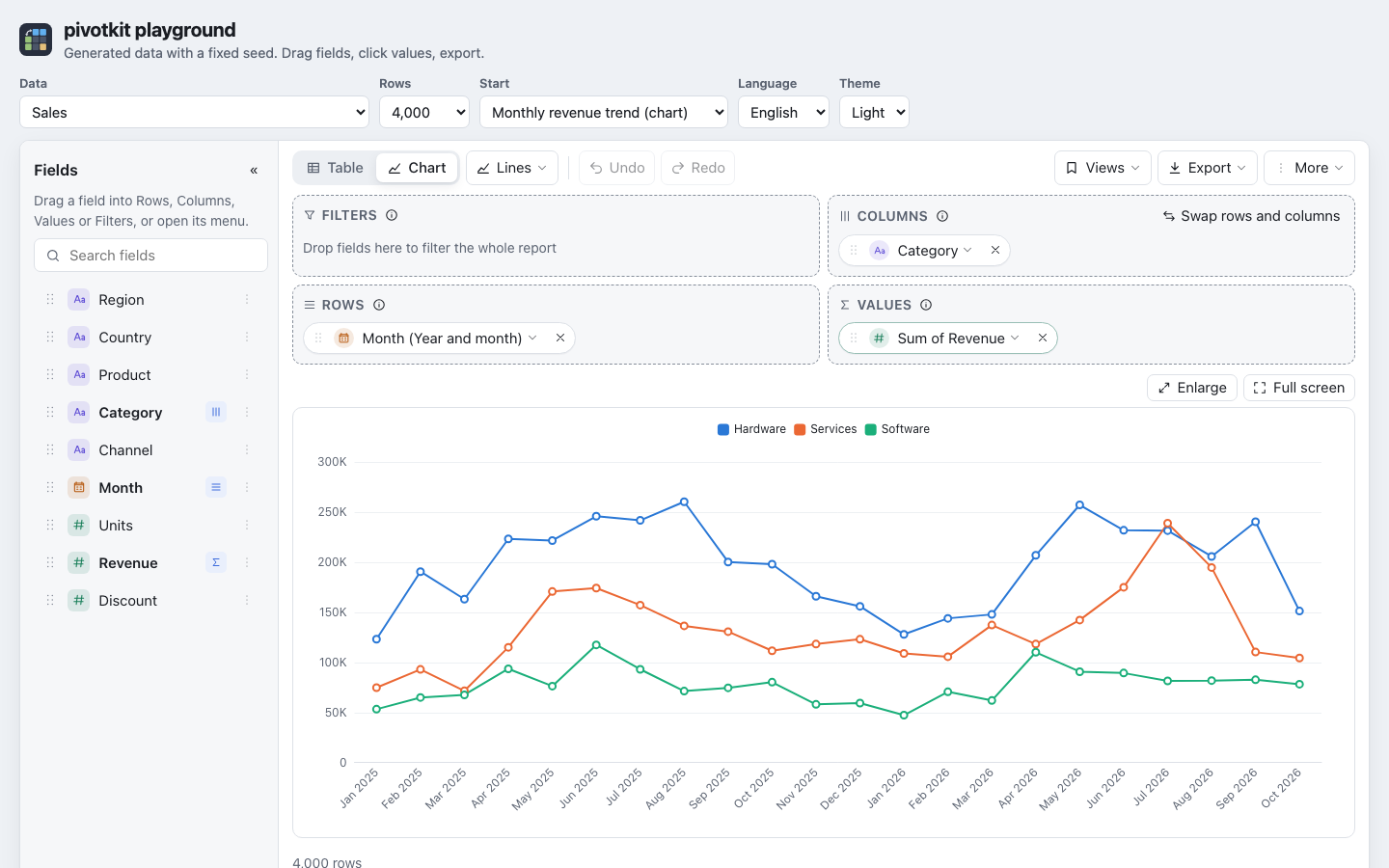
- The README, the package's page on npm, is a short landing page: what pivotkit-element is, one screenshot,
|
|
55
|
+
install, one example and a table of links into the
|
|
56
|
+
[documentation site](https://pivotkit.eize.dev/), which holds the details.
|
|
57
|
+
- pivotkit-react's toolbar: Views is the last button to move into "More", so it stays in the toolbar
|
|
58
|
+
from about 1280 px (the chart type moves into "More" before it); New is in the Views menu only.
|
|
59
|
+
Every save closes the Views menu; the question before a view is replaced has the focus on Cancel;
|
|
60
|
+
the view loaded has a check mark in its group, and More the dot for unsaved changes while Views
|
|
61
|
+
is in it.
|
|
62
|
+
|
|
63
|
+
### Fixed
|
|
64
|
+
|
|
65
|
+
- No `pivot-export` for an empty report: its Export entries are off with "Add a field first."
|
|
66
|
+
([#61](https://github.com/eizedev/pivotkit/issues/61)).
|
|
67
|
+
|
|
9
68
|
## [0.1.0] - 2026-11-07
|
|
10
69
|
|
|
11
70
|
First release.
|
|
@@ -79,5 +138,6 @@ First release.
|
|
|
79
138
|
thousands separators, CSV percentages and calculations as the table shows them, heatmaps without
|
|
80
139
|
grey empty cells.
|
|
81
140
|
|
|
82
|
-
[Unreleased]: https://github.com/eizedev/pivotkit/compare/pivotkit-element@0.
|
|
141
|
+
[Unreleased]: https://github.com/eizedev/pivotkit/compare/pivotkit-element@0.2.0...HEAD
|
|
142
|
+
[0.2.0]: https://github.com/eizedev/pivotkit/compare/pivotkit-element@0.1.0...pivotkit-element@0.2.0
|
|
83
143
|
[0.1.0]: https://github.com/eizedev/pivotkit/releases/tag/pivotkit-element@0.1.0
|
package/README.md
CHANGED
|
@@ -1,20 +1,27 @@
|
|
|
1
1
|
# pivotkit-element
|
|
2
2
|
|
|
3
|
-
|
|
3
|
+
The pivot report builder of [pivotkit](https://pivotkit.eize.dev/) as one web component,
|
|
4
|
+
`<pivot-report>`, for pages without React: Angular apps, PHP and other server-rendered pages, plain
|
|
5
|
+
HTML. It brings its own React ([which version](https://pivotkit.eize.dev/browser-support/#react)), [pivotkit-react](https://www.npmjs.com/package/pivotkit-react),
|
|
6
|
+
[pivotkit-core](https://www.npmjs.com/package/pivotkit-core) and @dnd-kit, renders into an open shadow
|
|
7
|
+
root and loads ECharts on the first chart. Everything the React component does works the same: field
|
|
8
|
+
list, drag and drop, table and chart, filters, drill-down, undo, saved and shared views, export.
|
|
4
9
|
|
|
5
|
-
|
|
10
|
+
|
|
6
11
|
|
|
7
|
-
|
|
8
|
-
|
|
9
|
-
|
|
10
|
-
|
|
11
|
-
|
|
12
|
-
[pivotkit-react README](https://github.com/eizedev/pivotkit/tree/main/packages/pivotkit-react#what-the-user-can-do) describes it.
|
|
12
|
+
## Install
|
|
13
|
+
|
|
14
|
+
```bash
|
|
15
|
+
npm install pivotkit-element
|
|
16
|
+
```
|
|
13
17
|
|
|
14
|
-
|
|
15
|
-
|
|
18
|
+
With a bundler, `import "pivotkit-element";` once defines `<pivot-report>`. Without one, serve the
|
|
19
|
+
package's whole `dist/` directory: its chunks are loaded by relative URL from `dist/index.js`, so
|
|
20
|
+
`index.js` alone is not enough. The package has no runtime dependency; the licenses of what it
|
|
21
|
+
bundles are in `dist/THIRD_PARTY_LICENSES.txt`. Browsers: Chrome 111, Firefox 113, Safari 16.4 or
|
|
22
|
+
later.
|
|
16
23
|
|
|
17
|
-
##
|
|
24
|
+
## Example
|
|
18
25
|
|
|
19
26
|
```html
|
|
20
27
|
<script type="module" src="/assets/pivotkit-element/dist/index.js"></script>
|
|
@@ -36,362 +43,32 @@ report.templates = [{ name: "By region", view: { rows: ["Region"] } }];
|
|
|
36
43
|
report.addEventListener("pivot-view-change", (e) => localStorage.setItem("view", JSON.stringify(e.detail.view)));
|
|
37
44
|
```
|
|
38
45
|
|
|
39
|
-
|
|
40
|
-
`<pivot-report>`). `dist/` is ES modules; the files in `dist/chunks/` are loaded by relative URL
|
|
41
|
-
from the entry, so serve the whole `dist/` directory, not `index.js` alone.
|
|
46
|
+
## Where in the docs
|
|
42
47
|
|
|
43
|
-
|
|
44
|
-
`Access-Control-Allow-Origin` for `index.js` and every chunk. Subresource Integrity covers only the
|
|
45
|
-
`<script integrity>` of the entry; the chunks it imports later cannot carry a hash, so pin a version in
|
|
46
|
-
the URL (or host `dist/` yourself) instead of relying on SRI. The bundle targets ES2022 in Chrome 111,
|
|
47
|
-
Firefox 113 and Safari 16.4 or later (`target` in pivotkit-react's `build.js`); older browsers are not
|
|
48
|
-
supported.
|
|
49
|
-
|
|
50
|
-
| Entry | What |
|
|
48
|
+
| Topic | Page |
|
|
51
49
|
| --- | --- |
|
|
52
|
-
|
|
|
53
|
-
|
|
|
54
|
-
|
|
55
|
-
|
|
56
|
-
|
|
57
|
-
|
|
58
|
-
|
|
59
|
-
|
|
60
|
-
|
|
61
|
-
|
|
62
|
-
|
|
|
63
|
-
|
|
|
64
|
-
|
|
|
65
|
-
|
|
|
66
|
-
|
|
|
67
|
-
|
|
|
68
|
-
|
|
|
69
|
-
|
|
|
70
|
-
|
|
|
71
|
-
|
|
|
72
|
-
| `fieldDefaults` | | `{ [field]: { agg?, format?, drillFormat?, order?, label?, description?, href?, type? } }` | | The aggregator and format a field gets in Values (another aggregator in the value's menu keeps the format while the result is in the field's unit, not for a count); `drillFormat` (else `format`) for its values in the drill-down (`"text"`: an identifier as it is); `order`: the field's custom order of items on Rows or Columns (also in a view without a sort entry for it), offered as "Custom order" and "Custom order, reversed" in its menu; `label`, `description`, `href`, `type`: its display name, its description behind an "i" with "Learn more" (https), its column type (pivotkit-core's `fieldDefaultsFromSchema` reads them from an OpenAPI document). |
|
|
73
|
-
| `labels` | | partial labels | | Texts merged over the language's labels (the keys are in pivotkit-react's `LABELS.en`). |
|
|
74
|
-
| `limits` | | `Partial<Limits>` | | pivotkit-core's limits; a layout or data over them shows a message in place of the result. |
|
|
75
|
-
| `locale` | `locale` | `string` | `"en-US"` | Numbers, dates, sorting and the language of the labels (`de-*` is German). Without it the element's own `lang` attribute is used; the page's language is not. |
|
|
76
|
-
| `theme` | `theme` | `"auto" \| "light" \| "dark"` | `"auto"` | `auto` follows the nearest `data-theme="light\|dark"` on the element or above it (`<html>`), then `prefers-color-scheme`, and changes with them. |
|
|
77
|
-
| `height` | `height` | `number \| string` | `640` | Pixels (`height="480"`) or a CSS length; `"100%"` fills the element, which then needs a height from the page (`pivot-report { height: 70vh }`). |
|
|
78
|
-
| `timeZone` | `time-zone` | `string` | `"UTC"` | The zone `data` is encoded in; see pivotkit-core. |
|
|
79
|
-
| `fileName` | `file-name` | `string` | `"pivot"` | Name of exported files, without the extension; made safe. |
|
|
80
|
-
| `label` | `label` | `string` | `labels.report` | The name of the report's region landmark; give each report on a page its own (`label="Tickets"`). |
|
|
81
|
-
| `drillDown` | `drill-down` | `boolean` | `true` | The panel with the rows behind a clicked value; `drill-down="false"` turns it off. |
|
|
82
|
-
| `drillDownLimit` | `drill-down-limit` | `number` | `1000` | Rows passed to the panel and to `pivot-cell-click`; the panel's exports hold these rows and say when there are more ("1,000 of 4,212 rows"). |
|
|
83
|
-
| `tips` | `tips` | `string` | `"on"` | The tips above the result: `"on"`, `"off"` (none, no switch in Options) or the tip ids allowed, comma-separated. |
|
|
84
|
-
| `storageKey` | `storage-key` | `string` | | Remembers dismissed tips in `localStorage` under `pivotkit:tips:<key>`; one key per element on a page. With `template-store="browser"` the user's own views are kept under `pivotkit:views:<key>` too. |
|
|
85
|
-
| `dismissedTips` | | `string[]` | | Dismissed tip ids from the page's own storage (from `pivot-tip-dismiss`; `"*"`: all off; `"-explanations"`: "Show explanations" off; `"open:<section>"`, `"closed:<section>"`: a menu section opened or folded). |
|
|
86
|
-
| `fieldInfo`, `zoneInfo`, `settingInfo` | `field-info`, `zone-info`, `setting-info` | `"on" \| "off"` | | Decide the "i" of the field descriptions, of the zones and of the settings that need explaining, one kind each; unset, the user's one switch "Show explanations" in Options, Help decides. |
|
|
87
|
-
| `sourceId`, `sourceName` | `source-id`, `source-name` | `string` | | The data shown: it goes into the shared [view files](https://pivotkit.eize.dev/reference/view-file/) and links, and a view made for another source asks before it loads. |
|
|
88
|
-
| `sources` | | `{ id, name? }[]` | | The other data the page can show: a view made for one of them offers "Switch to “name” and load" (`pivot-source-switch`). |
|
|
89
|
-
| `chartOptions` | | `object` | | Plain JSON merged over the chart's ECharts option; it wins over the view's chart settings. |
|
|
90
|
-
| `shareLink` | `share-link` | `boolean \| string` | off | "Copy link" and shared links: the attribute alone for the page's address without its query, a value as the base URL. |
|
|
91
|
-
| `persistView` | `persist-view` | `"session"` | | Keeps the view for the tab (`sessionStorage`, per `storage-key`). |
|
|
92
|
-
| `loading` | `loading` (boolean) | `boolean` | `false` | The page is loading the data: the report shows its skeleton. |
|
|
93
|
-
| `fieldList` | `field-list` | `"open" \| "collapsed"` | the user's choice | The field list of a wide report open or collapsed to a rail, over the user's stored choice. |
|
|
94
|
-
|
|
95
|
-
Properties with an attribute reflect it, as native elements do: `report.theme = "dark"` sets
|
|
96
|
-
`theme="dark"`, `null` removes it. `view` and `default-view` are parsed as JSON objects (a text that
|
|
97
|
-
is not one is ignored with a console warning); setting the property does not write the attribute.
|
|
98
|
-
Data, templates, sources, labels, field defaults, limits and dismissed tips are properties only. A view is user input either
|
|
99
|
-
way: pivotkit-core normalizes it against the data and it cannot run code.
|
|
100
|
-
|
|
101
|
-
The element sets `data-pk-theme="light|dark"` on itself, the theme the report shows. It is an
|
|
102
|
-
output: read it or style with it (below), do not set it.
|
|
103
|
-
|
|
104
|
-
Properties set before the element is defined (a framework that renders before the script has
|
|
105
|
-
loaded) are taken over when it is.
|
|
106
|
-
|
|
107
|
-
`data` is compared by identity, as in React: rows changed in place and the same array set again
|
|
108
|
-
are not encoded again. Set a new array (`report.data = [...rows]`), or a new `dataKey`.
|
|
109
|
-
|
|
110
|
-
On a phone the report's zones sit above the table, so the default 640 px leaves little room for it.
|
|
111
|
-
Give the element more height on narrow screens, for example `height="100%"` and
|
|
112
|
-
`@media (max-width: 639px) { pivot-report { height: calc(100svh - 24px); } }`, as the
|
|
113
|
-
[example](https://github.com/eizedev/pivotkit/tree/main/examples/element) does: the page scrolls to the report, the table scrolls inside it.
|
|
114
|
-
|
|
115
|
-
### Controlled and uncontrolled
|
|
116
|
-
|
|
117
|
-
As with `<PivotReport>`:
|
|
118
|
-
|
|
119
|
-
- Uncontrolled (no `view`): the report starts on `defaultView` and keeps the view itself; every change
|
|
120
|
-
is a `pivot-view-change` event. Setting a different `defaultView` (compared by value) starts the
|
|
121
|
-
report again on it, with a new undo history and Reset pointing there; the same view again changes
|
|
122
|
-
nothing, and so does the view the report last reported: a page that stores every
|
|
123
|
-
`pivot-view-change` and binds it as `defaultView` (`[defaultView]="stored"`) keeps the report and
|
|
124
|
-
its undo history. Feed the view back unchanged and before the next change: an older view (from a
|
|
125
|
-
debounced or asynchronous store) counts as a new start view and starts the report again. That way a framework that sets properties after the element is in the page
|
|
126
|
-
(React 18, Angular) still gets its start view.
|
|
127
|
-
- Controlled (`view` set): the report shows that view. A change is a `pivot-view-change` event, and the
|
|
128
|
-
report shows it only when the page sets `view = event.detail.view`; a page that does not set it keeps
|
|
129
|
-
the report on its view. A view the page sets on its own becomes one undo step. `view = undefined`
|
|
130
|
-
makes it uncontrolled again; switching back and forth is not meant for normal use.
|
|
131
|
-
|
|
132
|
-
Undo and redo always stay inside the element. When the element is removed from the page, its React
|
|
133
|
-
root is unmounted (in a microtask: a move in the same task, `parent.append(el)` say, keeps the report
|
|
134
|
-
and its history); connected again, it mounts a new report that starts on the last view it showed, with
|
|
135
|
-
a new history.
|
|
136
|
-
|
|
137
|
-
## Events
|
|
138
|
-
|
|
139
|
-
Every event is a `CustomEvent` that bubbles and is composed: a listener on the element, on a parent
|
|
140
|
-
or on the document gets it, with `event.target` the element. So does every other script on the page:
|
|
141
|
-
the details carry the view and, for `pivot-cell-click`, the page's own row objects behind the cell.
|
|
142
|
-
A page that shows data some of its scripts must not read keeps those scripts off the page, as it
|
|
143
|
-
would for the data itself.
|
|
144
|
-
|
|
145
|
-
| Event | `detail` | What |
|
|
146
|
-
| --- | --- | --- |
|
|
147
|
-
| `pivot-view-change` | `{ view }` | Every change of the view, normalized. |
|
|
148
|
-
| `pivot-cell-click` | `{ row, col, value, valueIndex, text, count, rows }` | A click (or Enter) on a value or a chart point: key paths, the value, the number of source rows and the first `drillDownLimit` of them (the page's own row objects). |
|
|
149
|
-
| `pivot-template-save` | `{ name, view, scope, respondWith }` | "Save current view" (with `save-templates`); `scope` is `"user"`. |
|
|
150
|
-
| `pivot-template-delete` | `{ name, scope, respondWith }` | Delete of a template marked `deletable`, after the user confirmed in the menu; `scope` is its group. Not sent for a view of the browser store. |
|
|
151
|
-
| `pivot-template-publish` | `{ name, view, respondWith }` | "Publish as shared view" on one of the user's views (with `can-publish`), after the user confirmed. |
|
|
152
|
-
| `pivot-export` | `{ kind, fileName, blob, text, rows }` | Every exported file before its download and every copy before it goes on the clipboard: `"xlsx"`, `"csv"`, `"png"`, `"json"` for the view file of "Download view"; the copies `"copy-table"` and `"copy-json"` (Export, Copy table and Copy data as JSON); the drill-down panel's `"drill-copy"`, `"drill-json"`, `"drill-csv"` and `"drill-xlsx"`. A copy also has its `text` and the `fileName` it would have as a file (`pivot.tsv`); a drill-down export has `rows: { shown, count }`. Cancelable: `preventDefault()` skips the download or the copy, the page keeps the blob (to upload it, say). |
|
|
153
|
-
| `pivot-tip-dismiss` | `{ id, dismissed }` | A tip dismissed (`id`), all tips off (`"*"`) or back on (`null`), with every dismissed id, for a page that stores them and sets `dismissedTips`. |
|
|
154
|
-
| `pivot-source-switch` | `{ source, view, name }` | "Switch to “name” and load" for a view made for one of `sources`: show that data and set `defaultView` to `view`. |
|
|
155
|
-
|
|
156
|
-
The template events wait for the page's answer: call `event.detail.respondWith(promise)` in the
|
|
157
|
-
listener itself (later throws `InvalidStateError`). The report shows "Saved" or "Published" (or removes the entry)
|
|
158
|
-
when the promise resolves, and an error with its message when it rejects (a rejection without a
|
|
159
|
-
message shows "The server could not save the view.", `labels.toastSaveRejected`). Without `respondWith` (no
|
|
160
|
-
listener, or `respondWith` after an `await`) the action counts as done at once and the element logs a
|
|
161
|
-
console warning, since the user is told "saved", "deleted" or "published" either way. The page then sets
|
|
162
|
-
`templates` to the new list.
|
|
163
|
-
|
|
164
|
-
When a listener of `pivot-export` calls `preventDefault()`, the report shows no "Exported" or
|
|
165
|
-
"Copied" note: the page that kept the file or the text says itself what became of it.
|
|
166
|
-
|
|
167
|
-
```js
|
|
168
|
-
report.saveTemplates = true;
|
|
169
|
-
report.addEventListener("pivot-template-save", (e) => {
|
|
170
|
-
e.detail.respondWith(
|
|
171
|
-
fetch("/api/templates", { method: "POST", body: JSON.stringify({ name: e.detail.name, view: e.detail.view }) })
|
|
172
|
-
.then((r) => (r.ok ? r.json() : Promise.reject(new Error(r.statusText))))
|
|
173
|
-
.then((list) => (report.templates = list))
|
|
174
|
-
);
|
|
175
|
-
});
|
|
176
|
-
```
|
|
177
|
-
|
|
178
|
-
## Theming and styles
|
|
179
|
-
|
|
180
|
-
The report's stylesheet lives in the shadow root: no CSS of the page reaches into the report and none
|
|
181
|
-
of the report's reaches out. What does cross is what crosses every shadow root: inherited properties
|
|
182
|
-
(the font family and size the report inherits through the element, `color-scheme`) and the `--pk-*`
|
|
183
|
-
custom properties set **on the element**. Every token is declared on the element's `:host`, so a
|
|
184
|
-
`--pk-*` set higher up the page (on `body`) does not reach the report; a rule of the page on the
|
|
185
|
-
element wins over the defaults:
|
|
186
|
-
|
|
187
|
-
```css
|
|
188
|
-
pivot-report {
|
|
189
|
-
--pk-accent: #0a7d5a;
|
|
190
|
-
--pk-radius: 4px;
|
|
191
|
-
--pk-font: "Inter", sans-serif;
|
|
192
|
-
}
|
|
193
|
-
pivot-report[data-pk-theme="dark"] {
|
|
194
|
-
--pk-surface: #101418;
|
|
195
|
-
}
|
|
196
|
-
```
|
|
197
|
-
|
|
198
|
-
The tokens and their defaults are listed in the
|
|
199
|
-
[pivotkit-react README](https://github.com/eizedev/pivotkit/tree/main/packages/pivotkit-react#theming). There are no `::part()` names; the
|
|
200
|
-
tokens are the styling interface.
|
|
201
|
-
|
|
202
|
-
The styles reach the shadow root as one constructed stylesheet shared by every element of the
|
|
203
|
-
document (`adoptedStyleSheets`). Where a browser has none, or refuses one, the element adds a
|
|
204
|
-
`<style>` element to its shadow root instead (a browser test covers it). An element moved into
|
|
205
|
-
another document (an iframe) after it was created keeps what it had; that case is not tested.
|
|
206
|
-
|
|
207
|
-
Menus and popovers are `position: fixed`. Inside an ancestor with a `transform`, a `filter` or
|
|
208
|
-
`contain` (router animations, dialogs, carousels) fixed elements are placed relative to that
|
|
209
|
-
ancestor; the report measures its origin and places them at their button all the same (browser test
|
|
210
|
-
with a transformed wrapper). The narrow layout's bottom sheets, the field drawer and the drill-down
|
|
211
|
-
cover that ancestor, not the window, in such a case. The drag preview (also `position: fixed`) is not
|
|
212
|
-
corrected there and is not tested; a scaled ancestor (`scale()`) is not corrected either.
|
|
213
|
-
|
|
214
|
-
## Content-Security-Policy
|
|
215
|
-
|
|
216
|
-
Measured in the browser tests (`tests/browser/element.spec.js`) in Chromium, Firefox and WebKit of
|
|
217
|
-
Playwright 1.64.1, with this policy in a `<meta>` element:
|
|
218
|
-
|
|
219
|
-
```text
|
|
220
|
-
default-src 'none'; script-src 'self'; style-src 'self'; img-src 'self'; connect-src 'self'; base-uri 'none'; form-action 'none'
|
|
221
|
-
```
|
|
222
|
-
|
|
223
|
-
- The report renders and is styled: the constructed stylesheet is not blocked by `style-src 'self'`,
|
|
224
|
-
and the inline styles React sets (through `element.style`, the CSSOM) are not blocked either.
|
|
225
|
-
- The chart works: ECharts loads from its chunk and draws on a canvas; nothing needs `'unsafe-eval'`.
|
|
226
|
-
Its tooltip shows on hover without a violation: pivotkit-react builds it as DOM nodes with styles
|
|
227
|
-
set through the CSSOM and the data's texts as `textContent`, instead of ECharts' default HTML string
|
|
228
|
-
with inline `style` attributes (which `style-src-attr` would refuse).
|
|
229
|
-
- The XLSX and PNG exports download (a blob URL on an `<a download>`; no `fetch` of `data:`); CSV
|
|
230
|
-
takes the same path as XLSX.
|
|
231
|
-
- No violation is reported (`securitypolicyviolation`) and nothing is logged; the test checks that the
|
|
232
|
-
policy is in force by adding an inline `<style>`, which is refused.
|
|
233
|
-
- The `<style>` fallback is tested on its own page (constructable stylesheets removed), without CSP.
|
|
234
|
-
|
|
235
|
-
Not covered: the `<style>` fallback (browsers without constructable stylesheets) needs
|
|
236
|
-
`style-src 'unsafe-inline'`, since the element has no nonce option; only the `<meta>` form of the
|
|
237
|
-
policy was measured, not an HTTP header; `script-src` must allow the origin that serves `dist/` and
|
|
238
|
-
its chunks. A page script that sets the properties must be a file (or carry a nonce) under such a policy.
|
|
239
|
-
|
|
240
|
-
## Bundle size
|
|
241
|
-
|
|
242
|
-
What a page loads, measured with `npm run size -w pivotkit-element` on one Mac (esbuild 0.28.2,
|
|
243
|
-
gzip level 9 per file, sizes add up per group; approximate, they change with every dependency
|
|
244
|
-
update). CI runs the same command; it fails when a group is over `SIZE_BUDGET_KIB` in `build.js`
|
|
245
|
-
(a few per cent above these numbers):
|
|
246
|
-
|
|
247
|
-
| Loaded | Files | Size | gzip |
|
|
248
|
-
| --- | ---: | ---: | ---: |
|
|
249
|
-
| First (`index.js` and its static imports: React, ReactDOM, pivotkit-react, pivotkit-core, @dnd-kit, styles) | 6 | 464 KiB | 151 KiB |
|
|
250
|
-
| On the first chart (ECharts with bar, line, pie (also the donut), heatmap, the components they use, the title among them, and the canvas renderer) | 1 | 595 KiB | 201 KiB |
|
|
251
|
-
| On the first export or copy (pivotkit-core's export, and fflate as a chunk it shares with the link; the Export menu and the drill-down's start loading it when they open) | 2 | 24 KiB | 11 KiB |
|
|
252
|
-
| On the first shared link, Copy link or loaded link (pivotkit-core's link with fflate) | 2 | 13 KiB | 6 KiB |
|
|
253
|
-
| Right after the first render (the menus' panels, the Export menu, the drill-down's panel and the texts only they show) | 1 | 56 KiB | 16 KiB |
|
|
254
|
-
|
|
255
|
-
ECharts is bundled, not left to the page: a page without a bundler or an import map would have no
|
|
256
|
-
way to provide it, and loading it on first use keeps it out of the first load. Only the four chart
|
|
257
|
-
types the report draws are in the chunk: pivotkit-react's `echarts.js` imports them by name
|
|
258
|
-
(`test/build.test.js` checks the chunk against it). A page that already has ECharts loads it twice; one that needs a single
|
|
259
|
-
copy uses [pivotkit-react](https://github.com/eizedev/pivotkit/tree/main/packages/pivotkit-react#readme) with its own React instead.
|
|
260
|
-
|
|
261
|
-
## React on the page
|
|
262
|
-
|
|
263
|
-
The element's React is private to the bundle: it sets no global, and a page with a React of its own
|
|
264
|
-
(another version, or the same) is not affected, nor is the element by it. The browser tests run a
|
|
265
|
-
page with its own React 18 and, in the React 19 job, React 19, that renders `<pivot-report>` in its
|
|
266
|
-
tree and renders again every 200 ms. Each element has its own React root; the elements of a page share
|
|
267
|
-
one copy of the bundle. A React page can use pivotkit-react directly and save the second React.
|
|
268
|
-
|
|
269
|
-
React 18 passes only attributes to a custom element: set `data` and the other objects in a ref
|
|
270
|
-
(`useEffect(() => { ref.current.data = rows; }, [rows])`) and add listeners there. React 19 sets a prop
|
|
271
|
-
as a property when the element has one, and listens for a custom event with `on` and the event's
|
|
272
|
-
exact name (react.dev, "Custom HTML elements"):
|
|
273
|
-
|
|
274
|
-
```jsx
|
|
275
|
-
// React 19
|
|
276
|
-
<pivot-report data={rows} defaultView={start} theme="auto" onpivot-view-change={(e) => save(e.detail.view)} />
|
|
277
|
-
```
|
|
278
|
-
|
|
279
|
-
The test page uses the ref in the React 18 job and these props in the React 19 job, and checks that
|
|
280
|
-
`data` arrives as a property. For TypeScript, `import type {} from "pivotkit-element/jsx";` once
|
|
281
|
-
declares `<pivot-report>` with its properties and `on<event>` props in React's JSX (needs
|
|
282
|
-
`@types/react` 18.3 or later; the types describe React 19's behaviour).
|
|
283
|
-
|
|
284
|
-
## Angular
|
|
285
|
-
|
|
286
|
-
Not built or tested in this repository; the element is a standard custom element, so Angular's
|
|
287
|
-
property and event bindings apply:
|
|
288
|
-
|
|
289
|
-
```ts
|
|
290
|
-
import { Component, CUSTOM_ELEMENTS_SCHEMA } from "@angular/core";
|
|
291
|
-
import "pivotkit-element";
|
|
292
|
-
import type { PivotView } from "pivotkit-element";
|
|
293
|
-
|
|
294
|
-
@Component({
|
|
295
|
-
selector: "app-ticket-report",
|
|
296
|
-
standalone: true,
|
|
297
|
-
// <pivot-report> is no Angular component: the schema lets the template use it
|
|
298
|
-
schemas: [CUSTOM_ELEMENTS_SCHEMA],
|
|
299
|
-
template: `
|
|
300
|
-
<pivot-report
|
|
301
|
-
[data]="rows"
|
|
302
|
-
[defaultView]="start"
|
|
303
|
-
[templates]="templates"
|
|
304
|
-
locale="de-DE"
|
|
305
|
-
height="640"
|
|
306
|
-
(pivot-view-change)="onView($event)"
|
|
307
|
-
></pivot-report>
|
|
308
|
-
`
|
|
309
|
-
})
|
|
310
|
-
export class TicketReportComponent {
|
|
311
|
-
rows: object[] = [];
|
|
312
|
-
templates = [];
|
|
313
|
-
start: PivotView = { rows: ["Team"], values: [{ field: "Ticket", agg: "count" }] };
|
|
314
|
-
|
|
315
|
-
onView(event: Event) {
|
|
316
|
-
const { view } = (event as CustomEvent<{ view: PivotView }>).detail;
|
|
317
|
-
// store the view
|
|
318
|
-
}
|
|
319
|
-
}
|
|
320
|
-
```
|
|
321
|
-
|
|
322
|
-
`[data]="rows"` sets the property (Angular binds properties of an element with the schema); a new
|
|
323
|
-
array is a new data set. For the controlled form bind `[view]="view"` and set `this.view` in the
|
|
324
|
-
handler. Binding the stored view back as `[defaultView]` is fine: the element ignores the view it
|
|
325
|
-
reported itself.
|
|
326
|
-
|
|
327
|
-
Change detection: the element runs React's scheduler, ECharts' pointer listeners and animation
|
|
328
|
-
frames in whatever zone created it. Inside Angular's zone (zone.js) each of them may trigger change
|
|
329
|
-
detection of the app. Not measured here; if it shows, create and feed the element outside the zone
|
|
330
|
-
and come back in for the app's own state:
|
|
331
|
-
|
|
332
|
-
```ts
|
|
333
|
-
constructor(private zone: NgZone, private host: ElementRef<HTMLElement>) {}
|
|
334
|
-
|
|
335
|
-
ngAfterViewInit() {
|
|
336
|
-
this.zone.runOutsideAngular(() => {
|
|
337
|
-
const report = document.createElement("pivot-report");
|
|
338
|
-
report.data = this.rows;
|
|
339
|
-
report.addEventListener("pivot-view-change", (e) => this.zone.run(() => this.onView(e)));
|
|
340
|
-
this.host.nativeElement.append(report);
|
|
341
|
-
});
|
|
342
|
-
}
|
|
343
|
-
```
|
|
344
|
-
|
|
345
|
-
## PHP and server-rendered pages
|
|
346
|
-
|
|
347
|
-
The server writes the rows (and templates) as JSON into a `<script type="application/json">`, which
|
|
348
|
-
the browser does not run, and a module script hands them to the element:
|
|
349
|
-
|
|
350
|
-
```php
|
|
351
|
-
<script type="application/json" id="report-rows">
|
|
352
|
-
<?= json_encode($rows, JSON_HEX_TAG | JSON_HEX_AMP | JSON_THROW_ON_ERROR) ?>
|
|
353
|
-
</script>
|
|
354
|
-
<pivot-report id="report" locale="de-DE" file-name="tickets"></pivot-report>
|
|
355
|
-
<script type="module" src="/assets/pivotkit-element/dist/index.js"></script>
|
|
356
|
-
<script type="module" src="/assets/report.js"></script>
|
|
357
|
-
```
|
|
358
|
-
|
|
359
|
-
```js
|
|
360
|
-
// report.js
|
|
361
|
-
document.getElementById("report").data = JSON.parse(document.getElementById("report-rows").textContent);
|
|
362
|
-
```
|
|
363
|
-
|
|
364
|
-
`JSON_HEX_TAG` writes `<` and `>` as `\u003C` and `\u003E`, so a value containing `</script>`
|
|
365
|
-
cannot end the block. A start view as JSON fits in the `default-view` attribute:
|
|
366
|
-
`default-view='<?= htmlspecialchars(json_encode($view), ENT_QUOTES) ?>'` (`ENT_QUOTES` also encodes
|
|
367
|
-
`'`, which PHP before 8.1 leaves alone by default and the attribute's quotes need). Data never goes
|
|
368
|
-
into an attribute.
|
|
369
|
-
|
|
370
|
-
## Types
|
|
371
|
-
|
|
372
|
-
`types/` holds the declarations: `PivotReportElement` with its properties, the event map
|
|
373
|
-
(`PivotReportEventMap`), and the DOM's maps, so `document.createElement("pivot-report")` is a
|
|
374
|
-
`PivotReportElement` and `addEventListener("pivot-view-change", (e) => e.detail.view)` knows the
|
|
375
|
-
detail, on the element and on the document. The view type is a structural `PivotView`; the full one is
|
|
376
|
-
pivotkit-core's `View`. `pivotkit-element/jsx` (types only) adds the element to React's JSX, see
|
|
377
|
-
above.
|
|
378
|
-
|
|
379
|
-
## Development
|
|
380
|
-
|
|
381
|
-
```bash
|
|
382
|
-
npm run build -w pivotkit-element # pivotkit-react's dist, then dist/ of this package (esbuild)
|
|
383
|
-
npm run size -w pivotkit-element # the same, with the size of what a page loads, checked against the budget
|
|
384
|
-
npm test -w pivotkit-element # build, then node --test: attributes, events, stylesheet, bundle, Node import
|
|
385
|
-
npm run types -w pivotkit-element # tsc: types/ from the JSDoc, plus src/global.d.ts and src/jsx.d.ts
|
|
386
|
-
npm run test:browser # Playwright in Chromium, Firefox and WebKit, also of the element pages
|
|
387
|
-
```
|
|
388
|
-
|
|
389
|
-
`build.js` bundles pivotkit-react as it ships (its `dist/`), with `process.env.NODE_ENV` set to
|
|
390
|
-
`production` and the package's version as `PivotReportElement.version`, and writes
|
|
391
|
-
`dist/THIRD_PARTY_LICENSES.txt` with the license texts of every bundled package, once per name and
|
|
392
|
-
version (React, ReactDOM, scheduler and @dnd-kit: MIT; ECharts: Apache-2.0 with its NOTICE; zrender:
|
|
393
|
-
BSD-3-Clause; tslib: 0BSD; fflate: MIT). The browser test pages are in `tests/browser/pages/element/`.
|
|
50
|
+
| Getting started: install, first report, saving views on a server | [Getting started with the web component](https://pivotkit.eize.dev/getting-started/web-component/) |
|
|
51
|
+
| PHP and server-rendered pages | [PHP and other server-rendered pages](https://pivotkit.eize.dev/getting-started/web-component/#php-and-other-server-rendered-pages) |
|
|
52
|
+
| Angular | [Angular](https://pivotkit.eize.dev/getting-started/web-component/#angular), [Angular and zone.js](https://pivotkit.eize.dev/reference/element/#angular-and-zonejs) |
|
|
53
|
+
| A page with React of its own | [React on the page](https://pivotkit.eize.dev/reference/element/#react-on-the-page) |
|
|
54
|
+
| Entries, loading from a CDN | [Entries](https://pivotkit.eize.dev/reference/element/#entries), [Loading](https://pivotkit.eize.dev/reference/element/#loading) |
|
|
55
|
+
| Every property and attribute | [Properties and attributes](https://pivotkit.eize.dev/reference/element/#properties-and-attributes) |
|
|
56
|
+
| Controlled and uncontrolled | [Controlled and uncontrolled](https://pivotkit.eize.dev/reference/element/#controlled-and-uncontrolled) |
|
|
57
|
+
| Events | [Events](https://pivotkit.eize.dev/reference/element/#events) |
|
|
58
|
+
| Styles and theming | [Styles](https://pivotkit.eize.dev/reference/element/#styles), [Theming](https://pivotkit.eize.dev/reference/theming/#on-the-web-component) |
|
|
59
|
+
| Languages and labels | [Localisation](https://pivotkit.eize.dev/reference/localisation/) |
|
|
60
|
+
| The view, saved and shared views | [Views and saved views](https://pivotkit.eize.dev/concepts/views/), [Templates and shared views](https://pivotkit.eize.dev/concepts/templates/), [View file format](https://pivotkit.eize.dev/reference/view-file/) |
|
|
61
|
+
| TypeScript | [Types](https://pivotkit.eize.dev/reference/element/#types) |
|
|
62
|
+
| Bundle size | [Bundle size](https://pivotkit.eize.dev/reference/element/#bundle-size) |
|
|
63
|
+
| Content-Security-Policy | [Security](https://pivotkit.eize.dev/security/#content-security-policy) |
|
|
64
|
+
| Limits | [Locale, time zones, limits and errors](https://pivotkit.eize.dev/concepts/limits/#limits) |
|
|
65
|
+
| Browser support | [Browser support](https://pivotkit.eize.dev/browser-support/) |
|
|
66
|
+
| Recipes | [Recipes](https://pivotkit.eize.dev/embed/recipes/) |
|
|
67
|
+
| What the people using the report can do | [Use a report](https://pivotkit.eize.dev/use/) |
|
|
68
|
+
| Try it | [Live demo and the element example](https://pivotkit.eize.dev/demo/#the-web-component-example), [feature list](https://pivotkit.eize.dev/features/), [FAQ](https://pivotkit.eize.dev/faq/) |
|
|
69
|
+
| Changes | [CHANGELOG](https://github.com/eizedev/pivotkit/blob/main/packages/pivotkit-element/CHANGELOG.md) |
|
|
394
70
|
|
|
395
71
|
## License
|
|
396
72
|
|
|
397
|
-
[MIT](https://github.com/eizedev/pivotkit/blob/main/LICENSE); the bundled packages under their own
|
|
73
|
+
[MIT](https://github.com/eizedev/pivotkit/blob/main/LICENSE); the bundled packages under their own
|
|
74
|
+
licenses, see `dist/THIRD_PARTY_LICENSES.txt`.
|