pinme 1.2.0 → 1.2.2-alpha.1
This diff represents the content of publicly available package versions that have been released to one of the supported registries. The information contained in this diff is provided for informational purposes only and reflects changes between package versions as they appear in their respective public registries.
- package/README.md +148 -7
- package/dist/index.js +1954 -967
- package/dist/utils/getDeviceId.js +61 -0
- package/package.json +1 -1
package/README.md
CHANGED
|
@@ -16,7 +16,7 @@
|
|
|
16
16
|
[PinMe](https://pinme.eth.limo/) is a zero-config frontend deployment tool.
|
|
17
17
|
No servers. No accounts. No setup.
|
|
18
18
|
|
|
19
|
-
Build a static site, generate a page with AI,
|
|
19
|
+
Build a static site, generate a page with AI, export your frontend, or import CAR files — then deploy instantly with a single command.
|
|
20
20
|
|
|
21
21
|
PinMe publishes your site as verifiable content, making silent tampering and accidental breakage far harder than traditional hosting.
|
|
22
22
|
|
|
@@ -25,7 +25,6 @@ PinMe handles availability and persistence for you.
|
|
|
25
25
|
|
|
26
26
|
Website: [https://pinme.eth.limo/](https://pinme.eth.limo/)
|
|
27
27
|
|
|
28
|
-
|
|
29
28
|
## Installation
|
|
30
29
|
|
|
31
30
|
### Using npm
|
|
@@ -56,6 +55,20 @@ pinme upload /path/to/file-or-directory --domain <name>
|
|
|
56
55
|
pinme upload /path/to/file-or-directory -d <name>
|
|
57
56
|
```
|
|
58
57
|
|
|
58
|
+
### Import CAR files
|
|
59
|
+
|
|
60
|
+
```bash
|
|
61
|
+
# Interactive CAR import
|
|
62
|
+
pinme import
|
|
63
|
+
|
|
64
|
+
# Specify CAR file path directly
|
|
65
|
+
pinme import /path/to/car-file.car
|
|
66
|
+
|
|
67
|
+
# Import CAR file and bind to a domain
|
|
68
|
+
pinme import /path/to/car-file.car --domain <name>
|
|
69
|
+
pinme import /path/to/car-file.car -d <name>
|
|
70
|
+
```
|
|
71
|
+
|
|
59
72
|
### Remove files from IPFS
|
|
60
73
|
|
|
61
74
|
```bash
|
|
@@ -92,6 +105,23 @@ pinme set-appkey
|
|
|
92
105
|
pinme set-appkey <AppKey>
|
|
93
106
|
```
|
|
94
107
|
|
|
108
|
+
### View AppKey information
|
|
109
|
+
|
|
110
|
+
```bash
|
|
111
|
+
# Show current AppKey (masked for security)
|
|
112
|
+
pinme show-appkey
|
|
113
|
+
|
|
114
|
+
# Or use the shorthand command
|
|
115
|
+
pinme appkey
|
|
116
|
+
```
|
|
117
|
+
|
|
118
|
+
### Log out
|
|
119
|
+
|
|
120
|
+
```bash
|
|
121
|
+
# Log out and clear authentication
|
|
122
|
+
pinme logout
|
|
123
|
+
```
|
|
124
|
+
|
|
95
125
|
### View your domains
|
|
96
126
|
|
|
97
127
|
```bash
|
|
@@ -120,10 +150,12 @@ pinme upload [path] [--domain <name>]
|
|
|
120
150
|
```
|
|
121
151
|
|
|
122
152
|
**Options:**
|
|
153
|
+
|
|
123
154
|
- `path`: Path to the file or directory to upload (optional, if not provided, interactive mode will be entered)
|
|
124
155
|
- `-d, --domain <name>`: Pinme subdomain to bind after upload (optional)
|
|
125
156
|
|
|
126
157
|
**Examples:**
|
|
158
|
+
|
|
127
159
|
```bash
|
|
128
160
|
# Interactive upload
|
|
129
161
|
pinme upload
|
|
@@ -139,6 +171,37 @@ pinme upload ./my-website --domain my-site
|
|
|
139
171
|
pinme upload ./my-website -d my-site
|
|
140
172
|
```
|
|
141
173
|
|
|
174
|
+
### `import`
|
|
175
|
+
|
|
176
|
+
Import CAR (Content Addressable aRchive) files to the IPFS network. This command is specifically designed for importing CAR files while maintaining their original structure. Supports binding to a Pinme subdomain after import.
|
|
177
|
+
|
|
178
|
+
```bash
|
|
179
|
+
pinme import [path] [--domain <name>]
|
|
180
|
+
```
|
|
181
|
+
|
|
182
|
+
**Options:**
|
|
183
|
+
- `path`: Path to the CAR file to import (optional, if not provided, interactive mode will be entered)
|
|
184
|
+
- `-d, --domain <name>`: Pinme subdomain to bind after import (optional)
|
|
185
|
+
|
|
186
|
+
**Examples:**
|
|
187
|
+
```bash
|
|
188
|
+
# Interactive CAR import
|
|
189
|
+
pinme import
|
|
190
|
+
|
|
191
|
+
# Import a specific CAR file
|
|
192
|
+
pinme import ./my-archive.car
|
|
193
|
+
|
|
194
|
+
# Import CAR file and bind to a domain
|
|
195
|
+
pinme import ./my-archive.car --domain my-archive
|
|
196
|
+
pinme import ./my-archive.car -d my-archive
|
|
197
|
+
```
|
|
198
|
+
|
|
199
|
+
**Key Differences from `upload`:**
|
|
200
|
+
- CAR files are imported with their original structure preserved
|
|
201
|
+
- Uses IPFS CAR import protocol for efficient content addressing
|
|
202
|
+
- Ideal for importing previously exported IPFS content
|
|
203
|
+
- Same domain binding and management features as `upload`
|
|
204
|
+
|
|
142
205
|
### `rm`
|
|
143
206
|
|
|
144
207
|
Remove a file from the IPFS network.
|
|
@@ -148,9 +211,11 @@ pinme rm [hash]
|
|
|
148
211
|
```
|
|
149
212
|
|
|
150
213
|
**Options:**
|
|
214
|
+
|
|
151
215
|
- `hash`: IPFS content hash to remove (optional, if not provided, interactive mode will be entered)
|
|
152
216
|
|
|
153
217
|
**Examples:**
|
|
218
|
+
|
|
154
219
|
```bash
|
|
155
220
|
# Interactive removal
|
|
156
221
|
pinme rm
|
|
@@ -171,10 +236,12 @@ pinme ls [options]
|
|
|
171
236
|
```
|
|
172
237
|
|
|
173
238
|
**Options:**
|
|
239
|
+
|
|
174
240
|
- `-l, --limit <number>`: Limit the number of records displayed
|
|
175
241
|
- `-c, --clear`: Clear all upload history
|
|
176
242
|
|
|
177
243
|
**Examples:**
|
|
244
|
+
|
|
178
245
|
```bash
|
|
179
246
|
# Show the last 10 records
|
|
180
247
|
pinme list
|
|
@@ -195,9 +262,11 @@ pinme set-appkey [AppKey]
|
|
|
195
262
|
```
|
|
196
263
|
|
|
197
264
|
**Options:**
|
|
265
|
+
|
|
198
266
|
- `AppKey`: Your AppKey for authentication (optional, if not provided, interactive mode will be entered)
|
|
199
267
|
|
|
200
268
|
**Examples:**
|
|
269
|
+
|
|
201
270
|
```bash
|
|
202
271
|
# Interactive AppKey setup
|
|
203
272
|
pinme set-appkey
|
|
@@ -208,6 +277,55 @@ pinme set-appkey your-app-key-here
|
|
|
208
277
|
|
|
209
278
|
**Note:** After setting the AppKey, your anonymous upload history will be automatically merged to your account.
|
|
210
279
|
|
|
280
|
+
### `show-appkey` / `appkey`
|
|
281
|
+
|
|
282
|
+
Display current AppKey information with masked sensitive data.
|
|
283
|
+
|
|
284
|
+
```bash
|
|
285
|
+
pinme show-appkey
|
|
286
|
+
pinme appkey
|
|
287
|
+
```
|
|
288
|
+
|
|
289
|
+
**Description:**
|
|
290
|
+
|
|
291
|
+
This command shows the current AppKey information including:
|
|
292
|
+
- Address (fully displayed)
|
|
293
|
+
- Token (masked for security)
|
|
294
|
+
- AppKey (masked for security)
|
|
295
|
+
|
|
296
|
+
**Examples:**
|
|
297
|
+
|
|
298
|
+
```bash
|
|
299
|
+
# Show AppKey information
|
|
300
|
+
pinme show-appkey
|
|
301
|
+
|
|
302
|
+
# Shorthand command
|
|
303
|
+
pinme appkey
|
|
304
|
+
```
|
|
305
|
+
|
|
306
|
+
**Note:** Sensitive information (token and AppKey) will be masked to protect your credentials. Only the address is fully displayed.
|
|
307
|
+
|
|
308
|
+
### `logout`
|
|
309
|
+
|
|
310
|
+
Log out and clear authentication information from local storage.
|
|
311
|
+
|
|
312
|
+
```bash
|
|
313
|
+
pinme logout
|
|
314
|
+
```
|
|
315
|
+
|
|
316
|
+
**Description:**
|
|
317
|
+
|
|
318
|
+
This command logs out the current user and removes the authentication information from local storage. After logging out, you will need to set your AppKey again to use authenticated features.
|
|
319
|
+
|
|
320
|
+
**Examples:**
|
|
321
|
+
|
|
322
|
+
```bash
|
|
323
|
+
# Log out
|
|
324
|
+
pinme logout
|
|
325
|
+
```
|
|
326
|
+
|
|
327
|
+
**Note:** This action will remove your AppKey from local storage. You can set it again using `pinme set-appkey` command.
|
|
328
|
+
|
|
211
329
|
### `my-domains` / `domain`
|
|
212
330
|
|
|
213
331
|
List all domains owned by the current account.
|
|
@@ -218,6 +336,7 @@ pinme domain
|
|
|
218
336
|
```
|
|
219
337
|
|
|
220
338
|
**Examples:**
|
|
339
|
+
|
|
221
340
|
```bash
|
|
222
341
|
# List all domains
|
|
223
342
|
pinme my-domains
|
|
@@ -227,6 +346,7 @@ pinme domain
|
|
|
227
346
|
```
|
|
228
347
|
|
|
229
348
|
This command displays information about each domain including:
|
|
349
|
+
|
|
230
350
|
- Domain name
|
|
231
351
|
- Domain type
|
|
232
352
|
- Bind time
|
|
@@ -241,9 +361,11 @@ pinme help [command]
|
|
|
241
361
|
```
|
|
242
362
|
|
|
243
363
|
**Options:**
|
|
364
|
+
|
|
244
365
|
- `command`: The specific command to view help for (optional)
|
|
245
366
|
|
|
246
367
|
**Examples:**
|
|
368
|
+
|
|
247
369
|
```bash
|
|
248
370
|
# Display general help
|
|
249
371
|
pinme help
|
|
@@ -251,8 +373,8 @@ pinme help
|
|
|
251
373
|
|
|
252
374
|
## Upload Limits
|
|
253
375
|
|
|
254
|
-
- Single file size limit:
|
|
255
|
-
- Total directory size limit:
|
|
376
|
+
- Single file size limit: 200MB (free plan)
|
|
377
|
+
- Total directory size limit: 1GB (free plan)
|
|
256
378
|
|
|
257
379
|
## File Storage
|
|
258
380
|
|
|
@@ -264,10 +386,10 @@ Uploaded files are stored on the IPFS network and accessible through the Glitter
|
|
|
264
386
|
### Log Locations
|
|
265
387
|
|
|
266
388
|
Logs and configuration files are stored in:
|
|
389
|
+
|
|
267
390
|
- Linux/macOS: `~/.pinme/`
|
|
268
391
|
- Windows: `%USERPROFILE%\.pinme\`
|
|
269
392
|
|
|
270
|
-
|
|
271
393
|
## License
|
|
272
394
|
|
|
273
395
|
MIT License - See the [LICENSE](LICENSE) file for details
|
|
@@ -283,11 +405,20 @@ When uploading projects built with Vite, please note:
|
|
|
283
405
|
```js
|
|
284
406
|
// vite.config.js
|
|
285
407
|
export default {
|
|
286
|
-
base:
|
|
408
|
+
base: './',
|
|
287
409
|
// other configurations...
|
|
288
|
-
}
|
|
410
|
+
};
|
|
289
411
|
```
|
|
290
412
|
|
|
413
|
+
### Working with CAR Files
|
|
414
|
+
|
|
415
|
+
When using the `import` command for CAR files:
|
|
416
|
+
|
|
417
|
+
1. **CAR File Format**: Ensure your files have the `.car` extension and follow the IPFS CAR specification
|
|
418
|
+
2. **Content Integrity**: CAR files preserve the original content structure and CID relationships
|
|
419
|
+
3. **Use Cases**: Ideal for importing previously exported IPFS content, migrating between IPFS nodes, or batch content transfers
|
|
420
|
+
4. **Size Considerations**: CAR files can be large, ensure you have sufficient bandwidth and storage space
|
|
421
|
+
|
|
291
422
|
## GitHub Actions Integration
|
|
292
423
|
|
|
293
424
|
PinMe can be integrated with GitHub Actions to automatically deploy your project when you push code to GitHub. This enables a fully automated CI/CD workflow.
|
|
@@ -295,10 +426,12 @@ PinMe can be integrated with GitHub Actions to automatically deploy your project
|
|
|
295
426
|
### Quick Setup
|
|
296
427
|
|
|
297
428
|
1. **Add the workflow file** to your repository:
|
|
429
|
+
|
|
298
430
|
- Copy `.github/workflows/deploy.yml` from the PinMe repository to your project
|
|
299
431
|
- Or create `.github/workflows/deploy.yml` in your repository
|
|
300
432
|
|
|
301
433
|
2. **Configure GitHub Secrets**:
|
|
434
|
+
|
|
302
435
|
- Go to your repository → Settings → Secrets and variables → Actions
|
|
303
436
|
- Add a new secret named `PINME_APPKEY` with your PinMe AppKey
|
|
304
437
|
- (Optional) Add `PINME_DOMAIN` to specify a custom domain name
|
|
@@ -326,6 +459,7 @@ The GitHub Actions workflow automatically:
|
|
|
326
459
|
You can configure the following secrets in your repository:
|
|
327
460
|
|
|
328
461
|
- **`PINME_APPKEY`** (Required): Your PinMe AppKey for authentication
|
|
462
|
+
|
|
329
463
|
- Format: `<address>-<jwt>`
|
|
330
464
|
- Get your AppKey from [PinMe website](https://pinme.eth.limo/)
|
|
331
465
|
|
|
@@ -390,18 +524,25 @@ The workflow automatically detects and supports:
|
|
|
390
524
|
### Troubleshooting
|
|
391
525
|
|
|
392
526
|
**Build directory not found:**
|
|
527
|
+
|
|
393
528
|
- Ensure your build script outputs to a standard directory (`dist`, `build`, `public`, or `out`)
|
|
394
529
|
- Or set `PINME_DOMAIN` secret and use manual workflow dispatch to specify custom directory
|
|
395
530
|
|
|
396
531
|
**Authentication failed:**
|
|
532
|
+
|
|
397
533
|
- Verify your `PINME_APPKEY` secret is correctly set
|
|
398
534
|
- Ensure the AppKey format is correct: `<address>-<jwt>`
|
|
399
535
|
|
|
400
536
|
**Domain binding failed:**
|
|
537
|
+
|
|
401
538
|
- Check if the domain name is available
|
|
402
539
|
- Ensure you have permission to bind the domain
|
|
403
540
|
- Try a different domain name
|
|
404
541
|
|
|
542
|
+
## Star History
|
|
543
|
+
|
|
544
|
+
[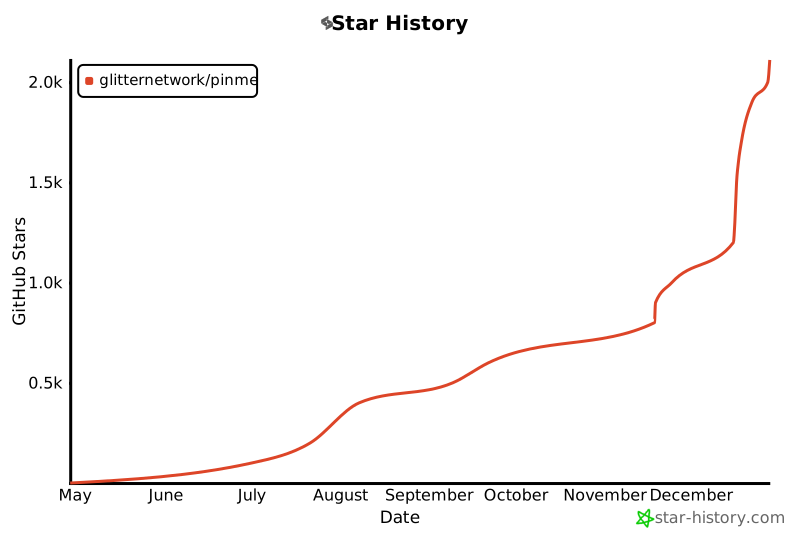](https://star-history.com/#glitternetwork/pinme&Date)
|
|
545
|
+
|
|
405
546
|
## Contact Us
|
|
406
547
|
|
|
407
548
|
If you have questions or suggestions, please contact us through:
|