pi-web-ui 0.90.0 → 0.90.1
This diff represents the content of publicly available package versions that have been released to one of the supported registries. The information contained in this diff is provided for informational purposes only and reflects changes between package versions as they appear in their respective public registries.
- package/CHANGELOG.md +26 -0
- package/README.md +7 -4
- package/README.zh-CN.md +6 -3
- package/bin/pi-web-ui.mjs +37 -10
- package/deploy/pi-web-ui.service +36 -31
- package/dist/server/agent-service.js +546 -90
- package/dist/server/index.js +61 -14
- package/dist/server/terminals.js +50 -20
- package/package.json +32 -32
- package/web/dist/assets/TerminalPanel-CkxM4Byl.js +3 -0
- package/web/dist/assets/index-DJIV4A-t.js +355 -0
- package/web/dist/assets/index-DLdcRBs_.css +1 -0
- package/web/dist/assets/markdown-CCeVCbci.css +1 -0
- package/web/dist/assets/markdown-eUQn_o9D.js +296 -0
- package/web/dist/assets/react-CR5VJ85Q.js +9 -0
- package/web/dist/assets/rolldown-runtime-hePW80VL.js +1 -0
- package/web/dist/assets/xterm-B1njb2Cr.css +1 -0
- package/web/dist/assets/xterm-Cf5xxe4g.js +16 -0
- package/web/dist/index.html +6 -4
- package/web/dist/assets/TerminalPanel-BDbdLhpT.js +0 -6
- package/web/dist/assets/TerminalPanel-DOrYoP_4.css +0 -32
- package/web/dist/assets/index-1f_DP8S3.js +0 -380
- package/web/dist/assets/index-DeUwDA-C.css +0 -10
- package/web/dist/assets/markdown-D3PKeHAZ.js +0 -311
- package/web/dist/assets/react-w24rH0km.js +0 -24
- package/web/dist/assets/xterm-B96xOxS9.js +0 -38
package/CHANGELOG.md
CHANGED
|
@@ -10,6 +10,32 @@
|
|
|
10
10
|
|
|
11
11
|
## [Unreleased]
|
|
12
12
|
|
|
13
|
+
## [0.90.1] — 2026-09-18
|
|
14
|
+
|
|
15
|
+
### Added
|
|
16
|
+
|
|
17
|
+
- **多标签页对话过户 + 跨页作答 + 残留自动认领** —— 右键 elsewhere 行可把整段对话(含子代理后代、等答复问卷、看门狗剩余计时)过户到本页并切过去;别处的待答问卷可拉到本页作答;关浏览器重开后、无其他在线标签时自动认领最近的有内容残留。
|
|
18
|
+
|
|
19
|
+
### Changed
|
|
20
|
+
|
|
21
|
+
- **依赖大版本升级**:Express 4→5(通配路由改 `*splat` 具名写法)、React 18→19(JSX 类型改显式导入)、Vite 6→8(分包改 `advancedChunks.groups`、裸 CSS 导入加类型兜底)、mermaid 11→12(vendor 包 `--mermaid-*` 主题钩子入 CSS 白名单),其余小版本同步跟进。
|
|
22
|
+
- **systemd 安装器**(#219)—— 监听 1024 以下端口时自动加 `CAP_NET_BIND_SERVICE`(仍以安装用户运行,不改 root);`PI_WEB_TOKEN` 持久化进 unit 文件(0600 权限);详见 `docs/deployment.md`。
|
|
23
|
+
|
|
24
|
+
### Fixed
|
|
25
|
+
|
|
26
|
+
- **桌面版自动更新接线导致启动即闪退**(#220)—— `electron-updater` 的 `autoUpdater` 是用 `Object.defineProperty` 懒 getter 导出的,Node 的 ESM 具名导出探测看不到它,`const { autoUpdater } = await import("electron-updater")` 恒为 `undefined`,`wireAutoUpdater` 随即抛 `TypeError`,使 0.90.0 桌面版(macOS 实测,同一份 `dist/desktop/main.js` 也用于 Windows/Linux)装完根本打不开。改为回落到 `default` 再取一次,两者都取不到则降级为“更新不可用”,不再拖垮启动。
|
|
27
|
+
|
|
28
|
+
- **手机端触摸拖动滚动**(#218)—— 触屏拖动内容滚动,兜底 xterm 6.0.0 的触摸滚动回归。
|
|
29
|
+
- **Windows 关机跳过 `pty.kill`**(#215 跟进)—— 根治 ConPTY 关停死锁。
|
|
30
|
+
|
|
31
|
+
<!-- auto-i18n:start -->
|
|
32
|
+
### i18n
|
|
33
|
+
|
|
34
|
+
- 前端新增 key(3):`takeoverConversation`、`takeoverHasQuestion`、`waitingQuestionBadge`
|
|
35
|
+
- 前端中文变更(1):`elsewhereTip`
|
|
36
|
+
- 前端英文变更(1):`elsewhereTip`
|
|
37
|
+
<!-- auto-i18n:end -->
|
|
38
|
+
|
|
13
39
|
## [0.90.0] — 2026-09-18
|
|
14
40
|
|
|
15
41
|
### Added
|
package/README.md
CHANGED
|
@@ -4,7 +4,7 @@
|
|
|
4
4
|
|
|
5
5
|
**English** | [简体中文](https://github.com/xing-shuyin/pi-web-ui/blob/main/README.zh-CN.md)
|
|
6
6
|
|
|
7
|
-
|
|
7
|
+
_Just open your browser — get all your work done._
|
|
8
8
|
|
|
9
9
|
<p>
|
|
10
10
|
<a href="https://www.npmjs.com/package/pi-web-ui"><img src="https://img.shields.io/npm/v/pi-web-ui?color=cb3837&logo=npm&label=pi-web-ui" alt="npm version"></a>
|
|
@@ -16,14 +16,15 @@ _The polished browser cockpit for the [pi coding agent](https://pi.dev)._
|
|
|
16
16
|
<a href="https://github.com/xing-shuyin/pi-web-ui/fork"><img src="https://img.shields.io/badge/PRs-welcome-brightgreen?style=flat" alt="PRs welcome"></a>
|
|
17
17
|
</p>
|
|
18
18
|
|
|
19
|
-
|
|
19
|
+
Chat, code, review, manage files, use the terminal — all in one browser tab. No IDE, no terminal app, no context-switching.
|
|
20
20
|
|
|
21
21
|
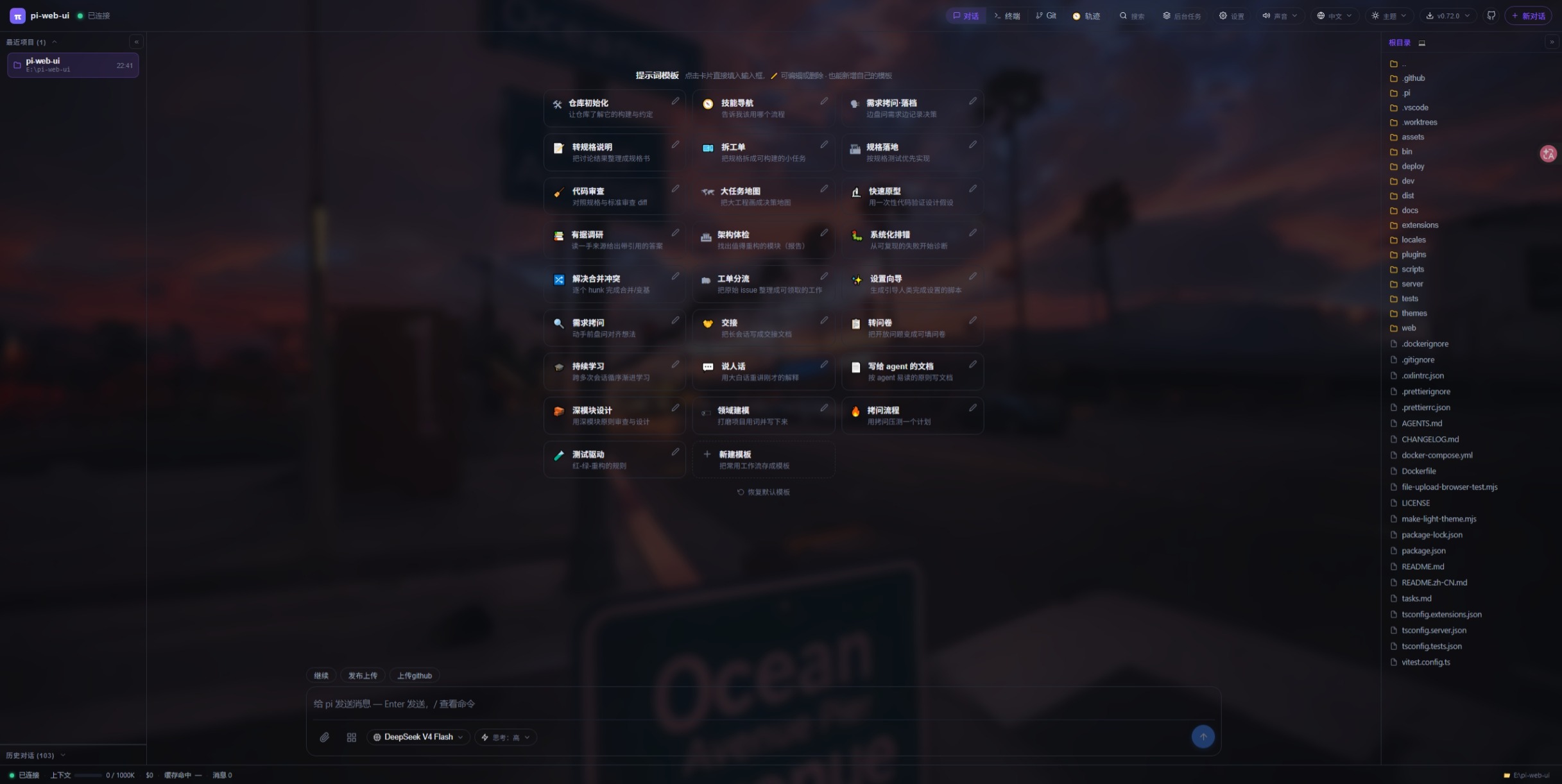
|
|
22
22
|
|
|
23
23
|
</div>
|
|
24
24
|
|
|
25
|
-
A
|
|
26
|
-
**
|
|
25
|
+
A browser cockpit for AI coding agents (pi / DSH) built around one idea:
|
|
26
|
+
**you only need a browser to get everything done.** The agent runs
|
|
27
|
+
server-side and streams events to the browser over WebSocket:
|
|
27
28
|
thinking blocks, tool calls, file trees, a built-in terminal, model management,
|
|
28
29
|
theme switching, and a full settings panel — tuned for daily development.
|
|
29
30
|
|
|
@@ -35,6 +36,8 @@ theme switching, and a full settings panel — tuned for daily development.
|
|
|
35
36
|
>
|
|
36
37
|
> [**dsh-ui-tools**](https://github.com/xing-shuyin/dsh-ui-tools) is the author's companion project for building and extending UI tools in the DSH ecosystem.
|
|
37
38
|
|
|
39
|
+
QQ群 1126050727
|
|
40
|
+
|
|
38
41
|
## ✨ Highlights
|
|
39
42
|
|
|
40
43
|
| 💬 **Chat that works like you do** | 🖼️ **Files & images** | 🧩 **Extensible by design** | 🔒 **Private by default** |
|
package/README.zh-CN.md
CHANGED
|
@@ -6,10 +6,11 @@
|
|
|
6
6
|
[](https://nodejs.org/)
|
|
7
7
|
[](LICENSE)
|
|
8
8
|
|
|
9
|
-
>
|
|
10
|
-
>
|
|
9
|
+
> 你只需要打开浏览器,就能完成所有工作。
|
|
10
|
+
>
|
|
11
|
+
> 聊天、写代码、改文件、用终端、管 Git —— 都在一个浏览器标签页里,不用开 IDE,不用来回切换。
|
|
11
12
|
|
|
12
|
-
|
|
13
|
+
AI 编程智能体(pi / DSH)的浏览器工作台,宗旨只有一句话:**打开浏览器,什么都能干**。智能体在服务端运行,
|
|
13
14
|
事件经 WebSocket 流式推送到浏览器。支持思考块与工具调用、附件与图片问答、内置终端、
|
|
14
15
|
模型管理,以及设置面板(自定义系统提示词、技能/插件开关、设置预设一键应用)等功能。
|
|
15
16
|
需要 Node.js ≥ 22.19 及配置好的 pi 环境。
|
|
@@ -21,6 +22,8 @@
|
|
|
21
22
|
> [**dsh-ui-tools**](https://github.com/xing-shuyin/dsh-ui-tools) 是作者的配套项目,
|
|
22
23
|
> 用于在 DSH 生态中构建和扩展 UI 工具。
|
|
23
24
|
|
|
25
|
+
QQ群 1126050727
|
|
26
|
+
|
|
24
27
|
## 功能特性
|
|
25
28
|
|
|
26
29
|
**对话**
|
package/bin/pi-web-ui.mjs
CHANGED
|
@@ -126,7 +126,8 @@ server 选项:
|
|
|
126
126
|
环境变量(flag 优先,环境变量后备):
|
|
127
127
|
PI_WEB_PORT / PI_WEB_CWD / PI_WEB_DATA_DIR / PI_WEB_ENGINE / PI_WEB_HOST /
|
|
128
128
|
PI_CODING_AGENT_DIR。
|
|
129
|
-
鉴权口令 PI_WEB_TOKEN
|
|
129
|
+
鉴权口令 PI_WEB_TOKEN:仅环境变量(不走命令行);Linux install 会写入 unit,--print 会显示口令。
|
|
130
|
+
其他平台需手动加入服务配置。
|
|
130
131
|
`;
|
|
131
132
|
|
|
132
133
|
const HELP_EN = `pi-web-ui v${pkg.version} — web chat for the pi coding agent
|
|
@@ -179,7 +180,8 @@ UI plugins (installed into <data-dir>/plugins/; refresh browser to activate whil
|
|
|
179
180
|
Environment variables (flag takes precedence, env var as fallback):
|
|
180
181
|
PI_WEB_PORT / PI_WEB_CWD / PI_WEB_DATA_DIR / PI_WEB_ENGINE / PI_WEB_HOST /
|
|
181
182
|
PI_CODING_AGENT_DIR
|
|
182
|
-
Auth token PI_WEB_TOKEN: env var only (not on command line
|
|
183
|
+
Auth token PI_WEB_TOKEN: env var only (not on command line). Linux install persists it; --print reveals it.
|
|
184
|
+
On other platforms, add it to the service config manually.
|
|
183
185
|
`;
|
|
184
186
|
|
|
185
187
|
const HELP = isZhLang() ? HELP_ZH : HELP_EN;
|
|
@@ -993,11 +995,20 @@ ${entries}
|
|
|
993
995
|
`;
|
|
994
996
|
}
|
|
995
997
|
|
|
998
|
+
/** systemd quoted strings use C-style escapes; %% prevents specifier expansion. */
|
|
999
|
+
function systemdQuote(value) {
|
|
1000
|
+
return JSON.stringify(String(value)).replace(/%/g, "%%");
|
|
1001
|
+
}
|
|
1002
|
+
|
|
996
1003
|
/** Build the systemd unit file. */
|
|
997
1004
|
function buildUnit(cwd, env) {
|
|
998
1005
|
const envLines = Object.entries(env)
|
|
999
|
-
.map(([k, v]) => `Environment=${k}=${v}`)
|
|
1006
|
+
.map(([k, v]) => `Environment=${systemdQuote(`${k}=${v}`)}`)
|
|
1000
1007
|
.join("\n");
|
|
1008
|
+
const lowPort = Number(env.PI_WEB_PORT) > 0 && Number(env.PI_WEB_PORT) < 1024;
|
|
1009
|
+
const capabilities = lowPort
|
|
1010
|
+
? "CapabilityBoundingSet=CAP_NET_BIND_SERVICE\nAmbientCapabilities=CAP_NET_BIND_SERVICE\n"
|
|
1011
|
+
: "";
|
|
1001
1012
|
return `# Generated by: pi-web-ui server install (do not edit by hand — rerun to change)
|
|
1002
1013
|
[Unit]
|
|
1003
1014
|
Description=pi-web-ui — web chat for the pi coding agent
|
|
@@ -1006,9 +1017,9 @@ After=network.target
|
|
|
1006
1017
|
[Service]
|
|
1007
1018
|
Type=simple
|
|
1008
1019
|
User=${process.env.SUDO_USER ?? userInfo().username}
|
|
1009
|
-
WorkingDirectory=${cwd}
|
|
1020
|
+
WorkingDirectory=${systemdQuote(cwd)}
|
|
1010
1021
|
${envLines}
|
|
1011
|
-
ExecStart=${JSON.stringify(NODE)} ${JSON.stringify(SERVER_ENTRY)}
|
|
1022
|
+
${capabilities}ExecStart=${JSON.stringify(NODE)} ${JSON.stringify(SERVER_ENTRY)}
|
|
1012
1023
|
Restart=always
|
|
1013
1024
|
RestartSec=5
|
|
1014
1025
|
|
|
@@ -1113,18 +1124,34 @@ function installLaunchd(opts) {
|
|
|
1113
1124
|
console.log(` 提示 : pi-web-ui server shortcut 可在桌面创建「一键启动」图标`);
|
|
1114
1125
|
}
|
|
1115
1126
|
|
|
1127
|
+
/** Elevate only the privileged operation, not the CLI that captures the user's environment.
|
|
1128
|
+
* Unit contents travel through stdin, never argv (which may expose the token via ps). */
|
|
1129
|
+
function runSystemdRoot(command, args, input) {
|
|
1130
|
+
const root = typeof process.getuid === "function" && process.getuid() === 0;
|
|
1131
|
+
const result = spawnSync(root ? command : "sudo", root ? args : ["--", command, ...args], {
|
|
1132
|
+
input,
|
|
1133
|
+
stdio: input === undefined ? "inherit" : ["pipe", "inherit", "inherit"],
|
|
1134
|
+
});
|
|
1135
|
+
if (result.error) fail(`无法执行 ${command}: ${result.error.message}`);
|
|
1136
|
+
if (result.status !== 0) process.exit(result.status ?? 1);
|
|
1137
|
+
}
|
|
1138
|
+
|
|
1116
1139
|
function installSystemd(opts) {
|
|
1117
1140
|
const { name, port, cwd, dataDir, engine, host, agentDir } = serviceOptions(opts);
|
|
1118
|
-
const
|
|
1141
|
+
const env = serviceEnv(port, cwd, dataDir, engine, host, agentDir, { name });
|
|
1142
|
+
if (process.env.PI_WEB_TOKEN !== undefined) env.PI_WEB_TOKEN = process.env.PI_WEB_TOKEN;
|
|
1143
|
+
const content = buildUnit(cwd, env);
|
|
1119
1144
|
const unitPath = systemdUnitPath(name);
|
|
1120
1145
|
if (opts.print) {
|
|
1121
1146
|
console.log(`# ${unitPath}\n${content}`);
|
|
1122
1147
|
return;
|
|
1123
1148
|
}
|
|
1124
|
-
|
|
1125
|
-
|
|
1126
|
-
|
|
1127
|
-
|
|
1149
|
+
// Generated units can contain credentials. install also corrects an existing unit's mode.
|
|
1150
|
+
runSystemdRoot("install", ["-m", "600", "/dev/stdin", unitPath], content);
|
|
1151
|
+
runSystemdRoot("systemctl", ["daemon-reload"]);
|
|
1152
|
+
runSystemdRoot("systemctl", ["enable", `${name}.service`]);
|
|
1153
|
+
// enable --now does not restart an already-active unit after configuration changes.
|
|
1154
|
+
runSystemdRoot("systemctl", ["restart", `${name}.service`]);
|
|
1128
1155
|
console.log(`✅ 已安装并启动 systemd 服务 ${name}.service`);
|
|
1129
1156
|
console.log(` 端口 : ${port}`);
|
|
1130
1157
|
console.log(` 目录 : ${cwd}`);
|
package/deploy/pi-web-ui.service
CHANGED
|
@@ -1,31 +1,36 @@
|
|
|
1
|
-
# pi-web-ui systemd unit — Linux auto-start on boot.
|
|
2
|
-
#
|
|
3
|
-
# Install (adjust User/WorkingDirectory/Environment to taste):
|
|
4
|
-
# sudo npm i -g pi-web-ui
|
|
5
|
-
# sudo cp deploy/pi-web-ui.service /etc/systemd/system/
|
|
6
|
-
# sudo systemctl daemon-reload
|
|
7
|
-
# sudo systemctl enable --now pi-web-ui
|
|
8
|
-
# sudo systemctl status pi-web-ui
|
|
9
|
-
#
|
|
10
|
-
# Logs: journalctl -u pi-web-ui -f
|
|
11
|
-
|
|
12
|
-
[Unit]
|
|
13
|
-
Description=pi-web-ui — web chat for the pi coding agent
|
|
14
|
-
After=network.target
|
|
15
|
-
|
|
16
|
-
[Service]
|
|
17
|
-
Type=simple
|
|
18
|
-
# Run as an unprivileged user (change to your user, e.g. yourname)
|
|
19
|
-
User=YOUR_USER
|
|
20
|
-
# The workspace the agent operates in (read/edit/bash/write)
|
|
21
|
-
WorkingDirectory=/home/YOUR_USER
|
|
22
|
-
Environment=PI_WEB_PORT=8787
|
|
23
|
-
#
|
|
24
|
-
#
|
|
25
|
-
|
|
26
|
-
|
|
27
|
-
|
|
28
|
-
#
|
|
29
|
-
|
|
30
|
-
|
|
31
|
-
|
|
1
|
+
# pi-web-ui systemd unit — Linux auto-start on boot.
|
|
2
|
+
#
|
|
3
|
+
# Install (adjust User/WorkingDirectory/Environment to taste):
|
|
4
|
+
# sudo npm i -g pi-web-ui
|
|
5
|
+
# sudo cp deploy/pi-web-ui.service /etc/systemd/system/
|
|
6
|
+
# sudo systemctl daemon-reload
|
|
7
|
+
# sudo systemctl enable --now pi-web-ui
|
|
8
|
+
# sudo systemctl status pi-web-ui
|
|
9
|
+
#
|
|
10
|
+
# Logs: journalctl -u pi-web-ui -f
|
|
11
|
+
|
|
12
|
+
[Unit]
|
|
13
|
+
Description=pi-web-ui — web chat for the pi coding agent
|
|
14
|
+
After=network.target
|
|
15
|
+
|
|
16
|
+
[Service]
|
|
17
|
+
Type=simple
|
|
18
|
+
# Run as an unprivileged user (change to your user, e.g. yourname)
|
|
19
|
+
User=YOUR_USER
|
|
20
|
+
# The workspace the agent operates in (read/edit/bash/write)
|
|
21
|
+
WorkingDirectory=/home/YOUR_USER
|
|
22
|
+
Environment=PI_WEB_PORT=8787
|
|
23
|
+
# For privileged ports (1-1023, e.g. 80/443), uncomment both lines:
|
|
24
|
+
#CapabilityBoundingSet=CAP_NET_BIND_SERVICE
|
|
25
|
+
#AmbientCapabilities=CAP_NET_BIND_SERVICE
|
|
26
|
+
# Optional authentication; protect this file if you store a token here.
|
|
27
|
+
#Environment="PI_WEB_TOKEN=replace-with-your-token"
|
|
28
|
+
# Point at your pi config dir if it's not the default ~/.pi/agent
|
|
29
|
+
#Environment=PI_CODING_AGENT_DIR=/home/YOUR_USER/.pi/agent
|
|
30
|
+
ExecStart=/usr/bin/pi-web-ui
|
|
31
|
+
Restart=on-failure
|
|
32
|
+
RestartSec=5
|
|
33
|
+
# npm global bin may live elsewhere (nvm, etc.) — find with: which pi-web-ui
|
|
34
|
+
|
|
35
|
+
[Install]
|
|
36
|
+
WantedBy=multi-user.target
|