pi-web-ui 0.22.1 → 0.24.0
This diff represents the content of publicly available package versions that have been released to one of the supported registries. The information contained in this diff is provided for informational purposes only and reflects changes between package versions as they appear in their respective public registries.
- package/README.md +83 -0
- package/README.zh-CN.md +76 -0
- package/bin/pi-web-ui.mjs +98 -2
- package/dist/server/agent-service.js +466 -15
- package/dist/server/control-socket.js +177 -0
- package/dist/server/index.js +116 -4
- package/dist/server/vision-bridge.js +113 -0
- package/package.json +2 -2
- package/web/dist/assets/index-BfpjVv5g.css +41 -0
- package/web/dist/assets/{index-DqEHUXqU.js → index-CCePsQTu.js} +57 -57
- package/web/dist/index.html +2 -2
- package/web/dist/assets/index-B8AkogcB.css +0 -41
package/README.md
CHANGED
|
@@ -9,6 +9,65 @@ built-in terminal, manage models, tweak the system prompt, toggle skills and
|
|
|
9
9
|
extensions on/off, and save/apply settings presets — all from a settings panel.
|
|
10
10
|
Requires Node.js ≥ 22.19 and a configured pi install.
|
|
11
11
|
|
|
12
|
+
## Features
|
|
13
|
+
|
|
14
|
+
**Chat**
|
|
15
|
+
|
|
16
|
+
- Streaming agent chat over WebSocket — the pi SDK runs in-process; events are pushed as snapshots (60 ms throttled) and the browser renders them.
|
|
17
|
+
- Thinking blocks, tool-call cards and bash outputs with live status (running → finished · waiting for the model · duration).
|
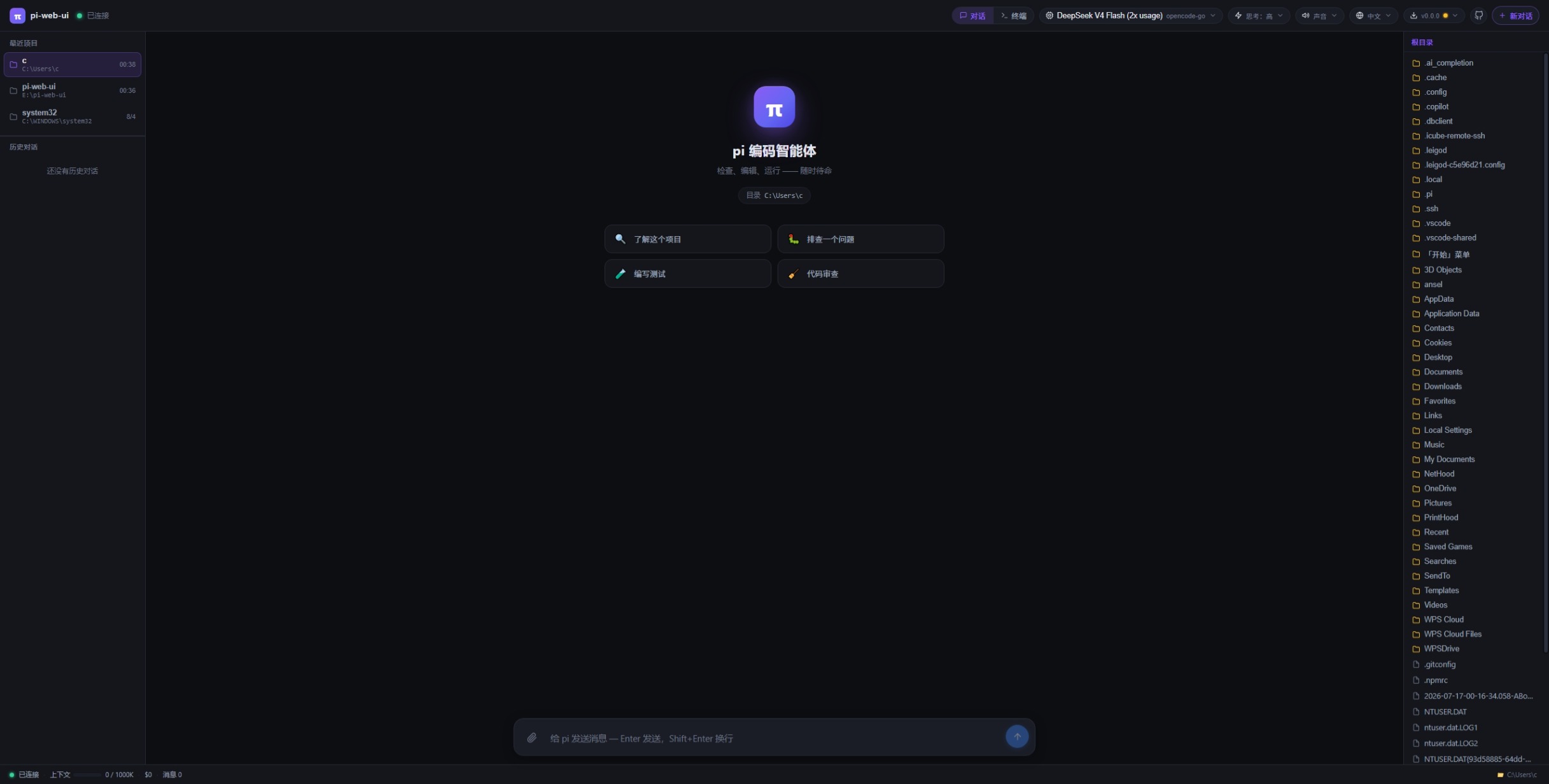
|
18
|
+
- **补充 (steer)** — send a follow-up while the agent is replying; it is queued and injected as soon as the current turn's tool calls settle (the "Interrupt" equivalent of the pi CLI).
|
|
19
|
+
- **Slash commands** — `/` opens a command picker (built-in / extension / template / skill); built-ins include `/new /model /compact /cwd /thinking /resume`, plus `/help` (command list) and `/copy` (copy last reply).
|
|
20
|
+
- **Multiple conversations per project** — each conversation gets its own agent runtime and keeps running in the background after you switch away; the "Running conversations" list shows stream progress and lets you switch back.
|
|
21
|
+
- **Edit & re-ask** — fork any past question into a new branch and re-prompt; the original conversation stays untouched.
|
|
22
|
+
- Long threads auto-collapse messages older than 30 into lazy summary rows (click to expand).
|
|
23
|
+
- Question navigation — a floating rail plus per-question tags to jump between questions.
|
|
24
|
+
|
|
25
|
+
**Files, images & attachments**
|
|
26
|
+
|
|
27
|
+
- Three attachment modes: `inline` (≤12 KB), `reference` (path only), `lines` (selected ranges) — over-limit ones degrade automatically.
|
|
28
|
+
- Paste / drag-drop / upload images — resized client-side and sent as image content when the model supports vision (warning otherwise).
|
|
29
|
+
- **Vision bridge** — when the current model is text-only, images are transcribed into text evidence by an auto-discovered vision model (cached per batch; model & on/off configurable in Settings).
|
|
30
|
+
- Attach arbitrary files without a workspace path — stored in a global uploads dir, inlined when small, referenced by absolute path otherwise.
|
|
31
|
+
- File preview — line numbers, click/drag/Shift selection (add to chat as `lines`), GBK fallback decoding, binary hex view, media preview over HTTP with Range support, and a download button.
|
|
32
|
+
- Live file tree — the server watches the listed directory (fs.watch) and re-lists on change; oversized directories show a truncation warning.
|
|
33
|
+
|
|
34
|
+
**Terminal & Git**
|
|
35
|
+
|
|
36
|
+
- Built-in terminal (xterm.js + node-pty) with per-client PTY management; Windows auto-selects Git Bash (busybox fallback).
|
|
37
|
+
- **Source control (Git) panel** — status / branch / diff / untracked files via a hidden query terminal; commit, switch branch, push and pull run in the visible terminal and auto-switch to the terminal view.
|
|
38
|
+
|
|
39
|
+
**Models & settings**
|
|
40
|
+
|
|
41
|
+
- Model management — edit `models.json` in the UI and set per-provider API keys (keys/headers never leave the server).
|
|
42
|
+
- Thinking level per model (only the levels the model actually supports are shown).
|
|
43
|
+
- First-run setup wizard.
|
|
44
|
+
- Settings panel — system prompt (append or replace), toggle skills/extensions on/off with immediate effect, save/apply/delete settings presets, and vision-bridge model & switch.
|
|
45
|
+
|
|
46
|
+
**Goal mode**
|
|
47
|
+
|
|
48
|
+
- Goal bar — set a target with a review model, max rounds and a lock switch.
|
|
49
|
+
- Goal wizard ("AI 提炼") — turns a raw request into a concrete goal through a guided questionnaire.
|
|
50
|
+
- Automatic review loop — after each turn an independent review session checks the goal against the final text and `git diff HEAD`; on fail the feedback is injected as steer until it passes (or the round cap is hit).
|
|
51
|
+
|
|
52
|
+
**Background tasks**
|
|
53
|
+
|
|
54
|
+
- Background-task panel — servers launched by the agent are detected via port snapshots and listed (port/pid/name); stop one or kill all.
|
|
55
|
+
- Tool watchdog — a tool call running over 20 minutes is aborted automatically.
|
|
56
|
+
- **Stop bash command only** — abort a running bash tool without killing the conversation.
|
|
57
|
+
|
|
58
|
+
**Safety & operations**
|
|
59
|
+
|
|
60
|
+
- Loopback-only by default; set `PI_WEB_HOST=0.0.0.0` for LAN / containers.
|
|
61
|
+
- WebSocket Origin/Host same-authority check — cross-origin pages are rejected (403); `PI_WEB_ALLOW_ORIGINS` whitelist for reverse proxies.
|
|
62
|
+
- Quiesce drain mode via a local control socket (`server status|quiesce|unquiesce`).
|
|
63
|
+
- Credentials stay server-side — provider headers are never sent to the browser.
|
|
64
|
+
- Sound alerts, Chinese/English UI, and a recent-projects list (click to switch workspace).
|
|
65
|
+
|
|
66
|
+
**Deploy & update**
|
|
67
|
+
|
|
68
|
+
- Foreground, global npm install, Docker (docker-compose), macOS launchd, Linux systemd, Windows Task Scheduler, and a desktop shortcut (`server shortcut`).
|
|
69
|
+
- In-app self-update — checks the npm registry, installs and auto-restarts the service.
|
|
70
|
+
|
|
12
71
|
## Screenshots
|
|
13
72
|
|
|
14
73
|
|
|
@@ -68,8 +127,31 @@ pi-web-ui server stop # stop (auto-start stays)
|
|
|
68
127
|
pi-web-ui server start # start again
|
|
69
128
|
pi-web-ui server uninstall # remove the service entirely
|
|
70
129
|
pi-web-ui server shortcut # desktop one-click launch icon
|
|
130
|
+
pi-web-ui server quiesce # drain: refuse NEW chats/messages, let running ones finish
|
|
131
|
+
pi-web-ui server unquiesce # reopen admission
|
|
71
132
|
```
|
|
72
133
|
|
|
134
|
+
`server status` also shows live stats via a local control socket (version,
|
|
135
|
+
PID, quiesce state, connected browsers, running conversations) — the same
|
|
136
|
+
socket drives `quiesce`/`unquiesce`.
|
|
137
|
+
|
|
138
|
+
## Security
|
|
139
|
+
|
|
140
|
+
- **Loopback-only by default** — the server binds `127.0.0.1` and is not
|
|
141
|
+
reachable from the network unless you explicitly set `PI_WEB_HOST=0.0.0.0`
|
|
142
|
+
(e.g. LAN access, Docker port mapping — the compose file sets it for you).
|
|
143
|
+
- **WebSocket origin check** — browser pages connecting to `/ws` must present
|
|
144
|
+
an `Origin` whose hostname **and port** match the request `Host`;
|
|
145
|
+
cross-origin pages are rejected with 403. Non-browser clients (no `Origin`)
|
|
146
|
+
are unaffected. Add `PI_WEB_ALLOW_ORIGINS=http://your-host:port` for
|
|
147
|
+
reverse-proxy setups.
|
|
148
|
+
- **Quiesce** — `server quiesce` refuses new prompts/forks/session resumes
|
|
149
|
+
until you `server unquiesce`; in-flight runs finish cleanly (useful before
|
|
150
|
+
upgrades/backups).
|
|
151
|
+
- **Credentials stay server-side** — provider `headers` (which may carry
|
|
152
|
+
`Authorization` / API keys) are never sent to the browser; the model
|
|
153
|
+
management UI edits everything else and the server preserves the headers.
|
|
154
|
+
|
|
73
155
|
- **macOS** → launchd agent (no sudo), logs to `/tmp/pi-web-ui.log` / `.err`
|
|
74
156
|
- **Linux** → systemd unit (`systemctl enable --now`), logs via `journalctl -u pi-web-ui -f`
|
|
75
157
|
- **Windows** → Task Scheduler logon task (hidden PowerShell window, no black console)
|
|
@@ -82,3 +164,4 @@ port/cwd.
|
|
|
82
164
|
## License
|
|
83
165
|
|
|
84
166
|
MIT
|
|
167
|
+
|
package/README.zh-CN.md
CHANGED
|
@@ -7,6 +7,65 @@
|
|
|
7
7
|
模型管理,以及设置面板(自定义系统提示词、技能/插件开关、设置预设一键应用)等功能。
|
|
8
8
|
需要 Node.js ≥ 22.19 及配置好的 pi 环境。
|
|
9
9
|
|
|
10
|
+
## 功能特性
|
|
11
|
+
|
|
12
|
+
**对话**
|
|
13
|
+
|
|
14
|
+
- WebSocket 流式聊天 —— pi SDK 在服务端进程内运行,事件以快照(60ms 节流)推送,浏览器按快照渲染。
|
|
15
|
+
- 思考块、工具调用卡片、bash 输出,实时显示状态(执行中 → 已结束 · 等模型 · 耗时)。
|
|
16
|
+
- **补充(steer)** —— 回复流式中可排队发送跟进消息,当前回合工具结算后立即注入(对应 pi CLI 的 Enter 打断语义)。
|
|
17
|
+
- **斜杠命令** —— 输入 `/` 弹出命令选择器(内置 / 扩展 / 模板 / 技能);内置 `/new /model /compact /cwd /thinking /resume`,另有 `/help`(命令清单)与 `/copy`(复制上一条回复)。
|
|
18
|
+
- **每项目多对话并发** —— 每个对话独立 agent runtime,切走后仍在后台运行;「运行的对话」列表显示流式进度,可随时切回。
|
|
19
|
+
- **编辑重问** —— 把任意历史问题 fork 成新分支重新提问,原对话不受影响。
|
|
20
|
+
- 超过 30 条的消息自动折叠为摘要行(惰性渲染,点击展开)。
|
|
21
|
+
- 问题导航 —— 右侧浮动导航条 + 每个问题顶部的序号标签,一键跳转。
|
|
22
|
+
|
|
23
|
+
**文件、图片与附件**
|
|
24
|
+
|
|
25
|
+
- 三种附件模式:`inline`(≤12KB 内联)、`reference`(仅路径引用)、`lines`(选中行),超限自动降级。
|
|
26
|
+
- 粘贴 / 拖拽 / 上传图片 —— 浏览器端自动缩放,模型支持识图时作为图片内容发送(不支持时提示警告)。
|
|
27
|
+
- **视觉桥** —— 当前模型不支持识图时,把图片交给自动发现的视觉模型转写成文字证据(按批次缓存,可在设置里指定模型/开关)。
|
|
28
|
+
- 免工作区路径附加任意文件 —— 存入全局上传目录,小文件内联,其余以绝对路径引用。
|
|
29
|
+
- 文件预览 —— 行号、点选/拖拽/Shift 选区(可添加到对话为 lines 附件)、GBK 回退解码、二进制十六进制视图、媒体 HTTP 预览(支持 Range)、下载按钮。
|
|
30
|
+
- 实时文件树 —— 服务端对当前列出目录 fs.watch,改动即静默重列;超大目录显示截断提示。
|
|
31
|
+
|
|
32
|
+
**终端与 Git**
|
|
33
|
+
|
|
34
|
+
- 内置终端(xterm.js + node-pty),每客户端独立 PTY 管理;Windows 自动选择 Git Bash(busybox 兜底)。
|
|
35
|
+
- **源代码管理(Git)面板** —— 经隐藏查询终端展示 status / branch / diff / 未跟踪文件;提交、切换分支、推送、拉取复用可见终端并自动切换到终端视图。
|
|
36
|
+
|
|
37
|
+
**模型与设置**
|
|
38
|
+
|
|
39
|
+
- 模型管理 —— UI 里编辑 models.json、按 provider 设置 API key(密钥/headers 永不下发浏览器)。
|
|
40
|
+
- 思考强度(thinking level)按模型切换(只显示该模型实际支持的档位)。
|
|
41
|
+
- 首次配置引导(PiSetupModal)。
|
|
42
|
+
- 设置面板 —— 系统提示词(追加或整体替换)、技能/插件一键开关(即时生效)、设置预设保存/应用/删除、视觉桥模型与开关。
|
|
43
|
+
|
|
44
|
+
**目标(Goal)模式**
|
|
45
|
+
|
|
46
|
+
- GoalBar 目标栏 —— 设置目标 + 审查模型 + 最大轮数 + 锁定开关。
|
|
47
|
+
- 目标调研向导(「AI 提炼」)—— 通过引导式问卷把原始需求收敛成明确目标。
|
|
48
|
+
- 自动审查循环 —— 每轮结束后用独立审查会话核对「目标 + 最终文本 + git diff HEAD」;不达标就把审查意见作为 steer 注入重改,直到通过或达到轮数上限。
|
|
49
|
+
|
|
50
|
+
**后台任务**
|
|
51
|
+
|
|
52
|
+
- 后台任务面板 —— 通过端口快照检测 agent 启动的服务(端口/pid/名称),可单独停止或全部关闭。
|
|
53
|
+
- 工具看门狗 —— 单个工具调用超过 20 分钟自动中断会话。
|
|
54
|
+
- **只停止 bash 命令** —— 中止运行中的 bash 工具而不打断对话。
|
|
55
|
+
|
|
56
|
+
**安全与运维**
|
|
57
|
+
|
|
58
|
+
- 默认只绑 loopback;局域网 / 容器需显式 `PI_WEB_HOST=0.0.0.0`。
|
|
59
|
+
- WebSocket Origin/Host 同权威校验 —— 跨源页面直接拒绝(403);反代场景用 `PI_WEB_ALLOW_ORIGINS` 白名单。
|
|
60
|
+
- 本地控制 socket 提供 `server status|quiesce|unquiesce`(排空模式:拒绝新工作、存量跑完)。
|
|
61
|
+
- 凭据不下发浏览器 —— provider headers(可能含 Authorization/API key)永不发送到前端。
|
|
62
|
+
- 声音提醒、中英文界面、最近项目列表(点击即切换工作目录)。
|
|
63
|
+
|
|
64
|
+
**部署与更新**
|
|
65
|
+
|
|
66
|
+
- 前台运行 / 全局 npm 安装 / Docker(docker-compose)/ macOS launchd / Linux systemd / Windows 计划任务 / 桌面快捷方式(`server shortcut`)。
|
|
67
|
+
- 界面内自更新 —— 对比 npm registry 版本,安装后自动重启服务。
|
|
68
|
+
|
|
10
69
|
## 界面截图
|
|
11
70
|
|
|
12
71
|

|
|
@@ -64,8 +123,25 @@ pi-web-ui server stop # 停止(开机自启保留)
|
|
|
64
123
|
pi-web-ui server start # 再次启动
|
|
65
124
|
pi-web-ui server uninstall # 彻底移除服务
|
|
66
125
|
pi-web-ui server shortcut # 桌面一键启动图标
|
|
126
|
+
pi-web-ui server quiesce # 排空:拒绝新的对话/消息,存量运行继续跑完
|
|
127
|
+
pi-web-ui server unquiesce # 解除排空,恢复接收新工作
|
|
67
128
|
```
|
|
68
129
|
|
|
130
|
+
`server status` 还会经本地控制 socket 显示实时状态(版本、PID、排空状态、
|
|
131
|
+
浏览器连接数、运行中对话数)——`quiesce`/`unquiesce` 也走同一个 socket。
|
|
132
|
+
|
|
133
|
+
## 安全
|
|
134
|
+
|
|
135
|
+
- **默认只绑 loopback** —— 服务器只监听 `127.0.0.1`,不暴露到网络;需要局域网访问或
|
|
136
|
+
Docker 端口映射时显式设置 `PI_WEB_HOST=0.0.0.0`(docker-compose.yml 已内置)。
|
|
137
|
+
- **WebSocket Origin 校验** —— 浏览器页面连 `/ws` 时其 Origin 的 hostname **和端口**
|
|
138
|
+
必须与请求 Host 一致,跨源页面直接 403;无 Origin 的非浏览器客户端不受影响。
|
|
139
|
+
反向代理场景可用 `PI_WEB_ALLOW_ORIGINS=http://你的域名:端口` 放行。
|
|
140
|
+
- **Quiesce 排空** —— `server quiesce` 后拒绝新的 prompt/编辑重问/会话恢复,存量运行
|
|
141
|
+
跑完为止(升级/备份前用);`server unquiesce` 恢复。
|
|
142
|
+
- **凭据不下发浏览器** —— provider 的 `headers`(可能含 Authorization / API key)
|
|
143
|
+
永不发给浏览器;模型管理 UI 编辑其他字段,服务端自动保留 headers。
|
|
144
|
+
|
|
69
145
|
- **macOS** → launchd 代理(无需 sudo),日志 `/tmp/pi-web-ui.log` / `.err`
|
|
70
146
|
- **Linux** → systemd unit(`systemctl enable --now`),日志 `journalctl -u pi-web-ui -f`
|
|
71
147
|
- **Windows** → 计划任务(登录自启,隐藏 PowerShell 窗口,无黑窗)
|
package/bin/pi-web-ui.mjs
CHANGED
|
@@ -23,6 +23,7 @@
|
|
|
23
23
|
* PI_CODING_AGENT_DIR。
|
|
24
24
|
*/
|
|
25
25
|
import { spawnSync } from "node:child_process";
|
|
26
|
+
import { createConnection } from "node:net";
|
|
26
27
|
import { get as httpGet } from "node:http";
|
|
27
28
|
import {
|
|
28
29
|
chmodSync,
|
|
@@ -60,6 +61,8 @@ const HELP = `pi-web-ui v${pkg.version} — web chat for the pi coding agent
|
|
|
60
61
|
pi-web-ui server shortcut [选项] 在桌面创建「一键启动」图标(启动服务并打开浏览器)
|
|
61
62
|
pi-web-ui server uninstall [选项] 卸载系统服务(同时移除桌面图标)
|
|
62
63
|
pi-web-ui server start|stop|restart|status [选项]
|
|
64
|
+
pi-web-ui server quiesce [选项] 进入排空模式:拒绝新的对话/消息/编辑,存量运行继续跑完
|
|
65
|
+
pi-web-ui server unquiesce [选项] 解除排空模式,恢复接收新工作
|
|
63
66
|
pi-web-ui --version / --help
|
|
64
67
|
|
|
65
68
|
server 选项:
|
|
@@ -1069,6 +1072,90 @@ function uninstallWindows(opts) {
|
|
|
1069
1072
|
console.log(`🗑 已移除桌面快捷方式`);
|
|
1070
1073
|
}
|
|
1071
1074
|
|
|
1075
|
+
// ---------------------------------------------------------------------------
|
|
1076
|
+
// ---------------------------------------------------------------------------
|
|
1077
|
+
// Local control socket (status / quiesce / unquiesce). The server listens on
|
|
1078
|
+
// a mode-0600 Unix socket (POSIX) or a named pipe (Windows) under its data
|
|
1079
|
+
// dir; same path rules as server/control-socket.ts so the CLI and server
|
|
1080
|
+
// always agree without sharing code.
|
|
1081
|
+
// ---------------------------------------------------------------------------
|
|
1082
|
+
|
|
1083
|
+
/** Resolve the control socket path for the given options. */
|
|
1084
|
+
function controlPath(opts) {
|
|
1085
|
+
const dir = opts.dataDir
|
|
1086
|
+
? resolve(opts.dataDir)
|
|
1087
|
+
: process.env.PI_WEB_DATA_DIR
|
|
1088
|
+
? resolve(process.env.PI_WEB_DATA_DIR)
|
|
1089
|
+
: join(homedir(), ".pi-web");
|
|
1090
|
+
return isWin
|
|
1091
|
+
? `\\\\.\\pipe\\pi-web-ui-${String(opts.port ?? process.env.PORT ?? "8787")}`
|
|
1092
|
+
: join(dir, "pi-web-ui.sock");
|
|
1093
|
+
}
|
|
1094
|
+
|
|
1095
|
+
/** Send one control command to a RUNNING server; resolves null if unreachable. */
|
|
1096
|
+
function controlCommand(opts, cmd) {
|
|
1097
|
+
const path = controlPath(opts);
|
|
1098
|
+
return new Promise((resolvePromise) => {
|
|
1099
|
+
const sock = createConnection(path);
|
|
1100
|
+
let done = false;
|
|
1101
|
+
const finish = (v) => {
|
|
1102
|
+
if (done) return;
|
|
1103
|
+
done = true;
|
|
1104
|
+
clearTimeout(timer);
|
|
1105
|
+
sock.destroy();
|
|
1106
|
+
resolvePromise(v);
|
|
1107
|
+
};
|
|
1108
|
+
const timer = setTimeout(() => finish(null), 3000);
|
|
1109
|
+
let buf = "";
|
|
1110
|
+
sock.on("connect", () => sock.write(JSON.stringify({ cmd }) + "\n"));
|
|
1111
|
+
sock.on("data", (chunk) => {
|
|
1112
|
+
buf += chunk.toString("utf8");
|
|
1113
|
+
const nl = buf.indexOf("\n");
|
|
1114
|
+
if (nl >= 0) {
|
|
1115
|
+
try {
|
|
1116
|
+
finish(JSON.parse(buf.slice(0, nl)));
|
|
1117
|
+
} catch {
|
|
1118
|
+
finish(null);
|
|
1119
|
+
}
|
|
1120
|
+
}
|
|
1121
|
+
});
|
|
1122
|
+
sock.on("error", () => finish(null));
|
|
1123
|
+
sock.on("close", () => finish(null));
|
|
1124
|
+
});
|
|
1125
|
+
}
|
|
1126
|
+
|
|
1127
|
+
/** Append the live server status (via the control socket) to `server status`. */
|
|
1128
|
+
async function printLiveStatus(opts) {
|
|
1129
|
+
const st = await controlCommand(opts, "status");
|
|
1130
|
+
if (!st || !st.ok) {
|
|
1131
|
+
console.log(" (服务器未运行或控制通道不可达 — 启动后可查 server status 实时信息)");
|
|
1132
|
+
return;
|
|
1133
|
+
}
|
|
1134
|
+
console.log(" --- 实时状态 (control socket) ---");
|
|
1135
|
+
console.log(` 版本 : ${st.version} · PID ${st.pid}`);
|
|
1136
|
+
console.log(` 目录 : ${st.cwd}`);
|
|
1137
|
+
console.log(
|
|
1138
|
+
` 排空 : ${st.quiesced ? `是(自 ${new Date(st.quiescedSince).toLocaleString()})` : "否"}`,
|
|
1139
|
+
);
|
|
1140
|
+
console.log(
|
|
1141
|
+
` 连接 : ${st.connectedClients} 个浏览器 · ${st.activeConversations} 个运行中对话 · ${st.pendingMessages} 条排队消息`,
|
|
1142
|
+
);
|
|
1143
|
+
}
|
|
1144
|
+
|
|
1145
|
+
/** `server quiesce|unquiesce` — toggle the admission gate on a RUNNING server. */
|
|
1146
|
+
async function setQuiesce(opts, on) {
|
|
1147
|
+
const st = await controlCommand(opts, on ? "quiesce" : "unquiesce");
|
|
1148
|
+
if (!st || !st.ok) {
|
|
1149
|
+
fail(`服务器未运行或控制通道不可达(${controlPath(opts)})`);
|
|
1150
|
+
}
|
|
1151
|
+
console.log(
|
|
1152
|
+
on
|
|
1153
|
+
? "⏸ 已进入排空模式(quiesce):拒绝新的对话/消息/编辑,存量运行继续跑完。\n" +
|
|
1154
|
+
" 跑完后用 pi-web-ui server unquiesce 恢复。"
|
|
1155
|
+
: "▶ 已解除排空模式(unquiesce):恢复接收新的对话/消息/编辑。",
|
|
1156
|
+
);
|
|
1157
|
+
}
|
|
1158
|
+
|
|
1072
1159
|
function controlService(action, opts) {
|
|
1073
1160
|
const name = opts.name ?? "pi-web-ui";
|
|
1074
1161
|
|
|
@@ -1279,12 +1366,21 @@ async function serverCmd(argv) {
|
|
|
1279
1366
|
case "start":
|
|
1280
1367
|
case "stop":
|
|
1281
1368
|
case "restart":
|
|
1282
|
-
case "status":
|
|
1283
1369
|
controlService(action, opts);
|
|
1284
1370
|
break;
|
|
1371
|
+
case "status":
|
|
1372
|
+
controlService("status", opts);
|
|
1373
|
+
await printLiveStatus(opts);
|
|
1374
|
+
break;
|
|
1375
|
+
case "quiesce":
|
|
1376
|
+
await setQuiesce(opts, true);
|
|
1377
|
+
break;
|
|
1378
|
+
case "unquiesce":
|
|
1379
|
+
await setQuiesce(opts, false);
|
|
1380
|
+
break;
|
|
1285
1381
|
default:
|
|
1286
1382
|
fail(
|
|
1287
|
-
`未知操作: ${action}(install / shortcut / uninstall / start / stop / restart / status)`,
|
|
1383
|
+
`未知操作: ${action}(install / shortcut / uninstall / start / stop / restart / status / quiesce / unquiesce)`,
|
|
1288
1384
|
);
|
|
1289
1385
|
}
|
|
1290
1386
|
}
|