pi-smart-voice-notify 0.1.0 → 0.1.2
This diff represents the content of publicly available package versions that have been released to one of the supported registries. The information contained in this diff is provided for informational purposes only and reflects changes between package versions as they appear in their respective public registries.
- package/CHANGELOG.md +11 -0
- package/README.md +175 -119
- package/package.json +1 -1
package/CHANGELOG.md
CHANGED
|
@@ -1,5 +1,16 @@
|
|
|
1
1
|
# Changelog
|
|
2
2
|
|
|
3
|
+
## [0.1.2] - 2026-03-04
|
|
4
|
+
|
|
5
|
+
### Fixed
|
|
6
|
+
- Use absolute GitHub raw URL for README image to fix npm display
|
|
7
|
+
|
|
8
|
+
## [0.1.1] - 2026-03-04
|
|
9
|
+
|
|
10
|
+
### Changed
|
|
11
|
+
- Rewrote README.md with professional documentation standards
|
|
12
|
+
- Added comprehensive feature documentation, configuration reference, and usage examples
|
|
13
|
+
|
|
3
14
|
## 0.1.0
|
|
4
15
|
|
|
5
16
|
- Standardized repository structure to `index.ts` shim + `src/` implementation.
|
package/README.md
CHANGED
|
@@ -1,187 +1,243 @@
|
|
|
1
|
-
# pi-smart-voice-notify
|
|
1
|
+
# 🔔 pi-smart-voice-notify
|
|
2
2
|
|
|
3
3
|
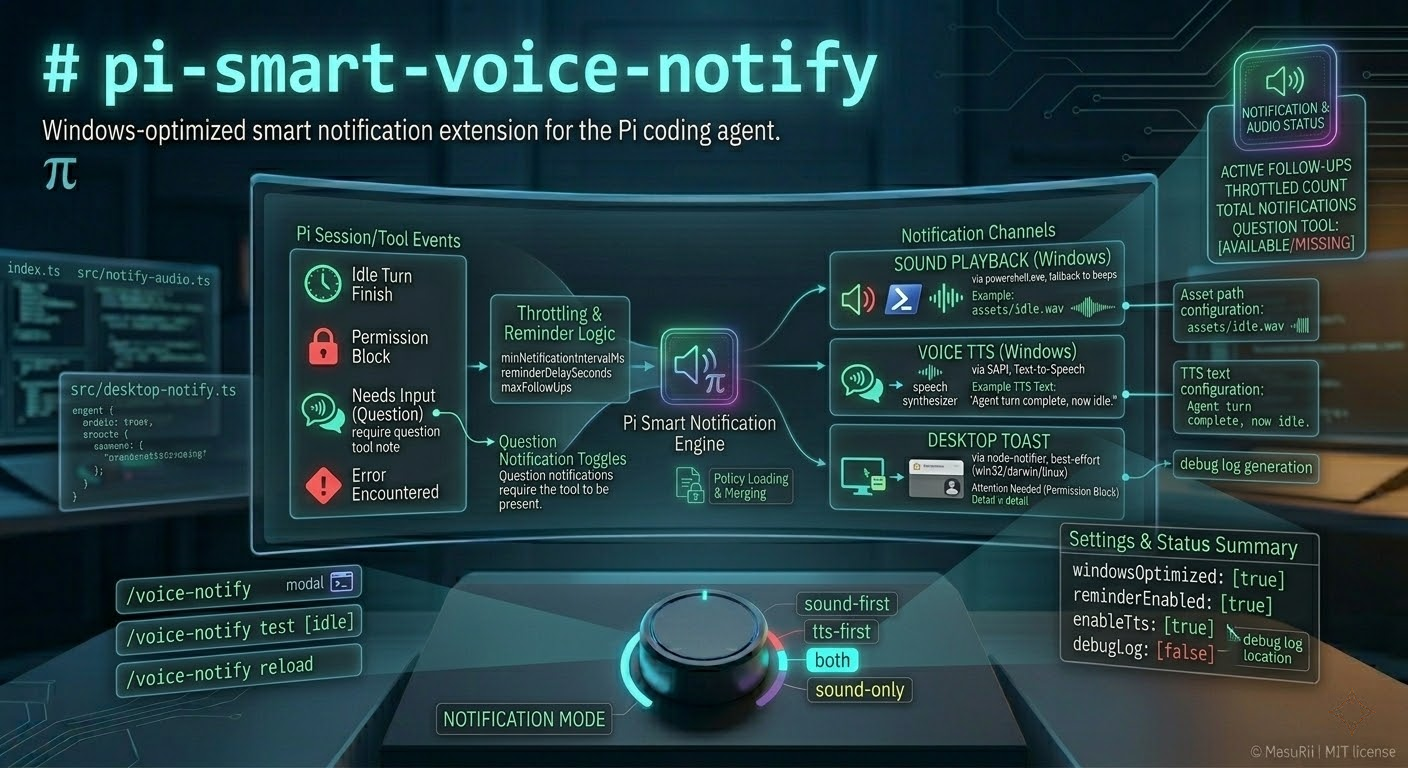
Windows-optimized smart notification extension for the Pi coding agent.
|
|
4
4
|
|
|
5
|
-
|
|
5
|
+
**pi-smart-voice-notify** monitors Pi session and tool events to alert you via **Windows SAPI TTS**, **sound playback**, and **desktop toast notifications** when the agent requires your attention.
|
|
6
6
|
|
|
7
|
-
-
|
|
8
|
-
- hits a permission block
|
|
9
|
-
- needs your input (question)
|
|
10
|
-
- encounters an error
|
|
11
|
-
|
|
12
|
-

|
|
7
|
+
|
|
13
8
|
|
|
14
9
|
## Features
|
|
15
10
|
|
|
16
|
-
- Multi-channel notifications
|
|
17
|
-
- **Sound**
|
|
18
|
-
- **Voice**
|
|
19
|
-
- **Desktop
|
|
20
|
-
- Reminder + follow-up scheduling when attention is still needed
|
|
21
|
-
- Throttling to avoid notification spam (`minNotificationIntervalMs`)
|
|
22
|
-
- Interactive settings UI:
|
|
23
|
-
- `/voice-notify` opens a configuration modal in interactive mode
|
|
24
|
-
- hides question-related settings automatically when no custom `question` tool is available
|
|
25
|
-
- Optional debug logging to `debug/` for diagnosing platform / PowerShell / notifier issues
|
|
11
|
+
- **Multi-channel notifications**
|
|
12
|
+
- **Sound** – Windows audio playback via PowerShell (with beep fallback)
|
|
13
|
+
- **Voice** – Windows SAPI text-to-speech with configurable voice and rate
|
|
14
|
+
- **Desktop toasts** – Cross-platform notifications via `node-notifier` (Windows/macOS/Linux)
|
|
26
15
|
|
|
27
|
-
|
|
16
|
+
- **Intelligent event detection**
|
|
17
|
+
- Task completion (idle)
|
|
18
|
+
- Permission blocks
|
|
19
|
+
- Questions requiring input (when custom `question` tool is loaded)
|
|
20
|
+
- Errors
|
|
21
|
+
|
|
22
|
+
- **Reminder system**
|
|
23
|
+
- Configurable reminder delays with follow-up scheduling
|
|
24
|
+
- Exponential backoff multiplier for follow-ups
|
|
25
|
+
- Auto-cancel reminders on user activity
|
|
28
26
|
|
|
29
|
-
|
|
27
|
+
- **Wake monitor support**
|
|
28
|
+
- Wakes display from sleep before notifications
|
|
29
|
+
- Cross-platform: Windows (SendKeys), macOS (caffeinate), Linux (xset/GNOME)
|
|
30
30
|
|
|
31
|
-
|
|
31
|
+
- **Interactive settings UI**
|
|
32
|
+
- `/voice-notify` command opens a modal for live configuration
|
|
33
|
+
- Settings persist to disk automatically
|
|
34
|
+
|
|
35
|
+
- **Debug logging**
|
|
36
|
+
- Optional JSONL debug output for troubleshooting
|
|
37
|
+
|
|
38
|
+
## Installation
|
|
32
39
|
|
|
33
|
-
|
|
34
|
-
- Project: `.pi/extensions/pi-smart-voice-notify`
|
|
40
|
+
### Local Extension Folder
|
|
35
41
|
|
|
36
|
-
Pi auto-discovers
|
|
42
|
+
Place this folder in either location (Pi auto-discovers both):
|
|
37
43
|
|
|
38
|
-
|
|
44
|
+
- **Global:** `~/.pi/agent/extensions/pi-smart-voice-notify`
|
|
45
|
+
- **Project:** `.pi/extensions/pi-smart-voice-notify`
|
|
46
|
+
|
|
47
|
+
### As an npm Package
|
|
39
48
|
|
|
40
49
|
```bash
|
|
41
50
|
pi install npm:pi-smart-voice-notify
|
|
42
51
|
```
|
|
43
52
|
|
|
44
|
-
|
|
53
|
+
### From Git
|
|
45
54
|
|
|
46
55
|
```bash
|
|
47
56
|
pi install git:github.com/MasuRii/pi-smart-voice-notify
|
|
48
57
|
```
|
|
49
58
|
|
|
50
|
-
##
|
|
59
|
+
## Usage
|
|
51
60
|
|
|
52
|
-
|
|
61
|
+
### Commands
|
|
53
62
|
|
|
54
|
-
|
|
55
|
-
|
|
56
|
-
|
|
63
|
+
| Command | Description |
|
|
64
|
+
|---------|-------------|
|
|
65
|
+
| `/voice-notify` | Opens the settings modal (interactive mode) or prints config summary |
|
|
66
|
+
| `/voice-notify status` | Displays current configuration and question tool availability |
|
|
67
|
+
| `/voice-notify reload` | Reloads config from disk and resets reminder state |
|
|
68
|
+
| `/voice-notify on` | Enables the extension |
|
|
69
|
+
| `/voice-notify off` | Disables the extension |
|
|
70
|
+
| `/voice-notify test [type]` | Triggers a test notification (bypasses throttling) |
|
|
57
71
|
|
|
58
|
-
|
|
72
|
+
**Test types:** `idle`, `permission`, `question`, `error`
|
|
73
|
+
|
|
74
|
+
### Example
|
|
59
75
|
|
|
60
76
|
```text
|
|
61
|
-
|
|
77
|
+
/voice-notify test idle
|
|
78
|
+
/voice-notify test permission
|
|
62
79
|
```
|
|
63
80
|
|
|
64
|
-
|
|
81
|
+
## Configuration
|
|
82
|
+
|
|
83
|
+
Configuration is stored at:
|
|
65
84
|
|
|
66
|
-
|
|
67
|
-
-
|
|
85
|
+
```
|
|
86
|
+
~/.pi/agent/extensions/pi-smart-voice-notify/config.json
|
|
87
|
+
```
|
|
68
88
|
|
|
69
|
-
|
|
89
|
+
A starter template is provided in `config/config.example.json`. On startup, the extension creates `config.json` with defaults if missing.
|
|
70
90
|
|
|
71
|
-
|
|
72
|
-
- `windowsOptimized` (boolean): when `true`, shows a one-time warning on non-Windows platforms that audio behavior is best-effort
|
|
73
|
-
- `notificationMode`:
|
|
74
|
-
- `sound-first` (default)
|
|
75
|
-
- `tts-first`
|
|
76
|
-
- `both`
|
|
77
|
-
- `sound-only`
|
|
78
|
-
- Channel toggles:
|
|
79
|
-
- `enableSound` (Windows)
|
|
80
|
-
- `enableTts` (Windows)
|
|
81
|
-
- `enableDesktopNotification` (toast via `node-notifier`)
|
|
82
|
-
- Per-event toggles:
|
|
83
|
-
- `enableIdleNotification`
|
|
84
|
-
- `enablePermissionNotification`
|
|
85
|
-
- `enableQuestionNotification` (only effective when a custom tool named `question` is loaded)
|
|
86
|
-
- `enableErrorNotification`
|
|
87
|
-
- Reminder / follow-ups:
|
|
88
|
-
- `reminderEnabled`, `reminderDelaySeconds`
|
|
89
|
-
- `followUpEnabled`, `maxFollowUps`, `followUpBackoffMultiplier`
|
|
90
|
-
- Debug:
|
|
91
|
-
- `debugLog` (boolean): writes JSONL debug events to the debug log file
|
|
91
|
+
### Configuration Options
|
|
92
92
|
|
|
93
|
-
|
|
93
|
+
| Option | Type | Default | Description |
|
|
94
|
+
|--------|------|---------|-------------|
|
|
95
|
+
| `enabled` | boolean | `true` | Master on/off switch |
|
|
96
|
+
| `windowsOptimized` | boolean | `true` | Show warning on non-Windows platforms |
|
|
97
|
+
| `notificationMode` | string | `"sound-first"` | Mode: `sound-first`, `tts-first`, `both`, `sound-only` |
|
|
98
|
+
| `enableSound` | boolean | `true` | Enable sound playback (Windows) |
|
|
99
|
+
| `enableTts` | boolean | `true` | Enable text-to-speech (Windows) |
|
|
100
|
+
| `enableDesktopNotification` | boolean | `true` | Enable desktop toast notifications |
|
|
101
|
+
| `desktopNotificationTimeout` | number | `8` | Toast display duration in seconds (1–60) |
|
|
102
|
+
| `wakeMonitor` | boolean | `true` | Wake display from sleep before notifying |
|
|
103
|
+
| `idleThresholdSeconds` | number | `30` | System idle threshold before waking monitor (5–600) |
|
|
94
104
|
|
|
95
|
-
|
|
105
|
+
### Event Toggles
|
|
96
106
|
|
|
97
|
-
|
|
98
|
-
|
|
107
|
+
| Option | Type | Default | Description |
|
|
108
|
+
|--------|------|---------|-------------|
|
|
109
|
+
| `enableIdleNotification` | boolean | `true` | Notify when agent finishes a task |
|
|
110
|
+
| `enablePermissionNotification` | boolean | `true` | Notify on permission blocks |
|
|
111
|
+
| `enableQuestionNotification` | boolean | `true` | Notify when agent asks a question* |
|
|
112
|
+
| `enableErrorNotification` | boolean | `true` | Notify on errors |
|
|
113
|
+
| `suppressIdleAfterError` | boolean | `true` | Skip idle notification if turn had errors |
|
|
99
114
|
|
|
100
|
-
|
|
115
|
+
*Question notifications only work when a custom `question` tool is loaded.
|
|
101
116
|
|
|
102
|
-
|
|
117
|
+
### Reminder Settings
|
|
103
118
|
|
|
104
|
-
|
|
119
|
+
| Option | Type | Default | Description |
|
|
120
|
+
|--------|------|---------|-------------|
|
|
121
|
+
| `reminderEnabled` | boolean | `true` | Enable reminder notifications |
|
|
122
|
+
| `reminderDelaySeconds` | number | `30` | Initial delay before first reminder (5–300) |
|
|
123
|
+
| `followUpEnabled` | boolean | `true` | Enable follow-up reminders |
|
|
124
|
+
| `maxFollowUps` | number | `3` | Maximum follow-up count (1–10) |
|
|
125
|
+
| `followUpBackoffMultiplier` | number | `1.5` | Delay multiplier for each follow-up |
|
|
105
126
|
|
|
106
|
-
|
|
107
|
-
/voice-notify
|
|
108
|
-
```
|
|
127
|
+
### TTS Settings (Windows)
|
|
109
128
|
|
|
110
|
-
|
|
111
|
-
|
|
112
|
-
|
|
129
|
+
| Option | Type | Default | Description |
|
|
130
|
+
|--------|------|---------|-------------|
|
|
131
|
+
| `ttsVoice` | string | `"Microsoft Zira Desktop"` | SAPI voice name |
|
|
132
|
+
| `ttsRate` | number | `-1` | Speech rate (-10 to 10) |
|
|
113
133
|
|
|
114
|
-
|
|
134
|
+
### Sound File Paths
|
|
115
135
|
|
|
116
|
-
|
|
117
|
-
|
|
118
|
-
/
|
|
119
|
-
/
|
|
120
|
-
/
|
|
121
|
-
|
|
122
|
-
```
|
|
136
|
+
| Option | Type | Default |
|
|
137
|
+
|--------|------|---------|
|
|
138
|
+
| `idleSoundFile` | string | `"assets/Soft-high-tech-notification-sound-effect.mp3"` |
|
|
139
|
+
| `permissionSoundFile` | string | `"assets/Machine-alert-beep-sound-effect.mp3"` |
|
|
140
|
+
| `questionSoundFile` | string | `"assets/Machine-alert-beep-sound-effect.mp3"` |
|
|
141
|
+
| `errorSoundFile` | string | `"assets/Machine-alert-beep-sound-effect.mp3"` |
|
|
123
142
|
|
|
124
|
-
|
|
143
|
+
Paths can be absolute or relative to the extension directory.
|
|
125
144
|
|
|
126
|
-
|
|
127
|
-
- `/voice-notify test ...` bypasses throttling so you can validate your setup quickly.
|
|
128
|
-
- If no custom `question` tool is loaded, question notifications are skipped and `/voice-notify test question` warns.
|
|
145
|
+
### Advanced Settings
|
|
129
146
|
|
|
130
|
-
|
|
147
|
+
| Option | Type | Default | Description |
|
|
148
|
+
|--------|------|---------|-------------|
|
|
149
|
+
| `minNotificationIntervalMs` | number | `1500` | Throttle interval between same-type notifications |
|
|
150
|
+
| `debugLog` | boolean | `false` | Enable debug logging to file |
|
|
131
151
|
|
|
132
|
-
|
|
133
|
-
|
|
134
|
-
|
|
135
|
-
|
|
152
|
+
## Notification Modes
|
|
153
|
+
|
|
154
|
+
| Mode | Behavior |
|
|
155
|
+
|------|----------|
|
|
156
|
+
| `sound-first` | Play sound first; fall back to TTS on failure |
|
|
157
|
+
| `tts-first` | Speak TTS first; fall back to sound on failure |
|
|
158
|
+
| `both` | Play sound and speak TTS simultaneously |
|
|
159
|
+
| `sound-only` | Play sound only, no TTS or reminders |
|
|
136
160
|
|
|
137
161
|
## Troubleshooting
|
|
138
162
|
|
|
139
|
-
###
|
|
163
|
+
### Settings modal doesn't appear
|
|
140
164
|
|
|
141
|
-
|
|
142
|
-
- In non-interactive contexts, `/voice-notify` prints a summary instead.
|
|
165
|
+
The modal requires **interactive UI mode** (`ctx.hasUI`). In non-interactive contexts, `/voice-notify` prints a config summary instead.
|
|
143
166
|
|
|
144
|
-
### Desktop notifications
|
|
167
|
+
### Desktop notifications not showing
|
|
145
168
|
|
|
146
|
-
|
|
147
|
-
|
|
148
|
-
|
|
169
|
+
1. Ensure `enableDesktopNotification` is `true`
|
|
170
|
+
2. Check that `node-notifier` is installed
|
|
171
|
+
3. Enable `debugLog` and check `debug/pi-smart-voice-notify.log` for `desktop.notify.failed` events
|
|
149
172
|
|
|
150
|
-
### No sound
|
|
173
|
+
### No sound or voice on Windows
|
|
151
174
|
|
|
152
|
-
|
|
153
|
-
|
|
154
|
-
|
|
175
|
+
1. Sound and TTS are Windows-only (`process.platform === "win32"`)
|
|
176
|
+
2. The extension uses PowerShell for audio playback and SAPI—ensure PowerShell is available
|
|
177
|
+
3. Enable `debugLog` and search for `powershell.exec` entries
|
|
155
178
|
|
|
156
179
|
### Question notifications never trigger
|
|
157
180
|
|
|
158
|
-
|
|
159
|
-
- Run `/voice-notify status` and check `questionToolAvailable=true/false`.
|
|
181
|
+
Question notifications require a custom `question` tool to be loaded. Run `/voice-notify status` to verify `questionToolAvailable=true`.
|
|
160
182
|
|
|
161
|
-
|
|
183
|
+
### Wake monitor not working
|
|
184
|
+
|
|
185
|
+
- **Windows:** Uses SendKeys (F15) via PowerShell
|
|
186
|
+
- **macOS:** Uses `caffeinate -u -t 1`
|
|
187
|
+
- **Linux:** Uses `xset dpms force on` or GNOME D-Bus
|
|
188
|
+
|
|
189
|
+
Ensure system idle time exceeds `idleThresholdSeconds` for wake to trigger.
|
|
190
|
+
|
|
191
|
+
## Technical Details
|
|
192
|
+
|
|
193
|
+
### Architecture
|
|
194
|
+
|
|
195
|
+
```
|
|
196
|
+
index.ts → Extension entrypoint (re-exports src/index.ts)
|
|
197
|
+
src/
|
|
198
|
+
├── index.ts → Main extension logic, event handlers, command registration
|
|
199
|
+
├── config-store.ts → Config paths, normalization, load/save utilities
|
|
200
|
+
├── types.ts → TypeScript interfaces and types
|
|
201
|
+
├── notify-audio.ts → Windows sound + SAPI TTS + monitor wake service
|
|
202
|
+
├── desktop-notify.ts → Desktop toast notifications via node-notifier
|
|
203
|
+
├── logging.ts → Debug logger with JSONL output
|
|
204
|
+
└── zellij-modal.ts → Settings modal UI components
|
|
205
|
+
```
|
|
206
|
+
|
|
207
|
+
### Event Hooks
|
|
208
|
+
|
|
209
|
+
| Event | Behavior |
|
|
210
|
+
|-------|----------|
|
|
211
|
+
| `session_start` | Load config, reset state, update status bar |
|
|
212
|
+
| `session_switch` | Reset state, refresh question tool availability |
|
|
213
|
+
| `session_shutdown` | Cancel reminders, clear status |
|
|
214
|
+
| `input` | Track user activity, cancel pending reminders |
|
|
215
|
+
| `agent_start` | Reset error tracking |
|
|
216
|
+
| `tool_call` | Detect permission blocks |
|
|
217
|
+
| `tool_result` | Classify results (question/permission/error) |
|
|
218
|
+
| `agent_end` | Trigger idle notification (if enabled) |
|
|
219
|
+
|
|
220
|
+
### Debug Logging
|
|
221
|
+
|
|
222
|
+
When `debugLog: true`, JSONL events are written to:
|
|
162
223
|
|
|
163
|
-
```
|
|
164
|
-
|
|
165
|
-
npm run build
|
|
166
|
-
npm run lint
|
|
167
|
-
npm run test
|
|
168
|
-
npm run check
|
|
224
|
+
```
|
|
225
|
+
~/.pi/agent/extensions/pi-smart-voice-notify/debug/pi-smart-voice-notify.log
|
|
169
226
|
```
|
|
170
227
|
|
|
171
|
-
|
|
228
|
+
Events include: config changes, notifications triggered, audio dispatch, reminders, and errors.
|
|
172
229
|
|
|
173
|
-
|
|
230
|
+
## Development
|
|
174
231
|
|
|
175
|
-
|
|
232
|
+
```bash
|
|
233
|
+
npm install
|
|
234
|
+
npm run build # TypeScript compilation
|
|
235
|
+
npm run lint # Run linter
|
|
236
|
+
npm run test # Run tests
|
|
237
|
+
npm run check # lint + test
|
|
238
|
+
```
|
|
176
239
|
|
|
177
|
-
|
|
178
|
-
- `src/index.ts` - extension bootstrap, event hooks, `/voice-notify` command
|
|
179
|
-
- `src/config-store.ts` - config paths, normalization, load/save, debug log path constants
|
|
180
|
-
- `src/notify-audio.ts` - Windows sound + SAPI TTS + monitor wake best-effort helpers
|
|
181
|
-
- `src/desktop-notify.ts` - toast notifications via `node-notifier`
|
|
182
|
-
- `config/config.example.json` - starter config template
|
|
183
|
-
- `assets/` - bundled sound assets referenced by default config
|
|
184
|
-
- `debug/` - created at runtime when debug logging is enabled
|
|
240
|
+
**Requirements:** Node.js ≥ 20
|
|
185
241
|
|
|
186
242
|
## License
|
|
187
243
|
|