pi-open-tui 0.4.1 → 0.4.3
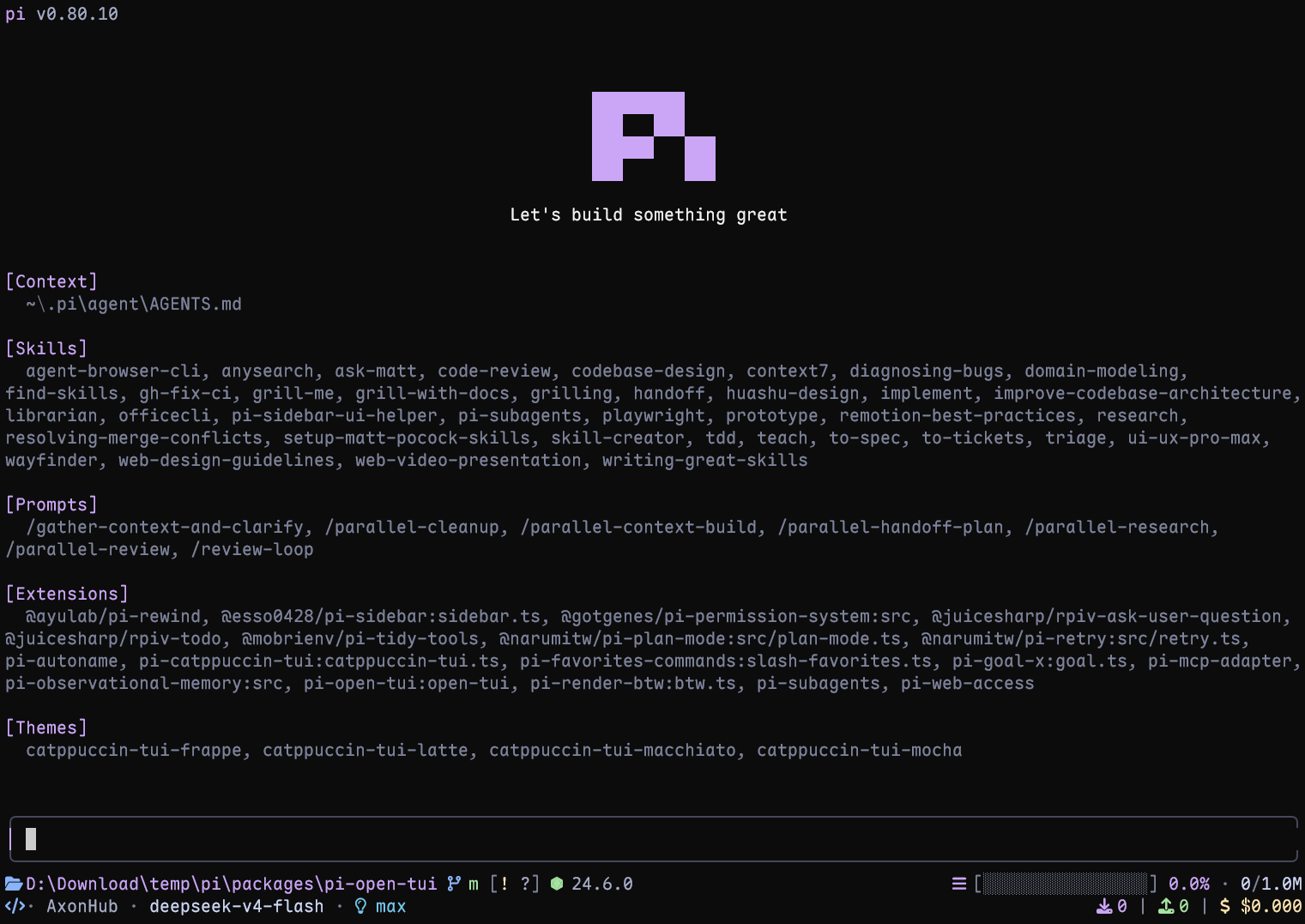
This diff represents the content of publicly available package versions that have been released to one of the supported registries. The information contained in this diff is provided for informational purposes only and reflects changes between package versions as they appear in their respective public registries.
- package/CHANGELOG.md +54 -0
- package/README.md +54 -121
- package/README.zh-CN.md +54 -121
- package/docs/configuration.md +245 -0
- package/docs/footer-segments.md +121 -0
- package/docs/implementation.md +185 -0
- package/extensions/open-tui/config.ts +25 -7
- package/extensions/open-tui/copy-buttons.ts +172 -66
- package/extensions/open-tui/footer-segments.ts +119 -0
- package/extensions/open-tui/footer.ts +121 -13
- package/extensions/open-tui/index.ts +8 -1
- package/extensions/open-tui/settings-command.ts +312 -63
- package/extensions/open-tui/tool-preview.ts +8 -2
- package/extensions/open-tui/tool-view.ts +206 -38
- package/extensions/open-tui/utils.ts +18 -6
- package/package.json +10 -8
package/CHANGELOG.md
ADDED
|
@@ -0,0 +1,54 @@
|
|
|
1
|
+
# Changelog
|
|
2
|
+
|
|
3
|
+
## [0.4.3] - 2026-11-05
|
|
4
|
+
|
|
5
|
+
### New Features
|
|
6
|
+
|
|
7
|
+
- Let extensions contribute text to either main footer row through the public `open-tui:footer:*` events, with placement, width priorities, lifecycle cleanup, and a separate visibility setting.
|
|
8
|
+
- Add opt-in compact rows for extension, MCP, and replacement tools through `toolView.extensionTools`, with generic summaries and native rendering on expansion.
|
|
9
|
+
- Add search-specific compact summaries for recognized `@ff-labs/pi-fff` installations, including page match counts, matching file totals, and pagination and fallback hints.
|
|
10
|
+
- Allow selected tools, such as `edit`, to keep their native rendering in compact mode through `toolView.exclude`.
|
|
11
|
+
|
|
12
|
+
### Breaking Changes
|
|
13
|
+
|
|
14
|
+
- Require Pi 1.5.0 or later.
|
|
15
|
+
|
|
16
|
+
### Changed
|
|
17
|
+
|
|
18
|
+
- Group `/open-tui` settings into sections in English and Simplified Chinese, with non-selectable headings and scrolling that includes heading rows.
|
|
19
|
+
- Keep feature introductions and usage examples in both READMEs, and move complete configuration and implementation details into bilingual reference documents in `docs/`.
|
|
20
|
+
|
|
21
|
+
### Fixed
|
|
22
|
+
|
|
23
|
+
- Show code-block Copy labels as soon as streaming ends, without requiring a terminal resize, and hide them when streaming resumes.
|
|
24
|
+
- Preserve each Copy button's code and click region across Markdown block reuse, repeated identical blocks, and mixed cached and new blocks; restore source tabs using the current block occurrence.
|
|
25
|
+
- Cancel pending Copy clicks when buttons are disabled, and suppress clipboard notifications from cleaned-up installations.
|
|
26
|
+
- Make changed-word highlighting for short edit-preview lines independent of scheduling delays, while keeping matching limits for larger diffs.
|
|
27
|
+
|
|
28
|
+
## [0.4.2] - 2026-11-03
|
|
29
|
+
|
|
30
|
+
### Changed
|
|
31
|
+
|
|
32
|
+
- Cache completed compact tool rows and Copy button labels so scrolling reuses rendered lines instead of rebuilding them.
|
|
33
|
+
|
|
34
|
+
### Fixed
|
|
35
|
+
|
|
36
|
+
- Cancel an in-progress Copy click when rendering moves, removes, or changes its Copy target, so a stale press cannot copy different content.
|
|
37
|
+
|
|
38
|
+
## [0.4.1] - 2026-11-02
|
|
39
|
+
|
|
40
|
+
### New Features
|
|
41
|
+
|
|
42
|
+
- Add clickable Copy buttons to fenced code blocks and user messages in fullscreen mode, configurable through `/open-tui`.
|
|
43
|
+
- Add syntax-highlighted previews for successful edits and writes in compact tool view, limited to 16 rows with a hint to expand longer output.
|
|
44
|
+
|
|
45
|
+
### Changed
|
|
46
|
+
|
|
47
|
+
- Preserve compatible editors installed by other extensions, including runtime replacements, while applying open-tui framing and retaining their input behavior.
|
|
48
|
+
- Refine compact tool status indicators with dimmed completed rows, animated running dots, and clearer error and truncation summaries.
|
|
49
|
+
|
|
50
|
+
### Fixed
|
|
51
|
+
|
|
52
|
+
- Include tool-reported usage, compaction and branch summaries, and cache warming in footer token and cost totals; show the cache-hit percentage for the latest assistant response.
|
|
53
|
+
- Respect `PI_CODING_AGENT_DIR` for settings storage and warn when settings cannot be saved.
|
|
54
|
+
- Improve Scala project detection and Git status handling for renamed-then-deleted files.
|
package/README.md
CHANGED
|
@@ -4,28 +4,28 @@
|
|
|
4
4
|
|
|
5
5
|
**English** | [简体中文](./README.zh-CN.md)
|
|
6
6
|
|
|
7
|
-
A polished terminal interface for the [Pi](https://pi.dev) coding agent.
|
|
7
|
+
A polished terminal interface for the [Pi](https://pi.dev) coding agent.
|
|
8
8
|
|
|
9
9
|
|
|
10
10
|
|
|
11
|
-
Live terminal screenshot with Pi 1.4.0.
|
|
12
|
-
|
|
13
11
|
## Highlights
|
|
14
12
|
|
|
15
13
|
- **Pi header** with model, thinking level, working directory, and useful slash-command hints
|
|
16
|
-
- **Responsive footer** with Git state, detected runtime, context usage,
|
|
17
|
-
- **Framed editor** with block, bar, and underline
|
|
18
|
-
- **Project awareness** for 50+ runtimes and detailed Git
|
|
19
|
-
- **Turn telemetry**
|
|
20
|
-
- **Thinking peek
|
|
21
|
-
- **
|
|
14
|
+
- **Responsive footer** with Git state, detected runtime, context usage, tokens, cost, and extension status
|
|
15
|
+
- **Framed editor** with block, bar, and underline cursors, preserving compatible editors from other extensions
|
|
16
|
+
- **Project awareness** for 50+ runtimes and detailed Git state, including ahead/behind, staged, modified, untracked, stash, and detached HEAD
|
|
17
|
+
- **Turn telemetry** with generation speed, time to first token, duration, stalls, tokens, and cost rate
|
|
18
|
+
- **Thinking peek** with a live preview of hidden reasoning while the model works
|
|
19
|
+
- **Compact tool view** with edit/write previews and optional support for extension and MCP tools
|
|
20
|
+
- **Fullscreen Copy buttons** for code blocks and user messages
|
|
21
|
+
- **Interactive settings** in English and Simplified Chinese through `/open-tui`
|
|
22
22
|
|
|
23
23
|
## Requirements
|
|
24
24
|
|
|
25
|
-
- Pi 1.
|
|
25
|
+
- Pi 1.5.0 or later
|
|
26
26
|
- Node.js 22.19.0 or later (Pi's minimum)
|
|
27
27
|
- A terminal with UTF-8 and color support
|
|
28
|
-
- A [Nerd Font](https://www.nerdfonts.com/font-downloads) for the full icon set (optional;
|
|
28
|
+
- A [Nerd Font](https://www.nerdfonts.com/font-downloads) for the full icon set (optional; Unicode and ASCII modes are available)
|
|
29
29
|
|
|
30
30
|
## Install
|
|
31
31
|
|
|
@@ -43,132 +43,64 @@ pi -e npm:pi-open-tui
|
|
|
43
43
|
|
|
44
44
|
## Font and icons
|
|
45
45
|
|
|
46
|
-
|
|
47
|
-
|
|
48
|
-
The default `auto` mode checks the terminal environment, not the installed font file. It uses Nerd Font icons in interactive UTF-8 TTYs, including terminals running through a runner or subshell. If icons appear as boxes or incorrect symbols, open `/open-tui` and choose one of these modes under **Appearance**:
|
|
49
|
-
|
|
50
|
-
- `nerd`: force Nerd Font icons after configuring a Nerd Font in the terminal
|
|
51
|
-
- `unicode`: portable Unicode icons (folder, branch, laptop, bulb, plug, hourglass, ...) that render without a patched font; emoji glyphs use the terminal's emoji fallback
|
|
52
|
-
- `ascii`: use plain-text icons with no patched font required
|
|
53
|
-
- `auto`: use Nerd Font icons in interactive UTF-8 TTYs; use portable Unicode icons for SSH sessions (the client terminal controls the font and usually has no Nerd Font); use ASCII for non-interactive output, `TERM=dumb`, or an explicitly non-UTF-8 locale
|
|
46
|
+
For the full icon set, install a [Nerd Font](https://www.nerdfonts.com/font-downloads), select it in your terminal profile, and restart the terminal. Installing the font in the OS alone is not enough for apps such as VS Code or Windows Terminal.
|
|
54
47
|
|
|
55
|
-
|
|
48
|
+
In `/open-tui`, **Appearance → Icons** offers `auto`, `nerd`, `unicode`, and `ascii`. The default `auto` mode checks the terminal environment, not the installed font. If icons appear as boxes, choose `unicode`; if your terminal has a Nerd Font, you can force `nerd`, including over SSH.
|
|
56
49
|
|
|
57
|
-
|
|
50
|
+
See [icon detection and spacing](./docs/configuration.md#icons) for automatic selection rules and the Kitty spacing option.
|
|
58
51
|
|
|
59
52
|
## Configuration
|
|
60
53
|
|
|
61
|
-
Run `/open-tui` to open the settings dialog.
|
|
62
|
-
|
|
63
|
-
Example configuration:
|
|
64
|
-
|
|
65
|
-
```json
|
|
66
|
-
{
|
|
67
|
-
"enabled": true,
|
|
68
|
-
"header": true,
|
|
69
|
-
"inlineFooter": false,
|
|
70
|
-
"copyButtons": true,
|
|
71
|
-
"settingsLanguage": "en",
|
|
72
|
-
"cursorStyle": "block",
|
|
73
|
-
"icons": {
|
|
74
|
-
"mode": "auto"
|
|
75
|
-
},
|
|
76
|
-
"footerSegments": {
|
|
77
|
-
"cwd": true,
|
|
78
|
-
"hostname": false,
|
|
79
|
-
"sessionName": false,
|
|
80
|
-
"gitBranch": true,
|
|
81
|
-
"gitStatus": true,
|
|
82
|
-
"gitCommit": false,
|
|
83
|
-
"runtime": true,
|
|
84
|
-
"context": true,
|
|
85
|
-
"tokens": true,
|
|
86
|
-
"cost": true,
|
|
87
|
-
"liveTps": true,
|
|
88
|
-
"extensionStatuses": true,
|
|
89
|
-
"capitalizeProviderName": true,
|
|
90
|
-
"nerdIconSpacing": false
|
|
91
|
-
},
|
|
92
|
-
"telemetry": {
|
|
93
|
-
"enabled": true,
|
|
94
|
-
"tps": true,
|
|
95
|
-
"ttft": true,
|
|
96
|
-
"duration": true,
|
|
97
|
-
"tokens": true,
|
|
98
|
-
"stalls": true,
|
|
99
|
-
"cost": true
|
|
100
|
-
},
|
|
101
|
-
"thinkingPeek": {
|
|
102
|
-
"lines": 1
|
|
103
|
-
},
|
|
104
|
-
"toolView": {
|
|
105
|
-
"mode": "native"
|
|
106
|
-
}
|
|
107
|
-
}
|
|
108
|
-
```
|
|
54
|
+
Run `/open-tui` to open the settings dialog. Its **General**, **Appearance**, **Footer**, and **Telemetry** tabs are available in English and Simplified Chinese and adapt to the terminal size. Use Tab/Shift+Tab or ←/→ to switch tabs, ↑/↓ to move, Enter/Space to change a value, and Esc/q to close.
|
|
109
55
|
|
|
110
|
-
|
|
56
|
+
Settings are stored in `open-tui.json` inside Pi's agent directory (default: `~/.pi/agent`; overridden by `PI_CODING_AGENT_DIR`). If saving fails, a warning explains that the change applies only to the current session.
|
|
111
57
|
|
|
112
|
-
|
|
|
58
|
+
| Setting | Where to find it | Default |
|
|
113
59
|
| --- | --- | --- |
|
|
114
|
-
|
|
|
115
|
-
|
|
|
116
|
-
|
|
|
117
|
-
|
|
|
118
|
-
|
|
|
119
|
-
|
|
|
120
|
-
|
|
|
121
|
-
| `footerSegments.capitalizeProviderName` | Boolean | Capitalizes the first character of the provider name in the footer; set it to `false` to keep the provider's original casing |
|
|
122
|
-
| `footerSegments.nerdIconSpacing` | Boolean | Adds an extra blank cell after Nerd Font icons in the footer; defaults to `false` |
|
|
123
|
-
| `telemetry` | Boolean flags | Enables telemetry and its individual measurements |
|
|
124
|
-
| `thinkingPeek.lines` | `0`, `1`, `2` | Off, one-line, or two-line hidden thinking preview |
|
|
125
|
-
| `toolView.mode` | `native`, `compact` | Pi's native cards (default) or compact call/summary rows with successful edit/write previews. Applies to rows created after the change |
|
|
126
|
-
|
|
127
|
-
`sessionName` appears only when the session has a name. `hostname` shows the short host name (first label of the machine's host name, e.g. `mba` from `mba.example.com`) with a server icon. In detached HEAD state, `gitBranch` shows `HEAD` with the short commit hash; `gitCommit` appends the tag pointing at that commit and only takes effect while `gitBranch` is on. Disabling `extensionStatuses` hides the entire extension status line, including MCP status. Each status keeps the colours its extension applied with `ctx.ui.theme.fg()`. A status without colours renders in the muted theme colour.
|
|
60
|
+
| Header and settings language | General → Interface | Header on, English |
|
|
61
|
+
| Thinking peek | General → Messages & tools | 1 line |
|
|
62
|
+
| Copy buttons | General → Messages & tools | On, fullscreen only |
|
|
63
|
+
| Tool view | General → Messages & tools | Native |
|
|
64
|
+
| Footer in editor border | General → Footer | Off |
|
|
65
|
+
| Icons and cursor style | Appearance | Auto icons, block cursor |
|
|
66
|
+
| Footer fields and telemetry measurements | Footer / Telemetry | Individually configurable |
|
|
128
67
|
|
|
129
|
-
|
|
68
|
+
Selecting **Tool view: Compact** reveals **Compact extension tools** as a child setting. Switching back to Native hides it and retains its value. The [configuration reference](./docs/configuration.md#english) contains the complete JSON defaults, every option, and tool exclusions.
|
|
130
69
|
|
|
131
|
-
|
|
70
|
+
## Header, footer, and editor
|
|
132
71
|
|
|
133
|
-
|
|
72
|
+
The header provides model and project context with command hints. The two main footer rows keep location, Git state, runtime, a working/done timer, context usage, model details, tokens, and cost visible as space allows. Fields can be toggled individually; the layout shortens or hides lower-priority information in narrow terminals.
|
|
134
73
|
|
|
135
|
-
|
|
74
|
+
Footer token and cost totals include assistant responses, tool-reported usage, compaction and branch summaries, and cache warming. The cache-hit percentage describes the latest assistant response. Other extensions can use separate status rows or [contribute text directly to the main footer](./docs/footer-segments.md).
|
|
136
75
|
|
|
137
|
-
|
|
76
|
+
Enable **Footer in editor border** to move the two main rows into the editor's top and bottom borders. Extension status rows remain below the editor. Compatible editors keep their input behavior, completion, and ghost text; editors that cannot be framed retain a separate footer. See [editor compatibility and layout](./docs/implementation.md#editor-and-layout) for the integration boundaries.
|
|
138
77
|
|
|
139
78
|
## Turn telemetry
|
|
140
79
|
|
|
141
|
-
After each complete agent run, pi-open-tui shows one transient result
|
|
80
|
+
After each complete agent run, pi-open-tui shows one transient result, combining its assistant turns:
|
|
142
81
|
|
|
143
82
|
```text
|
|
144
83
|
> TPS 42.5 tok/s | ~ TTFT 1.2s | + 29.7s | ↑ 567 | ↓ 1.2k | ! stall 1x / 4.3s | $ $3.60/M
|
|
145
84
|
```
|
|
146
85
|
|
|
147
|
-
TPS
|
|
86
|
+
TPS measures provider-reported output tokens over generation time, including waiting and stalls but excluding tool execution between turns. The working timer also shows an estimated live speed such as `~54 tok/s` during streaming. The `$ / M` field is the effective rate per million tokens for the run; the footer shows cumulative session cost.
|
|
148
87
|
|
|
149
|
-
|
|
150
|
-
|
|
151
|
-
The `$ / M` value is the model's list-price rate from `usage.cost.total`, not the cumulative session cost shown in the footer. Every telemetry field can be toggled from the **Telemetry** tab.
|
|
88
|
+
Toggle notification fields under **Telemetry → Measurements**, or live speed under **Footer → Runtime → Live TPS**. See [measurement definitions](./docs/implementation.md#usage-and-telemetry) for formulas, timing boundaries, and cache accounting.
|
|
152
89
|
|
|
153
90
|
## Thinking peek
|
|
154
91
|
|
|
155
|
-
|
|
156
|
-
|
|
157
|
-
- while the model is reasoning, the current thinking tail streams by with a spinner (`~ think ⠋ …`);
|
|
158
|
-
- when the answer starts, it settles on a check mark (`~ think ✓`);
|
|
159
|
-
- in 2-line mode, the previous and latest thinking lines share the same text indentation; if the latest line overflows, both rows follow its newest tail as tokens arrive instead of retaining the previous line;
|
|
160
|
-
- after the task settles, the native `Thinking...` label is restored.
|
|
92
|
+
With Pi's **Hide thinking** enabled, pi-open-tui replaces the hidden block's `Thinking...` label with the latest reasoning tail while the model works:
|
|
161
93
|
|
|
162
94
|
```text
|
|
163
95
|
~ think ⠋ previous thought
|
|
164
96
|
latest thought
|
|
165
97
|
```
|
|
166
98
|
|
|
167
|
-
|
|
99
|
+
Choose **Off**, **1 line**, or **2 lines** under **General → Messages & tools → Thinking peek**. The ticker appears only when the model streams reasoning, settles on a check mark when the answer begins, and returns to Pi's native label after the task settles. It follows Pi's Hide thinking toggle immediately and clips text to fit the available width.
|
|
168
100
|
|
|
169
101
|
## Tool view
|
|
170
102
|
|
|
171
|
-
**Native** remains the default.
|
|
103
|
+
**Native** remains the default. Select **General → Messages & tools → Tool view → Compact** to display Pi's built-in tools (`read`, `bash`, `powershell`, `edit`, `write`, `grep`, `find`, `ls`) as call and summary rows:
|
|
172
104
|
|
|
173
105
|
```text
|
|
174
106
|
● Read(extensions/open-tui/footer.ts:1-120)
|
|
@@ -179,18 +111,17 @@ The ticker appears only once the model actually streams reasoning, so non-reason
|
|
|
179
111
|
└ Done · 131 lines · 6.4s
|
|
180
112
|
```
|
|
181
113
|
|
|
182
|
-
- Successful
|
|
183
|
-
-
|
|
184
|
-
-
|
|
185
|
-
-
|
|
186
|
-
-
|
|
187
|
-
|
|
188
|
-
|
|
189
|
-
- The mode is chosen when Pi creates a row, so switching it affects new rows; `/reload` or a new session applies it to the whole transcript.
|
|
114
|
+
- Successful `edit` and `write` calls show syntax-highlighted previews of up to 16 rows, with a hint to expand longer output.
|
|
115
|
+
- Running shell calls show recent output and elapsed time; errors retain their error summary.
|
|
116
|
+
- Click a row to expand its native card, or use `Ctrl+O` to expand all rows. Tools, arguments, results, and model-visible content are unchanged.
|
|
117
|
+
- Enable **Compact extension tools** to include extension and MCP tools. Use `toolView.exclude` in the config file for tools that should keep native rendering. Recognized `@ff-labs/pi-fff` tools receive search-specific summaries.
|
|
118
|
+
- Changing the mode affects newly created rows. Use `/reload` or a new session to apply it to the whole transcript.
|
|
119
|
+
|
|
120
|
+
See [tool rendering details](./docs/implementation.md#tool-rendering) for preview rules, extension summaries, and renderer compatibility.
|
|
190
121
|
|
|
191
122
|
## Copy buttons
|
|
192
123
|
|
|
193
|
-
In fullscreen mode (Pi's `tuiMode: "fullscreen"`),
|
|
124
|
+
In fullscreen mode (Pi's `tuiMode: "fullscreen"`), completed code blocks show a clickable `[Copy]` label in their rounded frame when there is enough width. User messages have a Copy label too. Clicking copies the source text and Pi flashes `Copied!`.
|
|
194
125
|
|
|
195
126
|
```text
|
|
196
127
|
╭─ sh ─────────────── [Copy] ╮
|
|
@@ -198,15 +129,16 @@ In fullscreen mode (Pi's `tuiMode: "fullscreen"`), every fenced code block is dr
|
|
|
198
129
|
╰────────────────────────────╯
|
|
199
130
|
```
|
|
200
131
|
|
|
201
|
-
|
|
202
|
-
|
|
203
|
-
|
|
204
|
-
|
|
205
|
-
|
|
206
|
-
- Drag-selecting across a frame includes its border characters and the `[Copy]` text.
|
|
207
|
-
- If pi-pretty-tui is installed, its own code-block frames and copy buttons are kept and these are not drawn.
|
|
132
|
+
Code labels copy code without fences, preserving indentation and tabs. User-message labels copy the original message. Streaming code blocks gain their label when streaming finishes; regular mode and thinking blocks keep Pi's plain fences. Use Pi's `/copy` to copy a whole assistant reply.
|
|
133
|
+
|
|
134
|
+
Toggle **General → Messages & tools → Copy buttons** to enable or disable this feature. [Copy-button details](./docs/implementation.md#copy-button-behavior) cover width limits, cached blocks, and interaction with other renderers.
|
|
135
|
+
|
|
136
|
+
## Documentation
|
|
208
137
|
|
|
209
|
-
|
|
138
|
+
- [Configuration reference](./docs/configuration.md#english) — complete defaults, options, and icon selection
|
|
139
|
+
- [Implementation and compatibility](./docs/implementation.md#english) — measurement formulas, layout, rendering, and lifecycle
|
|
140
|
+
- [Extension footer segments](./docs/footer-segments.md) — public events and an integration example for extension authors
|
|
141
|
+
- [Changelog](./CHANGELOG.md) — released and upcoming changes
|
|
210
142
|
|
|
211
143
|
## Local development
|
|
212
144
|
|
|
@@ -217,7 +149,7 @@ npm run typecheck
|
|
|
217
149
|
pi -e .
|
|
218
150
|
```
|
|
219
151
|
|
|
220
|
-
CI checks Pi 1.
|
|
152
|
+
CI checks Pi 1.5.0 and the latest release on Node.js 22.19.0 and 24 across Linux, Windows, and macOS. Keep all Pi packages on the same version. Use `pi -e .` to check terminal fonts, mouse interaction, and cursor support interactively.
|
|
221
153
|
|
|
222
154
|
## Acknowledgements
|
|
223
155
|
|
|
@@ -227,6 +159,7 @@ This project builds on several Pi community packages:
|
|
|
227
159
|
- **[pi-claude-code-tui](https://github.com/Phoobobo/pi-claude-code-tui)** — Pi logo artwork and rounded editor border technique
|
|
228
160
|
- **[pi-zentui](https://github.com/lmilojevicc/pi-zentui)** — Starship-style footer segments, runtime detection, session lifecycle, and settings UI pattern
|
|
229
161
|
- **[pi-tps](https://github.com/monotykamary/pi-tps)** — turn timing, stall detection, and conservative TPS measurement
|
|
162
|
+
- **[pi-polish](https://github.com/Pringled/pi-extensions/blob/main/packages/pi-polish)** — compact tool-call rows and syntax-highlighted edit diffs
|
|
230
163
|
|
|
231
164
|
The logo artwork is derived from Pi's official install script (`pi.dev/install.sh`). Runtime detection and Git porcelain parsing borrow structure from `pi-zentui`.
|
|
232
165
|
|